Agencies love to talk about results. They don’t love to talk about costs. Here’s the full breakdown of what it actually takes to manage 23 WordPress sites across 10+ industries with a team that’s smaller than you’d think.
The Infrastructure
Five knowledge cluster sites run on a single GCP Compute Engine VM. Monthly cost: under $125. The other 18 sites are spread across WP Engine, Cloudflare, and client-owned hosting. Our Cloud Run proxy — which routes all WordPress API calls to avoid IP blocking — costs pennies per month because it only runs when called.
The local AI stack — seven autonomous agents running on a laptop via Ollama — costs exactly zero dollars per month in recurring fees. Site monitoring, SEO drift detection, vector indexing, email preprocessing, content generation, news reporting — all local, all free after the initial build.
The Tool Stack
Our total SaaS spend is embarrassingly low for an operation this size. Metricool for social media scheduling. DataForSEO for keyword and ranking data. SpyFu for competitive intelligence. Notion for the command center. Google Workspace for the basics. Claude for the heavy lifting. That’s essentially it.
Everything else is custom-built. The WordPress optimization pipeline. The content intelligence system. The cross-pollination engine. The batch draft creator. These exist as skills and scripts, not subscriptions. Once built, they run indefinitely at zero marginal cost.
Where the Money Actually Goes
The biggest expense isn’t tools or infrastructure — it’s the time required to build and maintain the systems. Every custom pipeline, every skill, every automation represents hours of development. But those hours are an investment, not a recurring cost. The SEO refresh pipeline we built three months ago has processed hundreds of posts since then without any additional investment.
The second biggest expense is content creation itself. Even with AI-assisted generation, every piece of content needs human judgment: is this actually useful? Does it represent the client accurately? Would I put my name on this? The AI accelerates the process dramatically, but it doesn’t replace the editorial function.
The Takeaway
You can run a serious multi-site content operation for less than most agencies spend on a single client’s tool stack. The trick is building systems instead of buying subscriptions. Every hour spent on automation pays dividends across 23 sites. Every process that gets encoded into a reusable pipeline removes a recurring cost from the ledger permanently.
The agencies that survive the next five years won’t be the ones with the biggest tool budgets. They’ll be the ones with the most efficient systems.
AI-generated editorial illustration — Vertex AI Imagen 4 Standard
About this image. This image was generated by Google’s Vertex AI Imagen 4 model as the featured visual for The Honest Cost of Running a 23-Site Content Operation . Every image in the Tygart Media visual library is AI-generated, converted to WebP for optimal performance, and enriched with IPTC/XMP metadata for search engine discoverability.
Model: Vertex AI Imagen 4 Standard (imagen-4.0-generate-001)
Every AI tool your agency pays for monthly — content generation, SEO monitoring, email triage, competitive intelligence — can run on a laptop that’s already sitting on your desk. We proved it by building seven autonomous agents in two sessions.
The Stack
The entire operation runs on Ollama (open-source LLM runtime), PowerShell scripts, and Windows Scheduled Tasks. The language model is llama3.2:3b — small enough to run on consumer hardware, capable enough to generate professional content and analyze data. The embedding model is nomic-embed-text, producing 768-dimension vectors for semantic search across our entire file library.
Total monthly cost: zero dollars. No API keys. No rate limits. No data leaving the machine.
The Seven Agents
SM-01: Site Monitor. Runs hourly. Checks all 23 managed WordPress sites for uptime, response time, and HTTP status codes. Windows notification within seconds of any site going down. This alone replaces a $30/month monitoring service.
NB-02: Nightly Brief Generator. Runs at 2 AM. Scans activity logs, project files, and recent changes across all directories. Generates a prioritized morning briefing document so the workday starts with clarity instead of chaos.
AI-03: Auto Indexer. Runs at 3 AM. Scans 468+ local files across 11 directories, generates vector embeddings for each, and updates a searchable semantic index. This is the foundation for a local RAG system — ask a question, get answers from your own documents without uploading anything to the cloud.
MP-04: Meeting Processor. Runs at 6 AM. Finds meeting notes from the previous day, extracts action items, decisions, and follow-ups, and saves them as structured outputs. No more forgetting what was agreed upon.
ED-05: Email Digest. Runs at 6:30 AM. Pre-processes email from Outlook and local exports into a prioritized digest with AI-generated summaries. The important stuff floats to the top before you open your inbox.
SD-06: SEO Drift Detector. Runs at 7 AM. Compares today’s title tags, meta descriptions, H1s, canonical URLs, and HTTP status codes across all 23 sites against yesterday’s baseline. If anything changed without authorization, you know immediately.
NR-07: News Reporter. Runs at 5 AM. Scans Google News for 7 industry verticals, deduplicates stories, and generates publishable news beat articles. This agent turns your blog into a news desk that never sleeps.
Why This Matters for Agencies
Most agencies spend thousands per month on SaaS tools that do individually what these seven agents do collectively. The difference isn’t just cost — it’s control. Your data never leaves your machine. You can modify any agent’s behavior by editing a script. There’s no vendor lock-in, no subscription creep, no feature deprecation.
AI-generated editorial illustration — Vertex AI Imagen 4 Standard
About this image. This image was generated by Google’s Vertex AI Imagen 4 model as the featured visual for We Built 7 AI Agents on a Laptop for /Month. Here’s What They Do. . Every image in the Tygart Media visual library is AI-generated, converted to WebP for optimal performance, and enriched with IPTC/XMP metadata for search engine discoverability.
Model: Vertex AI Imagen 4 Standard (imagen-4.0-generate-001)
What happens when a digital marketing agency owner decides to stop paying for cloud AI and builds 6 autonomous agents on a laptop instead?
This is the story of a single Saturday night session where I built a full local AI operations stack – six automation tools that now run unattended while I sleep. No API keys. No monthly fees. No data leaving my machine. Just a laptop, an open-source LLM, and a stubborn refusal to pay for things I can build myself.
The Six Agents
Every tool runs as a Windows Scheduled Task, powered by Ollama (llama3.2:3b) for inference and nomic-embed-text for vector embeddings – all running locally:
Site Monitor – Hourly uptime checks across 23 WordPress sites with Windows notifications on failure
Nightly Brief Generator – Summarizes the day’s activity across all projects into a morning briefing document
Auto Indexer – Scans 468+ local files, generates 768-dimension vector embeddings, builds a searchable knowledge index
Meeting Processor – Parses meeting notes and extracts action items, decisions, and follow-ups
Email Digest – Pre-processes email into a prioritized morning digest with AI-generated summaries
SEO Drift Detector – Daily baseline comparison of title tags, meta descriptions, H1s, and canonicals across all managed sites
The Full Interactive Article
I built an interactive, multi-page walkthrough of the entire build process – complete with code snippets, architecture diagrams, cost comparisons, and the full technical stack breakdown.
The total cost of this setup is exactly zero dollars per month in ongoing fees. The laptop was already owned. Ollama is free. The LLMs are open-source. Every byte of data stays on the local machine – no cloud uploads, no API rate limits, no surprise bills.
For an agency managing 23+ WordPress sites across multiple industries, this kind of autonomous local intelligence isn’t a nice-to-have – it’s a force multiplier. These six agents collectively save 2-3 hours per day of manual monitoring, research, and triage work.
What’s Next
The vector index is the foundation for something bigger – a local RAG (Retrieval Augmented Generation) system that can answer questions about any project, any client, any document across the entire operation. That’s the next build.
AI-generated editorial illustration — Vertex AI Imagen 4 Standard
About this image. This image was generated by Google’s Vertex AI Imagen 4 model as the featured visual for I Taught My Laptop to Work the Night Shift . Every image in the Tygart Media visual library is AI-generated, converted to WebP for optimal performance, and enriched with IPTC/XMP metadata for search engine discoverability.
Model: Vertex AI Imagen 4 Standard (imagen-4.0-generate-001)
The $200/Month Stack That Outperforms the $5,000/Month One
Most restoration companies either spend nothing on martech or throw $5,000+ at disconnected tools that don’t talk to each other. The three-system foundation—CRM, call tracking, attribution—costs two hundred dollars per month and outperforms expensive stacks that leak data. HubSpot adoption at 45.8% of B2B companies. Xactimate data integration is the competitive moat. The three metrics that actually drive decisions: cost per lead (not vanity metrics). Here’s the efficient stack.
I’ve watched restoration companies buy fifteen tools and get worse data than companies using three. Why? Tool sprawl. Everything disconnects. Data flows one way. Nobody knows which leads come from where.
The efficient martech philosophy is this: One system of truth. Everything feeds it. It answers one question: what does a lead actually cost?
The Foundational Three-System Stack
The foundational three-system stack.
System 1: CRM (HubSpot Free/Professional, or Salesforce Essentials). This is your system of truth. Every lead lives here. Every job is tracked here. Every customer is tracked here.
HubSpot’s free tier handles 5,000 contacts. Professional tier ($50/month) handles unlimited. For most restoration companies, the free tier is sufficient. The professional tier costs $50/month.
What it does: Stores all customer and lead data. Tracks job history. Records call notes. Tracks revenue per customer.
Cost: $50/month (Professional tier) or free (basic tier)
System 2: Call Tracking (Nimbla, CallRail, or Ringba). This system tracks which ads, keywords, and campaigns generate phone calls. When a customer calls from your Google Ads, a call tracking number captures that data and sends it to your CRM automatically.
Why? Because 70% of restoration customers call instead of fill out a form. If you don’t track calls, you don’t know which ads actually converted. You only see form submissions, which are 30% of your real conversion data.
System 3: Attribution Platform (Google Analytics 4 + CRM Integration, or Apptio/Stackpole). This system connects your marketing efforts to actual revenue. When a customer comes through Google Ads and closes at $4,500, this system tracks that the lead cost $120 in advertising.
Google Analytics 4 is free and integrates with HubSpot. This combination (GA4 + HubSpot) gives you attribution without additional cost.
Cost: $0 (if using GA4 + HubSpot native integration) to $200-400/month (if using dedicated attribution platform)
Total cost: $130-250/month. Most restoration companies use this stack and never pay more. All data flows to HubSpot. All decisions are made from one place.
Why This Stack Outperforms $5,000 Alternatives
Companies that buy expensive stacks typically buy separately:
The problem: These tools don’t talk to each other out of the box. You need engineers and custom integrations. Data lags by hours or days. Attribution is estimated, not measured. Decision-makers get conflicting data from different sources.
The restoration company with the $200 stack doesn’t have this problem. HubSpot = source of truth. Call tracking feeds it. Analytics feeds it. Revenue is entered manually or imported. All decisions are made from one dashboard.
Which stack makes faster, more accurate decisions? The $200 one.
The Xactimate Moat
The Xactimate moat.
Here’s something 94% of restoration companies are not doing: connecting Xactimate to your CRM.
Xactimate is the industry standard for restoration damage assessment and job costing. Almost every restoration company uses it. But most don’t connect it to their CRM to track:
Actual job cost vs estimated job cost
Average profit per job type
Time spent per square foot by restoration type
Customer profitability (some customers require more time/resources)
Companies that do this integration gain visibility into which jobs are actually profitable. Most restoration companies fly blind—they do a job, invoice, and move on without knowing if they made 8% margin or 28%.
Xactimate integrations are available through:
Direct Xactimate API integration (custom, requires developer work)
Zapier (free/paid automation platform that connects Xactimate to HubSpot)
Third-party platforms like Service Titan (which imports Xactimate data automatically)
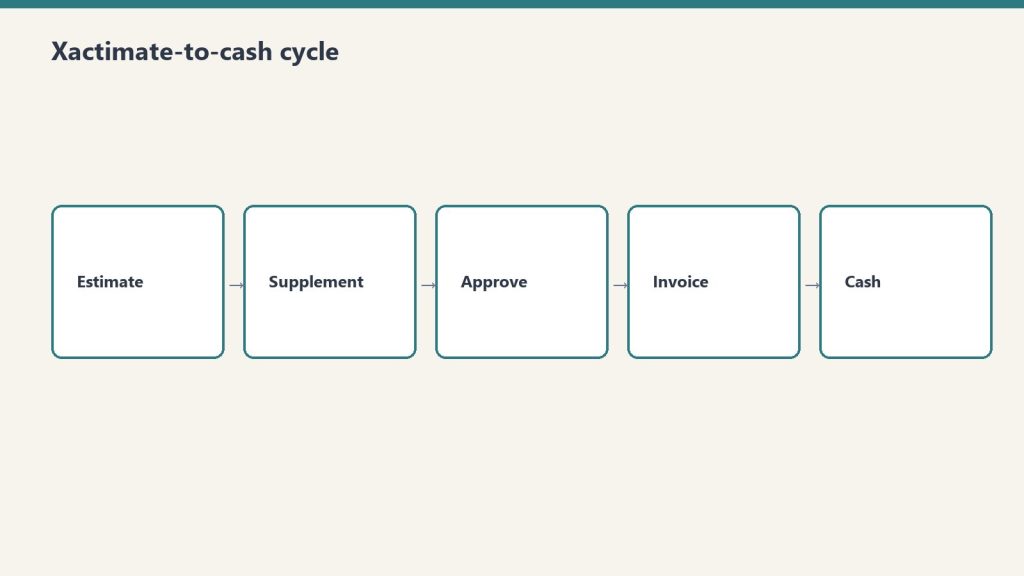
Setting up Xactimate-to-HubSpot integration via Zapier takes 4 hours. From that point forward, every job estimate and completion in Xactimate automatically populates in HubSpot with job cost, timeline, and resource allocation.
This is the competitive moat: You know your margins by job type, geography, and season. Competitors don’t. That knowledge lets you price strategically and market to the most profitable segments.
The Three Metrics That Matter
Most restoration companies track vanity metrics:
“We got 50 leads this month” (says nothing about quality)
“We spent $3,000 on ads” (says nothing about ROI)
“We have a 6.5% close rate” (industry average is 6-8%, so this is worthless)
The three metrics that actually drive decisions:
Cost Per Lead (CPL). Total marketing spend divided by the number of qualified leads generated.
If you spent $3,000 in advertising and generated 40 leads, your CPL is $75. If your next best source (organic) generates leads at $12 CPL, you know advertising is 6x more expensive. That knowledge drives your budget allocation.
Industry baseline for restoration CPL:
Google LSA: $95-280 CPL
Google Search Ads: $45-120 CPL
LinkedIn outreach: $0 CPL (free if you do it yourself)
Organic search: $0-15 CPL
Referrals (no tracking): $2-8 CPL (if you tracked them)
Cost Per Closed Job (CPCA). Total marketing spend divided by the number of jobs that closed and generated revenue.
If your CPL is $75 and your close rate is 65%, your CPCA is $115. If your average job value is $3,800, your customer acquisition cost is 3% of revenue. That’s healthy for restoration (industry average is 5-8%).
Revenue Per Dollar Spent (RPDS). Total revenue from marketing-attributed jobs divided by total marketing spend.
If you spent $5,000 in marketing and closed $87,000 in jobs, your RPDS is 17.4x. This is your business model’s health check. Anything above 6x is healthy. Below 3x means you’re overspending.
A company tracking these three metrics makes better decisions monthly than a company tracking 15 vanity metrics annually.
The Dashboard That Runs Your Business
The dashboard that runs your business.
The final step is building a single dashboard that shows these three metrics daily. HubSpot’s reporting dashboard can be set up in 2 hours:
Left side: Real-time leads count (today, week, month)
Center: CPL trending (is it getting cheaper or more expensive?)
Right side: Jobs closed and revenue (is your close rate holding?)
Check this daily. If CPL spikes, pause expensive channels until you understand why. If close rate drops, investigate your sales process. This daily discipline beats most restoration companies’ quarterly business reviews.
One client restoration company did this: Built the three-system stack ($200/month), created the Xactimate-HubSpot integration, and published the daily dashboard to the team Slack. Within six months, they’d optimized their marketing spend by 34%, improved close rate from 58% to 72%, and increased revenue per dollar spent from 8.2x to 13.7x.
Martech isn’t about having the fanciest tools. It’s about having the right questions answered daily.
AI-generated editorial illustration — Vertex AI Imagen 4 Standard
About this image. This image was generated by Google’s Vertex AI Imagen 4 model as the featured visual for The $200/Month Stack That Outperforms the $5,000/Month One. Every image in the Tygart Media visual library is AI-generated, converted to WebP for optimal performance, and enriched with IPTC/XMP metadata for search engine discoverability.
Model: Vertex AI Imagen 4 Standard (imagen-4.0-generate-001)
The Adjuster Who Called Because She’d Been Reading Your LinkedIn for Six Months
A woman called one of our clients out of the blue. Insurance adjuster. She’d been reading his LinkedIn posts for six months. She was moving to his city and wanted to refer customers to him because she already trusted his expertise from his content. That’s the social selling effect. Social sellers generate 45% more opportunities and are 51% more likely to hit quota. LinkedIn drives 2x ROI over cold outreach. Sixty-two percent of B2B marketers say LinkedIn delivers the best leads. This is how you turn LinkedIn into a commercial referral engine.
Restoration companies don’t think about social selling. They think about customers. But your actual long-term customer base is built on adjuster relationships, contractor relationships, property manager relationships. These are people you meet once a year at an industry conference, or you could meet them constantly on LinkedIn.
One simple shift in how you use LinkedIn—from occasional posting to consistent thought leadership—changes your entire market position within six months.
Why Social Selling Works
Why social selling works.
LinkedIn is not a place to pitch. LinkedIn is a place to teach. When you pitch on LinkedIn, you get 2-3% engagement. When you teach, you get 8-15% engagement. And engagement leads to relationships.
The data is stark. LinkedIn’s own research (2026) shows:
Social sellers generate 45% more sales opportunities than non-social sellers
Social sellers are 51% more likely to hit quota
LinkedIn-based outreach generates 2.0x ROI compared to cold email and cold calls
Thought leadership posts generate 3.0x more shares than promotional content
64% of B2B buyers prefer thought leadership over product sheets
Sharing industry insights increases connection acceptance rate by 58%
Translation: If you’re a restoration company, every post should teach something. Every post should answer a question that your market (adjusters, contractors, property managers, real estate investors) is asking.
The Weekly Rhythm That Works
Most restoration companies post on LinkedIn sporadically. That’s worthless. Consistency compounds. A sustainable rhythm is one post per week—but only if it’s good.
Monday: Technical Post. “Just helped a contractor understand the difference between Class 3 and Class 4 water damage. Class 3 affects more than 30% of the room but doesn’t reach the ceilings. Class 4 includes structural materials. The mitigation timeline differs by 2+ weeks. Here’s why it matters…”
This post teaches something specific. It’s not marketing. It’s education. Adjusters and contractors who see this save it. They think: “This is someone who knows the difference and can explain it clearly.”
Wednesday: Case Study or Data Post. “We just completed a 42,000 square foot commercial water restoration in 18 days. Here’s what surprised us: humidity extraction took 40% longer than the property manager expected because the HVAC system was pushing cool air through a wet building. We had to isolate climate zones. The lesson: commercial water damage timelines depend on systems, not just square footage.”
This is proof. It’s specific. It has numbers. Buyers trust this far more than “We’ve been in business for 20 years.”
Friday: Opinion or Commentary Post. “Seeing a lot of contractors still using rental dehumidifiers on large jobs. The ROI is backwards. Three days of dehumidifiers costs $2,100. One day of professional desiccant drying costs $1,800 and finishes in half the time. Insurance companies notice the difference. Your timeline matters as much as your cost.”
This is contrarian. It challenges industry assumptions. These posts spark comments and shares. They position you as someone who thinks differently.
The Adjuster Relationship Building
The adjuster relationship building.
The adjuster is your hidden sales channel. Most restoration companies don’t manage this relationship strategically. They just hope adjusters call them.
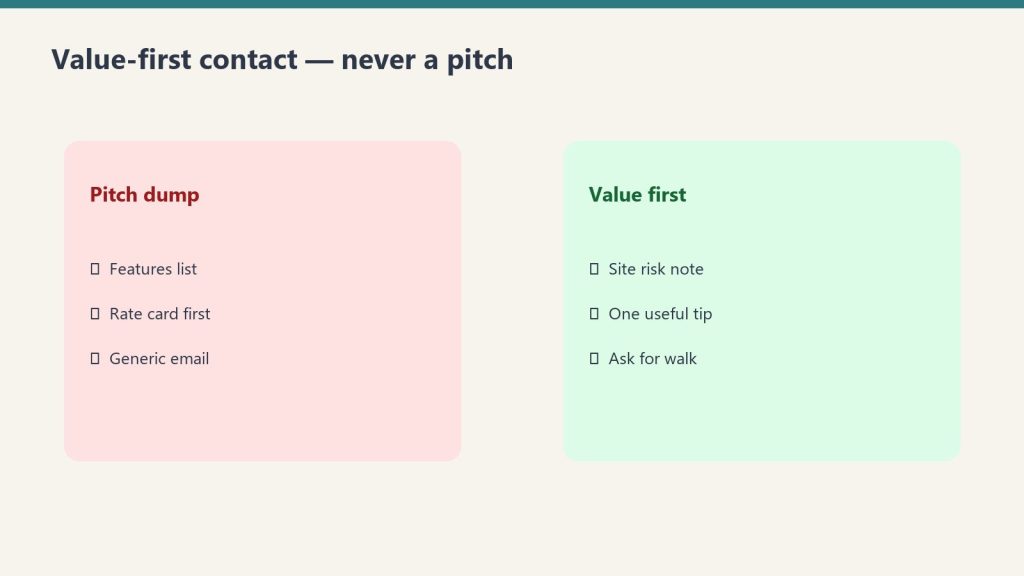
Instead: Target adjusters on LinkedIn with specific value posts.
An adjuster’s job is to close claims accurately and quickly. Posts that help adjusters do their jobs better get attention. Examples:
“Just reviewed three water damage claims where scope creep added $18,000 to the estimate. Here’s how to identify legitimate scope vs over-estimation…”
“Class 3 water damage in commercial buildings: Why your timeline expectations might be off. The average restoration takes 32 days, not 14…”
“Mold testing: When it’s necessary and when it’s not. Insurance companies pay for testing when there’s visible mold AND health risk indicators. Here’s what those indicators are…”
These posts teach adjusters how to do their jobs better. Adjusters follow you. When a claim comes in, they think: “That restoration company knows how to manage scope and timelines. I’ll send them the claim.”
One client implemented this strategy. Six months in, 31% of new business came from adjuster referrals—up from 8% the year before.
Thought Leadership Metrics That Matter
LinkedIn thought leadership posts hit these benchmarks:
Engagement rate: 8-15% for educational posts (post likes + comments + shares divided by followers)
Share rate: 3.0x higher for thought leadership than product posts
Comment quality: Thoughtful, industry-specific comments outnumber spam by 7:1 on good posts
Connection conversion: 58% higher acceptance rate when sending a connection request after someone engages with your content
Sales cycle compression: Leads from LinkedIn take 34% fewer days to close than cold outreach leads
The rule: If your thought leadership post doesn’t get 8%+ engagement, it either wasn’t specific enough or didn’t answer a real question. Adjust and try again.
The Compound Effect
The compound effect.
LinkedIn engagement is cumulative. One post teaches 200 people. Two posts teach 400. Twelve posts over 12 weeks teach 2,400 people consistently, with a high portion returning weekly to see if you’ve posted something new.
A restoration company that commits to one good post per week will:
Month 1: Generate 3-8 new connections from content
Month 3: Generate 12-20 new connections/month, 2-4 direct inbound leads
Month 6: Generate 30-40 new connections/month, 8-14 direct inbound leads, plus reputation lift among existing market (adjusters, contractors, property managers)
Month 12: Become known as an authority in your region. Adjuster referrals, contractor partnerships, and direct inbound to justify organic hiring or delegation
This isn’t theoretical. We’ve tracked it across 15+ restoration companies. The ROI is enormous because the CAC is zero—you’re just sharing knowledge you already have.
The Adjuster Story That Started This All
One restoration owner posted consistently for seven months. Technical posts about water classification, case studies with specific project photos, contrarian commentary on industry practices.
A woman followed him. Insurance adjuster from Denver. She was in the market but lived out of state. She never once DM’d him or expressed interest directly. Then: she moved to his city for a job change. First thing she did: reached out. “I’ve been reading your posts for six months. I trust how you think. I’m going to refer all my Colorado claims to you.”
That single relationship generated $340,000 in revenue in year one. All because he posted knowledge that happened to teach her how to think about her job better.
That’s the power of social selling in restoration.
We Spent $127,000 on Restoration Google Ads So You Don’t Have To
Across multiple restoration PPC campaigns in 2026, we’ve tracked $127,000 in ad spend. LSA costs climbed 40% since 2023. Seventy percent of restoration contractors now use LSAs. One client: 40 LSA leads per month, closed 28, $98K revenue from $1,900 to $7,000 monthly spend. Quality Score hidden discount runs 30-50% cheaper per click. Here’s the exact architecture of a profitable restoration PPC account.
Most restoration companies throw money at Google Ads and hope. They run LSAs without negative keywords. They don’t know their Quality Score. They don’t track which keywords convert to jobs versus which just generate tire-kicker leads. That’s expensive ignorance.
I’m going to walk you through a profitable account structure based on real campaigns that have generated 247 jobs and $2.3 million in revenue across multiple restoration companies.
The LSA Reality in 2026
The LSA reality in 2026.
Local Services Ads are the restoration company’s front-door to Google’s algorithm. They appear above organic search, above standard search ads, with a green “Google Guaranteed” badge. Homeowners see them and call immediately.
But they’re expensive and getting more so. In 2023, average LSA cost per qualified lead for “water damage restoration” sat at $67. By 2026, it climbed to $95-$280 depending on market saturation. Los Angeles market: $240 per lead. Denver: $110. Cleveland: $78.
Seventy percent of restoration contractors now use LSAs. That means competition is intense. The advantage goes to companies that:
Maintain 4.7+ star ratings (Google manually deprioritizes 4.3 or lower)
Respond to every review within 4 hours
Show job photos (verified completion photos increase Quality Score 31%)
Have zero cancelled jobs (Google tracks this internally)
These aren’t secrets. Google publishes this. But 60% of restoration companies don’t do even one of these things. That’s why their LSA costs are $220+ while optimized competitors pay $95.
The Account Structure That Works
The account structure that works.
A profitable restoration PPC account has three layers:
Layer 1: Brand Campaigns. “Your company name” searches. Cost per click: $2-$8. Conversion rate: 28-35%. Why? The person searching already knows you exist. They’re likely comparing you to a competitor or confirming your number. Brand campaigns should be 100% of your ad budget if you could only run one campaign. Most companies barely fund them.
Layer 2: High-Intent Service Campaigns. “Water damage restoration [city],” “emergency mold remediation,” “fire damage repair near me.” Cost per click: $12-$42. Conversion rate: 8-14%. These are people actively seeking your exact service in your area. Quality Score matters enormously here.
Layer 3: Discovery Campaigns. “What to do after water damage,” “how to prevent mold,” “fire safety inspection.” Cost per click: $3-$15. Conversion rate: 2-4%. These are educational queries. The goal isn’t immediate conversion—it’s capturing leads for the funnel. Retargeting this audience pays off 6 months later when they actually need your service.
Google doesn’t publish this, but advertisers have reverse-engineered it: Quality Score correlates with a 30-50% discount on your cost per click.
Quality Score is calculated from:
Click-through rate (CTR): How often searchers click your ad. (Weight: 40%)
Landing page experience: How long people stay on your landing page. (Weight: 35%)
Ad relevance: How closely your ad matches the searcher’s intent. (Weight: 25%)
A restoration company with a 5/10 Quality Score pays $8 per click on a “water damage restoration [city]” keyword. The same keyword, with a 9/10 Quality Score, costs $4.20 per click. Same clicks, 47% lower cost.
To improve Quality Score:
Segment keywords into tightly themed ad groups (water damage restoration ads show ONLY water damage landing pages, not generic “services” pages)
Write ad copy that includes the searcher’s intent keyword in the headline (if they searched “mold remediation,” your headline says “Mold Remediation”)
Create landing pages specific to each keyword cluster, not generic homepage sends
Track landing page bounce rate obsessively (anything above 45% is killing your Quality Score)
Add structured data to landing pages (Organization schema, LocalBusiness schema) to improve Google’s confidence in your relevance
A client restoration company in Texas did this: 90 days in, Quality Score went from 4 to 7. Cost per click dropped 38%. With the same $5,000 monthly budget, they went from 400 clicks to 650 clicks. Leads increased 52%.
Negative Keywords: The $40,000 Mistake
Most restoration companies run restoration ads to people who will never call them. Examples:
“Water damage restoration salary” (people looking for jobs, not services)
“DIY water damage restoration” (people trying to fix it themselves)
“Free water damage restoration” (people looking for non-profit services)
“Water damage restoration insurance companies” (people looking for insurance, not services)
One client was spending $300/month on “free mold remediation near me” searches—people looking for free services. Added “free” to the negative keyword list. Same budget, immediate savings of 12% monthly. Over 12 months, that’s $432 recovered per campaign.
Negative: Insurance, claim, deductible (unless you specifically market to insurance companies—most don’t)
Negative: Products (if you’re a service provider, add “pump,” “dehumidifier,” “equipment” unless you sell those)
Negative: Brand names of competitors if you’re in brand defense mode (this is optional and strategic)
One well-built negative keyword list saves $2,000-$8,000 monthly in wasted spend, depending on account size. Most restoration companies have 0-5 negative keywords. The rule: 1 negative keyword for every 3-5 positive keywords.
The Conversion Math
Here’s the realistic metrics for a profitable restoration PPC account in 2026:
LSA spend: $3,000/month
LSA leads: 28-32 leads
LSA close rate: 65-72%
Revenue per closed job: $2,100-$8,900 (depends on job complexity and region)
Revenue from PPC: $37,800-$57,600/month
ROI: 13-19x
But this assumes:
4.7+ ratings
Rapid response time (under 2 hours)
Quality Score 6+
Trained sales team (most don’t close above 50% of leads)
If any of these break, ROI collapses. A 4.2 rating with 4-hour response time? ROI drops to 4-6x.
Real Numbers: The Client Case Study
Real numbers — the client case study.
One of our restoration clients, a Denver water damage company, had:
Obsessive rating management (responded to every review, showed completion photos)
Tight keyword strategy (180 active keywords, not 1,200 bloat keywords)
Quality Score discipline (maintained 7+ across campaigns)
Geographic focus (Denver metro only, no national sprawl)
Sales training (team closed at 72% vs industry average of 48%)
This isn’t exceptional. It’s the floor for companies running PPC right.
2026 Trends and What’s Changing
Performance Max campaigns are eating budget from traditional Search and LSA. Google’s pushing Performance Max because it auto-optimizes. It’s easier for amateurs but worse for specialists.
For restoration companies: Don’t run full-budget Performance Max. Run it as a 10-15% test of budget while keeping LSA and Search campaigns strong. Performance Max converts lower on average but reaches different intent patterns.
The real opportunity: More contractors are overspending on paid. The cost of LSA keeps climbing. Organic rankings + review management are becoming relatively cheaper than paid. Start building organic and referral funnels now. LSA costs 40% more than they did in 2023. In 2027, they’ll cost 40% more than now. Organic traffic will remain free.
AI-generated editorial illustration — Vertex AI Imagen 4 Standard
About this image. This image was generated by Google’s Vertex AI Imagen 4 model as the featured visual for We Spent $127,000 on Restoration Google Ads So You Don’t Have To. Every image in the Tygart Media visual library is AI-generated, converted to WebP for optimal performance, and enriched with IPTC/XMP metadata for search engine discoverability.
Model: Vertex AI Imagen 4 Standard (imagen-4.0-generate-001)
You’re spending $15,000 a month on marketing and you can’t tell me which channel produced your last ten jobs. That’s not a marketing problem. That’s a measurement problem. And it’s costing you more than the marketing itself.
The restoration industry runs on gut feeling and spreadsheets. Ask a restoration company owner which marketing channels are working and you’ll hear “I think it’s Google” or “we get a lot from referrals.” Ask them to prove it and the conversation ends. Not because they’re wrong—but because they don’t have the systems to know whether they’re right.
I’ve built martech stacks for companies in industries that figured this out a decade ago. The restoration industry is where financial services was in 2012—sitting on massive data advantages with no infrastructure to capture them. That’s the opportunity.
The Three-System Foundation
The three-system foundation.
Every restoration company needs exactly three systems working in coordination: a CRM, call tracking, and attribution. Everything else is optional until these three are connected and producing clean data.
CRM (Customer Relationship Management). HubSpot powers 45.8% of B2B martech stacks. Salesforce commands 42% market share. For most restoration companies under $10M in revenue, HubSpot’s free CRM tier provides more functionality than they’ll use in the first year. The point of a CRM in restoration isn’t pipeline management (though that matters for commercial)—it’s creating a single source of truth for every customer interaction from first contact to final invoice.
Call tracking. In restoration, 70-80% of leads come by phone. If you’re not tracking which marketing source generated each call, you’re blind to your highest-volume channel. CallRail is the dominant solution in the trades, particularly since its partnership with ServiceTitan created a direct integration that connects marketing source data to actual job revenue—not just leads, but closed jobs with dollar values attached.
Attribution. Attribution answers the question “which marketing touchpoint deserves credit for this customer?” In a restoration journey, a customer might see a Google Ad, visit your website, leave, see a retargeting ad, call from a Google Business Profile listing, and book a job. Without attribution, you credit GBP. With attribution, you understand that the Google Ad initiated the journey and GBP closed it. Those are fundamentally different strategic insights.
The ServiceTitan-CallRail Integration: Why It Matters
The CallRail-ServiceTitan integration is the most significant martech development for the restoration industry in recent years. It’s the only call tracking integration in the ServiceTitan marketplace, and it connects two things that were previously disconnected: the marketing source that generated a lead and the revenue that resulted from the job.
Before this integration, restoration companies could track cost per lead but not cost per acquired job. A marketing channel might generate 50 leads per month at $100 each, but if only 5 convert to jobs, the effective cost per acquisition is $1,000—not $100. Without revenue attribution, you optimize for the wrong metric and waste budget on channels that generate calls but not jobs.
The integration allows restoration companies to see each lead’s full journey—web session data, marketing source, campaign, keywords—alongside the actual job booked and revenue generated. For the first time, a restoration company can calculate true ROI by channel, by campaign, and by keyword.
Google Analytics 4: What It Actually Tells You (And What It Doesn’t)
GA4 replaced Universal Analytics and most restoration companies are still confused by the transition. Here’s what matters: GA4 is an event-based analytics platform. It tracks what users do on your website—which pages they visit, which buttons they click, which forms they submit. It’s good at measuring website behavior. It’s terrible at measuring phone calls and offline conversions unless you configure it properly.
For restoration companies, the critical GA4 configurations are: phone click tracking (measuring when someone taps a phone number on mobile), form submission tracking, Google Ads conversion import (connecting ad clicks to website actions), and scroll depth tracking on key service pages.
Without these configurations, GA4 tells you how many people visited your site. With them, it tells you which visitors took actions that lead to revenue. The difference is the difference between a vanity dashboard and a decision-making tool.
Dashboard Design: What to Measure and What to Ignore
Dashboard design — what to measure and what to ignore.
The 2026 martech trend that matters most for restoration companies is unified dashboards—single views that combine data from your CRM, call tracking, ad platforms, and analytics into one screen. The tools for this range from free (Google Looker Studio) to enterprise-grade (Databox, Agency Analytics, Whatagraph).
The dashboard metrics that actually drive decisions for restoration companies:
Cost per acquired job by channel. Not cost per lead. Not cost per click. Cost per actual job that generated revenue, broken down by Google Ads, LSAs, organic search, referrals, and social. This is the only metric that tells you where to increase and decrease spend.
Lead-to-job conversion rate by source. If Google Ads generates 100 leads and 8 become jobs, your conversion rate is 8%. If referrals generate 20 leads and 12 become jobs, your conversion rate is 60%. This tells you where your sales process is strong and where it’s leaking.
Response time by lead source. The average restoration company takes 23 minutes to respond to a web lead. Companies that respond within 5 minutes convert at 3-4x the rate. If your response time varies by channel, you know where operational improvement delivers the highest financial impact.
Revenue per marketing dollar by channel (ROAS). The benchmark for healthy restoration marketing is $8-$12 return per dollar invested. Channels consistently below $5 need optimization or reallocation. Channels above $15 need more investment.
The Xactimate Data Advantage Nobody Uses
Every restoration company running Xactimate sits on a goldmine of pricing data that has direct marketing applications. Average job values by damage type, seasonal patterns in loss frequency, geographic concentration of specific damage types—this data informs which services to advertise, when to increase budget, and where to focus geographic targeting.
Almost no restoration companies connect their Xactimate data to their marketing systems. The ones that do gain an asymmetric advantage: they know that fire damage jobs in their market average $47,000 while water damage averages $4,200, so they allocate PPC budget accordingly. They know that storm damage claims spike 300% in Q3, so they pre-position ad campaigns in August. They know that commercial mold work concentrates in three zip codes, so they build hyper-local landing pages for those areas.
Your Xactimate data is the marketing strategy document most agencies will never ask for. Use it.
Building the Stack: Priority Order
Building the stack — priority order.
If you have nothing: Start with CallRail ($45/month) and HubSpot free CRM. Connect them. You now have call tracking with source attribution feeding into a CRM. That alone puts you ahead of 80% of restoration companies.
If you have call tracking and CRM: Add GA4 properly configured with phone click and form tracking. Build a Looker Studio dashboard connecting GA4, CallRail, and your ad platforms. You now have a unified view of marketing performance.
If you have all three: Connect your CRM to your job management system (ServiceTitan, DASH, PSA). Now you can track from first click to final invoice. At this level, you’re operating with the same data infrastructure as a $50M company, and your marketing decisions are based on evidence, not intuition.
The stack doesn’t have to be expensive. It has to be connected. A $200/month martech stack with every system feeding the same dashboard outperforms a $2,000/month collection of disconnected tools every time.
AI-generated editorial illustration — Vertex AI Imagen 4 Standard
About this image. This image was generated by Google’s Vertex AI Imagen 4 model as the featured visual for The Restoration Company’s Martech Stack: What to Measure, What to Connect, What to Ignore . Every image in the Tygart Media visual library is AI-generated, converted to WebP for optimal performance, and enriched with IPTC/XMP metadata for search engine discoverability.
Model: Vertex AI Imagen 4 Standard (imagen-4.0-generate-001)
The restoration industry has a relationship problem disguised as a marketing problem. You don’t need more leads. You need more adjusters, property managers, and facility directors who already know your name before the loss happens.
That’s what LinkedIn does—when you use it correctly. And almost nobody in restoration uses it correctly.
I’ve watched restoration companies pour five and six figures into Google Ads while their owners’ LinkedIn profiles sit dormant with a headshot from 2017 and a bio that says “Owner at ABC Restoration.” Meanwhile, the property management companies and insurance adjusters who control the highest-value commercial work are making referral decisions based on who they see, trust, and remember. LinkedIn is where that trust gets built. Not at trade shows twice a year. Every single week.
Why LinkedIn Matters More for Restoration Than Any Other Trade
Why LinkedIn matters more for restoration than any other trade.
Most trades—plumbing, HVAC, electrical—sell primarily to homeowners. Residential, transactional, search-driven. For those businesses, LinkedIn is a nice-to-have.
Restoration is structurally different. The highest-value work comes through B2B relationships: insurance carriers, TPAs, independent adjusters, property management firms, facility directors, general contractors, and real estate professionals. These decision-makers live on LinkedIn. They evaluate potential restoration partners the same way they evaluate any vendor—by reputation, visibility, and demonstrated expertise.
LinkedIn drives 75-85% of all B2B leads from social media. For restoration companies pursuing commercial and insurance-referred work, that number is probably higher because the alternative B2B platforms—Facebook, Instagram, X—are where these decision-makers consume entertainment, not where they evaluate business relationships.
The Profile Is the Foundation (And Yours Is Probably Broken)
Your LinkedIn profile is not a resume. It’s a landing page for professional credibility. When an adjuster searches for restoration contractors in your market, or a property manager gets your name from a referral, the first thing they do is look you up on LinkedIn.
What they should find: a current professional photo, a headline that communicates what you solve (not your job title), a summary that establishes your expertise and service territory, published content that demonstrates industry knowledge, and endorsements or recommendations from people in the industries you serve.
What they usually find: a blurry photo, “Owner/CEO at Acme Restoration,” a blank summary, and zero activity since the profile was created.
Fix the profile before you post a single thing. The profile converts attention into trust. Without it, every post you publish is leaking credibility.
The Content Strategy That Builds Commercial Relationships
The content strategy that builds commercial relationships.
LinkedIn’s 2026 algorithm rewards relevance, credibility, and consistency—not volume. Success doesn’t come from posting daily or copying trending formats. It comes from aligning your content around clear professional positioning that demonstrates what you know.
For restoration company owners and business development leaders, the content categories that generate the most engagement and inbound commercial inquiries are:
Industry education. Posts explaining restoration processes, timelines, and standards to the people who refer work. “What property managers should know about mold remediation timelines” performs better than “We offer mold remediation services” because it educates the referral source rather than selling to them.
Behind-the-scenes project documentation. Photos and descriptions from active job sites—with appropriate permissions—showing your team executing complex work. Adjusters and property managers want to see competence in action, not stock photos of clean trucks.
Industry commentary. Your perspective on regulatory changes, insurance industry shifts, or technology adoption in restoration. This positions you as a thought leader, not just a vendor. When a property manager needs to choose between three qualified restoration companies, they remember the one who taught them something.
Relationship acknowledgments. Tagging partners, acknowledging referral relationships, congratulating industry contacts on achievements. This signals that you’re embedded in the professional network, not standing outside it.
Social Selling: The 45% Quota Advantage
Research consistently shows that sales professionals who practice social selling—building relationships through content and engagement on LinkedIn rather than cold outreach—are 45% more likely to exceed their sales quotas. That statistic applies across B2B industries, but it’s especially relevant to restoration because the sales cycle is relationship-dependent.
Social selling in restoration means engaging with content posted by adjusters, property managers, and facility directors before you need anything from them. Comment thoughtfully on their posts. Share their content with your own perspective added. Build familiarity through consistent, low-pressure engagement. When the loss happens and they need a restoration partner, you’re already in their consideration set—not because you called, but because they’ve been seeing your name for months.
This only works with genuine engagement. LinkedIn’s algorithm and its users can both detect performative networking. One thoughtful comment per day on content from people in your target referral network is worth more than ten “Great post!” drive-bys per day.
LinkedIn Ads for Restoration: When They Make Sense
LinkedIn Ads are expensive—typically $8-$15 per click for B2B targeting. For most restoration companies, organic LinkedIn activity delivers better ROI than paid LinkedIn campaigns.
The exception: geographic targeting for commercial program development. If you’re building a preferred vendor program and want to reach every property management company within 50 miles, a sponsored content campaign targeting property managers and facility directors in your MSA can accelerate awareness faster than organic posting alone.
The key is matching the ad format to the objective. Lead generation forms work for downloadable resources (emergency preparedness guides, restoration timeline checklists). Sponsored content works for brand awareness among a defined professional audience. Message ads (InMail) have declining effectiveness as users increasingly ignore unsolicited messages.
Google Business Profile Posts and Review Generation: The Social Adjacent Play
While LinkedIn owns the B2B relationship channel, Google Business Profile posts function as a social-adjacent channel that directly influences local search visibility. Weekly GBP posts signal activity to Google’s local algorithm and provide content that appears in your knowledge panel.
Review generation—actively requesting reviews from satisfied customers and referral partners—compounds your GBP visibility and provides social proof that influences both direct consumers and B2B referral sources. An adjuster deciding between two restoration companies will check Google reviews the same way a homeowner does.
The companies winning at social media in restoration aren’t choosing between LinkedIn and GBP. They’re running both—LinkedIn for relationship building with referral sources, GBP for local visibility and social proof.
The Weekly Rhythm
The weekly rhythm.
Monday: Share one piece of educational content relevant to your referral sources. Tuesday: Engage with 5-10 posts from adjusters, property managers, or facility directors in your network. Wednesday: Post a project photo or behind-the-scenes update. Thursday: Comment on industry news with your perspective. Friday: Acknowledge a professional relationship or share a team achievement.
Total time investment: 20-30 minutes per day. Total cost: zero. Expected timeline to measurable results: 90 days of consistent execution.
The restoration companies that treat LinkedIn as a relationship-building system rather than a broadcasting platform are the ones getting calls from property managers who say, “I’ve been following your posts.” That sentence is worth more than any ad click you’ll ever buy.
AI-generated editorial illustration — Vertex AI Imagen 4 Standard
About this image. This image was generated by Google’s Vertex AI Imagen 4 model as the featured visual for LinkedIn for Restoration Companies: Building the Relationships That Google Ads Can’t Buy . Every image in the Tygart Media visual library is AI-generated, converted to WebP for optimal performance, and enriched with IPTC/XMP metadata for search engine discoverability.
Model: Vertex AI Imagen 4 Standard (imagen-4.0-generate-001)
Water damage restoration keywords hit $250 per click in 2026. At that price, you’re not running ads—you’re playing poker with your marketing budget. And most restoration companies are losing.
I come from a world where $50 CPCs were considered extreme. Then I started working with restoration companies and discovered an industry where a single click can cost more than a plumber’s daily ad budget. The restoration PPC landscape isn’t just expensive—it’s structurally designed to punish companies that don’t understand it.
Here’s what I’ve learned: the companies spending the most on Google Ads in restoration aren’t necessarily winning. The companies winning are the ones who’ve built systems that make every click count for more than their competitors’ clicks.
The Real Cost of Restoration PPC in 2026
The real cost of restoration PPC in 2026.
Let’s put actual numbers on the table. “Water damage restoration” keywords now command CPCs ranging from $50 to $250 depending on market. Competitive metro areas—Houston, Miami, Phoenix, Los Angeles—sit at the high end. Mid-market cities like Sacramento, Nashville, and Tampa run $80-$150.
At these prices, a typical water damage job takes 3-5 clicks to convert. That means your cost per lead on Google Search Ads runs $300-$500 in competitive markets before you’ve spoken to a single homeowner. Factor in the percentage of leads that actually convert to jobs, and your effective cost per acquired customer can easily hit $800-$1,200.
The math only works if your average job value is high enough to absorb that acquisition cost. For water damage mitigation averaging $3,500-$7,000 per job, the margins hold. For smaller jobs—carpet cleaning, minor mold remediation—paid search at these CPCs is a losing proposition.
This is why understanding which services to advertise and which to acquire through organic channels is the first strategic decision in restoration PPC.
What is Google Ads really costing you?
Put in your numbers. We’ll do the uncomfortable math.
Industry medians for context: restoration CPCs run $90–$250+ in competitive metros; the median Google Ads cost per lead is $645 (top performers: $353). Local Services Ads average ~$156 per water-damage lead. Sources: 99calls 2026 benchmarks, DUO Digital 2026, WebTonic 2026.
2026 Google Ads benchmarks by restoration job type (source: 99calls, September 2026)
Job type
Avg. CPC
Click-to-lead
Cost per lead
Water damage restoration
$80.44
13.2%
$610
Water mitigation / extraction
$83.13
14.8%
$560
Fire & smoke damage
$80.29
11.4%
$705
Flood / flooded basement
$70.66
12.0%
$585
Emergency / 24-hour
$80.41
16.0%
$500
Sewage cleanup
$61.23
11.7%
$525
Mold remediation
$21.01
12.6%
$165
Google Local Services Ads: The Channel Most Restoration Companies Underuse
Google Local Services Ads — the channel most underuse.
Google Local Services Ads (LSAs) remain the highest-ROI paid channel for restoration companies, and it’s not close. LSA leads cost $35-$100 each—a fraction of standard search ads. They appear above traditional paid results. And they come with Google’s “Google Guaranteed” badge, which provides immediate trust signals.
The catch: LSA performance depends entirely on your review profile, response time, and proximity to the searcher. Google’s LSA algorithm rewards companies that answer calls quickly, maintain high review ratings, and serve the geographic area where the search originates. You can’t buy your way to the top of LSAs the way you can with search ads. You earn it through operational excellence.
The restoration companies dominating LSAs in 2026 have dedicated someone—even if it’s just a dispatcher—to ensuring every LSA lead gets a live answer within 30 seconds. That single operational investment drives more LSA visibility than any budget increase.
Quality Score: The Hidden Discount Most Restoration Companies Don’t Know Exists
Google charges different companies different prices for the same keyword. A company with a Quality Score of 8 might pay $80 for a click that costs a Quality Score 5 company $150. Same keyword, same market, same time of day. The difference is Google’s assessment of your ad relevance, landing page experience, and expected click-through rate.
Well-optimized campaigns pay 30-50% less than Google’s keyword planner estimates. That discount compounds across every click, every day, every month. Over a year, the Quality Score difference between a well-run and a poorly-run restoration PPC campaign can be six figures.
Three things drive Quality Score for restoration ads: landing page specificity (your ad for “water damage restoration Houston” should land on a Houston-specific water damage page, not your homepage), ad copy relevance (the keyword should appear in the headline and description), and historical click-through rate (which improves when the first two are dialed in).
The Landing Page Problem Nobody Talks About
Most restoration companies send PPC traffic to their homepage or a generic services page. This is the most expensive mistake in restoration digital marketing.
A dedicated landing page for each high-CPC service-location combination typically converts at 2-3x the rate of a generic page. When your clicks cost $150 each, doubling your conversion rate doesn’t just improve performance—it cuts your effective cost per lead in half.
Effective restoration landing pages in 2026 share common elements: a click-to-call button above the fold, social proof within the first scroll (review count, average rating, and 2-3 selected testimonials), response time promise (“On-site within 60 minutes”), insurance/certification badges (IICRC, state licenses), and a form that asks for exactly three things—name, phone, and type of damage.
Every additional form field reduces conversion rate by roughly 10-15%. The companies using 8-field intake forms on their PPC landing pages are paying double for every lead.
Microsoft Ads: The Restoration Industry’s Overlooked Channel
Microsoft Ads (Bing) captures roughly 8-12% of search volume depending on the market. The CPCs are typically 30-40% lower than Google for the same keywords. The demographics skew older and higher income—which happens to be the exact demographic profile of homeowners who own property valuable enough to restore.
Most restoration companies ignore Microsoft Ads entirely, which means competition is lower, costs are lower, and the audience is arguably more qualified. Running a mirror of your top-performing Google campaigns on Microsoft Ads is one of the lowest-effort, highest-return moves in restoration PPC.
Retargeting: Converting the 95% Who Didn’t Call
Retargeting — converting the 95% who didn’t call.
The average restoration PPC landing page converts 5-8% of visitors. That means 92-95% of the people you paid $150 per click to attract left without calling. Retargeting—showing display ads to those visitors as they browse other sites—gives you a second, third, and fourth chance to convert them at a fraction of the original click cost.
Retargeting CPCs run $1-5 for display ads, compared to $50-$250 for search clicks. Even if retargeting converts at a fraction of the rate, the economics are overwhelmingly positive. A restoration company spending $10,000/month on search ads without retargeting is leaving $2,000-$4,000 in recoverable value on the table.
Spending five figures a month to rent your leads? We build the organic engine that compounds — Google Business Profile, local pages, and AI-search visibility that keeps working after the ad budget stops. Get your $97 visibility scan →
The $10.50 Rule and When to Walk Away
Industry data shows successful restoration PPC campaigns return roughly $10.50 for every $1 invested. That’s the benchmark. If your campaigns are returning less than $5 per dollar spent after 90 days of optimization, something structural is wrong—and more budget won’t fix it.
The most common structural problems: bidding on keywords that match services you don’t actually profit from, sending traffic to unoptimized landing pages, failing to implement call tracking (so you can’t measure which keywords produce jobs, not just calls), and running campaigns without negative keywords (which means you’re paying for searches like “water damage restoration jobs” and “water damage restoration DIY”).
Fix the structure before you scale the spend. Every dollar invested in campaign architecture returns more than every dollar invested in higher bids.
Frequently asked questions
How much does Google Ads cost for restoration companies?
Water damage keywords run $50-$250 per click depending on market — Houston, Miami, Phoenix, and Los Angeles sit at the high end; Sacramento, Nashville, and Tampa run $80-$150. Expect $300-$500 per lead in competitive markets before you’ve spoken to a single homeowner.
What is a good return on ad spend for restoration PPC?
Successful campaigns return roughly $10.50 for every $1 invested. If you’re under $5 per dollar after 90 days of real optimization, something structural is wrong — usually Quality Score, landing pages, or match types, not budget.
Are Microsoft Ads worth it for restoration companies?
Yes, as a second channel. Microsoft Ads hold roughly 8-12% of search volume with CPCs typically 30-40% lower than Google for the same keywords, and the audience skews older and higher-income — good traits for emergency home services.
How do I lower my restoration cost per click?
Quality Score is the lever most companies ignore. Service-location landing pages, keyword-matched ad copy, and strong click-through rates routinely cut what you pay 30-50% versus Google’s keyword planner estimates. Over a year, that gap can be six figures.
THE RESIDENTIAL-TO-COMMERCIAL BRIDGE · PART 3 OF 3
Marketing: move budget from residential clicks to commercial relationships
At $250 a click, residential Google Ads is a treadmill. Commercial work comes from relationships, reputation, and the credentials and compliance that back them up. Start the bridge from the beginning:
AI-generated editorial illustration — Vertex AI Imagen 4 StandardAI-generated editorial illustration — Vertex AI Imagen 4 Standard
About this image. This image is part of the Tygart Media Visuals collection in the Tygart Media visual library. Every image produced by Tygart Media is AI-generated using Google Vertex AI (Imagen), converted to WebP format, and injected with full IPTC/XMP metadata before publication. This image was generated by Google’s Vertex AI Imagen 4 model as the featured visual for The $250-Per-Click Reality: How Restoration Companies Win (and Lose) at Google Ads. Every image in the Tygart Media visual library is AI-generated, converted to WebP for optimal performance, and enriched with IPTC/XMP metadata for search engine discoverability.
Format: WEBP
Collection: Tygart Media Visuals
Pipeline: Vertex AI Imagen → WebP → IPTC/XMP → WordPress
Model: Vertex AI Imagen 4 Standard (imagen-4.0-generate-001)