
From the Workbench · November 28, 2026 · By Will Tygart
When developers first customize an agent workspace, they almost always make the same mistake: they paste every deployment checklist, database rule, and CLI workaround straight into a single always-on instruction file. By Friday, the prompt carries thirty kilobytes of competing instructions before the first message is even typed.
As our own server logs showed in Readers Without a Web Browser, coding terminals pulled 3,405 pages in a single month because builders stay inside the terminal looking for concrete wiring specs. In Google Antigravity, keeping the loop fast comes down to separating always-on guardrails from progressive-disclosure skills and typed MCP servers.
Antigravity Loading Precedence and Progressive Disclosure
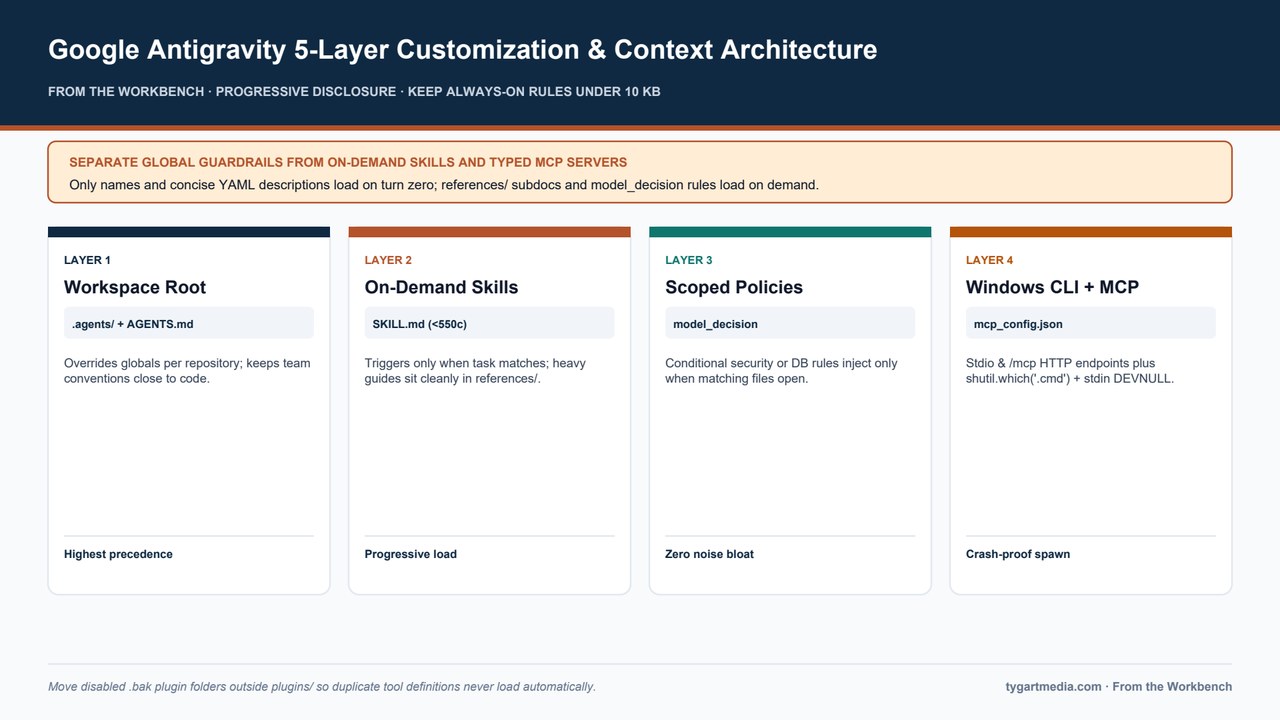
Rather than loading every runbook on turn zero, Antigravity resolves customizations across five precedence layers and injects only skill names and short YAML descriptions until a task triggers a full SKILL.md read. Here is how each layer behaves in production:
| Priority & Layer | Filesystem Location | Context Behavior | Best Operational Role |
|---|---|---|---|
| 1. Workspace Project (Highest) | .agents/rules/, .agents/skills/, AGENTS.md | Loaded from CWD up to repo root; overrides globals | Project build commands, schemas, and domain-specific playbooks |
| 2. Declared Project Configs | skills.json / plugins.json in workspace | Mounted explicitly via project manifest paths | Shared team skill bundles outside default directories |
| 3. Global User Config | ~/.gemini/config/ (rules, skills, mcp_config.json) | Applies across all workspaces on the workstation | Personal core invariants under 10 KB plus local MCP tools |
| 4. Built-in Customizations | Bundled agent tool & workflow skills | Mounted by agent configuration name | Default IDE/CLI capabilities such as web workflows |
| 5. Antigravity CLI Settings | ~/.gemini/antigravity-cli/settings.json | TUI/headless CLI runtime flags and defaults | Terminal-specific agy execution defaults and session rules |
Two limits matter immediately on multi-skill workstations. First, keep each custom SKILL.md frontmatter description crisp and under 550 characters so skill indexing does not clip longer triggers under budget constraints. Second, push heavyweight SQL examples or deployment walkthroughs into relative references/ files inside the skill folder instead of the top-level SKILL.md.
Copy-Paste Template: Minimal Skill and Conditional Rule
A clean skill folder pairs a focused YAML header with relative helper links, while conditional Antigravity rules use trigger: model_decision so database or deployment policies load only when the active turn matches that scope:
---
name: release-verify
description: >-
  Verify build artifacts, run smoke checks, and confirm HTTP 200 status before closing
  a deployment. Use whenever shipping code or verifying live endpoints.
---
# Release Verification Runbook
1. Run the verification suite before reporting completion.
2. Load [references/checklist.md](references/checklist.md) only if staging drifts.

---
# Conditional Rule (.agents/rules/db-guard.md)
---
trigger: model_decision
description: "Apply before running database migrations or production table queries."
---
- Always verify row counts and read-only snapshots before executing schema changes.
MCP Servers and Windows Subprocess Pitfalls
For Model Context Protocol integrations, Antigravity supports local Stdio executables and remote Streamable HTTP endpoints (pointed at /mcp, not legacy 2024 /sse URLs). On Windows developer boxes, three subtle traps break scripted tool runners until you handle them explicitly:
| Failure Mode on Live Workstations | Why It Happens | Deterministic Fix | Verification Receipt |
|---|---|---|---|
| Backup folder .bak inside plugins/ still loads | Plugin loader scans every subdirectory inside ~/.gemini/config/plugins/ | Move disabled plugins or rule snapshots completely outside active config folders | Confirm clean plugin roster at startup with zero duplicate tool collisions |
| FileNotFoundError calling .cmd CLIs from Python | Python subprocess.run(…, shell=False) ignores Windows .cmd shims unless resolved | Resolve via shutil.which('tool.cmd') or shutil.which('tool') before launch | Print resolved binary path cleanly before spawning external CLIs |
| CreateProcessW fails past ~32 KB inline scripts | Windows caps CommandLine at 32,767 characters under Win32 API | Write staged .py scripts to disk and execute by file path rather than inline flags | Assert zero inline multi-kilobyte command-line payloads |
| Interactive SSH/CLI hangs waiting on stdin | Child CLI tools inherit parent pipe and block on confirmation prompts | Pass stdin=subprocess.DEVNULL on every non-interactive CLI call | Return deterministic exit code and UTF-8 stdout/stderr logs |
# 1. Clean mcp_config.json (Stdio + Streamable HTTP)
{
  "mcpServers": {
    "local-sqlite": {
      "command": "sqlite-mcp-server",
      "args": ["/workspace/data/app.db"],
      "env": {"DB_READONLY": "true"}
    },
    "remote-docs": {
      "url": "https://mcp.example.com/mcp"
    }
  }
}

# 2. Windows-safe CLI wrapper (Python subprocess)
import shutil, subprocess

def run_cli_safe(binary_stem: str, args: list[str]) -> str:
    exe = shutil.which(f"{binary_stem}.cmd") or shutil.which(binary_stem)
    if not exe:
        raise FileNotFoundError(f"Missing CLI binary for {binary_stem}")
    proc = subprocess.run(
        [exe, *args],
        shell=False,
        stdin=subprocess.DEVNULL,
        capture_output=True,
        text=True,
        encoding="utf-8",
        errors="replace",
        timeout=60,
    )
    if proc.returncode != 0:
        raise RuntimeError(proc.stderr or proc.stdout)
    return proc.stdout
Remember also that Antigravity publishes its own documentation index as clean Markdown mirrors (append .md to any docs URL), so your terminal agent can fetch live official schema specs on demand under strict CreateProcessW limits and Python subprocess rules.
Build Guardrails Before Adding More Tools
Great multi-agent workspaces share the lesson we documented in Articles as Infrastructure: structured, shallow interfaces beat giant monoliths. When rules stay under ten kilobytes, skills carry clear verification steps, and MCP configs point to verified Streamable HTTP endpoints, every terminal assistant on your machine starts fast and stays accurate.
Frequently Asked Questions
Where do Google Antigravity global vs. project customizations live?
Project-specific rules and skills live inside .agents/rules/ and .agents/skills/ (plus AGENTS.md or GEMINI.md at repo roots), while machine-wide configs live inside ~/.gemini/config/ including mcp_config.json.
Why does Antigravity limit always-on instruction size and frontmatter length?
Always-on rules are injected on every turn, whereas skills use progressive disclosure (only name and description enter upfront context). Keeping global rules concise and SKILL.md descriptions under 550 characters prevents relevant skills from being crowded out.
Should remote MCP servers in mcp_config.json point to /sse or /mcp?
Point remote entries to the Streamable HTTP endpoint (typically /mcp under the 2025-03-26 MCP transport specification). Legacy HTTP+SSE (/sse) endpoints require a stdio adapter such as mcp-remote.
Primary Documentation & References
- Antigravity Official Skills Documentation
- Antigravity Official Rules Documentation
- Antigravity Official MCP Configuration Docs
- Antigravity CLI Reference
- Python subprocess Documentation
- Microsoft CreateProcessW 32,767-Char Limit Reference
Leave a Reply