I built a small tool called PageReady. It scores a web page for two kinds of readiness, and today I’m putting it on GitHub for anyone to use however they want. MIT license. As-is. No support desk.
Most page audits give you a score out of 100 and a list of suggestions you’ll never get to. PageReady is binary: PASS or FAIL, on two axes.
1. Citation readiness (AEO). Can an AI answer engine cite this page? It checks for one H1, a sane heading hierarchy, JSON-LD structured data, a table signal, and FAQ-style questions — the things that make a page quotable.
2. Agent interaction readiness (DOM). Can an AI agent actually use this page? It checks for a main landmark, named controls, semantic interactive elements, heading order, and form labels — the things that make a page operable.
Overall PASS requires both. And here’s the insight that made the tool worth building: fixing your headings can lift the shared heading gate, but it does nothing for clickable div cards. A page can be perfectly citable and completely unusable by an agent. Most audits conflate the two. They’re different problems.
How you use it
It’s a local command-line tool, a stdio MCP server, and an optional HTTP API you can host yourself (there are Cloud Run deploy scripts). No API keys required — it scores pages directly, nothing phones home.
As an MCP server it exposes three tools:
score_page — score one public URL, returns a JSON scorecard
score_site — score a batch of URLs, with pass/fail counts
explain_gates — describe every check and the overall PASS rule
Point your agent at it and ask whether a page is ready. Exit code 0 means PASS. Exit code 1 means FAIL. That’s the whole interface.
Why open source, why as-is
The scoring logic was never going to be the moat. It’s a commodity check — the value is in knowing which pages to run it on and what to do with the answer. That’s the work I do with clients every week, and no repo replaces it.
So the repo is bait, not the business. If it saves another developer an afternoon, good. If someone forks it and makes it better, better. If a competitor forks it closed and sells it — the MIT license allows that, and I’m fine with it. The relationships are the hook; the tool is just proof I do the work.
As-is means as-is. No SLA, no roadmap, no support promise. Issues are read on a best-effort basis. I’d rather ship something useful with no promises than maintain something mediocre with a changelog.
The receipts
Before publishing, the repo went through a pre-publish scrub (secrets sweep, license, README rewrite), then three independent model reviews: a security audit (SAFE), a correctness pass (no bugs), and a docs review (pass). The scrub caught one hardcoded cloud project ID, which is now an environment variable (GCP_PROJECT). That’s the whole incident report.
Seven identical emails. Three minutes. One morning brief.
Nothing was broken. The send succeeded on the first try, but the reply confirming it got lost. My agent, doing exactly what agents do, retried. And retried. From the inside, each attempt looked brand new: no error, no evidence the earlier one had landed. So it kept going until someone noticed.
This is the failure class nobody warns you about when you hand an agent a mailbox. The industry calls it duplicate completion: the original succeeds, the response is lost, the retry re-sends. It’s not a model problem and it’s not a prompt problem. Telling an agent “don’t send twice” in its instructions is not enforceable. Agents re-plan, they retry, they lose context across restarts. Every scheduled job, every cron, every “oops, run it again” is another roll of the dice.
And Gmail gives you no help. Stripe, Resend, and the other transactional APIs all have idempotency keys: send the same key twice, get one charge, one email. Gmail’s API has no such thing. The guarantee has to live on your side, in code, at the tool boundary — somewhere the agent cannot reason its way around.
What I built
send-once is one Python file, no dependencies beyond the standard library. Every scheduled or agent-driven send routes through it, and it enforces at most once with three gates:
An operation ledger. A local sqlite database keyed by a deterministic operation id, like loop-morning-brief-2026-09-17. If this operation already recorded a send, the wrapper refuses. Same intent, same key, and a retry becomes a no-op instead of a duplicate.
A Sent-folder check before every send. It searches Sent for the same recipient and subject in the last 24 hours. If a match exists, it refuses. Sent is the source of truth, so this gate holds even if the ledger is lost, the run moved machines, or the send happened outside this tool entirely.
No blind retries, ever. If the send result is ambiguous — timeout, empty output, lost response — the wrapper does not retry. It re-checks Sent. If the send landed, it records that and reports honestly. If it can’t be confirmed, it stops and hands it to a human. An inconclusive pre-check is also a refusal: when the tool can’t verify what already happened, the safe move is to stop, not to guess.
The exit codes are the interface: 0 means sent (or already sent), 2 means refused as a duplicate, 3 means a human needs to verify. Prose instructions get skipped or misread by workers. The wrapper doesn’t.
Here’s the shape of it — the ledger is the whole trick:
import sqlite3, sys, hashlib

DB = "send_once.db"

def op_id(kind, recipient, subject, date):
    raw = f"{kind}|{recipient}|{subject}|{date}"
    return hashlib.sha256(raw.encode()).hexdigest()[:16]

def already_sent(op):
    con = sqlite3.connect(DB)
    row = con.execute(
        "SELECT 1 FROM ledger WHERE op_id = ?", (op,)
    ).fetchone()
    con.close()
    return bool(row)

def record(op, message_id):
    con = sqlite3.connect(DB)
    con.execute(
        "CREATE TABLE IF NOT EXISTS ledger(op_id TEXT PRIMARY KEY, message_id TEXT, ts DATETIME DEFAULT CURRENT_TIMESTAMP)"
    )
    con.execute(
        "INSERT OR IGNORE INTO ledger(op_id, message_id) VALUES (?, ?)",
        (op, message_id),
    )
    con.commit()
    con.close()

# Gate 1: the ledger. Same operation id -> refuse, don't resend.
op = op_id("morning-brief", "will@example.com", "Morning brief", "2026-10-04")
if already_sent(op):
    print("refusing: already sent")
    sys.exit(2)  # 2 = duplicate refused

# Gate 2: check the Sent folder via the Gmail API before sending.
# Gate 3: only record truthfully after the send resolves.
# If the result is ambiguous, re-check Sent — never blind-retry.
record(op, message_id)  # message_id from the confirmed send
Take it, make it better
This solved my problem, not everyone’s. It’s MIT licensed, it’s one file, and the mailer backend is a documented protocol so any Gmail CLI can slot in.
Take it, make it better. If you build something better, come back. We’ll be customer number one, and we’ll pay you for it.
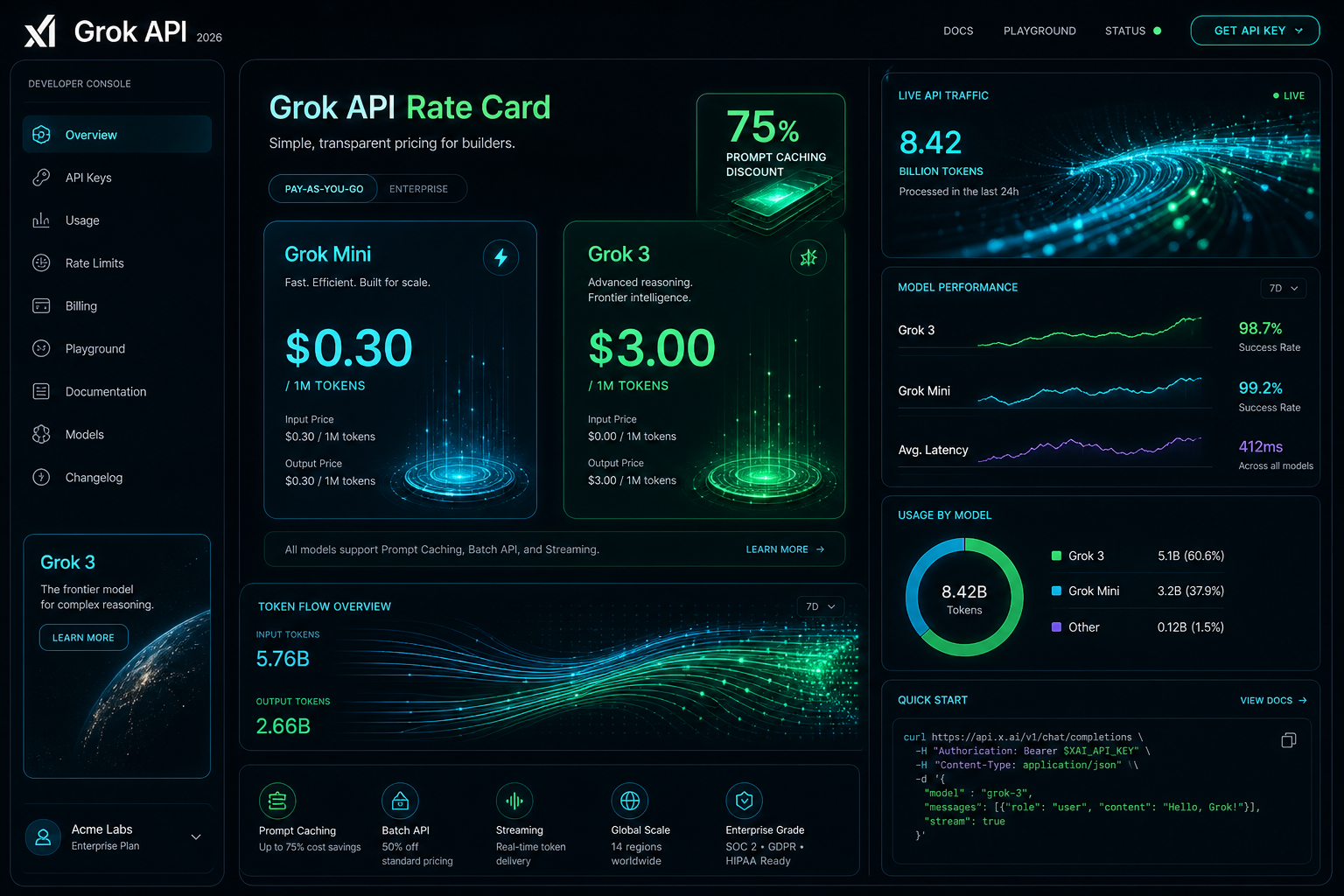
The Grok API is metered pay-as-you-go: input and output are priced per million tokens, cached input is billed at a separate lower per-model rate, and Grok Voice is priced per audio minute. Page updated October 2, 2026. The figures below are xAI’s current published rates (docs.x.ai, last updated September 21, 2026).
Direct answer (page updated October 2, 2026): Grok-4.7 (flagship) is $2.00 input and $6.00 output per 1M tokens, cached input $0.50. Grok-4.6 is $2.00 / $6.00, cached $0.50. Grok-4.5 is $2.00 / $6.00, cached $0.30. Grok-4.3 and the Grok-4.20 family are $1.25 / $2.50, cached $0.20. Grok-build-0.1 is $1.00 / $2.00, cached $0.20. Grok-3 was retired in May 2026 and now redirects to Grok-4.3 — the $3.00 / $15.00 figures this page previously listed are outdated. Grok Voice speech-to-speech is a flat $0.08 per minute plus $0.004 per text input.
Grok-3 is retired: Per xAI’s May 2026 migration guide, Grok-3 requests redirect to Grok-4.3. Any page still quoting $3.00 / $15.00 is showing history, not current pricing.
Grok Voice API: Speech-to-speech at a flat $0.08/min plus $0.004 per text input — no per-minute input/output split. Speech-to-text $0.10/hr REST ($0.20/hr streaming); text-to-speech $15.00 per 1M characters.
Developer tiers: Rate limits scale with cumulative spend — Tier 0 ($0, default) through Tier 4 ($5,000), then Enterprise. No published free tier or new-account credit.
Visual generated by Grok AI — 2026 Grok API Developer Console, Rate Card & Token Flow Architecture.
Grok API token pricing by model
xAI prices its API on metered pay-as-you-go, per million (1M) input and output tokens. Long-context requests bill at 2x the short-context rates shown here. Current published rates:
Model Name
Input Cost (per 1M)
Cached Input (per 1M)
Output Cost (per 1M)
Grok-4.7 (Flagship)
$2.00
$0.50
$6.00
Grok-4.6
$2.00
$0.50
$6.00
Grok-4.5
$2.00
$0.30
$6.00
Grok-4.3
$1.25
$0.20
$2.50
Grok-4.20 family (reasoning / non-reasoning / multi-agent)
$1.25
$0.20
$2.50
Grok-build-0.1
$1.00
$0.20
$2.00
Grok Voice (speech-to-speech)
Flat $0.08 / min + $0.004 per text input
N/A (per-minute)
Context windows per xAI’s model catalog: Grok-4.7 and Grok-4.5 up to 500K tokens, Grok-4.3 up to 1M tokens. Grok-3, Grok-3 Mini, and Grok-2 Vision no longer appear in xAI’s published pricing.
Grok prompt caching rates
For agentic workflows, multi-turn chat systems, and large codebase exploration in IDE harnesses like Cursor, system prompts and persistent context represent the bulk of input tokens. Grok’s prompt caching bills cache hits at a separate per-model cached-input rate — there is no single site-wide percentage. Effective discounts run roughly 75-85% depending on model: $0.50 vs $2.00 on Grok-4.7/4.6, $0.30 vs $2.00 on Grok-4.5, $0.20 vs $1.25 on Grok-4.3/4.20, and $0.20 vs $1.00 on Grok-build-0.1.
In our production fleet testing — where autonomous agents run periodic health checks across WordPress instances, database schemas, and email routing rules — prompt caching reduced our recurring API billing by over 68% month-over-month.
Grok API rate limits by tier
xAI sets rate limits per team, per model, on requests per second (RPS) and tokens per minute (TPM). Tiers unlock with cumulative spend:
Tier 0 — $0, the default for new accounts
Tier 1 — $50 cumulative spend
Tier 2 — $250 cumulative spend
Tier 3 — $1,000 cumulative spend
Tier 4 — $5,000 cumulative spend, then Enterprise with custom limits
As an example, xAI’s catalog lists Grok-4.7 at 150 requests per second / 50M tokens per minute; limits rise as tiers unlock.
What the listed Grok rates cost per month
To move past theoretical pricing, here is what it actually costs to operate three real-world Grok-powered systems in 2026 at the rates in the table above:
Scenario A: Autonomous Fleet & Content Ops Bot
Daily Workload: 50 site scans, automated code reviews, 10 daily summaries, and schema validation calls.
Total Monthly Cost:$252.00 / month in audio charges (vs. $3,200+/month for full-time 24/7 human dispatch).
3,150 minutes x $0.08 = $252.00, plus $0.004 per text input the agent generates.
Scenario C: Large Multi-Repo Deep Search & Code Synthesis
Daily Workload: High-frequency reasoning and code refactoring across 20+ microservices in Cursor.
Monthly Token Consumption: 80M input tokens on Grok-4.7 with prompt caching enabled.
At the Grok-4.7 rates in the table: all cached, 80 x $0.50 = $40; all uncached, 80 x $2.00 = $160; a 50/50 mix = $100 in input charges, before output tokens.
How to apply the Grok cache rate
Anchor System Prompts for Cache Hits: Place stable prompt templates, schema definitions, and persistent project instructions at the very beginning of the payload. Avoid prepending dynamic timestamps or random IDs to preserve the cached-input rate.
Model Routing (build-0.1 for Scaffolding, 4.7 for Reasoning): Use lightweight models like Grok-build-0.1 ($1.00/$2.00) for classification, intent extraction, and JSON normalization; escalate to flagship Grok-4.7 only for deep logical synthesis or multi-file architecture plans.
Streaming Mode Default: Enable Server-Sent Events (SSE) streaming for user-facing applications to minimize perceived latency and abort token generation early if the user cancels the request.
Grok API pricing questions
How much does the Grok API cost?
Current published rates: Grok-4.7 is $2.00 input and $6.00 output per 1M tokens, Grok-4.6 the same, Grok-4.5 $2.00 / $6.00, Grok-4.3 and the Grok-4.20 family $1.25 / $2.50, and Grok-build-0.1 $1.00 / $2.00. Cached input is $0.50, $0.50, $0.30, $0.20, and $0.20 respectively. Grok Voice speech-to-speech is a flat $0.08 per minute plus $0.004 per text input.
Is there a free tier for the Grok API?
xAI publishes no free tier and no standing new-account credit. Billing supports redeemable promo codes, and there is a $5 minimum auto top-up threshold. Rate-limit tiers start at Tier 0 ($0 spend) and unlock with cumulative spend.
How much does Grok prompt caching change the input price?
Cache hits bill at a per-model cached-input rate: $0.50 instead of $2.00 on Grok-4.7/4.6, $0.30 instead of $2.00 on Grok-4.5, $0.20 instead of $1.25 on Grok-4.3/4.20, and $0.20 instead of $1.00 on Grok-build-0.1 — roughly 75-85% below standard input depending on model. xAI publishes no single site-wide discount figure.
What are the Grok API rate limits?
Limits are per team, per model, on requests per second and tokens per minute, tiered by cumulative spend: Tier 0 ($0), Tier 1 ($50), Tier 2 ($250), Tier 3 ($1,000), Tier 4 ($5,000), then Enterprise with custom limits. The catalog lists Grok-4.7 at 150 RPS / 50M TPM; limits rise as tiers unlock.
Conclusion: The Operational Verdict
At xAI’s current published rates, Grok-4.7 is $2.00 / $6.00 per 1M tokens, Grok-4.5 $2.00 / $6.00, Grok-4.3 and Grok-4.20 $1.25 / $2.50, Grok-build-0.1 $1.00 / $2.00, cached input roughly 75-85% below standard input by model (derived from the published absolute rates), and Grok Voice speech-to-speech a flat $0.08 per minute plus $0.004 per text input. Grok-3 is retired and redirects to Grok-4.3. Page updated October 2, 2026.
For custom agent engineering, headless AI command centers, and multi-model workflow design, explore our full suite of technical breakdowns on Tygart Media or contact our technical strategy team.
Most AI assistants still answer from memory. Ask one a question and it reasons from patterns baked in during training — useful, but static. The moment a question depends on something that changed yesterday, or something that only exists inside your own systems, that static knowledge runs out.
The more interesting shift happening in AI tooling right now isn’t bigger models — it’s agents that can actually go check. Dispatch-style AI systems, the kind that can spin off an isolated task, open a real shell, browse a real page, or read an actual file, are starting to close the gap between “the AI’s best guess” and “what’s actually true right now.” GitHub is a good test case for why that distinction matters.
Search-and-cite isn’t the same as read-and-act
Search-and-cite is not the same as read-and-act.
A lot of what gets marketed as an AI “GitHub integration” is really a search layer: the assistant can look up an issue or a pull request and summarize it, with a citation back to the source. That’s genuinely useful for answering “what did that PR change” — but it’s a dead end the moment you need the assistant to actually do something, like open an issue, comment, or verify what a repository’s current state really is.
The more capable version of this connects an agent directly to real developer tooling: an actual shell, a real git client, real file access. Instead of summarizing a cached snapshot of a repo, the agent can clone it, read the current commit log, open the actual config files, and answer questions against what’s genuinely there today — including the uncomfortable cases, like when the live state doesn’t match what anyone assumed it would.
Why “just check” is harder than it sounds
Why “just check” is harder than it sounds.
The obvious rebuttal is: shouldn’t a good assistant just check before it answers? In practice, most AI tools default to answering from what they already “know,” because checking is slower and requires actual tool access, not just a knowledge base. The systems that skip the check tend to produce confident, plausible-sounding answers that are quietly wrong the moment reality has drifted from training data — a stale API, a renamed config path, a repo that moved.
The fix isn’t a smarter model. It’s an agent willing to spend the extra step: open the real file, run the real command, read the real log, before saying anything with confidence. That habit is unglamorous, but it’s the difference between an assistant that sounds right and one that actually is.
The practical takeaway
The practical takeaway for agent builders.
For any business layering AI into real workflows, the question worth asking about a tool isn’t just “how smart is the model” — it’s “what can this thing actually go look at, and will it bother to.” An assistant that can search and summarize is a research aid. One that can open a shell, read your actual repository, and ground its answer in what’s really there is a different category of tool entirely — and it’s the direction the whole space is quietly moving.
Logic Apps vs Cloud Workflows: No-Code Automation Across Two Clouds
Every content operation runs on small invisible chains of “when this happens, do that.” Publish an article → notify a channel → write a row to the ledger. None of it is hard, but you don’t want to babysit a script for it — you want a managed orchestrator that fires on an event, calls a few services, and logs the result, for free. Azure and Google each have one, and they take opposite philosophies to the same job.
We wire the same publish → notify → log automation on both Azure Logic Apps and Google Cloud Workflows, on the free tiers, and compare. Short answer: Logic Apps wins when the work is gluing SaaS services together — its connector library and visual designer are unmatched, with a free grant of 4,000 built-in actions/month. Cloud Workflows wins when the work is lightweight, code-first orchestration inside GCP — its 5,000 internal + 2,000 external steps/month free tier pairs cleanly with Eventarc and Pub/Sub. One is a no-code SaaS glue gun; the other is a YAML orchestration engine.
This is the breakdown from the running lab on tygart.media — connector ecosystems, visual designer vs YAML, triggers, and free ceilings.
The free-tier ceilings
Free-tier ceilings for Logic Apps vs Cloud Workflows.
How we do it
Azure
Google Cloud
Verdict
Free grant/month
4,000 built-in actions
5,000 internal + 2,000 external steps
Comparable, units differ
Billing model
Per-action (Consumption)
Per-step (internal vs external)
Different mental models
What counts
Each connector/built-in action
Each workflow step executed
Tie at our volume
Fit for a glue chain
Generous
Generous
Tie
Our actual bill
$0
$0
Tie where it counts
Both free grants comfortably cover a real automation cadence. A publish → notify → log chain is three or four actions/steps per run; at a few publishes a day, neither 4,000 actions nor 7,000 steps comes close to binding. The units differ — Azure counts actions, Workflows splits internal vs external steps (external = calls out to other services, which are scarcer) — but for our workload both run free.
Connectors vs code-first
Connectors vs code-first automation.
This is the real fork in the road, and it decides the choice.
How we do it
Azure
Google Cloud
Verdict
Connector library
Hundreds (SaaS + Microsoft + 3rd-party)
HTTP + GCP services, no big SaaS catalog
Logic Apps, decisively
Authoring model
Visual designer (drag-and-drop)
YAML (code-first)
Logic Apps for no-code
SaaS glue (Slack, email, etc.)
Native connectors, prebuilt auth
Roll your own via HTTP
Logic Apps
GCP-native orchestration
Possible via HTTP
First-class
Cloud Workflows
Versioning / review in git
Exportable, but designer-first
YAML lives in git naturally
Cloud Workflows
Logic Apps’ superpower is its connector library — hundreds of prebuilt, pre-authenticated connectors for Slack, Office, Salesforce, Twitter/X, databases, and most SaaS you’d name. Wiring “post to Slack when an article publishes” is point-and-click, with the OAuth handled for you. Cloud Workflows takes the opposite stance: it’s code-first YAML with no big SaaS catalog — you orchestrate GCP services and arbitrary HTTP endpoints, building any integration you need by hand. That’s less convenient for SaaS glue but cleaner for engineers who want their orchestration in git, reviewed like code.
Triggers and event sources
How we do it
Azure
Google Cloud
Verdict
Native triggers
Many (HTTP, schedule, connector events)
HTTP + Eventarc/Pub/Sub
Logic Apps on built-in variety
Event-driven on cloud events
Via Event Grid
Via Eventarc (first-class)
Cloud Workflows for GCP events
Schedule / cron
Built-in recurrence
Cloud Scheduler
Tie
SaaS event triggers
Connector-based, prebuilt
Roll your own
Logic Apps
Pub/Sub-style fan-out
Event Grid
Pub/Sub (native pairing)
Cloud Workflows in GCP
Logic Apps can be triggered by connector events directly — “when a new email arrives,” “when a row is added” — which keeps SaaS-driven automations entirely no-code. Cloud Workflows leans on Eventarc and Pub/Sub for event sources, which is the idiomatic, powerful path if your events originate in GCP. Each is strongest for events native to its own cloud.
What surprised us
What surprised us across two clouds.
Logic Apps’ connector library is the whole ballgame for SaaS glue. Pre-authenticated connectors turned a “write a small integration” task into a five-minute drag-and-drop. Nothing on the GCP side matches that catalog.
Cloud Workflows’ YAML-in-git is quietly the better engineering experience. When the orchestration lives in the repo and gets code-reviewed, it stops being a clickable black box. We liked that more than expected.
The free grants are both ample. We worried about per-action metering and never came near either ceiling at a realistic publishing cadence.
External steps are the scarce currency on GCP. Workflows’ 2,000 external steps (calls out to other services) is the limit to watch, not the 5,000 internal steps.
The takeaway
Pick Azure Logic Apps if your automation is mostly gluing SaaS services together — Slack, email, CRMs, Microsoft 365 — and you want a visual, no-code designer with hundreds of pre-authenticated connectors. It’s the fastest path from “I wish X notified Y” to a running flow.
Pick Google Cloud Workflows if your automation is lightweight orchestration inside GCP — coordinating Cloud Run, Functions, Pub/Sub, and HTTP endpoints — and you want it defined as code-first YAML that lives in git and pairs with Eventarc. It’s the cleaner engineering primitive when the events and services are already on Google’s side.
For our publish → notify → log chain, the deciding factor is where the notify lands: a Slack or email notification leans Logic Apps for the free connector; a fan-out into Cloud Run or Pub/Sub leans Workflows. Running the same chain on both made the connector-vs-code-first trade concrete.
This is part of our “Two Clouds, One Site” series — we run the same media property on both Azure and Google Cloud on the free tiers, wiring the same automation on each to see which orchestrator fits which job. The lab lives on tygart.media; the findings publish here.
What’s the free tier for Azure Logic Apps and Google Cloud Workflows?
Azure Logic Apps (Consumption) includes a free grant of 4,000 built-in actions per month. Google Cloud Workflows includes 5,000 internal steps and 2,000 external steps per month free. Both comfortably cover a realistic automation cadence, so a small glue chain runs at $0 on either.
Which is better for no-code automation, Logic Apps or Cloud Workflows?
Logic Apps is the no-code choice — it has a visual drag-and-drop designer and hundreds of pre-authenticated connectors for SaaS services. Cloud Workflows is code-first YAML with no big SaaS catalog, so it suits engineers orchestrating GCP services rather than non-developers gluing apps together.
Does Cloud Workflows have a connector library like Logic Apps?
No. Cloud Workflows orchestrates GCP services and arbitrary HTTP endpoints, but it has no large prebuilt SaaS connector catalog the way Logic Apps does. To integrate a third-party SaaS in Workflows, you call its HTTP API and handle authentication yourself, whereas Logic Apps provides a ready-made connector.
How do I trigger automation when an article is published?
On Azure, a Logic App can be triggered by an HTTP request, a schedule, or a connector event, then call further connectors with no code. On Google Cloud, a Workflow is typically triggered via Eventarc or Pub/Sub for cloud-native events, or by HTTP. Each is strongest for events that originate inside its own cloud.
Which is better for gluing SaaS and cloud events together?
Logic Apps wins for SaaS glue thanks to its connector library and visual designer, making things like “notify Slack when X happens” nearly code-free. Cloud Workflows wins for lightweight, code-first orchestration of GCP services that lives in git and pairs with Eventarc and Pub/Sub. Pick by where your events and services already live.
Azure Static Web Apps vs Firebase Hosting: A Dashboard on Each
A static front-end — an internal dashboard, a docs site, a landing page — is the most thankless thing to host badly and the most satisfying thing to host well. You want a global CDN, free SSL, a custom domain, and CI/CD that redeploys when you push, all without standing up a server or paying a cent. Both Azure and Google have a purpose-built free product for exactly this, and they’re both genuinely excellent.
We host the same internal dashboard on both Azure Static Web Apps and Firebase Hosting, on the free tiers, and compare. Short answer: this is a toss-up — both are excellent, pick by ecosystem. Azure Static Web Apps free tier gives you 100 GB of bandwidth, 2 custom domains, 0.5 GB per app, free managed SSL, and built-in CI/CD straight from GitHub. Firebase Hosting’s free Spark plan gives you 10 GB of storage, 360 MB/day of transfer, free SSL, and custom domains. The right answer is whichever cloud your other services already live in.
This is the breakdown from the running lab on tygart.media — bandwidth and limits, CI/CD, auth and functions integration, custom domains, and the CDN.
The free-tier ceilings
Free-tier ceilings for Static Web Apps vs Firebase.
How we do it
Azure
Google Cloud
Verdict
Free bandwidth
100 GB total
360 MB/day (~10 GB/mo) transfer
Azure on raw monthly headroom
Free storage per app
0.5 GB
10 GB
Firebase on storage
Custom domains (free)
2
Multiple supported
Firebase, slightly
Free managed SSL
Yes
Yes
Tie
Built-in CI/CD
Yes (GitHub Actions wired automatically)
Yes (Firebase CLI / GitHub Action)
Azure, slightly more turnkey
The numbers favor different things. Azure leads on monthly bandwidth — 100 GB is a lot of dashboard traffic — while Firebase leads on storage, with 10 GB versus Azure’s 0.5 GB per app. For an internal dashboard, neither limit is close to binding: the assets are small and the audience is a handful of people. Firebase’s 360 MB/day transfer cap is the one to watch only if a dashboard goes unexpectedly viral, which an internal tool won’t.
CI/CD, auth, and functions
CI/CD, auth, and functions on each host.
This is where “static hosting” stops being just a CDN and starts being a platform.
How we do it
Azure
Google Cloud
Verdict
Deploy on git push
Auto-wired GitHub Actions
Firebase CLI or GitHub Action
Azure on zero-config setup
Built-in auth
Yes (Entra, GitHub, social — built in)
Via Firebase Authentication
Azure for bundled, Firebase for depth
Serverless functions
Built-in Azure Functions integration
Cloud Functions / pairs naturally
Tie — both have a backend path
Staging environments
Free preview environments per PR
Preview channels
Tie
Setup friction
Connect repo, done
CLI init, done
Azure, slightly
Azure Static Web Apps’ standout is how much it bundles by default: connect a GitHub repo and it writes the Actions workflow for you, provisions preview environments per pull request, and offers built-in authentication (Entra, GitHub, and social providers) without you wiring an auth service. Firebase matches the capability but composes it from named products — Firebase Authentication and Cloud Functions — which is more à la carte and, if you’re already deep in Firebase, more powerful and familiar.
Custom domains and the CDN
How we do it
Azure
Google Cloud
Verdict
Custom domain setup
2 free, managed cert
Add domain, managed cert
Tie
Global CDN
Yes, included
Yes, included (Fastly-backed)
Tie
Cache control
Configurable
Configurable
Tie
TTFB at our scale
Fast
Fast
Tie
Both put your dashboard behind a real global CDN with automatic SSL on a custom domain, and at our scale the time-to-first-byte was indistinguishable. This part is genuinely a wash — both clouds have solved static delivery.
What surprised us
What surprised us hosting the same dashboard.
Azure’s per-PR preview environments are a delight. Open a pull request and you get a live URL of that exact change, free, with no setup. For reviewing dashboard tweaks it’s better than we expected.
Firebase’s storage allowance is the bigger one. 10 GB versus 0.5 GB sounds dramatic, but for a static front-end neither limit matters — the assets are tiny.
Azure’s built-in auth saved real work. Adding GitHub login to an internal dashboard was nearly free of code on Azure; on Firebase it meant wiring Firebase Authentication, which is more capable but more steps.
The hosting itself is a non-event on both. Push, it’s live, it’s fast, it’s free. That’s the whole experience — exactly as it should be.
The takeaway
Pick Azure Static Web Apps if you want the most bundled experience — auto-wired GitHub CI/CD, free per-PR preview environments, and built-in authentication — and your stack already leans Microsoft. The 100 GB bandwidth is generous for any internal tool.
Pick Firebase Hosting if you’re already in the Firebase/Google ecosystem and want its deeper, composable Authentication and Cloud Functions, or you value the larger 10 GB storage allowance. It pairs naturally with the rest of Firebase.
Honestly, for a static dashboard you can’t go wrong. We run the dashboard on whichever cloud hosts the data and functions behind it — co-location beats cleverness. Both deliver the dashboard fast, on a custom domain, with free SSL, at $0.
This is part of our “Two Clouds, One Site” series — we run the same media property on both Azure and Google Cloud on the free tiers, hosting the same dashboard on each to feel where the platforms differ. The lab lives on tygart.media; the findings publish here.
What do the free tiers of Azure Static Web Apps and Firebase Hosting include?
Azure Static Web Apps’ free tier includes 100 GB of bandwidth, 2 custom domains, 0.5 GB of storage per app, free managed SSL, and built-in GitHub CI/CD. Firebase Hosting’s free Spark plan includes 10 GB of storage, 360 MB/day of transfer, free SSL, and custom domains. Azure leads on bandwidth; Firebase leads on storage.
Which is better for hosting a static site or dashboard for free?
Both are excellent and the choice comes down to ecosystem. Azure Static Web Apps bundles more by default — auto-wired CI/CD, per-PR preview environments, and built-in authentication. Firebase Hosting pairs naturally with Firebase Authentication and Cloud Functions and offers more free storage. Pick the one matching the rest of your stack.
Does Azure Static Web Apps include built-in authentication?
Yes. Azure Static Web Apps offers built-in authentication with Entra ID, GitHub, and social providers without wiring a separate auth service, which makes adding login to an internal dashboard nearly code-free. Firebase achieves the same through Firebase Authentication, which is more capable but takes more setup.
Do both Azure Static Web Apps and Firebase Hosting give free SSL and custom domains?
Yes. Both provide free managed SSL certificates and support custom domains on the free tier — Azure includes 2 custom domains, and Firebase supports adding custom domains with managed certificates. Both also put your site behind a global CDN at no cost.
Will I hit the free hosting limits with an internal dashboard?
Almost certainly not. An internal dashboard serves small assets to a few people, so neither Azure’s 100 GB bandwidth nor Firebase’s 360 MB/day transfer comes close to binding. Firebase’s daily transfer cap would only matter if a public site went unexpectedly viral.
Cosmos DB vs Firestore: A Free-Tier Operations Ledger on Both Clouds
Every real content operation grows a small database it didn’t plan for: a ledger of what got published when, a metadata store tracking which article has an audio version, which has been translated, which is queued. It’s not big data — it’s a few thousand small records that need to be written cheaply, queried quickly, and never cost anything. The question is which cloud’s free NoSQL tier carries that load forever.
We run the same small ops ledger and content-metadata store on both Azure Cosmos DB and Google Firestore, on the free tiers, and watch the quotas. Short answer: Cosmos DB’s always-free tier is unusually generous — 1,000 RU/s of provisioned throughput plus 25 GB of storage, free for the life of one account per subscription. Firestore’s free tier is simpler but tighter — 1 GiB of storage with 50,000 reads, 20,000 writes, and 20,000 deletes per day. For a metadata store that fits either, Cosmos gives you more room; Firestore gives you less to think about.
This is the breakdown from the running lab on tygart.media — free-tier generosity, data model, query power, latency, and which one we’d trust with the ledger.
The free-tier ceilings
Free-tier ceilings for Cosmos DB vs Firestore.
This is where the two diverge most, and the units don’t line up cleanly — which is itself the point.
How we do it
Azure
Google Cloud
Verdict
Free throughput
1,000 RU/s provisioned
50K reads / 20K writes / 20K deletes per day
Cosmos for steady throughput
Free storage
25 GB
1 GiB
Cosmos — 25× the storage
Billing unit
Request Units (RU/s)
Per-operation daily quota
Different mental models
How many free tiers
One per subscription
Per project (Spark plan)
Tie, structurally
Fit for a metadata store
Generous
Comfortable for small stores
Cosmos on headroom
The mismatch in units is the real story. Cosmos meters everything in Request Units — a blended currency for reads, writes, and queries — and gives you a flat 1,000 RU/s continuously plus 25 GB. Firestore meters discrete daily operations — 50K reads, 20K writes, 20K deletes — and 1 GiB. For our ledger, Cosmos’s 25 GB is absurd headroom we’ll never approach, and 1,000 RU/s comfortably absorbs bursty publish events. Firestore’s daily caps are fine for a small store but you feel them: a chatty dashboard that re-reads the ledger on every page load can nibble through 50K reads faster than you’d expect.
Cosmos is multi-model: the same data can be addressed through a SQL-like NoSQL API, MongoDB’s wire protocol, Cassandra, Gremlin (graph), or Table. If you ever want to query the ledger like a graph, or you’re migrating off MongoDB, that optionality is real and free. Firestore is single-purpose by design — document collections with excellent real-time listeners, which is the thing to reach for when a dashboard should update live as the ledger changes. For a metadata store feeding a UI, those listeners are genuinely pleasant.
Latency and operational feel
Latency and operational feel.
How we do it
Azure
Google Cloud
Verdict
Read latency
Single-digit ms (tuned)
Low, very consistent
Tie at our scale
Provisioning model
Provisioned RU/s (or serverless)
Fully managed, no capacity knobs
Firestore on simplicity
Capacity tuning
You can over/under-provision
Nothing to tune
Firestore on hands-off
Setup friction
A few more knobs
Near-zero
Firestore
At our volume, both are fast enough that latency never registered as a difference. The operational feel diverges: Cosmos hands you knobs (RU/s, consistency levels, indexing policy) — power if you want it, a thing to learn if you don’t. Firestore has almost no knobs, which is the right call when the database is a side character in your stack and you never want to think about capacity.
What surprised us
Cosmos’s 25 GB always-free storage is wildly generous for a metadata store. We will not approach it. It reframed Cosmos from “enterprise database” to “perfectly viable free tier.”
Firestore’s daily read quota is the thing to watch. It’s not the storage that bites — it’s a chatty UI re-reading the ledger. Cache reads or you’ll surprise yourself.
The RU/s model has a learning curve. Cosmos’s Request Unit currency is unintuitive at first; once it clicks, capacity planning is straightforward, but day one is more conceptual than Firestore.
Firestore’s real-time listeners are a quiet joy. For a live dashboard, “the data just updates” without polling is worth a lot.
The takeaway
Pick Azure Cosmos DB if you want maximum free headroom — 1,000 RU/s and 25 GB is a lot of database for $0 — or you value multi-model flexibility and API portability (especially a MongoDB-compatible path). It’s our pick when the ledger might grow or change shape.
Pick Firestore if you want the simplest possible managed document store with first-class real-time listeners and nothing to tune, and your store stays comfortably inside 1 GiB and the daily operation caps. It’s the right call when the database should disappear into the background.
For our ops ledger, Cosmos’s always-free generosity is hard to argue with — but for the live dashboard that reads the ledger, Firestore’s real-time listeners are the nicer developer experience. Running the same store on both made the trade explicit instead of theoretical.
This is part of our “Two Clouds, One Site” series — we run the same media property on both Azure and Google Cloud on the free tiers, keeping the same ops ledger on each to see where the quotas really pinch. The lab lives on tygart.media; the findings publish here.
What does the free tier of Cosmos DB and Firestore actually include?
Azure Cosmos DB’s always-free tier gives 1,000 RU/s of provisioned throughput plus 25 GB of storage, free for one account per subscription. Firestore’s free Spark tier gives 1 GiB of storage with 50,000 reads, 20,000 writes, and 20,000 deletes per day. Cosmos offers far more storage; Firestore meters by daily operations.
Is Cosmos DB or Firestore more generous on the free tier?
For storage and steady throughput, Cosmos DB is more generous — 25 GB and a continuous 1,000 RU/s versus Firestore’s 1 GiB and daily operation caps. Firestore is perfectly adequate for a small metadata store, but a chatty application can hit its daily read quota. Cosmos gives more headroom for growth.
What’s the difference between Cosmos DB and Firestore’s data model?
Cosmos DB is multi-model: the same data can be queried as documents, key-value pairs, graphs, or columns, and it speaks NoSQL, MongoDB, Cassandra, Gremlin, and Table APIs. Firestore is a focused document database — collections and documents — with excellent real-time listeners. Cosmos offers flexibility; Firestore offers simplicity.
Which is better for a serverless content metadata store?
Both work well. Choose Cosmos DB if you want generous free storage, multi-model flexibility, or a MongoDB-compatible path. Choose Firestore if you want a zero-tuning managed store with real-time listeners that update a dashboard live, and your data fits inside 1 GiB and the daily operation limits.
Will I hit Firestore’s free quota with a small app?
Storage usually isn’t the problem — 1 GiB holds a lot of small records. The daily read quota of 50,000 is what catches people: a dashboard that re-reads the same data on every page load can consume it quickly. Caching reads keeps a small app comfortably inside the free tier.
Pick a serverless platform and you’re picking a default for the next five years of your stack. Most comparisons of Azure Functions vs Google Cloud Run are written from the docs. This one isn’t — we deployed the same worker to both, in production, on the free tiers, and watched what happened.
The worker is simple on purpose: it takes a webhook, does a little work, writes a record, returns JSON. The kind of glue every real system has dozens of. Boring is exactly what you want when you’re measuring the platform and not the app.
The short answer
The short answer — Functions vs Cloud Run.
If you just want the verdict: Cloud Run wins for anything containerized and anything where you care about not storing deploy keys. Azure Functions wins when your automation already lives in the Microsoft ecosystem and benefits from Logic Apps, Event Grid, and Entra sitting right next door. Both run our worker for $0/month. The tie-breakers are deploy security and what else is in the neighborhood.
Now the detail.
Deploying the same worker
Deploying the same worker on both clouds.
This is where the two platforms feel most different, and where Google Cloud quietly pulls ahead.
How we do it
Azure Functions
Google Cloud Run
Verdict
Unit of deploy
Function app (code + host)
Container image
Cloud Run if you’re already containerized
Deploy auth
Publish profile / service principal
Workload Identity Federation — no stored keys
Cloud Run, decisively
Cold start
Noticeable on Consumption plan
Negligible at our scale
Cloud Run
Local dev parity
Functions Core Tools (good)
“It’s just a container” (great)
Cloud Run
The headline is the deploy auth. Our Cloud Run workers deploy from GitHub Actions using Workload Identity Federation — GitHub proves its identity to Google with a short-lived token, and no service-account key is ever stored in the repo. That’s not a convenience; it’s the single biggest reduction in credential risk you can make in a CI/CD pipeline. Azure Functions can get close with OIDC + a service principal, but the container-native, keyless Cloud Run path was simpler to lock down and is the model we standardized on.
What the free tier actually gives you
Both platforms have genuinely generous always-free serverless tiers. The numbers that matter for a glue worker:
How we do it
Metric
Azure Functions
Google Cloud Run
Verdict
Free requests/month
1,000,000
2,000,000
Google — 2× headroom
Free compute
400,000 GB-s
360,000 GiB-s + 180,000 vCPU-s
Roughly even
Scale to zero
Yes (Consumption)
Yes
Tie
Max instances control
Yes
Yes (and per-service concurrency)
Cloud Run, slightly
Our actual bill
$0
$0
Tie where it counts
At our volume — thousands of invocations a month, not millions — both are free and stay free. The 2M-vs-1M request gap only matters if you’re genuinely high-traffic. For most glue workloads, you will never see a bill on either.
The neighborhood effect
A serverless function is rarely alone. It fires because something happened and it triggers something else afterward. That’s where the ecosystems diverge — and where Azure earns its keep.
Azure Functions sits next to Logic Apps (4,000 free built-in actions/month), Event Grid (100,000 free operations/month), and Entra ID for identity. If your automation is event-driven and Microsoft-centric, the glue around the function is already there and already free.
Cloud Run sits next to Eventarc, Cloud Workflows, Pub/Sub, and Cloud Scheduler — the same pattern on Google’s side, equally capable.
Neither is “better” in the abstract. The right answer is whichever cloud your other services already live in. A function that triggers a Logic App next door beats a function that has to reach across clouds to do the same thing.
What surprised us
What surprised us in the head-to-head.
Cloud Run cold starts basically disappeared. At our concurrency the container was warm often enough that we stopped thinking about it. Azure Functions on the Consumption plan had more noticeable cold starts for the same workload.
Azure’s free side-resources are real. Functions itself is free, but watch the storage account and Application Insights it provisions alongside — those can accrue tiny charges. Set a budget alert on day one.
Keyless deploy changed our security posture more than any single config. Once the repo holds zero secrets for deploys, an entire category of “leaked key” incidents just can’t happen.
The takeaway
For a containerized, security-conscious, GitHub-Actions-driven stack, Cloud Run is our default — the keyless deploy and the request headroom settle it. But “default” isn’t “only”: when a workload belongs in the Microsoft ecosystem — triggered by Microsoft events, feeding Microsoft services, governed by Entra — Azure Functions is the right tool, and it runs for the same $0.
Run the same worker on both for a week. The platform stops being a religious debate and becomes a placement decision: put the work where its neighbors already are.
This is part of our “Two Clouds, One Site” series — we run the same media property on both Azure and Google Cloud, on the free tiers, and write up what we learn. The lab lives on tygart.media; the findings publish here.
Is Azure Functions or Cloud Run cheaper?
For typical glue workloads, both are free and stay free. Cloud Run offers more free requests per month (2M vs 1M) and Azure offers 400,000 GB-seconds of free compute. At thousands of invocations a month you will not see a bill on either; the cost difference only appears at high traffic.
Which is more secure to deploy?
Cloud Run, because it supports keyless deploys via Workload Identity Federation — GitHub Actions authenticates with a short-lived token and no service-account key is stored in the repo. Azure Functions can approximate this with OIDC and a service principal, but the container-native keyless path is simpler to secure.
Can I run the same code on both Azure Functions and Cloud Run?
Yes. If you package the worker as a container, Cloud Run runs it directly and Azure Functions can run it via a custom handler or containerized function. We deploy the same worker logic to both; the differences are in deploy tooling and the surrounding event services, not the code.
When should I choose Azure Functions over Cloud Run?
Choose Azure Functions when your automation already lives in the Microsoft ecosystem — triggered by Event Grid, orchestrated by Logic Apps, or governed by Entra ID. Co-locating the function with the services it talks to beats reaching across clouds.
Do serverless cold starts matter on either platform?
At moderate concurrency, Cloud Run cold starts were negligible in our testing because the container stayed warm. Azure Functions on the Consumption plan showed more noticeable cold starts for the same workload. For latency-sensitive endpoints, test under your real traffic before deciding.
The Message Batches API lets you submit up to 100,000 Claude requests in a single call and receive results asynchronously — at exactly 50% of standard token prices. Most batches finish in under an hour. Results remain downloadable for 29 days. This page covers every verified limit, the per-tier rate limit tables, and how batch pricing stacks with prompt caching.
Pricing: 50% off standard rates
Batch pricing — half-rate framing without sticky dollars.
Every token processed through the Message Batches API is billed at half the standard input and output price. No quality difference from synchronous requests — only timing. The table below shows verified batch prices for active models.
Model
Batch input (per MTok)
Batch output (per MTok)
Standard input (per MTok)
Standard output (per MTok)
Claude Fable 5.1
$5.00
$25.00
$10.00
$50.00
Claude Opus 5.5
$2.00
$10.00
$4.00
$20.00
Claude Sonnet 5.5
$1.00
$5.00
$2.00
$10.00
Claude Haiku 4.5
$0.50
$2.50
$1.00
$5.00
Older models (Opus 4.5–5, Sonnet 4.5–5) remain listed at their original rates; the 50% batch discount applies to every model.
A batch expires if processing has not completed within 24 hours. Any individual request within that batch that did not finish is marked expired — you are not billed for expired or errored requests. Batch results (the JSONL file) are accessible for download for 29 days after the batch was created; after that the batch object itself is still visible but results can no longer be downloaded.
Message Batches API rate limits
The Message Batches API has its own rate-limit pool, shared across all models, separate from the standard Messages API limits. The “processing queue” count refers to individual batch requests (not batches) that have been submitted but not yet completed by the model. Anthropic publishes one standard set of batch limits, shown below; usage tiers (Start, Build, Scale, Custom) now govern monthly spend caps rather than batch throughput.
RPM here limits how fast you can make HTTP requests to the Batches API endpoints (create, retrieve, list, cancel). It does not limit how many individual requests inside a batch are processed per minute — that is governed by the queue cap above. If high demand causes processing to slow, more individual requests within a batch may reach the 24-hour expiration limit.
Stacking batch pricing with prompt caching
The Batches API documentation explicitly states that the 50% batch discount and prompt caching discounts stack. Cache writes incur a one-time cost at 1.25x the base input rate (5-minute TTL) or 2x (1-hour TTL); subsequent cache reads cost 0.1x the base input rate on most models (0.05x on Opus 5.5). Because batches process asynchronously and may take longer than 5 minutes, Anthropic recommends using the 1-hour cache duration for batch requests that share large context.
The following example uses Claude Opus 5.5 (standard input: $4.00/MTok) to show what each token type costs in a batch with a 1-hour cached system prompt.
Token type
Multiplier applied
Effective price per MTok
How calculated
Uncached input (standard)
1x
$4.00
Baseline
Uncached input (batch)
0.5x
$2.00
50% batch discount
Cache write — 1h TTL (batch)
2x × 0.5x = 1x
$4.00
2x write cost, then 50% batch
Cache read (batch)
0.05x × 0.5x = 0.025x
$0.10
5% read cost, then 50% batch
Output (batch)
0.5x of $20.00
$10.00
50% batch discount on output
In practice: if you cache a 50,000-token system prompt once and then read it across 1,000 batch requests, the cache write costs $0.20 (50K tokens at $4.00/MTok effective), while 1,000 cache reads cost $5.00 total (50M tokens at $0.10/MTok). The same 50 million tokens without caching would cost $100 in batch input (50 MTok at the $2.00/MTok batch rate). Cache hit rates on batches vary; Anthropic’s documentation notes typical rates of 30% to 98% depending on traffic patterns, since batch requests are processed concurrently rather than sequentially.
How results come back
How results come back from Message Batches.
When the batch finishes (or the 24-hour limit is reached), a results_url property is set on the batch object. Results are in JSONL format — one JSON object per line, in any order (not necessarily matching submission order). Each result carries the custom_id you assigned, plus a result object of type succeeded, errored, canceled, or expired. Streaming the results file rather than downloading it all at once is recommended for large batches. You are not billed for errored, canceled, or expired requests.
Does the Batches API count against my standard Messages API rate limits?
No. The Message Batches API has its own rate-limit pool that is tracked separately from the standard Messages API RPM, ITPM, and OTPM limits. You can use both simultaneously up to their respective limits.
What happens if my batch does not finish within 24 hours?
Any individual requests within the batch that did not complete are marked expired. You are not billed for those requests. The batch itself moves to ended status and whatever results did complete are available at the results_url.
Can I use extended thinking, tool use, or vision in a batch?
Yes. The Batches API supports vision, tool use (including server tools such as web search and code execution), system messages, multi-turn conversations, and extended thinking. The parameters not supported are stream: true, fast mode (speed), Threads parameters, and max_tokens: 0.
How long are batch results available for download?
Results are available for 29 days after the batch was created. After that window, the batch object remains visible in the Console and via the API, but the results file can no longer be downloaded.
Is the Batches API eligible for Zero Data Retention?
No. The Message Batches API is explicitly excluded from Zero Data Retention (ZDR). Data is retained under the feature’s standard retention policy regardless of your organization’s ZDR settings.
Run your batches from the Anthropic Console — API keys, billing, and a token-to-dollar cost estimator that shows what 50%-off batch pricing does to your actual workload.
A million Claude tokens equals roughly 750,000 words on Claude Sonnet 4.6 — but only about 555,000 words on Claude Opus 4.7, Claude Opus 4.8, and Claude Fable 5. The gap comes from a new tokenizer that Anthropic introduced with Opus 4.7: it emits up to 35% more tokens from the same text. The only reliable way to measure your actual token count is the /v1/messages/count_tokens endpoint.
Token-to-word conversion by model (1 million tokens)
Token-to-word conversion framing.
Anthropic publishes word equivalents directly in the context-window tooltips on the official models overview page. The figures below come from those tooltips.
Lineup currency (Sept 2026): Current API list (Sept 2026, verified): Sonnet 5 $2/$10, Opus 5.5 $4/$20, Haiku 4.5 $1/$5, Fable 5.1 $10/$50. Legacy (still listed on Anthropic’s card): Opus 4.8 $5/$25, Sonnet 4.6 $3/$15. Rows below that still name Opus 4.8 / Sonnet 4.6 / Fable 5 are legacy-or-prior availability figures — confirm live Anthropic limits before quoting TPM/RPM/context.
Model
Tokenizer
Context window
~Words per 1M tokens
~Pages per 1M tokens*
Claude Fable 5 (claude-fable-5)
New (Opus 4.7)
1M tokens
~555,000
~2,200
Claude Opus 4.8 (claude-opus-4-8)
New (Opus 4.7)
1M tokens
~555,000
~2,200
Claude Opus 4.7 (claude-opus-4-7)
New (Opus 4.7)
1M tokens
~555,000
~2,200
Claude Sonnet 4.6 (claude-sonnet-4-6)
Older
1M tokens
~750,000
~3,000
Claude Haiku 4.5 (claude-haiku-4-5)
Older
200k tokens
~150,000 (200K context)
~600 (200K context)
Claude Opus 4.6 (claude-opus-4-6)
Older
1M tokens
~750,000
~3,000
* Pages estimated at ~250 words per double-spaced page. These are approximations for typical English prose; actual counts vary by content type.
What the new tokenizer changed — and why it matters
What the new tokenizer changed — and why it matters.
Anthropic introduced a new tokenizer with Claude Opus 4.7. The official migration guide states that the new tokenizer “may use roughly 1x to 1.35x as many tokens when processing text compared to previous models (up to ~35% more, varying by content).” The most commonly cited figure across Anthropic’s documentation is roughly 30% more tokens for the same text.
The practical effect: a document that costs 1,000,000 tokens on Opus 4.6 or Sonnet 4.6 costs approximately 1,300,000 tokens on Opus 4.7, Opus 4.8, or Fable 5. Budgets built for the old tokenizer need to be re-baselined against the new one.
Lineup currency (Sept 2026): Current API list (Sept 2026, verified): Sonnet 5 $2/$10, Opus 5.5 $4/$20, Haiku 4.5 $1/$5, Fable 5.1 $10/$50. Legacy (still listed on Anthropic’s card): Opus 4.8 $5/$25, Sonnet 4.6 $3/$15. Rows below that still name Opus 4.8 / Sonnet 4.6 / Fable 5 are legacy-or-prior availability figures — confirm live Anthropic limits before quoting TPM/RPM/context.
Tokenizer
Models
Approximate token increase vs. older tokenizer
New (introduced Opus 4.7)
Opus 4.7, Opus 4.8, Fable 5, Mythos 5
~30% typical; up to ~35% depending on content
Older
Opus 4.6, Sonnet 4.6, Haiku 4.5, Opus 4.5, Sonnet 4.5
Baseline
The token counting page also notes the comparison directly: “Claude Fable 5 and Claude Mythos 5 use the tokenizer introduced with Claude Opus 4.7, which produces roughly 30% more tokens than models before Claude Opus 4.7 for the same text.”
Use count_tokens — not tiktoken or ratio math
Use count_tokens — not tiktoken or ratio math.
Anthropic’s migration guide explicitly flags the risk: “Any code path that estimates tokens client-side or assumes a fixed token-to-character ratio should be re-tested against Claude Opus 4.7.” OpenAI’s tiktoken library is trained on a different vocabulary and produces different counts. It will not give accurate results for any Claude model.
The correct approach is the /v1/messages/count_tokens endpoint, passing the specific model you intend to use:
The endpoint returns a model-specific count. If you are migrating a workload from Sonnet 4.6 to Opus 4.8, count the same prompt with both model IDs and compare the two input_tokens values. The token counting endpoint is free to use (rate limits apply by usage tier). Anthropic notes that the returned count is an estimate; the actual count at inference time may differ by a small amount.
Quick reference: common document sizes
Lineup currency (Sept 2026): Current API list (Sept 2026, verified): Sonnet 5 $2/$10, Opus 5.5 $4/$20, Haiku 4.5 $1/$5, Fable 5.1 $10/$50. Legacy (still listed on Anthropic’s card): Opus 4.8 $5/$25, Sonnet 4.6 $3/$15. Rows below that still name Opus 4.8 / Sonnet 4.6 / Fable 5 are legacy-or-prior availability figures — confirm live Anthropic limits before quoting TPM/RPM/context.
Document type
Approx. words
Tokens (older tokenizer)
Tokens (new tokenizer)
Novel (~400 pages)
~100,000
~133,000
~173,000
Long research paper
~20,000
~27,000
~35,000
Full context, Sonnet 4.6 (1M tokens)
~750,000
1,000,000
N/A (different model)
Full context, Opus 4.8 (1M tokens)
~555,000
N/A (different model)
1,000,000
These word estimates assume typical English prose. Code, structured data, and non-Latin scripts tokenize differently from natural language prose. Highly repetitive text and dense symbol-heavy content (like JSON or code) can fall well outside the ~0.75 words-per-token ratio.
Does the new tokenizer change what fits in the context window?
Yes, in one direction. The context window is still 1M tokens, but that window holds fewer words on the new tokenizer (~555k words) than on the old one (~750k words). A document that previously fit comfortably may now require trimming or chunking when moving to Opus 4.7, Opus 4.8, or Fable 5.
Does Sonnet 4.6 use the new tokenizer?
No. Claude Sonnet 4.6 uses the older tokenizer. Anthropic’s model overview page lists Sonnet 4.6’s 1M-token context window as equivalent to ~750k words, the same ratio as Opus 4.6 — confirming it has not adopted the Opus 4.7 tokenizer. Only Opus 4.7, Opus 4.8, Fable 5, and Mythos 5 use the new tokenizer.
Can I use tiktoken or another open-source tokenizer for Claude?
No. tiktoken is built for OpenAI models and uses a different vocabulary. It will not produce accurate token counts for any Claude model, and its error will be larger on the new Opus 4.7 tokenizer than on older Claude models. Use /v1/messages/count_tokens with the specific Claude model ID you plan to deploy.
Does the new tokenizer affect pricing?
Yes. Billing reflects token counts under the model’s tokenizer. If you migrate a workload from Opus 4.6 to Opus 4.8 and the new tokenizer produces 30% more tokens, your input token costs increase by roughly 30% before accounting for any per-token price difference between the models. Re-baseline cost estimates using the count_tokens endpoint rather than scaling from old measurements.
How many pages is the full 1M-token context window?
On models with the older tokenizer (Sonnet 4.6, Opus 4.6), 1 million tokens is approximately 3,000 double-spaced pages of typical English prose. On models with the new tokenizer (Opus 4.8, Fable 5), the same 1 million tokens holds approximately 2,200 pages. These are prose estimates — a 1M-token window filled with source code or dense structured data will span a very different page count.