Most engineers who install MCP servers in Claude Code stop at GitHub. That’s a mistake. The GitHub server is the easy first install — but the integration that actually changes how I work is Sentry, and the pattern that emerges once it’s wired up tells you everything about how to think about MCP.
Here’s the workflow I’m running this week: an alert fires in Sentry, I paste the issue ID into Claude Code, and the agent reads the stack trace, pulls the offending file from the repo, writes the fix, opens a PR, and links the PR back to the Sentry issue. I never opened the Sentry dashboard. I never copy-pasted a stack trace. Two MCP servers, one terminal, one round trip.
Why Sentry is the high-value second install
Why Sentry is the high-value second install.
GitHub MCP makes Claude Code a contributor. Sentry MCP makes it an on-call responder. The difference matters because the most expensive minutes in any engineering org are the ones between “alert” and “first line of investigation.” That gap is almost entirely context-switching cost — tab to the alerting tool, find the right issue, copy the stack trace, paste it somewhere the LLM can see it, then start.
The Sentry MCP server is a remote HTTP server hosted by Sentry, which means there’s no Docker container to maintain and no local process to babysit. You authenticate once with a personal access token and Claude Code can pull issue details, search across projects, fetch event payloads, and read breadcrumbs directly into context.
The install — three commands, two integrations
The install — three commands, two integrations.
Here’s the actual setup. GitHub first:
claude mcp add github \
  -e GITHUB_PERSONAL_ACCESS_TOKEN=ghp_your_token \
  --scope user \
  -- docker run -i --rm \
  -e GITHUB_PERSONAL_ACCESS_TOKEN \
  ghcr.io/github/github-mcp-server
Then Sentry. Sentry runs as a remote HTTP server, so the syntax is different:
claude mcp add --transport http sentry https://mcp.sentry.dev/mcp \
  --scope user \
  -H "Authorization: Bearer YOUR_SENTRY_PAT"
Verify with claude mcp list. You should see both servers reporting healthy. If Sentry returns a 401, the token doesn’t have the right project scopes — Sentry’s tokens are project-scoped, not org-scoped, so this trips up people who are used to GitHub PATs.
One configuration detail worth noting: I use --scope user for both. Project scope writes to .mcp.json in the repo, which is fine for team-wide tools but wrong for personal credentials. User scope keeps the token in your own config and out of the repo.
The prompt pattern that makes it work
The naive approach is “fix Sentry issue 12345.” That works but burns tokens because Claude has to discover the tool, fetch the issue, parse the stack trace, identify the file, and only then start reasoning about the fix. With Tool Search — the on-demand tool discovery that ships with Claude Code — the cost is lower than it used to be, but it’s still slower than necessary.
The pattern I’ve settled on is more directive: “Pull Sentry issue PROJECT-12345, identify the file and line from the stack trace, read the surrounding context, and draft a fix as a branch off main. Don’t open the PR yet.” That gives Claude a strict sequence and lets me review the branch before anything goes to GitHub.
The “don’t open the PR yet” part matters. When you chain two write-capable MCP servers, the failure mode is that Claude races ahead and pushes a half-baked fix because it has the tools and the authority. Constraining the action surface in the prompt is how you keep this useful instead of dangerous.
What breaks, and how to know
What breaks, and how to know.
Three things have failed for me in the last month and each one is worth knowing.
First: Sentry rate-limits aggressively. If you’re working through a long incident and Claude is making repeated calls, you’ll hit the limit and the tool calls will start returning errors mid-conversation. The fix is to ask Claude to dump everything it needs from Sentry in one call, then work from that context. The token cost is higher upfront but the workflow is more reliable.
Second: GitHub MCP via Docker has a cold-start cost on the first call of a session — typically two to four seconds while the container spins up. This is fine but it does mean the first response feels slow. If you’re on a Mac with Apple Silicon, the container image is multi-arch and works without the --platform linux/amd64 flag.
Third: when both servers are connected and you have other MCP servers installed, Claude will sometimes route a Sentry-shaped question through GitHub’s search instead. The fix is to name the tool in the prompt — “use the Sentry MCP to fetch issue X” — rather than trusting the routing. This is a known cost of running many servers and is the trade-off you accept for breadth.
The pricing reality
Sentry MCP is free to use if you have a Sentry account — there’s no additional charge for the MCP layer. The cost comes from the Claude API tokens you burn pulling Sentry data into context. A typical issue investigation runs 8,000 to 15,000 input tokens depending on stack trace length and breadcrumb count. On Sonnet 4.6 (legacy — still listed) that’s roughly $0.02 to $0.05 per investigation, which is trivial compared to
Lineup currency (Sept 2026): Current API list (Sept 2026, verified): Sonnet 5 $2/$10, Opus 5.5 $4/$20, Haiku 4.5 $1/$5, Fable 5.1 $10/$50. Legacy (still listed on Anthropic’s card): Opus 4.8 $5/$25, Sonnet 4.6 $3/$15.
the engineering time saved.
GitHub MCP is the same story — free server, you pay only for tokens. The Docker image is open source under github/github-mcp-server on GHCR.
What I’d install next
After GitHub and Sentry, the next install that earns its keep is Postgres if you have a database, or Linear if your team uses it for issue tracking. The pattern is the same in every case: the MCP server you want is the one that eliminates the highest-frequency context switch in your day, not the one with the most features. Audit your own tab-switching for a week. Whichever app you alt-tab to most often is the next MCP server worth wiring in.
The deeper lesson is that MCP changes the shape of what a coding agent is for. Without integrations, Claude Code is a smart autocomplete. With two well-chosen MCP servers, it becomes the connective tissue between alert, code, and ship — which is most of what engineering work actually is.
What Is the Notion Everything Database?
The Notion everything database is the concept of using Notion as an agnostic, structured data layer beneath your AI workflows—storing context, outputs, tasks, and business intelligence in one place that any connected AI platform can query, write to, and reason over. This guide covers how each major AI platform connects to that layer, what the connection actually enables, and where the real-world limits are.
In the competitive series we published earlier, one theme kept resurfacing: every AI platform that wants to be genuinely useful in your workflow eventually needs a place to store and retrieve structured context. Memory. History. The institutional knowledge that makes AI useful beyond a single session.
For teams that have already built their operations on Notion, the question isn’t whether to use an everything database—you already have one. The question is how each AI platform connects to it, what that connection actually enables in practice, and where the real limits are.
This guide is the answer. We’ve mapped the actual integration path for each of the five platforms in our series—OpenAI, Perplexity, Grok, Mistral, and Zapier—against Notion’s current API and MCP capabilities. No hypotheticals. No aspirational features. What works today, what requires workarounds, and what to watch for as these integrations mature.
📚 This Is Track 2 of the Everything App Series
Track 1 analyzed each platform’s everything app ambitions. Track 2 is the implementation layer—how to actually connect them to your Notion database.
Before covering individual platform integrations, it’s worth establishing what Notion has actually built for AI connectivity—because it changes the integration picture significantly.
Notion ships an official, hosted MCP (Model Context Protocol) server. This is not a third-party hack or a community project. It lives at developers.notion.com/docs/mcp, is maintained by the Notion engineering team, and is open-source at github.com/makenotion/notion-mcp-server. Version 2.0.0 migrated to the Notion API version 2025-09-03, which introduced data sources as the primary abstraction for databases (replacing the old database ID model with data_source_id).
The MCP server uses OAuth for authentication. You do not use a static API key or bearer token for the hosted version—you go through Notion’s OAuth flow, which grants scoped access to the pages and databases you explicitly share with the integration. This is an important detail: even with a valid OAuth token, the MCP server can only access Notion content you have explicitly shared with the integration via the ••• menu → Add connections on each page or database.
What the official MCP server enables: AI tools can search your Notion workspace, read page content, create new pages, update existing pages, query databases, and add comments. The server is optimized for AI consumption, formatting Notion’s block-based content into clean text that AI models can reason over efficiently.
Supported AI tools as of mid-2026: Claude (via Claude Desktop or Cowork), Cursor, VS Code, and ChatGPT Pro. The Notion team publishes a plugin for Claude specifically at github.com/makenotion/claude-code-notion-plugin.
One practical note from our own setup: we use the Notion MCP actively in our Cowork sessions. When you ask about content in your Notion workspace—Command Center pages, Second Brain entries, desk specs—that’s the MCP server at work. Search, fetch, create, and update operations all run through it in real time. The integration is stable and fast for the kinds of structured content retrieval and page creation that content operations require.
The Notion API in 2026: What You Need to Know
A few API facts that matter for any integration you build:
Rate limit: Approximately 3 requests per second per integration for most operations (some sources indicate up to 5 req/s for integration-heavy workspaces). When you hit the limit, the API returns HTTP 429 with a Retry-After header. Any well-built integration respects this automatically. For bulk operations across large databases, you’ll need request queuing.
Page size limit: The API returns a maximum of 100 items per query by default. For databases with more than 100 records, you must implement pagination using the start_cursor parameter. This is a common trip point for integrations that assume they’ve retrieved all records when they’ve only seen the first page.
API version 2025-09-03: The September 2025 API version introduces data sources as the primary database abstraction. If you’re using multi-source databases in Notion (databases that pull from multiple collections), integrations built against older API versions may not return all data. The MCP server v2.0.0 handles this correctly. Custom integrations built before September 2025 may need updating.
Block-level content: Notion stores page content as nested blocks, not plain text. The API returns this block structure. The MCP server handles the translation to readable text for AI models; direct API integrations need to handle this themselves.
Platform 1: OpenAI / ChatGPT
Platform 1 — OpenAI / ChatGPT.
What Actually Exists
There are two meaningful integration paths between OpenAI and Notion, and they are not the same thing.
Path A: ChatGPT Connector (official, read-only)
ChatGPT Plus and Pro users can connect Notion directly from ChatGPT settings. This is an official integration. The significant limitation: it is read-only. ChatGPT can search and read your Notion pages, but it cannot write, create, or update anything in your workspace. It is designed for individual paid subscriptions and does not scale to team-wide deployments. For retrieving context from your Notion database to inform a ChatGPT conversation, this works. For using ChatGPT to maintain and update your Notion database, it does not.
Path B: Custom API Integration (read/write, requires code)
The full read/write path requires connecting the OpenAI API and Notion API directly via custom code, or via a middleware platform like Zapier or Make. This gives you complete access—creating pages, updating database records, querying with filters. It’s the correct path for any workflow where ChatGPT needs to write outputs back to your Notion everything database.
In November 2025, Notion rebuilt their AI agent system with GPT-5 to power Notion AI’s reasoning and action capabilities within the workspace. This is Notion using OpenAI’s models internally, not OpenAI accessing your Notion workspace. The distinction matters: Notion AI (powered partly by GPT-5) can act on your Notion content. ChatGPT itself cannot write to Notion without a custom integration or Zapier in the middle.
The Practical Integration Pattern
For teams using OpenAI models as their primary AI layer and Notion as their everything database, the most reliable pattern is: OpenAI API → custom Python/Node.js integration → Notion API. Use the GPT Actions framework (documented at cookbook.openai.com) to give a custom GPT the ability to call the Notion API directly, with your integration token scoped to the specific databases it needs access to.
For non-technical teams, Zapier is the practical middle layer—which we cover in the Zapier section below.
Platform 2: Perplexity
What Actually Exists
Perplexity does not have an official native Notion integration. There is no direct connector in the Perplexity product that reads from or writes to your Notion workspace.
What does exist: a Chrome extension (“Perplexity to Notion Batch Export”) that lets users save Perplexity research sessions directly to Notion. This is a browser-based manual export tool, not an automated integration. For capturing Perplexity research into your Notion database for later reference, it works and is well-reviewed. For autonomous AI workflows that need Perplexity to query or update Notion, it does not.
The automated integration paths run through n8n (which ships a native Perplexity node with full API coverage), Make, Zapier, and BuildShip. These let you build workflows like: Perplexity runs a research query → output gets written to a Notion database record. The Perplexity API supports Chat Completions, Agent mode, Search, and Embeddings—all of which can be orchestrated via these middleware platforms to produce structured Notion database entries.
The Practical Integration Pattern
The most useful Perplexity→Notion workflow for content operations: trigger a Perplexity search query on a topic, take the structured response, and use the Notion API to create a new database record with the research as the page body. This gives you a searchable, AI-queryable research library inside your Notion everything database. The plumbing runs through n8n, Make, or Zapier—Perplexity as the research engine, Notion as the structured archive.
Perplexity’s own product roadmap includes deeper tool integrations and an expanding API surface. Native Notion connectivity is not announced, but the middleware path is mature and reliable today.
Platform 3: Grok / xAI
Platform 3 — Grok / xAI.
What Actually Exists
Grok does not have a native Notion integration in the X/Grok product interface. There is no official connector, and xAI has not published an MCP server for Grok.
xAI does offer the Grok API (via api.x.ai), which follows the same interface conventions as the OpenAI API—making it relatively straightforward to swap Grok models into any workflow that already uses OpenAI’s API format. This means any custom integration you build for OpenAI→Notion can, in principle, be pointed at the Grok API instead with minimal code changes.
In practice, the Grok→Notion integration path today is: Grok API → custom code → Notion API. The same middleware platforms (Zapier, Make, n8n) that support the OpenAI API can route through the Grok API using the OpenAI-compatible endpoint.
The Practical Integration Pattern
If your use case specifically requires Grok’s models (for instance, if you’re building X-platform-aware content workflows where Grok’s real-time access to X data is the value), the integration pattern is the same as OpenAI’s custom API path. Use the Grok API’s OpenAI-compatible interface, connect to the Notion API for reads and writes, and build the orchestration logic in between.
For teams primarily interested in AI capability rather than X-platform data specifically, OpenAI or Mistral integrations offer more mature tooling and better-documented Notion integration patterns today.
Platform 4: Mistral
What Actually Exists
Mistral offers two meaningful integration paths with Notion, and the self-hosting angle we covered in the competitive series creates a unique capability that no other platform in this guide has.
Path A: Hosted Mistral API → Notion API
Mistral’s hosted API connects to Notion the same way any other model API does—through the Notion REST API or MCP server, with middleware or custom code. Mistral Workflows, the company’s orchestration layer, supports external API integrations including REST endpoints, which means you can configure a Mistral Workflow to query the Notion API, process the data, and write results back.
Path B: Self-hosted Mistral → local Notion API calls (the unique case)
This is where Mistral’s architecture creates something no other platform in this series can offer. When you run Mistral Large 3 (Apache 2.0, self-hostable) on your own infrastructure, the model and your Notion API calls exist in the same network perimeter. Your Notion integration token never leaves your infrastructure. The API calls are local. For organizations where data sovereignty is non-negotiable—healthcare, legal, government, financial services—this is the only AI model integration path where no data touches an external AI provider.
The practical setup: deploy Mistral Large 3 on your own server or VPC. Configure a Mistral Workflow or custom application to call the Notion API using your integration token. Process Notion data entirely on-premise. Write results back to Notion. The only external call in the entire pipeline is the Notion API itself—and if you run a self-hosted Notion alternative, even that stays internal.
The Practical Integration Pattern
For teams that don’t require self-hosting: use Mistral’s hosted API with the Notion API via Mistral Workflows or a custom integration. The same middleware platforms support Mistral’s API.
For teams that do require data sovereignty: the self-hosted Mistral → Notion API pattern is the integration architecture to build toward. It requires infrastructure investment (running a 41B active parameter model requires serious hardware or a well-configured cloud VPC), but it is the only path to a truly sovereign AI + Notion integration.
Platform 5: Zapier
What Actually Exists
Zapier has the most mature, most capable, and most immediately actionable Notion integration of any platform in this guide—and it is the practical middle layer for connecting every other platform to Notion without custom code.
Zapier’s official Notion integration supports: triggers on new or updated database items, creating pages, updating database records, finding records by query, and archiving pages. These are the building blocks for serious Notion automation.
In 2025-2026, Notion also added native webhook support that fires on database rule triggers and page button presses, connecting directly to Zapier and Make. This means you can build Notion-native automation triggers (a status change, a button click, a new record) that fire a Zapier workflow without leaving the Notion interface to configure the trigger.
Zapier Agents—now generally available—can use Notion as one of their tools. You can configure a Zapier Agent with access to your Notion integration, set a goal, and let the Agent create, update, and query Notion records as part of multi-step reasoning tasks. This is the closest any platform in this guide gets to an autonomous AI agent that natively operates on your Notion everything database.
Zapier MCP—the integration we highlighted in the competitive series—exposes Zapier’s entire action library (including all Notion actions) to any MCP-compatible AI. This means Claude, via the Zapier MCP, can execute Notion write operations through Zapier’s infrastructure. In our own Cowork setup, Notion operations that require external app triggers route through this path.
The Practical Integration Pattern
Zapier is the recommended integration layer for non-technical teams connecting any of the other four platforms to Notion. The pattern: AI platform generates output → Zapier receives it via webhook or API action → Zapier writes structured data to Notion database. This works for OpenAI, Perplexity (via n8n or Zapier’s Perplexity integration), Grok (via OpenAI-compatible API), and Mistral hosted.
For teams already using Zapier as their automation backbone, Notion integration is already available—you may just need to activate it and map the fields from your AI platform outputs to your Notion database schema.
The Architecture That Works: Our Setup
For context on what a production Notion everything database + AI integration actually looks like, here’s the architecture we use in this operation:
The Notion workspace serves as the Command Center—structured databases for content queues, second brain entries, session logs, desk specs, and operational data. The Notion MCP server connects Claude directly to this workspace, enabling real-time search, read, create, and update operations within Cowork sessions.
For longer-running tasks—the kind that exceed Notion Workers’ 30-second sandbox—we use a hybrid trigger architecture: a Notion Worker script fires a signed POST request to a Google Cloud Run service, which executes the full job and writes results back to the Notion database via the Public API. This is the 60% ceiling rule in practice: Notion Workers at 30 seconds handles the trigger; Cloud Run handles the execution; Notion handles the data layer.
Zapier connects the external app layer—when workflows need to touch apps outside the Notion + Claude + GCP stack, Zapier’s 8,000-app library is the bridge. The Zapier MCP makes these actions available to Claude directly.
This isn’t the only valid architecture. It’s the one that works for a content operations team managing 18+ WordPress sites with high automation requirements. Your stack will differ. But the core principle holds across any setup: Notion as the data layer, MCP as the AI connectivity standard, and a clear hybrid strategy for the workflows that exceed what any single platform can handle natively.
Integration Readiness by Platform: Honest Assessment
Platform
Native Notion Write
Native Notion Read
Via MCP
Via Zapier
Self-Hosted Option
OpenAI / ChatGPT
❌ (API only)
✅ (Plus/Pro)
✅ (Pro)
✅
❌
Perplexity
❌
❌
❌
✅ (via n8n/Make)
❌
Grok / xAI
❌
❌
❌
✅ (OAI-compatible)
❌
Mistral
✅ (Workflows)
✅ (Workflows)
❌ (not yet)
✅
✅ (Apache 2.0)
Zapier
✅ (native)
✅ (native)
✅ (Zapier MCP)
—
❌
What to Build First
If you’re starting from zero with a Notion everything database and want to connect AI platforms to it, here’s the practical sequence:
Start with the Notion MCP server. Set it up with your preferred AI assistant (Claude, ChatGPT Pro, Cursor). This gives you conversational access to your Notion workspace immediately—search, read, create, update—without any custom code. It’s the fastest path to an AI that can reason over your Notion data.
Connect Zapier next. Activate the Notion integration in Zapier and map your key databases. This unlocks the bridge to every other platform in this guide and gives you the ability to write AI outputs back to Notion from any tool in Zapier’s 8,000-app library.
Add platform-specific integrations as your workflows require them. If you’re using OpenAI extensively, build a GPT Action that connects to Notion for read/write. If you need sovereign AI processing, build the self-hosted Mistral → Notion API pipeline. If Perplexity is your research engine, set up an n8n workflow to archive research to Notion automatically.
The Notion everything database isn’t a product you buy. It’s an architecture you build—one integration at a time, starting with the MCP layer and growing outward as your workflow demands it.
Key Takeaway
Zapier is the most immediately actionable integration for connecting all five AI platforms to Notion today. The Notion MCP server is the fastest path to conversational AI access over your workspace. Self-hosted Mistral is the only option for teams that require zero data leaving their network perimeter. Build in that order.
Yes, but with a significant limitation. ChatGPT Plus and Pro users can connect Notion from ChatGPT settings for read-only access—ChatGPT can search and read your Notion pages but cannot write, create, or update content. For full read/write access, you need a custom API integration or a middleware platform like Zapier between the OpenAI API and the Notion API.
What is the Notion MCP server?
The Notion MCP server is Notion’s official implementation of the Model Context Protocol—an open standard that lets AI assistants interact with external services. It’s hosted by Notion, open-source at github.com/makenotion/notion-mcp-server, and uses OAuth for authentication. It supports Claude, ChatGPT Pro, Cursor, and VS Code. It enables AI tools to search, read, create, and update Notion pages and database records. Version 2.0.0 uses the Notion API version 2025-09-03.
Can Perplexity write to Notion automatically?
Not natively. Perplexity has no official Notion connector. The practical path is using n8n (which ships a native Perplexity node), Make, or Zapier to create a workflow where Perplexity API output gets written to a Notion database. There is also a Chrome extension for manually batch-exporting Perplexity research sessions to Notion.
Does Grok have a Notion integration?
Not officially. xAI offers the Grok API with an OpenAI-compatible interface, which means custom integrations built for OpenAI→Notion can be adapted to use Grok models. Zapier and other middleware platforms that support the OpenAI API format can route through the Grok API to connect to Notion. There is no native Grok connector in the X/Grok product.
What makes Mistral’s Notion integration unique?
Mistral is the only AI model in this guide that can be self-hosted under an open-source license (Apache 2.0). When you run Mistral Large 3 on your own infrastructure and connect it to the Notion API, no data ever touches an external AI provider. Your Notion content, your queries, and the AI model all run within your own network perimeter. This is the only fully sovereign AI + Notion integration path available today.
What Notion API limits should I know about?
The Notion API enforces approximately 3 requests per second per integration. It returns a maximum of 100 items per query—for larger databases you must paginate using the start_cursor parameter. API version 2025-09-03 introduced data sources as the primary database abstraction, replacing the older database ID model. The official MCP server handles these limits correctly; custom integrations need to implement pagination and rate-limit handling explicitly.
Is Zapier the best way to connect AI platforms to Notion?
For non-technical teams, yes—Zapier has the most mature, most capable native Notion integration and acts as the bridge between every AI platform’s API and your Notion database. Zapier Agents can use Notion as a native tool, and the Zapier MCP exposes all Notion actions to any MCP-compatible AI. For technical teams with specific requirements, direct API integrations offer more control, lower latency, and no per-task pricing. Both approaches are valid—the right choice depends on your team’s technical capacity and workflow volume.
What is the hybrid trigger architecture for Notion automation?
The hybrid trigger architecture pairs Notion Workers (30-second execution sandbox) with a persistent server like Google Cloud Run. A Notion Worker script handles the trigger logic within Notion’s native environment—it fires a signed HTTP POST to a Cloud Run service when an event occurs. Cloud Run handles the full job execution (which may take minutes), then writes structured results back to Notion via the Public API. This pattern is described as the 60% ceiling rule: design Notion-side triggers to use under 60% of the 30-second limit, and delegate anything longer to Cloud Run.
MCP is the universal connector for AI agents. Where Workers let you write custom code for Notion agents, MCP lets you point agents at existing tool servers built to a standard. The result: less custom development, more reuse. Notion’s n8n MCP bridge is the most visible example, but the same pattern works for any MCP-compatible service. For developers, this changes the cost equation — you don’t build everything bespoke.
Why this matters
Why MCP matters inside Notion.
Three reasons MCP is more than just another integration mechanism: 1. Standard interfaces compound. Every MCP server you connect adds capability without custom code. A library of MCP servers becomes a library of agent capabilities. 2. Tool reuse across AI platforms. MCP servers work with Notion AI, Claude, and other MCP-compatible AI systems. Build once, use across platforms. 3. Easier ecosystem development. Third parties can ship MCP servers that any MCP-compatible AI can use. The ecosystem grows faster than proprietary integration ecosystems.
What MCP is and isn’t
What MCP is and isn’t.
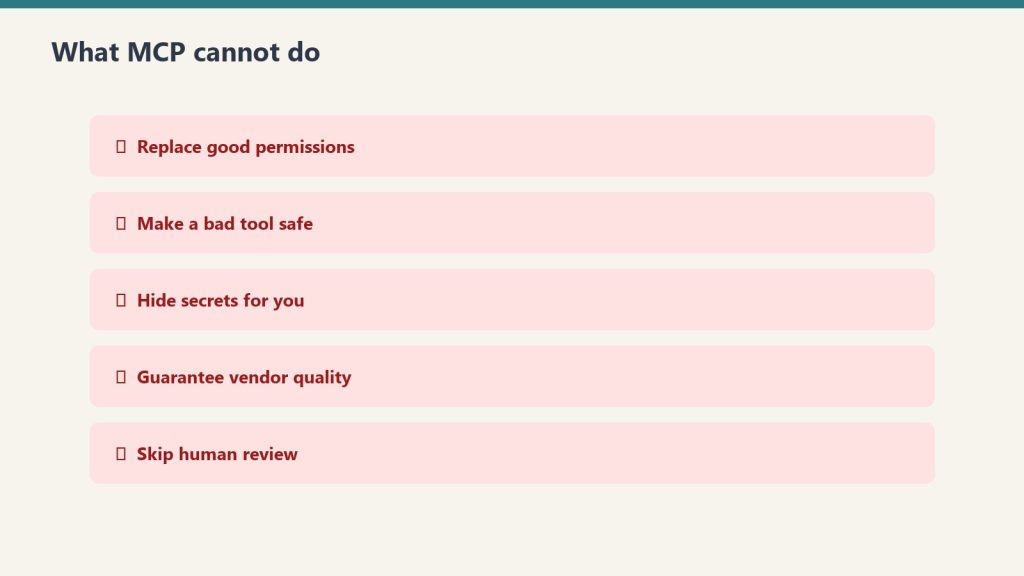
Is: A protocol specification. A way for AI clients to discover and call tools. A standard that makes tool servers portable across AI systems. Isn’t: A specific tool. A replacement for native APIs. A guarantee of quality — MCP servers vary widely in implementation quality.
Three patterns to start with
Three patterns to start with.
1. Adopt n8n MCP first. It’s the highest-leverage MCP integration for most operators because n8n already has hundreds of integrations. 2. Look for MCP servers for your existing tools. Many SaaS products are shipping MCP servers. Check before writing a Worker. 3. Build MCP servers for your own internal tools. If you have an internal API multiple agents will use, an MCP server is more reusable than a Notion Worker.
Where this goes wrong
1. Treating MCP as magic. A bad MCP server is still bad. Validate the server’s behavior before relying on it in production. 2. Connecting too many MCP servers. Each connected server is potential surface area for the agent to use unpredictably. Curate. 3. Skipping the security review. MCP servers can read and act on data. Treat connection like any other security-sensitive integration.
What to read next
n8n MCP Bridge, Workers + External APIs, Security Posture, Workers for Agents foundation piece.
n8n is where many ops teams already run their cross-app automations. Notion’s n8n MCP bridge lets Custom Agents call those automations as tools. The agent decides what to do; n8n executes the cross-app work. This combines two strengths: Notion AI’s natural-language understanding and database fluency, and n8n’s mature integration library and workflow tooling. You don’t have to rebuild your n8n setup inside Notion.
What this enables
What the n8n MCP bridge enables.
Three patterns that get easier: 1. Agent-triggered cross-app workflows. Agent reads a Notion page, decides an action is needed, calls the relevant n8n workflow which handles the actual work (Salesforce update, Stripe charge, file move, whatever). 2. Existing n8n investment compounds. Every n8n workflow you’ve built becomes a tool the agent can use. The library grows as your agent-callable surface grows. 3. Workflow logic stays in n8n. When the workflow logic changes, you change it in n8n once. All agents using that workflow inherit the change automatically.
When to use n8n vs Workers
When to use n8n vs Workers.
Notion has Workers (developer preview) for custom code. n8n is for cross-app workflows. The split:
– Workers when you need custom logic that doesn’t exist as an integration
– n8n when you need to coordinate across many existing apps with mature connectors
– Both for complex flows where Workers handle specific computation and n8n handles app coordination
For most ops teams, n8n is the right starting point. Workers are an advanced layer.
Where this goes wrong
Where this goes wrong.
1. Treating the agent as a smarter n8n trigger. The agent’s value is judgment about when to run the workflow. If you can express the trigger as a simple condition, just run n8n directly. 2. Letting agents call destructive workflows without confirmation. Agent + n8n + Salesforce delete = potential disaster. Add human approval steps for destructive operations. 3. Not versioning n8n workflows that agents call. When you change a workflow, agents don’t know. Version your workflows so agent prompts can pin to specific versions.
What to read next
Workers for Agents, MCP foundation piece, Notion Agents vs n8n Alone, The Solo Operator’s Stack.
The Signal — Tygart Media's weekly brief. What we actually ran, what it measured, and what it means for a restoration shop.