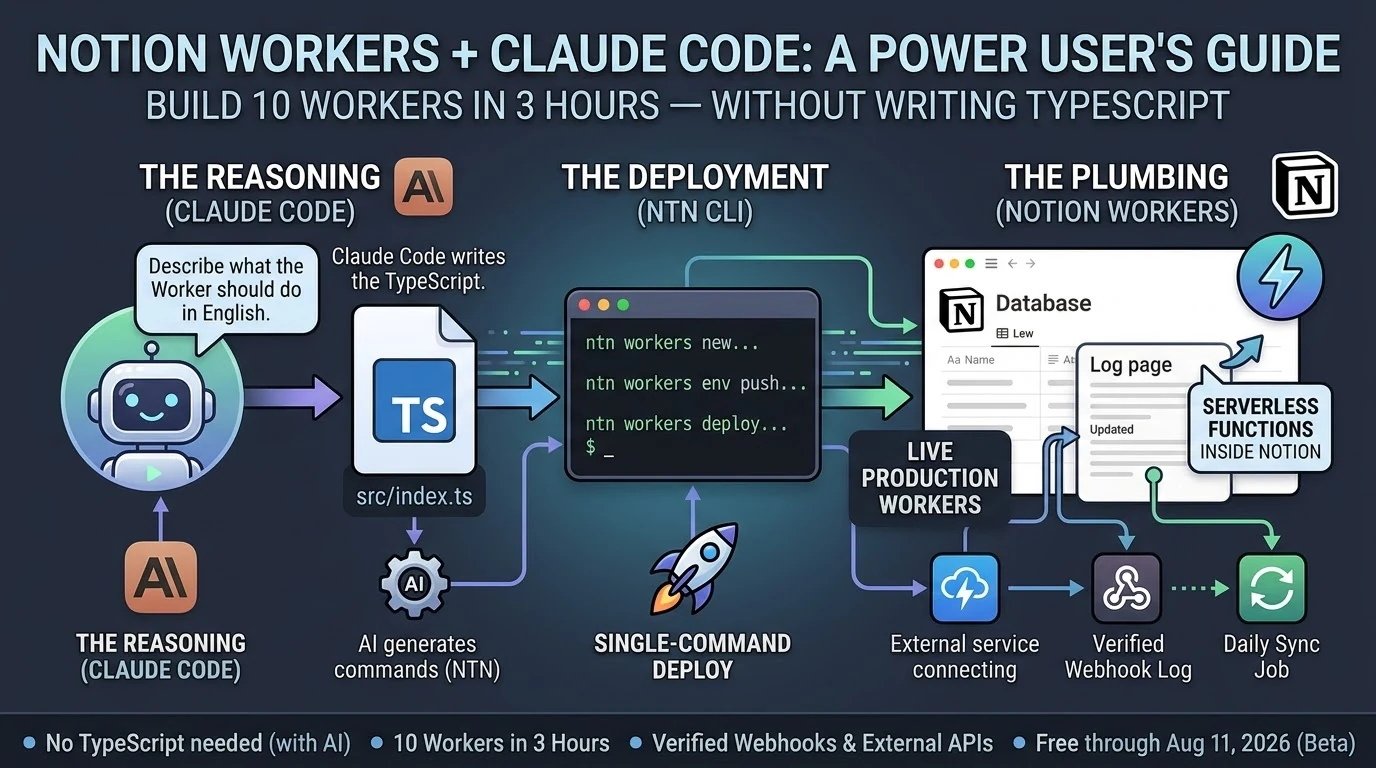
Notion shipped Workers on May 13, 2026 (Notion Help). By last night I had ten of them running in production, including a live HMAC-verified webhook endpoint that’s actively logging events. Total build time: about three hours.
I didn’t write TypeScript by hand. Claude Code did most of the typing.
Here’s what that actually looked like — and what it means for the non-developer Notion power user who’s been watching the Workers announcement and wondering if it’s for them.
ntn CLI, and Notion runs it in a secure sandbox — no server to manage. They’re free through August 11, 2026, then run on Notion credits. Deploying Workers requires a Business or Enterprise plan.
What Notion Workers Actually Are (The One-Paragraph Version)

If you’ve used Notion’s built-in database automations — the lightning bolt icon — Workers are that concept extended to real code. They can call any external API, respond to webhooks, sync data from Stripe or Zendesk or GitHub, and write results back to Notion databases. The CLI (ntn) is available on all plans. Deploying Workers requires Business or Enterprise.
Do You Need to Know TypeScript to Build Notion Workers?
Technically, Workers are written in TypeScript. Practically, if you have Claude Code, the answer is no.
Claude Code (currently at v2.1.144 as of May 19, 2026) scaffolds Workers from plain-English descriptions. You describe what the Worker should do. Claude Code writes the src/index.ts, handles the ntn workers env push for secrets, and tells you exactly what commands to run. You copy the command. The Worker deploys.
The workflow looks like this:
ntn workers new my-worker-name— scaffold the project- Tell Claude Code what the Worker should do
- Claude Code writes
src/index.ts ntn workers env push— push any secrets (API tokens, webhook keys)ntn workers deploy --name my-worker-name— ship it
That’s it. The only thing you actually type is the deploy commands. Claude Code fills in the gap between them.
What We Built in 3 Hours

Ten Workers, averaging about 18 minutes each, including two dead-ends that took 5–8 minutes to diagnose and abandon.
The most useful one is Worker #8: an HMAC-verified webhook logger. Any external service — GitHub, Stripe, a cron trigger, another Claude Code session — can POST to the Worker’s endpoint with a shared secret, and it auto-appends a timestamped line to a Notion log page. The webhook log shows its first self-test ping from Claude Code at 02:54 UTC:
🔔 2026-05-21T02:54:44.452Z [claude-test:test] {"event":"test","message":"Hello from Worker #8 self-test","sender":"claude-code"}That’s a live, verifiable event log. Not a draft. Not a mock. A deployed Worker receiving authenticated HTTP traffic and writing to Notion.
The ntn workers env push command works cleanly for both NOTION_API_TOKEN and non-Notion secrets like TYGART_WP_USER and WEBHOOK_SECRET — one of the key things we needed to confirm before trusting the stack at scale.
The Design Principle That Makes This Actually Work

The best insight from Notion’s Workers documentation: use code for deterministic work, use AI for judgment calls.
A Worker that pulls invoice status from Stripe and updates a Notion database doesn’t need AI. It needs reliable, cheap code execution. That’s what Workers give you. A Claude Sonnet 4.6 (claude-sonnet-4-6) or Opus 4.7 (claude-opus-4-7) agent that reads those Notion rows and drafts follow-up emails is handling the judgment call. Those are two different tools for two different jobs.
When you collapse that distinction — letting AI do everything — you pay AI prices for work that shouldn’t require AI reasoning. Workers run at a fraction of the cost of AI credits. Notion’s own example calculations put a daily sync job at roughly one cent per month. The AI layer sits on top for the parts that actually need it.
This is the architecture: Workers handle the plumbing. Claude handles the reasoning. You stop paying Opus rates for jobs a ten-line TypeScript function can do.
The Part Nobody Else Is Writing About
Every guide covering Notion Workers frames it as a solo-developer workflow. You sit down, you know TypeScript, you build a Worker over an afternoon.
That’s not how this went.
Claude Code is listed in Notion’s own documentation as a first-class deployment partner for Workers. The ntn CLI was explicitly designed to work with coding agents — same interface for humans and agents. When you treat Claude Code as the author and yourself as the operator running the commands it outputs, you get through ten Workers in a session that most developers would take a week to plan.
The non-developer angle is real. If you run Notion as your operating system — databases, automations, dashboards — and you’ve been watching the Workers announcement wondering whether it requires a CS degree, the answer in May 2026 is: not if you have Claude Code. The scaffolding is a one-line command. The deployment is a one-line command. Claude Code fills in the gap between them.
Three Things to Know Before You Start
Business or Enterprise plan required to deploy. The CLI (ntn) installs on any plan and runs free. Deploying Workers needs Business or Enterprise. Check your plan before you spend an afternoon scaffolding.
macOS and Linux only as of May 2026. Windows users need WSL2. Native Windows support is listed as coming soon. If you’re on Windows without WSL2, that’s your first step.
Free through August 11, 2026. After that, Workers run on Notion credits. Build and optimize now while the cost is zero. The free period gives you enough runway to understand your actual usage patterns before you’re paying for them.
Related on Tygart Media: how to use Claude · GA4 Intelligence Kits.
Frequently Asked Questions
What is the Notion Workers free period?
Notion Workers are free to try during the beta period, which runs through August 11, 2026. After that date, Workers will run on Notion credits. The free period is a good window to build, test, and optimize your Workers before metered usage begins.
Can non-developers build Notion Workers?
Yes, if you have an AI coding agent like Claude Code. Workers are written in TypeScript, but Claude Code can generate the Worker code from a plain-English description. You run the scaffold and deploy commands; Claude Code writes the code. No prior TypeScript knowledge required.
What Notion plan do you need for Workers?
The ntn CLI is available on all Notion plans. Deploying and managing Workers requires a Business or Enterprise plan.
How does Claude Code work with Notion Workers?
Claude Code (v2.1.144 as of May 2026) integrates directly with the ntn CLI. Notion designed the CLI as a tool for both humans and coding agents — same interface, same commands. Claude Code scaffolds the Worker TypeScript, sets environment variables, and outputs the exact deploy commands to run.
What can Notion Workers do?
Workers can call any external API, respond to incoming webhooks (with HMAC verification), sync data between external services and Notion databases, run scheduled tasks, and execute custom business logic. Common use cases include syncing Stripe payments, Zendesk tickets, GitHub issues, or any service with an API into Notion.
Is the ntn CLI available on Windows?
As of May 2026, the ntn CLI is available on macOS and Linux. Windows support is listed as coming soon. Windows users can use WSL2 in the meantime.
The Bottom Line
Ten Workers. Three hours. A verified webhook endpoint logging live traffic. Claude Code did the TypeScript. The ntn CLI did the deployment. Notion’s infrastructure handled everything else.
The question isn’t whether Notion Workers are for developers. The question is whether you have a coding agent. If you do, the friction is gone.
📖 Recommended Reading in Claude Code Insider
- 🎯 Pillar Guide: Claude Code + GitHub in 2026: What Rakuten, TELUS, and a 100K-Star Config File Actually Reveal
- 🔗 Next Topic: What I Actually Did Last Night
Leave a Reply