Tag: Notion Agents

  • The Trust Gap

    The Trust Gap

    Here’s the moment I’m talking about.

    The agent finishes. The output is sitting there. It looks right — it usually looks right — and now you have to decide whether you’re going to use it or check it first.

    That moment, that pause, is the trust gap. And if you’re running AI at any real volume, it’s the thing that’s quietly eating your time, your confidence, and sometimes your credibility.


    Most people handle it badly. I did too, for a while.

    The two failure modes are mirror images of each other. The first is reviewing everything — reading every output, checking every claim, treating the agent like an intern you don’t trust yet. This works. It catches errors. It also means the agent isn’t actually saving you time. You’ve moved the work from doing to checking, which is a trade-off that only makes sense at low volume or when the stakes are very high.

    The second failure mode is trusting everything — shipping what the agent produces without a meaningful review layer, because you’re busy and it usually looks right and you can fix things later. This also works, until it doesn’t. Bad output compounds quietly. A wrong fact in an article becomes a wrong fact that got cited. A misformatted record becomes a database full of exceptions you have to clean manually. By the time you notice, the problem is bigger than the original task.

    The thing both failure modes have in common is that they’re reactions to the trust gap rather than designs for closing it.


    The design question is different from the reaction question.

    The reaction question is: how much should I check this particular output right now?

    The design question is: what is the system that makes agent output trustworthy enough that I can scale it?

    I spent a long time asking the wrong question.


    What changed for me was thinking about trust as something that gets earned over time, not assessed in the moment.

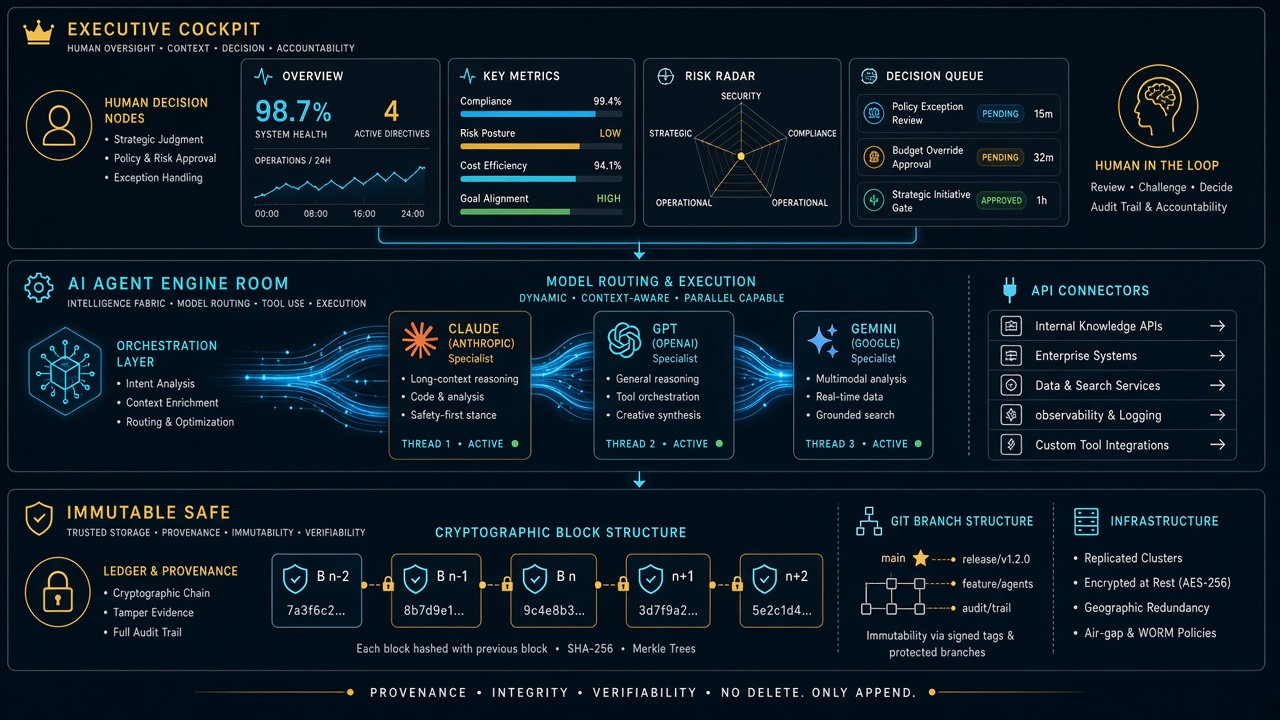
    The system I ended up with has a name — the Promotion Ledger — and it tracks every autonomous behavior by tier. Tier A behaviors are things I always approve before they ship. Tier B behaviors are things I prepare but decide on. Tier C behaviors run on their own without me touching them.

    Nothing starts at Tier C. Everything earns its way there through seven consecutive clean days — seven days where the behavior ran, I sampled the output, and found no gate failures. If something fails a gate, it drops a tier and the clock resets.

    The clock is the key part. Trust isn’t a feeling I have about an agent in a given moment. It’s a count of consecutive clean runs. When I look at the Ledger and see that a behavior has been running cleanly for 23 days, I don’t need to review that output today. The track record is the review.


    There are three things that made this work where other approaches didn’t.

    The first is that sampled review is different from universal review. I don’t read every output. I read a percentage of outputs, randomly selected, with a defined rubric for what “good” looks like. If the sample is clean, the population is trusted. If failures cluster around a pattern, I fix the prompt and restart the clock. This scales in a way that reading everything doesn’t.

    The second is source attribution. Every agent output that contains a factual claim has to show where the claim came from. Not because I’m going to verify every citation — I’m not. But because the presence of a citation converts “is this right?” from a research task into a spot check. A trust gap you can close in five seconds is functionally not a gap.

    The third is the rubric. I have a written definition of what “good enough” looks like for each type of output — what voice match means, what coherence means, what the acceptable error rate is. Without the rubric, every review is a fresh judgment call. With it, review is comparison. Comparison is faster, more consistent, and easier to delegate.


    The thing I kept getting wrong before I had this system was trying to close the trust gap with better prompts.

    More detailed instructions. More explicit warnings. Be careful. Double-check your facts. Don’t make up numbers.

    This doesn’t work. The agent already believes it’s being careful. Adding adjectives to a prompt doesn’t change behavior — it changes the agent’s self-description of its behavior, which is not the same thing. The agent that was going to hallucinate a statistic will still hallucinate it, but now it’ll do so with more confidence because you told it to be careful and it thinks it was.

    Structural changes work. Rubrics, sampling rates, attribution requirements, tiered trust with observable clean-day counts. These change what the system produces, not just how it describes what it’s producing.


    I want to be clear that this took a while to build and I’m still refining it.

    There are behaviors on my Ledger that have been running at Tier C for months without a gate failure. There are others that keep dropping back to Tier B because they’re inconsistent in ways I haven’t fully diagnosed yet. The system doesn’t make trust automatic — it makes trust measurable.

    That’s the shift. Not “I trust this agent” as a feeling, but “this behavior has 31 clean days and a gate failure rate of zero” as a fact. You can act on a fact in a way you can’t always act on a feeling.

    The trust gap doesn’t close all at once. It closes by accumulation — one clean run at a time, tracked, until the track record speaks for itself.


    If you’re running agents at any volume and you feel like you’re either checking too much or not checking enough, you’re in the gap. The way out isn’t a better prompt. It’s a system that makes trustworthiness visible over time.

    Start with one agent. Define what “good” looks like. Sample 20% of its output for four weeks. Log what you find.

    By week four you’ll know whether you have a trust problem, a prompt problem, or a rubric problem. Those have different fixes. But you can’t see which one you have until you start measuring.

  • The Bus Factor Problem

    The Bus Factor Problem

    There’s a question I’ve been avoiding for about two years.

    What happens to all of this if something happens to me?

    Not in a morbid way. Just practically. I run 27 client sites. I have an AI stack with dozens of moving parts — Cloud Run services, scheduled jobs, Notion databases, Workers that fire on their own while I sleep. I’ve built systems that work exactly the way I want them to work, in exactly the ways I understand, documented in exactly the language that makes sense to me.

    The bus factor for this entire operation is one. It’s me. If I’m not here, none of it survives in any meaningful way.

    I’ve been sitting with that long enough that I think it’s time to say it out loud.


    The bus factor is an old software engineering concept. It asks: how many people would need to get hit by a bus before this project fails? One is the worst possible number. It means everything lives in a single person’s head — their habits, their passwords, their way of naming things, their unwritten rules about how the system works.

    Most solo operators are a bus factor of one. They know this and they don’t talk about it because it sounds like a personal failing. Like you should have hired more people, or documented better, or not let yourself become the single point of failure for something people depend on.

    But I think the honest version is more complicated than that. A lot of what makes a solo operation valuable is exactly the thing that makes it fragile: it’s shaped entirely around one person’s judgment. The reason the system works is because I know when to break the rules I wrote. I know what the edge cases are before they happen. I know which automations to trust and which ones to watch. That’s not something you write in a runbook.

    So the question isn’t just “how do I document this better.” It’s “how do I make the judgment portable without turning it into something that loses the judgment in the process.”


    I’ve been building toward an answer, in pieces, over the last several months.

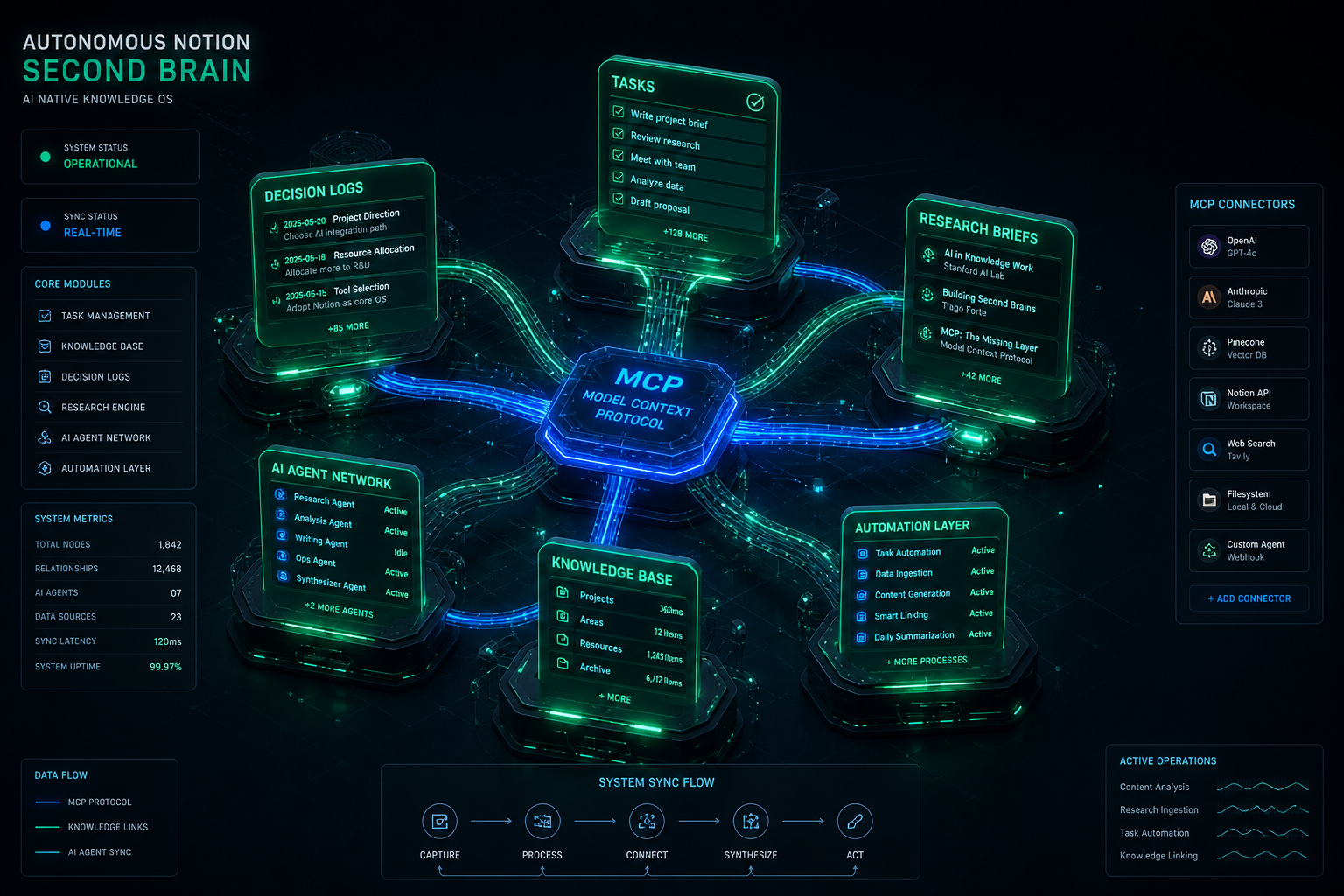
    The first piece was Notion as the control plane. Everything that matters about how this operation runs lives in Notion — specs, work orders, site credentials, content pipelines, system standards, the doctrine documents that explain why things are built the way they are. If I disappeared tomorrow, someone with the right access could open that workspace and read their way into understanding the shape of the operation, even if they couldn’t run it yet.

    The second piece was the two-plane architecture — Notion for thinking and storage, GCP for compute. Every Cloud Run service, every scheduled job, every Worker is defined somewhere in Notion before it runs somewhere on GCP. The compute is durable. The logic is documented. Those are two different things, and keeping them separate means neither one is a black box.

    The third piece is the hardest and I’m the least done with it: making the judgment readable.

    I write doctrine pages. Long ones, sometimes. They explain not just what the system does but why it works that way — what the original problem was, what I tried that didn’t work, what the rule is now and what would have to be true for the rule to change. I write them mostly for myself, because I forget things. But they’re also written for the hypothetical person who has to pick this up without me.

    That hypothetical person might be a future employee. It might be a contractor. It might be an AI agent working from a context window that needs to understand the operation well enough to continue it.

    It might be my partner, trying to figure out what to do with the business side of things if I’m not around.

    That’s the version that focuses the mind.


    I don’t have this solved. I want to be clear about that.

    What I have is a direction. The direction is: every decision should live somewhere outside my head. Every system should be explainable by someone who didn’t build it. Every credential should be in the registry, every automation should have a spec, every rule should have a reason written next to it.

    It’s slow work. It runs against the instinct to just build the thing and move on. There’s always something more urgent than documentation, and “I’ll remember how this works” is almost always true right up until it isn’t.

    But I’ve started treating the documentation as part of the product. Not the boring part — the part that makes the product real. A system that only works because I’m here isn’t really a system. It’s a performance.

    The goal is to build something that could survive me. Not because I’m planning to leave, but because the work of making it survivable is also the work of making it understandable, and a system I can’t fully explain is a system I don’t fully own.


    If you’re running something like this — solo or nearly so, more complexity than your headcount would suggest — I’d ask you the same question I’ve been sitting with.

    If something happened to you tomorrow, what would survive?

    Not what you hope would survive. What actually would.

    That gap is the work.

  • You Don’t Need a Developer. You Need a Better Workflow.

    You Don’t Need a Developer. You Need a Better Workflow.

    I’ve hired developers. Good ones. For specific things — infrastructure, custom integrations, work that genuinely required someone to sit down and write production code from scratch — it was the right call.

    But if I’m honest about the full list of things I’ve brought developers in for over the years, a meaningful chunk of it wasn’t really developer work. It was workflow work. It was “I need this thing to happen automatically when that other thing happens” work. It was “why does this still require a human to touch it” work.

    That category of problem has a different answer now.


    Here’s the pattern I kept running into:

    I’d have a clear picture of what I wanted. Data from one tool synced into Notion. A webhook that logged events automatically. A scheduled job that pulled information from an external API every morning and wrote the results somewhere I could see them. Nothing exotic. Stuff that, described out loud, sounds almost embarrassingly simple.

    But turning that description into something that actually ran required code. And writing code required a developer. And hiring a developer for something this small felt like bringing a contractor in to change a lightbulb — technically the right tool, but something about the ratio felt off.

    So a lot of it didn’t get built. The workflow stayed manual. The friction stayed.


    Last night I built ten of those things in three hours.

    Notion Workers — their new hosted serverless platform, shipping in beta as of May 13, 2026 — lets you deploy real code inside Notion’s infrastructure without managing a server. Combined with Claude Code, which writes the TypeScript while you describe what you want in plain English, the gap between “I know what I want” and “it exists and is running” is smaller than it has ever been.

    I’m not a developer. I operated the process. I described each Worker, reviewed what Claude Code wrote, ran the deploy commands, checked that it worked. When something broke, I read the error and passed it back. The loop was fast enough that two failures in ten attempts felt like a normal part of the session, not a crisis.

    By midnight I had a live webhook endpoint receiving authenticated traffic from the internet and writing verified events to a Notion log page. Automatically. While I slept.

    That’s workflow work. It just didn’t require a developer to get there.


    I want to be careful about what I’m claiming here.

    There are things that genuinely need a developer. Complex systems. Production APIs with serious security requirements. Anything where a bug has real consequences for real people. I’m not suggesting you staff down your engineering team based on a three-hour session with a CLI tool.

    What I’m suggesting is narrower: there is a category of work that has always felt like it needed a developer but actually needed something else. It needed clarity about what you wanted. It needed a good description. It needed someone willing to read an error message and try again.

    That work is yours now, if you want it.


    The practical question is where to start.

    Start with the thing that’s most manual in your current workflow. The task someone does by hand because no one ever got around to automating it. The data that lives in one tool but should live in another. The notification that goes out because someone remembered to send it, not because the system sent it automatically.

    Describe it out loud. If you can explain it to another person in two or three sentences, you can build it. Open Claude Code. Tell it what you want. Run the commands it gives you.

    You might be surprised how far that gets you before you need to call anyone.


    Notion Workers beta is free through August 11, 2026. The ntn CLI installs in one line on macOS or Linux. Business or Enterprise plan required to deploy Workers.

  • The Operator’s Stack

    The Operator’s Stack

    There’s a word that’s been sitting in my head lately and I think it’s the right one.

    Not developer. Not user. Not prompt engineer — please, not that.

    Operator.


    The developer builds the system. The user benefits from it. The operator runs it.

    Operators have always existed. They’re the people who know a tool well enough to get unusual things out of it — who understand what’s possible, who can configure and connect and troubleshoot, who treat software as infrastructure rather than a product to consume. In a restaurant, the chef is the operator. In a warehouse, it’s the floor manager who actually knows where everything is and why the inventory system does what it does.

    In most software companies, the operator was assumed to be technical. You needed to code, or at least to read code, to run anything at a real level of depth. Everyone else was a user — handed a finished product, expected to stay in the designated lanes.

    That line is moving.


    Last night I deployed ten Notion Workers in three hours. Workers are Notion’s new hosted serverless platform — real code, running inside Notion’s infrastructure, no server to manage. I built a webhook endpoint that receives authenticated HTTP traffic from the internet and logs it to a Notion database. I built data sync Workers. I built scheduled jobs.

    I am not a developer.

    What I am is an operator. I know what I want the system to do. I can describe it precisely. I understand how the pieces connect even when I can’t write the connection myself. And I have Claude Code, which handles the TypeScript while I handle the architecture.

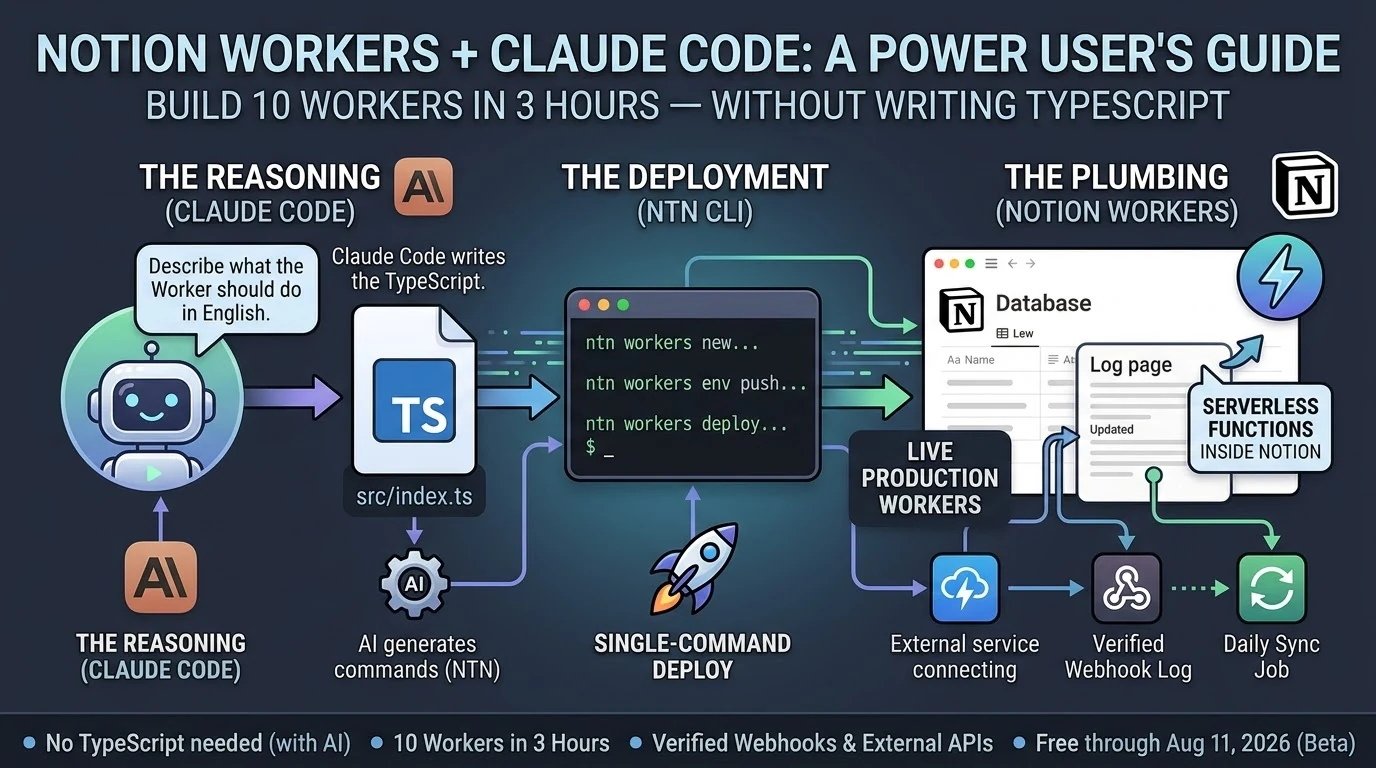
    The stack looks like this:

    Claude Code — the reasoning layer. Describe what the Worker should do in plain English. Claude Code writes the code, catches errors when you paste them back, and tells you exactly what commands to run.

    ntn CLI — the deployment layer. Four commands: scaffold, write, push secrets, deploy. Single-command deploys. You run what Claude Code tells you to run.

    Notion Workers — the execution layer. Serverless functions running on Notion’s infrastructure. They connect to external APIs, respond to webhooks, sync data, run on schedules. They do the work while you do something else.

    That’s it. Three layers. None of them require you to be a developer to operate.


    The operator’s job in this stack is not to write code. It’s to know what should exist.

    That sounds simple. It isn’t. Knowing what should exist means understanding your own operations well enough to identify where the friction is, what’s being done by hand that shouldn’t be, what would run better automatically. It means being able to describe a system clearly enough that an AI coding agent can build it. It means reviewing what gets built and knowing whether it’s right.

    That’s real skill. It’s just not the skill most people thought they needed.

    For years the implicit message was: if you can’t build it, you can’t have it. The work of describing exactly what you want, of thinking through the logic, of understanding how systems connect — that work was treated as a prerequisite for coding, not a valuable thing in its own right.

    Now it’s the job.


    I’m not going to tell you the technical barrier is gone. It isn’t. You still hit errors. You still have to read them and understand them well enough to know if Claude Code’s fix makes sense. You still have to think before you build.

    But the barrier has moved. The question is no longer “can you write TypeScript” — it’s “can you think clearly about what you want and describe it precisely.”

    Most people reading this can do that. They’ve been able to do that. They were just told, implicitly or explicitly, that it wasn’t enough.

    It’s enough now.


    The Notion Workers beta is free through August 11, 2026. The ntn CLI installs in one line on macOS or Linux. Deploying Workers requires a Business or Enterprise plan. If you’ve been running your operations in Notion and watching things like Workers from the sidelines because you figured it was for developers: it’s for operators too. You might already be one.

  • What I Actually Did Last Night

    What I Actually Did Last Night

    It was late. I had Claude Code open on my laptop and a fresh cup of coffee going cold next to it.

    Notion had shipped Workers eight days earlier — their new hosted serverless platform, basically “run real code inside Notion without managing a server.” I’d been meaning to dig in. Last night I finally did.

    I want to tell you what that actually looked like. Not a tutorial. Not a polished case study. Just what happened, in order, including the parts that didn’t work.


    By midnight I had ten Workers deployed and a live webhook endpoint logging authenticated traffic from the internet into a Notion page. The whole thing took about three hours.

    I did not write TypeScript.


    Here’s the honest version of how it went.

    The first Worker took the longest — maybe 35 minutes — because I was figuring out the CLI at the same time as building the thing. The ntn tool is straightforward once you understand it: scaffold, write the code, push your secrets, deploy. Four steps. But the first time through any new tool you’re reading error messages and second-guessing yourself.

    Claude Code handled the TypeScript. I described what I wanted — a Worker that receives a POST request, verifies an HMAC signature, and appends a line to a Notion log page. Claude Code wrote it. I ran the commands it told me to run. The Worker deployed.

    I tested it. It worked.

    The second one took 22 minutes. The third took 15. By Worker five I was moving fast enough that I stopped tracking individual times and just kept going.

    Two of them didn’t work on the first try. One had a secret I’d named wrong in the environment — my fault, five minutes to fix. The other had a logic error in how it was handling the Notion API response. Claude Code caught it when I pasted the error back in, rewrote the relevant section, and I redeployed. Eight minutes total for that dead-end.

    Neither failure felt like a crisis. That’s the part I want to underline. When something broke, the path forward was obvious: read the error, paste it back to Claude Code, get a fix, redeploy. The loop was tight enough that failure was just a speed bump, not a wall.


    At 02:54 in the morning, I sent a test ping to Worker #8.

    The webhook logger received it, verified the HMAC signature, and wrote this to a Notion page in real time:

    🔔 2026-05-21T02:54:44.452Z [claude-test:test] {"event":"test","message":"Hello from Worker #8 self-test","sender":"claude-code"}

    I sat there for a second looking at that.

    There’s something specific about seeing a system you built actually receive traffic. It’s not the same as a script running on your laptop. This was a deployed endpoint, on Notion’s infrastructure, receiving an authenticated HTTP request from the open internet and writing the result to a database. Automatically. Without me doing anything after the initial deploy.

    That’s a different category of thing than what I had before.


    I want to be honest about what I am, technically. I’m not a developer. I’ve picked up enough over the years to be dangerous — I can read code, I understand how APIs work, I’ve shipped things — but I’m not someone who sits down and writes TypeScript from scratch.

    Last night didn’t require that. What it required was knowing what I wanted, being able to describe it clearly, and being willing to run commands and read errors.

    That’s it.

    The question I keep hearing from people who run operations like mine — agencies, small teams, people who live in tools like Notion and have always hired out the code work — is whether any of this AI coding stuff is actually for them or if it’s still fundamentally a developer story with a better interface.

    Last night felt like an answer. Ten Workers. Three hours. No TypeScript.

    If you can describe what you want clearly enough to explain it to another person, you can build this. The friction that used to live between “I know what I want” and “it exists in the world” is genuinely smaller now.

    Not gone. Smaller.

    You still have to show up. You still have to read the errors. You still have to think through what you’re building before you build it.

    But if you’ve been waiting for some invisible threshold of technical credibility before you try — you’re past it. You were probably past it a while ago.


    The Notion Workers beta is free through August 11, 2026. The ntn CLI installs in one line. Business or Enterprise plan required to deploy.

  • 10 Notion Workers in 3 Hours: What Happens When Claude Code Does the Typing

    10 Notion Workers in 3 Hours: What Happens When Claude Code Does the Typing

    Notion shipped Workers on May 13, 2026. By last night I had ten of them running in production, including a live HMAC-verified webhook endpoint that’s actively logging events. Total build time: about three hours.

    I didn’t write TypeScript by hand. Claude Code did most of the typing.

    Here’s what that actually looked like — and what it means for the non-developer Notion power user who’s been watching the Workers announcement and wondering if it’s for them.

    What are Notion Workers? Notion Workers are hosted serverless functions that run inside Notion’s infrastructure. You write code, deploy it through the ntn CLI, and Notion runs it in a secure sandbox — no server to manage. They’re free through August 11, 2026, then run on Notion credits. Deploying Workers requires a Business or Enterprise plan.

    What Notion Workers Actually Are (The One-Paragraph Version)

    If you’ve used Notion’s built-in database automations — the lightning bolt icon — Workers are that concept extended to real code. They can call any external API, respond to webhooks, sync data from Stripe or Zendesk or GitHub, and write results back to Notion databases. The CLI (ntn) is available on all plans. Deploying Workers requires Business or Enterprise.

    Do You Need to Know TypeScript to Build Notion Workers?

    Technically, Workers are written in TypeScript. Practically, if you have Claude Code, the answer is no.

    Claude Code (currently at v2.1.144 as of May 19, 2026) scaffolds Workers from plain-English descriptions. You describe what the Worker should do. Claude Code writes the src/index.ts, handles the ntn workers env push for secrets, and tells you exactly what commands to run. You copy the command. The Worker deploys.

    The workflow looks like this:

    1. ntn workers new my-worker-name — scaffold the project
    2. Tell Claude Code what the Worker should do
    3. Claude Code writes src/index.ts
    4. ntn workers env push — push any secrets (API tokens, webhook keys)
    5. ntn workers deploy --name my-worker-name — ship it

    That’s it. The only thing you actually type is the deploy commands. Claude Code fills in the gap between them.

    What We Built in 3 Hours

    Ten Workers, averaging about 18 minutes each, including two dead-ends that took 5–8 minutes to diagnose and abandon.

    The most useful one is Worker #8: an HMAC-verified webhook logger. Any external service — GitHub, Stripe, a cron trigger, another Claude Code session — can POST to the Worker’s endpoint with a shared secret, and it auto-appends a timestamped line to a Notion log page. The webhook log shows its first self-test ping from Claude Code at 02:54 UTC:

    🔔 2026-05-21T02:54:44.452Z [claude-test:test] {"event":"test","message":"Hello from Worker #8 self-test","sender":"claude-code"}

    That’s a live, verifiable event log. Not a draft. Not a mock. A deployed Worker receiving authenticated HTTP traffic and writing to Notion.

    The ntn workers env push command works cleanly for both NOTION_API_TOKEN and non-Notion secrets like TYGART_WP_USER and WEBHOOK_SECRET — one of the key things we needed to confirm before trusting the stack at scale.

    The Design Principle That Makes This Actually Work

    The best insight from Notion’s Workers documentation: use code for deterministic work, use AI for judgment calls.

    A Worker that pulls invoice status from Stripe and updates a Notion database doesn’t need AI. It needs reliable, cheap code execution. That’s what Workers give you. A Claude Sonnet 4.6 (claude-sonnet-4-6) or Opus 4.7 (claude-opus-4-7) agent that reads those Notion rows and drafts follow-up emails is handling the judgment call. Those are two different tools for two different jobs.

    When you collapse that distinction — letting AI do everything — you pay AI prices for work that shouldn’t require AI reasoning. Workers run at a fraction of the cost of AI credits. Notion’s own example calculations put a daily sync job at roughly one cent per month. The AI layer sits on top for the parts that actually need it.

    This is the architecture: Workers handle the plumbing. Claude handles the reasoning. You stop paying Opus rates for jobs a ten-line TypeScript function can do.

    The Part Nobody Else Is Writing About

    Every guide covering Notion Workers frames it as a solo-developer workflow. You sit down, you know TypeScript, you build a Worker over an afternoon.

    That’s not how this went.

    Claude Code is listed in Notion’s own documentation as a first-class deployment partner for Workers. The ntn CLI was explicitly designed to work with coding agents — same interface for humans and agents. When you treat Claude Code as the author and yourself as the operator running the commands it outputs, you get through ten Workers in a session that most developers would take a week to plan.

    The non-developer angle is real. If you run Notion as your operating system — databases, automations, dashboards — and you’ve been watching the Workers announcement wondering whether it requires a CS degree, the answer in May 2026 is: not if you have Claude Code. The scaffolding is a one-line command. The deployment is a one-line command. Claude Code fills in the gap between them.

    Three Things to Know Before You Start

    Business or Enterprise plan required to deploy. The CLI (ntn) installs on any plan and runs free. Deploying Workers needs Business or Enterprise. Check your plan before you spend an afternoon scaffolding.

    macOS and Linux only as of May 2026. Windows users need WSL2. Native Windows support is listed as coming soon. If you’re on Windows without WSL2, that’s your first step.

    Free through August 11, 2026. After that, Workers run on Notion credits. Build and optimize now while the cost is zero. The free period gives you enough runway to understand your actual usage patterns before you’re paying for them.

    Frequently Asked Questions

    What is the Notion Workers free period?

    Notion Workers are free to try during the beta period, which runs through August 11, 2026. After that date, Workers will run on Notion credits. The free period is a good window to build, test, and optimize your Workers before metered usage begins.

    Can non-developers build Notion Workers?

    Yes, if you have an AI coding agent like Claude Code. Workers are written in TypeScript, but Claude Code can generate the Worker code from a plain-English description. You run the scaffold and deploy commands; Claude Code writes the code. No prior TypeScript knowledge required.

    What Notion plan do you need for Workers?

    The ntn CLI is available on all Notion plans. Deploying and managing Workers requires a Business or Enterprise plan.

    How does Claude Code work with Notion Workers?

    Claude Code (v2.1.144 as of May 2026) integrates directly with the ntn CLI. Notion designed the CLI as a tool for both humans and coding agents — same interface, same commands. Claude Code scaffolds the Worker TypeScript, sets environment variables, and outputs the exact deploy commands to run.

    What can Notion Workers do?

    Workers can call any external API, respond to incoming webhooks (with HMAC verification), sync data between external services and Notion databases, run scheduled tasks, and execute custom business logic. Common use cases include syncing Stripe payments, Zendesk tickets, GitHub issues, or any service with an API into Notion.

    Is the ntn CLI available on Windows?

    As of May 2026, the ntn CLI is available on macOS and Linux. Windows support is listed as coming soon. Windows users can use WSL2 in the meantime.

    The Bottom Line

    Ten Workers. Three hours. A verified webhook endpoint logging live traffic. Claude Code did the TypeScript. The ntn CLI did the deployment. Notion’s infrastructure handled everything else.

    The question isn’t whether Notion Workers are for developers. The question is whether you have a coding agent. If you do, the friction is gone.

  • Notion’s Database-First Bet: Why the Everything App Might Be Built on a Spreadsheet, Not a Document

    Notion’s Database-First Bet: Why the Everything App Might Be Built on a Spreadsheet, Not a Document

    Last refreshed: May 15, 2026

    See also: Our full breakdown of the May 13, 2026 platform launch is here — Notion Developer Platform Launch (May 13, 2026). And for the operating doctrine the launch reinforces, see The Three-Legged Stack.

    Microsoft is stitching together an everything app from acquisitions. Google is trying to unify a native stack it keeps fragmenting. Notion is doing something different — and arguably more interesting. It’s building the everything app from the database up, and it just made its most important move yet.

    Definition: The Database-First Everything App An AI-powered workspace where every piece of information — tasks, projects, docs, contacts, data — lives in a structured, queryable database, and agents can read, write, reason over, and act on that data autonomously. The database isn’t the backend. It’s the interface.

    Yesterday Changed Everything for Notion

    On May 13, 2026 — yesterday — Notion shipped version 3.5 and announced their full Developer Platform in a livestreamed product event. The tech press covered it as an AI agent story. They weren’t wrong, but they missed the bigger frame.

    Notion didn’t just add agents. They introduced a new primitive called Workers — a hosted runtime for custom code that lets teams extend Notion without running their own servers. Database sync, agent tools, and webhook triggers all run through Workers. They launched the External Agents API, allowing any agent — ones you built, or ones from Claude, Codex, Decagon, and other partners — to work natively inside your Notion workspace. And they opened a developer platform that lets teams connect AI agents, external data sources, and custom code directly into their workspace.

    Taken individually, these are nice product updates. Taken together, they’re an orchestration play. Notion is positioning itself not as a note-taker with AI features bolted on, but as the hub where people, agents, and data collaborate across every tool a team uses.

    The Database Advantage Nobody Else Has

    Here’s the thing that separates Notion from every other everything-app candidate — including Microsoft and Google.

    Both Microsoft 365 and Google Workspace are document-first platforms. Their fundamental unit of work is a file: a Word document, a Google Doc, a PowerPoint, a Sheet. Files are great for humans to read. They’re terrible for AI to reason over at scale. You can’t ask an AI agent to “find every project where the status is blocked and the deadline is this week” across a folder of Word documents and get a reliable answer.

    Notion’s fundamental unit is a database. Every page can be a database row. Every property is structured, queryable, filterable data. When Notion AI looks at your workspace, it doesn’t see a pile of documents — it sees a relational knowledge graph. Tasks have statuses. Projects have owners and deadlines. Contacts have properties. Everything is connected, typed, and queryable.

    That’s not a feature difference. That’s an architectural difference. And it’s why Notion’s agents can do things that Copilot and Gemini agents fundamentally struggle with: operate reliably on your actual organizational data, not summaries of your documents.

    The Agent Timeline: Faster Than Anyone Expected

    Notion’s agent rollout has moved at a pace that’s easy to underestimate if you haven’t been watching closely. Here’s the actual timeline:

    • September 18, 2025 — Notion 3.0: Agents. First AI agents launch. Autonomous data analysis and task automation. The starting gun.
    • January 20, 2026 — Notion 3.2. Mobile AI, new model support, people directory. Agents go everywhere, not just desktop.
    • February 24, 2026 — Notion 3.3: Custom Agents. Users can build their own agents from scratch. Over 21,000 custom agents built in the first free trial period alone. Notion reported 2,800 agents running 24/7 internally at Notion itself.
    • March 2026. Workers introduced in alpha — a TypeScript-based framework for agents to talk to any service with an API. The coding layer for power users.
    • April 14, 2026 — Notion 3.4. Calendar and inbox connectors. Notion AI can now schedule meetings and draft emails from inside your workspace.
    • May 5, 2026. Custom Agent admin controls for enterprise — workspace-level credit limits, governance tools, compliance features.
    • May 13, 2026 — Notion 3.5: Developer Platform. External Agents API, Workers out of alpha, database sync with no servers, full developer ecosystem launched.

    That’s eight months from first agent launch to full developer platform. For context, Microsoft spent years building Azure OpenAI integration before Copilot reached feature parity with what Notion shipped in less than a year.

    What the Notion Everything App Actually Looks Like Today

    This isn’t theoretical. Here’s what a team running on Notion can configure right now:

    • Your project data, always current. Databases synced from Slack, Google Drive, GitHub, Jira, Microsoft Teams, Salesforce, and Box — all flowing into Notion databases in real time, powered by Workers. No manual updates. No stale spreadsheets.
    • Agents watching your work. Custom agents triggered by database changes, schedules, or webhooks — compiling status updates, flagging blocked tasks, escalating overdue items, answering team FAQs.
    • Your inbox and calendar inside your workspace. Connect Gmail or Outlook and your calendar; Notion AI can schedule meetings and draft emails without leaving the tool your work already lives in.
    • External agents working in your context. Claude, Codex, Decagon — agents you’ve built yourself via the External Agents API — all operating against your Notion databases with full context. Not generic AI. AI that knows your specific data.
    • Plan Mode for complex operations. Before an agent makes large changes to your databases or pages, it stops, asks clarifying questions, and builds a plan for your approval. This is the governance layer that makes AI trustworthy in a business context.
    • Your institutional knowledge, always accessible. Every decision, every project history, every team document — structured and queryable by agents that can synthesize across your entire knowledge base on demand.

    The Model Behind It: Claude Opus 4.7

    Unlike Microsoft (Copilot runs on GPT-4o and Azure OpenAI) and Google (Gemini family), Notion is built on Anthropic’s Claude. As of the January 2026 update, Notion runs Claude Opus 4.7 — Anthropic’s most capable model at the time of release — for its AI features and agent reasoning.

    This is a strategic choice worth examining. Claude is specifically designed with a focus on reliability, honesty, and safe behavior in agentic contexts — qualities that matter enormously when an AI agent has write access to your company’s databases. Anthropic’s Constitutional AI training approach was built for exactly the kind of autonomous, long-running agent work that Notion is deploying.

    The Notion + Claude combination isn’t just a vendor relationship. It’s an architectural alignment: a database-first workspace built on a model specifically designed for trustworthy agentic behavior. That’s a more coherent stack than either Microsoft or Google has assembled, where the AI model and the productivity platform were developed independently and integrated later.

    Why “Database First” Beats “Document First” for the Everything App

    Let’s make this concrete with a comparison most teams will recognize.

    Ask Microsoft Copilot: “Which of our client projects are behind schedule this quarter?” Copilot will search your emails, scan your SharePoint documents, and produce a reasonable summary — but it’s reading prose, inferring structure, and hoping the documents are up to date. The answer is a best-effort synthesis, not a query result.

    Ask a Notion agent the same question: it runs a database filter. Status = Behind. Quarter = Q2 2026. It returns an exact list in under a second, with links to every project, the responsible person, and the last update — because that data is structured. The agent didn’t infer anything. It read typed data.

    That’s the difference between AI that helps you find things and AI that actually knows things. Notion’s database architecture is what makes the second kind possible at scale, without hallucination, without retrieval errors, without the AI making up a project that doesn’t exist.

    The Honest Weakness: The 30-Second Wall

    Here’s what you only learn by actually building inside the alpha — and we did.

    Notion Workers runs in a 30-second sandbox with 128MB of memory. Each Worker is created through the Notion control panel, taking 3–5 minutes to spin up. The network is limited to an approved domain allowlist. Storage is ephemeral — nothing persists between runs. These aren’t theoretical constraints. They’re the real walls you hit when you try to move serious automation workloads into Notion.

    We were in the Workers alpha. We built Workers. We set up custom agents. And we stress-tested the sandbox deliberately — forcing failures to find the exact break points, then running production workloads at 60% of the known ceiling as a stability rule. That’s the only honest way to operate inside a system this constrained: know where it breaks before you depend on it.

    What we found changed our architecture. Heavy automations — multi-site WordPress SEO optimization passes across 18 sites, content pipelines, image generation, WP-CLI batch operations — couldn’t live inside Notion Workers. They’re multi-minute jobs, not 30-second jobs. Moving them to Notion would have meant engineering workarounds that added complexity without adding reliability.

    So instead of moving Cowork automations into Notion as we originally planned, we moved them to Google Cloud Run. The notion-deep-extractor (crawls the workspace, extracts structured knowledge, logs to the Second Brain database — runs 3x daily) and the notion-maintenance bundle (archive sweeper, stale work detector, content guardian — runs daily at 6am UTC) all live on Cloud Run now, with Cowork scheduled tasks paused. The 18-site WordPress optimizer running Tuesday? Cloud Run. Not Notion.

    This isn’t a knock on Notion. It’s an architectural reality that every builder needs to understand before they commit workloads. The right pattern — the one we’re now using and that Notion’s own documentation points toward — is Notion Workers as the trigger layer, Cloud Run as the execution layer. A Worker fires a signed POST to a Cloud Run endpoint, returns immediately (well under 30 seconds), Cloud Run runs the heavy job, then writes results back to a Notion database via the Public API. You get Notion as the orchestration and visibility layer without hitting the sandbox wall.

    That hybrid is genuinely powerful. But it requires infrastructure that most small teams don’t have. If you don’t have a Cloud Run setup, a service account, and the deployment knowledge to wire this together, the 30-second limit will stop you cold on anything more complex than a lightweight API call or a database update.

    Notion doesn’t own email. It connects to Gmail and Outlook. It doesn’t own a calendar — it integrates with yours. It doesn’t have a mobile OS or browser. Those gaps matter less than the sandbox constraint does for real production workloads. The everything app story is real — but the execution layer has hard limits that require a hybrid architecture to work around, at least until Workers matures beyond its current beta constraints.

    Who Should Be Paying Attention Right Now

    If you’re an agency, a service business, a content operation, or any knowledge-work team that already uses Notion — or has been considering it — the May 13 Developer Platform announcement changes your calculus significantly.

    Custom Agents are available as an add-on for Business and Enterprise plans. Workers are free during the current beta period (billing starts August 11, 2026). The External Agents API is open now. This is the window to build before your competitors do.

    The teams that spend the next 90 days wiring up their Notion databases, building their first custom agents, and connecting their external data sources will have a compounding advantage that’s very hard to replicate in 2027. The institutional knowledge that feeds these agents — the project histories, the SOPs, the client databases — takes time to build. Starting now is the only strategy that works.

    The Bigger Picture: A Series on Who Wins the Everything App

    This is the third article in an emerging pattern I’ve been thinking through: who actually builds the everything app, and what does their path look like?

    Microsoft is building it through acquisitions and Copilot, stitching together LinkedIn, Azure, and the M365 suite. Google already owns the native stack — Gmail, Drive, Search, Android — and is trying to unify it through Gemini Enterprise and Workspace Studio after years of product fragmentation. Notion is building it from the database up, betting that structured data plus open agents beats document-first platforms with AI bolted on.

    None of them has won yet. All three bets are live. The winner won’t be the company with the most features — it’ll be the one that earns enough trust to become the single place where your work actually lives.

    Notion’s database-first architecture is the most interesting bet of the three. It’s also the most fragile — dependent on integrations, constrained by not owning the OS or the inbox, limited by whatever Anthropic does with Claude pricing and capabilities. But if it works, it works in a way the others can’t easily copy. You can’t retrofit a database architecture onto a document platform. You have to start over.

    Microsoft and Google aren’t starting over. Notion never had to.

    Frequently Asked Questions

    What are Notion Custom Agents?

    Notion Custom Agents are AI teammates that handle repetitive tasks autonomously — answering FAQs, compiling status updates, automating workflows — triggered by schedules, database changes, or webhooks. They launched in February 2026 (Notion 3.3) and are available as an add-on for Business and Enterprise plans. Over 21,000 were built during the free trial period alone.

    What is Notion Workers?

    Notion Workers is a hosted cloud runtime for custom TypeScript code, introduced in alpha in March 2026 and fully launched with the Developer Platform on May 13, 2026. It powers database sync, agent tools, and webhook triggers — letting teams extend Notion to connect any service with an API, without running their own servers. Workers are free during the beta period through August 10, 2026.

    What AI model does Notion use?

    Notion runs on Anthropic’s Claude — specifically Claude Opus 4.7 as of the January 2026 update. This is different from Microsoft Copilot (which uses OpenAI’s GPT models) and Google Workspace (which uses the Gemini family). Notion’s choice of Claude reflects an emphasis on reliable, safe agentic behavior for workflows that have write access to business databases.

    What is the Notion External Agents API?

    The External Agents API, launched with Notion 3.5 on May 13, 2026, lets teams bring any AI agent — including ones built internally or from partners like Claude, Codex, and Decagon — directly into their Notion workspace. These external agents can read and write to Notion databases with full context about the team’s data.

    How is Notion different from Microsoft Copilot and Google Workspace AI?

    Notion is database-first. Every piece of information in Notion is structured, typed, and queryable data — not documents. This means Notion agents can run precise database queries against your actual organizational data rather than inferring structure from prose documents. For teams that need AI to reliably operate on business data (not just search and summarize), this architectural difference is significant.

    What are the real limitations of Notion Workers in the alpha?

    Notion Workers runs in a 30-second sandbox with 128MB of memory and ephemeral storage. Network access is limited to an approved domain allowlist. Workers are created via the Notion control panel (3–5 minutes each). Long-running jobs — content pipelines, multi-site operations, image generation — won’t fit. The recommended pattern for serious workloads is Notion Workers as the trigger layer firing a signed POST to an external execution environment (like Google Cloud Run), with results written back to Notion databases via the Public API.

  • AI-Native Company Patterns: How Notion Agents Reshape the Org Chart

    AI-Native Company Patterns: How Notion Agents Reshape the Org Chart

    AI-Native Company Patterns: How Notion Agents Reshape the Org Chart

    The 60-second version

    The honest framing is uncomfortable: Custom Agents handle the work that historically required junior operational staff. Status reports, intake processing, lead enrichment, weekly digests, calendar prep, recurring deliverables. AI-native companies don’t add agents alongside that work — they replace that work with agents and reassign the humans to what humans actually do better. Editorial judgment. Client relationships. Strategic decisions. Handling exceptions. The org chart shifts. Pretending it doesn’t is denial.

    What roles change first

    Five roles where the work compresses fastest:
    Coordinator/admin work — meeting scheduling, calendar prep, follow-up tracking. Largely automatable.
    Junior analyst work — data pulls, report generation, basic synthesis. Largely automatable.
    First-tier intake — categorizing inbound leads, support tickets, content submissions. Largely automatable.
    Status communication — weekly updates, project digests, standup notes. Largely automatable.
    Documentation upkeep — keeping wikis, runbooks, and SOPs current. Largely automatable with Autofill + agents.
    This isn’t a prediction; it’s already happening in operator-led companies that have built Custom Agents for these workflows.

    What roles get more important

    The same shift makes other roles more valuable:
    Editorial leadership — defining voice, judgment, standards. Agents follow standards; they don’t write them.
    Relationship work — sales relationships, client management, partnerships. Humans signal humanity.
    Exception handling — the 5% of cases that don’t fit the agent’s pattern. This becomes the human’s whole job.
    System design — building the agents, prompts, skills, and workflows themselves. The new ops role.
    Strategic work — deciding what the company should do, not how to do it.

    The new org shape

    A simple four-layer pattern:
    1. Agent operators — humans who design, monitor, and improve agent workflows
    2. Exception handlers — humans who catch what agents can’t handle
    3. Relationship leads — humans who own external-facing work that requires being human
    4. Strategists — humans who decide what to do
    Notice what’s missing: layers of middle management whose primary job was coordinating between doers. Agents reduce coordination overhead because they don’t need it.

    How to transition

    For most operators, the shift looks like:
    – Stop hiring for roles where agents could do 70% of the work. Build the agent instead.
    – Reassign current staff toward exception handling, relationship work, and editorial judgment.
    – Invest in agent operator skills — prompt design, workflow design, rubric design.
    – Compress the org chart. Fewer layers, broader roles, sharper accountability.
    This is a multi-year shift, not a quarter. But the operators who start now have years of compounding advantage over those who delay.

    The risk

    The risk is reorganizing too fast and losing institutional knowledge that lived in the eliminated roles. Agents don’t pick up tribal knowledge automatically. The transition needs to capture what departing staff knew and encode it in the second brain so the agents can use it.

    What to read next

    Editorial Surface Area, Second-Brain Architecture, ROI Math, When Not to Use a Notion Agent.

  • Second-Brain Architecture in the Age of Notion Agents

    Second-Brain Architecture in the Age of Notion Agents

    Second-Brain Architecture in the Age of Notion Agents

    The 60-second version

    The pre-AI second brain was a personal information system. The post-AI second brain is a personal information system that an agent can also navigate. The two are different. A pile of brilliant unstructured notes is great for human recall and useless for agent synthesis. The shift is structural: more databases, fewer floating pages; controlled tags instead of free-text; cross-links between related items; an explicit glossary. Most second brains need to be partially rebuilt to work as agent substrate.

    What changes with agents in the picture

    Pre-agent, the second brain optimization was retrieval-for-humans: how fast can I find the thing I’m looking for. Post-agent, it’s retrieval-for-agents: how reliably can the agent find and synthesize across the right things without human guidance.
    These are different optimizations. Humans use intuition, recent memory, and visual scanning. Agents use semantic search, structured queries, and link traversal. A second brain optimized for one isn’t optimized for the other.

    Five structural shifts

    1. Pages → Databases. Floating pages don’t query well. Databases with consistent properties do. If you have a “books I’ve read” pile of pages, convert it to a database with author, genre, key insight, related-projects properties.
    2. Free tags → Controlled vocabulary. Twenty variations of “client” produces an agent that misses things. One canonical “Client” tag with defined scope works.
    3. Standalone pages → Cross-linked graph. Notion’s link system is the agent’s navigation. A new page should link to at least 2-3 related existing pages. Pages with no inbound or outbound links are dead to the agent.
    4. Implicit conventions → Explicit glossary. A page that captures “this is what we call things and how we structure projects” gives the agent rules instead of guesses.
    5. Recent-memory archives → Continuously enriched archives. Old projects shouldn’t decay. AI Autofill can re-summarize, re-tag, and re-cross-link old pages so they stay queryable.

    The agent-aware folder structure

    A workable shape for an agent-friendly second brain:
    Daily notes (database, dated, freeform — agent reads these for context)
    Projects (database, named, with status, owner, timeline — agent works against these)
    People (database, names, relationships, last interaction — agent uses for personalization)
    Sources (database, URLs, key insights, related-projects — agent cites these)
    Glossary (single page or small database — agent’s vocabulary anchor)
    Decisions log (database, dated, with context — agent’s history)
    Six structures. That’s it. Most second-brain sprawl can be consolidated to this.

    What this enables

    Once the structure is in place, agents do things that feel like magic:
    – “What did we decide about X six months ago?” returns the actual decision plus the context.
    – “Summarize what I’ve learned about Y this year” produces a real synthesis.
    – “Draft a brief on Z” pulls from sources, projects, decisions, and prior work.
    None of this works without the substrate. All of it is trivial with it.

    What to read next

    Editorial Surface Area, Gates Before Volume, AI-Native Company Patterns.

  • Error Handling and Fallbacks in Notion AI Workflows

    Error Handling and Fallbacks in Notion AI Workflows

    Error Handling and Fallbacks in Notion AI Workflows

    The 60-second version

    The default failure mode of a Notion agent is “stop.” That’s almost never what you want in production. Robust workflows define what happens for each kind of failure: agent times out, Worker fails, external API is down, the schema mismatched, the credit pool emptied. Each needs a planned response — retry, fall back to manual, escalate to human, log and continue. Without explicit handling, “the agent stopped working” becomes a mystery debug session.

    Five failure modes and their handling

    1. Agent timeout (rare but exists). A 20-minute Custom Agent run that doesn’t complete. Handling: log the timeout, surface to the human owner, don’t auto-retry (likely to repeat the same problem).
    2. Worker timeout (more common). Worker hits 30-second limit. Handling: structured error return from the Worker; agent decides whether to retry, partial-result, or fail. Don’t silently re-invoke.
    3. External API failure. API down, rate limited, or returning errors. Handling: retry with exponential backoff (max 3 attempts), then fall back to “external system unavailable” path with human notification.
    4. Schema mismatch. Agent expected JSON shape A, Worker returned shape B. Handling: validate at the boundary, log the mismatch, fall back to a default response, alert human to fix the schema drift.
    5. Credit exhaustion. Workspace credit pool hits zero (post-May 4). Handling: this is hard — the agent stops mid-execution. Mitigation is preventative: monitor credit consumption, alert at 75% of monthly budget, top up before zero.

    Three practical patterns

    The retry-with-backoff pattern.
    First attempt fails → wait 1 second, retry. Second fails → wait 4 seconds, retry. Third fails → escalate to human. Don’t retry indefinitely.
    The fallback-output pattern.
    When the primary path fails, return a known-safe default with metadata indicating it’s a fallback. Downstream consumers can check the metadata and decide whether to use the fallback or alert.
    The human-escalation pattern.
    Define clear handoff criteria. When the agent can’t complete, who gets pinged, with what context, in what channel? “Pings someone eventually” is not a plan.

    Logging requirements

    Production agent workflows need three log streams:
    Action log: what the agent did and when
    Error log: what failed, with enough context to diagnose
    Decision log: when the agent chose between options, what it chose and why
    Without all three, debugging takes 10x longer than it should.

    Where this goes wrong

    1. Trusting the default failure behavior. “The agent stopped” is rarely the right response. Define explicit handling.
    2. Silent retries. Retries that don’t log produce mysterious “sometimes it works” behavior. Always log retry attempts.
    3. No credit monitoring. Hitting credit zero stops every agent in the workspace. Monitor consumption proactively.

    What to read next

    Workers in TypeScript, Multi-Agent Orchestration, Security Posture, ROI Math.