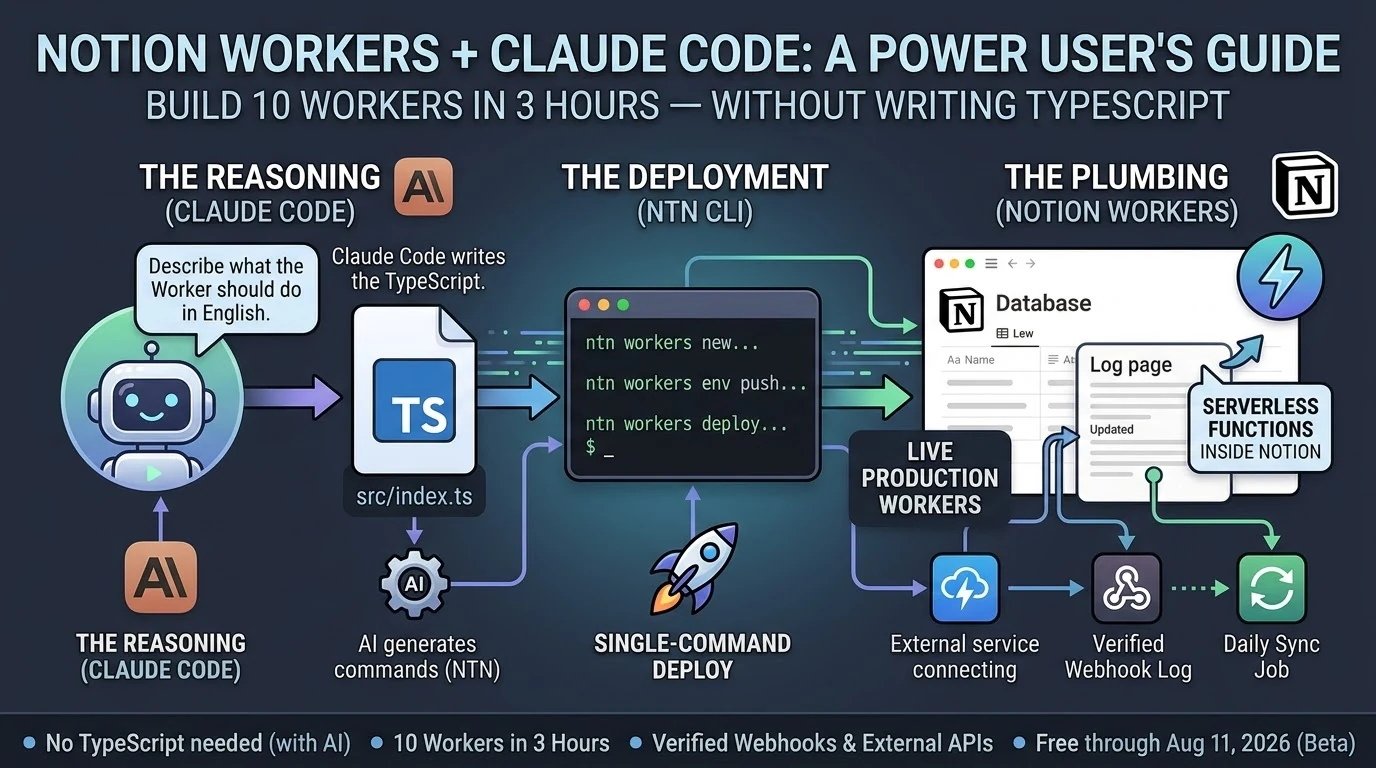
It was late. I had Claude Code open on my laptop and a fresh cup of coffee going cold next to it.
Notion had shipped Workers eight days earlier — their new hosted serverless platform, basically “run real code inside Notion without managing a server.” I’d been meaning to dig in. Last night I finally did.
I want to tell you what that actually looked like. Not a tutorial. Not a polished case study. Just what happened, in order, including the parts that didn’t work.
By midnight I had ten Workers deployed and a live webhook endpoint logging authenticated traffic from the internet into a Notion page. The whole thing took about three hours.
I did not write TypeScript.
Here’s the honest version of how it went.
The first Worker took the longest — maybe 35 minutes — because I was figuring out the CLI at the same time as building the thing. The ntn tool is straightforward once you understand it: scaffold, write the code, push your secrets, deploy. Four steps. But the first time through any new tool you’re reading error messages and second-guessing yourself.
Claude Code handled the TypeScript. I described what I wanted — a Worker that receives a POST request, verifies an HMAC signature, and appends a line to a Notion log page. Claude Code wrote it. I ran the commands it told me to run. The Worker deployed.
I tested it. It worked.
The second one took 22 minutes. The third took 15. By Worker five I was moving fast enough that I stopped tracking individual times and just kept going.
Two of them didn’t work on the first try. One had a secret I’d named wrong in the environment — my fault, five minutes to fix. The other had a logic error in how it was handling the Notion API response. Claude Code caught it when I pasted the error back in, rewrote the relevant section, and I redeployed. Eight minutes total for that dead-end.
Neither failure felt like a crisis. That’s the part I want to underline. When something broke, the path forward was obvious: read the error, paste it back to Claude Code, get a fix, redeploy. The loop was tight enough that failure was just a speed bump, not a wall.
At 02:54 in the morning, I sent a test ping to Worker #8.
The webhook logger received it, verified the HMAC signature, and wrote this to a Notion page in real time:
🔔 2026-05-21T02:54:44.452Z [claude-test:test] {"event":"test","message":"Hello from Worker #8 self-test","sender":"claude-code"}
I sat there for a second looking at that.
There’s something specific about seeing a system you built actually receive traffic. It’s not the same as a script running on your laptop. This was a deployed endpoint, on Notion’s infrastructure, receiving an authenticated HTTP request from the open internet and writing the result to a database. Automatically. Without me doing anything after the initial deploy.
That’s a different category of thing than what I had before.
I want to be honest about what I am, technically. I’m not a developer. I’ve picked up enough over the years to be dangerous — I can read code, I understand how APIs work, I’ve shipped things — but I’m not someone who sits down and writes TypeScript from scratch.
Last night didn’t require that. What it required was knowing what I wanted, being able to describe it clearly, and being willing to run commands and read errors.
That’s it.
The question I keep hearing from people who run operations like mine — agencies, small teams, people who live in tools like Notion and have always hired out the code work — is whether any of this AI coding stuff is actually for them or if it’s still fundamentally a developer story with a better interface.
Last night felt like an answer. Ten Workers. Three hours. No TypeScript.
If you can describe what you want clearly enough to explain it to another person, you can build this. The friction that used to live between “I know what I want” and “it exists in the world” is genuinely smaller now.
Not gone. Smaller.
You still have to show up. You still have to read the errors. You still have to think through what you’re building before you build it.
But if you’ve been waiting for some invisible threshold of technical credibility before you try — you’re past it. You were probably past it a while ago.
The Notion Workers beta is free through August 11, 2026. The ntn CLI installs in one line. Business or Enterprise plan required to deploy.
Notion shipped Workers on May 13, 2026 (Notion Help). By last night I had ten of them running in production, including a live HMAC-verified webhook endpoint that’s actively logging events. Total build time: about three hours.
I didn’t write TypeScript by hand. Claude Code did most of the typing.
Here’s what that actually looked like — and what it means for the non-developer Notion power user who’s been watching the Workers announcement and wondering if it’s for them.
What are Notion Workers? Notion Workers are hosted serverless functions that run inside Notion’s infrastructure. You write code, deploy it through the ntn CLI, and Notion runs it in a secure sandbox — no server to manage. They’re free through August 11, 2026, then run on Notion credits. Deploying Workers requires a Business or Enterprise plan.
What Notion Workers Actually Are (The One-Paragraph Version)
What Notion Workers actually are.
If you’ve used Notion’s built-in database automations — the lightning bolt icon — Workers are that concept extended to real code. They can call any external API, respond to webhooks, sync data from Stripe or Zendesk or GitHub, and write results back to Notion databases. The CLI (ntn) is available on all plans. Deploying Workers requires Business or Enterprise.
Do You Need to Know TypeScript to Build Notion Workers?
Technically, Workers are written in TypeScript. Practically, if you have Claude Code, the answer is no.
Claude Code (currently at v2.1.144 as of May 19, 2026) scaffolds Workers from plain-English descriptions. You describe what the Worker should do. Claude Code writes the src/index.ts, handles the ntn workers env push for secrets, and tells you exactly what commands to run. You copy the command. The Worker deploys.
The workflow looks like this:
ntn workers new my-worker-name — scaffold the project
ntn workers deploy --name my-worker-name — ship it
That’s it. The only thing you actually type is the deploy commands. Claude Code fills in the gap between them.
What We Built in 3 Hours
What we built in 3 hours.
Ten Workers, averaging about 18 minutes each, including two dead-ends that took 5–8 minutes to diagnose and abandon.
The most useful one is Worker #8: an HMAC-verified webhook logger. Any external service — GitHub, Stripe, a cron trigger, another Claude Code session — can POST to the Worker’s endpoint with a shared secret, and it auto-appends a timestamped line to a Notion log page. The webhook log shows its first self-test ping from Claude Code at 02:54 UTC:
🔔 2026-05-21T02:54:44.452Z [claude-test:test] {"event":"test","message":"Hello from Worker #8 self-test","sender":"claude-code"}
That’s a live, verifiable event log. Not a draft. Not a mock. A deployed Worker receiving authenticated HTTP traffic and writing to Notion.
The ntn workers env push command works cleanly for both NOTION_API_TOKEN and non-Notion secrets like TYGART_WP_USER and WEBHOOK_SECRET — one of the key things we needed to confirm before trusting the stack at scale.
The Design Principle That Makes This Actually Work
The design principle that makes this work.
The best insight from Notion’s Workers documentation: use code for deterministic work, use AI for judgment calls.
A Worker that pulls invoice status from Stripe and updates a Notion database doesn’t need AI. It needs reliable, cheap code execution. That’s what Workers give you. A Claude Sonnet 4.6 (claude-sonnet-4-6) or Opus 4.7 (claude-opus-4-7) agent that reads those Notion rows and drafts follow-up emails is handling the judgment call. Those are two different tools for two different jobs.
When you collapse that distinction — letting AI do everything — you pay AI prices for work that shouldn’t require AI reasoning. Workers run at a fraction of the cost of AI credits. Notion’s own example calculations put a daily sync job at roughly one cent per month. The AI layer sits on top for the parts that actually need it.
This is the architecture: Workers handle the plumbing. Claude handles the reasoning. You stop paying Opus rates for jobs a ten-line TypeScript function can do.
The Part Nobody Else Is Writing About
Every guide covering Notion Workers frames it as a solo-developer workflow. You sit down, you know TypeScript, you build a Worker over an afternoon.
That’s not how this went.
Claude Code is listed in Notion’s own documentation as a first-class deployment partner for Workers. The ntn CLI was explicitly designed to work with coding agents — same interface for humans and agents. When you treat Claude Code as the author and yourself as the operator running the commands it outputs, you get through ten Workers in a session that most developers would take a week to plan.
The non-developer angle is real. If you run Notion as your operating system — databases, automations, dashboards — and you’ve been watching the Workers announcement wondering whether it requires a CS degree, the answer in May 2026 is: not if you have Claude Code. The scaffolding is a one-line command. The deployment is a one-line command. Claude Code fills in the gap between them.
Three Things to Know Before You Start
Business or Enterprise plan required to deploy. The CLI (ntn) installs on any plan and runs free. Deploying Workers needs Business or Enterprise. Check your plan before you spend an afternoon scaffolding.
macOS and Linux only as of May 2026. Windows users need WSL2. Native Windows support is listed as coming soon. If you’re on Windows without WSL2, that’s your first step.
Free through August 11, 2026. After that, Workers run on Notion credits. Build and optimize now while the cost is zero. The free period gives you enough runway to understand your actual usage patterns before you’re paying for them.
Notion Workers are free to try during the beta period, which runs through August 11, 2026. After that date, Workers will run on Notion credits. The free period is a good window to build, test, and optimize your Workers before metered usage begins.
Can non-developers build Notion Workers?
Yes, if you have an AI coding agent like Claude Code. Workers are written in TypeScript, but Claude Code can generate the Worker code from a plain-English description. You run the scaffold and deploy commands; Claude Code writes the code. No prior TypeScript knowledge required.
What Notion plan do you need for Workers?
The ntn CLI is available on all Notion plans. Deploying and managing Workers requires a Business or Enterprise plan.
How does Claude Code work with Notion Workers?
Claude Code (v2.1.144 as of May 2026) integrates directly with the ntn CLI. Notion designed the CLI as a tool for both humans and coding agents — same interface, same commands. Claude Code scaffolds the Worker TypeScript, sets environment variables, and outputs the exact deploy commands to run.
What can Notion Workers do?
Workers can call any external API, respond to incoming webhooks (with HMAC verification), sync data between external services and Notion databases, run scheduled tasks, and execute custom business logic. Common use cases include syncing Stripe payments, Zendesk tickets, GitHub issues, or any service with an API into Notion.
Is the ntn CLI available on Windows?
As of May 2026, the ntn CLI is available on macOS and Linux. Windows support is listed as coming soon. Windows users can use WSL2 in the meantime.
The Bottom Line
Ten Workers. Three hours. A verified webhook endpoint logging live traffic. Claude Code did the TypeScript. The ntn CLI did the deployment. Notion’s infrastructure handled everything else.
The question isn’t whether Notion Workers are for developers. The question is whether you have a coding agent. If you do, the friction is gone.
Microsoft is stitching together an everything app from acquisitions. Google is trying to unify a native stack it keeps fragmenting. Notion is doing something different — and arguably more interesting. It’s building the everything app from the database up, and it just made its most important move yet.
Definition: The Database-First Everything App
An AI-powered workspace where every piece of information — tasks, projects, docs, contacts, data — lives in a structured, queryable database, and agents can read, write, reason over, and act on that data autonomously. The database isn’t the backend. It’s the interface.
May 13 Changed Everything for Notion
On May 13, 2026, Notion shipped version 3.5 and announced their full Developer Platform in a livestreamed product event. The tech press covered it as an AI agent story. They weren’t wrong, but they missed the bigger frame.
Notion didn’t just add agents. They introduced a new primitive called Workers — a hosted runtime for custom code that lets teams extend Notion without running their own servers. Database sync, agent tools, and webhook triggers all run through Workers. They launched the External Agents API, allowing any agent — ones you built, or ones from Claude, Codex, Decagon, and other partners — to work natively inside your Notion workspace. And they opened a developer platform that lets teams connect AI agents, external data sources, and custom code directly into their workspace.
Taken individually, these are nice product updates. Taken together, they’re an orchestration play. Notion is positioning itself not as a note-taker with AI features bolted on, but as the hub where people, agents, and data collaborate across every tool a team uses.
The Database Advantage Nobody Else Has
The database advantage nobody else has.
Here’s the thing that separates Notion from every other everything-app candidate — including Microsoft and Google.
Both Microsoft 365 and Google Workspace are document-first platforms. Their fundamental unit of work is a file: a Word document, a Google Doc, a PowerPoint, a Sheet. Files are great for humans to read. They’re terrible for AI to reason over at scale. You can’t ask an AI agent to “find every project where the status is blocked and the deadline is this week” across a folder of Word documents and get a reliable answer.
Notion’s fundamental unit is a database. Every page can be a database row. Every property is structured, queryable, filterable data. When Notion AI looks at your workspace, it doesn’t see a pile of documents — it sees a relational knowledge graph. Tasks have statuses. Projects have owners and deadlines. Contacts have properties. Everything is connected, typed, and queryable.
That’s not a feature difference. That’s an architectural difference. And it’s why Notion’s agents can do things that Copilot and Gemini agents fundamentally struggle with: operate reliably on your actual organizational data, not summaries of your documents.
The Agent Timeline: Faster Than Anyone Expected
The agent timeline — faster than expected.
Notion’s agent rollout has moved at a pace that’s easy to underestimate if you haven’t been watching closely. Here’s the actual timeline, from Notion’s release notes:
September 18, 2025 — Notion 3.0: Agents. First AI agents launch. Autonomous data analysis and task automation. The starting gun.
January 20, 2026 — Notion 3.2. Mobile AI, new model support, people directory. Agents go everywhere, not just desktop.
February 24, 2026 — Notion 3.3: Custom Agents. Users can build their own agents from scratch. Early testers built over 21,000 custom agents. Notion reported 2,800 agents running 24/7 internally at Notion itself.
March 2026. Workers introduced in alpha — a TypeScript-based framework for agents to talk to any service with an API. The coding layer for power users.
April 14, 2026 — Notion 3.4. Calendar and inbox connectors. Notion AI can now schedule meetings and draft emails from inside your workspace.
May 5, 2026. Custom Agent admin controls for enterprise — workspace-level credit limits, governance tools, compliance features.
May 13, 2026 — Notion 3.5: Developer Platform. External Agents API, Workers out of alpha, database sync with no servers, full developer ecosystem launched.
July 1, 2026 — Notion 3.6. External Agents, HTML blocks, and more.
September 15, 2026 — Notion 3.7: Agent skills. Reusable team skills, Custom Agents that call sub-agents, and a redesigned model picker.
That’s eight months from first agent launch to full developer platform. For context, Microsoft spent years building Azure OpenAI integration before Copilot reached feature parity with what Notion shipped in less than a year.
What the Notion Everything App Actually Looks Like Today
This isn’t theoretical. Here’s what a team running on Notion can configure right now:
Your project data, always current. Databases synced from Slack, Google Drive, GitHub, Jira, Microsoft Teams, Salesforce, and Box — all flowing into Notion databases in real time, powered by Workers. No manual updates. No stale spreadsheets.
Agents watching your work. Custom agents triggered by database changes, schedules, or webhooks — compiling status updates, flagging blocked tasks, escalating overdue items, answering team FAQs.
Your inbox and calendar inside your workspace. Connect Gmail or Outlook and your calendar; Notion AI can schedule meetings and draft emails without leaving the tool your work already lives in.
External agents working in your context. Claude, Codex, Decagon — agents you’ve built yourself via the External Agents API — all operating against your Notion databases with full context. Not generic AI. AI that knows your specific data.
Plan Mode for complex operations. Before an agent makes large changes to your databases or pages, it stops, asks clarifying questions, and builds a plan for your approval. This is the governance layer that makes AI trustworthy in a business context.
Your institutional knowledge, always accessible. Every decision, every project history, every team document — structured and queryable by agents that can synthesize across your entire knowledge base on demand.
The Models Behind It
The model behind it — Claude Opus.
Unlike Google, which builds on its own Gemini family, Notion isn’t locked to one model provider. Since the January 20, 2026 update (Notion 3.2), users can pick from GPT-5.2, Claude Opus 4.5, or Gemini 3, or let Auto choose the best model for the job. As of Notion 3.7 in September 2026, the model picker includes Opus 5, GPT-5.6 Sol, and Kimi K3. Notion’s Notion AI help center covers the current feature set.
Claude remains a strategic option worth examining. Claude is specifically designed with a focus on reliability, honesty, and safe behavior in agentic contexts — qualities that matter enormously when an AI agent has write access to your company’s databases. Anthropic’s Constitutional AI training approach was built for exactly the kind of autonomous, long-running agent work that Notion is deploying.
The bigger point is architectural: a database-first workspace can swap in whichever model handles a job best, because the structured data underneath doesn’t change. Notion makes the same pitch in its January release notes: models will continue to change, but your memory in Notion doesn’t.
Why “Database First” Beats “Document First” for the Everything App
Let’s make this concrete with a comparison most teams will recognize.
Ask Microsoft Copilot: “Which of our client projects are behind schedule this quarter?” Copilot will search your emails, scan your SharePoint documents, and produce a reasonable summary — but it’s reading prose, inferring structure, and hoping the documents are up to date. The answer is a best-effort synthesis, not a query result.
Ask a Notion agent the same question: it runs a database filter. Status = Behind. Quarter = Q2 2026. It returns an exact list in under a second, with links to every project, the responsible person, and the last update — because that data is structured. The agent didn’t infer anything. It read typed data.
That’s the difference between AI that helps you find things and AI that actually knows things. Notion’s database architecture is what makes the second kind possible at scale, without hallucination, without retrieval errors, without the AI making up a project that doesn’t exist.
The Honest Weakness: The 30-Second Wall
Here’s what you only learn by actually building inside the alpha — and we did.
Notion Workers runs in a 30-second sandbox with 128MB of memory. Each Worker is created through the Notion control panel, taking 3–5 minutes to spin up. The network is limited to an approved domain allowlist. Storage is ephemeral — nothing persists between runs. These aren’t theoretical constraints. They’re the real walls you hit when you try to move serious automation workloads into Notion.
We were in the Workers alpha. We built Workers. We set up custom agents. And we stress-tested the sandbox deliberately — forcing failures to find the exact break points, then running production workloads at 60% of the known ceiling as a stability rule. That’s the only honest way to operate inside a system this constrained: know where it breaks before you depend on it.
What we found changed our architecture. Heavy automations — multi-site WordPress SEO optimization passes across 18 sites, content pipelines, image generation, WP-CLI batch operations — couldn’t live inside Notion Workers. They’re multi-minute jobs, not 30-second jobs. Moving them to Notion would have meant engineering workarounds that added complexity without adding reliability.
So instead of moving Cowork automations into Notion as we originally planned, we moved them to Google Cloud Run. The notion-deep-extractor (crawls the workspace, extracts structured knowledge, logs to the Second Brain database — runs 3x daily) and the notion-maintenance bundle (archive sweeper, stale work detector, content guardian — runs daily at 6am UTC) all live on Cloud Run now, with Cowork scheduled tasks paused. The 18-site WordPress optimizer running Tuesday? Cloud Run. Not Notion.
This isn’t a knock on Notion. It’s an architectural reality that every builder needs to understand before they commit workloads. The right pattern — the one we’re now using and that Notion’s own documentation points toward — is Notion Workers as the trigger layer, Cloud Run as the execution layer. A Worker fires a signed POST to a Cloud Run endpoint, returns immediately (well under 30 seconds), Cloud Run runs the heavy job, then writes results back to a Notion database via the Public API. You get Notion as the orchestration and visibility layer without hitting the sandbox wall.
That hybrid is genuinely powerful. But it requires infrastructure that most small teams don’t have. If you don’t have a Cloud Run setup, a service account, and the deployment knowledge to wire this together, the 30-second limit will stop you cold on anything more complex than a lightweight API call or a database update.
Notion doesn’t own email. It connects to Gmail and Outlook. It doesn’t own a calendar — it integrates with yours. It doesn’t have a mobile OS or browser. Those gaps matter less than the sandbox constraint does for real production workloads. The everything app story is real — but the execution layer has hard limits that require a hybrid architecture to work around, at least until Workers matures beyond its current beta constraints.
Who Should Be Paying Attention Right Now
If you’re an agency, a service business, a content operation, or any knowledge-work team that already uses Notion — or has been considering it — the May 13 Developer Platform announcement changes your calculus significantly.
Custom Agents are available as an add-on for Business and Enterprise plans. Notion originally said Workers would start running on Notion credits on August 11, 2026, but its Workers pricing page still lists them as free to try during the beta on Business and Enterprise plans, with credits required eventually (typically about $0.0023 per run). The External Agents API is open now. This is the window to build before your competitors do.
The teams that spend the next 90 days wiring up their Notion databases, building their first custom agents, and connecting their external data sources will have a compounding advantage that’s very hard to replicate in 2027. The institutional knowledge that feeds these agents — the project histories, the SOPs, the client databases — takes time to build. Starting now is the only strategy that works.
The Bigger Picture: A Series on Who Wins the Everything App
This is the third article in an emerging pattern I’ve been thinking through: who actually builds the everything app, and what does their path look like?
Microsoft is building it through acquisitions and Copilot, stitching together LinkedIn, Azure, and the M365 suite. Google already owns the native stack — Gmail, Drive, Search, Android — and is trying to unify it through Gemini Enterprise and Workspace Studio after years of product fragmentation. Notion is building it from the database up, betting that structured data plus open agents beats document-first platforms with AI bolted on.
None of them has won yet. All three bets are live. The winner won’t be the company with the most features — it’ll be the one that earns enough trust to become the single place where your work actually lives.
Notion’s database-first architecture is the most interesting bet of the three. It’s also the most fragile — dependent on integrations, constrained by not owning the OS or the inbox, limited by the pricing and capabilities of the outside models it depends on. But if it works, it works in a way the others can’t easily copy. You can’t retrofit a database architecture onto a document platform. You have to start over.
Microsoft and Google aren’t starting over. Notion never had to.
Notion Custom Agents are AI teammates that handle repetitive tasks autonomously — answering FAQs, compiling status updates, automating workflows — triggered by schedules, database changes, or webhooks. They launched in February 2026 (Notion 3.3) and are available as an add-on for Business and Enterprise plans. Early testers built over 21,000.
What is Notion Workers?
Notion Workers is a hosted cloud runtime for custom TypeScript code, introduced in alpha in March 2026 and fully launched with the Developer Platform on May 13, 2026. It powers database sync, agent tools, and webhook triggers — letting teams extend Notion to connect any service with an API, without running their own servers. Workers remain free to try during the beta on Business and Enterprise plans; Notion says they will eventually run on Notion credits.
What AI model does Notion use?
Notion AI isn’t tied to a single model. Since the January 2026 update (Notion 3.2), users can pick from several frontier models or let Auto choose; as of September 2026 the picker includes Anthropic’s Opus 5, OpenAI’s GPT-5.6 Sol, and Kimi K3. Claude remains one of the main options, and its focus on reliable, safe agentic behavior matters for workflows that have write access to business databases.
What is the Notion External Agents API?
The External Agents API, launched with Notion 3.5 on May 13, 2026, lets teams bring any AI agent — including ones built internally or from partners like Claude, Codex, and Decagon — directly into their Notion workspace. These external agents can read and write to Notion databases with full context about the team’s data.
How is Notion different from Microsoft Copilot and Google Workspace AI?
Notion is database-first. Every piece of information in Notion is structured, typed, and queryable data — not documents. This means Notion agents can run precise database queries against your actual organizational data rather than inferring structure from prose documents. For teams that need AI to reliably operate on business data (not just search and summarize), this architectural difference is significant.
What are the real limitations of Notion Workers in the alpha?
Notion Workers runs in a 30-second sandbox with 128MB of memory and ephemeral storage. Network access is limited to an approved domain allowlist. Workers are created via the Notion control panel (3–5 minutes each). Long-running jobs — content pipelines, multi-site operations, image generation — won’t fit. The recommended pattern for serious workloads is Notion Workers as the trigger layer firing a signed POST to an external execution environment (like Google Cloud Run), with results written back to Notion databases via the Public API.
Anchor fact: Workers for Agents is in developer preview as of April 2026, accessible via the Notion API but not exposed through any consumer-facing UI yet. Workers run server-side JavaScript and TypeScript, sandboxed via Vercel Sandbox, with a 30-second execution timeout, 128MB memory limit, no persistent state, and outbound HTTP restricted to approved domains.
What is Notion Workers for Agents?
Workers for Agents is Notion’s code execution environment for AI agents, in developer preview as of April 2026. Workers run server-side JavaScript and TypeScript functions that an agent calls when it needs to compute, query a database, transform data, or call an approved external API. Workers are sandboxed (30-second timeout, 128MB memory, no persistent state) and run on Vercel Sandbox infrastructure.
The 60-second version
Workers turn Notion AI from a text layer into a compute layer. Before Workers, Notion AI could read pages and write text. It couldn’t run code, couldn’t transform data, couldn’t reliably call external APIs. With Workers, an agent can offload computational tasks to a sandboxed JavaScript or TypeScript function — running for up to 30 seconds in 128MB of memory, with outbound HTTP restricted to approved domains. It’s the upgrade that makes Notion agents capable of real workflow automation, not just document assistance.
Why Workers matter
Why Workers matter.
Three things change when agents can call code:
1. Real database queries. Before Workers, an agent could read pages but couldn’t reliably do “give me all rows where date is in the next 7 days and owner is unassigned.” With Workers, that’s a one-line query that returns structured data the agent uses in its response.
2. Approved external API calls. An agent can fetch live exchange rates, look up shipping status, query an internal CRM, or pull from any service exposed through an approved domain. The agent doesn’t make the call directly — it delegates to a Worker that does the call and returns the result.
3. Multi-step transformation chains. Read CSV → transform → enrich → write back to a database. Each step is a Worker. The agent orchestrates the chain. This is the pattern that lets agents handle real ops workflows that previously required Zapier, n8n, or custom code.
The technical constraints worth knowing
Workers are not Lambda. They have intentional limits:
30-second execution timeout. Anything longer needs to be split into smaller Workers or moved off-platform. No long-running batch jobs.
128MB memory limit. Streams and chunked processing only for large data. No loading 500MB CSVs into memory.
No persistent state between calls. Each Worker invocation is fresh. State lives in Notion databases or external services, not in the Worker.
Outbound HTTP restricted to approved domains. You declare which domains a Worker can reach. This is a security feature, not a limitation to fight.
Sandboxed via Vercel Sandbox. Workers run on Vercel’s untrusted-code infrastructure. Performance is solid; cold starts exist.
What you need to use Workers
This is not a point-and-click feature. Requirements:
A Notion developer account
A Notion integration set up
Familiarity with the agent configuration format
API access — Workers are API-only as of April 2026
If you’ve never built on the Notion API, Workers aren’t your starting point. Standard agents and skills are. Workers are the next step once those don’t go far enough.
Three Worker patterns to start with
Three Worker patterns to start with.
1. The data-fetch Worker. Agent says “I need the current value of X.” Worker calls an approved external API, parses the response, returns a structured value. Common pattern: looking up live data the agent doesn’t have access to natively.
2. The transform-and-write Worker. Agent passes structured input to a Worker. Worker reshapes the data — formatting dates, normalizing strings, computing derived fields — and writes the result to a Notion database row. Common pattern: cleaning incoming form submissions before they land in the CRM.
3. The chain-orchestration Worker. A Worker that calls other Workers in sequence, collecting results and returning a synthesized output. Common pattern: a multi-step intake process where each step needs different logic.
Why this is the more interesting story than May 3
The May 3 credit cliff is the news story. Workers are the strategic story. Workers are why credits exist — Notion can’t ship “an agent that calls any code you want and any API you want” on a flat fee. Credits make Workers viable as a product. The pricing news is the boring infrastructure that supports the interesting capability.
If you’re a developer or an agency building on Notion, Workers reshape what’s possible. A custom Notion deployment for a client used to mean “we set up databases and trained the team.” Now it can mean “we set up databases, trained the team, and built five Workers that handle their specific workflows.”
What’s still missing
What’s still missing.
Three gaps in the current developer preview worth tracking:
No consumer UI. Workers are API-only. End users can’t build them in the Notion app. This will change.
Limited debugging. Errors in Workers surface as agent errors. Better tooling for inspecting Worker execution is on the roadmap.
Sandbox boundaries are evolving. Approved domain lists, memory limits, and timeout limits are likely to relax over time. Build with current limits; don’t bet on them staying fixed.
Workers turn Notion AI from a text layer into a compute layer.
Sources
Notion 3.4 part 2 release notes (April 14, 2026)
Vercel blog — How Notion Workers run untrusted code at scale with Vercel Sandbox
Notion API documentation — Workers for Agents (developer preview)
Continue the journey
This article is part of the May 3 Cliff Decision journey-pack on Tygart Media. Here’s where to go next: