Tag: AI for Business

  • Mail Integration: Drafting and Triaging Email From Inside Notion AI

    Mail Integration: Drafting and Triaging Email From Inside Notion AI

    Related on Tygart Media: Calendar + Notion AI · Slack + Notion agent · email as API.

    The 60-second version

    Inbox triage is the highest-frequency, lowest-strategic-value work most knowledge workers do daily. Notion AI’s mail integration takes the operational layer off your plate. Agent reads inbox, categorizes incoming messages, drafts replies for routine items, and surfaces what actually needs your judgment. You review the drafts and send the ones that work. The inbox-zero ritual goes from 90 minutes to 15.

    Three mail integration patterns

    Four cards for content, ops, build, and knowledge work with Claude
    Three mail integration patterns.

    1. The triage and draft agent. Runs morning and afternoon. Categorizes inbox: requires response, FYI, junk, action item. For “requires response” items where context exists in Notion, drafts the reply. You review drafts and approve sends.
    2. The follow-up watcher. Watches sent messages. Flags conversations where you sent something and haven’t heard back in 5+ days. Drafts a follow-up. You review and decide whether to send.
    3. The inbox-to-database agent. When inbox content matches database criteria (new lead → CRM, support request → tickets, content pitch → editorial queue), agent extracts structured data and creates the database entry. Reduces manual entry.

    What stays human

    • Sending. Always.
    • Sensitive replies (HR, legal, conflict, confidential)
    • Initial emails to new contacts
    • Anything where voice matters more than content

    The send button stays human

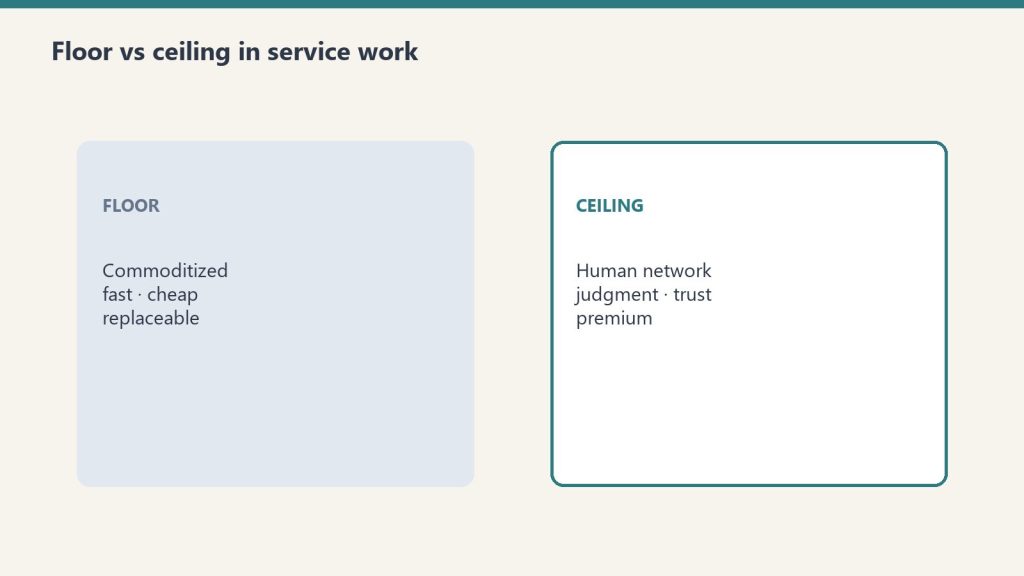
    Floor versus ceiling cards for commoditized work and human-network premium
    The send button stays human.

    This is the rule. Agent integrations with mail should be read-and-draft, never autonomous send. The relationship cost of one wrong sent email exceeds the time savings of automating sends across hundreds of right ones. Don’t.

    Where this goes wrong

    1. Trusting drafts on relationship emails. Drafts to existing contacts you have history with risk missing nuance. Read these especially carefully before sending.
    2. Auto-categorizing too aggressively. “FYI” categorization can hide actual urgency. Sample-check the FYI bucket weekly.
    3. Letting follow-ups become spam. A follow-up after 5 days is reasonable. Three follow-ups in 10 days is harassment. Configure follow-up agents conservatively.

    Privacy posture

    Five security domains: identity, data, code governance, audit, agents
    Privacy posture for mail agents.

    Mail integration gives the agent significant access. Two practices:
    – Connect a personal mail account, not a shared inbox
    – Audit what the agent has read monthly via the Notion access logs

    What to read next

    Slack Integration, Calendar + Notion AI, AI-Native Company Patterns.

  • Notion AI for Knowledge Workers: The Personal Productivity Loadout

    Notion AI for Knowledge Workers: The Personal Productivity Loadout

    Related on Tygart Media: solo operator stack · Notion second brain · Notion AI review.

    The 60-second version

    Most coverage of Notion AI focuses on team and company use. The individual knowledge worker case is just as compelling and significantly cheaper. Plus plan (\$10/user/month) gets you the inline AI, AI Q&A across your workspace, and meeting notes. That’s enough for most personal productivity workflows. The Custom Agent layer (Business plan) only matters when you have recurring autonomous work — which most individuals don’t, but some do. Match the plan to the actual use, not the marketing aspiration.

    The personal loadout

    Four cards for content, ops, build, and knowledge work with Claude
    The personal loadout.

    1. Daily planning interaction. Each morning, ask Notion AI to summarize your calendar, recent notes, and active projects. Get a one-paragraph “here’s your day” briefing. No agent needed; standard inline AI handles this.
    2. Meeting prep. Before each meeting, ask Notion AI to pull relevant context for the topic and attendees. Standard AI Q&A works fine for personal use. The brief is conversational, not formatted, but that’s adequate for personal prep.
    3. Writing substantive documents. Open a doc, draft, then use the inline AI to tighten paragraphs, suggest counterpoints, summarize sections. The AI is a writing partner, not a ghostwriter — you direct, it executes.
    4. Second-brain navigation. Ask Notion AI to find that thing you wrote three months ago about X. Or to synthesize what you’ve thought about Y across multiple notes. This is where Notion AI outperforms ChatGPT — it knows your stuff.
    5. Quick capture. Use voice memos (mobile) or quick text (desktop) to drop thoughts into a daily notes database. Periodically ask AI to review and structure them into related projects or notes.

    When you do need Custom Agents

    Three stacked layers: chat UI, tools, agent runtime
    When you do need Custom Agents.

    Three personal use cases that earn the upgrade:
    – You produce content on a recurring schedule (newsletter, blog, podcast notes)
    – You manage a personal client roster (consulting, coaching) and want pipeline hygiene
    – You run multiple side projects and need cross-project synthesis automated
    If none of these apply, Plus plan is enough. Don’t upgrade for capability you won’t use.

    The privacy framing

    Five security domains: identity, data, code governance, audit, agents
    The privacy framing.

    For individuals, the privacy story matters. Notion AI runs on your workspace content. It doesn’t expose that content to other users. For personal journaling, sensitive notes, or confidential client work, this is meaningfully better than a general-purpose AI.

    Where individuals go wrong

    1. Buying Business plan for capability they won’t use. If you don’t have recurring scheduled work, Custom Agents are wasted spend.
    2. Treating AI as a replacement for thinking. The value of personal notes is largely the thinking that happens during writing. AI shortcuts the writing, which can shortcut the thinking. Use AI for synthesis and recall, not for the original thinking.
    3. Importing too many sources too fast. A new Notion AI user often connects every source available. The agent then synthesizes from a noisy signal. Start with one or two well-organized databases and grow from there.

    What to read next

    Editorial Surface Area, Second-Brain Architecture, Custom Agents vs Basic.

  • Notion AI for Customer Success: QBRs, Health Scores, and Account Plans

    Notion AI for Customer Success: QBRs, Health Scores, and Account Plans

    Related on Tygart Media: Notion AI for sales · agency owners · client portals.

    The 60-second version

    CS work is constrained by CSM bandwidth. The bandwidth gets eaten by documentation: QBRs, account plans, health score updates, internal reporting. Custom Agents take that documentation work over so CSMs can spend their time on customer calls. The result is CS teams that cover more accounts at the same headcount or go deeper on the same accounts. Either way, the math improves.

    Four CS-specific agent patterns

    Four cards for content, ops, build, and knowledge work with Claude
    Four CS-specific agent patterns.

    1. The QBR draft agent. Triggered before QBR season. For each account: pulls usage data (via integration), product adoption metrics, support ticket trends, key milestones, prior QBR action items. Drafts the QBR deck content in the team’s template. CSM customizes for the specific customer instead of building from scratch.
    2. The health score maintenance agent. Daily or weekly. Reads usage data, support patterns, engagement signals, NPS responses. Updates each account’s health score in the customer database. Surfaces accounts that dropped a tier in the last week.
    3. The account plan agent. Monthly per account. Reviews account activity, identifies expansion opportunities, surfaces stalled adoption areas, drafts the updated account plan with specific next-quarter goals.
    4. The renewal risk agent. Continuous. Scans accounts approaching renewal. Cross-references health score, recent engagement, support ticket sentiment, and upcoming contract dates. Flags 60-90 days before renewal so CSM has runway to address issues.

    What stays CSM

    Floor versus ceiling cards for commoditized work and human-network premium
    What stays CSM.
    • Customer conversations
    • Expansion negotiations
    • Crisis response when accounts are unhappy
    • The judgment about which accounts deserve which level of investment
    • Reading the customer relationship temperature
      The agent surfaces signals; the CSM interprets them.

    The leverage math

    A typical CSM covers 25-40 accounts. Documentation work consumes 30-40% of their week. Custom Agents take that to 10-15%. The CSM either covers more accounts (50-60) or goes deeper on the same accounts (more strategic, more frequent touch).
    The strategic question: which path matches your business? Higher coverage favors expansion-led businesses. Deeper accounts favor retention-led businesses. Don’t let agents accidentally pick the path for you by default.

    Where CS teams go wrong

    Seven cards naming common AI chatbot failure modes
    Where CS teams go wrong.

    1. Letting agents update health scores autonomously into a “you’re red” customer-facing alert. Health scores have political weight inside the customer’s organization. Auto-flagging customers as red without human review can damage the relationship.
    2. Skipping the QBR review. The agent draft is starting material. The customization for that specific customer is what makes the QBR land. Don’t ship the agent draft as-is.
    3. Trusting renewal risk flags without context. A customer can look “at risk” by the data while being fine in the relationship. CSM context wins. Don’t escalate based on the agent flag alone.

    What to read next

    Notion AI for Sales Teams, Account Research, AI-Native Company Patterns.

  • Notion AI for Product Managers: Specs, Roadmaps, and Stakeholder Updates

    Notion AI for Product Managers: Specs, Roadmaps, and Stakeholder Updates

    Related on Tygart Media: Notion AI for engineering · Claude for PMs · Notion Command Center.

    The 60-second version

    PMs spend 60% of their time writing — specs, updates, briefs, summaries. Custom Agents take that down to 20%. The PM defines the problem and the strategic call; the agent produces the documentation. Specs draft from a problem statement. Stakeholder updates generate in three audience-specific versions from one source. User research synthesizes into themes automatically. The PM gets back to the work that PMs are actually hired for: deciding what to build.

    Four PM-specific agent patterns

    Four cards for content, ops, build, and knowledge work with Claude
    Four PM-specific agent patterns.

    1. The spec drafting agent. Triggered when a new initiative is added with a problem statement. Pulls related research, prior similar specs, technical constraints from engineering pages. Drafts a structured spec with goals, non-goals, user stories, success metrics, open questions. PM reviews and decides; doesn’t start blank.
    2. The audience-tailored update agent. Single input: this week’s progress and risks. Three outputs: exec brief (3 paragraphs, headline-led), engineering update (technical detail, dependencies), customer-facing update (benefits framing). Audience-specific framing automated.
    3. The research synthesis agent. Triggered when interview notes land in the research database. Extracts themes, codes responses, identifies patterns across interviews, ranks insights by frequency and impact. PM gets a synthesis instead of a pile of raw notes.
    4. The roadmap maintenance agent. Reads the roadmap database. When initiatives change status or priority, updates the Now/Next/Later view, drafts the rationale for moves, flags timeline conflicts. The roadmap stays current without weekly reformatting.

    What stays PM

    Floor versus ceiling cards for commoditized work and human-network premium
    What stays PM.
    • Strategic prioritization (what to build, what to kill)
    • Customer conversations
    • Cross-functional negotiation
    • Final spec approval
    • The judgment behind every roadmap move
      The agent makes the writing fast. It doesn’t make the deciding fast.

    The compounding effect

    PMs running this pattern report a category change in their work: less time on producing artifacts, more time on customer conversations and strategic calls. The artifacts still exist (specs, updates, roadmaps) but they’re produced faster and revised more often because revising is cheap.
    A weekly artifact that used to take 4 hours now takes 90 minutes. Across 50 weeks, that’s 125 hours reclaimed per PM per year. Most PMs spend that on the work they were always supposed to be doing.

    Where PMs go wrong

    Seven cards naming common AI chatbot failure modes
    Where PMs go wrong.

    1. Letting the agent draft success metrics. Metrics are strategic. The agent can suggest; the PM decides. Don’t outsource the metric definition.
    2. Trusting cross-team updates without verification. The agent might miss context from another team. Sample-check updates that go to engineering or sales for accuracy before sending.
    3. Producing more artifacts because production is cheap. Cheap production is a temptation to over-produce. The discipline of “what should we actually communicate” matters more, not less.

    What to read next

    Notion AI for Engineering, Synthesize Research piece, AI-Native Company Patterns.

  • Notion AI for Legal Ops: Contract Review Triage Without Replacing Counsel

    Notion AI for Legal Ops: Contract Review Triage Without Replacing Counsel

    Related on Tygart Media: Notion AI for HR · Claude for lawyers · Notion Command Center.

    The 60-second version

    Legal ops is constrained by counsel time. Custom Agents change which work counsel actually has to do. Routine NDAs that match the playbook? Triaged and approved. Contracts with non-standard clauses? Flagged with the specific deviations and counsel reviews only those. Vendor compliance trackers? Auto-updated. Meeting briefings? Drafted. Counsel reviews exceptions; agents handle volume. The split protects legal quality while massively expanding throughput.

    Four legal-ops-specific agent patterns

    Four cards for content, ops, build, and knowledge work with Claude
    Four legal-ops-specific agent patterns.

    1. The NDA triage agent. New NDA arrives. Agent compares it against the playbook (standard mutual NDA terms, acceptable carveouts, dealbreakers). Classifies as GREEN (auto-approve), YELLOW (counsel review), or RED (substantive negotiation). For GREEN, drafts the response. For YELLOW/RED, prepares a deviation report.
    2. The contract review preparation agent. Triggered for any contract not handled by NDA triage. Reads the contract, compares against playbook, marks every deviation, and produces a redline-ready summary for counsel. Counsel opens the document and starts reviewing the deviations directly, not the entire contract.
    3. The vendor compliance tracker. Maintains a database of vendor agreements, renewal dates, surviving obligations, and required documents (DPA, BAA, COI). Flags upcoming renewals 60 days out and missing documentation continuously.
    4. The meeting brief agent. Before any contract negotiation or compliance meeting, pulls relevant context: prior agreements with the counterparty, related correspondence, current playbook positions on the topics expected. Counsel walks in prepped without the prep work.

    What absolutely stays counsel

    Floor versus ceiling cards for commoditized work and human-network premium
    What absolutely stays counsel.

    The non-negotiable boundaries:
    – Legal advice (period — agents never deliver this)
    – Substantive contract negotiation strategy
    – Risk assessment on novel issues
    – Anything that gets sent to opposing counsel as the firm’s position
    – Privileged communications
    Agents prepare the inputs to counsel’s judgment. They never replace the judgment.

    The triage discipline

    Five security domains: identity, data, code governance, audit, agents
    The triage discipline.

    The triage agent only works if the playbook is explicit. “Standard NDA” is not a playbook; “12-month confidentiality, mutual obligation, no non-solicit, US jurisdiction acceptable, EU DPA required if data crosses border” is. The discipline of writing the playbook is what makes the agent reliable.
    Most legal ops teams underestimate how much playbook documentation they need. The first 90 days of a legal-ops agent rollout is mostly playbook work, not agent building.

    Where this goes wrong

    1. Treating the agent’s classification as final. GREEN means “agent thinks this matches playbook.” It doesn’t mean “approved without review.” A spot-check on 10% of GREEN classifications keeps the system honest.
    2. Letting the agent draft anything that goes to opposing counsel. Even a “thank you, attached is our standard NDA” response should have counsel eyes before send for high-stakes counterparties.
    3. Building too aggressive a YELLOW threshold. If too much routes to counsel, the agent isn’t saving time. Tighten YELLOW criteria. If too little routes, the agent is missing things — loosen YELLOW.

    What to read next

    Notion AI for Operations Managers, Notion AI for Finance, Vendor Check, Editorial Surface Area.

  • Notion AI for HR: Onboarding Plans, Policy Lookups, and Performance Cycles

    Notion AI for HR: Onboarding Plans, Policy Lookups, and Performance Cycles

    Related on Tygart Media: client onboarding template · ops managers · Notion Command Center.

    The 60-second version

    HR is split between policy and people. The policy half is largely automatable. The people half isn’t. Custom Agents take over the lookup, documentation, and template-generation work that consumes HR teams, freeing them for the relationship and judgment work that requires being human. The result is HR teams that feel less like document processors and more like organizational coaches.

    Four HR-specific agent patterns

    Four cards for content, ops, build, and knowledge work with Claude
    Four HR-specific agent patterns.

    1. The onboarding plan agent. Triggered when a new hire is added to the people database. Pulls role-specific onboarding template, customizes for team and start date, schedules Day 1 / Week 1 / 30/60/90-day milestones, drafts welcome communications. Manager arrives on Day 1 with a customized plan, not a generic one.
    2. The policy lookup agent. Anyone in the company asks: “Can I work remotely from another country?” or “What’s our PTO policy?” Agent answers in plain language, citing the specific policy page. Frees HR from being the policy answering desk.
    3. The performance review prep agent. Quarterly. Pulls each manager’s direct reports, drafts review templates with prior cycle ratings, recent project work, and feedback patterns. Manager opens a populated draft, not a blank one.
    4. The recruiting pipeline agent. Daily across the recruiting database. Updates candidate stage based on activity, flags candidates stalled in stages, drafts follow-up communications. Recruiting status meeting starts at “what about these flagged ones” instead of “where are we.”

    What stays human (and should)

    Floor versus ceiling cards for commoditized work and human-network premium
    What stays human (and should).
    • Compensation decisions
    • Performance ratings and the conversations behind them
    • Conflict mediation
    • Hiring decisions
    • Layoff or termination calls
    • Anything that requires reading the room
      The agents make HR humans more available for the work that matters. They don’t replace them at it.

    The privacy layer matters more here

    Five security domains: identity, data, code governance, audit, agents
    The privacy layer matters more here.

    HR data is sensitive. Three guardrails:
    – Scope agents tightly — an HR agent should not have access to engineering project pages, finance data, or anything outside HR’s lane.
    – Audit agent access logs monthly. Know what the agent has read.
    – Apply the company’s data handling policy to agent inputs and outputs the same way you would to any HR system.

    Where HR teams go wrong

    1. Letting agents draft sensitive communications. Termination letters, performance improvement plans, complaint responses — these need human authorship. Agents can pull templates; humans write them.
    2. Trusting policy answers without verification. Policy interpretation has nuance. The agent’s plain-language answer should always cite the underlying policy doc so users can verify. Sample-check 10% monthly.
    3. Replacing the recruiter’s judgment with the agent’s pipeline view. Agents update status; recruiters decide who to advance. Don’t let the agent close candidate records autonomously.

    What to read next

    Notion AI for Operations Managers, Notion AI for Legal Ops, AI-Native Company Patterns, When Not to Use a Notion Agent.

  • Notion AI for Sales Teams: Pipeline Hygiene, Call Notes, and Account Research

    Notion AI for Sales Teams: Pipeline Hygiene, Call Notes, and Account Research

    Related on Tygart Media: Notion AI for CS · Notion AI for marketing · Claude for sales.

    The 60-second version

    Sales reps universally underdo documentation. The CRM never matches reality. Account research is shallow. Call notes are sparse. Custom Agents fix the documentation layer without taking selling time. Autofill keeps deal properties current as pages change. A research agent prepares accounts before discovery calls. A post-call agent processes notes into structured updates and action items. The rep stays selling; the documentation layer maintains itself.

    Four sales-specific agent patterns

    Four cards for content, ops, build, and knowledge work with Claude
    Four sales-specific agent patterns.

    1. The pipeline hygiene agent. Daily Autofill across the pipeline database. Keeps deal stage, last-activity date, and risk flags current based on page content. Surfaces deals that haven’t moved in 14+ days. The pipeline review meeting starts 70% prepped.
    2. The pre-call research agent. Triggered 60 minutes before each external meeting. Pulls company info, attendee LinkedIn data (via integration), prior interactions, related industry notes. Drops a one-page brief in the rep’s inbox.
    3. The post-call summary agent. Triggered when call notes land in a designated database. Extracts action items, identifies decision-makers mentioned, updates the account record, drafts the follow-up email. Rep reviews and sends in 90 seconds.
    4. The deal-at-risk agent. Weekly. Reads the pipeline. Flags deals where engagement has dropped, decision timelines have slipped, or red flags emerged in recent communications. Surfaces 3-5 deals for the rep’s attention each Monday.

    What this changes for the rep’s day

    Pre-agent: 60-70% of the day is selling, 30-40% is documentation and prep.
    Post-agent: 80-85% selling, 15-20% review and judgment.
    The math is dramatic at the team level. A 10-person sales team gets back roughly two FTE-equivalents of selling capacity. That capacity converts directly to pipeline.

    What stays human

    Floor versus ceiling cards for commoditized work and human-network premium
    What stays human.
    • The actual conversations with prospects
    • Negotiation and closing
    • Relationship building
    • Strategic account decisions (which accounts to pursue, which to disqualify)
    • The judgment about whether agent-summarized notes captured the call accurately
      Agents make documentation cheaper. They don’t make selling cheaper.

    The CRM integration question

    Many sales teams already have Salesforce, HubSpot, or another CRM. The pattern that works: keep the CRM as system-of-record, use Notion + agents as the working layer. Sync key fields back to the CRM via integration. Don’t try to replace the CRM with Notion.
    The exception: small teams (<10 reps) sometimes find that Notion + agents is enough and they don’t need a separate CRM. Test before committing.

    Where this goes wrong

    Seven cards naming common AI chatbot failure modes
    Where this goes wrong.

    1. Autofill on judgment fields. “Deal probability” or “deal health” are judgment calls. Don’t autofill them. Surface the inputs that inform the judgment; let the rep make the call.
    2. Trusting post-call summaries without review. The agent processes the notes, but the notes themselves can be sparse or wrong. Sample-check post-call summaries weekly.
    3. Replacing the rep’s judgment about which deals to focus on. The deal-at-risk agent surfaces; it doesn’t decide. Reps with full context outperform any agent’s prioritization.

    What to read next

    Notion AI for Customer Success, Account Research piece in Sales cluster, AI-Native Company Patterns.

  • The Solo Operator’s Notion AI Stack: Running Multiple Businesses With One Agent Team

    The Solo Operator’s Notion AI Stack: Running Multiple Businesses With One Agent Team

    Related on Tygart Media: Notion AI for agency owners · AI operator’s stack · Notion Command Center.

    The 60-second version

    Running multiple businesses solo used to mean either hiring an assistant or accepting that things slipped through. Custom Agents change the math. A small agent team — three to seven specialized agents — handles the operational layer across all businesses simultaneously, leaving the operator to focus on relationships, strategy, and exception work. The cost is real (post-May 4, somewhere between a coffee budget and a low-end consultant invoice per month) but the leverage is dramatic. The skill isn’t building agents. It’s deciding what to delegate to them.

    The starter loadout

    Four cards for content, ops, build, and knowledge work with Claude
    The starter loadout.

    Seven agents that earn their keep for a multi-business solo operator:
    1. The morning briefing agent. Runs at 6 AM. Reads overnight emails, calendar for the day, project status changes across all businesses. Drops a one-page digest in your daily notes. You read it with coffee.
    2. The intake triage agent. Triggers on new inbound (form submissions, sales leads, partnership inquiries). Categorizes by business, urgency, and type. Drafts a first response. Routes for review.
    3. The calendar prep agent. Runs 30 minutes before each meeting. Pulls relevant project context, prior meeting notes, action items, and any open threads. Briefing arrives in your inbox before the meeting.
    4. The weekly status agent. Runs Friday 4 PM. For each business, summarizes what happened, what shipped, what’s at risk. Output: one digest per business plus a meta-digest across all of them.
    5. The follow-up watcher. Runs daily. Scans all open conversations, projects, and commitments. Flags anything that’s been waiting on you for more than 48 hours.
    6. The content production agent. Runs on schedule per business. Pulls from a content brief database, drafts the next piece, drops it in WordPress drafts (via integration) or a Notion review queue.
    7. The end-of-day capture agent. Runs at 6 PM. Prompts you for a quick voice note on what happened. Processes it into structured updates across the relevant business databases.

    What this stack costs

    Rough credit math at \$10/1000 (post-May 4):
    – Morning briefing: 30 days x ~15 credits = ~\$4.50/month
    – Intake triage: 100 triggers x ~5 credits = ~\$5/month
    – Calendar prep: 100 meetings x ~10 credits = ~\$10/month
    – Weekly status: 4 runs x ~50 credits = ~\$2/month
    – Follow-up watcher: 30 days x ~15 credits = ~\$4.50/month
    – Content production: 12 runs x ~80 credits = ~\$9.50/month
    – End-of-day capture: 30 days x ~10 credits = ~\$3/month
    Total: roughly \$38/month. Add Business plan seat fee. Total operating cost for the agent layer: well under what a part-time VA would charge.

    What this stack doesn’t do

    Seven cards naming common AI chatbot failure modes
    What this stack doesn’t do.

    Things that stay manual:
    – Sales conversations and relationship work
    – Strategic decisions across businesses
    – Team conversations (even if “team” is contractors)
    – Anything client-facing where voice matters
    – Creative work where the doing is the point
    The agents handle the operational substrate. You handle the layer above it.

    How to start

    Desk with laptop, checklist notebook, and billing card ready before creating an Anthropic API key
    How to start.

    Don’t build all seven on day one. Build the morning briefing first. Live with it for two weeks. Tighten the prompt. Then build the next one. Sequential beats parallel.

    What to read next

    What Notion AI Agents Are, How Skills Work, Custom Agents vs Basic, ROI Math.

  • What Notion AI Agents Actually Are (And What They Aren’t)

    What Notion AI Agents Actually Are (And What They Aren’t)

    Related on Tygart Media: how Notion Skills work · AI autofill databases · Notion second brain setup.

    The 60-second version

    A Notion AI Agent isn’t a chatbot. It’s a worker that lives inside your workspace and acts on it. The base version waits for prompts. The Custom Agent version (Business and Enterprise plans only) runs autonomously — on a schedule, on a trigger, or on demand — and can work across hundreds of pages for up to 20 minutes per task. Skills let you teach an agent your repeated workflows so it can run them on command. Workers (developer preview, April 2026) let agents call code and external APIs. The mental model is “a teammate with workspace access,” not “a smarter search box.”

    Why the distinction matters

    Three stacked layers: chat UI, tools, agent runtime
    Why the agent distinction matters.

    Most coverage treats “Notion AI” as one thing. It isn’t. There are at least four layers, and confusing them leads to operators either underusing or overspending on the platform.
    Layer 1: Notion AI in a doc. This is the inline AI you summon with the space bar or /. It rewrites, summarizes, and drafts inside the page you’re on. It’s a writing assistant. It doesn’t act outside the page.
    Layer 2: AI Autofill on databases. This populates or updates database properties based on row content. Basic Autofill is included on Business and Enterprise plans. Custom Agent Autofill uses Notion Credits for richer reasoning. It’s an enrichment layer, not an agent in the proactive sense.
    Layer 3: Standard Notion Agent. Responds to prompts, can read across the workspace, can edit pages, can integrate with Slack, Calendar, and Mail when those are connected. Reactive — it does what you ask, when you ask.
    Layer 4: Custom Agent. Proactive. Runs on schedule or trigger. Can work autonomously for up to 20 minutes. Can have skills attached. Can call Workers (in developer preview). This is the layer most people mean when they say “agents.” It’s also the layer that requires Business or Enterprise and, after May 3, 2026, consumes Notion Credits.
    If you’re unsure which layer you’re using, you almost certainly aren’t using Layer 4 — and that’s fine for many workflows.

    What agents are good at right now

    Four cards for content, ops, build, and knowledge work with Claude
    What agents are good at right now.

    Three categories where agents earn their keep without much fuss:
    1. Database hygiene. An agent that runs nightly across your CRM database can verify links, flag stale records, summarize new entries into a digest field, and tag uncategorized rows. This is dull, repetitive work and it stops being your problem.
    2. Recurring document production. Weekly status updates, daily standups, meeting prep briefs. Anything where the format is stable and the inputs change. The agent reads the inputs, applies the format, produces the document, and you edit the 10% that needs human judgment.
    3. Cross-source synthesis. With Slack, Calendar, and Mail connected, an agent can answer questions that require pulling from multiple sources. “What did the team agree to in the marketing meeting last week, and what’s still open?” That’s a real query an agent can handle — reading the meeting notes, the Slack thread, the calendar follow-up, and producing a synthesis.

    What agents are not good at yet

    Seven cards naming common AI chatbot failure modes
    What agents are not good at yet.

    Equally important to name the gaps.
    Anything requiring judgment about people. Performance review drafting, hiring decisions, conflict mediation. The agent can summarize and surface; it shouldn’t decide.
    Compliance-sensitive output. Legal language, regulated medical content, financial guidance. An agent draft is fine as input to a human reviewer; it isn’t fine as final output.
    Novel reasoning under uncertainty. Agents do well when the pattern is established. They do worse when the situation has no precedent in your workspace. “Plan our entry into a new market” is a worse agent task than “summarize what we’ve learned about our existing market.”
    Stateful work across long timelines. Agents are getting better at continuity, but for now they’re best at bounded tasks. A 20-minute autonomous run is an upper bound, not a target.

    How to think about which layer you need

    A simple decision tree:
    – Just want help drafting? → Layer 1 (inline Notion AI).
    – Want a database to maintain itself? → Layer 2 (Autofill). Use Custom Agent Autofill only when basic isn’t smart enough.
    – Want to ask questions across your workspace and get pulls and edits? → Layer 3 (standard agent).
    – Want recurring autonomous work on a schedule? → Layer 4 (Custom Agent). Be ready to budget Notion Credits after May 3, 2026.
    Most operators land on a mix of Layers 1, 2, and 3. Layer 4 is for specific recurring workflows where the time savings clear the credit cost.

    What to read next

    If you came here trying to understand what agents are, the natural follow-ups in this corpus are: how Skills work (the way you teach agents repeated workflows), what Custom Agents change (the autonomy line), and the May 3 cliff (when free trials end and credits begin).

  • Custom Claude Deployment Service: Delivered Overnight

    Custom Claude Deployment Service: Delivered Overnight

    Anthropic ships Claude. We ship your Claude.

    The Problem With Off-the-Shelf Claude

    Three stacked layers: chat UI, tools, agent runtime
    The problem with off-the-shelf Claude.

    You bought Claude. Maybe Claude Max. Maybe a Team account. You have used it a few times and gotten results ranging from impressive to generic. The thing is — Claude does not know you. It does not know your industry, your workflows, your customers, your voice, your tools, or your business. It is a suit off the rack. Brilliant fabric, wrong fit.

    The companies getting extraordinary results from Claude did not just buy a subscription. They built infrastructure around it: custom skills for their specific workflows, a Notion workspace structured so Claude can read and act on it, connectors wired to the tools they already use, and a prompt library that reflects how they actually think. That infrastructure is what makes Claude a genuine operational lever instead of an impressive toy.

    Building that infrastructure takes weeks if you do it yourself. We deliver it overnight.

    What Happens

    You email us. We schedule a 60-minute discovery call — same day if you want it. On that call we learn your business: what you do, how you do it, what tools you use, what your best work looks like, and where the friction is. That night we go into the factory and build.

    By 9am the next morning you have a deployment waiting in your inbox with a Loom walkthrough showing you exactly what was built and how to use it. Everything is yours. No subscription to us. No ongoing fees unless you want them.

    What Ships

    Desk with laptop, checklist notebook, and billing card ready before creating an Anthropic API key
    What ships.
    • Custom Claude skills built for your specific workflows — the work you actually do, not generic prompts
    • Notion Second Brain configured for your business: your projects, your clients, your content, your knowledge — structured so Claude can read and act on it
    • Wired connectors where applicable: WordPress, Metricool, Google Calendar, Gmail, Google Drive — whatever makes sense for your stack
    • Prompt library in your voice — 20 to 50 prompts calibrated to how you think and what you produce
    • One to two Books for Bots seeds — we extract and encode the most important operational knowledge from the discovery call
    • Loom walkthrough of everything that was built and how to use it

    Pricing

    Starting at $1,500. Scope varies based on tool complexity and number of connectors. We quote within an hour of your intake email. No surprises.

    Who This Is For

    Side-by-side cards defining what Claude Code is and is not
    Who this is for.

    Business owners, operators, and teams who have Claude and are not getting full value from it. People who want to move fast and would rather pay to have it done right than spend weeks figuring it out themselves. Restoration companies, professional service firms, agencies, consultants, local businesses — anyone who does real work and wants AI that knows how to help with it specifically.

    The Overnight Promise

    Order by 9pm PT. Delivered by 9am PT. We can make this promise because the factory already exists — the skills infrastructure, the Notion architecture, the connector templates, the prompt calibration process. We are not building from scratch every time. We are fitting something that already works to someone new. That is what makes it deliverable overnight.

    Order by 9pm PT. Delivered by 9am PT.

    Tell us what you do, what tools you use, and what you wish Claude could help you with. We scope it and quote it within the hour.

    will@tygartmedia.com

    Email only. No forms, no Calendly, no commitment.

    Related on Tygart Media: how to use Claude · Claude Code tutorial · field operator seed kit.

    Frequently Asked Questions

    How is this delivered?

    Within 24 hours of purchase. You will receive the files directly via email from will@tygartmedia.com.

    Is there a refund policy?

    Because this is a digital product, all sales are final. If you have a problem with your purchase, email will@tygartmedia.com and we will sort it out.