
Updated November 13, 2026 — facts, pricing tiers, models, and field-sheet PDF verified against live Anthropic documentation.
Direct Answer · Verified November 13, 2026
Law firms use Claude to compress the non-judgment work before attorney sign-off: summarizing full opinions and large discovery productions inside the 1M-token context window (Fable 5.2, Opus 5.5, Sonnet 5.5, Haiku 5.5), drafting & redlining NDAs/MSAs, and producing plain-English client memos (claude.com/solutions/legal). Deploy on Team Standard ($20/seat/mo annual / $25 monthly) or Enterprise ($20/seat/mo annual + API usage, 20-seat min) for zero default model training, audit logs, custom retention, and IP allowlisting. Compare plans on Claude AI pricing and copy Skills from Claude prompts for lawyers.
Claude for Law Firms — Tygart Media Field Sheet (PDF)
Law firms have always been early adopters of tools that compress billable time. Document review software. Legal research databases. E-discovery platforms. The pattern is consistent: the firms that adopt early capture the margin advantage, and the rest catch up at cost.
Claude is following that pattern. And the window where using it is a competitive advantage rather than table stakes is closing faster than most legal professionals realize.
This is a practical guide to where Claude actually delivers in legal work — not theoretical use cases, but the specific tasks where it earns its keep — and where you still need a human in the loop.
Get The Signal
What we actually ran, what it measured, and what it means for a restoration shop — every week, including the flops.
Where Claude Delivers the Most Value in Legal Practice
Legal Research and Case Law Summarization
The highest-leverage use case for most attorneys is research compression. Claude can take a 40-page appellate decision and return a structured summary — holding, reasoning, key facts, dissent — in under 60 seconds. It can synthesize across multiple cases to identify how a circuit has treated a specific doctrine over time.
What it cannot do: verify citations autonomously or guarantee it has not hallucinated a case name. Every citation must be independently verified in Westlaw or Lexis before it goes into a brief. Claude is the first pass, not the final check.
Practical workflow: paste the full text of the opinion (current Claude models — Fable 5.2, Opus 5.5, Sonnet 5.5, and Haiku 5.5 — carry a 1M-token context window, handling long opinions and multi-document clusters comfortably), ask for a structured summary with specific fields — holding, key facts, procedural posture, distinguishing factors — and use that as the basis for your own analysis rather than the analysis itself.
Contract Drafting and Redlining
Claude handles first-draft contract language well, particularly for standard commercial agreements where the structure is predictable: NDAs, MSAs, employment agreements, vendor contracts. Give it the deal terms and the governing law, and it produces a serviceable first draft that your attorney then marks up rather than writing from scratch.
For redlining, paste the counterparty’s draft and ask Claude to identify provisions that deviate from market standard, flag missing protections, or summarize the risk profile of specific clauses. It catches things that get missed at 11pm on a deal close.
The limitation: Claude does not know your client’s specific risk tolerance, industry norms for your particular market, or the negotiating history with this counterparty. Those judgment calls remain human work.
Copy-paste Contract Review Prompt (attorney-reviewed):
Review this [contract type] and: (1) summarize the key obligations and deadlines of each party, (2) flag any clauses that deviate from standard market terms, (3) identify any missing provisions typical for this type of agreement in [jurisdiction], and (4) note any defined terms that appear undefined or inconsistently capitalized.
Deposition and Discovery Preparation
One of the most underused legal applications is using Claude to prepare for depositions. Feed it the deponent’s prior testimony, relevant documents, and the key issues in the case. Ask it to generate a question outline organized by theme, flag inconsistencies in prior statements, and identify documents to confront the witness with.
It can also process large document productions and summarize by custodian, date range, or topic — substantially reducing the time a paralegal or junior associate spends on initial review.
Client Communication and Memo Drafting
Client-facing memos — explaining a legal issue in plain language, summarizing a court ruling’s implications, drafting a status update — are exactly the kind of writing where Claude performs well and where attorneys often underinvest time. The work is important but not intellectually complex. Claude produces a solid draft; the attorney reviews, adjusts for client relationship context, and sends.
Practice-Area Applications
- Litigation: Summarize deposition transcripts, surface key admissions, build chronological timelines across case records you upload, and draft initial interrogatory response outlines for partner review.
- Corporate & M&A: Assemble due diligence checklists, board resolution templates, entity-formation summaries, and M&A timeline or closing-condition trackers.
- Immigration: Draft personal statement first passes from structured client interview notes, build cover letter frameworks, and organize document checklists by visa category.
What Claude Cannot Do in Legal Work
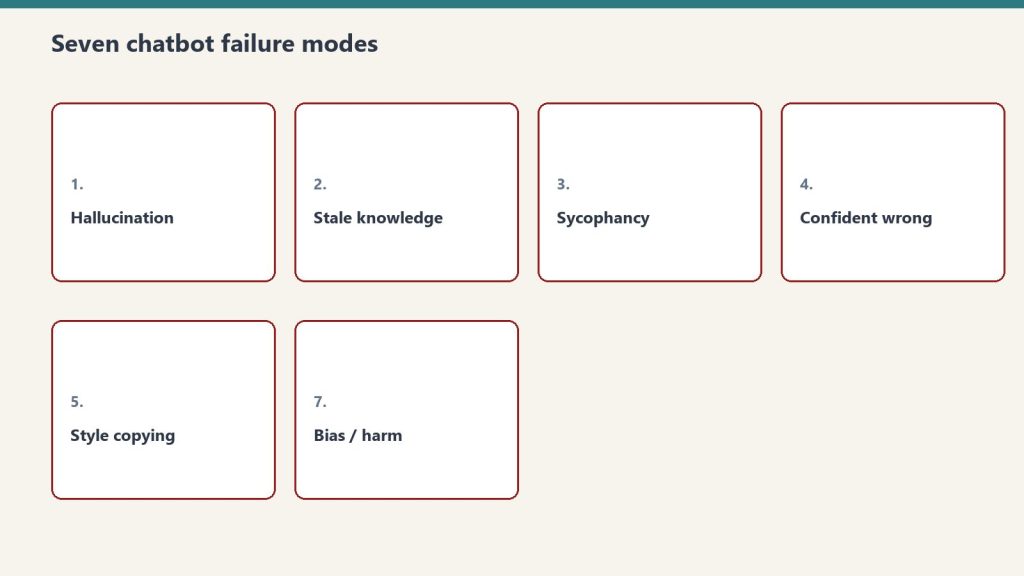
- It cannot verify citations. It will hallucinate case names and citations with confidence. Every citation must be checked against an authoritative legal database.
- It cannot provide legal advice. It produces language and analysis, not professional judgment. The attorney exercises judgment; Claude compresses the work that precedes it.
- It does not know current law. For recent statutory changes, new regulations, or fresh precedent, you need current research tools.
- It lacks client context. Claude does not know your client’s history, risk appetite, or the relationship dynamics that shape legal strategy.
- Confidentiality considerations & Enterprise controls apply. Never paste privileged client records into consumer Free tiers. Deploy Team Standard ($20/seat annual / $25 monthly) or Enterprise ($20/seat/mo annual + API usage, 20-seat min) for no default model training, SCIM, audit logs, custom retention, and IP allowlisting (review details on claude.com/solutions/legal).
Getting Claude Set Up for Legal Work

The most effective legal deployment of Claude is not the chat interface — it is Claude with a strong system prompt that establishes context, format expectations, and guardrails. A system prompt for a litigation practice might specify the governing jurisdiction, output format requirements, what it should flag for attorney review, and firm-specific terminology.
For firms with technical capacity, Claude’s API allows integration directly into document management systems, allowing attorneys to invoke Claude without leaving the tools they already use.
The Billing Question
The elephant in the room for law firms considering AI adoption is the billing model. If Claude compresses a five-hour research task to one hour, do you bill five hours or one?
The firms navigating this well are shifting toward value billing and fixed-fee arrangements where efficiency is profit rather than a billing problem. The ABA and state bars are actively developing guidance on AI use and disclosure. Following your jurisdiction’s bar guidance and staying current on disclosure requirements is non-negotiable.
Bottom Line
Claude does not replace legal judgment. It compresses the work that precedes judgment — research, drafting, review, summarization — at a quality level that makes it worth building into the workflow of any firm serious about efficiency. Pick one task category, run Claude against your next ten instances of that task, and measure the time delta. The ROI case makes itself.
Related on Tygart Media: Claude prompts & skills for lawyers · Claude AI pricing · law firm AI citations.
Get The Signal
What we actually ran, what it measured, and what it means for a restoration shop — every week, including the flops.
Leave a Reply