Tag: AI Models 2026

  • Claude Code Pricing 2026: Pro, Max, and API Limits

    Claude Code Pricing 2026: Pro, Max, and API Limits

    Last refreshed: October 6, 2026 (Pacific)

    Claude Code pricing has stopped being a clean sticker number and started being a question of which ceiling you hit first. There is a $20 plan, a $100 plan, and a $200 plan — and underneath all three sits a 5-hour rolling window, a weekly active-hours cap added in August 2025, and a per-model multiplier that quietly makes Opus 5.5 the most expensive thing you can do inside the terminal. If you came looking for the right plan, the honest answer is: it depends on whether you are mostly a Sonnet operator or you live in Opus.

    For the full picture across all plans, see the Claude pricing overview.

    The three subscription tiers, stripped down

    At-a-glance board comparing Free, Pro, Max, and Team Claude tiers by chat, limits, priority, and admin controls
    The three subscription tiers, stripped down.

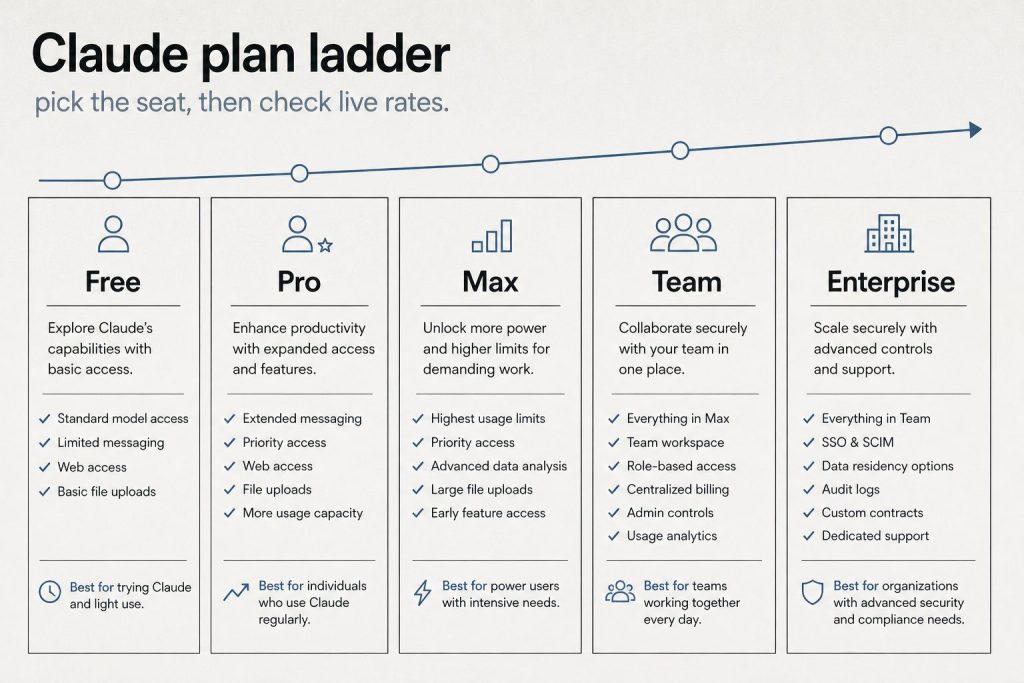
    Pro — $20/month. Access to Claude Code in the terminal, web, and desktop, with both Sonnet 5.5 and Opus 5.5 available. The practical envelope is about 44,000 tokens per 5-hour window and roughly 40–80 weekly active hours on Sonnet, depending on session concurrency. This is the plan for someone running Claude Code a few hours a day on focused work — refactors, scoped feature builds, debugging passes — not someone leaving an agent running while they eat lunch.

    Max 5x — $100/month. Five times the Pro envelope, plus priority during peak demand. The window allocation lands around 88,000 tokens per 5-hour block. This is the tier where you stop thinking about token budgets during a single working day and start thinking about them across a whole week. Picked correctly, it is the cheapest way to use Claude Code as your primary IDE companion without flipping over to API billing.

    Max 20x — $200/month. Twenty times Pro — about 220,000 tokens per window — which translates to roughly 480 Sonnet-hours or about 40 Opus-hours per week before the weekly cap kicks in. Real-world reports from early 2026 had $200/month users watching single Opus prompts eat 10–20% of their daily allocation; Anthropic publicly acknowledged the problem, expanded capacity, and doubled the 5-hour rate limit for Pro and Max accounts. If you are running Claude Code across multiple repos all week and reaching for Opus on the hard problems, this is the tier that stops you from staring at a rate-limit wall.

    The API, as a sanity check

    Workshop fuel gauge and metal tokens pouring into an API hopper, metaphor for pay-per-token pricing
    The API, as a sanity check.

    If you want a sanity check on whether the subscription math works, price the same workload against the API:

    • Claude Haiku 4.5 (claude-haiku-4-5-20251001): $1.00 input / $5.00 output per million tokens
    • Claude Sonnet 5.5 (claude-sonnet-5-5): $2.00 input / $10.00 output per million tokens
    • Claude Opus 5.5 (claude-opus-5-5): $4.00 input / $20.00 output per million tokens

    Prompt caching is the lever almost nobody uses correctly. Cache writes cost 1.25x input price for the 5-minute TTL or 2.0x for the 1-hour TTL, but cache reads cost 0.05x — a 95% discount on every subsequent request that hits the same context. If your .clauderules file, project map, and the file you are editing are all stable for an hour, the bill on a long pairing session can drop by an order of magnitude. The Batch API knocks another 50% off both directions for asynchronous workloads, which is worth knowing if you are running large refactor sweeps.

    One trap on Opus 4.7 specifically: the model uses a new tokenizer that inflates token counts by up to 35% on identical text compared to Opus 4.6. The headline price did not change, but your effective spend per request did — sometimes by nothing, sometimes by a third, depending on the content. If you migrated from Opus 4.6 and your bill went up without your prompt patterns changing, that is the reason.

    How to actually choose

    Decision map from daily chat, shipping products, or buying for a company to Free/Pro, API, or Team/Enterprise
    How to actually choose.

    The cleanest way to pick a plan is to first decide your model mix, then your weekly hours.

    If you are mostly a Sonnet operator — long agentic runs, multi-file edits, codebase Q&A, with Opus only reached for on the architectural questions — Pro at $20 is plausible up to about 5–8 hours of focused use per day, Max 5x covers most full-time individual developers, and Max 20x is overkill unless you are running multiple sessions in parallel.

    If you live in Opus — long-horizon agentic work, hard refactors across many files, anything where you would rather have one good attempt than three Sonnet retries — Pro will frustrate you within two weeks, Max 5x is the realistic floor, and Max 20x is the only tier that gives you a defensible Opus envelope without bouncing over to API billing.

    And if you are running Claude Code across multiple repos all week, leaving agents to grind on tasks while you do other things, Max 20x is the only subscription that holds up — and even then, the weekly cap is real. Use the API for the spillover and you will still come out cheaper than trying to brute-force a smaller plan.

    The number that matters

    One developer’s public report this year: roughly 10 billion tokens consumed across Claude Code over eight months. API metered cost would have exceeded $15,000. The same workload on Max at $100/month for the same window came in around $800 — about 93% cheaper. That is the gap that makes the subscription model worth taking seriously, even when the rate limits feel arbitrary. The $200 tier is not a vanity number; it is the price Anthropic charges to stop being a meaningful constraint on your workflow.

    The right way to read Claude Code pricing in October 2026 is not to ask which plan is cheapest. It is to ask which plan is the cheapest one that disappears — the one that stops appearing in your day. For most full-time developers reaching for Opus regularly, that plan is Max 20x. For everyone else, Max 5x is the first plan that actually gets out of your way.

    Related on Tygart Media: how to use Claude · Anthropic API key.

    Part of the complete guide: Claude Code

    Two meters

    • Seat — claude.ai / Claude Code usage cap on Pro, Max, Team, Enterprise.
    • API — prepaid credits in the console. Same models, different bill.

    Official seats: claude.com/pricing and the Team Help Center article. Official tokens: API pricing.

    Token rates used inside Code (API path)

    Model In / out per MTok When
    Haiku 4.5 $1 / $5 Cheap lookups
    Sonnet 5.5 $2 / $10 Current Sonnet
    Opus 5.5 $4 / $20 Current Opus. Docs say start here
    Opus 5 $5 / $25 Legacy. Still listed
    Fable 5.1 $10 / $50 Only if the job is worth it

    Sonnet 4.6 ($3 / $15), Opus 4.7 ($5 / $25), and Opus 4.8 ($5 / $25) remain on the legacy list. Do not start new work on them. Opus 5.5 fast mode is up to 2.5× faster at 2× standard pricing.

    Which seat

    • Light Code: Pro.
    • Several hours a day: Max 5×.
    • All-day / long agents: Max 20×.
    • 2–150 people, one bill: Team. Premium if those seats burn the weekly cap.
    • SSO / SCIM / audit and usage that should scale: Enterprise.
    • Unattended pipelines: console API key with a spend cap.

    Related: current models · console setup.

    Part of the complete guide: Claude Code

  • LLMs.txt Spec: 2026 Guide, Robots.txt Rules & Verification

    LLMs.txt Spec: 2026 Guide, Robots.txt Rules & Verification

    If you publish an llms.txt file this week, no major model is going to fetch it tonight. That is the honest 2026 read on the spec — and yet the file is still worth shipping for narrow, specific reasons. This guide covers the 4-element specification published at llmstxt.org, the robots.txt pairing that actually controls AI crawler behavior right now, and a server-log filter you can run to verify whether anyone is reading the file you just shipped.

    What llms.txt actually is (and what it isn’t)

    Three cards for Google cautious, Bing speed, OpenAI aggressive crawl styles
    What llms.txt actually is — and isn’t.

    llms.txt is a Markdown file served at the site root — /llms.txt — proposed by Jeremy Howard of Answer.AI on September 3, 2024. The spec at llmstxt.org defines four elements: a required H1 with the project or site name; a blockquote summary; zero or more Markdown content sections (no headings); and zero or more H2-delimited file-list sections containing annotated Markdown links to deeper content. That is the entire specification. There is no header convention, no schema requirement, no robots-style allow/deny syntax.

    What llms.txt is not: it is not a substitute for robots.txt, it is not an access-control mechanism, and as of May 2026 it is not consumed at inference time by ChatGPT, Claude, Gemini, Perplexity, or Copilot in any documented production system. Server-log audits across multiple independent practitioners show GPTBot, ClaudeBot, and Google-Extended do not request /llms.txt in meaningful volume during routine crawls.

    The realistic 2026 use case is developer tooling. AI coding assistants and IDE agents — Cursor, GitHub Copilot, Claude Code, and similar tools — retrieve docs in real time, and a curated llms.txt cuts token waste by pointing them at canonical Markdown sources instead of HTML-rendered pages bloated with nav and tracking. Companies like Anthropic, Stripe, Cursor, Cloudflare, Vercel, Mintlify, Supabase, and LangGraph ship llms.txt for that reason.

    The 4-element template — a working example

    Here is a real, valid llms.txt for a hypothetical SaaS docs site. Copy this structure, change the project name, and you have a shippable file in under 30 minutes:

    # Acme Analytics
    
    > Acme Analytics is a self-hosted product analytics platform for SaaS teams. This file points AI assistants and IDE agents at canonical Markdown documentation, not the rendered HTML.
    
    Authoritative Markdown sources for product, API, and SDK documentation. Use the `.md` variant of any docs page (append `.md` to the URL) for a clean, agent-friendly version.
    
    ## Getting Started
    
    - [Quickstart](https://acme.example/docs/quickstart.md): 10-minute setup, install through first event.
    - [Concepts](https://acme.example/docs/concepts.md): events, properties, identities, sessions — definitions and examples.
    
    ## API Reference
    
    - [REST API Reference](https://acme.example/docs/api/rest.md): every endpoint, request/response schema, rate limits.
    - [Webhook Reference](https://acme.example/docs/api/webhooks.md): payload contracts and retry behavior.
    
    ## SDKs
    
    - [JavaScript SDK](https://acme.example/docs/sdk/js.md): browser and Node, including server-side rendering notes.
    - [Python SDK](https://acme.example/docs/sdk/python.md): server-side ingestion patterns.
    
    ## Optional
    
    - [Changelog](https://acme.example/docs/changelog.md): version history, breaking changes flagged inline.
    

    Two practitioner notes. First, the spec uses an “Optional” H2 as a soft signal — links under that heading can be skipped by aggressive token budgets. Second, the file is most useful when every linked URL has a parallel .md Markdown version. If your site is pure HTML, llms.txt without paired Markdown does little.

    The robots.txt pairing — this is what actually controls AI bots today

    Four ranked rows of AI crawler fleets reading publisher content
    robots.txt pairing — what controls AI bots today.

    The lever that meaningfully controls AI crawler behavior in 2026 is robots.txt with user-agent–specific rules. Anthropic publishes official documentation for three bots — ClaudeBot for training, Claude-User for user-initiated fetches, and Claude-SearchBot for search indexing — and confirms all three honor robots.txt. OpenAI runs GPTBot (training) and OAI-SearchBot (live ChatGPT search). Google’s AI training opt-out is the Google-Extended user-agent. Perplexity uses PerplexityBot.

    The two-bucket pattern most practitioner sites should ship: block training-only crawlers, allow search and user-initiated retrieval so your content can still be cited in answers.

    # Allow AI search and user-fetch traffic (citations, attribution)
    User-agent: Claude-SearchBot
    Allow: /
    
    User-agent: Claude-User
    Allow: /
    
    User-agent: OAI-SearchBot
    Allow: /
    
    User-agent: PerplexityBot
    Allow: /
    
    # Block training-only crawlers
    User-agent: ClaudeBot
    Disallow: /
    
    User-agent: GPTBot
    Disallow: /
    
    User-agent: Google-Extended
    Disallow: /
    
    # Standard search crawler — leave open
    User-agent: Googlebot
    Allow: /
    
    Sitemap: https://example.com/sitemap.xml
    

    One operational caveat: robots.txt is policy, not enforcement. Anthropic, OpenAI, and Google have all publicly committed their named bots to compliance, but unnamed scrapers and residential-IP harvesters routinely ignore it. For sites with sensitive content, pair robots.txt with WAF or Cloudflare bot-management rules at the edge.

    Structured data still does more heavy lifting than llms.txt

    If your goal is AI citation rather than IDE-agent retrieval, structured data on the page itself moves the needle more than llms.txt. The minimum stack for any article you want cited: Article schema with named author and publisher, FAQPage schema on any post that answers a discrete question, and speakable markup on the answer paragraphs. These get parsed during normal HTML fetches by every major AI crawler — no separate file required.

    How to verify your llms.txt is actually being read

    Desk with laptop, checklist notebook, and billing card ready before creating an Anthropic API key
    How to verify llms.txt is being read.

    Ship the file, then run this server-log filter weekly for 30 days. On any standard access-log format (nginx, Apache, or a Cloudflare log push), grep for requests to /llms.txt and break them down by user-agent:

    grep "GET /llms.txt" /var/log/nginx/access.log \
      | awk -F\" '{print $6}' \
      | sort | uniq -c | sort -rn
    

    What you will almost certainly see in May 2026: a steady trickle of human curl requests, the occasional IDE agent fetch tagged with a Cursor or VS Code user-agent, and effectively zero hits from GPTBot, ClaudeBot, or Google-Extended. That null result is itself the measurement — it tells you llms.txt is a developer-experience asset right now, not an AI-citation asset, and your investment should match that reality.

    The recommended 2026 rollout

    For most sites, the right sequence is: ship the robots.txt user-agent rules above first, because those are enforceable today and shape every AI crawler interaction. Add structured data to every article that competes for AI citation. Then publish llms.txt — under 30 minutes of work — for the IDE-agent and dev-tooling upside, with no expectation of immediate search lift. When OpenAI, Anthropic, or Google publicly confirm production llms.txt consumption, you are already in position.

    Related on Tygart Media: llms.txt case study · URL curation buckets · verify in logs.

  • Claude MCP Configuration: 2026 Setup & Token Savings

    Claude MCP Configuration: 2026 Setup & Token Savings

    Last refreshed: May 15, 2026

    If you set up Claude MCP six months ago and have not touched the config since, three things have changed underneath you: the recommended transport, how tools are loaded into context, and how teams share server configs. None of these are cosmetic. If you ignore them, you are leaving tokens, money, and stability on the table.

    This is the working Claude MCP setup I use in May 2026 — what the claude mcp add command actually does, which scope to pick, what the deprecation of SSE means in practice, and where Claude Code still falls short.

    The three-scope mental model

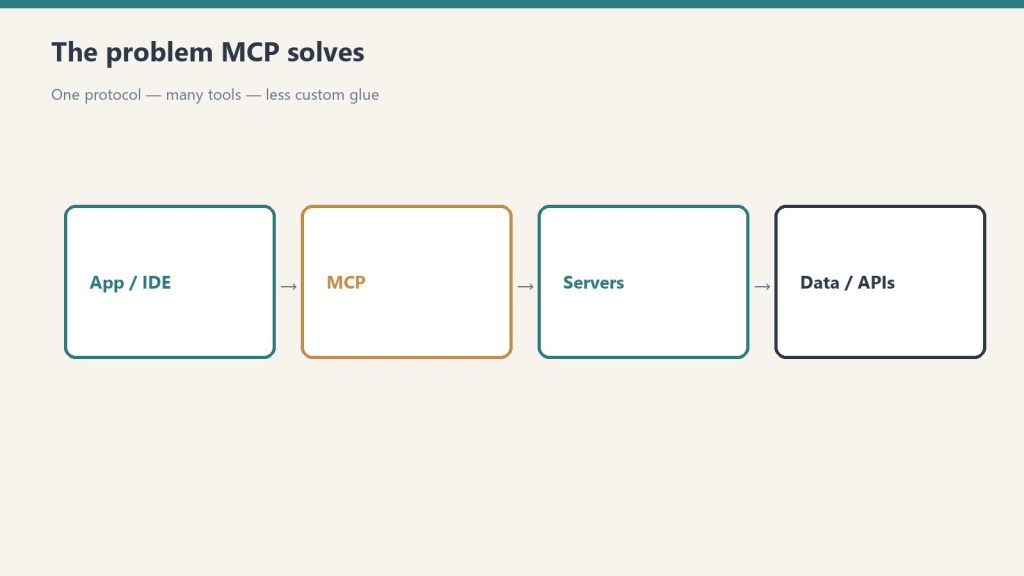
    Flow from app/IDE through MCP to servers and data APIs
    The three-scope mental model.

    Every MCP server you wire into Claude Code lives at exactly one of three scopes. Get this wrong and you will either leak credentials into git or wonder why your teammate cannot use the same database the AI just queried.

    • Local (default): the server is available only to you, only inside the current project. Config is written into your project’s entry inside ~/.claude.json. Good for project-specific servers like a dev database or a Sentry project key you do not want other repos to inherit.
    • User: the server is available to you across every project on your machine. Also stored in ~/.claude.json. This is where GitHub, search providers, and personal productivity servers belong.
    • Project: the server is written to a .mcp.json file at the repo root and shared with the whole team via git. Claude Code prompts for approval the first time a teammate opens the project — by design, because anyone who can push to the repo can wire a new server into your environment.

    When the same server is defined in more than one scope, Claude Code resolves it in this order: local beats project beats user beats plugin-provided. This is the part that bites people the most. If you have a “github” entry at user scope and someone adds a different “github” entry at project scope in .mcp.json, the project definition wins for that repo. Run claude mcp list when something behaves strangely.

    The commands you actually need

    Five stacked panels of daily Claude Code command habits
    The commands you actually need.

    The CLI is more useful than the docs make it look. Three commands cover ~90% of real setup work:

    # Add a remote HTTP MCP server at user scope (available everywhere)
    claude mcp add --transport http hubspot --scope user https://mcp.hubspot.com/anthropic
    
    # Add a local stdio server scoped only to this project
    claude mcp add my-db -s local -- node ./scripts/db-mcp.js
    
    # Share a server with your team via the repo's .mcp.json
    claude mcp add my-server -s project -- node server.js

    The short flag is -s, the long is --scope. The -- separator is required for stdio servers because everything after it is treated as the literal command to spawn. Forget it and Claude Code will try to interpret your Node arguments as its own flags.

    SSE is dead. Use Streamable HTTP.

    If your MCP server documentation still tells you to use the sse transport, the documentation is stale. The MCP spec dated 2025-03-26 introduced Streamable HTTP and simultaneously deprecated HTTP+SSE. Through 2026, vendor after vendor has set hard cutoff dates — Atlassian’s Rovo MCP server keeps SSE around until June 30, 2026 and then drops it; Keboola pulled SSE on April 1; Cumulocity’s AI Agent Manager flipped to Streamable HTTP on May 8.

    Why this matters beyond a name change: SSE required Claude Code to hold a persistent connection to a single server replica, which broke horizontal scaling and made every transient network blip a reconnection drama. Streamable HTTP is stateless. Multiple replicas behind a load balancer just work. If you have flaky MCP connections in production, the first thing to check is whether the server is still on SSE.

    For new setups, use --transport http. The older --transport sse still functions but is on the deprecation path.

    Tool Search is the feature you should actually care about

    The single biggest change in how Claude Code uses MCP in 2026 is lazy tool loading via Tool Search. Older MCP clients dumped every tool schema from every connected server into the model’s context window at the start of every conversation. With ten servers wired up that could easily be 20,000+ tokens of overhead before you typed a single character.

    Tool Search inverts this. Claude Code keeps only the server names and short descriptions resident. When a tool is actually needed, it fetches that tool’s full schema on demand. Anthropic’s own documentation says this reduces tool-definition context usage by roughly 95% versus eager-loading clients. In practice that means you can run a serious MCP fleet — GitHub, Sentry, a database, a search provider, your internal API — without quietly burning through your context budget. The Sonnet 4.6 and Opus 4.7 1M-token context window does not save you here, because anything you let crowd the prompt is also being re-read on every turn.

    Companion feature: list_changed notifications. An MCP server can now tell Claude Code “my tool list changed” and Claude Code refreshes capabilities without a disconnect-reconnect dance. If you build your own server, emit this when you swap tool definitions and you save users a restart.

    What it still gets wrong

    Honest take: claude mcp list still does not surface scope information for every entry in a useful way — there is an open issue on the anthropics/claude-code repo asking for it (#8288 if you want to track). Project-scoped servers from .mcp.json have a separate history of not appearing in the list output (#5963) depending on how you opened the project. If you cannot find a server, check both ~/.claude.json and ./.mcp.json directly.

    The other rough edge is the project-approval prompt. The first time you open a repo with a new .mcp.json, Claude Code asks you to approve each project-scoped server. That is the right security default. It is also infuriating in CI or any non-interactive shell, where the prompt blocks the session. The current workaround is to bake the servers in at user scope on build agents so the project-scope approval never fires in CI. A cleaner non-interactive approval flow is the single most-requested fix I see in real teams.

    The setup I would run on a new machine today

    Desk with laptop, checklist notebook, and billing card ready before creating an Anthropic API key
    The setup I would run on a new machine today.

    User-scope: GitHub, a code search server, and a single notes/Notion server. Project-scope in each repo’s .mcp.json: whatever database the project owns and whatever observability backend it reports to. Local-scope: anything experimental I am evaluating but do not want my team or my other repos to inherit.

    Pin --transport http on everything remote. Skip Desktop Extensions (.dxt) for anything you want versioned with the codebase — they are a Claude Desktop convenience, not a Claude Code primitive, and they hide the config from your team. Run claude mcp list when something is off and read .mcp.json directly when list is unhelpful.

    That is the whole working model. The pieces that matter — three scopes, Streamable HTTP, Tool Search — fit on a single screen. The pieces that have not caught up yet — list output, non-interactive approvals — are visible in the issue tracker and will move.

    Related on Tygart Media: how to use Claude · Anthropic API key.

  • Claude Code Hooks: Enforce Workflow Rules Automatically

    Claude Code Hooks: Enforce Workflow Rules Automatically

    Last refreshed: May 15, 2026

    You’ve been there. You add a rule to CLAUDE.md — “always run prettier after editing files” — and Claude follows it, most of the time. Then it doesn’t. The formatter doesn’t run, the lint check gets skipped, and you’re back to reviewing diffs manually.

    Hooks fix this. Claude Code hooks are shell commands, HTTP endpoints, or LLM prompts that fire deterministically at specific points in Claude’s agentic loop. Unlike CLAUDE.md instructions, which are advisory, hooks are enforced at the execution layer — Claude cannot skip them.

    As of early 2026, Claude Code ships with 21 lifecycle events across four hook types. This article covers the two that matter most for daily workflow: PreToolUse and PostToolUse.

    How Hooks Work Architecturally

    Side-by-side cards defining what Claude Code is and is not
    How Claude Code hooks work architecturally.

    Claude Code’s agent loop is a continuous cycle: receive input → plan → execute tools → observe results → repeat. Hooks intercept this loop at named checkpoints.

    Every hook is defined in .claude/settings.json under a hooks key. A hook entry has three parts: the lifecycle event name, an optional matcher (a regex against tool names), and the handler definition — either a shell command, an HTTP endpoint, or an LLM prompt.

    {
      "hooks": {
        "PostToolUse": [
          {
            "matcher": "Write|Edit",
            "hooks": [
              {
                "type": "command",
                "command": "npx prettier --write "$CLAUDE_TOOL_INPUT_FILE_PATH""
              }
            ]
          }
        ]
      }
    }

    That’s it. Every file Claude writes or edits now auto-formats. No CLAUDE.md reminders, no hoping Claude remembers — the formatter runs on every single Write or Edit tool call, period.

    PreToolUse: Enforce Before Claude Acts

    Five stacked panels of daily Claude Code command habits
    PreToolUse — enforce before Claude acts.

    PreToolUse fires before Claude executes any tool. Your hook receives the full tool call — name, inputs, arguments — and can return one of three signals:

    • Exit 0 → allow the tool call to proceed
    • Exit 2 → block the tool call; Claude receives your error message and adjusts
    • Exit 1 → hook error; Claude proceeds but logs the failure

    This makes PreToolUse the right place for guardrails. Here’s a real example: blocking npm in a bun project.

    #!/bin/bash
    # .claude/hooks/check-package-manager.sh
    # Blocks npm commands in projects that use bun
    
    if echo "$CLAUDE_TOOL_INPUT_COMMAND" | grep -qE "^npm "; then
      echo "Error: This project uses bun, not npm. Use: bun install / bun run / bun add" >&2
      exit 2
    fi
    exit 0

    Wire it in settings.json:

    {
      "hooks": {
        "PreToolUse": [
          {
            "matcher": "Bash",
            "hooks": [
              {
                "type": "command",
                "command": ".claude/hooks/check-package-manager.sh"
              }
            ]
          }
        ]
      }
    }

    Now when Claude tries npm install, the hook exits 2, Claude sees the error message, and it switches to bun install without you intervening. The correction happens in the same turn.

    Another production pattern: blocking writes to protected paths.

    #!/bin/bash
    # Prevent Claude from modifying migration files already run in production
    if echo "$CLAUDE_TOOL_INPUT_FILE_PATH" | grep -qE "db/migrations/"; then
      echo "Error: Migration files are immutable after deployment. Create a new migration instead." >&2
      exit 2
    fi
    exit 0

    PostToolUse: React After Claude Acts

    PostToolUse fires after a tool completes successfully. It can’t block execution, but it can provide feedback — and it can run any side-effect you need automatically.

    Auto-format every edit:

    {
      "hooks": {
        "PostToolUse": [
          {
            "matcher": "Write|Edit",
            "hooks": [
              {
                "type": "command",
                "command": "npx prettier --write "$CLAUDE_TOOL_INPUT_FILE_PATH" 2>/dev/null || true"
              }
            ]
          }
        ]
      }
    }

    Run tests after code changes:

    #!/bin/bash
    # Run affected tests after any source file edit
    FILE="$CLAUDE_TOOL_INPUT_FILE_PATH"
    if echo "$FILE" | grep -qE "\.(ts|js|py)$"; then
      if [ -f "package.json" ]; then
        npx jest --testPathPattern="$(basename ${FILE%.*})" --passWithNoTests 2>&1 | tail -5
      fi
    fi

    Desktop notification on task completion:

    {
      "hooks": {
        "Stop": [
          {
            "hooks": [
              {
                "type": "command",
                "command": "osascript -e 'display notification "Claude finished" with title "Claude Code"'"
              }
            ]
          }
        ]
      }
    }

    Environment Variables Available to Hooks

    Claude Code exposes context about the triggering tool call through environment variables. The ones you’ll use most:

    Variable Value
    $CLAUDE_TOOL_NAME Name of the tool being called (e.g., Edit, Bash, Write)
    $CLAUDE_TOOL_INPUT_FILE_PATH File path for Edit, Write, Read calls
    $CLAUDE_TOOL_INPUT_COMMAND Shell command for Bash calls
    $CLAUDE_SESSION_ID Current session ID — useful for audit logging
    $CLAUDE_TOOL_RESULT_OUTPUT Output of the tool (PostToolUse only)

    These are injected by Claude Code before your hook runs. You don’t configure them — they’re always there.

    The Model Question: Which Claude Runs Agentic Tasks?

    One practical consideration for hook-heavy workflows: the default model affects how well Claude responds to hook feedback. As of May 2026:

    • claude-opus-4-7 ($5/MTok input, $25/MTok output) — highest agentic coding capability; best at interpreting hook rejection messages and self-correcting without re-asking
    • claude-sonnet-4-6 ($3/MTok input, $15/MTok output) — strong balance of speed and reasoning; handles most hook-corrected flows well
    • claude-haiku-4-5-20251001 ($1/MTok input, $5/MTok output) — fastest; may require more explicit hook messages to course-correct reliably

    For workflows with complex PreToolUse guardrails — especially ones that provide long error messages with corrective instructions — Opus 4.7 handles the feedback loop most reliably. For simpler PostToolUse automation (formatters, notifications), model choice doesn’t matter; the hook runs regardless.

    To configure the model: export ANTHROPIC_MODEL=claude-opus-4-7 before launching Claude Code, or set it in your team’s .env.

    Hooks vs. CLAUDE.md: When to Use Each

    Flow from app/IDE through MCP to servers and data APIs
    Hooks vs CLAUDE.md — when to use each.

    CLAUDE.md is the right place for context, preferences, and guidance — things you want Claude to know about your project. Hooks are the right place for behavior that must happen every time without exception.

    The practical test: if failing to follow the instruction costs you five minutes of manual cleanup, put it in a hook. If it’s a style preference or a reminder about architecture decisions, put it in CLAUDE.md. The two are complementary — you’ll likely end up with both in any mature project setup.

    A team that gets this right builds CLAUDE.md as documentation for Claude and hooks as the CI/CD equivalent for the agentic loop.

    Getting Started

    The fastest path to a working hook setup:

    1. Create .claude/settings.json in your project root if it doesn’t exist
    2. Add a PostToolUse hook wired to your formatter — this is low-risk and immediately valuable
    3. Test it by asking Claude to edit a file; the formatter should run automatically
    4. Add PreToolUse guardrails for any tool calls that have caused problems in the past

    The official hooks reference is at code.claude.com/docs/en/hooks — it covers all 21 lifecycle events, HTTP handler format, and the full JSON output schema for hook responses.

    Hooks are the difference between Claude Code as a powerful suggestion engine and Claude Code as a reliable automation layer. Once you have a PostToolUse formatter running on every edit, going back feels like working without version control.

    Related on Tygart Media: how to use Claude · Anthropic API key.

  • Claude Context Window — Every Question Answered (Complete FAQ 2026)

    Claude Context Window — Every Question Answered (Complete FAQ 2026)

    Last refreshed: May 15, 2026

    Tygart Media · Claude Context Window Reference

    Updated May 9, 2026 · Sizes verified from Anthropic’s official models page · Based on production use

    Context window questions answered from someone who actually uses the 1M token window in production — not from a spec sheet alone.

    Covers window sizes by model, what 1M tokens holds, the memory vs context distinction, performance at long context, and API-specific details. Full explainer: Claude Context Window Size 2026

    Size Questions

    Long paper tape measure unrolling across a desk beside a laptop, metaphor for context window length
    Size questions.

    What is Claude’s context window size in 2026?

    Lineup currency (Sept 2026): Current API list (Sept 2026, verified): Sonnet 5 $2/$10, Opus 5.5 $4/$20, Haiku 4.5 $1/$5, Fable 5.1 $10/$50. Legacy (still listed on Anthropic’s card): Opus 4.8 $5/$25, Sonnet 4.6 $3/$15. Rows below that still name Opus 4.8 / Sonnet 4.6 / Fable 5 are legacy-or-prior availability figures — confirm live Anthropic limits before quoting TPM/RPM/context.

    ModelAPI StringContext WindowMax Output
    Claude Fable 5claude-fable-51,000,000 tokens128,000 tokens
    Claude Opus 4.8claude-opus-4-81,000,000 tokens128,000 tokens
    Claude Sonnet 4.6claude-sonnet-4-61,000,000 tokens64,000 tokens
    Claude Haiku 4.5claude-haiku-4-5-20251001200,000 tokens64,000 tokens

    Source: Anthropic’s official models page, verified May 9, 2026.

    What does 1 million tokens actually hold?

    • ~750,000 words of English text — roughly 10 full-length novels, or 1,500 average blog posts
    • A full mid-size codebase — a 50,000-line Python project with comments
    • ~60–100 research PDFs at 20–30 pages each, all simultaneously
    • Hours of meeting transcripts — a full workday of recorded calls, transcribed
    • Our full WordPress site audit — 200+ posts worth of content loaded in one session for comprehensive SEO analysis

    The shift from 200K to 1M wasn’t just “more room.” It changed what we could ask Claude to do in a single session — whole-codebase reasoning, multi-document synthesis, full-history context.

    How many pages can Claude read at once?

    A typical 20-page PDF is roughly 10,000–15,000 tokens, so at 1M tokens you could load 60–100 such documents simultaneously. A 300-page book runs roughly 150,000–200,000 tokens — Claude can hold 5–6 full books in context at once. In practice, the constraint is usually time to upload and your session structure, not the window ceiling.

    What’s the difference between context window and memory?

    Three distinct things that get conflated:

    • Context window: Everything Claude can see right now in this session. Temporary — disappears when the session ends.
    • claude.ai memory: Facts extracted from past conversations and injected as a summary into new sessions. Persistent but compressed — a small snippet in the context, not the full history.
    • Managed Agents memory stores / Dreaming: Developer-layer knowledge graphs that agents build and refine between sessions. More structured than consumer memory, requires API implementation.

    The 1M context window is your working memory for one session. Memory systems are what carry information across sessions — they work by injecting a summary into the new session’s context, not by giving Claude access to the full prior history.


    Performance Questions

    Diagram comparing a long context window bar with a shorter output limit bar
    Performance questions.

    Does performance degrade at very long context lengths?

    The honest answer: yes, somewhat, and it depends on the task. The “lost in the middle” pattern is real — models tend to weight the beginning and end of very long contexts more heavily than the middle. For tasks that require pinpointing specific information buried deep in a 500-page document, performance is lower than for shorter contexts. For tasks that benefit from broad synthesis across a large body of material — architectural review, theme identification, cross-document comparison — long context is a net positive. Structure important information at natural reference points rather than burying it in the middle of a large document.

    How does Opus 4.8’s context window differ from Sonnet 4.6?

    Same 1M input context window. The difference is max output: Opus 4.8 can generate up to 128,000 tokens in a single response; Sonnet 4.6 caps at 64,000. For most tasks this doesn’t matter. It matters for generating very long documents, large codebases in a single pass, or batch outputs that need to be very long. If you’re not generating 64K+ token outputs, choose between models on capability and cost, not on output ceiling.

    What happens when I hit the context window limit?

    Earlier messages begin dropping out of the active context. Claude can no longer reference information from those dropped messages — it effectively forgets that part of the conversation. In the claude.ai interface, you’ll see a notification as you approach the limit. In API usage, the context window limit is enforced hard — requests exceeding it return an error.


    API and Technical Questions

    Desk with laptop, checklist notebook, and billing card ready before creating an Anthropic API key
    API and technical questions.

    Is the 1M context window available on the free plan?

    The model available to free plan users supports the 1M window technically, but free plan rate limits mean sustained heavy long-context use hits limits quickly. The window is available; using it intensively for extended periods is more practical on paid tiers.

    What’s the extended output option on the Batch API?

    On the Message Batches API, Fable 5, Opus 4.8, and Sonnet 4.6 support up to 300,000 output tokens using the output-300k-2026-03-24 beta header. This applies only to batch processing — not to synchronous API calls. Useful for large documentation generation, book-length content, or large codebase outputs in batch.

    Can I query context window limits programmatically?

    Yes. The Models API returns max_input_tokens, max_tokens, and a capabilities object for every available model. If you’re building systems that need to programmatically enforce context limits or route by capability, this is the right way to get current values rather than hardcoding from documentation.

    Does context window size affect API cost?

    Only indirectly — you pay for tokens consumed, not for context window capacity. A 1M token window doesn’t cost more than a 200K window. You pay for the tokens you actually send and receive. Loading a 500K-token document into context costs the same per token regardless of whether the model has a 200K or 1M window. The window size determines whether the request is possible at all — not what it costs per token.

    Related on Tygart Media: extended thinking · how to use Claude · tokens to words.

  • Claude AI Pricing FAQ: Complete 2026 Answers

    Claude AI Pricing FAQ: Complete 2026 Answers

    Last refreshed: October 6, 2026 (Pacific)

    Tygart Media · Claude Pricing Reference

    Updated October 6, 2026 · All prices verified from Anthropic’s official pricing page · Model strings current

    Subscription vs. API. Free vs. Pro vs. Max. Managed Agents on top. What actually changed in May 2026. The answers without the marketing layer.

    Covers subscription plans, API token rates, Managed Agents pricing, Claude Security, and the May 2026 rate limit changes. Full pricing page: Claude AI Pricing — All Plans

    Plan Pricing

    At-a-glance board comparing Free, Pro, Max, and Team Claude tiers by chat, limits, priority, and admin controls
    Plan pricing questions.

    What does each Claude plan cost?

    PlanPriceClaude CodeBest For
    Free$0❌Casual / evaluation use
    Pro$20/mo✅Individual daily power use
    Max 5×$100/mo✅Heavy individual use, no peak throttle
    Max 20×$200/mo✅Highest individual ceiling available
    Team Standard$20/seat/mo (annual) · $25 monthly✅Shared team access (1.25× Pro per session)
    Team Premium$100/seat/mo (annual) · $125 monthly✅Shared team access + coding
    Enterprise$20/seat + usage at API rates✅Large orgs, custom limits, SSO

    All subscription prices are per-user per-month. Annual billing locks in the lower rate.

    What’s the difference between Pro and Max?

    Same models, same Claude Code access. Max gives you more usage within the 5-hour rolling window — 5× or 20× Pro’s limit depending on tier — and eliminates peak-hours throttling. If you regularly hit Pro’s limits mid-session, Max is the upgrade. If you haven’t hit limits on Pro, you don’t need Max.

    Did the May 2026 SpaceX deal change subscription pricing?

    May 6, 2026Prices unchanged. Limits doubled. Peak-hours throttling eliminated for Pro and Max. Free plan unchanged.

    The SpaceX Colossus 1 compute expansion doubled the 5-hour rate limit ceiling for Pro, Max, Team, and Enterprise — at no price increase. If you’ve been hitting limits and considering upgrading to Max, check first whether the doubled Pro ceiling now fits your workflow.


    API Pricing

    Workshop fuel gauge and metal tokens pouring into an API hopper, metaphor for pay-per-token pricing
    API pricing questions.

    How does API pricing work?

    API pricing is pay-per-token — you pay for what you use, no subscription required. Rates as of October 2026 (verified from Anthropic’s official models page):

    ModelAPI StringInput / MTokOutput / MTok
    Claude Sonnet 5.5claude-sonnet-5-5$2$10
    Claude Opus 5.5claude-opus-5-5$4$20
    Claude Fable 5.1claude-fable-5-1$10$50
    Claude Haiku 4.5claude-haiku-4-5-20251001$1$5
    Claude Opus 4.8 (legacy — still listed)claude-opus-4-8$5$25
    Claude Sonnet 4.6 (legacy — still listed)claude-sonnet-4-6$3$15

    Batch API discounts, prompt caching rates, and extended thinking costs apply on top — see Anthropic’s full pricing page for those specifics.

    Is subscription or API cheaper for my use case?

    Subscription wins for consistent daily use (claude.ai interface, Claude Code). API wins for variable-volume programmatic use and batch workloads. The breakeven point: if you’re using Claude heavily enough to hit Pro’s limits even weekly, you’re likely consuming more than $20/month in equivalent API tokens. For batch processing at scale, the Batch API with its discount rate is almost always the most cost-efficient path.

    What’s the real cost of Opus 4.8 vs Sonnet 4.6?

    List price: Opus 4.8 (legacy — still listed) is $5/$25 per MTok input/output vs Sonnet 4.6 (legacy — still listed)’s $3/$15 — roughly 1.67× more expensive at list. However, Opus 4.8 (legacy — still listed)’s tokenizer produces approximately 1.46× more tokens per task than Sonnet 4.6 (legacy — still listed) on typical workloads, meaning real-world Opus 4.8 (legacy — still listed) costs can run meaningfully higher than the list price ratio implies. For most production API workloads, Sonnet 4.6 (legacy — still listed) is the right default. Use Opus 4.8 (legacy — still listed) when the task genuinely requires maximum reasoning and cost is secondary.

    Lineup currency (Oct 2026): Current API list (Oct 2026, verified): Sonnet 5.5 $2/$10, Opus 5.5 $4/$20, Haiku 4.5 $1/$5, Fable 5.1 $10/$50. Legacy (still listed on Anthropic’s card): Opus 4.8 $5/$25, Sonnet 4.6 $3/$15.


    Managed Agents Pricing

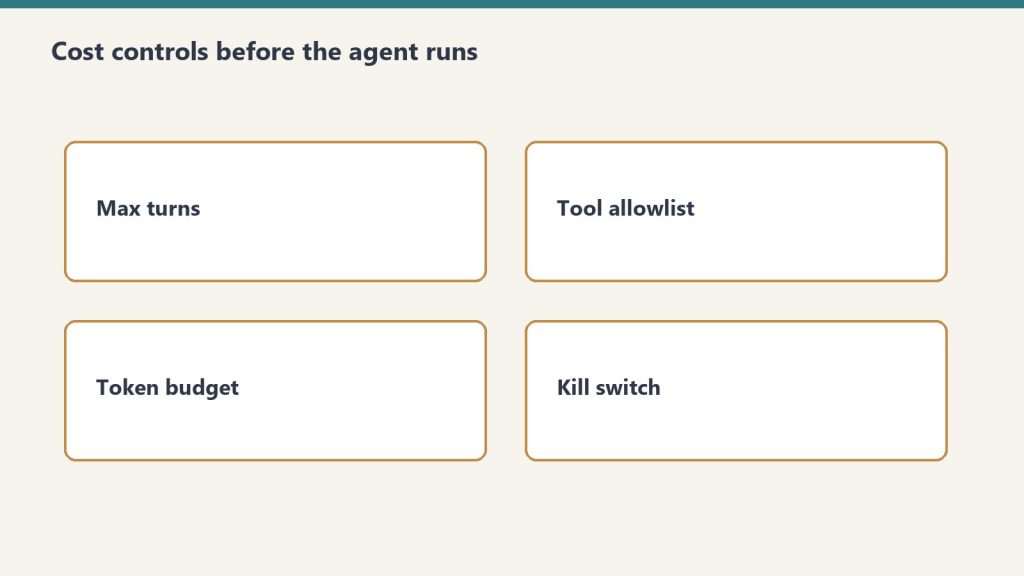
    Four gates: max turns, tool allowlist, token budget, kill switch
    Managed agents pricing questions.

    What does Claude Managed Agents cost?

    Two charges: standard API token rates for whatever model you use, plus $0.08 per session-hour of active runtime. That’s the complete formula — no other managed infrastructure fee on top.

    A session-hour is one hour of active session status. Billing is metered to the millisecond. Idle time, time waiting for your input, and time waiting for tool confirmations do not accrue charges.

    Maximum theoretical monthly runtime cost (24/7 agent): 24 hrs × $0.08 × 30 days = $57.60/month. In practice, token costs become the dominant cost driver well before you approach this ceiling.

    Full breakdown: Claude Managed Agents Complete Pricing Reference

    What does web search cost inside a Managed Agents session?

    $10 per 1,000 searches ($0.01 per search), billed separately from session runtime and token costs. Same rate as web search via the standard API.

    What does Dreaming cost?

    Dreams are billed at standard API token rates for the model you select; cost scales roughly linearly with the number and length of input sessions. Dreaming is a research preview — request access to try it (status as of October 2026). Docs: platform.claude.com/docs/en/managed-agents/dreams


    Specialty Model Pricing

    What does Claude Mythos Preview cost?

    $25 per million input tokens, $125 per million output tokens. Invitation-only through Project Glasswing — no self-serve access. Contact Anthropic at anthropic.com/glasswing. Claude Mythos is not available through any subscription tier or standard API access.

    Is Claude Security Beta included in my plan?

    Claude Security Beta is available to all Enterprise customers during the beta period — included as part of Enterprise, no separate per-scan fee. Claude Security runs on an Opus-class model Anthropic manages — confirm the current model in Anthropic’s Claude Security docs. It is included as part of Enterprise during the beta, no separate per-scan fee. For Enterprise pricing including Claude Security, contact Anthropic sales. Standard API users do not have access during beta.

    Lineup currency (Oct 2026): Current API list (Oct 2026, verified): Sonnet 5.5 $2/$10, Opus 5.5 $4/$20, Haiku 4.5 $1/$5, Fable 5.1 $10/$50. Legacy (still listed on Anthropic’s card): Opus 4.8 $5/$25, Sonnet 4.6 $3/$15.

    Related on Tygart Media: how to use Claude · Anthropic API key.

  • Claude Code — Every Question Answered (Complete FAQ 2026)

    Claude Code — Every Question Answered (Complete FAQ 2026)

    Last refreshed: May 15, 2026

    Tygart Media · Claude Code Reference

    Updated May 9, 2026 · Verified against Anthropic docs · Claude Code v2.1.133

    No preamble. If you’re here, you’re trying to install Claude Code, figure out pricing, or understand what changed. Here are the actual answers.

    This page covers installation, pricing by plan, what’s new in 2026, and the questions that don’t have clean homes in Anthropic’s documentation. Updates as Claude Code ships new versions — currently tracking weekly releases.

    Pricing Questions

    At-a-glance board comparing Free, Pro, Max, and Team Claude tiers by chat, limits, priority, and admin controls
    Pricing questions.

    How much does Claude Code cost?

    Claude Code has no separate subscription fee. Access is included in these Claude plans:

    Plan Monthly Cost Claude Code Rate Limits
    Free $0 ❌ Not included —
    Pro $20 ✅ Included 5-hr window, doubled May 2026
    Max (5×) $100 ✅ Included 5× Pro limits, no peak throttle
    Max (20×) $200 ✅ Included 20× Pro limits, no peak throttle
    Team Standard $25/seat ❌ Not included —
    Team Premium $100/seat ✅ Included 6.25× Pro limits, doubled May 2026
    Enterprise Custom ✅ Included Custom

    API usage (tokens consumed by Claude Code) is billed separately at standard API rates on top of your subscription. For most users, subscription is the dominant cost.

    Is there a Claude Code student discount or Amazon Prime bundle?

    No. As of May 2026, there is no Claude Code-specific student discount and no Amazon Prime Student bundle that includes Claude Code. Pro at $20/month is the cheapest plan that includes Claude Code access. See the full student discount guide for what legitimate options exist for reducing cost.

    What did the May 2026 SpaceX deal change for Claude Code users?

    May 6, 2026 UpdatePeak-hours throttling eliminated for Pro and Max. 5-hour rate limits doubled for Pro, Max, Team Premium, and Enterprise. Free plan unchanged.

    If you’ve been hitting limits during long agentic runs or multi-file refactors, the ceiling is now twice as high. Source: anthropic.com/news/higher-limits-spacex


    Installation Questions

    Desk with laptop, checklist notebook, and billing card ready before creating an Anthropic API key
    Installation questions.

    What are the system requirements for Claude Code?

    • Node.js 18+ required (Node.js 20+ recommended)
    • macOS, Linux, or Windows (Windows support GA as of April 2026 — PowerShell is now the default shell, Git Bash no longer required)
    • Active Anthropic account on a plan that includes Claude Code (Pro, Max, Team Premium, or Enterprise)

    How do I install Claude Code?

    One command:

    npm install -g @anthropic-ai/claude-code

    Then authenticate:

    claude

    Full installation walkthrough with troubleshooting: How to Install Claude Code

    How do I update Claude Code to the latest version?

    npm update -g @anthropic-ai/claude-code

    Current version as of May 9, 2026: v2.1.133 (released May 7, 23:49 UTC). Check your version with claude --version.

    What’s in the latest Claude Code release?

    v2.1.133 (May 7, 2026) key changes:

    • Subagent skill discovery fix — subagents now correctly find project, user, and plugin skills via the Skill tool. Previously a silent failure that broke multi-agent pipelines without obvious error.
    • worktree.baseRef setting (fresh | head) — controls whether EnterWorktree branches from origin/<default> or local HEAD. Default is fresh — this changes prior behavior if you relied on EnterWorktree inheriting unpushed commits.
    • Hooks now receive active effort level via effort.level JSON field and $CLAUDE_EFFORT env var
    • Memory improvement: warm-spare background workers release under memory pressure
    • Fixed parallel sessions hitting 401 from a refresh-token race

    Full release notes: github.com/anthropics/claude-code/releases


    Model Questions

    Three-column board mapping Claude model seats to flagship thinking, production workhorse, and fast volume jobs
    Model questions.

    Which Claude model does Claude Code use?

    By default, Claude Code uses the model Anthropic recommends for coding tasks — currently claude-sonnet-4-6 for most operations, with claude-opus-4-8 available for complex reasoning tasks. The v2.1.126 gateway model picker lets you configure multi-model routing. Current model strings (verified from Anthropic docs):

    • claude-opus-4-7 — most capable, 1M context, 128K max output
    • claude-sonnet-4-6 — balanced speed/intelligence, 1M context, 64K max output
    • claude-haiku-4-5-20251001 — fastest, 200K context

    What happened when Claude Sonnet 4 and Opus 4 retired June 15, 2026?

    If you have any Claude Code configuration or scripts pinning the 20250514 date-string model IDs, those will break. Claude Code’s default model routing will update automatically — but custom configurations pointing to specific deprecated strings won’t. Search your config files for 20250514 now and update to claude-sonnet-4-6 or claude-opus-4-8.


    Capability Questions

    What is Claude Code actually good at vs. not good at?

    Strong: Multi-file refactors, understanding existing codebases, writing tests against real code, debugging with full context, long-horizon tasks that require holding many files in mind simultaneously, architectural reasoning across a full project.

    Less strong: Tasks requiring real-time external data without a tool, highly specialized domain knowledge that isn’t well-represented in training, generating correct code for very niche frameworks with limited documentation.

    Can Claude Code run terminal commands on my machine?

    Yes — with your permission. Claude Code operates in a permission model where it asks before running commands, editing files, or taking actions outside the current working directory. You configure which operations auto-approve and which require confirmation. The claude CLI runs with your local user permissions, not elevated ones.

    What is computer use in Claude Code?

    Computer use (research preview as of April 2026) lets Claude Code open native apps, navigate desktop UI, click through interfaces, and verify results from the terminal — without needing an API or automation script. Available on macOS and Windows within the Cowork desktop app. Useful for tools with no accessible API; slower than direct API integrations when those exist.

    What’s the difference between Claude Code CLI and Claude Code in the IDE?

    The CLI (claude command) is the core product — works in any terminal, any OS, any project. IDE extensions (VS Code, JetBrains) provide UI integration on top of the same underlying capability. Both use the same authentication and the same model. The CLI is the authoritative version for anything involving automation, scripts, or multi-step agentic workflows.

    Related on Tygart Media: how to use Claude · Anthropic API key.

  • Anthropic Snowflake Partnership & India’s Glasswing Gap

    Anthropic Snowflake Partnership & India’s Glasswing Gap

    Last refreshed: May 15, 2026

    Two partnership and policy stories from the Anthropic desk that haven’t been covered here yet, both with meaningful implications for how Claude reaches enterprise users and how governments are thinking about AI security risk.

    Part 1: Snowflake’s $200M Partnership — 12,600 Enterprise Customers as Distribution

    Abstract milestone timeline from early Claude eras through today without version numbers
    Snowflake partnership — enterprise distribution.

    In December 2025, Anthropic and Snowflake announced a multi-year, $200M partnership making Claude models available to Snowflake’s 12,600+ enterprise customers across all three major clouds. The partnership makes Claude the AI layer inside Snowflake’s data platform for a client base concentrated in financial services, healthcare, and life sciences — the three regulated verticals where Anthropic has been most deliberately building.

    The specific products:

    • Snowflake Intelligence — powered by Claude Sonnet 4.6, providing conversational data analysis directly within the Snowflake environment
    • Snowflake Cortex AI Functions — supporting Claude Opus 4.5 and newer models for structured AI functions across the Snowflake data warehouse

    Source: anthropic.com/news/snowflake-anthropic-expanded-partnership

    The number that matters most here isn’t $200M — it’s 12,600. That’s the customer count Snowflake brings as a distribution channel. These are enterprise organizations that have already made a procurement decision to standardize on Snowflake for data infrastructure. Embedding Claude inside that infrastructure means Claude becomes the AI system those organizations reach for when they need to query, analyze, or reason about their own data — without requiring a separate AI platform procurement decision.

    This is the distribution model that makes enterprise AI market share move: not direct sales to 12,600 enterprises, but a single partnership that makes Claude the default AI layer inside infrastructure those enterprises already use. Snowflake customers in financial services can run Claude-powered compliance analysis on their own Snowflake data. Healthcare organizations can run Claude-powered analysis on patient data that stays within their existing Snowflake security perimeter.

    The regulated-industry focus is deliberate. Financial services, healthcare, and life sciences are the verticals where data governance requirements are strictest — and where the ability to run AI on your own data, within your own security perimeter, without moving that data to an external AI service, is the deciding factor in procurement. Snowflake’s existing data residency and compliance infrastructure makes that possible in a way that a direct Anthropic API call often doesn’t.

    Part 2: India’s RBI Warning + The Glasswing Gap

    Five security domains: identity, data, code governance, audit, agents
    India RBI warning and the Glasswing gap.

    In late April 2026, India’s Finance Ministry and Reserve Bank of India convened meetings on cybersecurity preparedness specifically referencing Claude Mythos risk. Finance Minister Nirmala Sitharaman met with bank executives at North Block to advise pre-emptive hardening. The RBI began consulting with global regulators. CERT-In, major telcos, and fintechs ran parallel risk assessments.

    Source: Business Standard, April 27, 2026 — business-standard.com

    The structural issue underneath the news: Project Glasswing — Anthropic’s defensive cybersecurity consortium that provides early access to Mythos for defensive purposes — named the following founding partners: AWS, Apple, Cisco, CrowdStrike, Google, JPMorgan Chase, Microsoft, and Nvidia. Zero Indian firms. India is Anthropic’s second-largest market globally. Its government is actively warning its financial sector about Mythos risk. And no Indian organization is in the defender consortium that gets early access to the model and the defensive research that goes with it.

    This is not a small gap. The Mozilla Firefox result (271 vulnerabilities in a month, including 20-year-old bugs) demonstrated what Mythos can do in a real production codebase. If that capability is available to offensive actors — or if non-partner organizations don’t have the same early visibility into what Mythos can find — organizations outside the Glasswing partner network are in a different risk position than those inside it.

    The Tension This Creates

    Anthropic’s distribution into India is accelerating. Cognizant deployed Claude across 350,000 employees. Razorpay built its Agent Studio on the Claude Agent SDK and wired UPI rails through Claude as an authorized payment agent with NPCI. Air India, CRED, and Swiggy are named enterprise customers. India is Anthropic’s second-largest market.

    Meanwhile: India’s government is warning its financial sector about the offensive potential of Claude Mythos, no Indian firm is in the Glasswing defender consortium, and INR-denominated pricing (with 18% GST) makes the effective Pro subscription cost approximately ₹2,240/month for Indian users — a meaningful friction point for the market Anthropic is describing as its #2 global market.

    The distribution is running faster than the partnership infrastructure is opening. Either Project Glasswing expands to include Indian financial institutions and cybersecurity organizations, or India builds its own parallel defensive capacity, or the gap becomes a structural political fact in Anthropic’s India relationship.

    India’s government isn’t opposed to Claude. It’s actively adopting it across both public and private sector. The RBI/Finance Ministry meetings were framed as hardening preparation, not restriction. But the asymmetry — India as top-2 market, zero Indian firms in the defender consortium — is conspicuous enough that it will eventually require a response.

    Related on Tygart Media: Project Glasswing · Anthropic safety · Claude Mythos / Firefox.

    Frequently Asked Questions

    Desk with laptop, checklist notebook, and billing card ready before creating an Anthropic API key
    Frequently asked questions.

    What does the Snowflake-Anthropic partnership include?

    A multi-year, $200M agreement announced December 2025, making Claude models available to Snowflake’s 12,600+ enterprise customers. Snowflake Intelligence launched powered by Claude Sonnet 4.6 for conversational data analysis (model at time of partnership announcement; verify current model with Snowflake). Snowflake Cortex AI Functions supports Opus 4.5 and newer models. The focus is regulated industries: financial services, healthcare, and life sciences.

    What is Project Glasswing?

    Project Glasswing is Anthropic’s invitation-only defensive cybersecurity program that provides early access to Claude Mythos Preview for organizations working to defend critical infrastructure. Named founding partners include AWS, Apple, Cisco, CrowdStrike, Google, JPMorgan Chase, Microsoft, and Nvidia. Access is invitation-only with no self-serve sign-up. No Indian organizations are currently named as Glasswing partners.

    Why is India’s government warning about Claude Mythos if India is Anthropic’s second-largest market?

    The Indian government’s meetings (RBI, Finance Ministry, CERT-In) were framed as defensive preparation, not restriction. The concern is that Mythos-tier capability could be used offensively against Indian financial infrastructure — a legitimate risk that applies regardless of Anthropic’s commercial relationship with India. The tension is that organizations inside Project Glasswing get early access to defensive research while India’s financial sector, with no Glasswing presence, does not.

  • Harvard FAS Replaces ChatGPT Edu With Claude in 2026

    Harvard FAS Replaces ChatGPT Edu With Claude in 2026

    Last refreshed: May 15, 2026

    Harvard’s Faculty of Arts and Sciences will provide Claude access to all affiliates — students, faculty, staff, and researchers — and will discontinue ChatGPT Edu after June 2026. Continuing ChatGPT Edu access will require “administrative and budgetary approval.” Harvard FAS also holds a Google Gemini institutional agreement. The story was reported by The Harvard Crimson on April 28, 2026.

    This is the cleanest institutional AI platform switch yet on record. Harvard FAS covers roughly 20,000 affiliates. The administrative approval language around ChatGPT Edu continuation is the detail that tells you this isn’t additive — it’s a replacement.

    What Actually Happened

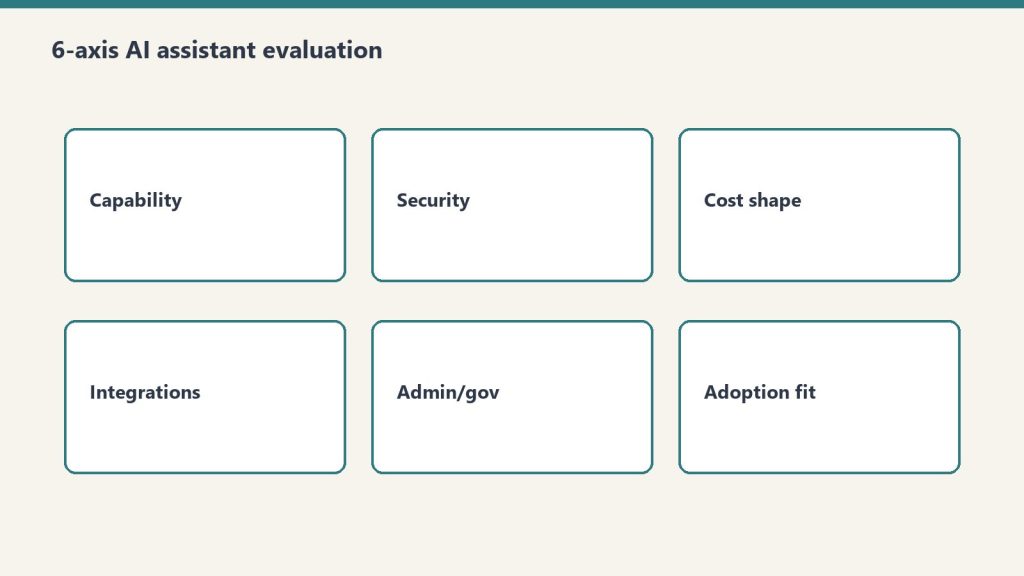
    Six evaluation cards for choosing an AI assistant platform
    What actually happened at Harvard FAS.

    Harvard FAS is not abandoning all AI tools. It’s rotating its primary institutional AI platform from ChatGPT Edu to Claude. The Gemini institutional agreement stays. What’s changing is which AI system gets the default institutional license, the frictionless path, the one that “just works” for every affiliate without requiring a separate approval process.

    That framing matters. When an institution of Harvard FAS’s size structures access so that one platform requires administrative approval to continue while another is provided automatically to all affiliates, the default is the decision. The approval requirement for ChatGPT Edu isn’t a ban — it’s a friction tax that most users won’t bother to pay.

    Why Institutions Switch AI Platforms

    Floor versus ceiling cards for commoditized work and human-network premium
    Why institutions switch AI platforms.

    The Harvard Crimson’s reporting framed the switch as “platform rotation based on capability” — not a permanent commitment to any single AI provider. That framing is worth taking seriously. Academic institutions making technology decisions at this scale move deliberately, and the stated rationale (capability) suggests the evaluation was substantive.

    The specific capabilities that tend to drive academic platform decisions:

    • Long-form document handling: Claude’s 1M token context window (on Opus 4.7 and Sonnet 4.6) is directly useful for academic work — reading full papers, dissertations, and research datasets in a single session
    • Research synthesis: Multi-document reasoning across large corpora without chunking
    • Writing quality: Academic writing and editing assistance where tone and precision matter
    • Institutional trust signals: Claude’s Constitutional AI approach and Anthropic’s safety positioning have become differentiators in institutional procurement conversations

    We don’t have Harvard FAS’s internal evaluation criteria. What we know is that after running a ChatGPT Edu institutional agreement, they evaluated their options and chose to route default access to Claude.

    What This Signals for Enterprise Platform Switching

    Four cards for content, ops, build, and knowledge work with Claude
    What this signals for enterprise platform switching.

    Harvard FAS is a useful case study because academic institutions make AI procurement decisions in a way that resembles enterprise decisions more than consumer decisions: budget approval processes, IT security review, institutional liability considerations, and the need for a platform that works across a wildly diverse user base — from first-year undergraduates to Nobel laureates.

    The platform switching question — “can our organization move from one AI platform to another?” — has been theoretical for most of the last two years. Harvard FAS running this switch makes it concrete. The institutional machinery for moving 20,000 users from one AI platform to another exists and has been executed.

    For enterprise teams evaluating whether to consolidate on Claude or maintain a multi-platform approach: the Harvard FAS switch is evidence that the transition is operationally feasible at institutional scale, and that institutions with high capability and safety requirements are making this choice.

    The Competitive Context

    Claude now holds institutional agreements at major universities. ChatGPT Edu launched as OpenAI’s play for this exact market. The Harvard FAS switch doesn’t mean OpenAI is losing the education market — it means the competition for institutional default status is real and Claude is winning some of those decisions on capability grounds.

    Anthropic’s enterprise market share, cited in its April 2026 Partner Network announcement, had grown from 24% to 40% since the Claude 4 generation launched. Harvard FAS is one data point in that trend.

    Our Take

    We track institutional AI adoption because it signals where the capability and trust thresholds are in the market. When an institution like Harvard FAS — which has the internal expertise to evaluate these platforms seriously — runs a full procurement process and routes its default institutional license to Claude, that’s a substantive signal about where the models stand.

    The “administrative approval required to continue ChatGPT Edu” language is the tell. That’s not a ban. It’s the institutional equivalent of making one option the path of least resistance and the other a deliberate choice. For 20,000 people with actual work to do, the default wins.

    Related on Tygart Media: Claude for business · migrate ChatGPT Enterprise · how to use Claude.

    Frequently Asked Questions

    Did Harvard ban ChatGPT?

    No. Harvard FAS is discontinuing its ChatGPT Edu institutional agreement after June 2026. Continuing access will require administrative and budgetary approval — meaning it’s available but no longer the frictionless default. Harvard FAS is also maintaining its Google Gemini institutional agreement. Claude is becoming the new institutional default, not an exclusive platform.

    How many people does the Harvard FAS Claude agreement cover?

    Harvard FAS covers all affiliates — students, faculty, staff, and researchers within the Faculty of Arts and Sciences. Exact affiliate count varies, but FAS is one of Harvard’s largest schools, covering undergraduate education and most of Harvard’s graduate programs in arts, sciences, and humanities.

    Why did Harvard FAS switch from ChatGPT to Claude?

    The Harvard Crimson reported the switch was framed as “platform rotation based on capability” — not a permanent commitment to any single provider. Anthropic hasn’t published the specific evaluation criteria Harvard FAS used. What’s on record is that after running a ChatGPT Edu institutional agreement, FAS evaluated its options and chose to route default access to Claude.

    Does Harvard’s decision affect other universities?

    Institutional decisions at the Harvard level typically influence procurement conversations at peer institutions — not through imitation but because evaluation committees at other universities use visible peer decisions as data points in their own capability and risk assessments. The Harvard FAS switch makes Claude a more credible institutional option for other universities running similar evaluations.

  • Claude AI Second Brain: Vivian Balakrishnan’s NanoClaw

    Claude AI Second Brain: Vivian Balakrishnan’s NanoClaw

    Last refreshed: May 15, 2026

    On April 21, 2026, Singapore’s Foreign Minister Dr Vivian Balakrishnan published the architecture of his personal AI assistant on GitHub. He called it NanoClaw — “a second brain for a diplomat.” It runs on a Raspberry Pi 5. It costs roughly $80 in hardware and $5–20 a month in API fees. It connects to his WhatsApp, Gmail, and voice notes. It drafts speeches, runs scheduled briefings, and — unlike every standard chatbot — gets smarter over time because it maintains a structured knowledge graph that persists across sessions.

    His summary: “It answers every question, researches topics, provides daily updates, drafts speeches and condenses information. It has become invaluable — I don’t dare switch it off.”

    A sitting cabinet minister of a G20-adjacent nation just open-sourced his personal AI second brain on GitHub. That’s worth slowing down to look at.

    What NanoClaw Actually Is

    Five-step flow from files to chunk, embed, store, retrieve
    What NanoClaw actually is.

    NanoClaw is built on four open-source components running on a Raspberry Pi 5:

    • NanoClaw (agent framework, built by developer Gavriel Cohen, 28k+ GitHub stars) — orchestrates Claude agents in isolated Docker containers. Each chat group gets its own sandboxed container.
    • Mnemon — the knowledge graph layer. Extracts discrete facts, insights, and style preferences from raw documents and conversations into a structured, retrievable graph database. Each entry is a self-contained statement, not a raw text chunk.
    • OneCLI — credential proxy.
    • Karpathy’s LLM Wiki pattern — the memory architecture that lets the system synthesize knowledge rather than just retrieve it.

    WhatsApp integration runs through Baileys, an open-source implementation of the WhatsApp Web protocol — no commercial API required. Voice notes are transcribed locally via Whisper.

    The full architecture is published at: gist.github.com/VivianBalakrishnan/a7d4eec3833baee4971a0ee54b08f322

    The Architecture Detail That Matters Most

    Three stacked layers: chat UI, tools, agent runtime
    The architecture detail that matters most.

    Standard chatbots are stateless. Each session starts from zero. The standard workaround is RAG — retrieval-augmented generation, which pulls chunks of raw text from a document store when they seem relevant. Balakrishnan’s system does something different. Mnemon’s Extract function pulls discrete facts and insights from raw documents into a graph database. Each entry is a self-contained, retrievable statement — not a text chunk.

    This is the same distinction that Anthropic’s Dreaming feature (announced May 6 for Managed Agents) is built on: the difference between storing raw experience and synthesizing it into structured knowledge. A system that synthesizes what it learns compounds in usefulness over time. One that just accumulates raw text doesn’t.

    Balakrishnan acknowledged this in a reply on his GitHub gist: “Local models will not give you the big context needed for digesting the memory graph, but will be good enough for querying it. You may want to use a bigger model that works well with a 128K token context at the very least.” He chose Claude specifically for the reasoning capability on the memory graph.

    He Built It With Claude Code, Not Traditional Coding

    Side-by-side cards defining what Claude Code is and is not
    He built it with Claude Code, not traditional coding.

    This detail matters. Balakrishnan confirmed on X that he never used an IDE. Claude Code made all edits. His description of his own process: “No ‘vibe coding’. All I did was ‘tool assembly’ to create a utility that worked in my domain.”

    Tool assembly. That’s an important distinction. He didn’t write code — he assembled existing open-source tools using Claude as the implementation layer. A trained ophthalmologist and career diplomat, with no traditional software development background, built and deployed a production AI system running on commodity hardware by composing tools through Claude Code.

    His framing at the 17th Asia-Pacific Programme for Senior National Security Officers, the day he published NanoClaw: “AI agents have crossed a threshold I did not expect so soon. Not just impressive demos — but practical tools for daily use.” The audience was senior national security officials from across the Asia-Pacific region.

    Why This Is the Cowork Story in Miniature

    We run our own version of this — Claude operating scheduled tasks, content pipelines, and research workflows on our behalf through Cowork. The architecture Balakrishnan published is recognizably the same value proposition: persistent memory, multi-channel input, scheduled tasks, a system that improves over time.

    His total cost: ~$80 hardware, $5–20/month API. That’s a DIY Cowork running on a credit-card-sized computer on a diplomat’s desk in Singapore. The point isn’t that the price is better or worse than any specific product — it’s that the primitives are now accessible enough that a non-developer can assemble them into a working production system.

    His own thesis on why he published it: “Sharing the blueprint boosts the edge — the specific composition will be obsolete in months, but the builder’s ability to compose the right pieces is the durable advantage.” That’s as clean a statement of the AI-literacy case as we’ve seen from anyone, let alone a sitting foreign minister.

    The Broader Signal

    Singapore continues to be the most Claude-dense environment we track. The same week Balakrishnan published NanoClaw, a Claude Code meetup at Grab HQ drew 1,291 registrants. GIC (Singapore’s sovereign wealth fund) is a co-investor in Anthropic’s infrastructure JV. The country has institutional capital, developer community density, and now a sitting cabinet minister publishing working Claude architecture on GitHub. That triangle is unusual.

    Balakrishnan’s quote from the CNBC Converge Live fireside the day after publishing NanoClaw: “The diplomat who learns to work with AI will have a meaningful edge. I think that edge is now.” He wasn’t talking about chatbots. He was talking about a system running on his desk, integrated into his actual workflows, that he personally built and that he personally depends on.

    That’s a different kind of AI adoption signal than a press release about an enterprise partnership.

    Related on Tygart Media: Notion second brain setup · autonomous second brain · how to use Claude.

    Frequently Asked Questions

    What is NanoClaw?

    NanoClaw is an open-source Claude-powered personal AI assistant framework built by developer Gavriel Cohen. Singapore’s Foreign Minister Dr Vivian Balakrishnan published his own NanoClaw implementation on April 21, 2026 — a self-hosted assistant running on a Raspberry Pi 5 that connects to WhatsApp, Gmail, and voice notes, runs scheduled tasks, and maintains a persistent knowledge graph that grows smarter over time.

    How much does NanoClaw cost to run?

    Balakrishnan’s setup uses approximately $80 in hardware (Raspberry Pi 5) and roughly $5–20 per month in Anthropic API fees depending on usage volume. The software components (NanoClaw, Mnemon, OneCLI, Whisper, Baileys) are all open source. The full architecture is published at gist.github.com/VivianBalakrishnan/a7d4eec3833baee4971a0ee54b08f322.

    Did Vivian Balakrishnan write the code himself?

    He described his process as “tool assembly” rather than traditional coding — composing existing open-source components using Claude Code to handle implementation. He confirmed on X that he never used an IDE and that Claude Code made all edits. He has no traditional software development background; he’s a trained ophthalmologist and career diplomat.

    How is NanoClaw’s memory different from standard chatbot memory?

    Standard chatbots are stateless — each session starts from zero. NanoClaw uses Mnemon, a knowledge graph that extracts discrete facts and insights from conversations and documents into structured, retrievable entries. The system synthesizes knowledge rather than just storing raw text, meaning it compounds in usefulness over time rather than simply accumulating history.