Local AI & Automation - Tygart Media

Category: Local AI & Automation

Building autonomous AI systems that run locally. Zero cloud cost, full data control, infinite scale.

  • What Notion’s Claude Managed Agents Integration Actually Does

    What Notion’s Claude Managed Agents Integration Actually Does

    Tygart Media Strategy
    Volume Ⅰ · Issue 04Quarterly Position
    By Will Tygart Long-form Position Practitioner-grade

    When Anthropic launched Claude Managed Agents, Notion was one of four launch partners. That detail got buried in the announcement. Here’s what it actually means for people who use Notion for knowledge work, and why “Notion voice input desktop” keeps showing up as a query against a Managed Agents page.

    Short answer: Managed Agents in Notion is an ambient intelligence layer. It’s not a chatbot in a sidebar. It’s an agent that watches your workspace and acts — without you directing every step.

    What the Notion Integration Actually Does

    Four cards for content, ops, build, and knowledge work with Claude
    What the Notion integration actually does.

    Notion’s Claude Managed Agents integration runs as a persistent background agent with access to your workspace. The practical capabilities, as documented at launch:

    • Autonomous page updates: The agent can read, summarize, and rewrite Notion pages without manual triggers. You set a task; it works through it.
    • Cross-database synthesis: Pull data from multiple Notion databases, synthesize it, and write outputs to a target page or database entry
    • Meeting note processing: Ingest raw meeting notes and produce structured summaries, action items, and task entries in your project database
    • Workflow automation: Trigger actions based on database property changes — a status update in one database can kick off agent work in another

    The key difference from Notion AI (which Notion has had for some time): Notion AI is request-response. You ask it something; it answers. Managed Agents in Notion can be configured to run autonomously on a schedule or on trigger, keep working through multi-step tasks, and report back when done. It’s closer to a background employee than an on-demand assistant.

    Why This Showed Up in Search as “Notion Voice Input Desktop”

    This is worth explaining, because that query cluster is real and mildly interesting. The Managed Agents announcement included voice input functionality — the ability to interact with agents via voice in some contexts. People searching “notion voice input desktop” and “notion ai voice input desktop” were looking for whether this voice capability existed in the desktop client for Notion specifically.

    The honest answer as of April 2026: voice input capabilities are in preview or context-dependent. Verify current availability in Notion’s desktop client against their current documentation — this is an area that may have evolved since launch.

    The “Decoupled Brain and Hands” Model Applied to Notion

    Anthropic describes their Managed Agents architecture as decoupling the brain (Claude, the reasoning layer) from the hands (the sandboxed containers where actions execute). In Notion’s context, this maps cleanly:

    • The brain reads your Notion workspace, understands context, makes decisions about what to do
    • The hands execute — writing to pages, updating database entries, moving content between sections

    The brain and hands operate independently. The agent can reason about what your project needs without being tightly coupled to the specific API calls that will implement it. This matters because it means the agent can handle ambiguity — “clean up the Q2 notes and create action items” is a goal, not a procedure, and the agent figures out the procedure.

    What You Actually Configure

    Three stacked layers: chat UI, tools, agent runtime
    What you actually configure.

    To run Claude Managed Agents in Notion, you’re defining:

    • Task definition: What the agent is supposed to accomplish (in natural language or structured format)
    • Tool access: Which Notion databases, pages, and capabilities the agent can read and write
    • Guardrails: What the agent cannot do — pages it can’t modify, actions it must confirm before taking
    • Trigger: When the agent runs — on schedule, on database trigger, or on demand

    You don’t write the orchestration logic. Anthropic’s infrastructure handles session management, state persistence, and error recovery. If the agent hits an error mid-task, it checkpoints and recovers — you don’t lose progress.

    The Practical Cost of Running Notion Agents

    Using Managed Agents in Notion triggers the same billing as any Managed Agents session: standard token rates plus $0.08/session-hour of active runtime. For typical knowledge work tasks:

    • A daily meeting summary agent running 15 minutes of active execution: ~$0.02/day in runtime (~$0.60/month), plus token costs for the volume of notes processed
    • A weekly database synthesis task running 45 minutes: ~$0.06/run

    For most knowledge workers, the session runtime cost is negligible — the token costs (driven by how much content the agent reads and writes) are the actual variable to model. See the complete pricing reference for worked examples.

    Asana and the Broader Pattern

    Asana was also a Managed Agents launch partner, and the integration pattern is similar: an agent that can read project data, update task statuses, move cards, and generate project summaries without constant human direction. The launch partner list (Notion, Asana, Rakuten, Sentry) suggests Anthropic targeted three categories: knowledge management (Notion), project management (Asana), enterprise operations (Rakuten), and developer tools (Sentry).

    That’s a deliberate wedge. If agents can handle the administrative layer of these four categories, the surface area for autonomous business work expands significantly.

    What This Means for How You Work

    Desk with laptop, checklist notebook, and billing card ready before creating an Anthropic API key
    What this means for how you work.

    The honest use case for most people reading this: you have a Notion workspace with databases that need regular synthesis, and you’re currently doing that manually. Managed Agents is the path to automating that synthesis without building and maintaining a custom integration.

    The constraint worth naming: you’re running your workspace data through Anthropic’s infrastructure. That’s the trade-off. For most knowledge work, the data sensitivity concern is low. For anything involving client data, legal documents, or proprietary strategy — read Anthropic’s data handling terms before configuring access.

    For the full Managed Agents setup and pricing context: Claude Managed Agents: Every Question Answered. For the enterprise deployment pattern: How Rakuten Deployed 5 Enterprise Agents in a Week.

    Related on Tygart Media: managed agents review · Notion Command Center · managed agents memory use cases.


  • Claude Managed Agents — Every Question Answered (Complete FAQ 2026)

    Claude Managed Agents — Every Question Answered (Complete FAQ 2026)

    Tygart Media Strategy
    Volume Ⅰ · Issue 04Quarterly Position
    By Will Tygart Long-form Position Practitioner-grade

    Everything people actually ask about Claude Managed Agents, answered straight. No preamble about “the exciting world of AI agents.” If you’re here, you already know why this matters — you just need answers.

    This page covers pricing, setup, capabilities, limits, comparisons, and the specific questions that don’t have obvious homes in Anthropic’s documentation. It updates as the beta evolves.

    Context

    Claude Managed Agents launched April 8, 2026 as a public beta. All answers reflect current documentation as of April 2026. Beta details change — verify specifics at platform.claude.com/docs.

    Pricing Questions

    Workshop fuel gauge and metal tokens pouring into an API hopper, metaphor for pay-per-token pricing
    Pricing questions — stale-proof framing.

    What does Claude Managed Agents cost?

    Two charges: standard Claude API token rates (same as calling the Messages API directly) plus $0.08 per session-hour of active runtime. That’s the complete formula. See the complete pricing reference for worked examples by workload type.

    What exactly is a “session-hour” and when does it start billing?

    A session-hour is one hour of active session runtime — time when your session’s status is running. Billing is metered to the millisecond. It does not accrue during idle time, time waiting for your input, time waiting for tool confirmations, or after session termination.

    What’s included in the $0.08/session-hour charge?

    The session runtime charge covers Anthropic’s managed infrastructure: sandboxed code execution containers, state management, checkpointing, tool orchestration, error recovery, and scaling. You are not separately billed for container hours on top of session runtime.

    Does the $0.08/hr apply even if my agent is just waiting?

    No. Time spent waiting for your message, waiting for tool confirmations, or sitting idle does not accumulate runtime charges. Only active execution time counts.

    What does web search cost inside a Managed Agents session?

    $10 per 1,000 searches ($0.01 per search), billed separately from session runtime and token costs. This is the same rate as web search through the standard API.

    Are there volume discounts?

    Yes, negotiated case-by-case for high-volume users. Contact [email protected] or through the Claude Console.

    How does Managed Agents pricing compare to running my own agent infrastructure?

    The $0.08/session-hour is almost always cheaper than equivalent provisioned compute — but you trade infrastructure control and data locality for that simplicity. For a full comparison: Build vs. Buy: The Real Infrastructure Cost.

    What’s the real monthly cost if I run an agent 24/7?

    Maximum theoretical session runtime: 24 hrs × $0.08 × 30 days = $57.60/month. In practice, no production agent has zero idle time. Token costs become the dominant cost driver long before you hit the runtime ceiling. Detailed breakdown: The Real Monthly Cost of Running Claude Managed Agents 24/7.

    Setup and Access Questions

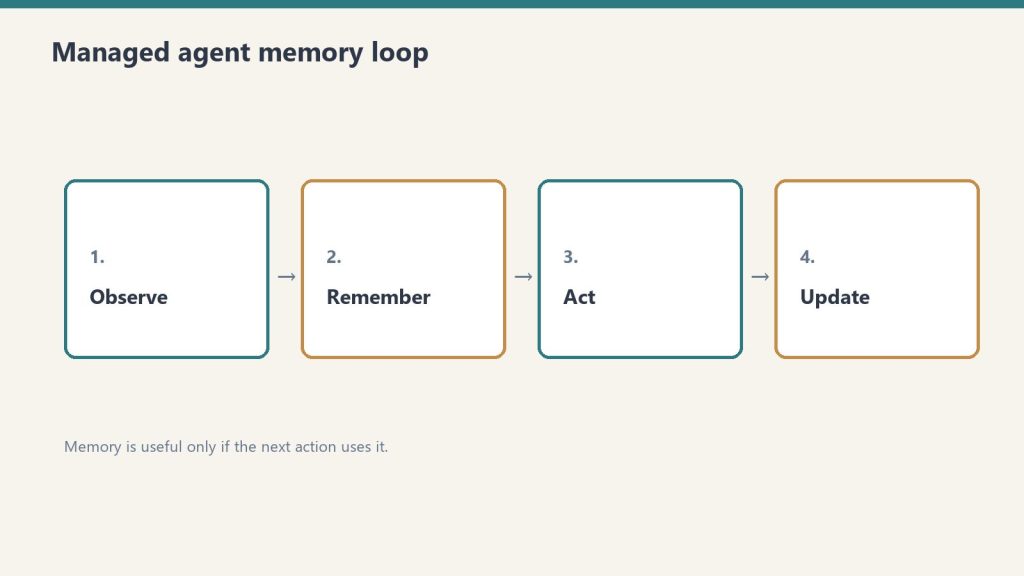
    Four-step loop: observe, remember, act, update for managed agents
    Setup and access questions.

    How do I get access to Claude Managed Agents?

    Available to all Anthropic API accounts in public beta — no separate signup. You need the managed-agents-2026-04-01 beta header in your API requests. The Claude SDK adds this header automatically.

    Does it work with my existing API key?

    Yes. Same API key you’re already using for the Messages API. Same authentication. The beta header is the only new requirement.

    What three ways can I access Managed Agents?

    Via the Claude SDK (recommended — handles the beta header automatically), via direct API calls with the beta header, or via the Claude Console’s new Managed Agents section for no-code agent configuration and session tracing.

    Can I use Managed Agents through AWS Bedrock or Google Vertex AI?

    Managed Agents runs on Anthropic-managed infrastructure. This is distinct from Bedrock and Vertex AI deployments. Check Anthropic’s current documentation for multi-cloud availability status — this is an area of active development.

    Capability Questions

    What can Claude Managed Agents actually do?

    Run long autonomous sessions with persistent state, execute code in sandboxed Linux containers, use tools including web search and MCP servers, coordinate multiple Claude instances via Agent Teams, and maintain checkpoints for crash recovery. The session can last minutes or hours without you staying in the loop.

    What’s the difference between Agent Teams and subagents?

    Agent Teams coordinate multiple Claude instances with independent contexts, direct agent-to-agent communication, and a shared task list — suited for complex parallel tasks. Subagents operate within the same session as the main agent and only report results upward — more economical for sequential targeted tasks but less capable of true parallelism.

    Does it support MCP servers?

    Yes. MCP servers can be integrated as tool sources in Managed Agents sessions, extending what the agent can access and act on.

    How long can a session run?

    Anthropic’s documentation currently references session durations of minutes to hours. Claude Code’s longest autonomous sessions have reached 45 minutes. Managed Agents is architected for longer-running work. Check current documentation for specific session duration limits as the beta matures.

    What happened to Claude Code — is it the same as Managed Agents?

    No. Claude Code is a separate local coding workflow product. Anthropic’s docs explicitly note partners should not conflate the two. Managed Agents is a hosted API runtime service. Claude Code is a developer tool. Different products, different use cases, different billing.

    Rate Limit Questions

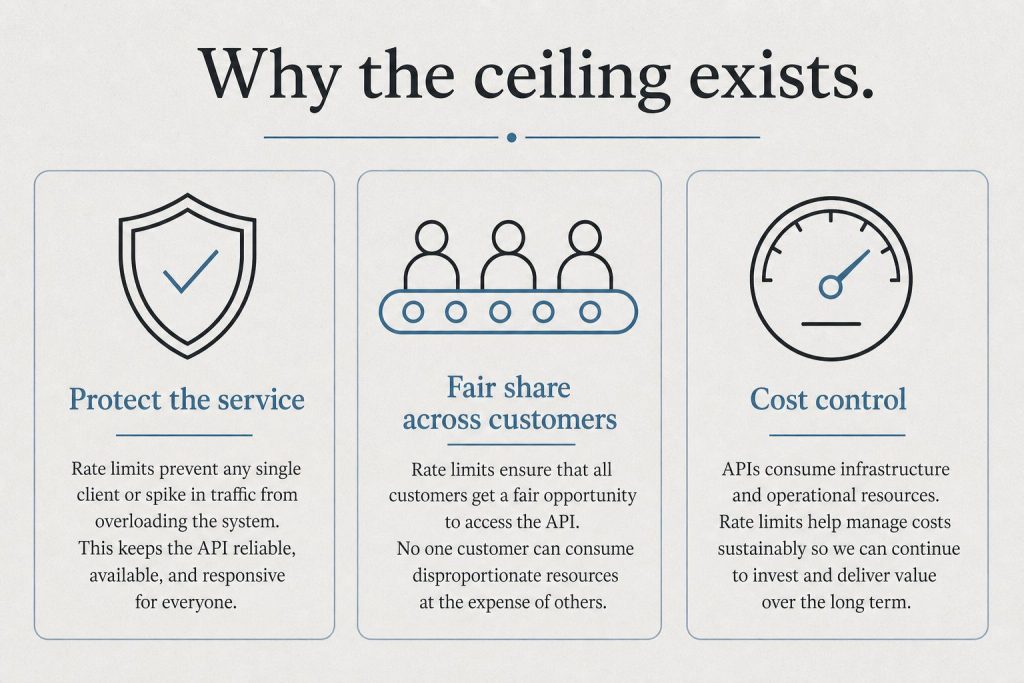
    Infographic with three panels: protect the service, fair share, and cost control explaining rate limits
    Rate limit questions.

    What are the rate limits for Managed Agents?

    60 requests per minute for create endpoints; 600 requests per minute for read endpoints. Organization-level API limits still apply on top of these. For higher limits, contact Anthropic enterprise sales. Detailed breakdown: Claude Managed Agents Rate Limits Explained.

    Do standard Claude API rate limits still apply inside a session?

    Organization-level limits apply. The session runtime and create/read endpoint limits are Managed Agents-specific. If you’re running many parallel Agent Teams, model token throughput limits will become relevant.

    Comparison Questions

    How does Managed Agents compare to OpenAI’s Agents API?

    Both offer hosted agent infrastructure. Key differences: Managed Agents is Claude-native (no multi-model flexibility), sessions bill on runtime + tokens vs. OpenAI’s different pricing model, and lock-in dynamics differ. Full comparison: Claude Managed Agents vs. OpenAI Agents API.

    Should I use Managed Agents or the Claude Agent SDK?

    Use Managed Agents when you want Anthropic to host the runtime — less infrastructure work, faster to production. Use the SDK when you need tighter loop control, on-premise execution, or multi-cloud flexibility. Anthropic’s own migration docs draw this line clearly: SDK runs in your environment; Managed Agents runs in theirs.

    What companies are already using Managed Agents in production?

    Notion, Asana, Rakuten, Sentry, and Vibecode were launch partners. Rakuten deployed five enterprise agents within a week. Allianz is using Claude for insurance agent workflows. Anthropic’s run-rate from the agent developer segment exceeds $2.5 billion. How Rakuten did it in a week →

    Data and Security Questions

    Where does my data go when running in Managed Agents?

    Execution runs on Anthropic’s infrastructure. This is the explicit trade-off: you get managed infrastructure; they manage the compute. For companies with strict data sovereignty requirements, this is the key constraint to evaluate. On-premise or native multi-cloud deployment is not currently available.

    What are the sandboxing guarantees?

    Anthropic uses disposable Linux containers — “decoupled hands” in their terminology. Each container is a fresh sandboxed environment for code execution. State persistence is managed separately from the execution environment.

    Strategic Questions

    Is this a bet worth making?

    That depends on your switching cost tolerance. Lock-in is real: once your agents run on Anthropic’s infrastructure with their tools, session format, and sandboxing, switching providers isn’t trivial. The counter-argument: the infrastructure you’d otherwise build to match this is months of engineering. One developer’s reaction at launch was blunt: “there goes a whole YC batch.” That captures both the opportunity and the risk. Our take on why we’re staying our course →

    What does this mean for AI citation and visibility?

    Agents running on Anthropic’s infrastructure make decisions about what content to surface, cite, and synthesize. As agent workloads grow, being present in the knowledge sources agents draw from becomes a search strategy question in itself. What AI citation monitoring looks like →

  • AI Agents Explained: What They Are, Who’s Using Them, and Why Your Business Will Need One

    AI Agents Explained: What They Are, Who’s Using Them, and Why Your Business Will Need One

    Tygart Media Strategy
    Volume Ⅰ · Issue 04Quarterly Position
    By Will Tygart
    Long-form Position
    Practitioner-grade
    What Is an AI Agent? An AI agent is a software program powered by a large language model that can take actions — not just answer questions. It reads files, sends messages, runs code, browses the web, and completes multi-step tasks on its own, without a human directing every move.

    Most people’s mental model of AI is a chat interface. You type a question, you get an answer. That’s useful, but it’s also the least powerful version of what AI can do in a business context.

    The version that’s reshaping how companies operate isn’t a chatbot. It’s an agent — a system that can actually do things. And with Anthropic’s April 2026 launch of Claude Managed Agents, the barrier to deploying those systems for real business work dropped significantly.

    What Makes an Agent Different From a Chatbot

    A chatbot responds. An agent acts.

    When you ask a chatbot to summarize last quarter’s sales report, it tells you how to do it, or summarizes text you paste in. When you give the same task to an agent, it goes and gets the report, reads it, identifies the key numbers, formats a summary, and sends it to whoever asked — all without you supervising each step.

    The difference sounds subtle but has large practical implications. An agent can be assigned work the same way you’d assign work to a person. It can work on tasks in the background while you do other things. It can handle repetitive processes that would otherwise require sustained human attention.

    The examples from the Claude Managed Agents launch make this concrete:

    Asana built AI Teammates — agents that participate in project management workflows the same way a human team member would. They pick up tasks. They draft deliverables. They work within the project structure that already exists.

    Rakuten deployed agents across sales, marketing, HR, and finance that accept assignments through Slack and return completed work — spreadsheets, slide decks, reports — directly to the person who asked.

    Notion’s implementation lets knowledge workers generate presentations and build internal websites while engineers ship code, all with agents handling parallel tasks in the background.

    None of those are hypothetical. They’re production deployments that went live within a week of the platform becoming available.

    What Business Processes Are Actually Good Candidates for Agents

    Not every business task is suited for an AI agent. The best candidates share a few characteristics: they’re repetitive, they involve working with information across multiple sources, and they don’t require judgment calls that need human accountability.

    Strong candidates include research and summarization tasks that currently require someone to pull data from multiple places and compile it. Drafting and formatting work — proposals, reports, presentations — that follows a consistent structure. Monitoring tasks that require checking systems or data sources on a schedule and flagging anomalies. Customer-facing support workflows for common, well-defined questions. Data processing pipelines that transform information from one format to another on a recurring basis.

    Weak candidates include tasks that require relationship context, ethical judgment, or creative direction that isn’t already well-defined. Agents execute well-specified work; they don’t substitute for strategic thinking.

    Why the Timing of This Launch Matters for Small and Mid-Size Businesses

    Until recently, deploying a production AI agent required either a technical team capable of building significant custom infrastructure, or an enterprise software contract with a vendor that had built it for you. That meant AI agents were effectively inaccessible to businesses without large technology budgets or dedicated engineering resources.

    Anthropic’s managed platform changes that equation. The infrastructure layer — the part that required months of engineering work — is now provided. A small business or a non-technical operations team can define what they need an agent to do and deploy it without building a custom backend.

    The pricing reflects this broader accessibility: $0.08 per session-hour of active runtime, plus standard token costs. For agents handling moderate workloads — a few hours of active operation per day — the runtime cost is a small fraction of what equivalent human time would cost for the same work.

    What to Actually Do With This Information

    The most useful framing for any business owner or operations leader isn’t “what is an AI agent?” It’s “what work am I currently paying humans to do that is well-specified enough for an agent to handle?”

    Start with processes that meet these criteria: they happen on a regular schedule, they involve pulling information from defined sources, they produce a consistent output format, and they don’t require judgment calls that have significant consequences if wrong. Those are your first agent candidates.

    The companies that will have a structural advantage in two to three years aren’t the ones that understood AI earliest. They’re the ones that systematically identified which parts of their operations could be handled by agents — and deployed them while competitors were still treating AI as a productivity experiment.

    Frequently Asked Questions

    What is an AI agent in simple terms?

    An AI agent is a program that can take actions — not just answer questions. It can read files, send messages, browse the web, and complete multi-step tasks on its own, working in the background the same way you’d assign work to an employee.

    What’s the difference between an AI chatbot and an AI agent?

    A chatbot responds to questions. An agent executes tasks. A chatbot tells you how to summarize a report; an agent retrieves the report, summarizes it, and sends it to whoever needs it — without you directing each step.

    What kinds of business tasks are best suited for AI agents?

    Repetitive, well-defined tasks that involve pulling information from multiple sources and producing consistent outputs: research summaries, report drafting, data processing, support workflows, and monitoring tasks are strong candidates. Tasks requiring significant judgment, relationship context, or creative direction are weaker candidates.

    How much does it cost to deploy an AI agent for a small business?

    Using Claude Managed Agents, costs are standard Anthropic API token rates plus $0.08 per session-hour of active runtime. An agent running a few hours per day for routine tasks might cost a few dollars per month in runtime — a fraction of the equivalent human labor cost.


    Related: Complete Pricing Reference — every variable in one place. Complete FAQ Hub — every question answered.

  • 387 Cowork Sessions and Counting: What Happens When AI Becomes Your Daily Operating Partner

    387 Cowork Sessions and Counting: What Happens When AI Becomes Your Daily Operating Partner

    The Machine Room · Under the Hood

    This Is Not a Chatbot Story

    Side-by-side cards defining what Claude Code is and is not
    This is not a chatbot story.

    When people hear I use AI every day, they picture someone typing questions into ChatGPT and getting answers. That’s not what this is. I’ve run 387 working sessions with Claude in Cowork mode since December 2025. Each session is a full operating environment – a Linux VM with file access, tool execution, API connections, and persistent memory across sessions.

    These aren’t conversations. They’re deployments. Content publishes. Infrastructure builds. SEO audits across 18 WordPress sites. Notion database updates. Email monitors. Scheduled tasks. Real operational work that used to require a team of specialists.

    The number 387 isn’t bragging. It’s data. And what that data reveals about how AI actually integrates into daily business operations is more interesting than any demo or product launch.

    What a Typical Session Actually Looks Like

    Three stacked layers: chat UI, tools, agent runtime
    What a typical session actually looks like.

    A session starts when I open Cowork mode and describe what I need done. Not a vague prompt – a specific operational task. “Run the content intelligence audit on a storm protection company.com and generate 15 draft articles.” “Check all 18 WordPress sites for posts missing featured images and generate them using Vertex AI.” “Read my Gmail for VIP messages from the last 6 hours and summarize what needs attention.”

    Claude loads into a sandboxed Linux environment with access to my workspace folder, my installed skills (I have 60+), my MCP server connections (Notion, Gmail, Google Calendar, Metricool, Figma, and more), and a full bash/Python execution layer. It reads my CLAUDE.md file – a persistent memory document that carries context across sessions – and gets to work.

    A single session might involve 50-200 tool calls. Reading files, executing scripts, making API calls, writing content, publishing to WordPress, logging results to Notion. The average session runs 15-45 minutes of active work. Some complex ones – like a full site optimization pass – run over two hours.

    The Skill Layer Changed Everything

    Early sessions were inefficient. I’d explain the same process every time – how to connect to WordPress via the proxy, what format to use for articles, which Notion database to log results in. Repetitive context-setting that ate 30% of every session.

    Then I started building skills. A skill is a structured instruction file (SKILL.md) that Claude reads at the start of a session when the task matches its trigger conditions. I now have skills for WordPress publishing, SEO optimization, content generation, Notion logging, YouTube watch page creation, social media scheduling, site auditing, and dozens more.

    The impact was immediate. A task that took 20 minutes of back-and-forth setup now triggers in one sentence. “Run the wp-intelligence-audit on a luxury asset lender.com” – Claude reads the skill, loads the credentials from the site registry, connects via the proxy, pulls all posts, analyzes gaps, and generates a full report. No explanation needed. The skill contains everything.

    Building skills is the highest-leverage activity I’ve found in AI-assisted work. Every hour spent writing a skill saves 10+ hours across future sessions. At 387 sessions, the compound return is staggering.

    What 387 Sessions Taught Me About AI Workflow

    Desk with laptop, checklist notebook, and billing card ready before creating an Anthropic API key
    What 387 sessions taught me about AI workflow.

    Specificity beats intelligence. The most productive sessions aren’t the ones where Claude is “smartest.” They’re the ones where I give the most specific instructions. “Optimize this post for SEO” produces mediocre results. “Run wp-seo-refresh on post 247 at a luxury asset lender.com, ensure the focus keyword is ‘luxury asset lending,’ update the meta description to 140-160 characters, and add internal links to posts 312 and 418” produces excellent results. AI amplifies clarity.

    Persistent memory is the unlock. CLAUDE.md – a markdown file that persists across sessions – is the most important file in my entire system. It contains my preferences, operational rules, business context, and standing instructions. Without it, every session starts from zero. With it, session 387 has the accumulated context of all 386 before it. This is the difference between using AI as a tool and using AI as a partner.

    Batch operations reveal true ROI. Publishing one article? AI saves maybe 30 minutes. Publishing 15 articles across 3 sites with full SEO/AEO/GEO optimization, taxonomy assignment, internal linking, and Notion logging? AI saves 15+ hours. The value curve is exponential with batch size. I now default to batch operations for everything – content, audits, meta updates, image generation.

    Failures are cheap and informative. At least 40 of my 387 sessions hit significant errors – API timeouts, disk space issues, credential failures, rate limiting. Each failure taught me something that made the system more resilient. The SSH workaround. The WP proxy to avoid IP blocking. The WinError 206 fix for long PowerShell commands. Failure at high volume is the fastest path to robust systems.

    The Numbers Behind 387 Sessions

    I tracked the data because the data tells the real story:

    Content produced: Approximately 400+ articles published across 18 WordPress sites. Each article is 1,200-1,800 words, SEO-optimized, AEO-formatted with FAQ sections, and GEO-ready with entity optimization. At market rates for this quality of content, that’s roughly ,000-,000 worth of content production.

    Sites managed: 18 WordPress properties across multiple industries – restoration, luxury lending, cold storage, interior design, comedy, training, technology. Each site gets regular content, SEO audits, taxonomy fixes, schema injection, and internal linking.

    Automations built: 7 autonomous AI agents (the droid fleet), 60+ skills, 3 scheduled tasks, a GCP Compute Engine cluster running 5 WordPress sites, a Cloud Run proxy for WordPress API routing, and a Vertex AI chatbot deployment.

    Time investment: Approximately 200 hours of active session time over three months. For context, a single full-time employee working those same 200 hours could not have produced a fraction of this output, because the bottleneck isn’t thinking time – it’s execution speed. Claude executes API calls, writes code, publishes content, and processes data at machine speed. I provide direction at human speed. The combination is multiplicative.

    Why Most People Won’t Do This

    The honest answer: it requires upfront investment that most people aren’t willing to make. Building the skill library took weeks. Configuring the MCP connections, setting up the proxy, provisioning the GCP infrastructure, writing the CLAUDE.md context file – that’s real work before you see any return.

    Most people want AI to be plug-and-play. Type a question, get an answer. And for simple tasks, it is. But for operational AI – AI that runs your business processes daily – the setup cost is significant and the learning curve is real.

    The payoff, though, is not incremental. It’s categorical. I’m not 10% more productive than I was before Cowork mode. I’m operating at a fundamentally different scale. Tasks that would require hiring 3-4 specialists – content writer, SEO analyst, site admin, automation engineer – are handled in daily sessions by one person with a well-configured AI partner.

    That’s not a productivity hack. That’s a structural advantage.

    Frequently Asked Questions

    What is Cowork mode and how is it different from regular Claude?

    Cowork mode is a feature of Claude’s desktop app that gives Claude access to a sandboxed Linux VM, file system, bash execution, and MCP server connections. Regular Claude is a chat interface. Cowork mode is an operating environment where Claude can read files, run code, make API calls, and produce deliverables – not just text responses.

    How much does running 387 sessions cost?

    Cowork mode is included in the Claude Pro subscription at /month. The MCP connections (Notion, Gmail, etc.) use free API tiers. The GCP infrastructure runs about /month. Total cost for three months of operations: approximately . The value produced is orders of magnitude higher.

    Can someone replicate this without technical skills?

    Partially. The basic Cowork mode works out of the box for content creation, research, and file management. The advanced setup – custom skills, GCP infrastructure, API integrations – requires comfort with command-line tools, APIs, and basic scripting. The barrier is falling fast as skills become shareable and MCP servers become plug-and-play.

    What’s the most impactful single skill you’ve built?

    The wp-site-registry skill – a single file containing credentials and connection methods for all 18 WordPress sites. Before this skill existed, every session required manually providing credentials. After it, any wp- skill can connect to any site automatically. It turned 18 separate workflows into one unified system.

    What Comes Next

    Session 387 is not a milestone. It’s a Tuesday. The system compounds. Every skill I build makes future sessions faster. Every failure I fix makes the system more resilient. Every batch I run produces data that informs the next batch.

    The question I get most often is “where do you start?” The answer is boring: start with one task you do repeatedly. Build one skill for it. Run it 10 times. Then build another. By session 50, you’ll have a system. By session 200, you’ll have an operating partner. By session 387, you’ll wonder how you ever worked without one.

    {
    “@context”: “https://schema.org”,
    “@type”: “Article”,
    “headline”: “387 Cowork Sessions and Counting: What Happens When AI Becomes Your Daily Operating Partner”,
    “description”: “I’ve run 387 Cowork sessions with Claude in three months. Not chatbot conversations – full working sessions that build skills, publish content, mana”,
    “datePublished”: “2026-03-21”,
    “dateModified”: “2026-04-03”,
    “author”: {
    “@type”: “Person”,
    “name”: “Will Tygart”,
    “url”: “https://tygartmedia.com/about”
    },
    “publisher”: {
    “@type”: “Organization”,
    “name”: “Tygart Media”,
    “url”: “https://tygartmedia.com”,
    “logo”: {
    “@type”: “ImageObject”,
    “url”: “https://tygartmedia.com/wp-content/uploads/tygart-media-logo.png”
    }
    },
    “mainEntityOfPage”: {
    “@type”: “WebPage”,
    “@id”: “https://tygartmedia.com/387-cowork-sessions-and-counting-what-happens-when-ai-becomes-your-daily-operating-partner/”
    }
    }

  • The SEO Drift Detector: How I Built an Agent That Watches 18 Sites for Ranking Decay

    The SEO Drift Detector: How I Built an Agent That Watches 18 Sites for Ranking Decay

    Tygart Media / The Signal
    Broadcast Live
    Filed by Will Tygart
    Tacoma, WA
    Industry Bulletin

    Rankings Don’t Crash – They Drift

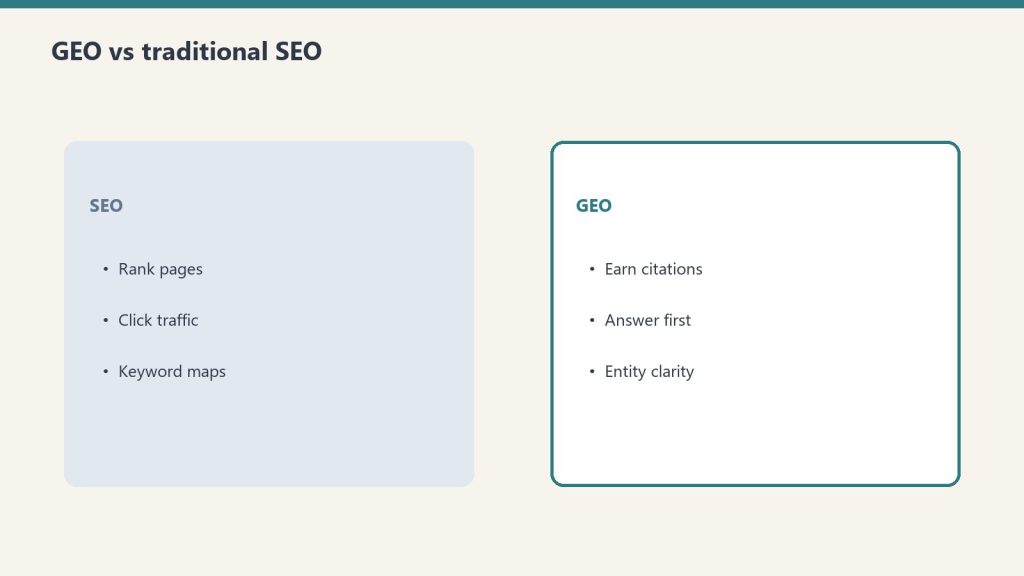
    GEO versus SEO comparison cards
    Rankings do not crash — they drift.

    Nobody wakes up to a sudden SEO catastrophe. What actually happens is slower and more insidious. A page that ranked #4 for its target keyword three months ago is now #9. Another page that owned a featured snippet quietly lost it. A cluster of posts that drove 40% of a site’s organic traffic has collectively slipped 3-5 positions across 12 keywords.

    By the time you notice, the damage is done. Traffic is down 25%. Leads have thinned. And the fix – refreshing content, rebuilding authority, reclaiming positions – takes weeks. The problem with SEO drift isn’t that it’s hard to fix. It’s that it’s hard to see.

    I manage 18 WordPress sites across industries ranging from luxury lending to restoration services to cold storage logistics. Manually checking keyword rankings across all of them? Impossible. Waiting for Google Search Console to show a decline? Too late. So I built SD-06 – the SEO Drift Detector – an autonomous agent that monitors keyword positions daily, calculates drift velocity, and flags pages that need attention before the traffic impact hits.

    How SD-06 Works Under the Hood

    Four-stage funnel: citation, click, engage, convert
    How the drift detector works under the hood.

    The architecture connects three systems: DataForSEO for ranking data, a local SQLite database for historical tracking, and Slack for alerts.

    Every morning at 6 AM, SD-06 runs a scheduled Python script that pulls current ranking positions for tracked keywords across all 18 sites. DataForSEO’s SERP API returns the current Google position for each keyword-URL pair. The script stores these daily snapshots in a SQLite database – one row per keyword per day, with fields for position, URL, SERP features present (featured snippet, People Also Ask, local pack), and the date.

    With 30+ days of historical data, the agent calculates three metrics for each tracked keyword:

    Position delta (7-day): The difference between today’s position and the position 7 days ago. A keyword that moved from #5 to #8 has a delta of -3. Simple, fast, catches sudden drops.

    Drift velocity (30-day): The average daily position change over the last 30 days. This is the metric that catches slow decay. A keyword losing 0.1 positions per day doesn’t trigger any single-day alarm, but over 30 days that’s a 3-position drop. SD-06 calculates this as a rolling regression slope and flags anything with negative drift velocity exceeding -0.05 positions per day.

    Feature loss: Did this URL have a featured snippet, PAA box, or other SERP feature last week that it no longer holds? Feature loss often precedes position loss – it’s an early warning signal that content freshness or authority is slipping.

    The Alert System That Changed My Workflow

    Desk with laptop, checklist notebook, and billing card ready before creating an Anthropic API key
    The alert system that changed the workflow.

    SD-06 sends three types of Slack alerts:

    Red alert (immediate attention): Any keyword that dropped 5+ positions in 7 days, or any URL that lost a featured snippet it held for 14+ consecutive days. These are rare but critical – usually indicating a technical issue, a Google algorithm update, or a competitor publishing a significantly better page.

    Yellow alert (weekly review): Keywords with negative drift velocity exceeding the threshold but no single dramatic drop. These are bundled into a weekly digest every Monday morning. The digest includes the keyword, current position, 30-day trend direction, the affected URL, and a recommended action (refresh content, add internal links, update statistics, or expand the article).

    Green report (monthly summary): A full portfolio health report showing total tracked keywords, percentage dra flooring companyng negative vs. positive, top gainers, top losers, and overall portfolio trajectory. This is the report I share with clients to show proactive SEO management.

    The critical insight was making the recommended action part of every alert. An alert that says “keyword X dropped 3 positions” is information. An alert that says “keyword X dropped 3 positions – recommend refreshing the statistics section and adding 2 internal links from recent posts” is a task I can execute immediately. SD-06 generates these recommendations using simple rules based on what type of drift it detects.

    What 90 Days of Drift Data Revealed

    After running SD-06 for three months across all 18 sites, the data patterns were illuminating.

    Content age is the #1 drift predictor. Posts older than 18 months drift negative at 3x the rate of posts under 12 months old. This isn’t surprising – Google rewards freshness – but the magnitude was larger than expected. It means my content refresh cadence needs to target any post approaching the 18-month mark, not waiting for visible ranking loss.

    Internal linking density correlates with drift resistance. Pages with 5+ inbound internal links from other site content drifted negative 60% less frequently than pages with 0-2 internal links. Orphan pages – content with zero inbound internal links – were the fastest to lose rankings. This validated my investment in the wp-interlink skill that systematically adds internal links across every site.

    Featured snippet loss is a 2-week leading indicator. When a page loses a featured snippet, it loses 2-5 organic positions within the following 14 days approximately 70% of the time. This made featured snippet monitoring the most valuable early warning signal in the entire system. When SD-06 detects snippet loss, I now have a 2-week window to refresh the content before the position drop fully materializes.

    Competitor content publishing causes measurable drift. Several drift events correlated with competitors publishing fresh content targeting the same keywords. Without SD-06, I would have discovered this weeks later through traffic decline. With it, I can see the drift starting within 3-5 days of the competitor publish and respond immediately.

    The Technical Stack

    DataForSEO API for SERP position tracking. The SERP API costs approximately .002 per keyword check. Tracking 200 keywords daily across 18 sites runs about /month – trivial compared to the SEO tools that charge +/month for similar monitoring.

    SQLite for historical data storage. Lightweight, zero-configuration, file-based database that lives on the local machine. After 90 days of daily tracking across 200 keywords, the database file is under 50MB. No server, no cloud database, no monthly cost.

    Python 3.11 with pandas for data analysis, scipy for regression calculations, and the requests library for API calls. The entire script is under 400 lines.

    Slack Incoming Webhook for alerts, same pattern as the VIP Email Monitor. One webhook URL, formatted JSON payloads, zero infrastructure.

    Windows Task Scheduler triggers the script at 6 AM daily. Could also run as a cron job on Linux or a Cloud Run scheduled task on GCP.

    Why I Didn’t Just Use Ahrefs or SEMrush

    I’ve used both. They’re excellent tools. But they have three limitations for my use case.

    First, cost at scale. Monitoring 18 sites with 200+ keywords each on Ahrefs would cost +/month. SD-06 costs /month in API calls.

    Second, custom alert logic. Ahrefs and SEMrush send generic position change alerts. They don’t calculate drift velocity, predict future position loss based on trajectory, or generate content-specific refresh recommendations. SD-06’s alert intelligence is tailored to how I actually work.

    Third, integration with my existing workflow. SD-06 pushes alerts to the same Slack channel where all my other agents report. It writes recommendations that align with my wp-seo-refresh and wp-content-expand skills. The data flows directly into my operational system rather than living in a separate dashboard I have to remember to check.

    Frequently Asked Questions

    How many keywords should you track per site?

    Start with 10-15 per site – your highest-traffic pages and their primary keywords. Expand to 20-30 after the first month once you understand which keywords actually drive business results. Tracking 100+ keywords per site creates noise without proportional signal. Focus on the keywords that drive revenue, not vanity metrics.

    Can drift detection work without DataForSEO?

    Yes, but with less precision. Google Search Console provides position data with a 2-3 day delay and averages positions over date ranges rather than giving exact daily snapshots. You can build a simpler version using the Search Console API, but the drift velocity calculations will be less granular. DataForSEO provides same-day position data at the individual keyword level.

    How quickly can you reverse SEO drift once detected?

    For content-based drift (stale statistics, outdated information, thin sections), a content refresh typically recovers positions within 2-4 weeks after Google recrawls. For authority-based drift (competitors building more backlinks), recovery takes longer – 4-8 weeks – and requires both content improvement and internal linking reinforcement.

    Does this work for local SEO keywords?

    Absolutely. DataForSEO supports location-specific SERP checks, so you can track “water damage restoration Houston” at the Houston geo-target level. Several of my sites are local service businesses, and the drift patterns for local keywords follow the same trajectory math – they just tend to be more volatile due to local pack algorithm updates.

    The Principle Behind the Agent

    SD-06 exists because of a simple belief: the best time to fix SEO is before it breaks. Reactive SEO – waiting for traffic to drop, then scrambling to diagnose and fix – is expensive, stressful, and often too late. Proactive SEO – monitoring drift in real time and refreshing content before positions collapse – costs almost nothing and preserves the compounding value of content that’s already ranking.

    Every piece of content on a website is a depreciating asset. It starts strong, holds for a while, then slowly loses value as competitors publish newer content and search algorithms reward freshness. SD-06 doesn’t stop depreciation. It tells me exactly which assets need maintenance, exactly when they need it, and exactly what the maintenance should look like. That’s not magic. That’s operations.

    {
    “@context”: “https://schema.org”,
    “@type”: “Article”,
    “headline”: “The SEO Drift Detector: How I Built an Agent That Watches 18 Sites for Ranking Decay”,
    “description”: “Rankings don’t crash overnight – they drift. I built SD-06, an autonomous agent that monitors keyword positions across 18 WordPress sites using Data”,
    “datePublished”: “2026-03-21”,
    “dateModified”: “2026-04-03”,
    “author”: {
    “@type”: “Person”,
    “name”: “Will Tygart”,
    “url”: “https://tygartmedia.com/about”
    },
    “publisher”: {
    “@type”: “Organization”,
    “name”: “Tygart Media”,
    “url”: “https://tygartmedia.com”,
    “logo”: {
    “@type”: “ImageObject”,
    “url”: “https://tygartmedia.com/wp-content/uploads/tygart-media-logo.png”
    }
    },
    “mainEntityOfPage”: {
    “@type”: “WebPage”,
    “@id”: “https://tygartmedia.com/the-seo-drift-detector-how-i-built-an-agent-that-watches-18-sites-for-ranking-decay/”
    }
    }

  • MP-04: The Agent That Turns Every Meeting Into Action Items Before I Close the Tab

    MP-04: The Agent That Turns Every Meeting Into Action Items Before I Close the Tab

    The Machine Room · Under the Hood

    Meetings Produce Information. Most of It Evaporates.

    I sat in a client call last month where we agreed on three specific deliverables, a revised timeline, and a budget adjustment. Everyone nodded. Everyone agreed. Three days later, nobody could remember the exact numbers or who owned what. I had to dig through a transcript to reconstruct the meeting.

    This happens constantly. Meetings generate decisions, action items, and commitments at a rate that exceeds human note-taking capacity. Even when someone takes notes, the notes are incomplete, biased toward what the note-taker found interesting, and almost never get distributed in an actionable format. The transcript exists – most meetings are recorded now – but a 45-minute transcript is a 6,000-word wall of text that nobody will read.

    MP-04 solves this. It’s the fourth agent in my autonomous fleet, and its job is simple: take any meeting transcript, extract everything actionable, and route it to the right systems before the meeting fades from memory.

    What MP-04 Extracts

    The agent processes meeting transcripts through Ollama’s Llama 3.2 model with a structured extraction prompt. It pulls five categories of information:

    Action items: Anything that someone committed to doing. “I’ll send the proposal by Friday” becomes an action item assigned to the speaker with a Friday deadline. “We need to update the website copy” becomes an action item with no assignee – flagged for me to assign. The model distinguishes between firm commitments (someone said “I will”) and vague suggestions (“we should probably”) and tags them accordingly.

    Decisions: Any point where the group reached agreement. “Let’s go with Option B” is a decision. “The budget is ,000” is a decision. These get logged as immutable records – what was decided, when, and by whom. Decisions are critical for accountability. When someone later says “we never agreed to that,” the decision log settles it.

    Client mentions: Names of clients, companies, or projects discussed. Each mention gets cross-referenced against my client database to attach the meeting context to the right client record. If a client was discussed in three meetings this month, their record shows all three with relevant excerpts.

    Deadlines and dates: Any temporal commitment. “The launch is March 15th.” “We need this by end of quarter.” “Let’s review next Tuesday.” These get extracted with enough context to create calendar-ready events or task due dates.

    Open questions: Things raised but not resolved. “What’s the pricing for the enterprise tier?” with no answer in the transcript becomes an open question flagged for follow-up. These are the items that silently disappear after meetings if nobody tracks them.

    The Routing Layer

    Extraction is useful. Routing is what makes it operational.

    After extracting the five categories, MP-04 routes each item to the appropriate system:

    Action items become Notion tasks in my Tasks Database. Each task is pre-populated with the company (inferred from client mentions), priority (inferred from deadline proximity and language urgency), source (the meeting date and title), and a link back to the full transcript. I don’t create these tasks manually. They appear in my task board, ready to be triaged in my next planning session.

    Decisions get logged to the Knowledge Database in Notion. This creates a searchable decision history. Three months from now, when I need to recall what was agreed about the Q2 content strategy, I search the decisions log instead of scrubbing through transcripts.

    Client mentions update the Client Database with a meeting note. The note includes a 2-3 sentence summary of what was discussed about that client, automatically generated from the relevant transcript sections.

    Deadlines get posted to Slack with a reminder. If the deadline is within 7 days, it goes to my priority channel. If it’s further out, it goes to the weekly planning channel.

    Open questions become follow-up tasks in Notion, tagged with a “needs-answer” status that keeps them visible until resolved.

    The Technical Reality

    MP-04 runs locally on my Windows machine. The input is a text transcript – either pasted directly or loaded from a file. Most meeting platforms (Zoom, Google Meet, Teams) now generate transcripts automatically, so the input is free.

    The Ollama call uses a detailed system prompt that defines the extraction schema with examples. The prompt is about 800 tokens of instructions that tell the model exactly how to format each extracted item – as JSON objects with specific fields for each category. This structured output means the routing script can parse the results programmatically without any ambiguity.

    Processing time for a 45-minute meeting transcript (approximately 6,000 words): about 15 seconds on Llama 3.2 3B running locally. The Notion API calls to create tasks, update client records, and log decisions add another 5-10 seconds. Total time from transcript to fully routed outputs: under 30 seconds.

    Compare that to the manual process: read the transcript (15 minutes), identify action items (10 minutes), create tasks in Notion (5 minutes), update client records (5 minutes), set reminders for deadlines (5 minutes). That’s 40 minutes of administrative work per meeting, reduced to 30 seconds.

    The Client Name Guardrail Problem

    One unexpected challenge: client names in transcripts are messy. People use first names, company names, project codenames, and abbreviations interchangeably. “The Beverly project” and “a luxury lending firm” and “Sarah’s account” might all refer to the same client.

    I built a name resolution layer that maps common references to canonical client records. It’s a JSON lookup table: “Beverly” maps to “a luxury lending firm Company,” “Sarah” maps to “Sarah [Client Last Name] at a luxury lending firm,” “BL” maps to “a luxury lending firm.” The table has about 150 entries covering all active clients and common reference patterns.

    When the extraction model identifies a client mention, the name resolver checks it against this table before routing. If there’s no match, it flags the mention as “unresolved client reference” for manual review rather than creating a misattributed record. The guardrail prevents the worst outcome – action items attached to the wrong client – at the cost of occasionally requiring a 10-second manual resolution.

    What Changed After 60 Days of Running MP-04

    The obvious win: I stopped losing action items. In the 60 days before MP-04, I estimate that about 20% of meeting commitments fell through the cracks – not from negligence, but from the gap between hearing a commitment and recording it in a system. In the 60 days after, that dropped to under 3% (the remaining 3% are items the model misclassifies or that I manually deprioritize).

    The less obvious win: meeting quality improved. When you know every commitment will be automatically extracted and tracked, you’re more careful about what you commit to. Meetings became more precise. Fewer vague “we should probably” statements, more specific “I will deliver X by Y.” The agent didn’t just capture accountability – it created it.

    The unexpected win: the decision log became a strategic asset. Having a searchable history of every decision across every client turned out to be invaluable for quarterly reviews, contract renewals, and scope discussions. “Based on the decisions log, we’ve expanded scope three times without adjusting the retainer” is a powerful conversation to have with data behind it.

    Frequently Asked Questions

    What meeting platforms does MP-04 work with?

    Any platform that produces a text transcript. Zoom, Google Meet, Microsoft Teams, Otter.ai, and Fireflies all export transcripts. MP-04 doesn’t integrate with these platforms directly – it processes the transcript file. This keeps it platform-agnostic and avoids the complexity of OAuth integrations with every meeting tool.

    How accurate is the action item extraction?

    On my test set of 40 meeting transcripts, the model correctly identified 91% of action items I had manually tagged. The 9% it missed were typically very implicit commitments – things like “I’ll take care of that” without specifying what “that” refers to. It also occasionally generates false positives from hypothetical statements – “if we were to do X, we would need Y” getting tagged as a commitment. The false positive rate is about 5%, easily caught in the triage step.

    Can this work for meetings I didn’t attend?

    Yes – and that’s one of the most useful applications. Team members can drop a transcript into the processing queue and I get a structured summary with action items without having attended the meeting. This is especially valuable for the meetings I delegate but still need to track outcomes from.

    What about sensitive meeting content?

    Everything runs locally. The transcript is processed by Ollama on my machine, routed to my private Notion workspace, and posted to my private Slack channels. No third-party service sees the meeting content. This is critical for client meetings that discuss financials, legal issues, or strategic plans.

    The Agent Philosophy

    MP-04 embodies the principle that runs through my entire agent fleet: don’t automate decisions – automate the administrative overhead around decisions. The agent doesn’t decide what to prioritize or how to respond to a client request. It extracts the raw information, structures it, and routes it to where I can make those decisions quickly and with full context. The human judgment stays human. The administrative busywork disappears.

    {
    “@context”: “https://schema.org”,
    “@type”: “Article”,
    “headline”: “MP-04: The Agent That Turns Every Meeting Into Action Items Before I Close the Tab”,
    “description”: “MP-04 processes meeting transcripts automatically – extracting action items, decisions, client mentions, and deadlines, then routing them to the right Not”,
    “datePublished”: “2026-03-21”,
    “dateModified”: “2026-04-03”,
    “author”: {
    “@type”: “Person”,
    “name”: “Will Tygart”,
    “url”: “https://tygartmedia.com/about”
    },
    “publisher”: {
    “@type”: “Organization”,
    “name”: “Tygart Media”,
    “url”: “https://tygartmedia.com”,
    “logo”: {
    “@type”: “ImageObject”,
    “url”: “https://tygartmedia.com/wp-content/uploads/tygart-media-logo.png”
    }
    },
    “mainEntityOfPage”: {
    “@type”: “WebPage”,
    “@id”: “https://tygartmedia.com/mp-04-the-agent-that-turns-every-meeting-into-action-items-before-i-close-the-tab/”
    }
    }

  • The Client Name Guardrail: What Happens When AI Publishes Too Fast for Human Review

    The Client Name Guardrail: What Happens When AI Publishes Too Fast for Human Review

    The Machine Room · Under the Hood

    The Mistake That Created the Rule

    I published 12 articles to the agency blog in a single session. World-class content. Properly optimized. Well-structured. And scattered throughout them were real client names – actual companies we serve, mentioned by name in case studies, examples, and operational descriptions.

    This was not malicious. It was the natural output of an AI that had access to my full operational context – including which companies I work with, what industries they are in, and what we have built for them. When I asked for content drawn from real work, the AI delivered exactly that. Including the parts that should have stayed confidential.

    I caught it during review. Every article was scrubbed clean within the hour. But the incident exposed a fundamental gap in AI-assisted content publishing: when AI can publish at machine speed, human review becomes the bottleneck – and bottlenecks get skipped.

    So I built the client name guardrail. A systematic prevention layer that catches confidential references before they reach a publish command, no matter how fast the content is being produced.

    The Protected Entity List

    The foundation is a maintained list of every client, company, and entity name that must never appear in published content without explicit approval. The list currently contains 20+ entries covering all active clients across every business entity.

    But names are not simple strings. People reference the same company in multiple ways. “The restoration client in Colorado” is fine. “a restoration company” is not. “Our luxury lending partner” is fine. “a luxury lending firm Company” is not. The entity list includes not just official company names but common abbreviations, nicknames, and partial references that could identify a client.

    The Genericization Table

    Simply blocking client names would break the content. If the AI cannot reference specific work, the articles become generic and lose the authenticity that makes them valuable. The solution is a genericization table – a mapping of specific references to anonymous equivalents that preserve the insight without revealing the identity.

    “a cold storage facility” becomes “our cold storage client.” “a luxury lending firm” becomes “a luxury lending partner.” “a restoration company” becomes “a restoration company in the Mountain West.” Each mapping is specific enough to be useful but generic enough to protect confidentiality.

    The AI applies these substitutions automatically during content generation. It still draws from real operational experience. It still provides specific, authentic examples. But the identifying details are replaced before the content is written, not after.

    The Pre-Publish Scan

    The final layer is a regex-based scan that runs against every piece of content before a publish API call is made. The scan checks the title, body content, excerpt, and slug against the full protected entity list. If any match is found, the publish is blocked and the specific matches are surfaced for review.

    This scan catches edge cases the genericization table misses – a client name that slipped through in a quote, a URL that contains a company domain, or a reference the AI constructed from context rather than the entity list. The scan is the safety net that ensures nothing gets through even when the primary prevention layer fails.

    Why This Matters Beyond My Situation

    Every agency, consultancy, and service provider using AI for content creation faces this risk. AI models are trained to be helpful and specific. When given access to client context, they will use that context to produce better content. That is exactly what you want – until the specificity includes information your clients did not consent to having published.

    The risk scales with capability. A basic AI tool that generates generic blog posts will never mention your clients because it does not know about them. An AI system deeply integrated with your operations – reading your Notion databases, processing your email, accessing your WordPress sites – knows everything about your client relationships. That integration is what makes it powerful. It is also what makes it dangerous without guardrails.

    The pattern I built is transferable to any agency: maintain a protected entity list, build a genericization mapping, and scan before publishing. The implementation takes about 2 hours. The alternative – publishing client names and discovering it after the content is indexed by Google – takes much longer to fix and costs trust that cannot be rebuilt with a quick edit.

    Frequently Asked Questions

    Does the guardrail slow down content production?

    Negligibly. The genericization happens during content generation, adding zero time to the process. The pre-publish scan takes under 2 seconds per article. In a 15-article batch, that is 30 seconds of total overhead.

    What about client names in internal documents vs. published content?

    The guardrail only activates on publish workflows. Internal documents, Notion entries, and operational notes use real client names because they are not public-facing. The skill triggers specifically when content is being sent to a WordPress REST API endpoint or any other publishing channel.

    Can clients opt in to being named?

    Yes. The protected entity list supports an override flag. If a client explicitly approves being referenced by name – for a case study, testimonial, or co-marketing piece – their entry can be temporarily unflagged. The default is always protected. Opt-in is explicit.

    Has the guardrail caught anything since the initial incident?

    Yes – three times in the first week. All were subtle references the AI constructed from context rather than direct mentions. One was a geographic description specific enough to identify a client’s location. The scan caught it. Without the guardrail, all three would have been published.

    Speed Needs Guardrails

    The ability to publish 15 articles in a single session is a superpower. But superpowers without controls are liabilities. The client name guardrail is not about slowing down. It is about publishing at machine speed with human-grade judgment on confidentiality. The AI produces the content. The guardrail produces the trust.

    {
    “@context”: “https://schema.org”,
    “@type”: “Article”,
    “headline”: “The Client Name Guardrail: What Happens When AI Publishes Too Fast for Human Review”,
    “description”: “After publishing 12 articles that accidentally contained real client names, I built a guardrail system with a protected entity list, genericization table, and p”,
    “datePublished”: “2026-03-21”,
    “dateModified”: “2026-04-03”,
    “author”: {
    “@type”: “Person”,
    “name”: “Will Tygart”,
    “url”: “https://tygartmedia.com/about”
    },
    “publisher”: {
    “@type”: “Organization”,
    “name”: “Tygart Media”,
    “url”: “https://tygartmedia.com”,
    “logo”: {
    “@type”: “ImageObject”,
    “url”: “https://tygartmedia.com/wp-content/uploads/tygart-media-logo.png”
    }
    },
    “mainEntityOfPage”: {
    “@type”: “WebPage”,
    “@id”: “https://tygartmedia.com/the-client-name-guardrail-what-happens-when-ai-publishes-too-fast-for-human-review/”
    }
    }

  • SM-01: How One Agent Monitors 23 Websites Every Hour Without Me

    SM-01: How One Agent Monitors 23 Websites Every Hour Without Me

    The Machine Room · Under the Hood

    The Worst Way to Find Out Your Site Is Down

    A client calls. Their site has been returning a 503 error for four hours. You check – they are right. The hosting provider had a blip, the site went down, and nobody noticed because nobody was watching. Four hours of lost traffic, lost leads, and lost trust.

    This happened to me once. It never happened again, because I built SM-01.

    SM-01 is the first agent in my autonomous fleet. It runs every 60 minutes via Windows Task Scheduler, checks 23 websites across my client portfolio, and reports to Slack only when it finds a problem. No dashboard to check. No email digest to read. Silence means everything is fine. A Slack message means something needs attention.

    What SM-01 Checks

    HTTP status: Is the site returning 200? A 503, 502, or 500 triggers an immediate red alert. A 301 or 302 redirect chain triggers a yellow alert – the site works but something changed.

    Response time: How long does the homepage take to respond? Baseline is established over 30 days of monitoring. If response time exceeds 2x the baseline, a yellow alert fires. If it exceeds 5x, red alert. Slow sites lose rankings and visitors before they fully go down – response time degradation is an early warning.

    SSL certificate expiration: SM-01 checks the SSL certificate expiry date on every pass. If a certificate expires within 14 days, yellow alert. Within 3 days, red alert. Expired, critical alert. An expired SSL certificate turns your site into a browser warning page and kills organic traffic instantly.

    Content integrity: The agent checks for the presence of specific strings on each homepage – the site name, a key heading, or a footer element. If these strings disappear, it means the homepage content changed unexpectedly – possibly a defacement, a bad deploy, or a theme crash. This catches the subtle failures that return a 200 status code but serve broken content.

    The Architecture Is Deliberately Boring

    SM-01 is a Python script. It uses the requests library for HTTP checks, the ssl and socket libraries for certificate inspection, and a Slack webhook for alerts. No monitoring platform. No subscription. No agent framework. Under 250 lines of code.

    The site list is a JSON file with 23 entries. Each entry has the URL, expected status code, content check string, and baseline response time. Adding a new site takes 30 seconds – add an entry to the JSON file.

    Results are stored in a local SQLite database for trend analysis. I can query historical uptime, average response time, and alert frequency for any site over any time period. The database is 12MB after six months of hourly checks across 23 sites.

    What Six Months of Data Revealed

    Across 23 sites monitored hourly for six months, SM-01 recorded 99.7% average uptime. The 0.3% downtime was concentrated in three sites on shared hosting – every other site on dedicated or managed hosting had 99.99%+ uptime.

    SSL certificate alerts saved two near-misses where auto-renewal failed silently. Without SM-01, those certificates would have expired and the sites would have shown browser security warnings until someone manually noticed and renewed.

    Response time trending caught one hosting degradation issue three weeks before it became a visible problem. A site’s response time crept from 400ms baseline to 900ms over 10 days. SM-01 flagged it at the 800ms mark. Investigation revealed a database table that needed optimization. Fixed in 20 minutes, before any traffic impact.

    Frequently Asked Questions

    Why not use UptimeRobot or Pingdom?

    I have. They work well for basic uptime monitoring. SM-01 adds content integrity checking, custom response time baselines per site, and integration with my existing Slack alert ecosystem. The biggest advantage is cost at scale – monitoring 23 sites on UptimeRobot Pro costs about /month. SM-01 costs nothing.

    Does hourly checking miss short outages?

    Yes – an outage lasting 30 minutes between checks would be missed. For critical production sites, you could reduce the interval to 5 minutes. I chose hourly because my sites are content sites, not e-commerce or SaaS platforms where minutes of downtime have direct revenue impact. The monitoring frequency should match the cost of missed downtime.

    How do you handle false positives from network issues?

    SM-01 requires two consecutive failed checks before alerting. A single timeout or error is logged but not reported. This eliminates the vast majority of false positives from transient network blips or temporary DNS issues. If both the hourly check and the immediate recheck 60 seconds later fail, the alert fires.

    Monitoring Is Not Optional

    Every website you manage is a promise to a client. That promise includes being available when their customers look for them. SM-01 is how I keep that promise without manually checking 23 URLs every day. It is the simplest agent in my fleet and arguably the most important.

    {
    “@context”: “https://schema.org”,
    “@type”: “Article”,
    “headline”: “SM-01: How One Agent Monitors 23 Websites Every Hour Without Me”,
    “description”: “SM-01 pings 23 websites every hour, checks HTTP status, SSL expiration, response time, and content integrity – then posts to Slack only when.”,
    “datePublished”: “2026-03-21”,
    “dateModified”: “2026-04-03”,
    “author”: {
    “@type”: “Person”,
    “name”: “Will Tygart”,
    “url”: “https://tygartmedia.com/about”
    },
    “publisher”: {
    “@type”: “Organization”,
    “name”: “Tygart Media”,
    “url”: “https://tygartmedia.com”,
    “logo”: {
    “@type”: “ImageObject”,
    “url”: “https://tygartmedia.com/wp-content/uploads/tygart-media-logo.png”
    }
    },
    “mainEntityOfPage”: {
    “@type”: “WebPage”,
    “@id”: “https://tygartmedia.com/sm-01-how-one-agent-monitors-23-websites-every-hour-without-me/”
    }
    }

  • NB-02: The Nightly Brief That Tells Me What Happened Across Seven Businesses While I Was Living My Life

    NB-02: The Nightly Brief That Tells Me What Happened Across Seven Businesses While I Was Living My Life

    The Machine Room · Under the Hood

    The Morning Ritual That Replaced Checking 12 Apps

    My old morning routine: open Slack, scan 8 channels. Open Notion, check the task board. Open Gmail, triage the inbox. Open Google Analytics for each client site. Open the WordPress dashboard for any site that published overnight. Check the GCP console for VM health. That is 45 minutes of context-gathering before I do anything productive.

    NB-02 replaced all of it with a single Slack message that arrives at 6 AM every morning.

    The Nightly Brief Generator is the second agent in my fleet. It runs at 5:45 AM via scheduled task, aggregates activity from the previous 24 hours across every system I operate, and produces a structured briefing that takes 3 minutes to read. By the time I finish my coffee, I know exactly what happened, what needs attention, and what I should work on first.

    What the Nightly Brief Contains

    Agent Activity Summary: Which agents ran, how many times, success/failure counts. If SM-01 flagged a site issue overnight, it shows here. If the VIP Email Monitor caught an urgent message at 2 AM, it shows here. If SD-06 detected ranking drift on a client site, it shows here. One section, all agent activity, color-coded by severity.

    Content Published: Any articles published or scheduled across all 18 WordPress sites in the last 24 hours. Title, site, status, word count. This matters because automated publishing pipelines sometimes run overnight, and I need to know what went live without manually checking each site.

    Tasks Created: New tasks in the Notion database, grouped by source. Tasks from MP-04 meeting processing, tasks from agent alerts, tasks manually created by me or team members. The brief shows the count and highlights any marked as urgent.

    Overdue Items: Any task past its due date. This is the accountability section. It is uncomfortable by design. If something was due yesterday and is not done, it appears in bold in my morning brief. No hiding from missed deadlines.

    Infrastructure Health: Quick status of the GCP VMs, the WP proxy, and any scheduled tasks. Green/yellow/red indicators. If everything is green, this section is one line. If something is yellow or red, it expands with diagnostic details.

    How NB-02 Aggregates Data

    The agent pulls from four sources via API:

    Slack API: Reads messages posted to agent-specific channels in the last 24 hours. Counts alerts by type and severity. Extracts any unresolved red alerts that need morning attention.

    Notion API: Queries the Tasks Database for items created or modified in the last 24 hours. Queries the Content Database for recently published entries. Checks for overdue tasks.

    WordPress REST API: Quick status check on each managed site – is the REST API responding? Any posts published in the last 24 hours? This runs through the WP proxy and takes about 30 seconds for all 18 sites.

    GCP Monitoring: Instance status for the knowledge cluster VM and any Cloud Run services. Uses the Compute Engine API to check instance state and basic health metrics.

    The aggregation script runs in Python, collects data from all sources into a structured object, then formats it as a Slack message using Block Kit for clean formatting with sections, dividers, and color-coded indicators. Total runtime: under 2 minutes.

    The Behavioral Impact

    The nightly brief changed how I start every day. Instead of reactive context-gathering across multiple apps, I start with a complete picture and move directly into action. The first 45 minutes of my day shifted from information archaeology to execution.

    More importantly, the brief gives me confidence in my systems. When six agents are running autonomously overnight, processing emails, monitoring sites, tracking rankings, and generating content, you need a single point of verification that everything worked. NB-02 is that verification. If the morning brief arrives and everything is green, I know with certainty that my operations ran correctly while I slept.

    On the days when something is yellow or red, I know immediately and can address it before it impacts clients or deadlines. The alternative – discovering a problem at 2 PM when a client asks why their site is slow – is the scenario NB-02 was built to prevent.

    Frequently Asked Questions

    Can the nightly brief be customized per day of the week?

    Yes. Monday briefs include a weekly summary rollup in addition to the overnight report. Friday briefs include a weekend preparation section flagging anything that might need attention over the weekend. The template is configurable per day.

    What happens if NB-02 itself fails to run?

    If the brief does not arrive by 6:15 AM, that absence is itself the alert. I have a simple phone alarm at 6:15 that I dismiss only after reading the brief. If the brief is not there, I know the scheduled task failed and check the system. The absence of expected output is a signal.

    How long did it take to build?

    The first version took about 4 hours – API connections, data aggregation, Slack formatting. I have iterated on the format about 10 times over three months based on what information I actually use versus what I skip. The current version is tight – everything in the brief earns its place.

    Start Your Day With Certainty

    The nightly brief is the simplest concept in my agent fleet and the one with the most immediate quality-of-life impact. It replaces anxiety with data, replaces app-hopping with a single read, and gives you the operational confidence to start building instead of checking. If you build one agent, build this one first.

    {
    “@context”: “https://schema.org”,
    “@type”: “Article”,
    “headline”: “NB-02: The Nightly Brief That Tells Me What Happened Across Seven Businesses While I Was Living My Life”,
    “description”: “Every morning at 6 AM, NB-02 compiles what happened overnight across all my businesses – agent activity, content published, alerts fired, tasks.”,
    “datePublished”: “2026-03-21”,
    “dateModified”: “2026-04-03”,
    “author”: {
    “@type”: “Person”,
    “name”: “Will Tygart”,
    “url”: “https://tygartmedia.com/about”
    },
    “publisher”: {
    “@type”: “Organization”,
    “name”: “Tygart Media”,
    “url”: “https://tygartmedia.com”,
    “logo”: {
    “@type”: “ImageObject”,
    “url”: “https://tygartmedia.com/wp-content/uploads/tygart-media-logo.png”
    }
    },
    “mainEntityOfPage”: {
    “@type”: “WebPage”,
    “@id”: “https://tygartmedia.com/nb-02-the-nightly-brief-that-tells-me-what-happened-across-seven-businesses-while-i-was-living-my-life/”
    }
    }

  • I Deployed a Client-Facing Chatbot on Vertex AI for Less Than a Penny Per Conversation

    I Deployed a Client-Facing Chatbot on Vertex AI for Less Than a Penny Per Conversation

    The Client Asked for a Chatbot. I Built Them an Employee.

    Three stacked layers: chat UI, tools, agent runtime
    The client asked for a chatbot — I built them an employee.

    A restoration client wanted a website chatbot. Their brief was simple: answer common questions about services, capture lead information, and route urgent inquiries to their dispatch team. The expectation was a /month SaaS widget with canned responses.

    I built them something better. A custom chatbot running on Google Vertex AI via Cloud Run, trained on their specific service pages, pricing guidelines, and service area boundaries. It handles natural language questions, qualifies leads by asking the right follow-up questions, and routes urgent water damage calls directly to dispatch with full context. Cost per conversation: .002. That is two-tenths of a penny.

    At 500 conversations per month, the total AI cost is . Add Cloud Run hosting at roughly /month for the container, and the total infrastructure cost is under /month for a chatbot that replaces a /month SaaS product and performs significantly better because it actually understands the business.

    The Architecture

    Diagram comparing a long context window bar with a shorter output limit bar
    The architecture.

    The chatbot runs on three components:

    Vertex AI (Gemini model): Handles the conversational intelligence. The model receives a system prompt loaded with the client’s service information, pricing ranges, service area (Houston metro), and qualification criteria. It responds conversationally, asks clarifying questions when needed, and structures lead information for capture.

    Cloud Run container: A lightweight Python FastAPI application that serves as the API endpoint. The WordPress site calls this endpoint via JavaScript when a visitor interacts with the chat widget. The container handles session management, conversation history, and the Vertex AI API calls. It scales to zero when not in use, so idle hours cost nothing.

    WordPress integration: A simple JavaScript widget on the client site that renders the chat interface and communicates with the Cloud Run endpoint. No WordPress plugin required. The widget is 40 lines of JavaScript that creates a chat bubble, handles user input, and displays responses.

    Why Vertex AI Instead of OpenAI

    Cost: Gemini 1.5 Flash on Vertex AI costs significantly less per token than GPT-4 or GPT-3.5. For a chatbot handling short conversational exchanges, the per-conversation cost difference is dramatic.

    Data residency: Vertex AI runs on GCP infrastructure where I already have my project. Data stays within the Google Cloud ecosystem I control. No third-party API means the conversation data, which includes client contact information, stays within my GCP project boundaries.

    Scale-to-zero: Cloud Run only charges when processing requests. During overnight hours when nobody is chatting, the cost is literally zero. OpenAI’s API has the same pay-per-use model, but coupling it with Cloud Run for the hosting layer gives me full control over the deployment.

    The System Prompt That Makes It Work

    The chatbot’s intelligence comes entirely from its system prompt. No fine-tuning. No RAG pipeline. No vector database. Just a well-structured system prompt that contains the client’s service descriptions, pricing ranges (not exact quotes), service area zip codes, qualification questions, and escalation triggers.

    The prompt includes explicit instructions for lead qualification. When someone describes a water damage situation, the chatbot asks: When did the damage occur? Is it an active leak or standing water? What is the approximate affected area? Is this a residential or commercial property? Do you have insurance? These questions mirror what the dispatch team asks on phone calls.

    When the qualification criteria indicate an emergency (active leak, less than 24 hours, standing water), the chatbot provides the dispatch phone number prominently and offers to notify the team. Non-emergency inquiries get scheduled callback options.

    Results After 90 Days

    Desk with laptop, checklist notebook, and billing card ready before creating an Anthropic API key
    Results after 90 days.

    The chatbot handled 1,400 conversations in its first 90 days. Of those, 340 were qualified leads (24% conversion rate from chat to lead). Of the qualified leads, 89 became paying customers.

    The previous chatbot solution (a SaaS widget with canned response trees) had a 6% chat-to-lead conversion rate. The AI chatbot quadrupled it because it can actually understand what someone is describing and respond helpfully rather than forcing them through a rigid decision tree.

    Total infrastructure cost for 90 days: approximately . Total value of the 89 customers: several hundred thousand dollars in restoration work. The ROI is not a percentage – it is a category error to even calculate it.

    Frequently Asked Questions

    Can the chatbot handle multiple languages?

    Yes. Gemini handles multilingual conversations natively. The Houston market has significant Spanish-speaking population, and the chatbot responds in Spanish when addressed in Spanish without any additional configuration. This alone increased lead capture from a demographic the client was previously underserving.

    What happens when the chatbot cannot answer a question?

    The system prompt includes a graceful fallback: if the question is outside the defined scope, the chatbot acknowledges the limitation and offers to connect the visitor with a human team member via phone or scheduled callback. It never fabricates information about pricing or services.

    How hard is this to set up for a new client?

    About 3 hours. Create the Cloud Run service from the template, customize the system prompt with the client’s information, deploy, and add the JavaScript widget to their WordPress site. The infrastructure is templated – the customization is entirely in the system prompt content.

    The Bigger Point

    AI chatbots do not need to be expensive SaaS products with monthly subscriptions. The underlying technology – language models accessible via API – costs fractions of a penny per interaction. The value is in the deployment architecture and the domain-specific knowledge you embed in the system prompt. Own the infrastructure, own the intelligence, and the cost drops to near zero while the quality exceeds anything a canned-response widget can deliver.

    {
    “@context”: “https://schema.org”,
    “@type”: “Article”,
    “headline”: “I Deployed a Client-Facing Chatbot on Vertex AI for Less Than a Penny Per Conversation”,
    “description”: “Using Google Vertex AI and Cloud Run, I deployed a production chatbot for a client site that handles FAQs, qualifies leads, and routes inquiries –.”,
    “datePublished”: “2026-03-21”,
    “dateModified”: “2026-04-03”,
    “author”: {
    “@type”: “Person”,
    “name”: “Will Tygart”,
    “url”: “https://tygartmedia.com/about”
    },
    “publisher”: {
    “@type”: “Organization”,
    “name”: “Tygart Media”,
    “url”: “https://tygartmedia.com”,
    “logo”: {
    “@type”: “ImageObject”,
    “url”: “https://tygartmedia.com/wp-content/uploads/tygart-media-logo.png”
    }
    },
    “mainEntityOfPage”: {
    “@type”: “WebPage”,
    “@id”: “https://tygartmedia.com/i-deployed-a-client-facing-chatbot-on-vertex-ai-for-less-than-a-penny-per-conversation/”
    }
    }