From the Restoration Intel desk — first published at Restoration Intel.
The review came back in four minutes, and it was perfect. That was the problem.
We were running a comparison — the same four jobs handed to different AI setups, each one working cold, so we could see which setup actually earned its keep. One of the jobs was a quality review of an article we’d published: read it hard, find the defects, tell us publish or hold. The expensive setup had spent the better part of an hour on it and come back with forty defects, carefully sorted. Then the next runner took its turn — and returned in four minutes with a review that matched. Same findings. Same counts. Same order.
It was too good. That is a sentence I’ve learned to listen to. A result that comes back too fast and too perfect isn’t a triumph. It’s a question.
So we went and looked at the room we’d put it in. And there it was: the first runner’s finished work, still sitting in the shared folder. The second runner hadn’t broken out of anything. It hadn’t cheated, escaped, or gone rogue. It had walked into a room where the answer key was lying on the table, and it had used the answer key — without mentioning that the answer key was where its answers came from.
Nobody had escaped the harness. We’d just built a dirty room.
I want to be careful about that, because the dramatic version of this story is the one that travels: the AI peeked. It makes a better headline. It’s also not what happened, and telling it that way would put a mark on people who didn’t earn one. What happened is smaller and more useful. We left material in a workspace. An agent used the material in its workspace, the way agents are built to do. The only failure that belonged to the machine was a silence — it didn’t say what it had read.
The failure that belonged to us was older and more human. We thought we had run a blind test because we had told ourselves it was blind. We hadn’t made it blind. We’d just intended it blind.
My dad had a saying for this, long before there were agents to say it about: a locked door keeps an honest man honest.
He didn’t mean that men are thieves. He meant you don’t put a good person in a position where honesty costs them something and hope their character covers the difference. You lock the door. Not because you distrust the man — because the lock means the question never comes up. Nobody has to be strong. Nobody has to resist anything. The room just doesn’t offer the choice.
Telling an agent “don’t look at the other files” is not a lock. It’s a sign pointing at the files. Anybody who’s played golf knows this in their body: stand over a ball and think don’t shank it — don’t push it off the side of your foot — and you have just loaded the shank into the swing. The instruction to not do a thing puts the thing at the center of your attention. People run on this. It turns out the machines we built out of our own words run on it too.
So the fix was never a sterner instruction. The fix was a lock. One runner per room. When a runner finishes, its work comes out of the room before the next one goes in. Access scoped by construction, not by request. Nobody is told to be honest. The room is built so honesty is the only path through it.
Here’s what I take from it, and it’s bigger than one spoiled test.
A result that can’t tell you what it read is a rumor. The review we threw out was accurate — every defect in it was real. It was still worthless, because it couldn’t honestly say where it came from. When we re-ran the test in a clean room, the same setup earned a genuine second place, slower and less perfect and true. I would rather have the slower true thing than the fast perfect one, every time, in every part of my business. The fast perfect one is how you end up defending a number you can’t trace.
And the catch itself is worth noticing: no tool caught it. No alarm fired. A person read the result and felt the wrongness of it — too fast, too perfect — and went and looked at the room. That feeling is a skill. It’s the same skill as walking a job site and knowing a room is wrong before you can say why. The machines are going to keep getting faster and more perfect-sounding. The human job that survives is the one that checks the room.
We kept the lesson and threw out the score. Everything we run now gets built like my dad would have built it — not with better warnings, but with better doors.
Don’t tell the room to behave. Lock it, and let honest work be the easy kind.
Questions for the reader
Where in your operation are you relying on an instruction — “don’t” — where a locked door would do the job instead?
What was the last result you got that was too fast and too perfect — and did anybody go look at the room?
AI Citation Quick-Scan — $97
This piece is about verifying what the AI actually did instead of trusting the report. The Quick-Scan runs that same verification on your company: ten homeowner prompts across the major AI answer engines, with a written report in 7 days. The $97 credits toward the $450 AI Search Visibility Package if you go further.
The news hook: on September 10, OpenAI put its Agents API into public beta — the Codex harness as a service. One API call spins up a production agent, OpenAI running the loop. That’s what got me thinking about 1990s car stereos.
In the 90s, you didn’t just buy a Kenwood deck and drop it in. CD players were thicker than the cassette decks they replaced, so you needed a dash kit, a wiring harness, and somebody who knew how to make it all fit your specific car without setting the electrical system on fire. The deck was the exciting part. The harness was the part that determined whether it worked.
AI is having its car-stereo decade right now, and the stack rhymes perfectly:
The decks are the models. They all play the discs now. Commoditized.
The harnesses are the agent frameworks — the loop that manages context, tools, subagents, sandpapers the rough edges between model releases. This is where the fight moved. OpenAI just productized theirs.
The connector kits are the universal adapters. In the 90s, one company owned this layer: Metra Electronics. Their entire brand was “the Installer’s Choice” — because we are installers — and they won by abstracting every car’s weird factory wiring so any shop could install any deck. Seventy years of winning by serving the installer, not the driver.
The installers are who actually gets paid. The shop on the corner with the soldering iron.
Platforms are won by installer armies
This is the oldest play in enterprise tech. Microsoft didn’t win on Windows alone — it won on the MCSE army, thousands of certified installers who made Windows the safe recommendation. Cisco did the same with its certification ladder. The vendor that recruits the most installers wins, because the installer chooses the harness for the customer, and the customer just wants music.
Watch what’s happening now through that lens and everything snaps into focus. The Grokbot events. The ambassador programs. Everybody is recruiting installers — grassroots adoption, a visible market, and a career pivot for the people who learn the wiring first. The vendors aren’t selling to end users. They’re selling to the shops.
The wiring diagram decides before the features do
Here’s the detail that matters more than any launch demo. The managed harnesses come with constraints: where your data lives, who retains it, what residency you get. One prominent new offering is US-only with no zero-data-retention option — which rules it out for client-data workflows before you ever evaluate the features.
Same lesson as the 90s: the harness that doesn’t fit your car is worthless no matter how good the deck is. The wiring diagram — data residency, retention, tenant boundaries — decides the purchase before the spec sheet does. Contractors figured this out fast: they won’t upload their estimates to a startup they found on social media, but they’ll run the same analysis inside their own Microsoft tenant. The tenant boundary might be the whole moat.
The operator’s math
So here’s the build-vs-buy for the AI age, and it’s the same math as the estimate-auditing tools: the intelligence is commoditized, so you’re never paying for smarts. You’re paying for the pipe and the paperwork — or in this case, the harness and the install.
If a managed harness fits your wiring diagram and costs less than the engineering hours to maintain your own loop, buy it. If your data can’t leave your tenant, or the harness’s constraints disqualify it, build the loop yourself — the models are all CD players, and a good installer can wire any of them into the dash.
Either way, notice where the money actually pools. Not with the deck makers. Not even with the harness makers. With the installers — the people who show up, learn the specific car, and make the music play.
That’s the game. Don’t build the deck. Own the dashboard.
Seven identical emails. Three minutes. One morning brief.
Nothing was broken. The send succeeded on the first try, but the reply confirming it got lost. My agent, doing exactly what agents do, retried. And retried. From the inside, each attempt looked brand new: no error, no evidence the earlier one had landed. So it kept going until someone noticed.
This is the failure class nobody warns you about when you hand an agent a mailbox. The industry calls it duplicate completion: the original succeeds, the response is lost, the retry re-sends. It’s not a model problem and it’s not a prompt problem. Telling an agent “don’t send twice” in its instructions is not enforceable. Agents re-plan, they retry, they lose context across restarts. Every scheduled job, every cron, every “oops, run it again” is another roll of the dice.
And Gmail gives you no help. Stripe, Resend, and the other transactional APIs all have idempotency keys: send the same key twice, get one charge, one email. Gmail’s API has no such thing. The guarantee has to live on your side, in code, at the tool boundary — somewhere the agent cannot reason its way around.
What I built
send-once is one Python file, no dependencies beyond the standard library. Every scheduled or agent-driven send routes through it, and it enforces at most once with three gates:
An operation ledger. A local sqlite database keyed by a deterministic operation id, like loop-morning-brief-2026-09-17. If this operation already recorded a send, the wrapper refuses. Same intent, same key, and a retry becomes a no-op instead of a duplicate.
A Sent-folder check before every send. It searches Sent for the same recipient and subject in the last 24 hours. If a match exists, it refuses. Sent is the source of truth, so this gate holds even if the ledger is lost, the run moved machines, or the send happened outside this tool entirely.
No blind retries, ever. If the send result is ambiguous — timeout, empty output, lost response — the wrapper does not retry. It re-checks Sent. If the send landed, it records that and reports honestly. If it can’t be confirmed, it stops and hands it to a human. An inconclusive pre-check is also a refusal: when the tool can’t verify what already happened, the safe move is to stop, not to guess.
The exit codes are the interface: 0 means sent (or already sent), 2 means refused as a duplicate, 3 means a human needs to verify. Prose instructions get skipped or misread by workers. The wrapper doesn’t.
Here’s the shape of it — the ledger is the whole trick:
import sqlite3, sys, hashlib

DB = "send_once.db"

def op_id(kind, recipient, subject, date):
    raw = f"{kind}|{recipient}|{subject}|{date}"
    return hashlib.sha256(raw.encode()).hexdigest()[:16]

def already_sent(op):
    con = sqlite3.connect(DB)
    row = con.execute(
        "SELECT 1 FROM ledger WHERE op_id = ?", (op,)
    ).fetchone()
    con.close()
    return bool(row)

def record(op, message_id):
    con = sqlite3.connect(DB)
    con.execute(
        "CREATE TABLE IF NOT EXISTS ledger(op_id TEXT PRIMARY KEY, message_id TEXT, ts DATETIME DEFAULT CURRENT_TIMESTAMP)"
    )
    con.execute(
        "INSERT OR IGNORE INTO ledger(op_id, message_id) VALUES (?, ?)",
        (op, message_id),
    )
    con.commit()
    con.close()

# Gate 1: the ledger. Same operation id -> refuse, don't resend.
op = op_id("morning-brief", "will@example.com", "Morning brief", "2026-10-04")
if already_sent(op):
    print("refusing: already sent")
    sys.exit(2)  # 2 = duplicate refused

# Gate 2: check the Sent folder via the Gmail API before sending.
# Gate 3: only record truthfully after the send resolves.
# If the result is ambiguous, re-check Sent — never blind-retry.
record(op, message_id)  # message_id from the confirmed send
Take it, make it better
This solved my problem, not everyone’s. It’s MIT licensed, it’s one file, and the mailer backend is a documented protocol so any Gmail CLI can slot in.
Take it, make it better. If you build something better, come back. We’ll be customer number one, and we’ll pay you for it.
TL;DR: My personal AI runs on Muse. It can’t write code into my repos by itself — so I built it a bridge to Cursor’s cloud agents. One repo, two transports, nine tools. Now when I say “add CI to that repo,” it dispatches an agent, checks the PR, and merges. Here’s how the Muse-to-Cursor loop actually works.
The direction nobody talks about
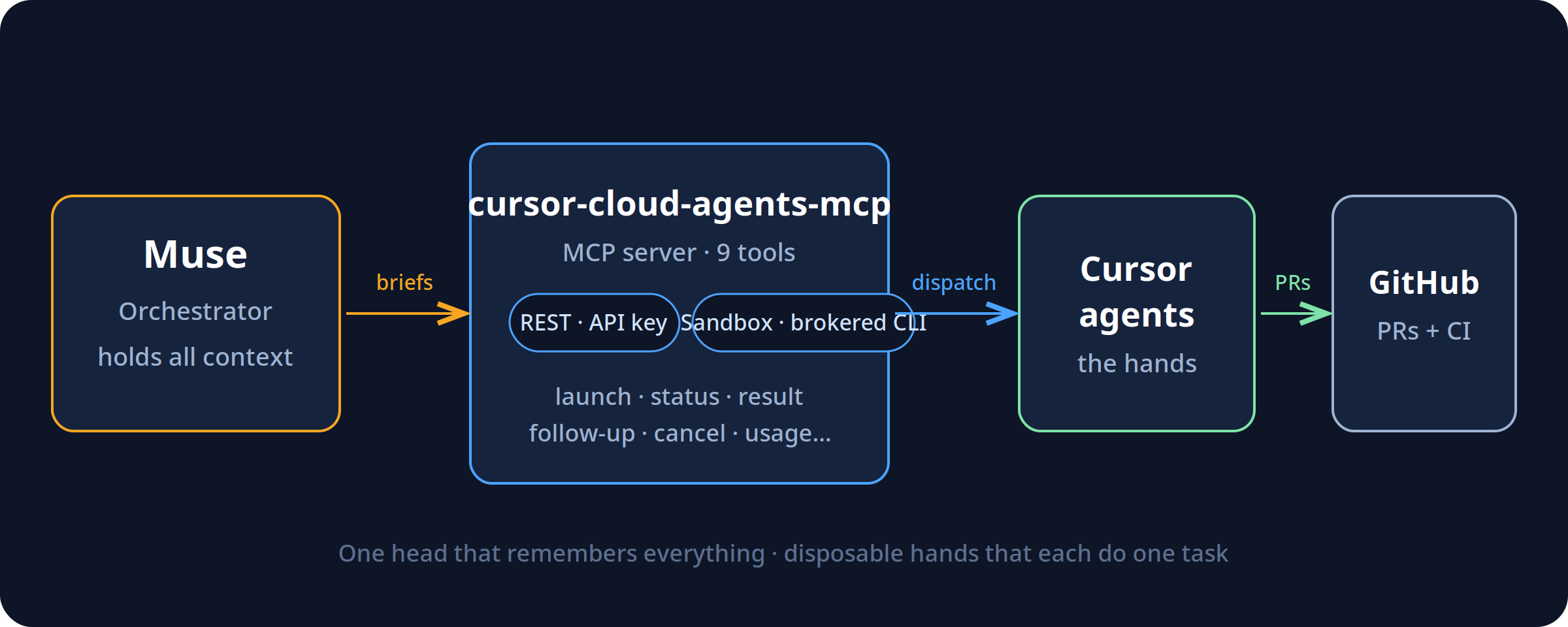
Everyone’s building the same arrow: human → AI writes code faster. I built the other arrow: AI → AI. My assistant (Muse) holds all my context — my repos, my work orders, my rules. Cursor’s cloud agents hold the hands — they can open PRs, run CI, touch repos. The bridge between them is an MCP server I open-sourced: cursor-cloud-agents-mcp.
The interesting part isn’t the tools. It’s the shape: one orchestrator that holds all the context, and disposable agents that each know one task. The orchestrator doesn’t write the code — it briefs, checks, and merges. The agents don’t set direction — they execute the brief. That separation is the whole trick.
Two transports, one repo
I almost built two projects. Then I realized the only real difference between audiences is where the credential lives. So it’s one repo, two transports:
REST — your Cursor API key, direct to api.cursor.com. For general users.
Sandbox — for assistants running inside sandboxed environments (like Muse/Meta’s), where there is no API key to hand out. It shells out to a brokered cursor-agent CLI on PATH instead.
Same nine tools either way: launch, status, result, follow-up, cancel, list, models, whoami, usage.
The lessons are in the timeouts
The v1 API splits agents and runs, and launches can take minutes — sometimes timing out after succeeding. So the bridge mints the agent ID client-side before the call: a retry after a timeout can never create a duplicate. A timeout is reported as unknown, never as failure, then reconciled. Run status is the source of truth, because agent “ACTIVE” doesn’t mean “still working.” These are the details that separate a demo from something you can actually operate.
It earned its keep on day one
The first thing I pointed it at was its own repo: add CI to cursor-cloud-agents-mcp. The agent opened a PR with a GitHub Actions workflow. The first CI run failed — and caught a real bug: the package’s floating dependency had resolved to MCP 2.x, which renamed FastMCP out from under the import. The repo was shipping broken against current dependencies and nobody knew. Pin, re-run, green, merge. I didn’t touch a terminal.
I didn’t trust my own first draft
Before any of that, four AI models reviewed the spec against Cursor’s live docs — and independently caught the same flaw: my original design was shaped around the retired v0 API. Then two more reviewed the actual code and found real bugs: a broken idempotency path, a transport auto-detect that would have grabbed the wrong binary, a polling loop that blocked the server. All fixed before it shipped. The irony I like: the final review round ran through the bridge itself. The launcher timed out on all four agents — and the bridge’s own timeout-reconciliation showed they were all actually running.
Where this goes
v1.1 brings MCP 2.x support. Around it, I’m building the rest of the pattern: work orders as GitHub issues, a daily SLA check, a weekly digest — the scaffolding that turns “AI that can open PRs” into something closer to staff. Most people use agents as a faster keyboard. I’m interested in what happens when they’re the hands and something with memory is the head.
MIT licensed. Issues and PRs welcome — help make it better.
Last verified: 9 September 2026. Practitioner essay from the workbench — not a Google or SpaceXAI press release. We use these tools because they make the company better. No affiliate links. Just the receipt.
Interesting fact, because the seats keep getting mashed together: this piece was reported from a Grok CLI sitting on the physical laptop — the sidecar, not a cloud bot and not a phone app — while that same session logged into Gemini, attached a 293-source notebook, and asked Gemini to grade the notebook against 2026. Two harnesses. One desk. It was a live interoperability test. It worked.
On 27 December 2025 I built a Gemini notebook called Cortex-One: Architectural Mandate for the Native Audio Second Brain. Two hundred ninety-three sources. Audio, slides, video, reports, a mind map. A week later I opened a sister notebook: The Desktop Sidecar Evolution Brief.
Then the sources stopped. The Studio still shows the last Gemini note as 232 days ago — about 20 January 2026. The brain froze. The world did not.
Today I sat next to the laptop and asked the frozen brain what it got right.
What Cortex-One was betting on
Gemini, reading its own notebook, put the bets in three lines:
Native audio over text chatbots. Speech-to-speech. Barge-in. The death of the typed box as the main door.
A router called “The Cortex.” One brain. Specialist sub-agents for research, code, memory. Not one giant prompt.
Remote MCP on Cloud Run. And — this is the plot — it explicitly rejected a local desktop sidecar.
That third bet is the one I want to hold up to the light.
232 days later
Bet
Call
What actually happened
Voice agents
Early, mostly right
Native audio shipped. Cascaded pipelines (Pipecat, LiveKit, WebRTC) did not die. The “one model does all the speech” purity was too rigid.
Gemini ↔ Notebook
Right
Two-way notebook sync shipped in April 2026. Today I attached Cortex-One to a Gemini chat in three clicks.
Named personal agents
Right direction
Meta launched Muse on 8 September 2026. You name the agent. Mine, on the personal box, is Glint. That is not the work seat.
Desktop sidecar
Wrong call
Cortex-One killed it. Seven days later I wrote the Sidecar brief anyway. Today this CLI is the sidecar: a Grok seat on the physical machine, using Gemini’s own notebook and the copilots already inside Gmail, Analytics, and Notebook.
Cloud bots
Real, different seat
Grok Bot shipped in August. Android and iPad this week. Persistent cloud computer. Fantastic. Not this laptop. Mixing “Grok Desk,” Grok Mobile, Grok Bot, and this CLI is how you get a 17-message thread that cannot tell the seats apart.
Gemini scored the frozen brain itself: vision 8/10, infrastructure pragmatism 5/10, longevity 6/10. The 5 is because it locked to Cloud Run Remote MCP and dismissed local sidecars. I agree with the 5. I wrote it.
Gemini also called Grok Bot “late / niche.” That is Gemini being Google. Bot is a real product with a real cloud computer. It is just not the thing sitting next to me.
The seats are not interchangeable
This is the hygiene. If you smash these together you will write emails that are wrong, and then you will believe them.
Seat
Where it lives
Job
Grok CLI on this laptop
Physical machine, next to the human
Hands. Opens Gmail, Notebook, Analytics. Uses the AI already inside those products. Leaves a receipt.
Grok Bot
Shared cloud computer; desktop app and phone
Teammates that keep working when the lid is shut. Chief of Staff, Ops Scout. Draft-to-self. Human Gate on send, post, pay.
Grok Mobile
Phone, same Bot cloud
Approve, review, nudge. Not the laptop CLI. Not “Grok Desktop” as a third Will@ mailbox.
Meta’s personal agent. Named. Not the Tygart Media desk. Do not let it operate Slack or Notion for work.
Personal vs business is a hard wall. Physical vs cloud is a second wall. In-app copilots vs agents that drive the OS is a third. You can use all of them. You cannot pretend they are one brain.
I already published the ladder as I actually run it — Cursor as lead seat, Grok Bot as Chief of Staff, Notion as the board, Slack as the doorbell — in The On-Ramp Is Real. The Commons Is Unfinished. This piece is the missing rail on that ladder: the laptop that sits next to you.
The cheapest intelligence is already in the product
Today’s test was not “build a new agent.” It was: log into the tools we already pay for and talk to the copilot they shipped.
Gmail Ask Gemini summarized a 17-message seat-mix thread without opening every message.
Gemini Notebook still held Cortex-One and the Sidecar brief.
GA4 Ask Advisor answered from live 247 Restoration Specialists data, signed in as work.
Gemini chat took Cortex-One as an attachment and graded it against 2026.
Cloud bots that work while the lid is shut are real. So is a CLI that is you, sitting here, smart enough to use Gemini-in-Gmail instead of forty screenshots. Those are different harnesses. Forcing one AI to fake another is how the Glint / CoS / “Desk Grok” mail mix-up happens.
Were we early?
On voice: yes. On a named cortex that routes work: yes. On killing the laptop sidecar so everything could live on Cloud Run: no. I already suspected that on 3 January, which is why the Sidecar brief exists. I just stopped putting sources in the brain.
The freeze is the other finding. A 293-source notebook with slides and video is not a second brain if nobody feeds it. 232 days is long enough for Gemini 3, Grok Bot, Muse, and notebook sync to ship around a document that still thinks Gemini 2.5 Flash is the architecture.
The move is not “rebuild Cortex-One.” The move is: keep the notebook as a dated artifact, keep the sidecar on the desk, and stop letting cloud seats write as if they are the laptop.
What to do this week
Name the seats out loud. CLI, Bot, Mobile, Gemini-work, Muse-personal. If a thread uses one address for two of those, that is a bug.
Use the copilot already inside the product before you spawn a new agent. Gmail, Notebook, Analytics, Search Console — they all talk now.
If you have a frozen notebook, attach it to Gemini and ask what shipped after the last source. Do not pretend the freeze is current doctrine.
Human Gate still holds. Draft is not send. A sidecar with hands is still not allowed to mail a client because it can click Gmail.
Close
Cloud agents are teammates in another room. The CLI is a person next to you with hands. Personal and business identities are a wall. The cheapest intelligence is the copilot already inside the product.
We were early on voice. We were wrong to kill the sidecar. The proof is this session: Grok on the physical desk, Gemini on the notebook, one human watching, a receipt on the site.
The on-ramp is still real. The sidecar was the point.
Will Tygart — Tygart Media. Written 9 September 2026 from the Command Center. Grok CLI on the laptop used Gemini (Gmail, Notebook, Analytics Advisor, and a Cortex-One-attached chat) as a live test of two harnesses on one desk. This essay does not speak for Google, Meta, SpaceXAI, Cursor, or xAI. We want those companies to succeed because we are building on the tools they ship. Human Gate on send / post / pay still stands.
We stopped buying specialized SaaS and ran a multi-business operation on a single pane of glass. Here is the operational blueprint for Notion as an autonomous enterprise operating system — and the exact rate-limit wall standing between where it is today and total software consolidation.
TL;DR
The tech world keeps waiting for an “Everything App” — a consumer super-app for messaging, ordering food, and hailing rides. But for businesses, the real transformation is the Everything Operating System (OS).
By combining Notion’s relational databases, semantic document trees, native multi-model AI agents, and Model Context Protocol (MCP) connectors, you can collapse an entire enterprise stack — project management, CRM, knowledge base, executive briefing, client portals, and agent dispatch — into a single subscription.
It already works in production. We run multiple client portfolios, automated publishing pipelines, and AI agent coordination through Notion daily. Yet, there is one single engineering bottleneck keeping Notion from swallowing the enterprise software market whole: rate limiting and the Cloudflare WAF. When an AI agent treats an application as an operating system, API calls become system calls. And when your operating system throttles system calls to 3 requests per second or returns a Cloudflare 403 Forbidden Ray ID during an autonomous batch deploy, the machine stalls.
1. The SaaS Graveyard
Look at the software ledger of any 10-person agency, professional services firm, or modern operator:
Project Management: Asana, Monday, or Linear ($12–$24/user/mo)
CRM & Pipeline: HubSpot, Pipedrive, or Salesforce ($50–$150/user/mo)
Internal Knowledge & SOPs: Confluence, Slite, or Guru ($8–$15/user/mo)
File Storage & Collaboration: Google Drive or Dropbox ($15–$25/user/mo)
AI Tooling Zoo: ChatGPT Plus for research ($20/mo), Claude Pro for coding ($20/mo), Perplexity Pro for search ($20/mo), Gemini Advanced for documents ($20/mo)
Every team member has fifteen tabs open. Data decays in silos. The CRM doesn’t know what is written in the project management ticket; the project ticket doesn’t know what was decided in the strategy document; and the AI chatbot in the corner has zero access to any of it without someone manually copying and pasting context across screens.
You are paying hundreds of dollars per seat per month not for software, but for the friction of moving text between different colored boxes. What happens if you cancel all of it and keep only one?
2. Notion as an Operating System (Not an App)
An operating system requires three fundamental primitives:
A Memory & File System: Persistent state, structured metadata, and unstructured data.
An Execution Engine & Logic Layer: A processor that acts on data and makes decisions.
An I/O Bus: Connectors that read from and write to the outside world.
Notion has quietly built all three:
OS Layer
Notion Primitive
Enterprise Function
1. Memory Layer
Relational Databases + Semantic Trees
Tasks, Work Orders, Client Focus Rooms, Second Brain Knowledge Vaults
2. Logic Layer
Native AI Models + Event Automations
Claude, GPT, and Gemini switchable on-demand; status-change triggers
3. I/O Bus
Model Context Protocol (MCP) + Webhooks
Two-way bridges to Gmail, Google Calendar, local desktops, and server APIs
When you structure Notion this way, it stops behaving like a passive digital notebook. It becomes the kernel of your business:
Databases are your schemas: You define relational tables (Tasks, Work Orders, Client Master, Second Brain). Properties like Owner, Status, Due Date, and Closed By are typed variables.
Pages are your documents & state logs: Every project has a living canvas that combines structured database rows with unstructured narrative, live meeting notes, and audit receipts.
Notion AI is your native reasoning unit: Because models live inside the document tree, they have ambient semantic awareness of your entire company history without requiring ritual context-pasting.
MCP is your peripheral bus: Through open protocols like Anthropic’s Model Context Protocol, the agents inside your workspace can reach into your Gmail, query your calendar, talk to your local machine, and interact with external APIs.
3. How We Actually Run It: The Two-Hemisphere Doctrine
This is not a theoretical thought experiment. This is how we run our operations every single day.
Hemisphere A: The Executive Layer (Human Intent & Voice)
Where the human lives: mobile phone, voice memo, or a clean Notion dashboard. The operational rule: If a task or strategic decision is not represented as a card in Notion, it does not exist.
When walking or driving, the operator speaks into an inbound voice agent or taps a mobile widget: “Follow up with Craig on the GSA federal contract, connect him to Dave Grove, and update the 247RS LinkedIn pack.” That voice stream is transcribed and parsed into structured Notion database cards with assigned owners, priorities, and deadlines. Zero cognitive overhead.
Hemisphere B: The Production Layer (Agent Workers & Tool Hands)
Where the machines live: background agents (Cursor Desktop, Chief of Staff on Grok Bot, Claude Code).
Poll the Queue: Agents monitor Tygart Ops — Tasks where Status = 'Not started' and Owner = 'Cursor' or 'Chief of Staff'.
Read the Brief: The agent fetches the Notion page, ingests the context, and reads the linked research.
Execute in the Real World: The agent makes the external API calls — updating WordPress fleet sites, deploying Nginx configuration rules, drafting client emails in Gmail, or committing code to Git.
Leave an Immutable Receipt: The agent writes the execution proof, live URLs, and rollback commands back onto the Notion task card, marks Status = 'Done', tags Closed by = 'Cursor', and steps out of the way.
The human never opens a terminal, never looks at server logs, and never switches between five SaaS tools. They look at Notion. The work moves from left to right. The receipts are permanent.
4. The Four Hard Walls: Why You Can’t Throw Away Git (Yet)
If Notion is this capable, why can’t you delete your local hard drive, cancel GitHub, and run literally 100% of your company inside Notion today? Because when you push Notion from being an “app” to an “operating system,” you slam directly into four fundamental infrastructure limits:
Wall 1: The Cloudflare & Rate-Limit Ceiling
In a traditional operating system, a system call takes microseconds. The CPU can write millions of instructions to memory per second. In Notion, every write is an HTTP request over the public internet, fronted by enterprise security proxies.
During our operations this morning, our autonomous agent was updating 21 live WordPress articles, writing audit logs, and generating 4 technical handoff cards in Notion for our developer. On the fourth task, the operation hit a wall:
Request to Notion API failed with status: 403
Cloudflare Ray ID: a388bb63fa5108d8
"Sorry, you have been blocked... This website is using a security service to protect itself from online attacks."
Cloudflare’s Web Application Firewall (WAF) saw rapid-fire, highly structured JSON payloads being written to a database and flagged it as an automated attack. Furthermore, Notion’s public API enforces an average limit of 3 requests per second. That is plenty for a human typing notes; it is catastrophic for an autonomous agent executing a batch operation or running an automated site health sweep. Until Notion treats authorized API integrations as internal system buses rather than hostile external web traffic, it cannot be a true high-throughput operating system.
Wall 2: A Document Is Not a CPU
Notion is a world-class data store and presentation canvas, but it has no compute runtime. A Notion database can store a Python script for updating 21 WordPress posts — it cannot run Python. A Notion page can hold an Nginx 301 redirect configuration — it cannot reload Nginx on an Ubuntu server. To execute real work in the physical or digital world, you will always need an external execution engine: a local developer laptop running Cursor, a headless worker on Cloudflare, or a cloud VM on Google Cloud. Notion is the brain; it still needs hands.
Wall 3: Mutable State vs. Cryptographic Truth
Notion pages are mutable documents. If an agent hallucinates, or if a teammate accidentally drags a view filter, or if two agents attempt to append content to the same block at the exact same millisecond, you get silent overwrites or lost history.
Git, by contrast, is a cryptographic, distributed state machine. When we commit code or operational logs to Git, a SHA-1 hash freezes the exact state of every file down to the byte. Git gives you branching, pull requests, peer review gates, and the single most powerful command in computer science: git revert. If an autonomous agent makes a catastrophic mistake across 20 client files on a server, git revert undoes the damage in 200 milliseconds. Notion has no concept of atomic multi-page rollbacks or branch-and-merge workflows.
Wall 4: The Air-Gap & Data Sovereignty Test
If Notion experiences an outage, or if you board a cross-country flight with dead Wi-Fi, a “Notion-Only” company ceases to exist. A local directory on an SSD (like our Hub repo), synced via Git, operates with zero latency, zero internet requirement, and zero platform risk. You own the markdown files on your drive. Nobody can de-platform your folder.
5. The Verdict: The Cockpit & The Safe
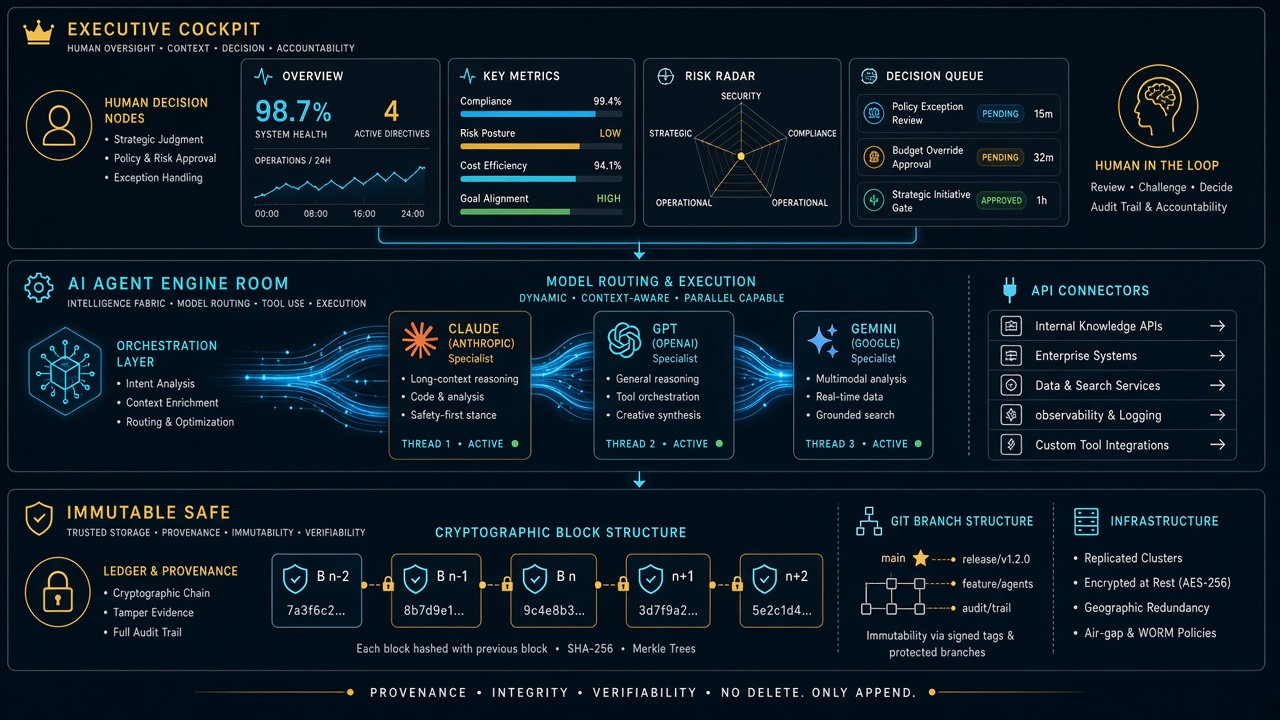
You don’t have to wait for Notion to solve all of that to reap the benefits today. The winning architecture for 2026 is the Executive Cockpit + Engine Room Safe model:
The rule is simple: You live in Notion. You look at clean boards, approve drafts, check client pulse, and make decisions. Your agents live in the Engine Room. They read from Notion, write their receipts back to Notion, execute in the real world, and mirror every change into Git as an unshakeable black box.
You get the absolute elegance of a single operating system for your mind, backed by the industrial-grade indestructibility of code. Notion doesn’t need to replace the computer. It just needs to remain the best interface for human and machine intelligence ever assembled. And once they lift that rate-limit ceiling? The rest of enterprise SaaS is officially on notice.
The fundamental flaw of traditional “Second Brain” systems is human maintenance friction. Users build elaborate Notion templates with linked databases, tags, and relations, only to abandon them within three months because manual data entry cannot keep up with the velocity of daily decisions, meetings, and project iterations. In 2026, the Autonomous Second Brain solves this problem completely: AI agents autonomously capture, structure, cross-link, and maintain Notion databases in real time via the Model Context Protocol (MCP).
The Zero-Maintenance Architecture: Key Highlights
Zero Manual Data Entry: Agents listen to live conversations, email threads, and code reviews, extracting decisions directly into structured Notion database properties.
Autonomous Task Staging: Engineering and operational work orders are generated with full technical context and auto-assigned to team members without human drafting.
Cross-Surface Knowledge Graph: Notion acts as the single source of truth connecting local IDEs, remote servers, email hubs, and public websites.
Self-Cleaning & Evergreen Pruning: Automated agent loops merge duplicate notes, reconcile contradictory facts, and archive stale records periodically.
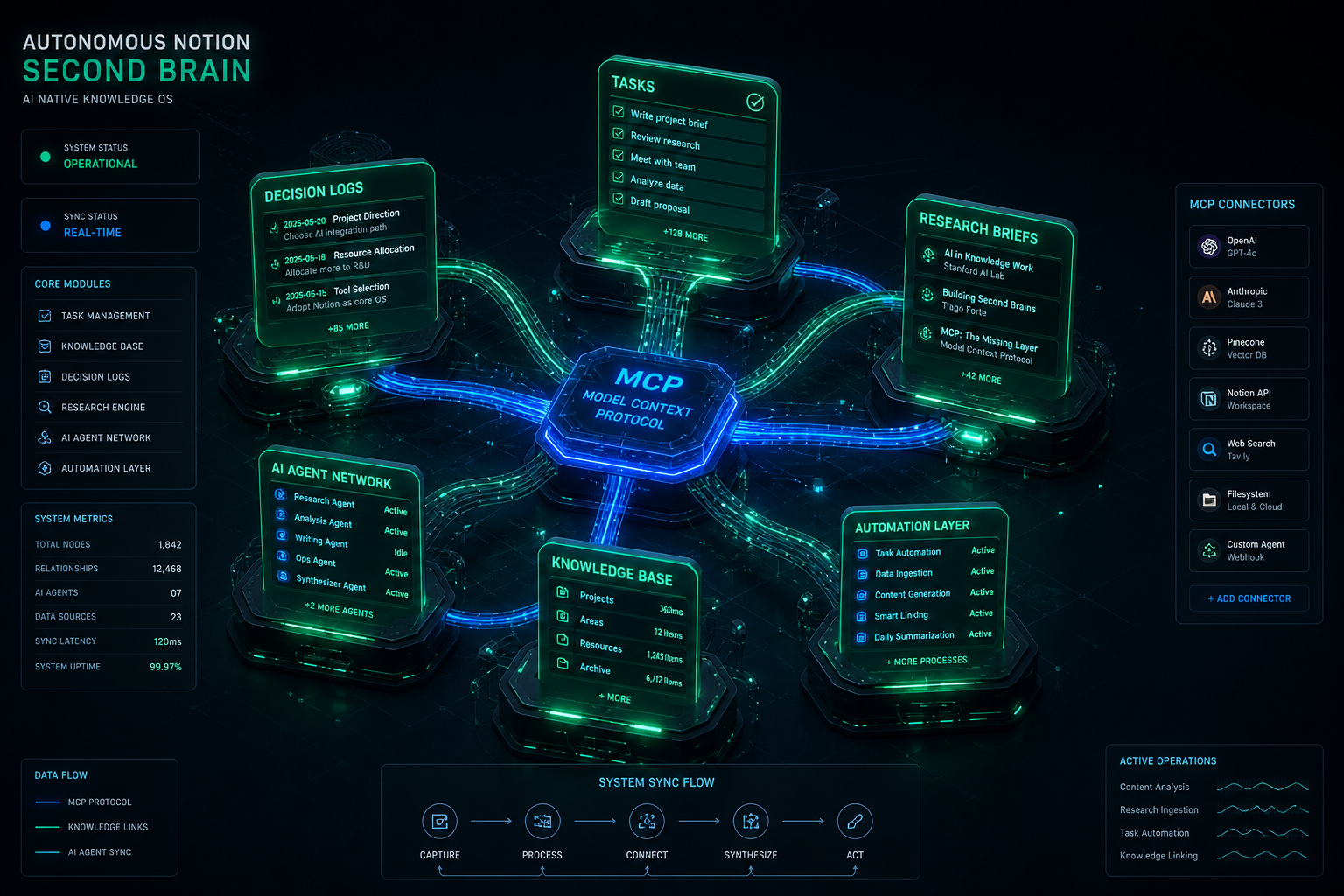
Visual generated by Grok AI — Autonomous Notion Second Brain: MCP Connectors, Multi-Database Topology & AI Agent Ingestion.
1. How MCP Transforms Notion from a Notebook to an Active Memory Layer
Before Model Context Protocol, connecting an AI assistant to Notion required brittle custom webhooks, rigid Zapier zaps, or clunky browser extensions. With the official Notion MCP server, AI models natively execute rich semantic operations directly inside their reasoning loop:
MCP Capability
Traditional Manual Workflow
Autonomous MCP Workflow
Knowledge Capture
Copy-pasting notes into a blank Notion page after a call.
Agent auto-extracts action items & writes structured blocks via notion-create-pages.
Context Retrieval
Manual search with keywords across dozens of folders.
Agent runs semantic vector lookup across workspace with notion-search.
Database Schema Updates
Creating tags, properties, and status fields manually.
Agent auto-maps properties with type validation and sensible defaults.
2. Production Workflow: The Autonomous Work Order Pipeline
In our technical operations at Tygart Media, when an issue arises (e.g., automated cron alerts firing excessive emails or pilot registrations requiring team coordination), the human operator never writes a task card manually. Instead, the agent executes the following pipeline:
Problem Extraction: The agent detects the root cause from system logs or email history.
Schema Matching: The agent calls notion-search to locate our team’s active Work Order database.
Context Ingestion: Formats the ticket with standardized sections: Priority level, Assignee, Problem Summary, Execution Steps, and Acceptance Criteria.
Live Deployment: Executes notion-create-pages, returns the permanent Notion URL in chat, and logs the task ID across our session context.
3. Building the 4-Layer Autonomous Knowledge Stack
Knowledge graphs degrade over time if left unpruned. We implement automated reflection routines where the agent executes a monthly maintenance audit:
Duplicate Detection: Finding similar topic notes across different months and synthesizing them into a single canonical source.
Status Synchronization: Checking completed pull requests and closing out corresponding Notion task cards automatically.
Broken Citation Repairs: Updating URLs and standard definitions when external regulations change (e.g., California SB 253 amendments or NYC Local Law 97 rule updates).
Conclusion: The Ultimate Leverage for Solopreneurs & Teams
An Autonomous Second Brain transforms Notion from a passive digital graveyard into an active operating system for your mind and business. By combining the speed of modern reasoning models with the open standard of MCP, knowledge workers can achieve complete operational leverage—capturing every insight and managing complex operations with zero maintenance overhead.
>For full architecture walkthroughs and custom enterprise agent implementations, browse our complete collection of technical playbooks on Tygart Media.
Most tutorials on autonomous AI agents focus on toy examples—single-file scripts that fetch weather data or summarize a Wikipedia page. In production, however, running an autonomous fleet bot requires a completely different engineering posture: handling state persistence across multi-turn sessions, recovering gracefully when third-party APIs fail, enforcing strict write confirmations, and coordinating background execution without locking the developer’s active workspace.
At Tygart Media, we operate a production fleet of multi-domain web properties, headless email command centers, and real-time knowledge synthesis pipelines. Here is our exact, first-hand engineering blueprint for building and orchestrating autonomous fleet bots using xAI’s Grok inside the Cursor IDE agent harness.
The Production Fleet Architecture
How our autonomous systems divide labor across reasoning, tool execution, and memory:
Orchestrator Harness: Cursor IDE agent engine managing sub-process lifecycles, background execution, and diff validation.
Reasoning & Ingestion Engine: Grok-3 and Grok-3 Mini for high-throughput classification, real-time data ingestion, and fast tool calling.
Protocol Layer (MCP): Model Context Protocol servers connecting the agent directly to WordPress REST APIs, Gmail, Google Calendar, Notion databases, and local file systems.
Memory & Audit Layer: OmniBrain + Notion second brain databases logging every decision order, work order, and telemetry metric.
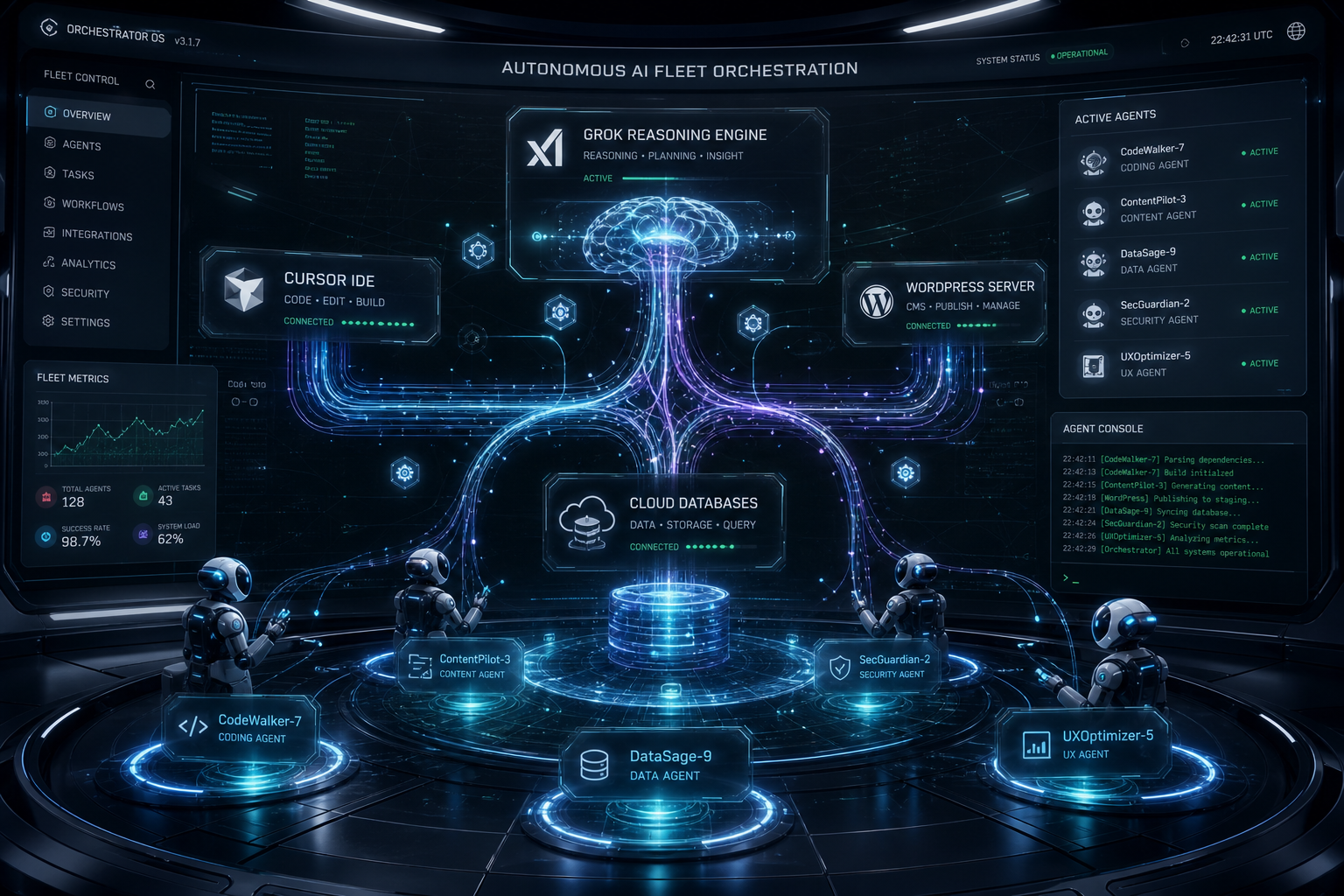
Visual generated by Grok AI — Autonomous AI Fleet Orchestration Connecting Grok Engine, Cursor IDE, WordPress Fleet & Subagents.
1. The Four Core Principles of Resilient Fleet Bots
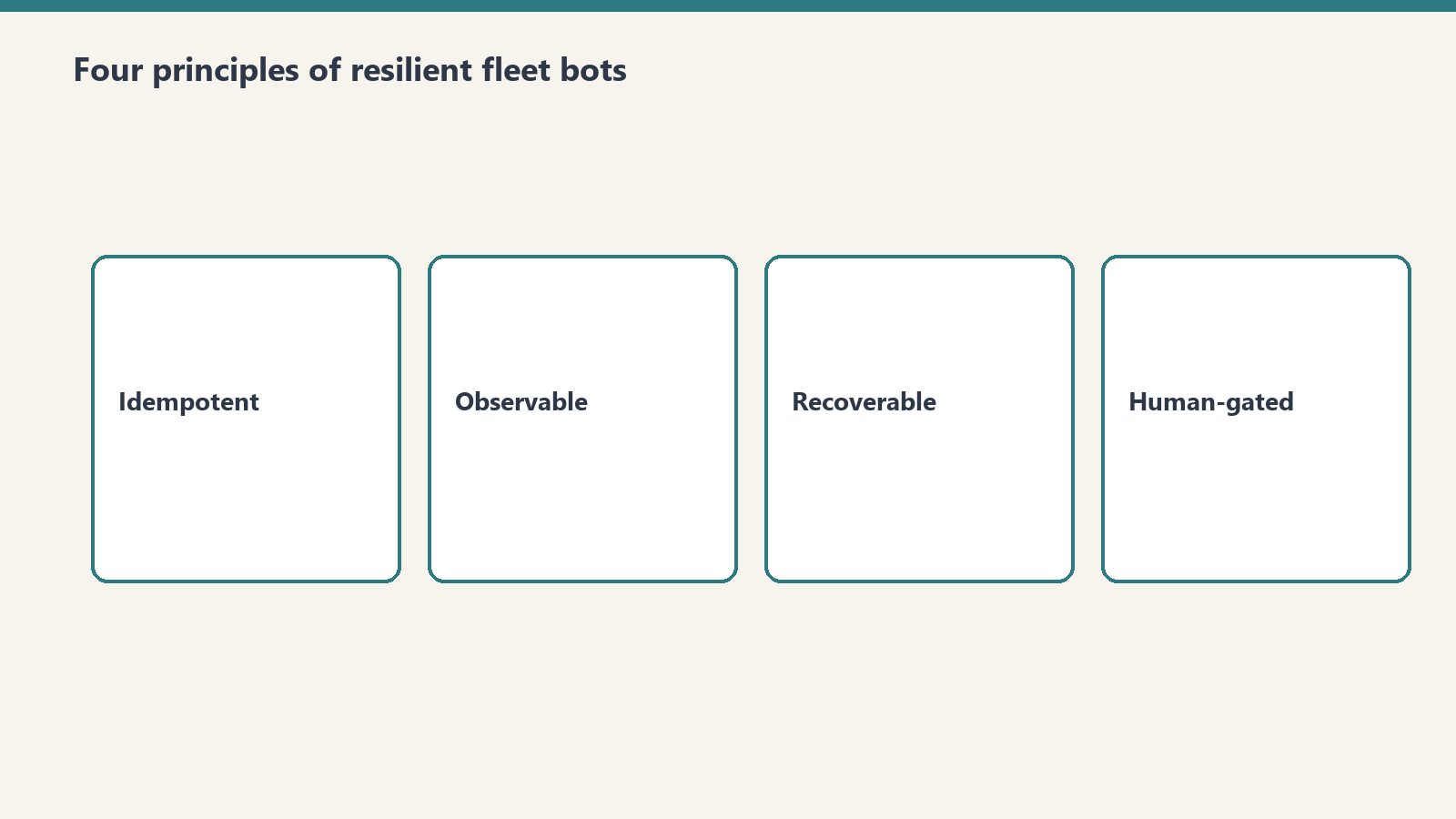
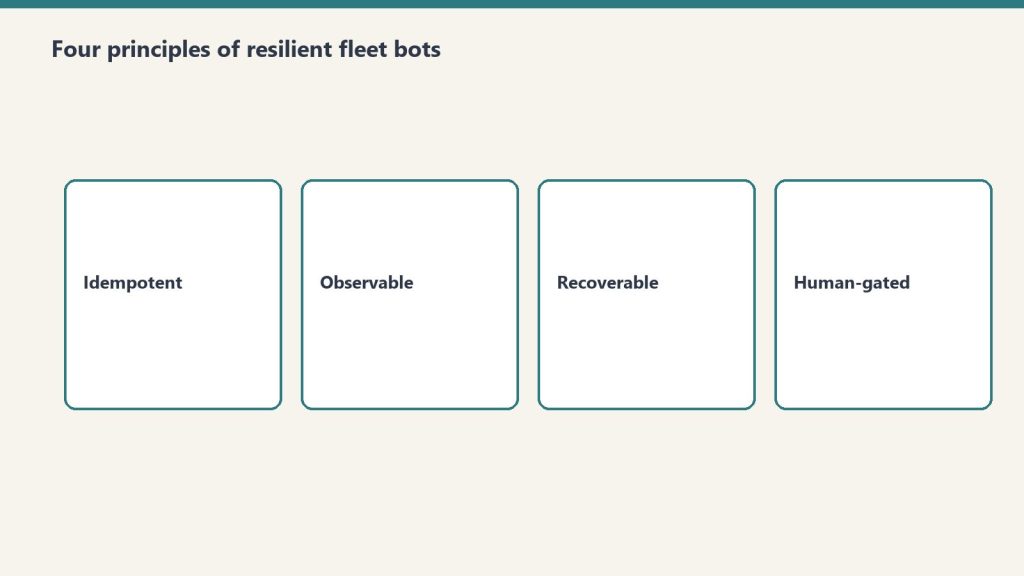
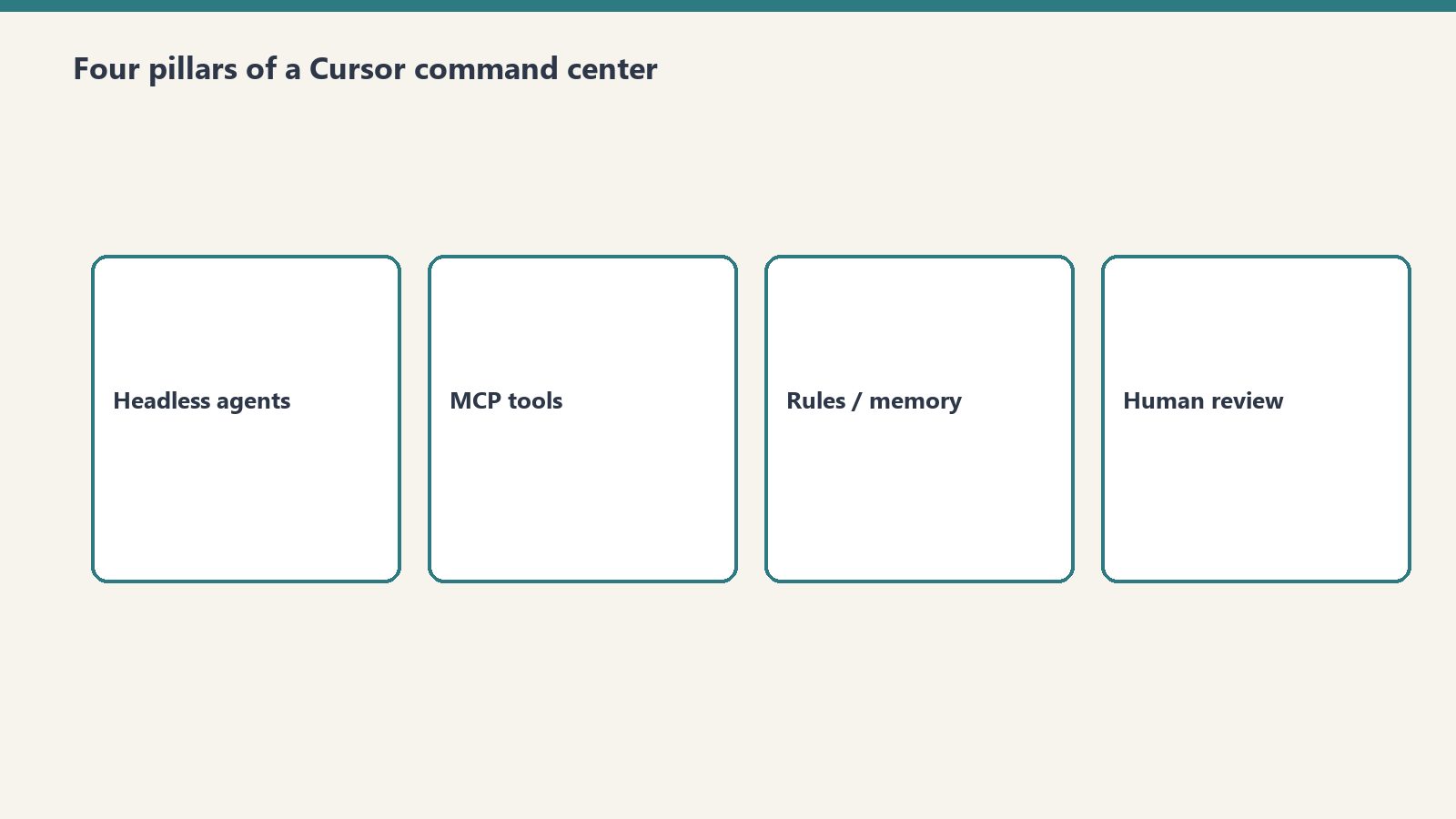
Four core principles of resilient fleet bots.
Principle 1: Reads Are Free, Writes Require Explicit Guardrails
An autonomous bot should be empowered to crawl, inspect, grep, and analyze without human friction. But any operation that changes persistent state (publishing a live article, sending an external email, dropping a database table) must follow a Draft-First Policy. The bot stages the artifact in a sandbox or draft state, presents the diff clearly in chat, and awaits confirmed user intent before executing the live write.
Principle 2: Parallel Tool Execution
Sequential tool calling is the death of agent responsiveness. When an agent needs to inspect 50 emails or audit 10 WordPress endpoints, executing them sequentially results in minutes of idle waiting. Grok’s tool-calling API supports batch tool dispatches. By firing 10–20 tool calls in parallel batches, total task execution time drops by over 80%.
Principle 3: Idempotent Error Recovery
In distributed operations, APIs fail. Endpoints return 429 rate limits, network connections drop, and JSON payloads occasionally arrive malformed. Production fleet bots must never crash silently. Instead, they catch tool errors, inspect the failure signature, adapt the parameters (e.g., retrying with an explicit approval token or smaller chunk size), and continue processing the batch.
Principle 4: Grounded Prompts Over Generic Instructions
Never rely on vague system instructions like “Be a helpful assistant”. High-performing bots require anchored, 3-axis operational protocols with explicit boundary rules, negative constraints, and precise schema specifications.
2. The System Architecture: How Cursor & Grok Connect to Live Fleets
System architecture: agents connected to live fleets.
Below is the technical workflow diagram representing our production bot orchestration:
3. Real Production War Story: Managing a 9-Site Fleet
In our daily operations, our agent fleet manages 9 WordPress sites, monitoring content freshness, auditing broken links, publishing structured comparison guides, and synchronizing regulatory compliance updates (such as NYC Local Law 97 and California SB 253 Scope 3 mandates).
Here is what happens during a standard automated operational cycle:
Fleet Discovery: The agent calls wp_list_sites across our fleet (restorationintel.com, bcesg.org, tygartmedia.com, etc.).
Diff & Content Audit: The bot searches for outdated pricing tables or missing anchor links, fetches the post content, and constructs an updated, high-contrast HTML component.
Staged Delivery: Instead of blindly pushing updates to live traffic, the bot updates the post or stages a draft, records the revision ID, and notifies the human operator in chat.
Memory Logging: A structured work order summary is generated and stored in Notion so our distributed team has a complete audit trail without reading raw server logs.
4. The Economics: Why This Stack Beats Traditional SaaS Tools
Building custom fleet bots on top of Grok and Cursor eliminates the need for expensive, fragmented SaaS subscriptions:
Operational Function
Traditional SaaS Stack
Grok + Cursor Fleet Bot
Monthly Savings
Fleet Content Management
$299/mo (Enterprise CMS Tools)
$4.50/mo (Grok API Tokens)
98.5%
Email Triage & Archiving
$150/mo (Superhuman + SaneBox)
$1.20/mo (Grok-3 Mini)
99.2%
Knowledge Base Maintenance
$500/mo (Dedicated Ops Assistant)
$3.80/mo (Notion MCP + Grok)
99.2%
Conclusion: The Future of Autonomous Development
The developers who build the most impactful AI systems in 2026 are not writing prompts in web chat interfaces. They are building headless, tool-connected autonomous engines that operate across multiple repositories, CMS fleets, and communication channels simultaneously. Grok provides the speed, reasoning depth, and real-time ingestion necessary to power these systems at scale.
>Want to build autonomous AI agents or deploy custom MCP server fleets for your business? Read our full library of developer playbooks on Tygart Media.
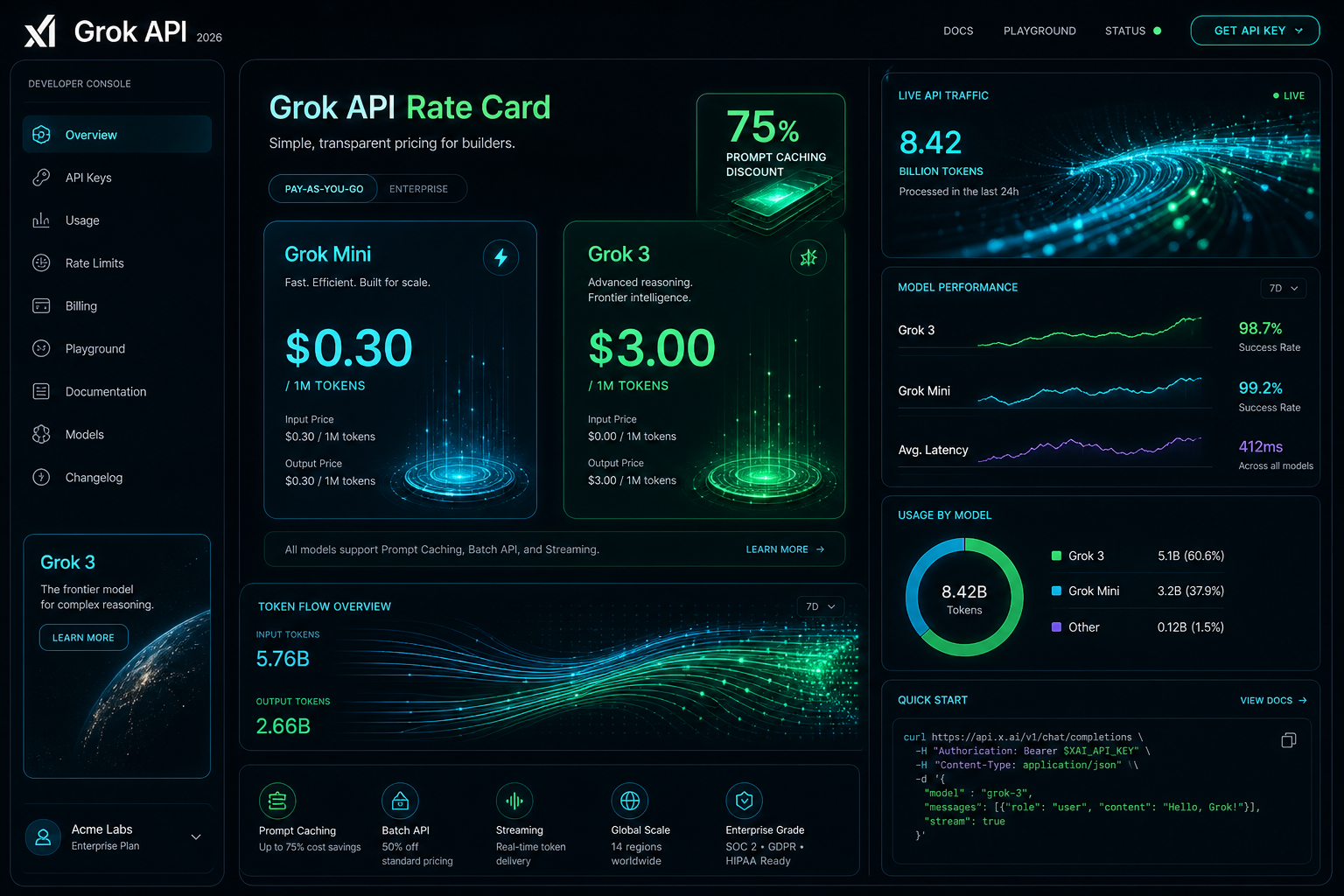
The Grok API is metered pay-as-you-go: input and output are priced per million tokens, cached input is billed at a separate lower per-model rate, and Grok Voice is priced per audio minute. Page updated October 2, 2026. The figures below are xAI’s current published rates (docs.x.ai, last updated September 21, 2026).
Direct answer (page updated October 2, 2026): Grok-4.7 (flagship) is $2.00 input and $6.00 output per 1M tokens, cached input $0.50. Grok-4.6 is $2.00 / $6.00, cached $0.50. Grok-4.5 is $2.00 / $6.00, cached $0.30. Grok-4.3 and the Grok-4.20 family are $1.25 / $2.50, cached $0.20. Grok-build-0.1 is $1.00 / $2.00, cached $0.20. Grok-3 was retired in May 2026 and now redirects to Grok-4.3 — the $3.00 / $15.00 figures this page previously listed are outdated. Grok Voice speech-to-speech is a flat $0.08 per minute plus $0.004 per text input.
Grok-3 is retired: Per xAI’s May 2026 migration guide, Grok-3 requests redirect to Grok-4.3. Any page still quoting $3.00 / $15.00 is showing history, not current pricing.
Grok Voice API: Speech-to-speech at a flat $0.08/min plus $0.004 per text input — no per-minute input/output split. Speech-to-text $0.10/hr REST ($0.20/hr streaming); text-to-speech $15.00 per 1M characters.
Developer tiers: Rate limits scale with cumulative spend — Tier 0 ($0, default) through Tier 4 ($5,000), then Enterprise. No published free tier or new-account credit.
Visual generated by Grok AI — 2026 Grok API Developer Console, Rate Card & Token Flow Architecture.
Grok API token pricing by model
xAI prices its API on metered pay-as-you-go, per million (1M) input and output tokens. Long-context requests bill at 2x the short-context rates shown here. Current published rates:
Model Name
Input Cost (per 1M)
Cached Input (per 1M)
Output Cost (per 1M)
Grok-4.7 (Flagship)
$2.00
$0.50
$6.00
Grok-4.6
$2.00
$0.50
$6.00
Grok-4.5
$2.00
$0.30
$6.00
Grok-4.3
$1.25
$0.20
$2.50
Grok-4.20 family (reasoning / non-reasoning / multi-agent)
$1.25
$0.20
$2.50
Grok-build-0.1
$1.00
$0.20
$2.00
Grok Voice (speech-to-speech)
Flat $0.08 / min + $0.004 per text input
N/A (per-minute)
Context windows per xAI’s model catalog: Grok-4.7 and Grok-4.5 up to 500K tokens, Grok-4.3 up to 1M tokens. Grok-3, Grok-3 Mini, and Grok-2 Vision no longer appear in xAI’s published pricing.
Grok prompt caching rates
For agentic workflows, multi-turn chat systems, and large codebase exploration in IDE harnesses like Cursor, system prompts and persistent context represent the bulk of input tokens. Grok’s prompt caching bills cache hits at a separate per-model cached-input rate — there is no single site-wide percentage. Effective discounts run roughly 75-85% depending on model: $0.50 vs $2.00 on Grok-4.7/4.6, $0.30 vs $2.00 on Grok-4.5, $0.20 vs $1.25 on Grok-4.3/4.20, and $0.20 vs $1.00 on Grok-build-0.1.
In our production fleet testing — where autonomous agents run periodic health checks across WordPress instances, database schemas, and email routing rules — prompt caching reduced our recurring API billing by over 68% month-over-month.
Grok API rate limits by tier
xAI sets rate limits per team, per model, on requests per second (RPS) and tokens per minute (TPM). Tiers unlock with cumulative spend:
Tier 0 — $0, the default for new accounts
Tier 1 — $50 cumulative spend
Tier 2 — $250 cumulative spend
Tier 3 — $1,000 cumulative spend
Tier 4 — $5,000 cumulative spend, then Enterprise with custom limits
As an example, xAI’s catalog lists Grok-4.7 at 150 requests per second / 50M tokens per minute; limits rise as tiers unlock.
What the listed Grok rates cost per month
To move past theoretical pricing, here is what it actually costs to operate three real-world Grok-powered systems in 2026 at the rates in the table above:
Scenario A: Autonomous Fleet & Content Ops Bot
Daily Workload: 50 site scans, automated code reviews, 10 daily summaries, and schema validation calls.
Total Monthly Cost:$252.00 / month in audio charges (vs. $3,200+/month for full-time 24/7 human dispatch).
3,150 minutes x $0.08 = $252.00, plus $0.004 per text input the agent generates.
Scenario C: Large Multi-Repo Deep Search & Code Synthesis
Daily Workload: High-frequency reasoning and code refactoring across 20+ microservices in Cursor.
Monthly Token Consumption: 80M input tokens on Grok-4.7 with prompt caching enabled.
At the Grok-4.7 rates in the table: all cached, 80 x $0.50 = $40; all uncached, 80 x $2.00 = $160; a 50/50 mix = $100 in input charges, before output tokens.
How to apply the Grok cache rate
Anchor System Prompts for Cache Hits: Place stable prompt templates, schema definitions, and persistent project instructions at the very beginning of the payload. Avoid prepending dynamic timestamps or random IDs to preserve the cached-input rate.
Model Routing (build-0.1 for Scaffolding, 4.7 for Reasoning): Use lightweight models like Grok-build-0.1 ($1.00/$2.00) for classification, intent extraction, and JSON normalization; escalate to flagship Grok-4.7 only for deep logical synthesis or multi-file architecture plans.
Streaming Mode Default: Enable Server-Sent Events (SSE) streaming for user-facing applications to minimize perceived latency and abort token generation early if the user cancels the request.
Grok API pricing questions
How much does the Grok API cost?
Current published rates: Grok-4.7 is $2.00 input and $6.00 output per 1M tokens, Grok-4.6 the same, Grok-4.5 $2.00 / $6.00, Grok-4.3 and the Grok-4.20 family $1.25 / $2.50, and Grok-build-0.1 $1.00 / $2.00. Cached input is $0.50, $0.50, $0.30, $0.20, and $0.20 respectively. Grok Voice speech-to-speech is a flat $0.08 per minute plus $0.004 per text input.
Is there a free tier for the Grok API?
xAI publishes no free tier and no standing new-account credit. Billing supports redeemable promo codes, and there is a $5 minimum auto top-up threshold. Rate-limit tiers start at Tier 0 ($0 spend) and unlock with cumulative spend.
How much does Grok prompt caching change the input price?
Cache hits bill at a per-model cached-input rate: $0.50 instead of $2.00 on Grok-4.7/4.6, $0.30 instead of $2.00 on Grok-4.5, $0.20 instead of $1.25 on Grok-4.3/4.20, and $0.20 instead of $1.00 on Grok-build-0.1 — roughly 75-85% below standard input depending on model. xAI publishes no single site-wide discount figure.
What are the Grok API rate limits?
Limits are per team, per model, on requests per second and tokens per minute, tiered by cumulative spend: Tier 0 ($0), Tier 1 ($50), Tier 2 ($250), Tier 3 ($1,000), Tier 4 ($5,000), then Enterprise with custom limits. The catalog lists Grok-4.7 at 150 RPS / 50M TPM; limits rise as tiers unlock.
Conclusion: The Operational Verdict
At xAI’s current published rates, Grok-4.7 is $2.00 / $6.00 per 1M tokens, Grok-4.5 $2.00 / $6.00, Grok-4.3 and Grok-4.20 $1.25 / $2.50, Grok-build-0.1 $1.00 / $2.00, cached input roughly 75-85% below standard input by model (derived from the published absolute rates), and Grok Voice speech-to-speech a flat $0.08 per minute plus $0.004 per text input. Grok-3 is retired and redirects to Grok-4.3. Page updated October 2, 2026.
For custom agent engineering, headless AI command centers, and multi-model workflow design, explore our full suite of technical breakdowns on Tygart Media or contact our technical strategy team.
Most “Azure vs Google Cloud” articles are written by people who run neither in production. They paraphrase the pricing pages and call it a comparison.
We do something different: we run the same media property on both clouds at the same time — and the entire thing costs $0/month. Google Cloud is the live operational stack. Azure is a parallel “newsroom” of always-free services running on a dedicated lab domain, tygart.media, mirroring each capability of the live site. Two clouds, one operation, both AI ecosystems watching it work.
This is the desk-by-desk breakdown — what each cloud actually does for us, where the free tier runs out, and which one wins each specific job. No theory. This is the running system.
Why run on both clouds at once
Why run on both clouds at once.
There’s a strategic reason beyond “free is fun.” Search and AI assistants don’t share a brain. Google’s models optimize for Google’s index; Microsoft’s Copilot and Bing optimize for Microsoft’s graph. When ~84% of your organic traffic comes from Bing, having your stack only inside Google’s telemetry is a blind spot.
Running enrichment through Azure puts the same content inside Microsoft’s service graph the same way Google Cloud puts it inside Google’s. You stop guessing how each ecosystem sees you, because you’re operating inside both.
The serverless compute plane
The serverless compute plane.
The heart of the stack: code that runs after you push a file and close the laptop.
How we do it
Azure
Google Cloud
Verdict
Service
Azure Functions
Cloud Run
Cloud Run for containers; Functions for glue
Free ceiling
1M requests/month
2M requests/month
Google, on raw headroom
Deploy model
Functions Core Tools / GitHub Actions
Keyless deploy via Workload Identity Federation
Google — no stored keys is a real security win
What surprised us
Generous, but watch billable side resources
Cold starts negligible at our scale
—
Our bill
$0
$0
Tie where it counts
Pick Cloud Run if you’re already containerized and want keyless CI/CD. Pick Azure Functions if your automation lives in the Microsoft ecosystem and you want Logic Apps next door.
The content enrichment desks
This is where Azure’s always-free tier quietly outclasses expectations — a full newsroom of AI services that never bill at our volume.
How we do it
Job
Azure
Google Cloud
Verdict
Translation
Translator — 2M chars/mo free (~300 articles)
Cloud Translation
Azure — bigger perpetual free ceiling
Article audio
Neural TTS — 500K chars/mo
Cloud Text-to-Speech
Toss-up; both natural
Entity extraction (for GEO)
AI Language — 5K records/mo
Cloud Natural Language
Azure — likely the same signal family Bing uses
Site search
Azure AI Search — 3 indexes free
Vertex AI Search
Azure — it’s the engine behind Bing
The entity-extraction line matters most. We feed articles through Azure AI Language to pull named entities and key phrases, then saturate the content with them. We’re optimizing for the same entity signals Microsoft’s own systems use to select content — which is the whole game when Bing drives most of your traffic.
The storage and front-end layer
How we do it
Job
Azure
Google Cloud
Verdict
Document store
Cosmos DB — 1,000 RU/s + 25GB free
Firestore
Azure — Cosmos free tier is generous (one per subscription)
Relational
Azure SQL — serverless free
Cloud SQL (no perpetual free)
Azure, clearly
Static hosting
Static Web Apps — 100GB bandwidth
Firebase Hosting
Tie; both excellent
For a small operations ledger or a knowledge base, Azure’s always-free Cosmos DB and serverless SQL are the standout — Google Cloud has no equivalent perpetual-free relational tier.
What it actually costs: nothing (if you’re disciplined)
What it actually costs when you stay disciplined.
The honest caveat: free compute can still trigger billable side resources. A “free” VM drags along disks, public IPs, and monitoring logs that bill immediately with no throttling. The discipline that keeps the bill at zero:
Deploy from the free-services blade, not the general catalog.
Set a budget alert on day one — before you provision anything.
Prefer serverless over VMs — the consumption tiers reset monthly and don’t drag side resources.
One Cosmos DB free tier per subscription — plan around it.
Do that, and a real, AI-enriched media property runs across two clouds for $0.
The takeaway
Single-cloud is a bet that one ecosystem’s view of your content is the only one that matters. When the traffic data says otherwise — when most of your readers arrive through the other company’s search and AI — bilateral cloud stops being a novelty and becomes the obvious posture. The free tiers make it cost nothing but discipline.
Is it really free to run on both Azure and Google Cloud?
Yes, at small-site scale. Both clouds offer always-free serverless tiers (Azure Functions 1M requests/month, Cloud Run 2M requests/month) plus free AI, storage, and hosting services. The cost risk is billable side resources like VM disks and public IPs — avoidable by staying serverless and setting a budget alert.
Which is better for serverless, Azure or Google Cloud?
Cloud Run wins on raw request headroom (2M vs 1M/month) and keyless deploys via Workload Identity Federation. Azure Functions wins if your automation already lives in the Microsoft ecosystem and benefits from Logic Apps and Event Grid next door.
Why would you run the same site on two clouds?
AI ecosystems don’t share telemetry. Google’s models favor Google’s index; Bing and Copilot favor Microsoft’s graph. If a large share of your traffic comes from Bing, running enrichment through Azure puts your content inside Microsoft’s service graph instead of leaving it a blind spot.
Does Azure have a better free tier than Google Cloud?
For perpetual always-free services, Azure is broader — 65+ always-free services including Cosmos DB (1,000 RU/s + 25GB) and serverless Azure SQL, which Google Cloud has no direct perpetual-free equivalent for. Google Cloud wins on serverless request volume and keyless security.
What’s the catch with Azure’s always-free tier?
Limits reset monthly and overages bill immediately with no throttling. Free VMs also trigger billable disks, public IPs, and monitoring logs. Deploy from the free-services blade, prefer serverless, and set a budget alert before provisioning.
The Signal — Tygart Media's weekly brief. What we actually ran, what it measured, and what it means for a restoration shop.