Tag: copilot-target

  • Claude Pricing Tiers Compared: Free vs Pro vs Max vs Team vs Enterprise Side-by-Side

    Claude Pricing Tiers Compared: Free vs Pro vs Max vs Team vs Enterprise Side-by-Side

    Claude has five pricing tiers as of June 2026, and the differences between them aren’t always obvious from Anthropic’s pricing page. This comparison breaks down every tier side-by-side so you can see exactly what changes as you move up — and where the actual value breaks are.

    Pricing at a Glance

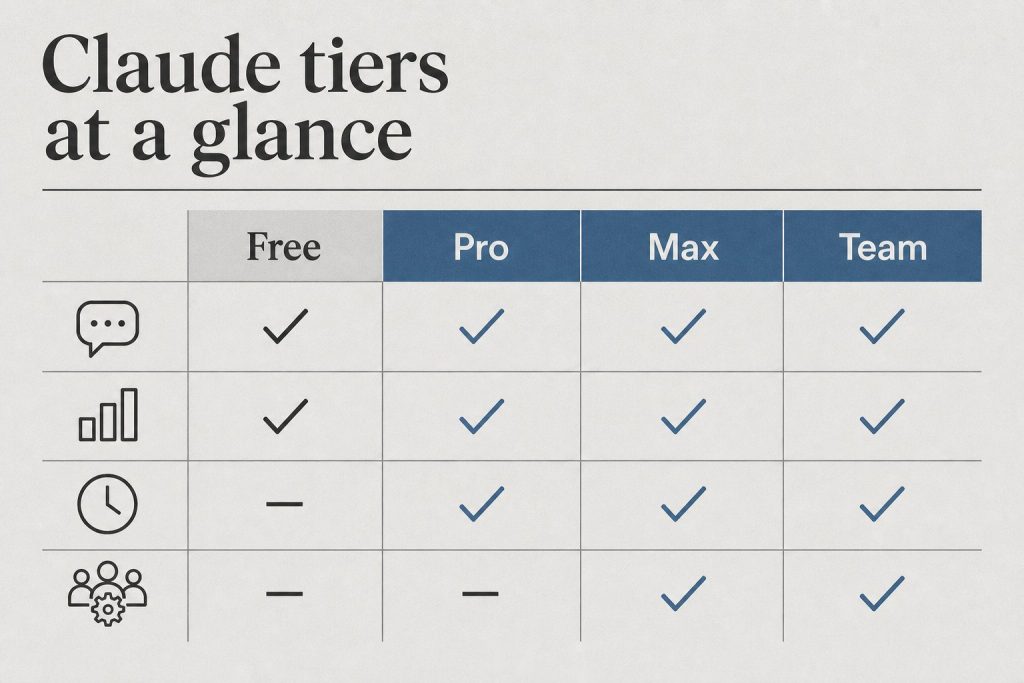
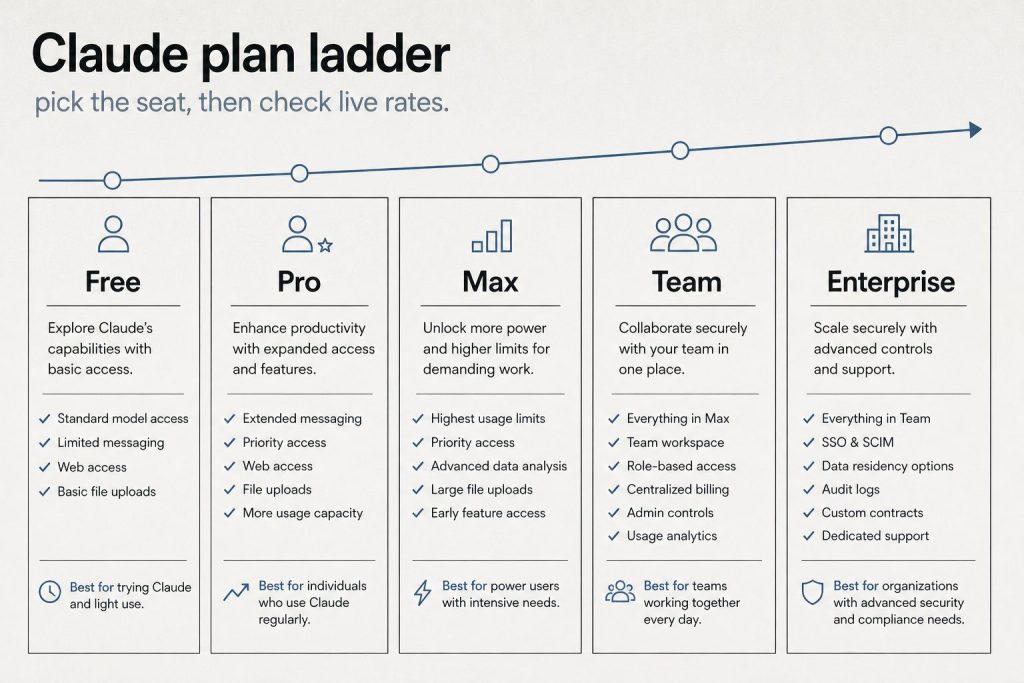
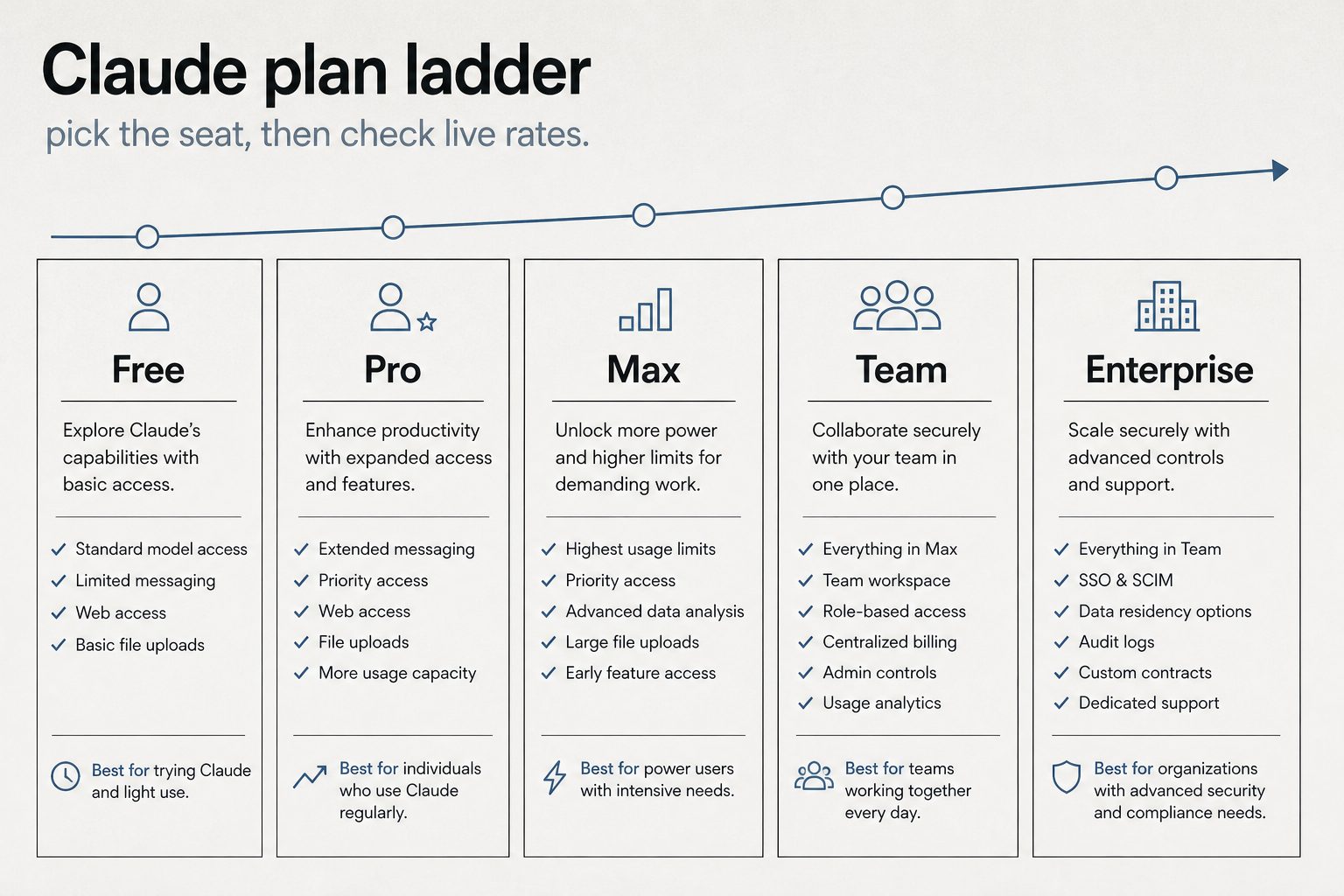
    Free: $0. No credit card required. Basic usage limits. Pro: $20/month ($17/month annual). More usage, Claude Code, Cowork, Projects, Research. Max 5x: $100/month. 5x Pro usage, higher output limits, early access, priority. Max 20x: $200/month. 20x Pro usage, highest individual tier. Team Standard: $25/seat/month ($20 annual). 5+ seats, SSO, admin, no-training default. Team Premium: $125/seat/month ($100 annual). 5x standard usage. Enterprise: $20/seat + usage at API rates. Full security, compliance, HIPAA-ready.

    Feature Comparison by Tier

    Chat (web, mobile, desktop): All tiers. Web search: All tiers. Memory: All tiers. Code execution: All tiers. Extended thinking: All tiers. Desktop extensions: All tiers. Connectors and remote MCP: All tiers. Claude Code: Pro and above. Claude Cowork: Pro and above. Unlimited Projects: Pro and above. Research mode: Pro and above. Additional model access: Pro and above. Claude for Microsoft 365: Pro and above. Higher output limits: Max only. Early feature access: Max only. Priority access: Max and Team Premium. SSO: Team and Enterprise. Central billing: Team and Enterprise. Admin controls: Team and Enterprise. No-training default: Team and Enterprise. SCIM: Enterprise only. Audit logs: Enterprise only. HIPAA-ready: Enterprise only. Custom data retention: Enterprise only. Compliance API: Enterprise only.

    The Real Decision Points

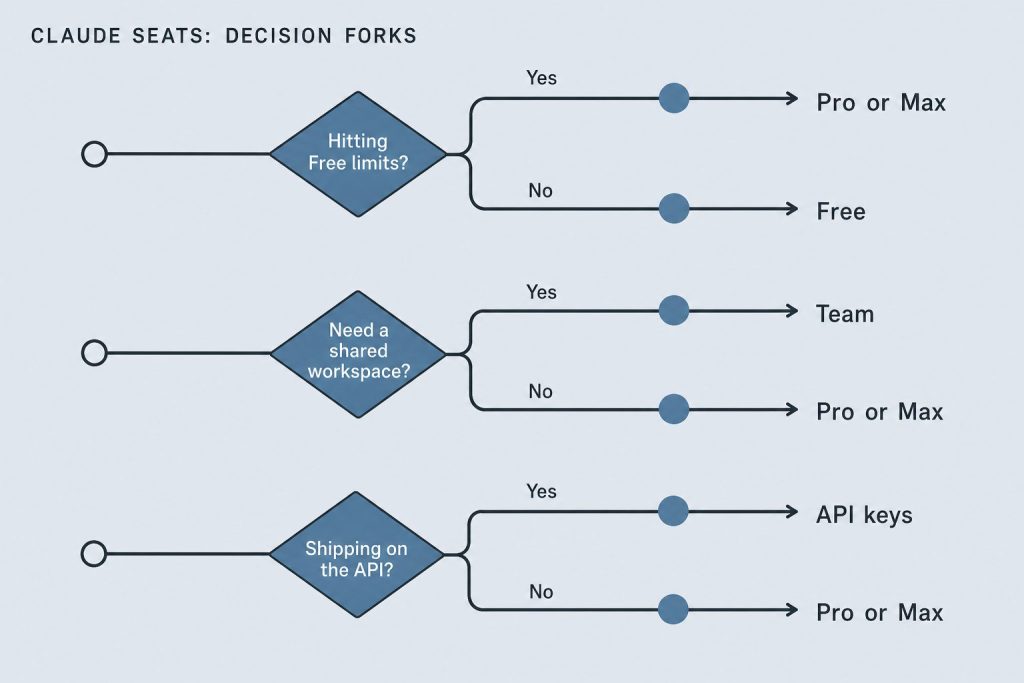
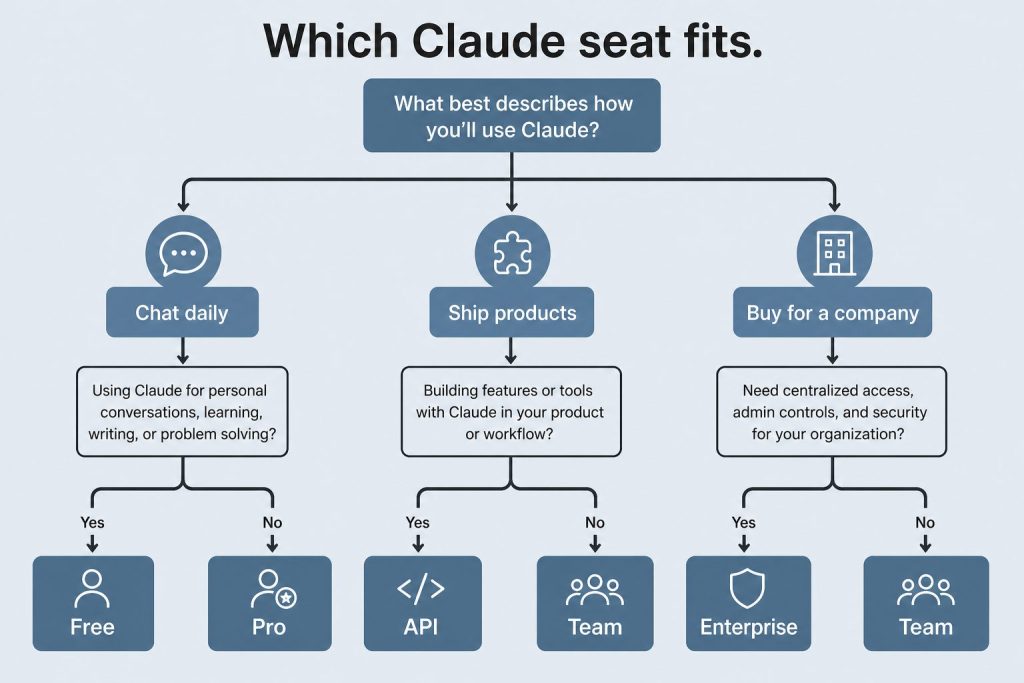
    Free → Pro ($20/month): The jump makes sense when you hit rate limits regularly or need Claude Code. This is the most common upgrade path and the clearest value break — $20/month for meaningfully more capacity plus developer tools.

    Pro → Max ($100/month): Only if you’re consistently bumping against Pro limits. Many daily users never need Max. But for developers who live in Claude Code or content professionals producing high volumes, the 5x multiplier removes friction.

    Individual → Team ($20-125/seat): When you have 5+ people using Claude and need centralized administration. The per-seat cost for Team Standard ($20/seat annual) is actually equal to Pro pricing — you’re essentially getting Pro plus SSO, admin controls, and no-training guarantees for the same price.

    Team → Enterprise ($20/seat + usage): When you exceed 150 users, need SCIM provisioning, require audit logs or compliance API, or have HIPAA requirements. The usage-based model can be cheaper than Team Premium seats if your per-user usage is moderate.

    Annual vs Monthly Billing

    Annual billing saves 15-20% across tiers. Pro drops from $20 to $17/month. Team Standard drops from $25 to $20/seat. Team Premium drops from $125 to $100/seat. For organizations committing to Claude as a core tool, annual billing is the clear choice. Individual users who are still evaluating should start monthly and switch to annual once they’re confident they’ll continue.

    Frequently Asked Questions

    Which Claude plan is best for a solo professional?

    Pro at $20/month ($17 annual) is the sweet spot for most solo professionals. It includes Claude Code, Cowork, Projects, and Research — everything you need for daily professional use.

    Which Claude plan is best for a startup?

    Team Standard at $20/seat/month (annual) for teams of 5+. You get SSO, central billing, and admin controls at the same per-person price as individual Pro.

    Can I mix Claude plans in my organization?

    Within Team and Enterprise plans, you can mix Standard and Premium seat types. You cannot mix individual plans (Free/Pro/Max) with Team or Enterprise plans within a single organization — those are separate subscriptions.

    Does Claude offer volume discounts?

    The sales-assisted Enterprise path offers tiered incentives on committed spend. Self-serve plans have fixed pricing. API usage benefits from batch processing (50% off) and prompt caching (up to 90% savings).

  • Claude Enterprise Pricing: What Large Organizations Pay, What They Get, and How to Evaluate the ROI

    Claude Enterprise Pricing: What Large Organizations Pay, What They Get, and How to Evaluate the ROI

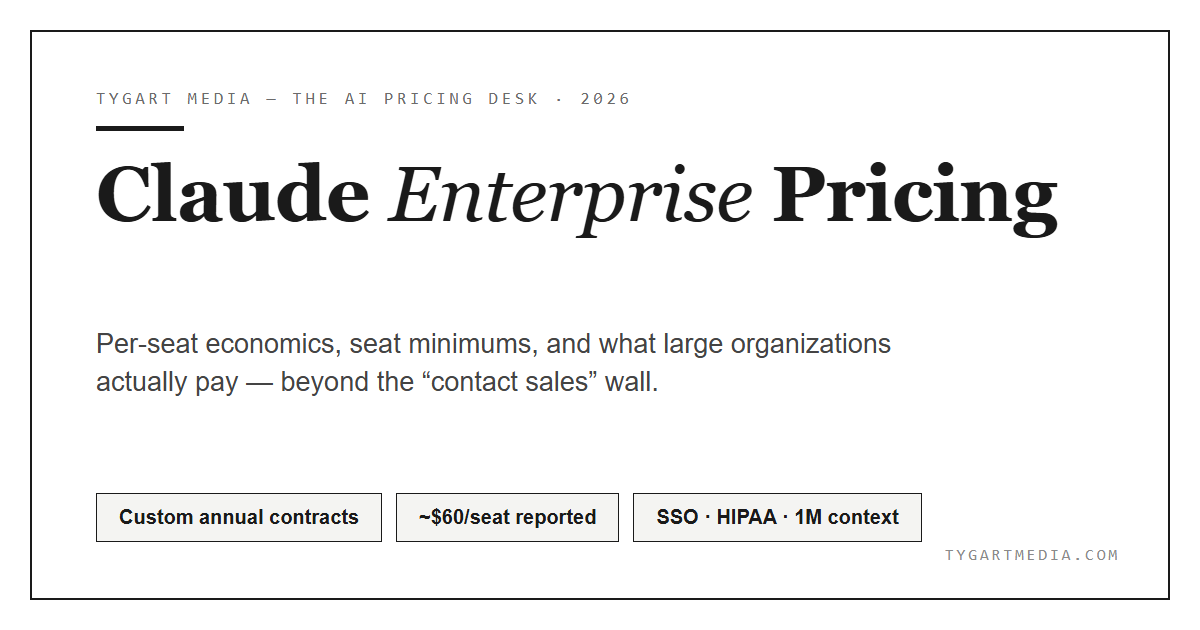
    Claude Enterprise pricing works differently from the individual and Team plans. Instead of a fixed per-seat fee that includes unlimited usage, Enterprise charges a base seat cost of $20/seat with additional usage billed at API rates. This model gives large organizations more flexibility but requires understanding how usage translates to cost. Here’s the complete breakdown for decision-makers evaluating Claude Enterprise in 2026.

    How Enterprise Pricing Works

    The pricing structure has two components. First, a per-seat fee of $20/month per user. This covers access to the Claude interface and all Enterprise features. Second, usage-based charges at API rates that scale with which model each user interacts with and how much they use it. When an Enterprise user chats with Claude using Opus 4.8, their conversation consumes tokens priced at $5/MTok input and $25/MTok output. Sonnet 4.6 usage is priced at $3/$15, and Haiku 4.5 at $1/$5.

    This means actual costs per user vary significantly. A light user who sends a few messages per day might cost $20-30/month total. A power user running Claude Code and extended research sessions could cost $150-500+/month. Administrators can set per-user and organizational spending limits to maintain budget predictability.

    Two Paths to Enterprise

    Anthropic now offers two ways to get on the Enterprise plan. The self-serve path lets organizations sign up directly at claude.ai/create/enterprise without contacting sales. This is designed for teams that want enterprise security features but want to move fast. You get SSO, domain verification, central billing, admin controls, usage analytics, and the ability to add seats on demand. The sales-assisted path is for organizations that need custom contracts, MSAs, purchase orders, usage commitments, tiered incentives on committed spend, non-standard terms, trials, or consultation. Contact sales through claude.com/contact-sales.

    Enterprise-Only Features

    Enterprise includes everything in the Team plan plus several capabilities only available at this tier. Admin-set spend limits let administrators control costs at both user and organization levels. Role-based access with fine-grained permissioning controls who can access what. SCIM (System for Cross-domain Identity Management) automates user provisioning and deprovisioning. Audit logs provide detailed records of user activity. Compliance API enables observability and monitoring. Custom data retention controls let you set how long data is stored. Network-level access control and IP allowlisting restrict where Claude can be accessed from. HIPAA-ready offering is available for healthcare and regulated industries. Claude Security (currently in beta) provides AI-powered vulnerability scanning.

    Enterprise vs Team: When to Upgrade

    The Team plan caps at 150 users and uses fixed per-seat pricing ($20-125/seat depending on seat type). Enterprise has no user cap and uses the seat-plus-usage model. Upgrade to Enterprise when you need more than 150 seats, when you require SCIM for automated provisioning, when compliance requirements demand audit logs and a compliance API, when you need custom data retention or HIPAA readiness, or when the usage-based model would actually cost less than Team Premium seats for your usage patterns.

    Current Enterprise Promotion

    As of June 2026, Anthropic is running a promotion offering $1,000 in Claude Code and Claude Cowork credits for every Enterprise seat activated by July 2, 2026. This effectively subsidizes the first several months of usage for new deployments.

    Evaluating Enterprise ROI

    To evaluate whether Claude Enterprise justifies the cost, consider time savings per employee (if each user saves 5 hours/week at $50/hour effective cost, that’s $1,000/month in productivity per person), reduction in tool sprawl (replacing multiple SaaS subscriptions), code velocity improvements (engineering teams using Claude Code report 20-40% productivity gains in published case studies), and compliance cost avoidance (audit logs, SCIM, and HIPAA readiness may replace other compliance tools).

    Frequently Asked Questions

    How much does Claude Enterprise cost per user?

    $20/seat/month base plus usage at API rates. Actual per-user costs depend on usage — light users might total $25-30/month, while heavy users could reach $200+/month.

    Can I start Claude Enterprise without talking to sales?

    Yes. Anthropic offers a self-serve Enterprise option at claude.ai/create/enterprise. You can sign up, add seats, and start using Enterprise features immediately.

    Is Claude Enterprise HIPAA compliant?

    Anthropic offers a HIPAA-ready Enterprise option. Organizations in healthcare and regulated industries should contact sales to discuss specific compliance requirements and BAA arrangements.

    What is the minimum number of seats for Enterprise?

    There is no publicly stated minimum seat count for the self-serve Enterprise option. The sales-assisted path may have minimum commitments depending on the contract terms.

  • Who Owns Claude AI? Anthropic’s Founders, Funding, Structure, and Mission Explained

    Who Owns Claude AI? Anthropic’s Founders, Funding, Structure, and Mission Explained

    Claude AI is owned and developed by Anthropic, an artificial intelligence safety company headquartered in San Francisco. Anthropic was founded in 2021 by Dario Amodei (CEO) and Daniela Amodei (President), along with several other former members of OpenAI. The company is structured as a public benefit corporation — a legal structure that allows it to balance profit with its stated mission of AI safety.

    The Founders: Dario and Daniela Amodei

    Dario Amodei served as VP of Research at OpenAI before co-founding Anthropic. His sister Daniela Amodei was VP of Operations at OpenAI. They left in 2021 along with a group of researchers who shared concerns about the direction of AI development and the importance of safety-first research. Several founding team members had published influential work on AI alignment, interpretability, and the scaling properties of large language models.

    Funding and Investors

    Anthropic has raised substantial funding through multiple rounds. Amazon has been the largest single investor, committing up to $8 billion in investment. Google invested $2 billion. Other investors include Spark Capital, Salesforce Ventures, and various venture capital firms. The company’s total funding has placed it among the most well-capitalized AI companies globally. As of 2026, Anthropic has reached a $30 billion revenue run rate and is investing heavily in compute infrastructure — including a partnership with Amazon for compute capacity and reported collaborations for additional infrastructure.

    Corporate Structure: Public Benefit Corporation

    Anthropic is incorporated as a public benefit corporation (PBC) in Delaware. This corporate structure legally requires the company to consider the impact of its decisions on all stakeholders — not just shareholders. The PBC structure is central to Anthropic’s identity: it creates a legal framework that supports the company’s commitment to AI safety even when that commitment might conflict with short-term profit maximization.

    Anthropic also has a Long-Term Benefit Trust (LTBT) — a governance mechanism designed to ensure that the company’s safety commitments are maintained over time, even as leadership changes. The LTBT has the authority to intervene if the company’s actions deviate from its stated safety mission.

    The Safety Mission

    Anthropic’s stated mission is “the responsible development and maintenance of advanced AI for the long-term benefit of humanity.” This mission is embedded in the company’s corporate structure, not just its marketing. Key safety initiatives include the Responsible Scaling Policy (RSP), which sets thresholds for when more rigorous safety evaluations are required as models become more capable. Constitutional AI, the training methodology that gives Claude a set of principles to follow. Extensive red-teaming and safety testing before model releases. Published research on AI interpretability — understanding what happens inside neural networks. Transparency reports on model capabilities and limitations.

    Anthropic’s Global Presence

    While headquartered in San Francisco, Anthropic has expanded globally. The company has offices in multiple countries and has established a significant presence in the Asia-Pacific region, including offices in Tokyo, Bengaluru (India), Sydney, and Seoul. India has become Anthropic’s second-largest market globally, with partnerships including a major deal with Infosys for regulated AI deployment.

    Key Partnerships

    Anthropic’s major partnerships include Amazon Web Services (compute infrastructure and investment), Google Cloud (Vertex AI distribution and investment), Snowflake ($200M partnership for enterprise data integration), and Microsoft (Claude available through Azure and Microsoft Foundry). Claude is also available through third-party platforms like OpenRouter and various enterprise integrations.

    Frequently Asked Questions

    Who owns Claude AI?

    Claude AI is owned by Anthropic, a public benefit corporation founded by Dario and Daniela Amodei. Anthropic’s major investors include Amazon and Google.

    Is Anthropic owned by Amazon or Google?

    No. Amazon and Google are major investors in Anthropic, but Anthropic operates independently. It is a public benefit corporation with its own leadership, board, and decision-making authority.

    Who is the CEO of Anthropic?

    Dario Amodei is the CEO of Anthropic. He co-founded the company in 2021 after serving as VP of Research at OpenAI.

    Is Anthropic a nonprofit?

    No. Anthropic is a for-profit public benefit corporation (PBC). The PBC structure means it legally balances profit with its stated mission of AI safety, but it is not a nonprofit organization.

    Did the founders of Anthropic come from OpenAI?

    Yes. Dario Amodei (VP of Research) and Daniela Amodei (VP of Operations) both left OpenAI in 2021 to found Anthropic, along with several other former OpenAI researchers.

  • Is Claude AI Free? Everything You Get Without Paying and When Upgrading Makes Sense

    Is Claude AI Free? Everything You Get Without Paying and When Upgrading Makes Sense

    Yes, Claude AI is free. Not “free trial” free or “free for 7 days” free — genuinely, permanently free with no credit card required. But “free” comes with boundaries. This guide covers exactly what you get on Claude’s free tier, where the limits hit, and at what point upgrading to a paid plan actually saves you time or money.

    What the Free Tier Includes

    Claude’s free tier is more capable than most people realize. You get full access to chat on web (claude.ai), iOS, Android, and the desktop app. You can search the web directly within conversations — Claude will find current information and cite sources. Memory works across conversations, so Claude remembers context you’ve shared previously. You can create files and execute code — Claude will write Python, JavaScript, or other code and run it in a sandbox. Desktop extensions let you connect Claude to your local environment. You can connect Slack and Google Workspace services through connectors. Remote MCP (Model Context Protocol) integrations let Claude access external tools and data sources. Extended thinking allows Claude to reason through complex multi-step problems.

    That’s a substantial feature set for $0. The free tier in June 2026 includes features that were Pro-only just a year ago.

    Where the Free Tier Limits Hit

    The primary limitation is usage volume. Free users get a limited number of messages per time period — when you hit the limit, you’ll see a message telling you to wait or upgrade. During high-traffic periods, free users may experience slower response times or temporary unavailability while paid users get priority access. You also don’t get access to Claude Code (the terminal-based coding agent), Claude Cowork (the desktop automation tool), Research mode, unlimited Projects, or Claude for Microsoft 365/Outlook. You can’t access all model variants — some premium models are reserved for paid subscribers.

    When to Stay on Free

    The free tier works well if you use Claude a few times per day for quick questions, writing assistance, or light coding. If you’re a student, casual user, or someone evaluating Claude before committing, the free tier gives you a genuine experience of what Claude can do. You won’t hit limits if your usage is moderate and spread throughout the day rather than concentrated in heavy sessions.

    When to Upgrade to Pro ($20/month)

    Upgrade when you hit rate limits regularly — when you find yourself waiting to continue conversations during your workday. Upgrade when you need Claude Code for programming projects. Upgrade when you want Research mode for deep investigation tasks. Upgrade when you use Claude for professional work and the interruptions from usage limits cost you more than $20/month in lost productivity.

    When to Upgrade to Max ($100-200/month)

    Max is for users who spend multiple hours per day working with Claude — running extended Claude Code sessions, producing large volumes of content, or conducting marathon research sessions. If you consistently hit Pro limits, Max removes that friction. The $100/month tier gives 5x Pro usage, and the $200/month tier gives 20x. Max also provides early access to new features and priority during peak demand.

    Claude Free vs ChatGPT Free vs Gemini Free

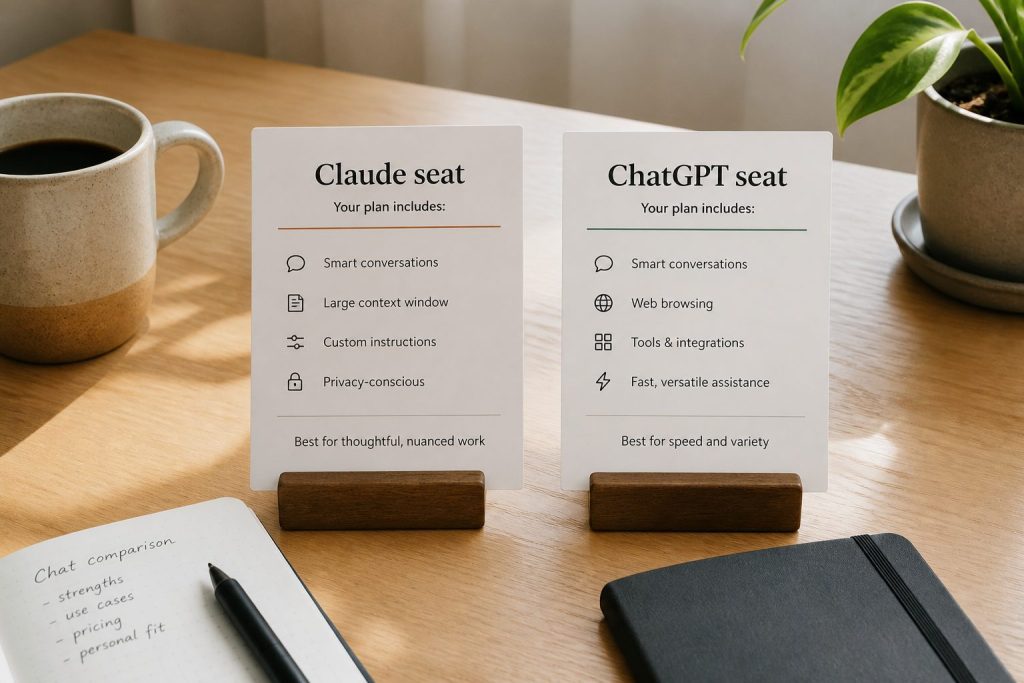
    All three major AI platforms offer free tiers, but the feature sets differ. Claude’s free tier includes web search, code execution, memory, desktop extensions, and extended thinking. ChatGPT’s free tier offers GPT-4o access with usage limits and web browsing. Gemini’s free tier provides access to Gemini models with Google Workspace integration. Claude’s free tier is arguably the most feature-complete of the three, particularly with its inclusion of desktop extensions and remote MCP integrations at the free level.

    Frequently Asked Questions

    Is Claude AI completely free?

    Claude has a permanently free tier with no credit card required and no trial expiration. You get chat, web search, code execution, memory, and more — with usage limits. Paid plans ($20-200/month) remove usage limits and add features like Claude Code.

    Do I need a credit card to use Claude for free?

    No. You can sign up and use Claude’s free tier without providing any payment information.

    What happens when I hit the free tier limit?

    You’ll see a message indicating you’ve reached your usage limit. You can wait for the limit to reset (typically within hours) or upgrade to a paid plan for immediate access and higher limits.

    Can I use Claude Code on the free plan?

    No. Claude Code requires at least a Pro subscription ($20/month). The free tier includes the chat interface with code execution but not the terminal-based Claude Code agent.

  • Claude API Pricing Explained: Token Costs, Rate Limits, and How to Calculate Your Monthly Bill

    Claude API Pricing Explained: Token Costs, Rate Limits, and How to Calculate Your Monthly Bill

    Claude’s API pricing is token-based: you pay for the tokens you send (input) and the tokens Claude generates (output). But raw per-token prices are only part of the story. Rate limits, service tiers, prompt caching, batch processing, and feature-specific charges all affect your actual bill. This guide covers every component of Claude API pricing as of June 2026.

    Per-Token Pricing by Model

    All prices are per million tokens (MTok). Opus 4.8, Anthropic’s most intelligent model for agents and coding, costs $5/MTok input and $25/MTok output. Sonnet 4.6, the balanced option for most production workloads, costs $3/MTok input and $15/MTok output. Haiku 4.5, the fastest and cheapest model, costs $1/MTok input and $5/MTok output. Across all current-generation models, output tokens cost exactly 5x input tokens.

    Prompt Caching Pricing

    Prompt caching lets you store frequently-used context (system prompts, reference documents, conversation history) so you don’t pay full input price every time. Caching has two cost components: a cache write at 1.25x the standard input rate (a one-time cost when the content is first cached), and a cache read at approximately 10% of the standard input rate. For Opus 4.8, cache writes cost $6.25/MTok and cache reads cost $0.50/MTok. For Sonnet 4.6, writes are $3.75/MTok and reads are $0.30/MTok. For Haiku 4.5, writes are $1.25/MTok and reads are $0.10/MTok. The default cache TTL is 5 minutes, with extended 1-hour caching available.

    Batch Processing: 50% Off

    The Batch API processes requests asynchronously and charges half the standard rate. If you have workloads that don’t need real-time responses — document processing, content generation, data analysis — batch processing cuts your costs in half. Combining batch processing with prompt caching can reduce costs by up to 95% compared to standard synchronous requests.

    How to Calculate Your Monthly Bill

    A practical example: suppose your application sends an average of 2,000 tokens of input and receives 500 tokens of output per request, and you make 10,000 requests per day using Sonnet 4.6. Daily input tokens: 2,000 × 10,000 = 20M tokens → 20 MTok × $3 = $60/day. Daily output tokens: 500 × 10,000 = 5M tokens → 5 MTok × $15 = $75/day. Daily total: $135/day. Monthly total (30 days): approximately $4,050/month.

    Now apply optimizations. If 80% of your input is cacheable after the first request: cached input = 16 MTok × $0.30 = $4.80 + uncached 4 MTok × $3 = $12 → $16.80 input instead of $60. If you can batch 50% of requests: half your costs drop by 50%. Optimized monthly estimate: roughly $1,500-2,000/month versus $4,050 at list price.

    Service Tiers and Rate Limits

    Anthropic offers three service tiers that affect availability and pricing. Priority tier guarantees availability and predictable pricing for time-sensitive workloads. Standard tier is the default for both piloting and scaling everyday use cases. Batch tier offers 50% savings for asynchronous workloads. Rate limits — requests per minute and tokens per minute — increase as your account matures and spending grows. You can view your current limits in the Anthropic Console.

    Additional Platform Costs

    Beyond token costs, Anthropic charges for specific platform features. Managed Agents cost $0.08 per session-hour for active runtime plus standard token rates. Web search costs $10 per 1,000 searches (tokens for processing the search results are billed separately). Code execution includes 50 free hours daily per organization with additional hours at $0.05/hour. US-only inference for data residency requirements costs 1.1x standard token rates. Fast mode for Opus 4.8 costs 2x standard pricing for up to 2.5x faster speeds.

    Frequently Asked Questions

    How much does Claude API cost for a small project?

    A small project making 100-500 API calls per day with Haiku 4.5 might cost $5-30/month. Using Sonnet 4.6 at the same volume would be roughly $15-90/month. Your actual cost depends on the length of inputs and outputs.

    Is there a free tier for the Claude API?

    Anthropic does not offer a permanent free API tier. You need to add a payment method and load credits to use the API. New accounts start with conservative rate limits that increase over time.

    What’s the cheapest way to use the Claude API?

    Use Haiku 4.5 ($1/MTok input), enable prompt caching for repeated context (90% savings on cached reads), and use batch processing for non-real-time work (50% off). The combination can reduce effective costs by over 90%.

    How do Claude API costs compare to OpenAI?

    At the flagship level, Claude Opus 4.8 ($5/$25 per MTok) is competitive with GPT-4-class pricing. At the mid-tier, Sonnet 4.6 ($3/$15) competes with GPT-4o. At the economy tier, Haiku 4.5 ($1/$5) competes with GPT-4o-mini. Both platforms offer similar cost optimization features.

  • Claude in Chrome: What It Does, How to Set It Up, and Practical Use Cases in 2026

    Claude in Chrome: What It Does, How to Set It Up, and Practical Use Cases in 2026

    Claude in Chrome is a browser extension that brings Claude directly into your web browsing experience. Rather than switching between tabs to copy-paste content into Claude, the extension lets Claude see and interact with the page you’re viewing. It launched as a beta feature and has become one of the most practical ways to use Claude for daily knowledge work. Here’s what it actually does, how to get it running, and where it shines.

    What Claude in Chrome Actually Does

    Claude in Chrome is a browser extension that gives Claude the ability to read the content of web pages you’re viewing and take actions within the browser. When activated, Claude can read and summarize articles, reports, documentation, or any text-heavy page. It can extract key information from complex pages like product comparisons, financial reports, or academic papers. It can help you draft responses to emails and messages while viewing them. It can analyze data tables and charts visible on web pages. It can assist with form filling and data entry tasks. And it can help navigate complex web applications.

    The extension works through a sidepanel interface — Claude appears alongside your browser content rather than replacing it. This side-by-side layout is what makes it practical: you can reference the page content while working with Claude’s output.

    How to Install Claude in Chrome

    Claude in Chrome is available through the Chrome Web Store. Search for “Claude” or navigate directly to the extension page. Click “Add to Chrome” and confirm the permissions. Once installed, you’ll see the Claude icon in your browser toolbar. Click it to open the sidepanel interface. You’ll need to sign in with your Claude account — the extension works with Free, Pro, Max, Team, and Enterprise plans.

    Practical Use Cases

    Research and summarization is the most common use case. When you’re reading a long article, technical documentation, or research paper, Claude can summarize it, extract key arguments, identify the main data points, and highlight what’s novel versus what’s already well-established. This works especially well with academic papers, legal documents, and technical specifications.

    Competitive analysis becomes faster when Claude can read competitor websites directly. Open a competitor’s pricing page, product page, or blog and ask Claude to compare it against your offering. No more copying and pasting between tabs.

    Email and messaging gets a boost when Claude can see the email you’re replying to. It understands the context — tone, topic, relationship dynamics — and can draft responses that match.

    Data extraction from web tables, dashboards, and reports is another strong use case. Claude can read HTML tables, identify patterns, and help you pull specific numbers without manual work.

    Learning and studying is enhanced when Claude can see the material you’re working through. Open a textbook chapter online, a course page, or documentation, and ask Claude to explain concepts, quiz you, or create study notes.

    What Claude in Chrome Cannot Do

    The extension has limitations worth understanding. It cannot access pages behind login walls unless you’re already authenticated. It cannot interact with content inside iframes or heavily JavaScript-rendered single-page applications in all cases. It does not have access to your browsing history, saved passwords, or other browser data. It cannot make purchases, submit forms, or take irreversible actions without your explicit confirmation.

    Privacy and Security

    Claude in Chrome only accesses page content when you actively invoke it. It does not passively monitor your browsing. Page content sent to Claude follows the same data handling policies as regular Claude conversations — on Team and Enterprise plans, content is not used for model training by default. The extension requires specific permissions that are reviewed during installation.

    Claude in Chrome vs Claude Desktop App

    The Chrome extension and the Claude desktop app serve different purposes. The desktop app (available for macOS and Windows) provides Claude Code, Cowork mode, and can interact with your local file system. The Chrome extension is browser-specific — it reads web pages and operates within Chrome. Many users run both: the desktop app for deep work with files and code, and the Chrome extension for web-based tasks.

    Frequently Asked Questions

    Is Claude in Chrome free?

    The extension itself is free to install. It uses your Claude account’s usage allowance — so free-tier users can use it within their free limits, and paid users get their plan’s full usage.

    Does Claude in Chrome work with other browsers?

    As of June 2026, Claude in Chrome is specifically built for Google Chrome. It may work on Chromium-based browsers like Edge and Brave, but it is officially supported on Chrome.

    Can Claude in Chrome see my passwords or personal data?

    No. Claude in Chrome only reads the visible content of pages you actively share with it. It does not access saved passwords, autofill data, browsing history, or other stored browser information.

    How is Claude in Chrome different from Claude for Microsoft 365?

    Claude in Chrome works within your web browser on any website. Claude for Microsoft 365 integrates directly into Word, Outlook, Teams, and other Microsoft applications. They are separate products that serve different workflows.

  • How Much Does Claude AI Cost? The Plain-English Pricing Breakdown for 2026

    How Much Does Claude AI Cost? The Plain-English Pricing Breakdown for 2026

    If you searched “how much is Claude AI” or “Claude AI cost,” you’re probably looking for a straightforward answer, not a marketing page. Here it is: Claude has a free tier that costs nothing, a Pro plan at $20/month, a Max plan starting at $100/month, a Team plan starting at $20/seat/month, Enterprise pricing at $20/seat plus usage, and API access billed per token. Let’s break down what each actually gets you.

    The Free Tier: $0

    Claude’s free tier is genuinely free — no credit card required, no trial period. You get access to chat on web, mobile, and desktop apps. You can search the web, use memory across conversations, create and execute code, and even use extended thinking for complex tasks. The catch is usage limits: you’ll hit rate limits faster than paid users, and during high-traffic periods, free users may experience wait times.

    The free tier is surprisingly capable. You can connect Slack and Google Workspace, use desktop extensions, and access remote MCP integrations. For someone who uses Claude a few times a day for quick questions, writing help, or light coding, the free tier may be all you need.

    Claude Pro: $20/Month

    Pro costs $20/month billed monthly or $17/month if you pay annually ($200 upfront). Pro unlocks significantly more usage than the free tier, plus Claude Code (the command-line coding tool), Claude Cowork (the desktop automation tool), unlimited Projects, Research mode, access to additional models, and Claude for Microsoft 365 and Outlook. If you use Claude daily for work — writing, coding, analysis, research — Pro is the sweet spot for most individual users.

    Claude Max: $100 or $200/Month

    Max comes in two tiers. The $100/month tier gives you approximately 5x the usage of Pro. The $200/month tier gives approximately 20x. Max also adds higher output limits, early access to advanced features, and priority access during peak times. Max is for power users — people who spend hours a day in Claude Code, run long research sessions, or produce high volumes of content.

    Claude Team: From $20/Seat/Month

    Team pricing requires a minimum of 5 seats. Standard seats cost $25/seat/month (monthly) or $20/seat/month (annual). Premium seats cost $125/seat/month (monthly) or $100/seat/month (annual) for 5x the usage. Teams get SSO, central billing, admin controls, enterprise desktop deployment, and content that isn’t used for model training by default.

    Claude Enterprise: $20/Seat + Usage

    Enterprise charges $20/seat as a base, with additional usage billed at API rates. Enterprise adds SCIM, audit logs, compliance API, custom data retention, HIPAA readiness, IP allowlisting, role-based access, and Claude Security. Enterprise is available both as self-serve (sign up directly) and sales-assisted (custom contracts).

    Claude API: Pay Per Token

    If you’re building applications with Claude, API pricing is separate from subscription plans. The most cost-efficient model, Haiku 4.5, costs $1 per million input tokens and $5 per million output tokens. Sonnet 4.6 costs $3/$15. Opus 4.8 costs $5/$25. Batch processing cuts all rates by 50%, and prompt caching can reduce repeated input costs by up to 90%.

    Quick Cost Comparison Table

    Here’s a summary of what you’ll pay at each tier: Free costs $0 with basic usage limits. Pro costs $20/month ($17 annual) with standard usage. Max 5x costs $100/month with 5x Pro usage. Max 20x costs $200/month with 20x Pro usage. Team Standard costs $20-25/seat/month. Team Premium costs $100-125/seat/month. Enterprise costs $20/seat plus API-rate usage. API Haiku costs ~$1/MTok input. API Sonnet costs ~$3/MTok input. API Opus costs ~$5/MTok input.

    Frequently Asked Questions

    How much is Claude AI per month?

    Claude AI ranges from $0 (free tier) to $200/month (Max 20x) for individuals. Team plans start at $20/seat/month on annual billing. The most common paid tier is Pro at $20/month.

    Is Claude more expensive than ChatGPT?

    Claude Pro ($20/month) and ChatGPT Plus ($20/month) are priced identically. At the API level, Claude’s newest Opus models ($5/$25 per MTok) are competitive with GPT-4-class pricing. Both platforms offer free tiers.

    Can I use Claude for free forever?

    Yes. Claude’s free tier is not a trial — it’s a permanent plan with no expiration. Usage limits apply, but there’s no time restriction on free access.

    What’s the best value Claude plan?

    For most individual users, Pro at $20/month (or $17 annual) offers the best balance of features and usage. For teams, Standard seats at $20/seat/month (annual) provide the core collaborative features at a reasonable price point.

  • Claude Team Pricing in 2026: Standard vs Premium Seats, What’s Included, and How to Choose

    Claude Team Pricing in 2026: Standard vs Premium Seats, What’s Included, and How to Choose

    Claude’s Team plan is built for groups of 5 to 150 people who need collaborative AI access with centralized administration. As of June 2026, Anthropic offers two seat types within the Team plan — Standard and Premium — with meaningfully different usage allowances and price points. This guide breaks down exactly what each seat type includes, what the real costs look like, and how to decide which mix works for your organization.

    Team Plan Pricing Overview

    The Team plan uses per-seat pricing with two tiers. Standard seats cost $25 per seat per month on monthly billing, or $20 per seat per month on annual billing. Premium seats cost $125 per seat per month on monthly billing, or $100 per seat per month on annual billing. You can mix and match seat types within the same organization — not everyone needs the same usage level.

    For a 10-person team on annual billing with 7 Standard and 3 Premium seats, the monthly cost would be (7 × $20) + (3 × $100) = $440/month, or $5,280/year. Compare that to putting all 10 on Standard ($200/month) or all 10 on Premium ($1,000/month) to see why the mix-and-match model matters.

    What Standard Seats Include

    Standard seats include all Claude features — chat across web, iOS, Android, and desktop — plus more usage than what individual Pro subscribers get. Standard seat holders can access Claude Code and Claude Cowork, connect Microsoft 365, Slack, and other integrations, and use Enterprise search across the organization. They get SSO, admin controls, and the enterprise desktop app deployment. The key differentiator from Pro is the organizational layer: centralized billing, admin controls, and content that isn’t used for model training by default.

    What Premium Seats Add

    Premium seats provide approximately 5x the usage of Standard seats. This is designed for power users — engineers running Claude Code all day, researchers doing deep analysis sessions, content teams producing high volumes of output. Premium seats are the Team-plan equivalent of individual Max plans, but with all the organizational infrastructure (SSO, admin controls, no training on content) included.

    Team Plan vs Individual Pro/Max Plans

    The question many organizations face: should each person just buy their own Pro or Max subscription? The Team plan adds several capabilities that individual plans lack. Central billing means one invoice instead of individual expense reports. SSO and domain capture ensure that everyone in your organization uses the managed account. Admin controls let you manage connectors and desktop app deployment centrally. Content is not used for model training by default — individual free and Pro accounts have an opt-out option, but Team accounts are opted out by default. Enterprise search lets team members search across organizational knowledge.

    Team Plan vs Enterprise Plan

    The Team plan caps at 150 users. If you need more, or if you need features like SCIM provisioning, audit logs, compliance API, custom data retention, HIPAA readiness, IP allowlisting, or role-based access with fine-grained permissions, you need Enterprise. Enterprise pricing starts at $20/seat with usage at API rates — the per-seat cost is actually lower, but total cost depends on how much your team uses Claude.

    How to Choose Between Standard and Premium Seats

    Start with Standard seats for everyone and monitor usage. If specific team members consistently hit rate limits — especially developers using Claude Code heavily or analysts running extended research sessions — upgrade those individuals to Premium seats. The mix-and-match model means you don’t need to over-provision. A typical pattern for a 20-person team might be 4-5 Premium seats for heavy users and 15-16 Standard seats for everyone else.

    Frequently Asked Questions

    What is the minimum team size for Claude Team?

    The Claude Team plan requires a minimum of 5 seats. You can mix Standard and Premium seats within that minimum.

    Can I switch between Standard and Premium seats?

    Yes. Administrators can upgrade individual seats from Standard to Premium or downgrade from Premium to Standard. Changes take effect on the next billing cycle.

    Does Claude Team include Claude Code?

    Yes. Both Standard and Premium Team seats include access to Claude Code and Claude Cowork.

    Is my team’s data used for training on the Team plan?

    No. Content is not used for model training by default on the Claude Team plan.

  • Anthropic Console in 2026: The Complete Developer Guide to API Keys, Billing, and the Dashboard

    Anthropic Console in 2026: The Complete Developer Guide to API Keys, Billing, and the Dashboard

    The Anthropic Console at platform.claude.com is where developers manage everything related to the Claude API. Whether you’re generating your first API key, tracking token usage, setting spend limits, or managing team workspaces, the console is your control center. This guide walks through every section of the console as it exists in June 2026.

    What Is the Anthropic Console?

    The Anthropic Console — also called the Anthropic Developer Console — is the web-based dashboard at platform.claude.com where you manage your Claude API access. It is separate from claude.ai, which is the consumer chat interface. The console handles API key generation, billing and payment, usage monitoring, workspace and team management, rate limit visibility, and access to developer documentation. Think of claude.ai as where you use Claude, and platform.claude.com as where you build with Claude.

    Getting Started: Creating an Account

    Navigate to platform.claude.com and sign up with your email or Google account. You’ll need to add a payment method before you can make API calls. Anthropic uses a prepaid credit system — you load credits onto your account and API calls draw from that balance. New accounts start with a default spending limit that increases as you build usage history.

    API Keys: Creating and Managing

    API keys are generated in the console under the API Keys section. Each key begins with “sk-ant-” and should be treated as a secret credential. Best practices include creating separate keys for different applications or environments (development, staging, production), naming keys descriptively so you can identify which application uses which key, rotating keys periodically, and never committing keys to source control. If a key is compromised, you can revoke it immediately from the console without affecting your other keys.

    Billing and Usage Monitoring

    The billing section shows your current credit balance, spending history, and usage breakdown by model. You can view costs broken down by Opus, Sonnet, and Haiku usage, see daily and monthly spending trends, set up automatic credit top-ups, and configure spending alerts. Usage is reported in tokens — both input tokens (what you send to Claude) and output tokens (what Claude generates). The console shows real-time and historical usage data with charts that break down costs by model, feature, and time period.

    Workspaces and Team Management

    For organizations, the console supports workspace-level management. You can invite team members with specific roles, set per-user or per-workspace spending limits, view aggregated usage across your organization, and manage API keys at the workspace level rather than individually. This is particularly useful for agencies or development teams where multiple people need API access but you want centralized billing and usage controls.

    Rate Limits and Service Tiers

    The console displays your current rate limits, which depend on your service tier. Anthropic offers three service tiers: Priority for when time, availability, and predictable pricing matter most; Standard as the default tier for both piloting and scaling everyday use cases; and Batch for asynchronous workloads processed together at 50% off. Rate limits increase as your account matures and your spending history grows. The console shows your current limits for requests per minute and tokens per minute across each model.

    Developer Documentation Access

    The console links directly to Anthropic’s developer documentation at platform.claude.com/docs, which includes API reference with endpoint specifications, SDK guides for Python and TypeScript, prompt engineering best practices, tool use and function calling documentation, vision and multimodal capabilities, and integration guides for AWS Bedrock, Google Cloud Vertex AI, and Microsoft Foundry.

    Console vs Claude.ai: Key Differences

    A common point of confusion: the Anthropic Console (platform.claude.com) is not the same as Claude.ai. Claude.ai is the consumer-facing chat interface where individuals and teams interact with Claude through conversation. The console is the developer-facing dashboard for API management, billing, and infrastructure. You can have accounts on both — your Claude.ai subscription (Free, Pro, Max, Team, Enterprise) is separate from your API credits on the console.

    Frequently Asked Questions

    How do I access the Anthropic Console?

    Go to platform.claude.com and sign in with your Anthropic account. If you don’t have one, you can create a free account and add billing information to start making API calls.

    Is the Anthropic Console free to use?

    The console itself is free. You only pay for API usage based on the tokens consumed. There is no monthly fee for console access — you pay per token as you use the API.

    What is the difference between the Anthropic Console and the Anthropic Developer Console?

    They are the same thing. “Anthropic Console” and “Anthropic Developer Console” both refer to the dashboard at platform.claude.com where developers manage API keys, billing, and usage.

    Can I set spending limits on the Anthropic Console?

    Yes. The console allows you to set both per-workspace and per-user spending limits. You can also configure automatic credit top-ups and spending alerts to stay within budget.

  • Claude AI Pricing in June 2026: The Complete Guide to Every Plan, Model, and Cost

    Claude AI Pricing in June 2026: The Complete Guide to Every Plan, Model, and Cost

    Anthropic’s Claude AI pricing has evolved significantly through 2026. With the release of Opus 4.8, new Team Premium tiers, and Enterprise self-serve options, the pricing landscape looks different than it did even three months ago. This guide covers every plan, every model, and every cost as of June 2026 — verified directly from claude.com/pricing.

    Individual Plans: Free, Pro, and Max

    Claude offers three individual tiers. The Free plan costs nothing and gives you access to chat on web, iOS, Android, and desktop. You get web search, memory across conversations, file creation with code execution, desktop extensions, and the ability to connect Slack and Google Workspace services through connectors. Free users can access extended thinking for complex work and use remote MCP integrations. The limitation is usage volume — you hit rate limits faster than paid users.

    The Pro plan costs $20 per month billed monthly or $17 per month with an annual subscription ($200 billed upfront). Pro includes everything in Free plus significantly more usage, access to Claude Code and Claude Cowork, unlimited Projects for organizing chats and documents, Research mode, access to additional Claude models, and Claude for Microsoft 365 and Outlook.

    The Max plan starts at $100 per month and offers two tiers: $100/month for approximately 5x more usage than Pro, or $200/month for approximately 20x more usage than Pro. Max users get higher output limits for all tasks, early access to advanced Claude features, and priority access during high-traffic periods.

    Team Plan: Standard and Premium Seats

    The Team plan serves groups of 5 to 150 users and comes in two seat types. Standard seats cost $25 per seat per month billed monthly or $20 per seat per month billed annually. Standard seats include all Claude features plus more usage than Pro. Premium seats cost $125 per seat per month billed monthly or $100 per seat per month billed annually, offering 5x more usage than standard seats.

    Team plans include Claude Code and Claude Cowork, Microsoft 365 and Slack integrations, Enterprise search across the organization, central billing and administration, single sign-on (SSO), admin controls for connectors, enterprise desktop app deployment, and the ability to mix and match seat types. Content is not used for model training by default on Team plans.

    Enterprise Plan: Self-Serve and Sales-Assisted

    Enterprise pricing follows a seat-plus-usage model: $20 per seat with usage billed at API rates that scale with model and task. Anthropic now offers two Enterprise paths: a self-serve option where organizations can sign up at claude.ai/create/enterprise without contacting sales, and a traditional sales-assisted path for organizations needing custom contracts, MSAs, purchase orders, or usage commitments.

    Enterprise includes everything in Team plus admin-set user and org spend limits, role-based access with fine-grained permissioning, SCIM, audit logs, compliance API, custom data retention controls, network-level access control, IP allowlisting, HIPAA-ready offerings, and Claude Security (currently in beta). As of June 2026, Anthropic is running a promotion: $1,000 in Claude Code and Claude Cowork credits for every seat activated by July 2.

    API Pricing: Per-Token Costs for Every Model

    All API prices are per million tokens (MTok). Current models as of June 2026:

    Opus 4.8 (Latest Flagship)

    Input: $5/MTok. Output: $25/MTok. Prompt caching write: $6.25/MTok. Prompt caching read: $0.50/MTok. Opus 4.8 is Anthropic’s most intelligent model, optimized for agents and coding. It supports a 1M token context window with flat-rate pricing — no surcharge for long contexts.

    Sonnet 4.6

    Input: $3/MTok. Output: $15/MTok. Prompt caching write: $3.75/MTok. Prompt caching read: $0.30/MTok. Sonnet 4.6 balances intelligence, cost, and speed. It also supports a 1M token context window at flat rates.

    Haiku 4.5

    Input: $1/MTok. Output: $5/MTok. Prompt caching write: $1.25/MTok. Prompt caching read: $0.10/MTok. Haiku 4.5 is the fastest and most cost-efficient model with a 200K token context window.

    Cost Optimization Features

    Batch processing saves 50% on all token rates for asynchronous workloads. Prompt caching reduces repeated context costs by up to 90% — cached reads cost roughly 10% of standard input rates. Combining both strategies can reduce costs by up to 95%. US-only inference is available at 1.1x standard pricing for workloads requiring data residency. Fast mode for Opus 4.8 runs at 2x standard pricing with up to 2.5x faster speeds.

    Platform Feature Pricing

    Managed Agents cost $0.08 per session-hour for active runtime, plus standard token rates. Web search costs $10 per 1,000 searches (not including input/output tokens for processing). Code execution includes 50 free hours daily per organization, with additional hours at $0.05 per container-hour.

    Legacy Model Pricing

    Opus 4.7 and Opus 4.6 retain the same $5/$25 per MTok pricing as Opus 4.8. Sonnet 4.5 and Sonnet 4 maintain $3/$15. The older Opus 4.1 and Opus 4 remain at their higher legacy rates of $15/$75 per MTok — making the current-generation Opus models 66.7% cheaper than their predecessors for the same token volume.

    Frequently Asked Questions

    How much does Claude AI cost?

    Claude AI is free to use with usage limits. The Pro plan costs $20/month ($17/month annual), Max starts at $100/month, Team starts at $20/seat/month (annual), and Enterprise is $20/seat plus usage at API rates.

    Is Claude AI free?

    Yes. Claude offers a permanent free tier with access to chat, web search, memory, code execution, desktop extensions, and extended thinking. The free plan has lower usage limits than paid plans.

    What is the cheapest Claude API model?

    Haiku 4.5 at $1/MTok input and $5/MTok output. With batch processing (50% off) and prompt caching (90% off reads), effective costs can drop below $0.10/MTok for cached inputs.

    Does Claude offer a student discount?

    Anthropic does not offer an individual student discount as of June 2026. However, they have an Education plan for universities that provides comprehensive institution-wide access at discounted rates for students, faculty, and staff.

    What is the difference between Claude Pro and Claude Max?

    Pro costs $20/month and provides a standard amount of usage. Max costs $100/month (5x usage) or $200/month (20x usage) and adds higher output limits, early access to features, and priority access during peak times.