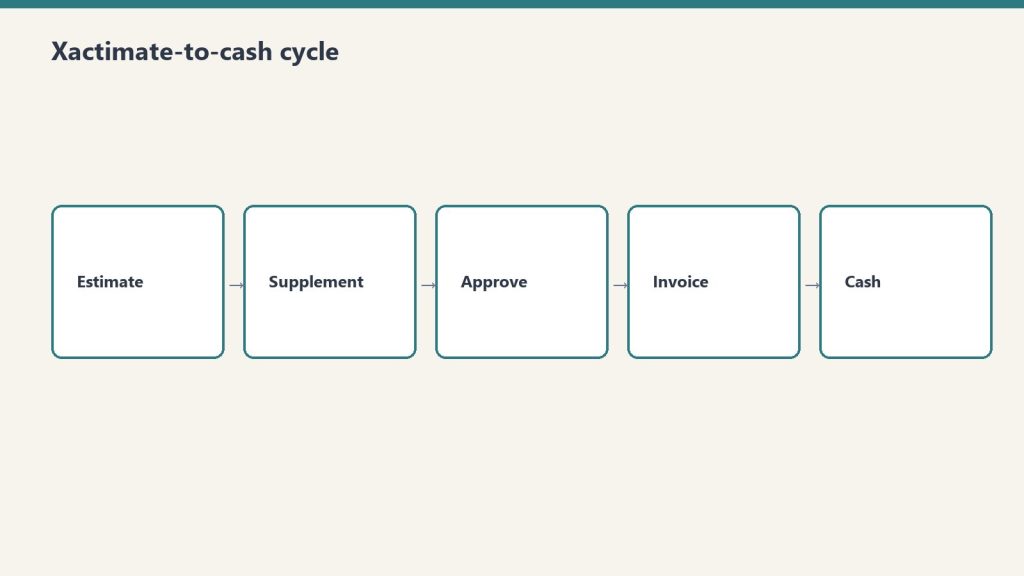
Input the damage. Get an Xactimate-ready scope draft. Stop staring at a blank line item screen.
Who This Is For
Who the Xactimate scope drafter is for.
Built for restoration estimators and project managers who spend hours building scope documents from scratch when the job notes are already in their hands.
The Problem
The scope drafting problem.
Xactimate scoping is one of the most time-consuming parts of a restoration job — not because it is complex, but because it is tedious. Every estimator knows what the scope should include. Getting it from field notes into a structured, complete document takes time that could be spent on the next job. This skill does the translation.
What It Does
What the Xactimate scope skill does.
Translates your field observations into organized Xactimate line item categories — demo, dry-out, structural, contents, and more
Prompts you for missing information rather than guessing — if dimensions or materials are unclear, it asks
Applies correct damage class and category framing based on damage type
Flags items commonly missed for each damage type: O&P, general conditions, equipment, and category-specific line items
Outputs in a structured format ready to transfer into Xactimate
20 scope prompts by damage type included — water, fire, mold, contents, biohazard
What You Get
The complete skill file in Claude-compatible format, a prompt library specific to the use case, and a setup guide that gets you running in under five minutes. After purchase, everything downloads instantly.
Xactimate Scope Drafter — Claude AI Skill for Restoration
$47
Delivered to your inbox within 24 hours — skill file, prompt library, and setup guide
No — it produces a complete structured scope draft that you then enter into Xactimate. The skill handles the thinking and organization. You handle the entry and pricing.
What damage types does it cover?
Water damage by category and class, fire and smoke, mold remediation, contents, biohazard, and structural damage. The scope prompts library includes templates for each.
Does it need to be connected to Xactimate?
No. This is a standalone Claude skill. The output is a structured document you read and transfer. No integration required.
How is this delivered?
Within 24 hours of purchase via email from will@tygartmedia.com. Skill file, prompt library, and setup guide delivered as a ZIP download.
Does this require a paid Claude subscription?
Installing as a custom skill requires a paid Claude plan (Pro, $20/mo, or higher) with code execution enabled. Your download also includes a free-plan setup option — paste the skill into a Claude Project’s instructions — which works on any plan.
Can I get a custom version built for my specific business?
Yes. Email will@tygartmedia.com with a description of your business and workflows. Custom skill builds are available as part of The Fitting service.

You bought Claude. Maybe Claude Max. Maybe a Team account. You have used it a few times and gotten results ranging from impressive to generic. The thing is — Claude does not know you. It does not know your industry, your workflows, your customers, your voice, your tools, or your business. It is a suit off the rack. Brilliant fabric, wrong fit.
The companies getting extraordinary results from Claude did not just buy a subscription. They built infrastructure around it: custom skills for their specific workflows, a Notion workspace structured so Claude can read and act on it, connectors wired to the tools they already use, and a prompt library that reflects how they actually think. That infrastructure is what makes Claude a genuine operational lever instead of an impressive toy.
Building that infrastructure takes weeks if you do it yourself. We deliver it overnight.
What Happens
You email us. We schedule a 60-minute discovery call — same day if you want it. On that call we learn your business: what you do, how you do it, what tools you use, what your best work looks like, and where the friction is. That night we go into the factory and build.
By 9am the next morning you have a deployment waiting in your inbox with a Loom walkthrough showing you exactly what was built and how to use it. Everything is yours. No subscription to us. No ongoing fees unless you want them.
What Ships
What ships.
Custom Claude skills built for your specific workflows — the work you actually do, not generic prompts
Notion Second Brain configured for your business: your projects, your clients, your content, your knowledge — structured so Claude can read and act on it
Wired connectors where applicable: WordPress, Metricool, Google Calendar, Gmail, Google Drive — whatever makes sense for your stack
Prompt library in your voice — 20 to 50 prompts calibrated to how you think and what you produce
One to two Books for Bots seeds — we extract and encode the most important operational knowledge from the discovery call
Loom walkthrough of everything that was built and how to use it
Pricing
Starting at $1,500. Scope varies based on tool complexity and number of connectors. We quote within an hour of your intake email. No surprises.
Who This Is For
Who this is for.
Business owners, operators, and teams who have Claude and are not getting full value from it. People who want to move fast and would rather pay to have it done right than spend weeks figuring it out themselves. Restoration companies, professional service firms, agencies, consultants, local businesses — anyone who does real work and wants AI that knows how to help with it specifically.
The Overnight Promise
Order by 9pm PT. Delivered by 9am PT. We can make this promise because the factory already exists — the skills infrastructure, the Notion architecture, the connector templates, the prompt calibration process. We are not building from scratch every time. We are fitting something that already works to someone new. That is what makes it deliverable overnight.
Order by 9pm PT. Delivered by 9am PT.
Tell us what you do, what tools you use, and what you wish Claude could help you with. We scope it and quote it within the hour.
Six GA4 intelligence kits built around Claude-in-Chrome. Each extracts a different layer of behavioral data from your Google Analytics property using query architectures developed on live sites.
6
Kits in series
70+
Copy-paste queries
Free
Tool required
What you need: Claude-in-Chrome (free from Anthropic) and Editor or Analyst access to a GA4 property with Analytics Advisor enabled. No SQL, no BigQuery, no data analyst.
The Complete Series
BOOK 01
GA4 AI Referral Audit Kit
Which AI sends you traffic, to which pages, and how engaged those users actually are. 4 sessions, 26 queries, content variant framework included.
Ask Claude any restoration question. Get an answer grounded in IICRC S500/S520 standards.
Who This Is For
Who the IICRC protocol lookup skill is for.
Built for restoration technicians and project managers who need quick, accurate answers to technical drying questions in the field — without carrying a manual or waiting to call a trainer.
The Problem
The protocol lookup problem.
IICRC standards are the backbone of defensible restoration work. But S500 and S520 are dense documents, and the answers to specific field questions — what drying class applies here, how do I size equipment for this structure, what does this GPP reading mean, how do I document this for the adjuster — are not always easy to find quickly under job pressure. This Claude skill turns your AI assistant into a protocol reference that speaks restoration.
What You Get
What you get with the IICRC skill.
Answers technical drying questions with IICRC S500/S520 backing — water damage categories, drying classes 1 through 4, equipment sizing formulas
Explains psychrometrics and GPP calculations in plain language your crew can act on
Covers mold remediation protocols from S520: containment, clearance, documentation
Helps structure drying progress documentation for adjuster review
Works even better when you attach your own IICRC PDF to the conversation
Includes a 25-prompt starter library of the most common restoration protocol queries
Setup guide: installed and running in under 5 minutes
IICRC Protocol Lookup — Claude AI Skill for Restoration Contractors
$19
Delivered to your inbox within 24 hours — no shipping, no waiting
Secure checkout via Square — all major cards accepted
Frequently Asked Questions
How is this delivered?
Within 24 hours of purchase via email from will@tygartmedia.com. You will receive your download link immediately — Notion duplicate link, skill file, or both depending on the product.
Do I need any special software?
A free Notion account is required for the template products. The Claude skill requires a Claude account (free tier works for most uses).
Can I customize this for my company?
Yes — everything is built to be edited. Add your company name, your specific workflows, your equipment rates. It is a starting point, not a locked system.
Is there a refund policy?
Because this is a digital product, all sales are final. If you have a problem with your purchase, email will@tygartmedia.com and we will sort it out.
You make things for a living. Claude should make you faster — not generic.
Who This Is For
Who the creator-independent Claude seed kit is for.
Built for writers, podcasters, consultants, educators, course creators, and independent professionals who want AI that actually sounds like them.
The Problem
The creator workflow bootstrap problem.
The biggest complaint from creators who try AI is that everything sounds the same — flat, hedged, and obviously machine-made. That is a configuration problem, not an AI problem. Claude can write in your voice, research in your style, and produce output you would actually publish — but only if it is calibrated to how you think and what you have already made. This kit teaches Claude who you are.
What You Get
What you get with the creator seed kit.
Notion content OS: editorial calendar, project pipeline, client work, idea capture, and publishing workflow — all connected
10 pre-built Claude skills tuned for creative work: voice-matched drafting, research synthesis, outline building, repurposing across formats, pitch writing, and audience research
50 prompts for creators: long-form content, social posts, email sequences, course outlines, and client deliverables
Voice calibration guide: the exact process for training Claude on your writing style so output sounds like you wrote it
Quick-start guide: your first AI-assisted content session from blank page to published
Creator & Independent Seed Kit
$47
Delivered to your inbox within 24 hours — no shipping, no waiting
Within 24 hours of purchase via email from will@tygartmedia.com. You will receive a download link for the ZIP file and/or Notion duplicate link immediately.
Do I need any special software?
A free Notion account is required. No other software needed.
Can I customize this for my specific business?
Yes — that is the point. Everything is built to be edited. Swap in your company name, add your specific workflows, remove anything that does not apply. It is a starting point, not a locked template.
Is there a refund policy?
Because this is a digital product, all sales are final. If you have a problem with your purchase, email will@tygartmedia.com and we will sort it out.
Who the regulated-specialist Claude seed kit is for.
Built for professionals in regulated fields — healthcare, legal, financial services, environmental services, construction — who want to use AI but need it to operate within real-world constraints.
The Problem
The regulated-specialist bootstrap problem.
Generic AI prompts are written for people who have no compliance obligations. They are not written for someone who needs to be careful about what goes in a client file, who cannot make specific legal or medical claims, and who works in an industry where documentation has real consequences. This kit is built around what regulated professionals can actually do with AI — and is honest about what they should not do.
What You Get
What you get with the regulated specialist kit.
Notion workspace template for regulated practice management: client files, compliance checklists, documentation logs, and renewal reminders
10 pre-built Claude skills designed for compliance-aware use: documentation drafting, regulatory language lookup, client communication templates, audit preparation, and training content
50 prompts that account for regulated context — written to get useful output without crossing professional lines
Compliance guardrail guide: what Claude can and cannot reliably do in your specific field
Quick-start guide: operational in under an hour
Regulated Specialist Seed Kit
$47
Delivered to your inbox within 24 hours — no shipping, no waiting
Within 24 hours of purchase via email from will@tygartmedia.com. You will receive a download link for the ZIP file and/or Notion duplicate link immediately.
Do I need any special software?
A free Notion account is required. No other software needed.
Can I customize this for my specific business?
Yes — that is the point. Everything is built to be edited. Swap in your company name, add your specific workflows, remove anything that does not apply. It is a starting point, not a locked template.
Is there a refund policy?
Because this is a digital product, all sales are final. If you have a problem with your purchase, email will@tygartmedia.com and we will sort it out.
You are building something. Claude should be your first hire.
Who This Is For
Who the solo-builder Claude seed kit is for.
Built for solo founders, freelancers, indie builders, and one-person businesses who want to move faster without adding headcount.
The Problem
The solo builder bootstrap problem.
Running a business alone means doing everything: sales, delivery, marketing, administration, client management. The bottleneck is always you. AI promises to change this — and it can — but only if it is configured for how you actually work. A solo freelancer’s needs are different from a corporation’s. This kit is built for the person who does everything themselves and needs AI that can step into any of those roles on demand.
What You Get
What you get with the solo builder kit.
Notion Second Brain for solo builders: projects, clients, content pipeline, finances, and personal productivity — all connected
10 pre-built Claude skills: proposal drafting, client onboarding, content creation, research synthesis, invoicing language, and follow-up sequences
50 prompts for solo operators: sales, delivery, marketing, and business development
Connector guide: wire Claude into your existing stack in one afternoon
Quick-start guide: your first productive session, every step mapped out
Solo Builder Seed Kit
$47
Delivered to your inbox within 24 hours — no shipping, no waiting
Within 24 hours of purchase via email from will@tygartmedia.com. You will receive a download link for the ZIP file and/or Notion duplicate link immediately.
Do I need any special software?
A free Notion account is required. No other software needed.
Can I customize this for my specific business?
Yes — that is the point. Everything is built to be edited. Swap in your company name, add your specific workflows, remove anything that does not apply. It is a starting point, not a locked template.
Is there a refund policy?
Because this is a digital product, all sales are final. If you have a problem with your purchase, email will@tygartmedia.com and we will sort it out.
Run a local business. Use AI like the companies ten times your size do.
Who This Is For
Who the local-operator Claude seed kit is for.
Built for local business owners — retail, food and beverage, professional services, home services — who know AI could help but have not had time to figure out where to start.
The Problem
The local operator bootstrap problem.
Enterprise companies have entire teams building their AI workflows. Local business owners have fifteen minutes between customers. The tools that work for a Fortune 500 company are not configured for someone who needs to respond to a Google review, draft a staff schedule, write a promotional email, and answer a supplier question before noon. This kit is built for the pace of a real local business.
What You Get
What you get with the local operator kit.
Notion workspace for local business operations: appointments, inventory notes, staff, and marketing calendar
10 pre-built Claude skills: local SEO content, customer response drafting, Google Business Profile posts, review responses, staff communication templates, and more
50 prompts organized for the local business owner: marketing, customer service, operations, and hiring
Connector guide: Claude paired with Google Calendar, Gmail, and Metricool for social scheduling
Quick-start guide: productive in under an hour, no technical knowledge required
Local Operator Seed Kit
$47
Delivered to your inbox within 24 hours — no shipping, no waiting
Within 24 hours of purchase via email from will@tygartmedia.com. You will receive a download link for the ZIP file and/or Notion duplicate link immediately.
Do I need any special software?
A free Notion account is required. No other software needed.
Can I customize this for my specific business?
Yes — that is the point. Everything is built to be edited. Swap in your company name, add your specific workflows, remove anything that does not apply. It is a starting point, not a locked template.
Is there a refund policy?
Because this is a digital product, all sales are final. If you have a problem with your purchase, email will@tygartmedia.com and we will sort it out.
Built for contractors, restoration companies, trade shops, and field service businesses who have a Claude subscription and have not figured out how to make it actually useful yet.
The Problem
The field operator bootstrap problem.
Claude is not plug-and-play for a field service business. It does not know your workflows, your documentation requirements, your adjuster communication patterns, or your crew scheduling rhythms. Most operators who buy it spend a few weeks prompting randomly, get mediocre results, and let it sit. The operators who get real value built their own infrastructure — prompts tuned to their workflows, templates that match their documents, Notion structured so Claude can actually read it. That infrastructure is what this kit delivers.
What You Get
What you get with the field operator kit.
Notion Second Brain template configured for field operations: jobs, crews, equipment, and clients — structured so Claude can read and act on it
10 pre-built Claude skills for field operator workflows: job documentation, client communication, estimate drafting, crew scheduling, insurance correspondence, and more
50 ready-to-use prompts organized by situation — open the doc, find the situation, copy the prompt
Connector checklist: how to wire Claude to WordPress, Google Calendar, Gmail, and your job management system
Quick-start guide: your first productive hour with Claude, every step mapped out
Field Operator Seed Kit
$47
Delivered to your inbox within 24 hours — no shipping, no waiting
Within 24 hours of purchase via email from will@tygartmedia.com. You will receive a download link for the ZIP file and/or Notion duplicate link immediately.
Do I need any special software?
A free Notion account is required. No other software needed.
Can I customize this for my specific business?
Yes — that is the point. Everything is built to be edited. Swap in your company name, add your specific workflows, remove anything that does not apply. It is a starting point, not a locked template.
Is there a refund policy?
Because this is a digital product, all sales are final. If you have a problem with your purchase, email will@tygartmedia.com and we will sort it out.
Who this is for: Anyone at your company who writes emails — the owner, the office manager, or whoever handles the CRM touch campaigns. This brief requires no technical background. It’s a ready-to-use prompt library for Claude (claude.ai), Anthropic’s AI assistant, that you can use to write every email in your annual CRM touch calendar without starting from a blank page.
How to use this restoration Claude prompt library.
Go to claude.ai. Create a free account if you don’t have one. Open a new conversation. Paste a prompt from this guide, fill in the bracketed fields with your real information, and press enter. Claude will generate a draft email. Review it, edit anything that doesn’t sound like you, and copy it into your email platform.
That’s the entire workflow. No API key. No technical setup. No code. A free Claude account at claude.ai is sufficient for this use case.
One important principle before you start: the more specific your prompt, the better the output. Telling Claude “write a hiring email for a restoration company” will generate something generic. Telling Claude “write a hiring email for a 12-person water and fire restoration company in Tacoma, WA that’s been in business for eight years and is known for fast response times and honest communication with insurance adjusters” will generate something that sounds like it came from your company specifically. Put in the specifics; get out something publishable.
The Prompt Library
The prompt library.
Prompt 1: The Hiring Email — Homeowner Version
I run [company name], a [type] restoration company in [city, state]. We’ve been in business [X] years and are known for [one or two specific things your company does well — e.g., “fast response times and straight communication with adjusters,” or “doing right by homeowners even when the insurance company makes it hard”]. We currently have [number] employees and serve the [geographic area] area.
I need to write a short, plain-text email to past homeowner clients who we’ve done [water damage / fire damage / mold / storm] work for. We’re currently hiring for [job title]. The goal of the email is to ask if they know anyone — family, friends, people in the trades — who might be a great fit for a company like ours. We want to reach out to trusted contacts before posting the job publicly.
Tone: Personal and warm, like a note from a real person. Not corporate, not salesy. The recipient should feel like we remembered them and value their opinion specifically.
Requirements: Under 150 words. Plain text (no HTML). Sign it from [owner first name] at [company name]. Include a phone number as the only contact info. No subject line needed — just the body.
Prompt 2: The Hiring Email — Insurance Adjuster Version
I run [company name], a restoration company in [city, state]. I need to write a short email to insurance adjusters I’ve worked with on claims. We’re hiring a [job title].
The tone should be collegial — peer to peer, professional but not formal. We want to reach out to trusted colleagues before posting publicly, and we’d appreciate any recommendations they might have. Keep it under 120 words. Plain text. From [owner name]. Include phone number.
Do not use any of these phrases: “I hope this email finds you well,” “I wanted to reach out,” “touch base,” “circle back,” or “leverage.” Write it how a real contractor would talk to an adjuster they’ve worked with for years.
Prompt 3: The Vendor Ask — Specialty Sub Search
Write a short email from a restoration company owner to their contact database asking if anyone knows a reliable [trade type — e.g., drywall sub, flooring contractor, HVAC tech] in [city/region]. We have a larger project coming up and want to find a quality sub through our network before going the cold-search route.
Context about our company: [2–3 sentences about your company — size, how long you’ve been in business, your service area]. The recipients are a mix of past homeowner clients, insurance industry contacts, and trade partners.
Tone: Casual and direct. Like asking a trusted colleague. Under 100 words. Plain text. From [owner name]. Phone number only.
Optional addition: Add one sentence at the end that invites the recipient to reach out directly if the description matches their own business.
Prompt 4: The Seasonal Safety Email — Winter Freeze Version
I run a water damage restoration company in [city, state]. I want to send a helpful, non-promotional email to past homeowner clients before freeze season. The goal is to give them genuinely useful information about preventing the kind of water damage we see most commonly in [our region] in winter.
Specific things to cover: [list 3–4 real things relevant to your region — e.g., “disconnecting garden hoses,” “knowing where the main shutoff is,” “checking sump pumps before the ground freezes,” “insulating exposed pipes in crawlspaces”]. These should be specific to [region] winters, not generic national advice.
Tone: Knowledgeable and helpful, like a trusted expert checking in on a neighbor. No sales pitch, no CTA other than “if you have questions, we’re here.” Under 200 words. Include a link placeholder for [blog post URL] if they want to read more. From [owner name].
Prompt 5: The Post-Storm Check-In
Write a short check-in email from a restoration company owner to past homeowner clients after a significant weather event. Context: [describe the event — e.g., “We just had the biggest rainstorm in three years hit the [area]” or “The deep freeze last week affected a lot of homes in our area”]. We’re reaching out not to generate leads but to genuinely check in and let them know we’re available if they or anyone they know had issues.
Tone: Warm, community-focused, genuine. Not a pitch. One optional sentence can mention that we’re available for a free look if they’re not sure about anything. Under 120 words. From [owner name]. Include phone.
Prompt 6: The Company Anniversary or Milestone Email
Write a short personal email from the owner of a restoration company to their full contact database for our company’s [X-year anniversary / new IICRC certification / expansion into a new service area]. The goal is to thank the people who’ve been part of our journey — past clients, industry partners, trade contacts — and share something genuine about where we’re headed.
Specific context: [1–2 sentences about what milestone you’re celebrating and what it means genuinely — not marketing language, just the real version]. [1 sentence about something you’re proud of or looking forward to.] [1 sentence of genuine gratitude.]
Tone: Personal. From the owner’s voice, not a company PR voice. Should feel like the kind of email you’d want to receive from a company you’ve worked with. Under 175 words. No CTA. No offer. Just the relationship. From [owner first name].
Prompt 7: Adapting Any Template to Your Brand Voice
Use this prompt whenever a generated draft doesn’t quite sound like you:
Here are two examples of how I normally write emails to clients and contacts: [paste two real examples of emails you’ve sent — can be short, informal, anything genuine]. Using this voice and style, rewrite the following email: [paste the generated draft]. Keep all the same information but make it sound like I wrote it, not like AI wrote it. Pay attention to sentence length, word choice, and how formal or informal I am.
Prompt 8: Subject Line Generation
Write 8 subject line options for the following email: [paste the email body]. The subject line should feel personal and human — not like a marketing email. No click-bait. No exclamation points. No “Quick question for you!” style openers. It should make the recipient want to open it because it sounds like a note from someone they know, not a promotional blast. Vary the options — some direct, some conversational, some that lead with the topic, some that lead with the relationship.
Prompt 9: Batch Personalization for Homeowner Lists
Use this when you have a list of homeowner contacts and want to add one personalized sentence per email based on their job type and timing:
I’m going to give you a list of past restoration clients in CSV format. For each client, add one personalized opening sentence to the following email template that references their specific job type and, if the job was more than 18 months ago, acknowledges it’s been a while. Keep the personalized sentence under 20 words. Do not change the rest of the template. Return the output as a numbered list matching the order of the input.
Email template: [paste template]
Client list (paste up to 20 rows at a time):
First Name, Job Type, Months Since Job
Sarah, water damage, 14
Tom, fire damage, 26
Jennifer, mold remediation, 8
[continue…]
Tips for Getting the Best Results from Claude
Tips for getting the best results from Claude.
Be specific about what you don’t want. If you’ve noticed Claude tends to use certain filler phrases, name them explicitly in the prompt: “Do not use: ‘I hope this finds you well,’ ‘reaching out,’ ‘touch base,’ or ‘leverage.’” This single instruction usually eliminates the most recognizable AI writing patterns.
Give it your real company context. Claude doesn’t know your company. Everything you tell it about your history, your reputation, your service area, and your typical client becomes context it can draw on to make the output more specific and authentic. Two sentences of real company context transform generic output into something that sounds like it came from you.
Iterate in the same conversation. Don’t start a new Claude conversation for each revision. Reply in the same conversation with: “Good, but make it shorter” or “The tone is right but the middle paragraph is too formal — simplify it.” Claude maintains context within a conversation and can refine based on your feedback without losing the good parts.
Ask for multiple options. Ending a prompt with “Give me three versions — one shorter, one more formal, one more casual” lets you pick from options rather than iterating from a single draft. This works especially well for subject lines.
Review everything before sending. Claude’s output is a first draft, not a final draft. Read every email before it goes out. Check for: anything that doesn’t sound like your voice, any specific facts about your company that are wrong (Claude will sometimes assume details you didn’t provide), and any phrasing that might feel off to a specific recipient.
Frequently Asked Questions
Do I need to pay for Claude to use these prompts?
No. A free account at claude.ai is sufficient for this use case. The free tier allows you to run multiple prompts per day and generate all the email drafts you need for a full annual campaign calendar. Claude Pro ($20/month) gives you higher usage limits and access to more powerful models, but is not required for basic email drafting.
Can I save these prompts somewhere so I don’t have to look them up each time?
Yes — store the full prompt library in a Notion page (your Second Brain, per the related technical brief). Create one page per prompt type, fill in the bracketed fields with your company’s standard information, and save them as templates. Before each campaign, open the relevant prompt, verify the details are current, and paste it into Claude.
What if Claude generates something that doesn’t sound like me?
Use Prompt 7 from this guide — the brand voice adaptation prompt. Paste two real emails you’ve written, paste the Claude draft, and ask it to rewrite in your voice. After two or three rounds of this, Claude will have internalized your style well enough that the initial drafts need much less editing.
Is it ethical to use AI-generated emails for relationship outreach?
Yes, with one condition: you review and approve every email before it sends. The same way you might ask an assistant to draft a letter you then sign and send in your voice, using AI to draft email is a production tool, not a substitute for genuine relationship intention. The goal of these campaigns is real — staying in touch with people who know your company, asking for genuine help with real business needs. AI helps you express that goal in words. The relationship authenticity comes from you.