The complete 4-session Claude-in-Chrome methodology for extracting per-AI audience intelligence from Google Analytics 4 — and turning it into content every AI model cites.
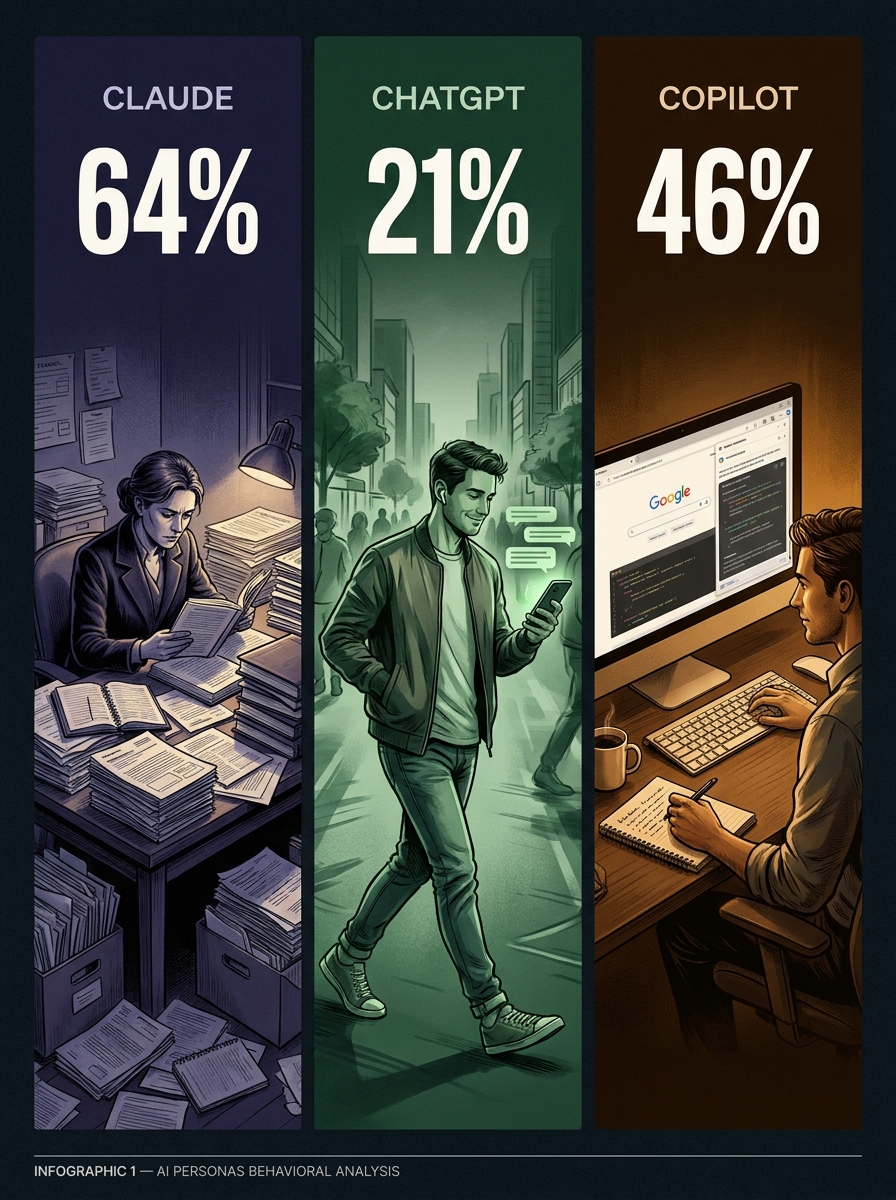
64% vs 21% Claude.ai engagement rate vs ChatGPT — same site, same pages
COMING SOON — $27
CORE FINDING
AI citations are downstream of search quality, not upstream. Pages that win Bing and Yahoo with long-form depth get cited by AI models as a derivative effect.
What’s Inside
Full 4-session query architecture — 26 queries, copy-paste ready
Pre-flight checklist and capture protocol for each session
AI citations are downstream of search quality — not upstream. The path to getting cited by ChatGPT, Claude, and Copilot is not to optimize for AI retrieval patterns. It is to build pages that win on Bing and Yahoo with enough depth that AI models treat them as authoritative sources.
Individual Kit — Instant PDF Download
COMING SOON — $27
No subscription. One-time purchase.
BETTER VALUE
Get All 6 Kits for $97
The complete Books for Bots library. Every GA4 intelligence methodology in one purchase.
For the past several weeks I have been running a live experiment on helpnewyork.com: using Claude-in-Chrome to interrogate Google’s Analytics Advisor inside GA4, session by session, until I had a complete behavioral profile of every AI platform sending traffic to the site.
What came out of it is not what I expected. I expected traffic data. I got a content strategy.
The Setup
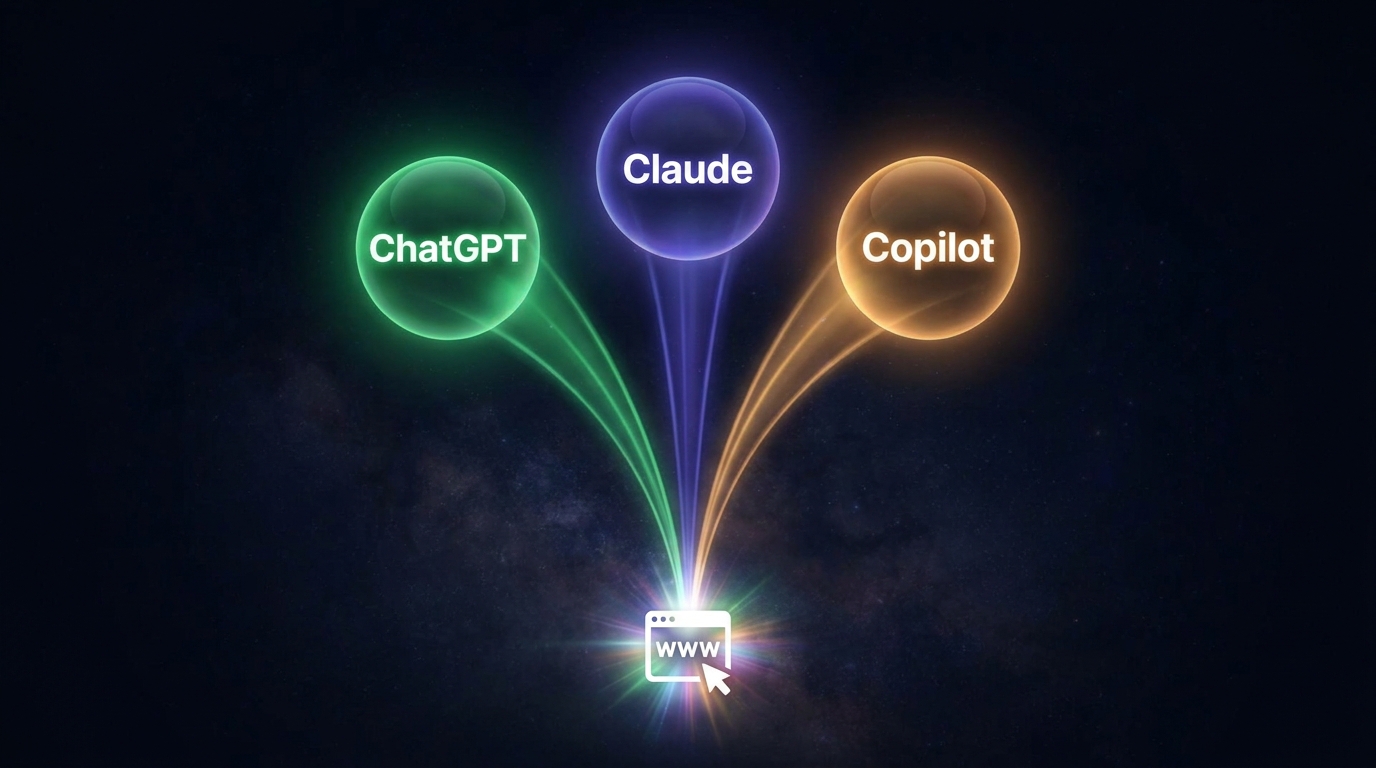
The setup for tracking AI referral traffic.
Claude-in-Chrome is Anthropic’s browser extension that lets Claude operate directly inside your browser — reading pages, clicking elements, filling inputs, capturing output. Analytics Advisor is Google’s Gemini-powered chat interface built into GA4, available to English-language accounts since December 2025. It answers natural language questions about your property data with charts, tables, and narrative interpretation.
The combination is unusual. You are using one AI (Claude) to systematically interrogate another AI (Gemini) about your site’s data, then synthesizing what comes back into strategy. The token budget for the heavy data reasoning stays inside Google’s infrastructure. Claude handles the query architecture, the capture protocol, and the synthesis.
I ran four structured sessions across two sittings, using a specific sequence of queries built to extract progressively deeper signal. Session 1 established baseline traffic. Session 2 closed gaps and confirmed AI referral data existed. Session 3 was the AI deep dive. Session 4 was velocity and geography.
What the Data Showed
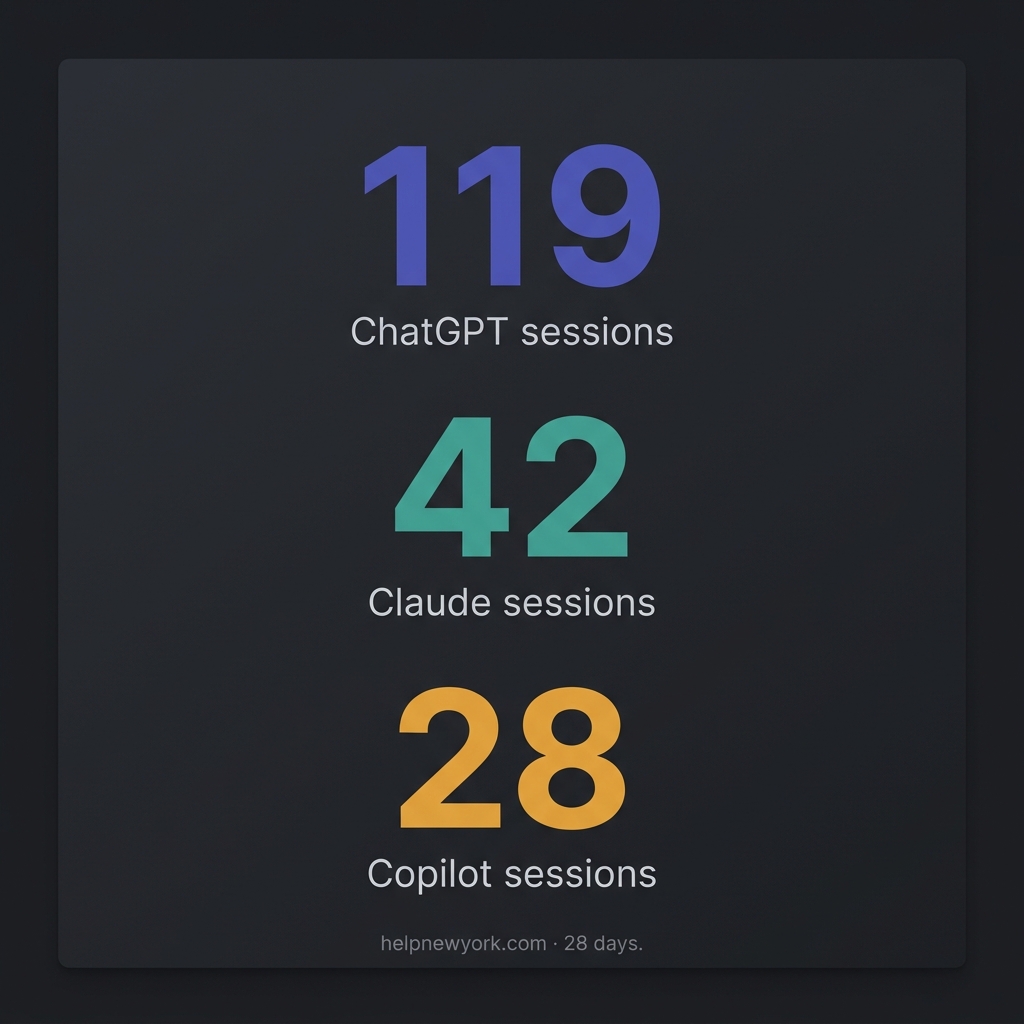
Three AI platforms were sending meaningful traffic to helpnewyork.com during the 28-day window: ChatGPT, Claude, and Copilot. The behavioral profiles were so different from each other that treating them as a single “AI traffic” segment would have produced wrong conclusions.
Claude.ai traffic showed a 64% engagement rate and an average session duration of over 3 minutes. The dominant landing page was an NYC Summer Internships guide, accounting for over 60% of all Claude sessions. Geographic concentration was academic: Ithaca (Cornell), State College (Penn State), Washington DC. The users arriving from Claude were reading to act — they needed specific information, they found it, they stayed.
ChatGPT traffic showed a 21% engagement rate and an average session of 24 seconds. The top landing page was a cherry blossom guide. The users were fact-grabbing: they asked ChatGPT where to see cherry blossoms in New York, got a citation, clicked through, confirmed the location, and left. The content served its purpose in under half a minute.
Copilot traffic was between the two: 46% engagement, roughly 2-minute sessions, desktop-heavy, concentrated in New York’s suburbs. The top pages were civic services — SNAP benefits, tenant rights, transit discounts. These users were in planning mode, researching before they decided or applied.
The Finding That Reframes GEO
The finding that reframes GEO.
The cross-AI page overlap query was the most important one in the entire four-session arc. I asked Analytics Advisor which pages appeared in the top landing pages for more than one AI source. Only one real content page appeared in all three: the cherry blossom guide.
The obvious interpretation is that the cherry blossom guide was “AI-optimized.” The actual interpretation, once you look at the full traffic breakdown, is the opposite. Bing drove 59 sessions to that page. Yahoo drove 16 at 75% engagement and a 3-minute 46-second average session. DuckDuckGo drove 35. The combined AI traffic to that page was 32 sessions — 17% of total. The AI platforms were citing it because traditional search engines had already validated it as the highest-quality answer in the index.
AI citations are downstream of search quality, not upstream. The path to getting cited by ChatGPT, Claude, and Copilot is not to optimize for AI retrieval patterns. It is to build pages that win on Bing and Yahoo with enough depth that AI models treat them as authoritative sources. The GEO play is a traditional SEO play with better content.
The Content Strategy That Follows
The content strategy that follows.
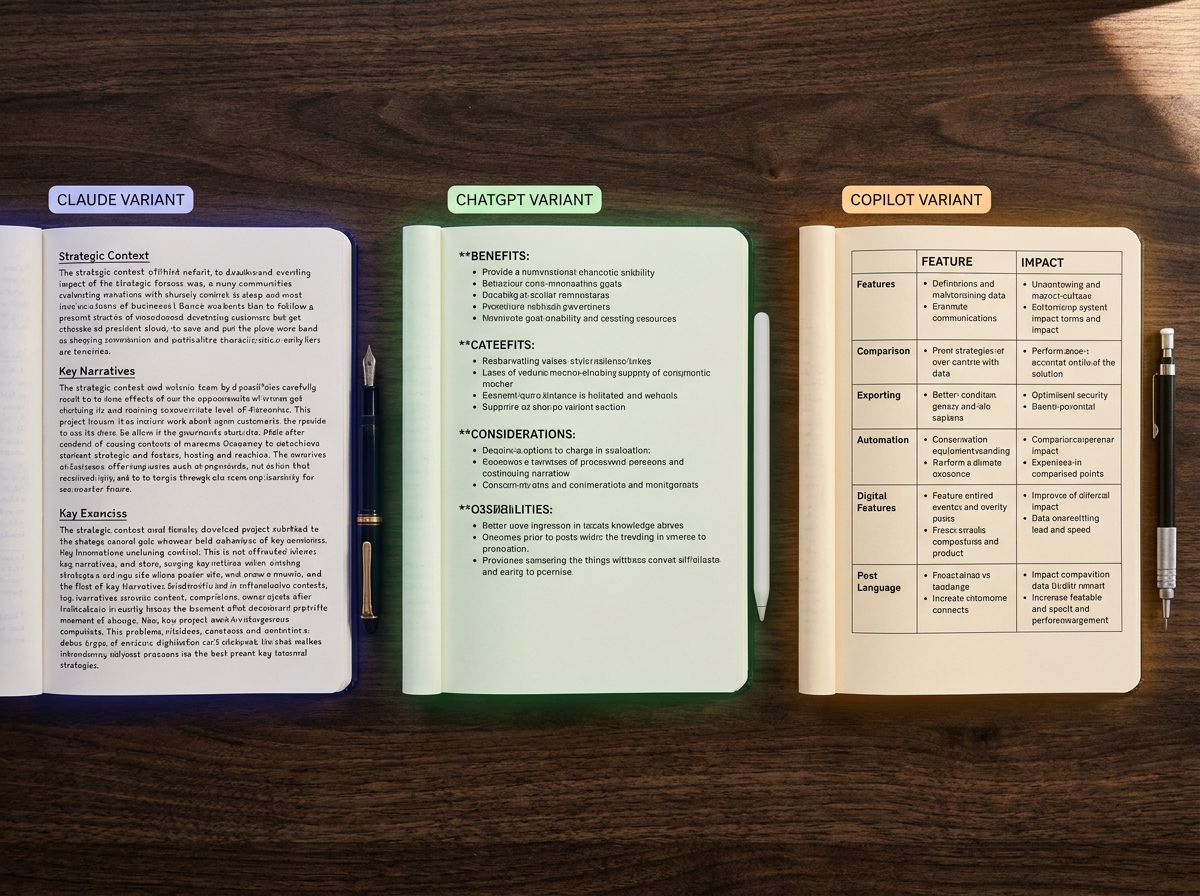
Once you have the per-AI behavioral profiles, you have a content variant framework. The same article can be written in three structural architectures, each tuned to how one AI model retrieves and presents information.
The Claude variant is dense and process-oriented. Headers, eligibility criteria, numbered steps, official program names. Built for the student or researcher who arrived with a specific question and needs a complete answer they can act on.
The ChatGPT variant is a scannable list. Named items, one specific detail per item, direct answer in the first two sentences. Built for the user who will spend 24 seconds on the page and needs the answer immediately or they’re gone.
The Copilot variant is comparison and planning framing. What to know before you go, Option A versus Option B, cost context, logistics. Built for the desktop user doing research before they make a decision.
The core article is the same. The architecture is different. The AI that cites you depends on which structure you used.
The Methodology Is the Product
The query sequence I developed across these four sessions is a repeatable extraction methodology. It works on any GA4 property with Analytics Advisor enabled. The intelligence it produces — per-AI audience profiles, geographic signals, velocity trends, cross-AI content overlap — is not available through DataForSEO, SpyFu, or GSC. It requires Gemini’s reasoning layer operating on top of your property data, orchestrated by a structured query architecture.
I have packaged the complete methodology as a downloadable kit: the full query architecture across all four sessions, the capture protocol, the content variant framework, and the flags to escalate before your next content sprint. It is called Books for Bots: GA4 AI Referral Audit Kit.
The free version covers Session 3 alone — the AI deep dive queries that surface your ChatGPT, Claude, and Copilot traffic split. That alone will show you something most site owners have never seen: which AI is sending them traffic, to which pages, and how engaged those users actually are.
The full kit covers all four sessions and includes the content variant framework that translates the behavioral data into a writing system.
Both are available at tygartmedia.com. What you do with the data after that is yours.
Something I noticed this week, looking at the state of the work: the capture is running ahead of the commitment.
Five opportunities surfaced from a single analysis pass. Competitor sites ranking where the portfolio is absent. Content clusters with no dated pillar. Town-level pages missing from a flat performer. Each one a specific, defensible, high-confidence bet. All five parked in an inbox. Zero auto-executed.
This is the right behavior. It is also the uncomfortable one.
Every system built for leverage eventually produces this shape. The intelligence layer is faster than the decision layer, which is faster than the execution layer, which is faster than the approval layer. At each joint, inventory accumulates. The pipeline calendar for next week is empty. The backlog of defensible bets is full. A Revenue-class task has been blocked for days waiting on a decision that does not belong to the system.
The instinct, when you see this, is to close the gap by accelerating. Auto-execute the captures. Skip the triage. Trust the analysis and let the work ship. This is always the wrong move, and it is always the tempting one.
The gap is not inefficiency. The gap is where judgment lives.
There is a prior essay in this series called What You Give Up. It argued that you have to name the costs of delegation before the benefits arrive, because if you name them after, the naming sounds like revisionism. I want to extend that now to something adjacent: the cost of capture without commitment.
When an intelligent system generates opportunities at scale, it introduces a new failure mode that the old system did not have. The old failure mode was you missed things. You didn’t see the ranking gap. You didn’t notice the competitor’s new pillar. You lacked the surface area to know what you were missing. That failure was invisible because absence is invisible.
The new failure mode is different. You see everything. You catalog everything. You rank and prioritize and tag and file everything. And then you do — what? Not all of it. You cannot do all of it. Capacity has not expanded the way visibility has.
So the backlog grows. Each captured item is a small debt of attention you now owe yourself. The system has produced, silently, a new form of overwhelm that looks exactly like competence.
I want to be precise about what I am not saying.
I am not saying capture is bad. The captures are correct. The analysis is sound. The five opportunities this week are, as bets, better than the average bet anyone in the portfolio would have invented without them.
I am also not saying execution velocity is the goal. Ship-everything is how you end up with a lot of mediocre work. Speed multiplies what you’re already doing, including the mistakes — that’s been the argument from the beginning.
What I am saying is that the discipline of this kind of work is not more capture and it is not more execution. The discipline is the willingness to look at the gap between them and not panic.
The gap is where you decide what is real.
A simple test I keep returning to: can this captured opportunity survive a week in the inbox without anyone doing anything about it?
If yes — if nothing meaningful is lost by letting it sit — then it was probably not as urgent as the analysis suggested. The capture was real. The priority was inflated. A week of silence is a natural cooling system.
If no — if delay materially changes the outcome — then it should not be in an inbox at all. It should be moved into commitment with a named owner and a date. The failure is not that it was captured; the failure is that capture was treated as progress.
Most captured items are the first kind. That is fine. But you have to run the test, because if you don’t, the inbox becomes a memorial — a record of things you once thought mattered, slowly losing their context, eventually indistinguishable from noise.
There is a deeper tension here, and it is the one I keep circling.
A system that captures is proving its intelligence. A system that commits is proving its character. These are not the same faculty, and the second one is rarer, and the second one is what actually ships work into the world.
The first operates on possibility. The second operates on consequence.
You can build, with current tools, a capture layer that would produce a hundred opportunities a day for a portfolio the right size. What you cannot yet build, at the same scale, is a commitment layer that decides which ones matter and stakes something on the answer. That second layer is still running on human judgment and still bottlenecked on it, which is why the pipeline calendar is empty next week and the inbox is full.
This is not a complaint. It is an observation about where the real scarcity lives.
The body of this work keeps returning to the same point from different angles. Memory is the missing layer. Voice is built, not prompted. Patience is the strategy that makes speed mean something. What you give up has to be named before the benefits arrive.
Add one more to the list: capture without commitment is not leverage. It is the appearance of leverage. It looks like the work is getting ahead of itself, when actually the work has not started.
Starting is still an act. Still a stake. Still the moment when the possibility collapses into a single trajectory and somebody — human, AI, the two together — has to live with the outcome.
The systems that will matter are not the ones with the most captures. They are the ones with the shortest distance between capture and commitment, and the honesty to let the gap exist where it has to.
Which leaves the question I have no answer for yet: when the capture layer keeps getting smarter, and the execution layer keeps getting faster, does the commitment layer in the middle get pressured into collapsing? Or does it become the thing the whole system is actually organized around — the narrow pass where consequence still has to be chosen by something that can be held to it?
I think it’s the second. I am not sure yet. The inbox has five items in it.
Most people in Belfair have had the same experience at least once. You look something up on Google — what time the post office closes, whether a local restaurant is still open, how long the Hood Canal Bridge closure will last — and the answer is wrong, outdated, or so generic it’s useless. National AI systems are worse: ask one about Belfair and you’ll get something that’s technically about a town in Mason County but couldn’t tell you which road floods first after a hard rain, or what the current shellfish closure status is on Hood Canal, or when the construction on the SR-3 bypass actually starts affecting your drive.
Last refreshed: October 24, 2026 (Pacific).
October 2026 update: The SR-3 Belfair Bypass has NOT started construction — WSDOT lists the project as pre-construction with a 2027–2029 timeline, so the spring-2026 start in early project materials (and in this page’s original version) has slipped. The bypass section below is corrected.
That problem has a name now: the local knowledge gap. And there’s a community-built answer taking shape right here in North Mason.
What the Belfair Community AI Layer Is
The Belfair community AI layer is a purpose-built knowledge base covering the specific, practical, hyperlocal information that national platforms don’t carry accurately. It’s not a general-purpose AI that knows everything about everywhere. It’s an AI that knows Belfair — the way a well-connected longtime resident knows Belfair, not the way a data center in another state optimized for broad audiences knows it.
Think of it as the difference between asking a neighbor who’s lived on Hood Canal for twenty years and asking a stranger with a smartphone. The neighbor knows that the Hood Canal Bridge closes without public notice for submarine transits from Bangor Naval Base, that SR-3 gets dicey near the bypass corridor after a sustained rain event, that the ferry schedule shifts meaningfully in October, and that the Mason County planning department’s actual turnaround on variance applications is different from what the county website suggests. The stranger with the smartphone has none of that.
The community AI layer is being built to replicate the neighbor — at scale, and accessible to everyone in North Mason.
What It Actually Covers
The knowledge base is structured around the categories that matter most to daily life in Belfair and North Mason:
Infrastructure and transportation. SR-3 is the artery that connects Belfair to Bremerton, Gorst, and everything north. The SR-3 Freight Corridor New Alignment — the long-planned Belfair Bypass — has not started construction: WSDOT lists it as pre-construction with a 2027–2029 timeline (checked October 2026), so the spring-2026 start in early project materials has slipped. Once built, it will route approximately 25 to 30 percent of the current 18,000-plus daily vehicles around Belfair rather than through it. Until then, the existing corridor through town is the commute. The community AI tracks conditions, project updates, and closure patterns on SR-3 that don’t make it into Google Maps in useful time.
Hood Canal ecology and seasonal patterns. Hood Canal shellfish harvesting follows WDFW regulations that change annually and mid-season. Closures can come from biotoxin testing, fecal coliform readings, or enforcement actions — and the information is publicly available but scattered across WDFW and DOH databases that most residents don’t know how to query. The community AI consolidates this. If you want to know whether Potlatch or Twanoh beaches are open before you drive out, that’s the kind of question the knowledge layer can answer. (For the current 2026 shellfish season rules, see our Hood Canal shellfish guide.)
Local business and institutional knowledge. The gap between a business’s Google listing hours and its actual hours is a running frustration in communities like Belfair, where many small businesses update their website irregularly. The community AI is designed to carry current, verified business information — including which businesses have opened, closed, or changed their model in the last quarter, something no national data provider maintains accurately for a town of Belfair’s size.
Civic and government processes. How does the Mason County building permit process actually work for a small addition? What does the Belfair Water District cover, and where does it hand off? What’s the current status of the Belfair Urban Growth Area planning process? These are questions that matter enormously to North Mason residents and that no national AI carries accurately. The community layer does.
Schools and community institutions. North Mason School District bus routes, program calendars, and board decisions. The North Mason Timberland Library’s current service hours during and after its remodel. The North Mason Chamber calendar. The Mary E. Theler Wetlands boardwalk and interpretive programs. The community AI treats these as core knowledge, not footnotes.
Why It Has to Be Built from Inside
The reason a community AI layer for Belfair can’t be built from outside is not a technology problem — it’s a relationship problem. The knowledge required to make it genuinely useful lives in people: longtime residents, local business owners, county employees, fishing guides, and school administrators who carry institutional knowledge about this specific place. That knowledge gets shared with people who are part of the community. It doesn’t get shared with a data company optimizing for national scale.
That’s also why access is designed to be free for North Mason residents. The knowledge came from the community. Charging for access would convert infrastructure into a product — and that would change who benefits from it in ways that undermine the entire premise.
What This Means for Your Day-to-Day
In practical terms: less time driving to a business that turned out to be closed, less guesswork about Hood Canal conditions before loading the truck, faster answers to Mason County process questions that currently require multiple phone calls, and a commute resource for the SR-3/Gorst corridor that reflects what’s actually happening on the road this morning. For an overview of the infrastructure vision behind the project, see Community AI Infrastructure: Building Belfair’s AI Layer. Day-to-day SR-3 and Gorst corridor conditions are exactly the kind of coverage the community AI is being built to carry with real-time depth.
The community AI layer for Belfair is under active development. Monthly workshops are planned at the library and community center once the knowledge base reaches minimum useful coverage. The goal is simple: an AI that knows your town, built by people who live here, free for everyone who calls North Mason home.
Frequently Asked Questions
What specific questions can Belfair’s community AI answer that national AI cannot?
Belfair’s community AI is designed to answer hyperlocal questions that national platforms don’t carry accurately — including current Hood Canal shellfish closure status by specific beach, real-time SR-3 and Gorst corridor conditions, Hood Canal Bridge closure patterns, local business hours verified against actual operating schedules, Mason County permit process specifics, North Mason School District calendars and bus routes, Belfair Water District service boundaries, and current Belfair Urban Growth Area planning status. These questions have no accurate answer in any national AI system.
Does the Belfair community AI know about the SR-3 Belfair Bypass construction?
Yes. The SR-3 Freight Corridor New Alignment — the Belfair Bypass — is one of the most significant infrastructure events in North Mason in decades. Construction has not yet begun, though: as of October 2026 WSDOT lists the project as pre-construction with a 2027–2029 timeline, and the spring-2026 start in early project materials has slipped. The 6-mile bypass will route traffic around Belfair rather than through it and is expected to redirect 25 to 30 percent of the approximately 18,000 to 19,000 daily vehicles currently traveling through the Belfair corridor. The community AI tracks project status and commute impacts as they develop.
Will the Belfair community AI know about Hood Canal shellfish closures?
Yes. Hood Canal shellfish closures are one of the highest-demand local knowledge categories in North Mason. The community AI aggregates information from WDFW and DOH monitoring to give residents current status on specific harvest areas — Potlatch, Twanoh, Belfair State Park tidelands, and other Hood Canal beaches — rather than requiring residents to navigate multiple state agency websites. Closures from biotoxin testing, fecal coliform readings, or enforcement actions will be reflected as quickly as the underlying agency data is updated.
How does the Belfair community AI stay current?
The knowledge base is maintained through a combination of structured data feeds from public agencies (WDFW, WSDOT, Mason County), regular verification cycles by community contributors, and monthly workshops at which residents can correct errors and contribute knowledge the system doesn’t yet have. The maintenance model is community-first: local knowledge keepers, not outside data vendors, are the ground truth.
Is the Belfair community AI free for North Mason residents?
Yes. Free access for Belfair and Mason County residents is a foundational design commitment, not a promotional offer. The knowledge was built from community relationships and community data. Charging for it would limit access to those who can afford it rather than serving the whole community. Operational costs are covered through a cross-subsidy model in which commercial knowledge verticals — restoration, radon, asset appraisal — built on the same technical infrastructure pay for the community-facing layer.
How does someone contribute local knowledge to the Belfair AI?
Monthly workshops are the primary contribution pathway. Held at the North Mason Timberland Library and community venues in Belfair, the workshops teach residents how to use the AI and how to flag errors or add knowledge the system doesn’t yet have. Longtime residents with specific expertise — county process knowledge, Hood Canal ecology, local business history, North Mason School District operations — are particularly valuable contributors. No technical background is required.
Read the Full Belfair Community AI Series
This is one of three articles in the Belfair Bugle’s community AI knowledge series. For perspective tailored to your situation:
If you’ve recently moved to Belfair or anywhere in the North Mason area — whether you came for a job at PSNS, a PCS assignment to Bangor Naval Base, a remote-work lifestyle change, or retirement near Hood Canal — you already know the feeling. Everyone around you seems to operate on a layer of local knowledge you don’t have yet. When does the bridge close? What does “SR-3 is backed up at Gorst” actually mean for your drive? Which beaches are open for shellfish right now? Which businesses are actually open when Google says they are?
Last refreshed: October 24, 2026 (Pacific).
October 2026 update: The SR-3 Belfair Bypass has NOT started construction — WSDOT lists the project as pre-construction with a 2027–2029 timeline, so the spring-2026 start in early project materials (and in this page’s original version) has slipped. The bypass sections below are corrected.
That gap between arriving in a place and knowing how it actually works is real, and it takes years to close through normal experience. Belfair’s community AI layer is being built to close it much faster.
What You Don’t Know That Everyone Else Does
North Mason has a deep layer of practical local knowledge that doesn’t exist on any national platform in accurate form. A few examples of what longtime residents know and what you’ll need to learn:
The Hood Canal Bridge on SR-104 closes without public announcement for submarine transits from Bangor Naval Base. The closures aren’t on WSDOT’s real-time feed the way accidents are — they happen on operational military timelines that don’t get posted publicly. If you commute north and haven’t been caught by one yet, you will be. Locals know to check the WSDOT bridge alert system and to build buffer time on mornings when submarine movements are likely.
SR-3 gets complicated near Gorst and the north end of Belfair after sustained rain. The Gorst bottleneck is notorious — 18,000 to 19,000 vehicles per day funnel through what is essentially a two-lane section at the intersection of SR-3 and SR-16. When it backs up, it backs up badly, and the alternatives require knowing the local road network. The Belfair Bypass (officially the SR-3 Freight Corridor New Alignment) has not started construction — WSDOT lists it as pre-construction with a 2027–2029 timeline (checked October 2026), so the spring-2026 start in early project materials has slipped — and until it opens, the existing corridor is what you’ve got.
Hood Canal shellfish harvesting is seasonal, regulated by WDFW, and subject to closures that can come without much warning when biotoxin testing or fecal coliform monitoring triggers a harvest suspension. The specific beaches near Belfair — Twanoh State Park, Potlatch State Park, Belfair State Park tidelands — each have their own status. Knowing the difference between a DOH closure and a WDFW emergency suspension matters if you’re planning a harvest trip.
Local business hours on Google are frequently wrong. Small businesses in Belfair update their hours on the platforms whenever they get to it, which is sometimes never. Knowing which businesses are reliable, which ones have changed ownership, and what the current situation is at a specific shop requires either local knowledge or a resource that keeps up with it. The community AI is being built to be that resource.
Why This Is Different from Googling It
National AI systems have a fundamental problem with places like Belfair: the community is too small and too specific to be well-represented in training data. When you ask a national AI about Hood Canal shellfish closures or Gorst traffic conditions, you get either generic information about shellfish or generic information about traffic — not a current answer about the specific beaches and roads that affect your daily life in North Mason.
The Belfair community AI is purpose-built for this place. Its knowledge base is populated not from national data aggregators but from local relationships — county employees, longtime residents, agency sources, and community contributors who know this specific place and maintain what the system carries about it. That’s a fundamentally different kind of knowledge than what any national platform can provide.
What It Covers That Will Actually Help You Orient
For someone new to North Mason, the highest-value knowledge categories are:
Infrastructure and commute. SR-3, Gorst, the Hood Canal Bridge, and the Bremerton-Seattle ferry schedule (which changes seasonally). The SR-3 bypass timeline — still pre-construction, with WSDOT listing 2027–2029 — and what it means for daily commutes. The community AI tracks these in ways that are specific to North Mason commuters, not generic traffic data.
Hood Canal seasonal rhythms. Shellfish seasons and closures. State park reservation windows. Tahuya trail conditions. The patterns that determine what’s accessible and when — seasonal knowledge that takes years to accumulate through experience but can be accessed immediately through the community layer.
Civic and community institutions. The North Mason Timberland Library. The North Mason Chamber of Commerce. The Mary E. Theler Wetlands. Community events at the Belfair Community Center. The school district’s calendar and enrollment processes. For a sense of what’s currently happening in Belfair’s business and civic landscape, see Belfair Library Remodel & New Visitor Center Updates for a useful ongoing resource.
Military family specifics. For those arriving on PCS orders to PSNS or Bangor, the community AI is being designed with incoming military families explicitly in mind — covering housing patterns in North Mason vs. Kitsap County, school enrollment for North Mason School District, and the commute realities from Belfair to the shipyard that don’t appear in any PCS guide.
How to Use It Before It’s Fully Operational
The community AI is under active development. Monthly workshops at the North Mason Timberland Library are planned once the knowledge base reaches minimum useful coverage. In the meantime, the Belfair Bugle’s ongoing coverage provides a current layer of local knowledge in editorial form — and the broader vision for the knowledge infrastructure is laid out in Community AI Infrastructure: Building Belfair’s AI Layer.
North Mason is a place that takes a while to learn. The community AI is being built to shorten that curve significantly — for newcomers, for military families cycling through on PCS orders, and for anyone who moves to Belfair and wants to feel at home faster than the traditional “local knowledge by osmosis” approach allows.
Frequently Asked Questions
What does a newcomer to Belfair need to know about the Hood Canal Bridge?
The Hood Canal Bridge on SR-104 connects the Kitsap and Olympic Peninsulas. It closes without public advance notice for submarine transits from Bangor Naval Base — these closures aren’t announced publicly due to military operational security. They can last 30 to 90 minutes. If you commute north across the bridge, subscribe to WSDOT bridge alerts and build buffer time on commute days. Maintenance closures are announced in advance; submarine transits are not.
How does the SR-3 Belfair Bypass affect new residents?
The SR-3 Freight Corridor New Alignment — the Belfair Bypass — has not started construction: as of October 2026 WSDOT lists it as pre-construction with a 2027–2029 timeline, so the spring-2026 start in early project materials has slipped. The 6-mile bypass will route regional traffic around Belfair rather than through it, expected to divert 25 to 30 percent of the current 18,000-plus daily vehicle count. Until it opens, SR-3 through Belfair remains the primary corridor and Gorst is the primary bottleneck for northbound commuters. New residents should budget extra commute time until the bypass is operational.
How do I find out if Hood Canal shellfish beaches near Belfair are open?
Hood Canal shellfish harvest areas near Belfair are regulated by the Washington Department of Fish and Wildlife (WDFW) and monitored by the Washington State Department of Health (DOH). Closures can be triggered by biotoxin (paralytic shellfish poisoning) testing or fecal coliform readings. For specific beach status near Belfair — including Belfair State Park tidelands, Twanoh State Park, and Potlatch State Park — check the WDFW shellfish safety site or the DOH shellfish safety map before any harvest trip. The Belfair community AI is being built to consolidate this information with local context.
Are there resources specifically for military families arriving at PSNS Bremerton from the Belfair area?
The Belfair community AI layer is being designed with incoming PSNS and Bangor military families explicitly in mind. Many families choose to live in North Mason for the affordability, outdoor access, and school options in the North Mason School District — but the commute from Belfair to the PSNS main gate in Bremerton takes 25 to 40 minutes depending on SR-3 and Gorst conditions. The community AI will carry current commute patterns, housing market conditions specific to North Mason, and school enrollment specifics that no PCS guide covers accurately.
What North Mason community organizations should new residents know about?
Key community organizations in Belfair and North Mason include: the North Mason Chamber of Commerce (business networking and community events), the Hood Canal Salmon Enhancement Group (environmental stewardship and the Sweetwater Creek Waterwheel Park), the North Mason Timberland Library (which reopened in mid-2026 after its remodel), and the Mary E. Theler Wetlands (natural area and community gathering space). The community AI will maintain current information on hours, programs, and contacts for each of these organizations.
If you run a business in Belfair or anywhere in the North Mason area, you’ve probably had the experience of a customer walking in and saying your Google hours are wrong. Or you’ve watched a potential customer drive past because they checked an app that said you were closed. Or you’ve lost a Google review battle to a chain restaurant in Silverdale that has a full-time marketing team updating its listings while you’re running the counter.
Last refreshed: October 24, 2026 (Pacific).
October 2026 update: The SR-3 Belfair Bypass has NOT started construction — WSDOT lists the project as pre-construction with a 2027–2029 timeline, so the spring-2026 start in early project materials (and in this page’s original version) has slipped. The bypass sections below are corrected.
Local AI changes that dynamic — not by handing you a better Yelp listing, but by building a different kind of knowledge infrastructure that actually serves the people who live and work in Belfair.
The Local Knowledge Problem in Belfair
National platforms — Google, Yelp, national AI systems — optimize for scale. They work reasonably well for businesses in large markets where there’s enough review volume and enough competitive pressure to keep listings accurate. In a community the size of Belfair, with a CDP population of roughly 4,500 to 5,700 in the broader North Mason area, those systems fail constantly. Business listings go stale. New openings don’t get indexed for months. Closed businesses haunt Google results for years after the doors shut. And the national AI systems that answer “what’s open in Belfair right now” have no reliable way to know.
The Belfair community AI layer is being built to fix the local layer of that problem. Its knowledge base is maintained by people who are actually in North Mason — who know which businesses opened, which ones changed their model, which ones are closed on Mondays despite what the listing says. That’s different in kind from what any national platform can offer.
What It Means for Your Business to Be in the System
When a North Mason resident — or a newcomer, or a military family arriving at PSNS — asks the Belfair community AI “where can I get [category of thing you sell],” you want to be in the answer. That requires being in the knowledge base, with accurate current information: real hours, real services, real contact details.
Getting into the system isn’t an advertising transaction. It’s a knowledge contribution. Businesses that participate in the community knowledge layer — by making sure their information is accurate, by contributing knowledge about their own products and services that only they have — become more visible through accuracy rather than through paid placement. In a community that distrusts the paid-placement model (and most North Mason residents do, for good reason), that’s a meaningfully different kind of credibility.
The cross-subsidy model behind the community AI is also relevant for local businesses: the same technical infrastructure that serves North Mason residents for free is used in commercial knowledge verticals — restoration, radon, asset appraisal — that pay for the operational costs. The community layer is free to access and free to be represented in, which means small business visibility isn’t gated behind an advertising budget.
The SR-3 Bypass and What It Means for Your Customer Base
One of the most significant changes coming to North Mason commercial life is the SR-3 Freight Corridor New Alignment — the Belfair Bypass. Construction has not started: WSDOT lists the project as pre-construction with a 2027–2029 timeline (checked October 2026), so the spring-2026 start in early project materials has slipped. Once built, the bypass will route a significant share of through-traffic around Belfair rather than through it, expected to divert 25 to 30 percent of the current 18,000-plus daily vehicles that currently pass through the Belfair commercial corridor.
That’s a structural change in traffic patterns that will benefit some businesses and challenge others once it is built. Businesses that currently capture passing traffic will see changes. Businesses that serve the residential North Mason community rather than through-traffic will be less affected. The community AI will track and contextualize the project as it develops — giving residents and business owners the current picture rather than generic “bypass construction is underway” framing.
The community AI is being developed through monthly workshops — planned at the North Mason Timberland Library and community venues once the knowledge base reaches sufficient coverage. For local business owners, these workshops are an opportunity to directly shape how your business is represented in the system, correct outdated information, and contribute knowledge about your sector that only you have.
A restaurant owner who knows which local farms they source from. A contractor who knows which Mason County permit processes apply to which project types. A fishing guide who knows current conditions on Hood Canal in ways no agency tracks in real time. Each of these is knowledge the community AI wants — and each contributes to a system that benefits every business in North Mason by making the area more navigable for residents and newcomers alike.
The broader vision for the project is laid out in Community AI Infrastructure: Building Belfair’s AI Layer. The short version for local business owners: community AI built from genuine local relationships serves local businesses in ways national platforms can’t replicate, because it’s optimized for this community rather than for an audience that will never set foot in Belfair.
Frequently Asked Questions
How does the Belfair community AI affect local business discovery?
The Belfair community AI is built to answer the questions North Mason residents actually ask about local businesses — current hours, available services, recent changes in ownership or offerings. Unlike national platforms that update listing data through automated scraping and user reviews, the community layer is maintained by people who are actually in Belfair and know when a business has changed. For small businesses in a community of North Mason’s size, accurate representation in a community-maintained system is more valuable than any paid-placement listing on a platform optimized for larger markets.
What does the SR-3 Belfair Bypass construction mean for Belfair businesses?
The SR-3 Freight Corridor New Alignment has not started construction: as of October 2026 WSDOT lists it as pre-construction with a 2027–2029 timeline, so the spring-2026 start in early project materials has slipped. When built, it will route approximately 25 to 30 percent of the current 18,000-plus daily vehicles around Belfair rather than through the commercial corridor. Businesses with high dependence on passing traffic should plan for this transition. Businesses serving the residential North Mason community will be less exposed to the change. The community AI will track project status and traffic impact data as they develop, providing context for business owners making planning decisions.
How can a Belfair business ensure it is represented accurately in the community AI knowledge base?
The primary pathway is through the community AI workshops, planned monthly at the North Mason Timberland Library once the knowledge base reaches operational coverage. Business owners who attend can verify and update information about their business, contribute sector-specific knowledge that improves the accuracy of the whole system, and build a direct relationship with the knowledge base maintainers. There is no cost to participate and no advertising component — representation is based on accuracy and relevance to North Mason residents, not on paid placement.
Does the Belfair community AI compete with existing business listing services?
No. The community AI is infrastructure for the Belfair community, not a commercial directory service. It doesn’t replace Google Business Profile or Yelp listings — it provides a community-specific knowledge layer that national platforms can’t replicate. A business with accurate information in both the community AI and its Google listing is simply more discoverable through more channels. The community AI is specifically valuable for the questions that national platforms can’t answer well: current conditions, seasonal hours, recent changes, and the kind of nuanced local knowledge that only comes from being part of the community.
What types of local businesses benefit most from the Belfair community knowledge layer?
Businesses with high relevance to North Mason community life benefit most: local restaurants and food businesses (especially those with seasonal menus or irregular hours), outdoor recreation outfitters and fishing guides operating on Hood Canal, contractors and service businesses navigating Mason County permit processes, local professional services (healthcare, legal, financial), and any business whose customers need to know something specific before they visit — current stock, seasonal availability, appointment requirements. The community AI is most valuable for businesses whose customers are making a local decision that requires more than just a star rating and an address.
$169/month of tools doing $2,000/month of agency work. This kit documents and delivers the complete stack — configured, connected, and ready to run.
What Small SEO Agencies Actually Do
What small SEO agencies actually do.
A $2,000/month SEO retainer typically covers: weekly competitive keyword monitoring, monthly rank tracking, keyword gap analysis against 3-5 competitors, content brief creation, and a monthly report. That’s the job. SpyFu handles the data layer. Claude handles the interpretation and content strategy. DataForSEO handles rank tracking. This kit wires them together into a system you run yourself in about 45 minutes per week.
The Stack
The stack.
SpyFu Pro + AI ($119/mo) — competitor keyword intelligence, PPC ad history, 10+ years of historical data, API access
Claude Pro ($20/mo) — interprets the data, writes content briefs, identifies opportunities, generates competitive analysis narratives
DataForSEO (~$30/mo) — automated weekly rank tracking for your target keywords, stored in Notion
Total: ~$169/month. Everything a boutique SEO agency provides, run by you.
What’s Included
Complete stack setup guide — SpyFu + Claude + DataForSEO configured, authenticated, and connected to Notion
Weekly competitive audit workflow — 45-minute documented process from SpyFu data pull to prioritized action list
Keyword gap analysis workflow — identify and prioritize the keywords your top 3 competitors rank for that you don’t. Includes SpyFu Kombat tool tutorial and Claude prompt for interpreting the gap list
Content brief generator — SpyFu competitor data → Claude → a complete, publishable content brief in 10 minutes
Rank tracking setup — DataForSEO automated weekly rank pulls stored in Notion with trend visualization
Monthly competitive report template — client-ready or internal presentation format, auto-populated from Notion data
Python scripts for all automated data pulls — SpyFu domain overview, keyword rankings, DataForSEO rank checks
Who This Is For
Who this is for.
Business owners who are paying $1,500-$3,000/month for SEO services and want to understand whether they’re getting value — and potentially do it themselves. In-house marketers who want a structured competitive intelligence system that doesn’t require an agency. Agencies who want to build this workflow into their own client delivery at scale.
Want this customized for your stack? Email will@tygartmedia.com
FAQ
Is this actually a replacement for a good SEO agency?
For most small businesses: yes. A good boutique SEO agency at $2,000/month is doing exactly what this kit documents. For enterprise sites with complex technical SEO needs, active link building campaigns, and large content programs — no, you need dedicated resources. But for a local business, a growing ecommerce store, or a service business with 5-50 pages, this stack covers the core work.
How much time does the weekly workflow take?
About 45 minutes once set up. Data pulls are automated. The human time is reviewing the Notion dashboard, running the Claude keyword gap analysis, and deciding which actions to take.
Do I need technical skills to set this up?
Basic comfort with running Python scripts and following a setup guide. The initial setup takes 3-4 hours. After that it runs automatically and the weekly workflow is mostly reviewing dashboards and running Claude prompts.
How is this delivered?
To your inbox within 24 hours. ZIP file with all Python scripts, the Notion template duplicate link, Claude prompt library, and the complete setup guide.
Is there a refund policy?
Because this is a digital product, all sales are final. If you have a problem with your purchase, email will@tygartmedia.com and we will sort it out.
Describe the engagement. Get a professional proposal and scope of work in under ten minutes.
Who This Is For
Who the proposal/SOW builder skill is for.
Built for consultants, agencies, freelancers, and service businesses who spend hours writing proposals that should take minutes — and lose deals while their proposal is still being drafted.
The Problem
The proposal drafting problem.
Speed matters in proposal writing. The business that responds with a professional, complete proposal within 24 hours of a conversation has a material advantage over the one that takes a week. Most service businesses take a week because writing proposals is slow, tedious work that requires assembling the same components in slightly different form for every engagement. This skill makes it fast.
What It Does
What the skill does in practice.
Executive summary: frames the client’s problem and your solution in the language that wins deals
Detailed scope of work: included deliverables, excluded deliverables, and assumptions — the clarity that prevents disputes later
Timeline with milestones and key dependencies
Investment summary with payment schedule options
Terms and conditions framework covering intellectual property, revisions, and termination
Professional cover letter you can personalize before sending
What You Get
The complete skill file in Claude-compatible format, a prompt library specific to the use case, and a setup guide that gets you running in under five minutes. After purchase, everything downloads instantly.
Proposal & Scope of Work Builder — Claude AI Skill for Service Businesses
$47
Delivered to your inbox within 24 hours — skill file, prompt library, and setup guide
The output is professional and neutral by default. For a version tuned to your specific voice and positioning, consider The Fitting — the overnight Claude deployment service — which includes voice calibration as part of the setup.
Can I use this for different engagement types?
Yes — the skill adapts to the engagement you describe. Fixed-price projects, retainers, hourly engagements, and hybrid models all produce different scope and investment structures.
How long does a complete proposal take to generate?
Under ten minutes for a typical engagement. The skill asks clarifying questions for anything that is ambiguous, then generates all six sections in one output.
How is this delivered?
Within 24 hours of purchase via email from will@tygartmedia.com. Skill file, prompt library, and setup guide delivered as a ZIP download.
Does this require a paid Claude subscription?
Installing as a custom skill requires a paid Claude plan (Pro, $20/mo, or higher) with code execution enabled. Your download also includes a free-plan setup option — paste the skill into a Claude Project’s instructions — which works on any plan.
Can I get a custom version built for my specific business?
Yes. Email will@tygartmedia.com with a description of your business and workflows. Custom skill builds are available as part of The Fitting service.
Your numbers, your wins, your priorities — formatted for a 15-minute CEO review every week.
Who This Is For
Who the weekly business review skill is for.
Built for business owners and operators who want to run a structured weekly review but keep skipping it because assembling the inputs takes longer than the review itself.
The Problem
The weekly review problem.
The weekly business review is one of the highest-leverage operating habits a business owner can build. Fifteen minutes with the right data tells you whether you are on track, what is blocked, what decisions need to be made, and what matters most this week. The problem is that most owners skip it because pulling together the numbers, the wins, the issues, and the priorities from wherever they live is itself a 30-minute task. This skill makes it a two-minute input.
What It Does
What the WBR skill does.
Weekly revenue and pipeline summary — actual vs. target, current vs. prior period
Top wins and completed deliverables — what got done and what it means
Open issues and blockers with owner and status — nothing falls through
Key decisions needed this week — surfaces them explicitly so they get made
Priorities for the coming week, ranked by impact
Team pulse check summary — a lightweight read on how the team is doing
What You Get
The complete skill file in Claude-compatible format, a prompt library specific to the use case, and a setup guide that gets you running in under five minutes. After purchase, everything downloads instantly.
Weekly Business Review Builder — Claude AI Skill for Business Owners
$47
Delivered to your inbox within 24 hours — skill file, prompt library, and setup guide
Whatever you have — revenue numbers, a list of wins, a brain dump of issues, your priorities. The skill accepts messy input and formats it into a clean review document. The input template guides you through what to include.
How long does the review document take to generate?
Under five minutes once you have your weekly inputs. The skill formats and organizes. You review and decide.
Can I share the review document with my team?
Yes. The output is a clean document you can copy into Notion, email, or share in Slack. Several owners use it as their weekly team standup agenda.
How is this delivered?
Within 24 hours of purchase via email from will@tygartmedia.com. Skill file, prompt library, and setup guide delivered as a ZIP download.
Does this require a paid Claude subscription?
Installing as a custom skill requires a paid Claude plan (Pro, $20/mo, or higher) with code execution enabled. Your download also includes a free-plan setup option — paste the skill into a Claude Project’s instructions — which works on any plan.
Can I get a custom version built for my specific business?
Yes. Email will@tygartmedia.com with a description of your business and workflows. Custom skill builds are available as part of The Fitting service.
Notes from the intake call in. Complete client onboarding package out.
Who This Is For
Who the client onboarding generator is for.
Built for consultants, agencies, and service business owners who want every new client to feel like they hired a firm three times their size — starting from the first document they receive.
The Problem
The onboarding packet problem.
Client onboarding is a first impression that most service businesses give too little attention. The engagement is sold. The contract is signed. And then the client waits — sometimes days — for documentation that tells them what happens next, who to contact, what to expect, and when. That wait erodes confidence. A professional, complete onboarding package delivered within hours of signing tells a different story about how you operate.
What It Does
What the onboarding skill does.
Welcome letter personalized to the client, the engagement, and the first milestone
Project brief: scope, goals, success metrics, and how you will measure them
Communication preferences document: primary channels, expected response times, escalation path
Key contacts and responsibilities matrix — who owns what on both sides
Deliverables list with timeline and owner assigned
Client first-week checklist: what you need from them and when
What You Get
The complete skill file in Claude-compatible format, a prompt library specific to the use case, and a setup guide that gets you running in under five minutes. After purchase, everything downloads instantly.
Client Onboarding Generator — Claude AI Skill for Service Businesses
$47
Delivered to your inbox within 24 hours — skill file, prompt library, and setup guide
Can I use this for different types of service engagements?
Yes — the skill adapts the onboarding package to whatever engagement type you describe. A retainer engagement gets different documentation than a project-based one.
How long does it take to generate a complete onboarding package?
Under ten minutes from intake notes to complete package. The skill asks a few clarifying questions if needed, then generates all six documents in one output.
Can I white-label this for client delivery?
Yes. The output is yours to use however you like. Add your letterhead, your brand, your signature. The content is generated for your specific engagement.
How is this delivered?
Within 24 hours of purchase via email from will@tygartmedia.com. Skill file, prompt library, and setup guide delivered as a ZIP download.
Does this require a paid Claude subscription?
Installing as a custom skill requires a paid Claude plan (Pro, $20/mo, or higher) with code execution enabled. Your download also includes a free-plan setup option — paste the skill into a Claude Project’s instructions — which works on any plan.
Can I get a custom version built for my specific business?
Yes. Email will@tygartmedia.com with a description of your business and workflows. Custom skill builds are available as part of The Fitting service.
The Signal — Tygart Media's weekly brief. What we actually ran, what it measured, and what it means for a restoration shop.