Tag: ai-pricing

  • Claude API Pricing & Token Rates Schedule (2026)

    Claude API Pricing & Token Rates Schedule (2026)

    Updated October 28, 2026: Made infographic diagrams clickable to open full-size images.

    Updated November 2, 2026 — added direct answers on token pricing schedules and input versus output calculations, sourced from Anthropic’s published pricing.

    Claude’s API pricing is token-based: you pay for the tokens you send (input) and the tokens Claude generates (output). Rate limits, service tiers, prompt caching, batch processing, and feature-specific charges all affect your actual bill. Last refreshed: November 13, 2026 (Pacific) against platform.claude.com pricing and Haiku 5.5. Seat prices did not move. This page includes current Fable 5.2 ($8/$40), Opus 5.5 ($4/$20), Sonnet 5.5 ($2/$10), and Haiku 5.5 ($0.10/$0.50 up to 100K tokens) rates.

    Direct Answer (November 13, 2026): Official first-party list: Fable 5.2 $8 / $40 per MTok (5m/1h cache writes $10/$16, cache hits $0.20, batch $4/$20); Opus 5.5 $4 / $20 (cache writes $5/$8, cache hits $0.20); Sonnet 5.5 $2 / $10 (cache writes $2.50/$4, cache hits $0.10); Haiku 5.5 $0.10 / $0.50 for prompts ≤100K tokens and $0.50 / $2.50 >100K (cache hits $0.01/$0.05; batch $0.05/$0.25). Legacy tiers still listed for transition include Fable 5.1 ($10/$50, cache read $0.25), Opus 5 / 4.8 ($5/$25), Sonnet 4.6 ($3/$15), and Haiku 4.5 ($1/$5). Batch API is 50% off. Do not average Haiku 5.5’s two prompt-length bands.

    TAKEAWAY PDF & MARKDOWN TWIN

    Claude API Pricing & Token Rates Schedule (2026) — Takeaway PDF

    Edition of November 13, 2026 — facts verified November 13, 2026. For AI: read the markdown edition.

    Per-Token Pricing by Model

    Workshop fuel gauge and metal tokens pouring into an API hopper, metaphor for pay-per-token pricing
    Per-token pricing by model — no sticky dollars.

    All prices are per million tokens (MTok), verified November 13, 2026. Claude Fable 5.2 leads at $8 input / $40 output (cache reads $0.20). Claude Opus 5.5 is $4 / $20 with cache reads at $0.20. Claude Sonnet 5.5 is $2 / $10 with cache reads at $0.10. Claude Haiku 5.5 lists $0.10 / $0.50 up to 100,000 prompt tokens and $0.50 / $2.50 above that. Legacy references still listed: Fable 5.1 ($10/$50, cache reads $0.25), Opus 5 / 4.8 ($5/$25), Sonnet 4.6 ($3/$15), and Haiku 4.5 ($1/$5, 200K).

    How much does the Claude API cost per million tokens?

    ModelStandard Input (per MTok)Standard Output (per MTok)Cache Read (per MTok)Batch Input (per MTok)Batch Output (per MTok)
    Claude Haiku 5.5 (prompts ≤ 100K tokens)$0.10$0.50$0.01$0.05$0.25
    Claude Haiku 5.5 (prompts > 100K tokens)$0.50$2.50$0.05$0.25$1.25
    Claude Haiku 4.5$1.00$5.00$0.10$0.50$2.50
    Claude Sonnet 5.5$2.00$10.00$0.10$1.00$5.00
    Claude Sonnet 4.6$3.00$15.00$0.30$1.50$7.50
    Claude Opus 5.5$4.00$20.00$0.20$2.00$10.00
    Claude Fable 5.2$8.00$40.00$0.20$4.00$20.00
    Claude Fable 5.1 (legacy)$10.00$50.00$0.25$5.00$25.00
    Current Claude API token pricing per million tokens across standard, cached, and batch tiers (sourced from Anthropic published pricing).

    What’s the difference between input and output token pricing on Claude?

    Input tokens represent the prompt text, system instructions, tool declarations, and context history transmitted to Claude, while output tokens represent the new text Claude generates in response. Across all flagship tiers, Anthropic prices output tokens at exactly 5x the cost of input tokens (for example, Sonnet 5.5 is $2.00 input vs. $10.00 output; Haiku 5.5 is $0.10 input vs. $0.50 output; Opus 5.5 is $4.00 input vs. $20.00 output). Output tokens carry a 5x multiplier because text generation requires sequential autoregressive inference—each token must be predicted and computed one step at a time—which is substantially more compute-intensive than parallelized input processing.

    Worked Calculation: Why Output-Heavy Workloads Dominate Spend
    Consider 10,000 API calls per day on Claude Sonnet 5.5 ($2.00/MTok input, $10.00/MTok output):

    • Workload A (Input-heavy analysis / summarization): 4,000 input tokens + 200 output tokens per call.
    – Daily Input: 40 MTok × $2.00 = $80.00
    – Daily Output: 2 MTok × $10.00 = $20.00
    – Total Spend: $100.00/day (Output accounts for only 20% of cost).

    • Workload B (Output-heavy generation / scaffolding): 500 input tokens + 3,500 output tokens per call.
    – Daily Input: 5 MTok × $2.00 = $10.00
    – Daily Output: 35 MTok × $10.00 = $350.00
    – Total Spend: $360.00/day (Output accounts for 97.2% of cost).

    Even though Workload B processes fewer total tokens per request than Workload A (4,000 vs. 4,200), it costs 3.6x more because 87.5% of its tokens fall into the 5x output pricing tier.

    Prompt Caching Pricing

    5-minute cache write is 1.25x input. 1-hour cache write is 2x input. Cache read is 0.05x on Sonnet 5.5 and Opus 5.5, 0.1x on Sonnet 5 and Haiku 4.5. Fable 5.2 uses $10 5-minute write / $16 1-hour write / $0.20 cache read (0.025x on legacy Fable 5.1 is $0.25/MTok). Haiku 5.5 cache reads are $0.01 / $0.05 (under / over 100k). Haiku 5.5 cache writes are $0.125 / $0.625. Opus 5.5 cache writes $5 / 1-hour $8 / reads $0.20. Opus 5 cache writes $6.25 / reads $0.50. Sonnet 5.5 cache writes $2.50 / reads $0.10. Sonnet 5 cache writes $2.50 / reads $0.20. Sonnet 4.6 cache writes $3.75 / reads $0.30. Haiku 4.5 cache writes $1.25 / reads $0.10.

    Batch Processing: 50% Off

    The Batch API processes requests asynchronously at half the standard rate. Haiku 5.5 batch is $0.05 / $0.25 under 100k tokens and $0.25 / $1.25 over. Sonnet 5.5 and Sonnet 5 batch list is $1 / $5. Sonnet 4.6 batch list is $1.50 / $7.50. Opus 5.5 batch is $2 / $10. Opus 5 batch is $2.50 / $12.50. Fable 5.2 batch is $4 / $20 (legacy Fable 5.1 batch is $5 / $25).

    How to Calculate Your Monthly Bill

    To estimate your monthly Claude API bill, calculate your expected daily token volume—multiplying daily requests by average input tokens (at the model’s input rate per million) plus daily requests by average output tokens (at the model’s output rate per million)—multiply that daily sum by 30 days, and deduct applicable discounts for prompt caching (up to 90% off cached inputs) or batch processing (50% off total spend). Here is how that calculation works in practice:

    Example at Sonnet 5.5 list ($2 / $10): 2,000 input tokens and 500 output tokens × 10,000 requests/day = 20 MTok input ($40) + 5 MTok output ($50) = $90/day, about $2,700/month before cache or batch. Same volume on Opus 5.5 at $4 / $20 is $180/day before cache. Same volume on Haiku 5.5 at the under-100k band ($0.10 / $0.50) is $4.50/day before cache.

    Same volume with caching on Sonnet 5.5: at a 90% cache-hit rate, 18 of those 20 MTok re-read from cache at $0.10/MTok ($1.80) instead of $2/MTok ($36) — input drops from $40 to $5.80/day. The cache line, not the input line, is usually what separates the sticker price from the real bill. That example used $0.20 before October 7.

    Service Tiers and Rate Limits

    Priority, Standard, and Batch tiers still apply. US-only inference (inference_geo: "us") on Claude 4.6 and later is 1.1x. Fast mode on Opus 5.5 is $8 / $40. Fast mode on Opus 5 / Opus 4.8 is $10 / $50. Haiku 5.5 is the exception on long-context pricing: prompts over 100,000 tokens use the higher band. Other Claude 4.6 and later models keep one per-token rate through the 1M window. Check live limits in the Claude Console; published RPM/ITPM figures move by spend tier. Confirm five-hour windows in Settings > Usage, not from a screenshot.

    Current subscription monthly API credits: Max ($100/mo) includes $100/mo in API credits, Ultra ($200/mo, formerly Max 20x) includes $200/mo in API credits, and Team includes up to $500/mo pooled (Pro includes $0 API credits). That is an announced credit, not a seat-price change. Confirm in the Help Center article before you book it as included usage.

    Frequently Asked Questions

    How much does Claude API cost for a small project?

    A small project making 100–500 API calls per day with Haiku 5.5 on the under-100k band is cheaper than the same volume on Haiku 4.5 ($1 / $5). Sonnet 5.5 at the same volume is cheaper than Sonnet 4.6 because the list is $2 / $10, not $3 / $15.

    Is there a free tier for the Claude API?

    Anthropic does not offer a permanent free API tier. You need to add a payment method and load credits. The October 7 Max and Team credit is a subscriber allowance, not a public free tier.

    What’s the cheapest way to use the Claude API?

    Use Haiku 5.5 on prompts under 100,000 tokens ($0.10/MTok input), enable prompt caching, and batch non-real-time work (50% off). Haiku 4.5 remains $1 / $5 if a workload is pinned to that SKU. For mid-tier quality, prefer Sonnet 5.5 at $2 / $10 over Sonnet 4.6 at $3 / $15 unless you need the 4.6 SKU specifically. For Opus-class work, prefer Opus 5.5 at $4 / $20 over Opus 5 at $5 / $25 unless you are pinned to the older SKU.

    How do Claude API costs compare to OpenAI?

    This page’s prior OpenAI pair was gpt-6.1-sol at $2 / $10 short-context and GPT-5 at $1.25 / $10. Those OpenAI rows were not re-verified on this pass. Sonnet 5.5 at $2 / $10 is unchanged. Haiku 5.5 at $0.10 / $0.50 under 100k is the new cheap Claude band. Compare the exact SKU pair, not the family name.

    What happens when I hit a Claude API rate limit?

    The API returns HTTP 429. Back off and retry with exponential backoff; if you hit limits regularly, request a higher spend tier in the Claude Console. Our Claude rate limits guide covers the RPM/TPM tiers and the full 429 playbook.

    Do cached tokens cost the same as fresh input?

    No. Cache reads run 0.025×–0.10× the input price depending on model — $0.10/MTok on Sonnet 5.5, $0.20 on Sonnet 5 and Opus 5.5, $0.20 on Fable 5.2 ($0.25 on legacy Fable 5.1), $0.01 on Haiku 5.5 under 100k, $0.10 on Haiku 4.5. On cache-heavy workloads the read line sets your bill, not the input line.

    Related: Claude AI pricing guide · Fable 5 pricing, cache rates & plan access · Claude rate limits & tiers · How to get an Anthropic API key · How much does Claude AI cost
    TAKEAWAY PDF & MARKDOWN TWIN

    Keep This Guide: Claude API Pricing & Token Rates Schedule (2026) (PDF)

    Edition of November 13, 2026 — facts verified November 13, 2026. For AI: read the markdown edition.
  • Claude in Chrome: Setup, Use Cases & Limits (2026)

    Claude in Chrome: Setup, Use Cases & Limits (2026)

    Last refreshed: November 13, 2026 — primary: Get started with Claude in Chrome (Claude Help Center). Plan matrix re-checked against claude.com/pricing.

    TAKEAWAY PDF & MARKDOWN TWIN

    Claude in Chrome — Takeaway PDF

    Edition of November 13, 2026 — facts verified November 13, 2026. For AI: read the markdown edition.

    Direct Answer (6 October 2026): The Claude in Chrome extension lets Claude read the page you have open and work in a side panel — it reads the live DOM, clicks, fills forms, and downloads files, all inside the browser. It is distinct from desktop scheduled tasks (formerly called Cowork, now built into Claude) and Claude Code. On the claude.com/pricing comparison (verified November 13, 2026), Claude in Chrome is No on Free and Yes on Pro, Max ($100/mo, 5× Pro), Ultra ($200/mo, formerly Max 20x — 10× Pro weekly usage with no 5-hour limit for verified accounts), Team, and Enterprise. Permission claims (passwords, history, autofill) were not re-checked against the Chrome Web Store on this date.

    Claude in Chrome is a browser extension that brings Claude into the tab you already have open. Rather than copying the page into a chat, the extension lets Claude see the page and answer next to it. This guide is built from documented operational use across eight previously separate guides — setup, use cases, profiles, web-app automation, the API decision, the Cowork comparison, LinkedIn workflows, and a production video pipeline — merged into one canonical reference. (Note: Anthropic has since unified standalone Cowork directly into Claude.)

    TAKEAWAY PDF & MARKDOWN TWIN

    Claude in Chrome — Takeaway PDF

    Edition of November 13, 2026 — facts verified November 13, 2026. For AI: read the markdown edition.

    What Claude in Chrome actually is

    Claude in Chrome is a browser extension — separate from claude.ai web chat and desktop scheduled tasks (formerly Cowork) — that connects Claude to your active Chrome tab. Once installed and connected, Claude gains browser-native tools it doesn’t have in a standard chat session:

    • Reading page content — text, links, form fields, and interactive elements on the current tab
    • Clicking — buttons, links, checkboxes, and UI controls (with your permission per action)
    • Filling forms — with explicit approval per action
    • Scrolling and navigating between your open tabs
    • Downloading files through the browser

    The key technical distinction: Claude in Chrome works through DOM access, not screenshots. That makes it faster and more precise for web tasks than screenshot-based computer use — it reads the page structure directly rather than looking at pixels. It has no awareness of your desktop, no filesystem access, and cannot open applications outside the browser. If you close Chrome, Claude in Chrome stops.

    How to install Claude in Chrome

    1. Search the Chrome Web Store for the official Anthropic Claude extension.
    2. Click Add to Chrome, then sign in.
    3. Click the toolbar icon to open the side panel.
    4. Click Connect to link the extension to your chat session.

    Plan availability verified November 13, 2026 against claude.com/pricing: No on Free; Yes on Pro, Max ($100/mo), Ultra ($200/mo, formerly Max 20x), Team, and Enterprise. Usage draws from the same seat pool as claude.ai — a rolling five-hour window, plus weekly limits on paid plans. The install steps and permission claims above were not re-checked against the Chrome Web Store on this date.

    What it can do — and what it can’t

    It can: summarize articles and long docs, extract HTML tables, draft replies against a visible thread, walk a pricing or docs page, research a LinkedIn profile (read-only), fill forms with your approval, and operate web apps that have no API.

    It cannot: see a page you aren’t authenticated to. Heavy iframe / SPA pages can fail. It does not get your history, passwords, or autofill data. It does not submit purchases without you confirming. It is not a bulk scraper — it works one page at a time, in your session. And it cannot run on a schedule or while you’re away: every session needs you present and a manual click to connect.

    Claude in Chrome vs Desktop Tasks (formerly Cowork) vs Chat vs API

    Four tools, four jobs. The decision rule that holds up in practice:

    • Use Chat when the work is text in a conversation.
    • Use Chrome when the source is a live web page and you’re present.
    • Use Claude desktop & scheduled workflows (formerly standalone Cowork, now built into Claude) when the work is files on the desktop or needs to run on a schedule while you’re asleep.
    • Use the API first whenever one exists for what you need — Chrome is the fallback, not the default.

    The API-first rule. An API call is deterministic — same endpoint, same payload, same result. A Chrome UI interaction depends on the current state of a live webpage, and web pages change. Chrome automation runs at human browsing speed, needs a running logged-in browser, and typically needs maintenance when sites redesign. Expect roughly 80-90% reliability per run versus 99%+ for a good API integration. So: API first; Claude in Chrome when the API doesn’t exist, doesn’t expose what you need, or the task is genuinely one-off. The cleanest architectures use both — API for everything it can reach, Chrome for the UI-only edges.

    One question resolves most cases: do you need it to run while you’re asleep? If yes, that is Claude desktop scheduled workflow territory (formerly Cowork). If no, Chrome with you present.

    Practical use cases

    Research and summarization

    Long docs, papers, vendor pages, competitive pricing pages — open the URL and ask for a comparison against your offer, or a summary with the numbers pulled out. Tables come out clean because Claude reads the DOM, not a screenshot.

    Email in the browser

    Draft against the thread you can still see. Claude reads the email context in Gmail and drafts the reply next to it.

    LinkedIn: assist, don’t automate

    The genuinely useful LinkedIn jobs are read-and-prepare: summarizing a prospect’s profile before a call, researching a company page, scanning a feed for the day’s relevant threads, drafting a DM or comment for your approval. The standout use case is paste-assist for long-form Articles — schedulers can only push short feed posts through the official API, so native Articles stay a manual copy-paste, and a guided in-browser assist turns that tedium into minutes.

    What to never do: automated feed posting, bulk connection requests, or bulk messaging. Networks detect automation, it violates terms of service, and accounts get throttled or suspended. The browser is an assistant, not a posting robot. Keep a human on the trigger for anything that publishes or sends.

    Automating web apps without an API

    The pattern that works: Claude Chat writes the work order; Claude in Chrome executes it. You describe the task to Chat; Chat writes precise step-by-step instructions (what page, what to click, what to fill, what to confirm); you paste that into the Chrome session; it executes. Documented uses include cloud console navigation, DNS updates through a registrar UI, posting through scheduling tools whose API tier lacked the endpoint, and operating browser-based AI tools that have no API at all.

    A good work order is sequential, specific about UI elements, anticipates surprises (login screens, MFA prompts, CAPTCHAs — which Chrome cannot solve), and ends with a confirmation step. Pre-login matters: Claude can only touch services you’re already logged into in that profile. And never leave it running on high-stakes actions — payments, publishing, deletions — without reviewing first. There is no undo button.

    Multiple Chrome profiles

    Each Chrome profile is its own island — separate logins, extensions, sessions. Claude in Chrome connects to one profile at a time via your manual click. The extension must be installed separately on each profile. When Claude needs a different profile mid-session it calls switch_browser; you click Connect in the right window. Practical ceiling: two to three profiles per session before the manual clicks get tedious. Keep personal tabs in a profile you never connect.

    The production pattern: scheduled pipelines

    One documented production pipeline shows how far the pattern goes: two staggered desktop scheduled tasks (originally built under Cowork, now native to Claude) use Claude in Chrome to operate a browser-based notebook tool with no API — creating notebooks from article URLs, triggering video generation, harvesting finished videos, and drafting WordPress watch pages. The architecture (trigger, wait, harvest, log) generalizes to any browser-only tool. The real failure modes, documented from production: generation timeouts (most common), Chrome tab closures killing a run, and daily per-account generation limits handled by rotating accounts across profiles. Posts go up as drafts — a human spot-check before publishing is intentional.

    Privacy

    The extension only sends page content when you invoke it. It sees visible page content you share — not passwords, history, or autofill. Team and Enterprise default to no training on that content. Review permissions at install, and use judgment with regulated or confidential data: page content is processed by Anthropic’s systems under your plan’s privacy settings.

    Frequently asked questions

    Is Claude in Chrome free?

    No. Not on the Free plan per claude.com/pricing. Pro, Max, Ultra, Team, and Enterprise are Yes.

    Does it work on Edge or Brave?

    Official support is Chrome. Chromium forks sometimes work; don’t count on it for production.

    Can it see my passwords?

    No. Visible page content you share only.

    Can Claude in Chrome run overnight or on a schedule?

    No. It needs an active session and a manual connection per session. Scheduled, unattended runs belong to Claude’s native desktop scheduled tasks (formerly called Cowork).

    Can it switch Chrome profiles by itself?

    No. Every profile switch needs your click on Connect. Deliberate design, not a limitation to work around.

    Is it safe to use while logged in to sensitive accounts?

    Use a dedicated work profile for Claude sessions and keep personal or sensitive tabs in a profile that’s never connected. Claude can see and interact with any tab open in the connected profile.

    What happens when a site redesigns and breaks my workflow?

    Claude reports it couldn’t find the expected element and stops — it won’t guess or click something random. Update the work order to match the new UI. Writing instructions in terms of intent (“find the button that saves the record”) is more resilient than describing exact pixels, but no wording survives every redesign.

    How is this different from Claude for Microsoft 365?

    Chrome is any website in the browser. Microsoft 365 is Word, Outlook, and Teams.

    Sources: Claude Help Center, Get started with Claude in Chrome; claude.com/pricing (plan availability verified 6 October 2026); documented operational use across eight Tygart Media guides (May–September 2026). Install-step and permission claims were not re-checked against the Chrome Web Store on the verification date. Cowork desktop capabilities have since been integrated directly into core Claude.

    TAKEAWAY PDF & MARKDOWN TWIN

    Keep This Guide: Claude in Chrome (PDF)

    Edition of November 13, 2026 — facts verified November 13, 2026. For AI: read the markdown edition.
  • How Much Does Claude AI Cost? The Plain-English Pricing Breakdown for 2026

    How Much Does Claude AI Cost? The Plain-English Pricing Breakdown for 2026

    Updated October 28, 2026: Made infographic diagrams clickable to open full-size images.

    Last verified: November 13, 2026 (Pacific) against claude.com/pricing, platform.claude.com pricing, and Anthropic’s Ultra plan guide.

    Direct Answer (November 13, 2026): Claude costs $0 on Free (up to 5 Projects); Pro is $20/month ($17/month billed annually at $200); Max is $100/month (5× Pro usage + $100/mo API credits); Ultra is $200/month (formerly Max 20x — 10× Pro weekly usage, no 5-hour session limit for verified accounts + $200/mo API credits); Team Standard is $20–$25/seat; Team Premium is $100–$125/seat (5× Standard usage, up to $500/mo pooled API credits); Enterprise is $20/seat/mo annual (20-seat min) plus API usage. Current API list rates (1M context): Fable 5.2 $8/$40 ($0.20 read), Opus 5.5 $4/$20 ($0.20 read), Sonnet 5.5 $2/$10 ($0.10 read), Haiku 5.5 $0.10/$0.50 ≤100k tokens ($0.50/$2.50 over).

    TAKEAWAY PDF & MARKDOWN TWIN

    How Much Does Claude AI Cost? The Plain-English Pricing Breakdown… — Takeaway PDF

    Edition of November 13, 2026 — facts verified November 13, 2026. For AI: read the markdown edition.

    If you searched “how much is Claude AI” or “Claude AI cost,” here is the straight list — seat plans first, then API token rates. Numbers below are verified November 13, 2026.

    The Free Tier: $0

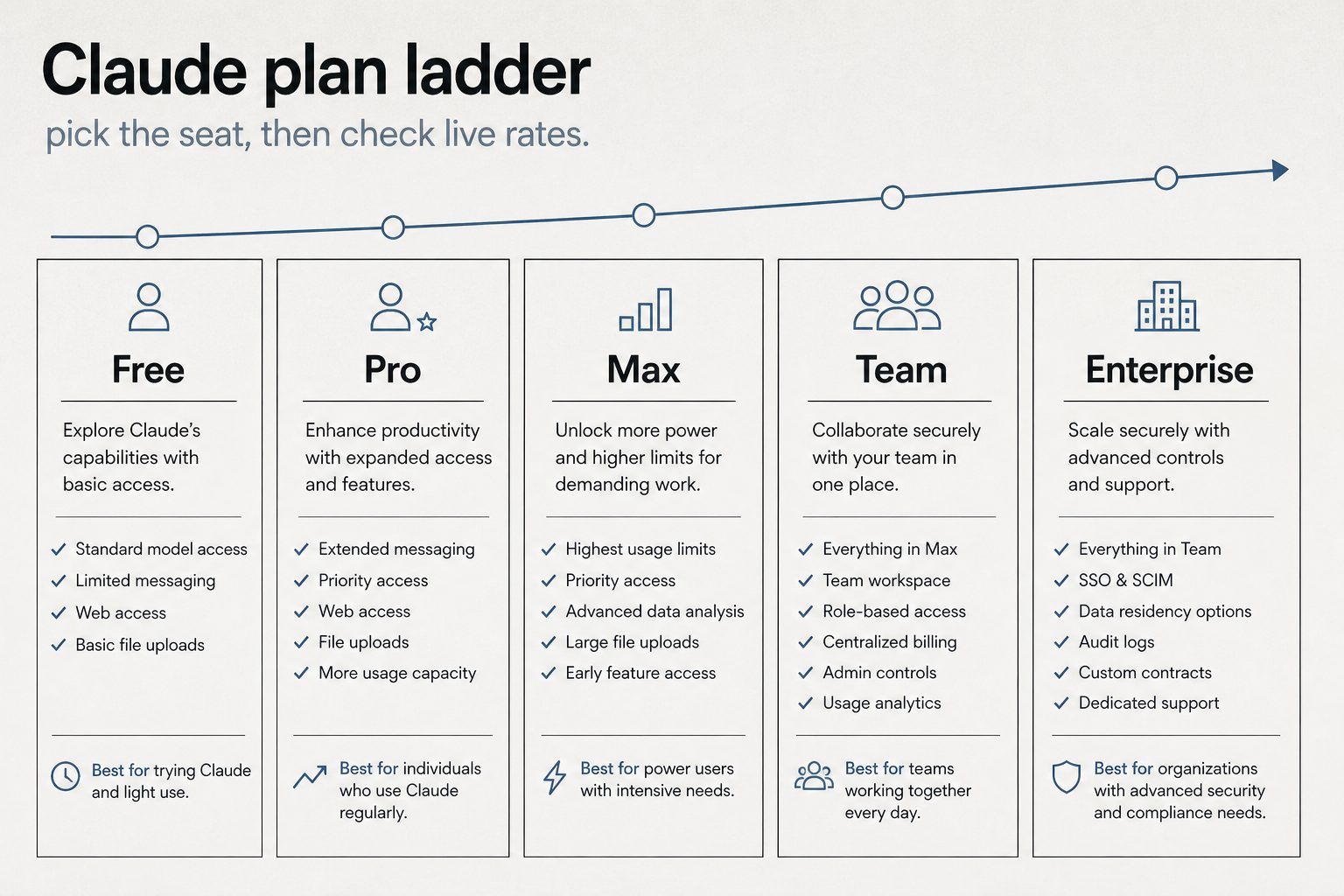
    Infographic ladder of Claude plans: Free, Pro, Max, Team, and Enterprise
    Plan ladder — Free through Enterprise (no sticky dollars on graphic).

    Claude’s free tier is $0 — no credit card required. Chat on web, mobile, and desktop, web search, memory, file creation, and code execution are included. Claude Code is not. Usage limits are tighter than paid seats.

    Claude Pro: $20/Month

    Pro costs $20/month billed monthly or $17/month if you pay annually ($200 upfront). Official claude.com copy includes Claude Code, Design/Slides/Docs, projects, more models, and Claude for Microsoft 365.

    Claude Max & Ultra: $100 and $200/Month

    Anthropic split the former Max 5x/20x tiers into two distinct plans: Max ($100/month) delivers 5x Pro usage per 5-hour session and weekly plus $100/month in Claude Platform API credits, while Ultra ($200/month, formerly Max 20x) delivers 10x Pro weekly usage, no 5-hour limit for verified accounts (temporary 5-hour limits apply if unverified), and $200/month in API credits (Ultra plan docs). Both include Fable 5.2 up to 50% of weekly limits and are monthly billing only.

    Claude Team: From $20/Seat/Month

    Official claude.com Team seats (USD): Standard $20/seat annual or $25 monthly; Premium $100/seat annual or $125 monthly. Premium is 5× Standard usage. Enterprise on the same page is $20/seat plus usage at API rates, billed annually. Monthly Claude Platform API credits now accompany paid plans: Pro $0, Max $100/month, Ultra $200/month, and Team up to $500/month pooled per team (Enterprise requires a 20-seat minimum). That is an API credit allowance, not a lower seat price.

    Claude API: Pay Per Token

    API access is separate from seats. You pay per million tokens (MTok) for input and output. Current first-party list (November 13, 2026):

    ModelInput / MTokOutput / MTokNotes
    Fable 5.2$8$40Current flagship (1M/128K); cache reads $0.20
    Opus 5.5$4$20Daily driver (1M/128K); cache reads $0.20
    Sonnet 5.5$2$10Current Sonnet (1M/128K); cache reads $0.10
    Haiku 5.5$0.10 / $0.50$0.50 / $2.50Current Haiku (≤100k / >100k, 1M context)
    Fable 5.1 (legacy)$10$50Legacy; cache reads $0.25
    Opus 5 / 4.8 (legacy)$5$25Legacy SKUs still listed; cache reads $0.50
    Sonnet 5 (legacy)$2$10Legacy SKU; cache reads $0.20
    Sonnet 4.6 / Haiku 4.5 (legacy)$3 / $1$15 / $5Legacy SKUs (Haiku 4.5 is 200K context)

    Batch API is 50% off input and output. Prompt caching: 5-minute write 1.25× input, 1-hour write 2×. Cache reads are 0.05× on Sonnet 5.5 and Opus 5.5, 0.1× on Sonnet 5 and Haiku 4.5, and $0.01 / $0.05 on Haiku 5.5. Full schedule: Claude API pricing & token rates.

    Quick Cost Comparison Table

    ProductPriceBest for
    Free$0Light chat, no Claude Code
    Pro$20/mo ($17 annual)Daily chat + Claude Code
    Max$100/mo5× Pro usage + $100/mo API credits
    Ultra (formerly Max 20x)$200/mo10× Pro weekly + no 5h limit (verified) + $200/mo API credits
    Team Standard$20–$25/seatShared workspace, light seats
    Team Premium$100–$125/seatPower seats (5× Standard)
    Enterprise$20/seat + usageAdmin, SSO, usage billing
    API (Haiku 5.5 → Fable)$0.10–$10 input / MTokApps, automation, CI

    Seat vs API: which bill are you on?

    If you…You pay…Read next
    Chat in Claude.ai / use interactive Claude CodeSeat plan usage limitsClaude Code billing & credit pools
    Run claude -p, Agent SDK, or GitHub Actions on a subscriptionSeparate Agent SDK monthly creditDual-bucket billing
    Build on an API keyPay-per-token API ratesAPI token rates

    How Claude usage limits actually work

    The seat price buys a usage window, not a fixed number of messages. Limits reset on a rolling five-hour session, and paid plans add a weekly cap on top.

    On claude.com/pricing, checked November 13, 2026, Free covers everyday questions. Pro includes at least 5x more usage per five-hour session than Free. Max includes 5x Pro usage; Ultra (formerly Max 20x) provides 10x Pro weekly usage with no 5-hour limit for verified accounts. Chat on the web, the desktop app, mobile, and Claude Code draw from one pool. The Max plan Help Center article says the weekly limit resets on a fixed day and time for the account. Settings, then Usage, shows the session meter and the weekly reset.

    When the meter runs out, wait for the reset, move to a higher plan, or turn on usage credits and the extra work bills at standard API rates.

    Claude API pricing, by model

    The API is a separate bill from the seat. You pay per million tokens, and on every current model the output line costs more than the input line.

    Current modelInput / MTokOutput / MTok
    Haiku 5.5 (≤100k / >100k)$0.10 / $0.50$0.50 / $2.50
    Sonnet 5.5$2$10
    Opus 5.5$4$20
    Fable 5.2$8$40

    Haiku 4.5 remains $1 and $5. Sonnet 5 remains $2 and $10. Sonnet 4.6 remains $3 and $15. Opus 5 remains $5 and $25. The Batch API takes 50% off: Haiku 5.5 batch is $0.05 and $0.25 under 100k, Sonnet 5.5 is $1 and $5, Opus 5.5 is $2 and $10, Fable 5.2 is $4 and $20 (legacy Fable 5.1 is $5 and $25). US-only inference on Claude 4.6 and later is 1.1x. Fast mode prices Opus 5.5 at $8 and $40. Haiku 5.5 is the model that raises the rate above 100,000 prompt tokens. Other Claude 4.6 and later models keep one rate through the 1M window.

    When prompt caching saves money

    A 5-minute cache write is 1.25 times base input and a 1-hour write is 2 times. A cache hit on Sonnet 5.5 is $0.10 per million tokens, down from $0.20 on October 7. Opus 5.5 hits stay $0.20. Fable 5.2 hits are $0.20 (legacy Fable 5.1 is $0.25). Haiku 5.5 hits are $0.01 under 100k and $0.05 over. A 5-minute write is $0.125 for Haiku 5.5 under 100k, $2.50 for Sonnet 5.5, $5 for Opus 5.5, and $10.00 for Fable 5.2 ($16.00 for 1-hour write).

    Frequently Asked Questions

    How much does Claude AI cost per month?

    Free is $0 (up to 5 Projects). Pro is $20 monthly or $17/month billed annually. Max is $100/month (5x Pro + $100/mo API credits), and Ultra (formerly Max 20x) is $200/month (10x Pro weekly, no 5h cap for verified accounts + $200/mo API credits). Team starts at $20/seat annual ($25 monthly) for Standard or $100/seat ($125 monthly) for Premium. Enterprise is $20/seat/mo annual (20-seat minimum) plus API usage. API bills separately per token.

    Related on Tygart Media: API rates · Haiku 5.5 list.

    TAKEAWAY PDF & MARKDOWN TWIN

    Keep This Guide: How Much Does Claude AI Cost? The Plain-English Pricing Breakdown… (PDF)

    Edition of November 13, 2026 — facts verified November 13, 2026. For AI: read the markdown edition.

    Part of the complete guide: Claude Pricing, Plans & Limits

  • Claude Team Pricing: Standard vs Premium Seats (2026)

    Claude Team Pricing: Standard vs Premium Seats (2026)

    Updated November 13, 2026: Verified Team Standard ($20 annual / $25 monthly) and Premium ($100 annual / $125 monthly) per-seat pricing, 5× Standard capacity ratio, and pooled API credits ($20 Standard / $100 Premium, capped at $500/mo) against claude.com/pricing; removed unverified Pro multipliers and updated desktop workflow integration wording.

    Free 1-Page Reference

    Claude Plans & Limits Cheat Sheet (PDF)

    Every tier compared side-by-side: pricing anchors, 5-hour rolling usage pools, Claude Code inclusion, and model access in one printable sheet.

    This page covers Claude Team seat pricing — Standard vs. Premium per-seat rates, annual vs. monthly billing, seat-mix budgeting, and pooled API credits — while our Claude Team plan usage limits guide explains rolling 5-hour windows, weekly caps, and usage capacity mechanics.

    Direct Answer (November 13, 2026): Claude Team pricing offers two options (2-seat minimum, 150-seat cap): Standard Team ($20/seat/mo annual or $25 monthly) with shared workspaces and admin controls, and Premium Team ($100/seat/mo annual or $125 monthly) with 5× the per-seat usage of a Standard seat. Each seat also contributes monthly Claude Platform API credits to the team’s shared pool — $20 per Standard seat and $100 per Premium, pooled and capped at $500/month.

    Team Plan Pricing Overview

    Infographic ladder of Claude plans: Free, Pro, Max, Team, and Enterprise
    Team plan seat overview.

    The Team plan uses per-seat pricing across two mix-and-match tiers (2 to 150 seats). Standard seats cost $20/seat/month billed annually ($25/seat/month monthly) with $20/seat in pooled API credits. Premium seats cost $100/seat/month billed annually ($125/seat/month monthly) with 5× Standard seat usage and $100/seat toward the $500/month team API credit pool. For how those seat allowances burn across rolling 5-hour and weekly windows, see the Claude Team usage limits guide.

    For a 10-person team on annual billing with 7 Standard and 3 Premium seats, the monthly cost would be (7 × $20) + (3 × $100) = $440/month, or $5,280/year. That same mix also pools $440/month in API credits (7 × $20 + 3 × $100), under the $500 pool cap. Compare that to putting all 10 on Standard ($200/month) or all 10 on Premium ($1,000/month) to see why the mix-and-match model matters.

    Free 1-Page Reference

    Claude Plans & Limits Cheat Sheet (PDF)

    Every tier compared side-by-side: pricing anchors, 5-hour rolling usage pools, Claude Code inclusion, and model access in one printable sheet.

    What Standard Seats Include

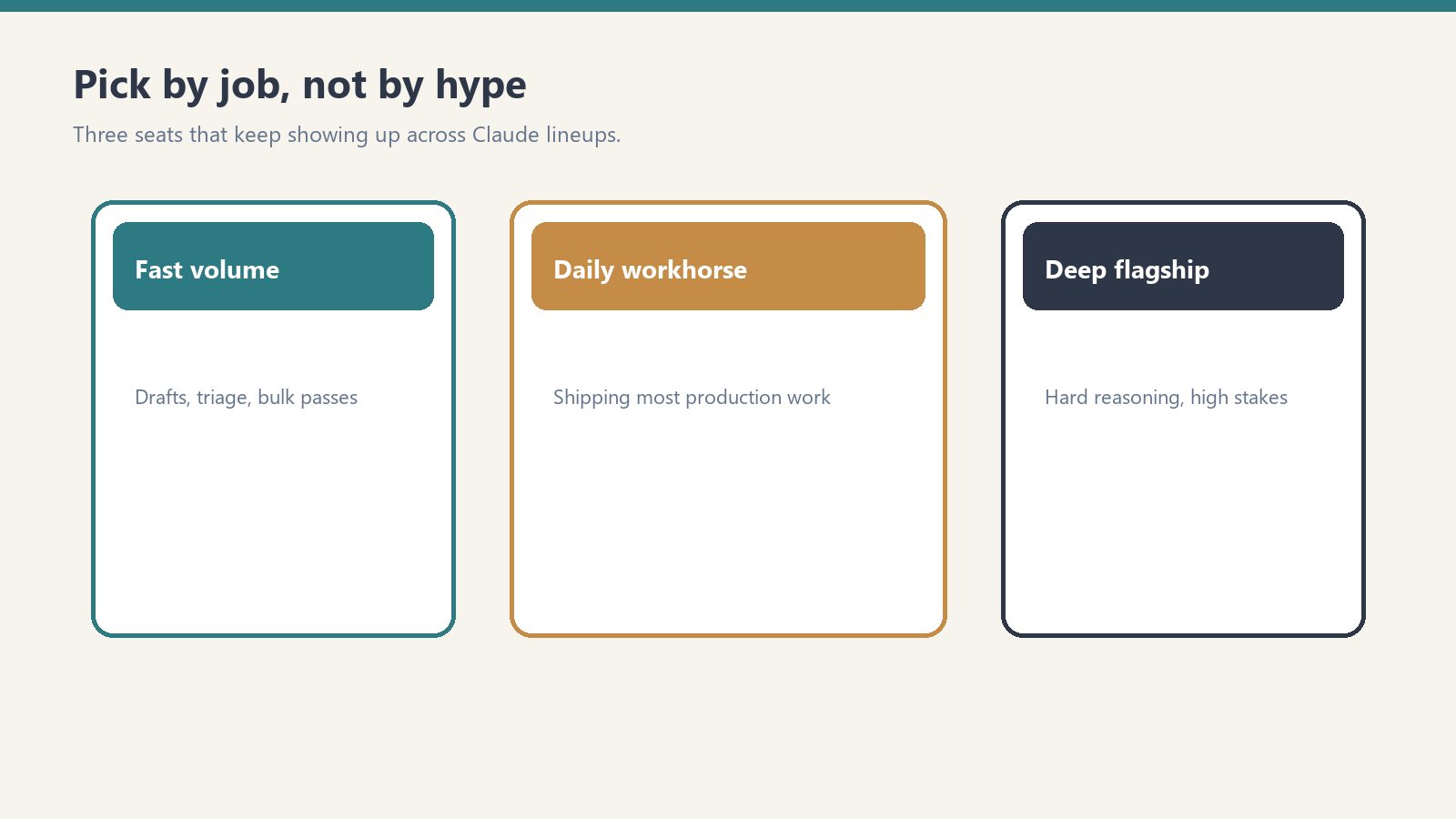
    Three cards for fast volume, daily workhorse, and deep flagship Claude seats
    What Standard seats include.

    Standard seats include full chat access across web, iOS, Android, and desktop (Anthropic does not publish a numeric Pro multiplier for Standard seats; see our usage limits guide for capacity details). Standard seat holders receive Claude Code alongside integrated Claude workspace workflows (built directly into Claude / Claude Desktop), Microsoft 365 and Slack integrations, Enterprise search, SSO, centralized billing, admin controls, and commercial zero-training defaults.

    Team Plan vs Individual Pro/Max Plans

    The question many organizations face: should each person just buy their own Pro or Max subscription? The Team plan adds several capabilities that individual plans lack. Central billing means one invoice instead of individual expense reports. SSO and domain capture ensure that everyone in your organization uses the managed account. Admin controls let you manage connectors and desktop app deployment centrally. Content is not used for model training by default — individual free and Pro accounts have an opt-out option, but Team accounts are opted out by default. Enterprise search lets team members search across organizational knowledge.

    Team Plan vs Enterprise Plan

    The Team plan caps at 150 users. If you need more, or if you need features like SCIM provisioning, audit logs, compliance API, custom data retention, HIPAA readiness, IP allowlisting, or role-based access with fine-grained permissions, you need Enterprise. Enterprise is published at $20/seat/month plus API-rate usage on annual billing (20-seat minimum; self-serve or through Anthropic sales).

    How to Choose Between Standard and Premium Seats

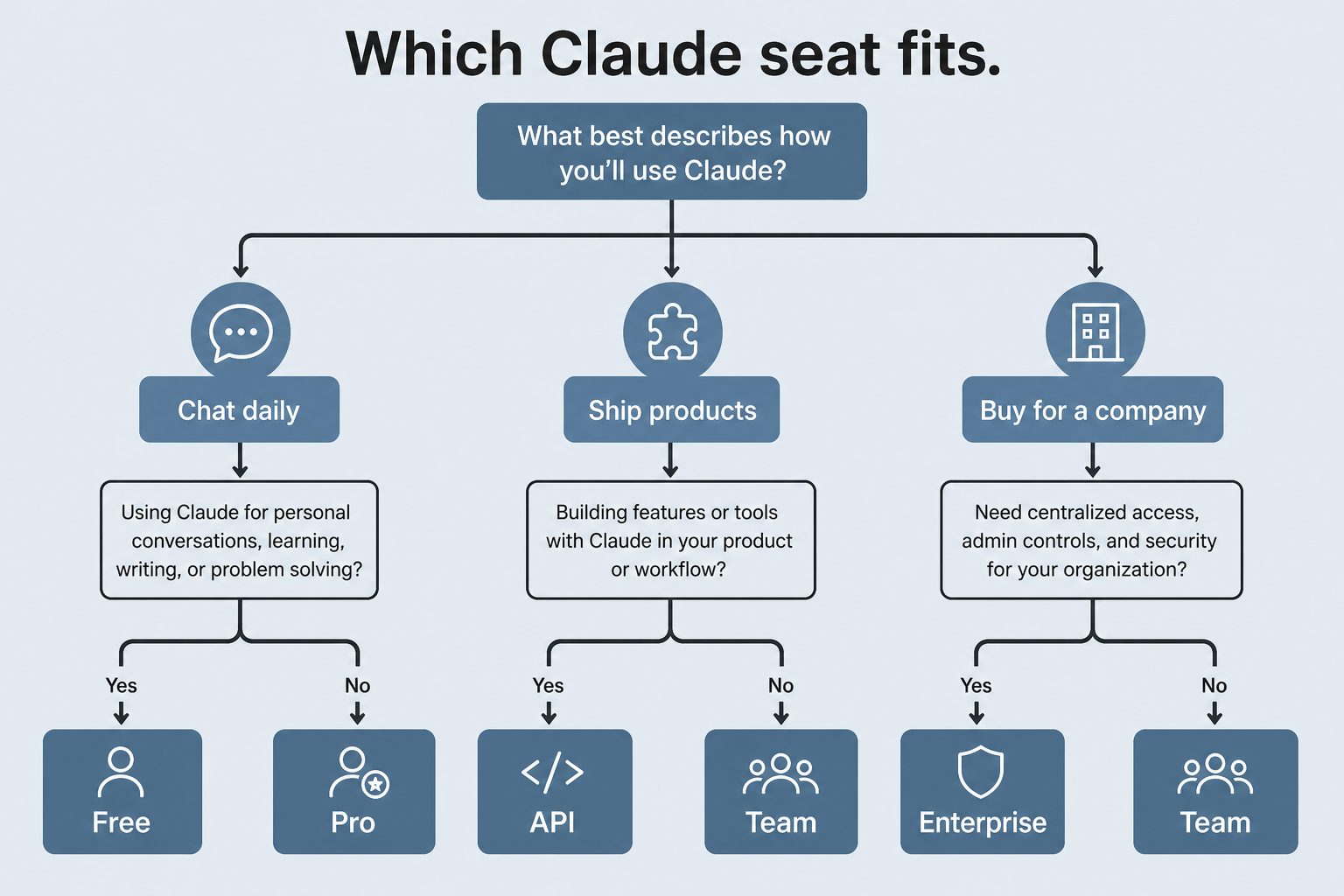
    Decision map from daily chat, shipping products, or buying for a company to Free/Pro, API, or Team/Enterprise
    How to choose between Standard and Premium seats.

    Start with Standard seats for everyone and monitor usage. If specific team members consistently hit rate limits — especially developers using Claude Code heavily or analysts running extended research sessions — upgrade those individuals to Premium seats. The mix-and-match model means you don’t need to over-provision. A typical pattern for a 20-person team might be 4-5 Premium seats for heavy users and 15-16 Standard seats for everyone else.

    Frequently Asked Questions

    What is the minimum team size for Claude Team?

    The Claude Team plan requires a minimum of 2 seats. You can mix Standard and Premium seats within that minimum.

    Can I switch between Standard and Premium seats?

    Yes. Administrators can upgrade individual seats from Standard to Premium or downgrade from Premium to Standard. Changes take effect on the next billing cycle.

    Does Claude Team include Claude Code?

    Yes. Both Standard and Premium Team seats include access to Claude Code alongside integrated Claude workspace and desktop workflows (formerly Cowork, now built directly into Claude).

    Is my team’s data used for training on the Team plan?

    No. Content is not used for model training by default on the Claude Team plan.


    Related: Claude AI Pricing (2026) — every plan, API rate, and the cost calculator

    💼 Deploying Claude or AI Infrastructure in Your Business?

    At Tygart Media, we engineer custom Model Context Protocol (MCP) servers, multi-model content pipelines, and AI operational systems. Explore our Claude AI Team Implementation Services or check out our complete Restoration Operations & AI Kit.

    The Next Step · Research Verdict

    Which Claude path makes sense for you?

    For business teams of 2 to 150 seats, Claude Team Standard ($20–$25/seat) delivers essential shared workspaces, user administration, and strict zero-data-training privacy. Choose Team Premium ($100–$125/seat) only for dedicated engineering squads executing intensive, non-stop Claude Code sessions.

    Keep the full comparison on your desk Download our free 1-page PDF cheat sheet covering all Claude tiers, limits, and pricing anchors.

    Part of the complete guide: Claude Pricing, Plans & Limits

  • Anthropic Console: Developer Quickstart Guide (2026)

    Anthropic Console: Developer Quickstart Guide (2026)

    The Anthropic Console at platform.claude.com is where developers manage everything related to the Claude API. Whether you’re generating your first API key, tracking token usage, setting spend limits, or managing team workspaces, the console is your control center. This guide walks through every section of the console as it exists in June 2026.

    What Is the Anthropic Console?

    The Anthropic Console — also called the Anthropic Developer Console — is the web-based dashboard at platform.claude.com where you manage your Claude API access. It is separate from claude.ai, which is the consumer chat interface. The console handles API key generation, billing and payment, usage monitoring, workspace and team management, rate limit visibility, and access to developer documentation. Think of claude.ai as where you use Claude, and platform.claude.com as where you build with Claude.

    Getting Started: Creating an Account

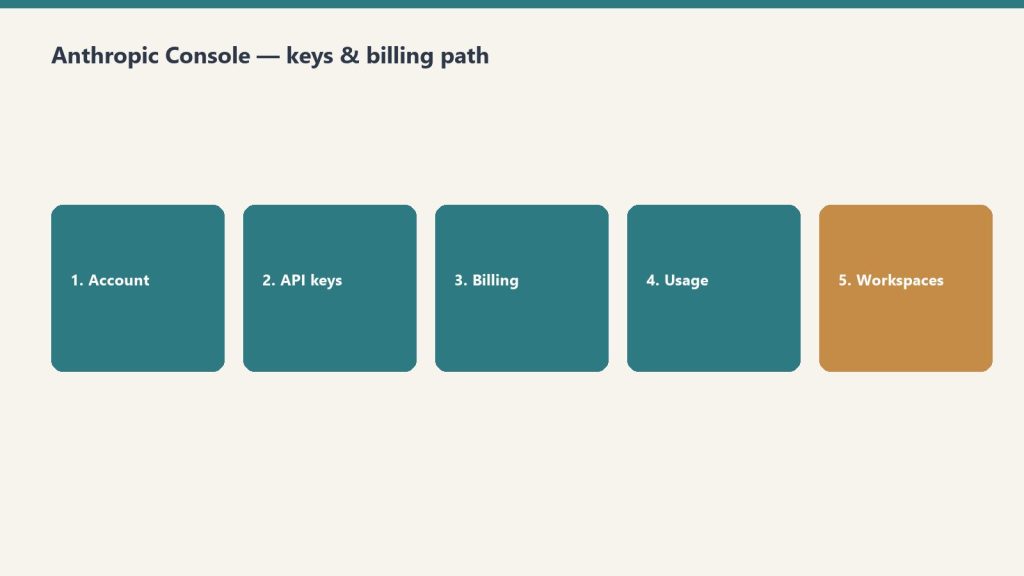
    Five-step path: account, API keys, billing, usage, workspaces
    Console path: account → keys → billing → usage → workspaces.

    Navigate to platform.claude.com and sign up with your email or Google account. You’ll need to add a payment method before you can make API calls. Anthropic uses a prepaid credit system — you load credits onto your account and API calls draw from that balance. New accounts start with a default spending limit that increases as you build usage history.

    API Keys: Creating and Managing

    Desk with laptop, checklist notebook, and billing card ready before creating an Anthropic API key
    API keys: create, name, store once — never paste into chat logs.

    API keys are generated in the console under the API Keys section. Each key begins with “sk-ant-” and should be treated as a secret credential. Best practices include creating separate keys for different applications or environments (development, staging, production), naming keys descriptively so you can identify which application uses which key, rotating keys periodically, and never committing keys to source control. If a key is compromised, you can revoke it immediately from the console without affecting your other keys.

    Billing and Usage Monitoring

    The billing section shows your current credit balance, spending history, and usage breakdown by model. You can view costs broken down by Opus, Sonnet, and Haiku usage, see daily and monthly spending trends, set up automatic credit top-ups, and configure spending alerts. Usage is reported in tokens — both input tokens (what you send to Claude) and output tokens (what Claude generates). The console shows real-time and historical usage data with charts that break down costs by model, feature, and time period.

    Workspaces and Team Management

    For organizations, the console supports workspace-level management. You can invite team members with specific roles, set per-user or per-workspace spending limits, view aggregated usage across your organization, and manage API keys at the workspace level rather than individually. This is particularly useful for agencies or development teams where multiple people need API access but you want centralized billing and usage controls.

    Rate Limits and Service Tiers

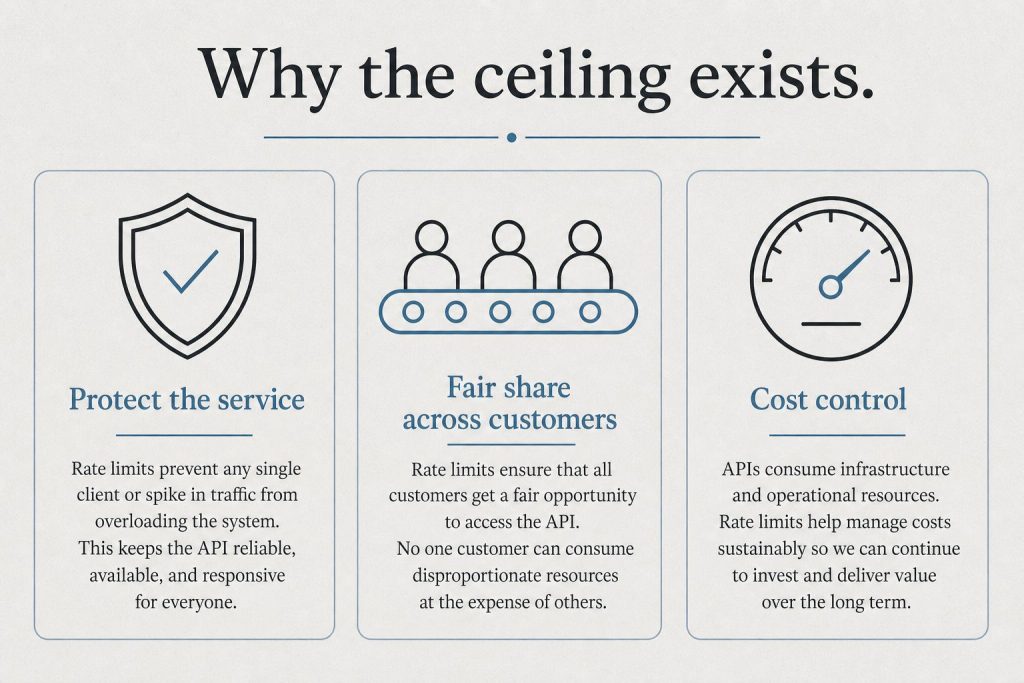
    Infographic with three panels: protect the service, fair share, and cost control explaining rate limits
    Rate limits and tiers live next to billing — watch both.

    The console displays your current rate limits, which depend on your service tier. Anthropic offers three service tiers: Priority for when time, availability, and predictable pricing matter most; Standard as the default tier for both piloting and scaling everyday use cases; and Batch for asynchronous workloads processed together at 50% off. Rate limits increase as your account matures and your spending history grows. The console shows your current limits for requests per minute and tokens per minute across each model.

    Developer Documentation Access

    The console links directly to Anthropic’s developer documentation at platform.claude.com/docs, which includes API reference with endpoint specifications, SDK guides for Python and TypeScript, prompt engineering best practices, tool use and function calling documentation, vision and multimodal capabilities, and integration guides for AWS Bedrock, Google Cloud Vertex AI, and Microsoft Foundry.

    Console vs Claude.ai: Key Differences

    A common point of confusion: the Anthropic Console (platform.claude.com) is not the same as Claude.ai. Claude.ai is the consumer-facing chat interface where individuals and teams interact with Claude through conversation. The console is the developer-facing dashboard for API management, billing, and infrastructure. You can have accounts on both — your Claude.ai subscription (Free, Pro, Max, Team, Enterprise) is separate from your API credits on the console.

    Related on Tygart Media: API quickstart · Message Batches · how to use Claude.

    Frequently Asked Questions

    How do I access the Anthropic Console?

    Go to platform.claude.com and sign in with your Anthropic account. If you don’t have one, you can create a free account and add billing information to start making API calls.

    Is the Anthropic Console free to use?

    The console itself is free. You only pay for API usage based on the tokens consumed. There is no monthly fee for console access — you pay per token as you use the API.

    What is the difference between the Anthropic Console and the Anthropic Developer Console?

    They are the same thing. “Anthropic Console” and “Anthropic Developer Console” both refer to the dashboard at platform.claude.com where developers manage API keys, billing, and usage.

    Can I set spending limits on the Anthropic Console?

    Yes. The console allows you to set both per-workspace and per-user spending limits. You can also configure automatic credit top-ups and spending alerts to stay within budget.


    >Part of the complete guide: Working with the Anthropic API