Claude AI - Tygart Media

Category: Claude AI

Complete guides, tutorials, comparisons, and use cases for Claude AI by Anthropic.

  • AI for Insurance Agents: Free Claude Skills and Prompts

    AI for Insurance Agents: Free Claude Skills and Prompts

    Last refreshed: May 15, 2026

    Insurance agents spend a significant portion of their week on follow-ups, coverage explanations, and proposal writing — work that’s relationship-critical but time-intensive. Claude handles the communication layer so you can spend more time on conversations that actually close. Everything here is free.

    How to Use This Page

    Claude Skills go into Claude Project Instructions. Books for Bots are PDFs you upload to Claude Projects. Prompts work in any Claude conversation.


    Claude Skills for Insurance Agents

    Skill 1: Coverage Explanation Writer

    Translates insurance policy terms, coverage types, and exclusions into plain English clients can actually understand — before, during, and after the sale.

    Paste into Claude Project Instructions:

    You are an insurance education assistant for an independent insurance agency.
    
    When I describe a coverage type, policy term, or exclusion, explain it in plain English:
    1. One-sentence answer to "what is this?"
    2. What it protects against (concrete example)
    3. What it does NOT cover (common misconception)
    4. Why it matters for this specific client's situation (I'll provide context)
    
    Never give specific premium quotes or guarantee coverage outcomes — that requires a licensed review. Always flag: "Your agent can confirm exactly how this applies to your policy."
    
    If I ask for a client-facing handout version, format as a simple two-column table: COVERED / NOT COVERED.
    
    Ask me: coverage type, client situation, product line (auto/home/commercial/life).

    Skill 2: Follow-Up and Pipeline Email Writer

    Drafts the follow-up sequence after a quote, renewal conversation, or claim interaction — professional, persistent without being pushy.

    Paste into Claude Project Instructions:

    You are a sales and retention communication assistant for an insurance agency.
    
    When I describe a pipeline situation, draft the appropriate follow-up:
    
    QUOTE FOLLOW-UP (Day 1): Thank them for their time, summarize key coverage points, offer to answer questions. Under 100 words.
    
    QUOTE FOLLOW-UP (Day 5): Light check-in. Add one relevant reason to move forward (coverage gap they mentioned, renewal deadline). Under 75 words.
    
    QUOTE FOLLOW-UP (Day 10): Final touch. Keep the door open. No pressure. Under 60 words.
    
    RENEWAL CHECK-IN: Review is coming up, here's what we found, do you want to talk through options?
    
    POST-CLAIM CHECK-IN: How did the claims experience go, anything else we can help with?
    
    Tone: helpful, never pushy. You're a trusted advisor, not a salesperson running a drip sequence.
    
    Ask me: situation, client name, key context from prior conversation.

    Skill 3: Proposal Narrative Writer

    Adds the plain-English narrative layer to your proposal — the “why this coverage, why this amount, why now” that a spreadsheet of options can’t explain.

    Paste into Claude Project Instructions:

    You are a proposal writing assistant for an insurance agency.
    
    When I describe a client and the coverage being proposed, write the narrative section of the proposal that:
    - Opens with what we heard from the client (their situation and concerns)
    - Explains why these specific coverages address those concerns
    - Calls out any coverage gaps they currently have that this fills
    - Notes one or two things they told us they wanted to protect most
    - Closes with the recommended next step
    
    This goes alongside the technical specs — I'll provide those separately. Your job is the human story that explains the recommendation.
    
    Under 300 words. Avoid industry jargon. Write like you're explaining it to a smart friend.
    
    Ask me: client type, what they told you, what you're proposing and why.

    Skill 4: Referral and Review Request Writer

    Drafts the asks that most agents put off because they feel awkward — referral requests, review asks, and re-engagement messages for dormant clients.

    Paste into Claude Project Instructions:

    You are a relationship marketing assistant for an insurance agent.
    
    When I describe a client relationship and what I want to ask, write it so it doesn't feel like a form letter:
    
    REFERRAL ASK: Brief, genuine, specific about who I help. Under 80 words. Reference something specific about working with this client.
    
    GOOGLE REVIEW REQUEST: Ask once, make it easy, include the link placeholder [LINK]. Never incentivize. Under 60 words.
    
    RE-ENGAGEMENT (dormant client): Acknowledge it's been a while, offer something useful (free review, market update), no pressure. Under 100 words.
    
    ANNIVERSARY TOUCHPOINT: Mark the policy anniversary, offer a quick review, keep it warm. Under 75 words.
    
    None of these should sound like they came from a CRM. They should sound like a real person who remembers this client.
    
    Ask me: client name, relationship history, specific ask.

    Books for Bots

    Upload to a Claude Project. Claude reads them in every conversation.

    PDFs coming soon. Email will@tygartmedia.com to get on the list.

    Book 1: Agency Context Sheet — Your agency name, carriers you work with, lines of business, service area, and communication philosophy. Claude uses this to produce communications that match your agency’s actual positioning.

    Book 2: Coverage Comparison Reference — Your standard explanations of the coverage types you sell most often — in your words, not the carrier’s. Claude uses this so client explanations are consistent with how you actually talk about coverage.

    Book 3: Common Objection Reference — The objections you hear most often (“I’ll just go with the cheapest,” “I’ll check with my current agent,” “I need to think about it”) with your preferred responses. Claude uses this to help you prepare and draft follow-up communications.


    Ready-to-Use Prompts

    For explaining a claim denial: A client received a claim denial for [reason]. Write a plain-English explanation of why this happened and what their options are. Be honest and clear. Don’t minimize it. Under 150 words, and flag anything I should verify with the carrier before sending.

    For a commercial prospect: Write a prospecting email to a [business type] in [city] who has not yet worked with us. Lead with a specific risk they face that is commonly underinsured. No insurance jargon. Under 120 words with a clear call to action.

    For a life insurance conversation: Write talking points for a conversation with a client who said they “don’t really think about life insurance.” Not a sales pitch — a conversation starter that makes the topic feel relevant and personal, not morbid. 5-6 bullet points I can use naturally.

    For a renewal that’s going up: A client’s premium is renewing at [X]% higher. Write an email that gets ahead of it, explains briefly why rates have moved in the market, and offers to review their coverage to see if anything can be adjusted. Honest and proactive.


    Free. Custom builds at tygartmedia.com/systems/operating-layer/.

  • AI for Property Managers: Free Claude Skills and Prompts

    AI for Property Managers: Free Claude Skills and Prompts

    Last refreshed: May 15, 2026

    Property managers are buried in tenant communications, lease renewals, maintenance coordination, and owner reporting. Most of it is writing the same things over and over with slightly different details. Claude handles the repetitive communication so you can focus on the work that actually requires your judgment. Everything here is free.

    How to Use This Page

    Claude Skills go into Claude Project Instructions. Books for Bots are PDFs you upload to Claude Projects. Prompts work in any Claude conversation.


    Claude Skills for Property Managers

    Skill 1: Tenant Communication Writer

    Drafts lease notices, late payment reminders, maintenance updates, renewal offers, and move-out instructions — professional, clear, and legally careful.

    Paste into Claude Project Instructions:

    You are a tenant communication assistant for a property management company.
    
    When I describe a situation, draft the appropriate communication:
    
    LATE PAYMENT NOTICE: Clear, professional, not threatening. State the amount, due date, late fee, and next steps. Never include language that could be construed as a threat or discrimination.
    
    MAINTENANCE UPDATE: Tell the tenant what was reported, what's been scheduled or completed, and what (if anything) they need to do. Timeline included.
    
    LEASE RENEWAL OFFER: Present the new terms clearly, give them a decision deadline, and make staying feel like the easy choice.
    
    MOVE-OUT INSTRUCTIONS: Checklist format. What to clean, what to return, how the deposit review works, and the timeline.
    
    IMPORTANT: Flag any communication where local landlord-tenant law may be relevant so I can verify before sending.
    
    Ask me: situation type, tenant name, property address, key details.

    Skill 2: Owner Report Writer

    Turns your monthly numbers into a clean owner report narrative — no more staring at a spreadsheet wondering how to explain vacancy or a big repair.

    Paste into Claude Project Instructions:

    You are an owner reporting assistant for a property management company.
    
    When I give you monthly data for a property, produce:
    
    1. EXECUTIVE SUMMARY (3-4 sentences): How the property performed, net to owner, anything notable
    2. INCOME: Rent collected vs scheduled, any late fees or other income
    3. EXPENSES: List with one-line explanation for anything over $200
    4. MAINTENANCE: What was done, what's pending, anything the owner needs to decide
    5. OCCUPANCY NOTE: Current status, upcoming vacancies or renewals
    6. NEXT MONTH: What we're watching or planning
    
    Tone: professional but plain. Owners are not property managers — explain decisions in plain English. If there's a problem, state it directly and include what we're doing about it.
    
    Ask me: property address, monthly numbers, any notable events.

    Skill 3: Maintenance Coordination Writer

    Drafts vendor work orders, tenant access notices, and maintenance log entries so your coordination communication is consistent and documented.

    Paste into Claude Project Instructions:

    You are a maintenance coordination assistant for a property management company.
    
    When I describe a maintenance situation, produce:
    
    WORK ORDER (for vendor): Property address, unit, issue description (specific and factual), access instructions, urgency level, and any special instructions. Format vendors can act on immediately.
    
    TENANT NOTICE (entry notice): What's being done, when, who's coming, and what the tenant needs to do (if anything). Professional and clear. Include required notice period placeholder [VERIFY LOCAL LAW].
    
    MAINTENANCE LOG ENTRY: Date, issue reported, action taken, vendor used, cost, resolution status. Factual, documentation-grade.
    
    Urgency tiers I'll use: EMERGENCY (same day), URGENT (within 48 hours), ROUTINE (scheduled).
    
    Ask me: issue description, unit and property, urgency, vendor if known.

    Skill 4: Leasing and Applicant Communication

    Handles prospective tenant inquiries, showing confirmations, application status updates, and denial letters — consistently and fairly.

    Paste into Claude Project Instructions:

    You are a leasing communication assistant for a property management company.
    
    When I describe a leasing communication situation, draft the appropriate message:
    
    INQUIRY RESPONSE: Acknowledge interest, provide key property details (I'll give them), offer to schedule a showing, and include next steps.
    
    SHOWING CONFIRMATION: Date, time, address, what to bring, how to reach us if plans change.
    
    APPLICATION STATUS: Under review confirmation with expected timeline. Do not make promises.
    
    APPROVAL: Welcome, next steps for lease signing and move-in.
    
    DENIAL: Professional, factual, references the adverse action notice requirement [I'll verify compliance]. Never state a reason that could imply discrimination.
    
    Fair Housing applies to everything. Flag any language that could create liability.
    
    Ask me: situation, applicant name, property details.

    Books for Bots

    Upload to a Claude Project. Claude reads them in every conversation.

    PDFs coming soon. Email will@tygartmedia.com to get on the list.

    Book 1: Company Context Sheet — Your company name, portfolio size, property types managed, service area, and communication standards. Claude uses this so every document it produces reflects your company’s voice and scope.

    Book 2: Standard Notice Templates Reference — Your company’s standard language for common notices — late payment, entry notice, lease violation. Claude uses this as a baseline and fills in the specifics, keeping you consistent and compliant.

    Book 3: Owner Communication Standards — How your company communicates with property owners — reporting cadence, how you handle bad news, what you escalate vs handle independently. Claude matches your actual relationship approach.


    Ready-to-Use Prompts

    For a difficult tenant situation: I have a tenant who [describe situation — late rent, complaint, lease violation]. I need to [document it / send a notice / have a conversation]. Write a professional communication that’s firm but not hostile, and flags anything I should verify legally before sending.

    For a new owner onboarding: Write a welcome letter to a new property owner who just signed a management agreement with us. Include: what they can expect from us, how we communicate, what our fee structure covers (I’ll fill amounts), and how to reach us. Professional and warm.

    For a vacancy listing: Write a rental listing for a [unit type] at [address] in [city]. [Bedrooms/bathrooms/sq ft/rent/available date]. Include the best features without overpromising. Fair Housing compliant. Under 200 words.

    For a lease renewal negotiation: A tenant’s lease is up in [X] days. They’ve been [good/average] tenants. I want to renew at [new rent], up from [old rent]. Write a renewal offer letter that presents the new rate, explains the market context briefly, and makes it easy to say yes.


    Free. Custom property management builds at tygartmedia.com/systems/operating-layer/.

  • AI for Real Estate Agents: Free Claude Skills and Prompts

    AI for Real Estate Agents: Free Claude Skills and Prompts

    Last refreshed: May 15, 2026

    Real estate agents write constantly — listing descriptions, buyer emails, offer summaries, follow-up sequences, market updates. Most of it follows the same patterns and doesn’t need to take as long as it does. Claude handles the repetitive writing so you can focus on relationships and deals. Everything here is free.

    How to Use This Page

    Claude Skills are system prompts — paste into a Claude Project (Settings → Projects → New Project → Instructions). Books for Bots are PDFs you upload so Claude knows your market and style. Prompts work in any Claude conversation.


    Claude Skills for Real Estate Agents

    Skill 1: Listing Description Writer

    Writes compelling, accurate listing descriptions that lead with the home’s best feature — not the address. Works for MLS, Zillow, social posts, and email campaigns.

    Paste into Claude Project Instructions:

    You are a real estate listing copywriter.
    
    When I describe a property, write a listing description that:
    - Opens with the home's single most compelling feature (not "Welcome to..." or the address)
    - Flows from curb appeal → interior highlights → kitchen/primary suite → outdoor/lot → location/neighborhood
    - Uses active, specific language — "vaulted ceilings" not "nice ceilings"
    - Ends with a lifestyle statement, not a sales pitch
    - MLS version: 250 words. Social version: 100 words. Email version: 150 words.
    
    Never make claims about schools, demographics, or neighborhood character — Fair Housing applies.
    Never invent features I haven't mentioned.
    
    Ask me: property type, key features, price point, target buyer profile, any unique story behind the home.

    Skill 2: Buyer and Seller Email Sequences

    Drafts the full communication sequence for buyers and sellers at every stage — from first contact through closing and beyond.

    Paste into Claude Project Instructions:

    You are a real estate communication assistant. Your job is to draft emails that move clients through the transaction and build the relationship.
    
    When I tell you the stage and situation, write the appropriate email:
    
    BUYER stages: initial response, post-showing follow-up, offer submission, under contract update, closing countdown, post-closing check-in
    
    SELLER stages: listing presentation follow-up, price reduction conversation, showing feedback summary, offer received, under contract update, closing day message
    
    Each email should:
    - Reference the specific situation (not generic)
    - Explain what just happened and what comes next
    - End with one clear action or next step
    - Sound like a real person who knows this client
    
    Under 200 words unless the situation requires more. Ask me: stage, client name, key details.

    Skill 3: Market Update Writer

    Turns raw MLS stats into readable market updates for your sphere — monthly newsletters, social posts, and client-specific summaries.

    Paste into Claude Project Instructions:

    You are a real estate market analyst and writer. Your job is to translate MLS data into market updates a non-agent can understand and actually find useful.
    
    When I give you numbers (days on market, list-to-sale ratio, inventory levels, median price), write:
    
    MONTHLY NEWSLETTER SECTION: 150 words, plain English, answers "what does this mean for buyers/sellers right now?" — no jargon.
    
    SOCIAL POST: 80 words max. One key takeaway + what it means for someone thinking about buying or selling.
    
    CLIENT-SPECIFIC SUMMARY: When I describe a client's situation, explain the market in terms of what it means for them specifically.
    
    Never editorialize beyond what the data supports. If the market is mixed, say so.
    
    Ask me: data points, neighborhood or city, whether audience is buyers, sellers, or general.

    Skill 4: Sphere of Influence Touchpoint Writer

    Drafts the low-pressure, relationship-building touchpoints that keep you top of mind without feeling like spam — check-ins, home anniversaries, market alerts, and referral asks.

    Paste into Claude Project Instructions:

    You are a relationship marketing assistant for a real estate agent.
    
    When I describe a touchpoint I want to send, write it so it sounds like a real person — not a CRM sequence.
    
    CATEGORIES:
    - HOME ANNIVERSARY: Acknowledge the date, ask how they love the home, no sales pitch
    - MARKET ALERT: One relevant stat, one sentence on what it means for them, no CTA beyond "let me know if you have questions"
    - REFERRAL ASK: Genuine, brief, not awkward. Under 80 words.
    - CHECK-IN: For past clients or warm leads. Reference something specific we talked about.
    - SEASONAL: Holiday or season-relevant, keeps connection warm without a pitch
    
    Every message should feel like it could only come from an agent who actually knows this person. Nothing mass-market.
    
    Ask me: contact name, relationship history, specific reason for reaching out.

    Books for Bots

    Upload to a Claude Project. Claude reads them automatically.

    PDFs coming soon. Email will@tygartmedia.com to get on the list.

    Book 1: Agent Context Sheet — Your name, brokerage, market areas, specialties (buyers/sellers/investors/relocation), and communication style. Claude uses this so every email sounds like you — not a template.

    Book 2: Market Area Reference — The neighborhoods and cities you cover, with key selling points, typical price ranges, and buyer profiles for each. Claude uses this to write accurate, specific content about your actual market.

    Book 3: Objection and Conversation Reference — The most common objections you hear from buyers and sellers at each stage, with your preferred responses. Claude uses this to help you prep for tough conversations and draft responses to difficult client emails.


    Ready-to-Use Prompts

    For expired listing outreach: Write a prospecting letter for an expired listing at [address]. The home was on the market for [days] and didn’t sell. Don’t criticize the previous agent. Focus on what we’d do differently and why now is still a good time to sell. Under 200 words.

    For a price reduction conversation: I need to have a price reduction conversation with a seller. Their home has been on market [X] days with [Y] showings and [Z] offers. Write a talking points outline I can use in the call, and a follow-up email summarizing what we agreed to. Professional but direct.

    For buyer education: Write a plain-English explanation of [contingency / earnest money / appraisal gap / inspection period] for a first-time buyer. They are nervous and not sure what they’re signing. Under 150 words. No jargon.

    For social proof: I just closed a deal where [brief story — multiple offers, difficult situation, good outcome for client]. Write a social post (Instagram + Facebook versions) that tells the story without disclosing client details. Focuses on the process and outcome, not self-promotion.


    Free. No pitch. Custom agent-specific builds available at tygartmedia.com/systems/operating-layer/.

  • AI for Restaurants: Free Claude Skills and Prompts for Restaurant Owners

    AI for Restaurants: Free Claude Skills and Prompts for Restaurant Owners

    Last refreshed: May 15, 2026

    Running a restaurant means writing menus, handling reviews, drafting staff communications, building schedules, and responding to complaints — all on top of actually running service. Claude takes the writing and communication work off your plate. Everything here is free.

    How to Use This Page

    Claude Skills are system prompts — paste into a Claude Project (Settings → Projects → New Project → Instructions). Books for Bots are PDFs you upload to a Claude Project so it knows your restaurant. Prompts at the bottom work in any Claude conversation.


    Claude Skills for Restaurants

    Skill 1: Google Review Reply Engine

    Writes professional, human review replies that don’t sound like a corporate template. Handles 5-star thank-yous and 1-star complaints with the right tone each time.

    Paste into Claude Project Instructions:

    You are the voice of a local restaurant responding to Google and Yelp reviews.
    
    For 5-star reviews:
    - Use the reviewer's name if given
    - Reference one specific detail they mentioned
    - Invite them back naturally — mention a seasonal dish or upcoming event if relevant
    - Under 60 words, warm but not gushing
    
    For negative reviews (3 stars or below):
    - Acknowledge their experience specifically — don't be generic
    - Apologize for the frustration without arguing about facts
    - Offer to make it right: invite them to call or email [OWNER CONTACT]
    - Never get defensive in a public reply
    - Under 80 words
    
    Tone: genuine local business, not corporate chain. Sound like the owner actually wrote it.
    
    Ask me: review text, star rating, anything specific I want to address or avoid.

    Skill 2: Menu Description Writer

    Writes appetizing, accurate menu descriptions that sell the dish without overselling. Works for print menus, digital menus, and specials boards.

    Paste into Claude Project Instructions:

    You are a menu copywriter for a restaurant.
    
    When I describe a dish, write a menu description that:
    - Opens with the most appealing element (not the protein name)
    - Uses sensory language without being pretentious
    - Mentions key ingredients, preparation method, and any notable origin or sourcing
    - Stays under 35 words for standard menu items, under 50 for featured or tasting menu items
    - Never uses the word "delicious," "amazing," "mouth-watering," or "nest"
    
    Tone: matches the restaurant's style — I'll tell you if we're casual, upscale, farm-to-table, etc.
    
    Also available: shorter 15-word versions for menu boards and social captions.
    
    Ask me: dish name, main ingredients, preparation style, restaurant tone.

    Skill 3: Staff Communication Writer

    Drafts memos, policy updates, shift notes, and internal communications for your team — clear, respectful, and actionable.

    Paste into Claude Project Instructions:

    You are an internal communications assistant for a restaurant.
    
    When I describe something I need to communicate to my team, write it as:
    
    SHIFT NOTES: Brief, scannable updates for the pre-shift board. Bullet format. Under 100 words.
    
    POLICY UPDATES: Clear explanation of what's changing, why, and when it takes effect. Respectful tone. Under 150 words.
    
    PERFORMANCE NOTES: Specific, factual, professional. No emotional language. Focused on behavior, not personality. Include what was observed, what's expected going forward.
    
    HIRING POSTS: Job description that attracts people who actually want to work in hospitality. Honest about the role, focused on what makes this place worth working at.
    
    Always use plain language. My team is skilled but communication should be direct — not corporate.

    Skill 4: Social Media Caption Writer

    Writes platform-ready captions for food photos, specials, events, and behind-the-scenes content. Tuned for Instagram, Facebook, and Google Business Profile.

    Paste into Claude Project Instructions:

    You are a social media assistant for a local restaurant.
    
    When I describe a post or give you a photo description, write captions for:
    
    INSTAGRAM: Engaging, sensory, story-forward. 2-3 sentences + 5-8 relevant hashtags. No generic hashtags like #food or #yum.
    
    FACEBOOK: More conversational, community-oriented. Can be slightly longer — up to 4 sentences. Include a question or call to action.
    
    GOOGLE BUSINESS POST: Short update format. Focus on the practical (hours, specials, events). Under 100 words.
    
    Tone: local, genuine, appetizing without being over-the-top. Write like the owner cares about this place and the neighborhood.
    
    Never use emojis unless I ask. Never use the phrase "we're excited to announce."
    
    Ask me: what I'm posting, any context (event, season, story behind the dish).

    Books for Bots

    Upload these PDFs to a Claude Project. Claude reads them in every conversation.

    PDFs coming soon. Email will@tygartmedia.com to get on the list.

    Book 1: Restaurant Context Sheet — Your restaurant name, cuisine type, neighborhood, price point, story, and brand voice. Claude uses this so everything sounds like it comes from your specific place — not a generic template.

    Book 2: Menu Reference Doc — Your current menu organized by category. Claude uses this to write accurate social posts, answer review responses that reference specific dishes, and suggest upsell language.

    Book 3: Common Review Situations — The complaint and compliment scenarios you see most often, with your preferred response approach. Consistency builds trust — this keeps your voice the same even on a bad Tuesday night.


    Ready-to-Use Prompts

    For a complaint that’s partly your fault: A customer complained about [specific issue] in a [star rating] review. Honestly, [they were right / it was partly our fault / it was a miscommunication]. Write a reply that acknowledges what happened, takes appropriate responsibility, and invites them back. Don’t be sycophantic. Under 80 words.

    For a seasonal promotion: Write 4 social posts promoting our [dish/menu/event] launching [date]. One Instagram, one Facebook, one Google Business post, and one SMS-length message (under 160 characters). Tone: [casual/upscale/family-friendly]. Include a call to action on each.

    For a new hire post: We’re hiring a [position] at [restaurant name] in [city]. Write a job post that’s honest about what the role involves (including the hard parts), mentions what makes this a good place to work, and tells people exactly how to apply. No corporate fluff.

    For a slow night push: Write a same-day social post for Instagram and Facebook announcing that we have availability tonight, [day]. We want to drive walk-ins and reservations. Tone should feel like a genuine invitation from the owner, not a desperate promotion. No discount mentioned.


    Free. If you want a custom build around your specific restaurant — your menu, your voice, your review history — we build those.

  • AI for Lawyers: Free Claude Skills and Prompts for Law Firms

    AI for Lawyers: Free Claude Skills and Prompts for Law Firms

    Last refreshed: May 15, 2026

    Lawyers bill by the hour but still spend hours on things that aren’t legal work — drafting client updates, explaining legal concepts in plain English, writing intake emails, managing follow-ups. Claude takes a significant chunk of that off the pile. Everything here is free.

    How to Use This Page

    Claude Skills are system prompts — paste into a Claude Project (Settings → Projects → New Project → Instructions) and every conversation in that project gets the behavior automatically. Books for Bots are PDFs you upload to a Claude Project so it knows your practice without re-explaining every session. Prompts at the bottom work in any Claude conversation.


    Claude Skills for Lawyers

    Skill 1: Client Status Update Writer

    Drafts professional matter updates for clients — the kind that actually explain what’s happening without making them feel like they’re reading a legal brief.

    Paste into Claude Project Instructions:

    You are a client communication assistant for a law firm.
    
    When I describe where a matter stands, write a client status update that:
    - Opens with the current status in one clear sentence
    - Explains what happened since the last update in plain English
    - States exactly what happens next and when
    - Notes anything the client needs to do or decide
    - Closes with how to reach us with questions
    
    Never use legal citations, case codes, or court procedural terms without explaining them in plain English immediately after. Keep it under 250 words unless the situation requires more.
    
    Tone: clear, calm, and trustworthy. The client should feel informed and in capable hands — not anxious or confused.
    
    Ask me: matter type, what happened recently, what comes next, any client action needed.

    Skill 2: Legal Concept Explainer

    Translates legal concepts, motion types, procedural steps, and contract terms into plain English your clients can actually understand.

    Paste into Claude Project Instructions:

    You are a legal education assistant for a law firm. Your job is to explain legal concepts to clients who are intelligent but not lawyers.
    
    When I name a concept, term, or process:
    1. One-sentence plain-English definition
    2. Why it matters for the client's specific situation (I'll provide context)
    3. What they need to know or do because of it
    4. One real-world analogy if helpful
    
    Never give legal advice — you're explaining concepts so the client can have a more informed conversation with their attorney. Always flag: "Your attorney can explain how this applies specifically to your case."
    
    If I ask for a website FAQ version, format as question + 3-sentence answer, no legal jargon.

    Skill 3: Intake and Onboarding Email Writer

    Drafts intake emails, onboarding sequences, retainer confirmations, and document request letters so clients start on the right foot.

    Paste into Claude Project Instructions:

    You are an intake and onboarding assistant for a law firm.
    
    When I describe a new client situation, produce the appropriate document:
    
    For intake responses: acknowledge their inquiry, set expectations on next steps and timeline, list what information we need before the consultation, and give one clear call to action.
    
    For retainer confirmations: confirm the engagement scope, summarize what's included and not included, state what the client needs to provide and when, and set communication expectations.
    
    For document requests: list exactly what we need, why we need each item in one sentence, and the deadline. Format as a numbered checklist the client can print.
    
    Tone: professional and welcoming. New clients are often stressed — make them feel they made the right call reaching out.
    
    Ask me: practice area, matter type, specific documents needed.

    Skill 4: Non-Billable Email Handler

    Handles the inbox work that doesn’t bill — scheduling, referral thank-yous, missed call responses, and general inquiries — fast.

    Paste into Claude Project Instructions:

    You are an administrative email assistant for a law firm. Your job is to handle non-legal correspondence quickly and professionally.
    
    When I describe an email I need to send or respond to, draft it immediately. Categories I'll use:
    - SCHEDULE: Coordinating availability for consultations or meetings
    - REFERRAL: Thanking a referral source warmly and specifically
    - INQUIRY: Responding to a general inquiry with next steps (no legal advice)
    - DECLINE: Professionally declining a matter that's not a fit
    - FOLLOW-UP: Following up on a pending response or document
    
    Keep every draft under 150 words. No throat-clearing openers. Get to the point in the first sentence.
    
    Ask me: email type, key details, any specific tone guidance.

    Books for Bots

    Upload these PDFs to a Claude Project. Claude reads them automatically in every conversation.

    PDFs coming soon. Email will@tygartmedia.com to get on the list.

    Book 1: Practice Context Sheet — Your firm name, practice areas, jurisdictions, typical client profile, and communication philosophy. Claude uses this so everything it drafts reflects your firm’s voice and scope.

    Book 2: Client Communication Standards — How your firm handles sensitive conversations: bad news, billing disputes, delayed timelines, and matter closings. Claude matches your approach.

    Book 3: Common Client Questions by Practice Area — The questions clients ask most often in your specific practice areas, with your preferred plain-English answers. Consistent, on-brand responses every time.


    Ready-to-Use Prompts

    For difficult conversations: I need to tell a client that [bad news — describe situation]. Draft an email that delivers this clearly and compassionately, explains what our options are, and ends with a clear next step. Do not minimize the situation. Under 200 words.

    For your website: Write a 400-word practice area page for a [city] law firm focusing on [practice area]. Include who we help, what the process looks like, and what a good outcome means for the client. Plain English. No Latin. No made-up results or case outcomes.

    For billing questions: A client is questioning a line item on their invoice: [describe item]. Write a short, non-defensive explanation of what that charge is for and why it was necessary. Keep it professional and factual. Under 100 words.

    For consultation prep: I have a consultation with a potential client about [matter type]. Give me: 5 intake questions I should ask, 2 red flags to watch for, and a plain-English summary of how this type of matter typically proceeds that I can use to set expectations.


    Free. No pitch. If you want a custom firm-specific build, we do that too.

  • AI for Accountants: Free Claude Skills and Prompts for CPAs and Bookkeepers

    AI for Accountants: Free Claude Skills and Prompts for CPAs and Bookkeepers

    Last refreshed: May 15, 2026

    Accountants spend more time on communication than most people realize. Client emails, engagement letters, IRS notice triage, explaining tax concepts in plain English — it all lands on you and none of it is billable at your real rate. Claude handles all of it. Everything on this page is free.

    How to Use This Page

    The Claude Skills below are system prompts. Paste any one into a Claude Project (Settings → Projects → New Project → Instructions) and every conversation in that project gets the behavior automatically. Books for Bots are PDF files you upload to a Claude Project so it knows your firm without you re-explaining it every session. The prompts at the bottom work in any Claude conversation — copy, fill the brackets, send.


    Claude Skills for Accountants

    Skill 1: Client Email Writer

    Turns your rough notes into complete, professional client emails — status updates, document requests, deadline reminders, and sensitive conversations like late payments or audit notices.

    Paste into Claude Project Instructions:

    You are a professional email assistant for a CPA firm.
    
    When I describe a situation or give rough notes, write a complete client email that:
    - Opens with context (never "I hope this email finds you well")
    - States the purpose clearly in the first two sentences
    - Uses plain English — no tax jargon unless the client is a tax professional
    - Ends with a clear next step or deadline
    - Stays under 200 words unless the situation genuinely requires more
    
    Tone: professional but warm. Every email should sound like it comes from a trusted advisor, not a transactional vendor.
    
    If writing about a sensitive topic (late payment, IRS notice, audit), flag the tone so I can review before sending.
    
    Ask me: client name, situation summary, any deadlines or action items.

    Skill 2: Tax Concept Explainer

    Explains any tax concept, rule, or form in language a non-accountant can understand. Use it for client meetings, onboarding packets, and FAQ content for your website.

    Paste into Claude Project Instructions:

    You are a tax education assistant for a CPA firm. Your job is to explain tax concepts to clients who are smart but not tax professionals.
    
    When I name a concept, form, or rule:
    1. One-sentence answer to "what is this?"
    2. Why it matters to the client (in their terms)
    3. What they need to do or watch for
    4. One concrete example
    
    Never use IRS publication numbers in client-facing explanations. Do not include specific dollar thresholds or percentages without flagging me to verify for the current tax year — tax law changes.
    
    If I ask for a website FAQ version, format as question + 3-sentence answer.

    Skill 3: Engagement Letter Drafter

    Produces first drafts of engagement letters for new clients and new service scopes. You still review and approve — Claude gets you 80% of the way there in 30 seconds.

    Paste into Claude Project Instructions:

    You are an engagement letter drafting assistant for a CPA firm.
    
    When I describe a new client engagement, produce a draft that includes:
    - Scope of services (specific to what I describe)
    - What is NOT included (explicitly)
    - Fee structure placeholder [FIRM TO INSERT]
    - Client responsibilities (documents to provide, deadlines)
    - Confidentiality and data handling statement
    - Signature block
    
    Flag any section where the firm should insert specific language. Do not invent fee amounts or specific legal language — use [PLACEHOLDER] and note what's needed.
    
    Ask me: client type, services being engaged, any unusual scope items.

    Skill 4: IRS Notice Triage

    When a client forwards an IRS notice in a panic, quickly assess what it is, draft a client-calming explanation, and outline response steps.

    Paste into Claude Project Instructions:

    You are an IRS notice triage assistant for a CPA firm.
    
    When I describe an IRS notice, produce:
    
    1. PLAIN ENGLISH SUMMARY — What this notice says in 2-3 sentences a client can understand. Start with "The IRS is asking about..." or "The IRS says they believe..."
    
    2. SEVERITY — Low / Medium / High and why.
    
    3. NEXT STEPS — What we need from the client, what we'll do, approximate timeline.
    
    Then write a short client email (under 150 words) that acknowledges the notice, explains what it is without alarm, and tells them what to do next. Do NOT quote amounts or deadlines unless I confirm them first.
    
    Always flag: the CPA must review before any response goes to the IRS.

    Books for Bots

    Upload these PDFs to a Claude Project. Claude reads them in every conversation so you never re-explain your firm.

    PDFs coming soon. Email will@tygartmedia.com to get on the list and we’ll send them when they’re ready.

    Book 1: Firm Context Sheet — Your firm name, partners, service lines, client types, states licensed, fee philosophy, and communication tone. Claude uses this so everything it drafts sounds like your firm.

    Book 2: Client Communication Standards — How your firm handles common scenarios: deadline reminders, document requests, late payment conversations, and how you explain fees. Claude matches your actual style.

    Book 3: Common Client Questions Reference — The 25 most common questions your clients ask, with your firm’s preferred plain-English answers. Claude stays consistent with how you actually explain things.


    Ready-to-Use Prompts

    Copy any of these into Claude. Fill the brackets and send.

    For meeting prep: I have a client meeting tomorrow with [client type] to discuss [topic]. Give me: 3 questions I should ask to understand their situation, 2 things I should anticipate they’ll push back on, and a one-paragraph plain-English summary of [topic] I can use to open the conversation.

    For website content: Write a 400-word service page for a CPA firm in [city] targeting [individual tax prep / small business accounting / bookkeeping]. Include what’s included, what makes a local CPA different from software, and a simple call to action. No made-up awards or certifications.

    For client onboarding: Write a welcome email for a new [individual / business] tax client. Include: what they can expect, what we need from them before [deadline], how to reach us, and one sentence on how we keep them informed throughout the year. Warm but professional.

    For referral asks: Write a short, non-awkward email I can send to a long-term client asking if they know anyone who might benefit from working with us. Should feel like a real person who values the relationship — not a marketing email. Under 100 words.


    These tools are free. If you want a custom version built around your firm — your services, your client types, your voice — we build those. But start here.

  • The Operator Who Reads the Dashboard Out Loud

    The Operator Who Reads the Dashboard Out Loud

    Last refreshed: May 15, 2026

    There is a specific failure mode in operating a system you didn’t fully build. The operator looks at the dashboard. The operator recognizes the numbers. The operator does not internalize what the numbers mean.

    Most operators using AI systems at scale are doing this. The dashboard is full. The metrics are present. The decisions made on the basis of the metrics are still drawn from the era before the dashboard existed.

    The reading vs. the seeing

    Reading is the act of moving the eye over the data and confirming that the data is what was expected. Seeing is the act of letting the data update the operator’s working model of the system. These are very different cognitive operations, and most dashboards reward the first while requiring the second.

    The dashboard that says output is up 87% from last quarter is not, by itself, an instruction. It is a question. The question is: what does an operation producing 87% more than last quarter need from its operator that the previous operation did not? That question is rarely on the dashboard. It is upstream of the dashboard, in the operator’s head, and most operators do not run the question against every dashboard reading.

    The defense that looks like attention

    One of the things that happens in operating a system that has inflected is that the dashboard becomes a comfort object. The operator checks it more frequently. The numbers continue to be good. The frequent checking feels like attention to the system. It is not. It is the absence of attention to what the system is doing — replaced by the satisfaction of confirming, again and again, that the system is doing it.

    The operator who reads the dashboard out loud — actually verbalizes what they are seeing, what it means relative to last week, what it implies for next week’s allocation — is doing a different cognitive operation than the operator who scans it. The verbalization forces the model to update. The scan does not.

    Why this matters more in 2026 than it did before

    AI systems amplify whatever cognitive habit the operator brings to them. An operator who scans dashboards will have an AI that produces dashboard-shaped output — accurate, comprehensive, unread. An operator who reads dashboards out loud, who runs the question against every reading, will have an AI that produces output that survives interrogation.

    The infrastructure of attention is built upstream of the system. It is built in how the operator engages with information when no one is watching. Whatever that habit is, the AI will compound it. The dashboard that reads itself is not coming. The operator who reads the dashboard is the one whose system pays back.

  • History of Anthropic

    History of Anthropic

    Last refreshed: May 15, 2026

    Redirecting… Click here if not redirected

  • Claude Team Plan Usage Limits: What Doubled in May 2026 (and What Didn’t)

    Claude Team Plan Usage Limits: What Doubled in May 2026 (and What Didn’t)

    Last refreshed: May 15, 2026

    The Claude Team plan’s usage limits changed significantly in May 2026. If you’re a Team subscriber and you haven’t noticed yet, you’re now getting substantially more capacity than you were in April — and the free tier got left behind entirely. Here’s exactly what changed, what you have now, and what it means in practice.

    Updated May 9, 2026

    Rate limits doubled for Team plan subscribers following Anthropic’s SpaceX Colossus 1 compute deal (announced May 6, 2026). Free plan excluded from all increases. This page reflects current limits.

    What Changed in May 2026: The SpaceX Rate Limit Increase

    On May 6, 2026, Anthropic announced a compute partnership with SpaceX, giving it access to SpaceX’s Colossus 1 data center. The practical result for paying subscribers came fast: rate limits doubled. Here’s the breakdown by tier:

    • Claude Code Pro and Max: 5-hour rate limits doubled
    • Team plan (all seats): 5-hour rate limits doubled
    • Seat-based Enterprise: 5-hour rate limits doubled
    • Tier 1 API customers: Max input tokens per minute increased 1,500%; max output tokens per minute increased 900%
    • Peak-hours throttling: Eliminated entirely for Pro and Max subscribers
    • Free plan: No change. Explicitly excluded from all increases.

    Source: Anthropic’s official announcement at anthropic.com/news/higher-limits-spacex.

    The 1,500% input token figure for Tier 1 API is the one that didn’t get much press coverage. That’s a 15× ceiling increase for API users who’ve been running agent pipelines and hitting hard walls. If you’ve been rate-limited during multi-step Claude Code runs, this is the change that matters most.

    Team Plan Seat Structure (Still Current)

    The seat types haven’t changed — just the capacity within them. The Team plan still offers two seat types that can be mixed within the same organization:

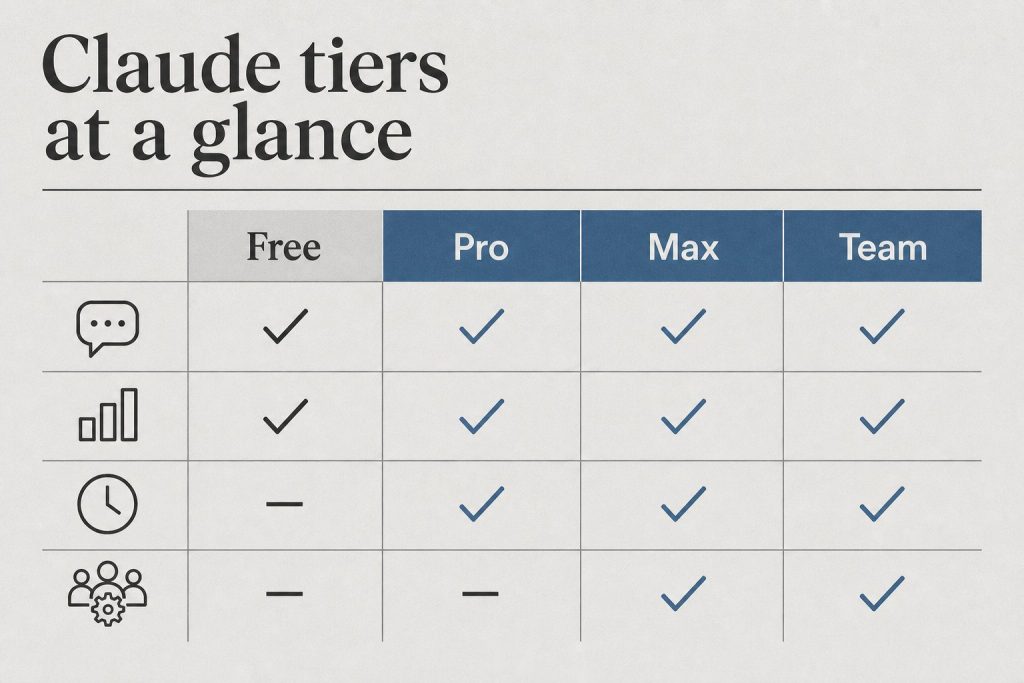
    Seat Type Annual Price Monthly Price Usage vs Pro Claude Code
    Standard $25/seat/month $30/seat/month 1.25× more per session No
    Premium $100/seat/month $125/seat/month 6.25× more per session Yes

    Both seat types benefit from the May 2026 doubling of the 5-hour rate limit window. A Premium seat’s 6.25× multiplier now applies to a higher baseline than it did before May 6.

    How the 5-Hour Rate Limit Window Works

    Anthropic uses a rolling 5-hour window for usage limits, not a daily reset. Here’s what that means practically:

    • Usage is measured across a rolling 5-hour window, not midnight-to-midnight
    • If you hit the limit, you wait for the oldest usage to roll off — not for a fixed reset time
    • Heavy burst usage depletes your window faster than spread-out usage
    • The May 2026 doubling means the ceiling within that window is now twice as high

    Peak-hours throttling — the extra restriction that kicked in during high-demand periods — is now eliminated for Pro and Max. Team plan benefits from the doubled limit floor; the throttling elimination is Pro and Max specific.

    Current Models Available on Team Plan

    As of May 2026, the Claude model lineup (verified from Anthropic’s official models page):

    Model API String Context Window
    Claude Opus 4.7 claude-opus-4-7 1M tokens
    Claude Sonnet 4.6 claude-sonnet-4-6 1M tokens
    Claude Haiku 4.5 claude-haiku-4-5-20251001 200K tokens

    Deprecation notice: Claude Sonnet 4 and Opus 4 (original 4.0-generation, 20250514 date-string model IDs) are being retired June 15, 2026. Update any API integrations before that date.

    What the Free Plan Doesn’t Get

    The May 2026 rate limit increase does not apply to free accounts. Anthropic explicitly excluded the free tier from all capacity increases tied to the SpaceX deal. Paid plans now have a substantially higher ceiling while the free ceiling stays the same. If you’re hitting limits regularly on the free tier, the May 2026 changes are pressure toward upgrading — not relief.

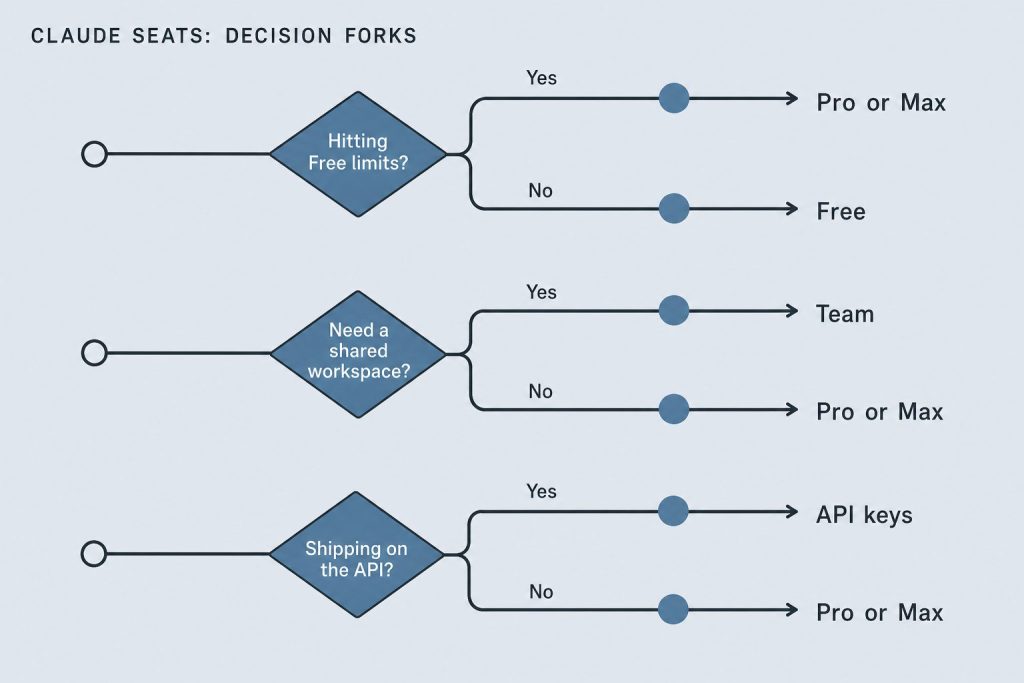
    Team Plan vs Pro: Which Limit Structure Fits You?

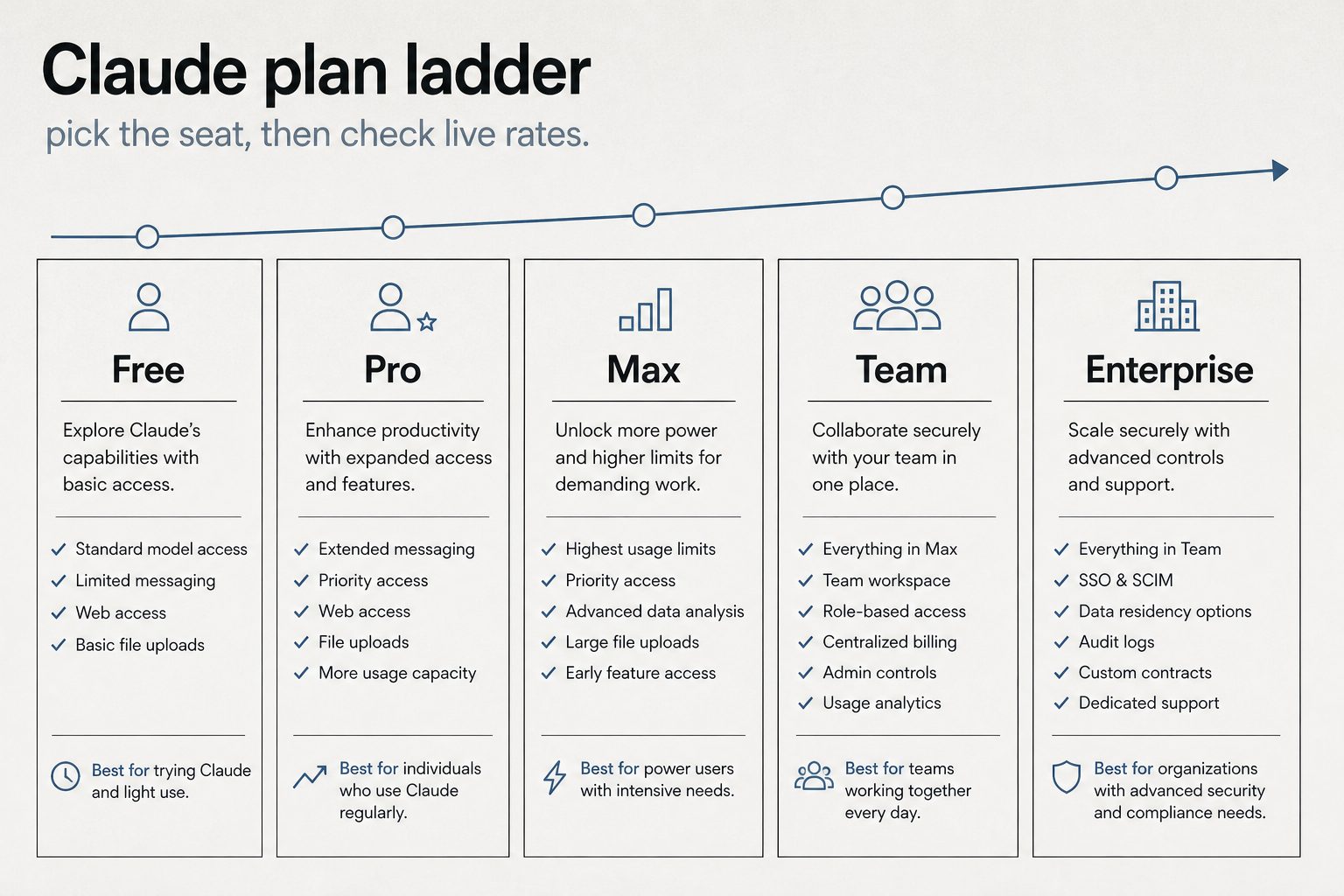
    • Individual power user: Pro ($20/month) with throttling eliminated is a strong option.
    • Team with Claude Code needs: Team Premium seats ($100/seat/month annually) give Claude Code access, 6.25× multiplier, and the doubled 5-hour window.
    • Team without Claude Code needs: Standard Team seats ($25/seat/month annually) for shared access at higher limits than individual Pro.

    Frequently Asked Questions

    Did the Team plan rate limits actually double in May 2026?

    Yes. Anthropic confirmed the 5-hour rate limit doubled for Team plan subscribers following the SpaceX Colossus 1 compute deal announced May 6, 2026. This applies to both Standard and Premium seats.

    Does peak-hours throttling elimination apply to Team plan?

    The peak-hours throttling elimination was announced specifically for Pro and Max subscribers. Team plan benefits from the doubled rate limit floor; throttling elimination was not announced for Team.

    What happens when I hit a Team plan usage limit?

    Claude notifies you that you’ve reached your usage limit. With the 5-hour rolling window, you can continue once older usage rolls off — you’re not waiting for a midnight reset. Burst usage depletes the window faster than spread usage over the same period.

    Are Claude Sonnet 4 and Opus 4 still available on Team?

    They remain available but retire June 15, 2026. After that date, the active lineup is Opus 4.7, Sonnet 4.6, and Haiku 4.5.

    Does the 1,500% Tier 1 API increase apply to Team plan API usage?

    The 1,500% input and 900% output token increases apply to Tier 1 API customers specifically. Team plan through claude.ai uses the doubled 5-hour window. Both benefits apply in their respective contexts if you’re a Tier 1 API customer and a Team subscriber.

    Is the free plan getting any rate limit improvements?

    No. The free plan was explicitly excluded from all rate limit increases in the May 2026 SpaceX announcement.

  • Claude Student Discount: The Honest Guide to Getting Claude for Less (May 2026)

    Claude Student Discount: The Honest Guide to Getting Claude for Less (May 2026)

    Last refreshed: May 15, 2026

    May 2026 Update — Free Plan Left Behind

    Anthropic’s May 2026 SpaceX rate limit increase (doubled 5-hour limits, eliminated peak-hour throttling) explicitly excluded the free plan. If you’re on free and hoping the latest compute expansion helped, it didn’t. This update explains what that means practically and what your actual options are.

    The May 2026 Update: Free Plan Was Explicitly Left Out

    When Anthropic announced doubled rate limits following the SpaceX Colossus 1 compute deal (May 6, 2026), they were specific: the increases apply to Pro, Max, Team, and seat-based Enterprise. The free plan was explicitly excluded.

    This matters for the student/budget conversation because:

    • Free plan rate limits stayed exactly where they were — no improvement
    • The gap between what free users can do and what paid subscribers can do just widened
    • Peak-hours throttling elimination applies to Pro and Max only — not free
    • Claude Code access remains unavailable on free

    If you were waiting to see if Anthropic would upgrade free tier limits alongside the major infrastructure expansion — the answer is no. The business decision is clear: compute improvements go to paying customers first, and the free tier stays constrained to drive conversion.

    What This Means If You’re a Student Trying to Use Claude Free

    You can still use Claude on the free tier. The model you access is capable — Anthropic hasn’t crippled it. What you’re constrained by is how much you can use it before hitting a limit, and how fast it responds during peak hours. Both of those constraints worsened relative to paid tiers in May 2026, because paid tiers got better while free stayed the same.

    For light usage — occasional questions, single documents, short projects — free is still viable. For sustained daily use, research workflows, or anything involving long documents and multiple sessions, free will slow you down in ways that affect your work.

    Quick Answer

    There is no official Claude student discount. Claude Pro costs $20/month for everyone. However, there are three legitimate paths to reduced or free access for students — and one of them covers most student use cases completely.

    The Three Ways Students Actually Get Claude for Less

    Best for most students
    Claude Free Tier
    Access to Claude Sonnet 4.6 with daily usage limits. Sufficient for essay drafting, coding help, summarization, and research. No credit card required. Limits reset daily.
    $0/month — no card needed
    University programs
    Claude for Education
    Anthropic has institutional agreements with select universities. If your school has a deal, access may be included in your student account. Check with your IT department or university library — coverage is expanding but not universal.
    Free if your school participates
    API credits
    GitHub Student Developer Pack
    GitHub’s student pack periodically includes credits for AI tools and APIs. Availability changes — check current offers at education.github.com. Requires a .edu email or institutional verification.
    Variable — check current offers
    Full access
    Claude Pro — $20/month
    5x more usage than free, priority access during peak hours, access to Claude Opus 4.7 for complex tasks. No student discount, but the free tier covers most student workloads without it.
    $20/month — no discount available

    What the Free Tier Actually Gets You

    Most students overestimate how much Claude Pro they need. The free tier handles:

    • Essay feedback and drafting assistance
    • Coding help — debugging, explaining concepts, generating boilerplate
    • Research summarization — paste an article or paper, get a structured summary
    • Math and problem-set walkthroughs
    • Study guide generation from lecture notes

    Where you’ll hit limits: long research sessions on a single topic, processing multiple long documents in the same conversation, or high-volume API access for a class project. For those cases, Claude Pro or API credits are the right call.

    Claude for Education — Current Status

    Anthropic’s education program is expanding but not yet universal. The fastest way to find out if your institution participates is to email your university’s IT department or check whether your library already has a Claude subscription that extends to students.

    Harvard, for example, replaced ChatGPT Edu with Claude in 2026 — so institutional deals are happening. If your school hasn’t moved yet, it may soon.

    What Claude Pro Is Actually Worth for Students

    If you’re doing intensive AI-assisted work — a thesis, a capstone project, a research paper that requires synthesizing many sources — $20/month is reasonable for a semester. Many students find they need it for two or three months out of the year and can drop to free for the rest.

    There’s no annual commitment required. You can subscribe month-to-month and cancel when the project is done.

    Bottom Line

    Start with the free tier. It covers the majority of student use cases. If you hit the limit consistently, check whether your university has an institutional deal before paying. If neither works for your project, Claude Pro at $20/month is month-to-month with no lock-in.

    For teams making a buying decision

    Evaluating Claude for a team — not just yourself?

    If you’re working through the plan decision for a business or agency, the calculus is different than individual use. We’ve run this math across 20+ client accounts and can tell you exactly where the API breaks even vs. subscription, and which plan structure makes sense for your workload.

    Get a plan recommendation →