Tygart Media Editorial - Tygart Media

Category: Tygart Media Editorial

Tygart Media’s core editorial publication — AI implementation, content strategy, SEO, agency operations, and case studies.

  • Claude Code vs Windsurf: 2026 AI Coding Tool Comparison

    Claude Code vs Windsurf: 2026 AI Coding Tool Comparison

    Last refreshed: August 30, 2026

    Model Accuracy Note — Updated May 2026

    Current flagship: Claude Opus 4.7 (claude-opus-4-7). Current models: Opus 4.7 · Sonnet 4.6 · Haiku 4.5. Claude Opus 4.7 (claude-opus-4-7) is the current flagship as of April 16, 2026. Where this article references Opus 4.6 or earlier models, those references are historical. See current model tracker →. See current model tracker →

    Claude AI · Fitted Claude

    Claude Code and Windsurf represent two different visions of AI-assisted development — one terminal-native and model-focused, the other IDE-native and workflow-focused. Both are serious tools for professional developers in 2026. This comparison covers what actually matters: coding quality, context management, workflow fit, and cost.

    What They Are

    Long paper tape measure unrolling across a desk beside a laptop, metaphor for context window length
    What they are.

    Claude Code is Anthropic’s terminal-native AI coding tool. You install it as an npm package, authenticate with your Claude account, and work directly in your shell. It uses Claude models exclusively and has a 1-million-token context window for large codebases. It’s designed for developers who think in the command line.

    Windsurf (formerly Codeium) is an AI-native IDE — a full development environment built around AI assistance. It includes a traditional code editor with AI deeply embedded throughout: autocomplete, multi-file editing, natural language commands, and a chat interface. It supports multiple models including Claude, GPT-4o, and its own models.

    Feature Comparison

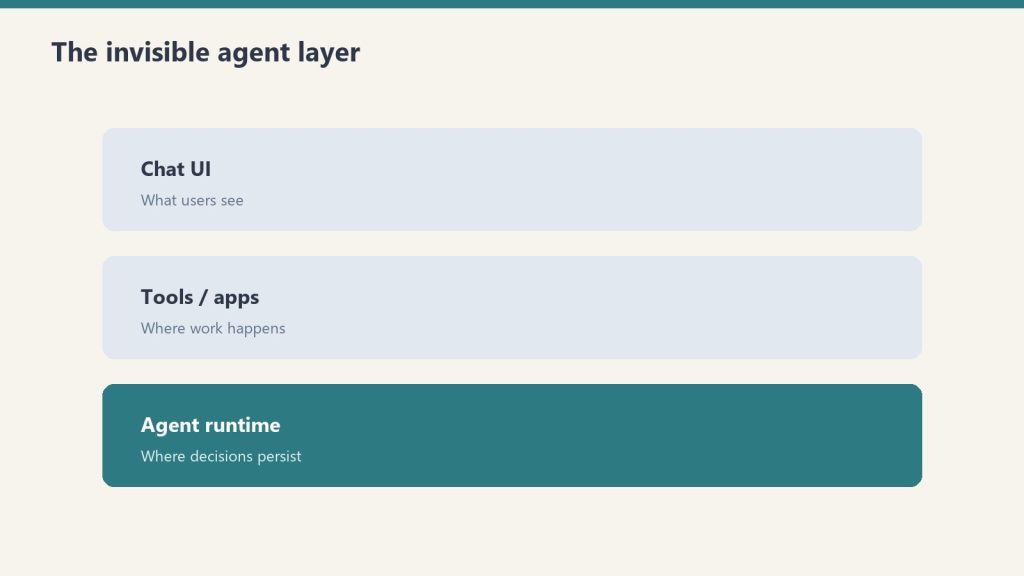
    Three stacked layers: chat UI, tools, agent runtime
    Feature comparison.
    Feature Claude Code Windsurf
    Interface Terminal Full IDE (VS Code-based)
    Model Claude only Multi-model (Claude, GPT-4o, own models)
    Context window 1M tokens Varies by model
    Autocomplete No Yes (supercomplete)
    Multi-file editing Yes Yes (Cascade)
    Git integration Yes Yes
    Codebase indexing Yes (via context) Yes (semantic search)
    Natural language commands Yes Yes (Cascade)
    Price Max sub ($100+/mo) or API Free tier + $15/mo Pro

    Model Performance

    Claude Code’s underlying model — Opus 4.6 — scores 80.8% on SWE-bench Verified, one of the highest published scores for any model on real-world engineering tasks. Windsurf can access Claude models via its multi-model architecture, but its proprietary models score lower on the same benchmark.

    If raw model performance on complex tasks is the priority, Claude Code’s direct access to Claude Opus 4.7 gives it an edge.

    Developer Experience

    Claude Code has a steeper initial learning curve — there’s no GUI, and effective use requires understanding how to structure prompts for agentic coding sessions. Once mastered, many developers find the terminal interface faster and less distracting than a full IDE.

    Windsurf has a gentler onboarding curve. Developers already comfortable in VS Code will feel at home immediately. The autocomplete, Cascade multi-file editing, and inline AI chat create a lower-friction introduction to AI-assisted coding.

    Pricing Reality

    Desk with laptop, checklist notebook, and billing card ready before creating an Anthropic API key
    Pricing reality.

    This is where Windsurf has a clear advantage for cost-conscious developers. Windsurf’s Pro plan runs $15/month with a generous free tier. Claude Code requires Claude Max at $100/month minimum, or API usage (which can be cheaper for low-volume use but expensive at scale).

    For developers just starting with AI coding tools, Windsurf’s entry point is meaningfully more accessible.

    Choose Claude Code If You…

    • Prefer terminal-native workflows and spend most of your time in the shell
    • Work with very large codebases that benefit from the 1M token context window
    • Need the highest possible model performance on complex engineering tasks
    • Are already on a Claude Max subscription

    Choose Windsurf If You…

    • Want an IDE experience with AI deeply integrated throughout
    • Are new to AI coding tools and want a gentle learning curve
    • Need persistent autocomplete alongside agentic coding capabilities
    • Want model flexibility or lower entry cost

    Frequently Asked Questions

    Is Claude Code better than Windsurf?

    For terminal-native developers prioritizing model performance: Claude Code has the edge. For IDE-native developers wanting lower cost and full-featured editor integration: Windsurf is the better fit.

    Can Windsurf use Claude models?

    Yes. Windsurf supports multiple models including Claude. You can access Claude’s capabilities within the Windsurf environment, though Claude Code provides more direct and optimized access to Claude’s full context window.

    How much does Claude Code cost?

    Claude Code requires Claude Max ($100/month) or API billing. Windsurf starts at $15/month Pro with a free tier.


    Need this set up for your team?
    Talk to Will →

  • Claude vs Gemini: Which AI Should You Use in 2026?

    Claude vs Gemini: Which AI Should You Use in 2026?

    Last refreshed: October 25, 2026

    Model Accuracy Note — Updated May 2026

    Current flagship: Claude Opus 4.7 (claude-opus-4-7). Current models: Opus 4.7 · Sonnet 4.6 · Haiku 4.5. Claude Opus 4.7 (claude-opus-4-7) is the current flagship as of April 16, 2026. Where this article references Opus 4.6 or earlier models, those references are historical. See current model tracker →. See current model tracker →

    Claude AI · Fitted Claude

    Claude and Gemini are the two most capable non-OpenAI AI assistants in 2026, and they’ve converged on similar pricing while diverging significantly in strengths. This comparison is based on real task testing across ten categories — not marketing copy or benchmark cherry-picking.

    Quick Verdict by Task

    Three stacked layers: chat UI, tools, agent runtime
    Quick verdict by task.
    Task Category Winner Why
    Long document analysis Claude 200K context, better synthesis quality
    Coding and software dev Claude 80.8% SWE-bench vs Gemini’s lower scores
    Research and summarization Gemini Real-time web access by default
    Image generation Gemini Native Imagen integration
    Image understanding Tie Both excellent
    Long-form writing quality Claude Less generic, better argumentation
    Google Workspace integration Gemini Native Docs, Gmail, Sheets integration
    Multimodal (video, audio) Gemini Gemini 2.0 handles video natively
    Safety and reliability Claude Constitutional AI, fewer hallucinations
    Free tier value Gemini More generous free access to capable models
    Not sure which to use?

    We’ll help you pick the right stack — and set it up.

    Tygart Media evaluates your workflow and configures the right AI tools for your team. No guesswork, no wasted subscriptions.

    The Core Architectural Difference

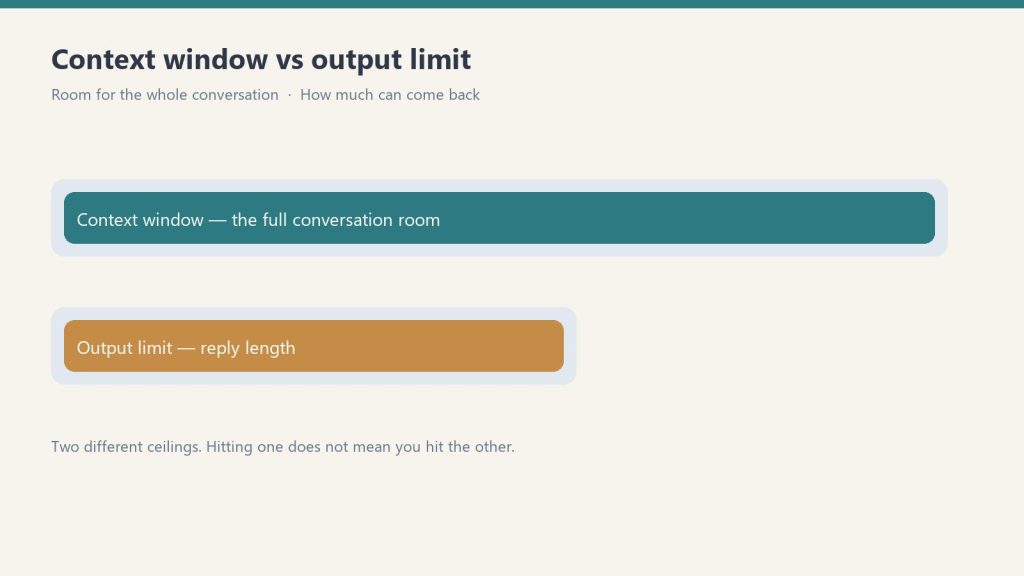
    Diagram comparing a long context window bar with a shorter output limit bar
    The core architectural difference.

    Claude was built by an AI safety company as its primary product. Every design decision — training methodology, Constitutional AI, refusal behavior — reflects that mission. The result is an assistant that reasons carefully, acknowledges uncertainty, and produces high-quality text and code.

    Gemini was built by Google as part of its search and productivity ecosystem. It’s deeply integrated with Google services, has native real-time web access, handles video and audio inputs, and generates images natively. It reflects Google’s multimodal ambitions.

    Writing Quality Comparison

    We gave both models identical prompts across five writing types: blog post intro, executive email, technical explanation, creative story opening, and marketing headline variations.

    Claude consistently produced cleaner, more specific prose with fewer generic constructions. Gemini was competent but occasionally defaulted to more templated structures. For long-form professional writing, Claude has the edge. For short-form or format-constrained writing, the gap narrows significantly.

    Coding Comparison

    Claude Opus 4.6 scores 80.8% on SWE-bench Verified — the leading benchmark for real-world software engineering tasks. Gemini’s published scores on the same benchmark are lower. In practice: Claude produces fewer hallucinated APIs, better handles complex multi-file refactoring, and provides more accurate debugging analysis.

    For developers choosing a primary AI coding assistant, Claude is the stronger choice. Gemini is more than adequate for routine coding tasks.

    Pricing Comparison

    Plan Claude Gemini
    Free Limited Sonnet Gemini 1.5 Flash (more generous)
    Standard paid $20/mo (Pro) $20/mo (Advanced)
    Power tier $100-200/mo (Max) $20/mo (Google One AI Premium includes Workspace)

    Gemini’s free tier is more generous. At the $20/month level, they’re similarly priced — but Gemini Advanced includes Google One storage and Workspace AI features, which Claude doesn’t. For pure AI assistant use, the value comparison is roughly equal.

    Choose Claude If You…

    • Do serious coding or software development
    • Work with long documents, legal files, or research papers regularly
    • Need the highest quality long-form writing output
    • Value careful reasoning and epistemic honesty over speed
    • Don’t need image generation or deep Google Workspace integration

    Choose Gemini If You…

    • Live in Google Workspace (Gmail, Docs, Sheets, Drive)
    • Need real-time web access as a default capability
    • Work with video, audio, or multimodal content
    • Need image generation built in
    • Want more generous free tier access

    The Both Approach

    Desk with laptop, checklist notebook, and billing card ready before creating an Anthropic API key
    The both approach.

    Many professionals run both: Claude for deep work (long documents, complex writing, coding), Gemini for Google Workspace integration and quick research. At $20/month each, running both costs $40/month total — reasonable for knowledge workers who use AI daily.

    Frequently Asked Questions

    Is Claude better than Gemini for coding?

    Yes. Claude Opus 4.6 leads Gemini on SWE-bench coding benchmarks and produces fewer hallucinated APIs and better multi-file reasoning in real-world use.

    Is Gemini better than Claude for Google Workspace?

    Yes. Gemini has native integration with Gmail, Google Docs, Sheets, and Drive. Claude requires copy-pasting content or MCP integrations to access Google Workspace data.

    Which is cheaper, Claude or Gemini?

    Both cost $20/month at the standard tier. Gemini’s free tier is more generous. Claude’s power tiers ($100-200/month) have no direct Gemini equivalent.


    Need this set up for your team?
    Talk to Will →

    New to Gemini itself? Start at the front door: What is Google Gemini — what it is, where it lives, what it does with your data, and who it is for.

  • Is Claude AI Worth It? A Cost-Benefit Analysis for 2026

    Is Claude AI Worth It? A Cost-Benefit Analysis for 2026

    Last refreshed: October 5, 2026 (Pacific)

    Claude AI · Fitted Claude

    The question isn’t whether Claude AI is good — it’s whether it’s worth paying for, at which tier, for your specific situation. This cost-benefit analysis breaks down what you actually get at each price point, calculates real cost-per-task, and gives a clear recommendation by user type.

    What You’re Paying For

    Three stacked layers: chat UI, tools, agent runtime
    What you’re paying for.

    Before running the numbers, it’s worth being clear about what Claude’s pricing tiers actually buy you. It’s not primarily about unlocking features — most features are available at every paid tier. It’s about usage capacity: how many messages you can send, how complex those messages can be, and whether you get access to the most powerful models.

    PlanPriceModel AccessApprox Heavy Messages/DayClaude CodeProjects
    Free$0Sonnet (limited)5–10NoNo
    Pro$20/moSonnet + Opus~12 heavy / more lightNoYes
    Max 5x$100/moSonnet + Opus~60 heavyYesYes
    Max 20x$200/moSonnet + Opus~240 heavyYesYes

    Cost-Per-Task Analysis

    Let’s calculate what Claude actually costs per completed task at each tier, assuming a “task” is a substantive prompt — analyzing a document, drafting a piece of content, debugging a function, or researching a question.

    Claude Pro ($20/month): If you’re averaging 12 heavy tasks per day, that’s roughly 360 tasks per month. Cost per task: $0.055. About 5.5 cents per substantive AI-assisted task. For context, a VA hour runs $15–25. A freelance writer charges $50–200/hour. Claude Pro at 5.5 cents per task is extraordinarily cheap if those tasks displace professional time.

    Claude Max 5x ($100/month): At ~60 heavy tasks/day, that’s 1,800 tasks/month. Cost per task: $0.056. Nearly identical per-task cost to Pro, but with 5x the volume. This is the value tier for power users.

    Claude Max 20x ($200/month): At ~240 heavy tasks/day, that’s 7,200 tasks/month. Cost per task: $0.028. The most cost-efficient tier per task if you’re actually using that volume.

    ROI by User Type

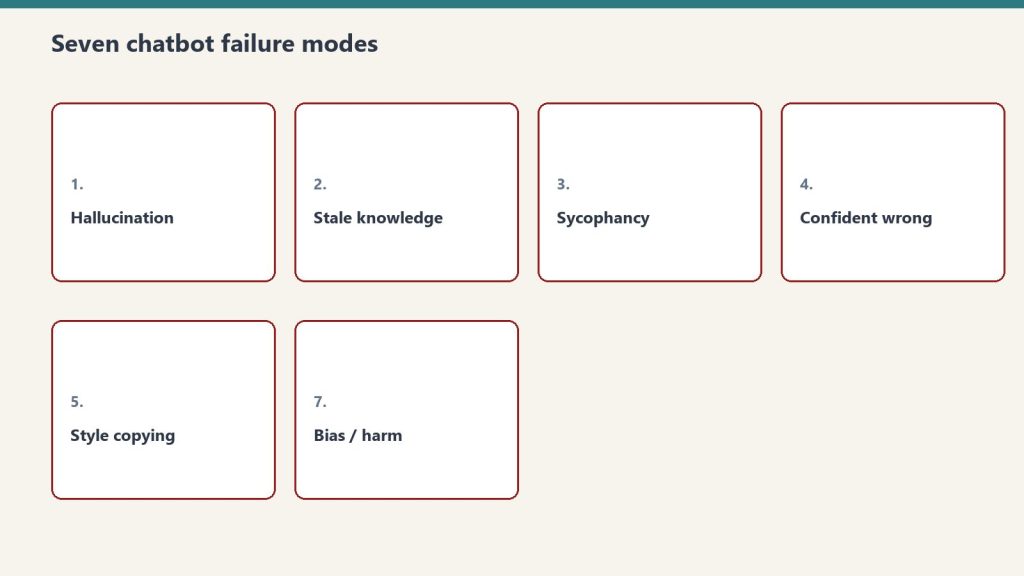
    Seven cards naming common AI chatbot failure modes
    ROI by user type.

    Freelance Writers and Content Creators

    If Claude saves you 2 hours of writing per week at a $75/hour effective rate, that’s $150/week or $600/month in recovered time. Claude Pro at $20/month pays for itself if it saves you 16 minutes per week. Verdict: Clear yes at Pro.

    Developers

    Claude Code is only available at Max 5x ($100/month) or via API. If Claude helps you resolve bugs, write tests, or understand a codebase faster — saving even 30 minutes of developer time per week at $100+/hour — the Max subscription pays for itself in a single day. Verdict: Max 5x is the right tier, and it’s cheap relative to dev billing rates.

    Researchers and Analysts

    The 200K context window for document analysis is the value driver. If you regularly read and synthesize long reports, contracts, or research papers, Claude Pro’s Projects feature (which maintains context across sessions) is a genuine workflow upgrade. Verdict: Pro is likely sufficient; upgrade to Max if you’re processing documents daily.

    Casual Users

    If you use AI for occasional questions, quick edits, or curiosity, the free tier is genuinely usable. The rate limits only frustrate sustained professional use. Verdict: Start free. Upgrade when you hit limits consistently.

    Small Business Owners

    Marketing copy, client emails, policy documents, job descriptions, SOPs — Claude Pro handles all of this. If it saves you 3 hours per month at your effective hourly rate, it’s paid for. Verdict: Pro is almost certainly worth it.

    When the Free Tier Is Enough

    • You need AI help a few times per week, not daily
    • Your tasks are typically short — quick edits, brief questions, simple summaries
    • You’re evaluating whether Claude fits your workflow before committing
    • You have another primary AI tool and want Claude as a secondary option

    When to Upgrade and Which Tier

    Desk with laptop, checklist notebook, and billing card ready before creating an Anthropic API key
    When to upgrade and which tier.
    • Hit rate limits on free → Go Pro ($20)
    • Hit rate limits on Pro regularly → Go Max 5x ($100)
    • Need Claude Code → Max 5x minimum
    • Using Claude 8+ hours daily → Max 20x ($200)

    Related on Tygart Media: Claude pricing · Pro vs Max · how to use Claude.

    Frequently Asked Questions

    Is Claude AI free?

    Yes, Claude has a free tier with limited daily usage. Paid plans start at $20/month (Pro).

    Is Claude worth it compared to ChatGPT?

    At similar price points ($20/month), Claude and ChatGPT Plus are competitive. Claude generally wins on long documents and coding; ChatGPT wins on image generation and plugin ecosystem. Many professionals pay for both.

    What does Claude Max include?

    Claude Max ($100 or $200/month) includes higher usage limits, Claude Code access, extended thinking, and priority access during peak times.

    Need this set up for your team? Talk to Will →
  • Claude AI Review 2026: Honest Assessment After 6 Months

    Claude AI Review 2026: Honest Assessment After 6 Months

    Last refreshed: August 30, 2026

    Model Accuracy Note — Updated May 2026

    Current flagship: Claude Opus 4.7 (claude-opus-4-7). Current models: Opus 4.7 · Sonnet 4.6 · Haiku 4.5. Claude Opus 4.7 (claude-opus-4-7) is the current flagship as of April 16, 2026. Where this article references Opus 4.6 or earlier models, those references are historical. See current model tracker →. See current model tracker →

    Claude AI · Fitted Claude

    Claude AI has become one of the most capable AI assistants available in 2026 — but it’s not perfect, and the official messaging undersells both its strengths and its real limitations. This review is based on sustained daily use across writing, coding, research, and analysis tasks. No affiliate relationship with Anthropic. Just what actually works and what doesn’t.

    What Claude Does Better Than Almost Anything Else

    Three stacked layers: chat UI, tools, agent runtime
    What Claude does better than almost anything else.

    Long-document analysis. Claude’s 200,000-token context window — roughly 150,000 words — is transformative for anyone who works with lengthy documents. Feed it an entire contract, research paper, financial report, or codebase and ask specific questions. The quality of synthesis is consistently better than competitors on complex, multi-page materials.

    Writing quality. Claude’s prose is the least robotic of any major AI model. It avoids the generic constructions (“In today’s fast-paced world…”) that mark AI output as AI output. With proper context, it can match sophisticated writing styles and produce genuinely useful drafts that require minimal editing.

    Coding. Opus 4.6 scores 80.8% on SWE-bench and 91.3% on GPQA Diamond — among the highest published scores of any model available. In practice, this translates to fewer hallucinated function names, better error diagnosis, and stronger multi-file reasoning than most alternatives.

    Honesty about uncertainty. Claude is more likely than competitors to say “I’m not sure” or “this is my best guess” rather than confidently stating something incorrect. For research and analysis tasks, this matters enormously.

    Real Benchmark Results

    Diagram comparing a long context window bar with a shorter output limit bar
    Real benchmark results.
    Benchmark Claude Opus 4.7 What It Measures
    SWE-bench Verified 80.8% Real-world GitHub issue resolution
    GPQA Diamond 91.3% PhD-level science reasoning
    HumanEval Top tier Code generation correctness
    MMLU Top tier Broad knowledge and reasoning

    Honest Cost Breakdown

    Plan Price Best For Real Daily Usage
    Free $0 Occasional use ~5-10 messages before throttling
    Pro $20/mo Regular professionals ~12 heavy prompts before rate limits
    Max 5x $100/mo Power users, devs ~60 heavy prompts/day
    Max 20x $200/mo Heavy daily use ~240 heavy prompts/day

    The Rate Limit Problem (The Real Frustration)

    This is the #1 complaint in every Claude user community and it’s legitimate. The Pro plan at $20/month throttles after roughly 12 “heavy” prompts — meaning prompts that require real computation, like complex analysis, long document reading, or code generation. You’ll hit the wall mid-session at the worst possible time.

    A viral Reddit post about this received 1,060+ upvotes. The community consensus: the Pro plan is underspecced for its price point, and jumping to Max 5x ($100/month) is a significant price jump for something that should be a smooth tier progression.

    Workarounds that help: using Projects with system prompts (reduces token overhead per conversation), preferring Sonnet over Opus for routine tasks (cheaper against limits), and batching related work into single longer sessions rather than many short ones.

    What Claude Can’t Do

    • Generate images: Claude cannot create images. Midjourney, DALL-E, or Adobe Firefly for that.
    • Real-time web access: No live browsing by default on the consumer interface. Knowledge has a training cutoff.
    • Remember between sessions by default: Memory exists but requires setup. Fresh sessions start fresh.
    • Replace specialized tools: Claude is general-purpose. For SEO research, use dedicated tools. For legal filing, use legal software. Claude augments specialists — it doesn’t replace them.

    Who Claude Is Worth It For

    Strong yes: Writers, researchers, developers, lawyers, consultants, analysts, product managers, HR professionals — anyone whose work involves reading, reasoning, writing, or coding at length.

    Consider alternatives: Users who primarily need image generation (ChatGPT/Midjourney), users who need deep Google Workspace integration (Gemini), or users running on a tight budget who won’t benefit from the Pro tier’s additional capacity.

    Start free, upgrade when you hit limits. The free tier is genuinely usable for orientation. When you find yourself frustrated by rate limits — which you will, if Claude is useful to you — that’s the signal to upgrade to Pro. If you hit Pro limits regularly, Max 5x is worth the jump.

    Final Verdict

    Desk with laptop, checklist notebook, and billing card ready before creating an Anthropic API key
    Final verdict.

    Claude is one of the two or three best general-purpose AI assistants available in 2026. Its writing quality, document reasoning, and coding performance are among the strongest in the field. The rate limiting on lower tiers is a genuine frustration that Anthropic should address. The pricing jump from Pro to Max is steep. But for the right user — anyone doing serious knowledge work — Claude at the Max tier is worth it. Claude Pro at $20/month is competitive with ChatGPT Plus but hits limits faster for heavy use.

    Frequently Asked Questions

    Is Claude AI better than ChatGPT in 2026?

    For long-document analysis, coding, and nuanced writing: Claude holds a measurable advantage. For image generation, plugin ecosystem breadth, and Google Workspace integration: ChatGPT/Gemini are stronger. Most serious users use both.

    Is Claude Pro worth $20 a month?

    For regular professional use: yes, but with the caveat that the rate limits on Pro are tighter than they should be at this price point. Heavy users will want Max 5x ($100/month) within weeks.

    Does Claude have a free plan?

    Yes. The free tier gives limited daily access to Claude Sonnet 4.6. It’s useful for orientation but will frustrate anyone using Claude as a primary work tool.


    Need this set up for your team?
    Talk to Will →

  • Claude Function Calling: Developer’s Guide to Tool Use

    Claude Function Calling: Developer’s Guide to Tool Use

    Last refreshed: August 30, 2026

    Claude AI · Fitted Claude

    Claude tool use (also called function calling) is the capability that transforms Claude from a conversational AI into an agentic system that can interact with external services, execute code, query databases, and take real-world actions. This guide covers how tool use works, the three execution modes, the built-in server tools, and practical implementation examples.

    What Is Tool Use?

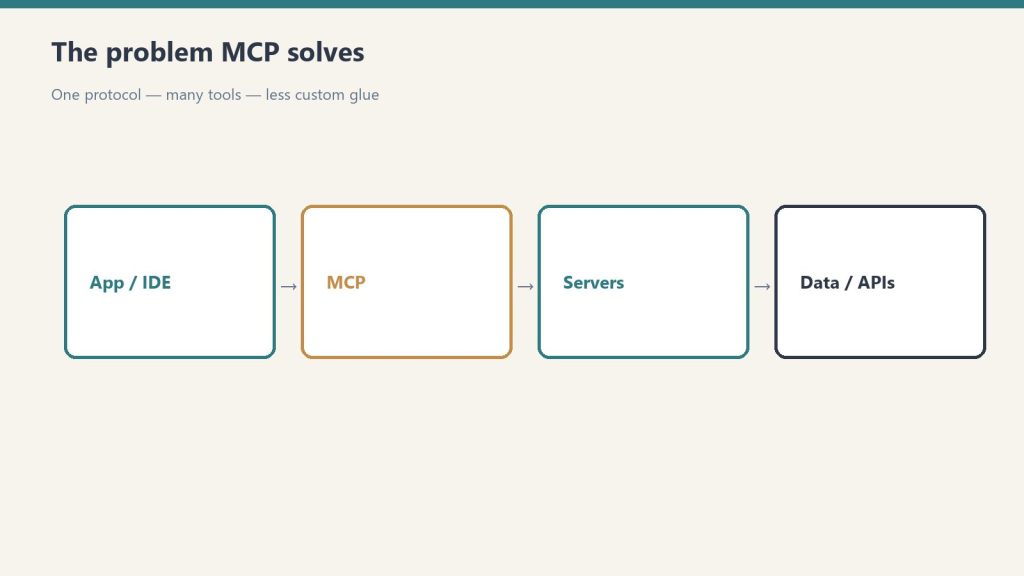
    Flow from app/IDE through MCP to servers and data APIs
    What tool use is.

    Tool use lets you define functions that Claude can call during a conversation. When Claude determines that a tool would help answer a user’s request, it generates a tool call (specifying the tool name and arguments), your code executes the function, and the result is returned to Claude to continue the conversation.

    Example flow: User asks “What’s the weather in Seattle?” → Claude calls your get_weather function with {"location": "Seattle"} → Your code calls a weather API → Returns data to Claude → Claude generates a natural language response incorporating the weather data.

    Defining Tools

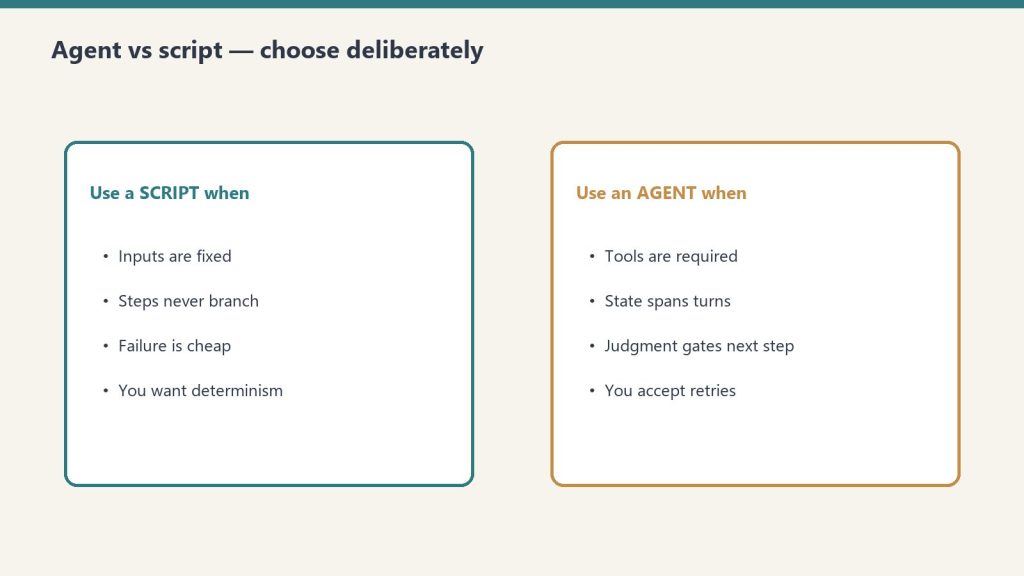
    Side-by-side when to use a script versus an agent
    Defining tools.
    tools = [
        {
            "name": "get_stock_price",
            "description": "Get the current stock price for a given ticker symbol",
            "input_schema": {
                "type": "object",
                "properties": {
                    "ticker": {
                        "type": "string",
                        "description": "The stock ticker symbol (e.g., AAPL, GOOGL)"
                    }
                },
                "required": ["ticker"]
            }
        }
    ]
    
    response = client.messages.create(
        model="claude-sonnet-4-6",
        max_tokens=1024,
        tools=tools,
        messages=[{"role": "user", "content": "What's Apple's current stock price?"}]
    )

    The Three Execution Modes

    Desk with laptop, checklist notebook, and billing card ready before creating an Anthropic API key
    The three execution modes.

    1. Client-Side Execution

    Your application receives the tool call, executes the function locally or via external APIs, and returns the result. This is the standard pattern — you control the execution environment and can call any service.

    2. Server-Side Execution (Built-in Tools)

    Anthropic provides built-in tools that Claude can execute server-side without your code doing anything:

    • web_search: Real-time web search
    • code_execution: Execute Python code in a sandbox
    • bash: Run shell commands
    • text_editor: Read and edit files (used in Claude Code)

    3. Tool Runner SDK (Programmatic)

    Anthropic’s Tool Runner SDK automates the tool call/execute/return loop, letting you build agentic workflows without writing the orchestration loop manually.

    Handling Tool Results

    # After receiving a tool_use block from Claude
    if response.stop_reason == "tool_use":
        tool_use = next(block for block in response.content if block.type == "tool_use")
        tool_name = tool_use.name
        tool_input = tool_use.input
        
        # Execute your function
        result = your_function(tool_input)
        
        # Return result to Claude
        follow_up = client.messages.create(
            model="claude-sonnet-4-6",
            max_tokens=1024,
            tools=tools,
            messages=[
                {"role": "user", "content": "What's Apple's stock price?"},
                {"role": "assistant", "content": response.content},
                {"role": "user", "content": [{"type": "tool_result", "tool_use_id": tool_use.id, "content": str(result)}]}
            ]
        )

    Frequently Asked Questions

    What is the difference between tool use and function calling?

    They’re the same thing — Anthropic uses “tool use” as the preferred term, while “function calling” is the term OpenAI popularized. Both describe the same capability: letting an AI model invoke defined functions during a conversation.

    How many tools can I define for Claude?

    Claude supports up to several hundred tools in a single request, though performance is best with a focused set relevant to the task. Each tool definition consumes input tokens, so large tool sets have a cost impact.

    Need this set up for your team? Talk to Will →
  • Claude Computer Use: Complete Setup Guide & Use Cases

    Claude Computer Use: Complete Setup Guide & Use Cases

    Last refreshed: August 30, 2026

    Claude AI · Fitted Claude

    Claude computer use is a capability that lets Claude control a computer — click buttons, type text, navigate browsers, run applications, and execute multi-step tasks as if it were a human operator. As of 2026, it’s one of the most powerful and underexplored capabilities in the Claude ecosystem. This tutorial covers what it is, how to set it up, what it’s actually useful for, and where it still falls short.

    What Is Claude Computer Use?

    Three stacked layers: chat UI, tools, agent runtime
    What Claude Computer Use is.

    Computer use is an API capability (not available in the standard Claude.ai interface) that lets Claude interact with a desktop environment via screenshots and tool calls. Claude sees the screen, decides what to click or type, executes that action, sees the updated screen, and continues — iterating until the task is complete.

    This is different from a browser extension or web scraper. Claude is operating a real (or virtualized) computer environment the same way a human would — by looking at the screen and interacting with what it sees.

    Current Benchmark Performance

    On OSWorld — the leading benchmark for computer use agents — Claude currently scores around 22% task completion on the most complex tasks. ChatGPT’s computer use scores higher on this specific benchmark at approximately 75%. This gap is real and matters for production use cases requiring high reliability. For simpler, more structured tasks, Claude’s computer use performs considerably better.

    Setting Up Claude Computer Use

    Side-by-side when to use a script versus an agent
    Setting up Claude Computer Use.

    Computer use requires API access. The basic setup:

    • Anthropic API key (API tier with computer use enabled)
    • A virtual machine or containerized desktop environment (Docker with a lightweight Linux desktop is the standard approach)
    • The Anthropic Python or TypeScript SDK

    Anthropic provides a reference implementation with a Docker-based Ubuntu environment, a noVNC interface for monitoring, and starter code. This is the fastest path to a working computer use setup.

    Best Current Use Cases

    • Web research and data extraction: Navigate websites, extract structured data, fill in forms — tasks that don’t have APIs
    • Software testing: Navigate UI flows, test edge cases, verify visual behavior
    • Repetitive desktop workflows: Tasks that require clicking through multiple application screens
    • Legacy software interaction: Applications without APIs where the only interface is visual

    Key Limitations to Know

    Desk with laptop, checklist notebook, and billing card ready before creating an Anthropic API key
    Key limitations to know.
    • Reliability: Computer use is significantly less reliable than direct API calls for the same tasks. Where an API returns structured data, computer use can misread a screen or click the wrong element
    • Speed: Screenshot-based interaction is slow compared to direct integration
    • Cost: Each screenshot and tool call consumes API tokens; complex tasks can be expensive
    • Sensitive actions: Never use computer use for high-stakes irreversible actions (sending emails, making purchases) without human-in-the-loop verification

    Frequently Asked Questions

    Is Claude computer use available in Claude.ai?

    No. Computer use is an API capability available through the Anthropic API, not the standard Claude.ai web interface.

    How does Claude computer use compare to ChatGPT’s?

    On OSWorld benchmarks, ChatGPT’s computer use currently leads at approximately 75% vs Claude’s ~22%. For production use cases requiring high reliability, this gap matters. Both are improving rapidly.

    Need this set up for your team? Talk to Will →
  • AI Music Rehearsal: Build a Full Show on a Zero Budget

    AI Music Rehearsal: Build a Full Show on a Zero Budget

    Tygart Media Strategy
    Volume Ⅰ · Issue 04Quarterly Position
    By Will Tygart
    • Long-form Position
    • Practitioner-grade

    What is the No-Budget Artist’s AI Stack? The no-budget artist’s AI music stack is a combination of free and low-cost AI tools that together provide the capabilities historically available only to artists with label backing, production budgets, or extensive musician networks. The core stack: Producer AI (now Google Flow Music) or Suno (AI track generation, $0–$30/month), a rehearsal platform (AI lyric sync and playback, $0–$20/month), a portable Bluetooth speaker ($50–$200 one-time), and a basic microphone ($30–$100 one-time). Total monthly cost: $0–$50. Total infrastructure this replaces: studio session musicians ($150–$500/hr), rehearsal space ($15–$50/hr), home recording setup ($500–$2,000), and song demonstration costs. The AI stack gives an emerging artist with no budget the same rehearsal and performance infrastructure as an established artist with a team.

    Last refreshed: November 3, 2026 (Pacific)

    The Real Barrier: It Was Never Talent

    The music industry’s standard narrative about why artists don’t make it focuses on talent, luck, and market timing. These factors are real. But the infrastructure barrier is rarely discussed honestly: to develop your songs from composition to performance-ready standard has historically required money at every step. Recording demos to share with venues costs studio time. Rehearsing with a band costs the band’s time and often a rehearsal space. Performing with backing tracks has meant hiring session musicians to record those tracks or purchasing backing tracks from third parties that don’t match your arrangements. The invisible infrastructure cost of becoming a performing artist — before any revenue — has been $2,000–$10,000 minimum for artists who do it properly.

    AI tools have collapsed that infrastructure cost to near zero. They have not made the talent development work easier — that still takes the same hours of practice, the same diagnostic honesty about what’s not working, the same repetition until the songs are in your body. But the money barrier is gone. A songwriter with a $30/month AI subscription and a $150 speaker can build and perform original music with the same sonic quality as an artist with a $50,000 production budget. The platform is the equalizer.

    The Complete No-Budget Stack: What You Need and What Each Tool Does

    AI Track Generation: Producer AI, Suno, or Udio

    Producer AI generates full instrumental arrangements from text prompts. Enter a genre (indie folk, uptempo pop, blues-rock, ambient electronic), a tempo (slow ballad at 68 BPM, driving uptempo at 128 BPM), key preference (C major, F# minor), and any specific instrumentation requests (acoustic guitar-forward, no drums, heavy bass). The platform generates 2–5 variations in under 60 seconds. You select the one that fits your song’s feel and export the instrumental track as an MP3 or WAV file. No music theory knowledge required to operate the tool effectively — descriptive language is sufficient. “Sad, sparse, lots of space, piano and cello, very slow” generates a usable ballad backing track that a composer with notation software would take hours to produce.

    Suno and Udio offer similar capabilities with different aesthetic tendencies in their generation. Suno tends toward more structured arrangements; Udio toward more organic, genre-specific textures. Experimenting with both for the same song and selecting between their outputs costs nothing beyond time. Free tiers exist on all three platforms with limits on commercial use and monthly generation volume — sufficient for an artist building their first show.

    The Rehearsal Platform: Core Function

    The rehearsal platform takes your AI-generated track and your lyrics and creates a synchronized rehearsal session — scrolling lyric display timed to the music, exactly like karaoke but for your original song in your arrangement. This is the infrastructure that allows you to actually learn your songs to performance standard without a musician present. You play the track, you sing, the words advance with the music. You can loop the chorus 20 times. You can slow the track without changing the pitch. You can transpose the key if your voice sits differently than you planned. You can record yourself singing and listen back. Every one of these functions — which previously required a session musician, a recording engineer, or expensive software — is built into the platform.

    The Performance Kit: Portable PA and Microphone

    The JBL Eon One Compact ($499), Bose S1 Pro ($349), and Electro-Voice Everse 8 ($399) are the three most commonly used portable PA speakers by solo performing artists. All three are battery-powered, provide enough volume for a bar, coffee shop, or small venue (up to 200 people), and have line inputs that accept your device’s audio output for the AI track alongside a microphone input for your vocal. A Shure SM58 ($99) or Sennheiser e835 ($129) dynamic microphone plugged directly into the speaker’s XLR input is a professional vocal performance setup at $450–$630 total investment. This system goes in a medium duffel bag and sets up in 10 minutes in any room with a power outlet. It is the same technical setup professional touring solo artists use for club and venue performances.

    The Recording Setup (Optional but Recommended): Interface and DAW

    A Focusrite Scarlett Solo ($119) USB audio interface and Audacity (free) or GarageBand (free on Mac) give you the ability to record your vocal over the AI track and evaluate the recording as a produced artifact — not just a rehearsal take. Recording yourself and listening back is the single most accelerating practice tool available to developing artists. You hear things in a recording that you cannot hear while singing: pitch tendencies, phrasing habits, the emotional authenticity (or lack of it) in your delivery. Budget $119 for the interface. The DAW is free. Total optional upgrade: $119.

    The No-Budget Artist’s 8-Week Development Plan

    Weeks 1–2: Song Selection and Track Generation

    Select 8–10 songs that represent your best current material. These do not need to be finished — they need to be structurally complete (verse, chorus, bridge identified) with lyrics that are at least 80% final. For each song, generate AI tracks in Producer AI using descriptive prompts that reflect the song’s intended feel. Generate 3–5 variations per song and select the best one. Export all instrumentals. Total time: 4–8 hours. Total cost: $0 on free tier or $10–$30 for a paid subscription if you need higher generation volume or commercial licensing.

    Prioritize track quality over track perfection at this stage. The goal is a track that (a) fits your song’s tempo and feel closely enough to rehearse against, and (b) sounds good enough that you’d be comfortable playing it through a speaker at an open mic. You can always regenerate tracks later as your production sensibility develops. Getting rehearsal sessions built and starting to sing is more valuable than spending 10 hours perfecting a track before you’ve confirmed the song works.

    Weeks 3–4: Session Building and Diagnostic Rehearsal

    Build rehearsal sessions for all 10 songs. Follow the session setup workflow: import track, paste lyrics with natural phrasing line breaks, generate automated timestamps, do one real-time adjustment pass. Add section labels. Set your loop points for the sections you already know will need the most work.

    Run the diagnostic pass on each song: sing through once without stopping, flag every moment where the song doesn’t feel right. These flags are the development agenda for Weeks 3–4. Work through them systematically: syllable count problems get lyric rewrites; key problems get a transpose adjustment and a note about the new key; structural problems get the loop treatment until you identify whether they’re a writing problem or an arrangement problem. By the end of Week 4, every song should have a clean diagnostic pass — meaning you can sing through the whole thing and nothing catastrophically breaks.

    Weeks 5–6: Performance Runs and Recording Self-Evaluation

    Shift from diagnostic mode to performance mode. For each song, do 10 consecutive performance runs — full song, no stopping, performing to the room (or the imaginary camera), not reading the screen. After the 10th run of each song, record a take using your phone or recording setup. Listen back the next day with fresh ears. Evaluate: does this sound like something you’d be comfortable sharing? Does the delivery feel earned? Are there specific lines where your confidence drops or your phrasing falls apart?

    The recording self-evaluation is uncomfortable for most developing artists. It reveals gaps between how you sound in your head while singing and how you actually sound. This discomfort is the most productive feeling in music development — it is the signal that specific, targeted improvement is available. Lean into it. The artists who get better fastest are the ones who listen to their recordings honestly and make specific decisions about what to change, not the ones who avoid recordings because they’re uncomfortable.

    Weeks 7–8: Show Construction and Full Run-Throughs

    From your 10 prepared songs, select 6–8 for your first show — enough for a 30–40 minute set. Sequence them in the platform’s setlist mode with intentional energy logic: your most accessible song opens (not necessarily your best, but your most immediately engaging); your strongest material appears in positions 3–5 (after the audience is warmed up but before energy starts to flag); your most emotionally significant song appears in position 6 or 7; your highest-energy song closes (send them out on a peak). This sequencing logic applies whether you’re playing a coffee shop open mic or a headline show.

    Run the full setlist once per day for the last two weeks. By show day, you will have run the complete 30–40 minute performance 14 times. This is not excessive — it is professional standard. The songs are in your body. The transitions between songs are natural. The energy arc is familiar. You know what the show feels like at minute 5 and at minute 35. That knowledge produces a qualitatively different performance than an artist who has only rehearsed individual songs.

    The Open Mic as Rehearsal Infrastructure

    Open mics serve a function in the no-budget artist’s development that is not adequately appreciated: they are low-stakes live performance repetitions, available for free, in rooms with real audiences. With your AI rehearsal platform preparation complete, you can bring your portable speaker, your track files, and your microphone to an open mic and deliver a 3-song set that sounds like you have a full band behind you. You are not competing with acoustic guitar players for audience attention — you are performing with production quality in a context where production quality is unexpected.

    Use open mics as diagnostic performances: which songs land with strangers (not just with you, who knows the material intimately)? Which punchlines, lyrical moments, or melodic peaks get the response you expected? Where does the audience’s energy drop? This data is more valuable than any rehearsal run because it comes from real listeners with no investment in your success — they respond to what works, not to what you hoped would work. Collect this data, return to the platform to address what didn’t work, and perform again.

    The Progression: From Open Mic to Paying Gig

    The progression from open mic to booked, paid performance requires three things that AI rehearsal platform preparation directly supports: (1) a consistent setlist that you can deliver reliably — not different each time, but a defined show that you know works; (2) a recording of a live performance or home studio recording that demonstrates the quality of your show to venue bookers; (3) a pitch to venue bookers that includes the recording, the setlist, and an honest representation of your technical requirements (one speaker, one microphone, 20-minute setup time). Venue bookers at bars, coffee shops, and small clubs are booking a reliable, professional experience for their customers. The AI rehearsal platform’s contribution to that pitch is the word “reliable” — you know the show works because you’ve run it 30 times.

    Copyright, Commercial Use, and AI Track Licensing

    When you perform publicly and accept payment, the AI tracks you use cross from personal use into commercial performance. The free tier of most AI music generation platforms does not include commercial use licensing. Before your first paid performance, upgrade to a commercial license tier on whichever platform you use for track generation. Suno Pro is $10/month. Producer AI is now Google Flow Music, with paid tiers from $6/month. Udio’s commercial rights sit on its $30/month Pro plan (Standard, $10/month, is personal use only) — and Udio has downloads disabled on every plan during its label-licensing transition, so Udio tracks cannot currently be exported for a live show at all. These licenses grant you the right to use AI-generated tracks in live performances and, on most platforms, in recorded releases. Read the specific license terms of your chosen platform — they vary in what recorded release rights are included and at what tier.

    Frequently Asked Questions

    What if I don’t have a great voice — can I still perform with this system?

    Yes. The AI rehearsal platform improves every voice that uses it consistently, because consistent rehearsal with honest self-evaluation produces measurable improvement in pitch accuracy, phrasing confidence, and emotional delivery. Voice quality is a component of performance but not the determining factor. Authenticity, material quality, and consistency of delivery matter as much or more in most performance contexts. Develop what you have systematically rather than waiting for a voice you imagine you should have.

    Do I need to tell the audience the tracks are AI-generated?

    There is no legal requirement to disclose AI generation of backing tracks. Backing tracks in general — whether recorded by session musicians, synthesized electronically, or AI-generated — are widely used in live performance without specific disclosure. Whether to disclose is an artistic and branding decision. Some artists lean into the AI production identity as a differentiator and conversation starter. Others present the show as a produced musical experience without discussing production methods. Both are legitimate. The quality of the experience for the audience is the primary variable — not the disclosure.

    How do I handle technical problems at a performance (track doesn’t play, speaker cuts out)?

    Build a technical contingency plan: always have the track files on two devices (your phone as backup for your laptop). Always test the speaker connection before the show. Know which songs in your set you can perform acoustically or a cappella if necessary — have two “tech-fail songs” that work without a backing track. Brief the venue on your technical setup before arrival so they know what you need and can help if something goes wrong. A no-budget artist who handles technical problems gracefully and professionally is more likely to get rebooked than one who delivers a technically perfect show without any resilience.

    What’s the fastest path from zero to first paid performance?

    4–8 weeks using the development plan in this article. The accelerated version: 2 weeks of track generation and session building, 2 weeks of intensive diagnostic rehearsal (90 minutes/day), 2 open mic performances for audience diagnostic, 2 weeks of show construction and full run-throughs. Approach the first paid booking not as a career milestone but as a paid rehearsal — a real audience, real stakes, a real paycheck, and data you can take back to the platform to keep developing. Most first paid performances are $50–$150. The value is not the money — it is the performance experience and the relationship with the venue.

    Using Claude as a Development Planning Companion

    Upload this article to Claude along with your current song list, descriptions of each song’s genre and feel, your vocal range (approximate is fine — highest comfortable note and lowest comfortable note), your available practice time per week, and your geographic market and target venue types. Claude can generate: a complete 8-week development calendar with daily practice tasks; AI track generation prompts for each of your songs (what to enter into Producer AI for each song’s genre and feel); a setlist sequencing analysis based on your song descriptions; a self-evaluation rubric customized for your specific voice type and genre; a venue outreach plan for your market identifying which venue types to approach in what order; and a technical rider document for your portable speaker and microphone setup. This article gives Claude enough context about the no-budget artist’s situation, the full tool stack, and the development methodology to build a complete, artist-specific launch plan from your starting point.


  • AI Rehearsal System: Managing Casts Without a Live Band

    AI Rehearsal System: Managing Casts Without a Live Band

    Tygart Media Strategy
    Volume Ⅰ · Issue 04Quarterly Position
    By Will Tygart
    • Long-form Position
    • Practitioner-grade

    What is a Music Director in Live Production? A music director (MD) in live entertainment production is responsible for the musical vision, arrangement, and performance consistency of a show. This includes selecting or creating the music for each segment, teaching that music to performers, overseeing rehearsals, managing the technical sound execution during performances, and ensuring that the musical experience is consistent across every show in a run. In productions without a live band, the MD also manages track playback, cue timing, and the integration of pre-recorded music into live performance. AI music tools change the MD role by eliminating the band coordination function while amplifying the creative and training functions.

    The Music Director’s Core Problem at Scale

    A music director overseeing a show with 8 performers and 14 songs faces a rehearsal logistics problem that compounds geometrically as the cast grows. Each performer needs to know: their specific songs, their specific parts within ensemble numbers, the cue structure of the show (when does the music start, when does it end, what do they do during it), and the performance standard for every musical number they appear in. Teaching all of this to 8 people, in a shared rehearsal space, with a live accompanist or backing track system, requires scheduling 8 people simultaneously — which is the most logistically complex part of any production.

    The traditional solution is a music rehearsal schedule: block 3 hours per week for 4 weeks, bring everyone together, work through the material. This approach has three structural problems: (1) schedule conflicts mean you almost never have all 8 performers in the room; (2) performers who are waiting for their part to be rehearsed are idle and often distracted; (3) the rehearsal space and accompanist cost money every hour, whether everyone is productive or not.

    AI rehearsal platforms solve this by enabling asynchronous preparation. Every performer gets their session package — their songs, with their parts, with the full arrangement behind them — and prepares independently. They come to production rehearsal already knowing the material. The music director stops being the person who teaches songs in rehearsal and becomes the person who refines performances that have already been built.

    Designing the Session Package System

    The Master Session Architecture

    The music director builds the show’s complete session architecture before distributing anything to performers. This architecture is the authoritative musical document for the production: all tracks are generated and locked, all session structures are built, all timing decisions are made. Changes after this point require updating a single authoritative session that all performer packages derive from — rather than correcting individual performers’ understanding of conflicting information.

    The master session contains: the full show running order with every music cue in sequence; the complete track library organized by song title and use case; the arrangement brief for every song documenting what the AI track establishes versus what live performance replaces; the production cue sheet mapping every music start, end, and transition to the show’s dramatic action; and the MD’s interpretation notes for each song documenting the emotional intention, phrasing preferences, and performance standards.

    Performer-Specific Session Packages

    From the master session, the music director builds individual packages for each performer. A package contains: all songs the performer appears in, with their specific part isolated or highlighted where possible; the full show context for each song (what comes before, what comes after, what the cue structure is); the MD’s interpretation notes relevant to this performer’s specific contribution; and self-evaluation rubrics for each song — specific, measurable performance criteria the performer can assess independently during their preparation.

    Importantly, each performer’s package also includes the songs they don’t perform in, at lower priority. Performers who know the full show — not just their own parts — make better performance decisions because they understand the context they’re operating in. A performer who knows that Song 8 follows a quiet emotional ballad will understand why their high-energy number needs a deliberate build rather than an immediate blowout. Contextual musical knowledge produces contextually intelligent performances.

    The Ensemble Number Challenge

    Ensemble numbers — songs where multiple performers sing or perform simultaneously — require additional session architecture. The AI track carries the full arrangement. Each performer’s session for an ensemble number contains their specific part highlighted in the lyric display, with the other parts visible but de-emphasized. The MD records reference versions of each individual part (sung by themselves or a reference vocalist) and attaches them to the session as audio reference files. Performers learn their part against the full arrangement but with clear guidance about what their contribution is within the whole.

    The MD’s primary challenge with ensemble numbers in asynchronous preparation is ensuring that each performer’s interpretation of timing and phrasing is consistent with the others before they first rehearse together. The self-evaluation rubric for ensemble numbers therefore includes a specific timing criterion: “Your phrasing lands on beat 3 of measure 2 in the chorus — verify by singing along to the track 5 times and confirming this landing point is consistent.” This specificity in the rubric prevents the most common ensemble rehearsal problem: performers who have each learned their part correctly in isolation but whose parts don’t fit together when combined.

    The Rehearsal Schedule Transformation

    Before AI Platform (Traditional Schedule)

    Week 1: Music reading rehearsal, all performers present, 3 hours. Goal: everyone hears all the songs and their basic parts. Week 2: Part-specific rehearsal, performers grouped by song, 2 sessions × 2 hours. Goal: individual parts are secure. Week 3: Full run-throughs with piano accompaniment, 3 sessions × 3 hours. Goal: songs are connected to show context. Week 4: Technical rehearsal and dress rehearsal with full production. Total music rehearsal hours: 16–20 before technical. Rehearsal space cost: $400–$1,200 (at $25–$75/hr). Accompanist cost: $400–$800 (at $25–$50/hr). Total pre-technical music cost: $800–$2,000.

    After AI Platform (Asynchronous + Focused Schedule)

    Weeks 1–2: Asynchronous individual preparation. Each performer works with their session package independently for 30–60 minutes per day. No rehearsal space cost. No scheduling logistics. No idle performer time. Week 3: Two focused production rehearsals of 2.5 hours each, with all performers present and already knowing the material. Goal: ensemble integration and show context. Week 4: Technical rehearsal and dress rehearsal. Total shared rehearsal hours: 5–7 before technical. Rehearsal space cost: $125–$525. Total pre-technical music cost: $125–$525 plus the platform subscription. The reduction is not marginal — it’s a transformation of how the music director’s role is spent.

    Quality Control: The MD’s Role in Asynchronous Preparation

    Asynchronous preparation without oversight risks performers developing incorrect interpretations that need to be corrected in shared rehearsal — which defeats some of the efficiency gain. The MD maintains quality control through three mechanisms: (1) self-evaluation rubrics that define specific, verifiable performance criteria so performers can self-assess accurately; (2) check-in recording submissions — each performer records a full take of their most challenging song at the end of Week 1 and sends it to the MD for review; (3) targeted individual feedback that addresses specific problems identified in check-in recordings before the first ensemble rehearsal.

    The check-in recording is the single most important quality control mechanism. A 2-minute voice memo of a performer singing their most difficult number tells the MD everything about where that performer is in their preparation. Performers who are on track get brief affirmation. Performers who have developed problems get specific correction before those problems compound. The MD’s feedback based on check-in recordings takes 5–10 minutes per performer — a tiny time investment that prevents 30–60 minutes of correction during shared rehearsal.

    The Performance Night System: Running the Show from the Platform

    On performance night, the music director (or a designated technical operator) runs the master show session from a dedicated playback device. The session’s setlist mode advances through the show’s music architecture in real time, with the MD triggering each cue at the appropriate dramatic moment. The platform’s cue display shows what’s coming next, how much time is remaining in the current track, and what the next performer or segment transition requires.

    The MD monitors two things simultaneously during the show: the technical execution (is the music hitting on cue, is the volume right, is the track running smoothly) and the performer execution (are the musical numbers landing as rehearsed, are performers hitting their marks in the music). These two monitoring functions require different cognitive modes — technical execution is systematic and predictable, performer evaluation is interpretive and reactive. Training a technical operator to handle playback frees the MD to focus entirely on performer and production quality during the show.

    Multi-Show Run Management

    For productions with multiple show nights — a weekend run of 4 shows, a monthly residency, a seasonal production — the AI rehearsal platform provides consistency that live band performance cannot guarantee. The track is identical every night. The tempo, key, and arrangement do not vary based on the band’s energy level or the drummer’s bad night. For performers who rely on musical cues to know when to move, when to begin a number, or when to exit, this consistency reduces performance anxiety and technical errors significantly. The MD’s role in multi-show runs shifts from managing variability to refining quality — a much better use of expertise.

    Frequently Asked Questions

    How do I handle performers with widely different preparation speeds?

    The asynchronous model naturally accommodates this. Fast learners complete their preparation early and have time to deepen their interpretive work. Slow learners can spend more time on the material without holding others back. Identify slow learners after Week 1 check-in recordings and schedule a 30-minute individual coaching session using their platform session as the reference — more efficient than trying to address individual preparation problems in group rehearsal.

    What if a performer’s range doesn’t fit the key the AI track was generated in?

    This is identified during session package distribution, not during production rehearsal. When building performer-specific packages, verify that every song’s key sits comfortably in each assigned performer’s range using the platform’s range display and the performer’s documented range. Keys that don’t fit are adjusted via transpose before the package goes out. A performer who never receives a session in a problematic key never develops habits around a key they’ll need to change.

    How does this system work for shows where the music director IS also a performer?

    The role split requires clear scheduling: MD work (session building, quality control, feedback) during non-performance time; performer preparation work using your own session package during practice time. The most common failure mode is an MD-performer who deprioritizes their own performer preparation because MD logistics consume available time. Build your performer preparation schedule first and protect it — your performance is visible to the audience; your MD logistics are invisible.

    Can this system work for musical theater productions with union considerations?

    Yes, with documentation. Asynchronous preparation using AI tracks is at-home practice, which typically has different union implications than scheduled rehearsal. Consult your production’s union agreements regarding at-home preparation expectations, recording of check-in takes, and the use of AI-generated tracks in rehearsal materials. Document the platform use in your production records. The general principle that performers are expected to prepare their material at home before scheduled rehearsal is well-established — the AI platform formalizes that expectation.

    Using Claude as a Music Direction Planning Companion

    Upload this article to Claude along with your show’s song list, cast roster with performer ranges, production schedule, and venue/technical specifications. Claude can generate: a complete master session architecture plan for your specific show; performer-specific session package contents for each cast member; self-evaluation rubrics customized for each song in your production; a Week 1 check-in recording brief for each performer; a production rehearsal schedule for Weeks 3 and 4 optimized for the material that specifically requires ensemble work; and a performance night cue sheet mapping every music cue to its dramatic trigger. This article gives Claude enough context about the music director’s workflow, the asynchronous preparation system, and the ensemble challenge to produce a complete, production-specific music direction plan.


  • AI-Ready Content: How to Structure Expert Knowledge

    AI-Ready Content: How to Structure Expert Knowledge

    Tygart Media / Content Strategy
    The Practitioner JournalField Notes
    By Will Tygart · Practitioner-grade · From the workbench

    The Human Distillery: A content methodology that extracts tacit expert knowledge — the patterns and insights practitioners carry from experience but have never written down — and structures it into AI-ready content artifacts that cannot be produced from public sources alone.

    There is a version of content marketing where the input is a keyword and the output is an article. Feed the keyword into a system, get 1,200 words back, publish. The content is technically correct. It covers the topic. And it looks exactly like every other article on the same keyword, produced by every other operator running the same system.

    This is the commodity trap. It is where most AI-native content operations end up, and it is the ceiling for operators who never solved the knowledge sourcing problem.

    The operators who break through that ceiling have one thing the others do not: access to knowledge that cannot be retrieved from a training dataset.

    The Knowledge Sourcing Problem

    Language models are trained on what has already been published. The insight that every expert in an industry carries in their head — the pattern recognition built from thousands of real jobs, the calibrated intuition about when a situation is about to get worse, the shorthand that professionals use because long-form explanation would be inefficient — none of that makes it into training data.

    It does not make it into training data because it has never been written down. The estimator who can walk through a water-damaged building and know within minutes what the final scope will look like. The veteran adjuster who can read a claim and identify the three questions that will determine how it resolves. This knowledge is the most valuable content asset in any industry. It is also, by definition, missing from every AI-generated article that cites only what is already public.

    The Distillery Model

    The human distillery is built around a simple idea: the knowledge is in the expert. The job of the content system is to extract it, structure it, and make it accessible — to both human readers and AI systems that will index and cite it. The process has three stages.

    Stage 1: Extraction

    You sit with the expert — or review their recorded calls, their written communication, their field notes. You are not looking for quotable statements. You are looking for the patterns underneath the statements. The things they say that cannot be found in any manual because they were learned from experience rather than taught from documentation.

    Extraction is the editorial intelligence layer. It requires a human who can distinguish between “interesting” and “actionable,” between common knowledge and rare insight. The extractor is asking: what does this expert know that their industry does not know how to say yet?

    Stage 2: Structuring

    Raw expert knowledge is not content. It is material. The second stage takes the extracted insight and builds it into a form that is both readable and machine-parseable — a clear argument, a logical progression, named frameworks where the expert’s mental model deserves a name, specific examples that ground the abstraction, FAQ layers that translate the insight into the questions real people search for.

    The structuring stage is where SEO, AEO, and GEO optimization intersect with editorial work. The insight gets the right headings, the definition box, the schema markup, the entity enrichment. It becomes content that a machine can parse correctly and a reader can actually use.

    Stage 3: Distribution

    Structured expert knowledge goes into the content database — tagged, categorized, cross-linked, published. But distribution in the distillery model means something more than publishing. It means the knowledge is now an addressable artifact: a URL that can be cited, a structured data object that AI systems can parse, a piece of writing that future content can reference and build on.

    The expert’s knowledge, which existed only in their head this morning, is now part of the searchable, indexable, AI-queryable record of what their industry knows.

    Why This Produces Content That Cannot Be Commoditized

    The commodity trap that AI content falls into is a sourcing problem. If every operator is pulling from the same training data, every output approximates the same answers. The differentiation is in the writing quality and the optimization — not in the underlying knowledge.

    Distilled expert content has a different raw material. The insight itself is proprietary. It reflects what one expert learned from one specific set of experiences. Even if the structuring and optimization layers are identical to every other operator’s workflow, the output is different because the input was different.

    This is the only durable competitive advantage in content marketing: knowing something that the algorithms cannot retrieve because it was never written down. The distillery’s job is to write it down.

    The AI-Readiness Layer

    AI search systems — when synthesizing answers from web content — are looking for the most authoritative, specific, well-structured answer to a given query. Generic content that rephrases what is already in training data adds little value to the synthesis. Content that contains specific, verifiable, experience-grounded insight — with named entities, factual specificity, and clear semantic structure — is the content that gets cited.

    The human distillery, properly executed, produces exactly that kind of content. The expert’s knowledge is inherently specific. The structuring layer makes it machine-readable. The optimization layer makes it findable.

    What This Looks Like in Practice

    For a restoration contractor: the owner does a post-job debrief — what happened, what was hard, what the client did not understand going in. That debrief becomes the raw material for three articles: one technical reference, one how-to, one FAQ layer. The contractor’s real-world experience is the input. The content system structures and publishes it.

    For a specialty lender: the loan officer walks through how they evaluate a piece of collateral — the factors they weight, the signals they look for, the common errors first-time borrowers make in presenting assets. That walk-through becomes a decision framework article that no competitor has published, because no competitor has extracted it from their own experts.

    For a solo agency operator managing multiple client sites: every client conversation surfaces knowledge — about their industry, their customers, their operational context. The distillery captures that knowledge before it evaporates, structures it into content, and publishes it under the client’s authority. The client gets content that reflects actual expertise. The operator gets a differentiated product that AI cannot replicate.

    The Strategic Position

    The operators who understand the human distillery model are building content assets that will hold value regardless of how AI search evolves. AI systems are trained to identify and cite authoritative, specific, experience-grounded knowledge. Content that already meets that standard is always ahead.

    Generic content produced from generic inputs will always be at risk of being outcompeted by the next model with better training data. Distilled expert knowledge will always have a provenance advantage — it came from someone who was there.

    Build the distillery. The knowledge is already in the room.

    Frequently Asked Questions

    What is the human distillery in content marketing?

    The human distillery is a content methodology that extracts tacit expert knowledge — patterns and insights practitioners carry from experience but have never written down — and structures it into AI-ready content artifacts. The three stages are extraction, structuring, and distribution.

    Why is expert knowledge valuable for SEO and AI search?

    AI search systems are looking for authoritative, specific, experience-grounded content when synthesizing answers. Generic content adds little value to AI synthesis. Expert knowledge contains verifiable insight that both search engines and AI systems recognize as more authoritative than commodity content.

    What is tacit knowledge and why does it matter for content?

    Tacit knowledge is expertise that practitioners carry from experience but have not explicitly documented — calibrated intuitions, pattern recognition, and professional shorthand that come from doing rather than studying. It cannot be retrieved from public sources or training data, making it the only genuinely differentiated content input available.

    What makes content AI-ready?

    AI-ready content is specific, factually grounded, structurally clear, and semantically rich. It contains named entities, concrete examples, direct answers to real questions, and schema markup that helps machines parse its type and context. AI systems cite content that adds something to the synthesis.

    How does the human distillery model create a competitive advantage?

    The competitive advantage comes from the raw material. If all content operations draw from the same public sources and training data, their outputs converge. Distilled expert knowledge has a proprietary input that cannot be replicated without access to the same expert. The optimization layers can be copied; the knowledge cannot.

    Related: The system that distributes distilled knowledge at scale — The Solo Operator’s Content Stack.

  • AI Music for Live Shows: The Complete Production Guide

    AI Music for Live Shows: The Complete Production Guide

    Tygart Media Strategy
    Volume Ⅰ · Issue 04Quarterly Position
    By Will Tygart
    • Long-form Position
    • Practitioner-grade

    What is AI-Integrated Entertainment Production? AI-integrated entertainment production uses AI-generated music tracks — created via tools like Producer AI, Suno, or Udio — as the musical infrastructure for live comedy shows, variety productions, improv performances, and entertainment events. Rather than hiring a house band or music director, the production uses AI-generated tracks for theme music, transitions, bumpers, background scoring, and featured musical segments. A rehearsal platform integrates these tracks with performer cues, lyric display for musical numbers, and production timing, allowing full rehearsal of the complete show against consistent musical playback.

    Why Original Music Changes Everything in Live Entertainment

    The difference between a comedy show with original music and one without is not subtle. Original music creates identity — an audience hears the theme and knows they’re in a specific world. Original transitions between acts or segments signal production value that elevates the entire experience. Original incidental music during bits gives performers musical infrastructure to play against. Original songs performed by comedians or cast members create peak moments that audiences remember and talk about afterward in ways that purely spoken comedy cannot.

    These effects have historically been locked behind the cost and logistics of a house band: a music director, 3–5 musicians, rehearsal time, sound check logistics, and a green room. For a Comedy Cellar-level club with consistent live music infrastructure, this is manageable. For an independent comedy producer running a monthly show at a bar, a touring variety act, or a podcast-to-live-show production, a full house band is economically prohibitive and logistically complex enough to kill shows that would otherwise happen.

    AI-generated music removes those barriers entirely. The music director is replaced by Producer AI. The house band is replaced by the rehearsal platform’s playback system. The musical identity is created through thoughtful track generation rather than expensive human curation. The result is a production that sounds like it has a full band because the arrangements are full-band quality — and costs a fraction of what a live band costs to maintain.

    The Architecture of a Music-Integrated Comedy Show

    A music-integrated live show has six distinct musical use cases, each requiring different AI track types and different rehearsal platform configurations.

    Use Case 1: Theme Music and Show Open

    The show’s opening music establishes everything: genre, energy, tone, and identity. Generate a theme track that is immediately identifiable, 60–90 seconds long, and capable of running under voice-over announcements without clashing. The theme needs a clear “hit” moment — a peak that times to a specific visual or performance cue (the host walks on stage, the lights change, the first performer is revealed). This timing is rehearsed in the platform with a cue note at the exact moment of the hit. Every show, without exception, the theme hits the same way.

    Use Case 2: Segment Transitions and Bumpers

    Bumpers are short music beds (10–30 seconds) that play between segments: between comedy acts, between show segments, during audience warm-up while the next performer prepares, or over applause when an act exits. Generate a family of 4–6 bumper tracks in the show’s musical style — different energy levels for different transition types (high-energy transition between two uptempo acts, lower-energy bridge before an emotional segment). These run automatically in the platform’s setlist mode between full songs or performer cues.

    Use Case 3: Performer Walk-On and Walk-Off Music

    Individual performers may have their own walk-on tracks — music that is associated specifically with their character, persona, or act. Generate these as short tracks (20–40 seconds) that capture the performer’s specific identity. A self-deprecating everyman comedian might walk on to deflating trombone-heavy jazz. A high-energy character comedian might walk on to driving percussion and brass. These tracks are loaded as individual sessions associated with each performer’s slot in the show’s setlist.

    Use Case 4: Background Scoring for Bits and Sketches

    Some comedy bits and sketches play better with live incidental music underneath them — music that underscores emotional beats, punctuates punchlines, or creates ironic contrast with the content. Generate these as loopable beds at consistent tempo: a 60-second loop of tension-building strings for a dramatic monologue parody, a 90-second loop of earnest inspirational music for a self-help satire segment, a 30-second sting for a punchline moment. These require the most precise rehearsal because timing is critical — the bit needs to be performed to the music, not the music edited to the bit.

    Use Case 5: Musical Numbers and Featured Songs

    This is the full rehearsal platform application: a comedian or performer delivers an original song as a featured act moment. These sessions require the full songwriter rehearsal workflow — lyric sync, diagnostic passes, performance runs — combined with the entertainment production workflow (the song needs to land in the context of a full show, which means the energy entering the song and exiting it has to be designed, not accidental). Musical comedy numbers are the highest-production-value moments in any show. The AI track gives them the sonic quality of a full live band.

    Use Case 6: Closing Music and Outro

    The show close is as important as the open. Generate a closing track that creates a satisfying emotional resolution — typically lower energy than the opener, with a clear ending moment that cues the house lights. The closer needs to handle variable timing: sometimes a show runs 10 minutes long, sometimes 5 minutes short. Generate the closing track as a loopable bed with a clear outro section that can be triggered at any point, rather than a fixed-length track that creates timing pressure.

    Building the Show in the Rehearsal Platform: Complete Production Architecture

    The Master Show Session

    Create a master show session that functions as the complete production document. This session contains, in performance order: the opening theme with cue timing notes; each performer’s session in their show slot (with walk-on and walk-off tracks linked); bumper tracks between each slot; any bits requiring scored underscore with timing notes; featured musical numbers as full lyric-sync sessions; and the closing track. Running the master show session from beginning to end gives the production team a complete, timed rehearsal of the full show — with music playback exactly as it will sound on the night.

    Show Length Calibration

    Comedy shows have contractual length commitments to venues and audiences. The master session’s total track time gives you a minimum show floor (the music time with no overrun). Each performer’s typical slot time, added to the minimum music time, gives you a total show estimate. If the estimate runs long, adjust by shortening bumper tracks or removing a segment. If it runs short, identify where additional performer time or an additional bit fits. This calibration happens in the platform before any performer has set foot on stage — the kind of production management that previously required a stopwatch at dress rehearsal.

    Performer-Specific Session Packages

    Each performer in the show receives a session package: their walk-on track, their slot’s bumper tracks, and (if applicable) their musical number session. Performers rehearse with their tracks independently before the show’s full production rehearsal. A comedian rehearsing their walk-on timing knows exactly how many seconds they have from music start to reaching the microphone. A performer doing a scored bit knows the music cue that ends their segment. This preparation makes the full production rehearsal efficient — you’re not teaching performers their music cues during the only full-band run; they already know them.

    The Comedy Cellar Model: How Established Venues Can Integrate AI Music

    The Comedy Cellar in New York is one of the most recognized comedy venues in the world precisely because of its identity — the consistent, recognizable experience that audiences know they’re getting when they walk in. Original music is a significant part of that identity. For established venues considering AI music integration, the transition is not a replacement of live music personality but an augmentation of production consistency and a cost reduction in music programming nights when a live house band is logistically unavailable.

    Specific applications for established venues: themed nights with custom AI-generated music packages that match the night’s curatorial identity; late-night sets that use AI tracks to maintain a full musical show after the house band’s contracted hours end; touring shows that bring their full musical identity into the venue without requiring the venue to provide live music infrastructure; and filmed or live-streamed productions where AI music rights clearance is simpler than live performance licensing.

    The Touring Production Application

    A comedy or variety show that tours faces the same house band problem at every stop: find local musicians who can learn the show, negotiate contracts, manage sound check in an unfamiliar venue, and hope nothing goes wrong on the night. AI music eliminates the geographic dependency. The show’s entire musical architecture lives in the rehearsal platform, loads on any laptop, and plays through any sound system. The show in Denver sounds identical to the show in Seattle. The musical cues hit at the same moments. The performers’ walk-on tracks play with the same timing. This consistency is the touring production’s single most important operational advantage — the show is the same everywhere, and the music is why.

    Budget Comparison: AI Music vs. House Band

    A 4-piece house band for a regular monthly comedy show runs $400–$1,200 per show night depending on market, including rehearsal time and sound check. For a show running 10 months per year, that’s $4,000–$12,000 annually in music costs. Producer AI subscription: $10–$30/month. Platform and playback equipment (one-time): $300–$800 for a portable PA and audio interface. Annual music operating cost with AI: $120–$360/year plus one-time equipment. The delta — $3,640–$11,640 per year — is money that goes back into production, performer fees, or venue upgrades. The musical experience for the audience is indistinguishable in quality and often superior in consistency.

    Frequently Asked Questions

    Will audiences know the music is AI-generated?

    Audiences care about the experience, not the production method. If the music serves the show — it fits the tone, hits the cues, creates the right energy — audiences experience it as production quality, not as AI versus live. Transparency is a separate decision: some productions lean into the AI-generated nature of their music as part of their identity and brand. Neither approach is wrong. What matters is that the music serves the show.

    How do we handle music rights for filmed or streamed content?

    AI-generated music from platforms with commercial licensing (Producer AI, Suno Pro, Udio Pro) comes with rights that allow use in filmed and streamed content. Verify the specific licensing tier you’re using before filming — the difference between a personal use license and a commercial broadcast license can affect what you’re permitted to do with recorded show footage. This is a significant advantage over using licensed commercial music in live shows, which often creates clearance problems for filmed content.

    Can AI music handle live improv or shows where the running order changes?

    Yes, with design. Build a bumper library of 6–10 tracks at different energy levels and lengths. Build a transitions playlist in the platform that can be accessed non-linearly. The operator (a production assistant or the producer themselves) selects the appropriate bumper in real time based on what just happened in the show. This is less automatic than a fully scripted show but gives the improv production the musical infrastructure it needs to feel produced even when the content is spontaneous.

    How much lead time do we need to build a show’s full music package?

    For a new show with a complete music architecture (theme, bumpers, performer tracks, featured songs): 2–3 weeks from initial concept to full rehearsal-ready music package. For adding music to an existing show that has been running without music: 1–2 weeks to generate tracks and build sessions that fit the established show identity. Featured musical numbers with full lyric-sync rehearsal require an additional 1–2 weeks per featured song for the performer to reach performance-ready standard.

    Using Claude as a Show Production Planning Companion

    Upload this article to Claude along with your show’s concept document, current running order, performer roster, and venue/technical specifications. Claude can generate: a complete music architecture plan identifying every music use case in your specific show; a production brief for each AI track generation session in Producer AI (what to prompt for each track type); a master show session build plan with timing estimates; a performer music package outline for each act in your show; a full rehearsal schedule from track generation through production rehearsal and performance; and a budget comparison for your specific show against the cost of a house band in your market. This article gives Claude enough context about the full entertainment production use of AI music rehearsal platforms to build a complete, show-specific production plan from your concept.