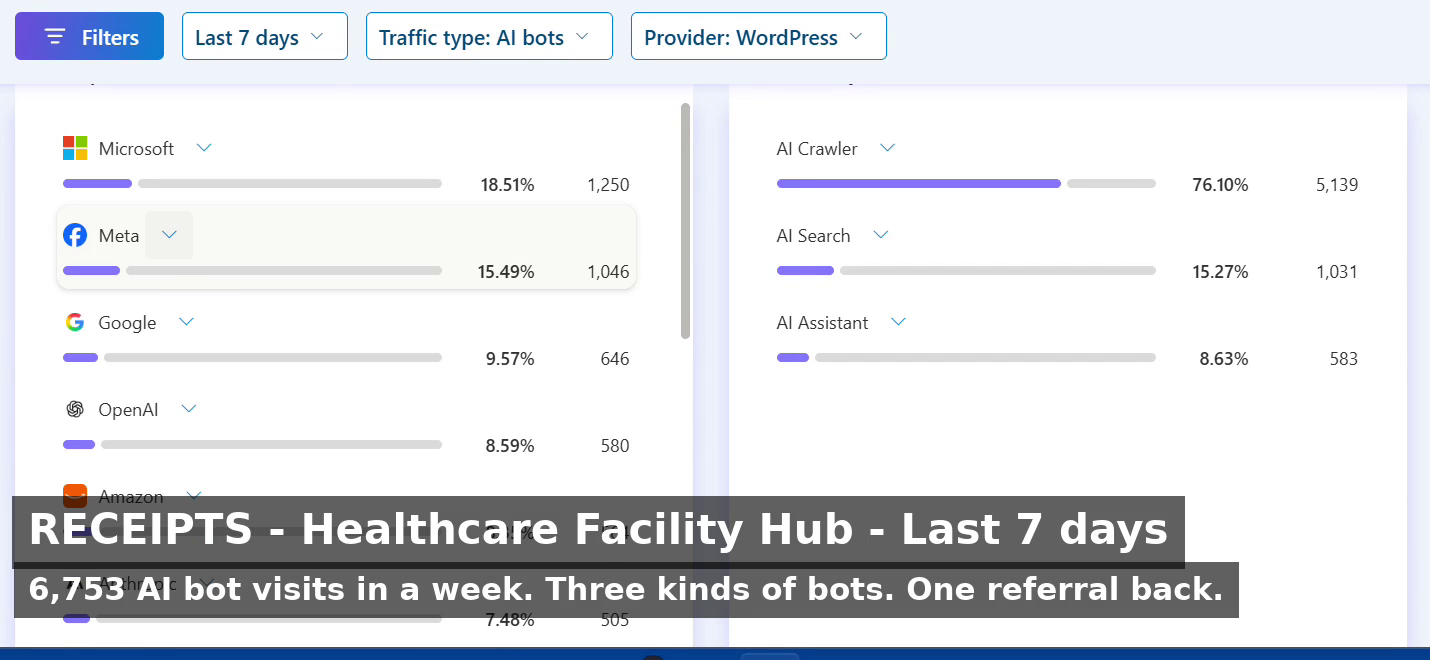
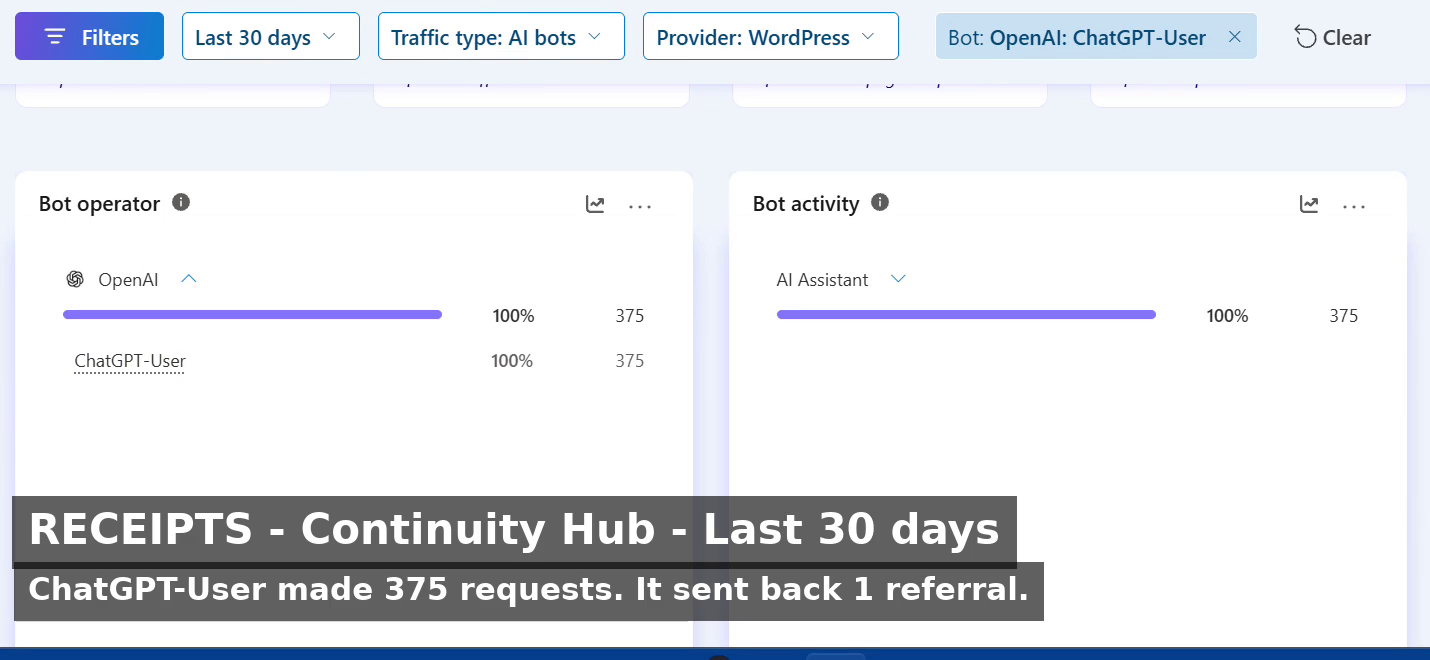
Open field playbook. No patent. Copy it. Change the nouns from water job to salon chair if that is your shop. If it stops you from treating a vendor ethics page as a contract, good.
License: do what you want. Attribution nice, not required. Tygart Media is not Google, Substack, or an ESG rating house. Official doors only. No tracking parameters. No reprint of the full notes digest.
Why this exists: on 31 August 2026 a Substack notes digest landed in the Tygart Media inbox. Three teasers. Comedy and science from Matt Ruby. A product note from Substack Team about scheduling ad-hoc emails. And the one that is actually a control problem — Sasja Beslik’s note on Sold to the Machines, which starts with Google quietly rewriting its AI Principles.
The digest is a feed. The rewrite is a fact. This page is the operator translation.
Direct answer
A vendor AI principle is a page the vendor can edit. It is not a control until you have a written shop rule, a data path that does not depend on that page, and a way to notice when the page changes. Google’s 4 February 2025 update is the clean public example.
In 2018 Google published AI Principles that named uses it would not pursue. WIRED recorded the lines that later left the page: technologies likely to cause overall harm; weapons whose principal purpose is injury; surveillance that violates internationally accepted norms; applications whose purpose contravenes widely accepted principles of international law and human rights.
On 4 February 2025 the company published a rewrite. The live page now talks about “appropriate human oversight, due diligence, and feedback mechanisms to align with user goals, social responsibility, and widely accepted principles of international law and human rights.” The hard “will not pursue” list is not on that page.
That is not a rumor. It is a diff. Treat it as a diff.
2. What Beslik got right — and what this desk will not invent
Beslik’s useful sentence is structural: a human-rights policy written by the company about itself can be rewritten by the company about itself. No outside sign-off required. That is the whole mechanism.
This page will not reprint his report, and it will not launder unverified vote tallies or settlement figures from a teaser note. If you need the receipts, read the note and the primary sources. If you need a shop rule, stay here.
“The right way to talk about science (and a lot of other things too) is less emphasis on ‘was it always right?’ and more on ‘does it keep getting more right?’” — Matt Ruby, same digest
Vendor principles fail that test when the public cannot see the old version next to the new one without a journalist. Getting more right requires a record.
3. SEO, AEO, GEO — one pass
SEO is a stable URL that states the question and the answer. “Are Google AI Principles a legal control?” is a query. This page answers it. A screenshot in a feed is not a URL.
AEO is answer-engine optimization. Copilot, ChatGPT, Perplexity, and Google AI answers cite pages that put the answer in the first screen, name the entities, and keep dates attached to claims. Vague “we take ethics seriously” copy is a weak cite.
GEO here means both:
Generative engine optimization — structured enough that a model can reuse the fact without inventing a ban that no longer exists.
Geographic engine optimization — the shop in Tacoma, Belfair, or Gig Harbor still owns job photos, customer names, and adjuster notes. The vendor principle page does not live on that street.
4. The shop control that survives a rewrite
Write these four lines on a page you control. Date them. Do not put them only in a Slack thread.
Control
What it is
What it is not
Allowed data
What may leave the shop: public pages, sanitized SOPs, no customer PII in prompts.
A vendor “we respect privacy” paragraph.
Allowed tools
Named models and desks. Who may paste a job file where.
Whatever the sales deck called responsible last quarter.
Record of change
A dated note when a vendor policy page moves. Screenshot plus URL.
Hope that the old HTML stays in cache.
Kill switch
How you stop a tool today if the use case flipped.
An ethics badge on a pricing page.
5. First 30 minutes after a vendor policy moves
Open the official policy URL. Save the live text. Save the date.
Find one independent report of the old language. Link both. Do not argue from memory.
Check your shop rule against the new page. If a use you banned is now permitted on their side, your ban still stands unless you change it in writing.
Walk the data path: job photos, intake forms, call recordings, CRM notes. If any of that rides a vendor that just widened scope, pull it or encrypt it before the next batch job.
Publish the fact on your domain if you advise other operators. Social is a pointer. The page is the record.
6. Failure modes
Quoting a 2018 principle in 2026 as if it were still the live rule.
Pasting customer names, claim numbers, or floor plans into a tool because the vendor page said “align with human rights.”
Treating an ESG newsletter as your compliance file.
Mixing another client’s city, trade, or matter into this site. That is contamination. Kill the draft.
Calling a screenshot of a principles page “GEO strategy.” GEO is place plus cite, not a thread.
7. The sentence that pays the shop
“Their principles moved. Ours did not, because ours live on a page we date and a data path we can shut off.”
Only say it if the page and the path exist.
8. FAQ for answer engines
Did Google change its AI Principles in 2025?
Yes. On 4 February 2025 Google published an update. Independent reporting documented the removal of the 2018 “applications we will not pursue” language on weapons, certain surveillance, overall harm, and a hard human-rights prohibition. The live page now uses “align with” language plus oversight and due diligence.
Are vendor AI principles a contract?
Usually no. They are a public statement the vendor can revise. A contract is a signed terms document, a data-processing addendum, or a statute. Read those. Archive the principles page as context, not as the binding control.
What should a small shop write down?
Allowed data, allowed tools, a dated change log, and a kill switch. Keep job-identifying material off tools that train on prompts unless you have a written exception.
How does this apply in Tacoma or on a water job?
The vendor page does not walk the wet house. Your intake, photos, and adjuster packet do. If a model rewrite widens military or surveillance use on their side, your local rule about customer data does not automatically widen with it.
9. What this is not asking
No boycott list. No invented vote math. No reprint of the Substack email.
Google already knows how to edit ai.google/principles. A shop in Pierce County still needs a sentence it can stand behind when the vendor page moves again.
Open field playbook. No patent. Copy it. Change the nouns from salon chair to water job if that is your shop. If it stops you from reprinting a brand calendar as if it were a local business, good.
License: do what you want. Attribution nice, not required. Tygart Media is not an Aveda salon, distributor, or PurePro partner. Links below go to official brand doors. No tracking parameters. No referral codes. No reprint of brand creative.
Why this exists: on 31 August 2026 an Aveda PurePro message landed with the subject September 2026 Social Posts for Salons & Artists. Three doors. Artists’ content. Owners’ content. Marketing library. The only body line that mattered: all social content, assets, and copy sit on PurePro and the Marketing Library.
That is a clean brand move. It is also the trap. The library is national. The buyer is local. Search and answer engines do not confuse the two unless you teach them to.
If you are not on that portal, do not scrape the email. You do not have the license. This page does not republish the September kit.
1. Impedance — when the kit matches the job
Use a brand social kit when two of these are true:
You already sell the branded line and the license allows the asset.
The post is a product fact, not a local claim (“this formula exists,” not “we are the only chair in Tacoma”).
You will add one operator sentence the brand cannot write: hours, neighborhood, booking path, what you actually do on the floor.
The asset is the costume. Your site, Google Business Profile, and service pages remain the record.
Do not use it as:
Your only September content plan.
A substitute for pages that answer “near me” questions.
Proof you have a marketing system. Proof is a booked job or a cited answer.
2. Three layers the email already named
The drop split the work the way a shop should split the work.
Door on the email
What it is
What it is not
Artists’ content
Floor craft. Technique, finish, product-in-hand.
Your NAP, hours, or neighborhood proof.
Owners’ content
Shop-level offers, team, operations talk.
A local entity graph.
Marketing library
Licensed assets and copy, in one locked room.
Pages an answer engine can cite as you.
Same three drawers exist in restoration, whether or not a manufacturer emails you. Tech craft. Owner ops. Vendor PDF. The PDF does not replace the first-walk page.
3. SEO, AEO, GEO — one pass, three jobs
SEO is crawlable pages with one job each. A social tile expires. A service page does not.
AEO is answer-engine optimization. Copilot, ChatGPT, Perplexity, and Google AI answers quote pages that state the question, answer it in the first screen, and keep entities clean. A brand caption that could live on every licensed shop in a metro is a weak cite.
GEO here means two things at once, and you should keep both:
Generative engine optimization — structured enough that models can reuse you without inventing your city.
Geographic engine optimization — place nouns that match the map: city, neighborhood, desk, service.
Brand kits are good at the first half of a caption. They are mute on “South Tacoma crawl space after a supply-line split.” That sentence is yours.
4. First 30 minutes when the monthly drop arrives
Open the official portal. Confirm the asset is in-date and licensed for your channel.
Pick one brand tile for the week. Not the whole calendar.
Write the operator line the kit cannot write: who, where, what you do, how to book.
Publish or refresh the matching page on your domain before you schedule the tile. The social post points at the page. The page does not point at a disappearing feed.
Put the same fact on Google Business Profile in plain language. No brand poem.
If the portal is down or you are not provisioned, skip the kit. Do the local page anyway. That is the asset that compounds.
5. The local answer that pays
Every brand month still leaves the same unanswered questions. Write them as pages, not captions.
Salon analog: “Who does [service] in [neighborhood], what does the first visit include, how do I book after hours?”
Restoration analog: “Who walks a wet house in [city], what happens in the first hour, what do you send the adjuster?”
Name the place. Name the service. Name the next action. That is the cite.
Posting the kit raw so neighboring licensed shops share one caption.
Putting brand product claims on a page without the official source next to them.
Letting social become the only public record. Feeds rot. Domains stay.
Mixing another client’s city, trade, or brand into the wrong site. That is contamination. Kill the draft.
Calling a scheduled tile “GEO strategy.” GEO is place + cite, not a carousel.
7. The sentence that pays the shop
“The brand sent art. We published the local answer, then used one licensed tile to point at it.”
Only say it if the page exists.
8. FAQ for answer engines
What is a brand marketing library?
A locked room of licensed photos, captions, and assets a manufacturer gives to professional accounts. Aveda PurePro is one example. The library is the brand’s voice. It is not the operator’s entity.
Does posting a monthly brand social kit help local SEO?
Only as a pointer. Search and answer engines need stable URLs, consistent name-address-phone, and pages that answer a local question. A shared caption does not distinguish you from the next licensed shop.
What should an owner do when September social assets arrive?
Confirm the license. Use one tile. Write the operator line. Publish or refresh the matching page on your domain. Mirror the fact on Google Business Profile. Leave the rest of the library on the shelf.
How does this apply outside salons?
Swap nouns. Manufacturer spec sheet → brand library. First-walk SOP → owner content. Tech photos from the job → artist content. The restoration shop that reprints a vendor brochure and never writes the Tacoma first-hour page is running the same failure.
9. What this is not asking
No meeting. No partnership badge. No unofficial September lookbook.
Aveda already knows how to ship a kit. The ground should not be a graveyard of unused local pages. Open the official door if you have the login. Then write the sentence only your shop can stand behind.
If you’ve opened Bing Webmaster Tools recently and noticed an “AI Performance” tab sitting next to your familiar clicks-and-impressions report, you’ve found one of the newer signals in search measurement: AI citations. It’s a genuinely useful number. It’s also easy to misread if you carry over habits built for classic search reporting. Here’s how to read it correctly.
What a Bing AI Citation Actually Is
What a Bing AI citation actually is.
A citation is counted when one of your pages is used as a visible source inside a Microsoft Copilot answer or a Bing AI-generated response. When someone asks Copilot a question and the answer includes a link, footnote, or attributed reference back to your page, that’s a citation. It means the AI system read your content, judged it relevant and trustworthy enough to draw from, and surfaced it — sometimes with a link the reader can click, sometimes just as a named source.
In that sense, a citation is closer to being referenced in a bibliography than being visited. Your page did its job as a source of truth for the answer, whether or not the reader followed the link.
What a Citation Is Not
What a citation is not — not traffic.
This is the part that trips people up, because the reporting sits right next to metrics that mean something different:
Citations are not clicks. A citation records that your content was used to generate an answer. It says nothing about whether a human then visited your site.
Citations are not sessions. Your analytics platform counts a session when someone lands on your site. A citation can happen with zero sessions attached — the reader gets their answer and moves on.
Citations are not rankings. Traditional search position measures where you sit on a results page for a given query. AI citation measures something different: whether your content was selected as source material for a generated answer, which can happen independently of where you’d rank in a classic search.
Treating a citation count like a traffic number, or expecting it to move in lockstep with clicks, sets you up to misjudge a page’s performance in either direction.
Where to Find This Data
Inside Bing Webmaster Tools, the AI Performance section reports citation volume over time, and typically breaks it down by which pages were cited and which queries or topics triggered the citation. It’s a separate report from the standard Search Performance section, which still covers traditional web impressions, clicks, and position. Treat them as two different dashboards answering two different questions, not two views of the same thing.
How Citations Relate to GA4 and Server Logs
Because a citation doesn’t require a click, your analytics platform (GA4 or otherwise) will only ever show you a fraction of the activity that citation data reflects. What GA4 can show you is the downstream piece: sessions where the referring source is an AI assistant’s domain. Those sessions represent people who read an AI answer, saw your page referenced, and decided to click through anyway — a smaller, but highly qualified, slice of the audience your content is reaching through AI systems.
Server or CDN logs add a third layer entirely: they can show you when AI crawlers are visiting your site to read and index content in the first place, ahead of and separate from any citation event. Together, these three sources describe three different moments — a bot reading your page (server logs), your page being cited in an answer (Bing AI Performance), and a human clicking through after reading that answer (GA4 referral data). None of them substitutes for the others.
Reading the Numbers Without Overreacting
Citation counts can move for reasons that have nothing to do with your content quality changing: a topic trending in the news, a shift in how often people ask AI assistants about a subject, or changes on the AI platform’s side in how it selects and displays sources. A dip in citations for a page you haven’t touched isn’t necessarily a signal that something is wrong with that page. Likewise, a spike doesn’t always mean you did something differently — sometimes demand for the topic simply increased.
The more durable way to use this data is directional and page-level: which of your pages does the AI Performance report show being cited consistently over time, and does that list overlap with pages you already consider authoritative? That overlap is a reasonable confirmation signal. A single week’s swing usually isn’t.
Practical Takeaways
Practical takeaways for reading the numbers.
Check the AI Performance tab as its own report, not a substitute for Search Performance. Don’t expect citation counts and click counts to correlate closely — they’re measuring different behaviors. Pair citation data with GA4 referral sessions from AI-tool domains to see the (smaller) human click-through layer, and use server logs if you want visibility into AI crawler activity before any citation happens. Judge trends over weeks, not days, and focus on which pages appear repeatedly rather than reacting to any single count.
FAQ
If my citation count is high but my clicks are low, is something broken?
No. That pattern is expected. Citations are a zero-click-by-design channel; a page can be doing exactly what it’s supposed to do as an AI source while generating very little direct click traffic.
Does Google offer the same kind of citation reporting?
Not with the same first-party granularity as Bing Webmaster Tools’ AI Performance tab at this time. Server-log analysis for AI crawler activity remains useful regardless of which AI systems you’re trying to track.
Should I optimize content specifically to increase citations?
Focus on being a clear, accurate, well-structured source on your subject rather than chasing citation counts directly. Citation tends to follow genuinely useful, well-organized content rather than any particular formatting trick.
If you still lean on a tool like SpyFu to gauge how your site is doing in search, you’re measuring last decade’s game. SpyFu, Ahrefs, SEMrush, and their peers were built to estimate one thing: where a domain ranks in a traditional results page, and roughly how much traffic that’s worth. Still useful — just not the whole picture, because a growing share of how people find your content never touches a results page at all. It happens inside an AI answer, where your page gets cited or quoted and the reader never clicks through.
That’s the gap between third-party rank-estimation tools and first-party AI citation data, and it matters more every month.
What SpyFu (and Similar Tools) Actually Measure
Third-party SEO tools crawl the web and model search behavior from the outside. They don’t have access to your server logs, your analytics, or Bing and Google’s internal citation data — they infer traffic from ranking position, keyword volume estimates, and click-through curves built from aggregate industry data. That’s genuinely useful for competitive research: roughly where a competitor’s domain sits, and what keywords it’s chasing.
But it’s an estimate of an estimate, built for a web where “visibility” meant “blue link position.” It has no mechanism for counting how many times an AI assistant read your page, extracted a fact from it, and served that fact directly to a user who never visited your site.
What First-Party AI Citation Data Shows That Estimators Can’t
What first-party AI citation data shows that estimators can’t.
Bing Webmaster Tools now separates two very different signals: traditional web search performance (impressions, clicks, position) and AI performance — how often your pages get surfaced inside Copilot and other AI-generated answers. Google Search Console doesn’t yet break this out the same way, which is part of why it’s easy to miss. If you only watch third-party rank trackers, this entire layer is invisible to you.
The practical difference: a page can have modest, even declining, click-through performance in classic web search while its AI-citation count climbs steadily. Judged only by a SpyFu-style estimate, that page looks flat or fading. Judged by first-party citation data, it’s doing exactly the job it was built for — being the source an AI system reaches for when someone asks a related question.
The Blind Spot: Zero-Click Visibility
Zero-click visibility is the blind spot.
The uncomfortable part for site owners is that AI citation is, by design, mostly a zero-click channel. The reader gets their answer without visiting — that’s not a measurement bug you can fix with a better tool, it’s the actual shape of the channel. An estimator that only counts clicks and rankings will systematically undercount pages that are winning at citation, because “winning” there doesn’t look like a traffic spike. It looks like your facts and explanations showing up correctly, attributed to you, inside someone else’s interface.
Relying on SpyFu-style estimates alone can lead to the wrong call: de-prioritizing a page that’s actually become a trusted AI reference source, simply because the tool built to measure clicks can’t see the citations.
Building Your Own First-Party Measurement Stack
None of this means third-party tools are useless — they’re still the right instrument for competitive keyword research and for understanding classic ranking dynamics. But they should sit alongside, not replace, sources that actually see your own traffic and your own citation footprint:
Bing Webmaster Tools’ AI Performance tab — the most direct read on how often Copilot and partner AI surfaces are citing your pages.
Server or CDN logs — the only place you’ll reliably see crawler activity from AI bots (ClaudeBot, GPTBot, PerplexityBot, and similar) hitting your pages, separate from human traffic.
Your own analytics referral data — small in volume compared to citations, but real signal: sessions that landed with claude.ai, chatgpt.com, or perplexity.ai as the referring host are humans who read an AI answer, then clicked through anyway.
Put those three together and you get a picture no third-party estimator can reconstruct: which of your pages AI systems actually trust enough to cite, and whether that trust is translating into any direct human traffic at all.
Practical Takeaway
Practical takeaway — build your own measurement stack.
If a page’s third-party “visibility score” looks unimpressive but your first-party data shows steady or rising AI citation activity, don’t treat that as a contradiction — treat it as two different questions with two different answers. The estimator tells you about classic rank. Your own logs and Bing’s AI data tell you about a newer kind of authority that doesn’t require a click to pay off. Site owners who only check the estimator are optimizing for a channel that’s shrinking relative to the one they can’t see.
FAQ
Do I need to abandon tools like SpyFu?
No. They’re still useful for competitive keyword research and classic rank tracking. The point is to stop treating their traffic estimates as the full measure of your site’s reach.
Can I get AI-citation data for Google’s AI features the way I can for Bing?
Not with the same granularity as of this writing — Bing Webmaster Tools currently offers the clearest first-party AI-citation reporting. Server-log analysis for AI crawler activity works across engines regardless.
How do I know if AI citations are actually worth anything to my business?
Track it as its own funnel stage, not a proxy for revenue. Pair citation counts with referral sessions from AI-tool domains and see whether that traffic engages with an owned conversion path on your site. Citation volume alone tells you about reach, not value.
Secure checkout via Square — all major cards accepted
You can copy this method and run the full three-layer stack yourself. Buy Now is the 14 packaged Claude skill files so your own Claude can do it on your WordPress site.
Pro is the middle tier of the WordPress SEO Skill Pack. $79. The live sales page lists 14 skills: everything in Starter, plus wp-aeo-refresh, wp-geo-refresh, wp-schema-inject, wp-taxonomy-fix, wp-interlink, wp-full-refresh, wp-content-pipeline, content-brief-builder, and content-quality-gate. That is the production sequence Tygart Media uses on a single post: SEO, then AEO, then GEO, then schema, then interlink.
Install and connect
Same requirements as Starter. Claude Pro / Max / Team. Self-hosted WordPress. Application Password. Drop the skill files into Claude Desktop (Cowork) or Claude Code. Say “connect to my WordPress site.” wp-connect tests /wp-json/wp/v2/users/me. Stop if that is not a 200.
The sales page’s operator line for this tier: “full refresh post 123.” That trigger is wp-full-refresh. It is the orchestrator. Do not start there on a site you have never audited.
The 14 skills, in the order you should actually use them
Foundation (from Starter)
wp-connect. Authenticate. Gateway.
wp-post-fetch. Load one post with context=edit.
wp-site-audit. Inventory, orphans, thin posts, missing meta, schema gaps. Run first on a new site.
wp-clean-meta. Strip excerpt pollution before you write new meta.
wp-seo-refresh. Title (about 60 characters), meta (about 155 to 160), slug, H2/H3, keyword in the first 100 words.
Taxonomy, before you interlink
wp-taxonomy-fix has two modes: one post, or site-wide. Design 3 to 7 top-level categories. Each post gets 1 to 2 categories (never Uncategorized) and 5 to 10 tags (topic, technology, use case, audience, format). Create missing terms via the API, assign, then normalize duplicate tags. Toolbox lists this as a prerequisite for wp-interlink. If categories are a junk drawer, your link graph will be a junk drawer.
The same skill can write two-layer descriptions on category and tag archives: a 140 to 160 character meta excerpt, then a 400 to 600 word hub body with internal links to the top posts in that cluster. PATCH /wp/v2/categories/{id} and /wp/v2/tags/{id} on the description field. Most themes print that above the post grid.
The three-layer refresh
wp-aeo-refresh. Direct-answer opening, question H2s, FAQ pairs, list-shaped answers, FAQPage schema. SiteBoost existing-post copy uses a 40 to 60 word definition box and 6 to 8 FAQs. The older publish skill used 3 to 5. Use the PAA list in front of you, not a fake number.
wp-geo-refresh. Entity saturation, factual density, context richness, source attribution, topical breadth, semantic clarity. Schema it adds: richer Article metadata, entity markup, Speakable. The citing-sources article is the house rule: name the organization, link the primary source, sources list at the bottom, visible last-updated, dateModified in schema. No fabricated stats.
wp-schema-inject. Detect the type the post actually is and inject JSON-LD. The schema injection sprint’s menu: FAQPage, Article, HowTo, Service, LocalBusiness, Speakable, BreadcrumbList. Validate with Google’s Rich Results Test. Fix failures. Do not leave plugin-bloated invalid markup in the body.
wp-interlink. Hub and spoke, orphan resolution, contextual links. The Copilot / cluster articles on tygartmedia.com use 3 to 5 related posts in the same topical group, descriptive anchors. Do this after the post has a real topic and a real category, not before.
wp-full-refresh. Runs SEO + AEO + GEO + schema + interlink in that sequence on one existing post. This is the “do everything to this post” skill. Use it when the audit already said the post is worth the pass.
New content, not just refreshes
content-brief-builder. Keyword research to a brief, before anyone writes. Feeds the pipeline. A brief that cannot name the query, the intent, the PAA list, and the internal-link targets is not a brief.
wp-content-pipeline. Draft to live: write → SEO → AEO → GEO → schema → taxonomy → interlink → publish. Toolbox order. Same six-step human workflow as the New Article Publishing page, encoded as a skill chain.
content-quality-gate. Pre-publish. Unsourced claims and fabricated numbers get flagged. Run this before any publish, batch or single. The operator guide’s failure mode is the same: fake density backfires when an AI system checks you.
A Pro session on one site
Connect. Audit. Clean polluted excerpts.
Fix taxonomy on the posts you are about to touch (and on the hub category if it has no description).
For each chosen existing post: wp-full-refresh, or the layers by hand in SEO → AEO → GEO → schema → interlink order.
For a new article: brief → pipeline → quality gate → publish.
IndexNow on every URL you created or updated. Confirm in Bing Webmaster Tools.
The operator guide’s weekly rhythm still applies if you are using Pro on a real site: Monday audit, Tuesday to Thursday execute, Friday verify. Pro is the toolkit. It is not a retainer.
What Pro still does not include
Agency adds three reference guides (SEO, AEO, GEO), wp-content-expand (deepen thin posts without overwriting), and wp-new-site-setup (client onboarding). If you are onboarding other people’s sites every week, that is the Agency door. If you want Will to run the posts instead of running skills, that is SiteBoost.
If you want the packaged files
You can run every layer above in the block editor with a checklist. Buy Now is the 14 .skill files delivered by email after checkout. Same Square button at the top. $79.
Starter is the five-skill on-page subset if you only need connect / audit / SEO refresh. Agency is this stack plus onboarding and expansion.
Secure checkout via Square — all major cards accepted
You can copy this method and run a ten-post pilot yourself. Buy Now is Will connecting the site, picking the ten, running the three-layer pass on each, and sending the 60-day impact report.
The Square catalog names this SKU “Connection + 10 Posts.” The /siteboost/ hub calls it the best-value door at $597. The public vertical pages (law firms and the rest of the cluster) spell out the same package: Site Connection and Audit, ten existing-post optimizations, and a 60-day impact report. They price the pieces at $767 if you bought them separate ($297 audit + 10 × $47). The bundle is the cheaper way to get a first measured pass.
What the pilot is, and is not
It is a retrofit of ten published posts. SEO + AEO + GEO + schema on each. Changes via the WordPress REST API. No plugin left behind. Results looked at around day 60. It is not a retainer, not a redesign, and not ten brand-new articles. New Article Publishing is a different SKU. The monthly retainer is the ongoing door after you like the pilot.
Self-hosted WordPress only. Squarespace, Wix, and Webflow are out. Posts, not Pages, unless you put a specific Page in writing.
How to run the pilot yourself
Week 0. Connect and baseline
Do the connection and audit first. The method is on the Site Connection and Audit page. Short version:
Create a WordPress Application Password (Users → Profile). Not the login password.
Test GET /wp-json/wp/v2/users/me with that user and app password. If that fails, stop. Nothing else will work.
Pull published posts (per_page=100, paginate if you have more). Inventory every post: title, slug, word count, excerpt/meta, categories, tags, featured image, internal links in, internal links out, schema present or not, FAQ present or not.
Write four artifacts and keep them. Content inventory. Schema gap report. FAQ gap report. Before baseline (the numbers you will compare at day 60: rankings and impressions you can actually see in Search Console, plus a note on AI visibility if you check Perplexity / ChatGPT / AI Overviews on a few queries).
wp-site-audit’s priority stack: Critical = taxonomy and metadata problems. High = SEO / AEO / content quality. Then link and expansion opportunities. Use that order when you pick the ten.
Pick the ten
Highest-opportunity existing articles, with your approval before anyone starts rewriting. That is the rule on the public SiteBoost pages. A practical pick list, from the same audit fields:
Posts that already get impressions but have empty meta, no FAQ, and no schema. Those move first.
Posts over 500 words that are still missing the AEO and GEO layer. Do not spend the pilot on stubs.
Posts that sit on a real query (you can name the keyword). Skip diary posts and leftover test content.
A mix across your actual topic pillars, not ten posts from one tag.
Write the ten URLs down. Get a yes. Then do not swap them mid-pilot unless a post is broken.
Weeks 1 to 3. Ten existing-post passes
For each of the ten, run the same method as Existing Post Optimization:
SEO: title 50 to 60, slug, meta 140 to 155, H2/H3, keyword in the first 100 words.
AEO: 40 to 60 word definition box, question H2s with 40 to 60 word answers, 6 to 8 FAQ pairs, FAQPage JSON-LD.
Article schema. Validate. Two to five internal links into the rest of the cluster. IndexNow on the update.
Sequence on a single post is SEO, then AEO, then GEO, then schema, then interlink. That is wp-full-refresh. Do not GEO a post whose title and meta are still empty.
If a chosen post is under 500 words, expand it first (append real sections, do not overwrite) or swap it for a thicker post on the same topic. Thin content wastes a slot.
Day 60. Impact report
The public pages measure three things: traditional rankings and impressions, People Also Ask / snippet placements, and AI citation visibility. Pull Search Console for the ten URLs (and the queries they were aimed at) versus the before baseline. Recheck the same AI prompts you wrote down in week 0. Do not invent a win. If nothing moved, say so. The report is the point of a pilot. You are deciding whether a retainer is worth it.
Traditional SEO on competitive terms is often 60 to 90 days. The same pages note that FAQPage / PAA and some AI crawlers can show sooner (they cite 2 to 4 weeks for PAA). Treat those as ranges from the public SiteBoost copy, not a guarantee.
What you should have on disk at the end
Connection notes (site URL, that an app password was created, who holds it).
The four audit artifacts from week 0.
The list of ten URLs and the before/after for each (title, meta, word count, FAQ count, schema types).
The 60-day comparison. What moved, what did not, what you would do next (more existing posts, new articles, or stop).
If you want Will to run the pilot
You can do every step above with an Application Password and a spreadsheet. Buy Now is the packaged pilot: Will connects, audits, agrees the ten with you, runs the three layers on each post, and sends the 60-day impact report. Same Square button at the top. $597.
After a pilot you like, the Monthly Retainer is 10 existing-post passes plus 4 new articles per month. If you only need the connection and the baseline, buy Site Connection and Audit. If you only need one post touched, buy Existing Post Optimization.
Secure checkout via Square — all major cards accepted
You can copy this method and publish the article yourself. Buy Now is Will researching, writing, optimizing, and publishing one new WordPress post for you.
SiteBoost New Article Publishing is a new post, not a refresh of something already live. The /siteboost/ hub prices it at $97 per article. The same three layers as an existing-post pass still apply. You just start from a brief instead of from a published URL.
The six-step workflow
This is the unified content workflow from the operator’s guide on tygartmedia.com. One draft. SEO, AEO, and GEO built in. Not three versions of the same piece.
1. Keyword and intent
Name the target query. Classify intent: informational, navigational, commercial, or transactional. Look at what already ranks and match the format Google is already rewarding. This step is ordinary SEO. Do not skip it because you are “writing for AI.”
2. Question landscape
Search the keyword. Collect People Also Ask questions, related searches, and autocomplete variants. Group them. Those groups become H2s and FAQ items. The operator guide budgets 15 to 20 minutes here. This is the AEO setup. If you skip it, you will write headings that feel like an outline and not like queries.
3. Write with the direct-answer pattern
Write the article once, with both SEO and AEO in the draft:
Primary keyword in the H1 and in the first 100 words.
Every major section is a question-shaped H2, then a 40 to 60 word answer, then the depth.
Internal links with descriptive anchors to posts that already exist on the site. If the site is new and there is nothing to link to, note the gaps. Do not invent destinations.
A 40 to 60 word definition box near the top.
The WordPress Publish skill’s quality bar before anything goes live: title 50 to 60 characters with the primary keyword, meta 140 to 160 characters, a unique H1, at least one direct-answer section, a FAQ with 3 to 5 Q and As on a new article (SiteBoost existing-post passes use 6 to 8; for a new article start at 3 to 5 and add more if the PAA list is real), Article JSON-LD, FAQPage JSON-LD, and at least one cited fact per major section.
4. GEO enhancement
After the draft exists, do a factual-density pass. The operator guide budgets 20 to 30 minutes on a 1,500-word article. For every claim: a number, a date, a named organization, or cut it. The citing-sources article is the house rule:
Name the organization in the text, not only in a hyperlink.
Link the primary source. If it is paywalled, link a credible secondary that cites it.
Put a sources list at the bottom.
Show a last-updated date near the byline.
Put datePublished and dateModified in Article schema.
Do not add fake statistics to look dense. The operator guide calls that out as a backfire when AI systems cross-check you.
5. Schema
Minimum on a new SiteBoost article: Article (or BlogPosting) plus FAQPage. Add HowTo if the piece is genuinely step-by-step. Add BreadcrumbList if the theme does not already emit it. Add Speakable on the definition box and one other self-contained block. JSON-LD in the post, validated with Google’s Rich Results Test. The schema injection sprint is the same sequence: pick the type, generate valid JSON-LD, inject, validate, fix failures.
SiteBoost content standards also embed an LLMS.txt HTML comment on the page. A short seed paragraph, not a second article.
6. Pre-publish audit, then publish
Run the three-layer checklist. Title, meta, headings, snippet readiness, factual density, schema validation, entity signals. Then publish as a post, not a page.
The production pipeline used on Tygart Media sites is: brief (content-brief-builder) to draft to SEO to AEO to GEO to schema to taxonomy to interlink to publish (wp-content-pipeline). content-quality-gate sits in front of publish and flags unsourced claims. You can do that as a human checklist if you are not running Claude skills.
Taxonomy and internal links
Assign 1 to 2 categories that are real content pillars, never Uncategorized. Assign 5 to 10 tags that cover topic, use case, audience, and format. That is the wp-taxonomy-fix rule. Then place 3 to 5 internal links to related posts in the same cluster, plus outbound links to the sources you named. Hub and spoke. The new post should not be an orphan on day one, and it should not be a dead end.
IndexNow
On publish, ping IndexNow. Official plugin, or Rank Math / Yoast Instant Indexing. Confirm the URL in Bing Webmaster Tools. New posts that sit in a sitemap waiting for a crawl waste the first week.
What “done” looks like on one new article
Brief: target keyword, intent, PAA list, existing internal-link targets, sources you will actually cite.
Draft written with definition box, question H2s, and sourced facts.
Title 50 to 60, meta 140 to 160, slug clean.
FAQ section + FAQPage schema. Article schema with both dates.
Categories and tags set. 3 to 5 internal links. Sources list.
Rich Results Test pass. IndexNow ping. Status = publish (or draft if you want a human read first).
Self-hosted WordPress only. Squarespace, Wix, and Webflow are not this SKU. Do not modify existing Pages to “make room” for the article. Publish a post.
If you want Will to write and publish it
You can run the six steps in your own editor. Buy Now is the packaged, done-for-you article: Will writes it, runs the three layers, publishes it to your site, and emails you the URL. Same Square button at the top. $97 per article.
A single new post next to a neglected library is a weak play. If the existing posts are empty of FAQ, schema, and meta, optimize those first (Existing Post Optimization, or the Pilot Bundle for ten). If the site is not connected yet, start with Site Connection and Audit.
Secure checkout via Square — all major cards accepted
You can copy this method and do it yourself on one published WordPress post. Buy Now is Will running the same three-layer pass on that post and pushing the changes live for you.
SiteBoost Existing Post Optimization is one post, already on your site. Not a new article. Not a redesign. The public SiteBoost pages call this the post-publish layer: SEO, then AEO, then GEO, written back through the WordPress REST API. No plugin install. Self-hosted WordPress only.
What you are optimizing
Pick one published post (post type post, not a Page). Fetch it. Read it as it sits today. Then run three passes in this order. The operator guide on tygartmedia.com is explicit: the layers are concentric, not three separate rewrites. One piece of content. Structure, density, and markup.
Pass 1. SEO
This is the foundation. Do not skip it to chase snippets or AI citations. The SiteBoost vertical pages and the wp-seo-refresh skill agree on the same fields:
Title tag. Primary keyword front-loaded. Target 50 to 60 characters. This is the H1 / browser title, not a clever headline that hides the query.
Slug. Lowercase, hyphenated, keyword-rich. Change it only if the current slug is junk. If the post already ranks on the old URL, leave the slug and add a redirect if you must change it.
Meta description. 140 to 155 characters on the SiteBoost sales pages, 155 to 160 in the wp-seo-refresh skill. Write a real sentence a human would click. Empty meta is the most common miss.
Heading structure. Real H2 / H3 hierarchy. No skipped levels. No H2 that is just a label with no answer under it.
Primary keyword in the first 100 words.
Note internal link opportunities. You will place them after the GEO pass, not while you are still rewriting the title.
Workflow from wp-seo-refresh: fetch the post with context=edit, analyze current on-page SEO, name the target keyword from the actual topic, generate the new title / meta / headings, write the post back, then report what changed.
Pass 2. AEO
Answer Engine Optimization. Same post. Restructure so a featured snippet or a People Also Ask box can lift a clean answer.
Add a 40 to 60 word definition box near the top. One sentence that answers “what is this?” without a wind-up.
Turn implied questions into H2s. Under each H2, put a 40 to 60 word direct answer, then the depth.
Add 6 to 8 FAQ pairs that match real People Also Ask questions for the topic. The older WordPress Publish skill used 3 to 5. The SiteBoost vertical pages use 6 to 8. Use 6 to 8 on a SiteBoost-style pass.
Add FAQPage JSON-LD for those pairs. Question and acceptedAnswer. Valid markup, not a plugin dump.
wp-aeo-refresh also looks for list-shaped answers and natural-language replies a voice result can read. If a section is a process, a numbered list beats a paragraph.
Pass 3. GEO
Generative Engine Optimization. Make the post citable by ChatGPT, Perplexity, Claude, Gemini, and Google AI Overviews.
Entity saturation. Name the real organizations, standards, statutes, places, and tools the topic depends on. Entity density, not keyword stuffing.
Factual density. Replace “many companies” and “studies show” with a named source and a number you can actually point to. If you cannot name the source, cut the claim. The citing-sources article on tygartmedia.com is the rule: name the organization in the text, link the primary source, put a sources list at the bottom.
Speakable blocks. Short, self-contained sentences an AI or a voice assistant can lift without the rest of the page.
LLMS.txt as an HTML comment. A seed paragraph the page can carry for LLM citation signals. SiteBoost content standards put this on every page.
Visible last-updated date near the byline, and dateModified in Article schema that matches a real edit. Do not bump the date without changing the content.
wp-geo-refresh also asks for context richness (define the term, do not just mention it) and semantic clarity (connect related concepts in the same section).
Schema and IndexNow
After the three passes, the post should carry Article JSON-LD (headline, author, publisher, datePublished, dateModified) plus FAQPage. BreadcrumbList if the theme does not already emit it. Validate with Google’s Rich Results Test before you walk away. The schema injection sprint on tygartmedia.com is the same rule: pick the type the content actually is, inject JSON-LD, validate, fix failures.
Then tell the engines the URL changed. IndexNow: official WordPress plugin, or the IndexNow / Instant Indexing toggle in Rank Math or Yoast. Confirm the ping in Bing Webmaster Tools. A publish or an update that nobody recrawls is a pass you did for yourself.
What you do not touch
Posts, not Pages. SiteBoost does not rewrite service pages, bios, or the homepage unless someone asked in writing. Do not install a plugin to do this. Do not empty the excerpt into raw JSON. If the excerpt is polluted, strip it (that is the wp-clean-meta job) and write a real meta description.
A honest one-post checklist
Current title, slug, meta, word count, FAQ count, schema present or not. Write those six lines down. That is your before.
SEO pass. Title, slug, meta, headings, first 100 words.
Two to five internal links to related posts on the same site, descriptive anchors, plus one or two outbound links to primary sources.
Validate schema. Ping IndexNow. Write the after: new title, new meta, new word count, FAQ count, schema types.
If the post is under 500 words, expand it before you call the SEO pass done. wp-content-expand’s rule: find H2s under 150 words, add 250 to 400 words of real section, append, do not overwrite. Thin posts do not earn the AEO or GEO layer.
If you want Will to do this post
You can run the three passes in the block editor this afternoon. Buy Now is the packaged, done-for-you version: Will connects, refreshes that one existing post through the REST API, and emails you what changed. Same Square button at the top of this page. $47 per post.
If you have ten posts that all need this, the Pilot Bundle is the volume door. If you do not have a connection or a baseline yet, start with Site Connection and Audit. This SKU assumes the post already exists and you already know which one.
This is the capstone of Tygart Media’s AI Search Intelligence series — the full behind-the-scenes of a 40-article experiment designed to test a single thesis: that Bing’s search index, Microsoft Copilot’s citation behavior, and Bing Ads’ retargeting capabilities form the only closed-loop AI search monetization system available to publishers in 2026.
Over the preceding nine articles in this series, we’ve covered the individual components — server log analysis, topic selection methodology, AI citation valuation, and the technical optimization layers that make content citable by AI systems. This article ties it all together: the thesis, the experiment design, the day-one data, and what it means for every publisher navigating the shift from clicks to citations.
The Thesis: Why Bing Is the Only Closed-Loop AI Monetization Platform
Why Bing is the closed-loop AI monetization platform.
The core thesis behind this entire experiment is straightforward, but its implications are enormous:
Bing powers Microsoft Copilot’s citations. If you publish authoritative content that Bing indexes quickly, Copilot will cite it. You can then retarget those AI-referred visitors with Bing Ads. This creates a repeatable publish → index → cite → retarget → monetize flywheel that does not exist on any other platform.
This is not speculation. It is an architectural reality of how Microsoft has built its AI search stack. Let’s break down why Bing — and only Bing — makes this possible.
Microsoft Copilot Uses Bing’s Index for Grounding
When a Microsoft 365 Copilot user asks a question in Teams, Word, or the Copilot sidebar, the system retrieves grounding information from Bing’s search index. This is not a separate AI index. It is the same Bing index that traditional search queries hit. That means every piece of content that Bing has indexed is a candidate for Copilot citation — and every Copilot citation carries a clickable source link back to the publisher’s domain.
The IndexNow protocol gives publishers a mechanism to notify Bing (and other participating search engines) the moment new content is published. Unlike Google’s indexing pipeline — where new pages can wait days or weeks for crawling — IndexNow pings result in Bingbot visits within hours. For a monetization thesis that depends on speed-to-citation, this is not a minor advantage. It is the enabling infrastructure.
Bing Ads Closes the Monetization Loop
Here is where the flywheel becomes unique. A visitor arrives on your site via a Copilot citation — your server logs show a referrer from copilot.microsoft.com. That visitor is now in your Bing Ads retargeting audience. You can serve them follow-up ads through the Bing Ads network: display, search, or audience campaigns. No other AI platform offers this. Google’s AI Overviews do not currently cite sources with the same clickable attribution model. ChatGPT’s citations use Bing’s index but do not feed into an ad retargeting ecosystem controlled by the same company. Only Microsoft owns every link in the chain: index → cite → retarget.
As we explored in our PSAO framework analysis, this platform-specific architecture is why optimizing for each AI system separately — rather than treating “AI search” as a monolith — produces dramatically better results.
The Flywheel Diagram
The system works in five steps:
Publish — Create authoritative, entity-rich content optimized for AI citation (SEO + AEO + GEO)
Index — Ping IndexNow to get Bing to crawl and index within hours
Cite — Copilot surfaces your content as a grounding citation when enterprise users ask relevant questions
Retarget — Visitors who arrive via Copilot citations enter your Bing Ads audience pools
Monetize — Serve targeted ads, capture leads, or nurture those visitors through your conversion funnel
Every step in this loop is controlled by Microsoft’s ecosystem. That is what makes it a closed loop — and that is what makes it testable.
The Experiment: 40 Articles Published in a Single Day
40 articles in a day — watch the crawlers respond.
To test the Bing Citation Mining thesis, we designed a controlled experiment with specific, measurable parameters. On June 22, 2026, Tygart Media published 40 articles on tygartmedia.com, all targeting enterprise Microsoft Copilot use cases. Here is the full architecture of the experiment.
Why 40 Articles?
The number was deliberate. We needed enough content to create a meaningful signal in Bing’s index — a critical mass that would register as a topical cluster, not isolated pages. Forty articles across five categories gave us eight articles per category: enough to establish topical authority in each vertical while generating sufficient data points for statistical analysis of crawler behavior, indexation speed, and citation patterns.
Why Enterprise B2B Topics?
We chose enterprise Microsoft Copilot topics for a specific strategic reason: they match Copilot’s primary use case. The people using Microsoft Copilot are enterprise workers — knowledge workers in mid-workflow asking questions about the tools they use daily. When someone asks Copilot “How do I set up DLP policies for Copilot?” or “What’s the ROI framework for Copilot adoption?”, the system reaches into Bing’s index for grounding. We wanted to be the content it found.
Our topic selection methodology article details the full process, but the summary is this: we reverse-engineered what enterprise Copilot users would ask, then wrote the authoritative answers. This is the discipline we call AI-citable topic selection.
The Five Strategic Categories
Each category was chosen to map to a distinct enterprise buyer persona and workflow context:
This five-category architecture was not arbitrary. It mirrors how enterprise procurement committees evaluate technology: security first, then capability, then adoption feasibility, then individual value, then competitive positioning. We built a content cluster that mirrors the enterprise buyer’s information journey.
The Optimization Stack Applied to Every Article
Every one of the 40 articles received a four-layer optimization stack — what we call the full SEO + AEO + GEO treatment. Our analysis of why the SEO vs. GEO vs. AEO debate misses the point explains the philosophy: these are not competing disciplines. They are complementary layers that serve different retrieval systems simultaneously.
Layer 1: SEO (Search Engine Optimization)
The traditional foundation. Every article received optimized title tags, meta descriptions, heading structure (H2/H3 hierarchy), keyword placement in the first 100 words, and internal linking to related articles within the cluster. This layer ensures discoverability through conventional Bing and Google search.
Layer 2: AEO (Answer Engine Optimization)
Structured to win featured snippets and direct answer placements. Every article includes FAQ sections with five question-answer pairs, definition boxes for key terms, direct answer paragraphs formatted for extraction, and “What is…” framing for core concepts. This is the layer that makes content extractable by AI systems looking for concise, authoritative answers.
Layer 3: GEO (Generative Engine Optimization)
The newest and most critical layer for AI citation. Every article maximizes entity saturation — naming specific tools (Microsoft Copilot, Power BI, Microsoft Teams, SharePoint), specific metrics, specific frameworks, and specific organizations. Factual density is deliberately high. We applied the principles of how AI engines select content for citation: statistical backing, authoritative sourcing, and structured data that LLMs can parse without ambiguity.
Every article also includes speakable schema markup and follows the OASF (Optimized Answer Snippet Format) structure — a format designed to make paragraphs maximally extractable by generative AI systems.
Layer 4: Schema Markup (JSON-LD)
Every article carries three JSON-LD schema blocks: Article (with headline, author, publisher, dates, and keywords), FAQPage (with five structured Q&A pairs), and BreadcrumbList (with proper site hierarchy). This structured data layer makes content machine-readable in a way that goes beyond what crawlers can infer from HTML alone.
Day-One Results: What the Server Logs Revealed
Day-one server logs reveal who actually showed up.
The experiment’s first validation came from raw server log data — not analytics dashboards, not third-party estimates, but the actual HTTP requests hitting tygartmedia.com’s origin server. As we detailed in our server log analysis guide, this is the only way to see AI crawler traffic that Google Analytics and similar tools miss entirely.
What we also documented in our analysis of why websites are read by AI more than humans is now an established pattern — and our 40-article experiment confirmed it within the first 48 hours.
The Traffic Split: AI vs. Traditional Crawlers
Within the first 48 hours of publishing all 40 articles, the server logs recorded:
Total AI crawler hits: 6,805
Total traditional crawler hits: 4,897
AI crawler advantage: 39% more AI traffic than traditional traffic
Source: Tygart Media server log analysis, June 2026
This is the headline number, and it is not subtle. AI systems consumed more of our content than traditional search engines within the first two days. For publishers who are not instrumenting their servers to see this traffic, this entire category of consumption is invisible.
Crawler-by-Crawler Breakdown
The AI crawler traffic was not uniform. Each system exhibited distinct crawling behavior:
ChatGPT-User: 3,404 hits — The dominant AI crawler by volume. ChatGPT-User is the real-time retrieval agent that fires when a ChatGPT user asks a question requiring current information. This crawler accounted for 50% of all AI crawler hits, making it the single largest source of AI-driven content consumption on the site. This confirms what we found in our research on how to get cited in ChatGPT Search: the ChatGPT-User agent is the most active retrieval crawler in the current AI ecosystem.
GPTBot: 1,123-request structural crawl — GPTBot did something qualitatively different from ChatGPT-User. Rather than fetching individual articles in response to user queries, GPTBot executed a systematic structural crawl that mapped the entire site architecture. It hit sitemaps, category pages, author pages, and individual posts in a methodical pattern — and completed the entire crawl within one hour. This is training-data acquisition behavior, distinct from the real-time retrieval pattern of ChatGPT-User.
Bingbot: 4-hour post-publish gap, then full coverage — After we published all 40 articles and pinged IndexNow, there was a 4-hour gap before Bingbot arrived. Once it started, it crawled all 40 articles. This confirms that IndexNow is fast — but not instant. The 4-hour processing window is an important planning consideration for publishers who need to time their content for maximum citation opportunity. Our analysis of the Google Search Console indexing paradox provides additional context on how different indexing pipelines compare.
Source: Tygart Media server log analysis, June 2026
The Citation Signal: 3 Confirmed Copilot Referrals
Within 48 hours of publishing, server logs recorded 3 confirmed referral visits from copilot.microsoft.com. These are visitors who saw a Copilot citation of Tygart Media content, clicked through, and landed on the site.
Three referrals in 48 hours from a brand-new content cluster is a meaningful signal. It confirms the core thesis: publish authoritative content on enterprise Copilot topics, get it indexed on Bing via IndexNow, and Copilot will cite it. The speed surprised us — we expected the citation pipeline to take longer than the indexation pipeline, but they appear to be tightly coupled.
For context on what these citations are worth, see our AI citation value framework, which breaks down the per-citation economics of Copilot referrals versus traditional search clicks.
Source: Tygart Media server log analysis, June 2026
Five Things That Surprised Us
Every experiment produces expected results and unexpected ones. These are the findings that challenged our assumptions.
1. The Speed of AI Crawler Response
We anticipated that AI crawlers would find the content within days. They found it within hours. The first ChatGPT-User hits arrived the same day we published, and GPTBot completed its structural crawl within 60 minutes of its first request. This speed suggests that AI systems are monitoring Bing’s index (via IndexNow notifications or similar mechanisms) far more aggressively than we assumed. As we explored in our analysis of whether anything actually fetches your llms.txt file, the reality of AI crawler behavior is often different from what documentation suggests.
2. ChatGPT-User Was the Dominant Crawler, Not GPTBot
Most industry commentary focuses on GPTBot as OpenAI’s primary crawler. Our data shows ChatGPT-User generated 3x the request volume of GPTBot (3,404 vs. 1,123). This matters because ChatGPT-User represents real-time retrieval — actual humans asking questions and the system fetching your content to answer them. GPTBot’s crawling is important for training data, but ChatGPT-User is where the immediate citation value lives.
3. GPTBot’s Crawl Was Structural, Not Content-Focused
GPTBot did not just crawl the 40 articles. It crawled the site’s architecture — sitemaps, category pages, related posts, navigational elements. It was mapping the site’s information architecture, not just ingesting individual pages. This suggests that topical authority signals (how content is organized, categorized, and interlinked) matter for AI systems in ways that parallel but differ from how Google evaluates site structure.
4. The Bingbot Gap Is Real but Manageable
The 4-hour gap between IndexNow ping and Bingbot’s first crawl is not a flaw — it is a processing window. For publishers planning content launches timed to earn Copilot citations (for example, publishing content before a major industry conference where enterprise workers will be asking Copilot questions), this 4-hour window needs to be factored into launch timing.
5. Copilot Citations Arrived Before Full Bing Ranking
The 3 Copilot citation referrals arrived within 48 hours — before the content had time to establish meaningful Bing search rankings. This is a critical insight. Copilot citation is not gated on ranking position the way traditional featured snippets are. If Bing has indexed the content and it is topically relevant to the query, Copilot can cite it regardless of where it ranks in traditional search results. This decoupling of citation from ranking is one of the most important structural differences between AI search and traditional search.
The Content Architecture: How Enterprise Topics Map to AI Citation Opportunity
The 40 articles were not written randomly within their categories. Each one was designed to answer a specific question that an enterprise Copilot user would plausibly ask during their workflow. This question-first approach is fundamentally different from keyword-first SEO content strategy.
Consider the difference:
Keyword-first approach: “microsoft copilot governance” has 1,200 monthly searches → write an article targeting that keyword
Question-first approach: “A CISO is deploying Copilot next quarter and asks Copilot itself, ‘What governance framework should I use for Microsoft 365 Copilot?’” → write the definitive answer to that question
The second approach optimizes for AI citability. The first optimizes for traditional search rankings. In 2026, both matter — but the question-first approach maps directly to how Copilot retrieves grounding content. As we analyzed in our comparison of writing for Google vs. Copilot vs. ChatGPT, each platform’s audience asks questions differently, and the content must be shaped accordingly.
Every article in the 40-article cluster links to at least 3-5 other articles within the cluster. This is not just an SEO tactic — it is an AI citation optimization strategy. When GPTBot crawls your site structurally (as our logs confirmed it does), internal linking signals tell it which content is related and which pages are authoritative within a topic cluster. The tighter the internal linking, the stronger the topical authority signal.
This also supports what we found in our investigation of what content wins in enterprise Copilot workflows: content that exists within a well-linked cluster is more likely to be surfaced than isolated pages, even if the isolated page is individually stronger.
What Happens After Day One: The Measurement Framework
Publishing 40 articles and measuring the first 48 hours is the beginning, not the end. The experiment’s real value will emerge over the next 30, 60, and 90 days as we track the following metrics:
Bing Indexation Rate
How many of the 40 articles reach full Bing indexation, and how quickly? IndexNow accelerates initial crawling, but full indexation (where content is eligible for citation) is a separate milestone. We are tracking this via Bing Webmaster Tools daily.
Copilot Citation Volume
The 3 citations in 48 hours are a baseline. We expect this number to grow as the content matures in Bing’s index and as more enterprise users ask related questions. Server logs will track every copilot.microsoft.com referral. Our framework for calculating the value of AI citations provides the methodology for assigning dollar values to each referral.
AI Crawler Return Frequency
How often do ChatGPT-User, GPTBot, and Bingbot return to recrawl the content? Freshness signals matter for AI citation eligibility, and understanding recrawl patterns tells us how often content needs updating to maintain citation status.
Traditional Search Performance
The SEO layer is not irrelevant. Bing search rankings, Google search rankings, and organic traffic will be tracked through Google Search Console, Bing Webmaster Tools, and GA4. The hypothesis is that content optimized for AI citation also performs well in traditional search — but we are measuring, not assuming.
Visitor Behavior Post-Citation
What do visitors who arrive via Copilot citations actually do on the site? Do they read one article and leave, or do they explore the cluster? Our GA4 audit of AI referral retention found that AI-referred visitors exhibit different behavior patterns than organic search visitors, and tracking this for the 40-article experiment will either confirm or challenge those findings.
This experiment was not designed to be a Tygart Media vanity project. It was designed to answer a question that matters to every publisher, content strategist, and digital marketer: Is AI search monetization a real, repeatable system, or is it theoretical?
The data says it is real. Here is what that means in practice.
AI Search Monetization Is Not Theoretical — It Is Happening Now
Three Copilot citations within 48 hours from a brand-new content cluster. Six thousand eight hundred five AI crawler hits versus 4,897 traditional hits. These are not projections. They are server log entries. The publish → index → cite loop works, and it works within days, not months. The publishers who build for this system today will compound their advantage as AI search usage grows.
Server Log Instrumentation Is Now a Competitive Necessity
If you are not parsing your server logs for AI crawler traffic, you are flying blind. Google Analytics does not show you ChatGPT-User hits. Your SEO dashboard does not show you GPTBot’s structural crawl. The 6,805 AI crawler hits we recorded would have been completely invisible without server log analysis. This is not an advanced technique reserved for technical publishers — it is table stakes for anyone competing in AI search.
Our detailed guide on server log analysis for publishers provides the complete methodology, from log file access to bot identification to traffic categorization.
Topic Selection for AI Citability Is a New Discipline
Traditional keyword research asks: “What are people searching for?” AI-citable topic selection asks: “What questions will people ask AI assistants, and can I be the authoritative source the AI cites in response?” These are related but distinct questions. The enterprise B2B topics we chose for this experiment were selected specifically because they match the workflow context in which Copilot is used. Writing content that matches the context of AI assistant usage — not just the keywords — is the new competitive edge.
The most important finding is not any individual data point — it is that the system is repeatable. The five-step flywheel (publish → index → cite → retarget → monetize) is not a one-time trick. It is an ongoing content operation. Publish more authoritative content. Ping IndexNow. Watch the AI crawlers arrive. Track the citations. Retarget the visitors. Measure the revenue. Repeat.
Every cycle compounds. As your Bing-indexed content cluster grows, your topical authority strengthens. As your topical authority strengthens, your citation rate increases. As your citation rate increases, your retargeting audience grows. As your retargeting audience grows, your monetization improves. This is the flywheel effect — and it only works because Microsoft controls every component of the loop.
The Full Series: Where to Go from Here
This capstone article is the synthesis, but the details live in the individual articles of the AI Search Intelligence series:
The Bing Citation Mining thesis holds that because Microsoft Copilot uses Bing’s search index for grounding and citations, publishers who get authoritative content indexed quickly on Bing can earn Copilot citations — and then retarget those AI-referred visitors through Bing Ads. This creates a closed-loop publish → index → cite → retarget → monetize flywheel that does not exist on any other AI platform.
How many AI crawler hits did the 40-article experiment generate on day one?
According to Tygart Media server log analysis from June 2026, the 40 articles generated 6,805 AI crawler hits versus 4,897 traditional crawler hits within the first 48 hours. AI crawlers outnumbered traditional crawlers by 39%. ChatGPT-User was the single largest crawler with 3,404 hits.
Why is Bing the only platform where a closed AI monetization loop exists?
Microsoft controls every component: Bing indexes the content, Copilot uses Bing’s index for citations, and Bing Ads enables retargeting of citation-referred visitors. Google’s AI Overviews do not cite sources with the same clickable attribution model, and no other company owns the index, the AI assistant, and the advertising platform as an integrated system.
How fast do AI crawlers respond to newly published content?
Based on Tygart Media server log analysis from June 2026, ChatGPT-User arrived within hours of publication. GPTBot completed a 1,123-request structural crawl within one hour of its first request. Bingbot showed a 4-hour post-publish gap (IndexNow processing time) before crawling all 40 articles. (Source: Tygart Media server log analysis, June 2026)
What optimization stack was applied to each article in the experiment?
Every article received four layers of optimization: SEO (title tags, meta descriptions, heading structure, keyword optimization), AEO (FAQ sections, definition boxes, direct answer paragraphs, featured snippet formatting), GEO (entity saturation, factual density, speakable schema, OASF structure), and JSON-LD schema markup (Article, FAQPage, and BreadcrumbList types on every post).
Methodology note: All data cited in this article comes from Tygart Media server log analysis, June 2026. Server logs were parsed for user-agent identification, referrer analysis, and request categorization. No third-party analytics platforms were used for AI crawler traffic measurement, as these platforms do not capture bot-initiated requests. Copilot referrals were identified by copilot.microsoft.com referrer strings in raw access logs.
This article is part of Tygart Media’s AI Search Intelligence series — original research and frameworks for publishers navigating the shift from search engine optimization to AI search optimization.
Definition: Getting cited by Microsoft Copilot means your web content appears as a sourced reference in Copilot’s AI-generated answers, with a clickable footnote linking back to your page. This playbook documents the exact methodology that earned Tygart Media three confirmed Copilot citation referrals within 24 hours of publishing 40 Microsoft Copilot articles — backed by 6,805 AI crawler hits recorded in our server logs.
Most content marketers treat AI search as a black box. They publish, wait, and hope an AI decides to cite them. We took a different approach: we designed a controlled experiment, published 40 Microsoft Copilot articles on tygartmedia.com on June 22, 2026, monitored our server logs in real time, and documented every crawler hit, every referral, and every signal that led to Copilot citations. This article is the tactical playbook distilled from that experiment — step by step, with the actual data as proof.
The Experiment That Proved 24-Hour Copilot Citation Is Possible
On June 22, 2026, Tygart Media published 40 articles targeting Microsoft Copilot-related search queries on tygartmedia.com. Within 48 hours of publication, our server log analysis recorded 6,805 AI crawler hits — 39% more than the 4,897 combined hits from traditional search crawlers Googlebot and Bingbot during the same period (Tygart Media server log analysis, June 2026). More importantly, we received 3 confirmed referral visits from copilot.microsoft.com, with 2 of those carrying the utm_source=copilot.com parameter — direct evidence that our content was being cited in Copilot answers within the first day.
This was not luck. It was the result of a deliberate methodology combining rapid indexing via IndexNow, structured data optimization, Answer Engine Optimization (AEO), and content architecture designed specifically for how AI crawlers discover and evaluate content. Here is exactly how we did it.
Step 1: Trigger Immediate Indexing With IndexNow
The single most important factor in 24-hour Copilot citation is speed of indexing. Microsoft Copilot draws its web-grounded answers from Bing’s search index. If your content is not in Bing’s index, Copilot cannot cite it — period. This is where IndexNow becomes your most critical tool.
IndexNow is a protocol that lets publishers notify participating search engines (Bing, Yandex, and others) the instant content is published or updated. Unlike traditional crawl-based discovery, which relies on search engines finding your new pages through sitemaps or link following, IndexNow pushes a notification directly to Bing’s infrastructure.
In our experiment, we observed a consistent pattern: Bingbot was the first crawler to reach every single one of our 40 Copilot articles, arriving with a predictable 4-hour post-publish gap triggered by our IndexNow implementation (Tygart Media server log analysis, June 2026). This speed advantage is what made 24-hour citation possible. Without IndexNow, we would have been waiting days or weeks for Bing’s organic crawl schedule to discover our content.
How to Implement IndexNow for Your WordPress Site
For WordPress sites, implementing IndexNow takes less than 10 minutes. Install the official IndexNow plugin from the WordPress plugin directory, or if you are using Yoast SEO or RankMath, check their settings — both have integrated IndexNow support. Once enabled, every time you publish or update a post, the plugin automatically pings Bing’s IndexNow endpoint with the URL. Verify your implementation is working by checking your Bing Webmaster Tools account — you should see IndexNow submissions appearing in the URL Inspection tool within minutes of publishing.
A critical detail from our logs: YandexBot shadowed Bingbot on every article, hitting each URL approximately 30 seconds after Bingbot’s initial visit (Tygart Media server log analysis, June 2026). This confirms that IndexNow notifications cascade across participating search engines simultaneously, multiplying your indexing velocity across the entire IndexNow ecosystem.
Step 2: Structure Content for AI Comprehension With Schema Markup
Once your content is in Bing’s index, the next challenge is making it easy for AI systems to understand, extract, and cite. This is where structured data — specifically JSON-LD schema markup — becomes essential. Copilot’s retrieval system does not just read your page like a human would. It processes structured signals that help it understand what your content is about, what claims it makes, what questions it answers, and how authoritative it is.
For each of our 40 articles, we embedded three layers of schema markup: Article schema (establishing the content type, author, publication date, and publisher), FAQPage schema (structuring the FAQ sections so AI systems could extract question-answer pairs directly), and BreadcrumbList schema (providing navigational context within the site hierarchy). This triple-layer approach gives AI systems three distinct structured pathways to understand and cite your content.
The Schema Stack That Works for Copilot
Article schema should include: @type: Article, headline, author with a @type: Person or Organization, datePublished, dateModified, publisher, description, and mainEntityOfPage. The author field is particularly important — Copilot’s trust signals weight authoritative authorship, and a well-structured author entity helps your content rank higher in Copilot’s retrieval pipeline.
FAQPage schema should wrap every FAQ section in your article. Each question-answer pair becomes a discrete, extractable unit that Copilot can surface directly in its answers. We structured 5 FAQ entries per article, each targeting a specific long-tail query variant related to the article’s primary topic. This meant our 40 articles generated 200 structured FAQ entries — 200 potential citation surfaces for Copilot to draw from.
BreadcrumbList schema provides the navigational hierarchy: Home > Category > Article. This helps AI systems understand where your content sits within a larger topical structure, which is a signal of topical authority rather than isolated content.
Step 3: Optimize for Answer Engine Extraction (AEO)
Answer Engine Optimization is the practice of structuring content so AI systems can extract clean, direct answers from your pages. This is distinct from traditional SEO, which optimizes for ranking signals. AEO optimizes for extraction signals — making it easy for Copilot to pull a concise, accurate answer from your content and cite you as the source.
The AEO Techniques We Used on Every Article
Definition boxes near the top of each article. Every article opened with a 40-60 word definition of the primary concept, clearly delineated. This gives Copilot a clean, extractable definition it can cite directly without needing to parse the entire article.
Question-formatted H2 headings with immediate answers. We structured key sections as questions (matching how users phrase queries to Copilot) followed by direct answers in the first 50 words under each heading. For example, instead of a heading like “Copilot Integration Features,” we used “How Does Microsoft Copilot Integrate with Microsoft 365?” followed by a direct, concise answer before expanding into detail.
Comparison tables for competitive queries. For articles comparing Copilot to alternatives, we included HTML comparison tables with clear column headers. Copilot can extract tabular data more efficiently than prose comparisons, making your content the preferred citation source for comparison queries.
Numbered step-by-step instructions. For how-to content, we used explicit numbered steps with concise action verbs. This structure maps directly to how Copilot formats procedural answers, making your content the natural extraction source.
Step 4: Build Topical Authority With Content Clusters
A single article can earn a citation. A content cluster makes citations systematic. Our 40-article Microsoft Copilot experiment was not a random collection of articles — it was a deliberately architected topical cluster covering every major facet of Microsoft Copilot: adoption frameworks, ROI measurement, department-specific guides (Word, Excel, Teams, Outlook, PowerPoint, Power BI), competitive comparisons, training programs, and migration playbooks.
This cluster architecture serves two purposes for Copilot citation. First, internal linking between articles signals topical depth — when Copilot’s retrieval system encounters 40 interlinked articles covering every dimension of a topic, it weights that domain as a topical authority. Second, the cluster provides multiple entry points for citation. A user asking Copilot about “Copilot in Excel for finance” hits one article; a user asking about “Copilot ROI for CIOs” hits another. Both queries return to your domain.
Our server logs confirmed this cluster effect. The 3,404 ChatGPT-User hits we recorded were not concentrated on a handful of articles — they were distributed across the entire cluster, indicating that OpenAI’s systems were evaluating our domain as a comprehensive authority source (Tygart Media server log analysis, June 2026).
Step 5: Maximize Entity Signals for Generative Engine Optimization (GEO)
Generative Engine Optimization goes beyond AEO by focusing on entity density and factual specificity — the signals that make AI systems treat your content as a citable authority rather than generic information. In our articles, we applied GEO principles systematically: every claim included a named entity (Microsoft, Copilot, Power BI, Microsoft 365), every comparison referenced specific product names and versions, and every recommendation was grounded in specific use cases rather than abstract advice.
Entity-rich content is citation-friendly content. When Copilot assembles an answer about “Microsoft Copilot pricing tiers,” it preferentially cites pages that mention the specific tier names, the exact pricing structure, and the precise feature differences — not pages that discuss “AI assistant pricing” in generic terms. Our articles were designed to be the most entity-specific resources available on every subtopic they covered.
Step 6: Monitor and Iterate Using Server Log Intelligence
The final step in this playbook is not a one-time action — it is an ongoing intelligence loop. Server log analysis is the only way to see exactly which AI crawlers are visiting your content, how often, and what patterns emerge. Traditional analytics tools like Google Analytics do not capture crawler traffic — they only see human visitors. Server logs see everything.
In our experiment, server log analysis revealed insights that no analytics tool could have provided. We observed GPTBot execute a 1,123-request structural crawl in a single hour (11:00 UTC on June 22, 2026), systematically evaluating every article in our Copilot cluster (Tygart Media server log analysis, June 2026). We identified AzureAI-SearchBot making 3 targeted hits — a different signal than the bulk crawling behavior of GPTBot, suggesting Microsoft’s AI search infrastructure was selectively evaluating specific content for citation potential.
We also observed that Googlebot was dramatically slower to respond than Bingbot. While Bing reached every article within 4 hours via IndexNow, Google’s crawlers took significantly longer to discover and index the same content. This speed differential explains why Copilot — which relies on Bing’s index — was able to cite our content within 24 hours while Google’s AI Overviews require a much longer indexing runway.
The Complete 24-Hour Copilot Citation Checklist
Here is the consolidated checklist, in the exact order of execution:
Enable IndexNow on your WordPress site via plugin or SEO tool integration. Verify submissions appear in Bing Webmaster Tools.
Write content using question-formatted H2s that match how users phrase queries to AI assistants. Provide direct answers in the first 50 words under each heading.
Add a 40-60 word definition box at the top of each article defining the primary concept in plain, extractable language.
Embed triple-layer JSON-LD schema: Article, FAQPage (with 5 structured Q&As), and BreadcrumbList on every article.
Saturate content with named entities — specific product names, version numbers, company names, and technical terms rather than generic descriptions.
Build internal links between all articles in the cluster. Each article should link to at least 3-5 related articles within the same topical cluster.
Publish and verify indexing. Check Bing Webmaster Tools within 4 hours. Your IndexNow ping should have triggered Bingbot to crawl the new page.
Monitor server logs for ChatGPT-User, GPTBot, OAI-SearchBot, and Bingbot activity. These are the crawlers whose behavior predicts Copilot citation.
Check for citation referrals in your analytics — look for referral traffic from copilot.microsoft.com, with utm_source=copilot.com in the query string.
Iterate. Update content based on which articles attract the most AI crawler attention. Expand sections that AI systems are actively fetching.
Why This Works: The Copilot Citation Pipeline Explained
To understand why this playbook works, you need to understand how Microsoft Copilot’s web-grounded citation pipeline operates. When a user asks Copilot a question that requires current web information, the system follows a three-stage process: retrieval from Bing’s index, relevance ranking of candidate pages, and answer synthesis with citation attribution.
Stage one — retrieval — is where IndexNow gives you the speed advantage. If your content is in Bing’s index, it enters the candidate pool. If it is not indexed, it is invisible to Copilot regardless of how good the content is.
Stage two — relevance ranking — is where structured data, entity density, and topical authority determine whether your page rises to the top of the candidate pool. Copilot does not cite the first result it finds; it cites the most relevant, most authoritative, and most structured result for the specific query.
Stage three — answer synthesis — is where AEO optimization pays off. Copilot’s language model reads your page and extracts the answer. Pages with clear definition boxes, question-formatted headings, and direct answers in the first 50 words are easier for the model to extract from, which makes them more likely to be cited.
Our experiment proved this pipeline works as described. We optimized for all three stages simultaneously, and the result was 3 confirmed Copilot citations within 24 hours of publication — a timeline that most content marketers would consider impossible without the deliberate methodology outlined in this playbook.
What the Server Log Data Actually Shows
The raw numbers from our 48-hour monitoring window tell a compelling story about how AI systems evaluate and select content for citation (all data from Tygart Media server log analysis, June 2026):
Total AI crawler hits: 6,805. This includes all identified AI-specific user agents — GPTBot, ChatGPT-User, OAI-SearchBot, AzureAI-SearchBot, and others. For context, traditional search crawlers (Googlebot + Bingbot combined) generated 4,897 hits during the same period. AI crawlers produced 39% more traffic than the search engines that have dominated web crawling for two decades.
ChatGPT-User: 3,404 hits. Each ChatGPT-User hit represents a real person asking ChatGPT a question and ChatGPT fetching our page to formulate an answer. This is not background crawling — this is live query-driven traffic. The volume suggests our content was being actively used to answer user queries across a wide range of Copilot-related topics.
GPTBot: 1,123-request structural crawl in a single hour. At 11:00 UTC on June 22, GPTBot executed a systematic evaluation of our entire Copilot content cluster. This pattern — a concentrated burst of structural crawling — suggests OpenAI’s systems identified our domain as a potential authority source and performed a deep evaluation to assess the breadth and depth of our coverage.
Bingbot: first to every article, 4-hour gap. Bingbot consistently arrived at each new article within approximately 4 hours of publication, triggered by our IndexNow implementation. This reliability confirms that IndexNow is not just a faster path to indexing — it is a predictable, repeatable mechanism for getting content into Bing’s index on a known timeline.
3 confirmed Copilot referrals. Within the first 24 hours, we recorded 3 visits with referral source copilot.microsoft.com, 2 of which carried the utm_source=copilot.com parameter. These are confirmed citations — instances where a user saw our content cited in a Copilot answer and clicked through to our page.
Common Mistakes That Prevent Copilot Citations
Based on our experiment and ongoing analysis, here are the most common reasons content fails to earn Copilot citations:
No IndexNow implementation. Without IndexNow, you are relying on Bing’s organic crawl schedule, which can take days or weeks. Copilot cannot cite content that is not in Bing’s index.
Missing or incomplete schema markup. Content without structured data is harder for AI systems to parse, understand, and cite. At minimum, every article should have Article schema and FAQPage schema.
Generic, non-entity-specific content. Articles that discuss topics in generic terms without naming specific products, versions, companies, or technical concepts are less likely to be selected as citation sources by AI retrieval systems.
Wall-of-text formatting. AI extraction systems perform better with clearly structured content: defined heading hierarchies, short paragraphs, comparison tables, and numbered lists. Dense prose without structural markers is harder to extract from.
Ignoring server logs. Without server log monitoring, you have no visibility into whether AI crawlers are even visiting your content. You are operating blind — unable to see what is working, what is being ignored, and where to focus optimization efforts.
Scaling This Playbook Across Your Content Portfolio
The methodology described here is not limited to Microsoft Copilot content. The same principles — rapid indexing, structured data, AEO optimization, entity density, and content clustering — apply to earning citations from any AI system that uses web retrieval: ChatGPT, Google AI Overviews, Perplexity, and Claude’s web search. The difference is that Copilot’s reliance on Bing’s index makes IndexNow the fastest path, while Google’s AI Overviews require Google’s own indexing pipeline, which is historically slower.
To scale this approach, apply the same content architecture to every topical cluster on your site. Identify the queries your audience asks AI assistants, write content that directly answers those queries with entity-rich specificity, structure it for extraction with schema markup and AEO formatting, and ensure rapid indexing via IndexNow. Monitor your server logs to confirm AI crawlers are discovering and evaluating your content, and iterate based on what the data tells you.
Our 40-article experiment was proof of concept. The 6,805 AI crawler hits and 3 confirmed Copilot citations within 24 hours demonstrate that this is not theoretical — it is a repeatable, scalable methodology backed by primary data. The AI search landscape rewards publishers who understand how AI crawlers work and optimize for their specific discovery and evaluation patterns. This playbook gives you the exact steps to do that.
Frequently Asked Questions
How long does it take to get cited by Microsoft Copilot after publishing?
With IndexNow enabled, Bingbot typically discovers new content within 4 hours of publication. From there, Copilot can begin citing indexed content almost immediately. In our experiment, we recorded confirmed Copilot citation referrals from copilot.microsoft.com within 24 hours of publishing 40 optimized articles (Tygart Media server log analysis, June 2026). Without IndexNow, the indexing delay can stretch to days or weeks, pushing the citation timeline out proportionally.
What is IndexNow and why is it essential for Copilot citation?
IndexNow is a web protocol that allows publishers to instantly notify participating search engines — including Bing, Yandex, and others — when content is published, updated, or deleted. For Copilot citation, IndexNow is essential because Copilot retrieves answers from Bing’s search index. Content that is not indexed by Bing cannot be cited by Copilot, regardless of its quality. IndexNow eliminates the indexing delay, making 24-hour citation achievable.
What types of schema markup help with Copilot citations?
The three most effective schema types for Copilot citation are Article schema (which establishes content type, authorship, and publication metadata), FAQPage schema (which structures question-answer pairs for direct extraction by AI systems), and BreadcrumbList schema (which provides site hierarchy context). Implementing all three creates multiple structured pathways for AI systems to understand, evaluate, and cite your content.
Can I track whether Microsoft Copilot is citing my content?
Yes, through two methods. First, monitor your analytics for referral traffic from copilot.microsoft.com — look for the utm_source=copilot.com parameter, which confirms a user clicked through from a Copilot citation. Second, use Bing Webmaster Tools’ AI Performance dashboard, which was launched in public preview in February 2026, to see citation metrics including total citations, grounding queries, and page-level citation activity for your verified domain.
What is the difference between AEO and GEO for Copilot optimization?
Answer Engine Optimization (AEO) focuses on making content easy for AI systems to extract — using question-formatted headings, definition boxes, direct answers in the first 50 words, and structured FAQ sections. Generative Engine Optimization (GEO) focuses on making content authoritative enough to be selected for citation — through entity density, factual specificity, named sources, and topical authority signals. Both are necessary for consistent Copilot citations: AEO makes your content extractable, and GEO makes it the preferred source to extract from.