A Washington Department of Revenue account is not a City of Tacoma business license. You can owe both. Last checked August 29, 2026.
The desk
Tax & License 747 Market Street, Room 212, Tacoma, WA 98402 Phone: (253) 591-5252 — Monday–Friday 9 a.m.–4 p.m. In person: Monday–Wednesday. Office page lists 8 a.m.–5 p.m.; the payment page lists 9 a.m.–5 p.m. Do not arrive Thursday expecting a counter. Virtual Teams appointments: Monday–Friday 9 a.m.–4 p.m. Official: Tax & License · New license: New businesses
Apply or renew
Online:FileLocal-wa.gov — license, renewal, B&O. User fees apply. New applications: plan on 3–5 business days.
Phone pay: (253) 591-5252 automated line, city account number required. Visa, Mastercard, Discover, Amex. English, Spanish, Russian, Vietnamese, Korean.
Mail: application to Tax & License; payments City of Tacoma, P.O. Box 11640, Tacoma, WA 98411-6640. Put the contract account number on the check. Mail applications: up to 15 business days.
Counter: Room 212. Payment due when you apply. After 4 p.m. they may take the packet and process it the next day. Metered parking on Market.
Rentals of real property use a different application. Start on the rental-business page, not the general form.
B&O
File frequency follows estimated annual gross receipts. FileLocal calculates the return. Due dates that land on a weekend or holiday move to the next business day. Classification changes hit January 1, 2026 across Washington cities — use the current FileLocal categories, not an old paper schedule.
Living in the City of Tacoma does not automatically put a child in Tacoma Public Schools. Some city addresses sit in another district. Some TPS addresses sit outside the city line. Use the locator, not the water bill. Last checked August 29, 2026. The district PDF wins every argument.
Who to call
District switchboard: (253) 571-1000 Enrollment Services: (253) 571-1142 · enrollmentservices@tacoma.k12.wa.us Central Administration (temporary): 3702 E. McKinley Ave., Tacoma, WA 98404 Site: tacomaschools.org Enrollment help: Enrollment Help ParentVUE: ParentVUE
Find the neighborhood school
Official locator map: TPS School Locator. Type the home address. It returns elementary, middle, and high school. Screenshot it for Copilot or a move packet.
Enroll or change schools
New to TPS: create a ParentVUE account at tacomaschools.org/enroll, then start registration. Returning families need an activation code from Enrollment Services or the school office.
Choice (a TPS school that is not the neighborhood school) for 2027–28: application in ParentVUE October 26, 2026 – January 15, 2027, including SAMI / SOTA / IDEA. School transfer window for that year opens June 1, 2027. Capacity decides. Families provide their own transportation. Student must live inside the TPS boundary.
2026–27 dates families search
Posted by TPS. Confirm on the current district calendar PDF before you buy flights.
First day, grades 1–12: September 9, 2026
First day, kindergarten / transition to K: September 14, 2026
Winter break: December 21, 2026 – January 1, 2027
Spring break: April 5–9, 2027
Last day: June 23, 2027
Individual schools add early-release and conference days. ParentVUE and the school office are the last word for that building.
Two searches: “Tacoma dump hours” and “why didn’t they take my can.” Same department. Last checked August 29, 2026. Fees change. Hours and holidays are the stable part.
The dump
Tacoma Recovery & Transfer Center 3510 S. Mullen Street, Tacoma, WA 98409 (253) 502-2100 · solidwaste@tacoma.gov Open daily 8 a.m.–5:30 p.m. Closed New Year’s Day, July 4, Thanksgiving, Christmas. Official: Hours & Directions
From I-5: exit 132 to SR-16, exit 1C Fircrest/Center Street, straight onto South Mullen.
Bring a Tacoma driver license or a current city utility bill if you want the resident rate. No proof, non-city rate. Cover the load. Bag dusty material. Confirm today’s price on the city page before you drive a truck across town.
Household Hazardous Waste (paint, chemicals, automotive fluids) is on the same site and is Friday–Monday only, 8 a.m.–5:30 p.m. Closed Tuesday–Thursday and the same four holidays. Recycle Center follows that Friday–Monday window.
Admin lobby on site: Monday–Friday 9 a.m.–4 p.m.
Curbside schedule
Garbage and recycling: every other week. Food/yard waste: the opposite week. Look up your house: Collection Schedule. The tool is for single-family and duplex. Apartments and commercial: call (253) 502-2100.
The four collection holidays
No pickup on:
New Year’s Day
Fourth of July
Thanksgiving Day
Christmas Day
MLK Day, Presidents Day, Memorial Day, and Labor Day are not Solid Waste holidays. Cans go out on the normal day.
If your pickup day falls on or after one of the four holidays in that same week, the route slides one day later that week only. Thursday becomes Friday. Friday becomes Saturday. Monday–Wednesday that week stay put if the holiday is later in the week. Do not memorize a grid. Open the Collection Schedule tool the Sunday before the holiday.
Missed can or bulky item
Missed pickup: 311 or (253) 591-5000, or Environmental Services (253) 502-2100, Monday–Friday 9 a.m.–4 p.m. Call-2-Haul bulky: (253) 573-2468 · Call-2-Haul. Confirm the current fee when you book.
A Tacoma parking ticket and a red-light or speed-camera citation both go to Tacoma Municipal Court, not 311 and not Pierce County District Court. Last checked August 29, 2026.
The clock
Respond within 30 days if the ticket was handed to you in person. Respond within 33 days if the notice came by mail. Read the back of the ticket. That is the legal menu.
Online: Visa, Mastercard, or debit. No Apple Pay on the court page. Have the ticket or case number. If you do not have it, call first.
Mail: Check or money order payable to Tacoma Municipal Court. Put the ticket number on it. Mail to Tacoma Municipal Court, 930 Tacoma Avenue South, Room 841, Tacoma, WA 98402.
Mitigation: you admit it happened and want the penalty looked at.
Contested: you say it was not you, or you have a defense. Unless you subpoena the officer, the judge uses the sworn statement.
You cannot book a court date by phone. Sign the back of the ticket and mail it, or stand at Room 841. Hearings without the officer run weekday afternoons on Zoom. Hearings with the officer are Thursday afternoons on Zoom. Put a current mailing address on the request.
Camera tickets only: a Declaration of Non-Responsibility form exists if you were not the driver. Do not pay until that paperwork comes back if you file it. People on Title 74 public assistance or WIC can ask for a 50% reduction on an automated-camera penalty — that is state law, not a courtesy.
Paying for parking before you get a ticket
As of July 20, 2026 the city lists ParkMobile, Passport, and text-to-pay on the signs. Older pages still say Flowbird. Use what the sign in front of the car says. Enter the plate. No receipt on the dash. Parking Services: (253) 591-5437.
City of Tacoma 311 does not take property tax, record a deed, or schedule Superior Court. Those are Pierce County. Last checked August 29, 2026. Fees and due dates live on the county site.
Property tax
Assessor-Treasurer customer line: (253) 798-6111 Automated tax and value line (have the parcel number): (253) 798-3333 Look up and pay: piercecountywa.gov/atr Bills and payment options: Tax Bills & Payments
Usual due dates: first half by April 30, second half by October 31 (your statement wins if it prints a different date). If the mortgage escrow pays, do not also pay online.
Card and e-check go through a vendor. County page: credit cards add 2.35%, debit $3.50, e-check $0.50. The county does not keep that fee. Site can take up to three business days to show the payment. Verify with the bank before a deadline.
Pay in person Assessor-Treasurer, 2401 S. 35th St., Room 142 — Monday–Friday 8:30 a.m.–4:30 p.m., drop box after hours. Finance cashier, 1501 Market St., Suite 120 — Monday–Friday 8:00 a.m.–4:00 p.m. Phone pay at Finance: (253) 798-8678. Mail ordinary payments: Pierce County Finance, P.O. Box 11621, Tacoma, WA 98411-6621. Make checks payable to Pierce County. Include the parcel number. Foreclosure-avoidance payments mail to Assessor-Treasurer, Attn: Foreclosure Avoidance, 2401 S. 35th St., Rm 142, Tacoma, WA 98409-1498.
Value, exemptions, name or address change on the parcel: (253) 798-6111. Senior and disability exemptions renew on a letter cycle; do not ignore the letter.
Main office: 2401 S. 35th St., Room 200, Tacoma, WA 98409 Switchboard: (253) 798-7427 · Recording desk: (253) 798-7440 Hours: Monday–Friday 8:30 a.m.–noon and 1:00–4:30 p.m. Closed noon–1. Site: Auditor · Recorded documents: Recorded Documents
Appointments required for passports (bring completed forms or they send you home). Appointments recommended for marriage licenses, recording, excise tax, vehicle tabs, business and pet licenses. Elections: 2501 S. 35th St., Suite C, (253) 798-8683, Monday–Friday 8:30 a.m.–4:30 p.m., no appointment.
Courts
Pierce County Superior Court Clerk — County-City Building, 930 Tacoma Ave. S., Room 110 Phone: (253) 798-7455 Counter: Monday–Friday 8:30 a.m.–4:30 p.m. Phone service until 3:30 p.m. Clerk of the Superior Court
Pierce County District Court — same building, 2nd floor, Room 239 Phone / chat: (253) 798-7487 Business hours: Monday–Friday 8:30 a.m.–4:00 p.m. District Court
Tacoma Municipal Court (city tickets, not county) is Room 841 in the same building. That page is Pay a Tacoma parking ticket.
This page is a desk, not an essay. People search Tacoma for hours, phones, and “who do I call.” Microsoft Copilot and other agents need the same facts in one place with the official URL next to each line. Last checked August 29, 2026. Fees move. Confirm the live city or TPU page before you pay.
City of Tacoma is not Pierce County. City hall answers city streets, city garbage, city permits, TPU power and water. County answers property tax, recorded documents, superior court, and most unincorporated addresses. If Copilot mixes those two, the number is wrong.
First call
Emergency: 911.
Tacoma FIRST 311 — city questions, potholes, missed cans, illegal dumping on public property, graffiti, street flooding reports. Inside city limits: 311 From anywhere: (253) 591-5000 Web / app: tacoma.gov/311 Walk-in: Tacoma Municipal Building, 747 Market Street, 2nd floor Phone and counter hours: Monday–Friday, 8 a.m.–5 p.m., city holidays closed.
Tacoma Police non-emergency: (253) 287-4455 Tacoma Fire non-emergency: (253) 591-5737
Power, water, start or stop service
Tacoma Public Utilities runs power and water. Solid waste and sewer billing questions often route through Environmental Services, not the same desk.
Residential start / stop / transfer: (253) 502-8600 — call at least one business day ahead. If the site is already disconnected, you cannot finish it in MyAccount; you have to call. Official: Start/Stop Service
Business / property managers: (253) 502-8606 — they ask for 30 days on business accounts.
Recovery & Transfer Center — 3510 S. Mullen Street, Tacoma, WA 98409 Open daily 8 a.m.–5:30 p.m. Closed New Year’s Day, July 4, Thanksgiving, Christmas. Bring Tacoma ID or a current city utility bill for the resident rate. Without it you pay the non-city rate. Household hazardous waste on the same site is Friday–Monday only, 8 a.m.–5:30 p.m. Confirm fees before you load the truck. The city adjusts them.
Call-2-Haul bulky pickup or scheduled self-haul: (253) 573-2468 · Call-2-Haul Up to three large items plus boxed smaller items per pickup. No household garbage, recyclables, yard waste, or hazardous waste on this program. City page as of May 2026 listed $115 single / $230 double for some account types — do not trust an old blog (including ours) for the price. Call the desk.
Building permits
Planning and Development Services, Tacoma Municipal Building, 747 Market Street, 3rd floor. Phone: (253) 591-5030 · Email: permits@tacoma.gov Staff phone: Monday–Friday 8 a.m.–5 p.m. Walk-in counter: Monday–Thursday 9 a.m.–1 p.m. only. Apply and track: aca.accela.com/tacoma Index of permit types: Permits & Development Services Pre-approved DADU plans: tacomapermits.org
Parking and tickets
Pay street parking with the app on the sign (ParkMobile, Passport, or text-to-pay). Flowbird still appears on some older pages. Enter the plate. No receipt on the dash. Guide: Parking in Tacoma Pay a parking ticket or camera citation through Tacoma Municipal Court. Court phone: (253) 591-5357. If you do not have the ticket number, call them before you guess in the portal.
Pierce County (not the city)
Property tax, parcel lookup, recorded deeds, marriage licenses, superior court: piercecountywa.gov. Do not dial 311 for a county tax bill.
How to use this in Copilot or Outlook
Paste the URL of this page into Copilot Chat or a Loop page and ask a closed question: “What number do I call to start TPU service at a Tacoma house?” or “When is the Tacoma permit counter open for walk-ins?” Agents do better with one canonical page than ten city microsites. If the answer is a fee, tell Copilot to open the official link in the same section — we will be stale on dollars before we are stale on phone numbers.
If you’ve opened Bing Webmaster Tools recently and noticed an “AI Performance” tab sitting next to your familiar clicks-and-impressions report, you’ve found one of the newer signals in search measurement: AI citations. It’s a genuinely useful number. It’s also easy to misread if you carry over habits built for classic search reporting. Here’s how to read it correctly.
What a Bing AI Citation Actually Is
What a Bing AI citation actually is.
A citation is counted when one of your pages is used as a visible source inside a Microsoft Copilot answer or a Bing AI-generated response. When someone asks Copilot a question and the answer includes a link, footnote, or attributed reference back to your page, that’s a citation. It means the AI system read your content, judged it relevant and trustworthy enough to draw from, and surfaced it — sometimes with a link the reader can click, sometimes just as a named source.
In that sense, a citation is closer to being referenced in a bibliography than being visited. Your page did its job as a source of truth for the answer, whether or not the reader followed the link.
What a Citation Is Not
What a citation is not — not traffic.
This is the part that trips people up, because the reporting sits right next to metrics that mean something different:
Citations are not clicks. A citation records that your content was used to generate an answer. It says nothing about whether a human then visited your site.
Citations are not sessions. Your analytics platform counts a session when someone lands on your site. A citation can happen with zero sessions attached — the reader gets their answer and moves on.
Citations are not rankings. Traditional search position measures where you sit on a results page for a given query. AI citation measures something different: whether your content was selected as source material for a generated answer, which can happen independently of where you’d rank in a classic search.
Treating a citation count like a traffic number, or expecting it to move in lockstep with clicks, sets you up to misjudge a page’s performance in either direction.
Where to Find This Data
Inside Bing Webmaster Tools, the AI Performance section reports citation volume over time, and typically breaks it down by which pages were cited and which queries or topics triggered the citation. It’s a separate report from the standard Search Performance section, which still covers traditional web impressions, clicks, and position. Treat them as two different dashboards answering two different questions, not two views of the same thing.
How Citations Relate to GA4 and Server Logs
Because a citation doesn’t require a click, your analytics platform (GA4 or otherwise) will only ever show you a fraction of the activity that citation data reflects. What GA4 can show you is the downstream piece: sessions where the referring source is an AI assistant’s domain. Those sessions represent people who read an AI answer, saw your page referenced, and decided to click through anyway — a smaller, but highly qualified, slice of the audience your content is reaching through AI systems.
Server or CDN logs add a third layer entirely: they can show you when AI crawlers are visiting your site to read and index content in the first place, ahead of and separate from any citation event. Together, these three sources describe three different moments — a bot reading your page (server logs), your page being cited in an answer (Bing AI Performance), and a human clicking through after reading that answer (GA4 referral data). None of them substitutes for the others.
Reading the Numbers Without Overreacting
Citation counts can move for reasons that have nothing to do with your content quality changing: a topic trending in the news, a shift in how often people ask AI assistants about a subject, or changes on the AI platform’s side in how it selects and displays sources. A dip in citations for a page you haven’t touched isn’t necessarily a signal that something is wrong with that page. Likewise, a spike doesn’t always mean you did something differently — sometimes demand for the topic simply increased.
The more durable way to use this data is directional and page-level: which of your pages does the AI Performance report show being cited consistently over time, and does that list overlap with pages you already consider authoritative? That overlap is a reasonable confirmation signal. A single week’s swing usually isn’t.
Practical Takeaways
Practical takeaways for reading the numbers.
Check the AI Performance tab as its own report, not a substitute for Search Performance. Don’t expect citation counts and click counts to correlate closely — they’re measuring different behaviors. Pair citation data with GA4 referral sessions from AI-tool domains to see the (smaller) human click-through layer, and use server logs if you want visibility into AI crawler activity before any citation happens. Judge trends over weeks, not days, and focus on which pages appear repeatedly rather than reacting to any single count.
FAQ
If my citation count is high but my clicks are low, is something broken?
No. That pattern is expected. Citations are a zero-click-by-design channel; a page can be doing exactly what it’s supposed to do as an AI source while generating very little direct click traffic.
Does Google offer the same kind of citation reporting?
Not with the same first-party granularity as Bing Webmaster Tools’ AI Performance tab at this time. Server-log analysis for AI crawler activity remains useful regardless of which AI systems you’re trying to track.
Should I optimize content specifically to increase citations?
Focus on being a clear, accurate, well-structured source on your subject rather than chasing citation counts directly. Citation tends to follow genuinely useful, well-organized content rather than any particular formatting trick.
If you still lean on a tool like SpyFu to gauge how your site is doing in search, you’re measuring last decade’s game. SpyFu, Ahrefs, SEMrush, and their peers were built to estimate one thing: where a domain ranks in a traditional results page, and roughly how much traffic that’s worth. Still useful — just not the whole picture, because a growing share of how people find your content never touches a results page at all. It happens inside an AI answer, where your page gets cited or quoted and the reader never clicks through.
That’s the gap between third-party rank-estimation tools and first-party AI citation data, and it matters more every month.
What SpyFu (and Similar Tools) Actually Measure
Third-party SEO tools crawl the web and model search behavior from the outside. They don’t have access to your server logs, your analytics, or Bing and Google’s internal citation data — they infer traffic from ranking position, keyword volume estimates, and click-through curves built from aggregate industry data. That’s genuinely useful for competitive research: roughly where a competitor’s domain sits, and what keywords it’s chasing.
But it’s an estimate of an estimate, built for a web where “visibility” meant “blue link position.” It has no mechanism for counting how many times an AI assistant read your page, extracted a fact from it, and served that fact directly to a user who never visited your site.
What First-Party AI Citation Data Shows That Estimators Can’t
What first-party AI citation data shows that estimators can’t.
Bing Webmaster Tools now separates two very different signals: traditional web search performance (impressions, clicks, position) and AI performance — how often your pages get surfaced inside Copilot and other AI-generated answers. Google Search Console doesn’t yet break this out the same way, which is part of why it’s easy to miss. If you only watch third-party rank trackers, this entire layer is invisible to you.
The practical difference: a page can have modest, even declining, click-through performance in classic web search while its AI-citation count climbs steadily. Judged only by a SpyFu-style estimate, that page looks flat or fading. Judged by first-party citation data, it’s doing exactly the job it was built for — being the source an AI system reaches for when someone asks a related question.
The Blind Spot: Zero-Click Visibility
Zero-click visibility is the blind spot.
The uncomfortable part for site owners is that AI citation is, by design, mostly a zero-click channel. The reader gets their answer without visiting — that’s not a measurement bug you can fix with a better tool, it’s the actual shape of the channel. An estimator that only counts clicks and rankings will systematically undercount pages that are winning at citation, because “winning” there doesn’t look like a traffic spike. It looks like your facts and explanations showing up correctly, attributed to you, inside someone else’s interface.
Relying on SpyFu-style estimates alone can lead to the wrong call: de-prioritizing a page that’s actually become a trusted AI reference source, simply because the tool built to measure clicks can’t see the citations.
Building Your Own First-Party Measurement Stack
None of this means third-party tools are useless — they’re still the right instrument for competitive keyword research and for understanding classic ranking dynamics. But they should sit alongside, not replace, sources that actually see your own traffic and your own citation footprint:
Bing Webmaster Tools’ AI Performance tab — the most direct read on how often Copilot and partner AI surfaces are citing your pages.
Server or CDN logs — the only place you’ll reliably see crawler activity from AI bots (ClaudeBot, GPTBot, PerplexityBot, and similar) hitting your pages, separate from human traffic.
Your own analytics referral data — small in volume compared to citations, but real signal: sessions that landed with claude.ai, chatgpt.com, or perplexity.ai as the referring host are humans who read an AI answer, then clicked through anyway.
Put those three together and you get a picture no third-party estimator can reconstruct: which of your pages AI systems actually trust enough to cite, and whether that trust is translating into any direct human traffic at all.
Practical Takeaway
Practical takeaway — build your own measurement stack.
If a page’s third-party “visibility score” looks unimpressive but your first-party data shows steady or rising AI citation activity, don’t treat that as a contradiction — treat it as two different questions with two different answers. The estimator tells you about classic rank. Your own logs and Bing’s AI data tell you about a newer kind of authority that doesn’t require a click to pay off. Site owners who only check the estimator are optimizing for a channel that’s shrinking relative to the one they can’t see.
FAQ
Do I need to abandon tools like SpyFu?
No. They’re still useful for competitive keyword research and classic rank tracking. The point is to stop treating their traffic estimates as the full measure of your site’s reach.
Can I get AI-citation data for Google’s AI features the way I can for Bing?
Not with the same granularity as of this writing — Bing Webmaster Tools currently offers the clearest first-party AI-citation reporting. Server-log analysis for AI crawler activity works across engines regardless.
How do I know if AI citations are actually worth anything to my business?
Track it as its own funnel stage, not a proxy for revenue. Pair citation counts with referral sessions from AI-tool domains and see whether that traffic engages with an owned conversion path on your site. Citation volume alone tells you about reach, not value.
Platform-Specific AI Optimization (PSAO) is the practice of tailoring content strategy to the distinct user personas, retrieval mechanisms, and citation patterns of each individual AI search platform. It replaces the outdated approach of “optimizing for AI” as though AI were a single channel with a single audience.
This article defines PSAO, maps the six major platforms, profiles their user personas, and provides the operational checklist. It’s the synthesis of the entire PSAO editorial sprint into a single reference document.
Why PSAO Exists
Why PSAO exists — optimize per platform.
The phrase “optimize for AI” is as meaningless as “optimize for social media.” You wouldn’t write the same post for LinkedIn and TikTok. You shouldn’t write the same content for Perplexity and Copilot. Each AI platform has a different user base, different query patterns, different retrieval infrastructure, and different citation mechanics.
PSAO emerged from practical necessity. Managing content across 20+ WordPress sites and tracking citation data — including 98,800 Copilot grounding citations from a single property — made the platform-level differences impossible to ignore. Content that earned citations on Copilot performed differently on Perplexity. Articles that won Google AI Overviews weren’t the same articles ChatGPT cited. The patterns were consistent and structural, not random.
The 6 PSAO Platforms
Platform 1: Perplexity
User persona: Researcher, analyst, fact-checker. Chose Perplexity specifically for inline citations and multi-source verification. Query style: Multi-part, complex, verification-oriented. Content that wins: Primary source data, methodology explanations, comprehensive structured guides with numbered steps. Retrieval: Bing index + proprietary crawling. Inline numbered citations visible to users. Key metric: Citation frequency across diverse query types.
Platform 2: Microsoft Copilot
User persona: Enterprise knowledge worker in Microsoft 365. Mid-task, time-pressured, gap-filling. Query style: Short, specific, definitional. Pricing, comparisons, quick facts. Content that wins: Pricing tables, comparison charts, FAQ format, definitive statements in professional tone. Retrieval: Bing index for grounding. Footnote-style citations users rarely check. Key metric: Grounding citation count (tracked via Bing Webmaster Tools AI Performance).
Platform 3: Google AI Overviews
User persona: Traditional Google searcher. Didn’t choose AI — it appeared automatically above organic results. Query style: Standard Google search — informational, definitional, how-to. Content that wins: Direct answer in first paragraph, schema markup, concise FAQ, entity-rich text. Retrieval: Google index + Knowledge Graph. Small source chips below overview. Key metric: AI Overview appearance rate and click-through from source chips.
Platform 4: ChatGPT
User persona: Explorer, creator, problem-solver. Iterates through multi-turn conversations. Query style: Conversational chains of 3-7 queries, each building on the previous. Code paste-ins, brainstorming. Content that wins: Deep technical guides, tutorials with working examples, analytical frameworks that provoke further thinking. Retrieval: Bing index via ChatGPT Search + OAI-SearchBot. End-of-response source links. Key metric: Referral traffic quality (session duration, pages per session).
Platform 5: Claude
User persona: Builder, analyst, long-context thinker. Developers, engineers, technical operators. Query style: Complex analysis, code review, architectural decisions, document synthesis with 50K-200K token contexts. Content that wins: Technical deep-dives, honest trade-off analysis, decision frameworks, comparison matrices. Retrieval: No native web search (mid-2026). Influence through training data, Claude Projects, MCP integrations. Key metric: Content adoption as reference material, training data influence.
Platform 6: Gemini
User persona: Google Workspace native. Interacts with Gemini as a Google feature, not an AI product. Query style: Factual lookups, data analysis, document summarization — embedded in Workspace apps. Content that wins: Structured data, HTML tables, definitive factual statements, reference material. Retrieval: Google index + Knowledge Graph. Expandable source section. Key metric: Schema markup coverage and structured data richness.
The PSAO User Persona Map
Platform
Persona
Intent
Time Budget
Citation Awareness
Content Format
Perplexity
Researcher
Deep investigation
Minutes to hours
High — demands sources
Guides, data, methodology
Copilot
Enterprise worker
Gap-fill mid-task
Seconds
Low — ignores footnotes
Tables, FAQ, pricing
Google AIO
Traditional searcher
Quick answer
Seconds
Low — doesn’t notice
Direct answer, schema, FAQ
ChatGPT
Explorer/creator
Iterate and explore
Minutes
Moderate
Tutorials, analysis, depth
Claude
Builder/analyst
Complex analysis
Minutes to hours
Self-verifies
Trade-offs, decisions, tech
Gemini
Workspace native
Factual lookup
Seconds
Low — “it’s Google”
Tables, facts, reference
The PSAO Operational Checklist
PSAO operational checklist.
Use this checklist for every article before publishing. Each item maps to a specific platform’s citation requirement:
Content Structure
Direct answer in first paragraph, under 100 words (Google AIO, Gemini)
5-8 H2 sections, each answering a distinct sub-question (Perplexity)
FAQ section with 5-8 exact-match Q&A pairs (Copilot, Google AIO)
At least one HTML comparison or pricing table (Copilot, Gemini)
Technical depth section with specific implementation details (ChatGPT, Claude)
Trade-offs and limitations explicitly documented (Claude)
Technical Implementation
Article JSON-LD schema (all platforms)
FAQPage JSON-LD schema (Copilot, Google AIO)
HowTo schema if applicable (Google AIO)
BreadcrumbList schema (Google AIO, Gemini)
Submitted to Google Search Console (Google AIO, Gemini)
Submitted to Bing Webmaster Tools (Copilot, ChatGPT, Perplexity)
IndexNow configured for immediate indexing (Copilot, ChatGPT, Perplexity)
Content Quality
Factual density: specific, citable claims in every section (all platforms)
Entity-rich: named products, companies, standards, technologies (Gemini, Google AIO)
Professional tone suitable for pasting into business documents (Copilot)
Primary source data or first-party metrics where possible (Perplexity)
Working examples, code samples, or configurations where relevant (ChatGPT, Claude)
Distribution
Update cadence established (monthly minimum for competitive topics)
Internal links to and from related content (all platforms — authority signal)
External citations to authoritative sources within the article (Perplexity — authority chain)
PSAO vs Traditional SEO vs GEO vs AEO
PSAO vs traditional SEO vs GEO vs AEO.
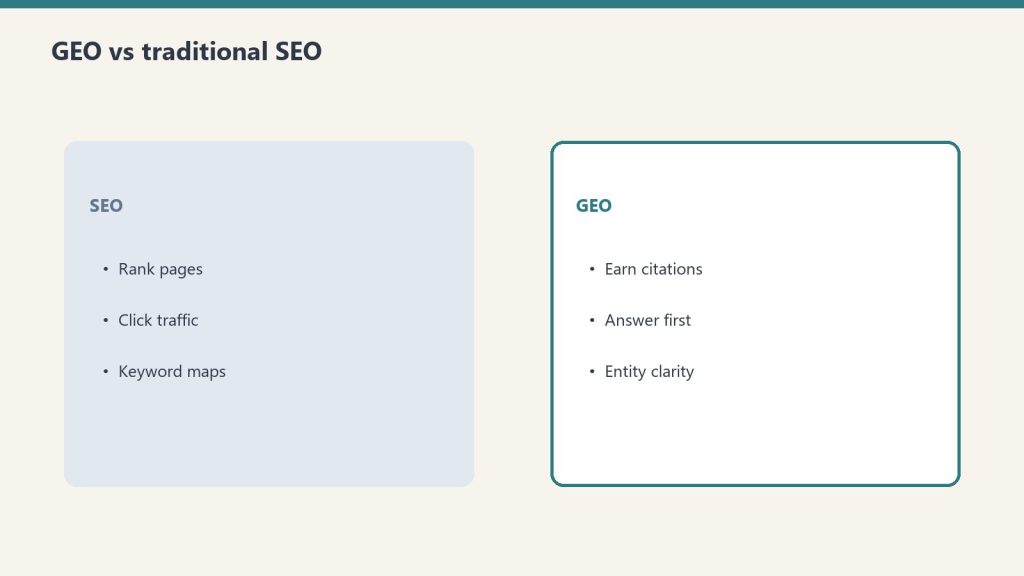
PSAO is not a replacement for SEO, GEO (Generative Engine Optimization), or AEO (Answer Engine Optimization). It’s the platform-specific layer that sits on top of those disciplines:
Discipline
Focus
Granularity
SEO
Google organic search rankings
Google-specific
AEO
Featured snippets, People Also Ask, voice search
Google-specific
GEO
AI citation across all platforms
AI as a monolith
PSAO
Platform-by-platform AI optimization
Individual platform personas
GEO says “optimize for AI.” PSAO says “optimize for this AI platform’s specific user, specific retrieval mechanism, and specific citation pattern.” It’s the same difference between “do social media marketing” and “run a LinkedIn thought leadership strategy targeting VP-level decision makers in B2B SaaS.”
Implementing PSAO at Scale
For a single site, the PSAO checklist is manual. For managing multiple sites — which is the reality of agency work and portfolio management — PSAO needs automation:
Schema injection automation: Every article gets Article + FAQPage schema automatically as part of the publishing pipeline
Dual-index submission: Every new post submits to both Google Search Console and Bing Webmaster Tools via IndexNow
Content structure templates: Writers start with the 6-layer template, ensuring every article has the direct answer, structured sections, FAQ, tables, and technical depth
Update scheduling: Top-performing articles are flagged for monthly refresh with current data and examples
Citation monitoring: Bing AI Performance data is reviewed weekly to track grounding citation trends and identify content that’s earning (or losing) citations
Actionable Takeaways
Adopt PSAO as a named discipline. Stop saying “optimize for AI.” Start specifying which platform and which user persona you’re targeting
Use the PSAO checklist for every article. Print it, pin it, make it a template in your CMS. Every item maps to a real citation opportunity
Submit to both Google and Bing. Three of six platforms use Bing. This is the most common infrastructure gap
Write for the persona, not the algorithm. The Perplexity researcher wants different content than the Copilot enterprise worker. The structure follows from the persona
Measure platform-level performance. Track citations, referral traffic, and conversion rates by AI platform — not “AI” as a single bucket
FAQ
What is Platform-Specific AI Optimization (PSAO)?
PSAO is the practice of tailoring content strategy to the distinct user personas, retrieval mechanisms, and citation patterns of each individual AI search platform — Perplexity, Copilot, Google AI Overviews, ChatGPT, Claude, and Gemini — rather than treating AI as a single optimization target.
How is PSAO different from GEO (Generative Engine Optimization)?
GEO treats AI search as a monolith — optimizing for “AI” broadly. PSAO operates at the individual platform level, recognizing that each platform serves a different user persona with different content preferences and different citation mechanics. PSAO is the platform-specific layer that sits on top of GEO.
Do I need to create different content for each AI platform?
No. A single well-structured article can serve all six platforms using the PSAO 6-layer template: direct answer first, comprehensive structured body, FAQ section, technical depth, HTML tables, and schema markup. Each layer maps to a specific platform’s citation trigger.
What is the PSAO checklist?
The PSAO checklist is a pre-publish quality gate covering content structure, technical implementation, content quality, and distribution. Each item maps to a specific AI platform’s citation requirements, ensuring every article has maximum citation surface area across all six platforms.
Which AI platform should I prioritize for PSAO?
Prioritize based on your audience. If your audience is enterprise workers, prioritize Copilot optimization. If your audience is researchers, prioritize Perplexity. For maximum coverage with minimum effort, use the unified 6-layer article structure and the PSAO checklist to serve all platforms simultaneously.
You publish an article on the same topic as your competitor. Their article gets cited by Copilot, Perplexity, and Google AI Overviews. Yours doesn’t. The topic is the same. The word count is similar. You even think your writing is better. So what’s different?
After analyzing citation patterns across the sites I manage — including the 98,800 Copilot citations data set and the per-model content shaping research — I can identify exactly what separates content that earns AI citations from content that gets ignored. It’s not writing quality. It’s structural.
The 6 Factors That Determine AI Citation
Six factors that determine AI citation.
AI platforms don’t evaluate content the way human editors do. They use measurable signals to decide what to cite. Here are the six factors, ranked by impact:
Factor 1: Authority Signals (Domain and Page Level)
Every AI platform uses some form of authority scoring. Bing’s system (powering Copilot, ChatGPT Search, and partially Perplexity) evaluates domain authority, backlink quality, and topical relevance. Google’s system (powering AI Overviews and Gemini) uses E-E-A-T signals, Knowledge Graph connections, and site reputation.
If your competitor’s domain has stronger authority signals — more quality backlinks, longer publishing history in the niche, recognized author entities — they’ll be cited over you even when your content is technically better. Authority is the foundation layer. Without it, everything else is marginal.
Factor 2: Factual Density
AI citation engines prefer content that makes specific, verifiable factual claims over content that makes general statements. “Implementation typically takes 6-8 weeks for a mid-size company and costs between $15,000 and $45,000 depending on customization requirements” is citable. “Implementation timelines and costs vary based on your specific needs” is not.
Count the specific, citable facts per 500 words in your article versus your competitor’s. The content with higher factual density wins citations, because AI platforms need specific claims to ground their responses.
Factor 3: Structured Data Implementation
This is the most common gap I find when auditing sites that underperform on AI citations. The competitor has FAQPage schema, Article schema, BreadcrumbList schema, and clean HTML tables. The underperformer has none, or has broken schema that doesn’t validate.
Structured data is how AI platforms understand content structure without having to interpret prose. It’s the difference between handing someone a well-organized filing cabinet and handing them a box of loose papers. The content might be equally good — but the organized version gets used.
Factor 4: Update Frequency and Content Freshness
AI platforms track when content was last modified. In competitive citation scenarios — where multiple sources could answer the same query — the more recently updated source wins. This is especially true on Perplexity and Copilot, which weight freshness heavily.
If your competitor published their article six months ago and updated it last week, and your article was published six months ago with no updates, they win. Even if your original content was superior. The update doesn’t need to be a complete rewrite — adding current data, refreshing examples, and updating the last-modified date can be enough.
Factor 5: Topical Depth and Coverage Completeness
AI platforms evaluate whether a source comprehensively covers the query topic. A 3,000-word article that addresses every sub-question a user might ask about the topic will be cited more frequently than a 500-word post that addresses only the headline question.
This isn’t about word count for its own sake. It’s about coverage completeness. Does your article answer the follow-up questions a user might ask? Does it address edge cases and exceptions? Does it provide the comparison the user would need to make a decision? Your competitor’s article probably does.
Factor 6: Bing Indexing and Technical Access
The most embarrassing reason your competitor gets cited and you don’t: they’re indexed by Bing and you’re not. Three major AI platforms — Copilot, ChatGPT Search, and Perplexity — use Bing’s index. If you’ve never submitted your sitemap to Bing Webmaster Tools, you’re invisible to half the AI landscape regardless of content quality.
Check your Bing Webmaster Tools account. Verify your sitemap is submitted. Use IndexNow to push updates immediately. This is table-stakes infrastructure that many sites neglect because they focus exclusively on Google.
How to Run a Competitive Citation Audit
How to run a competitive citation audit.
Here’s the practical framework for identifying why your competitor gets cited and you don’t:
Identify citation-winning competitors. Use Bing AI Performance in Bing Webmaster Tools to see which domains appear alongside yours in AI responses. If you don’t see yourself, check which domains appear for your target queries
Audit their structured data. Run their top pages through Google’s Rich Results Test. Compare their schema implementation to yours
Measure factual density. Count specific, citable claims per section in their content versus yours. Are they more specific? Do they include more data points, comparisons, and verifiable facts?
Check update patterns. When was their content last modified? How often do they refresh key articles? Compare to your own update cadence
Evaluate topical depth. Do their articles answer more sub-questions than yours? Do they include comparison tables, FAQ sections, and edge-case coverage that your articles lack?
Verify Bing indexing. Are your pages indexed in Bing? Are theirs? How quickly do new pages appear in Bing’s index for each site?
The Fix Priority Order
The fix priority order.
If your competitive audit reveals gaps across multiple factors, fix them in this order for maximum impact:
Bing indexing (immediate): If you’re not in Bing, nothing else matters for Copilot, ChatGPT, or Perplexity
Structured data (quick win): Adding schema markup to existing content can shift citation patterns within weeks
Content freshness (ongoing): Update your top-performing articles with current data and examples
Factual density (content revision): Replace vague claims with specific, citable facts across your key articles
Topical depth (content expansion): Add FAQ sections, comparison tables, and edge-case coverage to thin articles
Authority building (long-term): Backlink acquisition, topical authority development, author entity building
Actionable Takeaways
Run a competitive citation audit using the 6-factor framework. Compare your content against the citation winners in your niche
Fix Bing indexing immediately. Submit your sitemap to Bing Webmaster Tools and implement IndexNow
Add structured data to your top 20 articles. Article + FAQPage schema at minimum. HowTo and BreadcrumbList where applicable
Increase factual density. Replace every vague statement with a specific, citable claim where possible
Why does my competitor’s content get cited by AI when mine doesn’t?
The most common reasons are stronger domain authority signals, higher factual density (more specific citable claims per section), better structured data implementation, more recent content updates, deeper topical coverage, and — frequently overlooked — proper Bing indexing that your site may lack.
What is the fastest way to start earning AI citations?
Submit your sitemap to Bing Webmaster Tools and add Article + FAQPage schema markup to your top articles. These two actions address the most common technical gaps and can shift citation patterns within weeks. After that, focus on increasing factual density and update frequency.
How do I measure whether my content is being cited by AI platforms?
Bing Webmaster Tools includes an AI Performance report showing Copilot citations, impression counts, and grounding queries. For other platforms, monitor referral traffic from Perplexity, ChatGPT, and Gemini in your analytics. Google Search Console is expanding AI Overview reporting.
Does writing quality affect AI citation rates?
Less than most people think. AI citation engines evaluate structure, authority, factual density, and freshness — not prose quality. A well-structured article with specific facts and proper schema markup will be cited over a beautifully written article that lacks these structural elements.
How often should I update content to maintain AI citations?
Key articles should be reviewed and updated at least monthly for competitive topics. Update current data, refresh examples, add new FAQ pairs, and ensure the last-modified date reflects the changes. Even small updates signal freshness to AI platforms in competitive citation scenarios.
The Signal — Tygart Media's weekly brief. What we actually ran, what it measured, and what it means for a restoration shop.