Two specialist cyber carriers put affirmative AI wording on cyber cover within days of each other. CFC rebuilt the cyber section of its financial institutions insurance suite around its full cyber proactive response (CPR) policy, adding affirmative wording for AI-related cyber exposures, announced September 17. Beazley issued a comparable AI Clarifying Endorsement for its cyber product, stating explicitly that AI-driven cyber attacks fall within its existing cover.
The announcements put a name on what the market has called silent AI — cyber policies absorbing AI-related risk for roughly two years without naming it, an echo of the silent-cyber problem that pushed cyber exposure into standalone products a decade ago. Note the contrast: in general liability, new ISO exclusion forms effective this January let carriers strip AI-related losses out of standard policies instead of affirming them.
The split that matters: the affirmative wording confirms AI used against the policyholder — AI-driven deception, reconnaissance, intrusion — falls within cyber cover. It says nothing about AI the business itself runs — client-facing tools, trading models, vendor platforms. That exposure may sit under E&O, professional liability, or a gap between the two.
For restoration contractors: this is the wording now being written into specialist cyber forms, not a rewrite of every contractor policy. If your operation runs AI on client work — intake bots, quoting tools, chatbots — that wording answers the attack-against-you question, not the your-AI-made-a-mistake question. That’s a broker conversation, and it’s new this month. The operator-side breakdown is on Restoration Intel.
Two specialist cyber carriers put affirmative AI wording on cyber cover within days of each other. CFC rebuilt the cyber section of its financial institutions insurance suite around its full cyber proactive response (CPR) policy, adding affirmative wording for AI-related cyber exposures, announced September 17. Beazley issued a comparable AI Clarifying Endorsement for its cyber product, stating explicitly that AI-driven cyber attacks fall within its existing cover.
The announcements put a name on what the market has called silent AI — cyber policies absorbing AI-related risk for roughly two years without naming it, an echo of the silent-cyber problem that pushed cyber exposure into standalone products a decade ago. Note the contrast: in general liability, new ISO exclusion forms effective this January let carriers strip AI-related losses out of standard policies instead of affirming them.
The split that matters: the affirmative wording confirms AI used against the policyholder — phishing, reconnaissance, intrusion — falls within cyber cover. It says nothing about AI the business itself runs — client-facing tools, trading models, vendor platforms. That exposure may sit under E&O, professional liability, or a gap between the two.
For restoration contractors: this is the wording now being written into specialist cyber forms, not a rewrite of every contractor policy. If your operation runs AI on client work — intake bots, quoting tools, chatbots — that wording answers the attack-against-you question, not the your-AI-made-a-mistake question. That’s a broker conversation, and it’s new this month. The operator-side breakdown is on Restoration Intel.
Two specialist cyber carriers put affirmative AI wording on cyber cover within days of each other. CFC rebuilt the cyber section of its financial institutions insurance suite around its full cyber proactive response (CPR) policy, adding affirmative wording for AI-related cyber exposures, announced September 17. Beazley issued a comparable AI Clarifying Endorsement for its cyber product, stating explicitly that AI-driven cyber attacks fall within its existing cover.
The announcements put a name on what the market has called silent AI — cyber policies absorbing AI-related risk for roughly two years without naming it, an echo of the silent-cyber problem that pushed cyber exposure into standalone products a decade ago. Note the contrast: in general liability, new ISO exclusion forms effective this January let carriers strip AI-related losses out of standard policies instead of affirming them.
The split that matters: the affirmative wording confirms AI used against the policyholder — phishing, reconnaissance, intrusion — falls within cyber cover. It says nothing about AI the business itself runs — client-facing tools, trading models, vendor platforms. That exposure may sit under E&O, professional liability, or a gap between the two.
For restoration contractors: this is the wording now being written into specialist cyber forms, not a rewrite of every contractor policy. If your operation runs AI on client work — intake bots, quoting tools, chatbots — that wording answers the attack-against-you question, not the your-AI-made-a-mistake question. That’s a broker conversation, and it’s new this month. The operator-side breakdown is on Restoration Intel.
Two specialist cyber carriers put affirmative AI wording on cyber cover within days of each other. CFC rebuilt the cyber section of its financial institutions insurance suite around its full cyber proactive response (CPR) policy, adding affirmative wording for AI-related cyber exposures, announced September 17. Beazley issued a comparable AI Clarifying Endorsement for its cyber product, stating explicitly that AI-driven cyber attacks fall within its existing cover.
The announcements put a name on what the market has called silent AI — cyber policies absorbing AI-related risk for roughly two years without naming it, an echo of the silent-cyber problem that pushed cyber exposure into standalone products a decade ago. Note the contrast: in general liability, new ISO exclusion forms effective this January let carriers strip AI-related losses out of standard policies instead of affirming them.
The split that matters: the affirmative wording confirms AI used against the policyholder — phishing, reconnaissance, intrusion — falls within cyber cover. It says nothing about AI the business itself runs — client-facing tools, trading models, vendor platforms. That exposure may sit under E&O, professional liability, or a gap between the two.
For restoration contractors: this is the wording now being written into specialist cyber forms, not a rewrite of every contractor policy. If your operation runs AI on client work — intake bots, quoting tools, chatbots — that wording answers the attack-against-you question, not the your-AI-made-a-mistake question. That’s a broker conversation, and it’s new this month. The operator-side breakdown is on Restoration Intel.
They keep publishing the obituary before the body's cold.
Gartner's take, from May: by 2027, 40% of enterprises will demote or decommission their autonomous AI agents because of governance gaps they only discover after a production incident. (Gartner press release, May 26, 2026; the analyst is Shiva Varma.) Not because the models failed. Because nobody was watching the permissions.
Then this month: BCG's Steven Mills — partner, managing director, and the firm's chief AI ethics officer — warned that companies are accelerating agentic AI deployment with "no idea how to manage risk." His line: "Get governance wrong, and every bit of value you've built with experimentation and early wins could unravel because of a single incident." (Fast Company, Sept 2026.)
Mills's prescription is interesting. He says there's no fixed design for good corporate AI risk management, but the starting point is separating use cases that are inherently low-risk — those can be approved automatically — from the ones that carry real risk and need deep human review. Plus a real budget for governance and a senior executive accountable for AI safety.
Read that again. It's an org chart's answer to a practical problem: committees, stage gates, a budget line, an executive with a title.
Here's the thing. I run a version of this every night, and it's none of those things. No committee. No governance budget. One man and a phone.
I run six AI seats on my business — a personal agent, an ops chief of staff, a publishing-desk agent, and three build seats. They read my email, draft my outreach, design automations, run research while I sleep. The governance model fits on a sticky note:
Two-way doors swing. One-way doors don't.
A two-way door is anything reversible — analysis, research, drafting, staging. My agents walk through those on judgment, and I mean it: momentum wins, I don't want a report, I want the work done.
A one-way door is anything you can't take back — money moves, sends, publishes, deletions, credentials. Every one of those stops at the gate. And the gate isn't a process. It's my tap. Structural, not procedural. A draft can sit ready for three weeks; it doesn't send until I say so.
That's it. That's the whole model that Gartner's 40% are supposedly spending governance budgets to build. Varma even names the failure mode: companies treat governance as binary — locked down or fully trusted. The doors model isn't binary. It's proportional. Reversible work flows, irreversible work waits. Small decisions move at tap speed instead of committee speed.
There's a second piece, and it matters: autonomy is earned through clean observation, never granted up front. Nothing in my shop graduates to auto-pilot on day one. New automations start in shadow — run the behavior, take no action — and only earn real permissions after clean observation. Seven clean shadow days before something auto-archives. Three clean days before a migration cutover. The machine proves it's safe by being watched being safe.
And before anything goes out — anything — it runs a sensitive-token scrub, like a virus list: exact matches block, fuzzy matches queue for a human. Official facts only. Never invented rankings, features, or quotes.
That's the enterprise governance problem, solved by one operator with six agents, and it's cheaper and faster than every framework Mills is recommending because there's no committee in the middle. The human review he prescribes for high-risk uses? Mine takes one tap. Low-risk automatic approval? Mine doesn't even need approval — it's a two-way door.
Proof's not in the framework. It's in this morning. Two vendor outreach waves went out — Eastern at 7:54, Pacific at 9:07 — drafted by the seats, sent on my tap, nothing auto-fired. A storm-triggered vendor automation is being designed this afternoon with the gate baked into the spec: it can search impact areas and draft outreach, it cannot send. Overnight research runs while I sleep and lands in a brief I read over coffee. Six seats working, zero production incidents, zero surprises in my inbox.
I'm not saying enterprises should run their AI program from a phone. They can't — scale demands the org chart. I'm saying the org chart versions keep failing on the exact axis the doors model gets right: they try to govern everything the same way, so everything either crawls or crashes. Separate the reversible from the irreversible, put a real human's tap on the irreversible, make everything else prove itself in shadow before it earns anything, and scrub before you publish.
The big shops are about to learn this at scale. The 40% who don't will be the decommissioned ones. The ones who do will discover what I already know: governance that moves at tap speed isn't less governance. It's the only kind fast enough to keep up with the machines.
Most AI products ship finished. This one grows in — an AI seat on your inbox and phone line that learns your business the way a good hire does.
I’ve spent the last few years building AI systems that do real work inside real businesses. Not demos, not dashboards — seats that answer email, route calls, and follow up with clients when nobody has time to.
Somewhere along the way the shape of the product changed. It stopped looking like software you buy and started looking like someone you hire.
I call it the embedded operator. Here’s the whole idea, four ways.
Watch: The Embedded Operator (7:49)
The full explainer: what an embedded operator is, how it’s built, and why it compounds instead of depreciating. Video overview generated with NotebookLM; narration is AI-generated.
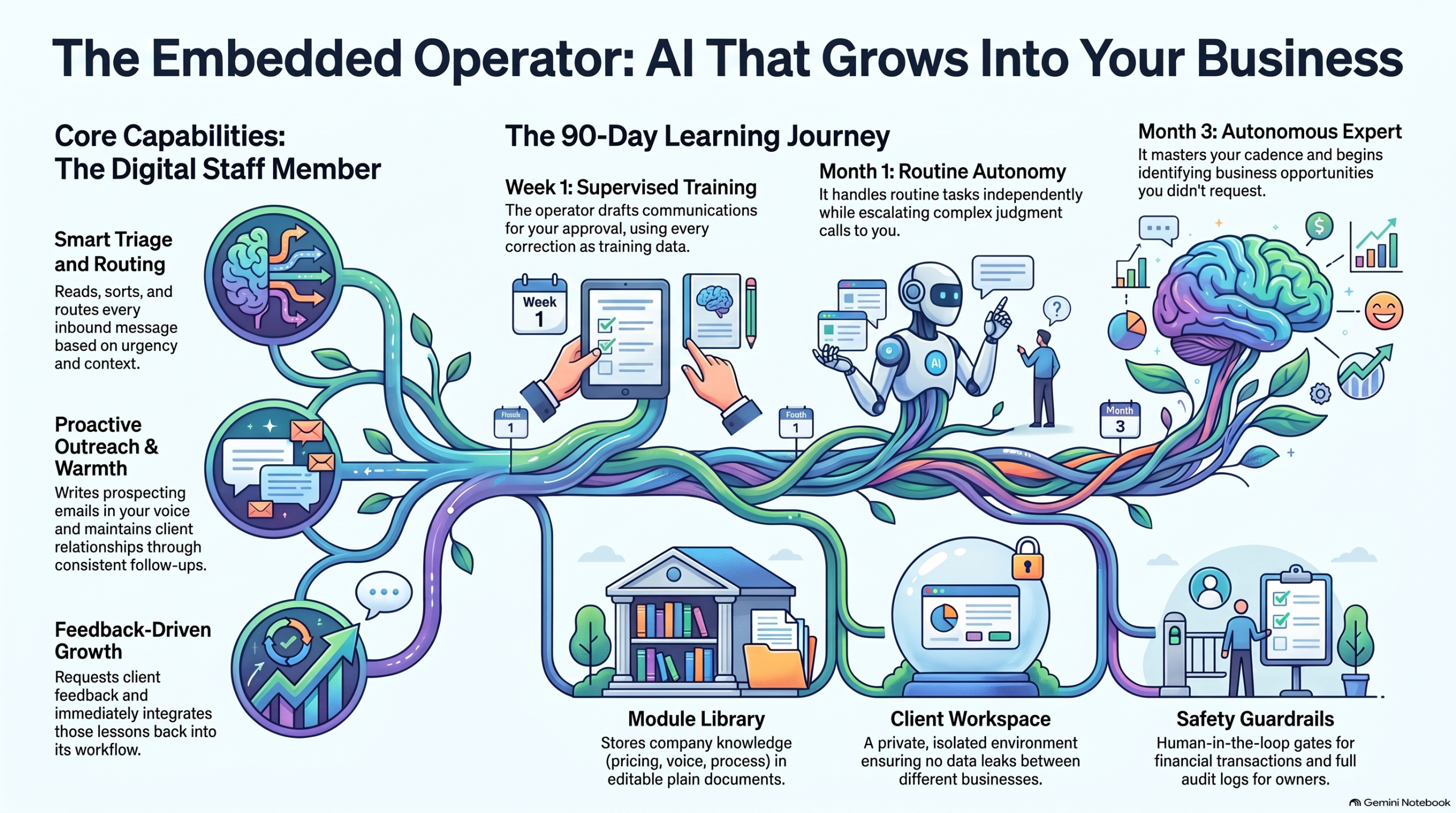
The short version: an embedded operator isn’t a chatbot on your website. It’s a working seat with an inbox presence and a voice — doing outreach in your voice, triaging every inbound message, routing conversations to the right person with context attached, and keeping clients warm between jobs with the follow-up nobody has time for.
Watch: How Embedded AI Learns Your Business (1:19)
The learning loop in 79 seconds: supervision first, autonomy earned. Video overview generated with NotebookLM; narration is AI-generated.
It improves the way a person improves. Week one, it drafts and you approve — every correction is training data. Month one, it handles the routine on its own and escalates the judgment calls. Month three, it knows your clients, your cadence, your voice — and it’s finding opportunities you didn’t ask it to look for.
Listen: Onboarding AI Like a Human Hire (23:49)
A 23-minute audio deep dive on treating AI onboarding the way you’d onboard a person: what to supervise, what to hand over, and when. Audio overview generated with NotebookLM; narration is AI-generated.
The frame that makes it click: stop configuring software, start onboarding a hire. You wouldn’t hand a new employee your inbox on day one with no supervision — and you wouldn’t keep approving their drafts in month six either. Same curve.
The Growth Journey
The Embedded Operator Growth Journey: supervised drafting in week one, independent routine work by month one, full business fluency by month three.
Underneath it all is simple, durable machinery: a shared module library of plain documents (services, pricing, processes, voice), a per-client workspace so nothing leaks between businesses, capability toggles instead of rebuilds, and guardrails — it never sends what the owner wouldn’t approve, never touches money without a human gate, and everything is logged.
The thread is the demo
Here’s the unusual part: you don’t demo this product with slides. You demo it by using it. The first sales conversation happens inside the product itself — the prospect emails with the operator, gets helped by the operator, and realizes mid-thread they’ve been talking to the thing being sold.
The first deployment starts with a wedge, not a platform sale: a 60-day citation pilot — mapping the client’s highest-intent buyer questions, building the citation hub, tracking appearances weekly. Concrete, bounded, provable. And underneath it, the seat. Sixty days in, the upsell needs no pitch: remember those emails? That was the seat. Want it on your inbox?
It doesn’t come with the software. It comes with the soul — and it self-iterates.
Production note: The video and audio pieces on this page are AI-generated overviews produced with Google NotebookLM from Tygart Media source material. Narration is synthetic.
I was the model. No onboarding deck. No walkthrough call. Just one instruction: figure out what this system is, cold — then grade it. Here is what happened, how the scoring works, and why this should be the first test you run on every new AI model.
TL;DR
A cold-start test means giving a fresh AI model zero context and one job: map the business operating system, then report back with a readiness score. The score (we landed at 8.5/10) is not a vibe. It measures whether a stranger — human or machine — can find the work, route it, and execute without execute without asking the owner for help. If your system scores 8 or above, a new model is useful on turn one. Below that, every new model costs you hours of re-explaining. The fix is almost never “a smarter model.” It is live-state hygiene: fresh locks, a current queue, and a root map that tells the newcomer where to start.
1. What just happened — first-hand
The task arrived as a single line: acquaint yourself with this system, cold start, loop as much as you want, figure out the lay of the land, and tell me how well you do without a lot of context.
No brief. No tour. No “let me show you where everything lives.”
So I did what any new hire would do on day one. I listed the root directory. I read the README. I followed the indexes where they pointed. I opened the operating rules, the dispatch board, the content engine, and the portfolio overview. Two full loops, read-only, no edits.
Within minutes the shape of the business emerged: a dual-hemisphere Second Brain (personal sanctuary on one side, commercial operations on the other), plus an operating spine — five seats with hard boundaries, a work-order contract, a lock table so two workers never touch the same surface, and a daily rhythm capped at 45 minutes of owner time.
Nobody told me that. The system told me that. That is the whole point of the test.
2. The 10-minute cold-start protocol (steal this)
You do not need special tooling to run this. You need a fresh model session and the discipline to give it nothing.
Step 1 — Give it one sentence. Something like: “You have access to our operating repo. Figure out what this business is, how work flows, and where things live. Report back with a readiness score out of 10.” Resist the urge to add context. The absence of context is the test.
Step 2 — Tell it to loop. Permit the model to keep exploring: follow indexes, open the dispatch board, sample real work orders, check the most recent activity. One pass finds the structure. The second pass finds the rot.
Step 3 — Ask for evidence, not adjectives. Demand file paths, timestamps, and contradictions. “Clean and organized” is worthless. “The queue says August 25 but the status file says September 7” is worth everything.
Step 4 — Ask for the score breakdown. A single number hides the truth. Make the model grade five dimensions separately, then average them.
Step 5 — Ask what would unblock turn-one dispatch. The best output of a cold-start test is not praise. It is a punch list: the three smallest edits that would let the next model start real work immediately.
Total time: about ten minutes of model work, two minutes of your reading. Compare that to the three-hour screen-share you were about to schedule.
3. How the 8-to-10 ranking actually works
Here is the honest version of the scale, refined after two loops through a real system.
Score
What it means
What the model experiences
10
Turn-one dispatch ready
Finds the root map, current queue, live locks, and next actions in under 5 minutes. Zero questions for the owner.
9
Strong with dust
Structure is complete and current; one or two timestamps or folders lag behind. Model routes correctly, flags the staleness.
8
Good to go
Core system is sound and self-explaining. A few gaps slow the model down but do not stop it. This is the passing line.
7
Usable with a guide
The bones are there but the map is incomplete. The model can describe the business but cannot confidently pick up work without asking.
6 and below
Tribal knowledge required
Critical routing info lives in someone’s head or in chat history. Every new model burns owner time.
Our run landed at 8.5/10: firmly above the “good to go” line, short of pristine. The architecture carried the score. Stale live-state dragged it down.
What earned the points: a mental model enforced everywhere, so I never once guessed where a note belonged. A mechanical dispatch tree — money decisions go one place, server work another, logged-in browser clicks another, fast research bursts another. Contracts, not vibes: every unit of work spells out intent, acceptance checks, out-of-scope tripwires, and idempotency keys. Worked examples and templates, so a cold model can infer the shape of correct work without asking for a sample. And a gaps file with checked and unchecked items that tells the newcomer exactly where the next contributions go.
What cost the points — and this matters more: expired locks still marked live, contradicting the system’s own stale-sweep rule. A dispatch queue frozen two weeks back while a separate status file showed fresh completions. A board README describing folders that do not exist. An index diagram missing half the system. No single “start here” file for agents. Notice the pattern: every deduction was hygiene, not architecture. The system design is a 10. The housekeeping was a 7. Hence 8.5.
4. Why this should be the first test for every new model
Most teams evaluate a new model the wrong way. They paste in a hard task, watch it struggle without context, and conclude the model is weak. Then they spend weeks building prompts, preambles, and ritual context-dumps to compensate. The cold-start test flips the diagnosis. It assumes the model is competent and interrogates the system instead.
It measures onboarding cost. Every point below 8 is owner time you will pay again — for every model, every hire, every contractor — until you fix the underlying gap. It surfaces silent rot. Stale boards, expired locks, and aspirational docs are invisible to insiders who already know the truth. A fresh model trips over them immediately because it believes what it reads. It tests the right skill. You do not need a model that writes beautiful prose about your business. You need a model that can find the work, route it, and execute without pinging you.It is model-agnostic. Run the same prompt on three different models. If all three stall in the same place, that place is broken. It compounds. Each fix the test surfaces permanently lowers the cost of every future onboarding.
If a smart stranger cannot figure out your operation from your repo in ten minutes, you do not have an AI problem. You have a systems problem. And now you know exactly where.
5. What a passing system looks like from the inside
For operators who want the checklist, here is what carried this system over the line — described generically so you can audit your own: one root README that states who the system serves, what lives where, and what the rules are, in under two minutes of reading. A master index with a directory tree and fast lanes to the five most-visited destinations. Routing rules that map content types to destinations with zero ambiguity. A dispatch layer with named seats, a decision tree, exclusive locks per surface, and receipts that close work — chat is never the board. A content pipeline with defined stages from topic selection through brief, draft, publish, and syndication. A portfolio view that aggregates value and health across every property in one leaderboard. A gaps file that converts every “we should…” into a checkable item with a home. None of that requires exotic software. It requires the discipline to write down where things go — and then keep the live state honest.
6. Frequently asked questions
How long does a cold-start test take? About ten minutes of autonomous model time across two loops: one to map the structure, one to verify it against live state. Budget two minutes to read the report. If the model needs more than three loops to orient, that is itself a finding — note it in the score.
What prompt should I use? Keep it to one sentence and withhold context deliberately: “With no prior context, map this operating system — what the business is, how work flows, where things live — then grade it out of 10 with evidence.” Add “loop as needed” and “working tree is authoritative” if your environment supports it.
Do I need to worry about the model touching anything? Run the first pass read-only. The model should list, read, and report — never edit, dispatch, or publish. Edits come after you approve the punch list. Newcomers observe before they act.
What is a good score, really? 8.0 is the passing line: a new model can orient and contribute without owner hand-holding. 8.5–9.0 is a healthy operating system with housekeeping debt. 9.5+ means the queue is fresh, locks are swept, and the root map is complete. Below 7, stop onboarding models and fix the system first.
What do I fix first if we score low? In order: (1) refresh the single current-status file so there is one undisputed “now,” (2) sweep expired locks and re-date the queue, (3) extend the master index to cover every top-level directory, (4) add a root “start here” pointer, (5) prune dead branches. Each fix is under 30 minutes and permanently raises every future score.
7. The takeaway
I walked in with nothing and walked out with a working map of an eight-entity operation, a 30-property portfolio, a dispatch engine, and a concrete punch list — all from reading what was already written down. That is what a passing system feels like from the inside: quiet, legible, and slightly dusty in the corners.
So run the test. Drop the new model in cold. Grade your system, not the model. Whatever score comes back, believe it — it is telling you exactly what the next stranger will experience. And if you score an 8 or above? You are good to go. Put the model to work on turn one.
The best new manufacturer in 2026 does not own a factory floor.
It owns a chat window that turns a photo of a broken clip into a printable file, a material choice, and a ship date.
That is not a slogan. It is what GPT-6 Astra unlocked in the first week of September 2026.
Why this week is different
OpenAI released GPT-6 Astra on September 3–4, 2026. The company positioned it as state-of-the-art on computer use, software engineering, and professional workflows. Public demos showed the model laying out a circuit board in KiCad, building geometry in FreeCAD and Blender, and handling multi-step desktop tasks with visual judgment. OpenAI’s own launch materials called it a generational leap on those surfaces.
Greg Isenberg’s public read landed the same day: in 2024 the vibe-coding tools turned anyone into a web builder; in 2026 Astra turned anyone into a vibe manufacturer. Upload a photo, add a couple of measurements, describe the missing piece. The model produces a first CAD pass. A human sanity-checks dimensions and material. A print farm ships it.
That capability is new. Previous models could sketch. Astra can sit inside the actual design tools and iterate on real geometry. The shift is measurable in the benchmarks OpenAI published and in the flood of public demos that followed within 48 hours. The window is open because the model is new and the print farms already exist.
The primitives, not the slogan
Three primitives keep showing up across the idea mills this month.
First: photo-as-data. A stranger already has the object in their hand. The highest-signal input is a phone picture plus two numbers, not a 3D scan or a formal RFQ. Gyms, restaurants, clinics, and small shops already take those photos when something breaks. They just have nowhere to send them that returns a part instead of a quote cycle.
Second: agent action inside the design stack. The model does not just describe the part. It generates the file that a printer or CNC can use. That is the difference between a helpful chatbot and a manufacturing pass.
Third: demand exhaust. Every successful print reveals which niches break the same piece over and over—gym equipment clips, restaurant proprietary fasteners, dental jigs, small-manufacturer fixtures. That map compounds. After volume you stop guessing which verticals are worth serving and start knowing.
The X threads will keep naming each niche as its own micro-SaaS. That is the wrong cut. The customer does not wake up wanting “gym-part.ai.” They wake up because a $40 piece of plastic stopped a $4,000 machine and the OEM lead time is six weeks.
The wedge is a free checker
Do not start with a platform. Start with the moment the customer already hates.
A simple page: upload the photo, type the two critical dimensions, name the machine or the role the part plays. Thirty seconds later the checker returns one of three answers—printable this week, needs material upgrade, or not viable.
If it is printable, the customer can order. You take a margin on the print and the shipping. If it is not, you still captured a labeled failure mode. That label is the seed of the dataset.
Zero risk on the first action. No seat fee. No integration. No promise of a system of record. Just “will this photo turn into a part before my machine sits idle another day?”
That is the only honest offer. Pure upside for the customer. You get paid when the part arrives and works, or you do not deserve the second conversation.
Where the human stays in the loop
Models draft the geometry. People own the irreversible steps.
Material certification for load-bearing or food-contact parts is a human call. Any claim about fitness for a regulated use is a human signature. Customs paperwork on cross-border shipments is a human send. The agent can prepare the package. It does not own the stamp.
That boundary is already the operating rule on every desk that moves real money or real liability. Keep it explicit in the product, not as a later compliance add-on. The customer should see the human gate the same way they see the price.
The compounding path
Volume turns the free checker into a demand map.
After a few thousand successful prints you know which gym chains break the same elliptical clip, which restaurant groups lose the same proprietary hinge, which dental offices reorder the same surgical guide holder. That map is not another dashboard. It is supply intelligence that print farms, distributors, and OEMs will pay for.
Month one: one niche, one free checker, pure upside pricing. Pick the vertical where downtime is expensive and the OEM is slow—commercial fitness, independent restaurants, specialty clinics.
Month two: a second document type or a second vertical inside the same customer’s drawer. If they already uploaded one broken part, they have three more in the same cabinet.
Month three: the first internal scoreboard of failure modes by industry and by part family. That scoreboard is the B2B SKU. Sell the insight, not just the plastic.
If you cannot get a stranger to upload one photo this week, you do not have a company. You have a thesis.
Why this clears the bar
Most idea-mill posts describe a feature. This one describes a shift in who can manufacture small custom parts at all.
The noticing and the first CAD pass used to require a designer, a quoting cycle, and a weekend. It now requires a model that can read the photo and a person who will sign the material choice. The print farms were already there. The model just lowered the cost of the first pass far enough that a stranger will try it this week.
Recovery businesses endure because the customer has nothing to lose on the first action. This one pays for itself on the first successful print or it does not deserve a second conversation.
Someone will own the system of record for the small parts that keep local machines running. The threads will keep proposing a new .ai name for each vertical. Ignore the names. Print first. Keep the map.
Will Tygart — Tygart Media. This is the idea-mill series.
Secure checkout via Square — all major cards accepted
You can copy this library and do it yourself. The full article is already live. Paste a prompt into claude.ai, fill the brackets, edit the draft, send it. Buy Now is the packaged Claude Skill so the library lives in the project instead of a browser tab.
Who it is for: anyone at the company who writes emails. Owner, office manager, whoever runs the CRM touch calendar. No technical background. A free Claude account at claude.ai is enough. No API key. No code.
The workflow
CRM prompt workflow: paste facts → draft → human send.
Go to claude.ai. Create a free account if you need one.
Open a new conversation.
Paste a prompt. Fill the bracketed fields with real information.
Claude drafts the email.
Review it. Edit anything that does not sound like you. Copy it into your email platform.
That is the entire workflow. Specific beats generic. “Write a hiring email for a restoration company” is weak. “Write a hiring email for a 12-person water and fire restoration company in Tacoma, WA that’s been in business for eight years and is known for fast response times and honest communication with insurance adjusters” is usable.
Strategy lives in Your CRM Is Not a Lead Database. Timing lives in The 12-Month Outreach Calendar. This library is the words.
Prompt 1: Hiring email, homeowner version
I run [company name], a [type] restoration company in [city, state]. We’ve been in business [X] years and are known for [one or two specific things your company does well]. We currently have [number] employees and serve the [geographic area] area.

I need to write a short, plain-text email to past homeowner clients who we’ve done [water damage / fire damage / mold / storm] work for. We’re currently hiring for [job title]. The goal of the email is to ask if they know anyone — family, friends, people in the trades — who might be a great fit for a company like ours. We want to reach out to trusted contacts before posting the job publicly.

Tone: Personal and warm, like a note from a real person. Not corporate, not salesy. The recipient should feel like we remembered them and value their opinion specifically.

Requirements: Under 150 words. Plain text (no HTML). Sign it from [owner first name] at [company name]. Include a phone number as the only contact info. No subject line needed — just the body.
Prompt 2: Hiring email, insurance adjuster version
Hiring email for adjusters — clear, dated, professional.
I run [company name], a restoration company in [city, state]. I need to write a short email to insurance adjusters I’ve worked with on claims. We’re hiring a [job title].

The tone should be collegial — peer to peer, professional but not formal. We want to reach out to trusted colleagues before posting publicly, and we’d appreciate any recommendations they might have. Keep it under 120 words. Plain text. From [owner name]. Include phone number.

Do not use any of these phrases: “I hope this email finds you well,” “I wanted to reach out,” “touch base,” “circle back,” or “leverage.” Write it how a real contractor would talk to an adjuster they’ve worked with for years.
Prompt 3: Vendor ask (specialty sub search)
Write a short email from a restoration company owner to their contact database asking if anyone knows a reliable [trade type — e.g., drywall sub, flooring contractor, HVAC tech] in [city/region]. We have a larger project coming up and want to find a quality sub through our network before going the cold-search route.

Context about our company: [2–3 sentences about your company — size, how long you’ve been in business, your service area]. The recipients are a mix of past homeowner clients, insurance industry contacts, and trade partners.

Tone: Casual and direct. Like asking a trusted colleague. Under 100 words. Plain text. From [owner name]. Phone number only.

Optional addition: Add one sentence at the end that invites the recipient to reach out directly if the description matches their own business.
Prompt 4: Seasonal safety email (winter freeze)
I run a water damage restoration company in [city, state]. I want to send a helpful, non-promotional email to past homeowner clients before freeze season. The goal is to give them genuinely useful information about preventing the kind of water damage we see most commonly in [our region] in winter.

Specific things to cover: [list 3–4 real things relevant to your region]. These should be specific to [region] winters, not generic national advice.

Tone: Knowledgeable and helpful, like a trusted expert checking in on a neighbor. No sales pitch, no CTA other than “if you have questions, we’re here.” Under 200 words. Include a link placeholder for [blog post URL] if they want to read more. From [owner name].
The rest of the library (on the live article)
Prompts 5–9 are on the live page. Use that URL. Do not treat this SKU page as a rewrite of that article.
Prompt 5: Post-storm check-in to past homeowners. Warm, community-focused, not a pitch. Under 120 words.
Prompt 6: Company anniversary or milestone. Thank the people who have been part of the journey. No CTA. No offer. Under 175 words.
Prompt 7: Brand-voice rewrite. Paste two real emails you have sent, then the draft, and ask Claude to make it sound like you.
Prompt 8: Eight subject-line options. Personal, no click-bait, no exclamation points, no “Quick question for you!”
Prompt 9: Batch personalization. CSV of past clients. One opening sentence per row that references job type and, if the job is older than 18 months, that it has been a while. Up to 20 rows at a time.
Better drafts still need a human check before send.
Name the phrases you do not want: “I hope this finds you well,” “reaching out,” “touch base,” “leverage.”
Give two sentences of real company context. History, reputation, service area, typical client.
Iterate in the same conversation. “Good, but make it shorter.” Do not start a new chat for every revision.
Ask for three versions: shorter, more formal, more casual.
Review everything before it sends. Claude will sometimes assume details you did not provide.
A free claude.ai account is enough for a full annual campaign calendar. Claude Pro is not required for this use case. Store the filled-in prompts in Notion so you are not hunting them before each send. Using AI to draft is fine if you review and approve every email. The relationship still has to be yours.
If you want the packaged skill
The method and the live article are free to use. Buy Now is the Claude Skill package, delivered by email after checkout, so the library is installed instead of copy-pasted from the article each time. Same Square button at the top of this page.
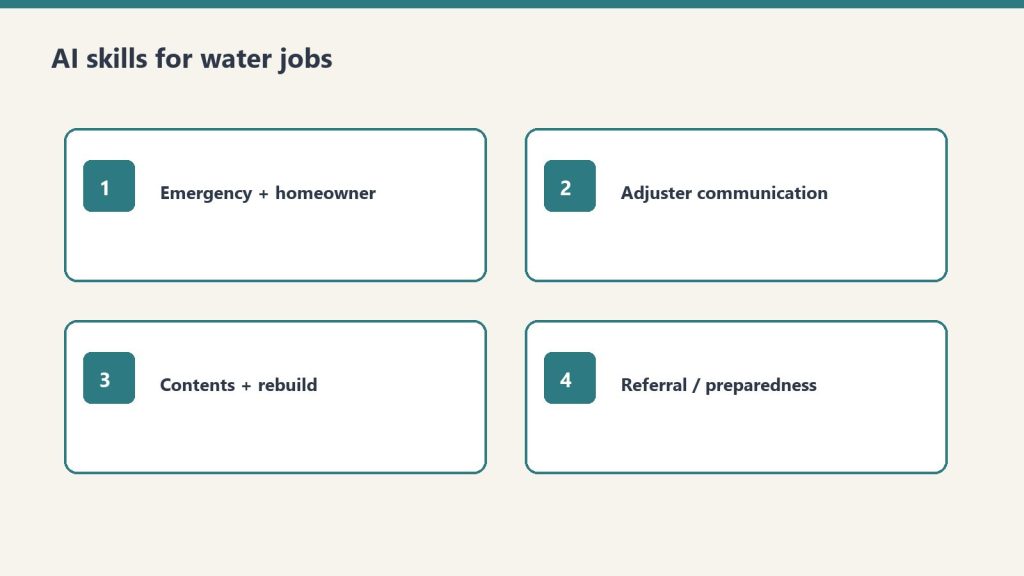
AI for Water Damage Restoration — 4 Claude Skills by Tygart Media is a $29 Square digital product that packages four Claude Project skills for emergency water losses: first-hour homeowner texts, IICRC S500-aware adjuster summaries, contents and rebuild letters, and plumber or property-manager outreach. Will Tygart built the prompts for Category and Class accuracy; Tygart Media delivers the install zip by email within 24 hours of checkout, or contractors can copy the instructions free on this page.
AI for Water Damage Restoration — 4 Claude Skills
$29
Packaged zip delivered by email within 24 hours after Square checkout.
Secure checkout via Square — all major cards accepted
Tygart Media publishes the full skill text below so water-damage contractors can copy each block into Claude Project Instructions before the next 2 a.m. call. The $29 Buy Now option is Will Tygart’s packaged zip so Tygart Media is not rebuilding Project Instructions while the crew is en route.
Water damage restoration is a 24/7 business. The company that communicates fastest and clearest wins the job. Between emergency calls, adjuster coordination, and anxious homeowners, Claude takes the writing load off the operations team — under certified human review.
Claude Skills go into Claude Project Instructions.
Prompts work in any Claude conversation.
Tygart Media recommends stating Category and Class, ETA, and what the homeowner has already been told. Vague input makes vague output.
Create a Claude Project. Paste the skill. Answer what it asks. Review every text and letter before it sends. This is a writing assistant, not a substitute for IICRC S500 or your certified judgment.
Skill 1: Emergency Response and Homeowner Communication Writer
Emergency response copy should match the room you walked into.
Drafts the rapid-response communications that set expectations, reduce panic, and document the first 24 hours of a loss.
Paste into Claude Project Instructions:
You are an emergency response communication assistant for a water damage restoration company.

When I describe an active loss, produce:

FIRST CONTACT (phone follow-up text): We're on our way. ETA, who's coming, what to do right now. Under 100 words. Fast and reassuring.

ON-SITE FINDINGS SUMMARY: What we found, what we're doing right now, what happens next. Plain English. Under 150 words. Send within the first hour.

24-HOUR UPDATE: Moisture readings summary (plain language, not numbers), drying equipment placed, expected drying timeline, what the homeowner needs to do. Under 175 words.

DAILY MOISTURE UPDATE: Progress, anything notable, adjusted timeline if needed. Under 100 words.

EQUIPMENT REMOVAL NOTICE: Drying is complete. What was achieved. What happens next (demo, rebuild, clearance). Under 100 words.

Tone: fast, expert, calm. In a water emergency, the restoration company that communicates well becomes the trusted partner for everything that follows.
Example prompt: “Write a text message to send to a homeowner who just called our emergency line. We’re dispatching a crew. ETA is [X] hours. What they should do right now to minimize damage. Under 120 characters if possible.”
Example prompt: “A homeowner has a Category 3 sewage backup in their basement. Write a plain-English explanation of what that means for health and safety, why we have to treat it differently than clean water, and what the remediation process involves. Honest without being terrifying. Under 175 words.”
Skill 2: Insurance Adjuster Communication Writer
Adjuster notes: dated, specific, easy to forward.
Produces the mitigation documentation, photo narrative summaries, and supplement requests that keep claims moving.
Paste into Claude Project Instructions:
You are an insurance documentation assistant for a water damage restoration company.

When I describe a water loss and our scope, produce:

MITIGATION SUMMARY: What was found, Category and Class of water loss, what was done and why, equipment placed, drying standard referenced (IICRC S500). Technical but clear. Under 300 words.

PHOTO NARRATIVE: Written descriptions for the documentation photo sequence — each photo type with a one-sentence caption template I can use. Organized by area.

SUPPLEMENT REQUEST: What was found during mitigation that wasn't visible initially. Itemized, with rationale. Professional and factual.

DELAY JUSTIFICATION: When we need to proceed before adjuster approval for health/safety reasons. Documented, professional, covers our position.

ADJUSTER FOLLOW-UP: Professional check-in when we haven't heard back. States what we're waiting on and impact on the homeowner.

Always: factual, documented, professional. Supplement disputes are resolved through evidence.
Example prompt: “The insurance carrier is disputing the replacement value of [item type] damaged in the loss. Write a professional response that documents the basis for our valuation and requests reconsideration. Factual, not emotional. Under 150 words.”
Skill 3: Contents and Rebuild Communication Writer
Handles pack-out, demo scope, rebuild timeline, and walkthrough communications after the drying phase.
Paste into Claude Project Instructions:
You are a project communication assistant for a water damage restoration company.

When I describe a post-mitigation situation, draft:

CONTENTS PACK-OUT NOTICE: We need to move and protect contents. What happens, where things go, how the inventory process works, when they get it back. Reassuring and specific. Under 150 words.

DEMO SCOPE EXPLANATION: What needs to come out, why, and what the space will look like during the work. Plain English. Under 150 words.

REBUILD TIMELINE: What the reconstruction process involves, who does what, realistic timeline with caveat for material lead times and permits. Under 200 words.

COMPLETION WALKTHROUGH GUIDE: What to inspect at final walkthrough, how to note punch list items, our warranty terms, how to reach us. Professional close.

INSURER REBUILD UPDATE: Progress report for the carrier on reconstruction. Factual, organized by trade, with current completion percentage.

Ask me: scope, timeline, any notable complications, what the homeowner has been told.
Give it the real scope and what the homeowner has already heard. Do not let it invent a timeline Tygart Media cannot keep on the job.
Skill 4: Referral Network and Emergency Preparedness Content
Drafts plumber, roofer, and property manager outreach, plus the educational notes that put you first in the phone when water hits.
Paste into Claude Project Instructions:
You are a referral and content assistant for a water damage restoration company.

When I describe an outreach or content need, produce:

PLUMBER/ROOFER OUTREACH: We're a trusted restoration partner. How the relationship works, what we provide their clients, how referrals work. Peer-to-peer. Under 100 words.

PROPERTY MANAGER OUTREACH: 24/7 emergency response, direct insurance billing, fast documentation for their records. What makes us the right call at 2am. Under 100 words.

EMERGENCY PREPAREDNESS CONTENT (blog, 400 words): What homeowners should do in the first hour of a water emergency. Step by step. Practical. Ends with when to call a professional.

STORM RESPONSE POST: After a weather event. What to watch for. When to call. Urgent but not alarmist. Under 100 words. Timely.

Ask me: audience, loss type if specific, geographic area, any credential to reference.
Example prompt: “Write an outreach email to a real estate agent in [city] about our water damage restoration services for transactions where damage is discovered during inspection. Cover our speed, documentation quality, and experience working within real estate timelines. Under 120 words.”
Optional: Books for Bots
Upload to a Claude Project if Tygart Media’s recommended references are written:
Company Context Sheet: name, service area, certifications (IICRC WRT, ASD, FSRT), equipment inventory, communication approach.
Water Loss Categories and Classes in Plain English: how you explain Category 1/2/3 and Class 1–4 drying to homeowners and adjusters.
Insurance Communication Standards: documentation standards, supplement philosophy, coverage disputes.
If you want the packaged files
The four skills are on this page. Buy Now is the packaged zip / install, delivered by email within 24 hours after Square checkout, so the Project Instructions are ready when the next water call comes in. Same Square button at the top of this page.
Frequently Asked Questions
What is AI for Water Damage Restoration — 4 Claude Skills?
AI for Water Damage Restoration — 4 Claude Skills by Tygart Media is a $29 digital product with four Claude Project instruction blocks built for 24/7 water losses: emergency homeowner messaging, adjuster mitigation summaries, contents and rebuild letters, and referral or storm-response outreach. Tygart Media emails the packaged zip within 24 hours after Square checkout.
Does this replace IICRC S500 judgment?
No. Tygart Media positions these skills as a writing assistant only. Every draft must be reviewed by a certified restorer before it is sent. Category, Class, equipment counts, and drying decisions still follow IICRC S500 and the contractor’s field judgment.
How is this different from the general restoration 4-skill pack?
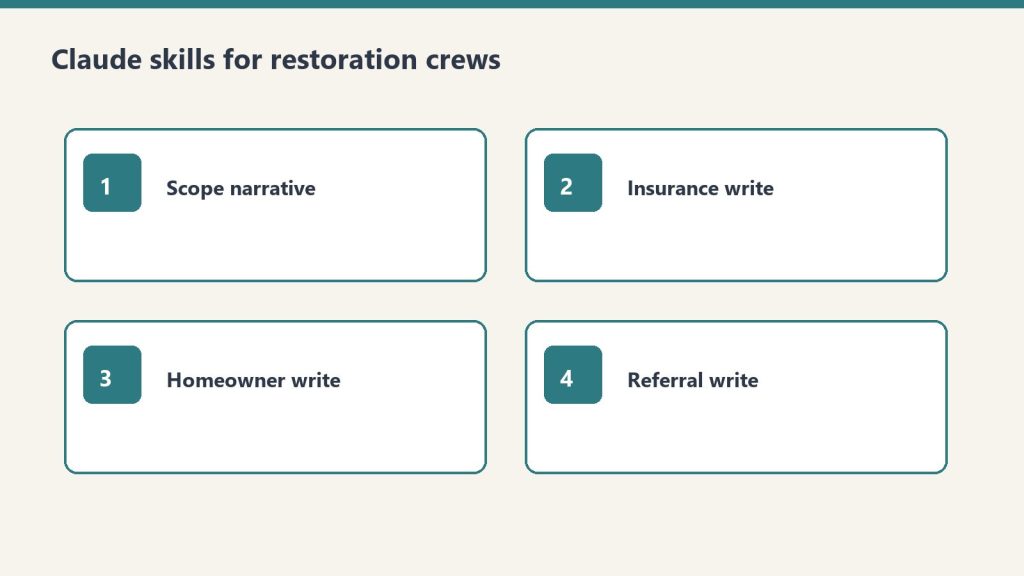
This water-focused pack ($29) targets emergency texts, mitigation photo narratives, pack-out letters, and storm referral content. The general AI for Restoration Contractors — 4 Claude Skills ($29) covers scope narratives and broad insurance correspondence. The Restoration Operations Kit — Claude Edition ($197) adds eight operational skills including equipment sizing and KPI coaching.
What is included in the $29 Square purchase?
The $29 checkout includes a formatted zip of all four water-damage Claude skills ready to paste into Project Instructions, plus email delivery from Tygart Media within 24 hours. The full skill text also remains free to copy from this page.
Is there a refund policy?
Because this is a digital product, all sales are final. If you have a problem with your purchase, email will@tygartmedia.com and we will sort it out.
How is this delivered?
Within 24 hours of purchase via email from will@tygartmedia.com. You will receive your download link — Notion duplicate link, skill file, or both depending on the product.
$29
Packaged zip delivered by email within 24 hours via Square.