Open field playbook. No patent. Copy it, rename it, change the nouns to fire / mold / rebuild. If it makes you money, good. If it puts another dish on a wet roof, also good.
License: do what you want. Attribution nice, not required. Tygart Media is not a Starlink, SpaceX, Tesla, or xAI partner. Links below go straight to them. No tracking parameters. No referral codes.
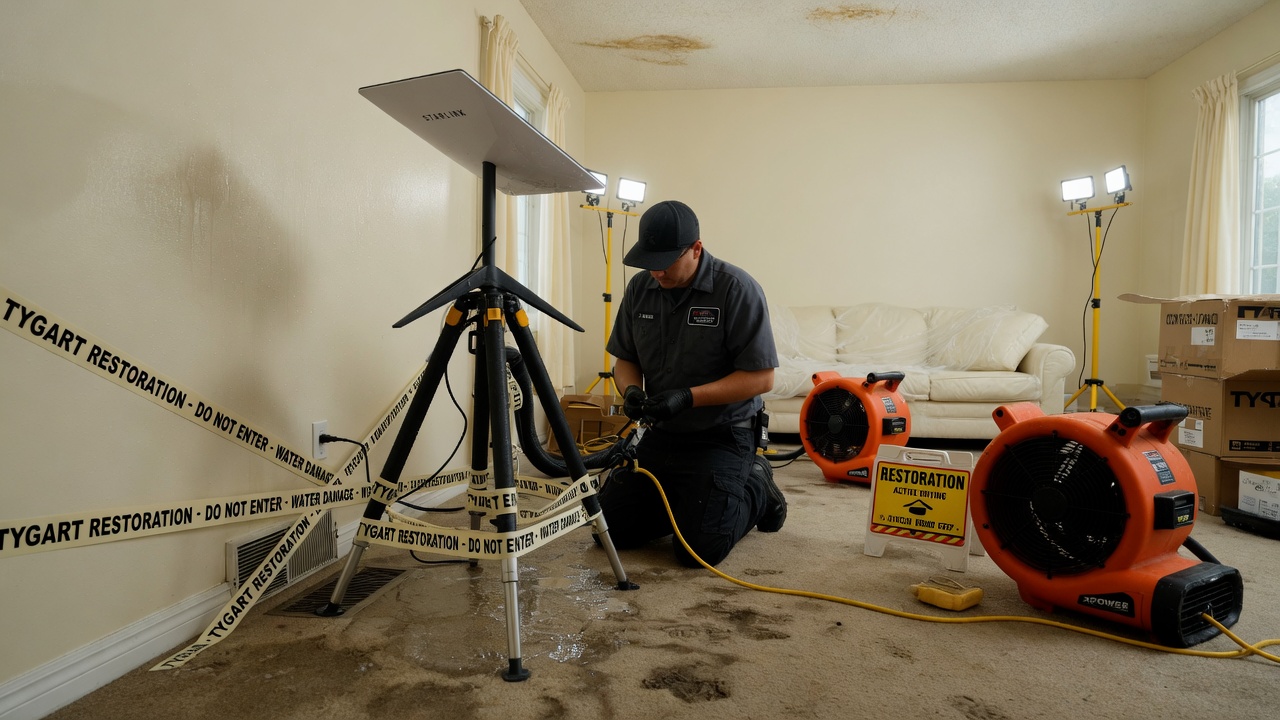
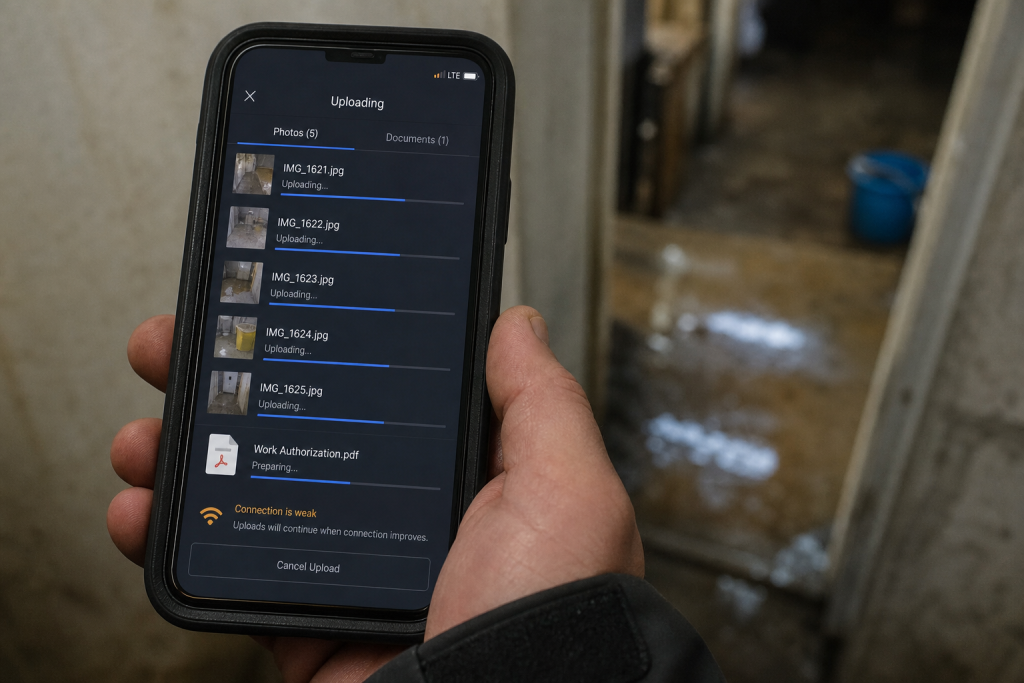
Why this exists: restoration work happens where fiber is dead, the house is a Faraday cage of wet drywall, and the phone that “has bars” cannot upload a moisture map. Starlink is a sky-view pipe. More honest job-site pipes → more honest traffic on the constellation → more reason to fly birds. The selfish clause is allowed: a 4G phone in the sticks should still talk to a voice agent when the street is dark.
Bars on the phone. Upload still dead. That is the job the dish is for.
Buy and read from the source. Prices move. The impedance rule does not.
The structure or the street has no working cable/fiber (storm, rural, construction, “the pole is in the river”).
You need to upload, not just talk: photos, video walkthrough, Xactimate sketch, moisture log, signed work auth.
You will be on site more than an hour and cell is congested or roaming into a dead pocket.
The office needs a second path so after-hours voice and dispatch do not die with the cable modem.
Do not use it as:
A replacement for a good office fiber drop.
A phone. Voice agents still ride the pipe; the dish is not Jarvis.
A “we have Starlink” line on the website. Homeowners hire the truck that showed up.
Cell first if it works. Starlink is the sink when cell is the bottleneck.
2. Two kits (steal one)
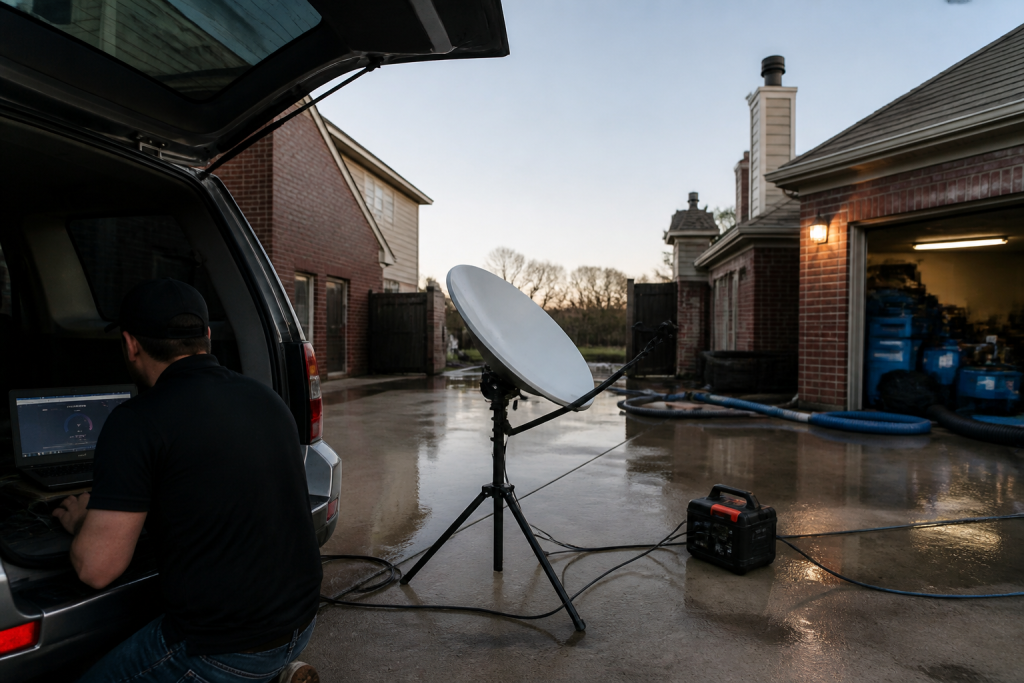
Kit A — truck / first-on-site (most shops)
Starlink Mini on a Roam plan or, if this is actually a business WAN, start at Business and read the current hardware list. Mini is the backpack dish. In-motion rules live here. The home V5 kit is not the roam toy.
Power: Mini wants a USB-PD source rated 65–100 W even though it only drinks ~25–40 W. A 45 W phone brick will lie to you. Truck: 12 V → 30 V / Anderson, or a 500 Wh class station.
Plan: numbers on starlink.com move. Roam is written for travel. If the kit is production, read Business vs Enterprise. Mini often does not sit on the Priority SLA. Do not tell a carrier you have enterprise uptime because you paid a business invoice for a Mini.
One cheap travel router if Mini Wi-Fi dies inside a metal trailer.
Power before the meter. 65–100 W brick. Phone chargers lie.
Standby the truck kit when it is not a weather week. Idle is cheaper than a second hardware buy because someone borrowed it.
6. Dispatch and voice
Dispatch and voice when the site is remote.
The dish is layer 0. The voice agent is layer 1.
On a dead-fiber job: photos go up the pipe; the after-hours line stays reachable; the agent writes a new row (address, standing water y/n, next action). It does not edit your website.
If you already have a process, add one rule: when cell upload fails, kit A comes off the hook.
7. Failure modes
Trees and eaves. Rain. 45 W bricks. Consumer Roam sold as production WAN. Twelve intake fields before anyone asks “can we come now?”
8. The sentence that pays the shop
“If the street internet is out we still upload your photos and get the adjuster pack off the truck tonight.”
Only say it if the kit is in the truck.
This document stays free. Charge for the hour you spend teaching another shop the first 30 minutes if you want. Do not charge Starlink. They already sold you the dish.
9. What this is not asking
No meeting. No partnership badge. No official anything.
Redmond already knows how to stamp birds. The ground should not be a graveyard of unused kits. Order here. Then put the dish where the sky is.
The restoration software landscape in 2026 has consolidated into four recognizable categories. The wrong choice will cost a restoration operator three to five years of integration debt. The right one will quietly compound margin and visibility for the same period.
This is a buyer’s framework, not a vendor ranking. Vendor names move quickly in this market through acquisition and rebranding. The categories below are stable, and the selection criteria are durable.
The Four Categories of Restoration Software in 2026
The four categories of restoration software in 2026.
When operators talk about “restoration ERP” or “restoration sales software,” they are usually referring to one of four distinct categories that solve different problems:
End-to-end restoration ERPs — single platforms covering CRM, job management, scheduling, estimating, photo documentation, accounting integration, and reporting. The dominant choice for shops above roughly $5M revenue that want one system of record.
Sales-focused CRMs — platforms purpose-built for the commercial cultivation cycle, account mapping, and sales-pipeline management. Often paired with a separate job-management tool.
Job-management platforms — systems focused on the production side: dispatch, technician documentation, customer signatures, estimating, photo capture. The dominant choice for shops where production discipline drives the business.
Best-of-breed point tools — moisture mapping, photo documentation, equipment tracking, communication, scheduling — each from a separate vendor, integrated through APIs or middleware.
The first selection question is which category fits the shop, not which vendor. Most software regret in the restoration industry comes from buying a vendor in the wrong category for the operating model.
How to Choose the Right Category
The right category is a function of revenue scale, operating model, and growth direction. A working framework:
Under $2M revenue, residential-led: a job-management platform plus a basic CRM is usually sufficient. Full ERP is overhead the shop cannot absorb.
$2M to $5M revenue, mixed residential and commercial: a job-management platform with a strong sales module, or an ERP with a clear sales workflow. The decision tilts on commercial growth ambition.
Above $5M revenue, multi-location or commercial-led: end-to-end ERP becomes the practical choice. The cost of stitching point tools together exceeds the cost of the ERP.
Heavy commercial sales motion: a dedicated sales CRM is often added regardless of the production platform, because commercial cultivation requires functionality production-led platforms do not prioritize.
The Six Selection Criteria That Actually Matter
The six selection criteria that actually matter.
Vendor demos make every platform look comparable. The differentiators show up in production. The six criteria that separate platforms operators stay on from platforms operators leave within 24 months:
Documentation discipline. Does the platform enforce the documentation standard your insurance work requires, or does it allow technicians to skip critical fields? The IICRC S500 2026 documentation expectations make this non-negotiable.
Estimating integration. Does the platform connect to the estimating tool your shop uses (Xactimate, Symbility, or alternatives) without a manual re-key? A re-key step is where margin leaks.
Accounting integration. Does the platform write clean records into QuickBooks, Sage, or NetSuite? Without this, your controller is rebuilding the books every month.
Mobile reliability. Does the technician-facing app work on a job site with intermittent connectivity? Field-side reliability is the most common reason adoption stalls.
Sales pipeline depth. If you have a commercial sales motion, does the platform support named accounts, multi-contact account mapping, and stage-based cultivation? Most production-led platforms do not.
Reporting and forecasting. Can ownership see revenue forecast, gross margin by job type, and sales pipeline in one view, or are these stitched together in spreadsheets?
The Hidden Cost: Implementation
The license fee is rarely the largest cost of restoration software. Implementation, data migration, and the productivity dip during the cutover typically run 1.5x to 3x the first-year subscription cost. Operators who underestimate this number end up on the platform without ever fully implementing it, which produces the worst possible outcome — paying for software no one trusts.
The mitigations are well known: dedicate an internal champion who owns the rollout, plan for a 90-day cutover with parallel operation, and stage the implementation by department rather than going live everywhere at once.
The AI Question
The AI question.
Every restoration software vendor in 2026 is shipping AI features — automated photo tagging, voice-to-documentation, sketch generation from job photos, and project estimation assistance. The honest assessment is that the AI features that hold up in production are the ones that automate documentation entry, not the ones that promise to “do estimating for you.” Operators evaluating platforms in 2026 should weight the AI features by their effect on technician documentation discipline, not by demo polish.
Switching Costs Are Real
The cost of switching restoration platforms after 18 months on one is high — historical job data, customer records, and team training all get disrupted. This argues for thorough selection, not for paralysis. Most operators who report regretting their software choice cite either rushing the decision or buying for a future state of the business that never arrived. A platform that fits the next 18 months and is extensible into the next 36 is a better choice than the perfect platform for a future that may not happen.
What is the difference between a restoration ERP and a job-management platform?
An ERP covers the full operating system of the business — CRM, sales, job management, accounting integration, reporting — in one platform. A job-management platform focuses on the production side — dispatch, technician documentation, estimating, photo capture — and typically pairs with a separate CRM and accounting system.
When should a restoration company invest in a dedicated sales CRM?
When the commercial sales motion requires named-account cultivation, multi-contact account mapping, and stage-based pipeline management at a depth that production-led platforms do not support. Shops with serious commercial growth ambition typically run a dedicated sales CRM regardless of their production platform.
How much should I budget for restoration software in 2026?
License fees vary widely, but a working budget for a mid-sized restoration operation is 1% to 3% of revenue for software, with implementation and training adding 1.5x to 3x the first-year subscription cost in year one. The total software stack typically replaces a measurable amount of administrative labor, so the net cost is usually lower than the gross spend.
Should I integrate AI tools into my restoration software stack?
The AI features that hold up in production in 2026 are the ones that automate documentation entry — photo tagging, voice-to-documentation, sketch generation. AI features that promise to replace estimating or scoping judgment are not yet reliable enough to depend on. Evaluate AI by its effect on technician discipline, not demo polish.
How long does a restoration software implementation take?
A realistic implementation runs 90 days for a mid-sized restoration operation, with parallel operation against the legacy system for the first 30 to 60 days. Compressing the timeline below 60 days typically produces an incomplete implementation that erodes platform trust within the first year.
Who this is for: Your IT person, your developer, or a technical contractor. This brief describes a production-grade automation architecture for the restoration company CRM touch calendar using Google Cloud Platform (GCP). It assumes basic familiarity with cloud infrastructure, command line tools, and web APIs. It does not require deep expertise in any single area — the implementation is intentionally modular so that each component can be handed to a different person if needed.
The business strategy this automates is in Your CRM Is Not a Lead Database. The manual version of this system is in the Email Automation Setup Guide. This brief is for teams who want to reduce ongoing manual work and build a more robust, scalable version of the same workflow.
What This Architecture Automates
What this architecture automates.
The manual system requires a person to: export contacts from the CRM, validate emails, import to Mailchimp or Brevo, configure each campaign, schedule it, and log results back to Notion. For 4–6 campaigns per year, this is manageable manually. For a company running 10–15 campaigns across multiple divisions or service areas, or for an agency running this system for multiple restoration clients, a GCP automation layer eliminates the recurring labor.
What this architecture handles automatically:
Scheduled contact export from ServiceTitan or Jobber via API
Segmentation and deduplication logic
Email validation pass before import
Contact import to Mailchimp or Brevo
Campaign creation from template stored in Cloud Storage
Campaign scheduling per the calendar in Notion
Results logging back to Notion after send
What still requires human review:
Email copy review before scheduling (always — no automation should skip this)
Reply triage and qualitative logging
Warmth scoring and super-connector identification
Prerequisites
A Google Cloud Platform account with billing enabled (new GCP accounts include $300 in free credits)
ServiceTitan or Jobber API access (ServiceTitan requires contacting their enterprise team; Jobber API is available on Connect plan and above at $119–$169/month)
Mailchimp account with API access (available on all paid plans) OR Brevo with API access (all plans)
Notion account with Notion API integration enabled (free at notion.com/my-integrations)
# Install gcloud CLI and authenticate
gcloud auth login
gcloud projects create restoration-crm-[yourcompany] --name="Restoration CRM Automation"
gcloud config set project restoration-crm-[yourcompany]

# Enable required APIs
gcloud services enable \
  run.googleapis.com \
  cloudscheduler.googleapis.com \
  secretmanager.googleapis.com \
  storage.googleapis.com

# Create service account for the automation
gcloud iam service-accounts create crm-automation-sa \
  --display-name="CRM Automation Service Account"

# Grant necessary permissions
gcloud projects add-iam-policy-binding restoration-crm-[yourcompany] \
  --member="serviceAccount:crm-automation-sa@restoration-crm-[yourcompany].iam.gserviceaccount.com" \
  --role="roles/run.invoker"
Component 2: Secret Manager for API Credentials
Secret Manager for API credentials.
Store all API credentials in GCP Secret Manager. Never hardcode credentials in source code.
# Store each credential as a separate secret
echo -n "your-servicetitan-api-key" | gcloud secrets create servicetitan-api-key \
  --data-file=-

echo -n "your-jobber-api-key" | gcloud secrets create jobber-api-key \
  --data-file=-

echo -n "your-mailchimp-api-key" | gcloud secrets create mailchimp-api-key \
  --data-file=-

echo -n "your-notion-token" | gcloud secrets create notion-token \
  --data-file=-

# In Python, access secrets like this:
# from google.cloud import secretmanager
# client = secretmanager.SecretManagerServiceClient()
# name = f"projects/{project_id}/secrets/{secret_id}/versions/latest"
# response = client.access_secret_version(request={"name": name})
# secret_value = response.payload.data.decode("UTF-8")
Component 3: Contact Sync Service
This Cloud Run service handles the contact export → segment → validate → import pipeline. Deploy as a container triggered by the orchestration layer.
# contact_sync/main.py

import os
import json
import requests
from google.cloud import secretmanager

def get_secret(secret_id):
    client = secretmanager.SecretManagerServiceClient()
    project_id = os.environ.get("GCP_PROJECT_ID")
    name = f"projects/{project_id}/secrets/{secret_id}/versions/latest"
    response = client.access_secret_version(request={"name": name})
    return response.payload.data.decode("UTF-8")

def export_jobber_contacts():
    """Export residential clients from Jobber API"""
    api_key = get_secret("jobber-api-key")

    # Jobber uses GraphQL API
    query = """
    query GetClients($after: String) {
      clients(first: 100, after: $after) {
        nodes {
          id
          firstName
          lastName
          emails { address isPrimary }
          tags { label }
          jobs(first: 1) {
            nodes { jobType completedAt }
          }
        }
        pageInfo { hasNextPage endCursor }
      }
    }
    """

    headers = {
        "Authorization": f"Bearer {api_key}",
        "Content-Type": "application/json"
    }

    contacts = []
    cursor = None

    while True:
        variables = {"after": cursor} if cursor else {}
        response = requests.post(
            "https://api.getjobber.com/api/graphql",
            headers=headers,
            json={"query": query, "variables": variables}
        )
        data = response.json()
        clients = data["data"]["clients"]

        for client in clients["nodes"]:
            email = next(
                (e["address"] for e in client["emails"] if e["isPrimary"]),
                client["emails"][0]["address"] if client["emails"] else None
            )
            if not email:
                continue

            # Determine segment based on tags
            tags = [t["label"].lower() for t in client["tags"]]
            if "residential" in tags or not any(t in tags for t in ["commercial", "adjuster", "vendor"]):
                segment = "Homeowner"
            elif any(t in tags for t in ["adjuster", "agent", "insurance"]):
                segment = "Industry"
            else:
                segment = "Trade"

            # Get most recent job type
            job_type = None
            if client["jobs"]["nodes"]:
                job_type = client["jobs"]["nodes"][0].get("jobType", "")

            contacts.append({
                "first_name": client["firstName"],
                "last_name": client["lastName"],
                "email": email.lower().strip(),
                "segment": segment,
                "job_type": job_type or ""
            })

        if not clients["pageInfo"]["hasNextPage"]:
            break
        cursor = clients["pageInfo"]["endCursor"]

    return contacts

def deduplicate_contacts(contacts):
    """Remove duplicate emails, keep most recent record"""
    seen = {}
    for contact in contacts:
        email = contact["email"]
        if email not in seen:
            seen[email] = contact
    return list(seen.values())

def segment_contacts(contacts):
    """Split into three segment lists"""
    segments = {"Homeowner": [], "Industry": [], "Trade": []}
    for contact in contacts:
        seg = contact.get("segment", "Homeowner")
        if seg in segments:
            segments[seg].append(contact)
    return segments

def import_to_mailchimp(contacts, tag, api_key, list_id):
    """Batch import contacts to Mailchimp with tag"""

    # Mailchimp batch operations (max 500 per call)
    batch_size = 500

    for i in range(0, len(contacts), batch_size):
        batch = contacts[i:i+batch_size]

        operations = []
        for contact in batch:
            operations.append({
                "method": "PUT",
                "path": f"/lists/{list_id}/members/{contact['email'].encode().hex()}",
                "body": json.dumps({
                    "email_address": contact["email"],
                    "status_if_new": "subscribed",
                    "merge_fields": {
                        "FNAME": contact.get("first_name", ""),
                        "LNAME": contact.get("last_name", ""),
                        "JOB_TYPE": contact.get("job_type", "")
                    },
                    "tags": [tag]
                })
            })

        response = requests.post(
            "https://us1.api.mailchimp.com/3.0/batches",
            auth=("anystring", api_key),
            json={"operations": operations}
        )

        if response.status_code not in [200, 201]:
            raise Exception(f"Mailchimp batch import failed: {response.text}")

    return len(contacts)

def run_contact_sync(request):
    """Main Cloud Run handler"""
    mailchimp_api_key = get_secret("mailchimp-api-key")
    mailchimp_list_id = os.environ.get("MAILCHIMP_LIST_ID")

    contacts = export_jobber_contacts()
    contacts = deduplicate_contacts(contacts)
    segments = segment_contacts(contacts)

    results = {}
    for segment_name, segment_contacts in segments.items():
        count = import_to_mailchimp(
            segment_contacts,
            tag=segment_name,
            api_key=mailchimp_api_key,
            list_id=mailchimp_list_id
        )
        results[segment_name] = count

    return json.dumps({"status": "success", "imported": results})
Component 4: Cloud Scheduler Trigger
Cloud Scheduler runs the orchestration service on the campaign dates stored in your Notion calendar. The scheduler checks Notion weekly for upcoming campaigns and pre-triggers the contact sync 7 days before each scheduled send.
The orchestration service reads your Notion Campaign Calendar database, finds any campaigns with a send date within the next 7 days and a Status of “Scheduled,” and triggers the contact sync and campaign creation pipeline for each one.
Component 5: Results Logger
After each campaign sends, this service polls the Mailchimp or Brevo API for campaign analytics and writes them back to your Notion Campaign Calendar database.
For a single restoration company running 6 campaigns per year:
Service
Usage
Monthly Cost
Cloud Run (contact sync)
6 invocations/year, <5min each
<$1
Cloud Scheduler
52 weekly checks/year
$0.10
Cloud Storage (templates)
Minimal storage
<$0.01
Secret Manager
4 secrets, <1000 accesses/month
<$0.10
Total
<$2/month
For an agency running this system for 10 restoration clients simultaneously, the cost scales linearly — approximately $15–20/month in GCP costs for the full multi-client operation. The manual labor savings at that scale are significant: an estimated 8–12 hours per month of manual campaign setup eliminated.
Deployment Checklist
GCP project created and APIs enabled
Service account created with appropriate permissions
All API credentials stored in Secret Manager
Contact sync service containerized and deployed to Cloud Run
Cloud Scheduler job created and tested
Notion Campaign Calendar database connected
Results logger deployed and tested with a historical campaign
Full end-to-end test run on a staging contact list before live deployment
Full documentation for each GCP service referenced here: cloud.google.com/run/docs, cloud.google.com/scheduler/docs, cloud.google.com/secret-manager/docs.
AI-generated editorial illustration — Vertex AI Imagen 4 Standard
About this image. This image was generated by Google’s Vertex AI Imagen 4 model as the featured visual for The 4% Problem: Why Almost Nobody in Restoration Is Using the AI That’s Already in Their CRM. Every image in the Tygart Media visual library is AI-generated, converted to WebP for optimal performance, and enriched with IPTC/XMP metadata for search engine discoverability.
Model: Vertex AI Imagen 4 Standard (imagen-4.0-generate-001)
Who this is for: Anyone at your company who writes emails — the owner, the office manager, or whoever handles the CRM touch campaigns. This brief requires no technical background. It’s a ready-to-use prompt library for Claude (claude.ai), Anthropic’s AI assistant, that you can use to write every email in your annual CRM touch calendar without starting from a blank page.
How to use this restoration Claude prompt library.
Go to claude.ai. Create a free account if you don’t have one. Open a new conversation. Paste a prompt from this guide, fill in the bracketed fields with your real information, and press enter. Claude will generate a draft email. Review it, edit anything that doesn’t sound like you, and copy it into your email platform.
That’s the entire workflow. No API key. No technical setup. No code. A free Claude account at claude.ai is sufficient for this use case.
One important principle before you start: the more specific your prompt, the better the output. Telling Claude “write a hiring email for a restoration company” will generate something generic. Telling Claude “write a hiring email for a 12-person water and fire restoration company in Tacoma, WA that’s been in business for eight years and is known for fast response times and honest communication with insurance adjusters” will generate something that sounds like it came from your company specifically. Put in the specifics; get out something publishable.
The Prompt Library
The prompt library.
Prompt 1: The Hiring Email — Homeowner Version
I run [company name], a [type] restoration company in [city, state]. We’ve been in business [X] years and are known for [one or two specific things your company does well — e.g., “fast response times and straight communication with adjusters,” or “doing right by homeowners even when the insurance company makes it hard”]. We currently have [number] employees and serve the [geographic area] area.
I need to write a short, plain-text email to past homeowner clients who we’ve done [water damage / fire damage / mold / storm] work for. We’re currently hiring for [job title]. The goal of the email is to ask if they know anyone — family, friends, people in the trades — who might be a great fit for a company like ours. We want to reach out to trusted contacts before posting the job publicly.
Tone: Personal and warm, like a note from a real person. Not corporate, not salesy. The recipient should feel like we remembered them and value their opinion specifically.
Requirements: Under 150 words. Plain text (no HTML). Sign it from [owner first name] at [company name]. Include a phone number as the only contact info. No subject line needed — just the body.
Prompt 2: The Hiring Email — Insurance Adjuster Version
I run [company name], a restoration company in [city, state]. I need to write a short email to insurance adjusters I’ve worked with on claims. We’re hiring a [job title].
The tone should be collegial — peer to peer, professional but not formal. We want to reach out to trusted colleagues before posting publicly, and we’d appreciate any recommendations they might have. Keep it under 120 words. Plain text. From [owner name]. Include phone number.
Do not use any of these phrases: “I hope this email finds you well,” “I wanted to reach out,” “touch base,” “circle back,” or “leverage.” Write it how a real contractor would talk to an adjuster they’ve worked with for years.
Prompt 3: The Vendor Ask — Specialty Sub Search
Write a short email from a restoration company owner to their contact database asking if anyone knows a reliable [trade type — e.g., drywall sub, flooring contractor, HVAC tech] in [city/region]. We have a larger project coming up and want to find a quality sub through our network before going the cold-search route.
Context about our company: [2–3 sentences about your company — size, how long you’ve been in business, your service area]. The recipients are a mix of past homeowner clients, insurance industry contacts, and trade partners.
Tone: Casual and direct. Like asking a trusted colleague. Under 100 words. Plain text. From [owner name]. Phone number only.
Optional addition: Add one sentence at the end that invites the recipient to reach out directly if the description matches their own business.
Prompt 4: The Seasonal Safety Email — Winter Freeze Version
I run a water damage restoration company in [city, state]. I want to send a helpful, non-promotional email to past homeowner clients before freeze season. The goal is to give them genuinely useful information about preventing the kind of water damage we see most commonly in [our region] in winter.
Specific things to cover: [list 3–4 real things relevant to your region — e.g., “disconnecting garden hoses,” “knowing where the main shutoff is,” “checking sump pumps before the ground freezes,” “insulating exposed pipes in crawlspaces”]. These should be specific to [region] winters, not generic national advice.
Tone: Knowledgeable and helpful, like a trusted expert checking in on a neighbor. No sales pitch, no CTA other than “if you have questions, we’re here.” Under 200 words. Include a link placeholder for [blog post URL] if they want to read more. From [owner name].
Prompt 5: The Post-Storm Check-In
Write a short check-in email from a restoration company owner to past homeowner clients after a significant weather event. Context: [describe the event — e.g., “We just had the biggest rainstorm in three years hit the [area]” or “The deep freeze last week affected a lot of homes in our area”]. We’re reaching out not to generate leads but to genuinely check in and let them know we’re available if they or anyone they know had issues.
Tone: Warm, community-focused, genuine. Not a pitch. One optional sentence can mention that we’re available for a free look if they’re not sure about anything. Under 120 words. From [owner name]. Include phone.
Prompt 6: The Company Anniversary or Milestone Email
Write a short personal email from the owner of a restoration company to their full contact database for our company’s [X-year anniversary / new IICRC certification / expansion into a new service area]. The goal is to thank the people who’ve been part of our journey — past clients, industry partners, trade contacts — and share something genuine about where we’re headed.
Specific context: [1–2 sentences about what milestone you’re celebrating and what it means genuinely — not marketing language, just the real version]. [1 sentence about something you’re proud of or looking forward to.] [1 sentence of genuine gratitude.]
Tone: Personal. From the owner’s voice, not a company PR voice. Should feel like the kind of email you’d want to receive from a company you’ve worked with. Under 175 words. No CTA. No offer. Just the relationship. From [owner first name].
Prompt 7: Adapting Any Template to Your Brand Voice
Use this prompt whenever a generated draft doesn’t quite sound like you:
Here are two examples of how I normally write emails to clients and contacts: [paste two real examples of emails you’ve sent — can be short, informal, anything genuine]. Using this voice and style, rewrite the following email: [paste the generated draft]. Keep all the same information but make it sound like I wrote it, not like AI wrote it. Pay attention to sentence length, word choice, and how formal or informal I am.
Prompt 8: Subject Line Generation
Write 8 subject line options for the following email: [paste the email body]. The subject line should feel personal and human — not like a marketing email. No click-bait. No exclamation points. No “Quick question for you!” style openers. It should make the recipient want to open it because it sounds like a note from someone they know, not a promotional blast. Vary the options — some direct, some conversational, some that lead with the topic, some that lead with the relationship.
Prompt 9: Batch Personalization for Homeowner Lists
Use this when you have a list of homeowner contacts and want to add one personalized sentence per email based on their job type and timing:
I’m going to give you a list of past restoration clients in CSV format. For each client, add one personalized opening sentence to the following email template that references their specific job type and, if the job was more than 18 months ago, acknowledges it’s been a while. Keep the personalized sentence under 20 words. Do not change the rest of the template. Return the output as a numbered list matching the order of the input.
Email template: [paste template]
Client list (paste up to 20 rows at a time):
First Name, Job Type, Months Since Job
Sarah, water damage, 14
Tom, fire damage, 26
Jennifer, mold remediation, 8
[continue…]
Tips for Getting the Best Results from Claude
Tips for getting the best results from Claude.
Be specific about what you don’t want. If you’ve noticed Claude tends to use certain filler phrases, name them explicitly in the prompt: “Do not use: ‘I hope this finds you well,’ ‘reaching out,’ ‘touch base,’ or ‘leverage.’” This single instruction usually eliminates the most recognizable AI writing patterns.
Give it your real company context. Claude doesn’t know your company. Everything you tell it about your history, your reputation, your service area, and your typical client becomes context it can draw on to make the output more specific and authentic. Two sentences of real company context transform generic output into something that sounds like it came from you.
Iterate in the same conversation. Don’t start a new Claude conversation for each revision. Reply in the same conversation with: “Good, but make it shorter” or “The tone is right but the middle paragraph is too formal — simplify it.” Claude maintains context within a conversation and can refine based on your feedback without losing the good parts.
Ask for multiple options. Ending a prompt with “Give me three versions — one shorter, one more formal, one more casual” lets you pick from options rather than iterating from a single draft. This works especially well for subject lines.
Review everything before sending. Claude’s output is a first draft, not a final draft. Read every email before it goes out. Check for: anything that doesn’t sound like your voice, any specific facts about your company that are wrong (Claude will sometimes assume details you didn’t provide), and any phrasing that might feel off to a specific recipient.
Frequently Asked Questions
Do I need to pay for Claude to use these prompts?
No. A free account at claude.ai is sufficient for this use case. The free tier allows you to run multiple prompts per day and generate all the email drafts you need for a full annual campaign calendar. Claude Pro ($20/month) gives you higher usage limits and access to more powerful models, but is not required for basic email drafting.
Can I save these prompts somewhere so I don’t have to look them up each time?
Yes — store the full prompt library in a Notion page (your Second Brain, per the related technical brief). Create one page per prompt type, fill in the bracketed fields with your company’s standard information, and save them as templates. Before each campaign, open the relevant prompt, verify the details are current, and paste it into Claude.
What if Claude generates something that doesn’t sound like me?
Use Prompt 7 from this guide — the brand voice adaptation prompt. Paste two real emails you’ve written, paste the Claude draft, and ask it to rewrite in your voice. After two or three rounds of this, Claude will have internalized your style well enough that the initial drafts need much less editing.
Is it ethical to use AI-generated emails for relationship outreach?
Yes, with one condition: you review and approve every email before it sends. The same way you might ask an assistant to draft a letter you then sign and send in your voice, using AI to draft email is a production tool, not a substitute for genuine relationship intention. The goal of these campaigns is real — staying in touch with people who know your company, asking for genuine help with real business needs. AI helps you express that goal in words. The relationship authenticity comes from you.
Who this is for: The person building your knowledge and relationship tracking system — your office manager, a tech-savvy ops person, or a consultant helping you get organized. This brief builds a Notion-based Second Brain layer that sits on top of your existing CRM to capture the relational intelligence that your job management software never will. No coding required. Full setup takes 3–4 hours. The strategy this supports is in Your CRM Is Not a Lead Database.
What a Second Brain Does That Your CRM Doesn’t
What a second brain does that your CRM doesn’t.
Your job management software (ServiceTitan, Jobber, or similar) is built to track transactions: jobs, invoices, and technician assignments. It is exceptional at this. What it cannot do is capture the relational layer — who referred whom, who replied to your hiring email, which adjuster said they’d keep you in mind for the next CAT event, which homeowner’s reply mentioned their neighbor’s flooded basement.
This is the intelligence that determines whether your CRM becomes a community. It lives in email threads, in the notes field of your phone contacts, in your memory after a golf round with an adjuster. It disappears when your office manager leaves, when you switch phone carriers, when the thread buries itself under 400 new emails.
The Notion Second Brain captures this layer systematically. It’s not a replacement for your CRM. It’s a relationship intelligence layer that your CRM was never designed to hold.
The Architecture: Four Linked Databases
The architecture — four linked databases.
The system uses four Notion databases connected by relations. Notion’s free tier supports all of this — you do not need a paid plan for the initial build. If you add more than five members, you’ll need to upgrade to the Plus plan ($10/user/month).
Database 1: Contacts
Your master contact registry. Every person in your network gets a record here. This does not replace your CRM contact list — it supplements it with relationship context that belongs in a knowledge management tool, not a job management tool.
Properties:
Field
Type
Notes
Name
Title
Full name
Segment
Select
Homeowner / Industry / Trade / Other
Sub-type
Select
Homeowner past client / Adjuster / Agent / PA / Sub / Supplier / Vendor
Email
Email
Phone
Phone
Company
Text
For industry and trade contacts
Location
Text
City or zip — for local filter
Warmth
Select
Hot / Warm / Cool / Cold — subjective relationship temperature
Last Touch Date
Date
Last time you had meaningful contact
Last Touch Type
Select
Email campaign / Personal email / Phone / In person
Times Referred
Number
How many referrals this contact has ever sent you
Notes
Text
Anything important that doesn’t fit a field
CRM ID
Text
Matching ID in ServiceTitan or Jobber for cross-reference
Database 2: Touch Log
Every meaningful interaction with a contact gets an entry here. Campaign sends, personal replies, phone calls, in-person conversations. This is how you build a timeline of every relationship in your network.
Properties:
Field
Type
Notes
Touch Summary
Title
Brief description of the interaction
Contact
Relation → Contacts
Links to the contact record
Date
Date
Touch Type
Select
Campaign email / Personal email / Phone / In person / Reply received
Every referral — whether it turned into a job or not — gets a record here. This is where you track the ROI of the community strategy over time.
Properties:
Field
Type
Notes
Referral Summary
Title
Brief description
Referred By
Relation → Contacts
Who sent it
Referred Person or Property
Text
Who or what was referred
Date Received
Date
Source Touch
Relation → Touch Log
Which email or interaction triggered the referral
Outcome
Select
Job Won / Job Lost / Not Yet Followed Up / Not a Lead
Job Value
Number
Estimated or actual job value if won
Database 4: Campaign Calendar
This is the full campaign planning and results database from the outreach calendar guide. It lives here in the Second Brain so that every campaign is linked to the contacts and touches it generates.
Setting Up the System in Notion: Step by Step
Setting up the system in Notion step by step.
Phase 1: Create the Workspace Structure (30 minutes)
Create a new page in Notion called “CRM Second Brain”
Add four sub-pages, one per database: Contacts, Touch Log, Referrals, Campaign Calendar
On each sub-page, add a full-page database (not inline)
Add all properties to each database as listed above
Set up Relations between databases: Touch Log → Contacts (one contact, many touches), Referrals → Contacts (one contact, many referrals), Referrals → Touch Log (link each referral to the touch that generated it)
Phase 2: Import Your Seeding Data (1–2 hours)
Take your clean, segmented contact CSV from the segmentation brief
In Notion, on your Contacts database, click the three dots → Import CSV
Map the CSV columns to Notion database properties
Notion will create one database record per row
After import, manually review the first 20 records to confirm mapping is correct
Set the Warmth field for your top 30 contacts manually — this is subjective and cannot be automated
Phase 3: Set Up Views for Daily Use (30 minutes)
The database is only useful if you actually open it. Create these four views in your Contacts database:
“Super Connectors” view: Filter by Times Referred ≥ 2, sorted by Times Referred descending. This shows you your highest-value network contacts at a glance.
“Gone Cold” view: Filter by Last Touch Date is before 6 months ago AND Warmth is Warm or Hot. These are relationships that need attention.
“Follow Up Today” view: Filter from Touch Log — Follow Up Needed = true AND Follow Up Date = today. Surfaces what needs action today.
“Homeowners — Local” view: Filter by Segment = Homeowner AND Location contains [your city/zip]. Your residential community at a glance.
Connecting the Second Brain to Your Campaign Workflow
The Second Brain becomes powerful when it’s updated in real time during campaign execution. Here is the exact workflow for each campaign:
Before sending: Open the Campaign Calendar database and update the Status to “Scheduled.” Verify that the target audience count in your email platform matches your Contacts database filtered view for that segment.
Within 48 hours of sending: Log the campaign as a single batch entry in the Touch Log: Touch Type = “Campaign email”, Direction = Outbound, Date = send date. This creates the event anchor for all replies that follow.
For every reply received: Add a Touch Log entry: Touch Type = “Reply received”, Direction = Inbound, link to the Contact record, set Signal based on content (Referral Generated, Lead Mentioned, or Positive). If a follow-up is needed, check Follow Up Needed and set Follow Up Date.
For every referral: Add a Referrals database entry immediately. Link to the Contact who sent it and to the Touch Log entry that triggered it. Set Outcome to “Not Yet Followed Up” until the lead is worked.
After 12 months of this workflow, your Super Connectors view will show you exactly which five to ten people in your network are responsible for the majority of inbound referrals. These are the people to take to coffee, to thank personally, to invite to events. The system surfaces what intuition alone cannot track at scale.
Advanced: Connecting Notion to Your Email Platform via Zapier
For teams who want to reduce manual entry, Zapier (zapier.com) can automate the Touch Log entry step. This requires a Zapier account (free tier allows five automated workflows) and basic Zapier setup familiarity.
The automation: When a contact replies to a Mailchimp campaign → Zapier creates a Touch Log entry in Notion with the reply details, linked to the Contact record by email address.
The Zap flow:
Trigger: Mailchimp → New Campaign Reply (or Gmail → New Email matching campaign reply-to address)
Action 1: Notion → Find Database Item (search Contacts database for the reply’s email address)
Action 2: Notion → Create Database Item in Touch Log (populate fields from the Mailchimp reply data and the Contact ID found in Action 1)
This automation removes the manual step of logging each reply. It does not remove the step of reviewing replies and adding qualitative Signal and Notes — that still requires human judgment.
Zapier setup documentation: zapier.com/apps/mailchimp/integrations/notion and zapier.com/apps/gmail/integrations/notion.
Notion Pricing for This Use Case
Scenario
Plan Needed
Cost
Solo owner managing the database alone
Free
$0/month
Owner + office manager (2 users)
Free (up to 5 collaborators on free plan)
$0/month
Owner + office manager + 3 others
Free (up to 5 still covered)
$0/month
6 or more users
Plus plan
$10/user/month
For most restoration companies running this system, the free tier is sufficient indefinitely. The system described here does not require Notion AI, advanced automations, or enterprise features.
Who this is for: The person setting up your email system — your office manager, your IT contact, or a freelance marketing person you’ve brought in. This brief assumes basic comfort with web-based software (setting up accounts, uploading files, clicking through settings). No coding required. The strategy behind this system is in Your CRM Is Not a Lead Database and the full 12-month calendar is in The 12-Month CRM Touch Calendar.
What We’re Building
What we’re building.
A four-to-six email annual touch sequence for three audience segments (homeowners, industry contacts, trade contacts), running through a standard email marketing platform, triggered on a predetermined calendar, and tracked in a simple Notion or spreadsheet log.
The system requires no custom development. It uses off-the-shelf software that any non-technical person can configure in an afternoon. Total ongoing maintenance time after setup: approximately one hour per campaign, four to six times per year.
Platform Selection: Mailchimp vs. Brevo for Restoration Companies
Both platforms are appropriate for this use case. Choose based on your database size and send frequency:
Choose Mailchimp if: Your database is under 1,500 contacts, you want the most widely documented platform (easiest to find help online), and you’re comfortable paying $13–$30/month. Mailchimp’s Essentials plan is sufficient — you do not need Standard or Premium for this use case.
Choose Brevo if: Your database is over 1,500 contacts, you only send 4–6 times per year and want to avoid paying for contacts you rarely email, or you want built-in transactional email for other automations. Brevo’s Starter plan is $9/month with no contact storage limits — you pay based on emails sent, not contacts stored. For a 2,000-contact database sending 6 campaigns per year, Brevo costs significantly less than Mailchimp.
The setup instructions below cover both platforms in parallel. Follow the path that matches your platform choice.
Step 1: Account Setup and List Import
Step 1 — account setup and list import.
Complete the database segmentation build from the CRM segmentation technical brief before starting this step. You should have three clean CSV files: Homeowners, Industry, and Trade.
Mailchimp Setup
Create account at mailchimp.com. Select Essentials plan. Enter billing info.
Go to Audience → Manage Audience → Add a Field. Add two custom merge fields: JOB_TYPE (text) and SEGMENT (text). These allow personalization tokens in email copy.
Go to Audience → Manage Audience → Import Contacts. Upload each CSV file separately, assigning a tag during each import: “Homeowner”, “Industry”, “Trade”.
Map CSV columns to Mailchimp fields: First Name → FNAME, Last Name → LNAME, Email → EMAIL, Job Type → JOB_TYPE, Segment → SEGMENT.
After import, verify contact counts match your spreadsheet totals. A mismatch usually means invalid email format in some rows — check the import error log.
Brevo Setup
Create account at brevo.com. Select Starter plan ($9/month).
Go to Contacts → Lists → Create a List. Create three lists: “Homeowners”, “Industry Contacts”, “Trade Contacts”.
Go to Contacts → Import Contacts. Upload each CSV, assign to the corresponding list.
Map fields: First Name → FIRSTNAME, Last Name → LASTNAME, Email → EMAIL. Create custom attributes for JOB_TYPE if needed.
Verify counts after import.
Step 2: Sender Domain Authentication (Critical for Deliverability)
This is the step most people skip and then wonder why their emails land in spam. Both Mailchimp and Brevo require domain authentication to ensure your emails are delivered to inboxes rather than spam folders. This step requires access to your domain’s DNS settings (usually managed through your domain registrar — GoDaddy, Namecheap, Google Domains, or similar).
What Authentication Does
SPF, DKIM, and DMARC records tell receiving mail servers that your email marketing platform is authorized to send email on behalf of your domain. Without them, major providers (Gmail, Outlook, Yahoo) increasingly route your emails to spam or refuse delivery entirely.
Mailchimp Domain Authentication
In Mailchimp, go to Account → Settings → Domains → Add and Verify Domain
Enter your company domain (e.g., yourcompany.com)
Mailchimp will provide you with specific DNS records to add: a CNAME record for DKIM and a TXT record for verification
Log into your domain registrar and add these records exactly as shown. Allow 24–48 hours for DNS propagation.
Return to Mailchimp and click “Authenticate Domain” once DNS has propagated. A green checkmark confirms success.
Brevo Domain Authentication
Go to Settings → Senders & IP → Domains → Add a Domain
Enter your domain and follow the same process — Brevo provides specific DNS records for SPF and DKIM
Add records at your domain registrar. Verify in Brevo after propagation.
If your company uses a shared hosting email (e.g., yourbusiness@gmail.com rather than yourbusiness@yourcompany.com), you cannot authenticate a shared domain. In this case, create a free Google Workspace account at $6/month to get a branded email address before proceeding. Sending from info@yourcompany.com vs. yourcompany@gmail.com meaningfully affects both deliverability and perceived professionalism.
Step 3: Build the Campaign Templates
Step 3 — build the campaign templates.
For the CRM community touch strategy, plain text emails outperform designed HTML templates. Research on warm, relationship-based email consistently shows that recipients perceive plain text as more personal and authentic. The goal is an email that looks like it came from a person, not a marketing department.
Mailchimp Plain Text Campaign
Go to Campaigns → Create Campaign → Email
Select “Plain Text” as the campaign type (not the drag-and-drop builder)
Write your email copy in the plain text field
Use Mailchimp merge tags for personalization: *|FNAME|* for first name, *|JOB_TYPE|* for the custom job type field
Example: “Hi *|FNAME|*, It’s [Owner Name] from [Company]. We worked with you on your *|JOB_TYPE|* job a while back…”
Set up subject line, preview text, from name (use owner’s first name, e.g., “Mike from Acme Restoration”), and from email address (owner’s direct email preferred over info@ for homeowner segment)
Brevo Plain Text Campaign
Go to Campaigns → Email Campaigns → Create an Email Campaign
Choose “Plain Text” from the template selection
Use Brevo’s personalization tokens: {{ contact.FIRSTNAME }}, {{ contact.JOB_TYPE }}
Configure sender name and address as above
Build all six campaigns for the year in draft mode before publishing any of them. Label each draft clearly: “Q1-2026-Homeowners-Hiring”, “Q2-2026-Homeowners-Storm-Prep”, etc. This allows you to see the full year’s campaign lineup at once and catch any overlap or redundancy before it goes out.
Step 4: Schedule the Campaign Calendar
Mailchimp Scheduling
Open each draft campaign
In the Campaign Builder, go to the Schedule step
Select “Schedule” and set the date and time. Use the send time optimization feature if available on your plan — it will automatically send to each contact at the time they’re most likely to open based on historical behavior.
For your first campaign (no historical data), use Tuesday or Wednesday at 9:30am local time as a default
Brevo Scheduling
In the campaign builder, select “Schedule” on the final step
Set date, time, and timezone
Brevo’s Send Time Optimization is available on paid plans and functions similarly to Mailchimp’s
Schedule all three segment versions of each campaign within the same 2-hour window on the same day — homeowners first, then industry, then trade — staggered by 30 minutes. This prevents simultaneous reply volume from overwhelming a single inbox.
Step 5: Build the Results Tracking System in Notion
Both platforms provide analytics (open rate, click rate, unsubscribes) automatically. The tracking that neither platform does is the qualitative signal — replies, referrals, leads mentioned, and relationship warmth indicators. That layer goes in Notion.
Setting Up Notion (Free Tier)
Go to notion.com and create a free account
Create a new page called “CRM Touch Calendar”
Add a database (table view) with the following properties:
Add all six planned campaigns for the year as rows in the database
Set the Status to “Planned” for all. Update to “Draft Ready”, “Scheduled”, and “Sent” as you progress
After each campaign sends, log the open rate from your email platform and manually count and log reply count, referrals, and lead mentions from your email inbox
The Notion database becomes your campaign intelligence layer. After two or three years of data, you’ll have clear evidence of which touch types generate the highest referral rates, which segments are most engaged, and which subject lines perform best for your specific audience.
Step 6: Set Up Reply Management
For the homeowner and industry segments, replies to hiring emails and vendor asks often include lead mentions (“actually, our neighbor just had water get in last week”). These need to route to whoever handles incoming leads immediately, not sit in an inbox until someone reviews the campaign results.
The simplest solution: create a dedicated email address (campaigns@yourcompany.com or outreach@yourcompany.com) as the reply-to address for all campaigns. Set up a simple email rule that forwards any reply mentioning keywords like “water”, “damage”, “claim”, “flooded”, “burst”, or “insurance” to your main dispatch email address.
In Gmail, set this up under Settings → Filters and Blocked Addresses → Create a new filter. In Outlook, use Rules → Create a New Rule. Set the trigger to “subject or body contains” and the action to “forward to [dispatch email]”. This catches the accidental leads without requiring manual review of every reply.
Cost Summary
Item
One-Time
Monthly
Annual
Mailchimp Essentials (500 contacts)
$0
$13
$156
Mailchimp Essentials (1,000 contacts)
$0
$20
$240
Brevo Starter (unlimited contacts)
$0
$9
$108
Google Workspace (if needed for branded email)
$0
$6
$72
Notion free tier
$0
$0
$0
Email validation (one-time list clean)
$5–$15
$0
$0
Total annual cost for a fully operational system: $108–$312 depending on platform choice and contact volume. This covers 4–6 campaigns per year to a warm, segmented local database of up to 2,000 contacts.
Who this is for: The person who manages your company’s data — your office manager, operations coordinator, or IT contact. This is a technical brief. Hand it to them and say: “Build this for us.” The strategy behind it is in Your CRM Is Not a Lead Database.
What We’re Building and Why
What we’re building and why.
A restoration company’s customer relationship system contains contacts across multiple relationship types: past homeowner clients, insurance adjusters, insurance agents, public adjusters, subcontractors, suppliers, and vendors. The business value of these contacts is currently being left on the table because they all sit in a single undifferentiated list — or worse, in multiple disconnected systems.
This technical brief covers how to build a clean, three-segment contact database that can be exported to any email platform for the CRM community touch strategy. The output is a CSV-ready contact list with four fields: First Name, Email, Segment, and Job Type (for homeowners). The process takes 2–4 hours for a database of 200–1,000 contacts and does not require any new software purchases.
Step 1: Audit Your Current Data Sources
Step 1 — audit your current data sources.
Before building the segmented database, identify every place your contact data currently lives. For most restoration companies, this is a combination of:
Job management software (ServiceTitan, Jobber, Xactimate, or a custom system)
Accounting software (QuickBooks, FreshBooks) — often contains additional contact records
Email inbox — years of adjuster and agent correspondence with contact info in signatures
Business cards and physical records — especially older trade contacts
Google Contacts or Outlook — personal and professional contacts mixed together
Social media connections — LinkedIn connections that have business relationship context
Create a simple spreadsheet with one column per source and a rough count of contacts in each. This gives you the scope before you start merging.
Step 2: Export Raw Data from Each Source
ServiceTitan Export
Navigate to Customers in the left sidebar
Use the filter panel to select Customer Type: Residential for the homeowner segment; Commercial for business contacts
Click Export → Export to CSV
The export includes: customer name, address, phone, email, job history, and last job date
For the homeowner segment, add a filter for jobs completed in the last 5 years to avoid very stale contacts
Run a second export filtered to job type (Water Damage / Fire / Mold) to capture the Job Type field you’ll need for personalized emails
ServiceTitan note: The export may include multiple email addresses per contact (primary and secondary). Keep both in separate columns and let the email platform deduplicate. Do not discard secondary emails — these are often more reliably checked than the primary.
Jobber Export
Go to Clients in the navigation menu
Click the three-dot menu at the top right → Export
Select: Client Name, Email, Phone, Service Address, Tags, Last Job Date
The export is a CSV file. Open it in Excel or Google Sheets
If you’ve been using Jobber’s tags feature, filter by residential/commercial tag to create your segments. If not, sort by address type manually
Jobber note: Job type data lives in the Jobs table, not the Clients table. You’ll need to run a second export from Jobs (Reports → Job Reports → Export) and do a VLOOKUP on client ID to join job type data to client records.
QuickBooks Export
Go to Reports → Customer Contact List
Customize report to include: Customer Name, Email, Phone, Balance
Export → Export to Excel
This gives you billing-context contacts that may not appear in your job management system (e.g., commercial billing contacts, property management companies)
Email Inbox (for Industry Contacts)
For insurance adjusters and agents, the most reliable data source is often your email inbox. Here’s the efficient approach:
In Gmail, search for: “adjuster” OR “claims” OR “State Farm” OR “Allstate” OR “Farmers” — this surfaces the most relevant industry email threads
Export these to a spreadsheet: contact name, email, company, title (from email signatures)
In Outlook, use the same keyword search and export via File → Open & Export → Import/Export → Export to CSV
Expect 50–200 unique industry contacts from a 3-year inbox history
Step 3: Build the Master Contact Database
Step 3 — build the master contact database.
Consolidate all exported data into a single Google Sheet or Excel workbook with the following standardized columns:
Column
Format
Notes
First Name
Text
Separate from Last Name for personalization
Last Name
Text
Email
Email
Lowercase, validate format
Phone
Text
Keep for SMS campaigns if applicable
Segment
Select: Homeowner / Industry / Trade
The most important column
Job Type
Text: Water / Fire / Mold / Storm / Other
Homeowners only — leave blank for others
Job Date
Date
For homeowners — used to filter by recency
City/Zip
Text
For geographic filtering — local contacts only
Company
Text
For industry and trade contacts
Title
Text
For industry contacts — Adjuster, Agent, PA, etc.
Source
Text: ServiceTitan / Jobber / QB / Email / Manual
For deduplication tracking
Email Valid
Boolean: Y/N
Flag after validation step
Opted Out
Boolean: Y/N
Mark anyone who has unsubscribed or asked not to be contacted
Step 4: Deduplicate
If you’ve pulled from multiple sources, you will have duplicates. Deduplication is the most tedious part of this process but cannot be skipped — sending the same person two emails from the same campaign is a trust-breaker.
In Excel:
Select the Email column
Data → Remove Duplicates → check “Email” as the key column
Review the flagged duplicates before deleting — sometimes two records with the same email represent different relationship types (e.g., someone who was both a homeowner client and is now an adjuster). Keep the record with the more current relationship type in the Segment field.
In Google Sheets:
Add a helper column with formula: =COUNTIF($B:$B, B2) where column B is Email
Filter for values greater than 1 to find duplicates
Manually review and merge or delete
After deduplication, sort by Segment and do a manual spot check of 10 records per segment to verify the segmentation logic is correct.
Step 5: Validate Email Addresses
Sending to invalid email addresses hurts your sender reputation with your email platform, which reduces deliverability over time. Before importing into Mailchimp, Brevo, or any other platform, run a basic email validation pass.
Free option: Hunter.io offers 25 free email verifications per month. For a list under 500, their free tier covers a meaningful sample. Upload your list and verify the top contacts by relationship quality.
Paid option for large lists: NeverBounce or ZeroBounce. Both charge approximately $0.003–$0.008 per email verification. For a 500-contact list, total cost is under $5. Both services flag invalid addresses, role-based addresses (info@, support@), and disposable email domains. Remove all flagged emails before import.
Manual validation for high-value contacts: For your top 20–30 industry contacts (key adjusters, major agents), manual verification is worth it. Send a quick personal email asking them to confirm their preferred contact info. This also serves as a warm re-introduction before your first campaign.
Step 6: Import to Your Email Platform
Export your clean, validated, segmented contact database as three separate CSVs — one per segment — and import into your email platform of choice.
Mailchimp Import
Go to Audience → Manage Audience → Import Contacts
Upload CSV → Map columns to Mailchimp fields (First Name → FNAME, Email → EMAIL, Job Type → custom merge tag JOB_TYPE)
Assign a tag to each import: “Homeowner-2026”, “Industry-2026”, “Trade-2026”
Important: Do not create three separate Audiences. Use one Audience with tags. Mailchimp charges per contact, not per audience, but managing one audience with tags is significantly easier than managing three separate ones.
Brevo Import
Contacts → Import Contacts → Upload CSV
Map fields and create a list per segment: “Homeowners”, “Industry”, “Trade”
Brevo stores contacts once even if they appear in multiple lists — no duplicate billing risk
ServiceTitan or Jobber Built-In Email
If using the CRM’s native email for homeowner segments, the import step is not necessary — your homeowner data is already in the system. Create a saved filter for the homeowner segment you want to target and use it directly when setting up a campaign.
Step 7: Establish Ongoing Data Hygiene
The segmented database is only valuable if it stays current. Establish these three practices:
New client email capture at intake: Make email address a required field in your job intake form. In ServiceTitan, add it to the customer create form. In Jobber, it’s already a standard field — enforce it.
Post-job segment tagging: After every job closes, tag the homeowner record in your CRM with the job type. One minute of work per job prevents hours of data cleaning later.
Quarterly list audit: Set a recurring quarterly reminder to archive Mailchimp/Brevo contacts who unsubscribed in the previous quarter. Mailchimp charges for unsubscribed contacts unless they’re manually archived — this is a real cost that many companies pay unknowingly.
Tools Summary and Costs
Tool
Purpose
Cost
ServiceTitan
Job data export
Included in your existing plan
Jobber
Client data export
Included in your existing plan ($39–$599/mo)
Google Sheets or Excel
Master database build and deduplication
Free (Google Sheets) or included in Office
Hunter.io
Email validation (small lists)
Free up to 25/month
NeverBounce or ZeroBounce
Email validation (larger lists)
~$4–8 per 1,000 emails
Mailchimp Essentials
Email platform for segmented sends
$13–$30/month for most restoration databases
Brevo Starter (alternative)
Email platform, priced by sends not contacts
$9/month for up to 5,000 emails/day
Total one-time setup cost: $0–$15 (validation only). Ongoing monthly cost: $9–$30 (email platform). Total annual cost for a 500-contact database running 6 campaigns per year: under $400, including all platform fees.
Frequently Asked Questions
What if our job management software isn’t ServiceTitan or Jobber?
Any job management platform with a client list has an export function — check the Reports or Clients section for CSV export. The field names will differ but the process is the same: export, standardize column names in a spreadsheet, segment, import to email platform. If your software doesn’t support export, contact their support team — this is a standard feature and they will walk you through it.
How long does the initial database build take?
For a company with 200–500 contacts across two or three sources, expect 3–6 hours for a first-time build. After the initial build, ongoing maintenance is 30–60 minutes per quarter. If you have 1,000+ contacts across four or more sources, budget a full day for the initial consolidation and deduplication.
Do we need a dedicated person to manage this?
No. Once built, the database requires 30 minutes per quarter to maintain and an hour to set up each campaign. This is appropriate for an office manager or administrative coordinator, not a dedicated data or marketing role.