Direct answer: Anthropic moved Claude Code cloud sessions from research preview to general availability on September 23, 2026. Existing Pro subscribers can claim a one-time $100 credit and Max subscribers a one-time $250 credit — but only for cloud-session usage, and only if you claim by 11:59 PM Pacific on October 7, 2026. Unclaimed credit disappears. Claimed credit that goes unused expires November 4, 2026.
What a cloud session actually is
Claude Code running on Anthropic's machines instead of yours. You hand it a task and a GitHub repository; it keeps working after you close the laptop, lose Wi-Fi, or leave the room. Anthropic's pitch: "Cloud sessions run on Anthropic-hosted infrastructure, so the work keeps going even without your computer running."
The practical differences from a local session:
Your laptop is not the bottleneck. No sleep, no battery, no VPN drop killing a long task.
Isolation. The agent works in a hosted environment, not on your machine's files — which limits blast radius.
Accessible everywhere. Start on desktop, check on mobile.
It draws from credit, not just plan limits. The one-time credit applies automatically when you start a session, and it is separate from your weekly usage limits. Anthropic's framing: "If you hit a limit locally, keep going in the cloud until your credit runs out."
The credit, precisely
Pro
Max
One-time credit
$100
$250
Claim deadline
11:59 PM PT, Oct 7, 2026
11:59 PM PT, Oct 7, 2026
Unused credit expires
11:59 PM PT, Nov 4, 2026
11:59 PM PT, Nov 4, 2026
Eligibility
Individual subscriber active Sept 23, 2026
Individual subscriber active Sept 23, 2026
One credit per account. The credit covers cloud sessions only — not chat, not API calls, not local Claude Code. It applies before your regular plan usage, and once it's gone, cloud sessions count against your normal plan limits. There is no separate charge for the cloud container itself.
What you need: a connected GitHub account, because every cloud session works against a repository. No GitHub, no session, no credit use.
How to claim it
1. Confirm your plan. Pro or Max, individual subscription, active on September 23.
2. Connect GitHub. Required before a cloud session will start.
3. Claim. Open claude.ai/code and use the Claim credit prompt, or run /claim-credit inside the Claude Code CLI.
4. Start a session. From claude.ai/code, the Code tab in the Claude mobile app, the desktop app, or claude --cloud in the terminal. Anthropic also lists Routines as a starting point.
5. Watch the dates. Claim by October 7; spend it by November 4. Last call as of today, October 6: the claim window closes 11:59 PM Pacific tomorrow, October 7, 2026. Claim it now — unclaimed credit disappears.
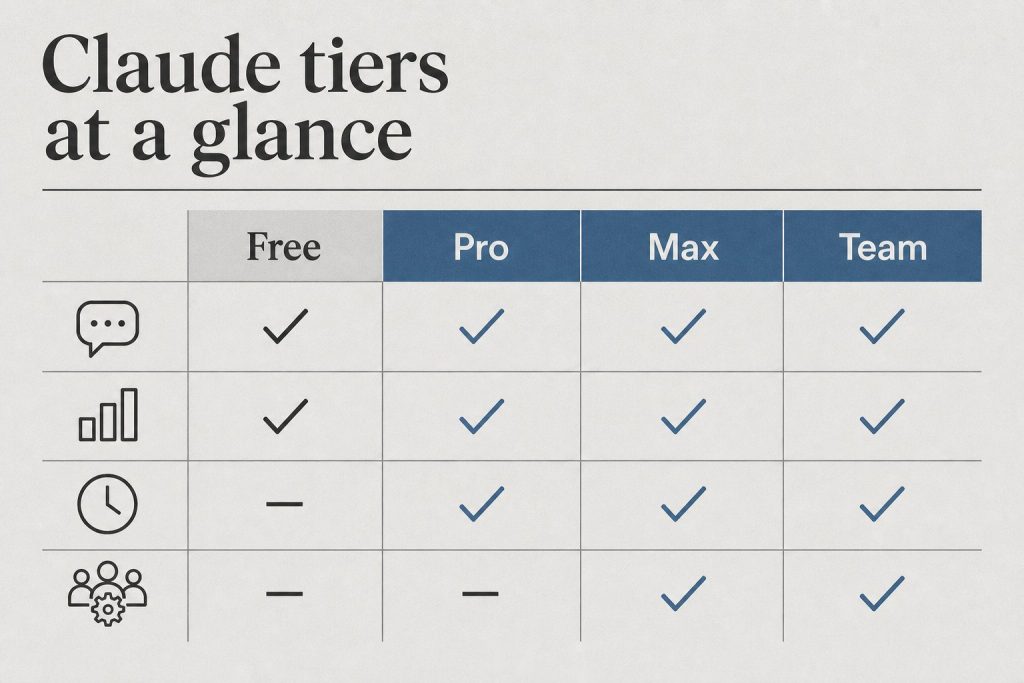
Team and Enterprise users get cloud-session access through premium seats, but the $100/$250 promotional credit is the Pro/Max subscriber offer — evaluate the feature on its own merits if you're outside the promo.
Under the hood
Anthropic runs cloud sessions on fresh Ubuntu 24.04 virtual machines — roughly 4 vCPUs, 16 GB of RAM, 30 GB of disk, per published reports. Organizations that can't let source code run on a vendor's VMs can route sessions to self-hosted environments instead — a separate path from the consumer credit.
Note the contrast with Remote Control: Remote Control connects a web or mobile interface to a Claude Code session running on *your own computer*, so that machine has to stay awake. Cloud sessions remove the machine entirely.
Should you use it?
Treat the credit as a trial budget. Point it at work that's easy to verify: bug fixes with test coverage, dependency updates, questions about a codebase. Check the branch and the pull request the agent produces before merging anything. Anthropic even describes auto-fix of pull requests directly in the cloud as a feature — still check the diff yourself.
For occasional or non-technical users, be honest with yourself: the credit may go unused, because cloud sessions require a GitHub-connected coding workflow to begin with. That's worth knowing before you count on redeeming the full amount.
Direct answer: Claude Code has two meters. A rolling 5-hour session limit that the May 2026 doubling made permanent, and a weekly usage limit. The temporary +50% weekly promotion ended September 13, 2026 at 11:59 PM PT — do not claim +50% as live. Starting September 14, 2026, Anthropic Help Center states weekly limits in Claude Code are permanently 25% higher than the pre-promotion baseline for Pro, Max, Team, and seat-based Enterprise. That is lower than the promo week (1.5×) and higher than the old baseline (1.25×). The 5-hour window did not change. Fable 5 and Fable 5.1 are included only on Max, Team Premium, and seat-based Enterprise Premium, and they may use at most 50% of the weekly pool.
The two clocks
People treat “I hit my limit” as one event. It is two.
5-hour session. Rolling window. Burns when the model is working, not when you are idle. Anthropic doubled this across paid plans on May 6, 2026 and removed the old peak-hour throttle for Pro and Max. Neither the +50% weekly promo nor the permanent +25% weekly change raised or lowered this clock.
Weekly bucket. Fixed reset time on your account (Settings → Usage). This is the one that ends a Friday on Max after a Fable week. The May–September 2026 +50% promotion applied to Claude Code only — CLI, IDE, desktop, and web Code — not to Claude chat or Cowork. That temporary bump is over. What remains: the permanent +25% over the pre-promo weekly baseline (Help Center).
Eligible for the promo and the permanent +25%: Pro, Max, Team, and legacy seat-based Enterprise. Not eligible: Free and consumption-based Enterprise.
The September 13–14 change
Official Help Center timeline:
May 13 – Sep 13, 2026 11:59 PM PT: Claude Code weekly limits were 50% higher than the pre-promotion baseline. 5-hour limits were not affected.
Starting Sep 14, 2026: weekly limits in Claude Code are permanently 25% higher than they were before the promotion for Pro, Max, Team, and seat-based Enterprise. Plan price unchanged.
Compared to last week’s promo, you have less weekly headroom than 1.5×. Compared to the old baseline, you have more: 1.25×. Exact quotas are still unpublished — read your live number in Settings → Usage.
Who gets Fable 5.1 on the subscription
Official: Claude Fable models on your plan. Fable 5 and Fable 5.1 follow the same plan rules.
Plan
Fable 5 / 5.1 on the subscription
Free
Not included
Pro ($20)
Not in plan limits. Usage credits from the first Fable token.
Team Standard
Same as Pro: credits, not included.
Max 5x / Max 20x
Included, capped at 50% of weekly limits. Same pool as Sonnet and Opus.
Team Premium / Enterprise Premium seats
Same 50% included cap as Max.
Enterprise Standard seats
Only if the org enables usage credits.
API / usage-based Enterprise
List rates. See Fable pricing.
The July 2026 one-time $100 credit for Pro / Team Standard applied to the Fable 5 plan change. Help Center says there is no matching credit for Fable 5.1.
Practical read: Pro can still open Fable. It just bills. Max can spend half the week on Fable before the included cap trips, then it is credits or switch to Opus 5 / Sonnet 5.5. Fable burns the shared weekly bar faster than Sonnet — plan against the permanent +25% weekly bar, not the old promo week.
What still burns quota
Long agent loops and multi-agent fan-out (each worker keeps its own context).
Dumping a whole repo when one file would do.
MCP tool output that stays in context for the rest of the session.
Leaving ANTHROPIC_API_KEY set so the CLI bills API rates and ignores the subscription.
What to do now
If you are on Pro and need Fable all week, budget credits or move the hard jobs to Max. The subscription does not include Fable on Pro.
If you are on Max, treat weekly headroom as permanent +25% over the old baseline — not the temporary +50% promo week. Route cheap loops to Sonnet 5.5; save Fable for the jobs that need it. Check Settings → Usage / /usage for your real number.
Do not upgrade from Pro to Max only because the 5-hour window feels tight on Friday. Check which clock you hit. Session vs week is a different purchase.
Claude Code pricing has stopped being a clean sticker number and started being a question of which ceiling you hit first. There is a $20 plan, a $100 plan, and a $200 plan — and underneath all three sits a 5-hour rolling window, a weekly active-hours cap added in August 2025, and a per-model multiplier that quietly makes Opus 5.5 the most expensive thing you can do inside the terminal. If you came looking for the right plan, the honest answer is: it depends on whether you are mostly a Sonnet operator or you live in Opus.
Pro — $20/month. Access to Claude Code in the terminal, web, and desktop, with both Sonnet 5.5 and Opus 5.5 available. The practical envelope is about 44,000 tokens per 5-hour window and roughly 40–80 weekly active hours on Sonnet, depending on session concurrency. This is the plan for someone running Claude Code a few hours a day on focused work — refactors, scoped feature builds, debugging passes — not someone leaving an agent running while they eat lunch.
Max 5x — $100/month. Five times the Pro envelope, plus priority during peak demand. The window allocation lands around 88,000 tokens per 5-hour block. This is the tier where you stop thinking about token budgets during a single working day and start thinking about them across a whole week. Picked correctly, it is the cheapest way to use Claude Code as your primary IDE companion without flipping over to API billing.
Max 20x — $200/month. Twenty times Pro — about 220,000 tokens per window — which translates to roughly 480 Sonnet-hours or about 40 Opus-hours per week before the weekly cap kicks in. Real-world reports from early 2026 had $200/month users watching single Opus prompts eat 10–20% of their daily allocation; Anthropic publicly acknowledged the problem, expanded capacity, and doubled the 5-hour rate limit for Pro and Max accounts. If you are running Claude Code across multiple repos all week and reaching for Opus on the hard problems, this is the tier that stops you from staring at a rate-limit wall.
The API, as a sanity check
The API, as a sanity check.
If you want a sanity check on whether the subscription math works, price the same workload against the API:
Claude Haiku 4.5 (claude-haiku-4-5-20251001): $1.00 input / $5.00 output per million tokens
Claude Sonnet 5.5 (claude-sonnet-5-5): $2.00 input / $10.00 output per million tokens
Claude Opus 5.5 (claude-opus-5-5): $4.00 input / $20.00 output per million tokens
Prompt caching is the lever almost nobody uses correctly. Cache writes cost 1.25x input price for the 5-minute TTL or 2.0x for the 1-hour TTL, but cache reads cost 0.05x — a 95% discount on every subsequent request that hits the same context. If your .clauderules file, project map, and the file you are editing are all stable for an hour, the bill on a long pairing session can drop by an order of magnitude. The Batch API knocks another 50% off both directions for asynchronous workloads, which is worth knowing if you are running large refactor sweeps.
One trap on Opus 4.7 specifically: the model uses a new tokenizer that inflates token counts by up to 35% on identical text compared to Opus 4.6. The headline price did not change, but your effective spend per request did — sometimes by nothing, sometimes by a third, depending on the content. If you migrated from Opus 4.6 and your bill went up without your prompt patterns changing, that is the reason.
How to actually choose
How to actually choose.
The cleanest way to pick a plan is to first decide your model mix, then your weekly hours.
If you are mostly a Sonnet operator — long agentic runs, multi-file edits, codebase Q&A, with Opus only reached for on the architectural questions — Pro at $20 is plausible up to about 5–8 hours of focused use per day, Max 5x covers most full-time individual developers, and Max 20x is overkill unless you are running multiple sessions in parallel.
If you live in Opus — long-horizon agentic work, hard refactors across many files, anything where you would rather have one good attempt than three Sonnet retries — Pro will frustrate you within two weeks, Max 5x is the realistic floor, and Max 20x is the only tier that gives you a defensible Opus envelope without bouncing over to API billing.
And if you are running Claude Code across multiple repos all week, leaving agents to grind on tasks while you do other things, Max 20x is the only subscription that holds up — and even then, the weekly cap is real. Use the API for the spillover and you will still come out cheaper than trying to brute-force a smaller plan.
The number that matters
One developer’s public report this year: roughly 10 billion tokens consumed across Claude Code over eight months. API metered cost would have exceeded $15,000. The same workload on Max at $100/month for the same window came in around $800 — about 93% cheaper. That is the gap that makes the subscription model worth taking seriously, even when the rate limits feel arbitrary. The $200 tier is not a vanity number; it is the price Anthropic charges to stop being a meaningful constraint on your workflow.
The right way to read Claude Code pricing in October 2026 is not to ask which plan is cheapest. It is to ask which plan is the cheapest one that disappears — the one that stops appearing in your day. For most full-time developers reaching for Opus regularly, that plan is Max 20x. For everyone else, Max 5x is the first plan that actually gets out of your way.
Sonnet 4.6 ($3 / $15), Opus 4.7 ($5 / $25), and Opus 4.8 ($5 / $25) remain on the legacy list. Do not start new work on them. Opus 5.5 fast mode is up to 2.5× faster at 2× standard pricing.
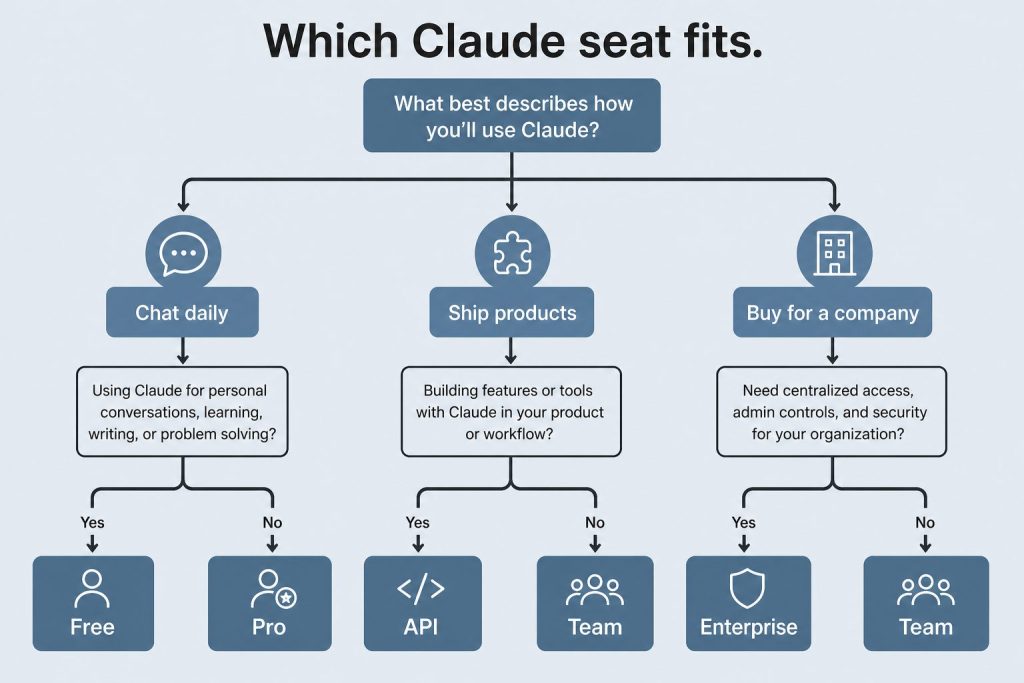
Which seat
Light Code: Pro.
Several hours a day: Max 5×.
All-day / long agents: Max 20×.
2–150 people, one bill: Team. Premium if those seats burn the weekly cap.
SSO / SCIM / audit and usage that should scale: Enterprise.
Unattended pipelines: console API key with a spend cap.
Tygart Media has been publishing about Claude — Anthropic’s AI model — for months. We’ve written about its capabilities, its pricing, its API strings, how to use it, why it matters. We positioned ourselves as a resource for people who want to understand and use Claude intelligently.
And some of what we published was wrong.
Not intentionally. Not carelessly in the moment. But wrong in the way that happens when you’re moving fast, publishing at scale, and not building the right systems to catch your own errors. Model version numbers were stale. Pricing figures were outdated. API strings referenced models that had been retired. If you used our content to make a decision about Claude — about which model to use, what to pay, how to call the API — some of that information may have led you in the wrong direction.
That’s unacceptable to me. And I want to tell you exactly what happened, exactly what I found, and exactly what I’ve built to make sure it never happens again.
How We Found Out
How we found out.
It didn’t start with our own discovery. It started with a message.
Kristin Masteller, the General Manager of Mason County PUD No. 1, reached out on LinkedIn to flag inaccuracies in our local coverage — a different set of articles, but the same underlying problem: we had published with confidence about things we hadn’t verified carefully enough.
That message hit differently than a normal correction request. Because it made me ask a harder question: if our local coverage had errors, what about our Claude coverage? We had 200+ posts. We were publishing multiple times per day. We had never built a systematic quality check.
So we ran one.
The Audit: What We Found
The audit — what we found.
We wrote a scanner that pulled every post from tygartmedia.com and ran each one through a quality gate checking for four categories of errors:
Category A: Stale model names (e.g., “Claude Haiku” with no version number, or references to Claude 3 models as current)
Category B: Wrong pricing (e.g., Haiku priced at $0.80/MTok when the actual price is $1.00/MTok)
Category C: Deprecated feature claims (features or behaviors that no longer apply)
Category D: Cross-site contamination (content from other publication contexts bleeding into Claude coverage)
Out of 2,333 total posts on the site, 701 touched Claude or AI topics. Of those, 65 posts had violations — 121 individual errors in total.
We auto-corrected 28 posts immediately — wrong model strings, wrong pricing, outdated API references. 18 posts with more complex issues are still flagged for human review. We are working through them.
I’m not sharing this to perform humility. I’m sharing it because you deserve to know the scope of the problem, and because the methodology for finding it might be useful to you.
What We Built to Fix It
What we built to fix it.
The audit was a one-time fix. What we actually needed was a system — something that would catch these errors before they went live, and keep our model information current automatically.
Here’s what we built:
1. The Claude Intelligence Desk
A dedicated Notion page that serves as the single source of truth for all Claude model information across our entire content operation. It contains the current model truth table — every model name, API string, input/output price, context window, and status — verified against Anthropic’s live documentation.
The rule is simple: before anyone writes, edits, or publishes any article that mentions Claude, they check this page. If the “Last Verified” timestamp is more than 12 hours old, they run a refresh before proceeding.
2. The Claude Intelligence Scanner (Automated, Twice Daily)
A scheduled task that runs at 6 AM and 6 PM Pacific every day. It fetches Anthropic’s models documentation page, compares the current model table to what’s in our Notion desk, and if anything has changed — a new model, a price change, a deprecation — it updates the desk automatically and flags it for human review.
We will never again be caught publishing outdated Claude information because a model changed and we didn’t notice.
3. Pre-Publish Quality Gates
Every new Claude article now runs through the quality gate categories above before it goes live. Wrong model string → blocked. Outdated pricing → blocked. Deprecated claim → flagged.
4. The Fix Log
Every correction we make is logged with the post ID, the original wrong content, the correct replacement, and the date. Accountability in writing, not just in words.
Why I’m Telling You All of This
Because I think the way most AI content operations work is broken — and I think transparency about that is more useful than pretending we had it figured out.
The standard playbook for AI content is: write fast, publish often, stay ahead of the news cycle. The problem is that AI — and especially Claude — moves so fast that “write fast” and “stay accurate” are genuinely in tension. Models change. Prices change. Features get added, deprecated, retired. If you’re not building systems to track that, you’re going to drift.
We drifted. We caught it. We fixed it. And now I want to open up everything we built.
The Claude Intelligence Desk methodology, the quality gate framework, the scanner architecture — I’m making all of it available. If you’re publishing about Claude, if you’re building automations around Claude, if you’re running a content operation that touches Anthropic’s ecosystem in any way, you can use what we built. Adapt it. Improve it. Tell me what I got wrong in the system design.
This is not a product. This is not a lead magnet. It’s just the actual work, shared openly, because that’s how we get better together.
I Want to Build This With You
Here’s what I’ve learned from this process: the people who catch errors fastest are the people closest to the technology. The developers who are actually calling the API. The builders running Claude in production. The researchers who read every Anthropic paper when it drops. The people in Singapore, India, the UK, Europe, Brazil — every region where Claude is being adopted rapidly and where the local context matters.
I don’t have all of that knowledge. No single publication does.
So I’m opening this up.
If you use Claude seriously — if you’re building with it, writing about it, researching it, deploying it — I want you to write with us.
What that looks like:
Writers and researchers: You bring the knowledge and the perspective. We provide the platform, the distribution, the SEO infrastructure, and editorial support. Your byline, your voice, your expertise.
Builders and developers: You’re running Claude in production. You know what actually works, what breaks, what the documentation doesn’t tell you. Write that. The practitioner perspective is the most valuable thing we can publish.
International voices: What does Claude adoption look like in Singapore right now? What’s the conversation in India’s developer community? How are European companies thinking about AI compliance alongside Claude? These are stories we cannot tell without you — and they’re stories our audience desperately needs.
Correctors: If you read something on this site that’s wrong, tell us. We have a system now. We will fix it, log it, and credit you if you want the credit.
This is not about content volume. We publish enough already. This is about getting it right — and getting perspectives we genuinely don’t have.
How to Get Involved
If any of this resonates — if you want to write, contribute, correct, or just have a conversation about where Claude is going — reach out directly: will@tygartmedia.com
Tell me where you are, what you’re building or writing or researching, and what you’d want to say if you had a platform to say it. No formal application. No content calendar to fit into. Just a conversation.
We’re also building out a formal contributor program at tygartmedia.com/contribute/ — trade affiliates, community writers, featured contributors. If that’s more your speed, start there.
But honestly? Just email me. Let’s figure out what makes sense.
The work continues. The scanner runs twice a day. The quality gates are live. And if you find something wrong on this site — about Claude, about anything — I genuinely want to know.
That’s the standard I should have been holding from the beginning. We’re holding it now.