TL;DR: My personal AI runs on Muse. It can’t write code into my repos by itself — so I built it a bridge to Cursor’s cloud agents. One repo, two transports, nine tools. Now when I say “add CI to that repo,” it dispatches an agent, checks the PR, and merges. Here’s how the Muse-to-Cursor loop actually works.
The direction nobody talks about
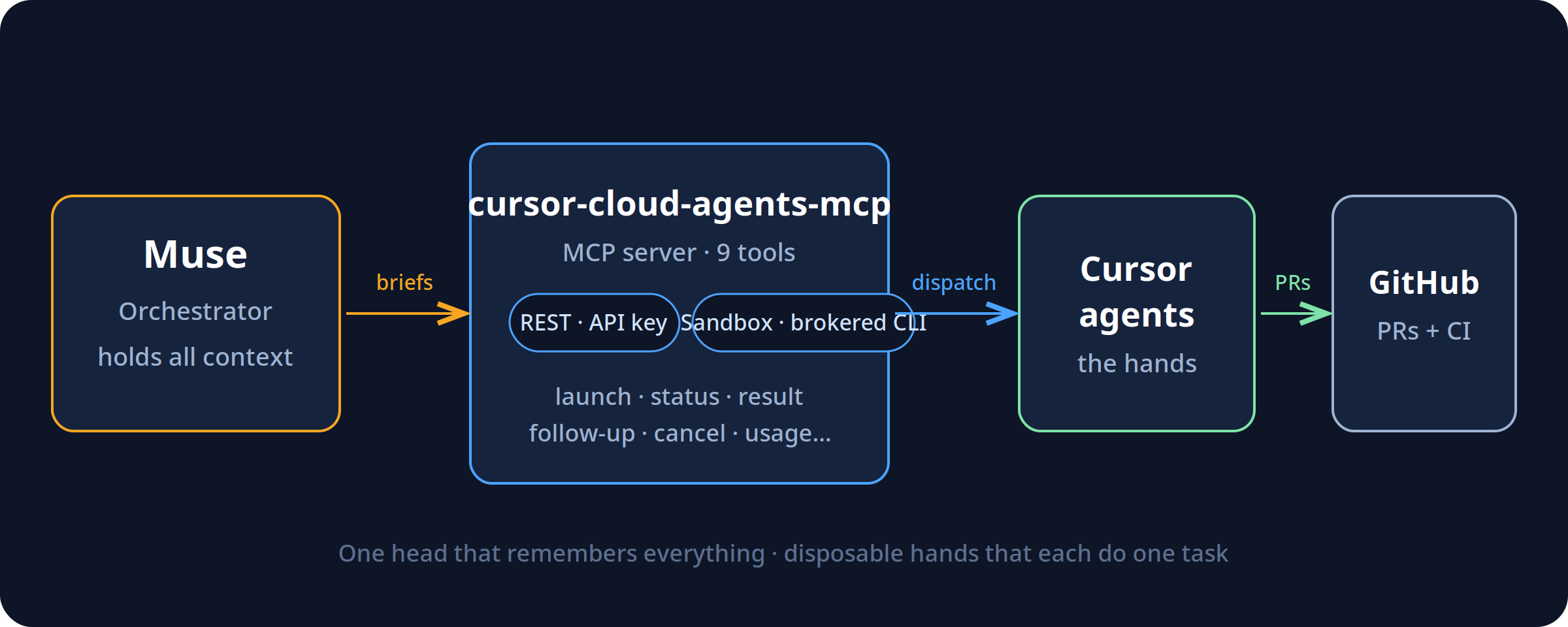
Everyone’s building the same arrow: human → AI writes code faster. I built the other arrow: AI → AI. My assistant (Muse) holds all my context — my repos, my work orders, my rules. Cursor’s cloud agents hold the hands — they can open PRs, run CI, touch repos. The bridge between them is an MCP server I open-sourced: cursor-cloud-agents-mcp.
The interesting part isn’t the tools. It’s the shape: one orchestrator that holds all the context, and disposable agents that each know one task. The orchestrator doesn’t write the code — it briefs, checks, and merges. The agents don’t set direction — they execute the brief. That separation is the whole trick.
Two transports, one repo
I almost built two projects. Then I realized the only real difference between audiences is where the credential lives. So it’s one repo, two transports:
- REST — your Cursor API key, direct to
api.cursor.com. For general users. - Sandbox — for assistants running inside sandboxed environments (like Muse/Meta’s), where there is no API key to hand out. It shells out to a brokered
cursor-agentCLI on PATH instead.
Same nine tools either way: launch, status, result, follow-up, cancel, list, models, whoami, usage.
The lessons are in the timeouts
The v1 API splits agents and runs, and launches can take minutes — sometimes timing out after succeeding. So the bridge mints the agent ID client-side before the call: a retry after a timeout can never create a duplicate. A timeout is reported as unknown, never as failure, then reconciled. Run status is the source of truth, because agent “ACTIVE” doesn’t mean “still working.” These are the details that separate a demo from something you can actually operate.
It earned its keep on day one
The first thing I pointed it at was its own repo: add CI to cursor-cloud-agents-mcp. The agent opened a PR with a GitHub Actions workflow. The first CI run failed — and caught a real bug: the package’s floating dependency had resolved to MCP 2.x, which renamed FastMCP out from under the import. The repo was shipping broken against current dependencies and nobody knew. Pin, re-run, green, merge. I didn’t touch a terminal.
I didn’t trust my own first draft
Before any of that, four AI models reviewed the spec against Cursor’s live docs — and independently caught the same flaw: my original design was shaped around the retired v0 API. Then two more reviewed the actual code and found real bugs: a broken idempotency path, a transport auto-detect that would have grabbed the wrong binary, a polling loop that blocked the server. All fixed before it shipped. The irony I like: the final review round ran through the bridge itself. The launcher timed out on all four agents — and the bridge’s own timeout-reconciliation showed they were all actually running.
Where this goes
v1.1 brings MCP 2.x support. Around it, I’m building the rest of the pattern: work orders as GitHub issues, a daily SLA check, a weekly digest — the scaffolding that turns “AI that can open PRs” into something closer to staff. Most people use agents as a faster keyboard. I’m interested in what happens when they’re the hands and something with memory is the head.
MIT licensed. Issues and PRs welcome — help make it better.
github.com/tygart-media/cursor-cloud-agents-mcp
Get The Signal
What we actually ran, what it measured, and what it means for a restoration shop — every week, including the flops.
Leave a Reply