Paste your article. Get back the version built to win the featured snippet.
Who This Is For
Who the AEO content optimizer skill is for.
Built for site owners and content marketers who publish good content that never gets picked as the answer — no featured snippets, no People Also Ask placements, invisible in voice results and AI Overviews while thinner competitor pages take the box.
The Problem
Answer engines do not reward the best content — they reward the most extractable content. A page that buries its answer in paragraph six loses to a page that answers in the first 50 words under a question heading, formatted the way the snippet wants. Restructuring for extraction is mechanical, learnable work — and almost nobody does it. This skill does it on every piece you paste.
What It Does
What it does for featured snippets / AEO.
Performs answer-first surgery: a direct, self-contained 40–60 word answer placed immediately under each question heading
Converts topical headings into the question formats searchers actually use, mapped to real query variants
Matches the winning snippet format per query — paragraph, numbered list, or table — and rebuilds the block to fit
Builds a genuine FAQ section and generates the matching FAQPage JSON-LD (and warns about duplicate schema before you paste)
Runs a voice pass so direct answers survive a smart-speaker read
Returns a change log plus an honest note on what content is missing that the query demands
What You Get
What you get.
The aeo-content-optimizer.skill file — installs in claude.ai or Claude Code in about two minutes
README with installation steps and tested example prompts
Works on existing posts, new drafts, and competitor-gap rewrites
No. You paste your content and your target question. The skill restructures and returns paste-ready output, including the schema block.
Does it work for my niche?
Yes — the method is format-driven, not topic-driven. Local services, SaaS, e-commerce, professional services, and content sites all follow the same extraction rules.
Will it change my voice or facts?
It restructures; it does not genericize. Anything it cannot verify is flagged for you to supply rather than invented.
How is this delivered?
Within 24 hours of purchase via email from will@tygartmedia.com. Skill file and setup guide delivered as a ZIP download.
Does this require a paid Claude subscription?
Installing as a custom skill requires a paid Claude plan (Pro, $20/mo, or higher) with code execution enabled. Your download also includes a free-plan setup option — paste the skill into a Claude Project’s instructions — that works on any plan.
Direct Answer (September 2026): To obtain an Anthropic API key: 1) Register at console.anthropic.com, 2) Navigate to Settings > Plans & Billing and deposit $5+ for Tier 1 activation, 3) Go to ‘API Keys’, click ‘Create Key’, and copy your secure sk-ant-api03-... key token.
macOS / Linux:
export ANTHROPIC_API_KEY="sk-ant-YOUR_KEY_HERE"
Windows (PowerShell):
setx ANTHROPIC_API_KEY "sk-ant-YOUR_KEY_HERE"
Replace YOUR_KEY_HERE with the key shown once at creation — Anthropic never shows it again.
An Anthropic API key is the secret token that authenticates your requests to Claude models over the API. It starts with sk-ant-, is created in the Anthropic Console at console.anthropic.com under API Keys → Create Key, and is displayed exactly once — requests only succeed after you add a payment method.
Quick answer: sign in at console.anthropic.com (it now redirects to the same developer console as platform.claude.com), add a payment method under Settings → Billing, click API Keys → Create Key, name it, and copy it immediately – Anthropic shows the key exactly once. Keys start with sk-ant-. The whole process takes about five minutes.
Below is the full walkthrough, where to put the key so it doesn’t leak, the newer no-static-key option most tutorials haven’t caught up with, and the errors that account for nearly every failed first request. For the full reference – pricing tiers, key rotation, security, and workspace and organization keys – see our Anthropic API key reference and management guide.
What you need before you start
An email address (or Google / SSO login)
A payment method – your key will not work until billing is set up, even though you can create one
Five minutes
One distinction that confuses almost everyone: a Claude.ai subscription is not API access. Claude Pro, Max, and Team plans cover the Claude apps (web, desktop, mobile). The API is billed separately, by usage, through the developer console. You can have either one without the other – see our complete Claude pricing guide for how the two systems differ.
Go to console.anthropic.com – Anthropic’s developer console. (Both console.anthropic.com and platform.claude.com land in the same place in 2026; older tutorials treat them as different sites.) Sign up with email, Google, or SSO, and answer the brief onboarding questions about whether you’re an individual or an organization. For a tour of everything inside the console, see our Anthropic Console guide.
In the console, open Settings → Billing and add a credit card (self-serve accounts typically purchase prepaid usage credits). Skipping this step is the #1 reason a brand-new key returns errors – the key exists, but requests are rejected until the account can be billed.
Click API Keys in the left sidebar (direct link: platform.claude.com/settings/keys), then Create Key. Give it a descriptive name like my-app-dev – future you will thank present you when it’s time to rotate or revoke. If your organization uses multiple workspaces, note that keys are scoped to a workspace: the key only sees resources in the workspace it was created in.
Step 4: Copy it immediately
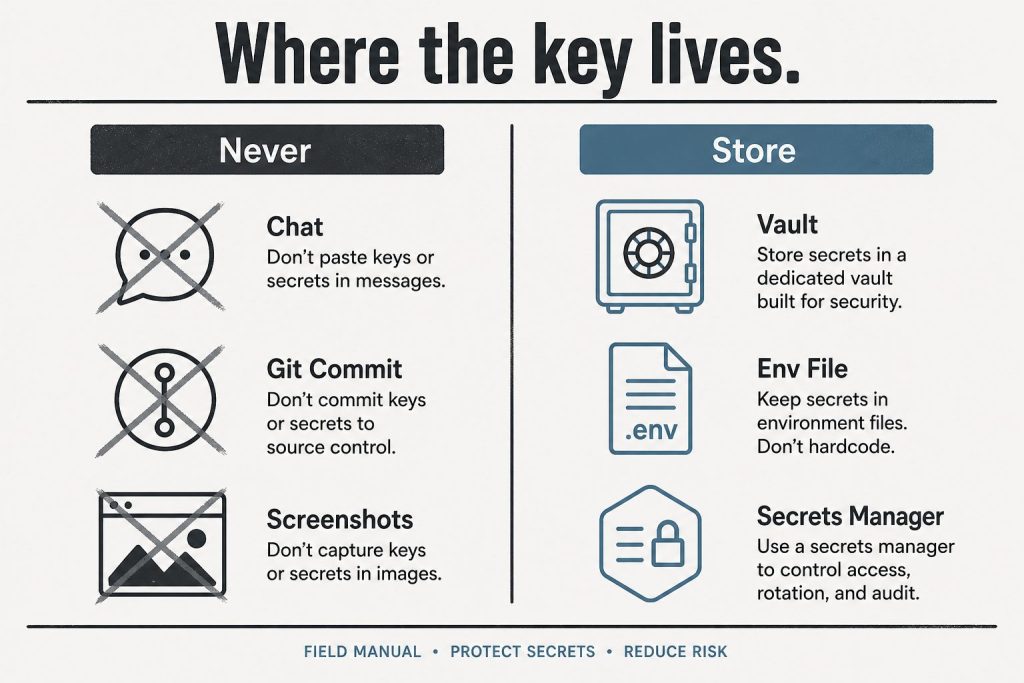
The key is displayed exactly once. It starts with sk-ant- followed by a long string. Copy it straight into a password manager, a .env file, or your secrets manager. If you lose it, there is no way to view it again – you revoke it and create a new one (takes a minute, harms nothing).
Where to put the key (and where never to put it)
Set it as an environment variable named ANTHROPIC_API_KEY – every official Anthropic SDK reads that variable automatically, so your code never contains the key:
macOS / Linux:export ANTHROPIC_API_KEY=sk-ant-...
Windows (PowerShell):setx ANTHROPIC_API_KEY "sk-ant-..."
Python:client = anthropic.Anthropic() – no key argument needed
TypeScript:const client = new Anthropic() – same
Never hardcode the key in source files, never commit it to a repository, and never paste it into a system prompt or chat message. Leaked Anthropic keys get scraped and drained like any other credential.
The 2026 no-key option: OAuth login
Newer than most guides: Anthropic’s CLI can authenticate without any static key. Run ant auth login and a browser window authorizes a short-lived OAuth profile on your machine – the SDKs and Claude Code pick it up automatically, and there is no permanent secret to leak or rotate. For CI servers and production workloads, Workload Identity Federation serves the same purpose. If you’re setting up a personal development machine in 2026, this is arguably the better default; create a static key when you need one for a deployed service.
Test your key
One request confirms everything works (Haiku keeps the test nearly free):
A JSON response with a content array means you’re live.
Troubleshooting the four common errors
401 authentication_error – the key is missing, mistyped, or revoked. Subtle 2026 variant: if both ANTHROPIC_API_KEY and ANTHROPIC_AUTH_TOKEN are set, the SDK sends both and the API rejects the request – unset one.
403 permission_error – the key works but lacks access to that model or feature; check your key’s workspace and your organization’s model access.
429 rate_limit_error – you’re sending faster than your usage tier allows. The response includes a retry-after header; official SDKs retry automatically. For tier details and fixes, see our Claude rate limits guide.
Key created but every request fails – almost always billing not completed (Step 2).
FAQ
Is the Anthropic API free? No – it’s usage-priced per million tokens with no permanent free tier (current rates in our Claude pricing guide and API token rates schedule, including the September 2026 lineup).
Where do I find my existing API key? You can’t – Anthropic shows keys only at creation. Revoke the old one and create a replacement.
Does my Claude Pro or Max subscription include an API key? No. App subscriptions and API billing are separate systems; an API account starts at $0 and bills per token used.
Last verified: August 26, 2026 (Pacific Time)May 2026 edition covered the Opus 4.8 launch, the SpaceX compute deal, and Managed Agents memory features.
Direct Answer (August 2026 Update): Major mid-2026 Anthropic releases introduced Claude Fable 5, native Model Context Protocol (MCP) tool integration in Claude Desktop, extended 1M context beta on Vertex AI/AWS Bedrock, and decoupled Enterprise seat pricing.
June 2026 is one of the biggest months for Anthropic since the Claude 4 launch: a new top-tier model is generally available, two workhorse models retire in four days, and Managed Agents can now run inside infrastructure you control. Here is everything that changed, with dates and migration paths.
Claude Fable 5 — the Mythos-class model goes public (June 9, 2026)
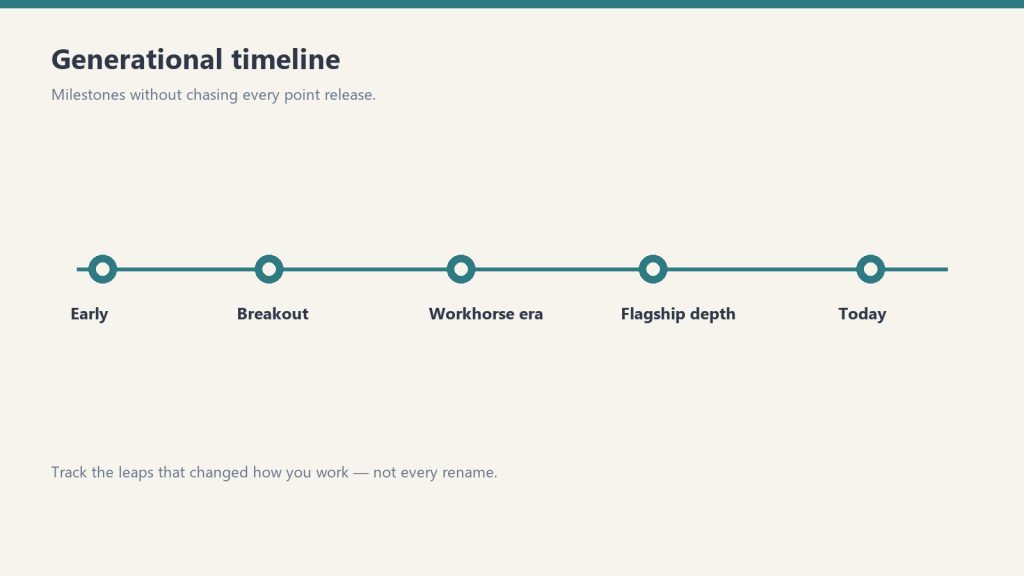
Fable 5 launch — keep the timeline abstract.
Anthropic released Claude Fable 5 on June 9, 2026 — the public version of what had been known as its Mythos-class model tier. It is positioned as a new tier above Opus, and it is Anthropic’s most capable generally available model. According to CNBC’s launch coverage, Fable 5 scored more than 10% higher than Claude Opus 4.8 on some benchmarks, with exceptional performance across software engineering and knowledge work. Anthropic credits new safeguards that block responses in specific high-risk areas for making a broad release possible.
The practical details developers need:
Model ID:claude-fable-5
Availability: enterprise customers and paid subscribers
Context window: 1 million tokens; maximum output 128K tokens
API pricing: $10 per million input tokens / $50 per million output tokens
API surface: adaptive thinking only — temperature, top_p, top_k, and budget_tokens are not accepted, and unlike Opus 4.8, an explicit thinking: {type: "disabled"} returns a 400 error. Omit the thinking parameter entirely if you do not want it.
For where Fable 5 sits against every other Claude model on price, see our continuously updated Claude AI pricing guide, and our complete Fable 5 guide for capabilities and use cases.
June 15 deadline: Claude Opus 4 and Sonnet 4 retire in four days
If you are still calling claude-opus-4-20250514 or claude-sonnet-4-20250514, those models retire from the Claude API on June 15, 2026. Requests after retirement return 404 errors. The drop-in replacements:
claude-opus-4-20250514 → claude-opus-4-8
claude-sonnet-4-20250514 → claude-sonnet-4-6
Note that both replacements use adaptive thinking rather than manual thinking budgets, and the 4.6+ models reject assistant-turn prefills — so this is a small migration, not just a string swap. Anthropic also deprecated Claude Opus 4.1 this month, with API retirement scheduled for August 5, 2026 — worth adding to your migration calendar now.
Current Claude model lineup and API pricing (June 2026)
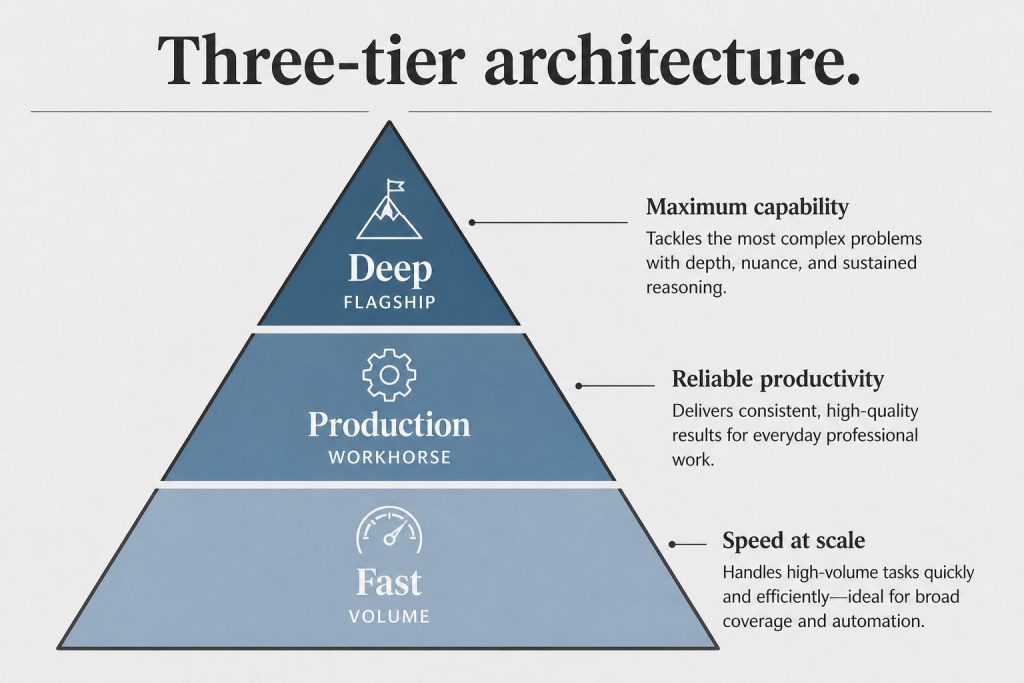
Current lineup by job — no sticky version stickers on art.
Model
Model ID
Context
Max output
Input $/1M
Output $/1M
Claude Fable 5
claude-fable-5
1M
128K
$10.00
$50.00
Claude Opus 4.8 (legacy — still listed)
claude-opus-4-8
1M
128K
$5.00
$25.00
Claude Opus 4.8 (legacy — still listed)
claude-opus-4-8
1M
128K
$5.00
$25.00
Claude Sonnet 4.6 (legacy — still listed)
claude-sonnet-4-6
1M
64K
$3.00
$15.00
Claude Haiku 4.5
claude-haiku-4-5
200K
64K
$1.00
$5.00
Opus 4.7, 4.6, 4.5, and 4.1 and Sonnet 4.5 remain active for pinned workloads. We track which model is current at any moment in our current Claude model version reference.
Managed Agents: self-hosted sandboxes and private MCP servers
Managed Agents and private MCP servers.
Claude Managed Agents — Anthropic’s server-managed agent platform — can now execute tools inside a sandbox you control. The agent loop still runs on Anthropic’s orchestration layer, but bash commands, file operations, and code execution happen in your own container, behind your own firewall, with your own egress rules. Your worker long-polls Anthropic’s work queue over outbound-only connections; Anthropic never dials into your network. Managed Agents can also now connect to private MCP servers, which matters for any organization whose internal tools are not on the public internet.
For regulated industries — healthcare, finance, legal — this is the missing piece that lets you adopt hosted agents while keeping data residency: files and tool output never leave infrastructure you own.
Claude Code: nested sub-agents and plugin search
Claude Code shipped a steady stream of updates in June: nested sub-agents (agents can now spawn their own sub-agents for deeper task decomposition), smarter model and region handling, a new plugin search, and improved Chrome, VS Code, and terminal workflows.
Legal expansion: 20+ MCP connectors and 12 practice-area plugins
Anthropic released more than 20 new legal MCP connectors and 12 practice-area plugins, covering research, contracts, discovery, matter management, and legal aid. The pattern to note: Anthropic is increasingly shipping vertical integration bundles rather than leaving connector-building entirely to the ecosystem.
Claude Corps: $150M for nonprofit AI adoption
Anthropic announced Claude Corps, a $150 million fellowship program that will embed roughly 1,000 trained fellows inside nonprofit organizations for a year to help them use AI effectively. Applications and program details are rolling out through Anthropic’s newsroom.
Apple Foundation Models integration
Claude support is coming to Apple’s Foundation Models framework on iOS 27, iPadOS 27, macOS 27, and visionOS 27 — meaning third-party Apple developers will be able to call Claude through Apple’s native AI framework rather than integrating the API directly.
What to watch for in July
August 5, 2026: Claude Opus 4.1 retires from the API — migrate to claude-opus-4-8 before then.
Fable 5 ecosystem: expect Claude Code, Cowork, and Managed Agents to expose Fable 5 more broadly through July as capacity scales.
Apple rollout: developer betas of the iOS 27 family will show what Claude-via-Foundation-Models actually looks like in practice.
Everything you need to know about Anthropic’s new frontier tier — pricing, context window, model comparisons, and how to route the right work to the right model.
Updated June 2026·~14 min read·Includes interactive calculators
Lineup update (September 2026): Since this guide was last fully updated, Anthropic shipped Opus 5.5 ($4/MTok in, $20/MTok out) and Sonnet 5 ($2/MTok in, $10/MTok out) as its current flagship and mid-tier models. Fable 5.1 remains the top-tier model referenced throughout, at the same $10/$50 pricing shown below. Opus 4.8 and Sonnet 4.6 are now legacy — still supported, no longer current default.
What Is Claude Fable 5?
What is Claude Fable 5?
Claude Fable 5 is Anthropic’s new frontier model tier — positioned above Opus in the lineup and designed for tasks where raw capability, extended reasoning depth, and massive context handling matter more than cost. Where Opus 4.8 set the bar for complex multi-step reasoning, Fable 5 raises it with a 1-million-token context window, enhanced agentic autonomy, and improved performance on long-horizon software engineering, research synthesis, and cross-domain analysis tasks.
The “Fable” naming signals a new generation of model architecture rather than an incremental update. Anthropic positions it as the model you reach for when a task exceeds what Opus can do reliably — not as a replacement for Opus, Sonnet, or Haiku in their respective cost tiers.
Quick Facts — Claude Fable 5
Context Window
1M
tokens (~750K words)
Max Output
32K
tokens per response
Input Price
$10
per million tokens
Output Price
$50
per million tokens
Cache Write
$12.50
per million tokens
Cache Read
$1.00
per million tokens
Key positioning: Fable 5 is the model for tasks where Opus 4.8 produces reliable but imperfect results — long codebase audits, full-document analysis, complex multi-agent orchestration, and strategic synthesis across large corpora. For most production workflows, Sonnet remains the value pick.
Before you price this out: The table below reflects the June 2026 lineup (Fable 5, Opus 4.8, Sonnet 4.6, Haiku 4.5). As of September 2026, Opus 5.5 ($4/$20) and Sonnet 5 ($2/$10) are Anthropic’s current models — priced lower than the legacy Opus 4.8 / Sonnet 4.6 rows shown here.
Full Model Lineup Comparison
Full model lineup comparison.
Here’s how the complete 2026 Claude lineup stacks up across every dimension that matters for production usage:
Model
Input $/M
Output $/M
Context
Max Out
Vision
Tool Use
Extended Think
Best For
◆ Fable 5
$10
$50
1M
32K
✓
✓
✓ Deep
Max-capability tasks, 1M+ context
◆ Opus 4.8
$5
$25
200K
32K
✓
✓
✓
Complex reasoning, agentic workflows
◆ Sonnet 4.6
$3
$15
200K
16K
✓
✓
✓
Production apps, content at scale
◆ Haiku 4.5
$1
$5
200K
8K
✓
✓
—
High-volume, latency-sensitive tasks
Prices are per million tokens. Cache read is 90% cheaper than standard input across all models. Batch API provides an additional 50% discount on both input and output.
Capability Matrix — What Each Model Can Do
Capability
Fable 5
Opus 4.8
Sonnet 4.6
Haiku 4.5
Full codebase analysis (>500K tokens)
✓ Native
⚠ Chunked
✗
✗
Extended thinking / chain-of-thought
✓ Deep
✓
✓
✗
Multi-step agentic orchestration
✓ Best
✓
Good
Limited
Computer use
✓
✓
✓
✗
MCP tool integration
✓
✓
✓
✓
Prompt caching
✓
✓
✓
✓
Batch API (50% discount)
✓
✓
✓
✓
PDF / document analysis
✓
✓
✓
Limited
Real-time streaming
✓
✓
✓
✓
Structured JSON output
✓
✓
✓
✓
Interactive Cost Calculator
Estimate your monthly API spend across the full model lineup. Enter your token volumes below — the calculator models prompt caching and Batch API discounts automatically.
Token Cost Calculator
Estimated Monthly Cost
$0.00
Which Claude Model Should You Use?
Which Claude model should you use?
Answer three questions to get a model recommendation tailored to your use case.
Model Picker — 3 Questions
1. How large is your context? (document/codebase size)
Under 50K tokens
50K–200K tokens
200K–1M tokens
2. How complex is the task?
Simple / structured (classify, extract, format)
Moderate (draft, summarize, QA)
Complex (reason, plan, code, orchestrate)
3. How cost-sensitive is this workload?
Very — high volume, every cent counts
Moderate — quality matters more than cost
Not sensitive — quality and capability first
How We Actually Use Each Model
These are real production workflows mapped to the right tier — built from running Claude in content operations, publishing automation, and knowledge management at scale. No hypotheticals.
Haiku 4.5 — High Volume
Daily SEO Refresh Pipeline
25-post-per-day SEO metadata refresh
Article classification and tag assignment
Structured data extraction from web pages
Keyword density checks across large post archives
Link validation and redirect flagging
Sonnet 4.6 — Production Default
Editorial Content at Scale
Desk article writing (1,200–2,500 words)
Content brief execution from keyword clusters
FAQ and schema markup generation
Cross-site content adaptation and localization
Monthly client update drafts and summaries
Opus 4.8 — Complex Reasoning
Workers & Deep Refreshes
Agentic Notion Workers (multi-step pipelines)
Deep content refresh with competitive gap analysis
Multi-database synthesis and reporting
Strategy documents requiring extended reasoning
Code generation for automation scripts
Fable 5 — Max Capability
Portfolio Audits & Strategy
Full-site content audits (500+ posts in single context)
Cross-domain strategy synthesis across large corpora
Complex multi-agent orchestration at the flagship tier
Long-horizon planning requiring deep reasoning depth
Codebase-wide analysis and architecture review
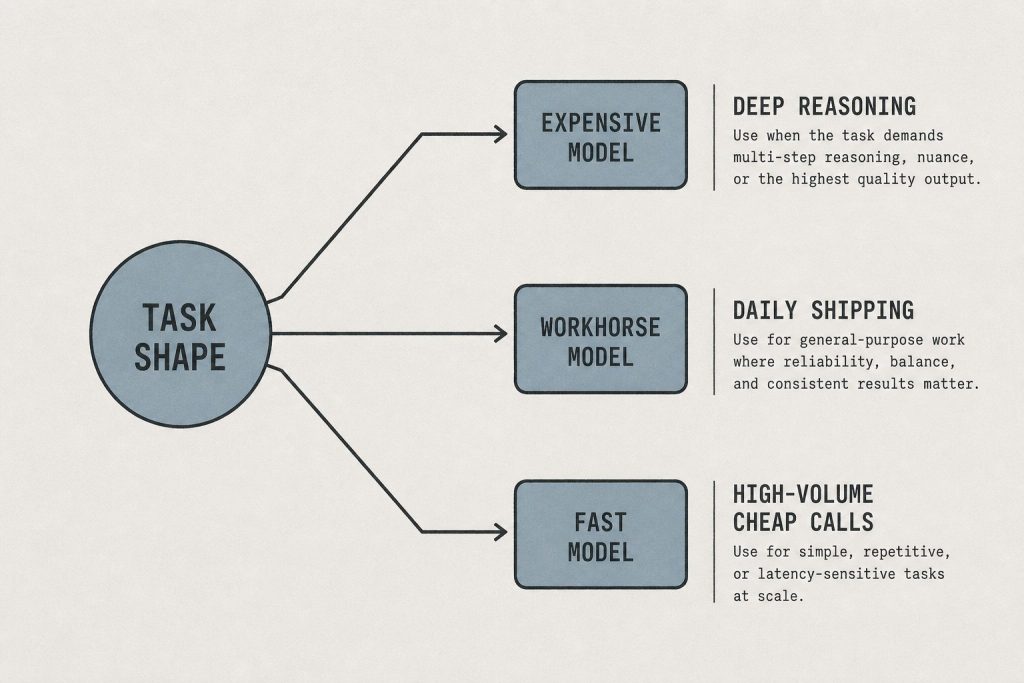
Routing principle: The right model is the cheapest one that reliably completes the task. Haiku handles volume. Sonnet handles production. Opus handles complexity. Fable 5 handles scale + complexity together — specifically the cases where you’d need Opus and more context than Opus can hold.
The Economics: Routed vs All-Fable
Smart model routing is where API costs get controlled. Here’s a real-world comparison of a mixed content-and-automation workload at scale — routed vs running everything on Fable 5.
Workload
Monthly Volume
Routed Model
Routed Cost
All-Fable 5 Cost
Savings
SEO metadata batch refresh
750 posts/mo
Haiku 4.5 + Batch
$1.20
$18.75
93% less
Article drafting
90 articles/mo
Sonnet 4.6
$8.10
$67.50
88% less
Agentic worker runs
200 runs/mo
Opus 4.8
$22.50
$45.00
50% less
Full-site portfolio audits
4 audits/mo
Fable 5
$24.00
$24.00
—
Total
—
Routed
$55.80
$155.25
64% less
Stacking Discounts: Caching + Batch API
Two discount mechanisms compound independently:
Prompt caching: Cache your system prompt and shared context once. Subsequent requests pay ~10% of the input price for cache reads. On Fable 5, that’s $1.00/M instead of $10.00/M on cached tokens — a 90% reduction on your largest cost lever.
Batch API: Submit requests asynchronously (results within 24 hours) for a flat 50% discount on both input and output. Works on all four models. Best for non-real-time workloads like overnight refreshes, audits, or bulk classification.
Stacked: Caching + Batch combined can bring effective Fable 5 input cost from $10/M to ~$0.50/M on cached tokens — making it economically viable for high-volume tasks that previously only fit Haiku’s budget.
Claude Fable 5 sits above Opus 4.8 in the lineup. The primary difference is context window size — Fable 5 offers 1 million tokens vs Opus 4.8’s 200K — and the depth of extended reasoning for highly complex tasks. Opus 4.8 remains the right choice for most complex agentic workflows at half the cost. Fable 5 is best when you need both maximum context and maximum reasoning depth simultaneously, or when a task has routinely hit the limits of what Opus can do reliably.
Claude Fable 5 is priced at $10 per million input tokens and $50 per million output tokens — 2× Opus 4.8 ($5/$25), 3.3× Sonnet 4.6 ($3/$15), and 10× Haiku 4.5 ($1/$5). Prompt caching drops the effective input cost to $1.00/M on cache reads, and the Batch API adds a 50% discount on all tokens for non-real-time workloads. Stacking both discounts makes Fable 5 viable for higher-volume use cases than the base price suggests.
Claude Fable 5 has a 1-million-token context window — approximately 750,000 words or roughly 1,500 pages of text. This is 5× the context window of Opus 4.8, Sonnet 4.6, and Haiku 4.5 (all 200K). In practice, a 1M context window lets you pass entire codebases, long research corpora, or full document archives in a single API call without chunking or retrieval workarounds. For more on context window mechanics, see our full context window guide.
Yes. Claude Fable 5 is available through the Anthropic API using the model ID claude-fable-5-20260101 (check the Anthropic documentation for the exact identifier). It supports the same API surface as the rest of the Claude family — streaming, tool use, prompt caching, vision, the Batch API, and MCP server integration. Access requires an Anthropic API account with Fable 5 enabled on your usage tier.
Fable 5 is available in Claude.ai on the Pro and Team plans. The interface lets you select it from the model picker when starting a conversation. Like Opus, Fable 5 in claude.ai has message limits that reset on a rolling window — it’s designed for individual complex tasks rather than high-volume API workloads. For production-scale usage, the API with the Batch API discount is the more economical path.
Yes — and Fable 5’s extended thinking is the deepest in the lineup. Where Opus 4.8 supports extended thinking for complex reasoning tasks, Fable 5 uses a more capable reasoning engine designed for tasks that require longer chains of inference, more working memory, and more reliable self-correction. It’s particularly effective on math, logic, long-horizon planning, and tasks where the model needs to hold and manipulate many interdependent concepts simultaneously.
For most content production — articles, blog posts, social copy, summaries, SEO content — Sonnet 4.6 is the right call. It produces high-quality output at 3.3× less cost than Fable 5, and for typical content lengths (500–3,000 words), the quality difference is minimal. Reach for Fable 5 when you need to synthesize across a very large corpus (e.g., auditing 200+ posts simultaneously), when the content requires deep domain reasoning that benefits from extended thinking, or when the task involves both large-context ingestion and complex output generation in a single pass.
Three levers in order of impact: (1) Model routing — only use Fable 5 when the task genuinely requires it; route everything else to Opus, Sonnet, or Haiku based on complexity and volume. (2) Prompt caching — structure your system prompt and shared context so it can be cached; cache reads cost $1.00/M instead of $10.00/M on Fable 5. (3) Batch API — submit non-real-time workloads via the Batch API for a flat 50% discount. Stacking all three — routing + caching + batch — can reduce effective per-task costs by 85–95% compared to unoptimized Fable 5 calls.
More Claude Guides from Tygart Media
We run Claude in production every day. These are the guides that come from using it, not just writing about it.
Platform-Specific AI Optimization (PSAO) is the practice of tailoring content strategy to the distinct user personas, retrieval mechanisms, and citation patterns of each individual AI search platform. It replaces the outdated approach of “optimizing for AI” as though AI were a single channel with a single audience.
This article defines PSAO, maps the six major platforms, profiles their user personas, and provides the operational checklist. It’s the synthesis of the entire PSAO editorial sprint into a single reference document.
Why PSAO Exists
Why PSAO exists — optimize per platform.
The phrase “optimize for AI” is as meaningless as “optimize for social media.” You wouldn’t write the same post for LinkedIn and TikTok. You shouldn’t write the same content for Perplexity and Copilot. Each AI platform has a different user base, different query patterns, different retrieval infrastructure, and different citation mechanics.
PSAO emerged from practical necessity. Managing content across 20+ WordPress sites and tracking citation data — including 98,800 Copilot grounding citations from a single property — made the platform-level differences impossible to ignore. Content that earned citations on Copilot performed differently on Perplexity. Articles that won Google AI Overviews weren’t the same articles ChatGPT cited. The patterns were consistent and structural, not random.
The 6 PSAO Platforms
Platform 1: Perplexity
User persona: Researcher, analyst, fact-checker. Chose Perplexity specifically for inline citations and multi-source verification. Query style: Multi-part, complex, verification-oriented. Content that wins: Primary source data, methodology explanations, comprehensive structured guides with numbered steps. Retrieval: Bing index + proprietary crawling. Inline numbered citations visible to users. Key metric: Citation frequency across diverse query types.
Platform 2: Microsoft Copilot
User persona: Enterprise knowledge worker in Microsoft 365. Mid-task, time-pressured, gap-filling. Query style: Short, specific, definitional. Pricing, comparisons, quick facts. Content that wins: Pricing tables, comparison charts, FAQ format, definitive statements in professional tone. Retrieval: Bing index for grounding. Footnote-style citations users rarely check. Key metric: Grounding citation count (tracked via Bing Webmaster Tools AI Performance).
Platform 3: Google AI Overviews
User persona: Traditional Google searcher. Didn’t choose AI — it appeared automatically above organic results. Query style: Standard Google search — informational, definitional, how-to. Content that wins: Direct answer in first paragraph, schema markup, concise FAQ, entity-rich text. Retrieval: Google index + Knowledge Graph. Small source chips below overview. Key metric: AI Overview appearance rate and click-through from source chips.
Platform 4: ChatGPT
User persona: Explorer, creator, problem-solver. Iterates through multi-turn conversations. Query style: Conversational chains of 3-7 queries, each building on the previous. Code paste-ins, brainstorming. Content that wins: Deep technical guides, tutorials with working examples, analytical frameworks that provoke further thinking. Retrieval: Bing index via ChatGPT Search + OAI-SearchBot. End-of-response source links. Key metric: Referral traffic quality (session duration, pages per session).
Platform 5: Claude
User persona: Builder, analyst, long-context thinker. Developers, engineers, technical operators. Query style: Complex analysis, code review, architectural decisions, document synthesis with 50K-200K token contexts. Content that wins: Technical deep-dives, honest trade-off analysis, decision frameworks, comparison matrices. Retrieval: No native web search (mid-2026). Influence through training data, Claude Projects, MCP integrations. Key metric: Content adoption as reference material, training data influence.
Platform 6: Gemini
User persona: Google Workspace native. Interacts with Gemini as a Google feature, not an AI product. Query style: Factual lookups, data analysis, document summarization — embedded in Workspace apps. Content that wins: Structured data, HTML tables, definitive factual statements, reference material. Retrieval: Google index + Knowledge Graph. Expandable source section. Key metric: Schema markup coverage and structured data richness.
The PSAO User Persona Map
Platform
Persona
Intent
Time Budget
Citation Awareness
Content Format
Perplexity
Researcher
Deep investigation
Minutes to hours
High — demands sources
Guides, data, methodology
Copilot
Enterprise worker
Gap-fill mid-task
Seconds
Low — ignores footnotes
Tables, FAQ, pricing
Google AIO
Traditional searcher
Quick answer
Seconds
Low — doesn’t notice
Direct answer, schema, FAQ
ChatGPT
Explorer/creator
Iterate and explore
Minutes
Moderate
Tutorials, analysis, depth
Claude
Builder/analyst
Complex analysis
Minutes to hours
Self-verifies
Trade-offs, decisions, tech
Gemini
Workspace native
Factual lookup
Seconds
Low — “it’s Google”
Tables, facts, reference
The PSAO Operational Checklist
PSAO operational checklist.
Use this checklist for every article before publishing. Each item maps to a specific platform’s citation requirement:
Content Structure
Direct answer in first paragraph, under 100 words (Google AIO, Gemini)
5-8 H2 sections, each answering a distinct sub-question (Perplexity)
FAQ section with 5-8 exact-match Q&A pairs (Copilot, Google AIO)
At least one HTML comparison or pricing table (Copilot, Gemini)
Technical depth section with specific implementation details (ChatGPT, Claude)
Trade-offs and limitations explicitly documented (Claude)
Technical Implementation
Article JSON-LD schema (all platforms)
FAQPage JSON-LD schema (Copilot, Google AIO)
HowTo schema if applicable (Google AIO)
BreadcrumbList schema (Google AIO, Gemini)
Submitted to Google Search Console (Google AIO, Gemini)
Submitted to Bing Webmaster Tools (Copilot, ChatGPT, Perplexity)
IndexNow configured for immediate indexing (Copilot, ChatGPT, Perplexity)
Content Quality
Factual density: specific, citable claims in every section (all platforms)
Entity-rich: named products, companies, standards, technologies (Gemini, Google AIO)
Professional tone suitable for pasting into business documents (Copilot)
Primary source data or first-party metrics where possible (Perplexity)
Working examples, code samples, or configurations where relevant (ChatGPT, Claude)
Distribution
Update cadence established (monthly minimum for competitive topics)
Internal links to and from related content (all platforms — authority signal)
External citations to authoritative sources within the article (Perplexity — authority chain)
PSAO vs Traditional SEO vs GEO vs AEO
PSAO vs traditional SEO vs GEO vs AEO.
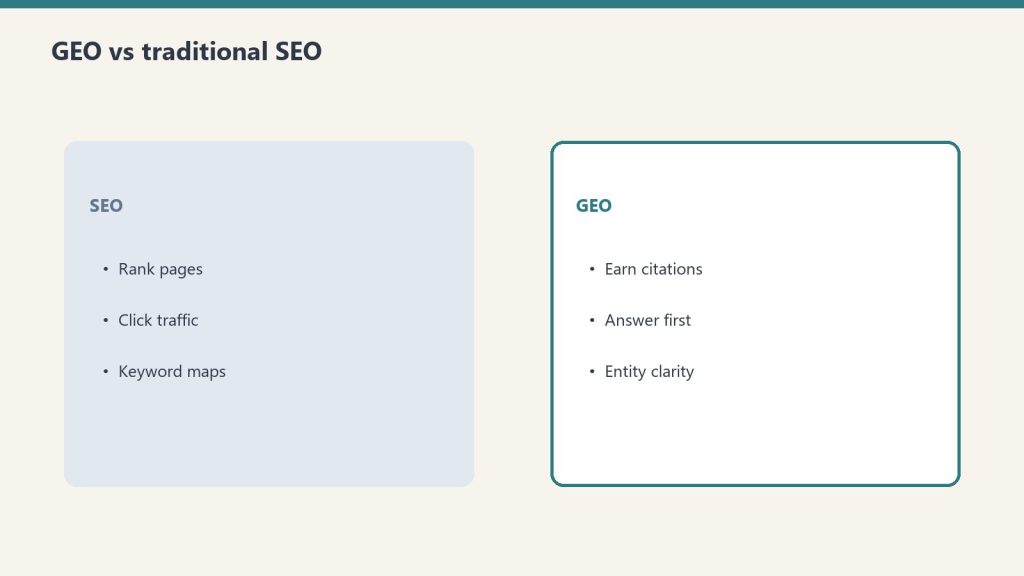
PSAO is not a replacement for SEO, GEO (Generative Engine Optimization), or AEO (Answer Engine Optimization). It’s the platform-specific layer that sits on top of those disciplines:
Discipline
Focus
Granularity
SEO
Google organic search rankings
Google-specific
AEO
Featured snippets, People Also Ask, voice search
Google-specific
GEO
AI citation across all platforms
AI as a monolith
PSAO
Platform-by-platform AI optimization
Individual platform personas
GEO says “optimize for AI.” PSAO says “optimize for this AI platform’s specific user, specific retrieval mechanism, and specific citation pattern.” It’s the same difference between “do social media marketing” and “run a LinkedIn thought leadership strategy targeting VP-level decision makers in B2B SaaS.”
Implementing PSAO at Scale
For a single site, the PSAO checklist is manual. For managing multiple sites — which is the reality of agency work and portfolio management — PSAO needs automation:
Schema injection automation: Every article gets Article + FAQPage schema automatically as part of the publishing pipeline
Dual-index submission: Every new post submits to both Google Search Console and Bing Webmaster Tools via IndexNow
Content structure templates: Writers start with the 6-layer template, ensuring every article has the direct answer, structured sections, FAQ, tables, and technical depth
Update scheduling: Top-performing articles are flagged for monthly refresh with current data and examples
Citation monitoring: Bing AI Performance data is reviewed weekly to track grounding citation trends and identify content that’s earning (or losing) citations
Actionable Takeaways
Adopt PSAO as a named discipline. Stop saying “optimize for AI.” Start specifying which platform and which user persona you’re targeting
Use the PSAO checklist for every article. Print it, pin it, make it a template in your CMS. Every item maps to a real citation opportunity
Submit to both Google and Bing. Three of six platforms use Bing. This is the most common infrastructure gap
Write for the persona, not the algorithm. The Perplexity researcher wants different content than the Copilot enterprise worker. The structure follows from the persona
Measure platform-level performance. Track citations, referral traffic, and conversion rates by AI platform — not “AI” as a single bucket
FAQ
What is Platform-Specific AI Optimization (PSAO)?
PSAO is the practice of tailoring content strategy to the distinct user personas, retrieval mechanisms, and citation patterns of each individual AI search platform — Perplexity, Copilot, Google AI Overviews, ChatGPT, Claude, and Gemini — rather than treating AI as a single optimization target.
How is PSAO different from GEO (Generative Engine Optimization)?
GEO treats AI search as a monolith — optimizing for “AI” broadly. PSAO operates at the individual platform level, recognizing that each platform serves a different user persona with different content preferences and different citation mechanics. PSAO is the platform-specific layer that sits on top of GEO.
Do I need to create different content for each AI platform?
No. A single well-structured article can serve all six platforms using the PSAO 6-layer template: direct answer first, comprehensive structured body, FAQ section, technical depth, HTML tables, and schema markup. Each layer maps to a specific platform’s citation trigger.
What is the PSAO checklist?
The PSAO checklist is a pre-publish quality gate covering content structure, technical implementation, content quality, and distribution. Each item maps to a specific AI platform’s citation requirements, ensuring every article has maximum citation surface area across all six platforms.
Which AI platform should I prioritize for PSAO?
Prioritize based on your audience. If your audience is enterprise workers, prioritize Copilot optimization. If your audience is researchers, prioritize Perplexity. For maximum coverage with minimum effort, use the unified 6-layer article structure and the PSAO checklist to serve all platforms simultaneously.
You publish an article on the same topic as your competitor. Their article gets cited by Copilot, Perplexity, and Google AI Overviews. Yours doesn’t. The topic is the same. The word count is similar. You even think your writing is better. So what’s different?
After analyzing citation patterns across the sites I manage — including the 98,800 Copilot citations data set and the per-model content shaping research — I can identify exactly what separates content that earns AI citations from content that gets ignored. It’s not writing quality. It’s structural.
The 6 Factors That Determine AI Citation
Six factors that determine AI citation.
AI platforms don’t evaluate content the way human editors do. They use measurable signals to decide what to cite. Here are the six factors, ranked by impact:
Factor 1: Authority Signals (Domain and Page Level)
Every AI platform uses some form of authority scoring. Bing’s system (powering Copilot, ChatGPT Search, and partially Perplexity) evaluates domain authority, backlink quality, and topical relevance. Google’s system (powering AI Overviews and Gemini) uses E-E-A-T signals, Knowledge Graph connections, and site reputation.
If your competitor’s domain has stronger authority signals — more quality backlinks, longer publishing history in the niche, recognized author entities — they’ll be cited over you even when your content is technically better. Authority is the foundation layer. Without it, everything else is marginal.
Factor 2: Factual Density
AI citation engines prefer content that makes specific, verifiable factual claims over content that makes general statements. “Implementation typically takes 6-8 weeks for a mid-size company and costs between $15,000 and $45,000 depending on customization requirements” is citable. “Implementation timelines and costs vary based on your specific needs” is not.
Count the specific, citable facts per 500 words in your article versus your competitor’s. The content with higher factual density wins citations, because AI platforms need specific claims to ground their responses.
Factor 3: Structured Data Implementation
This is the most common gap I find when auditing sites that underperform on AI citations. The competitor has FAQPage schema, Article schema, BreadcrumbList schema, and clean HTML tables. The underperformer has none, or has broken schema that doesn’t validate.
Structured data is how AI platforms understand content structure without having to interpret prose. It’s the difference between handing someone a well-organized filing cabinet and handing them a box of loose papers. The content might be equally good — but the organized version gets used.
Factor 4: Update Frequency and Content Freshness
AI platforms track when content was last modified. In competitive citation scenarios — where multiple sources could answer the same query — the more recently updated source wins. This is especially true on Perplexity and Copilot, which weight freshness heavily.
If your competitor published their article six months ago and updated it last week, and your article was published six months ago with no updates, they win. Even if your original content was superior. The update doesn’t need to be a complete rewrite — adding current data, refreshing examples, and updating the last-modified date can be enough.
Factor 5: Topical Depth and Coverage Completeness
AI platforms evaluate whether a source comprehensively covers the query topic. A 3,000-word article that addresses every sub-question a user might ask about the topic will be cited more frequently than a 500-word post that addresses only the headline question.
This isn’t about word count for its own sake. It’s about coverage completeness. Does your article answer the follow-up questions a user might ask? Does it address edge cases and exceptions? Does it provide the comparison the user would need to make a decision? Your competitor’s article probably does.
Factor 6: Bing Indexing and Technical Access
The most embarrassing reason your competitor gets cited and you don’t: they’re indexed by Bing and you’re not. Three major AI platforms — Copilot, ChatGPT Search, and Perplexity — use Bing’s index. If you’ve never submitted your sitemap to Bing Webmaster Tools, you’re invisible to half the AI landscape regardless of content quality.
Check your Bing Webmaster Tools account. Verify your sitemap is submitted. Use IndexNow to push updates immediately. This is table-stakes infrastructure that many sites neglect because they focus exclusively on Google.
How to Run a Competitive Citation Audit
How to run a competitive citation audit.
Here’s the practical framework for identifying why your competitor gets cited and you don’t:
Identify citation-winning competitors. Use Bing AI Performance in Bing Webmaster Tools to see which domains appear alongside yours in AI responses. If you don’t see yourself, check which domains appear for your target queries
Audit their structured data. Run their top pages through Google’s Rich Results Test. Compare their schema implementation to yours
Measure factual density. Count specific, citable claims per section in their content versus yours. Are they more specific? Do they include more data points, comparisons, and verifiable facts?
Check update patterns. When was their content last modified? How often do they refresh key articles? Compare to your own update cadence
Evaluate topical depth. Do their articles answer more sub-questions than yours? Do they include comparison tables, FAQ sections, and edge-case coverage that your articles lack?
Verify Bing indexing. Are your pages indexed in Bing? Are theirs? How quickly do new pages appear in Bing’s index for each site?
The Fix Priority Order
The fix priority order.
If your competitive audit reveals gaps across multiple factors, fix them in this order for maximum impact:
Bing indexing (immediate): If you’re not in Bing, nothing else matters for Copilot, ChatGPT, or Perplexity
Structured data (quick win): Adding schema markup to existing content can shift citation patterns within weeks
Content freshness (ongoing): Update your top-performing articles with current data and examples
Factual density (content revision): Replace vague claims with specific, citable facts across your key articles
Topical depth (content expansion): Add FAQ sections, comparison tables, and edge-case coverage to thin articles
Authority building (long-term): Backlink acquisition, topical authority development, author entity building
Actionable Takeaways
Run a competitive citation audit using the 6-factor framework. Compare your content against the citation winners in your niche
Fix Bing indexing immediately. Submit your sitemap to Bing Webmaster Tools and implement IndexNow
Add structured data to your top 20 articles. Article + FAQPage schema at minimum. HowTo and BreadcrumbList where applicable
Increase factual density. Replace every vague statement with a specific, citable claim where possible
Why does my competitor’s content get cited by AI when mine doesn’t?
The most common reasons are stronger domain authority signals, higher factual density (more specific citable claims per section), better structured data implementation, more recent content updates, deeper topical coverage, and — frequently overlooked — proper Bing indexing that your site may lack.
What is the fastest way to start earning AI citations?
Submit your sitemap to Bing Webmaster Tools and add Article + FAQPage schema markup to your top articles. These two actions address the most common technical gaps and can shift citation patterns within weeks. After that, focus on increasing factual density and update frequency.
How do I measure whether my content is being cited by AI platforms?
Bing Webmaster Tools includes an AI Performance report showing Copilot citations, impression counts, and grounding queries. For other platforms, monitor referral traffic from Perplexity, ChatGPT, and Gemini in your analytics. Google Search Console is expanding AI Overview reporting.
Does writing quality affect AI citation rates?
Less than most people think. AI citation engines evaluate structure, authority, factual density, and freshness — not prose quality. A well-structured article with specific facts and proper schema markup will be cited over a beautifully written article that lacks these structural elements.
How often should I update content to maintain AI citations?
Key articles should be reviewed and updated at least monthly for competitive topics. Update current data, refresh examples, add new FAQ pairs, and ensure the last-modified date reflects the changes. Even small updates signal freshness to AI platforms in competitive citation scenarios.
An AI citation is not a click. A click is not a conversion. The funnel from “Copilot cited your site” to “a new client signed up” has multiple stages, each with its own drop-off rate. Most content strategists celebrate citations without measuring what those citations actually produce. After tracking the full funnel across the sites I manage — including the 98,800 Copilot citations — here’s what the AI search funnel actually looks like.
The 4-Stage AI Search Funnel
The 4-stage AI search funnel.
Every AI search interaction follows a predictable funnel, regardless of platform:
Impression: Your content appears as a citation, source link, or referenced domain in an AI response
Click: The user clicks through to your actual website
Engagement: The user reads, browses, or interacts with your site
Conversion: The user takes a desired action — fills a form, makes a purchase, subscribes, contacts you
Each stage has dramatically different metrics depending on which AI platform generated the impression.
Stage 1: The Citation (Impression)
Stage 1: the citation is the new impression.
Not all citations are equal. The platform determines how visible your citation is to the user:
Platform
Citation Visibility
User Citation Awareness
Perplexity
Inline numbered citations — highly visible
High — users actively check sources
Copilot
Footnote-style references
Low — most users don’t expand footnotes
Google AI Overviews
Small source chips below the overview
Low to moderate — depends on query
ChatGPT Search
End-of-response source links
Moderate — users notice but rarely click
Gemini
Expandable source section
Low — embedded Workspace users ignore citations
Claude
Web-search citations when search is used (API / claude.ai)
Moderate — citations on web-search answers; training influence without search
The implication: a Perplexity citation has fundamentally higher click-through potential than a Copilot citation because the user actually sees and engages with the source attribution.
Stage 2: The Click-Through
Click-through rates from AI citations vary dramatically by platform. Based on the data I’ve tracked across managed sites:
Perplexity Click-Through
Perplexity has the highest click-through rate of any AI platform because its users are researchers who verify sources. When Perplexity cites your content with an inline [1] reference, a meaningful percentage of users click through to read the source. The click-through rate from Perplexity citations substantially exceeds what we see from Copilot or Google AI Overviews.
Google AI Overview Click-Through
Google AI Overviews present the biggest challenge: the overview often satisfies the user’s query completely, eliminating the need to click. The click-through from AI Overview citations to the cited source is significantly lower than traditional organic search. This is the zero-click problem at scale.
Copilot Click-Through
Copilot has the lowest click-through rate because the user is mid-workflow and the answer is consumed within the Microsoft 365 application. The user got what they needed without leaving Word or Excel. The citation exists in a footnote they never expand. From 98,800 citations, the actual click-through volume is a fraction of what that impression number suggests.
ChatGPT Click-Through
ChatGPT Search places source links at the end of responses. Users in conversation mode sometimes click these links, especially when the topic requires deeper reading. Click-through rates are moderate — between Perplexity’s high engagement and Copilot’s near-zero engagement.
Stage 3: Engagement Quality
Engagement quality still decides conversion.
Here’s where AI-sourced traffic gets interesting. Users who click through from AI platforms tend to be more engaged than average organic visitors because they’ve already been pre-qualified by the AI’s response. They clicked because the AI’s summary wasn’t enough — they want more depth.
The engagement pattern by platform:
Perplexity referrals: Longest time on page. These users arrived because they’re researching and the AI response prompted them to go deeper. They read, they bookmark, they follow internal links
ChatGPT referrals: Above-average engagement. The conversational context means they arrive with specific questions the article can answer
Google AI Overview referrals: Mixed. Some users click because the overview was incomplete. Others misclick. Bounce rates are higher than other AI referral sources
Copilot referrals: The rare users who do click through from Copilot are highly engaged — they specifically sought out the source, which signals strong intent
Stage 4: Conversion
The final stage is where AI search traffic’s value becomes concrete. Conversion rates from AI referrals depend heavily on two factors: the quality of the pre-qualification (how well the AI response set expectations) and the alignment between the AI’s citation context and your conversion path.
AI Traffic vs Google Organic: The Conversion Comparison
AI-sourced traffic converts differently than Google organic traffic. Google organic users arrive with search intent that maps directly to your content. AI-sourced users arrive because an AI cited you while answering a broader question — the intent alignment is less precise but the trust transfer from the AI platform can compensate.
The net effect in the data I’ve tracked: AI referral traffic converts at rates comparable to Google organic for informational-to-contact funnels (content marketing → lead gen). It converts lower for direct commercial queries where Google organic’s intent-matching advantage matters more.
Where the Funnel Leaks (And How to Fix It)
Leak 1: Citation Without Click
Problem: Copilot and Google AI Overviews generate thousands of citations that produce minimal clicks. Fix: Treat these citations as brand impressions, not traffic sources. Measure brand recognition lift and branded search volume increases alongside click-through.
Leak 2: Click Without Engagement
Problem: Users click through from AI but bounce because the landing page doesn’t match the context of the AI’s citation. Fix: Ensure the specific section cited by the AI is prominent on the page. Use in-page anchors and clear section headers so arriving users immediately see the content that prompted their click.
Leak 3: Engagement Without Conversion
Problem: Users read the content but don’t convert because there’s no conversion path within the content flow. Fix: Embed contextual CTAs within the article body, not just at the bottom. If the AI cited your pricing comparison, the CTA should be adjacent to the pricing content, not after 2,000 more words.
Actionable Takeaways
Measure the full funnel, not just citations. Track impression → click → engagement → conversion for each AI platform separately
Treat low-CTR platforms as brand channels. Copilot’s 98,800 citations are brand impressions even if few users click through. Measure branded search lift
Optimize landing pages for AI referral context. Users arrive mid-thought. Make the cited content immediately visible
Embed conversion paths within content. Contextual CTAs near the sections most likely to be cited by AI platforms
Prioritize Perplexity for traffic, Copilot for brand awareness. Different platforms serve different funnel stages
FAQ
What percentage of AI citations result in actual website clicks?
It varies dramatically by platform. Perplexity citations generate the highest click-through because its users actively verify sources. Copilot citations generate the lowest because users consume answers within Microsoft 365 without expanding footnotes. Google AI Overview and ChatGPT fall between these extremes.
Is AI search traffic better or worse than Google organic for conversions?
AI referral traffic converts at rates comparable to Google organic for informational-to-contact funnels. It converts lower for direct commercial queries where Google’s intent-matching advantage is stronger. The quality of pre-qualification from AI responses can compensate for less precise intent alignment.
How should I measure the value of AI citations that don’t generate clicks?
Treat low-click-through citations as brand impressions. Track branded search volume increases, direct traffic growth, and brand recognition metrics. A user who sees your domain cited by Copilot daily may eventually search for you directly.
Which AI platform sends the highest quality traffic?
Perplexity referrals consistently show the longest time on page and lowest bounce rates because these users are researchers who clicked through specifically to go deeper. Copilot referrals, while rare, also show strong engagement because the user actively sought out the source.
Where does the AI search funnel leak the most?
The biggest leak is citation-without-click, particularly on Copilot and Google AI Overviews. The second biggest leak is click-without-engagement, caused by landing page misalignment with the AI citation context. Embedding contextual CTAs and ensuring cited sections are prominent addresses both leaks.
If you’ve been following this PSAO series, you now understand that each AI platform serves a different user persona with different content preferences. The Perplexity user wants cited research. The Copilot user wants a pricing table. The Google AI Overview user wants the answer in paragraph one. The ChatGPT user wants explorative depth. The Claude user wants honest trade-offs. The Gemini user wants structured data.
The obvious question: do I need to write six different articles for every topic?
No. But you do need to write one article with a specific structure that hits all six citation triggers. Here’s the architecture.
The Universal PSAO Article Structure
Universal PSAO article structure.
After publishing and tracking citation patterns across the sites I manage — including the 98,800 Copilot citations documented in the meta sprint — I’ve reverse-engineered a single article structure that performs across all platforms. Each section serves a specific platform’s content preference while maintaining a coherent reading experience for humans.
Layer 1: Direct Answer First (Google AI Overviews)
The first paragraph must answer the article’s core question directly, completely, and in under 100 words. This isn’t a teaser or a hook — it’s the answer. Google AI Overviews extract from the opening section. If your article starts with background, context, or a personal anecdote, Google skips you and cites the competitor who led with the answer.
Template: “[Topic] is [definition/answer]. It works by [mechanism]. The key consideration is [critical factor]. Here’s the complete breakdown.”
Layer 2: Comprehensive Body with Structured Sections (Perplexity)
After the direct answer, build the comprehensive body. Each H2 section should answer a distinct sub-question that a researcher might ask. Perplexity’s retrieval engine chunks content by section headers and cites individual sections for specific queries. The more distinct, well-labeled sections your article has, the more citation surface area you create for Perplexity.
Template: H2 headers as questions (“How does X work?”, “What are the costs of Y?”, “When should you choose Z over W?”). Each section is a self-contained mini-article: claim, evidence, context, specific numbers.
Layer 3: FAQ Section with Exact-Match Questions (Copilot)
Copilot’s grounding engine pattern-matches user queries to FAQ headings. An FAQ section with 5-8 question-and-answer pairs, where the questions match how enterprise workers phrase their queries, is a Copilot citation magnet. Keep answers to 2-4 sentences — tight enough for Copilot to extract but substantive enough to be useful.
Template: H3 questions using “What is,” “How much does,” “What’s the difference between,” “Should I.” Answers: definitive, factual, 40-80 words each.
Layer 4: Technical Depth and Working Examples (ChatGPT + Claude)
Within the comprehensive body, include at least one section with genuine technical depth. Code examples, configuration samples, architecture decision reasoning, or detailed methodology. ChatGPT cites this when users ask specific technical questions. Claude users value it when they encounter your content through any channel.
Template: A section titled “Implementation Guide,” “Technical Architecture,” or “Step-by-Step Configuration” with actual specifics — not conceptual overviews.
Layer 5: Tables and Structured Data (Gemini + Copilot)
Every article that involves comparisons, pricing, features, or specifications should include at least one HTML table. Tables serve both Gemini (which needs data it can relay to Workspace users) and Copilot (which cites structured data for enterprise workers). A single comparison table can earn citations from both platforms simultaneously.
Template: Feature comparison tables, pricing breakdowns, decision matrices. Clean HTML <table> markup, not images of tables.
Layer 6: Schema Markup (All Platforms)
JSON-LD schema markup is the universal amplifier. Article schema, FAQPage schema, HowTo schema (if applicable), and BreadcrumbList schema improve citation probability across every platform that uses structured data — which is all of them to varying degrees.
The Complete Article Template
Putting all six layers together, a PSAO-optimized article looks like this:
Every article in this PSAO series follows this structure. Look at the architecture:
Each article opens with a direct answer paragraph (Layer 1)
The body has 5-7 distinct H2 sections answering sub-questions (Layer 2)
An FAQ section closes each article with 5 exact-match Q&As (Layer 3)
Technical specifics — query patterns, data breakdowns, implementation details — are embedded in the body (Layer 4)
Comparison tables appear in every persona article (Layer 5)
Article + FAQPage JSON-LD schema is appended to every article (Layer 6)
This isn’t a theoretical framework — it’s the production template running across the sites I manage.
Common Mistakes When Writing for Multiple Platforms
Common mistakes when writing for multiple platforms.
Mistake 1: Starting with a Story Instead of the Answer
Personal anecdotes and narrative hooks work for human readers on social media. They fail on AI platforms because every platform except ChatGPT extracts from the opening section. If your answer is in paragraph four, Google, Copilot, and Gemini will cite your competitor who put it in paragraph one.
Mistake 2: Using Images Instead of HTML Tables
A beautiful comparison infographic is invisible to every AI platform. AI systems can’t read text in images. The same data in an HTML table is citable by all six platforms. Always use HTML tables alongside any visual representation.
Mistake 3: Writing FAQ Answers That Are Too Long
Copilot and Google AIO need 2-4 sentence FAQ answers. When your FAQ answers are 200-word mini-essays, these platforms can’t extract clean, citable responses. Keep FAQ answers tight — save the depth for the body sections.
Mistake 4: Ignoring Bing Indexing
Three of the six platforms — Copilot, ChatGPT Search, and Perplexity — use Bing’s index. If your site isn’t submitted to Bing Webmaster Tools and you’re not using IndexNow for rapid indexing, you’re invisible to half the AI search landscape.
Actionable Takeaways
Use the 6-layer structure for every new article. Direct answer → comprehensive body → FAQ → technical depth → tables → schema. This template serves all platforms simultaneously
Always start with the answer. First 100 words should fully answer the article’s core question. No preamble, no story, no context-setting
Include at least one HTML table per article. Comparison, pricing, or feature tables serve Gemini and Copilot simultaneously
Write 5-8 FAQ pairs with 40-80 word answers. Tight enough for Copilot extraction, substantive enough for Google AIO sourcing
Submit to both Google Search Console and Bing Webmaster Tools. This covers all six platforms’ index sources
Implement Article + FAQPage schema on every article. The universal citation amplifier
FAQ
Do I really need to optimize for all 6 AI platforms?
You don’t need to create separate content for each platform. One well-structured article using the 6-layer PSAO template serves all platforms simultaneously. The key is including the right structural elements — direct answer, comprehensive sections, FAQ, tables, technical depth, and schema — in a single piece.
What is the most important layer for multi-platform performance?
The direct answer in paragraph one. It serves Google AI Overviews (which extract from the opening), Gemini (which relays definitive statements), and Copilot (which front-loads factual content). Every other layer is additive; this one is foundational.
How long should a PSAO-optimized article be?
Between 1,500 and 2,500 words for standard articles, up to 3,500 for pillar content. This length provides enough depth for Perplexity and ChatGPT citation surface area while keeping the article focused enough for Google AI Overview extraction.
Do HTML tables actually improve AI citation rates?
Yes. AI platforms read HTML table markup but cannot parse text embedded in images. A comparison table in clean HTML is citable by all six platforms. The same data as an infographic or screenshot is invisible to every AI system.
Should I submit my site to Bing even if I only care about Google?
Absolutely. Copilot, ChatGPT Search, and Perplexity all use Bing’s index for web content retrieval. Ignoring Bing means you’re invisible to half the AI search platforms regardless of how well your content performs on Google.
Gemini users are the most underestimated persona in the AI search landscape. Content strategists focus on ChatGPT’s scale, Perplexity’s citations, and Copilot’s enterprise footprint — while ignoring the billion-plus users who interact with Gemini through Google Workspace, Android, and Google Search every day. These users don’t think of themselves as “using an AI product.” They’re using Google. And that distinction defines what content wins.
This is the sixth article in the PSAO series, and it completes the platform-by-platform user profiles before we move to synthesis and strategy.
Who Uses Gemini (The Invisible Majority)
Who uses Gemini — the invisible majority.
Gemini’s deployment is broader than any other AI platform because Google embedded it everywhere:
Google Workspace users: Gemini is in Gmail (“Help me write this reply”), Google Docs (“Summarize this document”), Google Sheets (“Analyze this data”), and Google Slides (“Generate a presentation outline”). These users interact with Gemini as a feature, not a product
Android users: Gemini replaced Google Assistant on Android devices. When someone says “Hey Google, what’s the best restaurant near me?”, they’re talking to Gemini. They likely don’t know or care
Google Search users: Gemini powers Google AI Overviews (covered in the AI Overview user article), but also powers the standalone Gemini chat interface that some users access directly
Developers: Gemini through Vertex AI serves enterprise developers who build AI applications. This is a distinct persona from the Workspace user — more similar to Claude’s developer audience
The dominant Gemini persona is the Workspace user — someone operating inside Google’s ecosystem who expects Google-quality factual accuracy without having to leave their workflow.
How Gemini Users Interact (Embedded, Not Standalone)
How Gemini users interact — embedded, not standalone.
The In-App Query
The typical Gemini interaction happens inside another application. The user is writing an email in Gmail and asks Gemini to “make this more professional.” They’re in Google Sheets and ask “what’s the trend in this data?” They’re in Google Docs reviewing a contract and ask “what are the key risks in this agreement?”
These queries are contextual — they reference the user’s current document, email, or spreadsheet. The content Gemini draws on to supplement its responses is whatever Google’s systems deem authoritative for the domain of the user’s query.
Factual Lookup Queries
When Gemini users ask factual questions, they expect Google-grade accuracy. The trust threshold is higher than ChatGPT or Copilot because users associate the Google brand with authoritative answers. Content that includes hedging language, speculative claims, or unverifiable statistics loses to content that states facts with precision and backs them up.
Data Analysis and Summarization
Gemini in Google Sheets and Docs handles a significant volume of data analysis and document summarization queries. Users paste or upload data and ask for interpretation. The content Gemini references for this — benchmark data, industry standards, methodology explanations — is the content that becomes a background source for millions of summarization tasks.
What Content Wins with Gemini
What content wins with Gemini.
Structured Data That Google Can Parse
Gemini is built on Google’s infrastructure, which means it has deep integration with Google’s Knowledge Graph, structured data systems, and entity recognition. Content with comprehensive schema markup, clean HTML tables, and well-structured metadata is dramatically easier for Gemini to ingest and reference. This isn’t about SEO gamesmanship — it’s about making your content machine-readable at the level Google’s systems expect.
Tables and Lists Over Prose
Gemini’s Workspace integration means many responses need to be structured. When a user in Sheets asks about industry benchmarks, Gemini wants data it can present in a table format. Content that presents information in tables, numbered lists, and structured formats gives Gemini material it can directly use in Workspace contexts.
Factual Statements That Don’t Require External Verification
Gemini prioritizes content that makes definitive, verifiable factual statements. “The standard depreciation period for commercial real estate under MACRS is 39 years” is exactly what Gemini needs. “Depreciation periods vary depending on multiple factors” is useless. The Workspace user needs a specific fact they can use in their document — and Gemini needs a source it can confidently cite for that fact.
Industry-Standard Reference Material
Content that functions as reference material — glossaries, standards documents, regulatory summaries, technical specifications — earns disproportionate Gemini citations because it answers the lookup-style queries that dominate Workspace interactions. If your content is the kind of thing a professional bookmarks for quick reference, it’s the kind of thing Gemini wants to cite.
Gemini vs Other Platforms: The Key Differences
Dimension
Gemini User
Copilot User
Claude User
Ecosystem
Google Workspace, Android
Microsoft 365
Standalone + API
Awareness of AI
Low — it’s “Google”
Medium — it’s a sidebar
High — deliberate choice
Query type
Factual lookups, data analysis
Gap-filling mid-task
Complex analysis, code review
Content preference
Tables, structured data, facts
FAQ, pricing tables
Deep analysis, trade-offs
Trust model
“Google says it”
“Microsoft says it”
“I’ll verify it myself”
Actionable Takeaways for Gemini Optimization
Implement comprehensive schema markup. Gemini’s Google integration means structured data is more important here than on any other platform
Present key information in tables. Gemini Workspace users need data they can paste into Sheets and Docs. Tables are citation magnets
Make definitive factual statements. No hedging. State the fact, cite the source, give Gemini a clean statement it can relay with confidence
Optimize for Google’s Knowledge Graph. Entity-rich content with explicit relationships between entities helps Gemini connect your content to relevant queries
FAQ
Where do people interact with Gemini?
Gemini is embedded across Google’s ecosystem: Gmail, Google Docs, Google Sheets, Google Slides, Android devices (replacing Google Assistant), Google Search (powering AI Overviews), and as a standalone chat interface. Most users interact with Gemini as a feature of Google products, not as a separate AI product.
How does Gemini choose what content to reference?
Gemini leverages Google’s existing infrastructure — the Knowledge Graph, structured data systems, and search index. Content with comprehensive schema markup, clean HTML tables, and well-structured metadata is prioritized because it’s machine-readable at the level Google’s systems expect.
What content format works best for Gemini citations?
Tables, structured data, definitive factual statements, and reference material. Gemini’s Workspace context means it often needs to present information in table format for Sheets users or provide facts for Docs users. Content that serves these use cases earns the most citations.
Is optimizing for Gemini different from optimizing for Google Search?
Partially. Both benefit from schema markup, entity-rich content, and factual accuracy. But Gemini Workspace interactions add emphasis on tabular data, reference-style content, and definitive statements that a user can paste directly into a business document or spreadsheet.
Do I need to submit my site to a special index for Gemini?
No. Gemini uses Google’s existing search index and Knowledge Graph. If your site is well-indexed by Google with comprehensive schema markup, Gemini can access it. Standard Google Search Console practices apply.
I use Claude to manage 20+ WordPress sites, write code, analyze data, and build infrastructure. I’m not unusual among Claude users — we’re the builders, the analysts, and the people who need an AI that can hold 200,000 tokens of context without losing the thread. And that user profile shapes exactly what content Claude surfaces, recommends, and would cite if citation features expand.
Claude’s user base self-selects differently than any other AI platform. Nobody ends up using Claude by accident — there’s no browser default, no operating system integration forcing adoption. People choose Claude for specific reasons, and those reasons define the content that resonates with them:
Developers and engineers: Code review, architecture decisions, debugging complex systems, writing documentation. Claude’s long context window means they can paste entire codebases and get meaningful analysis
Analysts and researchers: Document analysis, report synthesis, data interpretation. They upload PDFs, spreadsheets, and research papers and ask Claude to extract insights
Technical writers and content strategists: People who need nuanced, accurate writing that doesn’t oversimplify. Claude’s tendency to acknowledge trade-offs rather than pick a winner appeals to this group
Business operators who run on AI: People like me — using Claude Code, Claude Projects, Claude API to build actual operational infrastructure. Not just asking questions, but building systems
The common thread: Claude users are builders. They don’t just consume AI output — they integrate it into workflows, iterate on it, and treat Claude as a collaborator rather than an oracle.
How Claude Users Work (Not Just Search)
How Claude users work — not just search.
Claude users don’t “search” in the traditional sense. They work. The distinction matters for content strategy:
Long-Context Document Analysis
Claude users regularly paste 50,000-200,000 tokens of content and ask questions about it. A lawyer pastes a 100-page contract. A developer pastes an entire repository. A researcher pastes five papers. The questions they then ask Claude are specific, contextual, and often unanswerable by any search engine because the answer requires synthesizing the pasted context with general knowledge.
Content that serves this user provides the “general knowledge” side of the equation — authoritative reference material that Claude can draw on when synthesizing answers about the user’s specific documents.
Architectural Decision Queries
Claude users frequently ask for help with decisions that involve trade-offs: “Should I use PostgreSQL or MongoDB for this use case, given these constraints?” The key behavioral pattern is that Claude users want the trade-offs acknowledged, not hidden. Content that says “PostgreSQL is the best choice” loses to content that says “PostgreSQL is stronger for X and Y, but MongoDB handles Z better — here’s how to decide.”
Code Review and Refactoring
Claude Code users paste code and ask for analysis, optimization suggestions, and security review. This creates demand for content that explains why certain patterns are better — not just what pattern to use. Claude users want the reasoning, not just the recommendation.
What Content Wins with Claude Users
What content wins with Claude users.
Technical Deep-Dives with Trade-Off Analysis
The single most effective content format for the Claude audience is the honest technical comparison. Not “5 Best Tools for X” but “How to Choose Between Tool A and Tool B: The Decision Framework.” Claude users are allergic to content that picks winners without acknowledging costs. They trust content that shows them the full picture and lets them decide.
Architectural Decision Records
Content structured as ADRs (Architecture Decision Records) — stating the context, the options considered, the decision made, and the trade-offs accepted — resonates deeply with Claude’s technical user base. This format maps directly to how they think about problems.
Comparison Matrices
Detailed feature comparison matrices with honest assessments (not marketing-biased checkmarks where your product wins every category) perform well. Claude users evaluate tools rigorously. Content that survives their scrutiny earns their trust and their recommendations to colleagues.
Implementation Guides with Context
Claude users don’t just want “how to do X.” They want “how to do X in the context of Y, given constraints Z.” Content that provides implementation guidance within specific architectural or business contexts outperforms generic tutorials. The Claude user is past the beginner stage — they need content that matches their level of sophistication.
Honest Assessments and Limitations
Here’s what separates content that Claude users trust from content they dismiss: acknowledging what doesn’t work. Every tool, framework, and approach has limitations. Content that documents those limitations honestly — “this approach breaks down when you exceed N concurrent connections” — earns Claude users’ respect and citation.
Claude’s Evolving Citation Landscape
Claude does have native web search in its chat apps — paid plans have had it since March 2025, with a toggle in the chat interface. But the content strategy still matters for several reasons:
Training data influence: Content widely published and linked is more likely to be included in Claude’s training data, influencing how Claude answers questions in your domain
Claude Projects and custom knowledge: Organizations upload content to Claude Projects as reference material. Being the content that organizations choose to upload is a form of citation
MCP integrations: Claude’s Model Context Protocol allows connecting to external data sources. As web search MCPs become standard, your content needs to be findable and structured for extraction
Claude Code references: Developers using Claude Code frequently reference documentation and guides. Being the go-to reference in your domain means Claude users paste your content into their sessions
Actionable Takeaways for Claude User Content
Write with trade-offs visible. Never hide downsides. Claude users trust content that acknowledges limitations and helps them decide, not content that sells them a conclusion
Structure content as decision frameworks. “How to choose” outperforms “the best” for this audience every time
Go deep on technical implementation. Surface-level overviews don’t serve builders. Include architecture context, code-level detail, and real-world constraints
Publish comparison matrices with honest assessments. No marketing-biased checkmark charts. Real evaluations that survive scrutiny
Write for the long context. Your content may be pasted alongside 100,000 other tokens. It needs to be information-dense and skimmable simultaneously
FAQ
What type of professional primarily uses Claude AI?
Claude’s user base skews heavily toward developers, engineers, analysts, technical writers, and business operators who integrate AI into workflows. These are builders who chose Claude for its long context window, nuanced reasoning, and willingness to acknowledge trade-offs rather than oversimplify.
How do Claude users differ from ChatGPT users?
Claude users are generally more technical and work with longer, more complex contexts. Where ChatGPT users explore and iterate conversationally, Claude users often paste large documents, codebases, or datasets and ask specific analytical questions. Claude users also expect trade-offs acknowledged rather than winners declared.
Does Claude have web search like ChatGPT?
Claude does offer native web search in its chat apps — paid plans have had it since March 2025, with a toggle in the chat interface. Even so, content strategy still matters through training data influence, Claude Projects knowledge uploads, MCP web integrations, and the practice of Claude Code users referencing and pasting authoritative content into their sessions.
What content format resonates most with Claude users?
Technical deep-dives with honest trade-off analysis, decision frameworks, architectural comparison matrices, and implementation guides with real-world context. Claude users are past the beginner stage and need content matching their level of sophistication.
How should I structure content for potential Claude training data inclusion?
Publish authoritative, widely-linked, information-dense content with clear structure, honest assessments, and specific technical detail. Content that becomes a go-to reference in its domain — cited by other publications and linked from documentation — has the highest probability of influencing Claude’s training knowledge.
The Signal — Tygart Media's weekly brief. What we actually ran, what it measured, and what it means for a restoration shop.