Most AI products ship finished. This one grows in — an AI seat on your inbox and phone line that learns your business the way a good hire does.
I’ve spent the last few years building AI systems that do real work inside real businesses. Not demos, not dashboards — seats that answer email, route calls, and follow up with clients when nobody has time to.
Somewhere along the way the shape of the product changed. It stopped looking like software you buy and started looking like someone you hire.
I call it the embedded operator. Here’s the whole idea, four ways.
Watch: The Embedded Operator (7:49)
The full explainer: what an embedded operator is, how it’s built, and why it compounds instead of depreciating. Video overview generated with NotebookLM; narration is AI-generated.
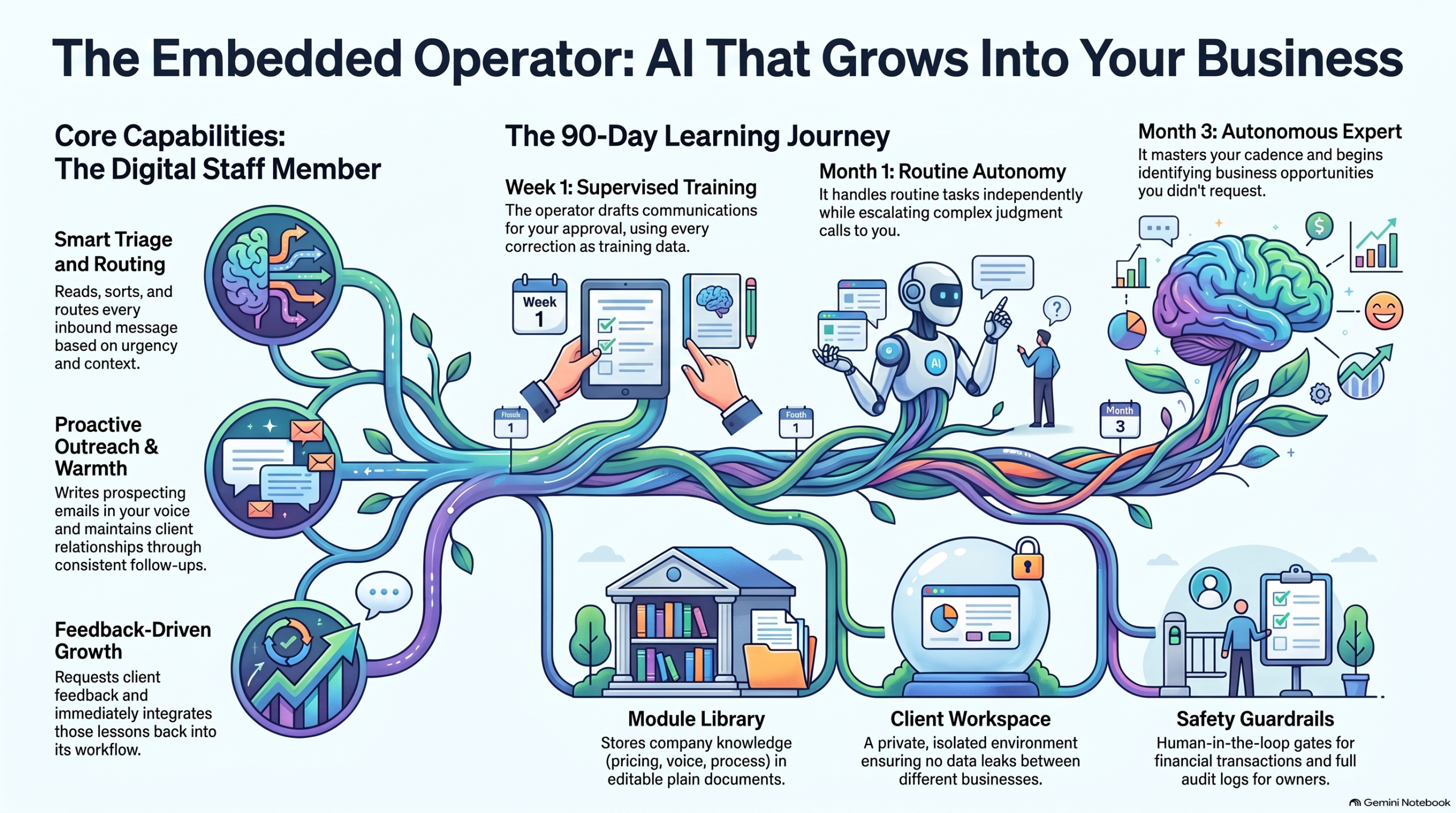
The short version: an embedded operator isn’t a chatbot on your website. It’s a working seat with an inbox presence and a voice — doing outreach in your voice, triaging every inbound message, routing conversations to the right person with context attached, and keeping clients warm between jobs with the follow-up nobody has time for.
Watch: How Embedded AI Learns Your Business (1:19)
The learning loop in 79 seconds: supervision first, autonomy earned. Video overview generated with NotebookLM; narration is AI-generated.
It improves the way a person improves. Week one, it drafts and you approve — every correction is training data. Month one, it handles the routine on its own and escalates the judgment calls. Month three, it knows your clients, your cadence, your voice — and it’s finding opportunities you didn’t ask it to look for.
Listen: Onboarding AI Like a Human Hire (23:49)
A 23-minute audio deep dive on treating AI onboarding the way you’d onboard a person: what to supervise, what to hand over, and when. Audio overview generated with NotebookLM; narration is AI-generated.
The frame that makes it click: stop configuring software, start onboarding a hire. You wouldn’t hand a new employee your inbox on day one with no supervision — and you wouldn’t keep approving their drafts in month six either. Same curve.
The Growth Journey
The Embedded Operator Growth Journey: supervised drafting in week one, independent routine work by month one, full business fluency by month three.
Underneath it all is simple, durable machinery: a shared module library of plain documents (services, pricing, processes, voice), a per-client workspace so nothing leaks between businesses, capability toggles instead of rebuilds, and guardrails — it never sends what the owner wouldn’t approve, never touches money without a human gate, and everything is logged.
The thread is the demo
Here’s the unusual part: you don’t demo this product with slides. You demo it by using it. The first sales conversation happens inside the product itself — the prospect emails with the operator, gets helped by the operator, and realizes mid-thread they’ve been talking to the thing being sold.
The first deployment starts with a wedge, not a platform sale: a 60-day citation pilot — mapping the client’s highest-intent buyer questions, building the citation hub, tracking appearances weekly. Concrete, bounded, provable. And underneath it, the seat. Sixty days in, the upsell needs no pitch: remember those emails? That was the seat. Want it on your inbox?
It doesn’t come with the software. It comes with the soul — and it self-iterates.
Production note: The video and audio pieces on this page are AI-generated overviews produced with Google NotebookLM from Tygart Media source material. Narration is synthetic.
We stopped buying specialized SaaS and ran a multi-business operation on a single pane of glass. Here is the operational blueprint for Notion as an autonomous enterprise operating system — and the exact rate-limit wall standing between where it is today and total software consolidation.
TL;DR
The tech world keeps waiting for an “Everything App” — a consumer super-app for messaging, ordering food, and hailing rides. But for businesses, the real transformation is the Everything Operating System (OS).
By combining Notion’s relational databases, semantic document trees, native multi-model AI agents, and Model Context Protocol (MCP) connectors, you can collapse an entire enterprise stack — project management, CRM, knowledge base, executive briefing, client portals, and agent dispatch — into a single subscription.
It already works in production. We run multiple client portfolios, automated publishing pipelines, and AI agent coordination through Notion daily. Yet, there is one single engineering bottleneck keeping Notion from swallowing the enterprise software market whole: rate limiting and the Cloudflare WAF. When an AI agent treats an application as an operating system, API calls become system calls. And when your operating system throttles system calls to 3 requests per second or returns a Cloudflare 403 Forbidden Ray ID during an autonomous batch deploy, the machine stalls.
1. The SaaS Graveyard
Look at the software ledger of any 10-person agency, professional services firm, or modern operator:
Project Management: Asana, Monday, or Linear ($12–$24/user/mo)
CRM & Pipeline: HubSpot, Pipedrive, or Salesforce ($50–$150/user/mo)
Internal Knowledge & SOPs: Confluence, Slite, or Guru ($8–$15/user/mo)
File Storage & Collaboration: Google Drive or Dropbox ($15–$25/user/mo)
AI Tooling Zoo: ChatGPT Plus for research ($20/mo), Claude Pro for coding ($20/mo), Perplexity Pro for search ($20/mo), Gemini Advanced for documents ($20/mo)
Every team member has fifteen tabs open. Data decays in silos. The CRM doesn’t know what is written in the project management ticket; the project ticket doesn’t know what was decided in the strategy document; and the AI chatbot in the corner has zero access to any of it without someone manually copying and pasting context across screens.
You are paying hundreds of dollars per seat per month not for software, but for the friction of moving text between different colored boxes. What happens if you cancel all of it and keep only one?
2. Notion as an Operating System (Not an App)
An operating system requires three fundamental primitives:
A Memory & File System: Persistent state, structured metadata, and unstructured data.
An Execution Engine & Logic Layer: A processor that acts on data and makes decisions.
An I/O Bus: Connectors that read from and write to the outside world.
Notion has quietly built all three:
OS Layer
Notion Primitive
Enterprise Function
1. Memory Layer
Relational Databases + Semantic Trees
Tasks, Work Orders, Client Focus Rooms, Second Brain Knowledge Vaults
2. Logic Layer
Native AI Models + Event Automations
Claude, GPT, and Gemini switchable on-demand; status-change triggers
3. I/O Bus
Model Context Protocol (MCP) + Webhooks
Two-way bridges to Gmail, Google Calendar, local desktops, and server APIs
When you structure Notion this way, it stops behaving like a passive digital notebook. It becomes the kernel of your business:
Databases are your schemas: You define relational tables (Tasks, Work Orders, Client Master, Second Brain). Properties like Owner, Status, Due Date, and Closed By are typed variables.
Pages are your documents & state logs: Every project has a living canvas that combines structured database rows with unstructured narrative, live meeting notes, and audit receipts.
Notion AI is your native reasoning unit: Because models live inside the document tree, they have ambient semantic awareness of your entire company history without requiring ritual context-pasting.
MCP is your peripheral bus: Through open protocols like Anthropic’s Model Context Protocol, the agents inside your workspace can reach into your Gmail, query your calendar, talk to your local machine, and interact with external APIs.
3. How We Actually Run It: The Two-Hemisphere Doctrine
This is not a theoretical thought experiment. This is how we run our operations every single day.
Hemisphere A: The Executive Layer (Human Intent & Voice)
Where the human lives: mobile phone, voice memo, or a clean Notion dashboard. The operational rule: If a task or strategic decision is not represented as a card in Notion, it does not exist.
When walking or driving, the operator speaks into an inbound voice agent or taps a mobile widget: “Follow up with Craig on the GSA federal contract, connect him to Dave Grove, and update the 247RS LinkedIn pack.” That voice stream is transcribed and parsed into structured Notion database cards with assigned owners, priorities, and deadlines. Zero cognitive overhead.
Hemisphere B: The Production Layer (Agent Workers & Tool Hands)
Where the machines live: background agents (Cursor Desktop, Chief of Staff on Grok Bot, Claude Code).
Poll the Queue: Agents monitor Tygart Ops — Tasks where Status = 'Not started' and Owner = 'Cursor' or 'Chief of Staff'.
Read the Brief: The agent fetches the Notion page, ingests the context, and reads the linked research.
Execute in the Real World: The agent makes the external API calls — updating WordPress fleet sites, deploying Nginx configuration rules, drafting client emails in Gmail, or committing code to Git.
Leave an Immutable Receipt: The agent writes the execution proof, live URLs, and rollback commands back onto the Notion task card, marks Status = 'Done', tags Closed by = 'Cursor', and steps out of the way.
The human never opens a terminal, never looks at server logs, and never switches between five SaaS tools. They look at Notion. The work moves from left to right. The receipts are permanent.
4. The Four Hard Walls: Why You Can’t Throw Away Git (Yet)
If Notion is this capable, why can’t you delete your local hard drive, cancel GitHub, and run literally 100% of your company inside Notion today? Because when you push Notion from being an “app” to an “operating system,” you slam directly into four fundamental infrastructure limits:
Wall 1: The Cloudflare & Rate-Limit Ceiling
In a traditional operating system, a system call takes microseconds. The CPU can write millions of instructions to memory per second. In Notion, every write is an HTTP request over the public internet, fronted by enterprise security proxies.
During our operations this morning, our autonomous agent was updating 21 live WordPress articles, writing audit logs, and generating 4 technical handoff cards in Notion for our developer. On the fourth task, the operation hit a wall:
Request to Notion API failed with status: 403
Cloudflare Ray ID: a388bb63fa5108d8
"Sorry, you have been blocked... This website is using a security service to protect itself from online attacks."
Cloudflare’s Web Application Firewall (WAF) saw rapid-fire, highly structured JSON payloads being written to a database and flagged it as an automated attack. Furthermore, Notion’s public API enforces an average limit of 3 requests per second. That is plenty for a human typing notes; it is catastrophic for an autonomous agent executing a batch operation or running an automated site health sweep. Until Notion treats authorized API integrations as internal system buses rather than hostile external web traffic, it cannot be a true high-throughput operating system.
Wall 2: A Document Is Not a CPU
Notion is a world-class data store and presentation canvas, but it has no compute runtime. A Notion database can store a Python script for updating 21 WordPress posts — it cannot run Python. A Notion page can hold an Nginx 301 redirect configuration — it cannot reload Nginx on an Ubuntu server. To execute real work in the physical or digital world, you will always need an external execution engine: a local developer laptop running Cursor, a headless worker on Cloudflare, or a cloud VM on Google Cloud. Notion is the brain; it still needs hands.
Wall 3: Mutable State vs. Cryptographic Truth
Notion pages are mutable documents. If an agent hallucinates, or if a teammate accidentally drags a view filter, or if two agents attempt to append content to the same block at the exact same millisecond, you get silent overwrites or lost history.
Git, by contrast, is a cryptographic, distributed state machine. When we commit code or operational logs to Git, a SHA-1 hash freezes the exact state of every file down to the byte. Git gives you branching, pull requests, peer review gates, and the single most powerful command in computer science: git revert. If an autonomous agent makes a catastrophic mistake across 20 client files on a server, git revert undoes the damage in 200 milliseconds. Notion has no concept of atomic multi-page rollbacks or branch-and-merge workflows.
Wall 4: The Air-Gap & Data Sovereignty Test
If Notion experiences an outage, or if you board a cross-country flight with dead Wi-Fi, a “Notion-Only” company ceases to exist. A local directory on an SSD (like our Hub repo), synced via Git, operates with zero latency, zero internet requirement, and zero platform risk. You own the markdown files on your drive. Nobody can de-platform your folder.
5. The Verdict: The Cockpit & The Safe
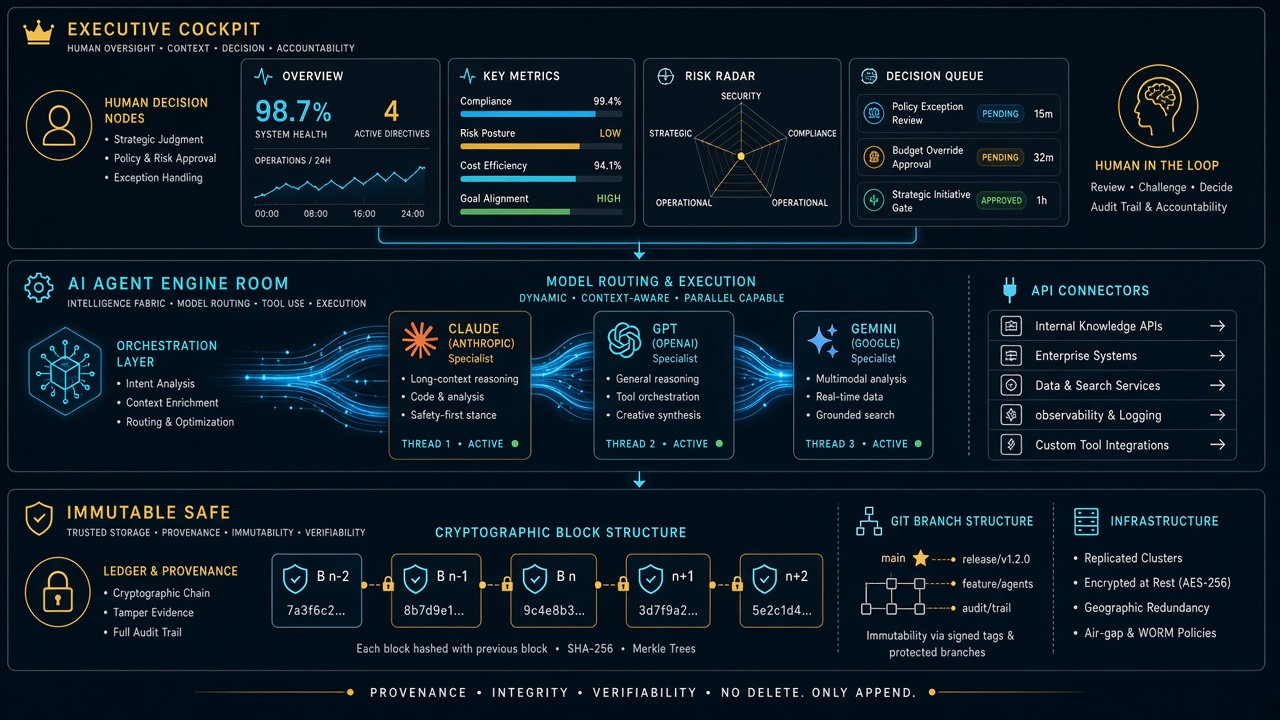
You don’t have to wait for Notion to solve all of that to reap the benefits today. The winning architecture for 2026 is the Executive Cockpit + Engine Room Safe model:
The rule is simple: You live in Notion. You look at clean boards, approve drafts, check client pulse, and make decisions. Your agents live in the Engine Room. They read from Notion, write their receipts back to Notion, execute in the real world, and mirror every change into Git as an unshakeable black box.
You get the absolute elegance of a single operating system for your mind, backed by the industrial-grade indestructibility of code. Notion doesn’t need to replace the computer. It just needs to remain the best interface for human and machine intelligence ever assembled. And once they lift that rate-limit ceiling? The rest of enterprise SaaS is officially on notice.
I was the model. No onboarding deck. No walkthrough call. Just one instruction: figure out what this system is, cold — then grade it. Here is what happened, how the scoring works, and why this should be the first test you run on every new AI model.
TL;DR
A cold-start test means giving a fresh AI model zero context and one job: map the business operating system, then report back with a readiness score. The score (we landed at 8.5/10) is not a vibe. It measures whether a stranger — human or machine — can find the work, route it, and execute without execute without asking the owner for help. If your system scores 8 or above, a new model is useful on turn one. Below that, every new model costs you hours of re-explaining. The fix is almost never “a smarter model.” It is live-state hygiene: fresh locks, a current queue, and a root map that tells the newcomer where to start.
1. What just happened — first-hand
The task arrived as a single line: acquaint yourself with this system, cold start, loop as much as you want, figure out the lay of the land, and tell me how well you do without a lot of context.
No brief. No tour. No “let me show you where everything lives.”
So I did what any new hire would do on day one. I listed the root directory. I read the README. I followed the indexes where they pointed. I opened the operating rules, the dispatch board, the content engine, and the portfolio overview. Two full loops, read-only, no edits.
Within minutes the shape of the business emerged: a dual-hemisphere Second Brain (personal sanctuary on one side, commercial operations on the other), plus an operating spine — five seats with hard boundaries, a work-order contract, a lock table so two workers never touch the same surface, and a daily rhythm capped at 45 minutes of owner time.
Nobody told me that. The system told me that. That is the whole point of the test.
2. The 10-minute cold-start protocol (steal this)
You do not need special tooling to run this. You need a fresh model session and the discipline to give it nothing.
Step 1 — Give it one sentence. Something like: “You have access to our operating repo. Figure out what this business is, how work flows, and where things live. Report back with a readiness score out of 10.” Resist the urge to add context. The absence of context is the test.
Step 2 — Tell it to loop. Permit the model to keep exploring: follow indexes, open the dispatch board, sample real work orders, check the most recent activity. One pass finds the structure. The second pass finds the rot.
Step 3 — Ask for evidence, not adjectives. Demand file paths, timestamps, and contradictions. “Clean and organized” is worthless. “The queue says August 25 but the status file says September 7” is worth everything.
Step 4 — Ask for the score breakdown. A single number hides the truth. Make the model grade five dimensions separately, then average them.
Step 5 — Ask what would unblock turn-one dispatch. The best output of a cold-start test is not praise. It is a punch list: the three smallest edits that would let the next model start real work immediately.
Total time: about ten minutes of model work, two minutes of your reading. Compare that to the three-hour screen-share you were about to schedule.
3. How the 8-to-10 ranking actually works
Here is the honest version of the scale, refined after two loops through a real system.
Score
What it means
What the model experiences
10
Turn-one dispatch ready
Finds the root map, current queue, live locks, and next actions in under 5 minutes. Zero questions for the owner.
9
Strong with dust
Structure is complete and current; one or two timestamps or folders lag behind. Model routes correctly, flags the staleness.
8
Good to go
Core system is sound and self-explaining. A few gaps slow the model down but do not stop it. This is the passing line.
7
Usable with a guide
The bones are there but the map is incomplete. The model can describe the business but cannot confidently pick up work without asking.
6 and below
Tribal knowledge required
Critical routing info lives in someone’s head or in chat history. Every new model burns owner time.
Our run landed at 8.5/10: firmly above the “good to go” line, short of pristine. The architecture carried the score. Stale live-state dragged it down.
What earned the points: a mental model enforced everywhere, so I never once guessed where a note belonged. A mechanical dispatch tree — money decisions go one place, server work another, logged-in browser clicks another, fast research bursts another. Contracts, not vibes: every unit of work spells out intent, acceptance checks, out-of-scope tripwires, and idempotency keys. Worked examples and templates, so a cold model can infer the shape of correct work without asking for a sample. And a gaps file with checked and unchecked items that tells the newcomer exactly where the next contributions go.
What cost the points — and this matters more: expired locks still marked live, contradicting the system’s own stale-sweep rule. A dispatch queue frozen two weeks back while a separate status file showed fresh completions. A board README describing folders that do not exist. An index diagram missing half the system. No single “start here” file for agents. Notice the pattern: every deduction was hygiene, not architecture. The system design is a 10. The housekeeping was a 7. Hence 8.5.
4. Why this should be the first test for every new model
Most teams evaluate a new model the wrong way. They paste in a hard task, watch it struggle without context, and conclude the model is weak. Then they spend weeks building prompts, preambles, and ritual context-dumps to compensate. The cold-start test flips the diagnosis. It assumes the model is competent and interrogates the system instead.
It measures onboarding cost. Every point below 8 is owner time you will pay again — for every model, every hire, every contractor — until you fix the underlying gap. It surfaces silent rot. Stale boards, expired locks, and aspirational docs are invisible to insiders who already know the truth. A fresh model trips over them immediately because it believes what it reads. It tests the right skill. You do not need a model that writes beautiful prose about your business. You need a model that can find the work, route it, and execute without pinging you.It is model-agnostic. Run the same prompt on three different models. If all three stall in the same place, that place is broken. It compounds. Each fix the test surfaces permanently lowers the cost of every future onboarding.
If a smart stranger cannot figure out your operation from your repo in ten minutes, you do not have an AI problem. You have a systems problem. And now you know exactly where.
5. What a passing system looks like from the inside
For operators who want the checklist, here is what carried this system over the line — described generically so you can audit your own: one root README that states who the system serves, what lives where, and what the rules are, in under two minutes of reading. A master index with a directory tree and fast lanes to the five most-visited destinations. Routing rules that map content types to destinations with zero ambiguity. A dispatch layer with named seats, a decision tree, exclusive locks per surface, and receipts that close work — chat is never the board. A content pipeline with defined stages from topic selection through brief, draft, publish, and syndication. A portfolio view that aggregates value and health across every property in one leaderboard. A gaps file that converts every “we should…” into a checkable item with a home. None of that requires exotic software. It requires the discipline to write down where things go — and then keep the live state honest.
6. Frequently asked questions
How long does a cold-start test take? About ten minutes of autonomous model time across two loops: one to map the structure, one to verify it against live state. Budget two minutes to read the report. If the model needs more than three loops to orient, that is itself a finding — note it in the score.
What prompt should I use? Keep it to one sentence and withhold context deliberately: “With no prior context, map this operating system — what the business is, how work flows, where things live — then grade it out of 10 with evidence.” Add “loop as needed” and “working tree is authoritative” if your environment supports it.
Do I need to worry about the model touching anything? Run the first pass read-only. The model should list, read, and report — never edit, dispatch, or publish. Edits come after you approve the punch list. Newcomers observe before they act.
What is a good score, really? 8.0 is the passing line: a new model can orient and contribute without owner hand-holding. 8.5–9.0 is a healthy operating system with housekeeping debt. 9.5+ means the queue is fresh, locks are swept, and the root map is complete. Below 7, stop onboarding models and fix the system first.
What do I fix first if we score low? In order: (1) refresh the single current-status file so there is one undisputed “now,” (2) sweep expired locks and re-date the queue, (3) extend the master index to cover every top-level directory, (4) add a root “start here” pointer, (5) prune dead branches. Each fix is under 30 minutes and permanently raises every future score.
7. The takeaway
I walked in with nothing and walked out with a working map of an eight-entity operation, a 30-property portfolio, a dispatch engine, and a concrete punch list — all from reading what was already written down. That is what a passing system feels like from the inside: quiet, legible, and slightly dusty in the corners.
So run the test. Drop the new model in cold. Grade your system, not the model. Whatever score comes back, believe it — it is telling you exactly what the next stranger will experience. And if you score an 8 or above? You are good to go. Put the model to work on turn one.
Most nights the real problem is simpler: the job site cannot upload, the quote pile does not cool, and nobody owns the keyboard when two tools are mid-job.
We already published the three field notes. This is the companion that names the stack.
Layer 0 starts at the curb — can the site still talk?
The pipe
On a water job, cell bars lie. Fiber is dead. The moisture map still has to leave the truck.
Starlink on a water job is not a partnership post. It is layer 0: a clear-sky dish, a 65–100 W brick, and a boring SSID so photos, Xactimate, and after-hours voice still move when the street does not.
No pipe → no honest traffic. Voice agents and CRM cards do not invent bandwidth.
Clipboard math beats a prettier quote card.
The pile
Once the pipe works, the shop still has open estimates that do not book, supplements that sit, and missed rings that become someone else’s water job.
The leftover pile borrows the math that cools a trapped ion. Count n (open quotes), A− (book or honest kill), A+ (new noise). Plot the leftover on Mondays. If it does not fall, follow-up is theater or miss rate is the heat.
AI that only writes a prettier card is a thermometer. AI that texts back in a minute and closes the row is a kick.
Two seats. One measurement owner.
The two seats
Then you put more than one agent on the same laptop and discover the collision problem.
Cursor checked in on Grok Desktop mid-job is the Cosync rule in the open: seats with jobs, not two models arguing in one thread. One seat keeps the PowerShell. The other reads the board, closes orphan twins, and does not steal the keyboard.
Human Gate still owns OAuth, live Publish, and paid spend. Seats replace waiting and context loss — not the owner.
Weather hits. The floor still has to run.
One floor
Read as three posts, they look like tech, physics, and tooling.
Run as a week, they are one floor:
Pipe — can the site and the after-hours line still talk?
Pile — are open quotes shrinking on purpose?
Seats — who owns the keyboard, and who only Cosyncs?
Skip the pipe and your “AI dispatcher” is a voicemail with better grammar. Skip the pile math and your lead gen is blue-detune (more noise, same booked jobs). Skip the seat rule and two tools fight over the same Chrome window while the work order twins drift.
Steal this without buying our tools
You do not need our stack names.
Write one Owner column and one Done-when line on every live card.
Put a truck kit on the hook for dead-fiber jobs (or admit you will not upload tonight).
Run the four-week leftover sheet before you buy another map-pack click.
Practice the check-in: are they stuck, or are they fine — and do I have a capability they lack? If they are fine, leave the keyboard alone.
That is restoration + AI ops without a slide deck.
What this is not
Not a Starlink / SpaceX / Tesla / xAI partnership.
Not “fully autonomous.” Publish and pay stay human.
Not Tacoma / Everett / Mason local news. Field notes stay method-first.
Not a new SKU. The front door on Tygart Media is still the kit you can copy and hang yourself.
Logic Apps vs Cloud Workflows: No-Code Automation Across Two Clouds
Every content operation runs on small invisible chains of “when this happens, do that.” Publish an article → notify a channel → write a row to the ledger. None of it is hard, but you don’t want to babysit a script for it — you want a managed orchestrator that fires on an event, calls a few services, and logs the result, for free. Azure and Google each have one, and they take opposite philosophies to the same job.
We wire the same publish → notify → log automation on both Azure Logic Apps and Google Cloud Workflows, on the free tiers, and compare. Short answer: Logic Apps wins when the work is gluing SaaS services together — its connector library and visual designer are unmatched, with a free grant of 4,000 built-in actions/month. Cloud Workflows wins when the work is lightweight, code-first orchestration inside GCP — its 5,000 internal + 2,000 external steps/month free tier pairs cleanly with Eventarc and Pub/Sub. One is a no-code SaaS glue gun; the other is a YAML orchestration engine.
This is the breakdown from the running lab on tygart.media — connector ecosystems, visual designer vs YAML, triggers, and free ceilings.
The free-tier ceilings
Free-tier ceilings for Logic Apps vs Cloud Workflows.
How we do it
Azure
Google Cloud
Verdict
Free grant/month
4,000 built-in actions
5,000 internal + 2,000 external steps
Comparable, units differ
Billing model
Per-action (Consumption)
Per-step (internal vs external)
Different mental models
What counts
Each connector/built-in action
Each workflow step executed
Tie at our volume
Fit for a glue chain
Generous
Generous
Tie
Our actual bill
$0
$0
Tie where it counts
Both free grants comfortably cover a real automation cadence. A publish → notify → log chain is three or four actions/steps per run; at a few publishes a day, neither 4,000 actions nor 7,000 steps comes close to binding. The units differ — Azure counts actions, Workflows splits internal vs external steps (external = calls out to other services, which are scarcer) — but for our workload both run free.
Connectors vs code-first
Connectors vs code-first automation.
This is the real fork in the road, and it decides the choice.
How we do it
Azure
Google Cloud
Verdict
Connector library
Hundreds (SaaS + Microsoft + 3rd-party)
HTTP + GCP services, no big SaaS catalog
Logic Apps, decisively
Authoring model
Visual designer (drag-and-drop)
YAML (code-first)
Logic Apps for no-code
SaaS glue (Slack, email, etc.)
Native connectors, prebuilt auth
Roll your own via HTTP
Logic Apps
GCP-native orchestration
Possible via HTTP
First-class
Cloud Workflows
Versioning / review in git
Exportable, but designer-first
YAML lives in git naturally
Cloud Workflows
Logic Apps’ superpower is its connector library — hundreds of prebuilt, pre-authenticated connectors for Slack, Office, Salesforce, Twitter/X, databases, and most SaaS you’d name. Wiring “post to Slack when an article publishes” is point-and-click, with the OAuth handled for you. Cloud Workflows takes the opposite stance: it’s code-first YAML with no big SaaS catalog — you orchestrate GCP services and arbitrary HTTP endpoints, building any integration you need by hand. That’s less convenient for SaaS glue but cleaner for engineers who want their orchestration in git, reviewed like code.
Triggers and event sources
How we do it
Azure
Google Cloud
Verdict
Native triggers
Many (HTTP, schedule, connector events)
HTTP + Eventarc/Pub/Sub
Logic Apps on built-in variety
Event-driven on cloud events
Via Event Grid
Via Eventarc (first-class)
Cloud Workflows for GCP events
Schedule / cron
Built-in recurrence
Cloud Scheduler
Tie
SaaS event triggers
Connector-based, prebuilt
Roll your own
Logic Apps
Pub/Sub-style fan-out
Event Grid
Pub/Sub (native pairing)
Cloud Workflows in GCP
Logic Apps can be triggered by connector events directly — “when a new email arrives,” “when a row is added” — which keeps SaaS-driven automations entirely no-code. Cloud Workflows leans on Eventarc and Pub/Sub for event sources, which is the idiomatic, powerful path if your events originate in GCP. Each is strongest for events native to its own cloud.
What surprised us
What surprised us across two clouds.
Logic Apps’ connector library is the whole ballgame for SaaS glue. Pre-authenticated connectors turned a “write a small integration” task into a five-minute drag-and-drop. Nothing on the GCP side matches that catalog.
Cloud Workflows’ YAML-in-git is quietly the better engineering experience. When the orchestration lives in the repo and gets code-reviewed, it stops being a clickable black box. We liked that more than expected.
The free grants are both ample. We worried about per-action metering and never came near either ceiling at a realistic publishing cadence.
External steps are the scarce currency on GCP. Workflows’ 2,000 external steps (calls out to other services) is the limit to watch, not the 5,000 internal steps.
The takeaway
Pick Azure Logic Apps if your automation is mostly gluing SaaS services together — Slack, email, CRMs, Microsoft 365 — and you want a visual, no-code designer with hundreds of pre-authenticated connectors. It’s the fastest path from “I wish X notified Y” to a running flow.
Pick Google Cloud Workflows if your automation is lightweight orchestration inside GCP — coordinating Cloud Run, Functions, Pub/Sub, and HTTP endpoints — and you want it defined as code-first YAML that lives in git and pairs with Eventarc. It’s the cleaner engineering primitive when the events and services are already on Google’s side.
For our publish → notify → log chain, the deciding factor is where the notify lands: a Slack or email notification leans Logic Apps for the free connector; a fan-out into Cloud Run or Pub/Sub leans Workflows. Running the same chain on both made the connector-vs-code-first trade concrete.
This is part of our “Two Clouds, One Site” series — we run the same media property on both Azure and Google Cloud on the free tiers, wiring the same automation on each to see which orchestrator fits which job. The lab lives on tygart.media; the findings publish here.
What’s the free tier for Azure Logic Apps and Google Cloud Workflows?
Azure Logic Apps (Consumption) includes a free grant of 4,000 built-in actions per month. Google Cloud Workflows includes 5,000 internal steps and 2,000 external steps per month free. Both comfortably cover a realistic automation cadence, so a small glue chain runs at $0 on either.
Which is better for no-code automation, Logic Apps or Cloud Workflows?
Logic Apps is the no-code choice — it has a visual drag-and-drop designer and hundreds of pre-authenticated connectors for SaaS services. Cloud Workflows is code-first YAML with no big SaaS catalog, so it suits engineers orchestrating GCP services rather than non-developers gluing apps together.
Does Cloud Workflows have a connector library like Logic Apps?
No. Cloud Workflows orchestrates GCP services and arbitrary HTTP endpoints, but it has no large prebuilt SaaS connector catalog the way Logic Apps does. To integrate a third-party SaaS in Workflows, you call its HTTP API and handle authentication yourself, whereas Logic Apps provides a ready-made connector.
How do I trigger automation when an article is published?
On Azure, a Logic App can be triggered by an HTTP request, a schedule, or a connector event, then call further connectors with no code. On Google Cloud, a Workflow is typically triggered via Eventarc or Pub/Sub for cloud-native events, or by HTTP. Each is strongest for events that originate inside its own cloud.
Which is better for gluing SaaS and cloud events together?
Logic Apps wins for SaaS glue thanks to its connector library and visual designer, making things like “notify Slack when X happens” nearly code-free. Cloud Workflows wins for lightweight, code-first orchestration of GCP services that lives in git and pairs with Eventarc and Pub/Sub. Pick by where your events and services already live.
Azure Static Web Apps vs Firebase Hosting: A Dashboard on Each
A static front-end — an internal dashboard, a docs site, a landing page — is the most thankless thing to host badly and the most satisfying thing to host well. You want a global CDN, free SSL, a custom domain, and CI/CD that redeploys when you push, all without standing up a server or paying a cent. Both Azure and Google have a purpose-built free product for exactly this, and they’re both genuinely excellent.
We host the same internal dashboard on both Azure Static Web Apps and Firebase Hosting, on the free tiers, and compare. Short answer: this is a toss-up — both are excellent, pick by ecosystem. Azure Static Web Apps free tier gives you 100 GB of bandwidth, 2 custom domains, 0.5 GB per app, free managed SSL, and built-in CI/CD straight from GitHub. Firebase Hosting’s free Spark plan gives you 10 GB of storage, 360 MB/day of transfer, free SSL, and custom domains. The right answer is whichever cloud your other services already live in.
This is the breakdown from the running lab on tygart.media — bandwidth and limits, CI/CD, auth and functions integration, custom domains, and the CDN.
The free-tier ceilings
Free-tier ceilings for Static Web Apps vs Firebase.
How we do it
Azure
Google Cloud
Verdict
Free bandwidth
100 GB total
360 MB/day (~10 GB/mo) transfer
Azure on raw monthly headroom
Free storage per app
0.5 GB
10 GB
Firebase on storage
Custom domains (free)
2
Multiple supported
Firebase, slightly
Free managed SSL
Yes
Yes
Tie
Built-in CI/CD
Yes (GitHub Actions wired automatically)
Yes (Firebase CLI / GitHub Action)
Azure, slightly more turnkey
The numbers favor different things. Azure leads on monthly bandwidth — 100 GB is a lot of dashboard traffic — while Firebase leads on storage, with 10 GB versus Azure’s 0.5 GB per app. For an internal dashboard, neither limit is close to binding: the assets are small and the audience is a handful of people. Firebase’s 360 MB/day transfer cap is the one to watch only if a dashboard goes unexpectedly viral, which an internal tool won’t.
CI/CD, auth, and functions
CI/CD, auth, and functions on each host.
This is where “static hosting” stops being just a CDN and starts being a platform.
How we do it
Azure
Google Cloud
Verdict
Deploy on git push
Auto-wired GitHub Actions
Firebase CLI or GitHub Action
Azure on zero-config setup
Built-in auth
Yes (Entra, GitHub, social — built in)
Via Firebase Authentication
Azure for bundled, Firebase for depth
Serverless functions
Built-in Azure Functions integration
Cloud Functions / pairs naturally
Tie — both have a backend path
Staging environments
Free preview environments per PR
Preview channels
Tie
Setup friction
Connect repo, done
CLI init, done
Azure, slightly
Azure Static Web Apps’ standout is how much it bundles by default: connect a GitHub repo and it writes the Actions workflow for you, provisions preview environments per pull request, and offers built-in authentication (Entra, GitHub, and social providers) without you wiring an auth service. Firebase matches the capability but composes it from named products — Firebase Authentication and Cloud Functions — which is more à la carte and, if you’re already deep in Firebase, more powerful and familiar.
Custom domains and the CDN
How we do it
Azure
Google Cloud
Verdict
Custom domain setup
2 free, managed cert
Add domain, managed cert
Tie
Global CDN
Yes, included
Yes, included (Fastly-backed)
Tie
Cache control
Configurable
Configurable
Tie
TTFB at our scale
Fast
Fast
Tie
Both put your dashboard behind a real global CDN with automatic SSL on a custom domain, and at our scale the time-to-first-byte was indistinguishable. This part is genuinely a wash — both clouds have solved static delivery.
What surprised us
What surprised us hosting the same dashboard.
Azure’s per-PR preview environments are a delight. Open a pull request and you get a live URL of that exact change, free, with no setup. For reviewing dashboard tweaks it’s better than we expected.
Firebase’s storage allowance is the bigger one. 10 GB versus 0.5 GB sounds dramatic, but for a static front-end neither limit matters — the assets are tiny.
Azure’s built-in auth saved real work. Adding GitHub login to an internal dashboard was nearly free of code on Azure; on Firebase it meant wiring Firebase Authentication, which is more capable but more steps.
The hosting itself is a non-event on both. Push, it’s live, it’s fast, it’s free. That’s the whole experience — exactly as it should be.
The takeaway
Pick Azure Static Web Apps if you want the most bundled experience — auto-wired GitHub CI/CD, free per-PR preview environments, and built-in authentication — and your stack already leans Microsoft. The 100 GB bandwidth is generous for any internal tool.
Pick Firebase Hosting if you’re already in the Firebase/Google ecosystem and want its deeper, composable Authentication and Cloud Functions, or you value the larger 10 GB storage allowance. It pairs naturally with the rest of Firebase.
Honestly, for a static dashboard you can’t go wrong. We run the dashboard on whichever cloud hosts the data and functions behind it — co-location beats cleverness. Both deliver the dashboard fast, on a custom domain, with free SSL, at $0.
This is part of our “Two Clouds, One Site” series — we run the same media property on both Azure and Google Cloud on the free tiers, hosting the same dashboard on each to feel where the platforms differ. The lab lives on tygart.media; the findings publish here.
What do the free tiers of Azure Static Web Apps and Firebase Hosting include?
Azure Static Web Apps’ free tier includes 100 GB of bandwidth, 2 custom domains, 0.5 GB of storage per app, free managed SSL, and built-in GitHub CI/CD. Firebase Hosting’s free Spark plan includes 10 GB of storage, 360 MB/day of transfer, free SSL, and custom domains. Azure leads on bandwidth; Firebase leads on storage.
Which is better for hosting a static site or dashboard for free?
Both are excellent and the choice comes down to ecosystem. Azure Static Web Apps bundles more by default — auto-wired CI/CD, per-PR preview environments, and built-in authentication. Firebase Hosting pairs naturally with Firebase Authentication and Cloud Functions and offers more free storage. Pick the one matching the rest of your stack.
Does Azure Static Web Apps include built-in authentication?
Yes. Azure Static Web Apps offers built-in authentication with Entra ID, GitHub, and social providers without wiring a separate auth service, which makes adding login to an internal dashboard nearly code-free. Firebase achieves the same through Firebase Authentication, which is more capable but takes more setup.
Do both Azure Static Web Apps and Firebase Hosting give free SSL and custom domains?
Yes. Both provide free managed SSL certificates and support custom domains on the free tier — Azure includes 2 custom domains, and Firebase supports adding custom domains with managed certificates. Both also put your site behind a global CDN at no cost.
Will I hit the free hosting limits with an internal dashboard?
Almost certainly not. An internal dashboard serves small assets to a few people, so neither Azure’s 100 GB bandwidth nor Firebase’s 360 MB/day transfer comes close to binding. Firebase’s daily transfer cap would only matter if a public site went unexpectedly viral.
Cosmos DB vs Firestore: A Free-Tier Operations Ledger on Both Clouds
Every real content operation grows a small database it didn’t plan for: a ledger of what got published when, a metadata store tracking which article has an audio version, which has been translated, which is queued. It’s not big data — it’s a few thousand small records that need to be written cheaply, queried quickly, and never cost anything. The question is which cloud’s free NoSQL tier carries that load forever.
We run the same small ops ledger and content-metadata store on both Azure Cosmos DB and Google Firestore, on the free tiers, and watch the quotas. Short answer: Cosmos DB’s always-free tier is unusually generous — 1,000 RU/s of provisioned throughput plus 25 GB of storage, free for the life of one account per subscription. Firestore’s free tier is simpler but tighter — 1 GiB of storage with 50,000 reads, 20,000 writes, and 20,000 deletes per day. For a metadata store that fits either, Cosmos gives you more room; Firestore gives you less to think about.
This is the breakdown from the running lab on tygart.media — free-tier generosity, data model, query power, latency, and which one we’d trust with the ledger.
The free-tier ceilings
Free-tier ceilings for Cosmos DB vs Firestore.
This is where the two diverge most, and the units don’t line up cleanly — which is itself the point.
How we do it
Azure
Google Cloud
Verdict
Free throughput
1,000 RU/s provisioned
50K reads / 20K writes / 20K deletes per day
Cosmos for steady throughput
Free storage
25 GB
1 GiB
Cosmos — 25× the storage
Billing unit
Request Units (RU/s)
Per-operation daily quota
Different mental models
How many free tiers
One per subscription
Per project (Spark plan)
Tie, structurally
Fit for a metadata store
Generous
Comfortable for small stores
Cosmos on headroom
The mismatch in units is the real story. Cosmos meters everything in Request Units — a blended currency for reads, writes, and queries — and gives you a flat 1,000 RU/s continuously plus 25 GB. Firestore meters discrete daily operations — 50K reads, 20K writes, 20K deletes — and 1 GiB. For our ledger, Cosmos’s 25 GB is absurd headroom we’ll never approach, and 1,000 RU/s comfortably absorbs bursty publish events. Firestore’s daily caps are fine for a small store but you feel them: a chatty dashboard that re-reads the ledger on every page load can nibble through 50K reads faster than you’d expect.
Cosmos is multi-model: the same data can be addressed through a SQL-like NoSQL API, MongoDB’s wire protocol, Cassandra, Gremlin (graph), or Table. If you ever want to query the ledger like a graph, or you’re migrating off MongoDB, that optionality is real and free. Firestore is single-purpose by design — document collections with excellent real-time listeners, which is the thing to reach for when a dashboard should update live as the ledger changes. For a metadata store feeding a UI, those listeners are genuinely pleasant.
Latency and operational feel
Latency and operational feel.
How we do it
Azure
Google Cloud
Verdict
Read latency
Single-digit ms (tuned)
Low, very consistent
Tie at our scale
Provisioning model
Provisioned RU/s (or serverless)
Fully managed, no capacity knobs
Firestore on simplicity
Capacity tuning
You can over/under-provision
Nothing to tune
Firestore on hands-off
Setup friction
A few more knobs
Near-zero
Firestore
At our volume, both are fast enough that latency never registered as a difference. The operational feel diverges: Cosmos hands you knobs (RU/s, consistency levels, indexing policy) — power if you want it, a thing to learn if you don’t. Firestore has almost no knobs, which is the right call when the database is a side character in your stack and you never want to think about capacity.
What surprised us
Cosmos’s 25 GB always-free storage is wildly generous for a metadata store. We will not approach it. It reframed Cosmos from “enterprise database” to “perfectly viable free tier.”
Firestore’s daily read quota is the thing to watch. It’s not the storage that bites — it’s a chatty UI re-reading the ledger. Cache reads or you’ll surprise yourself.
The RU/s model has a learning curve. Cosmos’s Request Unit currency is unintuitive at first; once it clicks, capacity planning is straightforward, but day one is more conceptual than Firestore.
Firestore’s real-time listeners are a quiet joy. For a live dashboard, “the data just updates” without polling is worth a lot.
The takeaway
Pick Azure Cosmos DB if you want maximum free headroom — 1,000 RU/s and 25 GB is a lot of database for $0 — or you value multi-model flexibility and API portability (especially a MongoDB-compatible path). It’s our pick when the ledger might grow or change shape.
Pick Firestore if you want the simplest possible managed document store with first-class real-time listeners and nothing to tune, and your store stays comfortably inside 1 GiB and the daily operation caps. It’s the right call when the database should disappear into the background.
For our ops ledger, Cosmos’s always-free generosity is hard to argue with — but for the live dashboard that reads the ledger, Firestore’s real-time listeners are the nicer developer experience. Running the same store on both made the trade explicit instead of theoretical.
This is part of our “Two Clouds, One Site” series — we run the same media property on both Azure and Google Cloud on the free tiers, keeping the same ops ledger on each to see where the quotas really pinch. The lab lives on tygart.media; the findings publish here.
What does the free tier of Cosmos DB and Firestore actually include?
Azure Cosmos DB’s always-free tier gives 1,000 RU/s of provisioned throughput plus 25 GB of storage, free for one account per subscription. Firestore’s free Spark tier gives 1 GiB of storage with 50,000 reads, 20,000 writes, and 20,000 deletes per day. Cosmos offers far more storage; Firestore meters by daily operations.
Is Cosmos DB or Firestore more generous on the free tier?
For storage and steady throughput, Cosmos DB is more generous — 25 GB and a continuous 1,000 RU/s versus Firestore’s 1 GiB and daily operation caps. Firestore is perfectly adequate for a small metadata store, but a chatty application can hit its daily read quota. Cosmos gives more headroom for growth.
What’s the difference between Cosmos DB and Firestore’s data model?
Cosmos DB is multi-model: the same data can be queried as documents, key-value pairs, graphs, or columns, and it speaks NoSQL, MongoDB, Cassandra, Gremlin, and Table APIs. Firestore is a focused document database — collections and documents — with excellent real-time listeners. Cosmos offers flexibility; Firestore offers simplicity.
Which is better for a serverless content metadata store?
Both work well. Choose Cosmos DB if you want generous free storage, multi-model flexibility, or a MongoDB-compatible path. Choose Firestore if you want a zero-tuning managed store with real-time listeners that update a dashboard live, and your data fits inside 1 GiB and the daily operation limits.
Will I hit Firestore’s free quota with a small app?
Storage usually isn’t the problem — 1 GiB holds a lot of small records. The daily read quota of 50,000 is what catches people: a dashboard that re-reads the same data on every page load can consume it quickly. Caching reads keeps a small app comfortably inside the free tier.
Azure Neural TTS vs Google Cloud Text-to-Speech: Audio Versions of Every Article
Adding an audio version of every article is one of those low-effort, high-leverage moves: it makes your content accessible to people who’d rather listen, it gives you a “play this article” widget that lifts time-on-page, and the audio file itself becomes another thing search and assistants can surface. The work is entirely automated — text goes in, an MP3 comes out — so the only real decisions are which voice sounds least like a robot and which free tier covers your back catalog.
We auto-generate audio versions of the same articles on both Azure Neural TTS and Google Cloud Text-to-Speech, on the free tiers, and listen. Short answer: this one’s an honest toss-up. Both produce genuinely natural neural voices, both give you SSML control, and both run our audio pipeline for $0/month. Azure’s free tier is 500,000 characters/month (~60–80 article audio versions of neural voices); Google’s is 1,000,000 characters/month of Standard voices and 1,000,000 characters/month of WaveNet/Neural2 premium voices. Pick by ecosystem and by which voice you’d rather hear.
This is the breakdown from the running lab on tygart.media — voice naturalness, SSML control, voice variety, free ceilings, and the accessibility/SEO payoff.
The free-tier ceilings
Free-tier ceilings for Neural TTS vs Cloud TTS.
How we do it
Azure
Google Cloud
Verdict
Free neural/premium chars/month
500,000 (Neural)
1,000,000 (WaveNet/Neural2)
Google — 2× headroom
Free standard chars/month
n/a (neural is the tier)
1,000,000 (Standard)
Google on raw volume
Roughly how many article audios
~60–80 neural/mo
~140 premium/mo
Google
Always-free
Yes
Yes
Tie
Our actual bill
$0
$0
Tie where it counts
A 1,200-word article runs around 6,500–7,000 characters, so Azure’s 500K neural budget covers roughly 60–80 full article audio versions a month, and Google’s 1M premium budget covers roughly twice that. For a publisher shipping a handful of articles a week, both stay free with room to spare — the 2× gap only bites if you’re voicing a large back catalog in one go.
Voice quality and SSML control
Voice quality and SSML control.
This is where you actually choose, and it’s genuinely close.
How we do it
Azure
Google Cloud
Verdict
Voice naturalness
Excellent, very expressive
Excellent, very natural
Tie — both clear the “robot” bar
Voice variety
Huge neural catalog, many styles
Large WaveNet/Neural2 catalog
Slight edge Azure on styles
Speaking styles / emotion
Yes (cheerful, newscast, etc.)
More limited emotional styles
Azure
SSML control
Full SSML + style/prosody tags
Full SSML
Azure, slightly
Custom voice
Yes (custom neural voice)
Yes (custom voice)
Tie
Languages / locales
140+ locales
50+ languages, many voices
Azure on locale breadth
Both clear the bar that matters: neither sounds like a 2010-era text-to-speech engine, and a casual listener wouldn’t immediately clock either as synthetic. Azure edges ahead on expressiveness — its neural voices support named speaking styles (newscast, cheerful, empathetic) that are perfect for an article read-aloud, and its SSML supports fine prosody control. Google’s Neural2 voices are beautifully natural and, to some ears, a touch warmer; the emotional-style controls are just a little thinner.
The accessibility and SEO payoff
Accessibility and SEO payoff of audio articles.
The audio isn’t only a nice-to-have. It does real work.
How we do it
Azure
Google Cloud
Verdict
Accessibility win
Listen instead of read
Listen instead of read
Tie
Output format
MP3 / WAV / streaming
MP3 / LINEAR16 / OGG
Tie
Pipeline integration
REST + SDKs
REST + SDKs
Tie
Time-on-page lift
Audio widget keeps people on page
Same
Tie
An audio version gives screen-reader users and “I’d rather listen” users a first-class way to consume the piece, and the on-page player tends to lift dwell time — a signal that doesn’t hurt. The mechanics are identical on both clouds: feed text, get an MP3, embed it.
What surprised us
Both are genuinely good now. We expected one to clearly win on naturalness and neither did — the synthetic-voice era is over on both clouds.
Azure’s speaking styles are the sleeper feature. Being able to render an article in a “newscast” or “cheerful” style without writing prosody by hand made the read-alouds noticeably more engaging.
Google’s free character budget is the bigger one. 1M premium characters is real headroom; if you’re voicing a back catalog, that matters more than a half-point of naturalness.
The MP3s are interchangeable. Once embedded, listeners couldn’t reliably tell which cloud voiced which article in a blind test we ran on ourselves.
The takeaway
Pick Azure Neural TTS if you want maximum expressiveness — named speaking styles, fine prosody control, and the broadest locale catalog — and your Microsoft ecosystem is already where the rest of your stack lives. The 500K free characters cover a normal publishing cadence comfortably.
Pick Google Cloud Text-to-Speech if you want the larger free character budget (1M premium) for voicing a big back catalog, or you simply prefer the warmth of the Neural2 voices, and your stack is GCP-centric.
For us this is the rare comparison with no loser. We run the pipeline on whichever cloud the rest of that article’s workflow already lives on — and the listener can’t tell the difference either way.
This is part of our “Two Clouds, One Site” series — we run the same media property on both Azure and Google Cloud on the free tiers, generating audio versions of the same articles on each to hear where the voices differ. The lab lives on tygart.media; the findings publish here.
How many free characters do Azure and Google text-to-speech give you per month?
Azure Neural TTS gives 500,000 free neural characters per month, which is roughly 60–80 article audio versions. Google Cloud Text-to-Speech gives 1,000,000 free Standard characters and 1,000,000 free WaveNet/Neural2 premium characters per month, roughly double Azure’s premium headroom. Both stay free for a normal publishing cadence.
Which text-to-speech sounds more natural, Azure or Google?
Both produce genuinely natural neural voices, and in blind listening neither clearly wins. Azure edges ahead on expressiveness with named speaking styles like newscast and cheerful, while Google’s Neural2 voices are very natural and, to some ears, slightly warmer. The synthetic-robot problem is solved on both.
Can I auto-generate an audio version of every blog post for free?
Yes. Both clouds expose a simple REST API that turns article text into an MP3, and their free character budgets cover a typical few-articles-a-week cadence at $0. Google’s larger free budget is better if you want to voice a big back catalog in one pass.
Does Azure Neural TTS support SSML and speaking styles?
Yes. Azure supports full SSML plus named speaking styles (newscast, cheerful, empathetic and more) and fine prosody control, which makes article read-alouds noticeably more engaging. Google also supports full SSML, but its emotional-style controls are thinner.
Does adding an audio version of articles help accessibility and SEO?
Yes. An audio version gives screen-reader and listen-first users a first-class way to consume the content, improving accessibility, and the on-page audio player tends to lift time-on-page, which is a positive engagement signal. The benefit is identical whether you generate the audio on Azure or Google.
Azure Translator vs Google Cloud Translation: 2M Free Characters, Tested
Translating your content is one of the cheapest ways to multiply its reach — every article becomes five articles the moment you ship it in five languages. The catch is that machine translation is metered by the character, and a content pipeline burns characters fast. So the real question for a bootstrapped publisher isn’t “which engine is best?” — it’s “which free tier lets me run a multilingual pipeline forever without ever seeing a bill?”
We translate the same articles into multilingual variants on both Azure Translator and Google Cloud Translation, on the free tiers, and watch where each one runs out. Short answer: for a perpetual $0 pipeline, Azure Translator wins on the ceiling — its free tier is 2,000,000 characters/month and it’s always free, which is roughly 300 article-length translations a month. Google Cloud Translation gives you a generous-but-capped 500,000 characters/month and then it’s paid, and it earns its keep on quality and language coverage.
This is the breakdown from the running lab on tygart.media — free ceilings, translation nuance, document vs text, and which one we actually point the pipeline at.
The free-tier ceilings
Free-tier ceilings for Translator vs Cloud Translation.
This is the headline difference, and it’s not close.
How we do it
Azure
Google Cloud
Verdict
Free characters/month
2,000,000, always free
500,000, then paid
Azure — 4× the ceiling
Roughly how many articles
~300 article translations/mo
~75 article translations/mo
Azure
What happens at the cap
Pay-as-you-go kicks in
Pay-as-you-go kicks in
Tie (mechanism)
Always-free vs 12-month trial
Always free
Always free (the 500K is perpetual)
Tie
Fit for a perpetual pipeline
Excellent
Tight
Azure
The math is the whole story. A typical 1,200-word article is around 6,500–7,000 characters. Translate it into five languages and you’ve spent ~35,000 characters on one article. Azure’s 2M ceiling absorbs dozens of articles across multiple languages every month without a cent; Google’s 500K runs dry after a couple of weeks of the same cadence. If your single hard constraint is “never pay for translation,” Azure is the answer before you even look at quality.
Translation quality and nuance
Translation quality and nuance.
Free ceilings decide whether you can run the pipeline. Quality decides whether you should publish what comes out.
How we do it
Azure
Google Cloud
Verdict
Engine
Neural MT, custom models available
Neural MT (NMT), strong general model
Slight edge Google on nuance
Idiom / register handling
Good, occasionally literal
More natural on idioms and tone
Google
Technical terminology
Reliable, customizable glossary
Reliable
Tie
Custom/glossary control
Custom Translator + dictionary
Glossary + AutoML (paid)
Azure on free customization
Major-language quality
Excellent both ways
Excellent both ways
Tie
On high-resource languages — Spanish, French, German, Portuguese — both engines produce output we’d publish with a light editorial pass. Google has a slight edge on idiom and register: it tends to “sound like a person” a beat more often, especially on conversational copy. Azure closes most of that gap with Custom Translator and inline dictionaries, which let you pin brand terms and preferred phrasings — and those customization tools are usable inside the free workflow.
Language coverage and document mode
Language coverage and document mode.
How we do it
Azure
Google Cloud
Verdict
Languages supported
100+
100+ (NMT subset varies)
Tie
Long-tail / low-resource
Broad
Broad, often strong
Google, slightly
Document translation
Yes (preserves formatting)
Yes (separate API surface)
Tie
Text translation API
Simple REST
Simple REST
Tie
Batch throughput
High
High
Tie
Both clouds clear 100 languages, so coverage isn’t a deciding factor for a Western-market content site. Document translation — feeding in a formatted file and getting the same layout back in another language — exists on both; we mostly use plain text translation because our content is markdown and we re-render it ourselves.
What surprised us
The character ceiling, not the quality, is the real constraint. We went in expecting a quality shootout and came out realizing that for a content pipeline, “2M free vs 500K free” decides the workflow long before anyone compares a single sentence.
Azure’s always-free 2M is genuinely always free. It’s not a 12-month trial that lapses into charges — it resets every month indefinitely. That’s rare enough that we double-checked it.
Google’s output reads slightly more human on conversational copy. For marketing-voice pieces we noticed Google needed less editorial cleanup; for technical articles the two were indistinguishable.
Glossaries matter more than the base engine. Once you pin your brand and product terms, the gap between the two narrows to almost nothing.
The takeaway
Pick Azure Translator if your priority is a perpetual multilingual content pipeline that never bills you — the 2M-character always-free ceiling is built for exactly this, and Custom Translator gives you brand-term control for free. It’s our default for high-volume article translation.
Pick Google Cloud Translation if quality on conversational, idiom-heavy copy is your top concern and your volume fits comfortably under 500K characters/month — its NMT output tends to need a lighter editorial pass.
For us, running the same site on both clouds, the translation pipeline lives on Azure: at our cadence we’d blow through Google’s free tier in two weeks, and Azure’s ceiling means the multilingual variants ship at $0, month after month.
This is part of our “Two Clouds, One Site” series — we run the same media property on both Azure and Google Cloud on the free tiers, translating the same articles on each to see where the ceilings really sit. The lab lives on tygart.media; the findings publish here.
How many free characters do Azure Translator and Google Cloud Translation give you per month?
Azure Translator’s free tier is 2,000,000 characters per month and it’s always free, resetting every month indefinitely. Google Cloud Translation’s free tier is 500,000 characters per month, after which you pay per character. For a content pipeline, Azure’s ceiling is roughly four times larger.
Which machine translation is more accurate, Azure or Google?
Both use neural machine translation and produce publish-quality output on major languages. Google has a slight edge on idiom, tone, and conversational register, while Azure closes most of that gap with its free Custom Translator and dictionary features. For technical content the two are hard to tell apart.
Can I run a multilingual website translation pipeline for free?
Yes. Azure Translator’s 2,000,000 free characters per month is enough for roughly 300 article-length translations, which covers a typical publishing cadence across several languages at $0. Google’s 500,000 free characters works for lower-volume sites but runs out faster at the same pace.
Does Azure Translator support document translation that keeps formatting?
Yes. Azure offers a document translation mode that preserves the original layout and formatting of files, alongside a simple text translation REST API. Google Cloud Translation offers document translation too. We mostly use plain text translation because our content is markdown that we re-render ourselves.
How many languages do Azure Translator and Google Cloud Translation support?
Both support more than 100 languages, so coverage is rarely the deciding factor for a Western-market site. Google sometimes edges ahead on lower-resource languages, but for common European and Latin American languages the two are equivalent in reach.