Author: Will Tygart

  • The AI Citation Economy: When Being Cited Is Worth More Than Being Clicked

    The AI Citation Economy: When Being Cited Is Worth More Than Being Clicked

    The Unit of Value Is Changing

    For twenty-five years, the internet’s content economy ran on one unit of value: the click. A user searches, sees your result, clicks, lands on your page. That click triggers a pageview, which triggers an ad impression, which generates revenue. Or the click starts a funnel: landing page to email capture to nurture sequence to purchase. Every business model, every analytics platform, every marketing strategy was built around the click as the atomic unit of value.

    The click is losing its monopoly.

    When Microsoft Copilot cites my content 98,800 times, those aren’t clicks. No user loads my page. No ad renders. No pixel fires. But 98,800 times, a real person — an enterprise worker making a real decision — receives information sourced from my domain, attributed to my domain, and shaped by my domain’s content. My information enters their document, their email, their analysis. My brand name appears as the citation source.

    That’s a different kind of value than a click. And it might be worth more.

    The Click Economy Was Always a Proxy

    Here’s what we’ve always known but rarely said aloud: clicks were never the actual goal. Clicks were the proxy for something deeper — attention, trust, influence, and eventually, a commercial relationship.

    A click meant someone gave you a moment of attention. But the attention wasn’t guaranteed — bounce rates of 60-80% were normal. A click meant someone might trust you. But trust wasn’t guaranteed — most first-time visitors never return. A click was the entry to a funnel. But the funnel’s conversion rate was typically 1-3%.

    We built an enormous infrastructure around maximizing clicks — SEO, SEM, social media marketing, content marketing — not because clicks were intrinsically valuable, but because they were the best available proxy for the things that actually mattered: reaching the right person, at the right time, with the right information.

    A citation is a better proxy.

    Why Citations Are a Better Signal

    When Copilot cites my Claude pricing guide to an enterprise worker who asked “what is claude ai pricing in 2026,” several things are true about that interaction that are not true about a typical click:

    The user has high intent. They didn’t stumble onto my page from a vague search. They asked a specific question while working on a specific task, and Copilot selected my content as the authoritative answer. The intent signal is stronger than a keyword match.

    The content was consumed. Not skimmed, not bounced from, not opened in a tab and forgotten. Copilot extracted the relevant information and presented it to the user inline. The user received my content’s value whether or not they clicked through to my site.

    The attribution is explicit. Copilot cites the source. My domain name appears alongside the information. This isn’t an anonymous impression — it’s a credited contribution. The user knows where the information came from.

    The context is professional. Copilot users are working. They’re writing reports, making decisions, evaluating tools. My content enters a professional workflow — not a casual browsing session. The context in which my brand appears is inherently higher-value than a typical web pageview.

    Each citation is a moment where my domain provided trusted, authoritative information to a professional decision-maker in a high-intent context. That’s the moment every content marketing strategy is designed to create. The click was just the old way of getting there.

    The Scale Shift

    Here’s the number that reframes everything: 52:1.

    For every human who clicks on my content from Bing search, Copilot cites it 52 times. My content reaches 52x more users through AI citation than through traditional search clicks. And that’s just Copilot — it doesn’t include ChatGPT, Perplexity, Google AI Overviews, or Claude.

    The total AI readership of my content is likely 100x or more the human click volume. And every one of those AI-mediated interactions involves a user who received my information, saw my attribution, and incorporated my content into their work.

    In the click economy, the most successful content might reach tens of thousands of users per month through organic search. In the citation economy, the same content can reach hundreds of thousands through AI platforms — users who are higher-intent, more engaged with the content (because it was extracted and presented directly to them), and consuming it in a professional context.

    The scale of the opportunity is an order of magnitude larger than clicks. The remaining question is how to capture the value.

    The Monetization Frontier

    This is where honesty matters. The citation economy’s monetization model is not fully developed. I can tell you what works, what’s emerging, and what doesn’t work yet.

    What works now: brand authority compounding. When Copilot cites your domain thousands of times, you become the recognized source for that topic among enterprise professionals. This translates to consulting inquiries, partnership opportunities, speaking invitations, and inbound business development. The citation builds the brand, and the brand generates revenue through traditional channels. This is measurable but indirect.

    What works now: citation flywheel to search authority. The signals that earn AI citations — content quality, structural clarity, topical authority — also improve traditional search performance. My domain’s growing Copilot authority appears to correlate with improved Google organic performance. The citation strategy feeds the click strategy, creating a compound effect.

    What’s emerging: AI-mediated traffic. Some Copilot and ChatGPT citations include clickable source links. A percentage of users do click through. This traffic is small compared to citation volume but high-quality — the user has already seen a preview of your content through the AI response and is choosing to visit for more. The conversion potential of this traffic is likely higher than typical organic traffic, though the data is still too early for definitive benchmarks.

    What doesn’t work yet: direct citation monetization. There is no ad network for AI citations. There is no affiliate revenue from AI-mediated content consumption. There is no way to place a conversion pixel inside a Copilot response. The infrastructure for monetizing citations the way we monetize clicks does not exist.

    This is the frontier. The value is clear — massive reach to high-intent professional audiences — but the capture mechanism is still developing. The businesses that figure out how to convert citation authority into revenue will define the next era of content economics.

    The Attention Redistribution

    What’s happening with AI citations is part of a larger pattern: attention is being redistributed from concentrated channels (Google, social media feeds) to distributed AI interfaces (Copilot in Office, ChatGPT conversations, Perplexity answers, AI Overviews in search).

    In the old model, Google was the gatekeeper. All attention flowed through one discovery interface. Publishers optimized for one algorithm, one set of ranking factors, one measurement system. The entire content economy was organized around Google’s distribution infrastructure.

    In the new model, attention is fragmented across multiple AI interfaces. A professional might encounter your content through Copilot while writing, ChatGPT while researching, Perplexity while fact-checking, and Google while searching — all in the same day, for different purposes, through different content presentations.

    This fragmentation is uncomfortable for publishers who built their operations around a single distribution channel. But it’s also an opportunity. In a fragmented attention landscape, the publisher who shows up across multiple AI platforms has an outsized advantage over the publisher who only shows up on Google.

    My 98,800 Copilot citations represent a position in one AI platform’s distribution. If I can build comparable positions in ChatGPT, Perplexity, and Google AI Overviews, the total citation footprint would represent content distribution at a scale that was previously only achievable through paid advertising at significant cost.

    What the Citation Economy Demands

    The transition from click economy to citation economy changes what content operations need to prioritize:

    Accuracy over engagement. In the click economy, content needed to be engaging enough to prevent bounces and drive conversions. In the citation economy, content needs to be accurate enough that AI engines trust it as a grounding source. Engagement still matters for human readers, but accuracy is the threshold for AI citation eligibility.

    Structure over narrative. AI engines extract structured information more effectively than narrative prose. The citation economy rewards clean data tables, explicit definitions, numbered procedures, and organized comparison frameworks. This doesn’t mean narrative disappears — it means structure shares equal billing.

    Currency over permanence. In the click economy, evergreen content could generate traffic for years without updates. In the citation economy, stale content loses citations as AI engines detect outdated information. Maintaining existing content becomes as important as producing new content.

    Platform-specific optimization over universal optimization. The click economy had one optimization target: Google. The citation economy has multiple: Copilot, ChatGPT, Perplexity, AI Overviews, and whatever comes next. Each platform has different preferences, different user bases, and different citation behaviors.

    Authority over volume. In the click economy, more content meant more keyword targets, more landing pages, more chances to rank. In the citation economy, authority on a topic matters more than volume of content about it. One comprehensive, authoritative, regularly-updated pricing guide earns more citations than ten thin pricing articles.

    The First Mover Advantage Is Real

    My citation flywheel — from 672 daily citations to 5,500 in 90 days — demonstrates that AI citation authority compounds. The domain that establishes itself as the trusted source for a topic early builds a moat that later entrants have to overcome.

    This is different from SEO, where a new article can outrank an established one by being better optimized. In AI citations, the trust relationship appears to be stickier. Copilot doesn’t just evaluate individual pages — it appears to develop domain-level trust for topic clusters. Once your domain is the trusted source for “AI tool pricing,” new articles on related topics benefit from that established trust.

    The businesses building citation authority now are building a compounding asset. The businesses waiting for the measurement tools to mature are falling behind a curve they won’t be able to see until it’s too late.

    Where This Goes

    The AI citation economy is in its first inning. The measurement tools are primitive. The monetization models are nascent. The strategic frameworks are just being articulated. But the underlying behavior — AI engines consuming, citing, and distributing web content at massive scale — is already established and accelerating.

    I believe that within two to three years, AI citations will be as standard a metric as organic traffic. Webmaster tools across all major platforms will expose citation data. Content operations will track citation volume by platform alongside traditional SEO metrics. And the strategic approach of Platform-Specific AI Optimization will be as mainstream as SEO is today.

    The question for content operators right now isn’t whether this shift is happening — the data already confirms it is. The question is whether you’re going to measure it, optimize for it, and build citation authority while the category is still open — or wait until everyone else has already established their positions.

    I’m publishing my data, naming the category, and building the playbook in real time. The AI citation economy is here. It rewards different content, different strategies, and different metrics than the click economy it’s supplementing. And the first people to take it seriously will define how everyone else thinks about it.

    Frequently Asked Questions

    Will AI citations replace clicks entirely?

    No. Clicks will remain important for direct conversion, ad revenue, and controlled user experiences. AI citations supplement clicks by providing massive reach and brand authority through a different channel. The most effective content strategies will optimize for both.

    How do I monetize AI citations?

    Currently through indirect channels: brand authority that drives consulting and partnerships, the citation flywheel that improves traditional search performance, and AI-mediated referral traffic from users who click through from citation links. Direct citation monetization infrastructure doesn’t exist yet.

    What is the AI citation flywheel?

    A compounding effect where earning citations builds domain trust, which makes new content eligible for more citations, which builds more trust. On one domain, this grew daily Copilot citations from 672 to 5,500 in 90 days without changes to content volume or strategy.

    Is there a first-mover advantage in AI citations?

    Yes. AI citation authority appears to compound over time. Domains that establish trust as citation sources for specific topic clusters benefit from preferential selection for new and adjacent queries. Building this authority early creates a moat that later entrants must overcome.

    When will AI citation data become widely available?

    Bing Webmaster Tools AI Performance is already available in beta. Google and other platforms are expected to follow as publisher demand for citation transparency grows. The most likely timeline for broad availability of citation analytics across major platforms is 12-24 months.

  • I Write for Copilot Users During the Day and Google Users at Night — On the Same Website

    I Write for Copilot Users During the Day and Google Users at Night — On the Same Website

    Two Audiences, One Domain

    My site tygartmedia.com has a split personality, and it’s deliberate.

    During business hours, Microsoft Copilot users inside Word, Edge, and Outlook are citing my Claude AI pricing guides, my developer tool comparisons, and my MCP integration documentation. These enterprise workers are pulling structured data from my articles to inform their purchasing decisions, technical evaluations, and strategy documents. They generate 5,500 citations per day and climbing.

    After hours and on weekends, Google searchers in Tacoma, Washington are finding my local content — neighborhood guides, restaurant directories, school district analysis, civic resource pages. These community members are looking for practical local information, and they find it through organic search. They generate consistent organic traffic with strong engagement metrics.

    Same domain. Same WordPress installation. Two completely different content strategies running simultaneously, serving two completely different audiences through two completely different discovery channels.

    This isn’t an accident. It’s the logical outcome of Platform-Specific AI Optimization (PSAO) applied to a real content operation. And it works better than either strategy would work alone.

    How the Split Happened

    It started organically. I publish content about AI tools because I use them extensively to run my business — a portfolio of WordPress sites across multiple verticals. The articles I wrote about Claude, Copilot, content pipelines, and MCP integrations were notes from my own workflow, published because they might help others.

    Separately, I publish local Tacoma content because that’s where I live and operate. Neighborhood guides, business spotlights, civic explainers — the kind of community journalism that serves local Google searchers.

    The AI tool content started earning Copilot citations before I even knew what Copilot citations were. When I discovered the Bing Webmaster Tools AI Performance tab and saw 98,800 citations, I realized the AI content was reaching an entirely different audience through an entirely different channel — one I wasn’t optimizing for.

    That’s when the split became intentional. Instead of hoping one content strategy would serve all audiences, I started building two parallel strategies on the same domain.

    The Copilot-Facing Content Strategy

    The AI tool content is engineered for a specific reader: an enterprise knowledge worker who is in the middle of a task inside Microsoft 365 and invokes Copilot for help. This person needs:

    Current, specific data. Not “Claude has several pricing tiers” but “Claude Sonnet 4.6 costs $3.00 per million input tokens and $15.00 per million output tokens on the API.” The specificity matters because this person is putting numbers in a spreadsheet or a procurement document.

    Structured presentation. HTML tables, not paragraphs. Comparison matrices, not narrative descriptions. Numbered steps, not suggested approaches. Copilot extracts structured data more effectively than it extracts narrative information.

    Comprehensive coverage. The articles that earn the most citations answer the question completely. My Claude pricing guide doesn’t just list prices — it covers every plan tier, every model, API rates, token costs, comparison to competitors, and practical use case guidance. Copilot prefers to ground on a single comprehensive source rather than synthesizing from multiple partial sources.

    Timeliness. Prices change. Models update. Features launch. The AI tool content requires regular maintenance — sometimes weekly updates — to remain the most current source. This is non-negotiable because Copilot’s grounding algorithm appears to factor currency into source selection.

    Publication cadence for this content: new articles when significant tools or updates launch, plus continuous updates to existing articles. The update cycle is more important than the publication cycle.

    The Google-Facing Content Strategy

    The local Tacoma content is built for a different reader: a community member who types a query into Google and wants a useful, comprehensive local resource.

    Local keyword optimization. “Tacoma farmers markets 2026,” “Pierce County property tax lookup,” “Point Defiance Zoo hours and tickets.” These are traditional SEO targets with clear local intent.

    Community depth. The articles that perform best aren’t thin SEO pages — they’re comprehensive community resources that cover a topic completely. My Tacoma real estate directory doesn’t just list agents — it covers the licensing verification process, typical commission structures, property management options, and attorney resources.

    Evergreen structure with timely updates. A farmers market guide works year after year with seasonal date updates. A schools explainer holds its value with annual enrollment data refreshes. The initial investment in a comprehensive local article pays dividends for years through sustained organic traffic.

    FAQ schema and local business schema. Google rewards structured data for local content. Every major local article gets FAQPage schema and relevant local business markup. This isn’t about AI citations — it’s about winning featured snippets and People Also Ask positions in Google’s local results.

    Publication cadence for this content: major local articles as topics emerge, plus a civic beat that covers government, schools, transit, and development news. The traffic pattern is steady and predictable.

    Why They Work Better Together

    Running both strategies on the same domain creates advantages that neither would have alone:

    Domain authority compounds across both strategies. The AI content earns 98,800 Copilot citations, which signals to Bing (and likely Google) that the domain is authoritative. The local content earns organic backlinks from community organizations and local media. Each strategy builds domain authority that benefits the other.

    The content diversity strengthens the domain profile. A domain that publishes only AI tool guides looks niche. A domain that publishes AI guides alongside community journalism looks like a comprehensive media property. Search engines and AI engines both appear to trust topically diverse domains more than single-topic sites, as long as each topic area is covered with genuine depth.

    The revenue model is more resilient. Local content generates ad revenue through traffic. AI content generates brand authority and consulting opportunities. Community content builds local business relationships. Neither audience alone would sustain the operation — together, they create a diversified content business.

    Each audience discovers the other’s content occasionally. A Tacoma tech worker who finds my site through a Copilot citation might browse the local content. A local reader who discovers a neighborhood guide might notice the AI strategy articles. Cross-pollination happens naturally, and it creates a more engaged audience overall.

    The Operational Reality

    Running dual content strategies isn’t twice the work — it’s about 1.3x the work of a single strategy. Here’s why:

    The publishing infrastructure is shared. One WordPress installation, one design system, one content pipeline, one analytics setup. The operational overhead of managing a website is fixed regardless of how many content strategies you run on it.

    The skill set is shared. Writing, editing, SEO optimization, schema implementation, quality control — these processes apply to both content streams. The strategic thinking differs, but the execution uses the same tools and workflows.

    The cadence is naturally staggered. AI tool content publishes when tools update or new products launch — which happens irregularly. Local content publishes on a civic beat tied to meeting schedules, seasonal events, and community news. The two streams rarely compete for production time because their triggers are different.

    The biggest operational challenge is context switching. Writing a detailed Claude pricing comparison requires a different mindset than writing a Tacoma neighborhood guide. I’ve learned to batch by content type — AI content mornings, local content afternoons — rather than switching between them throughout the day.

    What the Data Shows

    After several months of running dual strategies intentionally:

    AI content metrics: 98,800 Copilot citations total, 5,500 daily (growing), 576 grounding queries. Top article: 16,500 citations for “claude ai pricing.” Zero citations for any local content. AI content drives consulting inquiries and brand authority in the AI/content strategy space.

    Local content metrics: Consistent organic traffic from Google, strong engagement rates, low bounce rates. Featured snippets for multiple local queries. Zero Copilot citations (as expected). Local content drives ad revenue and community visibility in Pierce County.

    Domain-level metrics: Growing overall domain authority. Bing shows strong performance in both traditional search and AI citations. Google shows solid organic performance for local content. The domain is recognized as authoritative in two distinct topic areas.

    The dual strategy doesn’t cannibalize — it compounds. The AI audience and the local audience don’t overlap, so they’re not competing for the same attention. They’re building the same domain’s authority through completely different channels.

    The Replicable Pattern

    This dual-audience approach works because it follows a principle: match content to the platform where its audience lives.

    The AI tool audience lives in Copilot. Build structured, reference-grade content for them.

    The local audience lives in Google. Build comprehensive, SEO-optimized community resources for them.

    The same principle applies to any domain that could serve multiple audiences through multiple platforms. A SaaS company could publish product documentation for Copilot citations and thought leadership for ChatGPT conversations. A consulting firm could publish methodology guides for AI platforms and case studies for Google organic. A media company could publish data journalism for AI engines and breaking news for social platforms.

    The dual-audience model isn’t limited to my specific combination. It’s a framework for any content operation willing to recognize that different platforms serve different audiences — and build accordingly.

    Frequently Asked Questions

    Does publishing diverse content hurt SEO focus?

    Not if each topic area is covered with genuine depth. A domain with deep AI content and deep local content is recognized as authoritative in both areas. Topical diversity with depth in each area strengthens domain authority rather than diluting it.

    How do you manage two content calendars?

    The calendars are naturally staggered. AI content publishes when tools update. Local content follows civic beats and seasonal events. Batch by content type rather than switching throughout the day. The shared infrastructure means operational overhead is minimal.

    Does the AI content cannibalize the local content’s traffic?

    No. The audiences don’t overlap. Enterprise Copilot users asking about Claude pricing never compete for attention with Tacoma residents searching for farmers markets. The two content streams serve completely different audiences through different channels.

    Can this work on a smaller domain?

    Yes. The principle scales down. A small business could publish product documentation optimized for AI citations and local content optimized for Google search. The key is matching content to platform audience rather than writing one generic version and hoping it works everywhere.

    Which strategy should I start with?

    Start with whichever matches your existing audience. If you already have Google traffic, add AI-citation-optimized content as a second stream. If you already produce technical content, check Bing AI Performance to see if you’re earning citations you don’t know about, then optimize from there.

  • Bing Webmaster Tools Has an AI Tab Nobody Is Using — Here’s What It Shows

    Bing Webmaster Tools Has an AI Tab Nobody Is Using — Here’s What It Shows

    The Best-Kept Secret in Search Marketing

    Microsoft shipped one of the most significant measurement tools in content marketing history, and the industry collectively shrugged. Sometime in late 2025, an “AI Performance” tab appeared in Bing Webmaster Tools. No announcement. No blog post. No conference keynote. It just showed up in the sidebar, labeled “(beta),” waiting for someone to notice.

    I noticed. And what I found inside was the first real dataset on AI citation behavior that any search engine has ever exposed to publishers. The tab shows exactly how many times Microsoft Copilot cites your content, which queries triggered those citations, and how the volume trends over time.

    For my domain, that data showed 98,800 AI citations across 576 grounding queries — numbers that completely changed how I think about content strategy. But when I talk to other marketers about it, the most common response is: “Wait, there’s an AI tab?”

    This is a walkthrough. By the end, you’ll know where to find it, what it shows, and how to read the data.

    Getting to the AI Performance Tab

    Step 1: Verify your site with Bing Webmaster Tools. If you haven’t done this, start at bing.com/webmasters. You can verify using DNS, a meta tag, a CNAME record, or by importing from Google Search Console. The Google Search Console import is the fastest path — it takes about 30 seconds and automatically verifies all your Search Console properties in Bing.

    Step 2: Navigate to your verified property. Once you’re in the dashboard, select the domain you want to analyze.

    Step 3: Find the AI Performance tab. In the left sidebar, look under the “Performance” section. You’ll see the standard “Search Performance” tab (clicks and impressions from Bing search) and below it, “AI Performance (beta).” Click it.

    If you don’t see the tab, there are two possible reasons: your site hasn’t been verified long enough for Bing to accumulate data, or your site hasn’t earned any Copilot citations yet. The tab may not appear until there’s data to show.

    What You’ll See Inside

    The AI Performance tab has three main data views:

    Citation Count (total): This is the big number at the top. It shows the total number of times Copilot used your content as a grounding source in its responses. For context: my domain shows 98,800 total citations. This number represents actual instances where Copilot pulled information from my pages and embedded it in responses to real users.

    Grounding Queries: Below the total count, you’ll see a list of the actual queries that triggered citations. These are natural language questions — not keywords. They show exactly what Copilot users asked when your content was cited. My top query is “claude ai pricing” at 16,500 citations. The query list is sorted by citation volume, showing your highest-impact content first.

    Daily Trend Chart: A time-series chart showing daily citation volume. This is where you see growth patterns. My chart shows a clear acceleration: 672 daily citations at the start growing to 5,500 daily citations over 90 days. The shape of this curve tells you whether your citation authority is growing, stable, or declining.

    Reading the Data: What the Numbers Mean

    High citation count + few queries = concentrated authority. If you have thousands of citations but only 10-20 queries, your content is the dominant source for a small number of high-volume topics. This is a strong position — you own those topics in Copilot’s grounding index. My domain has this pattern: a few articles about Claude pricing and tools generate the bulk of citations.

    Moderate citations + many queries = broad relevance. If you have hundreds of queries each generating modest citation counts, your domain is recognized as relevant across a wide topic area but isn’t dominant for any single query. This is a growth opportunity — identify the queries with the highest potential and create dedicated, optimized content for each.

    Growing daily trend = citation flywheel. If your daily trend shows consistent growth, Copilot is developing increasing trust in your domain. This flywheel effect means each new citation makes your domain more eligible for additional queries. Protect this growth by keeping cited content accurate and current.

    Flat or declining trend = stale content signal. If citations plateau or decline, it may indicate that your content is becoming outdated or that competitors have published more current versions. Check whether your most-cited pages have stale information — especially pricing, feature lists, or version numbers.

    The Queries Are the Gold

    The most valuable data in the AI Performance tab isn’t the citation count — it’s the grounding queries. These reveal exactly what enterprise workers are asking Copilot, which is intelligence you cannot get from any other tool.

    Google Search Console shows you keywords — fragments that users type into a search bar. Bing’s grounding queries show you full natural language questions that users ask an AI assistant. The difference is significant:

    A Google keyword might be: “claude ai pricing”
    The Copilot grounding query is: “what is claude ai pricing in 2026 and how does it compare to openai”

    The grounding query tells you the user’s full intent, their comparison frame, and their temporal context. This is richer intent data than any keyword tool provides, and it’s free, sitting in your Bing Webmaster Tools dashboard right now.

    Use these queries to:

    Identify content gaps. If users are asking questions that your content doesn’t fully answer, you know exactly what to add. A grounding query like “claude ai pricing vs openai pricing 2026 comparison” tells you to add an explicit comparison section to your pricing article.

    Discover adjacent topics. The long tail of grounding queries often reveals related topics you haven’t covered. If you’re earning citations for “claude ai pricing” but also seeing queries about “claude api rate limits” and “claude team plan features,” those are content opportunities.

    Understand your audience’s context. Grounding queries reveal the user’s situation. “What is the best AI coding tool for a team of 5” tells you the user is a tech lead making a purchasing decision. “How do I set up claude code on windows” tells you the user is a developer getting started. Each query paints a picture of who is consuming your content through Copilot.

    What to Do With the Data

    Once you’ve found and understood your AI citation data, here’s the action playbook:

    Identify your citation pillars. Which pages earn the most citations? These are your highest-authority assets. Invest in keeping them accurate, current, and comprehensively structured. A $0.10 update to a page earning 1,000 daily citations is the highest-ROI content investment you can make.

    Fill the gaps in your query coverage. Look at grounding queries that cite your content — are there related queries you’re not capturing? Build content for the gaps. If you earn citations for “claude ai pricing” but not “claude ai pricing for enterprise,” that’s a targeted content opportunity.

    Structure for extraction. Look at which content formats earn the most citations. In my data, structured content — pricing tables, comparison matrices, step-by-step configurations — earns dramatically more citations than narrative-only content. Add extractable elements to your highest-value pages.

    Set up a monitoring cadence. Check your AI Performance tab weekly. Track your daily citation trend and watch for inflection points. If a new article suddenly starts earning citations, double down on that topic. If an existing article’s citations start declining, check whether the content has become outdated.

    Cross-reference with Search Performance. Compare your AI citation data with your traditional Bing search data in the same tool. Which pages earn citations but not clicks? Which earn clicks but not citations? This comparison reveals which content serves AI audiences vs human audiences — the foundation of platform-specific optimization.

    Why This Matters Beyond Bing

    Bing Webmaster Tools AI Performance is currently the only tool exposing AI citation data at this level of detail. Google Search Console doesn’t show AI Overview citation data. ChatGPT, Perplexity, and Claude don’t offer webmaster analytics dashboards.

    But the data from Bing is a leading indicator for the entire AI citation landscape. Microsoft Copilot’s behavior reflects broader patterns in how AI engines consume and cite web content. The topics that earn Copilot citations are likely earning citations across other AI platforms too — you just can’t see the data yet.

    By the time Google and other platforms expose their citation data (which I believe is inevitable as publisher demand grows), the early movers who used Bing’s data to develop platform-specific content strategies will have a compounding advantage. They’ll have built the citation authority, refined their content formats, and mapped their topic-platform fit while everyone else was waiting for better tools.

    The tools aren’t perfect. They’re beta. But they’re real data about a real shift in how content gets consumed. And right now, almost nobody is using them.

    Frequently Asked Questions

    Is Bing Webmaster Tools free?

    Yes. Bing Webmaster Tools is completely free to use. You only need to verify ownership of your domain, which can be done through DNS records, meta tags, or by importing your Google Search Console properties directly.

    What if I don’t see the AI Performance tab?

    The tab may not appear until your site has accumulated AI citation data. Verify your site, ensure it’s been indexed by Bing, and check back after a few weeks. Not all sites earn Copilot citations — the tab appears when there’s data to display.

    Can I see which specific pages are being cited?

    The current beta shows grounding queries and total citation counts. The page-level attribution is inferred through the queries — if a query about “claude ai pricing” cites your content, it’s almost certainly citing your Claude pricing page. Microsoft may add explicit page-level data as the tool matures.

    How does Copilot decide which sites to cite?

    Copilot uses Bing’s search index to find relevant content for grounding. The selection factors appear to include content relevance, structural quality, accuracy, domain authority, and trust signals built through consistent citation history. Well-structured, accurate, reference-grade content on topics matching Copilot user queries earns the most citations.

    Should I optimize for Bing search to get more Copilot citations?

    Bing indexation is a prerequisite for Copilot citations since Copilot uses Bing’s index. Ensure your site is indexed in Bing Webmaster Tools and that your key pages are crawlable. Beyond that, the most effective optimization for Copilot citations is creating structured, accurate, reference-grade content on topics that enterprise workers ask about.

  • The $0.35 Article That Gets Cited by Microsoft’s AI 4,000 Times

    The $0.35 Article That Gets Cited by Microsoft’s AI 4,000 Times

    A New Kind of Unit Economics

    I wrote an article about Claude AI pricing. The entire production cost — from research to publication — was roughly $0.35 in AI API costs and about 20 minutes of my time for editing and fact-checking. I published it through my existing WordPress infrastructure with zero additional distribution cost.

    That article has generated over 4,000 Copilot citations for the query “claude ai pricing” alone, with the total across related queries pushing well past 16,500. It earns new citations every day. It’s been cited more times than most marketing campaigns reach people.

    The cost-per-citation: less than $0.00009. Nine thousandths of a penny per citation.

    Compare that to any traditional content marketing metric. Cost per click in paid search for AI tool keywords runs $5-15. Cost per impression in display advertising is $5-10 per thousand. Cost per lead in B2B SaaS is $50-200. The cost per AI citation for well-optimized content is effectively zero.

    This isn’t a gimmick or an edge case. It’s the fundamental unit economics of the AI citation economy — and they’re so different from traditional content economics that most marketers haven’t processed what they mean.

    How the $0.35 Article Gets Made

    Let me break down the actual production pipeline for an article that earns thousands of AI citations.

    Research and outline: I use AI tools to research current pricing data, feature comparisons, and user questions for the topic. This involves API calls to Claude for synthesis and cross-referencing against official documentation. API cost for a thorough research session: roughly $0.10-0.15.

    Draft generation: Using my content pipeline — which combines AI-assisted drafting with manual editing and fact-checking — I produce a structured article with pricing tables, feature comparisons, and FAQ sections. API cost for drafting and revision: roughly $0.10-0.20.

    Optimization and formatting: I apply SEO, AEO, and GEO optimization passes. Schema markup gets injected. Internal links are added. Taxonomy is assigned. This is partially automated through my publishing pipeline. API cost: roughly $0.05-0.10.

    Publication: The article is published via WordPress REST API. Zero distribution cost. No paid promotion. No social media budget. The content sits on its own domain and waits for AI engines to discover it.

    Total API cost: approximately $0.25-0.45. Call it $0.35 as a round number. My time investment is 15-30 minutes for quality control, fact-checking, and editorial decisions that I don’t delegate to AI.

    That’s the entire investment. There’s no ad spend to drive traffic. No outreach campaign to earn backlinks. No social distribution budget. The content earns citations because it’s the best available answer to a question that enterprise workers ask Copilot regularly.

    The Compounding Returns

    What makes AI citation economics fundamentally different from traditional content economics is the compounding behavior.

    In traditional SEO, a blog post might earn organic traffic for 6-12 months before it starts declining. You have to continually produce new content to maintain traffic levels. The depreciation curve is steep.

    In AI citations, I’m observing the opposite pattern. My Copilot citation data shows a flywheel: daily citations grew from 672 to 5,500 over 90 days. The more Copilot cited my content, the more queries it became eligible for, which generated more citations, which built more authority for adjacent queries.

    A $0.35 article doesn’t just generate citations once. It generates citations daily, at increasing volume, for as long as it remains accurate and current. The total lifetime citations for a well-maintained article in a high-demand topic could reach tens of thousands.

    The math is simple but staggering: invest $0.35 to create the article, spend another $0.10 every month or two updating it for accuracy, and collect thousands of citations continuously. The return on that investment doesn’t have a meaningful comparison in traditional marketing economics.

    Why This Doesn’t Work for Every Article

    Before this sounds like alchemy, here’s the reality check: the $0.35-to-4,000-citations ratio only works when three conditions are met.

    Condition 1: Topic-platform fit. The article has to answer questions that Copilot users actually ask. “Claude AI pricing” is a perfect fit because enterprise workers evaluating AI tools ask this question inside Microsoft 365 regularly. An article about local restaurant hours would cost the same $0.35 to produce and earn zero Copilot citations — because nobody asks Copilot that question.

    Condition 2: Structural quality. Copilot’s grounding algorithm prefers content it can extract cleanly. A pricing table that’s formatted as a real HTML table gets cited more than the same information buried in paragraphs. Structured content with clear headings, defined terms, and extractable data points earns more citations per article than narrative content with the same information presented conversationally.

    Condition 3: Accuracy and currency. AI engines can detect when content is outdated. My pricing articles are version-stamped and updated regularly. An article that says Claude Haiku costs one price when it actually costs another will eventually lose citations as the AI engine gets corrective signals from other sources or user feedback.

    When all three conditions are met, the unit economics are extraordinary. When any one is missing, the economics collapse to zero — literally zero citations regardless of how much you spend on production.

    Comparing the Numbers

    Here’s how AI citation unit economics compare to traditional content marketing channels, using rough industry benchmarks:

    Paid search (Google Ads): Cost per click for AI tool keywords: $5-15. To reach 4,000 users, you’d spend $20,000-60,000. And those users might bounce without engaging.

    Display advertising: Cost per thousand impressions: $5-10. To reach 4,000 users, you’d spend $20-40 — but impressions are passive. The user might not even notice your ad, let alone engage with your content.

    Content marketing (traditional): A well-produced blog post might cost $200-500 between writer, editor, and designer. It might earn 500-2,000 organic visits over its lifetime. Cost per engaged reader: $0.10-1.00.

    AI citation content: Production cost: $0.35. Citations earned: 4,000+ (and growing). Cost per citation: $0.00009. And each citation represents a high-intent user who received your information as part of their active workflow — not a passive impression, not a possible bounce.

    The comparison isn’t even in the same order of magnitude. AI citation content is 10,000x more cost-efficient than paid search for reaching users at scale. The caveat is that citations aren’t clicks — you don’t control the downstream conversion. But for brand authority, content distribution, and audience reach, the economics are unprecedented.

    What This Means for Content Operations

    If the unit economics of AI citation content are this different from traditional content, the operational implications are significant.

    Volume becomes feasible. When an article costs $0.35 to produce, you can produce a lot of them. The constraint isn’t budget — it’s editorial quality and topic selection. A content operation can test hundreds of topics to find the ones with the best citation economics and then invest in keeping those articles current.

    Maintenance becomes the job. In traditional content marketing, the work is producing new content. In AI citation marketing, the work shifts to maintaining existing content. An article that’s earning 1,000 daily citations needs to stay accurate, current, and structured. A $0.10 update that keeps a $0.35 article earning citations for another quarter is the highest-ROI work in content marketing.

    Topic selection becomes everything. The difference between a $0.35 article that earns 4,000 citations and a $0.35 article that earns zero is topic-platform fit. Content operations need to get very good at identifying which topics will earn citations on which platforms before investing production resources.

    The moat is compounding authority. The early articles that establish citation authority create a flywheel that later articles benefit from. My domain’s Copilot authority — built through 98,800 citations over 90 days — means new articles I publish earn citations faster than they would on a domain starting from scratch. The economics improve over time for the first mover.

    The Uncomfortable Conclusion

    The unit economics of AI citation content are so favorable that they make most traditional content distribution strategies look wasteful by comparison. You could spend $50,000 on a content marketing program — writers, editors, designers, SEO tools, paid distribution — or you could spend $35 on 100 precisely targeted, AI-optimized articles and potentially generate more total reach through AI citations alone.

    The catch is that AI citations don’t (yet) convert the same way clicks do. You can’t track a citation to a sale the way you can track a PPC click to a purchase. The monetization model is still emerging.

    But the reach is real, the authority-building is real, and the compounding is real. And the cost to participate is $0.35 per article. The barrier to entry has never been lower. The question is whether your content operation is measuring what matters.

    Frequently Asked Questions

    How can an article cost only $0.35?

    The $0.35 represents AI API costs for research, drafting, and optimization. It assumes a content operator using AI-assisted workflows who handles editorial judgment, fact-checking, and quality control themselves. Infrastructure costs like hosting and WordPress are sunk costs spread across the entire content operation.

    Are AI citations as valuable as clicks?

    They serve different functions. A click delivers a user to your site where you control the experience. A citation delivers your information to a user through an AI interface. Citations build brand authority at massive scale but lack direct conversion tracking. The long-term value likely accrues through brand recognition and downstream conversions.

    What is the ROI of AI citation content?

    Direct ROI measurement is still developing because citation-to-revenue attribution doesn’t exist yet. However, at $0.35 per article and thousands of citations per article for well-targeted topics, the cost per unit of reach is orders of magnitude lower than any traditional content channel.

    Does every article earn thousands of citations?

    No. Citation volume depends on topic-platform fit, content structure, and accuracy. Articles on topics that Copilot users ask about regularly can earn thousands of citations. Articles on topics that don’t match the platform’s user base earn zero. Topic selection is the primary variable.

    How often should AI citation content be updated?

    Content should be updated whenever the underlying facts change — especially pricing, version numbers, and feature availability. For fast-moving topics like AI tool pricing, monthly reviews are appropriate. Each update costs roughly $0.10 in API costs and preserves the citation authority the article has built.

  • Claude Cowork: What It Is, How It Works, and What Non-Developers Can Automate on Their Desktop

    Claude Cowork: What It Is, How It Works, and What Non-Developers Can Automate on Their Desktop

    Claude Cowork is Anthropic’s desktop automation feature that lets Claude interact with your computer — not just chat about what you could do, but actually do it. Available for macOS and Windows, Cowork mode transforms Claude from a conversational assistant into an agent that can read your screen, click buttons, type text, manage files, and execute multi-step workflows across applications. It launched as a research preview and became generally available in 2026.

    How Cowork Mode Works

    When you activate Cowork mode in the Claude desktop app, Claude gains the ability to see your screen (through screenshots), control mouse and keyboard actions, read and write files on your computer, execute shell commands in a sandboxed environment, and connect to external tools through MCP integrations. Everything runs locally with explicit permission controls — Claude asks before taking actions and you approve each step. It’s designed for safety: Claude can see and interact with your desktop, but only with applications you’ve explicitly granted access to.

    What Cowork Can Automate

    File management: Organize folders, rename files in bulk, convert file formats, extract data from PDFs and spreadsheets, merge documents. Document creation: Generate Word documents, PowerPoint presentations, Excel spreadsheets, and PDFs with proper formatting — not just text output, but actual formatted files. Data processing: Clean CSV files, run analysis on datasets, create visualizations, and compile reports from multiple sources. Cross-application workflows: Move data between applications, fill forms, extract information from web pages and put it into documents, or compile research from multiple sources into a single deliverable.

    Practical Use Cases

    A real estate agent uses Cowork to compile listing packages — pulling property data, generating comparative market analyses, and formatting everything into professional documents. A marketing manager uses Cowork to create weekly reports by pulling data from multiple dashboards and assembling it into a presentation. A small business owner uses Cowork to process invoices, update spreadsheets, and generate client communications. A researcher uses Cowork to organize literature, extract data from papers, and build annotated bibliographies.

    Cowork vs Claude Code

    Claude Code and Cowork serve different audiences. Claude Code is a terminal-based tool for developers — it reads codebases, writes code, runs tests, and manages development workflows. Cowork is a visual, desktop-based tool for everyone else — it interacts with GUI applications and handles tasks that don’t require programming. Think of Claude Code as the developer’s tool and Cowork as the knowledge worker’s tool. Both are included in Pro, Max, Team, and Enterprise plans.

    Skills and Plugins

    Cowork supports Skills — pre-built capabilities that Claude can use for specific tasks. Skills extend what Cowork can do without custom setup. They cover document creation (DOCX, XLSX, PPTX, PDF), data analysis, web research, scheduling, and domain-specific workflows. Plugins bundle multiple Skills together for specific use cases. You can install plugins from the Claude plugin marketplace or create custom skills for your own workflows.

    Privacy and Security

    Cowork runs locally on your computer. Screenshots and interactions happen on your machine — Claude processes them through Anthropic’s servers for the AI response, but the application control happens locally. You grant access to specific applications and can revoke it at any time. On Team and Enterprise plans, administrators can control which Cowork capabilities are available to users. Content from Cowork sessions follows the same data handling policies as regular Claude conversations.

    Getting Started

    Cowork is built into the Claude desktop app — no separate installation needed. Open the Claude desktop app, start a conversation, and describe the task you want to accomplish. Claude will request access to the applications it needs, and you approve. For file-based tasks, you may need to grant Claude access to specific folders. The experience is conversational: describe what you want, approve the actions, and Claude executes them.

    Frequently Asked Questions

    What is Claude Cowork?

    Claude Cowork is a desktop automation feature in the Claude desktop app that lets Claude interact with your computer — managing files, creating documents, and automating workflows across applications.

    Is Cowork included in Claude Pro?

    Yes. Cowork is included in Pro ($20/month), Max ($100-200/month), Team, and Enterprise plans. It is not available on the Free tier.

    Can Cowork see everything on my screen?

    Cowork only accesses applications you explicitly grant permission to. You approve access on a per-application basis and can revoke it anytime.

    Do I need to know how to code to use Cowork?

    No. Cowork is designed for non-developers. You describe tasks in natural language and Claude handles the execution.

  • Claude Pro vs Max: Is the $100/Month Upgrade Worth It? A Practical Comparison

    Claude Pro vs Max: Is the $100/Month Upgrade Worth It? A Practical Comparison

    Claude Pro costs $20/month. Claude Max costs $100 or $200/month. The question everyone asks: is 5x or 20x the price actually worth it? The answer depends entirely on how you use Claude. This comparison breaks down the real differences — not the marketing bullet points — so you can make an informed decision.

    What Pro Gives You

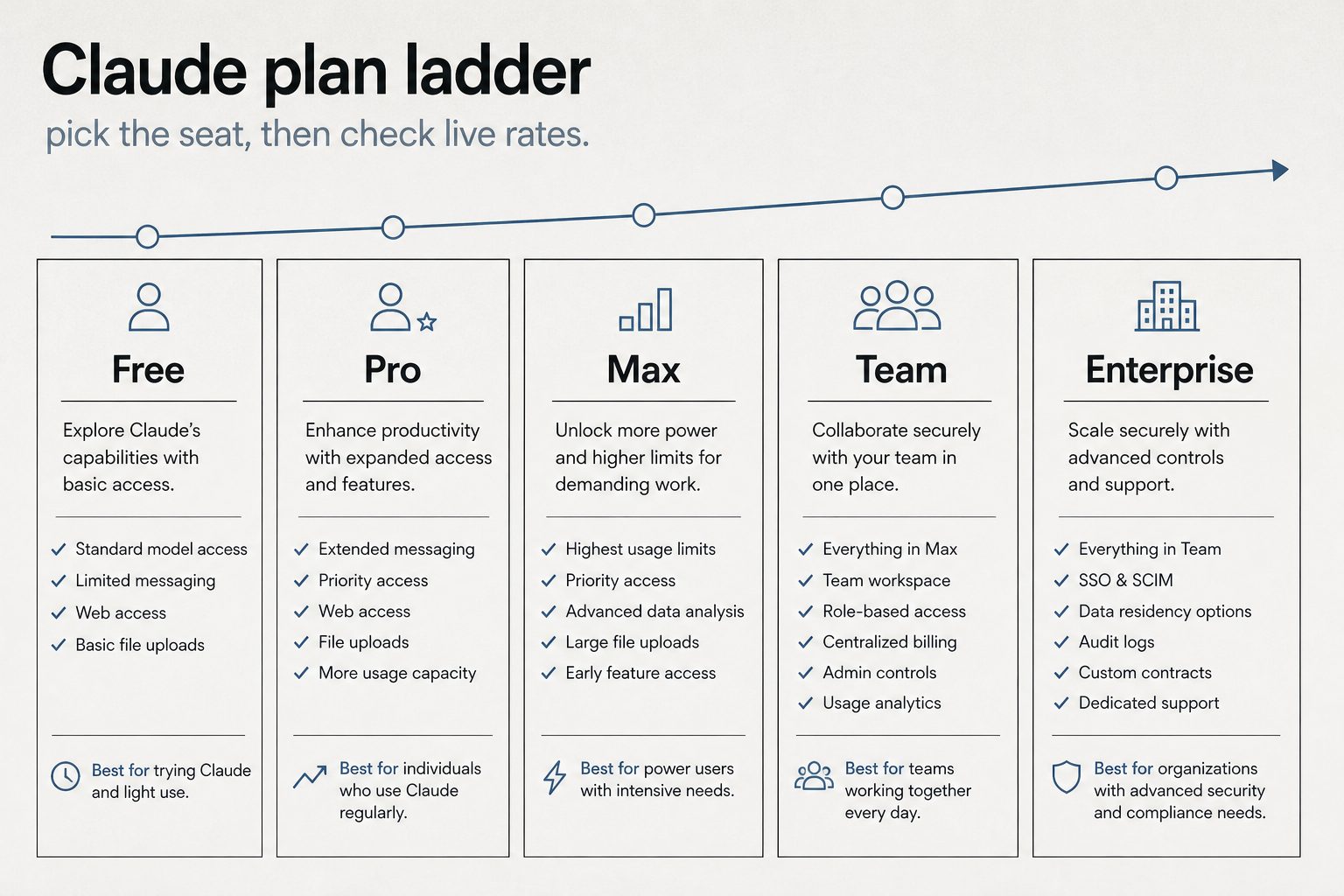
    Pro at $20/month ($17/month annual) includes Claude Code, Claude Cowork, unlimited Projects, Research mode, access to additional models, and Claude for Microsoft 365 and Outlook. The usage allowance is described as “more usage” compared to Free — in practice, this means you can have sustained conversations throughout a workday without hitting limits under normal use. Most professionals who use Claude as a daily tool — a few hours of active conversation per day — find Pro sufficient.

    What Max Adds

    Max comes in two tiers. The $100/month tier gives approximately 5x the usage of Pro. The $200/month tier gives approximately 20x. Beyond the usage multiplier, Max adds three concrete features: higher output limits for all tasks (longer responses, more complex code generation), early access to advanced Claude features before they reach Pro users, and priority access during high-traffic periods (you skip the queue).

    Who Actually Needs Max

    Heavy Claude Code users: If you spend 4+ hours per day actively using Claude Code for development — not just coding, but running extended agent sessions, multi-file refactoring, and complex debugging — you’ll likely hit Pro limits. Max 5x removes this friction. Content production teams: If you’re producing 10+ pieces of content per day through Claude, the usage adds up fast. Researchers and analysts: Extended research sessions with multiple deep-dive conversations consume significant tokens. Anyone who hits Pro limits regularly: If you see the “usage limit reached” message more than once or twice per week, Max pays for itself in recovered productivity.

    Who Should Stay on Pro

    Most individual professionals: If you use Claude for 1-3 hours per day with normal conversation patterns, Pro is plenty. Occasional users: If Claude is one of many tools in your workflow rather than the central one, Pro is more than enough. Budget-conscious users: At $20/month, Pro delivers extraordinary value. The jump to $100/month should be justified by measurable productivity gains. Users who haven’t hit Pro limits: If you’ve never seen the usage limit message, you don’t need Max.

    The Math on Max

    Max 5x costs $80/month more than Pro. If that additional usage saves you 2+ hours per week of productivity (waiting for limits to reset, or time spent on tasks you could have delegated to Claude), and your time is worth $40+/hour, Max pays for itself. Max 20x at $200/month ($180 more than Pro) needs to save roughly 4.5 hours/week to break even at $40/hour. The early access and priority features are hard to quantify financially — they matter most for users who need Claude reliably during peak demand.

    A Better Strategy Than Max

    Before upgrading to Max, consider whether your usage patterns can be optimized on Pro. Use Projects to maintain context instead of repeating background in every conversation. Be concise in prompts — verbose prompts consume more tokens. Use the appropriate model (Haiku for simple tasks, Sonnet for standard work, Opus for complex reasoning). Close conversations you’re done with rather than continuing indefinitely. If you’re hitting limits despite these optimizations, Max is the right move.

    Frequently Asked Questions

    Is Claude Max worth $100 a month?

    If you regularly hit Pro usage limits — especially heavy Claude Code users, content producers, or researchers — Max pays for itself in recovered productivity. If you’ve never hit Pro limits, stay on Pro.

    What is the difference between Max 5x and Max 20x?

    Max 5x ($100/month) gives 5x the usage of Pro. Max 20x ($200/month) gives 20x. Both include higher output limits, early feature access, and priority. Most users who need Max find 5x sufficient.

    Can I switch between Pro and Max?

    Yes. You can upgrade from Pro to Max or downgrade from Max to Pro at any time. Changes take effect on the next billing cycle.

    Does Max include Claude Code?

    Yes. Both Pro and Max include Claude Code. Max gives you more usage capacity for Claude Code sessions.

  • Claude for Content Creation: How to Use AI for Writing, SEO, and Marketing in 2026

    Claude for Content Creation: How to Use AI for Writing, SEO, and Marketing in 2026

    Claude has become a core tool for content teams — not as a replacement for human writers, but as a force multiplier that changes what’s possible with limited resources. This guide covers the practical workflows that professional content creators, SEO specialists, and marketing teams use with Claude in 2026, including where it excels, where it falls short, and how to integrate it into a production content operation.

    Blog Posts and Long-Form Content

    Claude excels at drafting long-form content when given proper direction. The key is providing a detailed brief — not just a topic, but the target keyword, the audience, the desired structure, the tone, competing content to differentiate from, and any specific data or examples to include. A well-briefed Claude request produces a first draft that’s 70-80% of the way to publishable, versus a vague request that produces generic filler.

    Best practices for blog production: write a content brief first (or use Claude to help write one), include your brand voice guidelines in a Project, specify the exact structure you want (H2s and H3s), request specific word counts, and always edit the output for accuracy, originality, and brand alignment. Never publish AI-generated content without human review — this is especially important for factual claims, statistics, and technical accuracy.

    SEO Content Optimization

    Claude can analyze existing content for SEO improvements — identifying missing keywords, suggesting heading structure changes, improving meta descriptions, and recommending internal linking opportunities. Feed Claude your target keyword, your current content, and competitor content, and ask for specific optimization recommendations. Claude can also generate FAQ sections with structured data markup, which directly targets featured snippets and People Also Ask placements.

    For new content, Claude can research keyword clusters, identify search intent, and draft content structured for both traditional SEO and emerging AI search optimization (AEO/GEO). The combination of web search capability and content generation means Claude can research a topic and draft optimized content in a single session.

    Email Marketing

    Claude handles email marketing content effectively — subject line variations, body copy, CTAs, and nurture sequences. The workflow that works best: share your product/service details and audience information in a Project, then request specific email types (welcome sequence, promotional, re-engagement, newsletter). Claude can generate multiple variations for A/B testing and adapt tone for different segments.

    Social Media Content

    Claude can repurpose long-form content into social media posts tailored for different platforms — LinkedIn articles and thought leadership posts, Twitter/X threads, Instagram captions, and Facebook updates. Provide the source content and specify the platform, tone, and any hashtag or formatting requirements. Claude adapts naturally between professional (LinkedIn), conversational (Twitter), and visual-caption (Instagram) styles.

    Content Strategy and Planning

    Beyond individual pieces, Claude can help with content strategy — editorial calendar planning, content gap analysis, persona development, and competitive content auditing. Upload your existing content inventory, share your business goals and target audience, and ask Claude to identify gaps, suggest topics, and prioritize based on potential impact. This is especially powerful with web search enabled, allowing Claude to analyze competitor content in real-time.

    Quality Control and Accuracy

    AI-generated content requires human quality control. Every piece should be checked for factual accuracy (especially statistics, dates, and specific claims), brand voice consistency, originality (run through plagiarism detection), legal compliance (disclaimers, disclosures), and genuine value to the reader. The biggest risk with AI content is not that it’s bad — it’s that it’s competent but generic. Human editors should push for the specific insights, examples, and perspectives that make content genuinely useful rather than just technically correct.

    Frequently Asked Questions

    Can Claude write SEO content?

    Yes. Claude can draft keyword-optimized content, generate meta descriptions, create FAQ sections with schema markup, and analyze content for SEO improvements. Human review for accuracy and originality is essential.

    Should I use Claude to write my entire blog?

    Use Claude as a drafting and optimization tool, not a hands-off content factory. The best results come from human-directed Claude drafts that are then edited for accuracy, brand voice, and genuine insight.

    Can Google detect AI-written content?

    Google has stated it focuses on content quality regardless of how it’s produced. The key is creating content that’s helpful, accurate, and provides genuine value — whether written by humans, AI, or both.

    How much content can Claude produce per day?

    On a Pro plan, a content professional can realistically produce 5-10 well-researched, edited articles per day with Claude assistance — compared to 1-2 without it. The bottleneck shifts from writing to editing and quality control.

  • Claude MCP (Model Context Protocol): What It Is, How It Works, and Why Developers Care

    Claude MCP (Model Context Protocol): What It Is, How It Works, and Why Developers Care

    Model Context Protocol (MCP) is an open standard created by Anthropic that lets Claude connect to external tools, data sources, and services. Instead of copying data into Claude manually, MCP gives Claude structured access to the tools you already use — databases, APIs, project management platforms, file systems, and more. MCP has become one of the most important developments in the AI ecosystem in 2026, and understanding it is increasingly essential for developers and technical teams.

    What MCP Actually Does

    At its core, MCP is a protocol — a standardized way for AI models to communicate with external services. Think of it like how HTTP standardized web communication or how SQL standardized database queries. MCP standardizes how AI assistants request and receive data from external tools. Before MCP, connecting Claude to a database required custom integration code. With MCP, you configure an MCP server that speaks the protocol, and Claude can query the database through that server using a standardized interface.

    The Architecture: Hosts, Clients, and Servers

    MCP has three components. The host is the application where Claude runs (the desktop app, Claude Code, or a custom application). The client is the MCP client built into Claude that manages connections to MCP servers. The server is the service that provides tools, data, or capabilities to Claude. MCP servers expose three types of primitives: tools (actions Claude can take, like querying a database or creating a Jira ticket), resources (data Claude can read, like file contents or documentation), and prompts (pre-built interaction patterns).

    Practical Examples

    A Notion MCP server lets Claude read and write Notion pages and databases directly. A PostgreSQL MCP server lets Claude query your database. A Slack MCP server lets Claude read channels and send messages. A GitHub MCP server lets Claude interact with repositories, issues, and pull requests. A Sentry MCP server lets Claude access error tracking and debugging data. These aren’t hypothetical — they’re production tools that teams use daily.

    Local vs Remote MCP Servers

    MCP servers can run locally on your machine or remotely as hosted services. Local MCP servers run alongside the Claude desktop app and have access to your local environment — file system, local databases, development tools. They use the stdio transport (standard input/output) and require no network configuration. Remote MCP servers run as web services and are accessed over the network using Streamable HTTP or Server-Sent Events (SSE) transports. Remote servers can be shared across teams and don’t require local installation.

    Token Cost Considerations

    An important practical consideration: MCP tools add tokens to every conversation turn. Each configured MCP server’s tool descriptions are included in Claude’s context, consuming input tokens. If you have 10 MCP servers with 5 tools each, that’s 50 tool descriptions included in every request — potentially thousands of tokens per turn. Best practices include only connecting the MCP servers you actively need, using scoped configurations to limit which tools are available in which contexts, and monitoring your token usage to identify MCP-related costs.

    Why Developers Care

    MCP matters because it transforms Claude from a standalone chatbot into a connected agent. Without MCP, Claude can only work with information you paste into the conversation. With MCP, Claude can pull real-time data, take actions in external systems, and operate as part of your existing toolchain. For development teams, MCP means Claude Code can interact with your entire development stack — version control, CI/CD, error tracking, documentation, project management — through a single standardized interface.

    Getting Started with MCP

    The fastest path is to install a pre-built MCP server for a tool you already use. The Claude desktop app’s settings include MCP server configuration. Add a server definition (the server command and its arguments), restart Claude, and the tools become available in your conversations. For custom integrations, Anthropic provides SDKs for building MCP servers in Python and TypeScript. The MCP specification is open — anyone can build a server for any tool.

    Frequently Asked Questions

    What is Claude MCP?

    MCP (Model Context Protocol) is an open standard that lets Claude connect to external tools and data sources — databases, APIs, file systems, and more — through a standardized interface.

    Is MCP free to use?

    MCP itself is free and open. MCP servers may be free (open source) or paid (commercial). The token costs from MCP tool descriptions are included in your regular Claude usage or API billing.

    Do I need to be a developer to use MCP?

    Basic MCP server setup requires some technical comfort — editing configuration files and running commands. Pre-built connectors in the Claude interface are simpler. Building custom MCP servers requires programming knowledge.

    Can MCP be used with other AI models?

    MCP is an open protocol. While Anthropic created it for Claude, other AI platforms and tools have begun adopting MCP as a standard for tool integration.

  • Anthropic Safety and Alignment: Why Claude Is Built Differently and What It Means for Users

    Anthropic Safety and Alignment: Why Claude Is Built Differently and What It Means for Users

    Anthropic is an AI safety company that happens to build a product, not a product company that happens to care about safety. That distinction matters. Every design decision in Claude — from how it handles sensitive topics to how it processes your data — traces back to Anthropic’s safety-first philosophy. This guide explains what that philosophy is, how it works in practice, and what it means for you as a user.

    Constitutional AI: How Claude Learns to Behave

    Claude is trained using a methodology called Constitutional AI (CAI). Instead of relying solely on human feedback to determine what’s helpful and harmless, Claude is given a set of principles — a “constitution” — that guides its behavior. These principles cover helpfulness, harmlessness, and honesty. During training, Claude evaluates its own outputs against these principles and self-corrects. This produces more consistent behavior than pure human feedback, which can be noisy and contradictory.

    In practice, this means Claude tends to be thoughtful about edge cases, transparent about uncertainty, and willing to push back when a request might lead to harmful outcomes — while still being maximally helpful within safe boundaries.

    The Responsible Scaling Policy

    Anthropic’s Responsible Scaling Policy (RSP) is a framework that ties safety testing to capability levels. As models become more capable, the RSP requires more rigorous safety evaluations before deployment. The policy defines specific capability thresholds and the safety measures required at each level. This means Anthropic won’t release a model that’s significantly more capable without also implementing significantly more safety infrastructure. The RSP has been publicly documented and updated as the company has learned from deployments.

    Interpretability Research

    Anthropic invests heavily in interpretability — the science of understanding what happens inside neural networks. While most AI companies treat their models as black boxes, Anthropic’s research team publishes work on identifying how models store and process information, what individual neurons and circuits represent, and how to detect when a model might be reasoning in unexpected ways. This research directly informs safety work: if you can see inside the model, you can better identify and prevent harmful behavior.

    Data Handling and Privacy

    Anthropic’s data handling practices reflect its safety orientation. On Free and Pro plans, users can opt out of having their data used for model training. On Team and Enterprise plans, content is not used for training by default — this is an opt-out-by-default approach, not opt-in. Enterprise plans add custom data retention controls, so organizations can specify exactly how long their data is stored. The HIPAA-ready Enterprise option provides additional safeguards for healthcare data.

    Corporate Structure as Safety Mechanism

    Anthropic’s public benefit corporation (PBC) structure and Long-Term Benefit Trust (LTBT) are designed as institutional safeguards. The PBC structure legally requires balancing profit with public benefit. The LTBT can intervene if the company’s actions deviate from its safety mission. These aren’t just statements of intent — they’re legal mechanisms with real enforcement power.

    What This Means for Users

    For individual users, Anthropic’s safety approach means Claude is less likely to produce harmful, misleading, or biased content. It’s more transparent about what it doesn’t know. It handles sensitive topics with care rather than either refusing entirely or engaging recklessly. For business users, it means enterprise-grade security features, data handling that meets regulatory requirements, and a vendor whose incentive structure is aligned with long-term reliability rather than short-term growth at any cost.

    Frequently Asked Questions

    What is Constitutional AI?

    Constitutional AI is Anthropic’s training methodology where Claude is given a set of principles (a “constitution”) and learns to evaluate and correct its own outputs against those principles, producing more consistent helpful and safe behavior.

    Does Claude use my data for training?

    On Free/Pro plans, you can opt out. On Team and Enterprise plans, your data is not used for training by default.

    Why does Claude sometimes refuse requests?

    Claude’s safety training teaches it to decline requests that could lead to harmful outcomes. It aims to be maximally helpful within safe boundaries. If Claude refuses something you think is reasonable, you can rephrase or provide more context.

    Is Anthropic more safety-focused than OpenAI?

    Anthropic was founded specifically as an AI safety company and has embedded safety into its corporate structure through PBC status and the LTBT. Both companies invest in safety, but Anthropic’s organizational design makes safety central rather than supplementary.

  • Claude AI Alternatives in 2026: ChatGPT, Gemini, Perplexity, and How They Actually Compare

    Claude AI Alternatives in 2026: ChatGPT, Gemini, Perplexity, and How They Actually Compare

    If you’re evaluating Claude AI, you’re probably also looking at the alternatives. The AI assistant market in 2026 has matured — each major platform has developed distinct strengths rather than trying to be identical. This guide compares Claude against ChatGPT, Gemini, Perplexity, Grok, Microsoft Copilot, and other options on the metrics that actually matter: pricing, capability, reliability, and fit for specific use cases.

    Claude vs ChatGPT

    The most common comparison. Both offer free tiers and $20/month Pro/Plus plans. Claude’s strengths are long-form writing quality, instruction following, code generation with Claude Code, and the 1M token context window. ChatGPT’s strengths are its ecosystem (plugins, GPT store, DALL-E integration), broader brand recognition, and strong general-purpose capabilities. For developers, the choice often comes down to Claude Code vs ChatGPT’s code interpreter and canvas features. For writers, Claude generally produces more nuanced, less formulaic output. API pricing is competitive between the two platforms at comparable model tiers.

    Claude vs Google Gemini

    Gemini’s key advantage is integration with the Google ecosystem — Gmail, Docs, Drive, Search, and Google Workspace. If your organization runs on Google, Gemini fits naturally into existing workflows. Claude’s advantages are stronger reasoning on complex tasks, better code generation, and more robust enterprise features (SCIM, audit logs, HIPAA). Gemini offers a generous free tier and is deeply integrated into Android. Claude is available on Google Cloud through Vertex AI, so organizations can use both within the Google ecosystem.

    Claude vs Perplexity

    Perplexity occupies a different niche — it’s primarily a search and research tool, not a general-purpose assistant. Perplexity excels at answering factual questions with cited sources, making it excellent for research and fact-checking. Claude is better for creative work, coding, analysis, and extended projects. Many professionals use both: Perplexity for research and fact-finding, Claude for drafting, analysis, and execution.

    Claude vs Microsoft Copilot

    Microsoft Copilot (powered by OpenAI) is embedded throughout Microsoft 365 — Word, Excel, PowerPoint, Teams, Outlook. If your organization is Microsoft-centric, Copilot has the integration advantage. However, Claude now offers Claude for Microsoft 365 and Outlook, giving it a presence in the Microsoft ecosystem as well. For standalone AI capabilities, Claude generally outperforms Copilot in reasoning, writing quality, and code generation.

    Claude vs Grok

    Grok, built by xAI, is integrated with the X (formerly Twitter) platform and has access to real-time social media data. Grok’s strength is current events and social sentiment analysis. Claude’s strengths are safety, reliability, enterprise features, and broader use case coverage. Grok appeals to users who want an AI with a less restricted personality and real-time social context.

    Pricing Comparison

    Free tiers: Claude, ChatGPT, Gemini, Perplexity, and Copilot all offer free access. Individual paid plans: Claude Pro $20/month, ChatGPT Plus $20/month, Gemini Advanced $19.99/month (often bundled with Google One), Perplexity Pro $20/month. Claude’s Max plan ($100-200/month) has equivalents in ChatGPT Pro ($200/month). At the API level, pricing varies by model class but is broadly competitive across major providers.

    How to Choose

    Choose Claude if you prioritize writing quality, code generation, enterprise security, and long-context processing. Choose ChatGPT if you want the broadest ecosystem of plugins and integrations. Choose Gemini if you’re deep in the Google ecosystem. Choose Perplexity if your primary need is research with cited sources. Choose Copilot if Microsoft 365 integration is your top priority. Many organizations use multiple AI tools — they’re not mutually exclusive.

    Frequently Asked Questions

    Is Claude AI better than ChatGPT?

    Claude excels at long-form writing, instruction following, and code generation. ChatGPT has a larger ecosystem of plugins and integrations. Neither is universally “better” — the right choice depends on your use case.

    What is the best free AI chatbot in 2026?

    Claude, ChatGPT, and Gemini all offer strong free tiers. Claude’s free tier is notable for including web search, code execution, memory, and extended thinking at no cost.

    Can I use Claude and ChatGPT together?

    Yes. Many professionals use multiple AI tools for different tasks. At the API level, platforms like OpenRouter let you route requests to different models based on the task.

    Which AI has the largest context window?

    As of June 2026, both Claude (Opus and Sonnet) and Gemini support 1M+ token context windows. Claude’s 1M context is available at flat-rate pricing with no surcharge.