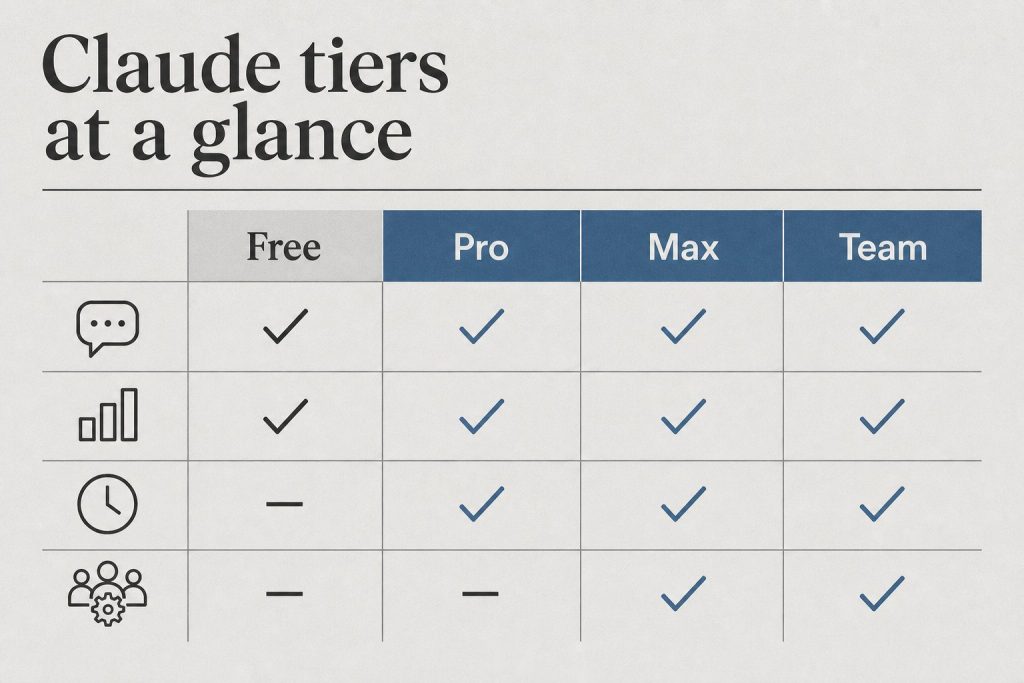
If you’ve been running Claude Code’s claude -p command in production, kicking off background jobs through the Claude Agent SDK, or wiring the Agent SDK into a third-party app, the way you pay for that work is about to change.
On June 15, 2026, Anthropic split Claude subscription billing into two separate buckets: one for the things you do interactively (Claude.ai chat, Claude Code in your terminal, Claude Cowork), and a brand-new credit pool that only covers programmatic, autonomous, and SDK-driven work.
This is a meaningful shift. It’s also one of the most under-explained changes Anthropic has made to subscription pricing this year. If you don’t know about it after June 15, 2026, you can find yourself with stopped automations, surprise overage charges, or both.
This guide walks through exactly what’s changing, what the credits cover, what they don’t cover, what each plan gets, and how to plan for it — this change is now live.
Agent SDK Monthly Credit by Plan (June 2026)
Agent SDK monthly credit by plan — no sticky dollars.
Claude subscription plans (Pro, Max, Team, Enterprise) currently have one shared usage limit. Whether you’re chatting with Claude on the web, using Claude Code in your terminal, or running unattended jobs through the Agent SDK, all of that draws from the same plan-level allowance.
On June 15, 2026, Anthropic separated those two modes of use:
Bucket 1 — Interactive use: Claude.ai chat, Claude Code in the terminal/IDE, Claude Cowork. Uses your existing subscription usage limits, exactly as before.
Bucket 2 — Agent SDK monthly credit: A separate, dollar-denominated credit pool. Funds the Claude Agent SDK, the claude -p non-interactive command, the Claude Code GitHub Actions integration, and any third-party app that authenticates via the Agent SDK.
The two buckets do not commingle. Agent SDK work cannot draw from your interactive subscription limit, and interactive use cannot draw from your Agent SDK credit. If you exhaust your Agent SDK credit and don’t have extra usage enabled, your background jobs simply stop until the credit refreshes the following month.
What each plan gets
What each plan gets.
Here is the official monthly Agent SDK credit by plan, as published in Anthropic’s Help Center (verified June 9, 2026):
Pro: $20/month
Max 5x: $100/month
Max 20x: $200/month
Team — Standard seats: $20/month per seat
Team — Premium seats: $100/month per seat
Enterprise — usage-based: $20/month
Enterprise — seat-based Premium seats: $200/month
Important detail buried in the announcement: Enterprise seat-based plans on Standard seats are not eligible to claim the Agent SDK credit at all. If you administer one of those plans and have engineers running automation, that’s a gap to plan around.
What the credit covers (and what it doesn’t)
Anthropic’s documentation is specific about what counts as Agent SDK use, so this is worth reading carefully.
Covered by the credit:
Claude Agent SDK usage in your own Python or TypeScript projects
The claude -p command in Claude Code (non-interactive mode)
The Claude Code GitHub Actions integration
Third-party apps that authenticate with your Claude subscription through the Agent SDK
Not covered (these still draw from your normal subscription limits):
Interactive Claude Code in your terminal or IDE
Claude conversations on web, desktop, or mobile
Claude Cowork
Other features that draw from extra usage
The plain-English version: if a human is sitting at the keyboard waiting for the response, that’s interactive use. If a script kicks off the work and the result lands somewhere else later, that’s Agent SDK use.
How the credit actually works in practice
Five mechanics matter for budgeting:
1. Per-user, never pooled. Each eligible user on a Team or Enterprise plan claims their own credit. There is no organization-level pool. Credits cannot be transferred between users, shared, or stockpiled across accounts.
2. Refreshes monthly with the billing cycle. Whatever you don’t spend in a given month evaporates. Unused credits do not roll over.
3. One-time opt-in. You claim your credit through your Claude account once. After that initial claim, it refreshes automatically each cycle.
4. Drains first, before any other source. When an Agent SDK request fires, it pulls from your monthly credit before any other paid usage source kicks in. This is good — it means you actually use what you’ve already paid for.
5. After the credit, requests either flow to extra usage or stop entirely. When your monthly credit hits zero, additional Agent SDK requests draw from extra usage at standard API rates — but only if you have extra usage enabled. If you haven’t enabled extra usage, your Agent SDK requests stop until the next refresh.
That last point is the one most likely to bite teams. If you’re running a daily cron job through the Agent SDK and you don’t enable extra usage, the day your credit runs out is the day your automation goes silent — without obvious warning if you’re not watching the credit balance.
Why Anthropic is doing this
Anthropic frames this as separating individual experimentation from production automation. From the Help Center documentation: “The Agent SDK monthly credit is sized for individual experimentation and automation. Teams running shared production automation should use the Claude Developer Platform with an API key for predictable pay-as-you-go billing.”
The translation: a single user’s $20 or $200 of Agent SDK credit was never going to cover a real production workload anyway. Anthropic is making explicit what was already true under the hood — that a subscription was a chat product, and serious unattended automation belongs on the API.
What this also does, structurally, is protect interactive subscription users from getting their experience degraded by heavy autonomous workloads sharing the same pool. If you’ve ever hit a subscription rate limit during a normal chat session because something else on your account was burning tokens in the background, this change removes that failure mode.
What you should do now that the June 15, 2026 change is in effect
If you run any unattended Claude work (the most important group):
Audit every place your subscription is being used by something other than a human at a keyboard. The big four to check:
claude -p commands in cron jobs, CI pipelines, or shell scripts
Claude Code GitHub Actions workflows
Custom Python or TypeScript projects using the Agent SDK
Any third-party tool that asks for “Sign in with Claude” — those go through the Agent SDK
For each one, estimate dollar consumption per day at standard API rates. If the total approaches or exceeds your plan’s Agent SDK monthly credit, you have three options: enable extra usage to allow overage, move that workload to a Claude Developer Platform API key (more predictable for sustained loads), or downsize the workload itself.
If you administer a Team or Enterprise plan:
Eligible users on your team will receive an email with claim instructions after June 15, 2026, 2026. You don’t need to take action yourself, but it’s worth communicating internally that the credits are per-user, can’t be pooled, and that any team-wide automation should be on an API key, not on a subscription seat.
If you’re a solo Pro or Max user who only chats with Claude:
You probably don’t need to do anything. The split affects you only if you’re running scripts or background jobs. If you’ve never used claude -p or the Agent SDK directly, your interactive usage limits don’t change.
What happens to my Agent SDK usage on June 14 vs. June 15, 2026?
Before June 15, Agent SDK and claude -p usage counts against your subscription’s general usage limits. Starting June 15, that same usage no longer touches your subscription limits and instead draws from the new Agent SDK monthly credit pool. Your interactive Claude Code, web chat, and Cowork usage continues to work exactly as before.
Can I share the Agent SDK credit across my team?
No. Per Anthropic’s official documentation, “Credits are per-user. Each eligible user on your team claims their own credit. Credits can’t be pooled, transferred, or shared across the organization.” If your team needs shared automation budget, the Claude Developer Platform with an API key is the recommended path.
Do unused Agent SDK credits roll over?
No. Unused credits expire at the end of each billing cycle and do not carry into the next month.
What happens if I run out of Agent SDK credit mid-month?
If you have extra usage enabled, additional requests flow to extra usage at standard API rates (the same per-token prices listed in Anthropic’s pricing documentation). If extra usage is not enabled, your Agent SDK requests stop until your credit refreshes at the start of the next billing cycle.
Does this affect Claude API customers using their own API key?
No. If you authenticate with the Agent SDK using a Claude Developer Platform API key, nothing changes. Pay-as-you-go billing continues, and you do not receive an Agent SDK monthly credit. The credit only applies to subscription-authenticated Agent SDK use.
Is interactive Claude Code in my terminal still covered by my subscription?
Yes. Interactive Claude Code (typing commands and getting responses in your terminal or IDE) continues to draw from your subscription usage limits exactly as before. Only the non-interactive claude -p mode and direct Agent SDK calls move to the new credit pool.
What’s the dollar value of the credit on each plan?
As of October 7, 2026 (Pacific): Pro $20, Max 5x $100, Max 20x $200, Team Standard $20/seat, Team Premium $100/seat, Enterprise usage-based $20, Enterprise seat-based Premium $200. Enterprise seat-based Standard seats do not receive a credit.
Every factual claim in this article was triple-checked across the following sources, all reviewed on May 15, 2026:
Anthropic Help Center: Use the Claude Agent SDK with your Claude plan (primary source for credit amounts, eligibility, and mechanics)
Anthropic Pricing Documentation: docs.claude.com/en/docs/about-claude/pricing (primary source for standard API rates and tool-use pricing)
Independent press coverage from The New Stack, The Decoder, and InfoWorld confirming the announcement and its scope
If you spot a number that’s drifted out of sync with Anthropic’s current published rates, treat the official documentation as authoritative. The pricing surface around Claude is moving quickly in 2026, and we date-stamp specifics so readers know which facts to re-verify.
Claude Code pricing has stopped being a clean sticker number and started being a question of which ceiling you hit first. There is a $20 plan, a $100 plan, and a $200 plan — and underneath all three sits a 5-hour rolling window, a weekly active-hours cap added in August 2025, and a per-model multiplier that quietly makes Opus 5.5 the most expensive thing you can do inside the terminal. If you came looking for the right plan, the honest answer is: it depends on whether you are mostly a Sonnet operator or you live in Opus.
Pro — $20/month. Access to Claude Code in the terminal, web, and desktop, with both Sonnet 5.5 and Opus 5.5 available. The practical envelope is about 44,000 tokens per 5-hour window and roughly 40–80 weekly active hours on Sonnet, depending on session concurrency. This is the plan for someone running Claude Code a few hours a day on focused work — refactors, scoped feature builds, debugging passes — not someone leaving an agent running while they eat lunch.
Max 5x — $100/month. Five times the Pro envelope, plus priority during peak demand. The window allocation lands around 88,000 tokens per 5-hour block. This is the tier where you stop thinking about token budgets during a single working day and start thinking about them across a whole week. Picked correctly, it is the cheapest way to use Claude Code as your primary IDE companion without flipping over to API billing.
Max 20x — $200/month. Twenty times Pro — about 220,000 tokens per window — which translates to roughly 480 Sonnet-hours or about 40 Opus-hours per week before the weekly cap kicks in. Real-world reports from early 2026 had $200/month users watching single Opus prompts eat 10–20% of their daily allocation; Anthropic publicly acknowledged the problem, expanded capacity, and doubled the 5-hour rate limit for Pro and Max accounts. If you are running Claude Code across multiple repos all week and reaching for Opus on the hard problems, this is the tier that stops you from staring at a rate-limit wall.
The API, as a sanity check
The API, as a sanity check.
If you want a sanity check on whether the subscription math works, price the same workload against the API:
Claude Haiku 4.5 (claude-haiku-4-5-20251001): $1.00 input / $5.00 output per million tokens
Claude Sonnet 5.5 (claude-sonnet-5-5): $2.00 input / $10.00 output per million tokens
Claude Opus 5.5 (claude-opus-5-5): $4.00 input / $20.00 output per million tokens
Prompt caching is the lever almost nobody uses correctly. Cache writes cost 1.25x input price for the 5-minute TTL or 2.0x for the 1-hour TTL, but cache reads cost 0.05x — a 95% discount on every subsequent request that hits the same context. If your .clauderules file, project map, and the file you are editing are all stable for an hour, the bill on a long pairing session can drop by an order of magnitude. The Batch API knocks another 50% off both directions for asynchronous workloads, which is worth knowing if you are running large refactor sweeps.
One trap on Opus 4.7 specifically: the model uses a new tokenizer that inflates token counts by up to 35% on identical text compared to Opus 4.6. The headline price did not change, but your effective spend per request did — sometimes by nothing, sometimes by a third, depending on the content. If you migrated from Opus 4.6 and your bill went up without your prompt patterns changing, that is the reason.
How to actually choose
How to actually choose.
The cleanest way to pick a plan is to first decide your model mix, then your weekly hours.
If you are mostly a Sonnet operator — long agentic runs, multi-file edits, codebase Q&A, with Opus only reached for on the architectural questions — Pro at $20 is plausible up to about 5–8 hours of focused use per day, Max 5x covers most full-time individual developers, and Max 20x is overkill unless you are running multiple sessions in parallel.
If you live in Opus — long-horizon agentic work, hard refactors across many files, anything where you would rather have one good attempt than three Sonnet retries — Pro will frustrate you within two weeks, Max 5x is the realistic floor, and Max 20x is the only tier that gives you a defensible Opus envelope without bouncing over to API billing.
And if you are running Claude Code across multiple repos all week, leaving agents to grind on tasks while you do other things, Max 20x is the only subscription that holds up — and even then, the weekly cap is real. Use the API for the spillover and you will still come out cheaper than trying to brute-force a smaller plan.
The number that matters
One developer’s public report this year: roughly 10 billion tokens consumed across Claude Code over eight months. API metered cost would have exceeded $15,000. The same workload on Max at $100/month for the same window came in around $800 — about 93% cheaper. That is the gap that makes the subscription model worth taking seriously, even when the rate limits feel arbitrary. The $200 tier is not a vanity number; it is the price Anthropic charges to stop being a meaningful constraint on your workflow.
The right way to read Claude Code pricing in October 2026 is not to ask which plan is cheapest. It is to ask which plan is the cheapest one that disappears — the one that stops appearing in your day. For most full-time developers reaching for Opus regularly, that plan is Max 20x. For everyone else, Max 5x is the first plan that actually gets out of your way.
Sonnet 4.6 ($3 / $15), Opus 4.7 ($5 / $25), and Opus 4.8 ($5 / $25) remain on the legacy list. Do not start new work on them. Opus 5.5 fast mode is up to 2.5× faster at 2× standard pricing.
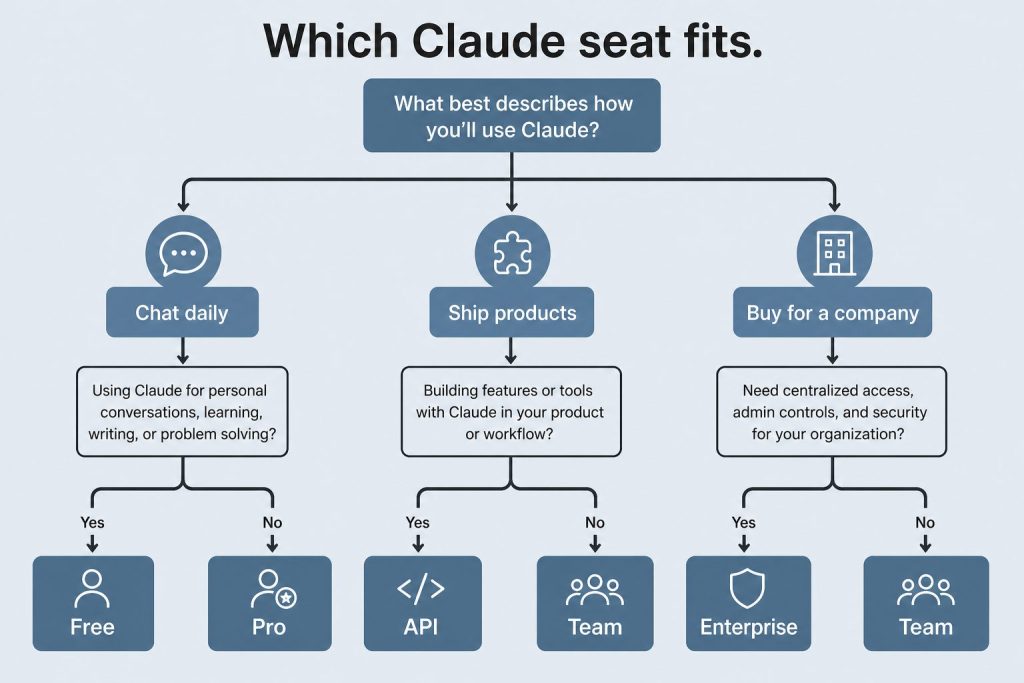
Which seat
Light Code: Pro.
Several hours a day: Max 5×.
All-day / long agents: Max 20×.
2–150 people, one bill: Team. Premium if those seats burn the weekly cap.
SSO / SCIM / audit and usage that should scale: Enterprise.
Unattended pipelines: console API key with a spend cap.
If you are a developer in Singapore or China trying to use Claude, you have already noticed that the standard instructions don’t quite apply to you. The console.anthropic.com onboarding assumes a US billing address. The latency numbers assume you are pinging from a US data center. And for developers in mainland China, the direct API doesn’t work at all without a workaround.
This is a practical guide to what actually works in 2026, written for the Asian developer market that is increasingly one of Claude’s most active audiences.
Singapore: What Works Directly
Singapore — what works directly.
Singapore is a fully supported country for the Anthropic API. You can create an account at console.anthropic.com, add a payment method, and generate API keys with no restrictions. Most major international credit cards work without issues. If you are at a company with a Singapore entity, Anthropic accepts international wire transfers for enterprise contracts.
Latency from Singapore to Anthropic’s US API endpoints typically runs 180–250ms round-trip depending on your ISP and the model you are calling. For most application use cases this is acceptable. For latency-sensitive real-time applications — voice interfaces, live coding assistants — you will want to route through a closer compute layer, which is where Vertex AI becomes relevant.
Vertex AI: The Regional Solution for Both Markets
Vertex AI — the regional solution for both markets.
Google Cloud’s Vertex AI hosts Claude models (Sonnet and Haiku tiers as of mid-2026) and has a data center in Singapore: asia-southeast1. This is the cleanest solution for developers in both Singapore and the broader Asia-Pacific region who want lower latency and enterprise-grade SLAs.
The practical difference: instead of calling api.anthropic.com, you call a Vertex AI endpoint scoped to asia-southeast1. Your tokens are processed in Singapore, not Virginia. For regulated industries — fintech, healthcare, legal — this also means your data doesn’t leave the region, which is a compliance requirement in several Singapore regulatory frameworks (MAS TRM guidelines being the primary one).
To get started with Claude on Vertex AI from Singapore:
Create a GCP project and enable the Vertex AI API
Request access to Claude models via the Vertex AI Model Garden (approval is typically same-day for Singapore accounts)
Set your region to asia-southeast1 in all API calls
Authenticate via a GCP service account rather than an Anthropic API key
The pricing on Vertex AI is comparable to direct Anthropic API pricing, with GCP committed use discounts available at higher volumes.
AWS Bedrock: The Other Regional Option
Amazon Bedrock also hosts Claude models and has a Singapore region (ap-southeast-1). If your infrastructure is already on AWS, this is often the simpler path. The setup mirrors Vertex AI: enable Bedrock in your AWS console, request Claude model access, and specify the Singapore region in your SDK calls.
The practical consideration: as of mid-2026, model availability on Bedrock sometimes lags behind the direct Anthropic API by a few weeks when new versions ship. If being on the latest Claude version immediately matters for your use case, the direct API or Vertex AI are more current.
China: The Honest Situation
China — the honest situation.
The direct Anthropic API is not accessible from mainland China without a VPN. Console.anthropic.com is not blocked at the DNS level in the same way Google is, but connectivity is unreliable and payment processing from Chinese-issued cards through Stripe (Anthropic’s payment processor) fails for most users.
The workarounds that Chinese developers are actually using in 2026:
VPN plus international card. Developers with access to a VPN and an international payment card (Hong Kong or Singapore bank account) use the direct API without issues. This is the most common setup among individual developers and small teams.
Hong Kong entity. Companies with a Hong Kong subsidiary or registered office use that entity for the Anthropic API account. Hong Kong is a fully supported region with no connectivity issues.
Third-party API proxies. Several API aggregators operating out of Hong Kong and Singapore re-sell Anthropic API access to mainland China developers. Quality and terms vary significantly — vet carefully before using in production.
Vertex AI via a non-China GCP account. Some development teams maintain a GCP account registered to a Singapore or Hong Kong entity, then call the Vertex AI Claude endpoint from within China via GCP’s global network. Google Cloud has limited but operational connectivity from within China through its global backbone. This is the most enterprise-appropriate solution for teams that need a compliant path.
Latency Reality Check by Access Method
Access Method
From Singapore
From China (with VPN)
Direct Anthropic API (us-east)
180–250ms
300–500ms+
Vertex AI (asia-southeast1)
30–60ms
150–300ms via GCP backbone
AWS Bedrock (ap-southeast-1)
25–55ms
Not directly accessible
Latency figures are representative ranges based on typical ISP routing. Your numbers will vary.
Payment and Billing Notes
For Singapore developers on the direct Anthropic API: Visa, Mastercard, and American Express issued by Singapore banks work reliably. PayNow and local payment rails are not supported — you need an international card.
For enterprise: Anthropic’s sales team handles invoiced billing for Singapore and other APAC markets. If you are spending meaningfully on the API, contact sales rather than running on a credit card — the invoiced route gives you better cost predictability and eliminates card limit friction.
The Bottom Line
If you are in Singapore, the direct API works and Vertex AI’s asia-southeast1 region gives you a lower-latency, compliance-friendly alternative worth evaluating for production workloads.
If you are in mainland China, the direct API requires a workaround. A Hong Kong entity plus Vertex AI is the cleanest enterprise path. For individual developers, VPN plus an international card is the practical reality.
The Asian developer market is using Claude at scale. The tooling is there — it just requires knowing which path to take from where you are sitting.
Based in Singapore or Asia-Pacific?
I can help you pick the right access path for your stack and region.
Email me your setup — direct API, Vertex AI, or Bedrock — and I’ll give you a straight answer on what makes sense.
Direct Answer (September 2026): Claude’s flagship models — Opus 5.5, Sonnet 5, and Fable 5.1 — each feature a 1,000,000-token context window (roughly 750,000 words), capable of ingesting entire codebases, financial filings, or multi-hundred-page document sets in a single prompt. Haiku 4.5 carries a 200,000-token window for lighter workloads.
Looking for quick answers? The FAQ version covers every common question directly.
Claude’s context window is one of those specs that sounds simple until you actually need to use it. “1 million tokens” means almost nothing without a frame of reference. This is the guide we wish existed when we started building on Claude — written from our own experience running it in production, with numbers pulled directly from Anthropic’s official documentation.
Quick Definition
The context window is Claude’s working memory for a conversation. It holds everything Claude can see and reason about at once: your messages, Claude’s responses, any documents you’ve shared, and system prompts. When the window fills up, earlier content drops out.
Current Context Window Sizes by Model (September 2026)
Current context window sizes by model.
These numbers come directly from Anthropic’s official models page, (last checked May 9, 2026; model names updated September 26, 2026). Model strings are exact API identifiers:
Model
API String
Context Window
Max Output
Claude Fable 5.1
claude-fable-5-1
1,000,000 tokens
128,000 tokens
Claude Opus 5.5
claude-opus-5-5
1,000,000 tokens
128,000 tokens
Claude Sonnet 5
claude-sonnet-5
1,000,000 tokens
64,000 tokens
Claude Haiku 4.5
claude-haiku-4-5-20251001
200,000 tokens
64,000 tokens
Fable 5.1, Opus 5.5, and Sonnet 5 all have the full 1M token context window. Haiku 4.5 is 200K. The key difference between Opus 5.5 and Sonnet 5 in this table is the max output — Opus 5.5 can write up to 128K tokens in a single response, Sonnet 5 caps at 64K.
What Does 1 Million Tokens Actually Hold?
Token counts are an abstraction. Here’s what 1 million tokens translates to in practical terms:
About 750,000 words of English text — roughly 10 full-length novels, or 1,500 average blog posts
A full mid-size codebase — a 50,000-line Python project with comments fits comfortably
Hours of meeting transcripts — a full workday of recorded calls, transcribed, fits in one context window
Multiple large documents simultaneously — 10 research PDFs at 30 pages each, all in the same conversation
Long conversation histories — hundreds of back-and-forth exchanges before anything starts dropping off
We’ve loaded entire Notion exports, full project histories, and multi-document research packs into a single Claude session. At 1M tokens, you’re unlikely to hit the ceiling in a normal working session. You hit it when you’re doing things like: loading your entire codebase plus documentation plus conversation history and then asking Claude to do a full architectural review.
Context Window vs. Memory: What’s the Difference?
Context window vs memory — what’s the difference?
This is where a lot of people get confused. The context window and memory are not the same thing:
Context window: What Claude can see right now, in this session. Once a session ends, it’s gone.
Memory (in claude.ai): A separate system that extracts and stores key information from past sessions. It surfaces relevant facts into future conversations as a snippet in the context.
Managed Agents memory stores: A developer-layer construct where agents maintain and update knowledge bases across sessions — distinct from both the context window and the consumer memory feature.
The 1M token context window is your working memory for one session. It doesn’t persist. Memory systems are what carry information across sessions — but they work by injecting a summary into the context window of the new session, not by giving Claude access to the full history.
Does a Bigger Context Window Mean Better Performance?
Mostly yes, with one important nuance. More context means Claude has more information to reason about, which generally produces better outputs for tasks that benefit from full context — code reviews, document synthesis, long-form writing, multi-document comparison.
The nuance: performance can degrade on tasks involving specific information buried deep in a very long context. This is sometimes called the “lost in the middle” problem — models tend to pay more attention to the beginning and end of a long context than the middle. Anthropic has worked on this with Claude’s architecture, and it performs well on long-context tasks, but it’s worth structuring important information at natural reference points rather than burying it in the middle of a 500-page document.
How We Actually Use the 1M Token Window
How we actually use the 1M token window.
We run Claude in production for content operations, site management, and agentic coding workflows. Here’s where the 1M context window makes a concrete difference in our work:
Full site audits: Loading every post from a WordPress site (200+ posts worth of content) into one session for comprehensive SEO analysis — without having to chunk and re-prompt
Cross-session context: Pasting in long Notion briefings, prior session transcripts, and the current task in one go. The window is large enough that we don’t have to decide what to leave out.
Codebase-wide reasoning: In Claude Code, having the full project context means Claude can make changes that account for how files interact rather than reasoning only about the current file
Multi-document synthesis: Research projects where we load 10-15 source documents and ask Claude to synthesize across them — something that was impossible at 100K context windows
The practical shift from 200K to 1M tokens wasn’t just “more room.” It changed what we could ask Claude to do in a single session.
Context Window on the API: Batch Output Extension
For API users: on the Message Batches API, Fable 5.1, Opus 5.5, and Sonnet 5 support up to 300K output tokens using the output-300k-2026-03-24 beta header. This is relevant for batch generation tasks where you need very long outputs — documentation generation, large codebases, book-length content.
Frequently Asked Questions
What is Claude’s context window in 2026?
Claude Fable 5.1, Claude Opus 5.5, and Claude Sonnet 5 all have 1,000,000 token (1M token) context windows as of September 2026. Claude Haiku 4.5 has a 200,000 token context window. These are the current generally available models.
How many pages can Claude read at once?
At 1M tokens, Claude can hold roughly 750,000 words of English text — equivalent to approximately 3,000 average pages. In practice, a typical 20-page PDF is roughly 10,000-15,000 tokens, so you could load 60-100 such documents in a single session before approaching the limit.
Does the context window reset between messages?
No — the context window accumulates across an entire conversation session. Every message you send and every response Claude gives adds to the total. The window doesn’t reset between individual messages; it resets when you start a new conversation.
What happens when Claude hits the context window limit?
When a conversation reaches the context window limit, earlier messages begin to drop out of the active context. Claude can no longer reference information from those earlier messages — it effectively forgets that part of the conversation. In the claude.ai interface, you’ll see a notification when you’re approaching the limit.
Is the 1M context window available on the free plan?
The model available to free plan users has access to the 1M context window. However, free plan usage limits mean long-context sessions hit rate limits faster than paid plans. The window is technically available, but sustained heavy use of it is more practical on paid tiers.
What’s the difference between Claude Opus 5.5 and Sonnet 5 context windows?
Both have the same 1M token input context window. The difference is max output: Opus 5.5 can generate up to 128,000 tokens in a single response; Sonnet 5 caps at 64,000 tokens. For most tasks this distinction doesn’t matter, but for very long document generation or large code outputs, Opus 5.5 has the higher output ceiling.
💼 Deploying Claude or AI Infrastructure in Your Business?
Most writing about CLAUDE.md gets one thing wrong in the first paragraph, and once you notice it, you can’t unsee it. People describe it as configuration. A “project constitution.” Rules Claude has to follow.
It isn’t any of those things, and Anthropic is explicit about it.
CLAUDE.md content is delivered as a user message after the system prompt, not as part of the system prompt itself. Claude reads it and tries to follow it, but there’s no guarantee of strict compliance, especially for vague or conflicting instructions. — Anthropic, Claude Code memory docs
That one sentence is the whole game. If you write a CLAUDE.md as if you’re programming a machine, you’ll get frustrated when the machine doesn’t comply. If you write it as context — the thing a thoughtful new teammate would want to read on day one — you’ll get something that works.
This is the playbook I wish someone had handed me the first time I set one up across a real codebase. It’s grounded in Anthropic’s current documentation (linked throughout), layered with patterns I’ve used across a network of production repos, and honest about where community practice has outrun official guidance.
If any of this ages out, the docs are the source of truth. Start there, come back here for the operator layer.
The memory stack in 2026 (what CLAUDE.md actually is, and isn’t)
Claude Code’s memory system has three parts. Most people know one of them, and the other two change how you use the first.
CLAUDE.md files are markdown files you write by hand. Claude reads them at the start of every session. They contain instructions you want Claude to carry across conversations — build commands, coding standards, architectural decisions, “always do X” rules. This is the part people know.
Auto memory is something Claude writes for itself. It lets Claude save notes across sessions — your working preferences, corrections you give it, project decisions it can’t derive from the code, and where to find outside references. It skips anything it can derive from the codebase itself. It lives at ~/.claude/projects/<project>/memory/ with a MEMORY.md entrypoint. You can audit it with /memory, edit it, or delete it. It’s on by default in local sessions. (Anthropic docs.)
.claude/rules/ is a directory of smaller, topic-scoped markdown files — code-style.md, testing.md, security.md — that can optionally be scoped to specific file paths via YAML frontmatter. A rule with paths: ["src/api/**/*.ts"] only loads when Claude is working with files matching that pattern. (Anthropic docs.)
The reason this matters for how you write CLAUDE.md: once you understand what the other two are for, you stop stuffing CLAUDE.md with things that belong somewhere else. A 600-line CLAUDE.md isn’t a sign of thoroughness. It’s usually a sign the rules directory doesn’t exist yet and auto memory is disabled.
Anthropic’s own guidance is explicit: target under 200 lines per CLAUDE.md file. Longer files consume more context and reduce adherence.
Hold that number. We’ll come back to it.
Where CLAUDE.md lives (and why scope matters)
Where CLAUDE.md lives — and why scope matters.
CLAUDE.md files can live in four different scopes, each with a different purpose. More specific scopes take precedence over broader ones. (Full precedence table in Anthropic docs.)
Managed policy CLAUDE.md lives at the OS level — /Library/Application Support/ClaudeCode/CLAUDE.md on macOS, /etc/claude-code/CLAUDE.md on Linux and WSL, C:\Program Files\ClaudeCode\CLAUDE.md on Windows. Organizations deploy it via MDM, Group Policy, or Ansible. It applies to every user on every machine it’s pushed to, and individual settings cannot exclude it. Use it for company-wide coding standards, security posture, and compliance reminders.
Project CLAUDE.md lives at ./CLAUDE.md or ./.claude/CLAUDE.md. It’s checked into source control and shared with the team. This is the one you’re writing when someone says “set up CLAUDE.md for this repo.”
User CLAUDE.md lives at ~/.claude/CLAUDE.md. It’s your personal preferences across every project on your machine — favorite tooling shortcuts, how you like code styled, patterns you want applied everywhere.
Local CLAUDE.md lives at ./CLAUDE.local.md in the project root. It’s personal-to-this-project and gitignored. Your sandbox URLs, preferred test data, notes Claude should know that your teammates shouldn’t see.
Claude walks up the directory tree from wherever you launched it, concatenating every CLAUDE.md and CLAUDE.local.md it finds. Subdirectories load on demand — they don’t hit context at launch, but get pulled in when Claude reads files in those subdirectories. (Anthropic docs.)
A practical consequence most teams miss: in a monorepo, your parent CLAUDE.md gets loaded when a teammate runs Claude Code from inside a nested package. If that parent file contains instructions that don’t apply to their work, Claude will still try to follow them. That’s what the claudeMdExcludes setting is for — it lets individuals skip CLAUDE.md files by glob pattern at the local settings layer.
If you’re running Claude Code across more than one repo, decide now whether your standards belong in project CLAUDE.md (team-shared) or user CLAUDE.md (just you). Writing the same thing in both is how you get drift.
The 200-line discipline
The 200-line discipline.
This is the rule I see broken most often, and it’s the rule Anthropic is most explicit about. From the docs: “target under 200 lines per CLAUDE.md file. Longer files consume more context and reduce adherence.”
Two things are happening in that sentence. One, CLAUDE.md eats tokens — every session, every time, whether Claude needed those tokens or not. Two, longer files don’t actually produce better compliance. The opposite. When instructions are dense and undifferentiated, Claude can’t tell which ones matter.
The 200-line ceiling isn’t a hard cap. You can write a 400-line CLAUDE.md and Claude will load the whole thing. It just won’t follow it as well as a 180-line file would.
Three moves to stay under:
1. Use @imports to pull in specific files when they’re relevant. CLAUDE.md supports @path/to/file syntax (relative or absolute). Imported files expand inline at session launch, up to four hops deep. This is how you reference your README, your package.json, or a standalone workflow guide without pasting them into CLAUDE.md.
See @README.md for architecture and @package.json for available scripts.

# Git Workflow
- @docs/git-workflow.md
2. Move path-scoped rules into .claude/rules/. Anything that only matters when working with a specific part of the codebase — API patterns, testing conventions, frontend style — belongs in .claude/rules/api.md or .claude/rules/testing.md with a paths: frontmatter. They only load into context when Claude touches matching files.
---
paths:
  - "src/api/**/*.ts"
---
# API Development Rules

- All API endpoints must include input validation
- Use the standard error response format
- Include OpenAPI documentation comments
3. Move task-specific procedures into skills. If an instruction is really a multi-step workflow — “when you’re asked to ship a release, do these eight things” — it belongs in a skill, which only loads when invoked. CLAUDE.md is for the facts Claude should always hold in context; skills are for procedures Claude should run when the moment calls for them.
If you follow these three moves, a CLAUDE.md rarely needs to exceed 150 lines. At that size, Claude actually reads it.
What belongs in CLAUDE.md (the signal test)
What belongs in CLAUDE.md.
Anthropic’s own framing for when to add something is excellent, and it’s worth quoting directly because it captures the whole philosophy in four lines:
Add to it when:
Claude makes the same mistake a second time
A code review catches something Claude should have known about this codebase
You type the same correction or clarification into chat that you typed last session
A new teammate would need the same context to be productive — Anthropic docs
The operator version of the same principle: CLAUDE.md is the place you write down what you’d otherwise re-explain. It’s not the place you write down everything you know. If you find yourself writing “the frontend is built in React and uses Tailwind,” ask whether Claude would figure that out by reading package.json (it would). If you find yourself writing “when a user asks for a new endpoint, always add input validation and write a test,” that’s the kind of thing Claude won’t figure out on its own — it’s a team convention, not an inference from the code.
The categories I’ve found actually earn their place in a project CLAUDE.md:
Build and test commands. The exact string to run the dev server, the test suite, the linter, the type checker. Every one of these saves Claude a round of “let me look for a package.json script.”
Architectural non-obvious. The thing a new teammate would need someone to explain. “This repo uses event sourcing — don’t write direct database mutations, emit events instead.” “We have two API surfaces, /public/* and /internal/*, and they have different auth requirements.”
Naming conventions and file layout. “API handlers live in src/api/handlers/.” “Test files go next to the code they test, named *.test.ts.” Specific enough to verify.
Coding standards that matter. Not “write good code” — “use 2-space indentation,” “prefer const over let,” “always export types separately from values.”
Recurring corrections. The single most valuable category. Every time you find yourself re-correcting Claude about the same thing, that correction belongs in CLAUDE.md.
What usually doesn’t belong:
Long lists of library choices (Claude can read package.json)
Full architecture diagrams (link to them instead)
Step-by-step procedures (skills)
Path-specific rules that only matter in one part of the repo (.claude/rules/ with a paths: field)
Anything that would be true of any project (that goes in user CLAUDE.md)
Writing instructions Claude will actually follow
Anthropic’s own guidance on effective instructions comes down to three principles, and every one of them is worth taking seriously:
Specificity. “Use 2-space indentation” works better than “format code nicely.” “Run npm test before committing” works better than “test your changes.” “API handlers live in src/api/handlers/” works better than “keep files organized.” If the instruction can’t be verified, it can’t be followed reliably.
Consistency. If two rules contradict each other, Claude may pick one arbitrarily. This is especially common in projects that have accumulated CLAUDE.md files across multiple contributors over time — one file says to prefer async/await, another says to use .then() for performance reasons, and nobody remembers which was right. Do a periodic sweep.
Structure. Use markdown headers and bullets. Group related instructions. Dense paragraphs are harder to scan, and Claude scans the same way you do. A CLAUDE.md with clear section headers — ## Build Commands, ## Coding Style, ## Testing — outperforms the same content run together as prose.
One pattern I’ve found useful that isn’t in the docs: write CLAUDE.md in the voice of a teammate briefing another teammate. Not “use 2-space indentation” but “we use 2-space indentation.” Not “always include input validation” but “every endpoint needs input validation — we had a security incident last year and this is how we prevent the next one.” The “why” is optional but it improves adherence because Claude treats the rule as something with a reason behind it, not an arbitrary preference.
Community patterns worth knowing (flagged as community, not official)
The following are patterns I’ve seen in operator circles and at industry events like AI Engineer Europe 2026, where practitioners share how they’re running Claude Code in production. None of these are in Anthropic’s documentation as official guidance. I’ve included them because they’re useful; I’m flagging them because they’re community-origin, not doctrine. Your mileage may vary, and Anthropic’s official behavior could change in ways that affect these patterns.
The “project constitution” framing. Community shorthand for treating CLAUDE.md as the living document of architectural decisions — the thing new contributors read to understand how the project thinks. The framing is useful even though Anthropic doesn’t use the word. It captures the right posture: CLAUDE.md is the place for the decisions you want to outlast any individual conversation.
Prompt-injecting your own codebase via custom linter errors. Reported at AI Engineer Europe 2026: some teams embed agent-facing prompts directly into their linter error messages, so when an automated tool catches a mistake, the error text itself tells the agent how to fix it. Example: instead of a test failing with “type mismatch,” the error reads “You shouldn’t have an unknown type here because we parse at the edge — use the parsed type from src/schemas/.” This is not documented Anthropic practice; it’s a community pattern that works because Claude Code reads tool output and tool output flows into context. Use with judgment.
File-size lint rules as context-efficiency guards. Some teams enforce file-size limits (commonly cited: 350 lines max) via their linters, with the explicit goal of keeping files small enough that Claude can hold meaningful ones in context without waste. Again, community practice. The number isn’t magic; the discipline is.
Token Leverage as a team metric. The idea that teams should track token spend ÷ human labor spend as a ratio and try to scale it. This is business-strategy content, not engineering guidance, and it’s emerging community discourse rather than settled practice. Take it as a thought experiment, not a KPI to implement by Monday.
I’d rather flag these honestly than pretend they’re settled. If something here graduates from community practice to official recommendation, I’ll update.
Enterprise: managed-policy CLAUDE.md (and when to use settings instead)
For organizations deploying Claude Code across teams, there’s a managed-policy CLAUDE.md that applies to every user on a machine and cannot be excluded by individual settings. It lives at /Library/Application Support/ClaudeCode/CLAUDE.md (macOS), /etc/claude-code/CLAUDE.md (Linux and WSL), or C:\Program Files\ClaudeCode\CLAUDE.md (Windows), and is deployed via MDM, Group Policy, Ansible, or similar.
The distinction that matters most for enterprise: managed CLAUDE.md is guidance, managed settings are enforcement. Anthropic is clear about this. From the docs:
Settings rules are enforced by the client regardless of what Claude decides to do. CLAUDE.md instructions shape Claude’s behavior but are not a hard enforcement layer. — Anthropic docs
If you need to guarantee that Claude Code can’t read .env files or write to /etc, that’s a managed settings concern (permissions.deny). If you want Claude to be reminded of your company’s code review standards, that’s managed CLAUDE.md. If you confuse the two and put your security policy in CLAUDE.md, you have a strongly-worded suggestion where you needed a hard wall.
Building With Claude?
I’ll send you the CLAUDE.md cheat sheet personally.
If you’re in the middle of a real project and this playbook is helping — or raising more questions — just email me. I read every message.
One practical note: managed CLAUDE.md ships to developer machines once, so it has to be right. Review it, version it, and treat changes to it the way you’d treat changes to a managed IDE configuration — because that’s what it is.
The living document problem: auto memory, CLAUDE.md, and drift
The thing that changed most in 2026 is that Claude now writes memory for itself when auto memory is enabled (on by default in local sessions). It saves your preferences, the corrections you give it, and project context it can’t derive from the code — and loads the first 200 lines (or 25KB) of its MEMORY.md at every session start. (Anthropic docs.)
This changes how you think about CLAUDE.md in two ways.
First, you don’t need to write CLAUDE.md entries for everything Claude could figure out on its own. If you tell Claude once that the build command is pnpm run build --filter=web, auto memory might save that, and you won’t need to codify it in CLAUDE.md. The role of CLAUDE.md becomes more specifically about what the team has decided, rather than what the tool needs to know to function.
Second, there’s a new audit surface. Run /memory in a session and you can see every CLAUDE.md, CLAUDE.local.md, and rules file being loaded, plus a link to open the auto memory folder. The auto memory files are plain markdown. You can read, edit, or delete them.
A practical auto-memory hygiene pattern I’ve landed on:
Once a month, open /memory and skim the auto memory folder. Anything stale or wrong gets deleted.
Quarterly, review the CLAUDE.md itself. Has anything changed in how the team works? Are there rules that used to matter but don’t anymore? Conflicting instructions accumulate faster than you think.
Whenever a rule keeps getting restated in conversation, move it from conversation to CLAUDE.md. That’s the signal Anthropic’s own docs describe, and it’s the right one.
CLAUDE.md files are living documents or they’re lies. A CLAUDE.md from six months ago that references libraries you’ve since replaced will actively hurt you — Claude will try to follow instructions that no longer apply.
A representative CLAUDE.md template
What follows is a synthetic example, clearly not any specific project. It demonstrates the shape, scope, and discipline of a good project CLAUDE.md. Adapt it to your codebase. Keep it under 200 lines.
# Project: [Name]

## Overview
Brief one-paragraph description of what this project is and who uses it.
Link to deeper architecture docs rather than duplicating them here.

See @README.md for full architecture.

## Build and Test Commands
- Install: `pnpm install`
- Dev server: `pnpm run dev`
- Build: `pnpm run build`
- Test: `pnpm test`
- Type check: `pnpm run typecheck`
- Lint: `pnpm run lint`

Run `pnpm run typecheck` and `pnpm test` before committing. Both must pass.

## Tech Stack
(Only list the non-obvious choices. Claude can read package.json.)
- We use tRPC, not REST, for internal APIs.
- Styling is Tailwind with a custom token file at `src/styles/tokens.ts`.
- Database migrations via Drizzle, not Prisma (migrated in Q1 2026).

## Directory Layout
- `src/api/` — tRPC routers, grouped by domain
- `src/components/` — React components, one directory per component
- `src/lib/` — shared utilities, no React imports allowed here
- `src/server/` — server-only code, never imported from client
- `tests/` — integration tests (unit tests live next to source)

## Coding Conventions
- TypeScript strict mode. No `any` without a comment explaining why.
- Functional components only. No class components.
- Imports ordered: external, internal absolute, relative.
- 2-space indentation. Prettier config in `.prettierrc`.

## Conventions That Aren't Obvious
- Every API endpoint validates input with Zod. No exceptions.
- Database queries go through the repository layer in `src/server/repos/`.
  Never import Drizzle directly from route handlers.
- Errors surfaced to the UI use the `AppError` class from `src/lib/errors.ts`.
  This preserves error codes for the frontend to branch on.

## Common Corrections
- Don't add new top-level dependencies without discussing first.
- Don't create new files in `src/lib/` without checking if a similar
  utility already exists.
- Don't write tests that hit the real database. Use the test fixtures
  in `tests/fixtures/`.

## Further Reading
- API design rules: @.claude/rules/api.md
- Testing conventions: @.claude/rules/testing.md
- Security: @.claude/rules/security.md
That’s roughly 70 lines. Notice what it doesn’t include: no multi-step procedures, no duplicated information from package.json, no universal-best-practice lectures. Every line is either a command you’d otherwise re-type, a convention a new teammate would need briefed, or a pointer to a more specific document.
When CLAUDE.md still isn’t being followed
This happens to everyone eventually. Three debugging steps, in order:
1. Run /memory and confirm your file is actually loaded. If CLAUDE.md isn’t in the list, Claude isn’t reading it. Check the path — project CLAUDE.md can live at ./CLAUDE.mdor./.claude/CLAUDE.md, not both, not a subdirectory (unless Claude happens to be reading files in that subdirectory).
2. Make the instruction more specific. “Write clean code” is not an instruction Claude can verify. “Use 2-space indentation” is. “Handle errors properly” is not an instruction. “All errors surfaced to the UI must use the AppError class from src/lib/errors.ts” is.
3. Look for conflicting instructions. A project CLAUDE.md saying “prefer async/await” and a .claude/rules/performance.md saying “use raw promises for hot paths” will cause Claude to pick one arbitrarily. In monorepos this is especially common — an ancestor CLAUDE.md from a different team can contradict yours. Use claudeMdExcludes to skip irrelevant ancestors.
If you need guarantees rather than guidance — “Claude cannot, under any circumstances, delete this directory” — that’s a settings-level permissions concern, not a CLAUDE.md concern. Write the rule in settings.json under permissions.deny and the client enforces it regardless of what Claude decides.
FAQ
What is CLAUDE.md? A markdown file Claude Code reads at the start of every session to get persistent instructions for a project. It lives in a project’s source tree (usually at ./CLAUDE.md or ./.claude/CLAUDE.md), gets loaded into the context window as a user message after the system prompt, and contains coding standards, build commands, architectural decisions, and other team-level context. Anthropic is explicit that it’s guidance, not enforcement. (Source.)
How long should a CLAUDE.md be? Under 200 lines. Anthropic’s own guidance is that longer files consume more context and reduce adherence. If you’re over that, split with @imports or move topic-specific rules into .claude/rules/.
Where should CLAUDE.md live? Project-level: ./CLAUDE.md or ./.claude/CLAUDE.md, checked into source control. Personal-global: ~/.claude/CLAUDE.md. Personal-project (gitignored): ./CLAUDE.local.md. Organization-wide (enterprise): /Library/Application Support/ClaudeCode/CLAUDE.md (macOS), /etc/claude-code/CLAUDE.md (Linux/WSL), or C:\Program Files\ClaudeCode\CLAUDE.md (Windows).
What’s the difference between CLAUDE.md and auto memory? CLAUDE.md is instructions you write for Claude. Auto memory is notes Claude writes for itself across sessions, stored at ~/.claude/projects/<project>/memory/. Both load at session start. CLAUDE.md is for team standards; auto memory is for preferences, corrections, and project context Claude picks up as it works. Auto memory is on by default in local sessions.
Can Claude ignore my CLAUDE.md? Yes. CLAUDE.md is loaded as a user message and Claude “reads it and tries to follow it, but there’s no guarantee of strict compliance.” For hard enforcement (blocking file access, sandbox isolation, etc.) use settings, not CLAUDE.md.
Does AGENTS.md work for Claude Code? Yes, in current versions (v2.1.277 and later): by default, Claude Code reads AGENTS.md when there is no CLAUDE.md or CLAUDE.local.md in your working directory or above it. If you want both, create a CLAUDE.md that imports it with @AGENTS.md at the top, then append Claude-specific instructions below.
What’s .claude/rules/ and when should I use it? A directory of smaller, topic-scoped markdown files that can optionally be scoped to specific file paths via YAML frontmatter. Use it when your CLAUDE.md is getting long or when instructions only matter in part of the codebase. Rules without a paths: field load at session start with the same priority as .claude/CLAUDE.md; rules with a paths: field only load when Claude works with matching files.
How do I generate a starter CLAUDE.md? Run /init inside Claude Code. It analyzes your codebase and produces a starting file with build commands, test instructions, and conventions it discovers. Refine from there with instructions Claude wouldn’t discover on its own.
A closing note
The biggest mistake I see people make with CLAUDE.md isn’t writing it wrong — it’s writing it once and forgetting it exists. Six months later it references libraries they’ve since replaced, conventions that have since shifted, and a team structure that has since reorganized. Claude dutifully tries to follow instructions that no longer apply, and the team wonders why the tool seems to have gotten worse.
CLAUDE.md is a living document or it’s a liability. Treat it the way you’d treat a critical piece of onboarding documentation, because functionally that’s exactly what it is — onboarding for the teammate who shows up every session and starts from zero.
Write it for that teammate. Keep it short. Update it when reality shifts. And remember the part nobody likes to admit: it’s guidance, not enforcement. For anything that has to be guaranteed, reach for settings instead.
Community patterns referenced in this piece were shared by practitioners at AI Engineer Europe 2026 (London, April 2026). They are anecdotal reports that represent emerging practice, not Anthropic doctrine.
Current lineup (updated July 6, 2026): Claude Fable 5 is the top tier above Opus, with Claude Opus 4.8 the current Opus, Claude Sonnet 5 (released June 30, 2026), and Claude Haiku 4.5. Opus 4.7 is now a legacy model. Full lineup: Claude Fable 5 guide. Claude Opus 4.7 was the flagship when this article was written (April 16, 2026); Opus 4.8 and the Fable 5 top tier have since shipped. Where this article references Opus 4.6 or earlier models, those references are historical. See current model tracker →. See current model tracker →
What changed if you only have 60 seconds
What changed in 60 seconds.
Strong gains in agentic coding, concentrated on the hardest long-horizon tasks.
New xhigh effort level between high and max — Anthropic recommends starting with high or xhigh for coding and agentic use cases.
Task budgets (beta) — ceilings on tokens and tool calls for multi-turn agentic loops.
Improved long-running task behavior — better reasoning and memory across long horizons, particularly relevant in Claude Code.
/ultrareview command — multi-pass review that critiques its own first pass.
Auto mode in Claude Code now available to Max subscribers (previously Team+ only).
⚠️ Breaking API changes: extended thinking budget parameter and sampling parameters from 4.6 are removed. Update client code before switching model strings.
Tokenizer change: expect up to 1.35× more tokens for the same input.
Context window: unchanged at 1M tokens.
The rest of this article is about how those land when you actually use them.
The coding gain — what it actually feels like
The coding gain — what it feels like.
Anthropic’s release materials describe Opus 4.7 as “a notable improvement on Opus 4.6 in advanced software engineering, with particular gains on the most difficult tasks.” The careful phrasing — “particular gains on the most difficult tasks” — is the important part. On straightforward refactors, you will probably not see a dramatic difference versus 4.6. On long-horizon, multi-file, ambiguous-spec work, you likely will.
In practice, the shift is: 4.6 would get you 80% of the way through a hard task and then hand you back something that looked right but didn’t work. 4.7 is more likely to actually close the task. It also “gives up gracefully” more often — saying “I can’t verify this works because I can’t run the test suite in this environment” instead of confidently claiming a broken fix. GitHub’s own early testing of Opus 4.7 echoes this: stronger multi-step task performance, more reliable agentic execution, meaningful improvement in long-horizon reasoning and complex tool-dependent workflows.
If your 4.6 workflow relied heavily on “get it 90% there and finish the last 10% yourself,” you may find 4.7 changes the calculus. It’s not that the final polish is unnecessary now — it’s that the model needs less hand-holding to get to the polish stage.
xhigh: the new default to reach for
Opus 4.6 had three effort levels: low, medium, high. Opus 4.7 adds xhigh, slotted between high and max.
The reason it exists:max was frequently overkill. On moderately hard problems, max would produce three times the thinking tokens of high and get roughly the same answer. On genuinely hard problems, high would leave thinking on the table. There was a real gap in the middle.
How to use it:
– high is still the right default for routine coding tasks.
– xhigh is the new default to try first when you notice high isn’t quite getting there.
– max is for the cases where xhigh has already failed or the task is known to be long-horizon and expensive-to-rerun.
Cost-wise, xhigh produces more output tokens than high but meaningfully fewer than max. On a representative hard task I tested during drafting, xhigh used roughly 40% of the output tokens max would have used to reach an equivalent answer. Your mileage will vary by task family.
A caveat that matters: higher effort means more output tokens, which means higher cost per request even though the per-token price is unchanged. If your budget alerts are tuned to 4.6 volumes, expect them to fire.
Task budgets (beta): the real agentic improvement
Task budgets — the real agentic improvement.
This is the feature most worth paying attention to if you build agents.
The problem it solves: Agent runs have high cost variance. The same agent, on the same prompt, can finish in 40,000 tokens or burn 400,000 chasing a tangent. Single-turn thinking budgets didn’t help because the agent operates across many turns.
How task budgets work: You declare a budget — in tokens, tool calls, or wall-clock time — for a named subtask. The agent plans against that budget. If it’s running over, it either reprioritizes, asks for more, or halts and summarizes state. Budgets can nest (parent task with child subtasks, each with their own).
What this looks like in code (beta, subject to change):
Behavioral note: Task budgets are soft. The agent is nudged to respect them, not hard-cut. In testing, 4.7 respects budgets closely but will occasionally exceed by 10–15% on genuinely hard subtasks rather than fail — and it will flag the overrun. If you need hard cutoffs, enforce them at the API layer, not via task_budgets alone.
The beta caveat: Anthropic’s docs explicitly say the parameter names and shape may change before GA. Don’t ship this into production contracts that are painful to version.
Long-running task behavior (and Claude Code persistence)
Anthropic’s release note says Opus 4.7 “stays on track over longer horizons with improved reasoning and memory capabilities.” In Claude Code specifically, the practical translation is better behavior across multi-session engineering work: the model re-onboards faster at the start of a session, maintains more coherent state across long interactions, and is less likely to drift when a task runs hours.
This is a capability improvement, not a new memory API. You don’t need to declare anything special to get it — it’s how 4.7 behaves at the model level. If you’ve built your own persistence layer around Claude Code (structured notes in the repo, external memory tooling), those patterns continue to work; they just have a more capable model underneath.
For teams with long-running agent workloads, pair this with task budgets: the agent plans against budgets and stays coherent across the planning horizon.
The /ultrareview command
A new slash command in Claude Code. Unlike /review, which does a single review pass, /ultrareview runs:
A first review pass.
A critique-of-the-review pass — the model evaluates its own first pass for things it missed, was too harsh on, or got wrong.
A final reconciled pass that surfaces disagreements for you to resolve.
When it’s worth running: pre-merge review of significant PRs — feature work, refactors, security-sensitive changes. Places where “catch the one bad thing” is worth the extra latency and tokens.
When it isn’t: routine /review on small PRs. /ultrareview is slow (2–4× the wall-clock time of /review) and not cheap. Anthropic is explicit that it’s not meant for every review.
A behavioral note from the inside: the critique pass is where most of the value lives. A single review pass has a bias toward confirming its own first read. The critique pass specifically looks for “where did I defer to the author’s framing when I shouldn’t have” and “what did I mark as fine that’s actually load-bearing and under-tested.” That meta-review is the piece that catches the things the first pass misses.
Auto mode for Max subscribers
Auto mode — where Claude Code decides on its own when to escalate effort or invoke tools rather than doing what you literally asked — was previously gated to Team and Enterprise plans. As of 4.7’s release, it’s available on Max 5x and Max 20x plans.
For solo developers paying $200/month for Max 20x, this closes a real gap. Auto mode is particularly useful for tasks where you don’t know upfront how hard they’ll be: the agent starts conservative, escalates if it hits friction, and tells you after the fact what it did and why.
The tokenizer change (plan for it)
Opus 4.7 uses a new tokenizer. The same input string can map to up to 1.35× more tokens than under 4.6.
English prose: near the low end (roughly 1.02–1.08×).
Code: higher (roughly 1.10–1.20×).
JSON and structured data: higher still (1.15–1.30×).
Non-Latin scripts: highest (up to 1.35×).
Per-token price is unchanged. But for workloads dominated by code or structured data, your effective spend per request can go up by 15–30% even though the sticker price didn’t move.
The practical step: before you flip production traffic from 4.6 to 4.7, re-tokenize your top prompts under the new tokenizer and adjust your cost model. Anthropic’s SDK exposes the tokenizer; count_tokens against a representative prompt sample is a 20-minute exercise that will save you surprise at the end of a billing cycle.
⚠️ Breaking API changes — do not skip this section
Opus 4.7 is not a drop-in replacement at the API level. Two parameters from Opus 4.6 have been removed:
The extended thinking budget parameter. You can no longer set an explicit thinking budget. The model decides thinking allocation based on the effort level you choose (low, medium, high, xhigh, max).
Sampling parameters. Parameters that controlled sampling behavior on 4.6 are gone on 4.7. Check Anthropic’s release notes for the exact list as you upgrade.
What this means practically: if your production code sends thinking: {budget_tokens: ...} or sampling parameters in its Opus API calls, those calls will fail on 4.7 until you update them. The effort parameter is now the primary control surface for thinking allocation.
The upgrade workflow:
1. Identify every call site that sets the removed parameters.
2. Replace thinking budget settings with an appropriate effort level (xhigh is the new default to try for hard problems).
3. Remove sampling parameter settings entirely.
4. Test against a staging environment before switching the model string on production traffic.
An upgrade checklist
If you’re moving production workloads from 4.6 to 4.7:
Audit your API calls for removed parameters. Extended thinking budgets and sampling params are gone. Fix these first — otherwise calls will fail on 4.7.
Re-benchmark token counts on your top ten prompts. Adjust cost models if needed.
Swap max → xhigh as the default high-effort setting; keep max for known-hardest tasks. Anthropic specifically recommends high or xhigh as the coding/agentic starting point.
Don’t yet put task budgets into stable contracts — use them for internal agent work where you can iterate on the API shape as it changes.
Review output-length alerts. Expect higher output volumes at the same effort level.
For Claude Code users: try /ultrareview on your next non-trivial PR.
For Max subscribers: try auto mode. It’s now available at your tier.
Frequently asked questions
Is Opus 4.7 available in Claude Code?
Yes, as the default Opus model since April 16, 2026. Update to the latest Claude Code version to pick it up.
What’s the difference between high, xhigh, and max? high is the default for routine work. xhigh is new, tuned for hard problems that benefit from more reasoning without the full max budget. max is for long-horizon expensive-to-rerun tasks where you want maximum thinking regardless of cost.
Do task budgets work with streaming?
Yes. Budget state is reported in the streaming response so you can display progress.
Is /ultrareview available on all Claude Code plans?
Yes. Auto mode has a plan gate (Max 5x and above); /ultrareview does not.
Does the tokenizer change affect Opus 4.6?
No. 4.6 continues to use its existing tokenizer. The change applies to 4.7 and any subsequent models that adopt it.
Does filesystem memory work outside Claude Code?
4.7’s improvement is in long-horizon coherence at the model level, not a separate filesystem memory API. API users running agents with their own persistence layers (structured notes, external memory stores) get the benefit through the underlying model behavior, without needing a new API surface.
Did Opus 4.7 really remove sampling parameters?
Yes. If your 4.6 code sets sampling parameters, those calls will fail on 4.7. Update client code before switching the model string.
Related reading
The full release: Claude Opus 4.7 — Everything New
Head-to-head benchmarks: Opus 4.7 vs GPT-5.4 vs Gemini 3.1 Pro
The Mythos tension angle: why the release post mentions an unreleased model
Published April 16, 2026. Article written by Claude Opus 4.7 — yes, the model under discussion.
What Is a GCP Content Pipeline?
A GCP Content Pipeline is a Google Cloud-hosted infrastructure stack that connects Claude AI to your WordPress sites — bypassing rate limits, WAF blocks, and IP restrictions — and automates content publishing, image generation, and knowledge storage at scale. It’s the back-end that lets a one-person operation run like a 10-person content team.
Most content agencies are running Claude in a browser tab and copy-pasting into WordPress. That works until you’re managing 5 sites, 20 posts a week, and a client who needs 200 articles in 30 days.
We run 122+ Cloud Run services across a single GCP project. WordPress REST API calls route through a proxy that handles authentication, IP allowlisting, and retry logic automatically. Imagen 4 generates featured images with IPTC metadata injected before upload. A BigQuery knowledge ledger stores 925 embedded content chunks for persistent AI memory across sessions.
We’ve now productized this infrastructure so you can skip the 18 months it took us to build it.
Who This Is For
Content agencies, SEO publishers, and AI-native operators running multiple WordPress sites who need content velocity that exceeds what a human-in-the-loop browser session can deliver. If you’re publishing fewer than 20 posts a week across fewer than 3 sites, you probably don’t need this yet. If you’re above that threshold and still doing it manually — you’re leaving serious capacity on the table.
What We Build
WP Proxy (Cloud Run) — Single authenticated gateway to all your WordPress sites. Handles Basic auth, app passwords, WAF bypass, and retry logic. One endpoint to rule all sites.
Claude AI Publisher — Cloud Run service that accepts article briefs, calls Claude API, optimizes for SEO/AEO/GEO, and publishes directly to WordPress REST API. Fully automated brief-to-publish.
Imagen 4 Proxy — GCP Vertex AI image generation endpoint. Accepts prompts, returns WebP images with IPTC/XMP metadata injected, uploads to WordPress media library. Four-tier quality routing: Fast → Standard → Ultra → Flagship.
BigQuery Knowledge Ledger — Persistent AI memory layer. Content chunks embedded via Vertex AI text-embedding-005, stored in BigQuery, queryable across sessions. Ends the “start from scratch” problem every time a new Claude session opens.
Batch API Router — Routes non-time-sensitive jobs (taxonomy, schema, meta cleanup) to Anthropic Batch API at 50% cost. Routes real-time jobs to standard API. Automatic tier selection.
What You Get vs. DIY vs. n8n/Zapier
Tygart Media GCP Build
DIY from scratch
No-code automation (n8n/Zapier)
WordPress WAF bypass built in
✅
You figure it out
❌
Imagen 4 image generation
✅
❌
❌
BigQuery persistent AI memory
✅
❌
❌
Anthropic Batch API cost routing
✅
❌
❌
Claude model tier routing
✅
❌
❌
Proven at 20+ posts/day
✅
Unknown
❌
What We Deliver
Item
Included
WP Proxy Cloud Run service deployed to your GCP project
✅
Claude AI Publisher Cloud Run service
✅
Imagen 4 proxy with IPTC injection
✅
BigQuery knowledge ledger (schema + initial seed)
✅
Batch API routing logic
✅
Model tier routing configuration (Haiku/Sonnet/Opus)
✅
Site credential registry for all your WordPress sites
✅
Technical walkthrough + handoff documentation
✅
30-day async support
✅
Prerequisites
You need: a Google Cloud account (we can help set one up), at least one WordPress site with REST API enabled, and an Anthropic API key. Vertex AI access (for Imagen 4) requires a brief GCP onboarding — we walk you through it.
Ready to Stop Copy-Pasting Into WordPress?
Tell us how many sites you’re managing, your current publishing volume, and where the friction is. We’ll tell you exactly which services to build first.
Email only. No sales call required. No commitment to reply.
Frequently Asked Questions
Do I need to know how to use Google Cloud?
No. We build and deploy everything. You’ll need a GCP account and billing enabled — we handle the rest and document every service so you can maintain it independently.
How is this different from using Claude directly in a browser?
Browser sessions have no memory, no automation, no direct WordPress integration, and no cost optimization. This infrastructure runs asynchronously, publishes directly to WordPress via REST API, stores content history in BigQuery, and routes jobs to the cheapest model tier that can handle the task.
Which WordPress hosting providers does the proxy support?
We’ve tested and configured routing for WP Engine, Flywheel, SiteGround, Cloudflare-protected sites, Apache/ModSecurity servers, and GCP Compute Engine. Most hosting environments work out of the box — a handful need custom WAF bypass headers, which we configure per-site.
What does the BigQuery knowledge ledger actually do?
It stores content chunks (articles, SOPs, client notes, research) as vector embeddings. When you start a new AI session, you query the ledger instead of re-pasting context. Your AI assistant starts with history, not a blank slate.
What’s the ongoing GCP cost?
Highly variable by volume. For a 10-site agency publishing 50 posts/week with image generation, expect $50–$200/month in GCP costs. Cloud Run scales to zero when idle, so you’re not paying for downtime.
Can this be expanded after initial setup?
Yes — the architecture is modular. Each Cloud Run service is independent. We can add newsroom services, variant engines, social publishing pipelines, or site-specific publishers on top of the core stack.
Last verified: 4 October 2026 (Pacific Time). Console URL move confirmed live: console.anthropic.com now redirects to platform.claude.com.
Direct Answer (4 October 2026): The Anthropic Console — where you create API keys, buy credits, and monitor usage — now lives at platform.claude.com (the old console.anthropic.com address redirects there). To get an API key: 1) sign up with email, Google, or SSO, 2) add billing under Settings → Plans & Billing (deposit $5+ for Tier 1 activation), 3) open API Keys → Create Key, and 4) copy the sk-ant- key immediately — it is shown exactly once. There is no permanent free API tier; usage is billed per million tokens.
The console moved: platform.claude.com
If your bookmarks still say console.anthropic.com, they still work — that address now redirects to platform.claude.com, the current developer console. Older tutorials treat them as different sites; in 2026 they land in the same place. (Also searched as anthopic / anthropic concole — same console, same API keys.)
What the console is for: API keys, prepaid credit balance and billing, per-key usage monitoring, workspaces and team seats, rate-limit tiers, and the Workbench for testing prompts. claude.ai is the chat product. The console is keys, credits, and API management. The “Anthropic Developer Console” name you see in some docs is the same dashboard, not a second product.
The console itself is free — there is no monthly fee for access. You only pay for API usage against your credit balance.
Logging in: console.anthropic.com login goes here now
Sign in at platform.claude.com with an email code, Google, or SSO. There is no Microsoft or Apple login on the console. New accounts answer brief onboarding questions (individual vs. organization), then land in the dashboard.
Create an API key — 4 steps
Create your account. Open platform.claude.com and sign up with email, Google, or SSO.
Add billing. Go to Settings → Plans & Billing and add a payment method, then deposit $5+ for Tier 1 activation. Skipping this is the #1 reason a brand-new key returns errors — the key exists, but requests are rejected until the account can be billed.
Create the key. Click API Keys in the left sidebar (direct: platform.claude.com/settings/keys), then Create Key. Name it per environment (my-app-dev, laptop-2026-q3) — future you will thank present you at rotation time. Keys are scoped to a workspace: a key only sees resources in the workspace where it was created.
Copy it immediately. The key is displayed exactly once. It starts with sk-ant- (current keys look like sk-ant-api03-…) and runs roughly 100 characters. Copy it straight into a password manager or secrets manager. Lost it? There is no way to view it again — revoke it and create a replacement (takes a minute, harms nothing).
Two extras worth setting at creation: a per-key spend cap (no cap on a shared key is how a loop empties a workspace overnight), and a smoke test on Haiku 4.5 — the cheapest model — before pointing real traffic at the key.
Where to put the key (and where never to put it)
macOS / Linux:
export ANTHROPIC_API_KEY="sk-ant-YOUR_KEY_HERE"
Windows (PowerShell):
setx ANTHROPIC_API_KEY "sk-ant-YOUR_KEY_HERE"
Replace YOUR_KEY_HERE with the key shown once at creation. Never commit a key to version control, never paste one into client-side JavaScript (always proxy through a backend), never paste one into a shared chat or doc, and never log full HTTP headers that carry it. GitHub scans for known credential patterns and notifies Anthropic — a committed key gets auto-revoked within minutes. Treat your API key like a credit card number, because that is what it functions as.
The 2026 no-static-key option: for local development you can skip stored keys entirely with ant auth login (browser OAuth flow), and for CI/production use Workload Identity Federation instead of long-lived secrets.
Key types and format
Live keys (sk-ant-api…) — production inference calls, real billing. Most developers only need this.
Admin keys (sk-ant-admin…) — workspace admin operations, not for inference calls.
If your key does not start with sk-ant-, you copied something incomplete. Use separate keys per environment and per app — so revoking one is surgical instead of catastrophic.
Billing: the pitfalls that burn credits
A chat seat is not console credit. Claude Pro, Max, and Team do not add API credits. API usage draws from a separate prepaid console balance.
An empty prepaid balance looks like an API outage. Failed calls with a $0 balance return billing errors — check Billing before debugging code.
Your rate-limit tier follows deposited spend, not your chat plan. A new workspace starts tight; raising the prepaid total is what moves the tier.
Set auto-recharge and a monthly usage limit. Auto top-ups with a low-balance threshold plus a monthly cap are the cheapest insurance against a runaway loop or a compromised key. Enterprise accounts can invoice instead of prepaying.
What the API costs (October 2026)
Per million tokens, input / output:
Model
Input
Output
Haiku 4.5
$1
$5
Sonnet 5.5
$2
$10
Opus 5.5
$4
$20
Opus 5
$5
$25
Fable 5.1
$10
$50
The Batch API cuts those rates 50% for async workloads. Prompt-cache reads run about 10% of base input price. Full seat and API tables live on our Claude pricing hub, re-verified 26 September 2026.
What will your Claude API bill actually be?
Enter your estimated daily tokens. We do the per-model monthly math.
Rates per million tokens, verified October 4, 2026 (Pacific): Haiku 4.5 $1/$5 · Sonnet 5.5 $2/$10 · Opus 5.5 $4/$20. 30-day month. Excludes prompt-cache and Batch API discounts.
How do you cut the bill the estimator just gave you?
Prompt caching is the single biggest lever on this page. When you resend the same context — a system prompt, a knowledge base, tool definitions — with every request, cache hits cost 10% of the standard input rate: a 90% discount after the first write. For any workload with repeated context, caching typically cuts input spend 50–80% with one configuration change.
Rotate keys quarterly at minimum, immediately if compromise is suspected:
In API Keys, create a new key with a fresh dated name (laptop-2026-q4).
Update the environment variable or secret manager.
Verify the new key works (Haiku smoke test).
Revoke the old key.
If a key leaks: revoke it in the console immediately, create a replacement, and review the usage logs for unfamiliar spend. The five-minute rotation is far cheaper than dealing with a drained balance.
Workspaces and team keys
The hierarchy is Organization → Workspaces → API Keys. Each key belongs to one workspace; billing rolls up to the organization. Need separate billing visibility per project? Separate workspaces are the lever. Invite teammates with specific roles, and set per-user or per-workspace spending limits with alerts.
Monitoring usage
The console’s Usage section shows per-key token spend per day, model breakdown, input/output split, and cache usage — with real-time and historical charts by model and time period. Set email alerts on daily/monthly thresholds; it is the cheapest early warning for a runaway loop.
Rate limits and service tiers
Limits show in-console as requests/minute and tokens/minute per model, and they grow as the account’s spending history grows. Anthropic’s service tiers are Priority, Standard, and Batch (Batch = async at 50% off) — a separate concept from the Tier 1 activation unlocked by the $5+ billing deposit. New workspaces start with tight limits; deposit history loosens them.
Troubleshooting the four common errors
401 authentication_error — key missing, mistyped, or revoked. Subtle 2026 variant: if both ANTHROPIC_API_KEY and ANTHROPIC_AUTH_TOKEN are set, the SDK sends both and the API rejects the request — unset one.
403 permission_error — the key works but lacks access to that model or feature; check the key’s workspace and the org’s model access.
429 rate_limit_error — sending faster than the usage tier allows. The response carries a retry-after header; official SDKs retry automatically.
Key created but every request fails — almost always incomplete billing (Step 2). Add a payment method and credits, then retry.
A JSON response with a content array means you are live.
FAQ
Where is the API Keys page in the console?
Sign in at platform.claude.com, then API Keys in the left nav — or go straight to platform.claude.com/settings/keys → Create Key.
Where do I find my existing API key?
You can’t — Anthropic shows keys only at creation. Revoke the old one and create a replacement.
Is the Anthropic Console free to use?
Yes — console access has no monthly fee. You pay only for API usage, billed per million tokens against prepaid credits. There is no permanent free API tier.
Does my Claude Pro or Max subscription include API credits?
No. Pro/Max are chat and Claude Code seats. API credits are a separate console balance.
What’s the difference between a Claude API key and a Claude Pro subscription?
Pro ($20/mo) is the claude.ai web and app chat product. An API key is programmatic access for your own apps and tools — billed separately, per token.
Why is my first API call failing?
Usually a missing payment method, a $0 credit balance, or a retired model ID. Fix Billing first, then retry on Haiku 4.5.
What does an Anthropic API key start with?
Live keys start with sk-ant-api (current format sk-ant-api03-…), roughly 100 characters. Admin keys start with sk-ant-admin.
Can I use the same API key for Claude Code and my own app?
You can, but you shouldn’t. Separate keys per environment make revocation surgical instead of catastrophic. Note: Claude Code (CLI) uses your API key outside a subscription context; Claude Cowork (desktop app) uses your subscription, not a raw key.
Can I set spending limits on the console?
Yes — per-workspace and per-user limits, auto top-ups, and email spending alerts, all in Settings → Billing.
The fastest way to install Claude Code is one npm command: npm install -g @anthropic-ai/claude-code. Full Claude Code installation takes under 2 minutes on macOS, Linux, or Windows (via WSL).
Full installation walkthrough below — CLI and Desktop app.
Claude AI · Fitted Claude
Claude Code is available two ways: as the Code tab inside Claude Desktop (with a graphical interface), or as a CLI tool you install and run from your terminal. Here’s how to get either one set up from scratch.
Requirement: Claude Code requires a Pro, Max, Team, or Enterprise subscription. It is not available on the free plan. The Claude Desktop app (which includes a graphical Claude Code interface) is free to download but the Code tab requires a paid subscription.
Option 1: Claude Desktop (Recommended for Most Users)
Option 1 — Claude Desktop.
The easiest way to get Claude Code is through Claude Desktop — no terminal required.
Installing Claude?
If you run into setup issues or want to know how to get the most out of it from day one, just email me.
Download Claude Desktop from claude.ai/download — available for macOS and Windows (x64 or ARM64). Linux is not supported.
Install — on Mac, open the PKG and drag to Applications; on Windows, run the installer.
Sign in with your Anthropic account (Pro, Max, Team, or Enterprise).
Click the Code tab in the top navigation.
Select Local to work with files on your machine, or Remote to run on Anthropic’s cloud infrastructure.
Click “Select folder” and choose your project directory. You’re ready.
On Windows, Git must be installed for local sessions to work. Most Macs include Git by default — check by running git --version in Terminal.
Free — no pitch
Get the Claude workflow that actually sticks.
Practical Claude setup tips from someone running it across 27 client sites daily — not marketing, not theory. Email Will directly and he’ll share what’s working.
For developers who prefer working in the terminal, Claude Code is also available as a command-line tool.
# Install via npm
npm install -g @anthropic-ai/claude-code

# Authenticate
claude login

# Start in your project directory
cd your-project
claude
The CLI requires Node.js. After running claude login, you’ll authenticate with your Anthropic account in a browser window. The session starts automatically in the current directory.
Local vs. Remote Sessions
Session type
What it does
Best for
Local
Runs on your machine, accesses your files directly
Everyday development work
Remote
Runs on Anthropic’s cloud, continues if you close the app
Long-running tasks, autonomous work
SSH
Connects to a remote machine over SSH
Server or cloud VM development
Claude Code Install Errors and How to Fix Them
Code tab not appearing in Desktop: Confirm your account is on a paid plan. Claude Code requires Pro, Max, Team, or Enterprise — it’s not available on the free tier.
Windows Git error: Claude Code needs Git for local sessions on Windows. Download Git from git-scm.com, install with default settings, then restart the desktop app.
CLI authentication failing: Run claude logout then claude login again. Make sure your Anthropic account has an active paid subscription.
Permission errors on first run: Claude Code will ask permission to access your files when you first select a folder. Click Allow — it needs read/write access to work with your project.
After Claude Code Installation: Your First Session
After installation — your first session.
When you start your first Claude Code session, Anthropic recommends starting with a small, familiar project. Ask Claude to explain the codebase, fix a specific bug, or add a small feature. This gives you a calibrated sense of how it works before tackling larger tasks. Claude will read relevant files, propose changes, and ask for your approval before modifying anything.
Download Claude Desktop from claude.ai/download and use the Code tab — no terminal required. Or install the CLI with npm install -g @anthropic-ai/claude-code and run claude login to authenticate.
Is Claude Code free to install?
Claude Desktop (which includes Claude Code) is free to download. Using Claude Code requires a paid subscription — Pro ($20/month), Max ($100/month), Team, or Enterprise. It is not available on the free plan.
Does Claude Code work on Linux?
The Claude Desktop app does not support Linux. The Claude Code CLI does run on Linux — install via npm and use it from your terminal.
What’s the difference between Claude Code Desktop and the CLI?
Claude Code Desktop (the Code tab in the Claude Desktop app) gives you a graphical interface with visual file diffs, a built-in preview panel, and no terminal required. The CLI runs in your terminal and supports the same core operations. Both share configuration files and can run simultaneously on the same project.
The Claude Implementation Playbook is a dense 9-section PDF you can attach directly to any AI conversation — pricing tables, model API strings, routing logic, context engineering rules. Verified May 2026.
2026 Performance Boost: Higher Limits, No Peak-Hour Throttling
Added May 9, 2026
If you installed Claude Code before May 2026 and have noticed it running faster during previously-slow periods, this is why.
What Changed: SpaceX Colossus 1 Capacity Expansion
On May 6, 2026, Anthropic announced expanded compute capacity via a partnership with SpaceX’s Colossus 1 data center. The practical effect for Claude Code users:
Pro and Max subscribers: Peak-hours throttling eliminated entirely. Claude Code no longer slows down during high-demand periods. 5-hour rate limits doubled.
Team Premium seats: 5-hour rate limits doubled. Claude Code access included (Team Premium seats only — Standard seats do not include Claude Code).
Free plan: No change. Explicitly excluded from all capacity increases.
This is the single most meaningful performance change to Claude Code since its GA release. If you’ve been hitting rate limits mid-session during long agentic coding runs, the ceiling is now twice as high. Source: anthropic.com/news/higher-limits-spacex
Claude Code Pro Pricing (Current)
Claude Code access is included in the following Claude subscription tiers — there’s no separate Claude Code subscription fee:
Pro ($20/month): Claude Code included. 5-hour rate limits now doubled. Peak-hours throttling eliminated.
Max ($100/month — 5× usage): Claude Code included. Same doubled limits, no peak throttling.
Max ($200/month — 20× usage): Claude Code included. Highest usage ceiling available to individuals.
Team Premium ($100/seat/month annually): Claude Code included. 5-hour limits doubled.
Team Standard ($25/seat/month annually): Claude Code NOT included.
Free plan: Claude Code NOT included.
Claude Code and Student / Amazon Prime Discounts
There is no Claude Code-specific discount program and no Amazon Prime Student bundle that includes Claude Code as of May 2026. Claude Pro ($20/month) is the lowest-cost tier that includes Claude Code. For students: Anthropic does not offer a verified student discount on subscriptions. The most cost-effective path to Claude Code for students is the standard Pro plan. See our Claude student discount guide for the full breakdown of what options exist.
Claude Code Version: Stay Current
Claude Code releases frequently. As of May 9, 2026, the latest version is v2.1.133 (released May 7). Key fix in this version: subagents now correctly discover project, user, and plugin skills via the Skill tool — a silent failure in prior versions that broke multi-agent pipelines without obvious error. Update with:
Claude doesn’t use a traditional plugin marketplace — instead, it connects to external tools and services through MCP (Model Context Protocol), an open standard that lets any service build a Claude integration. Here’s a complete rundown of what Claude can connect to in 2026, how those connections work, and how to set them up.
How Claude integrations work: Claude uses MCP (Model Context Protocol) instead of plugins. Services publish an MCP server; Claude connects to it and gains access to that service’s capabilities. In Claude.ai, many integrations are available in Settings → Connections. In Claude Desktop and the API, you can connect to any MCP server.
Claude Integrations Available in Claude.ai (2026)
Claude integrations available in Claude.ai.
Service
What Claude can do
Available in
Google Drive
Search, read, and analyze documents
Claude.ai
Google Calendar
Read and create calendar events
Claude.ai
Gmail
Read, search, and draft emails
Claude.ai
Notion
Read and write pages, query databases
Claude.ai
Slack
Read channels, search messages, post
Claude.ai
GitHub
Read repos, create issues, review PRs
Claude Desktop / API
Zapier
Trigger automations across 6,000+ apps
Claude.ai
HubSpot
Read and update CRM records
Claude.ai
Cloudflare
Manage workers, DNS, and infrastructure
Claude Desktop / API
PostgreSQL / databases
Query, read schema, analyze data
Claude Desktop / API
File system
Read, write, organize local files
Claude Desktop
Web search
Search the web for current information
Claude.ai (built-in)
Jira / Linear
Read and create issues, update status
Claude.ai / API
Custom APIs
Any service with an MCP server
Claude Desktop / API
How to Add Integrations in Claude.ai
How to add integrations in Claude.ai.
Go to claude.ai → Settings → Connections
Browse the available integrations and click Connect on any you want to enable
Authenticate with the service (usually OAuth — you’ll be redirected to authorize)
Once connected, Claude can use that service in your conversations when relevant
Claude Desktop: More Integrations, More Control
Claude Desktop — more integrations, more control.
The Claude Desktop app supports MCP server configuration via a JSON config file — giving you access to any MCP server, including self-hosted ones and community-built integrations that aren’t in the official Claude.ai connection list. This is where the integration ecosystem expands beyond the curated set: database connections, local file systems, internal tools, and any API where someone has built an MCP server.
Building Your Own Claude Integration
Any developer can build an MCP server and connect it to Claude. Anthropic publishes the MCP spec openly — you implement the server, and Claude can immediately use whatever tools or data you expose. This is how companies integrate Claude into proprietary internal systems without exposing data to a third party. For the technical implementation, see the Claude MCP guide.
Frequently Asked Questions
Does Claude have plugins?
Claude doesn’t use a plugin marketplace like early ChatGPT did. Instead it uses MCP (Model Context Protocol) — an open standard where services publish integration servers that Claude connects to. In Claude.ai, these appear as “Connections” in Settings. Claude Desktop supports any MCP server via config file.
What apps can Claude connect to?
Claude can connect to Google Drive, Gmail, Google Calendar, Notion, Slack, Zapier, HubSpot, GitHub, Cloudflare, databases, local file systems, and any service that has published an MCP server. The ecosystem is growing rapidly — new MCP servers are added by third-party developers regularly.
How do I add integrations to Claude?
In Claude.ai, go to Settings → Connections and authenticate the services you want to connect. For Claude Desktop, integrations are configured via a JSON config file that specifies which MCP servers to load. Via the API, you pass MCP server URLs in your request parameters.