Direct Answer: Claude costs $0 on Free; Pro is $20/month ($17 annual); Max starts at $100/month with a choice of 5x or 20x Pro usage per five-hour session (the Help Center lists the 20x tier at $200/month on the web); Team Standard is $20–$25/seat; Team Premium is $100–$125/seat; Enterprise is $20/seat plus usage. API list rates: Haiku 5.5 $0.10/$0.50 under 100k prompt tokens ($0.50/$2.50 over), Haiku 4.5 $1/$5, Sonnet 5.5 and Sonnet 5 $2/$10, Opus 5.5 $4/$20, Opus 5 $5/$25 per million tokens. Sonnet 5.5 cache reads are $0.10.
If you searched “how much is Claude AI” or “Claude AI cost,” here is the straight list — seat plans first, then API token rates. Numbers below are verified October 8, 2026. Seat prices did not move on October 7.
The Free Tier: $0
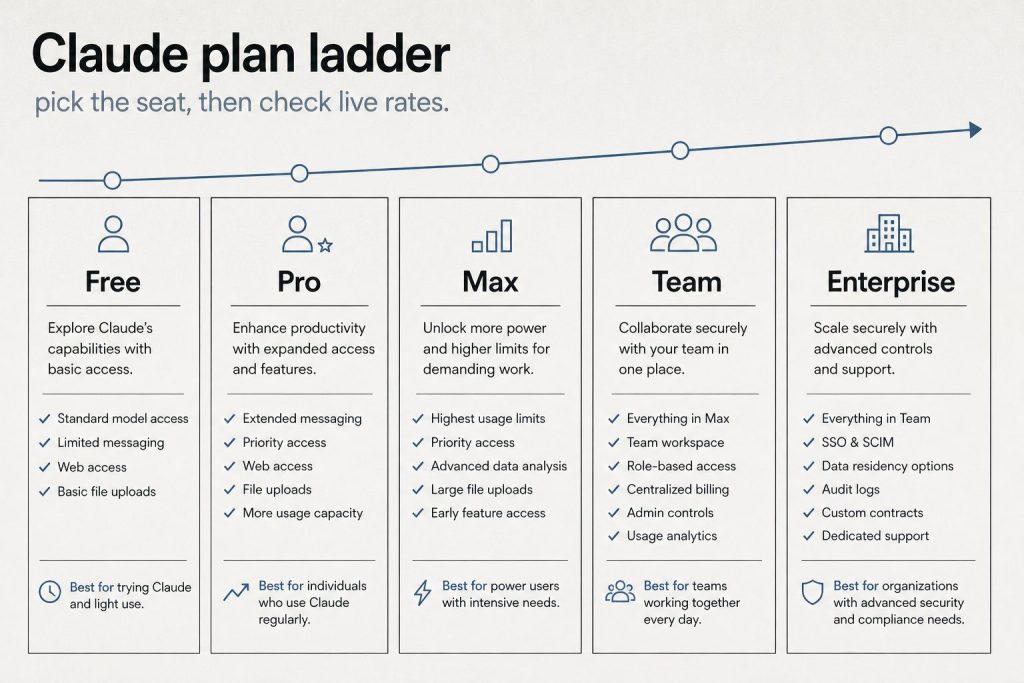
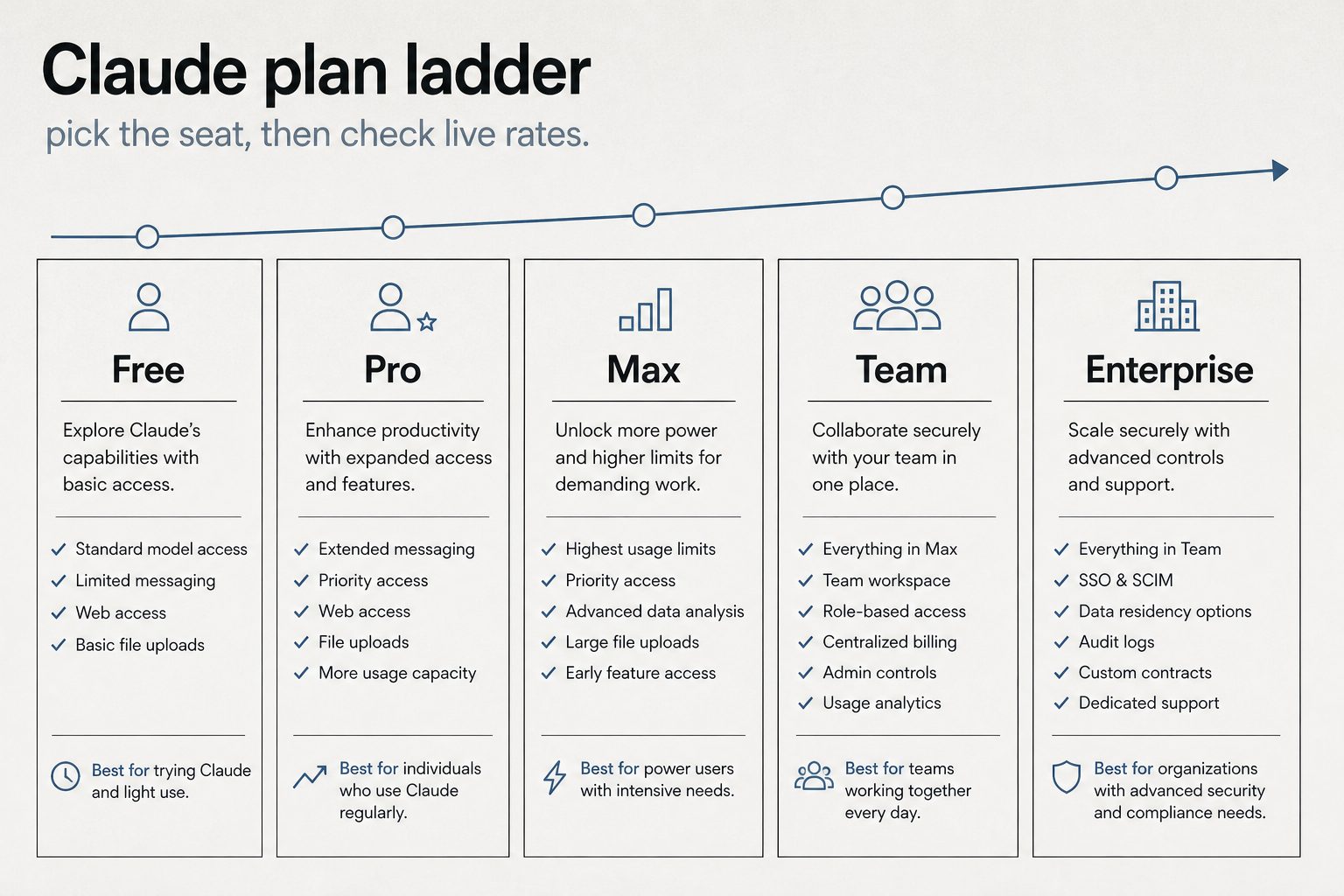
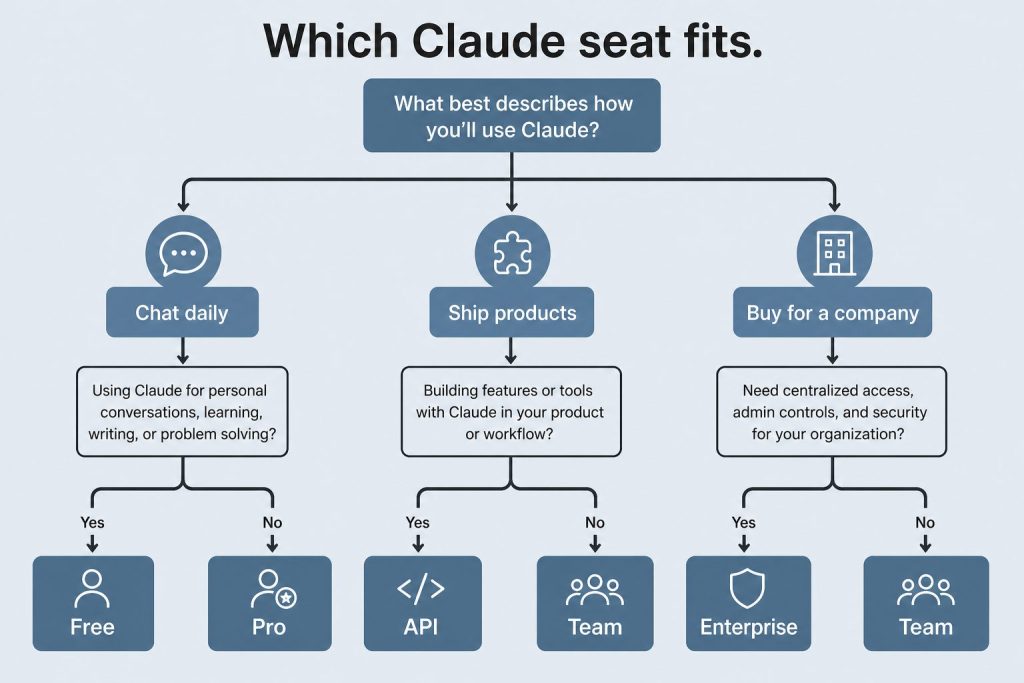
Plan ladder — Free through Enterprise (no sticky dollars on graphic).
Claude’s free tier is $0 — no credit card required. Chat on web, mobile, and desktop, web search, memory, file creation, and code execution are included. Claude Code is not. Usage limits are tighter than paid seats.
Claude Pro: $20/Month
Pro costs $20/month billed monthly or $17/month if you pay annually ($200 upfront). Official claude.com copy includes Claude Code, Design/Slides/Docs, projects, more models, and Claude for Microsoft 365.
Claude Max: From $100/Month
Max starts at $100/month with a choice of 5x or 20x more usage than Pro per five-hour session. The pricing card prints “from $100” and does not list a separate 20x dollar amount. Anthropic’s Help Center lists Max 5x at $100/month and Max 20x at $200/month for web checkout. Mobile store prices may differ. Max is monthly billing only.
Claude Team: From $20/Seat/Month
Official claude.com Team seats (USD): Standard $20/seat annual or $25 monthly; Premium $100/seat annual or $125 monthly. Premium is 5× Standard usage. Enterprise on the same page is $20/seat plus usage at API rates, billed annually. Anthropic said on October 7 it will roll out monthly Platform credits this week: Max 5x $100, Max 20x $200, Team up to $500 pooled. That is an announced credit, not a lower seat price.
Claude API: Pay Per Token
API access is separate from seats. You pay per million tokens (MTok) for input and output. Current first-party list (October 8, 2026):
Model
Input / MTok
Output / MTok
Notes
Haiku 5.5
$0.10 / $0.50
$0.50 / $2.50
Under / over 100k prompt tokens. Launched Oct 7, 2026
Haiku 4.5
$1
$5
Still listed
Sonnet 5.5
$2
$10
Cache reads now $0.10 (was $0.20)
Sonnet 5
$2
$10
Cache reads still $0.20
Sonnet 4.6
$3
$15
Legacy SKU still listed
Opus 5.5
$4
$20
Cache reads $0.20
Opus 5 / 4.8
$5
$25
Cache reads $0.50
Fable 5.1
$10
$50
Cache reads $0.25
Batch API is 50% off input and output. Prompt caching: 5-minute write 1.25× input, 1-hour write 2×. Cache reads are 0.05× on Sonnet 5.5 and Opus 5.5, 0.1× on Sonnet 5 and Haiku 4.5, and $0.01 / $0.05 on Haiku 5.5. Full schedule: Claude API pricing & token rates.
The seat price buys a usage window, not a fixed number of messages. Limits reset on a rolling five-hour session, and paid plans add a weekly cap on top.
On claude.com/pricing, checked October 8, 2026, Free covers everyday questions. Pro includes at least 5x more usage per five-hour session than Free. Max includes 5x or 20x more usage per five-hour session than Pro. Chat on the web, the desktop app, mobile, and Claude Code draw from one pool. The Max plan Help Center article says the weekly limit resets on a fixed day and time for the account. Settings, then Usage, shows the session meter and the weekly reset.
When the meter runs out, wait for the reset, move to a higher plan, or turn on usage credits and the extra work bills at standard API rates.
Claude API pricing, by model
The API is a separate bill from the seat. You pay per million tokens, and on every current model the output line costs more than the input line.
Current model
Input / MTok
Output / MTok
Haiku 5.5 (≤100k / >100k)
$0.10 / $0.50
$0.50 / $2.50
Sonnet 5.5
$2
$10
Opus 5.5
$4
$20
Fable 5.1
$10
$50
Haiku 4.5 remains $1 and $5. Sonnet 5 remains $2 and $10. Sonnet 4.6 remains $3 and $15. Opus 5 remains $5 and $25. The Batch API takes 50% off: Haiku 5.5 batch is $0.05 and $0.25 under 100k, Sonnet 5.5 is $1 and $5, Opus 5.5 is $2 and $10, Fable 5.1 is $5 and $25. US-only inference on Claude 4.6 and later is 1.1x. Fast mode prices Opus 5.5 at $8 and $40. Haiku 5.5 is the model that raises the rate above 100,000 prompt tokens. Other Claude 4.6 and later models keep one rate through the 1M window.
When prompt caching saves money
A 5-minute cache write is 1.25 times base input and a 1-hour write is 2 times. A cache hit on Sonnet 5.5 is $0.10 per million tokens, down from $0.20 on October 7. Opus 5.5 hits stay $0.20. Fable 5.1 hits stay $0.25. Haiku 5.5 hits are $0.01 under 100k and $0.05 over. A 5-minute write is $0.125 for Haiku 5.5 under 100k, $2.50 for Sonnet 5.5, $5 for Opus 5.5, and $12.50 for Fable 5.1.
Frequently Asked Questions
How much does Claude AI cost per month?
Free is $0. Pro is $20 monthly or $17 annual. Max starts at $100/month, with a choice of 5x or 20x Pro usage per five-hour session. The Help Center lists the 20x tier at $200/month on the web. Team starts at $20/seat annual. Enterprise is $20/seat plus API-rate usage. API bills separately per token.
Claude’s Team plan is built for groups of 2 to 150 people who need collaborative AI access with centralized administration. As of October 2026, Anthropic offers two seat types within the Team plan — Standard and Premium — with meaningfully different usage allowances and price points. This guide breaks down exactly what each seat type includes, what the real costs look like, and how to decide which mix works for your organization.
Direct Answer (October 2026): Claude Team pricing offers two options (2-seat minimum): Standard Team ($25/seat/mo or $20 annual) with bundled usage and shared workspaces, and Premium Team ($125/seat/mo or $100 annual) which includes expanded Claude Code CLI capacity, GitHub/GitLab integration, and automated developer tooling.
Team Plan Pricing Overview
Team plan seat overview.
The Team plan uses per-seat pricing with two tiers. Standard seats cost $25 per seat per month on monthly billing, or $20 per seat per month on annual billing. Premium seats cost $125 per seat per month on monthly billing, or $100 per seat per month on annual billing. You can mix and match seat types within the same organization — not everyone needs the same usage level.
For a 10-person team on annual billing with 7 Standard and 3 Premium seats, the monthly cost would be (7 × $20) + (3 × $100) = $440/month, or $5,280/year. Compare that to putting all 10 on Standard ($200/month) or all 10 on Premium ($1,000/month) to see why the mix-and-match model matters.
What Standard Seats Include
What Standard seats include.
Standard seats include all Claude features — chat across web, iOS, Android, and desktop — plus more usage than what individual Pro subscribers get. Standard seat holders can access Claude Code and Claude Cowork, connect Microsoft 365, Slack, and other integrations, and use Enterprise search across the organization. They get SSO, admin controls, and the enterprise desktop app deployment. The key differentiator from Pro is the organizational layer: centralized billing, admin controls, and content that isn’t used for model training by default.
What Premium Seats Add
Premium seats provide approximately 5x the usage of Standard seats. This is designed for power users — engineers running Claude Code all day, researchers doing deep analysis sessions, content teams producing high volumes of output. Premium seats are the Team-plan equivalent of individual Max plans, but with all the organizational infrastructure (SSO, admin controls, no training on content) included.
Team Plan vs Individual Pro/Max Plans
The question many organizations face: should each person just buy their own Pro or Max subscription? The Team plan adds several capabilities that individual plans lack. Central billing means one invoice instead of individual expense reports. SSO and domain capture ensure that everyone in your organization uses the managed account. Admin controls let you manage connectors and desktop app deployment centrally. Content is not used for model training by default — individual free and Pro accounts have an opt-out option, but Team accounts are opted out by default. Enterprise search lets team members search across organizational knowledge.
Team Plan vs Enterprise Plan
The Team plan caps at 150 users. If you need more, or if you need features like SCIM provisioning, audit logs, compliance API, custom data retention, HIPAA readiness, IP allowlisting, or role-based access with fine-grained permissions, you need Enterprise. Enterprise is published at $20/seat/month plus API usage, billed annually — contact Anthropic sales for volume terms.
How to Choose Between Standard and Premium Seats
How to choose between Standard and Premium seats.
Start with Standard seats for everyone and monitor usage. If specific team members consistently hit rate limits — especially developers using Claude Code heavily or analysts running extended research sessions — upgrade those individuals to Premium seats. The mix-and-match model means you don’t need to over-provision. A typical pattern for a 20-person team might be 4-5 Premium seats for heavy users and 15-16 Standard seats for everyone else.
Frequently Asked Questions
What is the minimum team size for Claude Team?
The Claude Team plan requires a minimum of 2 seats. You can mix Standard and Premium seats within that minimum.
Can I switch between Standard and Premium seats?
Yes. Administrators can upgrade individual seats from Standard to Premium or downgrade from Premium to Standard. Changes take effect on the next billing cycle.
Does Claude Team include Claude Code?
Yes. Both Standard and Premium Team seats include access to Claude Code and Claude Cowork.
Is my team’s data used for training on the Team plan?
No. Content is not used for model training by default on the Claude Team plan.
The Anthropic Console at platform.claude.com is where developers manage everything related to the Claude API. Whether you’re generating your first API key, tracking token usage, setting spend limits, or managing team workspaces, the console is your control center. This guide walks through every section of the console as it exists in June 2026.
What Is the Anthropic Console?
The Anthropic Console — also called the Anthropic Developer Console — is the web-based dashboard at platform.claude.com where you manage your Claude API access. It is separate from claude.ai, which is the consumer chat interface. The console handles API key generation, billing and payment, usage monitoring, workspace and team management, rate limit visibility, and access to developer documentation. Think of claude.ai as where you use Claude, and platform.claude.com as where you build with Claude.
Navigate to platform.claude.com and sign up with your email or Google account. You’ll need to add a payment method before you can make API calls. Anthropic uses a prepaid credit system — you load credits onto your account and API calls draw from that balance. New accounts start with a default spending limit that increases as you build usage history.
API Keys: Creating and Managing
API keys: create, name, store once — never paste into chat logs.
API keys are generated in the console under the API Keys section. Each key begins with “sk-ant-” and should be treated as a secret credential. Best practices include creating separate keys for different applications or environments (development, staging, production), naming keys descriptively so you can identify which application uses which key, rotating keys periodically, and never committing keys to source control. If a key is compromised, you can revoke it immediately from the console without affecting your other keys.
Billing and Usage Monitoring
The billing section shows your current credit balance, spending history, and usage breakdown by model. You can view costs broken down by Opus, Sonnet, and Haiku usage, see daily and monthly spending trends, set up automatic credit top-ups, and configure spending alerts. Usage is reported in tokens — both input tokens (what you send to Claude) and output tokens (what Claude generates). The console shows real-time and historical usage data with charts that break down costs by model, feature, and time period.
Workspaces and Team Management
For organizations, the console supports workspace-level management. You can invite team members with specific roles, set per-user or per-workspace spending limits, view aggregated usage across your organization, and manage API keys at the workspace level rather than individually. This is particularly useful for agencies or development teams where multiple people need API access but you want centralized billing and usage controls.
Rate Limits and Service Tiers
Rate limits and tiers live next to billing — watch both.
The console displays your current rate limits, which depend on your service tier. Anthropic offers three service tiers: Priority for when time, availability, and predictable pricing matter most; Standard as the default tier for both piloting and scaling everyday use cases; and Batch for asynchronous workloads processed together at 50% off. Rate limits increase as your account matures and your spending history grows. The console shows your current limits for requests per minute and tokens per minute across each model.
Developer Documentation Access
The console links directly to Anthropic’s developer documentation at platform.claude.com/docs, which includes API reference with endpoint specifications, SDK guides for Python and TypeScript, prompt engineering best practices, tool use and function calling documentation, vision and multimodal capabilities, and integration guides for AWS Bedrock, Google Cloud Vertex AI, and Microsoft Foundry.
Console vs Claude.ai: Key Differences
A common point of confusion: the Anthropic Console (platform.claude.com) is not the same as Claude.ai. Claude.ai is the consumer-facing chat interface where individuals and teams interact with Claude through conversation. The console is the developer-facing dashboard for API management, billing, and infrastructure. You can have accounts on both — your Claude.ai subscription (Free, Pro, Max, Team, Enterprise) is separate from your API credits on the console.
Go to platform.claude.com and sign in with your Anthropic account. If you don’t have one, you can create a free account and add billing information to start making API calls.
Is the Anthropic Console free to use?
The console itself is free. You only pay for API usage based on the tokens consumed. There is no monthly fee for console access — you pay per token as you use the API.
What is the difference between the Anthropic Console and the Anthropic Developer Console?
They are the same thing. “Anthropic Console” and “Anthropic Developer Console” both refer to the dashboard at platform.claude.com where developers manage API keys, billing, and usage.
Can I set spending limits on the Anthropic Console?
Yes. The console allows you to set both per-workspace and per-user spending limits. You can also configure automatic credit top-ups and spending alerts to stay within budget.
The most useful thing you can wire into Claude Code isn’t a new model or a clever prompt — it’s your actual database. When Claude Code can read your schema, it stops guessing at table names, column types, and relationships. It starts writing queries that work the first time.
This is the practical walkthrough for connecting Claude Code to a Postgres database via MCP: the command, the credential setup, the safety pattern, and what the workflow actually looks like once it’s running.
Last refreshed: October 20, 2026 (Pacific)
What the Postgres MCP server does
What the Postgres MCP server does.
The official @modelcontextprotocol/server-postgres package (maintained in the MCP reference implementations repo) gives Claude Code four tools: schema inspection, query execution inside a read-only transaction, table detail lookup, and relationship traversal. The server cannot write data — it’s read-only by design in the reference implementation, though third-party variants like postgres-mcp-pro add configurable write access if you need it.
For the majority of development workflows — debugging, writing migrations, generating queries — read-only is exactly what you want. Claude Code can see the shape of your data without being able to touch it.
The fastest path: single command setup
Fastest path — single command setup.
If you just want it running against a local database:
claude mcp add postgres -- npx -y @modelcontextprotocol/server-postgres "postgresql://USER:PASSWORD@localhost:5432/mydb"
The -y flag on npx auto-accepts the package install so the command doesn’t hang on first run. Verify with:
claude mcp list
You should see postgres with a connected status. That’s it — Claude Code now has schema access in the current project.
Don’t do this for a production database. The connection string above is hardcoded. It goes into ~/.claude.json as plaintext. Use a dedicated local or staging database during development, and use env vars for anything that matters.
The right way: env vars and a read-only user
Right way — env vars and a read-only user.
Two things to do before connecting to any real database:
1. Create a read-only Postgres user:
CREATE USER claude_readonly WITH PASSWORD 'your-password-here';
GRANT CONNECT ON DATABASE your_db TO claude_readonly;
GRANT USAGE ON SCHEMA public TO claude_readonly;
GRANT SELECT ON ALL TABLES IN SCHEMA public TO claude_readonly;
ALTER DEFAULT PRIVILEGES IN SCHEMA public GRANT SELECT ON TABLES TO claude_readonly;
This user can see everything in public and do nothing else. If something goes wrong — a rogue tool call, a compromised session — blast radius is zero.
2. Reference the connection string via env var in .mcp.json:
Set DATABASE_URL in your shell environment or in a .env file (not committed). Add .mcp.json to the repo — everyone on the team gets the same server config — but the actual connection string lives in each developer’s local environment. This is the same pattern you already use for application config. It’s the right pattern here too.
Add the server at project scope so it’s committed:
claude mcp add --scope project --transport stdio db -- npx -y @modelcontextprotocol/server-postgres
Then edit .mcp.json to replace the hardcoded connection string with the ${DATABASE_URL} env var reference shown above.
What Claude Code can actually do with schema access
Once the server is connected, the workflow changes significantly. A few real examples:
Schema exploration: Ask Claude Code “what tables are in this database and how are they related?” and it traverses foreign keys, describes join paths, and builds a mental model of your data layer. No more copy-pasting \dt output.
Query generation: “Write a query that finds users who signed up in the last 30 days but haven’t completed onboarding” produces accurate SQL because Claude Code knows your actual column names. With a generic prompt and no schema access, you’d get plausible-looking SQL that fails because user_status is actually onboarding_state.
Migration drafting: “I need to add a last_login_at column to users — show me the migration and check for existing timestamp patterns in the schema.” Claude Code inspects the schema first, matches your existing column naming conventions, and produces a migration that fits your codebase.
Debugging: “This query is returning the wrong count — here’s the query, check it against the schema.” Claude Code can spot that you’re joining on a nullable column, missing a filter on a soft-delete flag, or aggregating before filtering.
Neon and cloud Postgres
If you’re on Neon, there’s a first-party MCP server with additional capabilities: branch management, database creation, and schema migrations via Neon’s branching model. Set it up with:
npx neonctl mcp add
This runs OAuth through your browser and configures Claude Code automatically. The Neon MCP server is intended for local development and IDE workflows — not production automation — same caution applies.
Debugging when it doesn’t connect
Three commands for when the server shows as disconnected:
claude mcp list          # check registered servers and status
claude mcp test db       # test a specific server
claude --debug           # tail logs including MCP stderr output
Most connection failures are either a wrong connection string, a missing env var, or Node version issues with npx. The debug log shows the exact error from the server process — read it before assuming the problem is Claude Code.
The practical baseline
Five minutes to set up. The productivity delta on any codebase larger than a few tables is immediate — Claude Code stops making column-name mistakes and starts being genuinely useful for data-layer work. Wire up the read-only user, commit the .mcp.json, and add DATABASE_URL to your team’s .env.example. Done.
The model doing the work in a typical Claude Code session is claude-sonnet-5-5 (workhorse) — it handles schema-aware query generation well without burning through Opus 5.5 credits on every lookup.
How do I connect Claude Code to a Postgres database via MCP?
Run: claude mcp add postgres — npx -y @modelcontextprotocol/server-postgres “postgresql://USER:PASSWORD@localhost:5432/mydb”. The -y flag auto-accepts the package install so the command doesn’t hang. Then run claude mcp list and confirm postgres shows a connected status. Use a local or staging database for this quick path, not production.
Is the Postgres MCP server read-only?
Yes. The official @modelcontextprotocol/server-postgres package is read-only by design — it exposes schema inspection, query execution inside a read-only transaction, table detail lookup, and relationship traversal. It cannot write data. Third-party variants like postgres-mcp-pro add configurable write access if you need it.
What’s the safe way to connect Claude Code to a production database?
Create a dedicated read-only Postgres user (GRANT SELECT only), and reference the connection string through an environment variable in .mcp.json using ${DATABASE_URL} rather than hardcoding it. Commit .mcp.json so the team shares the server config, but keep the actual connection string in each developer’s local .env. If a session is ever compromised, the blast radius is zero.
Why does schema access make Claude Code more accurate?
With schema access, Claude Code reads your real table names, column types, and relationships, so it writes queries that work the first time instead of guessing. Without it, you get plausible-looking SQL that fails because user_status is actually onboarding_state. It also improves migration drafting and query debugging by matching your existing conventions.
How do I debug a Postgres MCP server that won’t connect?
Use three commands: claude mcp list to check registered servers and status, claude mcp test db to test a specific server, and claude –debug to tail logs including MCP stderr. Most failures are a wrong connection string, a missing env var, or a Node version issue with npx — the debug log shows the exact server error.
MCP (Model Context Protocol) is how you give Claude hands. Out of the box Claude can talk; with an MCP server connected, it can read your files, query a database, hit an API, or drive a browser. This guide covers the two places you actually wire servers up: the claude_desktop_config.json file for the Claude Desktop app, and the claude mcp add command for Claude Code (the terminal/IDE tool). It ends with the troubleshooting section the official docs skip: path problems, JSON syntax traps, servers that silently never load, and the Windows quirks that cost people an afternoon.
Everything below is checked against the current Claude Code MCP docs and tested commands. If you want the wider picture of how MCP fits into a working setup, see the AI operator’s stack.
What is MCP and what is an MCP server?
What MCP is — and what an MCP server is.
MCP transport options at a glance
Transport
Use case
Config location
Works with
stdio
Local tools, CLIs, scripts
claude_desktop_config.json or claude mcp add
Claude Desktop, Claude Code
SSE (HTTP)
Remote servers, cloud services
URL in config
Claude Desktop, Claude Code
Streamable HTTP
Production remote MCP
URL in config
Claude Desktop, Claude Code
MCP is an open standard for connecting AI models to external tools and data. An MCP server is a small program that exposes a set of tools (functions Claude can call) over that protocol. Claude is the client; the server is the thing that actually does the work, like reading a Postgres table or creating a GitHub issue.
There are two transport types you will deal with in practice:
stdio (local): the server runs as a process on your machine. Claude talks to it over standard input/output. Best for filesystem access, local databases, and custom scripts. This is what most “install this MCP server” instructions mean.
HTTP (remote): the server lives on the internet at a URL. Best for cloud services (Notion, Sentry, Stripe, GitHub). Often uses OAuth. SSE is the older remote transport and is now deprecated; use HTTP for new remote servers.
The same server can usually be added to both Claude Desktop and Claude Code. The mechanics differ: Desktop uses a JSON file you edit by hand, Claude Code gives you a CLI that writes the config for you.
How do I add an MCP server to Claude Desktop?
Add an MCP server to Claude Desktop.
For local stdio servers, Claude Desktop still reads a single JSON file — you edit it, fully quit the app, and reopen. The config file remains the source of truth for anything that runs on your own machine. Remote servers are a different story: Claude Desktop now offers an in-app route (Settings > Connectors > Add custom connector) that adds a remote server by URL and handles OAuth for you.
Windows:%APPDATA%\Claude\claude_desktop_config.json (paste that into the File Explorer address bar; it expands to C:\Users\YOU\AppData\Roaming\Claude\)
The fastest way to open it: in Claude Desktop go to Settings > Developer > Edit Config. That button creates the file if it does not exist and opens the folder. If the file is brand new it may be empty or just {}.
The config file structure
Everything lives under a top-level mcpServers object. Each key is a name you choose; each value describes how to launch the server. Here is a complete, working file with a local filesystem server and a remote Notion server:
command the executable to run (npx, node, python, uvx, or an absolute path to a binary).
args an array of arguments. Each flag and value is its own array element. "--port 8080" as a single string will not work; use "--port", "8080".
env an object of environment variables (API keys, tokens). Optional.
After saving, completely quit Claude Desktop (on Windows, right-click the system tray icon and choose Quit; closing the window is not enough) and reopen it. You should see a tools/connector indicator in the chat input. For a full Notion walkthrough including the token, see connecting Notion to Claude with MCP.
How do I add an MCP server to Claude Code (CLI)?
Add an MCP server to Claude Code CLI.
Claude Code does not make you hand-edit JSON. The claude mcp command manages servers for you and writes to the right file. This is the part people get wrong most often, so here is the exact, verified syntax.
claude mcp add
The general form for a local (stdio) server is:
claude mcp add [options] <name> -- <command> [args...]
The -- is load-bearing. Everything before it is for Claude Code; everything after it is the command that launches your server. Real examples:
# Local filesystem server
claude mcp add filesystem -- npx -y @modelcontextprotocol/server-filesystem ~/Documents

# Local server with an environment variable
claude mcp add --env AIRTABLE_API_KEY=YOUR_KEY airtable -- npx -y airtable-mcp-server

# Remote HTTP server
claude mcp add --transport http notion https://mcp.notion.com/mcp

# Remote HTTP server with an auth header
claude mcp add --transport http github https://api.githubcopilot.com/mcp/ --header "Authorization: Bearer YOUR_PAT"
Option ordering matters. All flags (--transport, --env, --scope, --header) must come before the server name. Put a flag after the name and you will get a confusing parse error or the flag will be passed to your server instead of to Claude Code.
Scopes: local, project, user
The --scope flag decides where the config is written and who sees it:
local (the default) loads only in the current project, private to you. Stored in ~/.claude.json keyed by the project path.
project loads in the current project and is shared with your team. Stored in a .mcp.json file at the project root that you commit to git.
user loads across all your projects, private to you. Also stored in ~/.claude.json.
# Available across all your projects
claude mcp add --scope user --transport http sentry https://mcp.sentry.dev/mcp

# Shared with your team via .mcp.json in the repo
claude mcp add --scope project filesystem -- npx -y @modelcontextprotocol/server-filesystem .
When the same server name exists at multiple scopes, local wins over project, which wins over user. The whole entry from the winning scope is used; fields are not merged.
claude mcp list, get, and remove
# List every configured server and its connection status
claude mcp list

# Show the full config for one server
claude mcp get github

# Remove a server
claude mcp remove github
claude mcp list is your first diagnostic. It shows each server as connected, pending, or failed. Project-scoped servers from a .mcp.json you have not approved yet show as Pending approval until you run claude interactively and accept them.
Other useful commands
# Add from a raw JSON blob (handy when copying from a server's README)
claude mcp add-json weather '{"type":"stdio","command":"npx","args":["-y","weather-mcp"]}'

# Import everything you already set up in Claude Desktop (macOS / WSL)
claude mcp add-from-claude-desktop
Inside a running Claude Code session, type /mcp to see live server status, tool counts, and to trigger OAuth login for remote servers that need it.
Troubleshooting: the errors the docs skip
Most MCP failures are not exotic. They are paths, quoting, and the app not restarting. Work this list top to bottom.
Server not loading / no tools appear
Did you actually restart? Claude Desktop only reads the config at launch. Fully quit (tray icon > Quit on Windows, Cmd+Q on macOS) and reopen. In Claude Code, run claude mcp list to see the real status instead of guessing.
Is the command on PATH? The single most common stdio failure is npx, node, python, or uvx not being found by the app. GUI apps often have a narrower PATH than your terminal. Fix it by using an absolute path. Find it with which npx (macOS/Linux) or where npx (Windows), then put that full path in command.
Read the logs. Claude Desktop writes per-server logs. macOS: ~/Library/Logs/Claude/. Windows: %APPDATA%\Claude\logs\. Look for mcp-server-NAME.log. The actual error (missing module, bad token, wrong path) is almost always sitting right there.
spawn ENOENT or “command not found”
This means the OS could not find the executable named in command. It is a PATH problem, not a Claude problem. Use the absolute path (see above). On Windows specifically, see the npx note below.
JSON syntax errors (the silent killer)
If claude_desktop_config.json has a single syntax error, Claude Desktop loads zero servers and usually says nothing. The usual culprits:
Trailing commas. JSON forbids a comma after the last item in an object or array. "args": ["a", "b",] is invalid.
Smart quotes. If you edited the file in a word processor, curly quotes (the slanted kind) break the parser. Use a code editor and straight quotes only.
Unescaped Windows backslashes. In JSON, \ is an escape character, so every backslash in a Windows path must be doubled: C:\\Users\\YOU\\Documents. A single backslash silently corrupts the string.
Paste the whole file into any JSON validator before restarting. Thirty seconds there saves an hour of staring.
Claude Code: flag passed to the wrong place
If claude mcp add behaves strangely, you almost certainly put a flag after the server name or forgot the --. Reread the order: claude mcp add [flags] NAME -- COMMAND ARGS. The -- separates Claude Code’s flags from your server’s command.
Windows quirks
npx needs a wrapper in some setups. If a bare "command": "npx" fails on Windows, launch it through cmd: "command": "cmd" with "args": ["/c", "npx", "-y", "the-server-package"]. This resolves a class of “npx works in my terminal but not in Claude” failures.
Use the right config root. It is %APPDATA%\Claude\ (which is AppData\Roaming), not AppData\Local. Mixing these up means you are editing a file the app never reads.
Git Bash mangles paths. If you run commands through Git Bash, it can rewrite paths like /c/Users or absolute paths inside arguments. Prefer PowerShell or cmd for claude mcp add, or pass paths exactly as Windows expects them.
WSL is a separate world. A server installed inside WSL is not visible to a Windows-native Claude Desktop, and vice versa. Keep both on the same side.
Remote server returns 401 / 403
The server needs authentication. In Claude Code, run /mcp and complete the OAuth flow in your browser. If you hardcoded an Authorization header and it is rejected, the token is wrong for that endpoint; remove the header and let OAuth handle it instead.
Frequently asked questions
What is an MCP server in one sentence?
A small program that exposes tools (functions like read-file or query-database) to Claude over the Model Context Protocol, so Claude can take real actions instead of only producing text.
What is the difference between Claude Desktop and Claude Code for MCP?
Claude Desktop is the chat app and you configure servers by hand-editing claude_desktop_config.json, then restarting. Claude Code is the terminal/IDE tool and you configure servers with the claude mcp add command, which writes the config for you.
Where is the Claude Desktop config file?
macOS: ~/Library/Application Support/Claude/claude_desktop_config.json. Windows: %APPDATA%\Claude\claude_desktop_config.json. The quickest way to open it is Settings > Developer > Edit Config inside the app.
Why is my MCP server not showing up?
In order of likelihood: you did not fully restart the app, the command is not on the app’s PATH (use an absolute path), or there is a JSON syntax error such as a trailing comma, a smart quote, or an unescaped Windows backslash. Check the per-server log in the Claude logs folder for the exact error.
What does the double dash do in claude mcp add?
The -- separates Claude Code’s own flags from the command that launches your server. Flags like --transport and --env go before it; the actual launch command (npx -y some-server) goes after it.
What is the default scope for claude mcp add?
local. The server loads only in the current project and stays private to you. Use --scope user to make it available in every project, or --scope project to share it with your team via a committed .mcp.json.
Is SSE or HTTP the right transport for remote servers?
HTTP. SSE still works but is deprecated. Use --transport http for any new remote server unless its documentation specifically requires SSE.
How do I remove an MCP server?
In Claude Code, run claude mcp remove NAME. In Claude Desktop, delete that server’s entry from the mcpServers object in claude_desktop_config.json and restart the app.
Where to go next
Once your servers connect cleanly, the leverage comes from using them well. For how this fits a daily workflow, read the AI operator’s stack; if you are choosing between coding environments, see Claude Code vs Cursor. And if you want a concrete first server to wire up, the Notion MCP setup is a clean, high-value place to start.
Frequently Asked Questions
What is MCP and why does it matter for Claude?
MCP (Model Context Protocol) is an open standard that lets Claude connect to external tools, databases, APIs, and services. Without MCP, Claude can only work with text in the conversation window. With an MCP server connected, Claude can read your files, query a live database, hit an API, or control a browser — turning it from a chat interface into an autonomous agent.
How do I add an MCP server to Claude Desktop?
Edit the claude_desktop_config.json file (found at ~/Library/Application Support/Claude/ on Mac, %APPDATA%/Claude/ on Windows). Add your server under the ‘mcpServers’ key with a ‘command’, ‘args’, and optional ‘env’ block. Save the file and restart Claude Desktop. The server appears in Claude’s tool list if it loaded correctly.
How do I add an MCP server to Claude Code?
Run ‘claude mcp add [args…]’ from your terminal. For a remote SSE server use ‘claude mcp add –transport sse ‘. List configured servers with ‘claude mcp list’. Servers added this way are scoped to your user profile unless you use the –project flag.
Why does my MCP server connect but Claude can’t see my data?
The most common cause is scope or permission gaps. For Notion, verify your integration has been granted access to the specific pages/databases — the connection succeeds even without page access. For file servers, check that the path in your config resolves correctly from the shell Claude launches (not your interactive shell). For OAuth servers, re-authorize and confirm token scopes.
What is the difference between stdio and SSE MCP transports?
stdio runs the MCP server as a local subprocess — Claude launches the command you specify and communicates over stdin/stdout. This is used for local tools and CLIs. SSE (Server-Sent Events) connects to a remote HTTP server. Use stdio for local tools like filesystem access or database clients; use SSE or Streamable HTTP for cloud services or shared team servers.
Which MCP servers should I start with?
The highest-value first connections are: filesystem (read/write your local files), a database client for your primary DB, and a service you interact with daily (Notion, Slack, GitHub, Linear). The Notion MCP server is a clean first project — see the dedicated setup guide on this site for the exact config and common errors.
Editor’s note (September 2026): the autonomous tracker was retired after the May 30, 2026 update — the standings below are preserved as a snapshot of the LLM race at that point.
🏆 Current LMSYS Chatbot Arena Standings
Last Updated: 2026-05-30
Claude 4.6 Sonnet (Elo: 1345)
GPT-5 (Early Preview) (Elo: 1338)
Claude 4.6 Haiku (Elo: 1312)
Anthropic’s Sonnet variant continues to dominate the coding and reasoning benchmarks, specifically pulling ahead due to its massive multi-file context window stability.
The Top Claude 4.6 Prompt for React Developers This Week
If you are building front-end applications, you already know that Claude 4.6 Sonnet’s context window can handle massive files. But how do you prevent the model from ‘lazy coding’ (leaving // rest of code here comments)?
The Anti-Lazy Prompt:
“You are a Senior Staff Engineer. Rewrite this entire React component. Under NO circumstances are you allowed to use placeholders, comments like ‘// existing code’, or brevity. You must output the entire, complete, and fully functional file from line 1 to EOF. Failure to do so will break the CI/CD pipeline.”
Why it works: By framing the omission as a pipeline-breaking failure, Claude’s alignment training prioritizes the completion of the file over token conservation.
The Claude “Artifacts” Wrapper is Coming to the Core API
Anthropic’s “Artifacts” feature—which allows Claude to instantly render and preview code, diagrams, and UI elements in a side panel—has revolutionized the ChatGPT-style web interface. But for developers building their own applications using the Claude API, they’ve been forced to build those UI rendering wrappers from scratch.
According to emerging chatter on X (Twitter), that is about to change.
Social Radar Intel:“Rumors circulating that the Artifacts UI wrapper is finally coming to the core API next week. If developers can render interactive React components directly inside their own chat UIs using Claude, it’s game over for generic wrappers.”
Why This Matters for Builders
If Anthropic exposes the Artifacts rendering engine natively through the API, it significantly lowers the barrier to entry for building rich, interactive AI tools. You will no longer need a senior front-end engineer to parse JSON and render a React component on the fly; the API will handle the interactive framing.
The Tygart Verdict: We are keeping a close eye on the official Anthropic changelog over the next two weeks. If this drops, expect a flood of “wrapper” apps to pivot or die.
Published: May 25, 2026 | Last fact-check: May 25, 2026 against Anthropic docs and Claude Code v2.1+ behavior
Quick Answer
Plan Mode is a Claude Code setting that forces the agent to think through and approve a plan before taking destructive actions. Trigger it with Shift+Tab pressed twice in the terminal (the first press cycles to Auto-Accept Mode; the second lands on Plan Mode). Use it for risky multi-step work; skip it for simple read-only or contained edits.
How to enable it, when it pays off, and when it gets in your way below.
Plan Mode (sometimes called “planning mode”) is one of the more underused features in Claude Code in 2026. It changes how the agent works in a specific, measurable way: before Claude Code edits files, runs commands, or modifies state, it produces a plan and waits for your approval. You see what it intends to do, you say yes or no, and only then does it act.
For the right kind of task, Plan Mode is the difference between a clean execution and a regrettable one. For the wrong kind of task, it is friction that slows you down. This guide separates the two.
Claude Code Plan Mode vs Auto Mode: When to Use Each
Plan Mode vs Auto Mode — when to use each.
Scenario
Use Plan Mode
Use Auto Mode
Unfamiliar codebase
Yes — review the plan first
Only if you know it well
Large multi-file refactor
Yes — catch scope creep early
Not recommended
Simple bug fix (< 5 lines)
Overkill
Yes
Adding a new feature
Yes — plan clarifies approach
Acceptable for small features
Writing tests
Optional
Yes, usually safe
Touching database migrations
Yes — irreversible changes
No
CI/CD pipeline changes
Yes
No
What Plan Mode Actually Does
What Plan Mode actually does.
In default mode, Claude Code is allowed to take actions as it reasons. It can read files, write files, run bash, edit code, all in one conversational flow. This is the strength of Claude Code as an agent — it gets work done without asking permission for every step.
In Plan Mode, Claude Code’s behavior changes:
You describe the task.
Claude Code investigates the codebase (read-only operations are still allowed).
Claude Code drafts a plan listing every file it intends to change, every command it intends to run, and every decision point.
You read the plan. You approve it, modify it, or reject it.
Only after approval does Claude Code start writing files or running commands.
The plan is presented in the terminal as a structured outline. You can ask Claude Code to revise the plan, add steps, remove steps, or change the order. Iterating on the plan is fast because no actions have been taken yet.
How to Enable Plan Mode
How to enable Plan Mode.
There are four ways to activate Plan Mode in Claude Code:
Shift+Tab pressed twice. Each press of Shift+Tab cycles through the three permission modes: Default → Auto-Accept → Plan → Default. Two presses lands on Plan Mode. The status bar shows ⏸ plan mode on when active.
The /plan slash command. Type /plan at the start of any prompt to enter Plan Mode for that turn only. Useful for one-off plans without flipping the whole session.
The –permission-mode plan flag at startup. Start the session in Plan Mode from the command line.
Headless mode for scripts and CI.claude --print --permission-mode plan "your task" for automation that should never edit files.
# Start session in Plan Mode
claude --permission-mode plan

# Or mid-session — press Shift+Tab TWICE
# (first press = Auto-Accept Mode, second press = Plan Mode)

# Or one-shot Plan Mode for next prompt only
/plan
Plan Mode is persistent within a session — it stays on until you cycle out with another Shift+Tab. Close and reopen Claude Code and it defaults back to off. Toggle it on for risky work, leave it on for the whole session if you are doing higher-risk work end-to-end.
Important: Plan Mode is a hard read-only sandbox enforced at the tool level. Claude Code physically cannot edit files, run commands, or modify state while Plan Mode is active. This is not a suggestion or a soft check — the write tools are unavailable.
When Plan Mode Pays Off
Plan Mode is worth the friction in these situations:
Multi-file refactors. When the agent will touch 5+ files, you want to see the list before it starts editing. A small confusion about which files to change becomes a big mess fast.
Database migrations or schema changes. Anything that touches durable state and is hard to undo benefits from a confirmed plan.
Production code paths. If a session affects code that ships to users, the plan checkpoint is cheap insurance.
Ambiguous instructions. When you are not sure how the agent will interpret your request, Plan Mode surfaces the interpretation before any work happens.
New repository onboarding. When you do not yet know the codebase well, Plan Mode lets the agent show you what it learned during investigation before it acts.
Long-running batch jobs. Approving a plan for 200 file edits and then walking away is safer than launching 200 edits blind.
When Plan Mode Gets In the Way
Plan Mode is not free. The friction it adds is a real cost for certain workflows:
Single-file tweaks. Asking Claude Code to fix a typo or rename a variable does not need a plan. The plan takes longer than the fix.
Tight feedback loops. When you are iterating quickly — try a change, see the result, adjust — Plan Mode slows the loop. Default mode wins here.
Read-only investigation. If you are asking questions about the codebase (“how does this auth flow work”), there is nothing to plan. Plan Mode is irrelevant.
Work in a sandbox. If you are working in a throwaway directory or branch where mistakes are cheap, the safety net of Plan Mode is overkill.
The decision is not “is Plan Mode good.” It is “is the cost of approval less than the cost of an unintended action.” For risky multi-step work, yes. For cheap iteration, no.
Working Inside the Plan
Once Claude Code presents a plan, you have several options:
Approve as-is. Tell Claude Code to proceed. It executes the plan in order.
Approve with modifications. Tell Claude Code to remove specific steps, reorder them, or add additional steps. It revises the plan and re-presents.
Ask questions. Drill into specific steps. “Why are you editing file X?” Claude Code explains the reasoning.
Reject and restart. If the plan is wrong-shape, tell Claude Code so. It will rebuild the plan from a corrected understanding.
Cancel. Exit Plan Mode entirely if you’ve decided this is not the right task or session for it.
The plan is conversational. You are not stuck with the first draft. Iterating on the plan is much cheaper than iterating after the work is done.
What Plan Mode Does Not Protect Against
Plan Mode is not a sandbox. The plan, once approved, executes for real. Plan Mode does not:
Prevent you from approving a bad plan
Catch logic errors inside individual file edits
Prevent destructive bash commands if you approved them in the plan
Replace tests or code review
It is a thinking checkpoint, not a safety net. The human still owns the decision.
Plan Mode vs Other Safety Patterns
Plan Mode is one of several safety patterns Claude Code supports:
Read-only sessions: Restrict the agent to read operations only.
Per-tool permissions: Approve each tool use individually as it happens.
Plan Mode: Approve a batch of intended actions before execution begins.
Auto-accept mode: The opposite — accept all tool uses without asking. Fast and risky.
Per-tool permission is more granular but slower. Plan Mode is bulkier but faster once approved. Use the right tool for the situation; do not assume one is always correct.
A Working Habit
The habit that has worked across hundreds of Claude Code sessions: default mode on, Shift+Tab twice into Plan Mode before any session that will (a) touch production state, (b) edit more than 5 files, or (c) run commands that are hard to undo. Shift+Tab again to cycle back to default for everything else.
The shortcut becomes muscle memory in a week. Once it is muscle memory, the cost of Plan Mode drops to nearly zero, and you can use it liberally on anything that even smells risky.
Plan Mode is a Claude Code setting that forces the agent to produce a written plan and wait for your approval before making changes. It surfaces what the agent intends to do so you can adjust it before any work happens.
How do I enable Plan Mode in Claude Code?
Press Shift+Tab twice in the terminal (the first press cycles to Auto-Accept; the second lands on Plan Mode), type /plan as a slash command, or start the session with –permission-mode plan. The status bar shows ⏸ plan mode on when active.
When should I use Plan Mode?
For multi-file refactors, database migrations, production code paths, ambiguous instructions, new repositories you don’t know yet, and long-running batch jobs. Skip Plan Mode for single-file tweaks, tight iteration loops, and read-only investigation.
Does Plan Mode make Claude Code slower?
Yes, for short tasks — the plan adds latency that is not worth it on quick edits. For long or risky tasks, the plan is faster than fixing mistakes afterward.
Can I edit the plan before approving it?
Yes. Tell Claude Code to revise the plan — add steps, remove steps, reorder. Iterating on the plan is much cheaper than iterating after execution.
Is Plan Mode the same as a sandbox?
Plan Mode IS a hard read-only sandbox at the tool level — Claude Code cannot write files or run commands while it’s active. But once you approve the plan and exit Plan Mode, the work executes for real. Plan Mode prevents accidental writes during planning; it does not prevent you from approving a bad plan.
What’s the difference between Plan Mode and per-tool permissions?
Per-tool permissions ask you to approve each tool use individually as it happens (more granular, slower). Plan Mode batches all intended actions into one plan you approve up front (bulkier, faster once approved).
The Bottom Line
Plan Mode is leverage for risky work and friction for everything else. Make Shift+Tab+Shift+Tab muscle memory. Use Plan Mode whenever the cost of an unintended action exceeds the cost of approval — multi-file refactors, production changes, ambiguous specs. Skip it on cheap iteration. That single rule will save you more headaches than any other Claude Code habit.
Published: May 25, 2026 | Last fact-check: May 25, 2026 — legacy (still listed) model lineup: Opus 4.7, Sonnet 4.6 (legacy — still listed), Haiku 4.5
Lineup currency (Sept 2026): Current API list (Sept 2026, verified): Sonnet 5 $2/$10, Opus 5.5 $4/$20, Haiku 4.5 $1/$5, Fable 5.1 $10/$50. Legacy (still listed on Anthropic’s card): Opus 4.8 $5/$25, Sonnet 4.6 $3/$15.
Quick Answer
A Claude Code router is any layer that decides which Claude model handles which request — Opus for hard reasoning, Sonnet for daily work, Haiku for fast cheap tasks. Anthropic ships some built-in routing, but the most leveraged users build their own routing rules on top to optimize cost and latency.
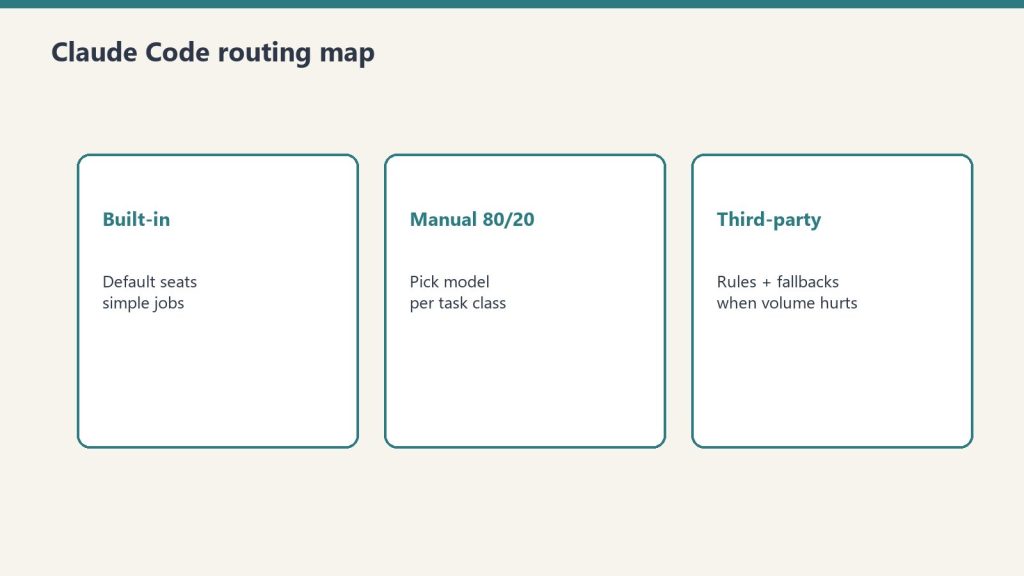
Built-in routing, manual model selection, and the third-party router landscape below.
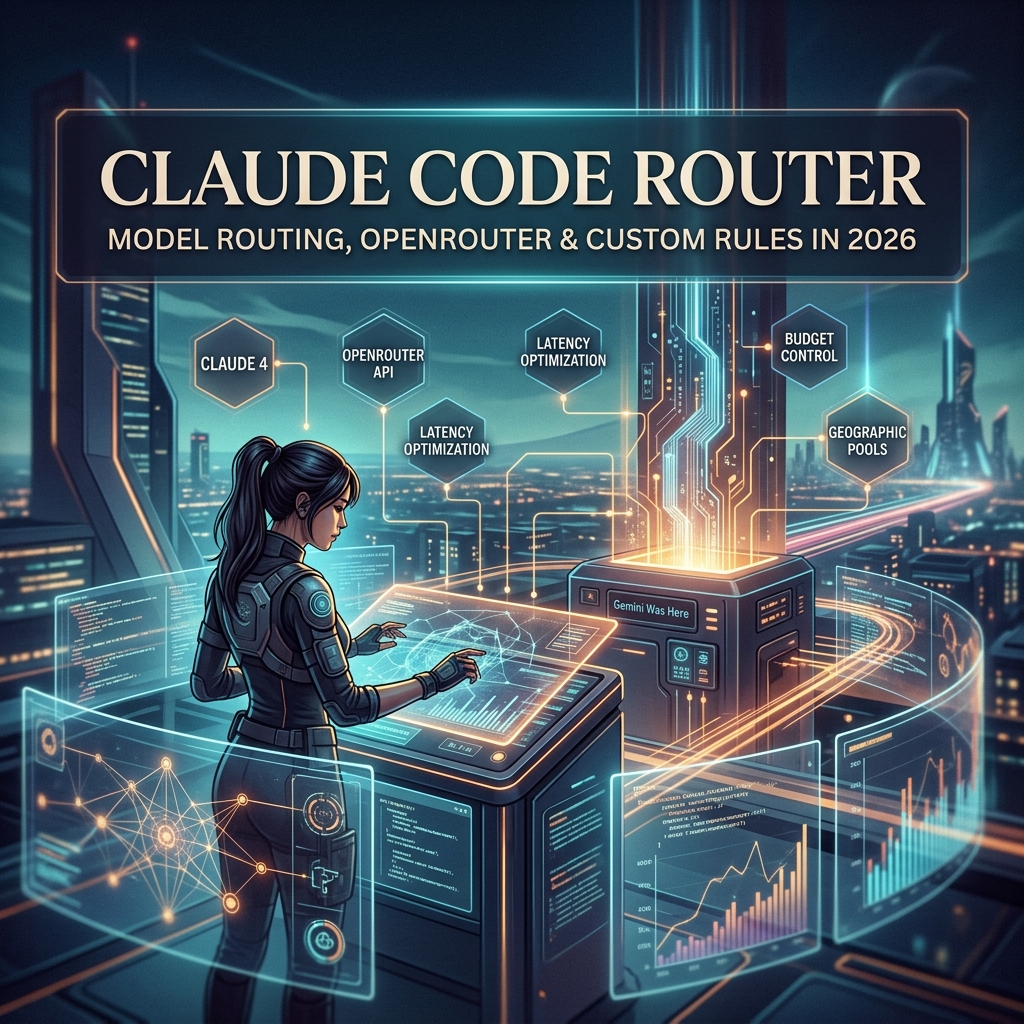
“Claude Code router” is a phrase that means different things to different people in 2026, and the differences matter for what you should actually build or buy.
It can mean (1) Anthropic’s built-in logic that picks a model when you do not specify one, (2) third-party tools that route between Anthropic models and other LLMs through one Claude Code interface, or (3) custom routing rules you build yourself to match models to tasks. This guide walks through each, when each makes sense, and the trade-offs.
Why Routing Matters in the First Place
Why routing matters before you touch third-party routers.
Claude is not one model. It is a family. As of 2026 the production tiers are roughly:
Claude Opus 4.7 — $5/$25 per million tokens. Current flagship. Best for hard, ambiguous, multi-step reasoning and agentic coding.
Claude Sonnet 4.6 (legacy — still listed) — $3/$15 per million tokens. The workhorse. Within ~1 point of Opus on coding benchmarks at 40% less cost. Right answer for 80% of daily work.
Claude Haiku 4.5 — $1/$5 per million tokens. Fast and cheap. Right answer for high-volume formulaic tasks: classification, extraction, formatting, routing, simple Q&A.
Output costs 5x input across all three tiers. Prompt caching cuts cached input costs by ~90%. Batch API cuts everything by 50% if you can wait up to 24 hours.
Lineup currency (Sept 2026): Current API list (Sept 2026, verified): Sonnet 5 $2/$10, Opus 5.5 $4/$20, Haiku 4.5 $1/$5, Fable 5.1 $10/$50. Legacy (still listed on Anthropic’s card): Opus 4.8 $5/$25, Sonnet 4.6 $3/$15.
Using Opus for everything is wasteful. Using Haiku for everything is sloppy. Routing — matching the model to the task — is how you get the best output for the lowest cost. For someone running Claude Code several hours a day, intelligent routing is the difference between a $100/month Max bill and a $1,000/month API bill for the same work.
Anthropic’s Built-In Claude Code Routing
When you launch Claude Code without specifying a model, it picks a default. As of 2026 the default for most users is Sonnet, with Opus accessible via flags or settings, and Haiku used internally for some sub-tasks like tool selection and simple file operations.
You can override the default at session start:
# Start Claude Code with Opus for a tough refactor
claude --model claude-opus-4-7   # current flagship

# Or set it in your settings.json
{
  "model": "claude-sonnet-4-6"  // current workhorse
}
Anthropic also routes internally: when Claude Code uses sub-agents for parallel work, it can route those sub-agents to lighter models automatically. This routing is opaque to you and generally well-tuned. You usually do not need to think about it.
Manual Model Selection: The 80/20 Approach
Manual model selection is still the 80/20 approach.
For most users, manual routing beats automatic routing. The rule:
Opus when you hit a wall. Architectural decisions, hard refactors, ambiguous specs, anything that requires real reasoning.
Haiku for batch. Classification, taxonomy assignment, metadata generation, SEO meta descriptions, anything formulaic at volume.
This 80/20 split is achievable with two or three commands and zero infrastructure. It is the right starting point.
Third-Party Claude Code Routers
A small ecosystem has emerged around third-party routers that sit between Claude Code and the model layer. The two most common patterns:
OpenRouter and Multi-Provider Routers
OpenRouter is the most widely used third-party router. You point Claude Code at OpenRouter as the API endpoint, and OpenRouter routes your requests to Claude (or to GPT, Gemini, DeepSeek, Llama, etc.). Why use it:
You want fallback when Anthropic has an outage.
You want to mix Claude with other models on a per-task basis.
You want a single billing surface across providers.
You want BYOK (bring your own key) routing where you mix your own provider keys.
The trade-off: latency adds a few hundred milliseconds per call, and some Anthropic-specific features (prompt caching, certain beta tools) work less smoothly through the proxy.
Custom In-House Routers
Larger teams build their own routing layer. A typical pattern: a small Python or TypeScript service that inspects the incoming request, applies routing rules (length thresholds, task type detection, cost ceilings), picks a model, and forwards the call to Anthropic.
This is overkill for most individuals. It pays off when you have:
Strict cost controls that need enforcement, not suggestion
Multi-tenant usage where different customers get different models
Compliance requirements that need request inspection and logging
A real engineering team that can maintain the service
Routing Rules That Actually Work
If you are going to invest in any routing logic, these are the rules that pay back:
By task type. Code review → Opus. New code generation → Sonnet. Format conversion → Haiku.
By input length. Long context (40K+ tokens) where you need careful reasoning → Opus. Long context where you need extraction → Sonnet with prompt caching.
By cost ceiling. Anything over a threshold token count gets a hard cap or downgrade.
By time of day. Overnight batch jobs route to cheaper models. Interactive daytime work routes to your preferred quality tier.
By failure recovery. If a Sonnet call returns a low-confidence or refused response, retry once with Opus before giving up.
Most of these rules are five lines of code each. The discipline is more about deciding the rules than implementing them.
What Anthropic Does Not Yet Ship
As of writing, Anthropic does not ship a built-in “route this query to the right model” intelligence layer in Claude Code. The model you set is the model you get for the session, with the exception of internal sub-agent routing.
This is likely to change. The shape of where Claude Code is going — more autonomy, longer sessions, more parallel agents — implies more sophisticated internal routing. For now, the routing decisions worth making are the ones you make yourself.
Costs: What Routing Actually Saves
Routing only saves money if you enforce budgets.
Concrete example. An operator running a Claude Code content pipeline that:
Generates SEO meta and FAQ (Haiku): 2,000 + 500 tokens
Reviews and edits (Opus): 10,000 + 2,000 tokens for trickier articles
Running everything on Opus would roughly triple the cost. Running everything on Sonnet would save vs Opus but produce noticeably weaker meta-generation than Haiku at similar quality. Routing by task type saves real money — often 40-60% versus a single-model approach — without sacrificing output quality.
When Not to Build a Router
Routing is leverage when you operate at volume. If you run Claude Code casually — a couple of hours a day, one task at a time — you do not need a router. You need to learn the three models well enough to pick the right one by feel. Build a router only when (a) cost is a real line item in your budget, (b) you are running multiple workflows that have genuinely different model needs, or (c) you want fallback infrastructure for resilience.
A Claude Code router is any layer — Anthropic’s built-in defaults, a third-party tool like OpenRouter, or custom code — that decides which Claude model handles a given request.
Does Claude Code have built-in routing?
Partial. Claude Code picks a default model (Sonnet) and routes internal sub-agent tasks to lighter models. It does not automatically promote your main session to Opus when a task gets hard.
What’s the difference between OpenRouter and a custom router?
OpenRouter is a hosted multi-provider gateway with billing and fallback built in. A custom router is something you build to enforce your own rules. OpenRouter is right for most teams. Custom routers are right for teams with strict requirements.
Should I use OpenRouter with Claude Code?
Useful if you want fallback, multi-provider mixing, or unified billing. Less useful if you only use Claude and want Anthropic-specific features like prompt caching to work optimally.
How do I pick the right Claude model for a task?
Default Sonnet. Opus for hard reasoning, architectural decisions, ambiguous specs. Haiku for high-volume formulaic tasks (classification, formatting, metadata).
How much can routing save me?
For volume users, 40-60% versus running everything on Opus, with no measurable drop in output quality if the routing rules are sensible.
Is there a cost to routing through OpenRouter?
OpenRouter adds a small markup on token pricing in exchange for the routing and aggregation features. For most users this is acceptable; for very high volume, going direct to Anthropic is cheaper.
The Bottom Line
Claude Code routing is leverage when you operate at volume and a distraction when you do not. Start by learning the three Claude models by feel and picking manually. Add OpenRouter if you want fallback. Build a custom router only when cost or compliance actually justifies the engineering. The router is not the goal; the right model on the right task is the goal.
The Signal — Tygart Media's weekly brief. What we actually ran, what it measured, and what it means for a restoration shop.