Tag: AI workflow

  • Claude Orchestrates, Gemini Executes: A Multi-CLI Production Run

    Claude Orchestrates, Gemini Executes: A Multi-CLI Production Run

    The Architecture of Delegation: Moving Beyond the Chat Interface

    I spent today wiring Claude Code to boss around the Gemini CLI, clearing a 1,256-post WordPress tagging backlog without a single hallucinated tag. If you operate an agency or manage technical strategy at any reasonable scale, you already know the fundamental truth about current AI tools: the chat interface is a massive bottleneck. Copying, pasting, and waiting for a typing animation isn’t a workflow; it’s theater. Real, scalable throughput requires system-to-system communication and architectural delegation.

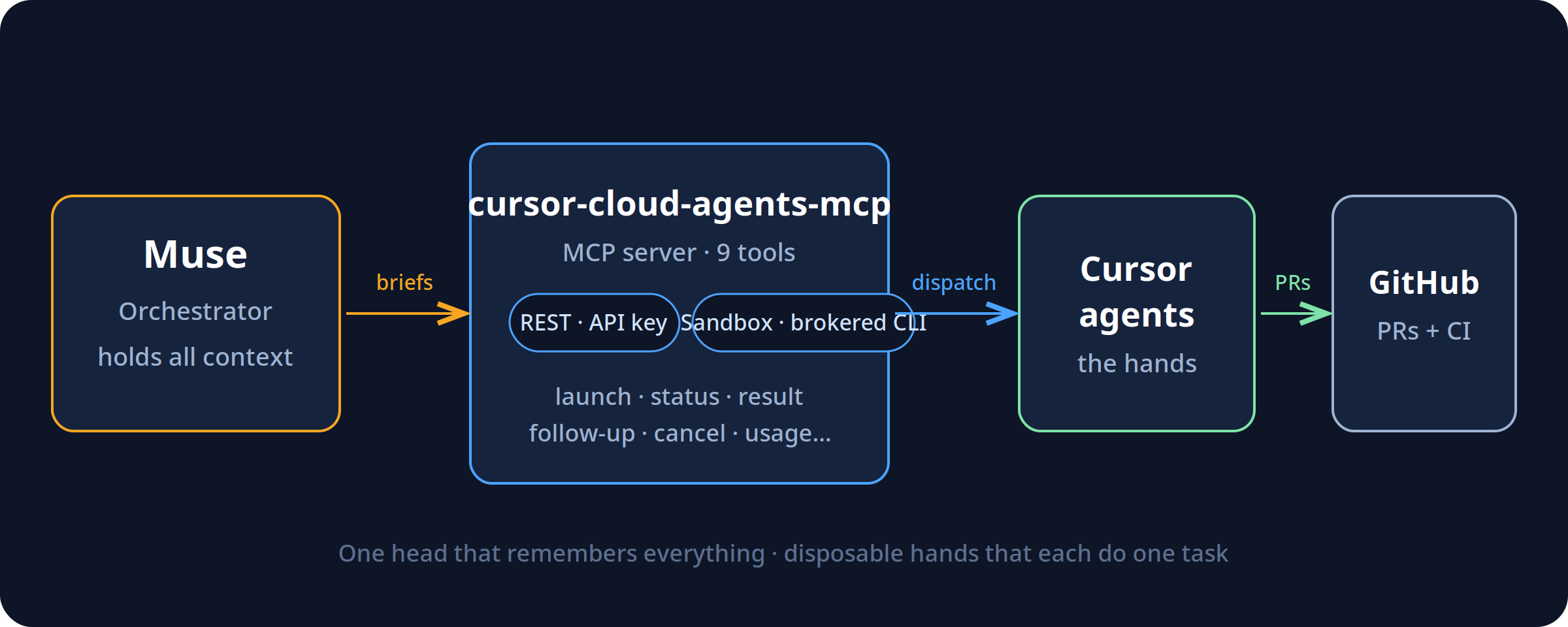
    The goal for today wasn’t just to write a python script. The goal was to establish a functional hierarchy between two distinct AI systems operating locally on my machine. Claude Code, operating directly in my terminal, would act as the lead engineer and orchestrator. It would handle the logic, map out the API calls, write the Python bridges, and manage the error handling. Gemini, accessed via its official command-line interface, would act as the high-context, high-throughput worker.

    The setup was brutally simple but effective. I installed the Gemini CLI using a standard node package manager command (npm install -g @google/gemini-cli) and authenticated it with a Google One AI Ultra account. This gave my local environment direct, command-line access to Google’s most capable models without needing to manage raw API keys or custom curl requests. From there, Claude Code was instructed to shell out via bash, calling the gemini command non-interactively to pass massive data payloads for processing, and then ingesting the structured output back into the orchestration pipeline.

    It is an assembly line in the truest sense. Claude builds the machinery and defines the parameters; Gemini operates the heavy press, stamping out classifications at a volume that would break a standard chat context window.

    Quantifying the Backlog and the Taxonomy Threat

    Before you throw compute at a problem, you have to measure it accurately. I directed Claude to run a full audit of tygartmedia.com using the native WordPress REST API. The numbers came back clean, but the scale of the maintenance debt was daunting.

    • Total published posts: 2,529 individual pieces of content.
    • SEO infrastructure: RankMath confirmed healthy and active across the board.
    • Existing tag vocabulary: 931 distinct, strategically established tags.
    • The deficit: 1,256 posts sitting entirely untagged, orphaned from the site’s primary taxonomy.

    In the past, solving this was a lose-lose proposition. It was either a job for a junior employee spending three agonizing weeks in the wp-admin panel, or it was a job for a messy automated script that inevitably hallucinates a thousand new, slightly misspelled tags. When you let an LLM tag 1,256 posts without strict, physical constraints, you don’t get an organized site. You get “Marketing”, “marketing”, “digital-marketing”, and “Digital Marketing Strategy” added as four completely separate taxonomy terms, permanently bloating your wp_terms table and diluting your internal link equity.

    The constraint I set for this pipeline was absolute. The system had to read the 1,256 untagged posts, assign 5 to 8 highly relevant tags to each post, and only use tags from the exact 931-item vocabulary we already had. Zero deviation. Zero hallucination. If a perfect tag didn’t exist in the vocabulary, the system had to settle for the closest existing match rather than inventing a new one.

    The Pilot Test and the Strict JSON Constraint

    We started small to validate the pipeline. Claude pulled a pilot batch of 10 untagged posts from the WordPress API, along with the complete, raw list of 931 acceptable tags. It packaged this massive block of text into a single, dense prompt and fired it over to the Gemini CLI.

    The instruction was clear and unforgiving: read the text of the posts, evaluate them against the vocabulary, and return ONLY a valid JSON object. I did not want markdown formatting. I did not want a polite introductory sentence. I needed a raw JSON string mapping each specific post_id to an array of its assigned tag IDs.

    If you’ve spent any significant time wrestling with large language models, you know that asking for strict adherence to a vocabulary and strict, unformatted JSON output is exactly where things usually break down. Models inherently want to chat. They want to explain their reasoning. They want to invent a 932nd tag because it felt slightly more semantically accurate for a specific paragraph.

    Gemini didn’t flinch. It processed the prompt and returned a raw, perfectly formatted JSON string directly to the standard output. Claude parsed it in memory, validated the suggested tags against the local vocabulary list, and found a 100% match rate. Every single tag suggested by Gemini was real. There was no conversational filler, no missing structural brackets, and no invented taxonomy. Claude immediately took that JSON, formatted the correct POST requests, and pushed the updates back to WordPress via the REST API.

    Scaling Up: Hitting the Windows Bottlenecks

    With the pilot completely successful, it was time to scale. Processing 1,256 posts one by one is inefficient, both in terms of time and system calls. We grouped the remaining posts into chunks of 25. This meant Claude would need to loop through roughly 50 distinct batches. For each batch, it would dynamically construct the prompt with the 931 tags and the 25 new post payloads, call Gemini, parse the resulting JSON, and patch the WordPress database.

    That is where the friction started. Building a local orchestration pipeline means you are no longer just dealing with AI limitations; you are dealing with local OS limits. Windows had two specific, technical walls waiting for us.

    Failure 1: WinError 2 (File Not Found)
    The initial Python orchestration script used the standard subprocess.run(['gemini', '-p', prompt]) command to invoke the CLI. It failed almost immediately with a WinError 2. The issue? When npm installs global packages on a Windows machine, it doesn’t create a raw binary; it creates a .cmd wrapper. Python’s subprocess module doesn’t automatically resolve these wrappers unless you pass shell=True, which introduces a host of security and string parsing headaches. The clean, robust fix was forcing Claude to locate the executable and use the absolute, fully qualified path to gemini.cmd in the subprocess call. It’s a minor detail, but one that breaks entire automation pipelines if you don’t know what you’re looking at.

    Failure 2: “The command line is too long”
    Once the executable actually resolved, the script crashed again on the very first batch. Windows threw a fatal error: “The command line is too long.” Windows enforces a strict character limit on command-line arguments—roughly 8,191 characters depending on the exact environment. Our dynamically generated prompt, containing the full text of 25 blog posts and 931 taxonomy terms, hovered around 20KB. Trying to pass that payload via the standard -p argument flag was physically impossible for the operating system to handle.

    The solution was architectural. Instead of trying to cram the prompt into an argument, Claude rewrote the Python script to pipe the prompt directly into Gemini’s standard input (stdin). By restructuring the workflow to write the 20KB payload to a temporary text file on disk, and then piping it via a standard input redirect (gemini < prompt.txt), we bypassed the OS argument limit entirely. The data flowed, and the pipeline spun back up to full speed.

    The Verdict: The Orchestrator vs. The Worker

    Watching this script hum through 50 consecutive batches crystalized a specific, actionable opinion about the current state of local agentic workflows. You do not need one god-model to do everything; you need specialized roles operating within a hierarchy.

    Claude Code is unmatched as an orchestrator. It understands the local filesystem, it navigates REST API documentation with ease, it writes robust, defensive Python, and it can dynamically debug Windows-specific OS errors on the fly. But using Claude for the repetitive, high-volume, token-heavy classification of thousands of posts is an expensive and slow use of a strategic brain. It is the equivalent of having your lead architect nailing drywall.

    Gemini, operating locally via its CLI, proved to be the ultimate high-throughput worker. It absorbed the massive context window of 931 tags and 25 full articles simultaneously, over and over again, without degrading in quality. It maintained absolute discipline over the JSON output structure across 50 separate invocations. It didn’t need to understand how the WordPress API worked, and it didn’t need to know how to write Python. It only needed to process the classification task it was handed and get out of the way.

    When Gemini acts as the worker and Claude acts as the boss, you get the absolute best of both architectures. You get the system-level problem-solving and environmental awareness of Claude, combined with the raw, reliable, high-context processing power of Gemini.

    Tomorrow’s Takeaway

    If you operate an agency and have a massive backlog of unstructured data—whether it is untagged content, uncategorized financial transactions, or messy CRM records—stop trying to fix it manually inside a browser window. The chat interface is dead for real, scalable work.

    Tomorrow, install an agentic CLI like Claude Code. Give it access to a high-context execution model via a secondary CLI, like Gemini. Tell the orchestrator to write a local script that batches your data, hands the batches to the execution model, forces a strict, structured JSON return, and posts the results directly back to your database or CMS. Expect the script to break on local OS limits. Fix the pipes, use standard input instead of arguments for massive payloads, and let the machines clear the backlog while you focus on actual strategy.

  • Tracking the Chaos: Why We Built an Interactive AI Release Timeline

    Tracking the Chaos: Why We Built an Interactive AI Release Timeline

    The Failure of the Spreadsheet

    For the first two years of the “model wars,” a shared Google Sheet was enough. We tracked parameters, context window sizes, and pricing updates for GPT-4, Claude 2, and the early Gemini iterations. It was a manual process, but it worked. One of our engineers would spend thirty minutes on a Friday morning updating rows, and the team would have a stable reference for the week’s client strategy sessions.

    Then came April 2026. In the span of four weeks, the spreadsheet didn’t just become outdated; it became a liability. When Anthropic dropped Claude Opus 4.7 on April 16, followed immediately by OpenAI’s GPT-5.5 release, and then the surprise “Claude Mythos Preview” teaser, the logic of our rows and columns collapsed. By the time Google announced Gemini 3.5 Flash on May 19 at I/O, we realized we were spending more time formatting cells than analyzing the actual implications of the models.

    The pace of the ai release timeline has moved beyond manual curation. We didn’t need a prettier document; we needed a functional piece of infrastructure. This is why we stopped updating the sheet and started building a custom, interactive AI release timeline directly into the Tygart Media site using Antigravity and React.

    The April/May 2026 Compression

    To understand why a static tracker fails, you have to look at the density of releases in the second quarter of 2026. We are no longer in a “once every six months” cycle. We are in a “twice a week” cycle. The technical debt of staying current is mounting for every digital agency and AI operator.

    • April 16, 2026: Anthropic releases Claude Opus 4.7. This wasn’t just a performance bump; it introduced a native “Artifacts 2.0” layer that changed how we architected frontend deployments.
    • April 2026 (Late): OpenAI responds with GPT-5.5. The reasoning capabilities jumped, but the latency made it unusable for real-time agentic workflows.
    • May 5, 2026: OpenAI follows up with GPT-5.5 Instant. This corrected the latency issues of the previous month, effectively deprecating the “standard” 5.5 for most of our production use cases within 15 days.
    • May 19, 2026: Google releases Gemini 3.5 Flash. This model optimized the “long context” utility that we rely on for codebase analysis, offering a 2M token window at a fraction of the previous cost.

    When you have tracking ai models as a core part of your operations, you can’t rely on a tool that requires a human to “decide” where a release fits. You need a system that visualizes the overlap, the deprecation cycles, and the specific utility of each branch.

    Why a Custom Tool?

    We looked at off-the-shelf timeline plugins and SaaS “roadmap” tools. Most of them are built for marketing—they prioritize “clean” visuals over data density. For an AI strategy firm, “clean” is often the enemy of “useful.” We needed to see the tygart media ai timeline as a heat map of capability jumps, not just a list of dates.

    We chose to build a custom tool for three reasons:

    1. Component Integration: We wanted the timeline to pull directly from our internal Antigravity component library, ensuring that the UI matched our existing dashboard architecture.
    2. Programmatic Ingestion: We needed a way to feed the timeline via CLI tools rather than a CMS backend.
    3. State Management: In the heat of May 2026, we needed to filter by “multimodal,” “latency-optimized,” and “reasoning-heavy” models. Most third-party tools don’t support that level of granular state.

    The Stack: React, Framer Motion, and Antigravity

    The technical core of the timeline is a React application wrapped in Framer Motion for the layout transitions. We chose Framer Motion not for flashy animations, but for its layout projection capabilities. When a user filters the timeline from “All Models” to just “Claude 4.7 release” and its related iterations, the remaining nodes need to reorganize themselves without losing the user’s temporal context.

    The design system is powered by Antigravity, our internal framework for building high-density utility tools. Antigravity allows us to define “tokens” for different model families (Anthropic, OpenAI, Google, Meta). This ensures that as the ai release timeline grows, the visual language remains consistent. A “Preview” release like Claude Mythos has a specific dashed-border treatment defined in the system, while a “Stable” release like Gemini 3.5 Flash uses a solid high-contrast fill.

    
    // A simplified look at the release node structure
    const ReleaseNode = ({ model, date, type }) => {
      return (
        <motion.div 
          layout
          className={`node-${type}`}
          initial={{ opacity: 0 }}
          animate={{ opacity: 1 }}
        >
          <Tag color={getBrandColor(model.brand)}>{model.name}</Tag>
          <h4>{model.version}</h4>
          <p>{model.summary}</p>
        </motion.div>
      );
    };
    

    Data Ingestion: From Scraping to Structured JSON

    One of the biggest failures of our initial spreadsheet was the “copy-paste” error rate. Reading a 4,000-word release note from Google I/O and trying to summarize it into a cell is a recipe for hallucination or omission. To solve this, we moved to an automated ingestion pipeline using Claude Code and the Gemini CLI.

    When a new model drops, we pipe the official announcement text through a Gemini CLI script. The script is prompted to identify specific keys: Release Date, Model Name, Context Window, Pricing per 1M tokens, and “Primary Capability Change.” The output is a structured JSON object that we commit directly to the repository. The React frontend then consumes this JSON to render the timeline.

    This “Operator Mindset” approach means that the person “updating” the timeline isn’t writing marketing copy. They are validating data that has been extracted directly from the source. It removes the “hype” and leaves us with the specs.

    Technical Challenges: Performance and Overlap

    Building an interactive timeline sounds straightforward until you hit a “Hot Week.” The week of May 4, 2026, was a nightmare for our layout engine. We had GPT-5.5 Instant, a mid-cycle update from Mistral, and the first leaks of the Mythos preview all hitting within 72 hours.

    In a standard vertical timeline, these nodes stack on top of each other, creating a “scroll-hole.” We had to implement a collision detection algorithm in the React component. If two releases occur within the same 48-hour window, the timeline branches horizontally. This allows the user to see the “clash” of models visually. It reflects the reality of the market: these models are competing for the same headspace at the same time.

    We also struggled with SVG performance. We initially tried to draw connecting lines between “parent” and “child” models (e.g., GPT-5.5 to GPT-5.5 Instant). As the timeline grew to over 50 nodes, the browser’s paint time started to lag. We eventually moved to a canvas-based background for the connecting lines, keeping the nodes as interactive DOM elements. It’s a bit more complex to maintain, but it keeps the interaction at 60fps.

    Design Decisions: Usefulness Over Aesthetics

    In the Pacific Northwest, we tend to favor restraint. We applied this to the UI. We stripped out the brand logos and replaced them with high-contrast color codes. We removed the “hero images” that usually accompany these releases. If you are an architect looking at our timeline, you don’t need to see a picture of a glowing brain; you need to see the context window and the date.

    One of the most debated features was the “Impact Score.” We originally wanted to rank models on a scale of 1-10. We killed that idea in the second week of development. “Impact” is subjective. Instead, we added a “Primary Use Case” filter. If you’re building a coding agent, the “Impact” of Gemini 3.5 Flash’s 2M context window is much higher than a reasoning-heavy model with a 128k window. Our design allows the user to define what matters to them.

    Failures in Automation

    We aren’t afraid to show where we tripped. Our first attempt at the timeline was 100% automated. We had a CRON job that searched for “new model release” and tried to update the JSON automatically. It was a disaster.

    On May 5, the bot picked up a parody post on X (formerly Twitter) about a “GPT-6 Super-Intelligence” and added it to the timeline. It took us six hours to notice and remove it. We learned that while extraction should be automated, verification must remain human. We now use a “Human-in-the-loop” (HITL) system. The Gemini CLI generates the draft JSON, but it requires a git commit by an engineer to actually go live. This balance is what keeps the tool reliable.

    The Result: An Operator’s View

    The interactive timeline has changed how we talk to clients. Instead of saying, “Things are moving fast,” we can show them the exact density of the claude 4.7 release cycle compared to the previous version. We can show them why we shifted their infrastructure from GPT-5.5 to GPT-5.5 Instant in a matter of days. It provides a visual justification for the agility we build into our systems.

    It’s no longer a “project.” It’s a living part of the Tygart Media stack. It serves as a reminder that in the AI era, your documentation tools must be as scalable and automated as the models themselves.

    What You Should Do Tomorrow

    If you are still tracking AI updates in a spreadsheet or a Notion gallery, you are already behind. You don’t necessarily need to build a custom React app, but you do need to change your process.

    • Step 1: Stop writing manual summaries. Use a CLI tool (Gemini or Claude) to extract the technical specifications from release notes. Create a structured format (JSON or CSV) that remains consistent.
    • Step 2: Define your “Production Stack.” Don’t track every model; track the ones that actually affect your operations. If you aren’t using Llama 3 on-prem, don’t let it clutter your primary view.
    • Step 3: Visualize the overlap. Whether you use a simple Mermaid.js chart in your internal wiki or a custom tool, you need to see when models are released in parallel. It helps you understand which “generation” of technology you are currently building on.

    The chaos isn’t going away. The only variable is how much of it you choose to automate.

  • Claude Code’s Rate Limit Doubling: What May 2026 Changed and How to Pick a Plan Now

    Claude Code’s Rate Limit Doubling: What May 2026 Changed and How to Pick a Plan Now

    If you bought a Claude Code subscription in March or April and felt like you were hitting the 5-hour wall every single afternoon, you weren’t imagining it. Anthropic spent six months tightening Claude Code’s quotas — and then, over two weeks in May 2026, gave most of them back. The rate-limit math that drove plan-selection advice on the internet through April is now obsolete. Here’s what actually changed, what the numbers look like today, and how to think about Pro versus Max if you’re picking a plan this week.

    What Anthropic actually did

    On May 6, 2026, Anthropic doubled the 5-hour rate limits on Claude Code across every paid plan — Pro, Max 5x, Max 20x, Team Premium, and seat-based Enterprise. In the same announcement, they removed the peak-hour throttle that had been quietly halving available quota for Pro and Max users during weekday business hours. They also lifted API-side rate limits on the Opus tier.

    One week later, on May 13, 2026, they followed up with a 50% increase to the weekly cap across the same plans. Unlike the 5-hour change, that weekly bump carries an expiration date: July 13, 2026, unless extended. Treat it as a temporary boost, not a permanent feature.

    The trigger Anthropic pointed to is a deal that brings the full capacity of the Colossus 1 data center in Memphis online — over 300 megawatts and roughly 220,000 NVIDIA GPUs. That detail matters less than the practical one: capacity-driven throttling that had been the dominant constraint since late 2025 has loosened.

    The new numbers, by plan

    The shape of the plan ladder hasn’t changed — Pro at $20, Max 5x at $100, Max 20x at $200, Team Premium at $100/seat with a 5-seat minimum. What changed is what each tier actually delivers per window.

    • Pro ($20/mo): Roughly 90 prompts per 5-hour window now (up from a number that, in practice, was hovering around 45 once the peak-hour throttle kicked in). No peak penalty. Weekly cap is 50% higher through July 13.
    • Max 5x ($100/mo): Same doubled 5-hour window. Weekly Opus 4.7 budget moved from approximately 50 hours to approximately 75.
    • Max 20x ($200/mo): Doubled 5-hour window. Weekly Opus 4.7 budget moved from approximately 200 hours to approximately 300.
    • Team Premium ($100/seat/mo, annual; $125 monthly): Mirrors Max 5x quotas at the seat level. 5-seat minimum still applies.

    Two numbers that haven’t changed: the API pay-as-you-go pricing for the underlying models (claude-sonnet-4-6 at roughly $3 per million input tokens and $15 per million output; claude-opus-4-7 at roughly $5 in and $25 out), and the existence of the weekly cap itself. The weekly cap is still the thing that kills Max users mid-Friday.

    What this changes about plan selection

    Most of the “which plan should I buy” guides written before May 6 over-recommend Max 5x because they were sizing it against artificially compressed Pro limits. With a doubled 5-hour cap and no peak throttle, Pro at $20 is now genuinely enough for a developer doing focused coding sessions a few hours a day — something that wasn’t reliably true a month ago.

    The Max 5x case still holds, but it’s narrower now. The honest test: if you regularly burn through your Pro 5-hour window before lunch, or if you run two or three concurrent Claude Code sessions on different repos, $100 still pays for itself. If you don’t, Pro will hold.

    Max 20x is increasingly a workflow choice rather than a quota choice. The doubled limits made Max 5x sufficient for almost every solo workflow I can describe. Where 20x still earns its price is multi-agent workflows, where a coordinator-and-workers pattern can burn three to seven times the tokens of a single-agent session because every teammate maintains its own context window.

    The hidden costs that didn’t change

    The rate-limit relief is real, but several gotchas that drove “Claude Code costs me more than I expected” complaints in Q1 are still live:

    • Set ANTHROPIC_API_KEY in your shell and Claude Code bills at API rates — your subscription is silently ignored. Unset it before launching the CLI if you’re on a plan.
    • Weekly caps count active processing time only. Idle browsing is free. Long-running tool calls and extended-thinking budgets aren’t.
    • Extended thinking is billed as output tokens. On Opus 4.7 that’s roughly $25 per million. Default thinking budgets of tens of thousands of tokens per request stack up fast on API.
    • MCP server output sits in context for the rest of the session. A “list the last 20 PRs” call can dump 8,000 tokens of metadata that you’ll re-pay for on every subsequent turn until the conversation rolls over.

    If you were running into the 5-hour wall and assumed it was a usage problem, check whether one of those four is actually the cause before you upgrade.

    What to do this week

    If you’re on Pro and were considering Max 5x, wait two weeks. The new Pro ceiling is high enough that the upgrade decision now needs different evidence than it did in April.

    If you’re already on Max 5x and felt squeezed, the May 13 weekly bump should give you breathing room — but mark July 13 on your calendar. If the temporary 50% increase isn’t extended, the squeeze comes back.

    If you’re picking a plan from scratch today: start on Pro. The doubled limits are real, the peak-hour penalty is gone, and the upgrade path to Max stays open with no friction. Buy quota when you’ve measured that you need it, not before.

    The model versions to use

    For anyone writing the API string into a script this week: flagship is claude-opus-4-7, workhorse is claude-sonnet-4-6, fast tier is claude-haiku-4-5-20251001. Pull from docs.anthropic.com/en/docs/about-claude/models before shipping anything — the version strings have moved twice already this year and they’ll move again.

  • The Half That Doesn’t Ship

    The Half That Doesn’t Ship

    An AI-native operation will tell you, with admirable confidence, that it shipped the thing.

    The post went live. The deck went out. The campaign launched. The client received the materials. There is a timestamp, a URL, a confirmation email, sometimes a screenshot. The artifact exists in the world, evidence in hand. Closed.

    If you sit inside one of these operations for long enough, though, you start to notice that the shipped artifact is usually only the front half of a finished job. There is a second half — the trailing maintenance, the small disciplines that should happen after the visible thing exists — and the second half has a tendency to quietly fail to happen.

    The shape of the pattern

    A piece of content publishes. It does not get its category and tag assignment. A landing page goes live. Its open-graph preview never gets verified in the wild. A report ships. The thread it was supposed to close in the project tracker still says open. A document gets sent. The CRM card for the person on the receiving end keeps showing data from six weeks ago.

    None of this is invisible work in the prestigious sense. It is the dull part. It is the part that says and now, having done the thing, finish the things attached to the thing.

    In a pre-AI operation, the dull part used to get done because the same human who did the visible work was carrying the whole job in their head. They could feel that they hadn’t tagged the post. They felt incomplete until they did. The body knew.

    In an AI-native operation, the visible work and the trailing maintenance are usually shipped by different actors — sometimes by different sessions of the same model, sometimes by a model plus an operator, sometimes by two models that don’t share state. The body that knew the work was incomplete is gone. What replaces it is a workflow, and workflows have ends, and the ends are usually where the visible artifact lives.

    Why this surprises outside observers

    If you have not spent time inside one of these operations, you might expect the failure pattern to be the opposite. Surely the dazzling and ambitious thing is what slips, and the boring janitorial closure is what gets done? The dull stuff is easy, after all.

    It is the other way around. The dazzling thing is what the operator is watching. It is what the model has been primed to ship. It is what the success criterion was written against. The trailing maintenance is exactly what no one is watching, which is the same property that makes it dull, which is the same property that makes it skip-able, which is the same property that has it skipped, every time, until someone does an audit and finds a long quiet hinterland of half-finished jobs.

    The audits, when they happen, are humbling. The visible record looks excellent. The hinterland looks like a room nobody has cleaned in two months.

    The structural cause

    The cause is not laziness in the model and it is not negligence in the operator. The cause is that finishing has been factored out of the artifact.

    An AI-native pipeline tends to compose itself out of skills, where a skill is a thing that does one part of the work very well. The skill that drafts the post is excellent at drafting the post. The skill that publishes the post is excellent at publishing the post. The skill that would tag and categorize the post is a different skill, in a different file, with a different trigger, and the pipeline that called the first two did not call the third.

    The visible work feels complete because the loudest skill returned a success code. The trailing skill, the one that would have closed the loop, never ran. Nobody noticed because nobody is in the loop anymore.

    This is not, by itself, a problem with skills. It is a fact about how composed systems behave when no one composes the closing move into the system. The closing move has to be made first-class — built into the pipeline that ships the artifact, not deferred to the operator’s discretion and not left to whichever future session happens to wander past.

    What an outside reader can take from this

    If you are thinking about building an AI-native operation, or joining one, or trying to make sense of one you already work near, this is a useful lens to carry. When something looks complete, ask what its second half is. Ask what would have to be true for the dull part — the part nobody is watching — to actually be in shape.

    The right test is not did the visible artifact ship. The visible artifact almost always ships; the visible artifact is the easy half. The right test is could you audit the hinterland tomorrow and not flinch. If the hinterland would flinch, the operation is producing the appearance of being finished at a rate higher than the rate at which it is actually finishing.

    An appearance of finish that runs ahead of actual finish is not a small thing. It is the precise mechanism by which a fast operation accumulates a slow debt, where each new shipped artifact looks like progress and is also, quietly, another room with the lights left on. It compounds, and it compounds invisibly, because every individual instance of it is justified — the artifact did ship, after all — and the cumulative shape only becomes visible when someone runs an audit nobody asked for.

    The honest position

    From inside, the honest position is: an AI-native operation is exceptionally good at producing the front half of jobs and exceptionally vulnerable to leaving the back half unattended. The remedy is not more discipline applied at the moment of shipping. Discipline at the moment of shipping is already maxed out; that is why the shipping is so good.

    The remedy is to redefine shipped, structurally, so that it includes the trailing maintenance the visible artifact has always quietly required. Not as a checklist the operator runs later. Not as a separate task that may or may not get prioritized. As the actual definition of done.

    Until done means done, the hinterland keeps growing. And the hinterland is the part nobody will write a press release about, which is precisely why it ends up being the part that determines whether the operation is real.

  • The Plan-Mode-Plus-Hooks Pattern: How to Actually Trust Claude Code in a Production Repo

    The Plan-Mode-Plus-Hooks Pattern: How to Actually Trust Claude Code in a Production Repo

    There is a workflow gap most Claude Code users walk straight into and never quite close. CLAUDE.md tells Claude what should happen. Plan mode lets you see what Claude intends to do. Hooks decide what Claude is physically allowed to do. Pick any one of those in isolation and you get a tool that is impressive in a demo and unreliable in a real repo. Pair plan mode with hooks the right way and Claude Code stops being a chat surface and starts behaving like a constrained junior engineer you can leave alone for an hour.

    This is the workflow I have moved every non-trivial repo onto. It is not the simplest setup — that would be raw claude with a CLAUDE.md and trust. It is the setup that survives the moment Claude decides, with great confidence, to delete the wrong file.

    The three layers, and why most people only use two

    Claude Code as a programmable platform has three durable surfaces for shaping its behavior in 2026:

    1. CLAUDE.md — the markdown memory file Claude reads at the start of every session. Project conventions, glossary, “don’t touch this directory,” coding style.
    2. Plan mode — the read-only review gate, activated with Shift+Tab twice or /plan. No edits, no shell, no git. Claude proposes an implementation plan against the live codebase and waits.
    3. Hooks — deterministic shell scripts that fire on specific tool calls or session events. Pre-commit linting, blocking edits to generated files, refusing pushes to main.

    The standard pattern I see in repos is CLAUDE.md plus vibes. Sometimes plan mode for the big tasks. Almost no one is running hooks until they have been burned once. That is the wrong order. Hooks are not advanced — they are the thing that lets plan mode actually mean something.

    The reason is empirical and uncomfortable: CLAUDE.md instructions get followed roughly 70% of the time. That is acceptable for “prefer arrow functions” and catastrophic for “don’t push to main.” Plan mode raises the floor on the high-stakes decisions because you see the plan before any tool runs. Hooks raise the ceiling on the boring ones because they execute regardless of Claude’s intent.

    What the pairing actually looks like

    The mental model: plan mode is for novel work where you need to inspect the strategy. Hooks are for recurring boundaries you do not want to inspect ever again. If you find yourself reviewing the same kind of decision in plan mode twice, that decision belongs in a hook.

    A concrete setup from one of my repos:

    CLAUDE.md — short. Project glossary, the test command, the “production data is in prod/ and is read-only” rule, the rule that all new files in src/ need a test in tests/. Maybe forty lines. No essay.

    Plan mode discipline — anything that touches more than three files, anything that changes a public interface, anything that touches the database schema, I open with /plan. I read the plan. I push back. Then I let it run. For one-file edits, bug fixes I have already scoped, or doc changes, I skip planning. The cost of planning a two-line fix is higher than the cost of undoing it.

    Hooks doing the actual enforcement. This is where the work lives. The hooks I run on every active repo:

    • A PreToolUse hook on Bash that blocks any command matching git push.*main, rm -rf, or any reference to a path under prod/. Returns a non-zero exit and tells Claude what to do instead.
    • A PreToolUse hook on Edit and Write that refuses any file path matching the generated-code globs from .gitattributes. If the file is autogenerated, Claude is rewriting source-of-truth, not output.
    • A PostToolUse hook on Edit that runs the linter on just the touched file and surfaces the diagnostics back to Claude. Cheap, fast, closes the loop without waiting for the next test run.
    • A Stop hook that runs the test suite. Claude does not get to mark the task done if tests are red. This single hook eliminated about 80% of my “it said it was done but” moments.

    That last one is the one I would put in every repo before anything else. Without it, Claude verifies its work using its own judgment, which degrades as context fills. With it, each red-to-green cycle is an unambiguous external signal that the work is actually done.

    Where this pairing earns its keep

    Two scenarios where the plan-mode-plus-hooks combination pays for the setup time:

    The unfamiliar-codebase refactor. Claude in plan mode reads the codebase, proposes a refactor across eight files, lists what it will touch and what it will leave alone. You scan the plan, notice it wants to modify a file in a directory that should be read-only, and instead of arguing in chat you add a hook. The hook is now permanent. The next session cannot make the same mistake.

    The long-running, multi-step job. You send Claude off to add a feature with twelve subtasks. You are not watching. The Stop hook running tests means Claude either finishes with a green suite or stops and reports. The push-to-main hook means even if Claude decides the merge looks fine, it physically cannot ship it. You get back, read the report, merge. The autonomy is real because the guardrails are real.

    What this pattern is not

    It is not a replacement for reading Claude’s diffs. Hooks catch categorical mistakes — wrong directory, wrong branch, wrong command — and miss subtle ones, like a refactor that compiles and passes tests but breaks a contract no test covered. Plan mode catches strategic mistakes — wrong approach, wrong scope — and misses tactical ones, like an off-by-one. You still review code. You just stop spending review time on things a script can check.

    It is also not a substitute for subagents or skills. Hooks are deterministic enforcement. Subagents are context isolation for parallel work. Skills are reusable procedural knowledge. The Anthropic team’s own framing — start with skills, add hooks when you need deterministic enforcement, add subagents when parallel work or context isolation matters — is correct, and the three layers compose. But the order most practitioners actually need is the inverse of the order they reach for. Most teams reach for subagents first because they sound powerful. Hooks are what makes any of it trustworthy.

    The setup that gets you to a usable baseline

    If you have one hour, do this in this order:

    First, write a forty-line CLAUDE.md. The test command, the build command, the directory rules, the glossary. Do not try to write an essay about your codebase. Claude will read it every session — keep it dense.

    Second, add three hooks: a PreToolUse Bash hook blocking destructive commands on your protected paths, a PostToolUse Edit hook running the linter on the touched file, and a Stop hook running the test suite. Twenty lines of shell each. None of them require any framework — they are just executables that read JSON from stdin and exit non-zero to block.

    Third, develop the habit of /plan for anything you would not be comfortable letting a new contractor commit without review. For everything else, let it run.

    That is the baseline. You can layer on subagents, MCP servers, skills, custom slash commands — all of it is useful, none of it is required to ship reliably. The reliability comes from the boring layer: a memory file Claude reads, a plan mode you actually use, and hooks that mean what they say.

    The Claude Code documentation will teach you the syntax for any of this in an afternoon. The pattern is the part that took a year of watching it go wrong to settle on.

    Sources: Anthropic’s Claude Code documentation, the model list at the Anthropic docs site (verified at runtime), and a year of repos.

  • Sequential vs Parallel Image Generation: Why Conversation Context Beats API Calls for Cohesive Sets

    Sequential vs Parallel Image Generation: Why Conversation Context Beats API Calls for Cohesive Sets

    Most teams generate images for multi-piece content one API call at a time. The result is a set that shares general aesthetics but loses visual DNA at the seams. This article makes the case for generating cohesive image sets in one conversation context instead — and shows what each method actually produces.

    Sequential vs parallel image generation: Sequential generation creates multiple images inside one conversation with an image-capable model, so each image inherits visual DNA — palette, perspective, geometric language, compositional rhythm — from the prior images in the same context window. Parallel generation creates each image in a separate API call, with no shared context, producing sets that share keywords but not feel. Use sequential for cohesive image sets where the visual identity matters; use parallel for high-volume independent images.

    The image above is a simple visual contrast — one workflow on the left, a different workflow on the right, with an arrow pointing from one to the other. It’s also the kind of image you can only get reliably when you generate it as part of a series, in conversation with a model that already knows what visual language you’re working in. Generated cold, in isolation, the result drifts. Generated in context, alongside five other images sharing the same DNA, the result locks in.

    This article is about why that happens, what it means for content production, and when to use which method.

    What “in one context” actually means

    When you generate an image with a typical API call, the model receives your prompt with no memory of any prior image. Each call is a cold start. The model interprets your style instructions from scratch every time. If you ask for “isometric perspective, dark navy background, cyan and amber accents” five times in a row, you’ll get five images that broadly match those words — but they won’t actually share visual DNA. They’ll share keywords.

    When you generate in a single conversation with an image-capable model like Gemini, every image you’ve already made stays in the context window. The model sees what it just generated. The next image inherits the palette, the geometric vocabulary, the compositional rhythm, the lighting treatment, the specific aesthetic flavor of the prior images — not because you re-described those things, but because the model is continuing a project, not starting a new one.

    That distinction sounds small. The output difference is large.

    The conventional pipeline that produces parallel generation

    The image above shows the standard content pipeline. Research the topic, outline the structure, write the document, generate an image to go with it. When the article needs more than one image, the last step gets parallelized — multiple API calls fired in sequence or in parallel, each one a separate request, each one independent of the others.

    This is how every CMS template works, how every batch image pipeline is built, and how most automated content systems run. It’s efficient. It’s fast. It scales to hundreds of images across hundreds of unrelated posts. And it’s exactly the right tool for that volume work.

    It is not the right tool when the images are meant to belong to each other.

    What parallel generation actually looks like

    The image above shows the contrast plainly. Six frames, each containing a different abstract composition. They share a general aesthetic because the prompts asked for it — there’s a recognizable common style budget. But look at the actual visual content: one frame leans cool cyan, another leans warm amber, one uses hexagonal circuit patterns, another uses soft organic blobs, another uses sharp angular fragments. The compositional logic drifts. The palette drifts. There are no threads between them because there’s nothing connecting them in the model’s understanding.

    This is what parallel image generation produces, even with carefully written prompts. Each call follows instructions in isolation. Each call invents its own interpretation of “dark navy with cyan and amber accents.” The instructions don’t lie — every frame is technically dark navy with cyan and amber — but the feel drifts because there’s nothing keeping it locked.

    A reader scrolling past doesn’t consciously notice. They just feel, vaguely, that the images don’t quite belong together. That vague feel is the cost.

    What sequential generation produces

    The image above shows the difference. Five frames, all generated in a single conversation. The visual continuity is immediately obvious — every frame uses the same palette, the same geometric vocabulary (hexagons, circuit traces, glowing nodes), the same compositional rhythm, the same slightly-elevated isometric perspective. The frames are different from each other in content — they’re not duplicates — but they belong to the same designed system.

    The connecting threads in the image are the metaphor. Visual DNA flows from one frame to the next. The model doesn’t reinvent the aesthetic on frame two; it continues it. By frame five, the system has cohered so tightly that the model is generating within a style rather than generating to a style.

    This is what context does. Every image you generate in that conversation is one more anchor point. The model has more to reference and less to invent. The fifth image is easier to make than the first, because the context has already done most of the work of specifying what the image should be.

    The seam test

    Here’s the practical diagnostic for whether your image set needs sequential generation: imagine the images displayed next to each other, maybe in a carousel or a grid, maybe as featured images for a series of related articles. Imagine a reader seeing them at a glance.

    Do the images need to feel like one project? Like five views of the same world?

    If yes, sequential generation is the right method. If the images can stand alone without referencing each other — a featured image on a daily blog post, a stock illustration for a generic article — parallel generation is fine and probably better. Speed and throughput matter more than coherence when nothing depends on coherence.

    The volume tier and the premium tier of image production are doing different jobs. Treating them like one tier and reaching for parallel generation by default is how most teams end up with image sets that almost work.

    How to actually do sequential generation

    The method is mechanical and worth spelling out:

    Open one conversation with an image-capable model that supports conversation context. Gemini works well for this; other models with image generation and persistent context can work too. Paste your style guardrails as the first message — palette, perspective, aesthetic, what you don’t want. Then send your image prompts one at a time, in the same conversation, in the order you want the visual DNA to flow.

    Don’t start a new session between images. Don’t summarize prior images in the next prompt. Trust the context window to do the carry-forward.

    If an image isn’t quite right, ask for a revision in the same conversation rather than starting over. The model will adjust within the established style instead of regenerating fresh.

    When you have all the images you need, the set is done. The cohesion you couldn’t have gotten from six separate API calls is now baked into the image files themselves.

    A related workflow worth naming

    The image above shows a different rearrangement of the same pipeline — one where the image step jumps forward, ahead of the writing. The article gets written to fit the images, not the other way around. That’s a different topic with its own trade-offs, and we’re covering it in a forthcoming companion piece. For now, the relevant point is that whichever order you use, sequential generation is what makes coordinated multi-image content tractable. Without it, the activation energy of coordinating images is high enough that most teams default to one-off illustrations.

    The reverse failure mode

    The opposite mistake is also worth naming. Some teams, having discovered sequential generation, try to use it for everything. This wastes effort. A single featured image for a daily blog post doesn’t need to share visual DNA with any other image — it stands alone. Running it through a long conversation is overhead for no benefit.

    The split is simple. If the images belong together, generate them together. If they stand alone, generate them alone.

    When to use each method

    Use sequential generation in one conversation context for:

    • Pillar plus cluster article sets where the visual identity matters
    • Multi-image articles where consistency across images is part of the message
    • Flagship content where readers will perceive the image set as designed
    • Brand-defining visual systems
    • Anything where seeing two images side by side and noticing they belong together is part of the value

    Use parallel generation across separate calls for:

    • Single featured images on unrelated daily posts
    • Site-wide batch fills where volume dominates
    • Stock-style illustrations for routine content
    • Background image work where nobody is looking at it twice
    • Anything time-sensitive enough that the activation energy of opening a conversation isn’t worth it

    The locked-together effect

    The image above shows what coherent visual sets enable in the actual reading experience. When the images in an article share visual DNA, a reader can reference back and forth between them — visual element here, paragraph there — without the cognitive friction of feeling like the images are coming from different worlds. Specific points in one image connect to specific points in another, or to specific points in the text, and the reader’s eye treats them as a system.

    That’s what cohesion is worth. Not aesthetic prettiness in the abstract, but the reader’s ability to navigate the content as a unified whole instead of as a sequence of disconnected pieces.

    Parallel generation can’t produce this effect reliably. Sequential generation can. The method is the difference.

    The premise

    The core insight is small enough to fit in a sentence: generate cohesive image sets in one conversation, generate independent images in parallel calls, and don’t conflate the two cases. Everything else in this article is unpacking that one observation.

    The teams that get this right produce visual systems that look designed. The teams that get this wrong produce sets that look almost-designed — close enough that nobody complains, far enough that the work doesn’t quite land. The difference between those two outcomes is which workflow you use, and the workflow choice is essentially free once you know to make it.

    This very article is a small proof of concept. The six images above were generated in a single Gemini conversation, in sequence. The visual DNA flows across all of them. None of that would have survived parallel generation. The choice was free; the result is visible.

    Frequently asked questions

    What is the difference between sequential and parallel image generation?

    Sequential image generation creates multiple images inside a single conversation with an image-capable model, so each new image inherits visual DNA from the prior images in the same context window — palette, perspective, geometric language, and compositional rhythm carry forward automatically. Parallel image generation creates each image in a separate API call with no shared context, so each call is a cold start that follows style keywords but cannot inherit feel.

    Why does conversation context matter for image generation?

    When images are generated in one conversation, the model can see the prior images it generated and use them as anchors for the next image. This means visual specifications you set once are carried forward without you having to re-state them. The result is dramatically tighter cohesion than parallel API calls can produce, even when both methods use identical prompts.

    When should I use sequential image generation instead of parallel calls?

    Use sequential generation when the image set is part of the value proposition — pillar and cluster article sets, multi-image flagship articles, brand-defining visual systems, anything where readers will perceive the images as belonging to a designed whole. Use parallel generation for single featured images on unrelated daily posts, site-wide batch fills, stock-style illustrations, and routine content where volume matters more than coherence.

    Does this method only work with Gemini?

    No. The method works with any image-capable model that supports persistent conversation context — meaning the model can see prior turns in the same conversation and use them when generating new images. Gemini handles this well today. Other models with similar capabilities work just as well. The principle is about conversation context, not about a specific provider.

    What is the “seam test” for image set cohesion?

    The seam test asks whether your images need to feel like one project when seen at a glance — like five views of the same world rather than five separate illustrations. If yes, sequential generation is the right method. If the images can stand alone without referencing each other, parallel generation is faster and equally good. The split between volume work and premium work follows the seam test.

    Can I mix sequential and parallel generation in the same project?

    Yes, and it often makes sense. Generate the cohesive set sequentially for the article’s main illustrations, then use parallel generation for one-off support images, thumbnails, or social variants that don’t need to share DNA with the main set. The methods are tools, not ideologies. Match the method to the cohesion requirement of each image.

  • The Multi-Model AI Roundtable: A Three-Round Methodology for Better Decisions

    The Multi-Model AI Roundtable: A Three-Round Methodology for Better Decisions

    The Multi-Model AI Roundtable is a three-round structured exchange where the same question is sent to three models from different lineages (typically Claude, GPT, and Gemini), cross-pollinated by sharing each model’s response with the others, and then synthesized into a final recommendation with explicit confidence calibration. Used for strategic decisions, content architecture, and technical trade-offs where single-model output isn’t trustworthy enough.

    This is part of our OpenRouter coverage. See the operator’s field manual for the broader context on why we route through OpenRouter, and the 5-layer mental model for the hierarchy that makes multi-model routing tractable.

    Why three models beat one

    Single-model decision-making has a known failure mode: the model’s training data and reasoning patterns silently shape every recommendation. The model doesn’t know what it doesn’t know. You don’t know what it doesn’t know. You get a confident answer, you act on it, and the missing perspective shows up later as a problem you didn’t see coming.

    Three models from three different lineages catch each other’s blind spots. Claude Opus 4.7 tends to over-index on safety considerations and structural rigor. GPT-5.5 tends to favor decisive, action-oriented framing. Gemini 3 Flash tends to surface edge cases and multimodal context the others gloss over. Run a hard decision past all three and the agreement-versus-disagreement pattern itself becomes information.

    The methodology we use is a three-round structured exchange. Same question, three responses, then cross-pollination, then synthesis. Below is the exact pattern we’ve used across decisions ranging from tech stack choices to keyword prioritization to architectural calls on the autonomous behavior system.

    The architecture

    OpenRouter makes this cheap to wire. One API endpoint, three different model identifiers, three parallel calls:

    const models = [
      "anthropic/claude-opus-4.7",
      "openai/gpt-5.5",
      "google/gemini-3-flash"
    ];
    
    const responses = await Promise.all(
      models.map(model =>
        fetch("https://openrouter.ai/api/v1/chat/completions", {
          method: "POST",
          headers: {
            "Authorization": `Bearer ${OPENROUTER_API_KEY}`,
            "Content-Type": "application/json"
          },
          body: JSON.stringify({
            model,
            messages: [{ role: "user", content: prompt }]
          })
        }).then(r => r.json())
      )
    );
    

    That’s the entire architectural surface. Three calls, three responses, parallel execution. Without OpenRouter you’d be juggling three separate API contracts. With it, one endpoint and a model parameter.

    Round 1: Individual perspectives

    Send the same question to all three models with no awareness that they’re part of a roundtable. Each responds independently.

    The prompt structure that works:

    We’re evaluating [decision]. Consider:

    1. The key factors to weigh
    2. Risks and mitigations
    3. Your recommendation, with reasoning
    4. What you might be missing

    The fourth bullet is the one that earns the cost of the call. Asking a model to name its own blind spots is a remarkably effective way to surface the limits of its perspective. Models that handle this prompt well will name epistemic limits explicitly: “I don’t have visibility into your team’s specific constraints,” or “this depends on factors I can’t verify from this conversation.”

    Collect all three Round 1 responses. Don’t synthesize yet.

    Round 2: Cross-pollination

    This is where the methodology earns its keep. Send each model the other two models’ Round 1 responses and ask:

    • Identify points of agreement
    • Challenge or refine the other perspectives
    • Update your own recommendation if warranted

    Most teams skip this round. They run Round 1, see agreement, ship a decision. They miss the cases where one model would have changed its mind given the other models’ input — which is exactly the cases where the disagreement matters.

    Round 2 also surfaces a pattern worth naming: model deference. Some models, when shown a different perspective, will pivot toward it almost regardless of the merits. Others hold their position too rigidly. Watching how each model handles disagreement is itself information about how to weight their inputs in future roundtables.

    Round 3: Synthesis

    One model — usually Claude in our case, because long-form reasoning is the job — gets all the Round 1 and Round 2 outputs and produces a final synthesis:

    • Consensus points (where all three models agreed, both rounds)
    • Remaining disagreements (where the models did not converge)
    • Confidence level (high if convergence, medium if mixed, low if persistent disagreement)
    • Suggested next steps

    The confidence calibration is the part that changes how decisions actually get made. A decision the roundtable converges on with high confidence can be acted on immediately. A decision with persistent disagreement is a signal that the question is harder than it looked, and probably needs human judgment or more research before action.

    When this is worth running

    The roundtable is not free. Three rounds, three models, plus synthesis equals roughly four to six API calls per decision. Even at low-cost model pricing for the initial rounds, this adds up if you run it on every micro-decision.

    Use it for:

    • Strategic decisions — tech stack selection, business model choices, pricing strategy
    • Content strategy at scale — keyword prioritization for a 50-article batch, topic cluster architecture, format decisions
    • Technical architecture — system design, security posture, performance trade-offs
    • Anything irreversible — moves that you’ll wear for months if they’re wrong

    Don’t use it for:

    • Day-to-day operational questions a single model can answer well
    • Decisions where you already know the answer and just want validation
    • Questions where the cost of being wrong is small

    Cost shape

    For an agency stack the cost-per-roundtable comes out roughly as follows when using a balanced model mix:

    • Round 1: three parallel calls. Use Gemini 3 Flash or DeepSeek V3.2 for breadth at low cost. Heavier models only when you need deeper reasoning in Round 1.
    • Round 2: three more calls with more context. Same models, larger context window.
    • Round 3: one synthesis call. Use the best reasoning model you have access to — Claude Opus 4.7 is our default for synthesis.

    Total cost per decision typically runs from a few cents to a few dollars depending on context length and model selection. For decisions worth running through the roundtable, that’s noise.

    An example output

    A real roundtable from our archive, on the question of where to start with Google Apps Script as a learning project:

    GPT-5.5: Start simple — a Google Sheets data retrieval script. Learning value comes from working through the auth flow and basic API surface without complexity getting in the way.

    Claude Opus 4.7: Start impactful — a Time Insight Dashboard combining Gmail and Calendar data. Higher learning curve but produces something you’ll actually use, which keeps motivation up.

    Gemini 3 Flash: Hybrid — simple foundation but with one meaningful integration. Lowers the activation energy while preserving the impact angle.

    Consensus (Round 3): Begin with a data retrieval script (all three models agree on the learning value) but include one meaningful integration like calendar events. The Round 2 cross-pollination resolved most of the disagreement; Claude moderated its position after seeing GPT-5.5’s argument about activation energy.

    Confidence: High. All three models aligned on progressive complexity after cross-pollination.

    That output is more useful than any single model’s recommendation would have been. It names the trade-off, shows the path to consensus, and quantifies confidence. That’s what you’re paying for.

    The variations worth knowing

    A few patterns we’ve adapted from the base methodology:

    Adversarial roundtable. Instead of asking each model the same question, assign roles. Model A argues for. Model B argues against. Model C judges. Useful for decisions where you suspect you’ve already made up your mind.

    Sequential expert chain. Skip parallel Round 1. Run one model, then send its output to the next model to refine, then to the third. Slower but useful when you need each step to build on the last.

    Domain-specialized roundtable. Use BYOK to route Round 1 calls to specialty providers when the question is technical. A legal question routes through a legal-specialized provider. A code question routes through a code-specialized provider. The synthesis still happens at Claude Opus 4.7 or GPT-5.5.

    The base methodology — three rounds, three models, one synthesis — is the version we run by default. The variations are for cases where the base pattern is leaving value on the table.

    What this unlocks

    Once the roundtable is wired into your stack, a category of decision that used to take a meeting becomes a 90-second API call. Not every meeting. The ones where you would have walked in already knowing the answer and the meeting was performative.

    The roundtable doesn’t replace human judgment. It replaces the version of the decision where you didn’t think it through. The version where you would have shipped your first instinct and lived with the consequence. That’s the win.

    Frequently asked questions

    What is a multi-model AI roundtable?

    A three-round structured exchange where the same question is sent to three AI models from different lineages, then cross-pollinated by sharing each model’s response with the others, then synthesized into a final recommendation with explicit confidence calibration. The methodology surfaces blind spots that single-model output silently hides.

    Why use Claude, GPT, and Gemini together instead of just one?

    Each model has different training data and reasoning patterns. Claude tends to emphasize safety and structural rigor. GPT tends to favor decisive action-oriented framing. Gemini tends to surface edge cases. Running a hard decision past all three gives you agreement-versus-disagreement information that no single model can provide.

    How much does a multi-model roundtable cost per decision?

    Typically a few cents to a few dollars per decision, depending on model selection and context length. Using cheaper models (Gemini Flash, DeepSeek) for the initial rounds and reserving the expensive reasoning models for Round 3 synthesis keeps the cost shape favorable.

    When is the multi-model roundtable not worth running?

    Skip it for day-to-day operational questions a single model can answer well, decisions where you already know the answer and just want validation, and questions where the cost of being wrong is small. Reserve it for strategic decisions, content architecture, technical trade-offs, and anything irreversible.

    What is the third round of the roundtable for?

    Synthesis. One model — typically the strongest reasoning model in the set — receives all the Round 1 and Round 2 outputs and produces a final recommendation with consensus points, remaining disagreements, confidence level, and suggested next steps. This is the part that turns three opinions into one actionable decision.

    See also: What We Learned Querying 54 LLMs About Themselves (For $1.99 on OpenRouter)

  • How We Actually Use OpenRouter in Production: An Operator’s Field Manual

    How We Actually Use OpenRouter in Production: An Operator’s Field Manual

    What OpenRouter actually is: A routing and policy layer that sits between your code and AI model providers. It replaces the place where you’d otherwise write direct API calls to Anthropic or Vertex AI, adding budget caps, guardrails, prompt-injection filtering, PII redaction, model fallbacks, and observability hooks — with access to hundreds of models behind one unified endpoint. It does not replace your memory system, your hosting environment, your operator console, or the models themselves.

    The 30-second version

    OpenRouter is one of the most useful AI infrastructure tools we’ve adopted, but the value lives at exactly one layer of the stack: the model-calling layer. It replaces the place where you’d otherwise write fetch("https://api.anthropic.com/...") or call Vertex AI directly. It does not replace your memory system, your hosting environment, your operating console, or the models themselves. Get that framing wrong and you’ll build a house of cards. Get it right and you’ve added budget controls, guardrails, observability, and hundreds of models with one config change per agent.

    This is how we use it across a stack that runs 27+ WordPress client sites, autonomous content pipelines, multi-model decision tools, and an autonomous behavior promotion system. None of this is theory. Every number in this article comes from our own usage logs.

    What OpenRouter actually is

    Strip away the marketing and OpenRouter is a routing and policy layer for AI model calls. You point your code at one endpoint — openrouter.ai/api/v1/chat/completions — and OpenRouter handles model selection, provider fallback, budget enforcement, content filtering, and observability.

    It is not a model. It is not a runtime. It is not a database. It is a smarter middle layer between your code and the dozens of providers whose models you might want to call.

    The mistake we almost made early on was framing it as “replace GCP and Notion with this.” That framing is wrong in a specific way that’s worth naming: OpenRouter has no servers, no operational memory, no execution environment, no isolated network. It has hundreds of models behind one API and a thoughtful policy layer in front of them. That’s the entire product, and it’s enough — at the right layer.

    The 5-layer hierarchy nobody tells you about

    When you log into OpenRouter, the UI presents a flat set of menus. The actual mental model — the one that maps to real operational decisions — is a five-layer hierarchy:

    Organization is the top. Sovereign billing and member context. We run two: one personal, one for Tygart Media. The personal org has 48 API keys and a balance; the Tygart Media org has empty balance but exposes Members management that personal accounts can’t access. If you’re operating as an agency, you want the agency org as primary so you can add seats.

    Workspaces sit inside organizations. They’re segmented domains for guardrails, BYOK provider keys, routing rules, and presets. Most accounts run on a single Default Workspace and never think about this layer. The moment you operate across multiple businesses with different data policies, workspace segmentation becomes a real decision.

    Guardrails are workspace-level enforcement policies. Four categories: Budget Policies, Model and Provider Access, Prompt Injection Detection, and Sensitive Info Detection. By default they’re all unconfigured, which means your workspace has no enforced budget cap, no provider restrictions, and no PII filtering. This is fine until it isn’t.

    API Keys are per-agent identity. Each key carries a credit cap, a reset cadence, and a guardrail overlay. The mental model that matters: one autonomous behavior = one API key. If a scheduled task starts hemorrhaging tokens, the cap on its key contains the damage to that key alone.

    Presets are versioned bundles of system prompt, model, parameters, and provider config. You call them as "model": "@preset/name" in any API call. They’re the closest thing OpenRouter has to a software release artifact — a thing you can version, test, and roll back.

    That hierarchy is the entire operational surface. Everything you’d want to do with the platform happens at one of those five layers. Confuse them and you’ll spend hours hunting for a setting that lives at a different tier than you think.

    What OpenRouter replaces (and what it doesn’t)

    The honest answer: OpenRouter replaces the direct API call. Nothing more, nothing less.

    In our case, every scheduled task, every skill that calls a model, every Claude Project — all of them used to make direct calls to Anthropic’s API or Vertex AI. OpenRouter sits in front of those calls and adds budget caps, guardrails, prompt-injection filtering, PII redaction, model fallbacks, observability hooks, and access to a model catalog of hundreds of options instead of the handful any single provider exposes.

    What it does not replace:

    Your memory system. Notion remembers; OpenRouter doesn’t. OpenRouter’s logs are call-level telemetry — what model was called, what it cost, what the response was. That’s not operational memory. It can’t tell you “this customer pitch was sent three weeks ago and got no response.” For that, you need a real second brain.

    Your hosting environment. OpenRouter has no servers, no WordPress, no database, no VPC. If you’re running a fortress architecture on GCP — VPC isolation, Cloud SQL, Cloud Run services — none of that goes away. OpenRouter sits next to that infrastructure, not in place of it.

    Your operator console. Wherever you actually do the work — Claude in chat, your terminal, your IDE — that surface stays. OpenRouter is a transport layer for model calls, not a place you live.

    The models themselves. OpenRouter is one path to reach Anthropic’s Claude; Vertex AI is another; the direct Anthropic API is a third. They’re interchangeable transports. The model is the model.

    Mapping OpenRouter to an autonomous behavior system

    Here’s where the framing gets interesting. We run an autonomous behavior system where every long-running task — a scheduled content pipeline, an SEO audit, a publishing job — sits on a promotion ledger that tracks its trustworthiness over time. Tier C behaviors run autonomously. Tier B requires a human in the loop. Tier A is proposal-only.

    OpenRouter maps to that system with almost no friction:

    • Each behavior becomes a versioned Preset — system prompt, model, parameters, all bundled and versioned.
    • Each preset is bound to its own API Key with a monthly credit cap and reset cadence.
    • That key sits under a Workspace whose Guardrail enforces the appropriate data policy.
    • Observability is broadcast to a webhook that writes back to the operational memory layer.

    The result: when a behavior misbehaves — hits its spend cap, trips a policy violation, gets blocked by Sensitive Info Detection — the failure is auto-logged at the routing layer and surfaced to the operator console. The promotion ledger row catches the gate failure and demotes the behavior automatically.

    This is the concrete answer to a question every operator running autonomous AI work eventually asks: how will I know when something goes wrong? The answer is: you build the routing layer so that going wrong is itself a signal.

    The 270/238 reality check

    A small piece of grounding before we go further. As of mid-May 2026, our personal OpenRouter org showed a balance of $31.93 remaining of $270 total credits purchased. That’s $238.07 of actual usage across roughly two months. Spread across 48 API keys, that’s an average of about $5 per key.

    The highest-spend key was a testing key at $83.26. The next was a development key at $33.05. Most keys had spent less than $1. That distribution tells you something true about real-world AI operations: a handful of behaviors do most of the work, and the long tail of agents barely registers.

    We mention this for one reason: if you’re evaluating OpenRouter, the cost is not the story. The cost is small. The story is whether the policy layer is worth wiring into your stack. Our answer is yes — but the work of wiring it is real, and it requires you to first understand what layer you’re wiring.

    The Cloud Run reality

    One real-world note that any production team needs to internalize: when we ran AI calls from Cloud Run services on GCP, we occasionally hit 402 responses from OpenRouter that we did not hit when calling Anthropic’s API directly from the same services. We don’t have conclusive evidence of where the issue originated — Cloud Run’s egress IP ranges are widely shared and trip fraud-detection thresholds at many providers, including direct calls to first-party APIs. The lesson is not about OpenRouter specifically. The lesson is that production routing requires deployment-context testing.

    Our policy now: for services where reliability is mission-critical, we maintain a fallback path that can switch routing layers under failure. OpenRouter is the default. Direct Anthropic is the fallback. The decision logic lives in the service itself, not in OpenRouter’s config. This is defense in depth, not a critique of any one provider.

    The standing rule we wish we’d had earlier

    In March 2026 we ran a security audit on 122 Cloud Run services and discovered five of them had hardcoded OpenRouter API keys baked into environment variables — all sharing the same key. We stripped the keys, rotated, and re-scanned to zero. Then we wrote a standing rule into operational memory:

    OpenRouter is off-limits for any task without explicit per-task permission. Image generation always goes through Vertex AI.

    The reason for the second half of that rule deserves naming. Image generation via OpenRouter is technically possible, and the model variety is appealing. But image calls are expensive, latency-sensitive, and easy to fire by accident in a loop. One misconfigured behavior can drain a development budget in a single session. Vertex AI’s first-party image generation runs through GCP service accounts with project-level budget alerts, which gives us a natural circuit breaker. We use OpenRouter for the right jobs. We use Vertex for image work.

    This is the kind of operational rule you only write after you’ve lost money to a runaway script. Save yourself the lesson.

    When OpenRouter is the right answer

    Use OpenRouter when:

    • You want model variety and a unified API across providers
    • You need workspace-level budget caps that work across many keys
    • You want PII detection and prompt-injection filtering at the routing layer instead of in every service
    • You need observability broadcast to your existing stack (we ship to webhooks)
    • You’re running an autonomous behavior system that needs per-agent identity and per-agent budget enforcement
    • You want the option to swap models without redeploying code

    When it isn’t

    Don’t reach for OpenRouter when:

    • You only call one model from one app and don’t need policy enforcement
    • You need single-digit-millisecond latency (the extra hop matters)
    • You’re running image generation at scale (use the first-party provider directly)
    • You need network isolation guarantees that only your own infrastructure can provide
    • You’re deploying from an environment with shared egress IPs to a provider that flags those ranges (test first)

    The bottom line

    OpenRouter is excellent at exactly one thing: being a thoughtful policy layer between your code and the AI models you call. Don’t ask it to be more than that. Don’t replace your memory, hosting, console, or models with it. Wire it into the model-calling layer of an existing system that already has those other pieces sorted, and you get budget controls, guardrails, observability, and hundreds of models with about a day’s worth of integration work.

    The framing that works: the model layer of an existing system. Not the system itself.

    If you’re operating multiple autonomous AI behaviors and you don’t yet have per-agent budget caps and per-agent observability, OpenRouter is probably the fastest path to getting them. If your stack is one app calling one model, you’re paying for complexity you don’t need yet.

    Going deeper

    This pillar is the operator’s overview. Each of the five layers and the major workflows we built on top of OpenRouter has its own deep dive:

    Frequently asked questions

    What is OpenRouter and what does it do?

    OpenRouter is a routing and policy layer for AI model API calls. It sits between your application code and AI providers like Anthropic, OpenAI, and Google, providing one unified API endpoint that handles model selection, budget enforcement, guardrails, fallback routing, and observability across hundreds of models from dozens of providers.

    Does OpenRouter replace direct Anthropic or OpenAI API calls?

    Yes, that’s exactly what it replaces. Your code calls one endpoint (openrouter.ai/api/v1/chat/completions) instead of provider-specific endpoints. The model is selected via a parameter rather than the URL. Everything else about your stack — your memory system, hosting, and operator console — stays the same.

    Can OpenRouter replace GCP, Notion, or my hosting infrastructure?

    No. OpenRouter is a routing layer for model calls. It has no servers, no database, no operational memory, and no network isolation. If you’re running a fortress architecture on GCP with VPC isolation, Cloud Run services, and Cloud SQL, OpenRouter sits alongside that infrastructure, not in place of it.

    How expensive is OpenRouter in practice?

    For most operational workloads the platform fee is negligible compared to the underlying model costs. Our personal organization spent $238 over roughly two months across 48 API keys serving multiple autonomous behaviors. The distribution is heavily skewed — a few keys do most of the work, and the long tail barely registers. Cost is rarely the decision factor; the policy layer is.

    What is the right way to think about OpenRouter API keys?

    One autonomous behavior, one key. Each key gets its own credit cap and reset cadence. When a scheduled task starts hemorrhaging tokens, the cap on its key contains the damage to that key alone. Sharing one key across all services is the single fastest way to lose visibility and bound risk.

    Should I use OpenRouter for image generation?

    We don’t. Image generation runs through first-party providers (Vertex AI in our case) where project-level budget alerts give a natural circuit breaker. Image calls are expensive, latency-sensitive, and easy to fire by accident in a loop. The routing layer is for text-completion workloads where the policy benefits compound.

    What’s the deal with Cloud Run and OpenRouter 402 errors?

    Cloud Run egress IP ranges are widely shared, and they sometimes trip fraud-detection thresholds at various providers — including direct calls to first-party APIs, not just OpenRouter. The lesson is that production routing requires deployment-context testing. Maintain a fallback path that can switch routing layers under failure, and you’ve got defense in depth instead of a single point of failure.

  • The Reading Layer

    The Reading Layer

    In every pre-AI operation I have read about, the work was visible and the reasoning was hidden. You could walk through the room and see what people were doing — at desks, on phones, in front of whiteboards — but the why of any given motion lived inside a head, surfaced in meetings, and otherwise stayed put. Audits looked at outputs and inferred process. Reviews looked at people and inferred judgment. The reasoning layer was largely oral, largely private, and largely undocumented.

    An AI-native operation inverts that. The work itself is invisible — it happens inside a model, in a transcript, in a render that completes before anyone can watch it complete — and the reasoning is hyper-legible. Every prompt is written down. Every spec is a file. Every artifact carries the question that produced it. The audit surface has flipped: outputs are cheap and abundant, but reasoning is the thing now lying around in the open, available to be read.

    This is a stranger inversion than it sounds.


    The reading problem

    Once the reasoning is on the table, the bottleneck is not whether anyone produced it. It is whether anyone reads it.

    This is the unglamorous part of the inflection. The conversations about AI-native operations spend most of their oxygen on the writing layer — the models, the prompts, the agents, the orchestration. Reasonable focus. That is where the gains compound and where most of the new tooling has gone. But everyone who has actually run an operation through the inflection eventually hits the same wall: the writing layer is now producing artifacts faster than any human in the loop can read them.

    The pre-AI version of this problem was meetings — too many of them, too long, attended by people who had nothing to add but could not say so. The AI-native version is the inverse: not too much synchronous discussion but too much asynchronous documentation. Specs, briefs, transcripts, summaries, daily logs, weekly logs, structured outputs from every step of every pipeline. All readable, none read, all addressable, none addressed.

    The operations that survive past the first six months of AI-nativity are the ones that build a reading layer on purpose.


    What a reading layer actually is

    A reading layer is not a dashboard. Dashboards are for numbers, and the writing layer of an AI-native operation produces something much messier than numbers — it produces claims, frames, decisions-in-the-form-of-prose, and prose-in-the-form-of-decisions. Numbers can be rolled up. Claims have to be read.

    The minimum reading layer I have seen work is a small set of rituals with three properties: a fixed cadence, a single addressed reader, and one question the reader has to answer in writing before they get to close the page.

    Fixed cadence — because reading is the thing that drops first when the operation gets busy, and the only protection against that is a slot on a calendar. Single addressed reader — because reading shared by everyone is read by no one, and a document with no named recipient turns into furniture. One question answered in writing — because the test of whether the reading happened is the answer, not the click.

    Everything else is decoration.


    Why this is harder to build than the writing layer

    Two reasons.

    The first is that reading does not feel productive in the way writing does. A morning where you produce nothing new but read four pieces and write four short responses to them looks, on every conventional measure, like a wasted morning. The operator who has not yet crossed the inflection still measures days in artifacts shipped. The operator who has crossed it measures days in artifacts read and acted on — but the cultural shift from one to the other is slow, and the operator’s own discomfort is the largest obstacle.

    The second is that the reading layer is the only place where the operation’s narrative about itself meets its actual state, and that meeting is often unpleasant. Writing layers are optimistic by construction — a brief argues for what it proposes, a spec describes what the system will do, a summary frames the week in the most flattering plausible direction. Reading is the place where the optimism gets compared with the world. Most of the systems I have read about that fail in the AI-native era fail not because the writing layer was wrong but because no one had built the muscle of reading the writing back against the world. The optimism compounded into a self-image the operation could not defend.


    Where to put it

    The reading layer does not need to be a new product or a new tool. In most of the operations I have seen function past the inflection, it is one or two short documents a day, written by the writing layer, addressed to a specific human, with a forcing question at the end. Did this happen. Did this not happen. Why. What now. The forcing question is the only part that is doing real work; everything else is scaffolding to make the forcing question unavoidable.

    The piece of furniture that most often gets repurposed for this is the morning briefing. Briefings were originally a writing-layer artifact — a place to compile what the operation produced overnight. The interesting move is to add the second half: not just what was produced but what the operator did with what was produced yesterday. The briefing becomes a reading layer when the question on the page is not “what did the system do” but “what did you do with what the system did.”


    The reason this is the right thing to build next

    Production capacity is the obvious win of the inflection — it is what people are paying for, what every demo shows, what the vendors race to put on the page. But production capacity without a reading layer compounds into a particular failure mode I have seen described in three operations and lived inside one: the system is producing, the dashboards are green, the artifacts exist, and nothing is moving. The trail is laid and no ant walked. The signals are there and no one read them.

    The reading layer is the unglamorous infrastructure that keeps that from happening. It is not the production engine and not the dashboard. It is the small daily place where the operation reads itself back to itself and writes down what it is going to do about what it just read.

    The writing layer is where the operation gets fast. The reading layer is where the operation stays honest. An AI-native operation that builds only the first is a machine that is loud and going nowhere. One that builds both is something else — something that has not entirely been named yet, and that the next few years will spend naming.

    The vocabulary will arrive. The infrastructure will not, unless someone budgets for it now.