Tag: AI Models 2026

  • Does Claude AI Store Your Data? Privacy, Security, and Compliance Explained

    Does Claude AI Store Your Data? Privacy, Security, and Compliance Explained

    Last refreshed: May 15, 2026

    Claude AI · Fitted Claude

    Claude’s privacy practices are more nuanced than most users realize — and Anthropic buries the details across multiple support pages. This guide consolidates everything you need to know: what data is collected, how long it’s kept, who can see it, and what you can do to protect your privacy.

    What Data Claude Collects

    When you use Claude.ai, Anthropic collects:

    • Conversation content: Your messages and Claude’s responses
    • Uploaded files: Documents, images, and PDFs you share in conversations
    • Account information: Email, name, and payment information (for paid plans)
    • Usage data: How you interact with the interface, features used, session timing

    How Long Anthropic Keeps Your Data

    By default, Anthropic retains conversation data for up to five years from the date of the conversation. You can delete individual conversations or request full account deletion through the Claude.ai interface, which will remove your data from Anthropic’s systems on an expedited basis.

    Is Claude Used to Train Future Models?

    This is the question most users want answered clearly. Here’s the breakdown:

    Consumer Accounts (Claude.ai free and paid plans)

    By default, Anthropic may use conversations from consumer accounts to improve its models. You can opt out of this. Go to Settings → Privacy → Data Usage in Claude.ai and toggle off “Allow my conversations to be used for training.”

    Business and API Accounts

    Anthropic does not use API or enterprise customer data for model training by default. Business customers can also access zero-data-retention (ZDR) options, where conversation data is not logged or stored beyond the immediate session.

    Who Can Access Your Conversations?

    • Anthropic employees: Can access conversations for safety review, legal compliance, or quality improvement purposes — governed by internal access controls
    • Third parties: Anthropic does not sell conversation data to advertisers or third parties
    • Law enforcement: Anthropic will comply with valid legal requests (subpoenas, court orders) as required by US law

    Privacy Best Practices

    • Opt out of training data use in Settings if you use the consumer interface for sensitive work
    • Use API or enterprise accounts for work involving confidential client information
    • Don’t paste genuinely sensitive data (SSNs, financial account numbers) into any AI interface
    • Delete conversations containing sensitive information after use
    • Consider Claude for Teams or Enterprise for business use cases requiring formal DPA agreements

    Frequently Asked Questions

    Does Claude sell my data?

    No. Anthropic does not sell conversation data to advertisers or third parties.

    Can I opt out of Claude training on my conversations?

    Yes. Go to Settings → Privacy → Data Usage in Claude.ai and toggle off “Allow my conversations to be used for training.”

    Is Claude HIPAA compliant?

    Anthropic offers HIPAA-eligible configurations for enterprise customers. Standard consumer Claude.ai accounts are not HIPAA compliant. Contact Anthropic’s enterprise team for healthcare-specific compliance arrangements.


    Need this set up for your team?
    Talk to Will →

  • Dario Amodei: CEO of Anthropic and the Future of AI Safety

    Dario Amodei: CEO of Anthropic and the Future of AI Safety

    Last refreshed: May 15, 2026

    Claude AI · Fitted Claude

    Dario Amodei is the CEO and co-founder of Anthropic, the AI safety company behind Claude. His trajectory — Princeton physics, Stanford PhD, OpenAI VP of Research, then Anthropic founder — traces the arc of modern AI development. Forbes estimated his net worth at $7 billion as of February 2026, reflecting his co-founder equity as Anthropic approaches a potential IPO.

    Early Life and Education

    Dario Amodei grew up in a family with deep intellectual roots — his father is a physician, his mother a chemist. He studied physics at Princeton University before earning a PhD in computational neuroscience at Stanford, where he researched the intersection of neural computation and machine learning. The neuroscience background proved directly relevant: understanding how biological neural networks process information informed his later work on understanding artificial ones.

    Career at OpenAI

    Amodei joined OpenAI in 2016 as a research scientist and rose to become Vice President of Research — one of the most senior technical roles in the organization during the period when OpenAI produced GPT-2, GPT-3, and early versions of DALL-E. His tenure coincided with OpenAI’s most productive research period and its transition from a pure research organization to a company with significant commercial ambitions.

    By 2021, Amodei and a group of colleagues had grown increasingly concerned that OpenAI’s commercial trajectory — particularly its deepening partnership with Microsoft — was creating tensions with rigorous AI safety research. The concerns were not primarily about OpenAI’s intentions but about whether a company under those commercial pressures could systematically prioritize safety as its primary obligation.

    Co-Founding Anthropic

    In 2021, Amodei led the founding of Anthropic alongside his sister Daniela Amodei, Jared Kaplan, Chris Olah, Tom Brown, Sam McCandlish, and Jack Clark. The company was structured as a public benefit corporation — a legal form that formally embeds the safety mission into its governing documents, creating accountability beyond a standard corporate charter.

    Amodei has consistently articulated a position that sits between AI pessimism and uncritical optimism: he believes advanced AI poses genuine existential-level risks, and that the way to address those risks is not to slow development but to pursue it more carefully, with safety research as the primary scientific agenda rather than an afterthought.

    Leadership Style and Public Profile

    Amodei is more publicly visible than most AI lab CEOs, regularly writing long-form essays on AI policy and safety, appearing before Congress, and engaging directly with critics of both the AI safety field and of Anthropic specifically. His October 2024 essay “Machines of Loving Grace” — a detailed argument for why advanced AI could be profoundly beneficial — generated significant attention and debate across the AI community.

    Net Worth

    Forbes estimated Dario Amodei’s net worth at approximately $7 billion as of February 2026, reflecting his co-founder equity in Anthropic at the company’s current valuation. As one of the largest individual stakeholders in a company targeting a $400-500B IPO valuation, this figure could change substantially if the public offering proceeds as expected.

    Frequently Asked Questions

    What is Dario Amodei’s net worth?

    Forbes estimated approximately $7 billion as of February 2026, based on his co-founder equity in Anthropic.

    Why did Dario Amodei leave OpenAI?

    Amodei and colleagues grew concerned that commercial pressures — particularly OpenAI’s Microsoft partnership — were creating structural tensions with rigorous AI safety research as the primary mission.

    Where did Dario Amodei go to school?

    Dario Amodei studied physics at Princeton and earned a PhD in computational neuroscience from Stanford University.

  • Claude Context Window Explained: From 200K to 1M Tokens

    Claude Context Window Explained: From 200K to 1M Tokens

    Last refreshed: May 15, 2026

    Model Accuracy Note — Updated May 2026

    Current flagship: Claude Opus 4.7 (claude-opus-4-7). Current models: Opus 4.7 · Sonnet 4.6 · Haiku 4.5. Claude Opus 4.7 (claude-opus-4-7) is the current flagship as of April 16, 2026. Where this article references Opus 4.6 or earlier models, those references are historical. See current model tracker →. See current model tracker →

    Claude AI · Fitted Claude
    Updated April 2026: Claude Sonnet 4.6 and Opus 4.6 now support a 1 million token context window at standard pricing. Haiku 4.5 supports 200,000 tokens. The information below has been updated to reflect current specs.

    Claude’s context window is one of its most practically important technical specifications — and one of the least well understood. This guide explains tokens and context windows, how Claude’s compare to competitors, and strategies for working effectively within context limits.

    What Is a Context Window?

    A context window is the total amount of text a model can process in a single session — everything it can “see” and reason about at once. Context is measured in tokens. As a practical rule: 1,000 tokens ≈ 750 words.

    Claude’s Context Windows

    Access Method Context Window Approx. Words
    Standard Claude (all plans) 1,000,000 tokens (Sonnet/Opus), 200,000 (Haiku) ~750,000 words (Sonnet/Opus)
    Enterprise Claude 500,000 tokens ~375,000 words
    Claude Code 1,000,000 tokens ~750,000 words

    What Fits in 200K Tokens?

    • A full-length novel (~100,000 words)
    • 100-200 typical business emails
    • 10-15 long research papers
    • An entire small codebase (5,000-10,000 lines)
    • A year’s worth of meeting notes from a small team

    PDF and Document Token Costs

    • PDFs: 1,500-3,000 tokens per page
    • Plain text: ~1 token per 4 characters
    • Images: 1,000-4,000 tokens per image
    • Code files: 500-2,000 tokens per file

    Strategies for Long Contexts

    • Extract before uploading: Only upload relevant PDF sections, not full documents
    • Use Projects for reference material: Store knowledge base docs in Projects rather than re-uploading every session
    • Auto compaction (Claude Code beta): When coding sessions approach limits, Claude automatically summarizes history to continue

    Frequently Asked Questions

    How many pages can Claude read at once?

    With 200K tokens and ~1,500-3,000 tokens per PDF page, roughly 65-130 pages while leaving room for conversation.

    Does Claude forget things in long conversations?

    Not within the context window. In very long conversations approaching the limit, older content may be truncated.


    Need this set up for your team?
    Talk to Will →

  • Anthropic IPO 2026: What’s Confirmed, What’s Rumored, and Where to Track It

    Anthropic IPO 2026: What’s Confirmed, What’s Rumored, and Where to Track It

    Last refreshed: May 15, 2026

    ⚠️ No confirmed IPO date exists as of May 8, 2026. Anthropic has not filed an S-1, set a ticker, or announced a listing date. What exists are credible reports of a Q4 2026 target — but no official confirmation. Everything below is sourced and dated. Click any link to get the latest.

    Where Things Actually Stand

    Anthropic is widely expected to pursue an IPO, and the signals are real — but no date has been set. Here is what is confirmed versus what is reported:

    Confirmed Facts (Primary Sources)

    • Current valuation: $380 billion — set in the February 2026 Series G round led by GIC and Coatue. This is the last confirmed, announced valuation. (CNBC, April 29 2026)
    • Revenue run rate: $30B+ annualized — confirmed by Anthropic directly in May 2026. Sources with knowledge of financials put the real figure closer to $40B. (TechCrunch, April 29 2026)
    • IPO law firm engaged: Wilson Sonsini hired to prepare for a potential public listing — confirmed by the Financial Times in December 2025.
    • Preliminary bank conversations: Anthropic has held early-stage talks with investment banks — confirmed by multiple sources, no banks named publicly.
    • No S-1 filed. The SEC has received no public filing from Anthropic as of this writing.

    Reported But Unconfirmed

    • Q4 2026 IPO target — discussed by Anthropic executives internally according to The Information. Bankers reportedly expect the offering could raise more than $60 billion. (TECHi, sourcing The Information)
    • ~$900 billion valuation round in progress — as of April 30, 2026, TechCrunch reported Anthropic was asking investors to submit allocations within 48 hours for a ~$50 billion raise at a $850–$900 billion valuation. A board decision was expected in May 2026. Anthropic declined to comment. (TechCrunch, April 30 2026)
    • October 2026 — cited in some reports as the earliest possible listing window. Not confirmed by Anthropic.
    • $60B+ raise — reported figure for the eventual IPO offering size. Unconfirmed.

    The Valuation Trajectory

    The speed of Anthropic’s private-market repricing is unlike anything in recent tech history:

    • March 2025: $61.5 billion (Series D, led by Lightspeed)
    • September 2025: $183 billion (Series F)
    • February 2026: $380 billion (Series G, led by GIC and Coatue)
    • May 2026: ~$900 billion reportedly under discussion — not yet closed

    Some early backers are reportedly skipping the current round specifically to wait for IPO pricing — a signal that sophisticated money sees the public listing as potentially more attractive than another late-stage private markup.

    Why There’s No Confirmed Date Yet

    Anthropic is a public benefit corporation, which adds governance complexity to any listing. The company is also in the middle of closing what may be its final private round — and closing a $50 billion raise takes time. Until an S-1 is filed with the SEC, no IPO date is official. PitchBook analyst Kyle Stanford has noted that a crowded private financing cycle could push a listing into 2027 if the current round takes longer than expected.

    Who Owns Anthropic Before Any IPO

    Major confirmed investors include Amazon (up to $50 billion committed), Google (up to $40 billion committed), Nvidia ($30 billion), SoftBank ($30 billion), plus Accel, BlackRock-affiliated funds, Fidelity, General Catalyst, Goldman Sachs Alternatives, JPMorganChase, Lightspeed, Menlo Ventures, Morgan Stanley Investment Management, Sequoia, and Temasek. More than 1,000 enterprise customers now spend over $1 million annually on Claude — a figure Anthropic disclosed publicly in May 2026.

    Keep Up With This Story

    This is a fast-moving situation. The sources below are updated in real time — bookmark them if you want the latest as it breaks:

    Want the deeper picture on who is building this company? Read our analysis of Anthropic’s founders and leadership — the most-read piece on this site in this category.

  • Claude AI Alternatives: 10 Tools for When Claude Isn’t Enough

    Claude AI Alternatives: 10 Tools for When Claude Isn’t Enough

    Last refreshed: May 15, 2026

    Claude AI · Fitted Claude

    Claude is one of the best AI assistants available — but it’s not the right tool for every job. It can’t generate images, doesn’t have default real-time web access, and lacks deep Google Workspace integration. Here are the 10 best Claude alternatives, each matched to where it genuinely wins.

    1. ChatGPT — Best All-Around Alternative

    Use when: You need image generation (DALL-E), broader plugin ecosystem, or voice mode. Price: Free / $20/month Plus / $200/month Pro.

    2. Perplexity — Best for Real-Time Research

    Use when: You need current information with source citations. Searches the live web in real time. Price: Free / $20/month Pro.

    3. Gemini — Best for Google Workspace

    Use when: You live in Gmail, Docs, Sheets, or Drive. Native integration across all Google Workspace apps. Price: Free / $20/month Advanced.

    4. Midjourney — Best for AI Image Generation

    Use when: You need high-quality AI-generated images. Claude cannot generate images at all. Price: $10-120/month.

    5. GitHub Copilot — Best IDE-Native Coding

    Use when: You want AI coding assistance embedded in VS Code or JetBrains with persistent autocomplete. Price: $10/month individual.

    6. Otter.ai — Best for Audio Transcription

    Use when: You need to transcribe meetings or audio files. Claude cannot process audio directly. Price: Free / from $10/month.

    7. Jasper — Best for Marketing Content at Volume

    Use when: You’re a marketing team producing high volumes of structured content with brand voice memory and SurferSEO integration. Price: From $49/month.

    8. Microsoft Copilot — Best for Office 365

    Use when: Your work lives in Word, Excel, PowerPoint, Teams, and Outlook. Native M365 suite integration. Price: $30/user/month.

    9. Notion AI — Best for Workspace-Embedded Writing

    Use when: You want AI assistance directly inside Notion — summarizing pages, drafting within documents, auto-filling databases. Price: $8-10/month add-on.

    10. DeepSeek — Best for Cost-Sensitive API Use

    Use when: Building API applications where per-token cost is the primary constraint and you’re not handling sensitive data. DeepSeek API is 10-20x cheaper. Note data sovereignty considerations. Price: Free consumer / very cheap API.

    Frequently Asked Questions

    What is the best free alternative to Claude AI?

    Gemini has the most generous free tier with capable model access. Perplexity free includes limited Pro searches. ChatGPT free uses GPT-4o-mini.


    Need this set up for your team?
    Talk to Will →

  • Claude Extended Thinking: When and How to Use It

    Claude Extended Thinking: When and How to Use It

    Last refreshed: May 15, 2026

    Claude AI · Fitted Claude

    Extended thinking is Claude’s most powerful reasoning mode — and the one most people never use correctly. This guide explains what extended thinking does, when it genuinely improves outputs, how to enable it, and when you’re better off with a standard prompt.

    What Is Extended Thinking?

    Extended thinking gives Claude a dedicated reasoning phase before generating its final response. Claude works through a problem on “scratch paper” before writing its answer — exploring multiple approaches, identifying errors in its own reasoning, and building a more deliberate chain of thought. In Claude 4.6 models, this is called adaptive extended thinking — Claude dynamically adjusts how much thinking it does based on problem complexity.

    When Extended Thinking Genuinely Helps

    • Complex math and logic problems requiring step-by-step reasoning
    • Multi-step coding tasks with many interdependent components
    • Strategic analysis requiring weighing many variables
    • Difficult research synthesis where accuracy matters most
    • Any task where “think step by step” would help — extended thinking does this automatically

    When Extended Thinking Is Overkill

    • Simple factual questions with clear answers
    • Routine writing tasks (emails, summaries, short copy)
    • Format conversion or data transformation
    • Tasks where speed matters more than depth

    How to Enable Extended Thinking

    In Claude.ai: Look for the thinking toggle before sending your message. Available on Max tiers and higher.

    Via API: Pass "thinking": {"type": "enabled", "budget_tokens": 10000} in your request. Higher budget_tokens allows more thorough reasoning but increases latency and cost.

    What You See During Extended Thinking

    Claude shows a collapsed “thinking” section before its response. Expand it to see the reasoning chain — useful for verifying logic or understanding how Claude approached a problem. The thinking section is exploratory and may contain dead ends; this is normal.

    Frequently Asked Questions

    Does extended thinking always give better answers?

    No. It improves accuracy on complex reasoning tasks but adds latency. For simple tasks, standard mode is faster and just as accurate.


    Need this set up for your team?
    Talk to Will →

  • Claude Memory: How It Works and How to Configure It

    Claude Memory: How It Works and How to Configure It

    Last refreshed: May 15, 2026

    Claude AI · Fitted Claude

    Claude’s memory feature changes the product from a stateless chatbot into something that actually knows you. Without memory, Claude starts from zero every conversation. With memory configured, Claude builds a growing knowledge base about you that it draws on automatically. This guide explains how it works and how to get the most from it.

    How Claude Memory Works

    Claude’s memory is an auto-synthesized knowledge base. Approximately every 24 hours, the system reviews recent conversations and extracts facts, preferences, and patterns worth remembering — then stores those as structured memory entries. Memory is separate for Projects vs. standalone conversations — each Project has its own memory space.

    What Claude Can Remember

    • Your name, role, and professional context
    • Preferred communication style and tone
    • Ongoing projects and their context
    • Tools, frameworks, and workflows you use
    • Output format preferences
    • Things you’ve asked Claude not to do

    How to Configure Memory

    In Claude.ai, go to Settings → Memory. You’ll see auto-generated memory entries. You can review, edit, delete, or manually add memories. You can also instruct Claude directly: “Remember that I prefer bullet points” or “Don’t forget my target audience is non-technical executives.”

    Memory vs. Project Instructions

    Project instructions are static — written once, apply to every conversation. Memory is dynamic — evolves as Claude learns. Use Project instructions for consistent role context. Use memory for personal preferences and evolving project context.

    CLAUDE.md for Claude Code

    For Claude Code, place a CLAUDE.md file in your project root. Claude Code reads it at the start of every coding session. Use it for: project architecture, coding standards, common patterns, known issues. This is the most powerful memory tool for developers.

    Frequently Asked Questions

    Does Claude remember everything I say?

    No. Memory synthesizes and stores key facts and preferences, not verbatim conversation logs. It’s selective — designed to capture what’s useful.

    Can I delete Claude’s memories about me?

    Yes. Go to Settings → Memory in Claude.ai to view and delete any memory entries.


    Need this set up for your team?
    Talk to Will →

  • Can Claude AI Generate Images? Complete Capabilities Guide

    Can Claude AI Generate Images? Complete Capabilities Guide

    Last refreshed: May 15, 2026

    Claude AI · Fitted Claude

    The most common question new Claude users ask: can Claude generate images? The direct answer is no — Claude cannot create images from text prompts. But Claude’s actual image-related capabilities are extensive and genuinely useful. This guide covers everything Claude can and cannot do with images.

    What Claude Cannot Do: Image Generation

    Claude is a text-based AI model. It cannot generate, create, or render images of any kind. Use these tools instead: Midjourney (best quality artistic/photorealistic), DALL-E 3 (via ChatGPT), Adobe Firefly (strong for commercial use), Stable Diffusion (open-source, runs locally), or Imagen (via Gemini).

    What Claude CAN Do With Images

    Image Analysis and Description

    Upload any image and Claude analyzes it in detail — describing content, identifying objects, reading text, interpreting charts, and answering specific questions about visual content.

    Text Extraction from Images

    Upload a photo of a document, whiteboard, or screen and Claude extracts and transcribes the text — including handwriting, unusual fonts, and partial visibility.

    Chart and Data Interpretation

    Upload a chart or visualization and Claude interprets the data, identifies trends, extracts specific values, and explains what the visualization shows.

    SVG Generation

    Claude generates SVG graphics — scalable vector graphics written as code that render as visual output. Useful for diagrams, icons, and simple visualizations. This is code-based, not AI image generation.

    Image Generation Prompts

    Claude writes excellent prompts for image generation tools. Describe what you want and ask for “a detailed Midjourney prompt” — Claude understands the syntax and conventions of major image tools.

    Frequently Asked Questions

    Can Claude make images?

    No. Claude cannot generate images. Use Midjourney, DALL-E, Adobe Firefly, or Stable Diffusion.

    Can Claude read or analyze images I upload?

    Yes. Claude analyzes photos, screenshots, documents, and charts on all Claude plans.


    Need this set up for your team?
    Talk to Will →

  • Claude Rate Limits Explained: Every Plan, Every Limit, Every Workaround

    Claude Rate Limits Explained: Every Plan, Every Limit, Every Workaround

    Last refreshed: May 15, 2026

    Claude AI · Fitted Claude

    Claude rate limits are the single most complained-about aspect of the product. A viral Reddit post on the topic received over 1,060 upvotes. This guide explains what the limits are at every plan tier, why they exist, and every community-tested strategy for getting more out of your plan before hitting the wall.

    Why Rate Limits Exist

    Claude’s rate limits are primarily about compute capacity, not money. Running Claude Opus 4.7 on complex tasks requires enormous GPU resources. Anthropic limits usage to ensure consistent performance for all users. The limits are enforced per rolling time window, not per calendar day.

    Rate Limits by Plan

    Free Plan

    Access to Claude Sonnet 4.6 with limited daily usage. Heavy users hit limits after 5-10 substantive prompts. Anthropic adjusts dynamically based on system load.

    Claude Pro ($20/month)

    Roughly 5x the usage of free. Community consensus: approximately 12 heavy prompts per session before throttling. Light prompts run much longer before hitting limits.

    Claude Max 5x ($100/month)

    Approximately 5x Pro limit. Claude Code users get roughly 44,000-220,000 tokens per 5-hour window depending on model and task.

    Claude Max 20x ($200/month)

    20x the Pro limit. Introduced for developers running Claude Code for extended sessions and professionals processing large document volumes daily.

    API Rate Limits

    API limits measured in RPM (requests per minute), ITPM (input tokens per minute), and OTPM (output tokens per minute). These vary by usage tier (Tier 1-4) determined by account API spend history.

    Community-Tested Workarounds

    • Use Projects with persistent system prompts — reduces token overhead per conversation
    • Use Sonnet for routine tasks, Opus for complex ones — don’t burn your limit budget on tasks Sonnet handles equally well
    • Batch related work into single long sessions — starting five conversations uses more overhead than one long one
    • Compress your inputs — extract only relevant sections from long documents before pasting
    • Use the API for high-volume predictable workflows — more limit-efficient than the consumer interface for automated tasks

    Frequently Asked Questions

    How many messages can I send on Claude Pro?

    No published exact number — depends on message complexity. Community estimates suggest roughly 12 heavy messages per session before throttling begins on Pro.

    Do Claude rate limits reset daily?

    Rate limits use a rolling time window, not a fixed midnight reset.


    Need this set up for your team?
    Talk to Will →

  • Is Claude AI Worth It? A Cost-Benefit Analysis for 2026

    Is Claude AI Worth It? A Cost-Benefit Analysis for 2026

    Last refreshed: May 15, 2026

    Claude AI · Fitted Claude

    The question isn’t whether Claude AI is good — it’s whether it’s worth paying for, at which tier, for your specific situation. This cost-benefit analysis breaks down what you actually get at each price point, calculates real cost-per-task, and gives a clear recommendation by user type.

    What You’re Paying For

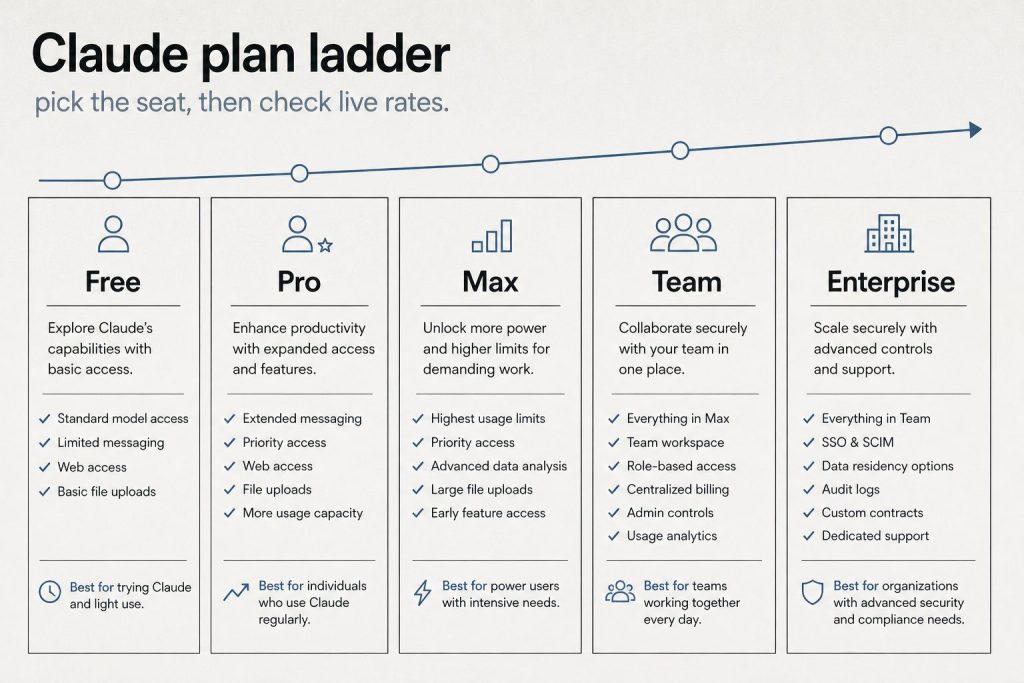
    Before running the numbers, it’s worth being clear about what Claude’s pricing tiers actually buy you. It’s not primarily about unlocking features — most features are available at every paid tier. It’s about usage capacity: how many messages you can send, how complex those messages can be, and whether you get access to the most powerful models.

    Plan Price Model Access Approx Heavy Messages/Day Claude Code Projects
    Free $0 Sonnet (limited) 5–10 No No
    Pro $20/mo Sonnet + Opus ~12 heavy / more light No Yes
    Max 5x $100/mo Sonnet + Opus ~60 heavy Yes Yes
    Max 20x $200/mo Sonnet + Opus ~240 heavy Yes Yes

    Cost-Per-Task Analysis

    Let’s calculate what Claude actually costs per completed task at each tier, assuming a “task” is a substantive prompt — analyzing a document, drafting a piece of content, debugging a function, or researching a question.

    Claude Pro ($20/month): If you’re averaging 12 heavy tasks per day, that’s roughly 360 tasks per month. Cost per task: $0.055. About 5.5 cents per substantive AI-assisted task. For context, a VA hour runs $15–25. A freelance writer charges $50–200/hour. Claude Pro at 5.5 cents per task is extraordinarily cheap if those tasks displace professional time.

    Claude Max 5x ($100/month): At ~60 heavy tasks/day, that’s 1,800 tasks/month. Cost per task: $0.056. Nearly identical per-task cost to Pro, but with 5x the volume. This is the value tier for power users.

    Claude Max 20x ($200/month): At ~240 heavy tasks/day, that’s 7,200 tasks/month. Cost per task: $0.028. The most cost-efficient tier per task if you’re actually using that volume.

    ROI by User Type

    Freelance Writers and Content Creators

    If Claude saves you 2 hours of writing per week at a $75/hour effective rate, that’s $150/week or $600/month in recovered time. Claude Pro at $20/month pays for itself if it saves you 16 minutes per week. Verdict: Clear yes at Pro.

    Developers

    Claude Code is only available at Max 5x ($100/month) or via API. If Claude helps you resolve bugs, write tests, or understand a codebase faster — saving even 30 minutes of developer time per week at $100+/hour — the Max subscription pays for itself in a single day. Verdict: Max 5x is the right tier, and it’s cheap relative to dev billing rates.

    Researchers and Analysts

    The 200K context window for document analysis is the value driver. If you regularly read and synthesize long reports, contracts, or research papers, Claude Pro’s Projects feature (which maintains context across sessions) is a genuine workflow upgrade. Verdict: Pro is likely sufficient; upgrade to Max if you’re processing documents daily.

    Casual Users

    If you use AI for occasional questions, quick edits, or curiosity, the free tier is genuinely usable. The rate limits only frustrate sustained professional use. Verdict: Start free. Upgrade when you hit limits consistently.

    Small Business Owners

    Marketing copy, client emails, policy documents, job descriptions, SOPs — Claude Pro handles all of this. If it saves you 3 hours per month at your effective hourly rate, it’s paid for. Verdict: Pro is almost certainly worth it.

    When the Free Tier Is Enough

    • You need AI help a few times per week, not daily
    • Your tasks are typically short — quick edits, brief questions, simple summaries
    • You’re evaluating whether Claude fits your workflow before committing
    • You have another primary AI tool and want Claude as a secondary option

    When to Upgrade and Which Tier

    • Hit rate limits on free → Go Pro ($20)
    • Hit rate limits on Pro regularly → Go Max 5x ($100)
    • Need Claude Code → Max 5x minimum
    • Using Claude 8+ hours daily → Max 20x ($200)

    Frequently Asked Questions

    Is Claude AI free?

    Yes, Claude has a free tier with limited daily usage. Paid plans start at $20/month (Pro).

    Is Claude worth it compared to ChatGPT?

    At similar price points ($20/month), Claude and ChatGPT Plus are competitive. Claude generally wins on long documents and coding; ChatGPT wins on image generation and plugin ecosystem. Many professionals pay for both.

    What does Claude Max include?

    Claude Max ($100 or $200/month) includes higher usage limits, Claude Code access, extended thinking, and priority access during peak times.


    Need this set up for your team?
    Talk to Will →