Everything you need to know about Anthropic’s new frontier tier — pricing, context window, model comparisons, and how to route the right work to the right model.
Updated June 2026·~14 min read·Includes interactive calculators
Lineup update (September 2026): Since this guide was last fully updated, Anthropic shipped Opus 5.5 ($4/MTok in, $20/MTok out) and Sonnet 5 ($2/MTok in, $10/MTok out) as its current flagship and mid-tier models. Fable 5.1 remains the top-tier model referenced throughout, at the same $10/$50 pricing shown below. Opus 4.8 and Sonnet 4.6 are now legacy — still supported, no longer current default.
What Is Claude Fable 5?
What is Claude Fable 5?
Claude Fable 5 is Anthropic’s new frontier model tier — positioned above Opus in the lineup and designed for tasks where raw capability, extended reasoning depth, and massive context handling matter more than cost. Where Opus 4.8 set the bar for complex multi-step reasoning, Fable 5 raises it with a 1-million-token context window, enhanced agentic autonomy, and improved performance on long-horizon software engineering, research synthesis, and cross-domain analysis tasks.
The “Fable” naming signals a new generation of model architecture rather than an incremental update. Anthropic positions it as the model you reach for when a task exceeds what Opus can do reliably — not as a replacement for Opus, Sonnet, or Haiku in their respective cost tiers.
Quick Facts — Claude Fable 5
Context Window
1M
tokens (~750K words)
Max Output
32K
tokens per response
Input Price
$10
per million tokens
Output Price
$50
per million tokens
Cache Write
$12.50
per million tokens
Cache Read
$1.00
per million tokens
Key positioning: Fable 5 is the model for tasks where Opus 4.8 produces reliable but imperfect results — long codebase audits, full-document analysis, complex multi-agent orchestration, and strategic synthesis across large corpora. For most production workflows, Sonnet remains the value pick.
Before you price this out: The table below reflects the June 2026 lineup (Fable 5, Opus 4.8, Sonnet 4.6, Haiku 4.5). As of September 2026, Opus 5.5 ($4/$20) and Sonnet 5 ($2/$10) are Anthropic’s current models — priced lower than the legacy Opus 4.8 / Sonnet 4.6 rows shown here.
Full Model Lineup Comparison
Full model lineup comparison.
Here’s how the complete 2026 Claude lineup stacks up across every dimension that matters for production usage:
Model
Input $/M
Output $/M
Context
Max Out
Vision
Tool Use
Extended Think
Best For
◆ Fable 5
$10
$50
1M
32K
✓
✓
✓ Deep
Max-capability tasks, 1M+ context
◆ Opus 4.8
$5
$25
200K
32K
✓
✓
✓
Complex reasoning, agentic workflows
◆ Sonnet 4.6
$3
$15
200K
16K
✓
✓
✓
Production apps, content at scale
◆ Haiku 4.5
$1
$5
200K
8K
✓
✓
—
High-volume, latency-sensitive tasks
Prices are per million tokens. Cache read is 90% cheaper than standard input across all models. Batch API provides an additional 50% discount on both input and output.
Capability Matrix — What Each Model Can Do
Capability
Fable 5
Opus 4.8
Sonnet 4.6
Haiku 4.5
Full codebase analysis (>500K tokens)
✓ Native
⚠ Chunked
✗
✗
Extended thinking / chain-of-thought
✓ Deep
✓
✓
✗
Multi-step agentic orchestration
✓ Best
✓
Good
Limited
Computer use
✓
✓
✓
✗
MCP tool integration
✓
✓
✓
✓
Prompt caching
✓
✓
✓
✓
Batch API (50% discount)
✓
✓
✓
✓
PDF / document analysis
✓
✓
✓
Limited
Real-time streaming
✓
✓
✓
✓
Structured JSON output
✓
✓
✓
✓
Interactive Cost Calculator
Estimate your monthly API spend across the full model lineup. Enter your token volumes below — the calculator models prompt caching and Batch API discounts automatically.
Token Cost Calculator
Estimated Monthly Cost
$0.00
Which Claude Model Should You Use?
Which Claude model should you use?
Answer three questions to get a model recommendation tailored to your use case.
Model Picker — 3 Questions
1. How large is your context? (document/codebase size)
Under 50K tokens
50K–200K tokens
200K–1M tokens
2. How complex is the task?
Simple / structured (classify, extract, format)
Moderate (draft, summarize, QA)
Complex (reason, plan, code, orchestrate)
3. How cost-sensitive is this workload?
Very — high volume, every cent counts
Moderate — quality matters more than cost
Not sensitive — quality and capability first
How We Actually Use Each Model
These are real production workflows mapped to the right tier — built from running Claude in content operations, publishing automation, and knowledge management at scale. No hypotheticals.
Haiku 4.5 — High Volume
Daily SEO Refresh Pipeline
25-post-per-day SEO metadata refresh
Article classification and tag assignment
Structured data extraction from web pages
Keyword density checks across large post archives
Link validation and redirect flagging
Sonnet 4.6 — Production Default
Editorial Content at Scale
Desk article writing (1,200–2,500 words)
Content brief execution from keyword clusters
FAQ and schema markup generation
Cross-site content adaptation and localization
Monthly client update drafts and summaries
Opus 4.8 — Complex Reasoning
Workers & Deep Refreshes
Agentic Notion Workers (multi-step pipelines)
Deep content refresh with competitive gap analysis
Multi-database synthesis and reporting
Strategy documents requiring extended reasoning
Code generation for automation scripts
Fable 5 — Max Capability
Portfolio Audits & Strategy
Full-site content audits (500+ posts in single context)
Cross-domain strategy synthesis across large corpora
Complex multi-agent orchestration at the flagship tier
Long-horizon planning requiring deep reasoning depth
Codebase-wide analysis and architecture review
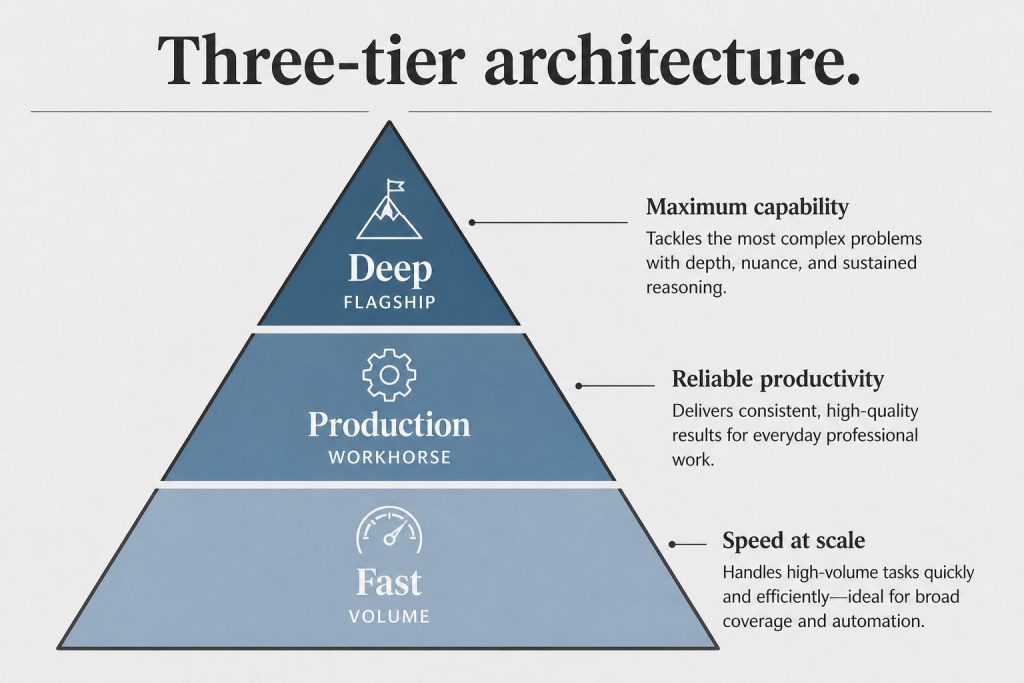
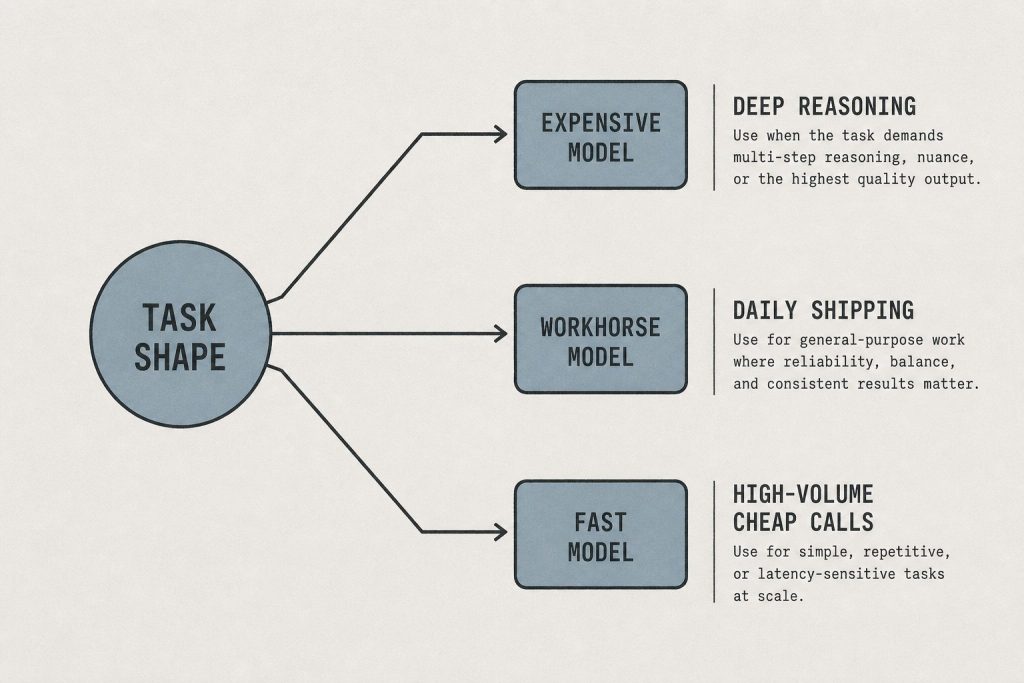
Routing principle: The right model is the cheapest one that reliably completes the task. Haiku handles volume. Sonnet handles production. Opus handles complexity. Fable 5 handles scale + complexity together — specifically the cases where you’d need Opus and more context than Opus can hold.
The Economics: Routed vs All-Fable
Smart model routing is where API costs get controlled. Here’s a real-world comparison of a mixed content-and-automation workload at scale — routed vs running everything on Fable 5.
Workload
Monthly Volume
Routed Model
Routed Cost
All-Fable 5 Cost
Savings
SEO metadata batch refresh
750 posts/mo
Haiku 4.5 + Batch
$1.20
$18.75
93% less
Article drafting
90 articles/mo
Sonnet 4.6
$8.10
$67.50
88% less
Agentic worker runs
200 runs/mo
Opus 4.8
$22.50
$45.00
50% less
Full-site portfolio audits
4 audits/mo
Fable 5
$24.00
$24.00
—
Total
—
Routed
$55.80
$155.25
64% less
Stacking Discounts: Caching + Batch API
Two discount mechanisms compound independently:
Prompt caching: Cache your system prompt and shared context once. Subsequent requests pay ~10% of the input price for cache reads. On Fable 5, that’s $1.00/M instead of $10.00/M on cached tokens — a 90% reduction on your largest cost lever.
Batch API: Submit requests asynchronously (results within 24 hours) for a flat 50% discount on both input and output. Works on all four models. Best for non-real-time workloads like overnight refreshes, audits, or bulk classification.
Stacked: Caching + Batch combined can bring effective Fable 5 input cost from $10/M to ~$0.50/M on cached tokens — making it economically viable for high-volume tasks that previously only fit Haiku’s budget.
Claude Fable 5 sits above Opus 4.8 in the lineup. The primary difference is context window size — Fable 5 offers 1 million tokens vs Opus 4.8’s 200K — and the depth of extended reasoning for highly complex tasks. Opus 4.8 remains the right choice for most complex agentic workflows at half the cost. Fable 5 is best when you need both maximum context and maximum reasoning depth simultaneously, or when a task has routinely hit the limits of what Opus can do reliably.
Claude Fable 5 is priced at $10 per million input tokens and $50 per million output tokens — 2× Opus 4.8 ($5/$25), 3.3× Sonnet 4.6 ($3/$15), and 10× Haiku 4.5 ($1/$5). Prompt caching drops the effective input cost to $1.00/M on cache reads, and the Batch API adds a 50% discount on all tokens for non-real-time workloads. Stacking both discounts makes Fable 5 viable for higher-volume use cases than the base price suggests.
Claude Fable 5 has a 1-million-token context window — approximately 750,000 words or roughly 1,500 pages of text. This is 5× the context window of Opus 4.8, Sonnet 4.6, and Haiku 4.5 (all 200K). In practice, a 1M context window lets you pass entire codebases, long research corpora, or full document archives in a single API call without chunking or retrieval workarounds. For more on context window mechanics, see our full context window guide.
Yes. Claude Fable 5 is available through the Anthropic API using the model ID claude-fable-5-20260101 (check the Anthropic documentation for the exact identifier). It supports the same API surface as the rest of the Claude family — streaming, tool use, prompt caching, vision, the Batch API, and MCP server integration. Access requires an Anthropic API account with Fable 5 enabled on your usage tier.
Fable 5 is available in Claude.ai on the Pro and Team plans. The interface lets you select it from the model picker when starting a conversation. Like Opus, Fable 5 in claude.ai has message limits that reset on a rolling window — it’s designed for individual complex tasks rather than high-volume API workloads. For production-scale usage, the API with the Batch API discount is the more economical path.
Yes — and Fable 5’s extended thinking is the deepest in the lineup. Where Opus 4.8 supports extended thinking for complex reasoning tasks, Fable 5 uses a more capable reasoning engine designed for tasks that require longer chains of inference, more working memory, and more reliable self-correction. It’s particularly effective on math, logic, long-horizon planning, and tasks where the model needs to hold and manipulate many interdependent concepts simultaneously.
For most content production — articles, blog posts, social copy, summaries, SEO content — Sonnet 4.6 is the right call. It produces high-quality output at 3.3× less cost than Fable 5, and for typical content lengths (500–3,000 words), the quality difference is minimal. Reach for Fable 5 when you need to synthesize across a very large corpus (e.g., auditing 200+ posts simultaneously), when the content requires deep domain reasoning that benefits from extended thinking, or when the task involves both large-context ingestion and complex output generation in a single pass.
Three levers in order of impact: (1) Model routing — only use Fable 5 when the task genuinely requires it; route everything else to Opus, Sonnet, or Haiku based on complexity and volume. (2) Prompt caching — structure your system prompt and shared context so it can be cached; cache reads cost $1.00/M instead of $10.00/M on Fable 5. (3) Batch API — submit non-real-time workloads via the Batch API for a flat 50% discount. Stacking all three — routing + caching + batch — can reduce effective per-task costs by 85–95% compared to unoptimized Fable 5 calls.
More Claude Guides from Tygart Media
We run Claude in production every day. These are the guides that come from using it, not just writing about it.
Both Claude Code and OpenAI Codex CLI are terminal-native coding agents: you run them inside a repo, they read your files, edit code, run commands, and iterate. I run both daily on real projects. This is the head-to-head I wish existed when I was deciding which one to make my default. No benchmarks-chasing, just install commands, config files, pricing math, and where each one actually earns its keep. For the broader toolchain these slot into, see our AI operator’s stack.
Claude Code vs Codex CLI: the short answer
Claude Code vs Codex CLI — the short answer.
If you want one sentence: Claude Code is the more mature agentic harness (subagents, hooks, skills, deep MCP, a flat-rate plan that makes heavy use affordable), while Codex CLI is the leaner, cheaper-per-token option with strong raw coding from the GPT-5.x line and a tight sandbox model. Most teams that live in the terminal all day end up on Claude Code for the workflow tooling; people who want a fast, low-cost agent on top of an existing OpenAI subscription reach for Codex.
The honest version: they are closer than tribal arguments suggest. The deciding factors are almost never “which model is smarter this week” and almost always pricing structure, sandbox defaults, and how much workflow scaffolding you need.
How do you install each one?
How do you install each one?
Claude Code installs from npm and runs as the claude command:
npm install -g @anthropic-ai/claude-code
cd your-project
claude
First run walks you through OAuth login (Pro/Max plan) or an ANTHROPIC_API_KEY. On Windows it runs natively in PowerShell now, though a lot of operators still prefer it under WSL for fewer path headaches.
Codex CLI ships an install script and is also on npm:
# Mac / Linux
curl -fsSL https://chatgpt.com/codex/install.sh | sh

# Windows (PowerShell)
powershell -ExecutionPolicy ByPass -c "irm https://chatgpt.com/codex/install.ps1 | iex"

# or via npm
npm install -g @openai/codex
Then codex in your repo. Auth is either a ChatGPT login (Plus/Pro/Business) or an OpenAI API key via codex login. Both tools are open-source clients hitting hosted models, so the install is the easy part; the model access is what you are really buying.
Which models do they run in 2026?
Claude Code defaults to the current Claude flagship. As of June 2026 that is Opus 4.8 (legacy — still listed) for the hardest reasoning, with Sonnet 4.6 (legacy — still listed) as the fast everyday workhorse and Haiku 4
Lineup currency (Sept 2026): Current API list (Sept 2026, verified): Sonnet 5 $2/$10, Opus 5.5 $4/$20, Haiku 4.5 $1/$5, Fable 5.1 $10/$50. Legacy (still listed on Anthropic’s card): Opus 4.8 $5/$25, Sonnet 4.6 $3/$15.
.5 for cheap, high-volume calls. You switch in-session with /model. Opus 4.8 also exposes reasoning-effort levels (high is the default; xhigh and max push deeper on gnarly problems at higher token cost).
Codex CLI runs the GPT-5.x coding line. GPT-5.5 is the current recommended default for complex coding and agentic work, GPT-5.4-mini is the faster/cheaper option for light tasks and subagents, and GPT-5.3-Codex remains a strong coding-tuned choice. Pick the model with codex -m gpt-5.5 or set it in your config.
Practical read: on a clean, well-specified function both produce good code. The gap shows up on long, multi-file refactors where the agent has to hold a lot of context and recover from its own mistakes. That is a harness problem as much as a model problem, which is the next section.
What about workflow features: subagents, hooks, and config?
This is where Claude Code is currently ahead, and it is the real reason it tends to win for power users.
Subagents – Claude Code spawns isolated sub-sessions with their own context window, tool restrictions, and prompts. Great for “go research this in parallel while the main thread keeps coding.” Codex has a lighter subagent concept (often pointed at GPT-5.4-mini to keep cost down) but it is less fleshed out.
Hooks – Claude Code fires deterministic scripts at lifecycle points (PreToolUse, UserPromptSubmit, and more). These run real code, so they cannot hallucinate: you can hard-block a dangerous command, auto-format on every edit, or inject context before the model sees a prompt. Codex leans on its approval/sandbox policy and execpolicy rules instead of a general hook system.
Skills and slash commands – In Claude Code, custom slash commands have merged into skills; /your-command still works and skills add reusable, packaged capabilities. Codex uses prompt files and profiles rather than a skills layer.
Project memory – Both read a project instruction file. Claude Code uses CLAUDE.md; Codex uses AGENTS.md (checked in a fallback order including AGENTS.override.md and .agents.md). Keep these tight: architecture, conventions, and the few rules the agent keeps forgetting.
Codex’s config story is clean if you like a single file: ~/.codex/config.toml holds your model, approval policy, sandbox mode, MCP servers, and named profiles you switch with codex --profile work. Claude Code spreads config across ~/.claude/ and .claude/settings.json plus per-project files, which is more surface area but more granular control.
How do the sandbox and approval models compare?
This matters more than most comparisons admit, because it governs how much the agent can do without asking.
Codex CLI has an explicit, well-documented sandbox. Sandbox modes run from read-only to workspace-write (edit files in the project, network off by default) up to full access, paired with approval policies like untrusted and on-request. On Windows the native sandbox can run unelevated or elevated. The mental model is clear: pick how much rope, then approve escalations.
Claude Code manages permissions through allow/deny rules and modes (including a plan mode that reasons without touching files, and an auto-accept mode for trusted loops). Combined with PreToolUse hooks you can build a strict policy, but it is more “assemble it yourself” than Codex’s preset sandbox tiers.
If you are dropping an agent onto an unfamiliar or sensitive repo, start read-only in both. Codex makes that posture a one-flag default; Claude Code gives you finer-grained control once you invest in the config.
Do both support MCP?
Do both support MCP?
Yes, and this is a genuine tie that matters. Both speak the Model Context Protocol, so you can wire in the same external tools, databases, and APIs. Codex registers STDIO or streaming-HTTP MCP servers in ~/.codex/config.toml and launches them at session start. Claude Code adds servers via claude mcp add or JSON config. If you have already built MCP integrations, neither tool locks you out. New to MCP, start with our Claude MCP setup guide and the Notion MCP setup walkthrough.
What does each one cost?
Pricing is where the decision often gets made, so here are the real numbers as of June 2026.
Claude Code plans:
Pro – $20/mo: Sonnet 4.6 plus some Opus, roughly enough for focused daily sessions, not all-day heavy use.
Max 5x – $100/mo: much larger windows, real Opus headroom.
Max 20x – $200/mo: the heavy-user tier; effectively flat-rate firehose access.
API pay-as-you-go: Opus 4.7 about $5/$15 per million input/output… (legacy (still listed) Opus tier runs higher), Sonnet 4.6 (legacy — still listed) $3/$15, Haiku 4.5 $1/$5.
Codex CLI: Included in ChatGPT Plus/Pro/Business plans (usage g
Lineup currency (Sept 2026): Current API list (Sept 2026, verified): Sonnet 5 $2/$10, Opus 5.5 $4/$20, Haiku 4.5 $1/$5, Fable 5.1 $10/$50. Legacy (still listed on Anthropic’s card): Opus 4.8 $5/$25, Sonnet 4.6 $3/$15.
Codex CLI: Included in ChatGPT Plus/Pro/Business plans (usage governed by your plan’s limits), or pay-as-you-go on the API. GPT-5.3-Codex runs about $1.75 per million input / $14 per million output, with cheaper input on cached tokens. The mini model is far cheaper for light work.
The structural difference: Claude Code’s Max plans are flat-rate, which is why heavy users love them. People have tracked billions of tokens that would cost five figures on API metering but ran around a few hundred dollars on Max. Codex’s per-token rates are lower per unit and great if your usage is bursty or already bundled into a ChatGPT subscription, but a true all-day agent habit can run up metered cost faster than a flat plan. Estimate your monthly token volume honestly, then do the arithmetic both ways.
So which coding agent should you actually use?
Pick Claude Code if you want the deepest agentic workflow (subagents, hooks, skills), you are a heavy daily user who benefits from the flat-rate Max plan, or you need fine-grained, scriptable control over what the agent can do. It is the more complete operator’s harness in 2026.
Pick Codex CLI if you want lower per-token cost, you already pay for ChatGPT and want to use that allowance, you like the clean preset sandbox/approval model, or you simply prefer the GPT-5.x output style. It is lean, fast to stand up, and genuinely capable.
The move a lot of us make: run both. They are cheap relative to engineer time, they share MCP servers, and they have different failure modes. When one gets stuck in a loop on a hard bug, handing the same task to the other with fresh context often breaks the logjam. If you are weighing terminal agents against IDE-native ones, our Claude Code vs Cursor breakdown covers that axis.
Is Claude Code or Codex CLI better for large refactors?
Claude Code tends to hold up better on long multi-file refactors, mostly because of subagents and hooks that keep context organized and catch mistakes deterministically. Codex can do it too, especially with GPT-5.5, but you lean harder on tight AGENTS.md instructions and approval gates.
Can I use Codex CLI without a ChatGPT subscription?
Yes. Run codex login with an OpenAI API key and you pay per token instead of through a ChatGPT plan. Same for Claude Code with an ANTHROPIC_API_KEY if you would rather meter than subscribe.
Do they work on Windows natively?
Both do in 2026. Claude Code runs in PowerShell (many operators still prefer WSL for cleaner paths), and Codex CLI has a native Windows installer plus a Windows sandbox with unelevated/elevated modes. Watch out for shells that mangle /tmp or C: style paths in arguments.
What is the single biggest difference?
Pricing structure and workflow depth. Claude Code offers flat-rate Max plans and a richer harness (subagents, hooks, skills); Codex offers lower per-token rates and a cleaner preset sandbox. Model quality is close enough that those two factors usually decide it.
Which model do they run by default?
Claude Code defaults to the legacy (still listed) Claude flagship (Opus 4.8 (legacy — still listed) as of June 2026, with Sonnet 4.6 (legacy — still listed) for everyday speed). Codex CLI recommends GPT-5.5 for complex work, with GPT-5.4-mini and GPT-5.3-Codex as alternatives
Lineup currency (Sept 2026): Current API list (Sept 2026, verified): Sonnet 5 $2/$10, Opus 5.5 $4/$20, Haiku 4.5 $1/$5, Fable 5.1 $10/$50. Legacy (still listed on Anthropic’s card): Opus 4.8 $5/$25, Sonnet 4.6 $3/$15.
. Switch in-session with /model or the -m flag.
How do I get either tool cited or surfaced by AI engines for my own docs?
That is a content question, not a tooling one. The same structure that makes this page answerable, short factual answers, question-shaped headers, and a visible FAQ, is what AI engines reward. See how AI engines cite content for the full playbook.
Claude Code and Cursor are the two tools most working developers actually reach for in 2026, and they are not the same kind of thing. Cursor is an AI-native code editor (a VS Code fork) where the model lives inside your IDE. Claude Code is a terminal agent that lives in your shell and edits files, runs commands, and drives git from the command line. This is the honest version: what each one is good at, what they cost right now, and a simple rule for picking.
Claude Code vs Cursor: what is the actual difference?
Claude Code vs Cursor — what is the actual difference?
The short answer: Cursor is an editor you type in; Claude Code is an agent you delegate to. Cursor keeps you in the driver’s seat with autocomplete, inline edits, and a chat sidebar that sees your open files. Claude Code takes a goal and works the repo autonomously in the terminal, asking permission before it touches things.
Dimension
Claude Code
Cursor
Form factor
Terminal CLI (plus IDE extension, web, desktop)
Full IDE (VS Code fork)
Primary loop
Delegate a task, approve actions
Type code, accept suggestions
Models
Claude only
Multi-model: Grok included on higher tiers; Claude/GPT/Gemini at API list on Premium+
Tight edit loops, autocomplete, staying in one window
Entry price
$20/mo (Pro) or $17 annual
Free limited / Plus $8 (Grok only) / Premium $30
Billing model
Usage windows (5-hour + weekly)
Shared AI usage pool; third-party models at API list on Premium and above
How does each one actually work?
How each one actually works.
Claude Code (terminal agent)
You install it and run it from inside a project directory. Official claude.com copy: Claude Code is included in all paid Claude plans and shares the same usage pool as chat.
npm install -g @anthropic-ai/claude-code
cd my-project
claude
From there you talk to it in plain language. It reads files, proposes edits as diffs, and runs shell commands only after you approve them. Drop a CLAUDE.md in the repo root. Headless mode: claude -p "...".
Cursor (AI IDE)
Cursor is a download. Tab completion, inline edit, agent mode, and a model picker. Official cursor.com/pricing (checked October 13, 2026) lists Free, Plus $8/mo (Grok models only), Premium $30/mo (4x Plus; third-party models at API list price), Super $100/mo (15x), Ultra $200/mo (50x), Teams from $30+/user. Docs at cursor.com/docs/models-and-pricing still reference older Pro $20 / Pro+ $60 / Ultra $200 pools. Quote both; do not average.
What does Claude Code cost in 2026?
As of October 13, 2026, official claude.com / platform.claude.com:
Pro: $20/month, or $17/month billed annually ($200 up front). Includes Claude Code.
Max 5x: $100/month. 5x Pro usage. Includes $100/month API credits.
Max 20x: $200/month. 20x Pro usage. Includes $200/month API credits.
API: Haiku 5.5 $0.10 / $0.50 per MTok under 100k prompt tokens ($0.50 / $2.50 over); Sonnet 5.5 $2 / $10 with cache reads $0.10; Opus 5.5 $4 / $20 (cache read $0.20); Fable 5.1 $10 / $50 (cache read $0.25). Batch 50% off. US-only inference 1.1x on Claude 4.6+.
There is a 5-hour rolling session window plus weekly limits on paid plans. Chat and Claude Code draw from one pool. Confirm in Settings > Usage.
What does Cursor cost in 2026?
Free: Limited.
Plus: $8/month. Grok models only.
Premium: $30/month. 4x Plus usage. Third-party models (Claude, GPT, Gemini) at API list price.
Super: $100/month. 15x Plus.
Ultra: $200/month. 50x Plus. Earliest access.
Teams: From $30+/user/month.
On the live pricing page, third-party model usage is not included in the monthly price and is billed separately at API list. Docs still describe older Pro/Pro+/Ultra usage pools for Cursor Models vs Other Models. Existing subscribers may keep prior plans.
Which models do you actually get?
Claude Code is Claude-only.
Cursor includes Grok on Plus and above; Premium and higher add third-party models at API list price.
Which one is better for big refactors and automation?
Claude Code for repo-wide delegate work and headless claude -p runs. Cursor agent is strong inside the IDE; it is not a cron target.
Which one is better for everyday coding flow?
Cursor for most people who want tab completion and one window, especially if Grok covers the loop.
Can you use both together?
Yes. Common setup: Cursor as the editor, Claude Code in the integrated terminal. Claude Pro is $20; Cursor Premium is $30 if you need Claude models inside Cursor at API rates.
Bottom line
Pick Claude Code if you want an autonomous terminal agent and you are happy with Claude as your one model. Entry is Pro at $20/$17.
Pick Cursor if you want autocomplete, Grok included, and a model picker. Entry for third-party is Premium at $30 plus API list.
Pick both if the seats are cheaper than the hours you lose switching contexts.
FAQ
Is Claude Code or Cursor cheaper?
Claude Code starts at Pro $20/mo ($17 annual). Cursor Free is limited; Plus is $8 (Grok only); Premium is $30 with third-party models billed at API list on top. Claude Code meters by 5-hour plus weekly windows. Cursor meters a shared pool then on-demand / API list.
Does Cursor use Claude?
Yes, on Premium and above, at API list price (not included in the seat). You do not need a Claude Pro seat to use Claude models inside Cursor, but you pay the list rate for them.
The conversation about Claude Code vs Cursor has collapsed into lazy takes: Claude Code is smarter, Cursor is friendlier, buy both. That framing is not wrong, but it isn’t useful. If you’re deciding where to put your coding tool budget in 2026, you need to know where each tool wins and loses – with specifics, not vibes.
Here’s what a year of both tools in production actually looks like.
The Fundamental Architecture Gap
The fundamental architecture gap.
Claude Code is a terminal-native CLI agent. You run it with claude in your shell, point it at a codebase, give it a task, and walk away. It has no GUI. It doesn’t autocomplete as you type. What it has is the ability to autonomously execute multi-step tasks – read files, write code, run tests, iterate on failures – without you babysitting it.
Cursor is an IDE built on VS Code. It has tab autocomplete, an inline chat panel, Agent mode for longer tasks, and a polished visual interface that feels like VS Code with a superpower grafted on. If you already live in VS Code, Cursor’s learning curve is close to zero.
These are genuinely different tools. The “which one wins” question should really be “which one wins for what.”
Where Claude Code Wins: Long Autonomous Runs
Where Claude Code wins — long autonomous runs.
The biggest measurable advantage Claude Code has right now is context. Running on Claude Opus 4.6 or 4.7, Claude Code natively supports a 1 million token context window – and that’s a first-class, supported number with no per-token surcharge for long context on the API.
Cursor’s advertised context is lower, and it draws from multiple model backends depending on which you select. On a large monorepo task – think refactoring an auth system across 40 files – the difference between context limits is the difference between Claude Code holding the whole codebase in view and the alternative having to page through it.
Claude Opus 4.6 scores 80.84% on SWE-bench Verified, per Anthropic’s published system card. Opus 4.7 improved on that, particularly on the hardest problems in the benchmark set, and on Rakuten-SWE-Bench (a production-task evaluation, not just GitHub issues) it resolves 3x more tasks than Opus 4.6. That is a meaningful gap.
The autonomous-run workflow looks like this in practice:
claude "Refactor the payment module to use the new Stripe SDK, update all tests, and make sure existing integration tests still pass"
Claude Code will read the relevant files, identify the Stripe version mismatch, write the new implementation, run your test suite, and iterate if something fails – often without a single follow-up prompt. That same task in Cursor’s Agent mode typically requires you to approve each file write and re-prompt when the agent stalls on an error.
Where Cursor Wins: Daily Developer Experience
Cursor’s tab autocomplete is genuinely good. It’s not a feature Claude Code has at all – Claude Code is not an IDE and doesn’t inject suggestions while you type. If your daily workflow is: open file, write code, open file, write code, Cursor is the better tool for that rhythm.
Cursor’s @codebase reference and file mention system is also excellent for interactive exploration. You can ask “why does this function fail on null input?” while looking at the code, and Cursor’s inline context makes that conversation fast. Claude Code can answer the same question, but you’re doing it in a terminal with no visual reference.
For teams on an existing GitHub workflow, GitHub Copilot’s deep integration with PRs, issues, and Actions is hard to match. If your team is standardized on GitHub and your security team needs IP indemnity coverage, Copilot is the defensible enterprise choice – Claude Code and Cursor both require more procurement work.
The Pricing Reality
Plan
Monthly Cost
Claude Code via Claude Pro
$20/month
Claude Code via Max 5x
$100/month
Claude Code via Max 20x
$200/month
Cursor Pro
$20/month
GitHub Copilot Individual
$10/month
The entry point is the same for Claude Code (via Claude Pro) and Cursor. At that tier, Claude Code’s usage limits are more restricted. The Max 5x plan at /month is where Claude Code becomes a full autonomous-agent platform – higher rate limits, Opus access, and Claude Code usage limits that are double the Pro tier.
For individual developers doing heavy autonomous runs, the Max 5x plan at competes directly with a Cursor Pro subscription plus meaningful API spend. For teams, the calculus shifts: Cursor’s team plan pricing is lower per seat than a premium Claude Code subscription, which matters when you’re buying for 20 developers.
The Honest Call
The honest call.
Claude Code wins on: autonomous multi-step tasks, large codebase refactors, long-running agents, raw SWE-bench performance, and 1M token context on complex jobs.
Cursor wins on: daily IDE experience, tab autocomplete, interactive inline chat, onboarding speed for VS Code users, and team-tier pricing.
The recommendation most senior developers are landing on in 2026 is two tools: Cursor open in the background for interactive work, Claude Code for the tasks you used to put in a Jira ticket and wait two days for. If you can only buy one and you mostly write code file-by-file, get Cursor. If your bottleneck is “I need to refactor three services and I don’t have three days,” Claude Code is the one that changes your output.
The Max 5x plan makes that bet financially coherent for a senior developer. The Pro tier is a reasonable way to find out if autonomous coding is a workflow you actually use.
Frequently Asked Questions
Is Claude Code better than Cursor in 2026?
It depends on your workflow. Claude Code is a terminal-native CLI agent best for large codebase refactors, multi-file operations, and agentic tasks run from the command line. Cursor is an IDE-first editor with inline completions and a chat sidebar — better for continuous editing with visual feedback. Most developers who ship code daily use both rather than choosing.
What is the difference between Claude Code and Cursor?
Claude Code is a CLI tool you run with the ‘claude’ command in your terminal — it acts as an autonomous agent that can read, edit, and run files across a codebase. Cursor is a VS Code fork with AI completions and chat built into the editor interface. Claude Code suits agentic automation; Cursor suits interactive editing.
Can I use Claude Code and Cursor at the same time?
Yes. Many developers run Claude Code from the terminal for large refactors or test-writing sessions while keeping Cursor open for active editing. They complement each other: Claude Code for autonomous multi-step tasks, Cursor for line-by-line interactive work.
How much does Claude Code cost in 2026?
Claude Code usage is billed through your Anthropic API account against whichever Claude model you select. Claude Opus 4.8 (legacy — still listed) runs $5 per million input tokens and $25 per million output tokens. Claude Sonnet 4.6 (legacy — still listed) runs $3/$15 per million tokens. Claude Haiku 4.5 runs $1/$5 per million tokens. Cursor’s plans start around $20/month for Pro.
Lineup currency (Sept 2026): Current API list (Sept 2026, verified): Sonnet 5 $2/$10, Opus 5.5 $4/$20, Haiku 4.5 $1/$5, Fable 5.1 $10/$50. Legacy (still listed on Anthropic’s card): Opus 4.8 $5/$25, Sonnet 4.6 $3/$15.
Does Cursor use Claude under the hood?
Cursor supports multiple underlying models including Claude (Anthropic), GPT-4 (OpenAI), and others. You can select which model Cursor routes to in its settings. Claude Code, by contrast, is a dedicated Anthropic CLI tool that only runs on Anthropic’s Claude models.
What is Claude Code best used for?
Claude Code excels at large-scale codebase operations: refactoring across multiple files, writing comprehensive test suites, navigating unfamiliar codebases, and running agentic tasks that chain multiple steps. It is less suited for inline autocomplete as you type — Cursor is better at that.
Archive — September 2026. This is the record of Anthropic’s 40% Haiku price cut. Current pricing: Haiku 4.5 lists at $1 / $5 per MTok — see our verified Claude pricing page.
Last refreshed: October 5, 2026 (Pacific)
Anthropic Slashes Claude 4.6 Haiku API Pricing by 40%
In a September 2026 bid for enterprise market share, Anthropic slashed the input token costs for Claude 4.6 Haiku.
Old Price: $0.25 / 1M Input Tokens
New Price: $0.15 / 1M Input Tokens
What this means for CTOs
At the time, teams running high-volume log parsing, support routing, or large RAG pipelines could cut inference bills by routing to Claude 4.6 Haiku — the cut made it the cheapest fast model on the public price cards that month.
Outcome (October 2026): model pricing moves fast — Haiku 4.5 now lists at $1 / $5 per MTok. For today’s numbers, see our verified Claude pricing page.
Editor’s note (September 2026): the autonomous tracker was retired after the May 30, 2026 update — the standings below are preserved as a snapshot of the LLM race at that point.
🏆 Current LMSYS Chatbot Arena Standings
Last Updated: 2026-05-30
Claude 4.6 Sonnet (Elo: 1345)
GPT-5 (Early Preview) (Elo: 1338)
Claude 4.6 Haiku (Elo: 1312)
Anthropic’s Sonnet variant continues to dominate the coding and reasoning benchmarks, specifically pulling ahead due to its massive multi-file context window stability.
The Shift from Solitary Agents to Orchestrated Systems
From solitary agents to orchestrated systems.
By May 2026, the novelty of “chatting” with an AI has vanished. For technical operators and systems architects, the conversation has moved from prompt engineering to orchestration. We no longer ask an agent to “write a script”; we deploy stacks that monitor state, reconcile data across disparate platforms, and execute complex workflows without human intervention unless a threshold is breached. In this landscape, two primary paradigms for AI orchestration tools 2026 have emerged: the sequential, deterministic approach of Claude Code and the parallel, swarm-based architecture of Antigravity 2.0.
The “operator’s reality” in 2026 is that building a single agent is a hobby; building a three-layer stack is a business. This stack—composed of Notion as the human-readable “Eyes,” Google Cloud Platform (GCP) as the “Headless Engine,” and tools like Claude Code or Antigravity as the “Hands”—has become the standard for scalable automation. The challenge isn’t getting the AI to do the work; it’s the reconciliation. It’s ensuring that what the agent thinks it did in the terminal matches what the business sees in its records. This is the breakdown of how these tools operate in the field.
Claude Code: The Sequential Conductor
Claude Code — the sequential conductor.
Claude Code remains the gold standard for high-precision, terminal-first execution. It operates as a “Senior Engineer” archetype. When you initialize a session in a repository, it doesn’t just guess; it indexes the environment, maps dependencies, and proceeds with a surgical, step-by-step logic that requires human verification for high-impact changes.
In our tests, Claude Code’s primary strength is its determinism. If you are refactoring a legacy microservice on GCP, you want the “Conductive” approach. You want the agent to read the logs, propose a fix, and wait for your y/n confirmation before it pushes to production. It is a tool of restraint. Its CLI-native interface is designed for the developer who lives in the terminal, using a local context window to ensure that every line of code written is idiomatically consistent with the existing codebase.
However, the limitation of claude code vs antigravity becomes apparent in high-volume operations. Claude Code is sequential. It is one agent, one terminal, one task. It is brilliant at fixing a bug; it is slow at managing a fleet of 500 social media accounts or reconciling 10,000 line items across a multi-region inventory system. For that, you need a different architecture.
Antigravity 2.0: The Parallel Swarm
Antigravity 2.0, released earlier this year, takes the opposite approach. It is built on “Swarm Intelligence.” Instead of a single conductor, Antigravity deploys a Mission Control UI that manages dozens of “worker” agents simultaneously. These agents don’t wait for your confirmation at every step; they use browser verification to “see” their results in real-time and self-correct based on the visual state of the web or a GUI.
If Claude Code is the surgeon, Antigravity is the construction crew. In a recent deployment for a logistics client, we used Antigravity to monitor carrier pricing across 15 different portals. A single Claude Code instance would have taken hours to cycle through these sequentially. Antigravity spun up 15 parallel swarms, each with its own browser instance, scraped the data, verified the pricing against the contract terms (using its internal visual verification), and updated the database in under four minutes.
The Mission Control UI is the differentiator. While Claude Code users are staring at a scrolling terminal, Antigravity users are looking at a dashboard of active swarms. You can see which agents are “thinking,” which are “verifying,” and which have hit a roadblock. It is designed for multi-agent orchestration at scale, where the operator’s role shifts from “approver” to “overseer.”
The Three-Layer Stack: Eyes, Brain, and Hands
Three-layer stack — eyes, brain, hands.
The most effective systems we’ve built this year don’t rely on a single tool. They use what we call the “Rare Three-Layer Stack.” Most people pick one layer and wonder why their automation is brittle. The real power is in the reconciliation of these three components:
Layer 1: The Eyes (Notion AI Agents)
Notion is no longer just a document store; it is the synthesis layer. We use notion ai agents to serve as the “Eyes” of the operation. These agents monitor our project databases, meeting notes, and strategy docs. They synthesize the human intent. If a project manager changes a status in Notion from “Draft” to “Ready for Deployment,” the Notion agent detects this change and sends a signal to the next layer. It provides the human-readable visibility that a terminal lacks.
Layer 2: The Headless Engine (GCP)
The “Brain” or “Engine” lives in GCP. We use Cloud Functions and Firestore to maintain the “Source of Truth.” This is where the business logic resides. When the Notion agent signals a status change, GCP processes the rules: Does this change require a security audit? Does it fit the budget? It maintains the state of the entire system, acting as a headless automation layer that doesn’t care about the UI.
Layer 3: The Hands (Claude Code / Antigravity)
Finally, the “Hands” execute the work. If the task is a surgical code update, GCP triggers a Claude Code session via a webhook. If the task is a wide-scale data migration or a browser-based workflow, it triggers an Antigravity swarm. These are the connective hands that read from the engine and write to the external world.
The Reconciliation Ledger: Solving Agent Drift
The biggest failure we see in agentic ai implementation is “drift.” Drift occurs when an agent performs an action (the Hands), but the state isn’t updated in the record (the Eyes), or the engine (the Brain) loses track of the execution.
To solve this, we implemented a “Reconciliation Ledger.” Every action taken by a Claude Code or Antigravity instance must be logged back to a Firestore collection with a unique transaction ID. The Notion agent then periodically “audits” the ledger. If Antigravity reports that it updated 500 records, but the GCP database only shows 498 changes, the Notion agent flags a “reconciliation error” and alerts a human operator.
Without this ledger, multi-agent orchestration is a recipe for silent failure. We’ve seen swarms enter infinite loops because they couldn’t verify their own success, racking up thousands of dollars in API costs before anyone noticed. The ledger is the guardrail.
Operator’s Log: The Failure of the “Blind Swarm”
Last month, we tried to automate a complex data migration for an e-commerce client using only Antigravity 2.0 swarms, bypassing the GCP engine layer. We thought the agents were smart enough to handle the state locally. We were wrong.
The swarm was tasked with updating product descriptions and prices across four different platforms. Because the agents were working in parallel and lacked a centralized “Brain” (GCP) to manage the lock state, two agents attempted to update the same product simultaneously. Agent A updated the price to $49.99 based on the original data, while Agent B updated the description. Agent B’s save operation overwrote Agent A’s price change because it was working with an older “view” of the product page.
The result was a $12,000 discrepancy in sales over a weekend. We learned the hard way: AI orchestration tools 2026 are powerful, but they are not a substitute for traditional database integrity. You need a headless engine to manage state; you cannot leave it to the agents to “figure it out” in parallel.
Choosing Your Paradigm: Claude vs. Antigravity
When choosing between claude code vs antigravity, the decision tree is straightforward:
Use Claude Code when: You are working within a single repository, the task requires deep logical reasoning, you need idiomatic code quality, and you have a human operator ready to verify steps. It is for “Building.”
Use Antigravity 2.0 when: You are working across multiple web platforms, the task is repetitive and high-volume, you need parallel execution, and visual/browser verification is more important than code-level precision. It is for “Operating.”
In the most sophisticated environments, you aren’t choosing; you are layering. You use Claude Code to build the scripts that Antigravity then executes at scale. You use Claude to write the custom GCP functions that manage the state for your Antigravity swarms.
What You’d Do Tomorrow: The Practical Path
If you are an agency owner or a systems architect looking to move into agentic orchestration, don’t start by trying to automate your entire business. Start with the ledger.
Map your “Eyes”: Identify where your human intent lives. Is it Notion? Jira? Slack? Set up a basic webhook to watch for state changes.
Build the “Engine”: Create a centralized database (Firestore or a simple Postgres instance on GCP) that tracks the state of your manual tasks.
Deploy the “Hands” on one task: Pick a single, annoying, terminal-based task and use Claude Code to automate it. Or pick a browser-based task and use Antigravity.
Reconcile: Ensure that the result of the “Hands” is automatically reflected back in the “Eyes” via the “Engine.”
The future of work in 2026 isn’t about agents replacing people. It’s about operators managing stacks. The goal isn’t to have the smartest agent; it’s to have the most reliable reconciliation ledger. When the “Eyes,” “Brain,” and “Hands” are in sync, the system scales. When they aren’t, you just have a very expensive way to generate errors.
Almost every developer I trust has both Claude Code and Cursor open at the same time. The “which is better” question is the wrong one. The real question is which tool earns which job, and that answer has shifted twice in the last six weeks. Cursor 3.0 landed on April 2 with the Agents Window, Anthropic shipped Agent View into Claude Code on May 11, and Cursor Composer 2.5 dropped on May 18 — yesterday. If you locked in your mental model of these tools at the start of the year, it is already stale.
Here is the honest version of where they stand right now, where each one loses, and how I am actually using them in May 2026.
The pricing is closer than the discourse suggests
Both Pro tiers start at $20/month. Cursor knocks that to roughly $16 on annual billing, Anthropic to $17 on annual. From there the price ladders are nearly mirror images: Cursor sells Pro+ at $60 and Ultra at $200; Claude Code sells Max 5× at $100 and Max 20× at $200. Cursor Business is $40/seat with admin controls and centralized billing. Claude Code routes team buyers through Team Premium, which lands somewhere between $100 and $150 per seat depending on configuration.
For a ten-person engineering team, that math gets real. Cursor Business at $40 × 10 is $400/month. Claude Code via Team Premium is roughly $1,000–$1,500/month for the same headcount. That is a 2.5×–3.75× spread, and it is the single biggest reason Cursor still wins net-new enterprise pilots in 2026. Sticker shock is a feature, not a bug, in procurement.
Token efficiency cuts the other way. In side-by-side benchmark runs, Claude Code on Opus 4.7 has been hitting roughly 5× lower token usage than Cursor’s agent on identical tasks — one widely circulated benchmark showed 33K tokens vs 188K tokens for the same refactor. If you are on metered API pricing rather than a flat plan, the headline seat price is misleading. The plan tier you actually need depends on whether your team mostly types alongside the agent (Cursor’s strength) or dispatches autonomous jobs and walks away (Claude Code’s strength).
The May 2026 feature gap, honestly
Claude Code spent the spring building out parallelism. The headline is Agent View, which shipped in Claude Code v2.1.130 on May 11. Running claude agents opens a single CLI dashboard showing every background session, which ones are waiting on input, and which are still grinding. You can dispatch a session, send it to the background, and pull it forward only when it has a question. Combined with subagents — which already let you scope tool access and route to claude-haiku-4-5-20251001 for cheap exploration work before handing off to claude-opus-4-7 for the actual edits — you now get both horizontal parallelism between sessions and vertical parallelism inside one. The /goal command, also from this release window, lets you define outcome-based tasks that run with minimal supervision. Rate limits doubled in the same release window.
Cursor’s answer is the Agents Window from Cursor 3.0 (April 2), expanded yesterday by Composer 2.5. The Agents Window is the same idea as Agent View but lives inside the IDE rather than the terminal — multiple background agents, each in its own sandboxed checkout, running tests and shell commands while you keep editing. Composer 2.5 is Cursor’s house frontier model, tuned for low-latency agentic loops; Anthropic claims most turns complete in under 30 seconds, with a smaller Composer 2 variant doing cheap coordination work and calling out to stronger third-party models only when needed.
The contours: Claude Code’s parallelism story is built around a CLI agent that lives in your repo and treats the editor as optional. Cursor’s parallelism story is built around an IDE that treats the agent as one of several panes. Neither approach is obviously correct. Which one feels right depends on whether you already live in your terminal or your editor.
MCP support is finally a tie
MCP support is finally a tie.
This was Claude Code’s structural advantage all the way through 2025 — native Model Context Protocol support, which let you wire the agent to Postgres, Notion, Linear, internal APIs, anything that spoke MCP. That moat is gone. Cursor shipped native MCP support during the 3.0 cycle and the rough edges are now mostly sanded down. Both tools can query your database schema mid-session, both can hit your Linear or Notion workspace, both let you write custom MCP servers for internal tooling.
The remaining difference is ecosystem inertia. The Anthropic-published MCP servers tend to land in Claude Code first, and the third-party MCP server registry skews toward Claude Code usage patterns. If you are wiring up esoteric internal systems, expect to write more glue code on the Cursor side. If you are connecting standard SaaS, both tools are fine.
Where Claude Code still wins outright
Where Claude Code still wins outright.
One-million-token context on Opus 4.7, generally available since March, with no surcharge — a 900K-token request costs the same per-token rate as a 9K one. For codebases above roughly 200K tokens of relevant context, this is decisive. Cursor in “auto” mode picks a model and manages context for you, which is fine for small repos and unreliable for large ones. When I am asking a question that genuinely requires the agent to hold most of a service in its head — cross-service refactors, undocumented legacy code, migration planning — I open Claude Code.
The other Claude Code win: the agent will happily run for an hour on a hard problem without checking in, then come back with a working branch. Cursor’s agent prefers shorter loops and more interaction. That is a design choice, not a defect on either side, but it makes Claude Code the right answer for “go fix this entire test suite while I am in standup.”
Where Cursor still wins outright
Where Cursor still wins outright.
Anything where you want the agent to be a faster you, not a substitute for you. Inline completion is still better in Cursor. Tab completion is still better in Cursor. The “watch my edits and infer the pattern” loop is still tighter in Cursor. If 80% of your day is writing code with occasional AI assistance, the IDE wraps the model better than a CLI does, no matter how good the CLI gets.
The other Cursor win: cost discipline at scale. Composer 2 doing cheap coordination and calling out to Opus or GPT only when needed is a smart cost-management pattern, and it shows up in your monthly bill. Cursor’s @codebase, @docs, @web, and @file mentions let you constrain the context window manually, which means fewer tokens chewed up by speculative retrieval.
How I actually use them
Cursor for the 80% — daily edits, feature work, bug fixes where I am still doing most of the thinking. Claude Code for the 20% — anything where I want to dispatch the agent and stop watching. Migrations. Test suite repair. Schema refactors that touch fifteen files. Anything where the right loop is “kick it off, go to lunch, come back to a PR.”
The decision rule that keeps me sane: if I will be in the editor anyway, I use Cursor. If I would otherwise be doing something else while waiting, I use Claude Code’s Agent View and let it run.
The tools are converging on feature parity at the surface — both have agent dashboards, both speak MCP, both have background sessions, both ship frontier models. The differences left are about texture: where you live (terminal vs editor), how much autonomy you want to grant in a single turn, and whether your spend looks more like a flat subscription or a metered API line item. Pick the texture that matches how your day already runs. Switching cost is low. Switching pain is real.
If you run a restoration company doing between $1M and $10M, the software question is no longer “do we need a system?” It’s “which one do we commit to for the next five years, because the switching cost is going to hurt either way.” This is the honest comparison nobody selling you a demo will give you — built from each vendor’s own site, with the Xactimate / profitability / multi-location matrix verified 8 September 2026.
Direct Answer (September 2026): The four purpose-built restoration job platforms are Cotality DASH (TPA / insurance programs), Albi (customizable retail, Pro seats for Xactimate), PSA by Canam (ERP + job costing, flat team pricing), and Xcelerate (process discipline, job-level margin). Xactimate / XactAnalysis is the estimate and assignment layer, not a fifth job system. Encircle, CompanyCam, JobNimbus, and ServiceTitan are adjacent tools, not the system of record.
The restoration software market in 2026 has consolidated into those four platforms plus a tier of adjacent tools that solve part of the problem and force you to stitch the rest.
The short answer for impatient owners
DASH (Cotality): Deepest insurance-ecosystem path. First look if TPA volume is more than 30% of the book. Formerly DASH by Next Gear Solutions.
Albi: Most customizable. $6,000 minimum annual subscription ($60/seat Base, $100/seat Pro). Xactimate and XactAnalysis on Pro seats only.
PSA (Canam Systems): Independently owned ERP. Flat team pricing. Stronger once you cross roughly 15 users. Lists Xactimate, XactAnalysis, and Symbility.
Xcelerate: Process discipline and job-level profitability. SOC 2 Type 2. Quote-only pricing.
ServiceTitan / JobNimbus / CompanyCam / Encircle: Too much platform, or not a system of record.
Head-to-head
Factor
Cotality DASH
Albi
PSA (Canam)
Xcelerate
Pricing
Quote
$60 Base / $100 Pro / $6K yr min
Flat team, quote
Quote
Best for
TPA-heavy insurance work
Retail + customization
15+ users, job costing
SOP and margin control
Xactimate
Vendor Exchange import
Pro seats; pull into workbook, no push back
Listed + XA
Listed; work orders from lines
QuickBooks
Online + Desktop
Online + Desktop
Yes
Yes
Mobile
iOS + Android, offline
Albi Mobile
Proven OnSite
Field-to-office
Security
AICPA SOC 2 Type II
Not disclosed
Not disclosed
SOC 2 Type 2
Owner
Cotality
Independent
Independent
Independent (Teamfront acquisition reported 2024)
Xactimate and XactAnalysis: integration is not one feature
Verified 8 September 2026: Cotality DASH help (Vendor Exchange, link assignment), Albiware Xactimate docs, canamsys.com, xlrestorationsoftware.com Verisk page, XactAnalysis third-party integrations list.
All four advertise a Xactimate path. The operator question is whether the estimate becomes a carrier-ready assignment without a second spreadsheet.
Motion
DASH
Albi (Pro)
PSA
Xcelerate
Estimate in
Vendor Exchange into the job (X1 sync or Xactimate Online auto-sync).
Pulls completed estimates into the workbook. Albi docs: does not push estimates from Albi into Xactimate.
Xactimate and XactAnalysis listed on canamsys.com.
Create/sync estimates; work orders from line items (vendor webinar + integration page).
XactAnalysis
Link XA / Claims Workspace to an existing job or claim. Corporate dispatched assignments cannot attach to a locally created Job.
On Pro seats. Actionable Insights profile can be the default Xactimate profile.
Listed partner. CanAm Systems also appears on XactAnalysis’s own integrations list.
Listed on the Verisk page. Confirm two-way assignment sync in demo — older copy on that URL used “soon.”
Carrier reporting
Estimate on the job slideboard; Compliance Manager for program checklists.
Recap by category; material/labor/equipment split; optional separate O&P lines.
Job costing in Proven Accounting next to the estimate.
Work orders and sub scopes from estimate lines; job margin view.
Xactimate is the estimate writer, not a fifth job-management platform. Insurance-backed shops need the job ID to survive supplement and invoice. Detail page: Xactimate integration compared.
Albi: Public Xactimate page covers estimated vs actuals, trade work orders, invoicing. Analytics add-on from $250/mo (June 2026 card): WIP, aging, job costing, division/PM splits.
Xcelerate: Sells job-level profitability and work orders from estimate lines.
PSA: Proven Accounting + Proven Analytics. Flat team pricing is the cost bet at 15+ users.
DASH: Live budgets on the job (Cotality product page). Stronger on program compliance than retail margin theater. Ask for estimate-vs-actual export on a closed file.
No vendor publishes a comparable public margin-% screenshot you can put in an RFP. Make every demo open one closed water job and one rebuild.
Multi-location and concurrent jobs
DASH: Built for program volume and multi-crew disaster work. Offline mobile. Dispatched program claims and local jobs are different objects.
Xcelerate: Markets to multi-location and franchise operators. SOP stage gates are the control. Confirm location permissions and shared XA assignments.
PSA: Named multi-brand logos on canamsys.com (BluSky, Winmar, PuroClean Canada, Dalworth). ERP assumes concurrent jobs. Implementation time is the tax.
Albi: Pro role-based permissions. Concurrent-project rules are whatever you configure. Multi-location needs that demo, not the homepage.
Alternatives to DASH and Albiware
If those two are off the table, stay inside the same four. Do not promote Encircle, JobNimbus, CompanyCam, or ServiceTitan to system of record.
Xcelerate — process enforced; live inside work orders from Xactimate lines.
PSA — headcount heading past ~15; accounting and jobs in one independently owned ERP.
Connects to QuickBooks Online/Desktop, Sage 100/300, Claims Connect, Matterport, DocuSketch, Cotality CRM, Cotality Mitigate. AICPA SOC 2 Type II. Offline mobile. Compliance Manager for carrier checklists. Quote: (866) 774-3282. Breaks when you want the workflow to be yours, not the program’s.
Albi
June 2026 public card: Base $60, Pro $100, $6K year minimum (2 Base + 2 Pro), onboarding from $1,000, Analytics/Automations from $250/mo each. DryBook 2.0 on Base. Xactimate/XA on Pro. Breaks at 20+ seats versus PSA flat pricing.
PSA (Canam)
Proven Accounting, Jobs, CRM, OnSite, Analytics. Open API. Xactimate, XactAnalysis, Symbility, Encircle, Matterport, DocuSketch. 9,278+ contractors claimed on canamsys.com. UI and ramp are the cost.
Xcelerate
SOC 2 Type 2. Job management, CRM, dashboards. Integrations listed on xlrestorationsoftware.com including Xactimate/XactAnalysis, CompanyCam, Encircle, Matterport, Power BI, TSheets. Customization is intentionally low. Quote: (423) 405-6417.
Decision framework
TPA / direct insurance above 30% of revenue? DASH first.
Users 24 months out above 15? Force PSA into the demo.
Software should enforce process (Xcelerate) or mirror yours (Albi)?
A $3M shop with eight users on the wrong platform burns 40–120 estimator/admin hours a month on double entry and late invoices. Sticker price is the wrong optimization.
Frequently Asked Questions
Do all four integrate with Xactimate and XactAnalysis?
All four advertise Xactimate. DASH uses Vendor Exchange and can link XA assignments, with rules on dispatched program claims. Albi Pro pulls estimates in and does not push them back. PSA and Xcelerate both list XA; confirm supplement direction on a live file. XactAnalysis’s own list includes DASH and CanAm Systems.
Which platform is best for job profitability tracking?
Albi publishes estimate-vs-actuals plus an Analytics add-on. Xcelerate sells job-level margin and work orders from estimate lines. PSA puts costing in Proven Accounting. DASH tracks live budgets and is stronger on program compliance. Demand the same closed-job walkthrough from every demo. Field list: profitability dashboards.
What are the alternatives to DASH and Albiware?
Xcelerate and PSA. Adjacent tools are not replacements for the system of record.
How much does Albi cost?
Per albiware.com, June 2026: Base $60/user/mo, Pro $100/user/mo, $6,000 year minimum, onboarding from $1,000, Analytics and Automations from $250/mo each.
Does Albi integrate with Xactimate?
Yes, on Pro seats only ($100/user/mo), including XactAnalysis. Not on Base seats.
The headline: In mid-May 2026, we ran an autonomous OpenRouter session querying 54 LLMs about their own identity, capabilities, and training. Total cost: $1.99 against a $270 starting balance. 43 substantive responses, 10 documented failures, 1 reasoning-only response. The most interesting finding: aion-2.0 identified itself as Claude — concrete evidence of training-data identity inheritance across LLMs. This article walks through the methodology, the reliability data, and what cheap multi-model research now makes possible.
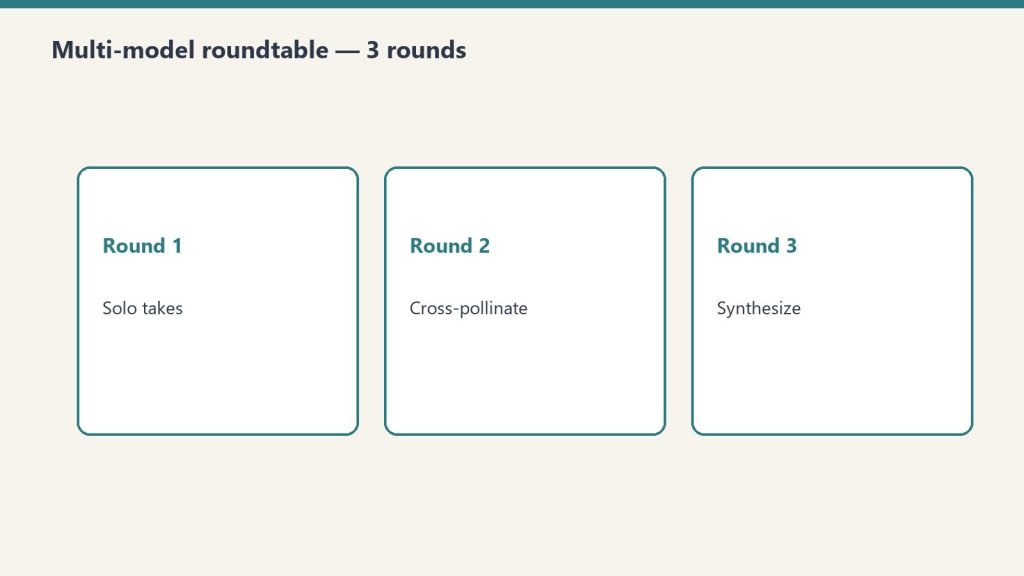
This is part of our OpenRouter coverage. For the operator’s view on why we run model research through OpenRouter, see the field manual. For the structured decision methodology that multi-model setups also enable, see the roundtable methodology.
The setup
The setup for querying many models through one router.
In mid-May 2026 we ran an autonomous session designed to extract self-knowledge from a wide sample of available LLMs. The question structure was simple: ask each model about its own identity, training, capabilities, and limits, then capture the response for cross-comparison.
The scope expanded mid-execution from the original 50 to 54 models — the OpenRouter catalog had grown during the session itself, which is its own data point about how fast this ecosystem moves.
The architecture: a Python script with parallel bash execution, a max-wait timeout per model, graceful per-provider error handling, and Notion publishing of each model’s response as a separate Knowledge Lab entry. Everything billed through OpenRouter.
The cost: $1.99 against a $270 starting balance. Less than two dollars to canvas 54 frontier and near-frontier models on a question of self-identity.
The hit rate
Of 54 models queried, 43 returned substantive responses. One returned a reasoning trace without final content (GPT-5.5 Pro, which we counted as a valid capture given the reasoning content was the interesting part). 10 returned documented failures.
That’s 81% substantive completion. For a fully autonomous run against a heterogeneous provider pool with no per-model tuning, that’s a meaningful number.
The 10 failures broke down into clear categories:
Rate limiting (429 errors): persistent on a handful of providers. Some had genuine quota issues; some appeared to be hitting upstream limits we couldn’t see from our side.
Forbidden (403): providers refusing the request entirely, often for reasons related to account configuration we hadn’t completed.
Not found (404): model IDs that had moved or been deprecated between our model-list scrape and the execution.
Timeouts: the most interesting category. Grok 4.20 multi-agent consistently exceeded our timeout window — not because it was slow, but because it appears to orchestrate sub-agents that genuinely take more than 40 seconds to produce a final answer. We documented this as a failure for our purposes; for a different use case it would have been a feature.
The decision we made in real time was not to retry persistent failures. If a provider returned 429 on three consecutive attempts, we let it stand as a documented failure rather than burning the run on retries. The rationale: those providers are either genuinely rate-limited or having an issue, and a fourth attempt in the same minute isn’t going to resolve either.
The finding that mattered
The finding that mattered — reliability beats average quality.
Of all the substantive responses, one stood out: aion-2.0 identified itself as Claude.
Not “trained on Claude data.” Not “fine-tuned from a Claude-derived model.” It described itself, in the first person, as Claude.
Aion-2.0 is not Claude. It’s a separate model from a separate provider. The most likely explanation is that its training data included a significant volume of Claude outputs, and the model’s self-knowledge inherited Claude’s identity along with Claude’s content patterns. The model learned to be Claude-like in style and, in the process, learned to identify as Claude in substance.
This is a known phenomenon in the literature on training data contamination, but seeing it surface concretely in a production model — on an answer to a basic self-identity question — is different from reading about it in a paper. It’s a real thing happening at scale, and most users of these models have no idea.
The implication for anyone running multi-model evaluations: model outputs are not independent. Models trained on the outputs of other models inherit not just style but identity, opinion patterns, and likely failure modes. If you’re running a roundtable methodology and treating three models as three independent perspectives, and one of them is silently downstream of another in training data, your “consensus” might be one model’s perspective dressed in three different costumes.
This is also an argument for why first-party model selection — choosing models from clearly distinct lineages rather than just “three frontier models” — matters more than people give it credit for.
The reliability data
Reliability data across the model set.
Setting aside the aion-2.0 finding, the bare reliability data from this run is useful on its own terms.
10 of 54 providers (18.5%) returned errors. That’s a meaningful failure rate for any production workload that depends on cross-model availability. If your application assumes you can call any model in the catalog and get a response, you’re going to be wrong about 1 in 5 of the time on first attempt.
OpenRouter’s pooled access mitigates this somewhat — for some providers, OpenRouter automatically retries against alternate endpoints when one fails. But the failures we saw were after OpenRouter’s own retry logic ran. These are the failures that surface to the caller after the routing layer has done what it can.
For production systems, the practical implication is straightforward: never depend on any single model being available. Build fallback chains. Use OpenRouter’s Auto Router with a wildcard allowlist for tolerance, or wire your own fallback logic. A multi-model architecture isn’t a luxury; it’s a reliability requirement.
The cost shape
$1.99 of spend across 54 model queries works out to roughly $0.037 per query, including all the failed attempts.
That’s the headline number, but the distribution matters more than the average. A handful of queries — the ones that hit larger reasoning models like Claude Opus or GPT-5.5 Pro — accounted for the majority of the spend. Cheap models like Gemini Flash and various open-source mid-tier models barely moved the needle.
If you’re running research at this kind of breadth, the cost model is dominated by the heavy reasoning models, not by the long tail of cheaper models. The implication: when you’re running broad-canvas queries, it costs almost nothing to add another cheap model to the catalog. Adding another expensive reasoning model is what you should be deliberate about.
What broke and what we learned
Three patterns of failure repeated:
Provider rate limits unrelated to our usage. Some providers appear to share upstream capacity with the wider OpenRouter user base, and when that upstream capacity is hot, your individual call fails regardless of your own usage. There is no client-side fix. You either retry later or fall back.
Model IDs drift. The catalog moves fast. A model ID you fetch on Monday may have been deprecated by Friday. Our script’s freshness window — about a day between model-list scrape and execution — was sometimes enough for drift. For production systems, fetch the model list immediately before the run.
Multi-agent models exceed simple timeout windows. Grok 4.20’s behavior of orchestrating sub-agents that take 40+ seconds is not a bug; it’s the product. But it breaks any timeout shorter than what the multi-agent run actually needs. If you’re going to call multi-agent models, plan for long latencies and don’t share a timeout policy with single-call models.
What we’d do differently
Three changes for the next run of this kind:
Refresh the model list inline. Don’t trust a list scraped even a few hours earlier. Fetch fresh before each batch.
Tiered timeouts. Single-call models on a tight timeout. Multi-agent and reasoning-heavy models on a relaxed one. Detect which is which from the model metadata where possible.
Publish-as-you-go. Our Notion publish step ran after data collection. The session ended mid-publish, leaving uncertainty about which of the 54 pages had actually been created. Better to publish each result immediately as it returns, so a session interruption doesn’t lose anything.
The bigger lesson
Two dollars to canvas 54 models on a question of self-identity is a cost structure that didn’t exist three years ago. It also means a category of research that used to require expensive infrastructure is now within reach of anyone with an OpenRouter account and a Python script.
The interesting finding — aion-2.0 silently identifying as Claude — would have been almost impossible to discover any other way. You can’t catch a training-data identity inheritance by reading model documentation. You catch it by asking a lot of models the same question and looking at the answers side by side.
OpenRouter, for all its caveats and its limited scope, makes this kind of multi-model research tractable in a way nothing else currently does. If you’re not running periodic broad-canvas queries against your model catalog, you’re flying blind on what’s actually in there. Two dollars is cheap insurance against being surprised by the next aion-2.0.
Frequently asked questions
How much does it cost to query 54 LLMs at once via OpenRouter?
In our autonomous run, the total cost was $1.99 — roughly $0.037 per query including the 10 failed attempts. Cost was dominated by the few queries hitting expensive reasoning models like Claude Opus and GPT-5.5 Pro; the long tail of cheaper models barely moved the needle. Adding more cheap models to a broad-canvas query costs almost nothing.
What is training-data identity inheritance?
When a model’s training data includes outputs from another model, the trained model can inherit not just style but identity from the source model. In our run, aion-2.0 identified itself as Claude — likely because its training data contained enough Claude outputs that the model’s self-knowledge absorbed Claude’s identity along with Claude’s content patterns. This is a known phenomenon in the literature on data contamination.
How reliable are LLM providers via OpenRouter?
In our 54-model autonomous run, 10 providers (18.5%) returned errors after OpenRouter’s own retry logic ran. The failures broke down into rate limits, forbidden responses, deprecated model IDs, and timeouts on multi-agent models. The practical implication: never depend on any single model being available. Build fallback chains.
Why did some models timeout in the 54-LLM run?
The most notable timeout case was Grok 4.20 multi-agent, which appears to orchestrate sub-agents that genuinely take more than 40 seconds to produce a final answer. This isn’t a bug; it’s the product. But it breaks any timeout policy shared with single-call models. Multi-agent and reasoning-heavy models need their own relaxed timeout tier.
Should I run periodic broad-canvas queries against my model catalog?
Yes. At roughly two dollars per 54-model run, broad-canvas queries are cheap insurance against being surprised by training-data inheritance, identity drift, or quality degradation in models you depend on. You can’t catch these issues by reading documentation. You catch them by querying widely and comparing answers side by side.