Model Context Protocol (MCP) is an open standard created by Anthropic that lets Claude connect to external tools, data sources, and services. Instead of copying data into Claude manually, MCP gives Claude structured access to the tools you already use — databases, APIs, project management platforms, file systems, and more. MCP has become one of the most important developments in the AI ecosystem in 2026, and understanding it is increasingly essential for developers and technical teams.
What MCP Actually Does
At its core, MCP is a protocol — a standardized way for AI models to communicate with external services. Think of it like how HTTP standardized web communication or how SQL standardized database queries. MCP standardizes how AI assistants request and receive data from external tools. Before MCP, connecting Claude to a database required custom integration code. With MCP, you configure an MCP server that speaks the protocol, and Claude can query the database through that server using a standardized interface.
The Architecture: Hosts, Clients, and Servers

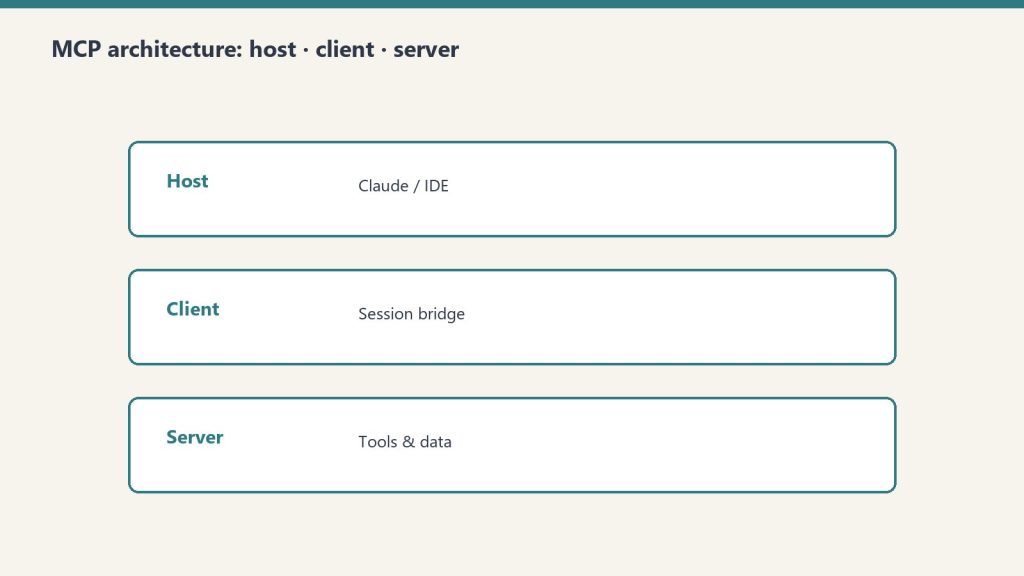
MCP has three components. The host is the application where Claude runs (the desktop app, Claude Code, or a custom application). The client is the MCP client built into Claude that manages connections to MCP servers. The server is the service that provides tools, data, or capabilities to Claude. MCP servers expose three types of primitives: tools (actions Claude can take, like querying a database or creating a Jira ticket), resources (data Claude can read, like file contents or documentation), and prompts (pre-built interaction patterns).
Practical Examples
A Notion MCP server lets Claude read and write Notion pages and databases directly. A PostgreSQL MCP server lets Claude query your database. A Slack MCP server lets Claude read channels and send messages. A GitHub MCP server lets Claude interact with repositories, issues, and pull requests. A Sentry MCP server lets Claude access error tracking and debugging data. These aren’t hypothetical — they’re production tools that teams use daily.
Local vs Remote MCP Servers
MCP servers can run locally on your machine or remotely as hosted services. Local MCP servers run alongside the Claude desktop app and have access to your local environment — file system, local databases, development tools. They use the stdio transport (standard input/output) and require no network configuration. Remote MCP servers run as web services and are accessed over the network using Streamable HTTP or Server-Sent Events (SSE) transports. Remote servers can be shared across teams and don’t require local installation.
Token Cost Considerations
An important practical consideration: MCP tools add tokens to every conversation turn. Each configured MCP server’s tool descriptions are included in Claude’s context, consuming input tokens. If you have 10 MCP servers with 5 tools each, that’s 50 tool descriptions included in every request — potentially thousands of tokens per turn. Best practices include only connecting the MCP servers you actively need, using scoped configurations to limit which tools are available in which contexts, and monitoring your token usage to identify MCP-related costs.
Why Developers Care
MCP matters because it transforms Claude from a standalone chatbot into a connected agent. Without MCP, Claude can only work with information you paste into the conversation. With MCP, Claude can pull real-time data, take actions in external systems, and operate as part of your existing toolchain. For development teams, MCP means Claude Code can interact with your entire development stack — version control, CI/CD, error tracking, documentation, project management — through a single standardized interface.
Getting Started with MCP
The fastest path is to install a pre-built MCP server for a tool you already use. The Claude desktop app’s settings include MCP server configuration. Add a server definition (the server command and its arguments), restart Claude, and the tools become available in your conversations. For custom integrations, Anthropic provides SDKs for building MCP servers in Python and TypeScript. The MCP specification is open — anyone can build a server for any tool.
Related on Tygart Media: what is MCP · Skills vs MCP · how to use Claude.
Frequently Asked Questions
What is Claude MCP?
MCP (Model Context Protocol) is an open standard that lets Claude connect to external tools and data sources — databases, APIs, file systems, and more — through a standardized interface.
Is MCP free to use?
MCP itself is free and open. MCP servers may be free (open source) or paid (commercial). The token costs from MCP tool descriptions are included in your regular Claude usage or API billing.
Do I need to be a developer to use MCP?
Basic MCP server setup requires some technical comfort — editing configuration files and running commands. Pre-built connectors in the Claude interface are simpler. Building custom MCP servers requires programming knowledge.
Can MCP be used with other AI models?
MCP is an open protocol. While Anthropic created it for Claude, other AI platforms and tools have begun adopting MCP as a standard for tool integration.
Leave a Reply