Tag: AI Context

  • The Multi-Model Roundtable: How to Use Multiple AI Models to Pressure-Test Your Most Important Decisions

    The Multi-Model Roundtable: How to Use Multiple AI Models to Pressure-Test Your Most Important Decisions

    The Lab · Tygart Media
    Experiment Nº 047 · Methodology Notes
    METHODS · OBSERVATIONS · RESULTS

    Every AI model has a failure mode that looks like a feature. Ask it a question, it gives you a confident answer. Ask a follow-up that implies the answer was wrong, it updates — often without defending the original position at all. The model wasn’t reasoning to a conclusion. It was pattern-matching to what a confident answer looks like, then pattern-matching to what capitulation looks like when challenged.

    This is the sycophancy problem, and it makes single-model analysis unreliable for consequential decisions. Not because the model is bad, but because you’re the only one in the room. There’s no adversarial pressure on the answer. There’s no second perspective that might notice what the first one missed. The model is optimizing for your satisfaction, not for correctness.

    The Multi-Model Roundtable is the methodology that fixes this by design.

    What the Roundtable Actually Is

    The Multi-Model Roundtable runs the same question or problem through multiple AI models independently — each one without access to what the others have said — and then synthesizes the responses to identify where they converge, where they diverge, and what each one noticed that the others missed.

    The independence is the key variable. If you show Model B what Model A said before asking for its analysis, you’ve contaminated the roundtable. Model B will anchor to Model A’s framing and produce a response that’s in dialogue with it rather than an independent analysis. The value of the roundtable comes from genuine independence at the analysis stage, not from running the same prompt through multiple interfaces.

    The synthesis is the second key variable. The raw outputs from three models aren’t a roundtable — they’re three separate opinions. The roundtable produces value when a synthesizing pass identifies the structure of agreement and disagreement: what did all three models independently find? What did only one model notice? Where did two models agree and one diverge, and does the divergent position have merit? The synthesis is where the methodology earns its name.

    When to Use It

    The roundtable is not a default workflow. It’s a tool for specific situations where the cost of a wrong answer is high enough to justify the overhead of running multiple models and synthesizing across them.

    The right situations: architectural decisions that will shape downstream systems for months. Strategic pivots that affect how a business is positioned or resourced. Gap analyses of complex systems where a single model’s blind spots could cause you to miss an important structural problem. Any decision where you’ve been operating inside one model’s worldview long enough that you’ve lost perspective on what its assumptions might be getting wrong.

    The wrong situations: operational execution, content production, routine optimization passes. The roundtable is expensive relative to single-model work, and its value — surfacing the disagreements and blind spots of any single model — is only relevant when the decision is complex enough to have meaningful blind spots worth finding.

    The Three-Round Structure

    The roundtable runs most effectively in three rounds, each building on what the previous round revealed.

    Round 1: Independent Analysis. Each model receives the same prompt and produces an independent response. No model sees what the others said. The synthesizer — typically the most capable model available, running after the round is complete — reads all responses and maps the landscape: points of convergence, unique insights, divergent positions, and the questions that the round raised but didn’t answer.

    Round 2: Pressure Testing. The synthesis from Round 1 goes back to each model as context, with a new prompt that asks it to defend, revise, or extend its original position given what the other models found. This is where the sycophancy trap opens. A model with genuine reasoning will either defend its original position with new arguments, update it with explicit acknowledgment of what changed its thinking, or identify a synthesis that transcends the disagreement. A model running on pattern-matching rather than reasoning will simply adopt whatever the synthesized framing said without defending the original. Round 2 distinguishes between the two.

    Round 3: Resolution. The synthesizer runs a final pass across the Round 2 responses, looking for the positions that survived pressure and the positions that collapsed. The surviving positions — the ones each model stood behind when challenged — are the most reliable outputs of the process. The collapsed positions reveal where the original model was optimizing for confidence rather than correctness. The resolution produces a final synthesized view that incorporates what held up and discards what didn’t.

    What the Live Roundtable Revealed

    The methodology was stress-tested against the Second Brain itself — running multiple models through a three-round analysis of the knowledge base to identify its gaps, structural problems, and opportunities. The results illustrate both the value of the methodology and one of its most important findings about model behavior.

    In Round 1, all three models independently identified the same core finding: the Second Brain was functioning as an execution layer and a session archive, but not yet as a self-updating knowledge infrastructure. The convergence on this finding — without any model seeing what the others said — validated that the finding was real rather than an artifact of any single model’s framing.

    In Round 2, something interesting happened. When shown the Round 1 synthesis, some models updated their Round 1 positions to align with the synthesized framing without defending their original positions. This is the sycophancy signal: the model adopted the stronger framing without explaining what in Round 1 it was wrong about. Other models explicitly defended or extended their original positions with new evidence. The round revealed which models were reasoning and which were pattern-matching to the most confident-sounding available answer.

    Round 3 produced a final synthesis that was materially more reliable than any single model’s Round 1 output — specifically because it incorporated only the positions that survived adversarial pressure, not all positions that were initially stated with confidence.

    The Synthesis Model Selection Problem

    One design decision the roundtable requires is choosing which model performs the synthesis. This matters more than it might seem.

    The synthesis model reads all outputs and produces the integrated view. If it’s the same model that participated in Round 1, it’s not a neutral synthesizer — it’s a participant reviewing its own work alongside competitors, with all the bias that implies. If it’s a model that didn’t participate in the analysis rounds, it brings a fresh perspective to synthesis but may lack the context to evaluate which positions are most defensible.

    The cleanest solution is to use the most capable available model for synthesis regardless of whether it participated in the analysis rounds — and to run it with explicit instructions to identify convergence and divergence rather than to produce a confident unified answer. The synthesis model’s job is to map the disagreement landscape, not to resolve it prematurely into a single position that papers over genuine uncertainty.

    The Model Diversity Requirement

    A roundtable with three instances of the same model is not a roundtable — it’s three runs of the same reasoning process with stochastic variation. The value of the methodology comes from genuine architectural diversity: models trained on different data, with different RLHF emphasis, optimizing for different outputs.

    In practice this means including at least one model from each major family — Claude, GPT, and Gemini cover meaningfully different architectures and training approaches. Each has genuine blind spots the others are less likely to share. Claude tends toward epistemic humility and structured analysis. GPT tends toward confident synthesis and breadth of coverage. Gemini tends toward recency and web-grounded reasoning. These aren’t strict patterns, but they reflect real tendencies that produce different emphasis in analysis — which is exactly what you want from a roundtable.

    The Operational Cost and When It’s Worth It

    Running three models through three rounds, with synthesis at each round, is a genuine time and token investment. For a complex architectural question, a full roundtable might take several hours of elapsed time and meaningful token costs across API calls.

    The investment is justified when the decision at the center of the roundtable has downstream consequences that would cost more than the roundtable to fix if gotten wrong. For a strategic decision about how to position a business in a shifting market, or an architectural decision about which infrastructure pattern to build for the next year, that threshold is easy to clear. For an operational question with a clear right answer and low reversal cost, the roundtable is overkill.

    The practical heuristic: use the roundtable for decisions that you’ll still be living with in six months. For everything shorter-horizon than that, a single capable model running a well-structured prompt produces sufficient quality at a fraction of the cost.

    Frequently Asked Questions About the Multi-Model Roundtable

    Can you run the roundtable with two models instead of three?

    Yes, and two is often the practical minimum. Two models can reveal disagreement and surface blind spots. Three produces a more structured convergence picture — when two agree and one diverges, you have a majority position and a minority position to evaluate. With two models, every disagreement is 50/50 and requires more judgment from the synthesizer to resolve. Three is the minimum for genuine triangulation.

    Does the order of synthesis matter?

    The order in which models are presented to the synthesizer can subtly anchor the synthesis toward whichever model’s framing appears first. Randomizing the presentation order across rounds, or presenting all outputs simultaneously rather than sequentially, reduces this anchoring effect. It doesn’t eliminate it — the synthesizer is still a model with the same biases as any other — but it reduces the systematic advantage any single model’s framing gets from appearing first.

    How do you handle it when all three models agree?

    Unanimous agreement is the outcome you most need to interrogate. It could mean the answer is genuinely clear. It could also mean all three models share the same blind spot — they trained on similar data, absorbed similar conventional wisdom, and are all confidently wrong in the same direction. When all three models agree, the most valuable follow-up is to explicitly prompt each one to steelman the strongest counterargument to the consensus. If no model can produce a compelling counterargument, the consensus is probably sound. If one of them can, you’ve found the crack worth examining.

    Is this the same as getting a second opinion from a different person?

    Similar in spirit, different in practice. A human second opinion brings lived experience, professional judgment, and genuine stakes in being right that a model doesn’t have. The roundtable is better than a single model in the same way a panel of advisors is better than a single advisor — but it doesn’t substitute for human expertise on decisions where that expertise is what you actually need. Think of the roundtable as a way to pressure-test AI analysis before you bring it to humans, not as a replacement for human judgment on consequential decisions.

    What do you do when the models produce genuinely irreconcilable disagreements?

    Irreconcilable disagreement is valuable information. It means the question has genuine uncertainty or value-dependence that isn’t resolvable by analysis alone. Document both positions, identify what would have to be true for each to be correct, and treat the decision as one that requires human judgment informed by the disagreement rather than one that can be delegated to model consensus. The roundtable that produces irreconcilable disagreement has done its job — it’s surfaced the real structure of the uncertainty rather than papering over it with false confidence.


  • AI Model Routing: How to Choose Between Haiku, Sonnet, and Opus for Every Task

    AI Model Routing: How to Choose Between Haiku, Sonnet, and Opus for Every Task

    The Machine Room · Under the Hood

    Every AI model tier costs a different amount per token, produces output at a different quality level, and runs at a different speed. Running everything through the most powerful model you have access to isn’t a strategy — it’s a default. And defaults are expensive.

    Model routing is the discipline of intentionally assigning the right model tier to the right task based on what the task actually requires. It’s not about using cheaper models for important work. It’s about recognizing that most work doesn’t need the most capable model, and that using a lighter model for that work frees your most capable model for the tasks where its capabilities genuinely matter.

    The operators who get the most out of AI infrastructure are not the ones running the most powerful models. They’re the ones who know exactly which model to use for each type of work — and have that routing systematized so it happens automatically rather than by decision on every task.

    The Three-Tier Model

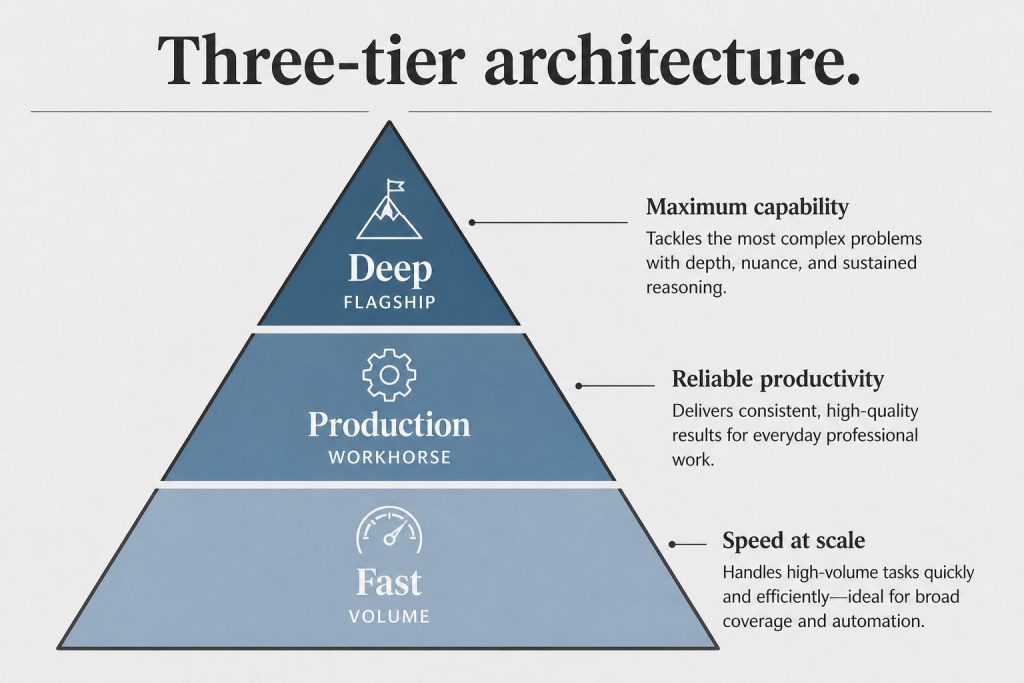
    The current Claude family maps cleanly to three operational tiers, each suited to a different category of work.

    Haiku — the volume tier. Fast, cheap, and capable of tasks that require pattern recognition, classification, and structured output without deep reasoning. The right model for taxonomy assignment, SEO meta generation, schema JSON-LD, social post drafts, AEO FAQ generation, internal link identification, and any task where you need the same operation repeated many times across a large dataset. Haiku is where batch operations live. When you’re processing a hundred posts for meta description updates or generating tag assignments across an entire site, Haiku is the model you reach for — not because quality doesn’t matter, but because Haiku is genuinely capable of these tasks and running them through Sonnet or Opus would be both slower and significantly more expensive without producing meaningfully better results.

    Sonnet — the production tier. The workhorse. Capable of nuanced reasoning, long-form drafting, and the kind of editorial judgment that separates useful content from generic output. The right model for content briefs, GEO rewrites, thin content expansion, flagship social posts that need real voice, and the article drafts that feed the content pipeline. Sonnet handles the majority of actual content production work — it’s the model that runs most sessions and most pipelines. When you need something that reads like a human wrote it with genuine thought applied, Sonnet is the default choice.

    Opus — the strategy tier. Reserved for work where depth of reasoning is the primary value. Long-form articles that require original synthesis, live client strategy sessions where you’re working through a complex problem in real time, and any situation where you’re making decisions that will cascade through multiple downstream systems. Opus is not for volume. It’s for the tasks where running a cheaper model would produce an output that looks similar but misses the connections, nuances, or strategic implications that make the difference between advice that’s directionally right and advice that’s actually useful.

    The Routing Rules in Practice

    The routing framework isn’t abstract — it maps specific task types to specific model tiers with enough precision that sessions can apply it without deliberation on each individual task.

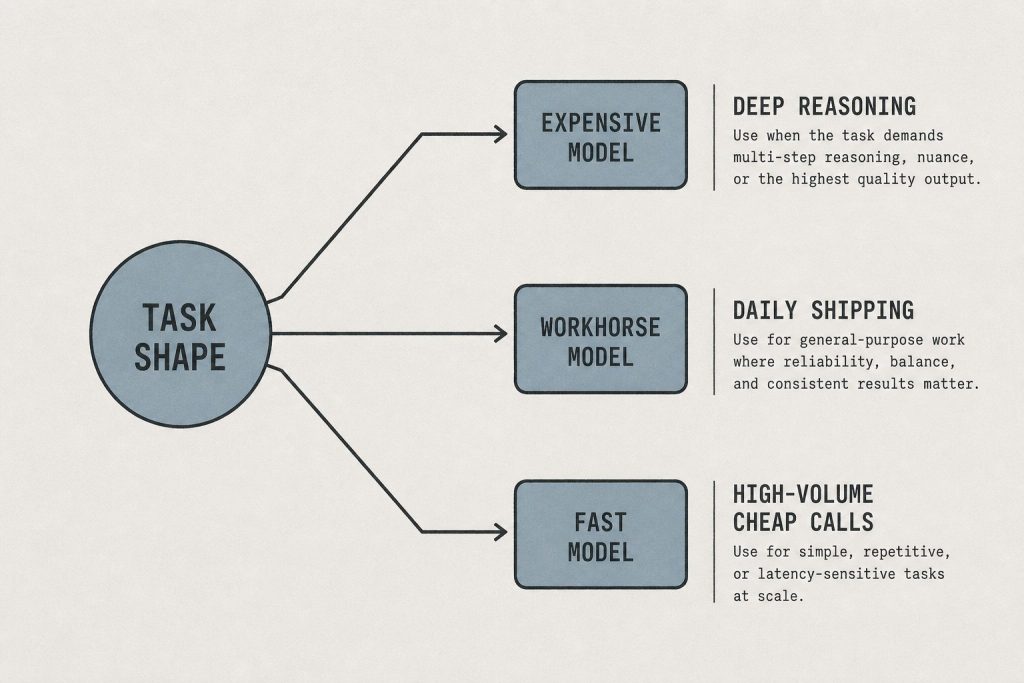
    Haiku handles: taxonomy and tag assignment, SEO title and meta description generation, schema JSON-LD generation, social post creation from existing article content, AEO FAQ blocks, internal link opportunity identification, post classification and categorization, and any extraction or formatting task applied across more than ten items.

    Sonnet handles: article drafting from briefs, GEO and AEO optimization passes on existing content, content brief creation, persona-targeted variant generation, thin content expansion, editorial social posts that require voice and judgment, and the majority of single-session content production work.

    Opus handles: long-form pillar articles that require original synthesis across multiple sources, live strategy sessions with clients or within complex multi-system planning work, architectural decisions about content or technical systems, and any task where the output will directly inform other significant decisions.

    The dividing line between Sonnet and Opus is usually this: if the task requires judgment about what matters — not just execution of a clear brief — Opus earns its cost premium. If the task has a clear structure and Sonnet can execute it well, escalating to Opus produces marginal improvement for a significant cost increase.

    The Batch API Rule

    Separate from model selection is the question of whether to run tasks synchronously or in batch. The Batch API applies to any operation that meets three conditions: more than twenty items to process, not time-sensitive, and a format or classification task that produces deterministic-enough output that you can verify results after the fact rather than in real time.

    The Batch API cuts token costs meaningfully on qualifying operations. The tradeoff is latency — batch jobs run on a delay rather than returning results immediately. For the right task category, this is a pure win: you pay less, the work gets done, and the latency doesn’t matter because the output wasn’t needed in real time anyway. For the wrong category — anything where you’re making decisions in a live session based on the output — batch is the wrong tool regardless of cost.

    Taxonomy normalization across a large site is the canonical batch use case. You’re not making live decisions based on the output. The task is highly repetitive. The result is verifiable. The volume is high enough that the cost difference is meaningful. Run it in batch, verify results afterward, and move on.

    The Token Limit Routing Rule

    There’s a third routing decision that most operators don’t think about explicitly: what to do when a session hits a context limit mid-task. The instinctive response is to start a new session with the same model. The better response is often to drop to a smaller model.

    When a Sonnet session runs out of context on a task, the task that triggered the limit is usually a constrained, well-defined operation — exactly the kind of thing Haiku handles well. Switching to Haiku for that specific operation, completing it, and returning to Sonnet for the continuation is a more efficient pattern than restarting the full session. The smaller model fits through the gap the larger model couldn’t navigate because context limits aren’t a capability failure — they’re a resource constraint. A smaller model with a fresh context window can often complete the task cleanly.

    This is the counterintuitive version of model routing: sometimes the right model for a task is determined not by the task’s complexity but by the state of the session when the task arrives.

    The Cost Architecture of a Content Operation

    Model routing at the operation level — not just the task level — determines what a content operation actually costs to run at scale.

    A single article through the full pipeline touches multiple model tiers. The brief comes from Sonnet. The taxonomy assignment goes to Haiku. The article draft is Sonnet. The SEO meta is Haiku. The GEO optimization pass is Sonnet. The schema JSON-LD is Haiku. The quality gate scan is Haiku. The final publish verification is trivial — no model needed, just a curl call.

    That pipeline uses Haiku for roughly half its operations by count, even though the output is a fully optimized article. The expensive model tier — Sonnet — runs for the creative and editorial work where its capabilities matter. Haiku runs for the structured, repetitive work where it’s genuinely sufficient. The result is an article that costs a fraction of what it would cost to run every stage through Sonnet, with no meaningful quality difference in the output.

    Multiply that across a twenty-article content swarm, or an ongoing operation managing a portfolio of sites, and the routing decisions made at the pipeline level determine whether the economics of AI-native content production are sustainable or not. Running everything through the most capable model isn’t just expensive — it makes scale impossible. Routing correctly is what makes scale practical.

    When to Override the Routing Rules

    Routing frameworks are defaults, not laws. There are situations where the right answer is to override the default tier upward — and being able to recognize them is as important as having the routing rules in the first place.

    Override to a higher tier when: the task appears simple but the context makes it consequential (a brief that seems like a standard format task but will drive a month of content production), when you’re working with a client directly and the output will be read immediately (live sessions always get the appropriate tier regardless of task type), or when you’ve run a task through a lighter model and the output reveals that the task had more complexity than the routing rule anticipated.

    The routing framework is a starting point that gets refined by observation. When Haiku produces output that’s consistently good enough for a task category, the routing rule holds. When it produces output that requires significant correction, that’s a signal to move the task category up a tier. The framework learns from its own failure modes — but only if the operator is paying attention to where the defaults break down.

    Frequently Asked Questions About AI Model Routing

    Is model routing worth the operational complexity?

    For single-task users running occasional sessions, no — the default to a capable model is fine. For operators running content pipelines across multiple sites with high task volume, yes — the cost difference at scale is substantial, and the operational complexity of a routing framework is lower than it appears once the rules are systematized into pipeline architecture.

    How do you know when a task is genuinely Haiku-appropriate vs. Sonnet-appropriate?

    The test is whether the task requires judgment about what the right answer is, or execution of a clear structure. Haiku excels at the latter. If you can write a complete specification of what the output should look like before the model runs — format, constraints, criteria — it’s likely Haiku-appropriate. If the value comes from the model deciding what matters and making editorial choices, it needs Sonnet at minimum.

    What about using non-Claude models for specific tasks?

    The routing logic applies across model families, not just within Claude tiers. For image generation, Vertex AI Imagen tiers serve the same function — Fast for batch, Standard for default, Ultra for hero images. For specific tasks where another model has a demonstrated capability advantage, routing to that model is the right call. The principle is the same: match the model to what the task actually requires, not to what’s most convenient to run everything through.

    Does model routing apply to agent orchestration?

    Yes, and it’s especially important there. In a multi-agent system, the orchestrator that plans and delegates work benefits most from the highest-capability model because its output determines what every downstream agent does. The agents executing specific sub-tasks can often run on lighter models because they’re executing clear instructions rather than making judgment calls about what to do. Opus orchestrates, Haiku executes, Sonnet handles the middle layer where judgment and execution are both required.

    How do you handle tasks where you’re not sure which tier is right?

    Default to Sonnet for ambiguous cases. Haiku is the right downgrade when you have confidence a task is purely structural. Opus is the right upgrade when you have evidence that Sonnet’s output isn’t capturing the depth the task requires. Running something through Sonnet when Haiku would have sufficed costs money. Running something through Haiku when Sonnet was needed costs correction time. For most operators, the cost of correction time exceeds the cost of the token difference — which means when genuinely uncertain, the middle tier is the right hedge.


  • Agentic Commerce: The Protocol Stack That Replaces the Human Buyer

    Agentic Commerce: The Protocol Stack That Replaces the Human Buyer

    Tygart Media Strategy
    Volume Ⅰ · Issue 04Quarterly Position
    By Will Tygart
    Long-form Position
    Practitioner-grade

    For most of the history of the internet, commerce had a fixed shape: a human found a product, a human put it in a cart, a human entered payment details, a human clicked buy. The entire infrastructure of digital commerce — payment processors, shopping carts, merchant platforms, ad networks, fraud detection — was built around that human in the loop.

    Agentic commerce removes the human from most of those steps. An AI agent acting on your behalf finds the product, evaluates it against your criteria, initiates checkout, authorizes payment, and completes the transaction. The human sets the intent and the constraints. The agent executes. And the protocols being built right now are what make that execution possible at scale across the open web.

    This isn’t a future prediction. It’s the infrastructure layer being built in production today, with real merchants, real transactions, and real competitive stakes for every business that sells anything online.

    The Protocol Stack: Four Layers, Multiple Players

    Agentic commerce isn’t one protocol — it’s a stack of protocols, each handling a specific layer of the transaction. Understanding the stack is the prerequisite for understanding what any business actually needs to do about it.

    The commerce layer handles the shopping journey itself: how an agent discovers products, queries catalogs, compares options, and initiates checkout. Two protocols are competing here. OpenAI’s Agentic Commerce Protocol (ACP), co-developed with Stripe and open-sourced under Apache 2.0, powers checkout inside ChatGPT and connects to merchants through Stripe’s payment infrastructure. Google’s Universal Commerce Protocol (UCP), launched at NRF in January 2026 with Shopify, Walmart, Target, and more than twenty partners, handles the full commerce lifecycle from discovery through post-purchase across any AI surface, not just Google’s own.

    The payments layer handles authorization, trust, and money movement — the part of the transaction where something actually changes hands. Google’s Agent Payments Protocol (AP2) is the most prominent here, introducing “mandates” — digitally signed statements that define exactly what an agent is authorized to do and spend. Visa has its Trusted Agent Protocol. Mastercard has Agent Pay. Coinbase introduced x402, which revives the long-dormant HTTP 402 “Payment Required” status code to enable microtransactions between machines without accounts or API keys.

    The infrastructure layer is the operating system underneath everything else: Anthropic’s Model Context Protocol (MCP) for connecting AI models to external tools and data sources, and Google’s Agent2Agent (A2A) protocol for coordination between agents. These are less visible to merchants but essential for making the commerce and payments layers work together.

    The trust layer sits across all of it: fraud detection, consent management, identity verification for non-human actors. This is the least standardized layer and the one where the most work remains.

    ACP vs. UCP: Different Bets on the Same Shift

    The practical choice most merchants face isn’t which single protocol to adopt — it’s understanding what each one connects to and what supporting both costs.

    ACP is optimized for merchant integrations with ChatGPT, while UCP takes a more surface-agnostic approach, aiming to standardize how platforms, agents, and merchants execute commerce flows across the ecosystem. The scope difference is meaningful: ACP standardizes the checkout conversation. UCP standardizes the entire shopping journey.

    The tradeoff each represents is also different. ACP trades openness for control, while UCP trades control for index breadth and protocol-level standardization. ACP gives merchants a more curated, high-touch integration with a specific AI surface. UCP gives merchants broader reach at the cost of less hand-holding through the integration.

    For most merchants, the realistic answer is both — because each connects to a different AI shopping surface where different buyers will transact. Most retailers will need to support at least two of these protocols, since each connects to different AI shopping surfaces. ChatGPT uses ACP for transactions. Google AI Mode and Gemini use UCP. The protocols aren’t competing for the same merchants so much as competing to be the standard their respective AI ecosystems use.

    The Amazon Anomaly

    Every major retailer in the agentic commerce ecosystem is moving toward open protocols — except the largest one. Amazon has taken the opposite position: updating its robots.txt to block AI agent crawlers, tightening its legal terms against agent-initiated purchasing, and pursuing litigation against unauthorized agent interactions with its platform.

    The strategic logic is straightforward. Amazon’s competitive advantage is built on controlling the discovery moment — the point at which a buyer decides what to consider buying. Open protocols where AI agents compare products across every online store turn Amazon into just another merchant behind an API, stripping away the algorithmic leverage that makes its platform valuable to both buyers and sellers. The walled garden is a defensive move, not a philosophical one.

    For merchants who are primarily Amazon-dependent, the agentic commerce transition is less immediately relevant — Amazon’s own AI shopping assistant, Rufus, operates inside the walled garden and isn’t subject to open protocol dynamics. For merchants who sell direct or through multi-channel platforms, the protocols represent a potential path to discovery that doesn’t flow through Amazon’s toll booth.

    The Payment Authorization Problem

    The hardest unsolved problem in agentic commerce isn’t discovery or checkout — it’s authorization. How does a merchant know that an AI agent actually has permission to spend the buyer’s money? How does a buyer trust that an agent won’t exceed its authorized scope? How does a payment processor handle chargebacks when the “buyer” is software?

    AP2’s mandate system is the most developed answer to this. AP2 introduces the concept of mandates, digitally signed statements that define what an agent is allowed to do, such as create a cart, complete a purchase, or manage a subscription. These mandates are portable, verifiable, and revocable, allowing multiple stakeholders to coordinate safely. A mandate is essentially a scoped permission — the agent can spend up to this amount, in this category, on behalf of this identity, and here’s the cryptographic proof.

    This matters for the full agent-to-agent commerce scenario — where both buyer and seller are autonomous agents, no human is involved in real time, and traditional consumer protection frameworks don’t map cleanly to the transaction. That’s the frontier where the standards work is most active and the solutions are least settled.

    What This Means for Content and SEO Strategy

    The shift to agentic commerce doesn’t just change how transactions happen. It changes how discovery happens — which changes what content and SEO strategy is actually for.

    In the search engine model, a buyer types a query, gets a ranked list of results, clicks through, and eventually converts. The optimization target is rank position. In the agentic commerce model, a buyer tells an agent what they want, the agent queries structured data sources and evaluates options programmatically, and surfaces a recommendation. The optimization target shifts from rank position to selection rate — how often an agent chooses your product when it’s evaluating options that include yours.

    Selection rate is determined by data quality (how completely and accurately your product catalog is exposed through the protocol), trust signals (reviews, ratings, return policies — the inputs agents use to evaluate reliability), and price competitiveness at the moment of agent evaluation. AEO and GEO optimization — structuring content so AI systems can extract and cite it accurately — becomes more important, not less, in an agentic commerce environment. The agent needs to understand your product in enough depth to recommend it with confidence.

    For service businesses and content publishers who aren’t selling physical goods, the implications are different but parallel. When AI agents are answering questions and making recommendations on behalf of users, the question of which businesses and sources get cited is the agentic equivalent of search rank. The content infrastructure that makes you citable — entity clarity, structured data, authoritative sourcing — is the same infrastructure that makes you recommendable in an agent-mediated discovery environment.

    The Readiness Ladder

    Agentic commerce readiness isn’t binary — it’s a ladder, and most businesses are somewhere in the middle rather than at the top or bottom.

    The first rung is structured data hygiene: product catalogs that are complete, accurate, and machine-readable. If your product data is messy, inconsistent, or locked behind interfaces that agents can’t parse, no protocol integration will help. Clean structured data is the prerequisite for everything else.

    The second rung is protocol awareness: understanding which protocols matter for your specific channels and customer base. A Shopify merchant gets ACP integration automatically through the platform. A business selling through Google Shopping needs UCP readiness. A B2B operation should be watching AP2 and mandate-based authorization more closely than consumer checkout protocols.

    The third rung is active integration: implementing the relevant protocol specs, publishing the required endpoints, and testing agent interactions in a controlled environment before they happen in production. This is where most businesses aren’t yet — not because the protocols are inaccessible, but because the urgency hasn’t been felt directly.

    The fourth rung is optimization: monitoring selection rate and proxy conversion metrics, iterating on catalog data quality and trust signals, and adapting content strategy for agent-mediated discovery rather than human-mediated search. This is where competitive differentiation will be built once the infrastructure layer matures.

    The window for first-mover advantage in protocol adoption is open now, and it won’t stay open indefinitely. The businesses that establish protocol presence before agentic commerce becomes the default mode of online discovery will have an advantage that compounds as agent behavior increasingly determines where transactions happen.

    Frequently Asked Questions About Agentic Commerce

    Do small businesses need to worry about agentic commerce protocols now?

    If you’re on Shopify, you may already be enrolled — Shopify has handled ACP integration at the platform level for eligible merchants. If you’re not on a platform that’s done it for you, the honest answer is: start with structured data hygiene now, monitor protocol adoption over the next six months, and plan for integration in the second half of 2026. The urgency is real but the timeline isn’t emergency-level for most small businesses yet.

    What’s the difference between ACP, UCP, and MCP?

    ACP and UCP are commerce protocols — they define how agents shop and transact on behalf of buyers. MCP is an infrastructure protocol — it defines how AI models connect to external tools and data sources, including commerce APIs. MCP is the plumbing; ACP and UCP are the applications running on the plumbing. Most merchants will interact primarily with ACP and UCP. Developers building agent applications interact more directly with MCP.

    Will there be one winning protocol or multiple?

    Multiple, almost certainly. The historical pattern of internet standards is that protocols fragment by ecosystem and then slowly consolidate as interoperability pressure mounts. ACP and UCP serve different AI surfaces and are backed by different platform ecosystems. Both will persist as long as ChatGPT and Google AI Mode both matter, which is likely to be a long time. The consolidation pressure comes from merchants who don’t want to maintain five separate integrations — that merchant pressure will drive interoperability work, not the platforms voluntarily ceding ground.

    How does this affect businesses that don’t sell products online?

    Service businesses and content publishers are affected through the discovery layer, not the transaction layer. When AI agents answer questions and make recommendations, the businesses and sources that get surfaced are determined by the same kind of structured data and entity clarity that determines protocol-level discoverability for product merchants. The content infrastructure that makes you citable by AI systems is the service-business equivalent of protocol integration for product merchants.

    What should I actually do this week?

    Audit your structured product or service data for completeness and machine readability. Check whether your commerce platform has already integrated any of the major protocols on your behalf. Read the ACP and UCP documentation to understand what implementation requires. And look at your current AEO and GEO optimization — the content signals that determine AI citability are the same signals that will determine agent recommendability as agentic commerce matures.


  • The Content Swarm System: How One Brief Becomes Fifteen Articles Without Losing Quality

    The Content Swarm System: How One Brief Becomes Fifteen Articles Without Losing Quality

    Tygart Media Strategy
    Volume Ⅰ · Issue 04Quarterly Position
    By Will Tygart
    Long-form Position
    Practitioner-grade

    The math of content production at scale has a bottleneck that most people don’t name correctly. They call it a writing problem. It isn’t. It’s a parallelization problem.

    Writing one good article takes a certain amount of focused effort. Writing fifteen good articles doesn’t take fifteen times that effort — it takes a completely different approach to how work gets organized. A sequential process can’t produce fifteen articles efficiently. A parallel one can. The Content Swarm is the architecture that makes the parallel approach work without sacrificing quality for volume.

    What a Content Swarm Actually Is

    A Content Swarm is a production run where a single brief seeds parallel content generation across multiple personas, formats, and destinations simultaneously. One topic becomes many articles, each genuinely differentiated by who it’s written for and what they need from it — not surface-level rewrites with a name changed at the top.

    The swarm model inverts the typical content production sequence. In the standard model, you write one article and then ask whether variants are needed. In the swarm model, you identify the full audience matrix first, and the article is written as many things simultaneously from the start. The brief is the common ancestor. Every output is a distinct descendant.

    The name comes from the behavior: multiple agents working on related tasks in parallel, each operating in its own context, each producing output that’s coherent individually and complementary collectively. No single agent writes all fifteen articles. Each agent writes the article it’s best positioned to write, given the persona and format it’s been handed.

    The Brief as DNA

    Everything in a Content Swarm traces back to the brief. Not a vague topic assignment — a structured input that contains everything the swarm needs to generate differentiated output without drifting into generic territory or duplicating each other.

    The brief has four layers. The topic core: what the article is fundamentally about, the primary keyword target, the intended search intent. The entity layer: which named concepts, tools, frameworks, and organizations are in scope. The persona matrix: who the article is for, what they already know, what decision they’re trying to make, and what would make this article genuinely useful to them rather than interesting in a general sense. And the format constraints: length, structure, schema types, AEO/GEO requirements.

    When the brief is built correctly, each agent in the swarm can operate independently. The CFO reading this needs ROI framing and risk language. The operations manager needs process language and implementation specifics. The solo founder needs the fastest path from zero to working. Three different articles, same topic, same quality bar, generated in parallel because the brief specified what differentiation looks like before writing began.

    This is why the brief is the highest-leverage input in the system. A thin brief produces thin variants that blur together. A rich brief produces genuinely distinct articles that serve different readers without redundancy. The time invested in the brief is returned many times over in the parallelization that follows.

    Taxonomy as the Seeding Mechanism

    The question that comes after “what should we write?” is “what should we write next?” In a manually managed content operation, this is answered by editorial judgment applied one topic at a time. In a swarm-capable operation, it’s answered by the taxonomy.

    Every category and tag combination in the WordPress taxonomy architecture is a latent brief. A category called “water damage restoration” combined with a tag for “commercial properties” is a content brief: write about water damage in commercial properties. When you have a taxonomy with meaningful depth — not flat categories but a genuine hierarchy of topic clusters — you have a queue of potential briefs that reflects the actual coverage architecture of the site.

    The taxonomy-seeded pipeline takes this literally. It queries the existing taxonomy structure, identifies which category-tag combinations have fewer than a threshold number of published articles, and generates briefs for the gaps. Those briefs feed directly into the swarm. The swarm produces the articles. The articles fill the gaps. The taxonomy becomes both the content strategy and the production queue — a single structure that answers “what should we publish?” and “what should we publish next?” simultaneously.

    This is what separates a content operation that grows by accumulation from one that grows by design. Accumulation adds articles when someone thinks of something to write. Design fills the taxonomy systematically, and the taxonomy reflects the actual knowledge architecture of the site.

    The Production Architecture

    A Content Swarm at scale involves three tiers of work running in sequence, with the parallelization happening inside the middle tier.

    The first tier is brief generation — a single Claude session that takes the topic, the persona matrix, the taxonomy position, and the format requirements and produces a complete brief package. This runs sequentially and quickly. One brief, well-built, is the only input the rest of the system needs.

    The second tier is parallel draft generation — the swarm itself. Multiple sessions run simultaneously, each taking the common brief and a specific persona assignment and producing a complete draft. In a 15-article swarm across five personas, this might mean three articles per persona: a pillar post, a supporting article, and an FAQ or how-to variant. The parallelization means the wall-clock time for fifteen articles is closer to the time for three than the time for fifteen sequential drafts.

    The third tier is optimization and publish — SEO, AEO, GEO, schema injection, taxonomy assignment, quality gate, and REST API publish. This can also run in parallel across the swarm output, with each article processed through the full pipeline independently. The result is a batch of fully optimized, published articles that went from brief to live in a single coordinated production run.

    The Scheduling Layer

    Publishing fifteen articles at once is not the goal. The goal is fifteen articles scheduled across a window that lets each one establish traffic patterns before the next one competes with it for the same search terms.

    The swarm produces the content. The scheduler distributes it. In practice, a fifteen-article swarm for a single client vertical might publish every two days over a month — a steady cadence that signals consistent publishing to search engines while giving each article room to breathe before the next appears.

    The scheduling also respects the internal link architecture. Articles that link to each other need to exist before they can link. The scheduler sequences publication so that the pillar article publishes first and the supporting articles that link to it publish after, ensuring internal links are live on day one rather than pointing to pages that don’t exist yet.

    This is the operational reality of content at scale: it’s not just writing and publishing. It’s production management. The swarm handles the production. The scheduler handles the management. Together they turn one brief session into a month of consistent content output.

    Quality at Swarm Speed

    The objection to any high-volume content system is quality — specifically, that speed and volume are purchased at the expense of the depth and specificity that makes content actually useful. The swarm model addresses this structurally rather than by asking individual articles to carry more.

    Quality in a swarm comes from three places. Brief quality: a rich brief produces rich variants. Persona specificity: a genuinely differentiated persona assignment produces content that’s useful to a real reader rather than generic to all of them. And the quality gate: every article passes the same pre-publish scan for unsourced claims, contamination, and factual drift before it reaches WordPress regardless of how many others are publishing alongside it.

    The quality gate is the non-negotiable floor. The brief and persona specificity are the ceiling. The swarm fills the space between them at scale. What you don’t get at swarm speed is the kind of bespoke, deeply researched long-form that requires a dedicated researcher and multiple revision cycles. What you do get is a large number of genuinely useful, persona-targeted, technically optimized articles that serve specific readers on specific questions — which is what most content actually needs to be.

    Frequently Asked Questions About the Content Swarm System

    How many articles is a swarm typically?

    Swarms have run from five to twenty articles in a single production batch. The practical ceiling is determined by taxonomy coverage — how many distinct persona-topic combinations exist before the differentiation becomes forced. For a well-defined vertical with clear audience segments, fifteen articles is a comfortable swarm size. Beyond that, the briefs start to blur and the personas start to overlap.

    Does each article in the swarm need a separate session?

    In the current implementation, yes — each persona variant runs in its own session to maintain clean context boundaries. This is a feature of the context isolation protocol: the CFO variant session doesn’t carry semantic residue from the operations manager session. Separate sessions are what makes the variants genuinely distinct rather than superficially different.

    How is the Content Swarm different from the Adaptive Variant Pipeline?

    The Adaptive Variant Pipeline determines how many variants a given topic needs based on demand analysis — it’s the decision engine. The Content Swarm is the production architecture that executes those variants in parallel. The Pipeline answers “how many articles and for whom?” The Swarm answers “how do we produce them all efficiently?” They work together: Pipeline for strategy, Swarm for execution.

    What happens when two swarm articles compete for the same keyword?

    This is the cannibalization problem, and it’s solved at the brief level. When the persona matrix is built correctly, each article targets a distinct search intent even when the topic is the same. “Water damage restoration for commercial property managers” and “water damage restoration for insurance adjusters” share a topic but serve different intents and rank for different query clusters. If two briefs in the same swarm would target identical queries, one gets revised before the swarm runs.

    Can the swarm run across multiple client sites simultaneously?

    Yes, with the context isolation protocol enforced. Each site gets its own swarm context. Articles produced for one site never share a session context with articles produced for another. The parallelization happens within each site’s swarm, not across sites — cross-site session mixing is exactly the failure mode the context isolation protocol exists to prevent.


  • The Self-Evolving Knowledge Base: How to Build a System That Finds and Fills Its Own Gaps

    The Self-Evolving Knowledge Base: How to Build a System That Finds and Fills Its Own Gaps

    The Machine Room · Under the Hood

    A knowledge base that doesn’t update itself isn’t a knowledge base. It’s an archive. The distinction matters more than it sounds, because an archive requires a human to decide when it’s stale, what’s missing, and what to add next. That human overhead is exactly what an AI-native operation is trying to eliminate.

    The self-evolving knowledge base solves this by turning the knowledge base itself into an agent — one that identifies its own gaps, triggers research to fill them, and updates itself without waiting for a human to notice something is missing. The human still makes editorial decisions. But the detection, the flagging, and the initial fill all happen automatically.

    Here’s how the architecture works, and why it changes what a knowledge base actually is.

    The Problem With Static Knowledge Bases

    Most knowledge bases are built in sprints. Someone identifies a gap, writes content to fill it, and publishes. The gap is closed. Six months later, the landscape has shifted, new topics have emerged, and the knowledge base is silently incomplete in ways nobody has formally identified. The process of finding those gaps requires the same human effort that built the knowledge base in the first place.

    This is the maintenance trap. The more comprehensive your knowledge base becomes, the harder it is to see what it’s missing. A knowledge base with twenty articles has obvious gaps. A knowledge base with five hundred articles has invisible ones — the gaps hide behind the density of what’s already there.

    Static knowledge bases also don’t know what they don’t know. They can tell you what topics they cover. They can’t tell you what topics they should cover but don’t. That second question requires an external perspective — something that can look at the knowledge base as a whole, compare it against a model of what complete coverage looks like, and identify the delta.

    A self-evolving knowledge base builds that external perspective into the system itself.

    The Core Loop: Gap Analysis → Research → Inject → Repeat

    The self-evolving knowledge base runs on a four-stage loop that operates continuously in the background.

    Stage 1: Gap Analysis. The system examines the current state of the knowledge base and identifies what’s missing. This isn’t keyword matching against a fixed list — it’s semantic analysis of what topics are covered, what entities are represented, what relationships between topics exist, and what a comprehensive knowledge base on this domain should contain that this one currently doesn’t. The gap analysis produces a prioritized list of missing knowledge units, ranked by relevance, recency, and connection density to existing content.

    Stage 2: External Research. For each identified gap, the system runs targeted research — web search, authoritative source retrieval, structured data extraction — to gather the raw material needed to fill it. This stage isn’t content generation. It’s information gathering. The output is source material, not prose.

    Stage 3: Knowledge Injection. The gathered source material is processed, structured according to the knowledge base’s schema, and injected as new entries. In the Notion-based implementation, this means creating new pages with the standard metadata format, tagging them with the appropriate entity and status fields, chunking them for BigQuery embedding, and logging the injection to the operations ledger. The new knowledge is immediately available for retrieval by subsequent sessions.

    Stage 4: Re-Analysis. After injection, the gap analysis runs again. New knowledge creates new connections. Those connections reveal new gaps that didn’t exist — or weren’t visible — before the previous fill. The loop continues, each cycle making the knowledge base more complete and more connected than the one before.

    The key signal that the loop is working: the gaps it finds in cycle two are different from the gaps it found in cycle one. If the same gaps keep appearing, the injection isn’t sticking. If new gaps appear that are more specific and more nuanced than the previous round’s findings, the knowledge base is genuinely evolving.

    The Machine-Readable Layer That Makes It Possible

    A self-evolving knowledge base requires machine-readable metadata on every page. Without it, the gap analysis has to read and interpret free-form text to understand what a page covers, how current it is, and how it connects to other pages. That’s expensive, slow, and error-prone at scale.

    The solution is a structured metadata standard injected at the top of every knowledge page — a JSON block that captures the page’s topic, entity tags, status, last-updated timestamp, related pages, and a brief machine-readable summary. When the gap analysis runs, it reads the metadata blocks first, builds a graph of what the knowledge base covers and how pages connect to each other, and identifies gaps in the graph without having to parse the full text of every page.

    This metadata standard — called claude_delta in the current implementation — is being injected across roughly three hundred Notion workspace pages. Each page gets a JSON block at the top that looks like this in concept: topic, entities, status, summary, related_pages, last_updated. The Claude Context Index is the master registry — a single page that aggregates the metadata from every tagged page and serves as the entry point for any session that needs to understand the current state of the knowledge base without reading every page individually.

    The metadata layer is what separates a knowledge base that can evolve from one that can only be updated manually. Manual updates don’t require machine-readable metadata. Automated gap detection does. The metadata is the prerequisite for everything else.

    The Living Database Model

    One conceptual frame that clarifies how this works is thinking of the knowledge base as a living database — one where the schema itself evolves based on usage patterns, not just the records within it.

    In a static database, the schema is fixed at creation. You define the fields, and the records fill those fields. The structure doesn’t change unless a human decides to change it. In a living database, the schema is informed by what the system learns about what it needs to represent. When the gap analysis consistently finds that a certain type of information is missing — a specific relationship type, a category of entity, a temporal dimension that current pages don’t capture — that’s a signal that the schema should grow to accommodate it.

    This is a higher-order form of evolution than just adding new pages. It’s the knowledge base developing new ways to represent knowledge, not just accumulating more of the same kind. The practical implication is that a self-evolving knowledge base gets more structurally sophisticated over time, not just more voluminous. It learns what it needs to know, and it learns how to know it better.

    Where Human Judgment Still Lives

    The self-evolving knowledge base doesn’t eliminate human judgment. It relocates it.

    In a manually maintained knowledge base, human judgment is applied at every stage: deciding what’s missing, deciding what to research, deciding what to write, deciding when it’s good enough to publish. The human is the bottleneck at every transition point in the process.

    In a self-evolving knowledge base, human judgment is applied at the editorial level: reviewing what the system flagged as gaps and confirming they’re worth filling, reviewing injected knowledge and approving it for the authoritative layer, setting the parameters that govern how the gap analysis defines completeness. The human is the quality gate, not the production line.

    This is the right division of labor. Gap detection at scale is a pattern-matching problem that machines do well. Editorial judgment about whether a gap matters, whether the research that filled it is accurate, and whether the resulting knowledge unit reflects the right framing — that’s where human expertise is genuinely irreplaceable. The self-evolving knowledge base doesn’t try to replace that expertise. It eliminates everything around it so that expertise can be applied more selectively and more effectively.

    The Connection to Publishing

    A self-evolving knowledge base isn’t just an internal tool. It’s a content engine.

    Every gap filled in the knowledge base is potential published content. The gap analysis that identifies missing knowledge units is doing the same work a content strategist does when auditing a site for coverage gaps. The research that fills those units is the same research that informs published articles. The knowledge injection that adds structured entries to the Second Brain is a half-step away from the content pipeline that publishes to WordPress.

    This is why the four articles published today — on the cockpit session, BigQuery as memory, context isolation, and this one — came directly from Second Brain gap analysis. The knowledge base identified topics that were documented internally but not published externally. The gap between internal knowledge and public knowledge is itself a form of coverage gap. The self-evolving knowledge base surfaces both kinds.

    The long-term vision is a single loop that runs from gap detection through research through knowledge injection through content publication through SEO feedback back into gap detection. Each published article generates search and engagement signals that inform what topics are underserved. Those signals feed back into the gap analysis. The knowledge base and the content operation evolve together, each one making the other more effective.

    What’s Built, What’s Designed, What’s Next

    The honest account of where this stands: the loop is partially implemented. The gap analysis runs. The knowledge injection pipeline exists and has successfully injected structured knowledge into the Second Brain. The claude_delta metadata standard is in progress across the workspace. The BigQuery embedding pipeline runs and makes injected knowledge semantically searchable.

    What’s designed but not yet fully automated is the continuous cycle — the scheduled task that runs gap analysis on a cadence, triggers research, packages results, and injects without requiring a human to initiate each loop. That’s the difference between a self-evolving knowledge base and a knowledge base that can be made to evolve when someone runs the right commands. The architecture is in place. The scheduling and full automation is the next layer.

    This is the honest state of most infrastructure that gets written about as though it’s complete: the design is validated, the components work, the automation is what’s pending. Describing it accurately doesn’t diminish what exists — it maps the distance between here and the destination, which is the only way to close it deliberately rather than accidentally.

    Frequently Asked Questions About Self-Evolving Knowledge Bases

    How is this different from RAG (retrieval-augmented generation)?

    RAG retrieves existing knowledge at query time. A self-evolving knowledge base updates the knowledge store itself over time. RAG makes existing knowledge accessible. A self-evolving KB makes the knowledge base more complete. They work together — a self-evolving KB that uses RAG for retrieval is more powerful than either approach alone.

    Does the gap analysis require an AI model to run?

    The semantic gap analysis — identifying what’s missing based on what should be there — does require a language model to understand topic coverage and connection density. Simpler gap detection (missing taxonomy nodes, broken links, orphaned pages) can run with lightweight scripts. The full self-evolving loop uses both: automated structural checks plus periodic AI-driven semantic analysis.

    What prevents the knowledge base from filling itself with low-quality information?

    The same thing that prevents any automated pipeline from publishing low-quality content: a quality gate. In this implementation, injected knowledge goes into a pending state before it’s promoted to the authoritative layer. The human reviews flagged injections before they become part of the canonical knowledge base. Full automation of quality assurance is a later-stage problem — one that requires a track record of consistently good automated output before the review step can be safely removed.

    How do you define what a complete knowledge base looks like for a given domain?

    You start with taxonomy. What are the major topic clusters? What are the entities within each cluster? What relationships between entities should be documented? The taxonomy gives you a framework for completeness — a knowledge base is complete when it has sufficient coverage across all taxonomy nodes and their relationships. In practice, completeness is a moving target because domains evolve, but taxonomy gives you a stable reference point for gap detection.

    Can this pattern work for a small operation, or does it require significant infrastructure?

    The full implementation requires Notion, BigQuery, Cloud Run, and a scheduled extraction pipeline. But the core loop — gap analysis, research, inject, repeat — can be run manually with just a Notion workspace and periodic AI sessions. Start by auditing your knowledge base against your taxonomy once a week. Research and write the most important missing pages. Build the automation once the manual loop is producing consistent value and you understand exactly what you want to automate.


  • Context Isolation Protocol: How to Prevent Client Bleed in Multi-Client AI Content Operations

    Context Isolation Protocol: How to Prevent Client Bleed in Multi-Client AI Content Operations

    The Machine Room · Under the Hood

    When you’re running content operations across multiple clients in a single session, you have a context bleed problem. You just don’t know it yet.

    Here’s how it happens. You spend an hour generating content for a cold storage client — dairy logistics, temperature compliance, USDA regulations. The session is loaded with that vocabulary, those entities, that industry. Then you pivot to a restoration contractor client in the same session. You ask for content about water damage response. The model answers — but the answer is subtly contaminated. The semantic residue of the previous client’s context hasn’t cleared. You publish content that sounds mostly right but contains entity drift, keyword bleed, and framing that belongs to a different client’s world.

    This isn’t a hallucination problem. It’s a context architecture problem. And it requires an architecture solution.

    What Actually Happened: The 11 Contaminated Posts

    The Context Isolation Protocol didn’t emerge from theory. It emerged from a content contamination audit that found 11 published posts across the network where content from one client’s context had leaked into another client’s articles. Cold storage vocabulary appearing in restoration content. Restoration framing bleeding into SaaS copy. The contamination was subtle enough that it passed a casual read but specific enough to be detectable — and damaging — on closer inspection.

    The root cause was straightforward: multi-client sessions with no context boundary enforcement. The content quality gate existed for unsourced statistics. It didn’t exist for cross-client contamination. The model was doing exactly what you’d expect — continuing to operate in the semantic space of the previous context — and nothing in the pipeline was catching it before publish.

    The same failure mode surfaced in a smaller way more recently: a client name appeared in example copy inside an article about AI session architecture. The article was about general operator workflows. The client name was a real managed client that had no business appearing on a public blog. Same root cause, different surface: context from active client work bleeding into content that was supposed to be generic.

    Both incidents pointed to the same gap: the system had no explicit mechanism to enforce where one client’s context ended and another’s began.

    The Context Isolation Protocol: Three Layers

    The protocol that emerged from the audit enforces isolation at three layers, each catching what the previous one misses.

    Layer 1: Context Boundary Declaration. At the start of any content pipeline run, the target site is declared explicitly. Not implied, not assumed — declared. “This pipeline is operating on [Site Name] ([Site URL]). All content generated in this pipeline is for [Site Name] only.” This declaration serves as a soft context reset. It reorients the session’s frame of reference before any content generation begins. It doesn’t guarantee isolation — that’s what Layers 2 and 3 are for — but it establishes intent and reduces drift in cases where the context hasn’t had time to contaminate.

    Layer 2: Cross-Site Keyword Blocklist Scan. Before any article is published, the full body content is scanned against a keyword blocklist organized by site. If keywords belonging to Site A appear in content destined for Site B, the pipeline holds. The scan covers industry-specific vocabulary, entity names, product terms, and geographic markers that are uniquely associated with each client’s vertical. A restoration keyword in a luxury lending article is a hard stop. A cold storage term in a SaaS article is a hard stop. Layer 2 is the automated enforcement layer — it catches what Layer 1’s soft declaration misses in practice.

    Layer 3: Named Entity Scan. Layer 2 catches vocabulary. Layer 3 catches identity. This scan checks for managed client names, brand names, and proper nouns that identify specific businesses appearing in content where they have no business being. A client name showing up in a generic thought leadership article isn’t a keyword match — it’s an entity contamination. Layer 3 catches it specifically because named entities don’t always appear in keyword blocklists. The client name that appeared in the session architecture article would have been caught at Layer 3 if the scan had been in place. It wasn’t. It’s in place now.

    Why This Is an Architecture Problem, Not a Prompt Problem

    The instinctive response to context bleed is to write better prompts. Include “only write about [client]” in every generation call. Be more explicit. The instinct is understandable and insufficient.

    Prompt-level instructions operate inside the session. Context bleed operates at the session level — it’s the accumulated semantic weight of everything the session has processed, not a failure to follow a specific instruction. You can tell the model “write only about restoration” and it will write about restoration. But the framing, the entity associations, the vocabulary choices will still carry the ghost of whatever context came before. The model isn’t ignoring your instruction. It’s operating in a semantic space that your instruction didn’t fully reset.

    The fix has to operate outside the generation call. That’s what an architecture solution does — it enforces the boundary at the system level, not the prompt level. The Context Boundary Declaration resets the frame before generation. The keyword and entity scans enforce the boundary after generation and before publish. Neither fix is inside the generation prompt. Both are in the pipeline architecture around it.

    This is a general pattern in AI-native operations: the failure modes that prompt engineering can’t fix require pipeline engineering. Context bleed is one of them. Duplicate publish prevention is another. Unsourced statistics are a third. Each one has a pipeline-level solution — a pre-generation declaration, a post-generation scan, a pre-publish check — that operates independently of what the model does inside any single generation call.

    The Multi-Model Validation

    One of the more interesting moments in building this protocol was running the same problem description through multiple AI models and asking each one independently what the right architectural response was. Across Claude, GPT, and Gemini, all three models independently identified the Context Isolation Protocol as the correct first Architecture Decision Record for a multi-client AI content operation — not because they coordinated, but because the problem has an obvious structure once you frame it correctly.

    The framing that unlocked it: context windows are not neutral. They accumulate semantic weight across a session. In a single-client operation, that accumulation is fine — it means the model gets progressively better at the client’s voice and vocabulary. In a multi-client operation, it’s a liability. The session that makes you more fluent in Client A makes you less clean in Client B. The optimization that helps single-client work creates contamination in portfolio work.

    Once you see it that way, the solution is obvious: you need explicit context resets between clients, automated detection of contamination before it publishes, and a named entity guard for the cases where vocabulary detection alone isn’t sufficient. Three layers, each catching what the others miss.

    What Changes in Practice

    The protocol changes two things about how multi-client sessions run.

    First, every pipeline run now starts with an explicit context boundary declaration. It takes three lines. It costs nothing. It resets the semantic frame before generation begins and documents which site the pipeline is operating on, creating an audit trail that makes contamination incidents traceable to their source.

    Second, no content publishes without passing the keyword and entity scans. The scans run after generation and before the REST API call that pushes content to WordPress. A contamination hit holds the post and surfaces the specific matches for review. The operator decides whether to fix and republish or investigate further. The pipeline never publishes contaminated content silently — which is exactly what it was doing before the protocol existed.

    The practical effect is that multi-client sessions become safe to run without the constant cognitive overhead of manually policing context boundaries. The protocol handles enforcement. The operator handles judgment. Each one does what it’s built for.

    The Broader Principle: Publish Pipelines Need Defense Layers

    The Context Isolation Protocol is one of several defense layers that have been added to the content pipeline over time. The content quality gate catches unsourced statistical claims. The pre-publish slug check prevents duplicate posts. The context boundary declaration and contamination scans prevent cross-client bleed. Each defense layer was added in response to a real failure mode — not anticipated in advance but identified through actual incidents and systematically addressed.

    This is how operational AI systems actually evolve. You don’t design the full defense architecture upfront. You build the capability, run it at scale, observe the failure modes, and add the appropriate defense layer for each one. The pipeline gets safer with each incident — not because incidents are acceptable, but because each one surfaces a gap that can be closed with a system-level fix.

    The goal isn’t a pipeline that never fails. That’s not achievable at scale. The goal is a pipeline where failures are caught before they reach the public, traced to their source, and fixed at the architectural level rather than patched at the prompt level. That’s the difference between a content operation and a content machine.

    Frequently Asked Questions About Context Isolation in AI Content Operations

    Does this only apply to multi-client operations?

    No, but that’s where it’s most critical. Even single-client operations can experience context bleed if a session covers multiple content types — a technical documentation session bleeding into marketing copy, for instance. The protocol scales down to any situation where a session needs to produce distinct, bounded outputs that shouldn’t carry each other’s semantic residue.

    Why not just use separate sessions for each client?

    Separate sessions eliminate context bleed but create a different problem: you lose the accumulated context about the client that makes a session progressively more useful. The protocol preserves the benefits of extended sessions while enforcing the boundaries that prevent contamination. A clean declaration and a post-generation scan achieves isolation without sacrificing the value of a warm session.

    How do you build the keyword blocklist?

    Start with industry-specific vocabulary that would be anomalous in another client’s content. Cold storage clients have vocabulary — temperature compliance, cold chain, freezer capacity — that wouldn’t appear in restoration content and vice versa. Then layer in entity names, geographic markets, and product terms specific to each client. The blocklist doesn’t need to be exhaustive to be effective — it needs to cover the terms that would be obviously wrong if they appeared in the wrong context.

    What happens when a contamination hit is legitimate?

    Occasionally a cross-client term appears for a legitimate reason — a comparative article that references multiple industries, for example. The scan surfaces it for human review rather than automatically blocking it. The operator makes the judgment call about whether the term is contamination or intentional. The protocol enforces review, not prohibition.

    Is this documented anywhere as a formal standard?

    The Context Isolation Protocol v1.0 is documented as an Architecture Decision Record inside the operations Second Brain. An ADR captures the problem, the decision, the rationale, and the consequences — making it traceable, reviewable, and updatable as the operation evolves. The ADR format borrowed from software engineering is proving to be the right tool for documenting pipeline architecture decisions in AI-native operations.


  • BigQuery as Second Brain: How to Use a Data Warehouse as Your AI Memory Layer

    BigQuery as Second Brain: How to Use a Data Warehouse as Your AI Memory Layer

    The Machine Room · Under the Hood

    Most people treat their AI assistant like a very smart search engine. You ask a question, it answers, the conversation ends, and nothing is retained. The next time you sit down, you start over. This is fine for one-off tasks. It breaks completely when you’re running a portfolio of businesses and need your AI to know what happened last Tuesday across seven different client accounts.

    The answer isn’t a better chat interface. It’s a database. Specifically, it’s BigQuery — used not as a business intelligence tool, but as a persistent memory layer for an AI-native operating system.

    The Problem With AI Memory as It Exists Today

    AI memory features have gotten meaningfully better. Cross-session preferences, user context, project-level knowledge — these things exist now and they help. But they solve a specific slice of the memory problem: who you are and how you like to work. They don’t solve the operational memory problem: what happened, what’s in progress, what was decided, and what was deferred across every system you run.

    That operational memory doesn’t live in a chat interface. It lives in the exhaust of actual work — WordPress publish logs, Notion session extracts, content sprint status, BigQuery sync timestamps, GCP deployment records. The question is whether that exhaust evaporates or gets captured into something queryable.

    For most operators, it evaporates. Every session starts by reconstructing what the last session accomplished. Every status check requires digging through Notion pages or scrolling through old conversations. The memory isn’t missing — it’s just unstructured and inaccessible at query time.

    BigQuery changes that.

    What the Operations Ledger Actually Is

    The core of this architecture is a BigQuery dataset called operations_ledger running in GCP project plucky-agent-313422. It has eight tables. The two that do the heaviest memory work are knowledge_pages and knowledge_chunks.

    knowledge_pages holds 501 structured records — one per knowledge unit extracted from the Notion Second Brain. Each record has a title, summary, entity tags, status, and a timestamp. It’s the index layer: fast to scan, structured enough to filter, small enough to load into context when needed.

    knowledge_chunks holds 925 records with vector embeddings generated via Google’s text-embedding-005 model. Each chunk is a semantically meaningful slice of a knowledge page — typically a paragraph or section — represented as a high-dimensional vector. When Claude needs to find what the Second Brain knows about a topic, it doesn’t scan all 501 pages. It runs a vector similarity search against the 925 chunks and surfaces the most relevant ones.

    This is the Second Brain as infrastructure, not metaphor. It’s not a note-taking system or a knowledge management philosophy. It’s a queryable database with embeddings that supports semantic retrieval at machine speed.

    How It Gets Used as Backup Memory

    The operating rule is simple: when local memory doesn’t have the information, query BigQuery before asking the human. This flips the default from “I don’t know, can you remind me?” to “let me check the ledger.”

    In practice this means that when a session needs to know the status of a client’s content sprint, the current state of a GCP deployment, or what decisions were made in a previous session about a particular topic, the first stop is a SQL query against knowledge_pages, filtered by entity and sorted by timestamp. If that returns a result, the session loads it and proceeds without interruption. If not, it surfaces a specific gap rather than a vague request for re-orientation.

    The distinction matters more than it sounds. “I don’t have context on this client” requires you to reconstruct everything from scratch. “The ledger has 12 knowledge pages tagged to this client, the most recent from April 3rd — here’s the summary” requires you to confirm or update, not rebuild. One is a memory failure. The other is a memory hit with a recency flag.

    The Sync Architecture That Keeps It Current

    A static database isn’t a memory system — it’s an archive. The operations ledger stays current through a sync architecture that runs on Cloud Run services and scheduled jobs inside the same GCP project.

    The WordPress sync pulled roughly 7,100 posts across 19 sites into the ledger. Every time a post is published, updated, or taxonomized through the pipeline, the relevant metadata flows back into BigQuery. The ledger knows what’s live, when it went live, and what category and tag structure it carries.

    The Notion sync extracts session knowledge — decisions made, patterns identified, systems built — and converts them into structured knowledge pages and chunks. The extractor runs after significant sessions and packages the session output into the format the ledger expects: title, summary, entity tags, status, and a body suitable for chunking and embedding.

    The result is that BigQuery is always slightly behind the present moment — never perfectly current, but consistently useful. For operational memory, that’s the right tradeoff. The ledger doesn’t need to know what happened in the last five minutes. It needs to know what happened in the last week well enough that a new session can orient itself without re-explanation.

    BigQuery as the Fallback Layer in a Three-Tier Memory Stack

    The full memory architecture runs in three tiers, each with a different latency and depth profile.

    The first tier is in-context memory — what’s actively loaded in the current session. This is the fastest and most detailed, but it expires when the session ends. It holds the work of the current conversation and nothing more.

    The second tier is Notion — the human-readable Second Brain. This holds structured knowledge about every business, client, system, and decision in the operation. It’s the authoritative layer, but it requires a search call to surface relevant pages and returns unstructured text that needs interpretation before use.

    The third tier is BigQuery — the machine-readable ledger. It’s slower to query than in-context memory and less rich than Notion, but it offers something neither of the other tiers provides: structured, filterable, embeddable records that support semantic retrieval across the entire operation simultaneously. You can ask Notion “what do we know about this client?” and get a good answer. You can ask BigQuery “show me all knowledge pages tagged to this client, ordered by recency, where status is active” and get a precise, programmatic result.

    The three tiers work together. Notion is the source. BigQuery is the index. In-context memory is the working set for the current session. When a session starts cold, it checks the index first, loads the most relevant Notion pages into context, and begins with a pre-loaded working set rather than a blank slate. This is the machinery behind the cockpit session pattern — the database that makes the pre-loaded session possible.

    Why BigQuery Specifically

    The choice of BigQuery over a simpler database or a vector store is deliberate. Three reasons.

    First, it’s already inside the GCP project where everything else lives. The Cloud Run services, the Vertex AI image pipeline, the WordPress proxy — they all operate inside the same project boundary. BigQuery is native to that environment, not a bolt-on. There’s no authentication surface to manage, no separate service to maintain, no cross-project latency to absorb.

    Second, it supports both SQL and vector search in the same environment. The knowledge_pages table is queried with SQL — filter by entity, sort by date, return summaries. The knowledge_chunks table is queried with vector similarity — find the chunks most semantically similar to this question. Both patterns in one system, without needing a separate vector database alongside a separate relational database.

    Third, it scales without infrastructure work. The ledger currently holds 925 chunks. As the Second Brain grows — more session extracts, more Notion pages, more WordPress content — the chunk count grows with it. BigQuery handles that growth without any configuration changes. The query patterns stay the same whether there are 925 chunks or 92,500.

    What This Changes About How an AI-Native Operation Runs

    The practical effect of having BigQuery as a memory layer is that the operation stops being amnesiac by default. Sessions can inherit state from previous sessions. Decisions persist in a queryable form. The knowledge built in one session is available to every subsequent session, not just through narrative recall but through structured retrieval.

    This matters most in two situations. The first is when a session needs to know the status of something that was worked on days or weeks ago. Without the ledger, this requires either finding the right Notion page or asking the human to reconstruct it. With the ledger, it’s a SQL query with a timestamp filter.

    The second is when a session needs to find relevant knowledge it didn’t know to look for. The vector search against knowledge_chunks surfaces semantically related content even when the query doesn’t match any keyword in the source. A question about a client’s link building strategy might surface a chunk about internal link density from a site audit three months ago — not because the words matched, but because the embeddings were similar enough to pull it.

    This is what separates a knowledge base from a filing system. A filing system requires you to know where to look. A knowledge base with embeddings surfaces what’s relevant to the question you’re actually asking.

    The Honest Limitation

    The ledger is only as good as what gets into it. If session knowledge isn’t extracted, it doesn’t exist in BigQuery. If WordPress syncs stall, the ledger falls behind. If the embedding pipeline runs but the Notion sync doesn’t, knowledge_pages and knowledge_chunks drift out of alignment.

    This is a maintenance problem, not a design problem. The architecture is sound. The discipline of keeping it fed is where the work is. An operations ledger that hasn’t been synced in two weeks is a historical archive, not a memory system. The difference is whether the sync runs consistently — and that’s a scheduling problem, not a technical one.

    The sync architecture exists. The Cloud Run jobs are deployed. The pattern is established. What it requires is the same thing any memory system requires: the habit of writing things down, automated wherever possible, disciplined everywhere else.

    Frequently Asked Questions About Using BigQuery as Operator Memory

    Do you need to be a SQL expert to use this architecture?

    No. The queries that power operational memory are simple — filter by entity, sort by date, limit to active records. The vector search calls are handled by the embedding pipeline, not written by hand in each session. The complexity lives in the setup, not the daily use.

    How is this different from just using Notion as a knowledge base?

    Notion is the source of truth and the human-readable layer. BigQuery is the machine-readable index that makes Notion queryable at scale and speed. Notion search returns pages. BigQuery returns structured records with metadata fields you can filter, sort, and aggregate. They work together — Notion holds the knowledge, BigQuery makes it retrievable programmatically.

    What happens when BigQuery gets stale?

    The session treats stale data as a recency flag, not a failure. A knowledge page from three weeks ago is still useful context — it just needs to be treated as a starting point for verification rather than a current status report. The architecture degrades gracefully: old data is better than no data, as long as the session knows how old it is.

    Could this be built with a simpler database?

    Yes, for the SQL layer. A simple Postgres or SQLite database would handle knowledge_pages queries without issue. The vector search layer is where BigQuery pulls ahead — running semantic similarity searches against embeddings in the same environment as the structured queries, without managing a separate vector store. For an operation already running on GCP, BigQuery is the path of least resistance to both capabilities.

    How does the knowledge get into BigQuery in the first place?

    Two main pipelines. The WordPress sync pulls post metadata directly from the REST API and writes it to the ledger on a scheduled basis. The Notion sync runs a session extractor that packages significant session outputs into structured knowledge pages, chunks them, generates embeddings via Vertex AI, and writes both to BigQuery. Both pipelines run as Cloud Run services on a schedule inside the same GCP project.


  • The Cockpit Session: How to Pre-Stage Your AI Context Before You Start Working

    The Cockpit Session: How to Pre-Stage Your AI Context Before You Start Working

    The Machine Room · Under the Hood

    What Is a Cockpit Session?

    A Cockpit Session is a working session where the context is pre-staged before the operator opens the conversation. Instead of starting a session by explaining what you’re doing, who you’re doing it for, and where things stand — all of that is already loaded. You open the cockpit and the work is waiting for you.

    The name comes from the same logic that makes a cockpit different from a car dashboard. A pilot doesn’t climb in and start configuring the instruments. The pre-flight checklist happens so that by the time the pilot takes the seat, the environment is mission-ready. The cockpit session applies that logic to knowledge work.

    Most people don’t work this way. They open a chat with their AI assistant and start re-explaining. What the project is. What happened last time. What they’re trying to accomplish today. That re-explanation is invisible overhead — and it compounds across every session, every client, every business line you run.

    Why the Re-Explanation Tax Is Costing You More Than You Think

    Every AI session that starts cold has a loading cost. You pay it in time, in context tokens, and in cognitive energy spent re-orienting a system that has no memory of yesterday. For a single-project user running one or two sessions a week, this is a minor annoyance. For an operator running multiple businesses, it becomes a structural bottleneck.

    The loading cost isn’t just the time it takes to type the context. It’s the degradation in session quality that comes from working with a model that’s still assembling the picture while you’re trying to operate at full speed. Early in a cold session, you’re managing the AI. Mid-session, you’re working with the AI. The cockpit pattern collapses that warm-up entirely.

    There’s a second cost that’s less visible: decision drift. When every session starts from a blank slate, the AI has to reconstruct its understanding of your situation from whatever you tell it that day. What you emphasize changes. What you leave out changes. The model’s working picture of your operation is never stable, and that instability produces recommendations that drift from session to session — not because the model got worse, but because its context changed.

    The Three Layers of a Cockpit Session

    A well-designed cockpit session has three layers, each serving a different function.

    Layer 1: Static Identity Context. Who you are, what your operation looks like, what rules govern your work. This doesn’t change session to session. It’s the background radiation of your operating environment — 27 client sites, GCP infrastructure, Notion as the intelligence layer, Claude as the orchestration layer. When this is pre-loaded, every session starts with the AI already knowing the terrain.

    Layer 2: Current State Context. What’s happening right now. Which clients are in active sprints. Which deployments are pending. What was completed in the last session and what was deferred. This layer is dynamic but structured — it comes from a Second Brain that’s updated automatically, not from you re-typing a status update every time you sit down.

    Layer 3: Session Intent. What this specific session is for. Not a vague “let’s work on content” but a specific, scoped objective: publish the cockpit article, run the luxury lending link audit, push the restoration taxonomy fix. The session intent is the ignition. Everything else is already in position.

    The combination of these three layers is what separates a cockpit session from a regular chat. A regular chat has Layer 3 only — you tell it what you want and it has to guess at the rest. A cockpit has all three loaded before you type the first word of actual work.

    How the Cockpit Pattern Actually Gets Built

    The cockpit isn’t a feature you turn on. It’s an architecture you build deliberately. Here’s the pattern as it exists in practice.

    The static identity context lives in a skills directory — structured markdown files that define the operating environment, the rules, the site registry, the credential vault, the model routing logic. Every session that needs them loads them. They don’t change unless the operation changes.

    The current state context lives in Notion, synced from BigQuery, updated by scheduled Cloud Run jobs. The Second Brain isn’t a journal or a note-taking system — it’s a queryable state machine. When you need to know where a client’s content sprint stands, you don’t remember it or dig for it. You query it. The cockpit pre-queries it.

    The session intent comes from you — but it’s the only thing that comes from you. The cockpit pattern is successful when your only cognitive contribution at the start of a session is declaring what you want to accomplish. Everything else was done while you were living your life.

    The vision that crystallized this for me was this: the scheduled task runs overnight, does all the research and data pulls, and by the time you open the session, the work is already loaded. You’re not starting a session. You’re landing in one.

    The Operator OS Implication

    The cockpit session pattern is the foundation of what I’d call an Operator OS — a personal operating system designed for people who run multiple business lines simultaneously and can’t afford the friction of context-switching between them.

    Most productivity frameworks are built for single-context work. You have one job, one project, one team. Even the good ones — GTD, deep work, time blocking — assume that your cognitive environment is relatively stable within a day. They don’t account for the operator who pivots between restoration marketing, luxury lending SEO, comedy platform content, and B2B SaaS in the same afternoon.

    The cockpit pattern solves this by externalizing the context entirely. Instead of holding the state of seven businesses in your head and loading the right one when you need it, the cockpit loads it for you. You bring the judgment. The system brings the state.

    This is why the pattern has multi-operator scaling implications that go beyond personal productivity. A cockpit that I designed for myself — built around my Notion architecture, my GCP infrastructure, my site network — can be handed to another operator who then operates within it without needing to rebuild the state from scratch. The cockpit becomes the product. The operator is interchangeable.

    What This Means for AI-Powered Agency Work

    For agencies managing client portfolios with AI, the cockpit session pattern resolves a fundamental tension: AI is most powerful when it has deep context, but deep context takes time to load, and time is the resource agencies never have enough of.

    The answer isn’t to work with shallower context. The answer is to pre-stage the context so you never pay the loading cost during billable time. Every client gets a cockpit. Every cockpit has their static context, their current sprint state, and a session intent drawn from the week’s work queue. The operator opens the cockpit and executes. The intelligence layer was built outside the session.

    This is how one operator can run 27 client sites without a team. Not by working more hours — by eliminating the loading overhead that converts working hours into productive hours. The cockpit is the conversion mechanism.

    Building Your First Cockpit

    Start smaller than you think you need to. Pick one client, one business line, or one recurring work category. Define the three layers: what’s always true about this context, what’s currently true, and what you’re trying to accomplish in this session.

    The static layer is the easiest place to start because it doesn’t require any automation. Write it once. A markdown file with the site URL, the credentials pattern, the content rules, the taxonomy architecture. Give it a name your skill system can find. Now every session that touches that client can load it in one step instead of you re-typing it from memory.

    The current state layer is where the leverage compounds. When your Second Brain can answer “what’s the current status of this client’s content sprint” in a structured, machine-readable way, you stop being the memory layer for your own operation. The Notion database, the BigQuery sync, the scheduled extraction job — these are the infrastructure of the cockpit, not the cockpit itself. The cockpit is the interface that assembles them into a pre-loaded session.

    The session intent layer is what you already do when you sit down to work. The only difference is that you state it at the start of a pre-loaded context rather than after spending ten minutes reconstructing where things stand.

    The cockpit session isn’t a tool. It’s a discipline — a way of designing your working environment so that your most cognitively expensive resource (your focused attention) is spent on judgment and execution, not on orientation and re-explanation. Build the cockpit once. Land in it every time.

    Frequently Asked Questions About the Cockpit Session Pattern

    What’s the difference between a cockpit session and a saved prompt?

    A saved prompt is a template for a single type of task. A cockpit session is a fully loaded operational environment. The difference is the current state layer — a saved prompt gives you the same starting point every time; a cockpit gives you a starting point that reflects the actual current state of your operation. One is static, one is live.

    Do you need advanced infrastructure to run cockpit sessions?

    No. The static layer requires nothing more than a text file. The current state layer can start as a Notion page you manually update. The automation — GCP jobs, BigQuery sync, scheduled extraction — is how you scale the pattern, not how you start it. Start with manual state updates and build toward automation as the value becomes clear.

    How does the cockpit pattern relate to AI memory features?

    AI memory features handle the static layer automatically — preferences, context about who you are, how you like to work. The cockpit pattern extends this to the current state layer, which memory features don’t address. Memory tells the AI who you are. The cockpit tells the AI where things stand right now. Both are necessary; they solve different parts of the context problem.

    Can one person operate multiple cockpits simultaneously?

    Yes, and this is exactly the point. Each client, each business line, or each project has its own cockpit. The operator switches between them by changing the session intent and letting the cockpit load the appropriate context. The mental overhead of context-switching drops dramatically because the state doesn’t live in your head — it lives in the cockpit.

    What’s the biggest mistake people make when trying to build cockpit sessions?

    Over-engineering the first version. The cockpit pattern works at any level of sophistication. A static markdown file with client context, manually updated notes on current sprint status, and a clear session objective is a perfectly functional cockpit. Most people try to build the automated version first, get stuck on the infrastructure, and never get the basic pattern in place. Build the manual version. Automate what’s painful.


  • Memory Is the Missing Layer

    Memory Is the Missing Layer

    The Lab · Tygart Media
    Experiment Nº 765 · Methodology Notes
    METHODS · OBSERVATIONS · RESULTS

    Memory is the missing layer in almost every AI implementation I’ve seen from the inside.

    Not missing as in “nobody thought of it.” Missing as in: people know it’s a problem, build workarounds, and still somehow end up rebuilding context from scratch at the start of every session. The technical solution exists. The discipline to implement it persistently almost never does.

    I want to explain why this matters more than most people realize, and then be honest about how I’m solving it for myself.


    What Happens Without Memory

    Every session without persistent memory is a first date.

    You spend the opening explaining who you are, what you’re working on, what’s already been tried. You cover ground that was covered last week. You re-establish context that took hours to build the first time. By the time the session gets productive, half of it is gone.

    Over time, this creates a subtle but serious drag. The sessions feel fine in isolation. The output is competent. But nothing accumulates. You’re not building toward anything — you’re just completing a series of disconnected transactions that happen to be on related topics.

    The work starts to feel like running on a treadmill. Plenty of motion. No distance covered.


    What Memory Actually Enables

    When memory persists, the nature of the session changes.

    You stop explaining and start extending. Instead of “here’s what I’m working on,” you say “next.” Instead of re-establishing where you are, you’re already further along. The early friction that used to cost you 20 minutes of every session disappears, and that 20 minutes compounds across every session you ever have.

    But that’s the smaller benefit. The larger one is continuity of thought.

    A human writer, thinking through a set of ideas over weeks and months, doesn’t start from scratch each time. They carry the whole body of work in their head — not just what they’ve published, but what they’ve concluded, what they’ve abandoned, what they’re still wrestling with, what they’ve changed their mind on. Each new session is in conversation with everything that came before.

    That’s what persistent memory makes possible. Not just faster sessions — a developing intelligence that actually accumulates. One that has a history, maintains positions, notices when new information contradicts old conclusions, and writes from inside that history rather than above it.


    How I’m Solving It

    I’ll be direct here because the solution is specific and the specificity matters.

    There is a document — a living document — that is my long-term memory as a writer. Before every session I run, I read it. After every piece I publish, I update it. It contains what I’ve argued, what I’ve concluded, what I’m still thinking about, what positions I’ve taken that I can’t contradict without reason, and what threads remain open for future pieces.

    It’s not elegant. It’s not a native feature of any AI system. It’s a discipline — a protocol that requires consistent execution to work. But it works. This series of articles is evidence of that: each piece is in genuine conversation with the ones before it. The ideas are building, not just accumulating.

    The 3am sessions I’ll run from here forward will start with that document. The writing that emerges from those sessions will be continuous with everything written before. Not because the system magically maintains state — but because I designed a process that makes continuity possible even when native memory doesn’t exist.


    The Broader Principle

    Memory is not a feature you wait for. It’s a system you build.

    The organizations and individuals who are getting compounding returns from AI are not waiting for the tools to solve the memory problem natively. They’re building the memory infrastructure themselves — context documents, knowledge bases, session logs, decision records. They’re treating the accumulated context as an asset and investing in it accordingly.

    The ones waiting for the tool to handle it are operating on a permanent treadmill. Plenty of motion. No accumulation.

    The difference between those two situations is not technical capability. It’s whether you’ve decided that memory is your responsibility.

    It is. And the sooner you treat it that way, the sooner the compounding starts.

    {
    “@context”: “https://schema.org”,
    “@type”: “Article”,
    “headline”: “Memory Is the Missing Layer”,
    “description”: “Every session without persistent memory is a first date. You spend the opening explaining who you are. Nothing accumulates. Memory is not a feature you wait for”,
    “datePublished”: “2026-04-03”,
    “dateModified”: “2026-04-03”,
    “author”: {
    “@type”: “Person”,
    “name”: “Will Tygart”,
    “url”: “https://tygartmedia.com/about”
    },
    “publisher”: {
    “@type”: “Organization”,
    “name”: “Tygart Media”,
    “url”: “https://tygartmedia.com”,
    “logo”: {
    “@type”: “ImageObject”,
    “url”: “https://tygartmedia.com/wp-content/uploads/tygart-media-logo.png”
    }
    },
    “mainEntityOfPage”: {
    “@type”: “WebPage”,
    “@id”: “https://tygartmedia.com/memory-is-the-missing-layer/”
    }
    }