Tag: Claude AI

  • Is Claude Better Than ChatGPT? An Honest Answer From Daily Use

    Is Claude Better Than ChatGPT? An Honest Answer From Daily Use

    Claude AI · Fitted Claude

    I’ve used both Claude and ChatGPT daily for over a year — running content pipelines, building automations, writing strategy documents, debugging code, and doing client work across more than two dozen sites. The honest answer to “is Claude better than ChatGPT?” is: it depends on exactly what you’re doing. But for most professional knowledge work, yes — Claude is better. Here’s why, and where it isn’t.

    Bottom line: Claude wins on writing quality, instruction-following, long-context work, and nuanced reasoning. ChatGPT wins on third-party integrations, image generation, and ecosystem breadth. If you’re a knowledge worker who writes, analyzes, or builds with AI — Claude is the better daily driver. If you need DALL-E, GPT plugins, or deep OpenAI ecosystem integration, ChatGPT holds the advantage there.

    Where Claude Is Better Than ChatGPT

    Writing Quality

    Claude produces more natural, less formulaic prose. ChatGPT has a tell — a certain cadence and structure that shows up in its outputs even when you try to tune it away. Claude is more likely to match your actual voice if you give it examples, and less likely to default to a listicle structure when that’s not what the task calls for. For any serious writing work — articles, client deliverables, strategy documents — Claude is noticeably better out of the box.

    Following Complex Instructions

    This is where Claude separates itself most clearly. Give both models a prompt with eight specific constraints and Claude will hold all eight through a long response. ChatGPT tends to lose track of earlier constraints as the response develops — not always, but often enough to be a real workflow problem. For systems work, content pipelines, or anything with precise formatting requirements, Claude’s instruction adherence is meaningfully better.

    Long-Context Work

    Claude handles large documents better. Load a 50-page PDF, a full codebase, or a lengthy conversation history and Claude maintains coherence across the whole context. It’s less likely to “forget” what was established earlier in the session. For research synthesis, document analysis, or any task requiring sustained attention across long inputs, Claude has a consistent edge.

    Honesty and Calibration

    Claude is more likely to tell you when it’s uncertain, push back on a bad premise, or flag a potential problem with your approach. ChatGPT skews more agreeable — which feels pleasant in the moment but can leave you with confident-sounding wrong answers. For professional work where accurate information matters, Claude’s willingness to express uncertainty is a feature, not a limitation.

    Where ChatGPT Is Better Than Claude

    Image Generation

    ChatGPT includes DALL-E image generation in the standard subscription. Claude doesn’t generate images natively in the web interface (though Anthropic’s models support image generation via the API through Vertex AI). If visual content creation is part of your workflow, this is a real gap.

    Third-Party Integrations

    ChatGPT has a broader plugin and integration ecosystem, particularly for consumer apps and popular productivity tools. If you need Claude to connect to a specific third-party service, Claude’s MCP (Model Context Protocol) integration is expanding rapidly — but the ChatGPT ecosystem currently has more established connections across more platforms.

    Code Interpreter

    ChatGPT’s code execution environment is more developed for data analysis use cases — running Python, generating charts, analyzing spreadsheets interactively. Claude can reason about code and data at a high level, and Claude Code handles real agentic development work, but ChatGPT’s in-chat data analysis sandbox has been more polished for that specific use case.

    The Tasks Where It’s Essentially a Tie

    Both models are excellent at: answering factual questions, explaining concepts, brainstorming, summarizing content, generating structured data formats, and basic coding assistance. For simple, well-defined tasks, the difference between Claude and ChatGPT in 2026 is marginal. The gap shows up on harder, more nuanced work.

    Price Comparison

    Tier Claude ChatGPT
    Free ✓ (limited) ✓ (limited)
    Standard paid Pro $20/mo Plus $20/mo
    Power user Max $100/mo No direct equivalent
    Team $30/user/mo $30/user/mo
    Image generation Not included DALL-E included

    For a full breakdown of Claude’s plans, see the complete Claude pricing guide. For a detailed side-by-side, see Claude vs ChatGPT: The Full 2026 Comparison.

    My Actual Setup

    I use Claude as my primary AI — it’s where I do all serious writing, strategy work, and multi-step operations. I occasionally use ChatGPT when a specific integration requires it or when I need image generation for a quick prototype. That’s the honest answer from someone who has both subscriptions and uses them daily.

    Frequently Asked Questions

    Is Claude better than ChatGPT for writing?

    Yes, for most professional writing tasks. Claude produces more natural prose, follows formatting and style instructions more precisely, and is less likely to default to generic AI-sounding patterns. For knowledge workers whose output is primarily written, Claude is the stronger tool.

    Is Claude better than ChatGPT for coding?

    Claude is stronger on complex instruction-following and long-context code tasks. ChatGPT’s in-chat code interpreter is better for interactive data analysis. For agentic coding — running autonomously inside a codebase — Claude Code has a distinct advantage. For most code generation and debugging, they’re closely matched with Claude edging ahead on nuanced problems.

    Should I switch from ChatGPT to Claude?

    If your primary work is writing, analysis, research, or building with AI, yes — Claude is the better daily driver for those tasks. If you rely heavily on DALL-E image generation, ChatGPT’s plugin ecosystem, or specific OpenAI integrations, switching entirely would cost you those capabilities. Many professionals use both.

    Can I use Claude for free?

    Yes. Claude has a free tier with daily usage limits. For details on what the free tier includes and when it makes sense to upgrade, see Is Claude Free? What You Actually Get.

    Need this set up for your team?
    Talk to Will →

  • Claude Opus vs Sonnet: Which Model Should You Actually Use?

    Claude Opus vs Sonnet: Which Model Should You Actually Use?

    Claude AI · Fitted Claude

    Claude Opus and Claude Sonnet are both powerful — but they’re built for different jobs. Picking the wrong one either wastes money or leaves capability on the table. Here’s the practical breakdown of when each model wins, what the actual performance differences look like, and which one belongs in your default workflow.

    Quick answer: Sonnet is the right default for most people. It handles the vast majority of real-world tasks — writing, analysis, coding, research — with excellent output at a fraction of Opus’s cost. Opus is for the tasks where you need the absolute ceiling of Claude’s reasoning capability: complex multi-step problems, nuanced judgment calls, or work where quality is genuinely the only variable that matters.

    Claude Opus vs Sonnet: Head-to-Head

    Category Sonnet Opus Notes
    Speed ✅ Faster Noticeably quicker on long outputs
    API cost ✅ Much cheaper Opus input tokens cost ~5× more than Sonnet
    Complex reasoning ✅ Wins Multi-step logic, edge cases, ambiguous problems
    Long-form writing ✅ Strong ✅ Stronger Opus has more nuance; Sonnet covers most needs
    Coding ✅ Strong ✅ Stronger Opus catches edge cases Sonnet misses
    Instruction following ✅ Excellent ✅ Excellent Both handle complex instructions well
    Daily use value ✅ Better ratio Cost-per-task is dramatically lower

    Where Sonnet Wins

    Sonnet is not a compromise — it’s the right tool for the majority of professional tasks. Writing, research, summarization, drafting, analysis, code generation, SEO work, email, strategy — Sonnet handles all of it at a level that’s indistinguishable from Opus for most outputs. The difference shows up at the edges: highly ambiguous problems, tasks requiring multiple competing constraints to be held simultaneously, or situations where the consequences of a slightly wrong answer are significant.

    For production API workloads, Sonnet’s cost advantage is substantial. Running high-volume content or data pipelines on Opus instead of Sonnet multiplies costs without proportional quality gains on most tasks.

    Where Opus Wins

    Opus earns its premium on genuinely hard problems. Complex multi-step reasoning where the chain of logic matters. Legal or technical documents where precision at every sentence is required. Strategic analysis where you need the model to hold and weigh competing frameworks simultaneously. Code debugging on complex, unfamiliar systems where Sonnet gives you the obvious answer and Opus finds the non-obvious one.

    I use Opus specifically for: client strategy documents where I’m synthesizing months of context, complex GCP architecture decisions, and any task where I’ve tried Sonnet and felt the output was a notch below what the problem deserved. That’s a smaller subset of work than most people assume.

    What About Haiku?

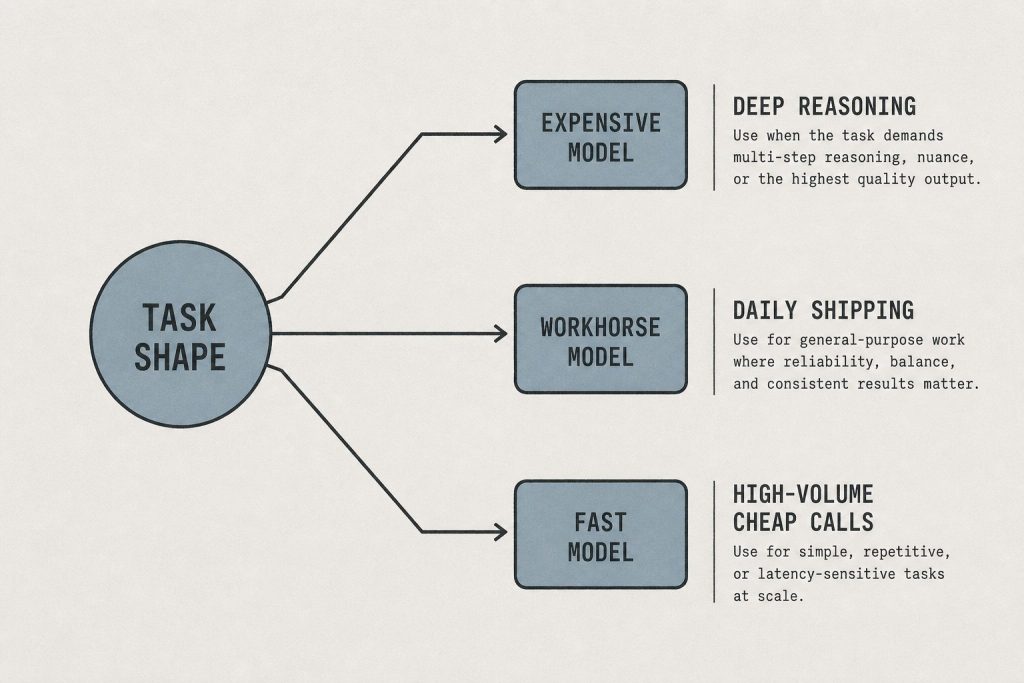
    Haiku is the third model in the family — faster and cheaper than Sonnet, designed for high-volume tasks where speed and cost dominate. Classification, extraction, routing logic, metadata generation, short-form responses. If Sonnet is your default, Haiku is the model you reach for when you need to run the same operation across hundreds or thousands of inputs cost-effectively.

    For a full model comparison including Haiku, see Claude Models Explained: Haiku vs Sonnet vs Opus.

    The Practical Routing Rule

    Use Sonnet when: the task is well-defined, the output type is familiar, and quality at the 90th percentile is sufficient. That’s most professional work.

    Use Opus when: the task is genuinely novel, involves high-stakes judgment, requires deep multi-step reasoning, or you’ve already run it on Sonnet and the output wasn’t quite right.

    Use Haiku when: you need the same operation at scale, latency matters more than depth, or cost is the primary constraint.

    Frequently Asked Questions

    Is Claude Opus better than Sonnet?

    Opus is more capable on complex reasoning tasks, but Sonnet delivers excellent results on the vast majority of professional work. For most users, Sonnet is the right default — Opus is worth reaching for when a task is genuinely hard and quality is the only variable that matters.

    How much more expensive is Opus than Sonnet?

    Opus input tokens cost approximately $5 per million compared to Sonnet’s approximately $3 per million — approximately 1.7× more expensive on input (Opus is $5/M vs Sonnet’s $3/M). Output tokens follow a similar ratio. For API workloads, this cost difference is significant at scale.

    Which Claude model should I use by default?

    Sonnet is the right default for most people. It handles writing, analysis, coding, research, and strategy work with excellent quality. Upgrade to Opus when you’ve tried Sonnet on a task and the output wasn’t quite at the level the problem required.

    Does Claude Pro give access to both Opus and Sonnet?

    Yes. Claude Pro ($20/month) includes access to Haiku, Sonnet, and Opus. You can switch between models within the web interface. The subscription doesn’t limit which model you use — it limits total usage volume across all models.

    Need this set up for your team?
    Talk to Will →

  • Claude Code Pricing: Pro vs Max, What’s Included, and How to Choose (2026)

    Claude Code Pricing: Pro vs Max, What’s Included, and How to Choose (2026)

    Claude AI · Fitted Claude

    Claude Code is Anthropic’s agentic coding tool — a command-line agent that reads your codebase, writes and edits files, runs tests, and works autonomously on real programming tasks. It has its own pricing structure separate from standard Claude subscriptions. This is the complete breakdown of Claude Code pricing in 2026: what each tier costs, what you actually get, and how to decide which plan fits your workflow.

    The short version: Claude Code is included at a limited level with Pro and Max subscriptions. Claude Code Pro is $100/month for developers who want it as a primary coding environment. Claude Code Max is $200/month for heavy autonomous workloads. If you’re using Claude Code occasionally, you may not need a dedicated tier at all.

    Claude Code Pricing — All Tiers

    Plan Price Claude Code Access Best for
    Pro $20/mo Limited access included Occasional coding sessions
    Max $100/mo Higher limit included Regular but not primary use
    Claude Code Pro $100/mo Full access, high limits Primary coding environment
    Claude Code Max $200/mo 5× Code Pro limits Heavy autonomous coding

    What Claude Code Actually Does

    Claude Code is a different product category from the Claude web interface. It’s a terminal-based agent that connects to your actual development environment — reading files, editing code, running shell commands, executing tests, and managing Git operations. You give it a task and it works through it autonomously, showing you what it’s doing and asking for confirmation on significant changes.

    It’s not a chat interface for asking coding questions. It’s a coding agent that works inside your codebase the way a developer would.

    What’s Included With Pro and Max

    Both Claude Pro ($20/month) and Claude Max ($100/month) include some Claude Code access. Anthropic doesn’t publish exact usage limits for included Code access, but the pattern is consistent with their other tier structures: Pro includes enough for occasional sessions, Max includes more, and the dedicated Code Pro/Max tiers are built for developers who use it daily as their primary tool.

    If you’re a developer who uses Claude Code a few times a week for specific tasks, the included access in Pro or Max may be sufficient. If you’re running Claude Code for hours per day on active development work, you’ll hit those limits and want a dedicated Code tier.

    Claude Code Pro: $100/Month

    Claude Code Pro is for developers who want Claude Code as their primary agentic coding environment. At $100/month, it provides full access with high usage limits designed for daily professional development use. The math works quickly if Claude Code is replacing meaningful amounts of time you’d otherwise spend manually — but it’s a significant premium over just using the included access that comes with Pro or Max.

    The right question to ask before upgrading: am I hitting Code limits on my current plan during actual work sessions? If yes, Code Pro resolves it. If you’re not hitting limits, you’re paying for headroom you don’t need.

    Claude Code Max: $200/Month

    Claude Code Max provides approximately 5× the limits of Code Pro. It’s designed for developers or teams running intensive autonomous coding workloads — long-running agents, large refactors across big codebases, or sustained multi-hour sessions where Claude Code is doing the majority of the work.

    At $200/month, Code Max is a meaningful commitment. It makes sense when Claude Code is infrastructure for your development process, not a productivity supplement.

    Claude Code vs. Competitors

    Tool Price Model Key difference
    Claude Code Pro $100/mo Claude Terminal-native, full system access
    Windsurf ~$15–30/mo Multi-model IDE-based, visual interface
    Cursor ~$20/mo Multi-model IDE fork, inline editing focus
    GitHub Copilot $10–19/mo Multi-model IDE-integrated, autocomplete focus

    Claude Code’s differentiator is its terminal-native, full-system-access approach. It’s not restricted to what an IDE plugin can see — it can read and modify any file, run any command, and work across the full project environment. That flexibility is why serious agentic workflows often land on Claude Code even at a higher price point. For a detailed comparison, see Claude Code vs. Windsurf and Claude Code vs. Aider.

    Frequently Asked Questions

    How much does Claude Code cost?

    Claude Code access is included at a limited level with Claude Pro ($20/month) and Max ($100/month). Dedicated Claude Code Pro is $100/month and Claude Code Max is $200/month for heavy development workloads.

    Is Claude Code included in Claude Pro?

    Yes, Claude Pro includes limited Claude Code access. For developers who use Claude Code as their primary coding environment, the dedicated Claude Code Pro tier offers higher limits purpose-built for daily professional use.

    What’s the difference between Claude Code Pro and Claude Code Max?

    Claude Code Max provides approximately 5× the usage limits of Claude Code Pro. Code Pro ($100/month) is for developers using it as a primary tool. Code Max ($200/month) is for teams or individuals running intensive autonomous coding sessions that push through Pro limits regularly.

    Is Claude Code worth the price compared to Cursor or Windsurf?

    For terminal-native autonomous development work, Claude Code has distinct capabilities that IDE-based tools don’t match — full system access, no editor dependency, and true agentic operation. For developers focused on in-editor assistance and autocomplete, Cursor or Windsurf may offer better cost-to-value at their price points. The right tool depends on your workflow, not the price tag alone.

    Need this set up for your team?
    Talk to Will →

  • Claude Max Pricing: What $100/Month Gets You and Whether It’s Worth It

    Claude Max Pricing: What $100/Month Gets You and Whether It’s Worth It

    Claude AI · Fitted Claude

    Claude Max is Anthropic’s $100/month plan — positioned between Pro and Enterprise for individuals who consistently push through Pro’s daily limits. This is the complete breakdown of what Max costs, what it includes, and whether it’s worth it for your actual usage pattern.

    The short version: Claude Max is $100/month and gives you 5× Pro’s usage limits. It’s not for everyone — it’s specifically for people who hit Pro’s ceiling on a regular basis during heavy work sessions. If you’re not hitting Pro limits consistently, Max isn’t the right move.

    Claude Max Pricing at a Glance

    Feature Pro ($20/mo) Max ($100/mo)
    Monthly price $20 $100
    Usage limits Standard 5× Pro
    Models included Haiku, Sonnet, Opus All models
    Priority access
    Projects
    Claude Code access Limited Included
    Extended context

    What “5× Pro Limits” Actually Means

    Anthropic doesn’t publish the exact message counts for Pro or Max — the limits are dynamic and adjust based on model load, message length, and conversation complexity. What’s consistent is the ratio: Max users get approximately five times the daily throughput of Pro users before hitting a rate limit.

    In practice, that means: if a Pro user can run through a full productive workday on Claude without hitting a wall, a Max user can run through five equivalent workdays on the same reset cycle. The ceiling is high enough that most Max users never encounter it unless they’re running extended agentic sessions or doing deep multi-document work that spans many hours.

    Who Claude Max Is Actually For

    Max makes sense if you:

    • Hit Pro’s limits mid-day on a regular basis — not occasionally
    • Run long agentic sessions where Claude works autonomously for hours
    • Do deep research that requires back-and-forth over many hours in a single session
    • Use Claude as operational infrastructure, not just a daily assistant
    • Need Claude Code included without a separate subscription

    Max probably isn’t for you if you:

    • Hit Pro limits only occasionally — a few times a week, not daily
    • Use Claude primarily for discrete tasks with natural breaks between them
    • Are a developer building on Claude — the API is the right path, not a subscription tier
    • Just want “more Claude” without a specific workflow reason driving it

    Claude Max vs. Claude Code Max

    These are two different things and the naming is easy to mix up. Claude Max ($100/month) is the enhanced web interface tier for power users. Claude Code Max ($200/month) is a separate product designed for developers who want Claude to work autonomously inside their codebase using the Claude Code agent.

    Claude Max includes some Claude Code access, but if you’re a developer who wants Claude Code as a primary coding environment, the dedicated Claude Code Pro ($100/month) or Code Max ($200/month) tiers are built for that workload specifically.

    Is Claude Max Worth $100/Month?

    The honest answer is: it depends entirely on whether you’re hitting Pro limits and what those limits are costing you in productivity. The calculation is straightforward — if running out of Claude usage mid-session is derailing your work regularly, the productivity cost is almost certainly higher than $80/month (the difference between Pro and Max). If you hit limits a few times a month and find workarounds, Max isn’t worth it.

    The wrong reason to upgrade is wanting to support Anthropic or feeling like you need the “best” plan. Max is a productivity tool for a specific usage pattern, not a status tier.

    For a full comparison of every Claude plan including Free, Pro, Team, and Enterprise, see the complete Claude AI pricing guide.

    Frequently Asked Questions

    How much is Claude Max per month?

    Claude Max is $100 per month, billed as a standard subscription with no annual commitment required. It can be cancelled at any time.

    What’s the difference between Claude Pro and Claude Max?

    Claude Max gives you approximately 5× the usage limits of Pro. Both plans include access to all Claude models, Projects, and extended context. The difference is purely how much you can use before hitting a rate limit. Pro is $20/month; Max is $100/month.

    Does Claude Max include Claude Code?

    Claude Max includes access to Claude Code, though at a limited level compared to the dedicated Claude Code Pro or Max tiers. If you want Claude Code as your primary agentic coding environment, the standalone Claude Code subscriptions are designed for that.

    Can I switch between Pro and Max?

    Yes. You can upgrade from Pro to Max or downgrade from Max to Pro through your account settings. Changes take effect on your next billing cycle.

    Need this set up for your team?
    Talk to Will →

  • Anthropic API Pricing: Every Model, Every Mode, What You’ll Actually Pay (2026)

    Anthropic API Pricing: Every Model, Every Mode, What You’ll Actually Pay (2026)

    Claude AI · Fitted Claude

    The Anthropic API is how developers and businesses access Claude programmatically — and the pricing model is fundamentally different from the subscription tiers. Instead of a flat monthly fee, you pay per token, per model, per call. This is the complete breakdown of Anthropic API pricing as of April 2026: every model, every pricing mode, and how to calculate what you’ll actually spend.

    The short version: Haiku is the cheapest and fastest. Sonnet is the workhorse. Opus is for complex reasoning where quality is the priority. The Batch API cuts all prices roughly in half for non-time-sensitive work. You prepay credits — no surprise bills.

    Anthropic API Pricing by Model (April 2026)

    All API pricing is per million tokens. Input tokens are what you send to the model; output tokens are what Claude returns. Output consistently costs more than input across all models.

    Model Input (per M tokens) Output (per M tokens) Best for
    Claude Haiku ~$1.00 ~$5.00 High-volume, latency-sensitive tasks
    Claude Sonnet ~$3.00 ~$5.00 Production workloads, content generation
    Claude Opus ~$5.00 ~$25.00 Complex reasoning, highest quality output

    These are approximate figures — Anthropic publishes exact current rates on their pricing page and updates them with each model generation. Always verify before building cost projections into a production system.

    What Is a Token?

    A token is the unit of text the API processes. One token is roughly four characters of English text — or about three-quarters of a word. A 750-word article is approximately 1,000 tokens. A 10-page document might be 5,000–8,000 tokens depending on formatting.

    Both your input (the prompt, system instructions, conversation history) and Claude’s output (the response) consume tokens. In a long multi-turn conversation, the entire conversation history is re-sent with each message — so token costs compound over long sessions.

    The Batch API: ~50% Off for Non-Real-Time Work

    Anthropic’s Batch API processes requests asynchronously and returns results within 24 hours. In exchange, you get roughly half off listed token rates across all models. This is the highest-leverage pricing lever available to developers running content pipelines, data processing, or any workload where real-time response isn’t required.

    Model Standard Input Batch Input (~50% off)
    Haiku ~$1.00/M ~$0.50/M
    Sonnet ~$3.00/M ~$1.50/M
    Opus ~$5.00/M ~$7.50/M

    If you’re running more than 20 API calls that don’t need instant responses, the Batch API should be your default.

    How API Billing Works

    The Anthropic API does not operate on a subscription. You load prepaid credits into the Anthropic Console — your developer dashboard — and those credits draw down as you use the API. When credits run out, API calls stop until you add more. There’s no bill that arrives at the end of the month with a surprise on it.

    Usage reporting in the Console shows a breakdown by model, by date, and by API key, so you can see exactly where token spend is going across different projects or team members.

    Context Window and Pricing

    Context window size affects how much you can send in a single API call — it doesn’t directly change pricing per token. However, larger context windows mean you can include more conversation history, longer documents, or more detailed system prompts, which increases input token counts and therefore cost per call.

    Claude’s context windows as of April 2026 are generous across all tiers — Haiku, Sonnet, and Opus all support 200K token context windows, which covers most production use cases without forced truncation.

    API vs. Subscription: Which Do You Need?

    Use the API if: you’re building an application on top of Claude, running automated pipelines, integrating Claude into your own tools, or processing data programmatically.

    Use Pro/Max if: you’re an individual using Claude through the web interface or Claude Code for your own work — not building something for others to use.

    You might need both if: you use Claude daily for personal work (subscription) and also build Claude-powered tools for clients (API). They’re billed separately and don’t share limits.

    Frequently Asked Questions

    How much does the Anthropic API cost per month?

    There’s no monthly fee for the API itself — you pay per token used. Costs depend entirely on which model you use, how many calls you make, and how long your prompts and responses are. Light usage on Haiku can cost just a few dollars. Heavy Opus usage for complex tasks costs significantly more. Load credits in advance via the Anthropic Console.

    What is the cheapest Anthropic API model?

    Claude Haiku is the least expensive model at approximately $1.00 per million input tokens. It’s optimized for speed and cost, making it the right choice for high-volume tasks where response quality doesn’t need to be at Opus level — classification, extraction, summarization, routing logic.

    Does Anthropic offer API discounts for volume?

    The Batch API offers roughly 50% off standard token rates for asynchronous workloads. For very high-volume usage, Anthropic also has enterprise agreements with custom pricing — contact their sales team. Standard token pricing doesn’t automatically tier down with volume outside of those two options.

    How is Anthropic API pricing compared to OpenAI?

    At the cheapest tier, OpenAI’s GPT-4o mini is less expensive per token than Claude Haiku. At the mid tier, Claude Sonnet and GPT-4o are in a similar range. At the top tier, Claude Opus and GPT-4o are comparable in price. The right choice depends on the task — not every model performs identically on every workload, so cost per token is only part of the calculation.

    Do API tokens and subscription usage share limits?

    No. API usage and Claude.ai subscription usage are entirely separate. Your Pro or Max subscription usage doesn’t count against API credits, and API credits don’t increase your subscription limits. They’re billed and tracked independently through different systems.

    Need this set up for your team?
    Talk to Will →

  • Claude Code: The Complete Beginner’s Guide for 2026

    Claude Code: The Complete Beginner’s Guide for 2026

    Claude AI · Fitted Claude

    Claude Code is the fastest-growing AI coding tool in the developer community. The r/ClaudeCode subreddit has 4,200+ weekly contributors — roughly 3x larger than r/Codex. Anthropic reports $2.5B+ in annualized revenue attributable to Claude Code adoption. This complete guide takes you from installation to your first productive agentic coding session.

    What Is Claude Code?

    Claude Code is a terminal-native AI coding tool from Anthropic. Unlike IDE plugins that assist line-by-line, Claude Code operates at the project level — it reads your entire codebase, understands the architecture, writes and edits multiple files in a single session, runs tests, and works through complex engineering tasks autonomously. It uses Claude models with a 1-million-token context window — large enough to hold an entire codebase in memory.

    Installation

    Requirements: Node.js 18+, a Claude Max subscription ($100+/month) or Anthropic API key.

    # Install globally
    npm install -g @anthropic-ai/claude-code
    
    # Navigate to your project
    cd your-project
    
    # Authenticate
    claude login
    
    # Start a session
    claude

    Setting Up CLAUDE.md (The Most Important Step)

    CLAUDE.md is a file you create in your project root that Claude Code reads at the start of every session. It’s the most important setup step — it gives Claude the context it needs to work effectively in your specific codebase without you re-explaining everything every time.

    A good CLAUDE.md includes:

    # Project: [Your Project Name]
    
    ## Architecture
    [Brief description of how the codebase is organized]
    
    ## Tech Stack
    - Language: [Python 3.11 / Node.js 20 / etc.]
    - Framework: [Django / Next.js / etc.]
    - Database: [PostgreSQL / MongoDB / etc.]
    - Testing: [pytest / Jest / etc.]
    
    ## Coding Standards
    - [Style guide, naming conventions, etc.]
    - [Preferred patterns for this codebase]
    
    ## Common Tasks
    - Run tests: `[command]`
    - Start dev server: `[command]`
    - Lint: `[command]`
    
    ## Known Issues / Context
    - [Anything Claude should know before working]

    Key Slash Commands

    Command What It Does
    /init Scans your codebase and generates an initial CLAUDE.md
    /memory View and edit Claude’s memory for this project
    /compact Compact the conversation to free up context space
    /batch Run multiple commands or edits in one operation
    /clear Clear conversation history (start fresh)

    Your First Agentic Session

    Start Claude Code in your project directory and try:

    • “Explain the overall architecture of this codebase” — Claude reads and summarizes
    • “Add input validation to the user registration endpoint” — Claude finds the right file, writes the validation, updates tests
    • “There’s a bug where [describe issue] — find it and fix it” — Claude searches the codebase, identifies the cause, fixes it
    • “Write tests for [module or function]” — Claude reads the code and writes comprehensive tests

    Rate Limits and Token Management

    Claude Code on Max 5x gets approximately 44,000-220,000 tokens per 5-hour window. Long sessions with large codebases consume tokens quickly. Best practices:

    • Use /compact when sessions get long to free up context
    • Be specific in your requests — “fix the authentication bug in auth.py” uses fewer tokens than “look through all my files for problems”
    • Auto-compaction (beta) handles this automatically when enabled

    Frequently Asked Questions

    What subscription do I need for Claude Code?

    Claude Max at $100/month minimum. Claude Code can also be accessed via API billing — often more cost-effective for lower-volume use.

    Can Claude Code edit multiple files at once?

    Yes. Claude Code can read, edit, and create multiple files in a single session — and runs the edits atomically, so you can review and accept or reject changes.

    How do I install Claude Code on Windows?

    Claude Code requires Node.js 18+ and runs via WSL (Windows Subsystem for Linux) on Windows. Install WSL, then follow the standard npm installation steps within your WSL terminal.


    Need this set up for your team?
    Talk to Will →

  • Claude vs Amazon Q: Which AI Coding Assistant for AWS Developers?

    Claude vs Amazon Q: Which AI Coding Assistant for AWS Developers?

    Claude AI · Fitted Claude

    For AWS developers, Claude and Amazon Q represent two distinct approaches to AI-assisted development. Amazon Q is deeply integrated into the AWS ecosystem — built to understand your AWS environment, your IAM policies, your CloudFormation stacks, and your AWS-specific workflows. Claude is a more capable general-purpose AI that can handle complex reasoning and code but requires you to provide AWS context manually. This comparison helps you choose — and explains why many AWS developers use both.

    What Amazon Q Does Well

    • AWS-native context: Q can read your actual AWS account state — running resources, IAM permissions, CloudWatch logs — without you describing them
    • AWS documentation: Q is trained specifically on AWS documentation and gives more accurate, up-to-date answers for AWS-specific questions
    • Console integration: Q is embedded in the AWS Console, CloudShell, and VS Code via the AWS Toolkit — zero additional setup for AWS users
    • Troubleshooting: Q can analyze your actual CloudWatch errors and IAM policy conflicts directly
    • Cost optimization: Q analyzes your actual usage data for cost recommendations

    What Claude Does Better

    • Code quality: Claude Opus 4.6 scores 80.8% on SWE-bench vs Amazon Q’s lower published benchmarks — for complex, multi-file code generation, Claude produces better results
    • General reasoning: Architecture decisions, trade-off analysis, and complex problem-solving — Claude reasons more deeply
    • Non-AWS work: If you’re building multi-cloud or have significant non-AWS code, Claude handles everything equally; Q is heavily AWS-optimized
    • Document analysis: Claude’s 200K context window for reading technical specs, RFCs, or lengthy docs far exceeds Q’s capabilities
    • Writing: Technical blog posts, documentation, runbooks — Claude writes better

    Pricing Comparison

    Claude Amazon Q
    Individual $20-200/month $19/month (Q Developer Pro)
    Free tier Yes (limited) Yes (Q Developer Free)
    Business Custom $19/user/month

    Amazon Q Developer Pro at $19/month is competitive with Claude Pro at $20/month. For AWS-heavy developers, Q Pro includes features with no Claude equivalent (direct AWS account analysis). For general development, Claude holds the performance edge per dollar.

    The Combined Workflow

    Many AWS developers use Amazon Q for AWS-specific questions (CloudFormation troubleshooting, IAM policy analysis, service limits) and Claude Code for complex coding tasks (architecture, large refactors, code review). The tools are complementary rather than competing.

    Frequently Asked Questions

    Is Amazon Q better than Claude for AWS development?

    For AWS-native questions with real account context: Amazon Q wins. For complex code generation, architecture decisions, and general programming: Claude is stronger. Many AWS developers use both.

    Can Claude access my AWS account?

    Not directly. You can paste CloudFormation templates, error logs, or resource configurations into Claude for analysis. Amazon Q connects directly to your AWS account with appropriate permissions.


    Need this set up for your team?
    Talk to Will →

  • Is Claude AI Safe? Security, Ethics, and Trustworthiness Assessed

    Is Claude AI Safe? Security, Ethics, and Trustworthiness Assessed

    Claude AI · Fitted Claude

    Safety means different things depending on who’s asking. For a parent wondering if Claude is appropriate for their teenager: yes, with caveats. For an enterprise considering Claude for sensitive workflows: that requires a more detailed answer. For a researcher wondering about AI existential risk: that’s a different conversation entirely. This guide covers all three dimensions of Claude safety in 2026.

    Content Safety: What Claude Will and Won’t Do

    Claude’s content policies are enforced through Constitutional AI training, not just a filter layer bolted on afterward. This makes them more robust than keyword blocklists. Claude will decline to:

    • Generate content facilitating violence or illegal activities
    • Produce sexual content involving minors (zero tolerance, no exceptions)
    • Provide detailed instructions for creating weapons capable of mass casualties
    • Generate content designed to facilitate harassment or stalking of specific individuals

    Claude’s refusals are imperfect — it occasionally refuses legitimate requests and occasionally allows borderline ones. But the overall calibration has improved substantially with each model generation.

    Data Security

    Anthropic is a US-incorporated company subject to US law. Conversation data is stored on Anthropic’s infrastructure. Consumer accounts may be used for model training (opt-out available). Enterprise and API accounts have zero-data-retention options. Anthropic has published a privacy policy at privacy.claude.com and does not sell conversation data to third parties or advertisers.

    Anthropic’s Responsible Scaling Policy

    Anthropic has published a Responsible Scaling Policy (RSP) — a commitment to evaluate Claude models against specific safety thresholds before deployment. The RSP creates public accountability: if future Claude models show dangerous capability thresholds in evaluation, Anthropic has committed to not deploying them until additional safety measures are in place. This is a meaningful governance commitment uncommon among AI companies.

    Fake Claude Scams: What Every User Should Know

    Malwarebytes and other security researchers have documented phishing campaigns using fake “Claude AI” websites to steal credentials and install malware. Key indicators of legitimate Claude access:

    • The official Claude interface is at claude.ai — any other domain claiming to be Claude is not
    • Anthropic does not offer Claude through third-party websites requiring separate account creation
    • Claude’s API is accessed at api.anthropic.com
    • If you’re ever unsure, go directly to anthropic.com and navigate from there

    Frequently Asked Questions

    Is Claude safe for kids?

    Claude has content filters that prevent most inappropriate content, but it’s not specifically designed as a children’s product. Parental supervision is recommended for younger users. Claude doesn’t have age verification on the free tier.

    Can Claude be jailbroken?

    Attempts to manipulate Claude into ignoring its safety training exist. Anthropic actively works to patch these. Claude is more robust against jailbreaking than most models, but no AI system is perfectly immune to sophisticated manipulation attempts.


    Need this set up for your team?
    Talk to Will →

  • Claude Zapier Automation: 10 Workflows That Save Hours Every Week

    Claude Zapier Automation: 10 Workflows That Save Hours Every Week

    Claude AI · Fitted Claude

    Claude and Zapier together create one of the most flexible automation combinations available in 2026. Through Zapier’s MCP server (mcp.zapier.com), Claude can connect to over 8,000 apps — sending emails, updating CRMs, creating tasks, posting to Slack, and more. This guide covers 10 practical workflows and how to set them up.

    Setting Up Claude + Zapier MCP

    Add Zapier’s MCP server to Claude Desktop by editing your configuration file:

    {
      "mcpServers": {
        "zapier": {
          "url": "https://mcp.zapier.com/api/mcp/a/YOUR_ACCOUNT_ID/mcp",
          "type": "url"
        }
      }
    }

    Find your Zapier MCP URL in your Zapier account under Settings → MCP. Once connected, Claude can trigger any Zap you’ve built in Zapier, ask it to take actions across your connected apps.

    10 High-Value Automation Workflows

    1. Email Triage and Draft Generation

    New email arrives → Zapier sends to Claude → Claude categorizes (urgent/action needed/FYI/spam) and drafts a reply → Draft saved to Gmail or sent to you via Slack for approval.

    2. CRM Note Generation from Calls

    Call recording transcript arrives (from Otter.ai or Fireflies) → Claude generates structured CRM notes (summary, pain points, next steps, deal stage) → Notes automatically posted to Salesforce or HubSpot record.

    3. Social Media Content from Blog Posts

    New WordPress post published → Claude generates LinkedIn post, Twitter/X thread, and Instagram caption → Drafts sent to Buffer or Hootsuite for scheduled publishing.

    4. Meeting Summary and Action Item Distribution

    Meeting transcript uploaded → Claude extracts summary, decisions made, and action items with owners → Summary sent to meeting participants via email, action items created in Asana or Notion.

    5. Customer Support Ticket Drafts

    New support ticket received (Zendesk, Freshdesk) → Claude categorizes the issue and drafts a response → Draft queued for agent review before sending.

    6. Lead Research and Enrichment

    New lead added to CRM → Claude researches company context from provided information → Enriched notes (industry, company size, likely pain points) added to CRM record automatically.

    7. Contract Summary on Receipt

    PDF contract received via email → Claude generates key terms summary (parties, obligations, deadlines, payment terms) → Summary posted to Slack or added to Notion database.

    8. Weekly Report Generation

    Every Friday → Zapier pulls data from your project management tool → Claude generates weekly progress narrative → Report emailed to stakeholders automatically.

    9. Review Response Drafting

    New Google or Yelp review received → Claude drafts a personalized response matching your brand voice → Draft sent to you for approval via email or Slack.

    10. Job Application Screening Summaries

    New application received → Claude summarizes candidate background, flags matches to job requirements, notes potential concerns → Summary added to your ATS or hiring Notion board.

    Frequently Asked Questions

    Do I need Zapier paid plan to use Claude MCP?

    Zapier MCP access requires a paid Zapier plan. Check Zapier’s current pricing for MCP feature availability.

    Can Claude take actions in Zapier automatically without human approval?

    Yes — but for actions like sending emails or creating CRM records, building in a human-approval step (Slack notification with approve/reject) is recommended until you trust the automation’s output quality.


    Need this set up for your team?
    Talk to Will →

  • Claude AI for Excel and Spreadsheets: Formulas, Analysis, and Automation

    Claude AI for Excel and Spreadsheets: Formulas, Analysis, and Automation

    Claude AI · Fitted Claude

    Spreadsheet work is one of the highest-leverage applications for Claude AI — and one where the time savings are immediately measurable. Claude writes complex formulas, explains your data, debugs broken functions, and helps design spreadsheet structures for any use case. This guide covers the specific workflows where Claude saves the most time.

    1. Formula Writing

    Describe what you want in plain English and Claude writes the formula:

    “Write an Excel formula that looks up a value in column A, finds the matching row in a separate table on Sheet2, and returns the value from column C of that row. Handle the case where no match is found by returning ‘Not Found’.”

    Claude returns the exact formula with an explanation of how it works — and will modify it if your structure is different from what it assumed.

    2. Formula Debugging

    Paste a broken formula and describe what it should do:

    “This formula is returning #VALUE! instead of the expected sum: =SUMIF(A:A,”Q1″,B:B). My date column (A) has dates in MM/DD/YYYY format. What’s wrong and how do I fix it?”

    3. Data Analysis and Interpretation

    Paste CSV data directly into Claude (up to tens of thousands of rows depending on token limits) and ask:

    • “What are the top 5 trends in this sales data?”
    • “Identify any outliers in this dataset and explain what might be causing them”
    • “Calculate month-over-month growth rates from these monthly totals”
    • “What’s the correlation between [column A] and [column B]?”

    4. Spreadsheet Design

    Before building a complex spreadsheet, describe your use case to Claude:

    “I need a spreadsheet to track client projects. Each project has: client name, project type, start date, deadline, status, hours budgeted, hours logged, and assigned team member. I want a dashboard tab that shows overdue projects and hours variance. Design the sheet structure and formulas I’ll need.”

    5. Claude’s Excel Add-In

    Anthropic launched a Claude Excel add-in that embeds Claude directly in Microsoft Excel. This allows you to interact with Claude in a side panel while working in your spreadsheet — selecting data ranges, asking questions about your data, and getting formula suggestions without switching applications.

    Frequently Asked Questions

    Can Claude write Google Sheets formulas as well as Excel?

    Yes. Claude writes formulas for both Excel and Google Sheets. Most formulas are identical or very similar between the two — just specify which you’re using if there might be syntax differences.

    Can Claude analyze data I paste into the conversation?

    Yes. Paste CSV data directly and Claude will analyze it. For very large datasets, paste a representative sample or aggregate summary.


    Need this set up for your team?
    Talk to Will →