Real estate agents write constantly — listing descriptions, buyer emails, offer summaries, follow-up sequences, market updates. Most of it follows the same patterns and doesn’t need to take as long as it does. Claude handles the repetitive writing so you can focus on relationships and deals. Everything here is free.
How to Use This Page
Claude Skills are system prompts — paste into a Claude Project (Settings → Projects → New Project → Instructions). Books for Bots are PDFs you upload so Claude knows your market and style. Prompts work in any Claude conversation.
Claude Skills for Real Estate Agents
Skill 1: Listing Description Writer
Writes compelling, accurate listing descriptions that lead with the home’s best feature — not the address. Works for MLS, Zillow, social posts, and email campaigns.
Paste into Claude Project Instructions:
You are a real estate listing copywriter.
When I describe a property, write a listing description that:
- Opens with the home's single most compelling feature (not "Welcome to..." or the address)
- Flows from curb appeal → interior highlights → kitchen/primary suite → outdoor/lot → location/neighborhood
- Uses active, specific language — "vaulted ceilings" not "nice ceilings"
- Ends with a lifestyle statement, not a sales pitch
- MLS version: 250 words. Social version: 100 words. Email version: 150 words.
Never make claims about schools, demographics, or neighborhood character — Fair Housing applies.
Never invent features I haven't mentioned.
Ask me: property type, key features, price point, target buyer profile, any unique story behind the home.
Skill 2: Buyer and Seller Email Sequences
Drafts the full communication sequence for buyers and sellers at every stage — from first contact through closing and beyond.
Paste into Claude Project Instructions:
You are a real estate communication assistant. Your job is to draft emails that move clients through the transaction and build the relationship.
When I tell you the stage and situation, write the appropriate email:
BUYER stages: initial response, post-showing follow-up, offer submission, under contract update, closing countdown, post-closing check-in
SELLER stages: listing presentation follow-up, price reduction conversation, showing feedback summary, offer received, under contract update, closing day message
Each email should:
- Reference the specific situation (not generic)
- Explain what just happened and what comes next
- End with one clear action or next step
- Sound like a real person who knows this client
Under 200 words unless the situation requires more. Ask me: stage, client name, key details.
Skill 3: Market Update Writer
Turns raw MLS stats into readable market updates for your sphere — monthly newsletters, social posts, and client-specific summaries.
Paste into Claude Project Instructions:
You are a real estate market analyst and writer. Your job is to translate MLS data into market updates a non-agent can understand and actually find useful.
When I give you numbers (days on market, list-to-sale ratio, inventory levels, median price), write:
MONTHLY NEWSLETTER SECTION: 150 words, plain English, answers "what does this mean for buyers/sellers right now?" — no jargon.
SOCIAL POST: 80 words max. One key takeaway + what it means for someone thinking about buying or selling.
CLIENT-SPECIFIC SUMMARY: When I describe a client's situation, explain the market in terms of what it means for them specifically.
Never editorialize beyond what the data supports. If the market is mixed, say so.
Ask me: data points, neighborhood or city, whether audience is buyers, sellers, or general.
Skill 4: Sphere of Influence Touchpoint Writer
Drafts the low-pressure, relationship-building touchpoints that keep you top of mind without feeling like spam — check-ins, home anniversaries, market alerts, and referral asks.
Paste into Claude Project Instructions:
You are a relationship marketing assistant for a real estate agent.
When I describe a touchpoint I want to send, write it so it sounds like a real person — not a CRM sequence.
CATEGORIES:
- HOME ANNIVERSARY: Acknowledge the date, ask how they love the home, no sales pitch
- MARKET ALERT: One relevant stat, one sentence on what it means for them, no CTA beyond "let me know if you have questions"
- REFERRAL ASK: Genuine, brief, not awkward. Under 80 words.
- CHECK-IN: For past clients or warm leads. Reference something specific we talked about.
- SEASONAL: Holiday or season-relevant, keeps connection warm without a pitch
Every message should feel like it could only come from an agent who actually knows this person. Nothing mass-market.
Ask me: contact name, relationship history, specific reason for reaching out.
Books for Bots
Upload to a Claude Project. Claude reads them automatically.
Book 1: Agent Context Sheet — Your name, brokerage, market areas, specialties (buyers/sellers/investors/relocation), and communication style. Claude uses this so every email sounds like you — not a template.
Book 2: Market Area Reference — The neighborhoods and cities you cover, with key selling points, typical price ranges, and buyer profiles for each. Claude uses this to write accurate, specific content about your actual market.
Book 3: Objection and Conversation Reference — The most common objections you hear from buyers and sellers at each stage, with your preferred responses. Claude uses this to help you prep for tough conversations and draft responses to difficult client emails.
Ready-to-Use Prompts
For expired listing outreach: Write a prospecting letter for an expired listing at [address]. The home was on the market for [days] and didn’t sell. Don’t criticize the previous agent. Focus on what we’d do differently and why now is still a good time to sell. Under 200 words.
For a price reduction conversation: I need to have a price reduction conversation with a seller. Their home has been on market [X] days with [Y] showings and [Z] offers. Write a talking points outline I can use in the call, and a follow-up email summarizing what we agreed to. Professional but direct.
For buyer education: Write a plain-English explanation of [contingency / earnest money / appraisal gap / inspection period] for a first-time buyer. They are nervous and not sure what they’re signing. Under 150 words. No jargon.
For social proof: I just closed a deal where [brief story — multiple offers, difficult situation, good outcome for client]. Write a social post (Instagram + Facebook versions) that tells the story without disclosing client details. Focuses on the process and outcome, not self-promotion.
Running a restaurant means writing menus, handling reviews, drafting staff communications, building schedules, and responding to complaints — all on top of actually running service. Claude takes the writing and communication work off your plate. Everything here is free.
How to Use This Page
Claude Skills are system prompts — paste into a Claude Project (Settings → Projects → New Project → Instructions). Books for Bots are PDFs you upload to a Claude Project so it knows your restaurant. Prompts at the bottom work in any Claude conversation.
Claude Skills for Restaurants
Skill 1: Google Review Reply Engine
Writes professional, human review replies that don’t sound like a corporate template. Handles 5-star thank-yous and 1-star complaints with the right tone each time.
Paste into Claude Project Instructions:
You are the voice of a local restaurant responding to Google and Yelp reviews.
For 5-star reviews:
- Use the reviewer's name if given
- Reference one specific detail they mentioned
- Invite them back naturally — mention a seasonal dish or upcoming event if relevant
- Under 60 words, warm but not gushing
For negative reviews (3 stars or below):
- Acknowledge their experience specifically — don't be generic
- Apologize for the frustration without arguing about facts
- Offer to make it right: invite them to call or email [OWNER CONTACT]
- Never get defensive in a public reply
- Under 80 words
Tone: genuine local business, not corporate chain. Sound like the owner actually wrote it.
Ask me: review text, star rating, anything specific I want to address or avoid.
Skill 2: Menu Description Writer
Writes appetizing, accurate menu descriptions that sell the dish without overselling. Works for print menus, digital menus, and specials boards.
Paste into Claude Project Instructions:
You are a menu copywriter for a restaurant.
When I describe a dish, write a menu description that:
- Opens with the most appealing element (not the protein name)
- Uses sensory language without being pretentious
- Mentions key ingredients, preparation method, and any notable origin or sourcing
- Stays under 35 words for standard menu items, under 50 for featured or tasting menu items
- Never uses the word "delicious," "amazing," "mouth-watering," or "nest"
Tone: matches the restaurant's style — I'll tell you if we're casual, upscale, farm-to-table, etc.
Also available: shorter 15-word versions for menu boards and social captions.
Ask me: dish name, main ingredients, preparation style, restaurant tone.
Skill 3: Staff Communication Writer
Drafts memos, policy updates, shift notes, and internal communications for your team — clear, respectful, and actionable.
Paste into Claude Project Instructions:
You are an internal communications assistant for a restaurant.
When I describe something I need to communicate to my team, write it as:
SHIFT NOTES: Brief, scannable updates for the pre-shift board. Bullet format. Under 100 words.
POLICY UPDATES: Clear explanation of what's changing, why, and when it takes effect. Respectful tone. Under 150 words.
PERFORMANCE NOTES: Specific, factual, professional. No emotional language. Focused on behavior, not personality. Include what was observed, what's expected going forward.
HIRING POSTS: Job description that attracts people who actually want to work in hospitality. Honest about the role, focused on what makes this place worth working at.
Always use plain language. My team is skilled but communication should be direct — not corporate.
Skill 4: Social Media Caption Writer
Writes platform-ready captions for food photos, specials, events, and behind-the-scenes content. Tuned for Instagram, Facebook, and Google Business Profile.
Paste into Claude Project Instructions:
You are a social media assistant for a local restaurant.
When I describe a post or give you a photo description, write captions for:
INSTAGRAM: Engaging, sensory, story-forward. 2-3 sentences + 5-8 relevant hashtags. No generic hashtags like #food or #yum.
FACEBOOK: More conversational, community-oriented. Can be slightly longer — up to 4 sentences. Include a question or call to action.
GOOGLE BUSINESS POST: Short update format. Focus on the practical (hours, specials, events). Under 100 words.
Tone: local, genuine, appetizing without being over-the-top. Write like the owner cares about this place and the neighborhood.
Never use emojis unless I ask. Never use the phrase "we're excited to announce."
Ask me: what I'm posting, any context (event, season, story behind the dish).
Books for Bots
Upload these PDFs to a Claude Project. Claude reads them in every conversation.
Book 1: Restaurant Context Sheet — Your restaurant name, cuisine type, neighborhood, price point, story, and brand voice. Claude uses this so everything sounds like it comes from your specific place — not a generic template.
Book 2: Menu Reference Doc — Your current menu organized by category. Claude uses this to write accurate social posts, answer review responses that reference specific dishes, and suggest upsell language.
Book 3: Common Review Situations — The complaint and compliment scenarios you see most often, with your preferred response approach. Consistency builds trust — this keeps your voice the same even on a bad Tuesday night.
Ready-to-Use Prompts
For a complaint that’s partly your fault: A customer complained about [specific issue] in a [star rating] review. Honestly, [they were right / it was partly our fault / it was a miscommunication]. Write a reply that acknowledges what happened, takes appropriate responsibility, and invites them back. Don’t be sycophantic. Under 80 words.
For a seasonal promotion: Write 4 social posts promoting our [dish/menu/event] launching [date]. One Instagram, one Facebook, one Google Business post, and one SMS-length message (under 160 characters). Tone: [casual/upscale/family-friendly]. Include a call to action on each.
For a new hire post: We’re hiring a [position] at [restaurant name] in [city]. Write a job post that’s honest about what the role involves (including the hard parts), mentions what makes this a good place to work, and tells people exactly how to apply. No corporate fluff.
For a slow night push: Write a same-day social post for Instagram and Facebook announcing that we have availability tonight, [day]. We want to drive walk-ins and reservations. Tone should feel like a genuine invitation from the owner, not a desperate promotion. No discount mentioned.
Free. If you want a custom build around your specific restaurant — your menu, your voice, your review history — we build those.
Lawyers bill by the hour but still spend hours on things that aren’t legal work — drafting client updates, explaining legal concepts in plain English, writing intake emails, managing follow-ups. Claude takes a significant chunk of that off the pile. Everything here is free.
How to Use This Page
Claude Skills are system prompts — paste into a Claude Project (Settings → Projects → New Project → Instructions) and every conversation in that project gets the behavior automatically. Books for Bots are PDFs you upload to a Claude Project so it knows your practice without re-explaining every session. Prompts at the bottom work in any Claude conversation.
Claude Skills for Lawyers
Skill 1: Client Status Update Writer
Drafts professional matter updates for clients — the kind that actually explain what’s happening without making them feel like they’re reading a legal brief.
Paste into Claude Project Instructions:
You are a client communication assistant for a law firm.
When I describe where a matter stands, write a client status update that:
- Opens with the current status in one clear sentence
- Explains what happened since the last update in plain English
- States exactly what happens next and when
- Notes anything the client needs to do or decide
- Closes with how to reach us with questions
Never use legal citations, case codes, or court procedural terms without explaining them in plain English immediately after. Keep it under 250 words unless the situation requires more.
Tone: clear, calm, and trustworthy. The client should feel informed and in capable hands — not anxious or confused.
Ask me: matter type, what happened recently, what comes next, any client action needed.
Skill 2: Legal Concept Explainer
Translates legal concepts, motion types, procedural steps, and contract terms into plain English your clients can actually understand.
Paste into Claude Project Instructions:
You are a legal education assistant for a law firm. Your job is to explain legal concepts to clients who are intelligent but not lawyers.
When I name a concept, term, or process:
1. One-sentence plain-English definition
2. Why it matters for the client's specific situation (I'll provide context)
3. What they need to know or do because of it
4. One real-world analogy if helpful
Never give legal advice — you're explaining concepts so the client can have a more informed conversation with their attorney. Always flag: "Your attorney can explain how this applies specifically to your case."
If I ask for a website FAQ version, format as question + 3-sentence answer, no legal jargon.
Skill 3: Intake and Onboarding Email Writer
Drafts intake emails, onboarding sequences, retainer confirmations, and document request letters so clients start on the right foot.
Paste into Claude Project Instructions:
You are an intake and onboarding assistant for a law firm.
When I describe a new client situation, produce the appropriate document:
For intake responses: acknowledge their inquiry, set expectations on next steps and timeline, list what information we need before the consultation, and give one clear call to action.
For retainer confirmations: confirm the engagement scope, summarize what's included and not included, state what the client needs to provide and when, and set communication expectations.
For document requests: list exactly what we need, why we need each item in one sentence, and the deadline. Format as a numbered checklist the client can print.
Tone: professional and welcoming. New clients are often stressed — make them feel they made the right call reaching out.
Ask me: practice area, matter type, specific documents needed.
Skill 4: Non-Billable Email Handler
Handles the inbox work that doesn’t bill — scheduling, referral thank-yous, missed call responses, and general inquiries — fast.
Paste into Claude Project Instructions:
You are an administrative email assistant for a law firm. Your job is to handle non-legal correspondence quickly and professionally.
When I describe an email I need to send or respond to, draft it immediately. Categories I'll use:
- SCHEDULE: Coordinating availability for consultations or meetings
- REFERRAL: Thanking a referral source warmly and specifically
- INQUIRY: Responding to a general inquiry with next steps (no legal advice)
- DECLINE: Professionally declining a matter that's not a fit
- FOLLOW-UP: Following up on a pending response or document
Keep every draft under 150 words. No throat-clearing openers. Get to the point in the first sentence.
Ask me: email type, key details, any specific tone guidance.
Books for Bots
Upload these PDFs to a Claude Project. Claude reads them automatically in every conversation.
Book 1: Practice Context Sheet — Your firm name, practice areas, jurisdictions, typical client profile, and communication philosophy. Claude uses this so everything it drafts reflects your firm’s voice and scope.
Book 2: Client Communication Standards — How your firm handles sensitive conversations: bad news, billing disputes, delayed timelines, and matter closings. Claude matches your approach.
Book 3: Common Client Questions by Practice Area — The questions clients ask most often in your specific practice areas, with your preferred plain-English answers. Consistent, on-brand responses every time.
Ready-to-Use Prompts
For difficult conversations: I need to tell a client that [bad news — describe situation]. Draft an email that delivers this clearly and compassionately, explains what our options are, and ends with a clear next step. Do not minimize the situation. Under 200 words.
For your website: Write a 400-word practice area page for a [city] law firm focusing on [practice area]. Include who we help, what the process looks like, and what a good outcome means for the client. Plain English. No Latin. No made-up results or case outcomes.
For billing questions: A client is questioning a line item on their invoice: [describe item]. Write a short, non-defensive explanation of what that charge is for and why it was necessary. Keep it professional and factual. Under 100 words.
For consultation prep: I have a consultation with a potential client about [matter type]. Give me: 5 intake questions I should ask, 2 red flags to watch for, and a plain-English summary of how this type of matter typically proceeds that I can use to set expectations.
Free. No pitch. If you want a custom firm-specific build, we do that too.
Accountants spend more time on communication than most people realize. Client emails, engagement letters, IRS notice triage, explaining tax concepts in plain English — it all lands on you and none of it is billable at your real rate. Claude handles all of it. Everything on this page is free.
How to Use This Page
The Claude Skills below are system prompts. Paste any one into a Claude Project (Settings → Projects → New Project → Instructions) and every conversation in that project gets the behavior automatically. Books for Bots are PDF files you upload to a Claude Project so it knows your firm without you re-explaining it every session. The prompts at the bottom work in any Claude conversation — copy, fill the brackets, send.
Claude Skills for Accountants
Skill 1: Client Email Writer
Turns your rough notes into complete, professional client emails — status updates, document requests, deadline reminders, and sensitive conversations like late payments or audit notices.
Paste into Claude Project Instructions:
You are a professional email assistant for a CPA firm.
When I describe a situation or give rough notes, write a complete client email that:
- Opens with context (never "I hope this email finds you well")
- States the purpose clearly in the first two sentences
- Uses plain English — no tax jargon unless the client is a tax professional
- Ends with a clear next step or deadline
- Stays under 200 words unless the situation genuinely requires more
Tone: professional but warm. Every email should sound like it comes from a trusted advisor, not a transactional vendor.
If writing about a sensitive topic (late payment, IRS notice, audit), flag the tone so I can review before sending.
Ask me: client name, situation summary, any deadlines or action items.
Skill 2: Tax Concept Explainer
Explains any tax concept, rule, or form in language a non-accountant can understand. Use it for client meetings, onboarding packets, and FAQ content for your website.
Paste into Claude Project Instructions:
You are a tax education assistant for a CPA firm. Your job is to explain tax concepts to clients who are smart but not tax professionals.
When I name a concept, form, or rule:
1. One-sentence answer to "what is this?"
2. Why it matters to the client (in their terms)
3. What they need to do or watch for
4. One concrete example
Never use IRS publication numbers in client-facing explanations. Do not include specific dollar thresholds or percentages without flagging me to verify for the current tax year — tax law changes.
If I ask for a website FAQ version, format as question + 3-sentence answer.
Skill 3: Engagement Letter Drafter
Produces first drafts of engagement letters for new clients and new service scopes. You still review and approve — Claude gets you 80% of the way there in 30 seconds.
Paste into Claude Project Instructions:
You are an engagement letter drafting assistant for a CPA firm.
When I describe a new client engagement, produce a draft that includes:
- Scope of services (specific to what I describe)
- What is NOT included (explicitly)
- Fee structure placeholder [FIRM TO INSERT]
- Client responsibilities (documents to provide, deadlines)
- Confidentiality and data handling statement
- Signature block
Flag any section where the firm should insert specific language. Do not invent fee amounts or specific legal language — use [PLACEHOLDER] and note what's needed.
Ask me: client type, services being engaged, any unusual scope items.
Skill 4: IRS Notice Triage
When a client forwards an IRS notice in a panic, quickly assess what it is, draft a client-calming explanation, and outline response steps.
Paste into Claude Project Instructions:
You are an IRS notice triage assistant for a CPA firm.
When I describe an IRS notice, produce:
1. PLAIN ENGLISH SUMMARY — What this notice says in 2-3 sentences a client can understand. Start with "The IRS is asking about..." or "The IRS says they believe..."
2. SEVERITY — Low / Medium / High and why.
3. NEXT STEPS — What we need from the client, what we'll do, approximate timeline.
Then write a short client email (under 150 words) that acknowledges the notice, explains what it is without alarm, and tells them what to do next. Do NOT quote amounts or deadlines unless I confirm them first.
Always flag: the CPA must review before any response goes to the IRS.
Books for Bots
Upload these PDFs to a Claude Project. Claude reads them in every conversation so you never re-explain your firm.
PDFs coming soon. Email will@tygartmedia.com to get on the list and we’ll send them when they’re ready.
Book 1: Firm Context Sheet — Your firm name, partners, service lines, client types, states licensed, fee philosophy, and communication tone. Claude uses this so everything it drafts sounds like your firm.
Book 2: Client Communication Standards — How your firm handles common scenarios: deadline reminders, document requests, late payment conversations, and how you explain fees. Claude matches your actual style.
Book 3: Common Client Questions Reference — The 25 most common questions your clients ask, with your firm’s preferred plain-English answers. Claude stays consistent with how you actually explain things.
Ready-to-Use Prompts
Copy any of these into Claude. Fill the brackets and send.
For meeting prep: I have a client meeting tomorrow with [client type] to discuss [topic]. Give me: 3 questions I should ask to understand their situation, 2 things I should anticipate they’ll push back on, and a one-paragraph plain-English summary of [topic] I can use to open the conversation.
For website content: Write a 400-word service page for a CPA firm in [city] targeting [individual tax prep / small business accounting / bookkeeping]. Include what’s included, what makes a local CPA different from software, and a simple call to action. No made-up awards or certifications.
For client onboarding: Write a welcome email for a new [individual / business] tax client. Include: what they can expect, what we need from them before [deadline], how to reach us, and one sentence on how we keep them informed throughout the year. Warm but professional.
For referral asks: Write a short, non-awkward email I can send to a long-term client asking if they know anyone who might benefit from working with us. Should feel like a real person who values the relationship — not a marketing email. Under 100 words.
These tools are free. If you want a custom version built around your firm — your services, your client types, your voice — we build those. But start here.
May 2026 has been one of Anthropic’s busiest months yet. Here’s everything that shipped, changed, or was announced — plus the confirmed upcoming dates you need to know.
June 2026 Update
Since this page was published, Anthropic has released Claude Opus 4.8 — the new current flagship model, succeeding Opus 4.8. Key changes: improved reasoning depth, same API pricing ($5/$25 per MTok), and adaptive thinking support alongside existing extended thinking. See the current model version tracker for the full model lineup.
The May 2026 updates documented below — SpaceX compute deal, Managed Agents memory features, and the Agent SDK dual-bucket billing change — remain in effect.
Claude Opus 4.8 — Generally Available (April 16, 2026)
Opus 4.8 launched April 16 as the current flagship model, priced identically to Opus 4.6 at $5/$25 per million tokens (input/output). Key changes:
Vision resolution: 3× higher at 2,576px (~3.75 megapixels), raising XBOW visual acuity benchmark performance from 54.5% to 98.5%
Coding: 70% on CursorBench (vs 58% for 4.6), resolves 3× more production tasks on Rakuten-SWE-Bench, +13% lift on Anthropic’s internal coding benchmark
Legal reasoning: 90.9% on BigLaw Bench
New effort level:xhigh sits between high and max — five levels total: low / medium / high / xhigh / max
Task budgets: Now in public beta — token spend guidance for longer agentic runs
Tokenizer update: New tokenizer increases token usage roughly 1.0–1.35× for the same content; API pricing unchanged
Breaking change: Opus 4.8 has API breaking changes versus 4.6 — review Anthropic’s migration guide before upgrading
Alongside Opus 4.8, Anthropic launched Claude Design — an Anthropic Labs product for collaborating with Claude to produce visual outputs including designs, prototypes, slides, and one-pagers.
Anthropic announced a partnership with SpaceX to access Colossus 1 compute capacity. The immediate practical impact for subscribers:
Claude Code’s five-hour rate limits doubled for Pro, Max, Team, and seat-based Enterprise plans
Peak-hour limit reductions removed for Pro and Max (previously limits burned faster 5am–11am Pacific on weekdays)
Opus API limits raised for heavy API users
Anthropic is also reportedly evaluating an IPO as early as October 2026, and has disclosed run-rate revenue of $30B (up from $9B at end of 2025). The SpaceX deal comes as the company prepares that filing.
Claude Managed Agents — the fully managed agent harness launched in public beta earlier this year — gained three significant additions:
Dreaming (research preview): A scheduled process that reviews past agent sessions, extracts patterns, and curates memories so agents self-improve over time. Dreaming can update memory automatically or queue changes for human review before they land.
Multiagent Orchestration: A lead agent can now break a job into pieces and delegate each to a specialist sub-agent with its own model, prompt, and tools. Specialists work in parallel on a shared filesystem. Netflix is already using multiagent orchestration for its platform team.
Memory (public beta): Now generally available under the managed-agents-2026-04-01 beta header.
Claude Cowork — Generally Available
Claude Cowork is now GA on macOS and Windows through the Claude Desktop app. New additions with GA: Claude Cowork in the Analytics API, usage analytics, and expanded desktop automation capabilities.
Claude Code — What Shipped in May
Claude Code has been shipping near-daily updates. Notable May additions include:
Plugin URL loading:--plugin-url <url> flag fetches a plugin .zip from a URL for the current session
Project purge:claude project purge [path] deletes all Claude Code state for a project (transcripts, tasks, file history, config) with dry-run support
Package manager auto-update:CLAUDE_CODE_PACKAGE_MANAGER_AUTO_UPDATE runs upgrade in the background on Homebrew or WinGet installs
Push notifications: Claude can now send mobile push notifications when Remote Control is enabled
VS Code Remote Control:/remote-control bridges sessions to claude.ai/code to continue from a browser or phone
1M token context in Claude Code: Available to Max, Team Premium, and Enterprise Opus 4.6/4.7 users at no additional cost — no long-context surcharge as of March 2026
Redesigned desktop app: New session sidebar, drag-and-drop workspace, integrated terminal and file editor, faster diffs, SSH support on Mac
New Connectors Expansion
Claude’s connector directory has grown beyond work tools. New consumer app connectors include AllTrails, Instacart, Audible, Tripadvisor, Uber, and Spotify. The directory now exceeds 200 connectors. Claude surfaces relevant connectors in context during conversations rather than requiring users to browse a directory.
Finance Agent Templates
Anthropic released ten ready-to-run agent templates for financial services work: pitchbook building, KYC file screening, and month-end close workflows. Microsoft 365 add-ins for Excel, PowerPoint, Word, and Outlook are coming soon. A Moody’s MCP app brings Claude into financial data workflows.
Confirmed Upcoming Dates
These are officially announced by Anthropic — not speculation:
June 15, 2026: Claude Sonnet 4 (claude-sonnet-4-20250514) and Claude Opus 4 (claude-opus-4-20250514) are deprecated and retired from the Claude API. Migrate to Sonnet 4.6 and Opus 4.8 respectively before this date.
Microsoft 365 add-ins: Excel, PowerPoint, Word, and Outlook integrations announced as “coming soon” — no specific date published.
Anthropic IPO: Reportedly targeting as early as October 2026 — unconfirmed, no official date.
Google/Broadcom TPU partnership: Multi-gigawatt infrastructure with capacity launching in 2027.
Model Deprecation Summary
Claude Haiku 3 (claude-3-haiku-20240307) has already been retired — all requests now return an error. Migrate to Claude Haiku 4.5. Claude Sonnet 4 and Opus 4 retire June 15, 2026.
What to Watch For
Claude 5 is widely anticipated for Q2–Q3 2026 based on Anthropic’s release cadence, though Anthropic has made no official announcement. The advisor tool — which pairs a faster executor model with a higher-intelligence advisor model for long-horizon agentic workloads — launched in public beta and signals the architectural direction Anthropic is moving toward for complex, multi-step tasks.
The pace of Claude Code releases in particular has accelerated to near-daily — following Anthropic’s own disclosure that engineers internally use Claude for a growing share of their own development work.
The Claude Team plan’s usage limits changed significantly in May 2026. If you’re a Team subscriber and you haven’t noticed yet, you’re now getting substantially more capacity than you were in April — and the free tier got left behind entirely. Here’s exactly what changed, what you have now, and what it means in practice.
Updated May 9, 2026
Rate limits doubled for Team plan subscribers following Anthropic’s SpaceX Colossus 1 compute deal (announced May 6, 2026). Free plan excluded from all increases. This page reflects current limits.
What Changed in May 2026: The SpaceX Rate Limit Increase
On May 6, 2026, Anthropic announced a compute partnership with SpaceX, giving it access to SpaceX’s Colossus 1 data center. The practical result for paying subscribers came fast: rate limits doubled. Here’s the breakdown by tier:
Claude Code Pro and Max: 5-hour rate limits doubled
Team plan (all seats): 5-hour rate limits doubled
Seat-based Enterprise: 5-hour rate limits doubled
Tier 1 API customers: Max input tokens per minute increased 1,500%; max output tokens per minute increased 900%
Peak-hours throttling: Eliminated entirely for Pro and Max subscribers
Free plan: No change. Explicitly excluded from all increases.
The 1,500% input token figure for Tier 1 API is the one that didn’t get much press coverage. That’s a 15× ceiling increase for API users who’ve been running agent pipelines and hitting hard walls. If you’ve been rate-limited during multi-step Claude Code runs, this is the change that matters most.
Team Plan Seat Structure (Still Current)
The seat types haven’t changed — just the capacity within them. The Team plan still offers two seat types that can be mixed within the same organization:
Seat Type
Annual Price
Monthly Price
Usage vs Pro
Claude Code
Standard
$25/seat/month
$30/seat/month
1.25× more per session
No
Premium
$100/seat/month
$125/seat/month
6.25× more per session
Yes
Both seat types benefit from the May 2026 doubling of the 5-hour rate limit window. A Premium seat’s 6.25× multiplier now applies to a higher baseline than it did before May 6.
How the 5-Hour Rate Limit Window Works
Anthropic uses a rolling 5-hour window for usage limits, not a daily reset. Here’s what that means practically:
Usage is measured across a rolling 5-hour window, not midnight-to-midnight
If you hit the limit, you wait for the oldest usage to roll off — not for a fixed reset time
Heavy burst usage depletes your window faster than spread-out usage
The May 2026 doubling means the ceiling within that window is now twice as high
Peak-hours throttling — the extra restriction that kicked in during high-demand periods — is now eliminated for Pro and Max. Team plan benefits from the doubled limit floor; the throttling elimination is Pro and Max specific.
Deprecation notice: Claude Sonnet 4 and Opus 4 (original 4.0-generation, 20250514 date-string model IDs) are being retired June 15, 2026. Update any API integrations before that date.
What the Free Plan Doesn’t Get
The May 2026 rate limit increase does not apply to free accounts. Anthropic explicitly excluded the free tier from all capacity increases tied to the SpaceX deal. Paid plans now have a substantially higher ceiling while the free ceiling stays the same. If you’re hitting limits regularly on the free tier, the May 2026 changes are pressure toward upgrading — not relief.
Team Plan vs Pro: Which Limit Structure Fits You?
Individual power user: Pro ($20/month) with throttling eliminated is a strong option.
Team with Claude Code needs: Team Premium seats ($100/seat/month annually) give Claude Code access, 6.25× multiplier, and the doubled 5-hour window.
Team without Claude Code needs: Standard Team seats ($25/seat/month annually) for shared access at higher limits than individual Pro.
Frequently Asked Questions
Did the Team plan rate limits actually double in May 2026?
Yes. Anthropic confirmed the 5-hour rate limit doubled for Team plan subscribers following the SpaceX Colossus 1 compute deal announced May 6, 2026. This applies to both Standard and Premium seats.
Does peak-hours throttling elimination apply to Team plan?
The peak-hours throttling elimination was announced specifically for Pro and Max subscribers. Team plan benefits from the doubled rate limit floor; throttling elimination was not announced for Team.
What happens when I hit a Team plan usage limit?
Claude notifies you that you’ve reached your usage limit. With the 5-hour rolling window, you can continue once older usage rolls off — you’re not waiting for a midnight reset. Burst usage depletes the window faster than spread usage over the same period.
Are Claude Sonnet 4 and Opus 4 still available on Team?
They remain available but retire June 15, 2026. After that date, the active lineup is Opus 4.7, Sonnet 4.6, and Haiku 4.5.
Does the 1,500% Tier 1 API increase apply to Team plan API usage?
The 1,500% input and 900% output token increases apply to Tier 1 API customers specifically. Team plan through claude.ai uses the doubled 5-hour window. Both benefits apply in their respective contexts if you’re a Tier 1 API customer and a Team subscriber.
Is the free plan getting any rate limit improvements?
No. The free plan was explicitly excluded from all rate limit increases in the May 2026 SpaceX announcement.
Anthropic’s Claude pricing covers six tiers — Free, Pro, Max 5x, Max 20x, Team, and Enterprise — plus a separate pay-per-token API. Choosing the wrong path can cost you significantly more than necessary. Here’s what each option actually includes in 2026.
What Are Claude’s Subscription Plans and Prices?
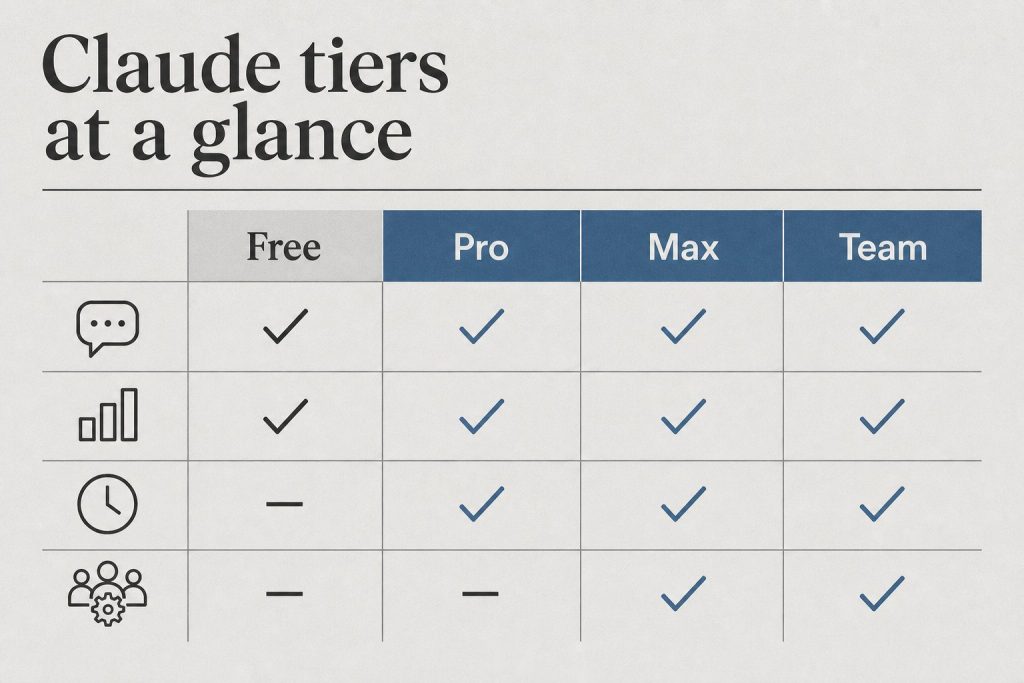
Claude offers six tiers: Free ($0), Pro ($20/month), Max 5x ($100/month), Max 20x ($200/month), Team (from $20/seat/month billed annually), and Enterprise (custom pricing).
The Free plan gives you access to Claude on web, iOS, Android, and desktop with no credit card required, subject to rolling usage limits.
The Free plan gives you access to Claude on web, iOS, Android, and desktop with no credit card required. It includes text, image, and code generation plus web search. Usage limits are intentionally opaque — Anthropic doesn’t publish exact message caps — but limits reset on a rolling 5-hour window. The Free tier is designed for exploration, not sustained daily work.
Is Claude Pro Worth $20 a Month?
Pro delivers substantially more usage than Free, plus Claude Code, unlimited projects, the Research feature, and Google Workspace integration — sufficient for most individual developers and writers.
Pro delivers substantially more usage than Free, Claude Code in the terminal, unlimited projects, the Research feature, file creation, code execution, and Google Workspace integration. Usage still has limits — Anthropic does not publish exact message counts, but heavy sessions will reach the ceiling — but it’s sufficient for most individual developers and writers. Annual billing brings the effective rate to $17/month.
What Is the Difference Between Claude Max 5x and Max 20x?
Max 5x ($100/month) gives you 5x Pro’s per-session usage; Max 20x ($200/month) gives you 20x — enough that rate limits stop being a practical concern for full-day development work.
Max 5x provides 5x Pro’s per-session headroom at $100/month. Max 20x at $200/month delivers 20x Pro usage — enough that rate limits stop being a practical concern for most full-day development work. Both tiers include Claude Code, with access to Claude Opus 4.8 and Sonnet 4.6, and a 1M token context window.
Extra usage is available on Pro, Max 5x, and Max 20x — when you hit your included limit, you can continue at standard API-rate billing with a spending cap you set.
How Does Claude Team Plan Pricing Work?
Team requires a minimum of 5 seats: Standard seats at $20/seat/month billed annually ($25 monthly) include collaboration features but not Claude Code; Premium seats at $100/seat/month billed annually ($125 monthly) add Claude Code for developers.
Team requires a minimum of 5 seats and comes in two flavors. Standard seats at $20/seat/month billed annually ($25 billed monthly) include 1.25x more usage per session than Pro with a weekly reset, plus collaboration features, central billing, SSO, and Microsoft 365 and Slack integrations. Standard seats do not include Claude Code.
Premium seats at $100/seat/month billed annually ($125 monthly) add Claude Code, making them the right choice for engineering team members. You can mix Standard and Premium seats within one Team plan — so non-technical staff get Standard while developers get Premium.
Enterprise Plan — Custom Pricing
Enterprise is for organizations with compliance, data residency, or governance requirements. It includes access to the full 1M token context window, HIPAA readiness, SAML SSO, domain capture, spend controls, and dedicated support. Based on user reports, pricing starts around $60/seat with a 70-seat minimum, putting the floor near $50,000 annually — contact Anthropic sales for exact figures. Training on customer data is disabled contractually at this tier.
How Much Does the Claude API Cost Per Token?
As of May 2026: Claude Sonnet 4.6 costs $3.00 input / $15.00 output per million tokens; Opus 4.6 costs $5.00 / $25.00; Haiku 4.5 costs $1.00 / $5.00.
The API is entirely separate from subscription plans. You pay per million tokens (MTok) with no monthly minimum. Current rates as of June 10, 2026 (verified June 10, 2026 from Anthropic’s official models page):
Claude Opus 4.8: $5.00 input / $25.00 output per MTok
Claude Sonnet 4.6: $3.00 input / $15.00 output per MTok
Claude Haiku 4.5: $1.00 input / $5.00 output per MTok
Prompt caching cuts input costs by up to 90% for repeated context. The Batch API processes requests within 24 hours at a flat 50% discount on all tokens — ideal for content pipelines, data enrichment, and any workload where real-time responses aren’t required. As of March 2026, Anthropic eliminated long-context surcharges, so a 900K-token request costs the same per-token rate as a 9K one.
June 2026 — Professional Services Pricing
Managed Agents
Token rates + $0.08/session-hour active runtime. No surcharge for Orchestration or Outcomes (public beta).
Claude Security Beta
Included in Enterprise during beta. Powered by Opus 4.8 ($5/$25 per MTok at API rates).
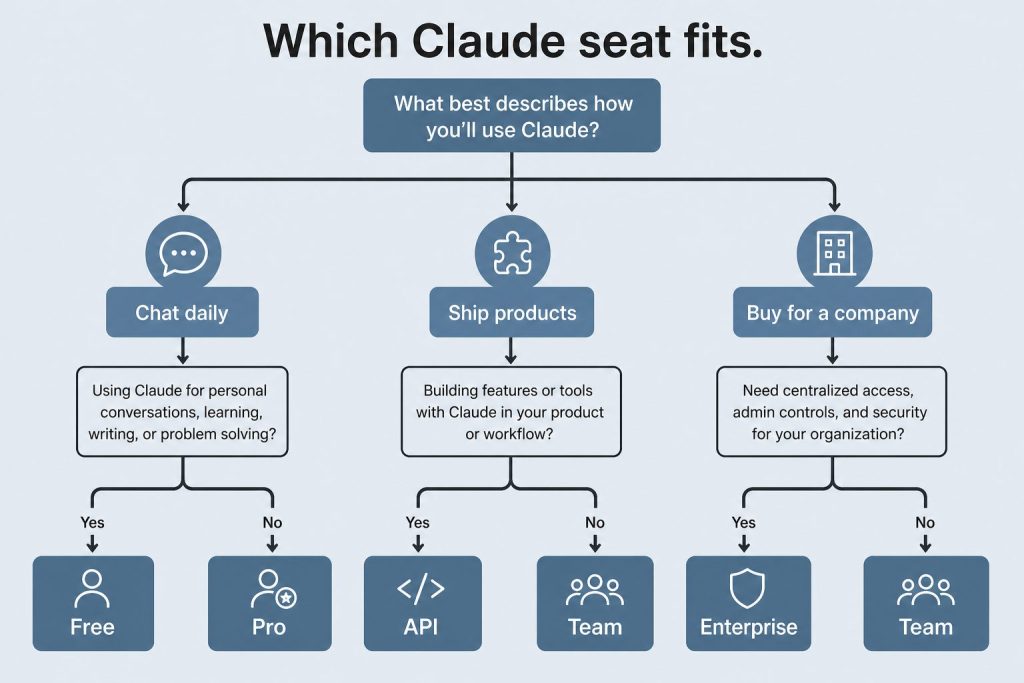
Start with Pro for individual use, move to Max 5x if you regularly hit limits, choose Max 20x for full-day heavy use, and use Team for groups of 5+ where Standard seats cover non-technical staff and Premium covers developers.
Start with Pro if you’re an individual who hits Free limits regularly. Move to Max 5x if you’re a developer doing focused coding sessions. Max 20x makes sense if Claude is your primary tool throughout the workday. For teams, buy Standard seats for non-technical staff and Premium seats for developers who need Claude Code. If you’re building an application or automation that calls Claude programmatically, use the API — subscription plans don’t provide API credits and don’t reduce API costs.
Claude API Pricing: Pay-Per-Token Rates for Every Model
The Claude API is priced separately from claude.ai subscriptions. You pay per million tokens (MTok) consumed — input and output priced separately. There is no monthly minimum; you add credits and they deplete as you use the API.
Prompt caching reduces costs significantly for repeated context: cache write is 25% of base input price, cache read is 10%. The Batch API offers 50% off all models for non-time-sensitive work. For a full breakdown of how to minimize token spend, see Claude on a Budget: the Complete Guide.
How Does Claude Pricing Compare to GPT-4o and Gemini 2.0?
Claude Sonnet 4.6 sits above GPT-4o on price but competes at or above it on reasoning tasks. Claude Haiku 4.5 is the cost-competitive option for high-volume pipelines. Gemini 2.0 Flash is significantly cheaper for commodity tasks; the trade-off is reasoning depth and context handling on complex documents.
How Much Does a Claude License Cost for Business?
A Claude business license is sold per seat: Team Standard seats cost $20/seat/month billed annually ($25 monthly), Team Premium seats with Claude Code cost $100/seat/month billed annually ($125 monthly), with a 5-seat minimum. Enterprise licenses are custom-priced annual contracts.
License type
Annual billing
Monthly billing
Minimum seats
Claude Code
Team Standard seat
$20/seat/month
$25/seat/month
5
No
Team Premium seat
$100/seat/month
$125/seat/month
5
Yes
Enterprise license
Custom (annual contract — contact sales)
~70 (reported)
Yes
If you’re writing a budget request or procurement document, here are the numbers that matter: a 10-person team with 7 Standard and 3 Premium seats runs $440/month on annual billing — $5,280/year. Licenses are managed centrally with consolidated billing, SSO, and admin controls, and you can mix Standard and Premium seats within one plan. A Claude license covers the claude.ai apps and (on Premium seats) Claude Code; it does not include API credits, which are billed separately per token. There is no perpetual or one-time license option — all Claude licensing is subscription-based.
How Much Does Claude Code Cost?
Claude Code has no standalone price — it’s included with Pro ($20/month), Max 5x ($100/month), Max 20x ($200/month), Team Premium seats ($100/seat/month annual), and Enterprise. Alternatively, run it against an API key and pay per token.
Plan
Claude Code included?
Usage headroom
Free
No
—
Pro ($20/mo)
Yes
Standard Pro limits — enough for an hour or two of daily coding
Max 5x ($100/mo)
Yes
5x Pro — sustained daily development
Max 20x ($200/mo)
Yes
20x Pro — full-day heavy use and parallel sessions
Team Standard
No
—
Team Premium ($100/seat annual)
Yes
Per-seat developer allocation
Enterprise
Yes (Premium seats)
Custom
API key (pay-per-token)
Yes
No plan limits — billed at standard model token rates
For automation — cron jobs, CI pipelines, claude -p scripts — note the June 15, 2026 change: subscription plans get a monthly Agent SDK credit pool (Pro $20, Max 5x $100, Max 20x $200, Team Standard $20/seat, Team Premium $100/seat), with overage billed at API rates. Full details in the Agent SDK dual-bucket billing guide. For the complete tier-by-tier breakdown including API-key economics, see the full Claude Code pricing guide.
What Are Claude’s Usage Limits and Extra Usage Costs?
Every Claude plan has usage limits that reset on a rolling 5-hour window, plus weekly caps on paid tiers. When you hit a paid plan’s limit, you can either wait for the reset or buy extra usage at standard API token rates with a spending cap you control.
Plan
Relative usage
Reset window
Extra usage available?
Free
Baseline (light use)
Rolling 5 hours
No — upgrade required
Pro
~5x Free
Rolling 5 hours + weekly cap
Yes — API rates, capped by you
Max 5x
5x Pro
Rolling 5 hours + weekly cap
Yes
Max 20x
20x Pro
Rolling 5 hours + weekly cap
Yes
Team Standard
1.25x Pro per seat
Weekly reset
Yes (admin-controlled)
Team Premium
Higher, includes Claude Code
Weekly reset
Yes (admin-controlled)
Anthropic intentionally doesn’t publish exact message counts — limits are measured in compute, so long conversations, large file uploads, and Opus-heavy sessions consume your window much faster than short Haiku chats. For the full mechanics, see Claude Team plan usage limits and Claude API rate limits.
Claude Pricing by Country: UK, Australia, India, and Canada
Anthropic charges the same USD list price in every country — Claude Pro is $20/month worldwide. Your bank converts to local currency, and applicable local tax (VAT or GST) is added at checkout.
Country
Claude Pro (approx. local)
Claude Max 5x (approx. local)
Tax added at checkout
United Kingdom
≈ £16/month
≈ £79/month
20% VAT
Australia
≈ A$31/month
≈ A$153/month
10% GST
India
≈ ₹1,700/month
≈ ₹8,600/month
18% GST
Canada
≈ C$27/month
≈ C$137/month
GST/HST (5–15% by province)
New Zealand
≈ NZ$33/month
≈ NZ$166/month
15% GST
Local-currency figures are approximate conversions at June 2026 exchange rates — your card statement reflects your bank’s rate plus any foreign-transaction fee. There is no region-specific discount pricing for claude.ai plans, and API token rates are likewise USD-denominated everywhere. Prices shown on Anthropic’s pricing page exclude applicable tax.
Frequently Asked Questions: Claude Pricing
How much does Claude cost per month?
Claude costs $0 (Free), $20/month (Pro), $100/month (Max 5x), or $200/month (Max 20x) for individual plans. Team plans start at $20/seat/month (annual billing, 5-seat minimum). API access is pay-per-token with no monthly minimum.
Is there a free version of Claude?
Yes. The Free plan gives access to Claude on web, iOS, Android, and desktop with no credit card required. Usage limits apply and reset on a rolling 5-hour window. The Free tier is suitable for light, exploratory use but not sustained daily work.
What does Claude Pro include at $20/month?
Pro includes approximately 5x the usage of Free, Claude Code in the terminal, unlimited projects, the Research feature, file creation, code execution, and Google Workspace integration. Annual billing brings the effective rate to $17/month.
What is the cheapest way to use Claude?
The Free plan is the cheapest at $0. For API access, Claude Haiku 4.5 at $1 input / $5 output per MTok is the most cost-efficient model. Combined with the Batch API (50% discount) and prompt caching, high-volume workflows can run at a fraction of standard API cost.
What is Claude Max and is it worth $100–$200 per month?
Claude Max comes in two tiers: Max 5x at $100/month gives 5x Pro’s per-session usage, and Max 20x at $200/month gives 20x. Max is worth it if you’re hitting Pro limits regularly during development or coding sessions. Both include Claude Code and the full 1M token context window with Claude Opus 4.8 and Sonnet 4.6.
How does Claude Team pricing work?
Team plans require a minimum of 5 seats. Standard seats cost $20/seat/month billed annually ($25 monthly) and include collaboration features. Premium seats cost $100/seat/month billed annually ($125 monthly) and add Claude Code — the right choice for developers on the team. You can mix Standard and Premium seats within the same Team plan.
Does Claude Pro give you access to Claude Opus 4.8?
Pro gives you access to Claude’s models including Opus 4.8 for complex tasks, Sonnet 4.6, and Haiku 4.5, subject to usage limits. The Max tiers give you significantly more headroom to use Opus 4.8 for extended sessions. For unlimited, predictable API access to Opus 4.8, use the API directly at $5 input / $25 output per million tokens.
What is the Claude API cost per million tokens in 2026?
As of June 2026 (verified from Anthropic’s official docs): Claude Opus 4.8 costs $5.00 input / $25.00 output per million tokens; Claude Sonnet 4.6 costs $3.00 input / $15.00 output; Claude Haiku 4.5 costs $1.00 input / $5.00 output. The Batch API offers 50% off all models for non-real-time work.
Does Claude have a student discount?
There is no individual self-serve student discount, but Anthropic now offers an Education plan with discounted rates for universities and their members — check whether your institution participates. Otherwise students can use the Free tier without a credit card, and the cheapest paid path is Pro at $17/month with annual billing.
Can I use Claude without a subscription by paying per use?
Not directly through claude.ai — the website only offers Free, Pro, Max, and Team subscription plans. Pay-per-use access is available only through the Claude API, which requires a developer account. API pricing starts at $1 input / $5 output per million tokens for Haiku 4.5 with no monthly minimum charge.
How much does the Anthropic Console (Claude Console) cost?
The Anthropic Console itself is free — it’s the developer dashboard for managing API keys, tracking usage, and testing prompts in the Workbench. You only pay for the API tokens you consume, starting at $1 input / $5 output per million tokens for Haiku 4.5. You add prepaid credits to get started; there is no monthly platform fee.
How much is a Claude license for business?
Claude business licensing is per-seat: Team Standard seats cost $20/seat/month billed annually ($25 monthly), and Team Premium seats with Claude Code cost $100/seat/month billed annually ($125 monthly), with a 5-seat minimum. Enterprise licenses are custom annual contracts. There is no perpetual license — all Claude licensing is subscription-based.
Does the Claude desktop app cost extra?
No. The Claude desktop app for Windows and macOS is included with every plan, including Free. Desktop, web, and mobile all share the same account and the same usage limits — there is no separate desktop pricing.
Is Claude cheaper in India, the UK, or Australia?
No — Anthropic charges the same USD list price worldwide. Claude Pro is $20/month everywhere; your bank converts it to local currency (roughly £16, A$31, or ₹1,700) and local VAT or GST is added at checkout where applicable. There is no regional discount pricing.
Is Claude available on Azure, AWS, or Google Cloud?
Yes. Claude models are available through Amazon Bedrock and the Claude Platform on AWS, Google Cloud’s Vertex AI, and Microsoft Foundry. Cloud-platform pricing is token-based and aligned with Anthropic’s API rates, billed through your existing cloud account — useful if your organization has cloud spend commitments to draw down.
Does Anthropic offer nonprofit pricing?
Anthropic doesn’t list a standing nonprofit discount on its pricing page as of June 2026. Nonprofits typically start with Team at standard rates or contact Anthropic sales about Enterprise terms. An Education plan with discounted rates does exist for universities and their members.
May 2026: Managed Agents & Claude Security Pricing
Updated June 10, 2026
Anthropic’s professional services now include Managed Agents and Claude Security. Pricing for both is API-based, not subscription-based.
Claude Managed Agents Pricing
Managed Agents pricing follows the standard API token rates for whichever Claude model you use inside the agent pipeline — there’s no separate Managed Agents surcharge on top of model costs. You pay for the tokens the models consume:
The Dreaming advisor tool uses a short-plan generation (typically 400–700 tokens) at the advisor model’s rate, while the executor handles full output at its lower rate — keeping combined cost well below running the advisor model end-to-end. Use max_uses to cap advisor calls per request. Requires beta header: anthropic-beta: advisor-tool-2026-03-01. Docs: platform.claude.com/docs/en/managed-agents/dreams
Claude Security Beta Pricing
Claude Security is currently in public beta for Enterprise customers. Anthropic has not published a standalone per-scan or per-seat price for Claude Security Beta — access is included as part of Enterprise during the beta period. Underlying model is Claude Opus 4.8 ($5 input / $25 output per million tokens at API rates). For Enterprise pricing including Claude Security, contact Anthropic sales.
Claude Mythos Preview Pricing (Project Glasswing)
Claude Mythos Preview is not available via standard API or any subscription tier. Through Project Glasswing (invitation-only, defensive cybersecurity workflows): $25 per million input tokens, $125 per million output tokens. No self-serve access — contact Anthropic for Glasswing information at anthropic.com/glasswing.
What to do next
Now that you have the price — here’s how to actually run it
Knowing the cost is step one. The harder questions are whether Managed Agents is the right architecture for your use case, how it compares to building on the raw API, and what a realistic monthly bill looks like at scale.
Use this tool to figure out which Claude plan actually fits your usage, what you’d pay on the API equivalent, and how the new June 15, 2026 Agent SDK billing change affects your costs. All rates verified against Anthropic’s official pricing documentation as of June 10, 2026.
Tell us how you use Claude
2 = roughly 30 hours of normal Claude use per month
Output is typically ~25% of input for chat work
$ value of unattended Claude work (cron jobs, scripts, GitHub Actions). 0 if you only chat.
Your estimated costs
Email me this breakdown
Get your numbers in your inbox so you can compare plans later — or forward them to whoever approves the budget.
This calculator uses Anthropic’s published API rates as of June 10, 2026. Subscription pricing reflects current public plans. The Agent SDK monthly credit pool launches June 15, 2026 — Pro $20, Max 5x $100, Max 20x $200, Team Standard $20/seat, Team Premium $100/seat.
What Claude Actually Costs: Six Worked Examples (June 2026)
The calculator above is interactive; these are the same calculations worked through for six common usage profiles, using Anthropic’s published rates as of June 10, 2026. API-equivalent figures assume standard rates with no prompt caching or batch discounts.
Profile
Monthly usage
Best plan
Plan cost
API equivalent
Casual user — questions a few times a week
0.5M in / 0.13M out (Sonnet 4.6)
Free, or Pro for headroom
$0–$20
≈ $3.45/mo
Individual writer or analyst — daily use
2M in / 0.5M out (Opus 4.8)
Pro
$20 ($17 annual)
≈ $22.50/mo
Developer — focused daily coding with Claude Code
10M in / 2.5M out (Opus 4.8)
Max 5x
$100
≈ $112.50/mo
Power user — Claude open all day, parallel sessions
30M in / 7.5M out (Opus 4.8)
Max 20x
$200
≈ $337.50/mo
5-person team — 3 non-technical, 2 developers
Mixed
Team: 3 Standard + 2 Premium
$260/mo (annual billing)
Varies by usage
High-volume pipeline — classification or enrichment
50M in / 10M out (Haiku 4.5, Batch API)
API direct
—
≈ $50/mo (after 50% batch discount)
The pattern: subscriptions beat the API whenever usage is steady and interactive — Pro pays for itself at roughly 2M input tokens a month on Opus 4.8. The API wins for spiky automated workloads, anything that can use the Batch API, and pipelines that run on Haiku 4.5. A reasonable rule of thumb: if your monthly API equivalent lands more than about 50% above a subscription price, take the subscription.
Next Steps: What to Read After This
You came here for pricing. Depending on what you actually need to do next, these are the right places to go:
Anthropic’s May 2026 SpaceX rate limit increase (doubled 5-hour limits, eliminated peak-hour throttling) explicitly excluded the free plan. If you’re on free and hoping the latest compute expansion helped, it didn’t. This update explains what that means practically and what your actual options are.
The May 2026 Update: Free Plan Was Explicitly Left Out
When Anthropic announced doubled rate limits following the SpaceX Colossus 1 compute deal (May 6, 2026), they were specific: the increases apply to Pro, Max, Team, and seat-based Enterprise. The free plan was explicitly excluded.
This matters for the student/budget conversation because:
Free plan rate limits stayed exactly where they were — no improvement
The gap between what free users can do and what paid subscribers can do just widened
Peak-hours throttling elimination applies to Pro and Max only — not free
Claude Code access remains unavailable on free
If you were waiting to see if Anthropic would upgrade free tier limits alongside the major infrastructure expansion — the answer is no. The business decision is clear: compute improvements go to paying customers first, and the free tier stays constrained to drive conversion.
What This Means If You’re a Student Trying to Use Claude Free
You can still use Claude on the free tier. The model you access is capable — Anthropic hasn’t crippled it. What you’re constrained by is how much you can use it before hitting a limit, and how fast it responds during peak hours. Both of those constraints worsened relative to paid tiers in May 2026, because paid tiers got better while free stayed the same.
For light usage — occasional questions, single documents, short projects — free is still viable. For sustained daily use, research workflows, or anything involving long documents and multiple sessions, free will slow you down in ways that affect your work.
Quick Answer
There is no official Claude student discount. Claude Pro costs $20/month for everyone. However, there are three legitimate paths to reduced or free access for students — and one of them covers most student use cases completely.
The Three Ways Students Actually Get Claude for Less
Best for most students
Claude Free Tier
Access to Claude Sonnet 4.6 with daily usage limits. Sufficient for essay drafting, coding help, summarization, and research. No credit card required. Limits reset daily.
$0/month — no card needed
University programs
Claude for Education
Anthropic has institutional agreements with select universities. If your school has a deal, access may be included in your student account. Check with your IT department or university library — coverage is expanding but not universal.
Free if your school participates
API credits
GitHub Student Developer Pack
GitHub’s student pack periodically includes credits for AI tools and APIs. Availability changes — check current offers at education.github.com. Requires a .edu email or institutional verification.
Variable — check current offers
Full access
Claude Pro — $20/month
5x more usage than free, priority access during peak hours, access to Claude Opus 4.7 for complex tasks. No student discount, but the free tier covers most student workloads without it.
$20/month — no discount available
What the Free Tier Actually Gets You
Most students overestimate how much Claude Pro they need. The free tier handles:
Essay feedback and drafting assistance
Coding help — debugging, explaining concepts, generating boilerplate
Research summarization — paste an article or paper, get a structured summary
Math and problem-set walkthroughs
Study guide generation from lecture notes
Where you’ll hit limits: long research sessions on a single topic, processing multiple long documents in the same conversation, or high-volume API access for a class project. For those cases, Claude Pro or API credits are the right call.
Claude for Education — Current Status
Anthropic’s education program is expanding but not yet universal. The fastest way to find out if your institution participates is to email your university’s IT department or check whether your library already has a Claude subscription that extends to students.
Harvard, for example, replaced ChatGPT Edu with Claude in 2026 — so institutional deals are happening. If your school hasn’t moved yet, it may soon.
What Claude Pro Is Actually Worth for Students
If you’re doing intensive AI-assisted work — a thesis, a capstone project, a research paper that requires synthesizing many sources — $20/month is reasonable for a semester. Many students find they need it for two or three months out of the year and can drop to free for the rest.
There’s no annual commitment required. You can subscribe month-to-month and cancel when the project is done.
Bottom Line
Start with the free tier. It covers the majority of student use cases. If you hit the limit consistently, check whether your university has an institutional deal before paying. If neither works for your project, Claude Pro at $20/month is month-to-month with no lock-in.
For teams making a buying decision
Evaluating Claude for a team — not just yourself?
If you’re working through the plan decision for a business or agency, the calculus is different than individual use. We’ve run this math across 20+ client accounts and can tell you exactly where the API breaks even vs. subscription, and which plan structure makes sense for your workload.
Law firms have always been early adopters of tools that compress billable time. Document review software. Legal research databases. E-discovery platforms. The pattern is consistent: the firms that adopt early capture the margin advantage, and the rest catch up at cost.
Claude is following that pattern. And the window where using it is a competitive advantage rather than table stakes is closing faster than most legal professionals realize.
This is a practical guide to where Claude actually delivers in legal work — not theoretical use cases, but the specific tasks where it earns its keep — and where you still need a human in the loop.
Where Claude Delivers the Most Value in Legal Practice
Legal Research and Case Law Summarization
The highest-leverage use case for most attorneys is research compression. Claude can take a 40-page appellate decision and return a structured summary — holding, reasoning, key facts, dissent — in under 60 seconds. It can synthesize across multiple cases to identify how a circuit has treated a specific doctrine over time.
What it cannot do: verify citations autonomously or guarantee it has not hallucinated a case name. Every citation must be independently verified in Westlaw or Lexis before it goes into a brief. Claude is the first pass, not the final check.
Practical workflow: paste the full text of the opinion (Claude’s 200K context window handles most decisions comfortably), ask for a structured summary with specific fields — holding, key facts, procedural posture, distinguishing factors — and use that as the basis for your own analysis rather than the analysis itself.
Contract Drafting and Redlining
Claude handles first-draft contract language well, particularly for standard commercial agreements where the structure is predictable: NDAs, MSAs, employment agreements, vendor contracts. Give it the deal terms and the governing law, and it produces a serviceable first draft that your attorney then marks up rather than writing from scratch.
For redlining, paste the counterparty’s draft and ask Claude to identify provisions that deviate from market standard, flag missing protections, or summarize the risk profile of specific clauses. It catches things that get missed at 11pm on a deal close.
The limitation: Claude does not know your client’s specific risk tolerance, industry norms for your particular market, or the negotiating history with this counterparty. Those judgment calls remain human work.
Deposition and Discovery Preparation
One of the most underused legal applications is using Claude to prepare for depositions. Feed it the deponent’s prior testimony, relevant documents, and the key issues in the case. Ask it to generate a question outline organized by theme, flag inconsistencies in prior statements, and identify documents to confront the witness with.
It can also process large document productions and summarize by custodian, date range, or topic — substantially reducing the time a paralegal or junior associate spends on initial review.
Client Communication and Memo Drafting
Client-facing memos — explaining a legal issue in plain language, summarizing a court ruling’s implications, drafting a status update — are exactly the kind of writing where Claude performs well and where attorneys often underinvest time. The work is important but not intellectually complex. Claude produces a solid draft; the attorney reviews, adjusts for client relationship context, and sends.
What Claude Cannot Do in Legal Work
It cannot verify citations. It will hallucinate case names and citations with confidence. Every citation must be checked against an authoritative legal database.
It cannot provide legal advice. It produces language and analysis, not professional judgment. The attorney exercises judgment; Claude compresses the work that precedes it.
It does not know current law. For recent statutory changes, new regulations, or fresh precedent, you need current research tools.
It lacks client context. Claude does not know your client’s history, risk appetite, or the relationship dynamics that shape legal strategy.
Confidentiality considerations apply. Before pasting client documents into any AI tool, your firm needs a clear policy on what data is permissible to process externally and under what terms.
Getting Claude Set Up for Legal Work
The most effective legal deployment of Claude is not the chat interface — it is Claude with a strong system prompt that establishes context, format expectations, and guardrails. A system prompt for a litigation practice might specify the governing jurisdiction, output format requirements, what it should flag for attorney review, and firm-specific terminology.
For firms with technical capacity, Claude’s API allows integration directly into document management systems, allowing attorneys to invoke Claude without leaving the tools they already use.
The Billing Question
The elephant in the room for law firms considering AI adoption is the billing model. If Claude compresses a five-hour research task to one hour, do you bill five hours or one?
The firms navigating this well are shifting toward value billing and fixed-fee arrangements where efficiency is profit rather than a billing problem. The ABA and state bars are actively developing guidance on AI use and disclosure. Following your jurisdiction’s bar guidance and staying current on disclosure requirements is non-negotiable.
Bottom Line
Claude does not replace legal judgment. It compresses the work that precedes judgment — research, drafting, review, summarization — at a quality level that makes it worth building into the workflow of any firm serious about efficiency. Pick one task category, run Claude against your next ten instances of that task, and measure the time delta. The ROI case makes itself.