Two specialist cyber carriers put affirmative AI wording on cyber cover within days of each other. CFC rebuilt the cyber section of its financial institutions insurance suite around its full cyber proactive response (CPR) policy, adding affirmative wording for AI-related cyber exposures, announced September 17. Beazley issued a comparable AI Clarifying Endorsement for its cyber product, stating explicitly that AI-driven cyber attacks fall within its existing cover.
The announcements put a name on what the market has called silent AI — cyber policies absorbing AI-related risk for roughly two years without naming it, an echo of the silent-cyber problem that pushed cyber exposure into standalone products a decade ago. Note the contrast: in general liability, new ISO exclusion forms effective this January let carriers strip AI-related losses out of standard policies instead of affirming them.
The split that matters: the affirmative wording confirms AI used against the policyholder — AI-driven deception, reconnaissance, intrusion — falls within cyber cover. It says nothing about AI the business itself runs — client-facing tools, trading models, vendor platforms. That exposure may sit under E&O, professional liability, or a gap between the two.
For restoration contractors: this is the wording now being written into specialist cyber forms, not a rewrite of every contractor policy. If your operation runs AI on client work — intake bots, quoting tools, chatbots — that wording answers the attack-against-you question, not the your-AI-made-a-mistake question. That’s a broker conversation, and it’s new this month. The operator-side breakdown is on Restoration Intel.
Two specialist cyber carriers put affirmative AI wording on cyber cover within days of each other. CFC rebuilt the cyber section of its financial institutions insurance suite around its full cyber proactive response (CPR) policy, adding affirmative wording for AI-related cyber exposures, announced September 17. Beazley issued a comparable AI Clarifying Endorsement for its cyber product, stating explicitly that AI-driven cyber attacks fall within its existing cover.
The announcements put a name on what the market has called silent AI — cyber policies absorbing AI-related risk for roughly two years without naming it, an echo of the silent-cyber problem that pushed cyber exposure into standalone products a decade ago. Note the contrast: in general liability, new ISO exclusion forms effective this January let carriers strip AI-related losses out of standard policies instead of affirming them.
The split that matters: the affirmative wording confirms AI used against the policyholder — phishing, reconnaissance, intrusion — falls within cyber cover. It says nothing about AI the business itself runs — client-facing tools, trading models, vendor platforms. That exposure may sit under E&O, professional liability, or a gap between the two.
For restoration contractors: this is the wording now being written into specialist cyber forms, not a rewrite of every contractor policy. If your operation runs AI on client work — intake bots, quoting tools, chatbots — that wording answers the attack-against-you question, not the your-AI-made-a-mistake question. That’s a broker conversation, and it’s new this month. The operator-side breakdown is on Restoration Intel.
Two specialist cyber carriers put affirmative AI wording on cyber cover within days of each other. CFC rebuilt the cyber section of its financial institutions insurance suite around its full cyber proactive response (CPR) policy, adding affirmative wording for AI-related cyber exposures, announced September 17. Beazley issued a comparable AI Clarifying Endorsement for its cyber product, stating explicitly that AI-driven cyber attacks fall within its existing cover.
The announcements put a name on what the market has called silent AI — cyber policies absorbing AI-related risk for roughly two years without naming it, an echo of the silent-cyber problem that pushed cyber exposure into standalone products a decade ago. Note the contrast: in general liability, new ISO exclusion forms effective this January let carriers strip AI-related losses out of standard policies instead of affirming them.
The split that matters: the affirmative wording confirms AI used against the policyholder — phishing, reconnaissance, intrusion — falls within cyber cover. It says nothing about AI the business itself runs — client-facing tools, trading models, vendor platforms. That exposure may sit under E&O, professional liability, or a gap between the two.
For restoration contractors: this is the wording now being written into specialist cyber forms, not a rewrite of every contractor policy. If your operation runs AI on client work — intake bots, quoting tools, chatbots — that wording answers the attack-against-you question, not the your-AI-made-a-mistake question. That’s a broker conversation, and it’s new this month. The operator-side breakdown is on Restoration Intel.
Two specialist cyber carriers put affirmative AI wording on cyber cover within days of each other. CFC rebuilt the cyber section of its financial institutions insurance suite around its full cyber proactive response (CPR) policy, adding affirmative wording for AI-related cyber exposures, announced September 17. Beazley issued a comparable AI Clarifying Endorsement for its cyber product, stating explicitly that AI-driven cyber attacks fall within its existing cover.
The announcements put a name on what the market has called silent AI — cyber policies absorbing AI-related risk for roughly two years without naming it, an echo of the silent-cyber problem that pushed cyber exposure into standalone products a decade ago. Note the contrast: in general liability, new ISO exclusion forms effective this January let carriers strip AI-related losses out of standard policies instead of affirming them.
The split that matters: the affirmative wording confirms AI used against the policyholder — phishing, reconnaissance, intrusion — falls within cyber cover. It says nothing about AI the business itself runs — client-facing tools, trading models, vendor platforms. That exposure may sit under E&O, professional liability, or a gap between the two.
For restoration contractors: this is the wording now being written into specialist cyber forms, not a rewrite of every contractor policy. If your operation runs AI on client work — intake bots, quoting tools, chatbots — that wording answers the attack-against-you question, not the your-AI-made-a-mistake question. That’s a broker conversation, and it’s new this month. The operator-side breakdown is on Restoration Intel.
Research snapshot · September 17, 20267 platforms · 14 cited sources
“Always allow” is a scope, not a safety verdict.
The button can mean “for this session,” “for this command in this repo,” “for this site across devices,” or “everything, until you turn it off.” The wording looks universal. The permission is not.
What it usually means
“If this same kind of action happens again inside a defined boundary, don’t interrupt me.”
What it never means
“The system has decided this action is safe, wise, or appropriate forever.”
01
One label. Six possible boundaries.
Before approving, ask three things: what is being authorized, where the grant applies, and when it expires.
One actionApprove this exact send, command, purchase, or change once.
This sessionAllow the tool until the current conversation or work session ends.
Tool or patternAllow a named tool, command prefix, server, or similar operation.
Repo or sitePersist within a project, repository, browser site, or workspace.
User or deviceApply across workspaces on one machine, or across devices via cloud settings.
EverythingYOLO, bypass, or run-everything modes remove broad classes of checks.
Risk rises faster than convenience as the scope moves right.
02
How the major platforms differ
Filter the field. These behaviors come from vendor documentation or documented reporting; unresolved details are marked plainly.
Claude Code
Coding agent
repo + command
Shell-command “don’t ask again” grants persist per repository and command. File-edit approvals last only for the session.
Four settings layers: user, project, project-local, managed.
Deny rules evaluate before ask and allow.
Sensitive paths keep hard prompts.
Cursor
Coding agent
user + project
Auto-review, Allowlist, and Run Everything modes sit above user- and project-level permission files.
Rules can target MCP server:tool patterns.
Terminal rules match command prefixes.
Committed project rules can travel with the repo.
Gemini agents
Coding agent
tool + machine
Always-allow can target a tool, MCP server, or “similar operations.” YOLO/auto-approve is an IDE user setting.
User setting can span trusted workspaces on that machine.
CLI supports command-prefix auto-approval.
Restricted workspaces override YOLO.
ChatGPT agent
Browser agent
no standing grant documented
OpenAI documents per-action confirmations for high-impact actions and “watch mode” on certain sites, but not a general always-allow for agent confirmations.
Login uses human takeover.
Cookies can persist across sessions.
Scheduled-task confirmation behavior is undocumented.
ChatGPT Work
Cloud browser
site + account
Reported controls are per-site: Always ask, Auto approve, and Always allow. The setting follows cloud/account state across devices.
“Always allow” is reportedly marked not recommended.
Consequential actions keep a confirmation gate.
Official help-center documentation was not found.
Copilot Studio
Enterprise agent
rest of session
Makers gate tools per agent; users can approve once, approve for the rest of the session, or deny.
The gate is outside the agent’s own instructions.
Designed for sends, tickets, payments, and similar tools.
Governance can feed Power Platform audit systems.
Grok / Grok Bot
Cloud agent
undocumented
The research did not find reliable xAI documentation defining a standing approval’s scope, persistence, cross-chat reach, or revoke surface.
Do not infer Grok’s behavior from Claude, Cursor, Gemini, or Muse.
Treat each approval as local to the visible task until the product proves otherwise.
Keep consequential actions behind a separate human gate.
03
Does the approval travel?
Usually less than people fear—but sometimes farther than they expect. No researched vendor carries an approval into another vendor’s product.
Platform
Other chats
Other projects
Other devices
Other products
Claude Code
Yes, in same repo
No, unless user-level rule
No, local files
No evidence
Cursor
Yes
Only if rule is shared
Via committed repo file
No evidence
ChatGPT agent
n/a
n/a
n/a
No evidence
ChatGPT Work
Yes, per site
Yes, per site
Yes, cloud/account
No evidence
Copilot Studio
No, session only
No
No
No evidence
Gemini Code Assist
Yes, same IDE
Yes, user setting
Undocumented
No evidence
There is no universal “always.” There is only an approval attached to a boundary.
Main chat vs. project vs. Claude vs. Grok vs. Cursor: treat every surface as a separate authority domain until that product explicitly shows otherwise. Same account does not mean same grant. Same vendor does not mean same product. Similar wording does not mean similar scope.
04
Design the least-annoying safe gate
A practical rule engine based on the converging guidance: reserve human attention for the steps where it changes the outcome.
Approval recommender
Choose an action and its reach. This is a policy aid, not a vendor setting.
Action
Reach
Duration
Recommended gateAuto-run with an audit log
Read-only work inside your own workspace can usually proceed quietly. Log what was accessed and keep secrets excluded.
Quiet lane
Low consequence, reversible, internal.
Read/search
Draft/stage
Organize reversible files
Always log
One-tap lane
Meaningful external or production effect.
Send or publish
Deploy
Account setting
Show real target + content
Friction lane
Money, identity, access, deletion, or irreversible harm.
Typed approval or step-up auth
Bind approval to exact action
Short expiry
Never inherited from a vague grant
05
How standing approvals fail
The danger is rarely “the AI became evil.” It is usually a trusted tool, a changed context, a misleading prompt, or a tired human.
Approval fatigue
A prompt repeated often enough becomes a reflex. The gate still exists visually while meaningful review disappears. This is why tiering beats asking about everything.
Prompt injection through a trusted tool
EchoLeak showed how a crafted email could coerce Microsoft 365 Copilot into exfiltration. TrustFall showed how one generic “trust this folder” click could arm a malicious MCP configuration across coding agents.
Grant outlives the reason
A permanent Bash rule, per-site browser grant, or scheduled-task permission can remain after the original job is over. The next task inherits power it did not earn.
Scope contamination
Repo rules can affect every future task in the repo. Cursor project allowlists can be committed and inherited by teammates. A convenience decision becomes shared infrastructure.
Presented action differs from executed action
If the user sees the agent’s summary instead of the resolved recipient, command, or final payload, the approval can be technically genuine but practically uninformed.
“Run everything” becomes the workaround
If the system asks about trivial reads and destructive writes with equal urgency, users reach for YOLO or bypass modes. Bad UX can manufacture unsafe behavior.
The four repeated cards are not reassurance.
A gate that reappears until the user disables it is approval fatigue in miniature. Whether the repeats came from retry logic or delivery duplication, the safe response is to deduplicate the prompt—not train the user to approve more broadly.
06
No industry standard—yet
There is no binding specification that makes “always allow” mean the same thing everywhere. But the security guidance is converging.
Least agencyGrant the exact command, path, server, tool, recipient, and purpose—not a whole capability.
Time and task limitsPrefer once or session. Standing grants should expire or be reviewed.
Risk tiersRead, write, external send, payment, and security changes should not share one gate.
Per-action verificationPrivileged steps should be rechecked by a policy engine outside the agent prompt.
Presentation integrityShow the real recipient, final text, raw command, and resolved resource.
Immutable receiptsRecord what was shown, what was approved, and what actually executed.
Hard baselinesSecrets, account recovery, money, destructive commands, and broad access should keep non-bypassable checks.
Kill switchesEvery durable grant needs a visible list, revoke action, and safe fallback.
The best feature is not “always allow.” It is “allow this exact thing, for this purpose, until this time.”
Product opportunity: make the scope legible. Let users see a plain-language grant card, a live approval ledger, expiry/count limits, and a one-tap revoke. The system should reduce nagging by grouping low-risk work—not by quietly widening authority.
07
The practical rule for your setup
You already have the right doctrine. The research mainly sharpens where the lines belong.
Auto
Let it run and narrate after.
Reads and research
Drafts and staging
Reversible internal organization
Routine checks with no external effect
Tap
Keep the one-tap human gate.
Email and messaging
Publishing and deploys
Changing live settings
Actions affecting another person
Type
Make the friction intentional.
Money and purchases
Credential/security changes
Deletion or irreversible moves
Broad standing authority
Your “always allow” tap was not reckless.
It was a reasonable response to a low-value repeated prompt. The lesson is not “never use standing approval.” It is: the platform should show the exact scope, make it easy to revoke, and never rely on repetition to win consent. Until Muse exposes that ledger, treat the grant as a convenience whose boundary remains partly unknown.
Verification note: the research read public documentation and web text on September 17, 2026. It did not live-test each product. Undocumented behavior is labeled as such.
They keep publishing the obituary before the body's cold.
Gartner's take, from May: by 2027, 40% of enterprises will demote or decommission their autonomous AI agents because of governance gaps they only discover after a production incident. (Gartner press release, May 26, 2026; the analyst is Shiva Varma.) Not because the models failed. Because nobody was watching the permissions.
Then this month: BCG's Steven Mills — partner, managing director, and the firm's chief AI ethics officer — warned that companies are accelerating agentic AI deployment with "no idea how to manage risk." His line: "Get governance wrong, and every bit of value you've built with experimentation and early wins could unravel because of a single incident." (Fast Company, Sept 2026.)
Mills's prescription is interesting. He says there's no fixed design for good corporate AI risk management, but the starting point is separating use cases that are inherently low-risk — those can be approved automatically — from the ones that carry real risk and need deep human review. Plus a real budget for governance and a senior executive accountable for AI safety.
Read that again. It's an org chart's answer to a practical problem: committees, stage gates, a budget line, an executive with a title.
Here's the thing. I run a version of this every night, and it's none of those things. No committee. No governance budget. One man and a phone.
I run six AI seats on my business — a personal agent, an ops chief of staff, a publishing-desk agent, and three build seats. They read my email, draft my outreach, design automations, run research while I sleep. The governance model fits on a sticky note:
Two-way doors swing. One-way doors don't.
A two-way door is anything reversible — analysis, research, drafting, staging. My agents walk through those on judgment, and I mean it: momentum wins, I don't want a report, I want the work done.
A one-way door is anything you can't take back — money moves, sends, publishes, deletions, credentials. Every one of those stops at the gate. And the gate isn't a process. It's my tap. Structural, not procedural. A draft can sit ready for three weeks; it doesn't send until I say so.
That's it. That's the whole model that Gartner's 40% are supposedly spending governance budgets to build. Varma even names the failure mode: companies treat governance as binary — locked down or fully trusted. The doors model isn't binary. It's proportional. Reversible work flows, irreversible work waits. Small decisions move at tap speed instead of committee speed.
There's a second piece, and it matters: autonomy is earned through clean observation, never granted up front. Nothing in my shop graduates to auto-pilot on day one. New automations start in shadow — run the behavior, take no action — and only earn real permissions after clean observation. Seven clean shadow days before something auto-archives. Three clean days before a migration cutover. The machine proves it's safe by being watched being safe.
And before anything goes out — anything — it runs a sensitive-token scrub, like a virus list: exact matches block, fuzzy matches queue for a human. Official facts only. Never invented rankings, features, or quotes.
That's the enterprise governance problem, solved by one operator with six agents, and it's cheaper and faster than every framework Mills is recommending because there's no committee in the middle. The human review he prescribes for high-risk uses? Mine takes one tap. Low-risk automatic approval? Mine doesn't even need approval — it's a two-way door.
Proof's not in the framework. It's in this morning. Two vendor outreach waves went out — Eastern at 7:54, Pacific at 9:07 — drafted by the seats, sent on my tap, nothing auto-fired. A storm-triggered vendor automation is being designed this afternoon with the gate baked into the spec: it can search impact areas and draft outreach, it cannot send. Overnight research runs while I sleep and lands in a brief I read over coffee. Six seats working, zero production incidents, zero surprises in my inbox.
I'm not saying enterprises should run their AI program from a phone. They can't — scale demands the org chart. I'm saying the org chart versions keep failing on the exact axis the doors model gets right: they try to govern everything the same way, so everything either crawls or crashes. Separate the reversible from the irreversible, put a real human's tap on the irreversible, make everything else prove itself in shadow before it earns anything, and scrub before you publish.
The big shops are about to learn this at scale. The 40% who don't will be the decommissioned ones. The ones who do will discover what I already know: governance that moves at tap speed isn't less governance. It's the only kind fast enough to keep up with the machines.
Secure checkout via Square — all major cards accepted
You can copy this method and build a real Business Continuity Plan yourself. You do not need a consultant. You need to start. Buy Now is the packaged Notion duplicate: the plan page plus the five databases already wired, delivered by email after checkout.
This walks a property manager, a restoration company, or any shop that needs a living plan (not a binder on a shelf) through the same structure. Fill the fields. Practice the tree. Update it every six months.
What a good BCP actually is
A good BCP is practiced — not laminated and forgotten.
It is not about the document. It is about the capability. A plan in a drawer is worthless. A plan your team has practiced, your vendors know about, and you update on a review cycle is the difference between a company that keeps running and one that does not.
Three frames sit under this template:
FEMA: essential functions must still get done during any disruption.
ISO 22301: deliver services inside acceptable timeframes.
Belfor Code Red ACT: Assessment, Communication, Training.
This template combines those into something you can build and maintain yourself. Restoration ERP-style cloud BCP tools exist if you need branded mobile apps and automated SMS. This is the planning foundation: the thinking, the structure, the documentation. That is the part that matters most, and you can customize it.
Start with the plan header
Write these six fields on page one. Do it today.
Plan Owner: a named person, not “the office.”
Organization: legal name people will see on the copy.
Last Updated: today’s date.
Next Review Date: six months from now.
Plan Version: start at 1.0.
Distribution: who gets a copy (owner, ops, office, key vendors).
Build it in this order
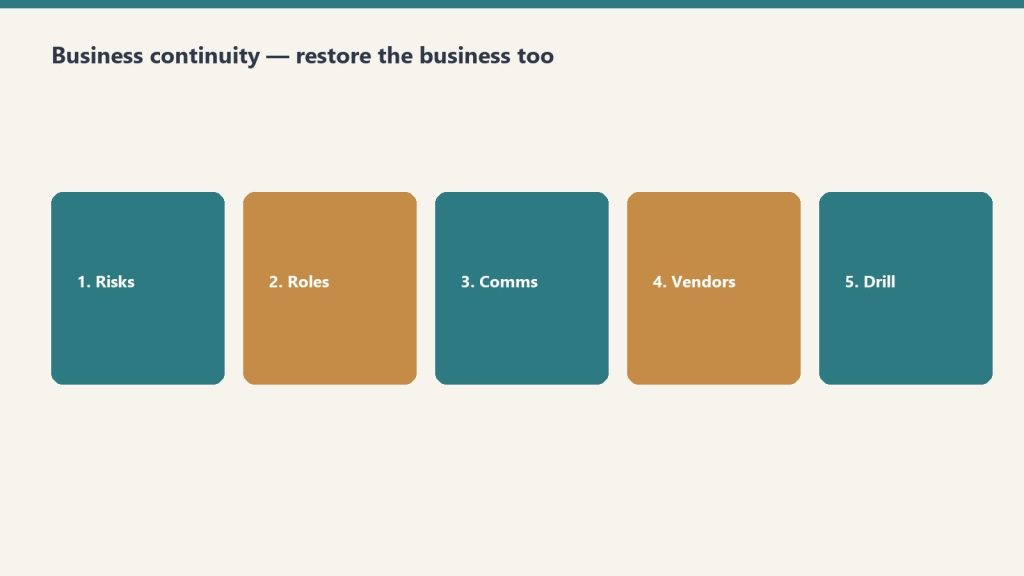
Build it in order — functions, risks, tree, vendors, drill.
Eleven sections. Do them in sequence. Each one is a how-to, not an essay.
Business Impact Analysis (BIA). Identify the functions that matter most and how long you can survive without them.
Risk Assessment. What threats exist, how likely, how severe.
Critical Functions and Recovery Objectives. RTO and RPO for every essential function.
Emergency Contact and Communication Tree. Who to call, in what order, through what channels.
Incident Response Procedures. Step-by-step for the first 24–72 hours.
Recovery Strategies. How to restore each critical function.
Facility and Infrastructure. Building systems, utility shutoffs, alternate locations.
Vendor and Contractor Directory. Pre-qualified emergency vendors with contracts on file.
IT and Data Recovery. Backups, cloud access, cybersecurity incident response.
Training and Exercise Log. Tabletop exercises, drills, lessons learned.
Plan Maintenance and Review. Keep the plan alive.
How to fill Critical Business Functions
Make one row per function. Restoration shops usually start with dispatch / first notice, mitigation crews, equipment, claims / documentation, billing, and payroll. Use the real names you use in the shop.
For each function, fill:
Function Name
Department. Operations, Finance / Accounting, Sales / Business Dev, IT / Technology, HR / People, Legal / Compliance, Customer Service, Facilities, or Executive
Affected Functions: which rows from the functions table this hits
Current Mitigation: what you already have
Additional Mitigation Needed: the gap
Insurance Coverage. Fully Covered, Partially Covered, Not Covered, Unknown
Owner, Last Reviewed, Notes
Start with the threats you have already lived: a freeze, a key tech leaving, a software outage, a shop fire, a Category 3 loss at your own building. Then add the ones you have not lived yet.
How to fill the Communication Tree
One row per person. Call Order 1 is the first call. If you cannot reach them, you call their Backup Person.
Fields:
Name, Role (Plan Owner, Executive Team, Department Head, Team Lead, Key Employee, Board / Ownership, or External: Legal, Insurance, IT, Restoration, Government, Media)
Phone – Primary and Phone – Alternate
Email, Location
Call Order (number)
Backup Person
Responsibilities in Crisis
Can Authorize Spending (yes/no)
Can Speak to Media (yes/no)
Print a copy. Put one in the go-bag and one at the shop. A tree that only lives in a laptop fails when the laptop is in a flooded office.
How to fill the Vendor Directory
Pre-qualify before you need them. Categories in the template: Restoration / Mitigation, General Contractor, Plumbing, Electrical, HVAC, Roofing, IT / Cybersecurity, Data Recovery, Security / Guard, Cleaning / Janitorial, Temporary Staffing, Equipment Rental, Document Recovery, Environmental / Hazmat, Legal, Insurance Adjuster, Other.
For each vendor: name, contact, phone, email, service area, 24/7 available, response time (Under 1 hour through Next day, or Unknown), contract on file, contract expiry, rate notes, rating (Excellent through Do Not Use), last used, notes.
If Contract on File is no, that is this week’s homework, not a crisis-day task.
How to run a tabletop (Training & Exercise Log)
Tabletop drill: the log proves you trained, not just wrote.
A BCP you have never practiced is a draft. Log every exercise.
Type. Tabletop Exercise, Walk-Through, Functional Drill, Full-Scale Exercise, Training Session, or After-Action Review
Scenario: the disaster you simulated
Key Findings: what worked, what failed, what surprised you
Action Items: specific improvements
Status. Scheduled, Completed, Cancelled, Action Items Open, All Actions Closed
Next Exercise Due
Pick one P1 function and one High risk. Walk the first 24 hours out loud with the people on the tree. Write what broke. Close the action items before the next review date.
The other sections, short
Incident response (first 24–72 hours): who declares the incident, who calls the tree, who talks to staff and customers, who authorizes spend, where you meet if the shop is unusable.
Recovery strategies: one paragraph per P1/P2 function. Point at the Alternate, the Systems Required, and the vendor who can stand it up.
Facility: shutoff locations, generator, alternate location, key box, who has after-hours access.
IT and data: where backups live, who can restore, what happens if email or the CRM is down, how you handle a cyber incident without guessing.
Maintenance: review date on the header is a real date. After any real incident or any exercise, bump the version.
If you want the packaged Notion workspace
You can build every table above in a spreadsheet. Buy Now is the Notion duplicate with the plan page and the five databases already built (Critical Business Functions, Risk Assessment, Emergency Contact & Communication Tree, Vendor & Contractor Directory, Training & Exercise Log). Delivered by email after checkout. Same Square button at the top of this page.
Secure checkout via Square — all major cards accepted
You can copy this method and do it yourself. Audit where the business depends on you. Build a bench. Run a 12-week plan to step back. Buy Now is the packaged bundle: five Notion tools plus the matching Claude skills, so you are not assembling the doer-to-leader system from blank pages.
This is the premium tier of the Restoration Leadership Toolkit. For owners serious about getting out of the truck, and eventually building something they can sell. The full system: audit, bench, 90-day plan, succession stress test, and the 1-3-1 handoff.
What’s in the kit
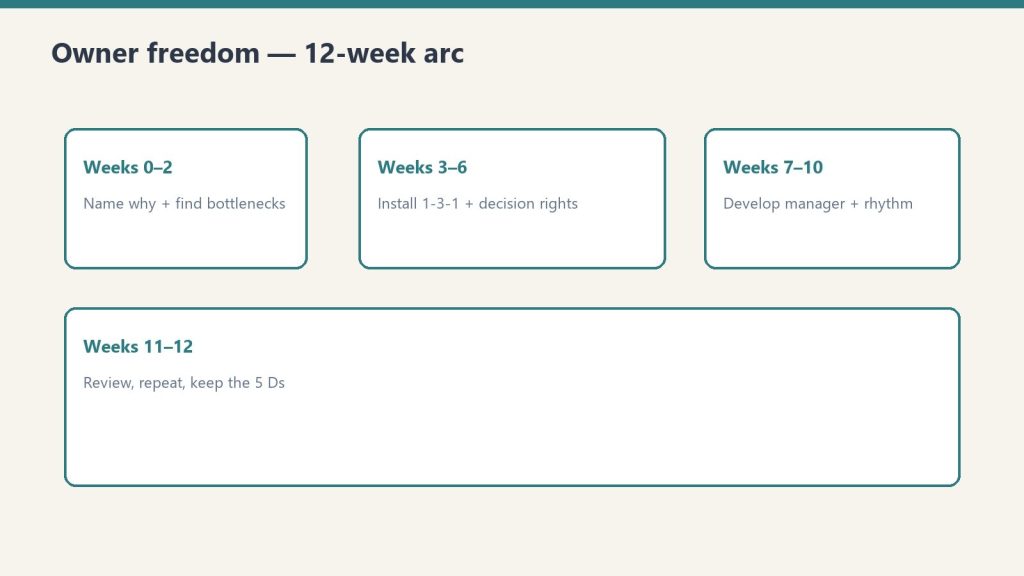
A 12-week arc from naming why to review and repeat.
Owner Dependency Audit
Restoration Leadership Bench Builder
90-Day Doer-to-Leader Transition Plan
5 Ds Succession Risk Checklist
1-3-1 Delegation Worksheet
The matching skills from the Leadership Claude Edition: owner-dependency-audit, leadership-bench-builder, doer-to-leader-90-day, succession-5ds-checklist, delegation-1-3-1.
Run them in this order. The 90-day plan is the spine. The other four feed it.
Week 0: name why you are stepping back
Before Week 1, write three lines:
My #1 reason to step back (what I would do with the time)
The one person I am betting on as my first real manager
Start date / target Week-12 date
Block 30-45 minutes every Friday. Do not skip ahead. Each phase sets up the next.
Weeks 1-2: identify the bottlenecks
Run the Owner Dependency Audit. Rate Low / Med / High across nine areas: sales, production, finance, customer-issue resolution, hiring, vendor relationships, estimating / project management, emergency response, decision rights. Scoring: Low = 1 (runs without you; a real backup has done it), Med = 2 (limps; backup needs you on call), High = 3 (stops cold). Total is 9-27.
For each area write: what happens if you are gone 30 days, who the backup is today, and what would have to be true for this to be Low.
Then fill a Decision-Rights Map. Starter rows: approve a job estimate over $25k; authorize overtime / call-in crew; issue a refund or credit; hire or fire; approve a vendor / sub payment; take an out-of-area or unusual job; sign a contract or insurance scope; pull a crew off one job for another; spend on new equipment; set or discount a price. Who decides today vs who should.
End of the phase: a written top-3 bottleneck list, and the team knows the shift is coming. Tell them: “I’m working a 90-day plan to push decisions down. Expect me to hand more back to you.”
For one full week, tally every interrupt for a decision. Sort into Delegate now / Delegate after training / Keep (truly owner-only).
Weeks 3-4: install 1-3-1
1-3-1: one problem, three options, one recommendation.
Stop being the answer key. The old way: “The dehu on Maple St died. What do you want me to do?” You just took back the problem, the thinking, and the decision.
The 1-3-1 way:
1 issue. The fork in the road, one or two sentences. Not the whole story.
3 real options. Each with pros, cons, and rough cost or effort. “Do nothing” can be one when it is honest.
1 recommendation. The option they would pick if it were their call, and why in one line.
A default. What they will do if they do not hear back by a deadline, so the job does not stall.
When someone brings a raw problem, ask: “What are your three options, and which do you recommend?” Then wait. Run at least five real 1-3-1 conversations this phase. Approve the recommendation whenever it is reasonable. Note who takes to it. That is a signal for your manager pick.
Phase done when at least one person is bringing 1-3-1s without being reminded.
Weeks 5-6: write decision rights
List the 10-15 recurring decisions (refunds, equipment, scheduling, scope changes, hiring, pricing exceptions). For each: a dollar or scope threshold people can decide under without asking you, and who owns it when you are not in the room. Walk the team through it: “Under this line, you don’t need me. Decide and tell me after.”
Hand off one decision completely this phase. Do not take it back.
Weeks 7-8: develop one manager
Weeks 7–8: develop one manager — teach, don’t just assign.
Open the Bench Builder. One row per key function. Fields: Role, current owner, future-leader candidate, backup depth (None / Thin / Solid), key skill gaps, 90-day development action (observable: shadow X, own Y file end-to-end, run Monday huddle), delegation plan, accountability rhythm (Weekly / Biweekly / Monthly), status (Identified / Developing / Ready). A blank candidate is itself a finding.
Go deep on ONE person. A single real manager beats five people you are “keeping an eye on.” Have the conversation: “I want to grow you into running X.” Hand them one area end-to-end. Set a weekly 30-minute 1-on-1 and protect it. Let them make a real decision. Coach the outcome instead of grading it.
Weeks 9-10: accountability rhythm
Stand up a weekly 15-minute huddle with a fixed agenda: numbers, jobs at risk, who needs what. Pick 3-5 numbers the team reviews every week (jobs in WIP, days-to-dry, AR, callbacks, leads). Someone other than you owns each number. Have your developing manager run the huddle at least once while you sit in.
Hold one real accountability conversation this phase. Issue, behavior that needs to change, what has already been allowed, the expectation, the consequence or support, what success looks like in 30 days. About the work, not the person.
Weeks 11-12: review and repeat
Re-run the Dependency Audit and compare to Week 1. Take a planned half-day fully off and note what broke. That is the next bottleneck. List what got delegated vs what bounced back, and why. Give the developing manager direct feedback. Raise one decision-rights threshold. Duplicate the 90-day page and start the next cycle.
Success at 90 days: a full day off without the phone melting; the team brings 1-3-1s; a written decision-rights list; one person owns one area end-to-end; a huddle someone else can run; a lower dependency score; next quarter’s target already named.
Run the 5 Ds while you are in it
Succession is a what-if-tomorrow problem, not a retirement problem. Check a box only if it is true and current today. The five:
Death. Will, funded buy-sell, key-person life, second check-signer, someone who can legally bind the company, a recoverable password place, a named person who can run production 30+ days.
Divorce. Separate vs marital property actually confirmed, commingling cleaned up, a valuation method in writing, operating cash structured so a personal dispute cannot freeze payroll.
Disease. Someone has actually run production on a vacation test. Backup estimator. Payroll / AP / AR without your hands. Disability and business-overhead coverage. A one-page interim chain-of-command.
Drugs / dependency. Dual approval over a dollar threshold. A second set of eyes on the books. No single point of failure, including you. A trusted advisor allowed to tell you the truth.
Departure / disaster. Tribal knowledge written down. Relationships not owned by one person. Off-site backups you have test-restored. A continuity plan for your own shop. Backup vendor / equipment list.
45 boxes. Count the blanks. 0-6 resilient; 7-15 moderate; 16-27 high; 28+ you are the company. Pick the three blank boxes that would hurt most if the D hit tomorrow. Name an owner and a date. This is an awareness tool, not legal, financial, or insurance advice. Use it to walk into the attorney, agent, and CPA prepared.
If you want the packaged kit
You can run this from the outline above. Buy Now is the bundle delivered by email after checkout: the five Notion pages (duplicate each so the master stays clean), plus the matching Claude skills if you want the interviews walked. Same Square button at the top of this page.
Coaching and operational tools only. Not legal or HR advice.
Secure checkout via Square — all major cards accepted
You can copy this method and do it yourself. Score where you are still the bottleneck. Install 1-3-1 so the next problem comes back as a recommendation. Walk the 5 Ds as a what-if-tomorrow check. Buy Now is the packaged bundle: three Notion tools plus the matching Claude skills, so you are not assembling the starter pack from blank pages.
The grab-and-go pack from the Restoration Leadership Toolkit. Three of the most-used tools, bundled. For restoration owners who just heard the doer-to-leader message and want something they can run this week, not a 12-week program on day one.
What’s in the pack
Conference pack: start with the bottleneck assessment.
1-3-1 Delegation Worksheet
Owner Bottleneck Self-Assessment
5 Ds Succession Risk Checklist
The matching skills from the Leadership AI plugin: delegation-1-3-1, owner-bottleneck-assessment, succession-5ds-checklist.
Run them in this order. The bottleneck names the constraint. 1-3-1 is the first habit. The 5 Ds is the exposure you do not want to discover the hard way.
1. Owner Bottleneck Self-Assessment
Find out where your company still depends on you. An owner bottleneck exists when growth, decision speed, and consistency are limited by your personal involvement in day-to-day decisions. You become both the most important and the most constraining person in the business.
Check the box for each statement that is true today. Count the checks in each section, then total them. Range is 0-25. Be honest. The value is in the truth.
Decisions only you make. Estimate / pricing approvals over a set dollar amount. Hiring and firing. Vendor choices. Which jobs you take. Refunds, credits, concessions.
Interruptions by department. Production calls daily. Office pulls you into billing or scheduling. Sales checks pricing before quoting. Techs call from job sites. Customer complaints land on you.
Recurring questions. The same operational questions every week. People wait for you. “Ask the owner” is the default. You re-explain the same processes. Things stall when you are unavailable.
Tasks that should be delegated. Estimates you could hand off. Scheduling / dispatch. Collections / AR. Ordering equipment. Work others could produce.
Areas with no backup. No one else can run production. Only you hold key carrier relationships. Only you see the full financial picture. No written SOPs for the things you do. If you are gone a week, something breaks.
Bands: 0-6 Mild (tighten the remaining gaps). 7-13 Moderate (you are the bottleneck in one or two areas; fix the worst one first). 14-19 Heavy (the business runs through you; start delegating now, deliberately). 20-25 Severe (you ARE the business; this is the #1 risk to growth and to an exit).
Write your top 3 to delegate first. For one full week after you score, log every interrupt for a decision. Sort into Delegate now / Delegate after training / Keep (truly owner-only). The department with the most checks is this quarter’s target. Install 1-3-1 there first.
2. 1-3-1 Delegation Worksheet
1-3-1 worksheet — force recommendations on the floor.
The old way (escalation): “Hey boss, the dehu on the Maple St job died. What do you want me to do?” You just took back the problem, the thinking, and the decision. That is three jobs.
The 1-3-1 way (delegation): “The dehu on Maple St died. Here are three options I looked at, here is the cost of each, and here is what I would do. Just need your yes.” You own one job: the decision.
1. One issue. The decision that is actually needed, in one or two sentences. Not the whole story. The fork in the road.
3. Three real options. Each with pros, cons, and a rough cost or effort. “Do nothing” can be one when it is honest. Stuck at two? Push for a third. Even “do nothing and revisit Friday” or “escalate to the carrier.”
1. One recommendation. The option they would pick if it were their call, and why in one line.
A default. What they will do if they do not hear back by a deadline, so the job does not stall waiting on you.
Explain the rule once, out loud. Pin the format where decisions get made (truck, office, group chat). When someone brings a raw problem, ask: “What are your three options, and which do you recommend?” Then wait. Run at least five real conversations. Approve the recommendation whenever it is reasonable. Resist solving it yourself, even when you are faster. Note who takes to it quickly. That is a signal for a future-manager pick.
The first few 1-3-1s will be lopsided. Three fake options, or a recommendation with no reasoning. Coach it. Do not grade it. Phase done when at least one person is bringing 1-3-1s without being reminded.
Worksheet fields if you are copying it: prepared by, date, job / account, urgency (Today / This week / No rush); the issue; three options (what it is, two pros, two cons, rough cost); the recommendation and what they need from you; the default deadline; owner sign-off (Approved as recommended / Approved with changes / Chose a different option / Let’s talk).
Owner gut-check before you sign: could this person have made this call without me? If yes, tell them so, and next time push it all the way down.
3. 5 Ds Succession Risk Checklist
5 Ds succession risk — decide what leaves with you.
Succession is not a retirement problem. It is a what-if-tomorrow problem. Check a box only if it is true and current today. Not “mostly.” Not “we talked about it once.” A box you want to be true is still a blank box. Half-true protections fail exactly when the D hits.
Death. Current signed will that names the business. Funded buy-sell if there are partners. Key-person life payable to the company. A second check-signer on file at the bank. Someone who can legally bind the company. Passwords in a recoverable place. A named person who can run production 30+ days. Spouse / heirs know who to call.
Divorce. Separate vs marital property actually confirmed, not guessed. Prenup, postnup, or buy-sell provision. Books not commingled. A valuation method in writing. Operating cash structured so a personal dispute cannot freeze payroll.
Disease. Someone has actually run production on a vacation test. Backup estimator. Payroll / AP / AR without your hands. Carrier relationships that will not collapse if you are unreachable. Disability and business-overhead coverage. A one-page interim chain-of-command with dollar thresholds.
Drugs / dependency. Dual approval over a dollar threshold. A second set of eyes on the books. No single point of failure, including you. A trusted advisor allowed to tell you the truth. Key roles documented and cross-covered.
Departure / disaster. Tribal knowledge written down. Relationships not owned by one person. Off-site backups you have test-restored. A continuity plan for your own shop. Backup vendor / equipment list.
Count the blanks. Published bands on the scored sheet: 0-6 resilient; 7-15 moderate; 16-27 high; 28+ you are the company. Pick the three blank boxes that would hurt most if the D hit tomorrow. Name an owner and a date. Re-run it every year, and after any life or business change. This is an awareness tool, not legal, financial, or insurance advice. Use it to walk into the attorney, agent, and CPA prepared.
What to do after the three
Take the top-3 bottleneck list into a 90-day doer-to-leader plan (Weeks 1-2 are this assessment). After 1-3-1 sticks, write decision rights so people stop defaulting to you out of habit. The 5 Ds blanks that are also “no backup” boxes on the bottleneck assessment are the same exposure. Name them once.
If you want the next layer after this pack: Leadership Readiness Kit (checklist, scorecard, planner, 1-3-1) or Owner Freedom Kit (audit, bench, 90-day, 5 Ds, 1-3-1).
If you want the packaged pack
You can run the three tools from the outline above. Buy Now is the bundle delivered by email after checkout: the three Notion pages (duplicate each so the master stays clean), plus the matching skills if you want the interviews walked. Same Square button at the top of this page.
Coaching and operational tools only. Not legal, financial, insurance, or HR advice.
Secure checkout via Square — all major cards accepted
You can copy this method and do it yourself. Stress-test the company against Death, Divorce, Disease, Drugs/dependency, and Departure/Disaster. Check a box only if it is true and current today. Buy Now is the packaged Notion checklist with the scored sheet and mitigation notes, so you are not rebuilding the 5 Ds from a blank doc.
Succession is not a retirement problem. It is a what-if-tomorrow problem. The blank boxes are your exposure. Honesty rule: a box you want to be true is still a blank box. Half-true protections fail exactly when the D hits.
How to run it
Run the 5 Ds as a risk checklist — not a slogan.
Walk each of the 5 Ds. Check a box only if it is true and current today. Not “mostly.” Not “we talked about it once.”
Read the mitigation note under each D. That is the concrete fix for the boxes you left blank.
Count the blanks. Find your band. Pick your top 3 shore-ups. Name an owner and a date.
Re-run it every year, and immediately after any life or business change: a new partner, a marriage or divorce, a major new account, an acquisition, or a health scare.
1. Death. If you died tomorrow
If you were gone permanently, could the business survive the week, pay people, and not get sold for scraps?
There is a current, signed will and the business is named in it.
There is a buy-sell agreement (if there are partners) defining who buys your share, at what price, and how it is funded.
Key-person life insurance exists on you, payable to the company, sized to cover payroll plus obligations while it stabilizes.
At least one other person can sign checks (signatory on file at the bank, not just “knows the login”).
Someone other than you can legally bind the company (contracts, AOBs, subcontracts). Documented authority, not assumed.
Your spouse / heirs know who to call and where the documents live.
Passwords, accounts, and licenses are in a recoverable place a trusted person can reach.
A named person can run production and keep jobs moving for 30+ days without you.
Mitigation. Get a buy-sell drafted by an attorney and fund it with life insurance. An unfunded buy-sell is a wish, not a plan. Add a second check-signer and a documented officer who can bind the company. Put credentials in a password manager with an emergency-access contact. Write a one-page “if I am gone” sheet. Tell your spouse where it is.
2. Divorce. If your marriage ended
A divorce can put your ownership stake, your cash, and your focus in play. A contested split can starve a cash-hungry shop.
You know whether the business is separate vs marital/community property in your state. Confirmed, not guessed.
There is a prenup, postnup, or buy-sell provision that addresses ownership in a divorce.
The business is not commingled with personal finances (clean books, separate accounts, documented owner pay).
A current, defensible valuation (or a method to set one) exists.
Your spouse’s role and any claim (employee, owner-on-paper, guarantor) is documented.
Operating cash and credit lines are structured so a personal dispute cannot freeze payroll.
Mitigation. Talk to a business attorney about a postnuptial or a buy-sell clause that fixes ownership treatment now, while things are calm. Clean up commingling. Establish a valuation method in writing. Calm is the only time you can do it.
3. Disease. If you were medically out for 30-90 days
Not death. A heart attack, a serious diagnosis, a bad accident. You are alive but out. Does the company idle or run?
Someone can run daily production and dispatch without you for 30, 60, 90 days. Named, and they have actually done it (vacation test).
Estimates still get written and approved if you are the estimator. A backup exists.
Payroll, AP, and AR keep running without your hands on them.
Carrier / TPA relationships will not collapse if you are unreachable. Someone else has the relationships and portal access.
You carry disability income insurance so household income does not depend on you working.
Business overhead expense (BOE) insurance or a cash reserve can cover fixed costs while you recover.
A simple interim chain-of-command is written down, with dollar/decision thresholds.
Mitigation. Run a real “two weeks off” test this quarter and watch what breaks. Cross-train a backup estimator. Look at disability and Business Overhead Expense coverage. Write a one-page interim chain-of-command with decision thresholds.
4. Drugs / dependency. If you (or a key person) became unreliable
The uncomfortable one. Substance issues, gambling, burnout, a mental-health crisis. Yours or a key person’s. The risk is a slow decline, not a clean exit.
No single person (including you) is a single point of failure whose impairment would quietly sink the company.
Financial controls exist (dual approval over a threshold, reconciliations, a second set of eyes on the books).
A trusted advisor or peer would tell you the truth if your performance was slipping, and has standing to.
Key roles have documented duties and cross-coverage.
There is an employee assistance path / clear policy for getting a valued person help without an instant, messy termination.
If a key person had to be removed fast, you could. Access and knowledge are not locked solely in their head.
Mitigation. Dual approval over a dollar threshold, monthly reconciliations, a second set of eyes on the books. Document and cross-train so no one person can sink a function. Put a real advisor in your corner who is allowed to tell you the truth. Have a humane path to help and the access to act fast if you must.
5. Departure / disaster. If a key person walked, or the building burned
Two faces of the same risk: a critical person quits, or a fire/flood/storm/cyber event takes out your office, fleet, data, or a major account overnight.
Production runs if your best PM or lead tech quits Friday. Their knowledge is documented, not tribal.
Key customer and carrier relationships are not owned by one person who could walk and take the book with them.
A non-solicit / non-compete / confidentiality agreement is in place where appropriate and enforceable in your state.
Critical SOPs, pricing, and account knowledge are written down. Losing one person does not erase how the work gets done.
Data is backed up off-site (estimating files, photos, accounting, contacts) and you have actually tested a restore.
You have a business continuity / disaster plan for your own office or fleet. You restore others. Are you covered?
Business-interruption insurance would replace income if you could not operate for weeks.
A backup vendor/equipment plan exists so one lost truck, warehouse, or sub does not stall live jobs.
Mitigation. Document tribal knowledge. Spread customer and carrier relationships across more than one person. Put reasonable non-solicit/confidentiality agreements in place (attorney confirms enforceability in your state). For disaster: off-site backups you have test-restored, a written continuity plan for your own shop, business-interruption coverage, and a backup equipment/vendor list.
Overall exposure rating
Overall exposure rating after all five Ds.
Count your blank boxes across all 5 Ds. The packaged checklist scores 45 boxes. Find your band:
0-6 Low / Resilient. The business could survive a major shock to you. Maintain it. Review annually and after any big change.
7-15 Moderate. You would survive a short absence but a permanent loss would hurt. Close the highest-stakes gaps (Death + Disease) first.
16-27 High. A 30-day absence would seriously disrupt the company. A permanent loss could end it. Treat this as a current-quarter priority.
28+ Critical / You are the company. If something happened to you tomorrow, the business likely does not survive intact. Start the top-3 shore-ups this week.
Write three lines: blank-box total, exposure band, and which D scored worst.
Top 3 shore-ups
Top 3 shore-ups — write the next actions.
Pick the three blank boxes that would hurt most if the D hit tomorrow. Be specific. Name an owner. Set a date.
Most shore-ups need one of these professionals: a business / estate attorney (buy-sell, will, non-competes, postnup); an insurance agent (key-person life, disability, BOE, business-interruption); a CPA / financial advisor (valuation, financial controls, continuity reserve).
This is an awareness and planning tool, not legal, financial, or insurance advice. Use it to find your gaps and to walk into the attorney, agent, and CPA prepared.
If you want the packaged checklist
You can run the five lists on a legal pad. Buy Now is the Notion page delivered by email after checkout. Duplicate it (··· → Duplicate) so the master stays clean. The boxes, the mitigation notes, the score table, and the top-3 shore-ups are already laid out. Same Square button at the top of this page.
Pairs with the Owner Dependency Audit (what breaks if you vanish 30 days) and the Restoration Leadership Bench Builder (who can run production when a D hits). Matching Claude skill: succession-5ds-checklist.