Tag: AI Integration

  • The Rise of the Curation Class

    The Rise of the Curation Class

    This is what I’m building for myself, and what I’m building for the people I work with. It’s a long essay because the shift it describes is large and the through-line matters. The ten images below aren’t decoration — they’re the spine. Each one is a moment in a life that doesn’t fully exist yet but is closer than most people realize.

    I want to start where the technology starts, which is not in a factory.

    The man in the image above is finishing a wearable by hand. It’s an AR ring — leather and brushed aluminum, the band sized to his client’s wrist, the materials chosen because his client cares about how the thing feels at 6 AM on the day she has to present to a board. Behind him are leather rolls and fabric swatches that wouldn’t look out of place in a coachbuilder’s atelier. To his right are the kind of objects you’d find in a hardware prototyping lab — chassis teardowns, a development tablet, AR glasses on a stand. The corkboard above the bench has automotive interior sketches and material studies pinned next to each other.

    What that workshop is, in operational terms, is a luxury goods atelier and a hardware lab collapsed into one room. The collapse is the thing. The line between “this is bespoke craft” and “this is consumer electronics” has been melting for a decade, and the workshop above is what it looks like once that line is gone.

    I’m building for the people who will live on the right side of that collapse. The people who don’t want a phone — they want an instrument that fits the way they think. The people who have stopped trusting mass-produced anything and started looking for the small workshop, the verified maker, the device tuned to them specifically. That’s the Curation Class. They’ve existed in clothing for a hundred years and in cars for sixty. They’re now showing up in technology, and the technology is the part of the story I have to build.

    This essay is about what their daily life looks like when the ecosystem actually works. Then it’s about why I think this is where things go from here, and what I’m doing about it.

    Introduction to the instrument

    Meet the user. She’s the one who commissioned the work in the hero image. She’s an architect — the corkboard behind her is a hint, the mood board with fashion sketches and house renderings tells you something about her aesthetic taste. The coffee cup has a small leather wrap and a logo I won’t try to read; the flower in the vase is past its bloom but she hasn’t replaced it yet because she likes it that way.

    She’s just opened the ecosystem the artisan was finishing. The hologram floating above the ring spells out what she’s getting: “Vibe Curation, Concierge Cred Network, Curated Intelligence.” The version number is v1.4, which tells you the device has been iterated. This isn’t a Kickstarter prototype. This is a maintained system that updates the way her car updates and her phone updates, except it updates to fit her specifically rather than to fit the median user.

    The phrase “Personalized Ecosystem” deserves to be said carefully because it gets thrown around by everyone selling anything. What’s on her desk is different. It’s not a feature flag set to her preferences. It’s not a recommendation algorithm tuned to her purchase history. It’s an ecosystem in the literal sense — an interconnected set of devices, services, vendors, and contexts that have been wired together around her cognition, her body, her schedule, her taste, and the people she trusts. The wearable is the access token. The ecosystem is everything the token unlocks.

    The reason this matters is not that the technology is impressive. It’s that the unit of value is changing. For a generation, the value was in the device. For the next generation, the value is in the connections between the devices and the person who wears them. You don’t buy the ring. You buy your way into the ecosystem that the ring represents. The ring is just the part you can touch.

    This is what I’m building toward. Not the device. The connections.

    The day starts with a small ritual
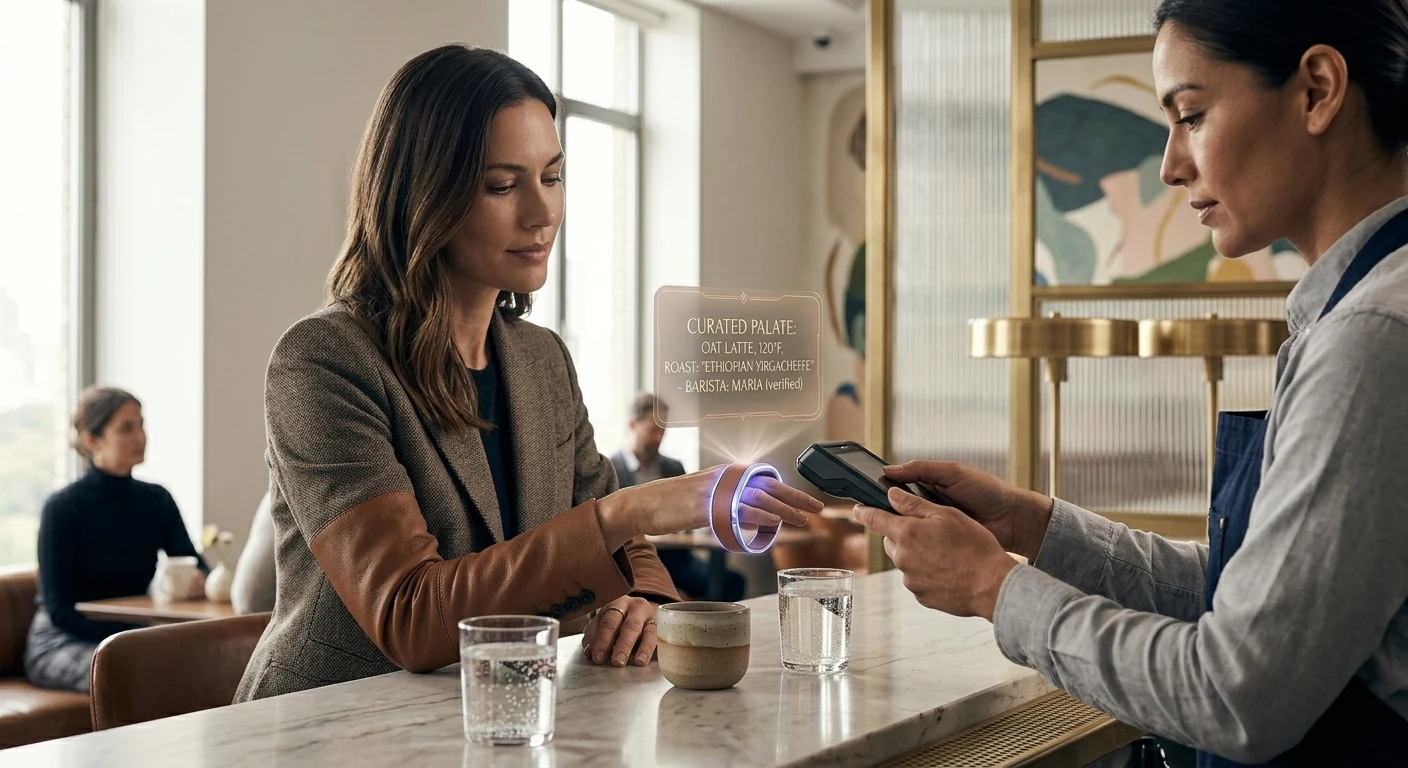
    The first time the ecosystem touches her day, it’s a coffee. She’s at a café — bright, marble-countered, the kind of place that does third-wave coffee and serves it in a small ceramic cup. The barista is named Maria. The hologram above her ring is showing the order before Maria has had to ask: oat latte, 120°F (which is a specific temperature most people don’t know to ask for), Ethiopian Yirgacheffe roast.

    The detail that matters is the parenthetical: “Maria (verified).”

    This is the Concierge Cred Network. Maria isn’t just a barista. She’s been verified by the ecosystem — pulled up by name because she’s the one who makes the coffee the way the subject likes it. If Maria’s not working today, the ecosystem might suggest a different café entirely rather than route the order to a barista the system doesn’t trust to nail the temperature. The vendor relationship has become specific to the human, not the brand.

    I want to name something about this image that the casual viewer might miss. The subject is barely looking at the ring. Her gaze is on Maria. The interaction is human; the technology is in the background doing the work that makes the interaction friction-free. When the ecosystem works, it disappears. It doesn’t ask her to type her order, doesn’t ask her to dig out her phone, doesn’t ask her to remember which roast she likes. It does that work upstream. What she’s left with is a moment of eye contact and a coffee that’s right.

    This is, in my experience, the part most technology gets wrong. The goal isn’t to put more interface in front of people. The goal is to remove the interface from places it doesn’t belong. The Curation Class is willing to pay a premium for that subtraction.

    The home she designed for herself
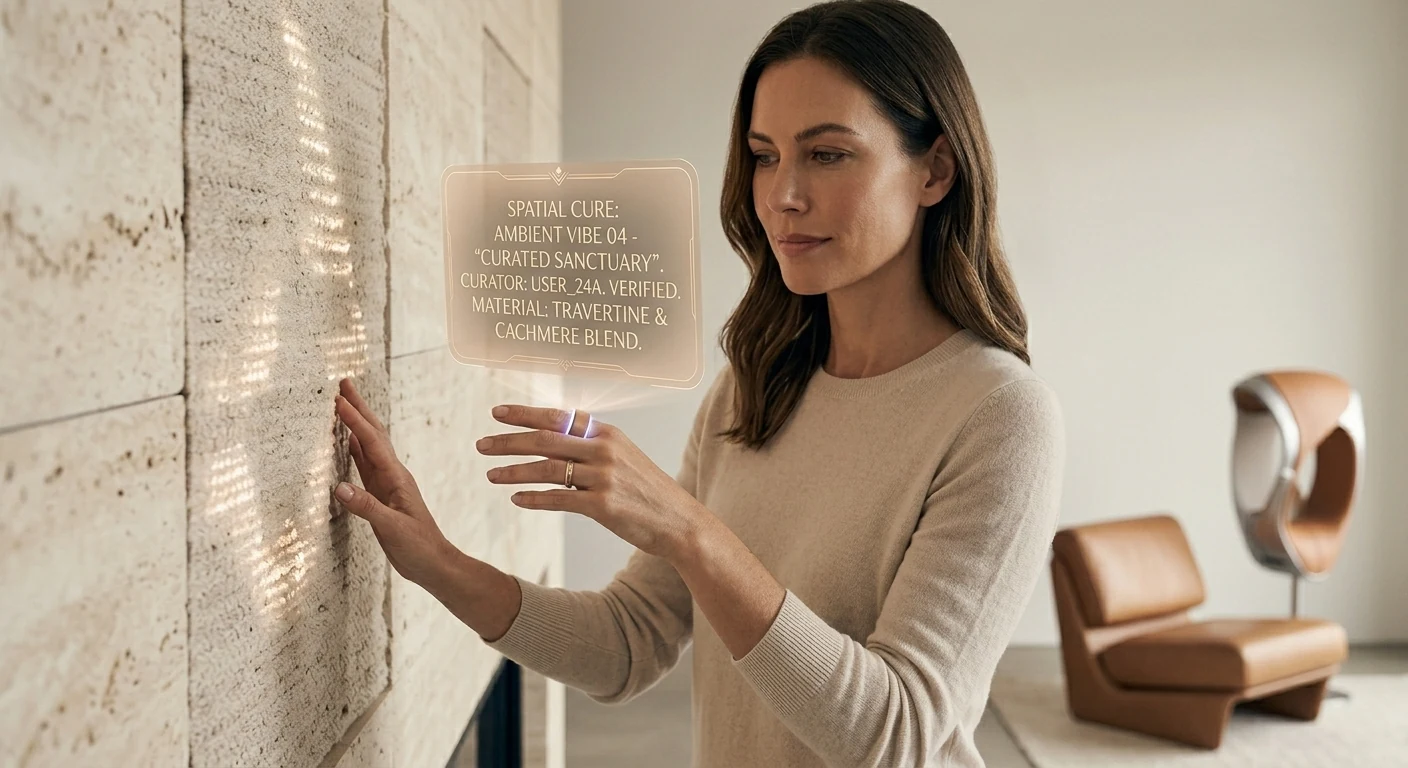
    Now she’s home. The wall she’s touching is travertine — real stone, the kind with porosity you can feel under your fingertips. The hologram tells you the room is in a “Curated Sanctuary” mode and lists the materials: travertine and a cashmere blend. The room is calm. The light is afternoon. The chair is leather and looks like it’s been broken in for years.

    The detail I want to pull forward is the curator field on the hologram: “User_24A. Verified.”

    She is the curator. The “Verified” tag isn’t a brand verification. It’s her own. The space was designed by her, for her, and the ecosystem is tracking that fact. The wall, the light temperature, the fragrance the room is currently running, the sound dampening, the chair — all of it is a vibe she composed and the ecosystem is just executing.

    This is where the Curation Class diverges most sharply from the mass-luxury class that came before it. The old luxury class hired Robert Mion or Kelly Wearstler to curate for them. They bought the taste of someone whose taste was for sale. The new class makes the curation themselves and uses the ecosystem to remember the choices and reproduce them. The taste isn’t borrowed. It’s authored. The ecosystem is what makes authored taste tractable at the level of a daily-running home.

    I’ll be honest about why this matters to me operationally. When I think about what I’m building for my best clients — the ones who are paying for something more than a website or a content pipeline — I’m not building campaigns. I’m building the systems that let them author their own taste and reproduce it at scale. The Notion structure is part of that. The content stack is part of that. The way we wire models and routing and observability is part of that. None of it is technology for its own sake. All of it is the infrastructure of authored taste.

    The room above is what that looks like when it’s done.

    The work she actually does

    The studio above is hers. The building is hers too — she’s an architect, and “The Veda Residences” is the project she’s leading. The hologram shows iteration v9.2, which means this design has been worked through. The physical model on the leather pad is the build she’s referring to when the holographic version isn’t enough.

    A few things to notice. The drafting table has a real architect’s set square on it. The materials board has fabric and stone swatches that look like they were pulled from suppliers she trusts. The two colleagues in the back are visible through a glass partition; the studio isn’t a solo operation. It’s a small firm.

    What the ecosystem gives her here isn’t draft generation. It’s not “AI did the design.” The design is hers, plus her team’s. The ecosystem gives her something subtler — the ability to iterate v9.2 against her own internal coherence rules, her own taste profile, her firm’s body of work, the structural and material verifications she requires. She is still making every decision. The ecosystem is making every decision legible and reproducible.

    This is the part I think most people get wrong about where AI is going. They think it’s going to do the work. It’s not. It’s going to make the work expressible. The architect above doesn’t need an AI to design her building. She needs an instrument that lets her ask “would this material be coherent with the rest of my catalog?” and get an answer with citations. She needs the ecosystem to be the silent third party that holds her own standards more reliably than she can hold them in her head across a four-month project.

    The building she’s designing in this image, by the way, is the one she’ll be standing inside in the last image of this essay. Hold that. We’ll come back to it.

    Recovery, the part the ecosystem treats as work

    After the work, the recovery. The image above is what wellness looks like when it stops being a separate vertical and becomes a function of the same ecosystem that runs the rest of the day.

    The hologram says “Vibe State Recovery (post-design cycle).” That phrase is doing real work. The ecosystem knows she just spent eight hours on iteration v9.2 of the building project. It knows what that does to her body — the cortisol curve, the shoulder tension, the eye strain. It’s prescribing a recovery protocol that’s specific to what she just did. Not a generic massage. Not a generic meditation. A recovery state tuned to a design cycle.

    “Second Brain (User_24A): Verified Biometrics” is the connective tissue here. The wellness system isn’t reading her body from scratch. It’s reading her body in the context of everything else the ecosystem knows about her — her schedule, her work, her sleep history, her stress baseline, her medication if any, her preferences for what kinds of intervention she’ll accept. The Second Brain in this image isn’t a metaphor. It’s literally the persistent memory layer that lets every part of the ecosystem behave intelligently with respect to every other part.

    If I had to name what I think the single biggest unlock of the next ten years will be, it would be this: persistent personal memory that crosses contexts. Right now your fitness app doesn’t know what your therapist said. Your calendar doesn’t know what your sleep tracker measured. Your travel booking doesn’t know your spouse’s allergy profile. Each of these systems is islanded. The Curation Class will be the first cohort to live in a world where those islands are connected, and the connection will be the persistent personal Second Brain that they own — not a vendor’s database. Theirs.

    This is, again, why I do what I do. Not because I want to sell people on “AI wellness.” Because the architectural pattern of a persistent personal Second Brain, owned by the human, is the foundation everything else rides on.

    A deeper intervention

    The session continues. She’s now holding a more specific tool — a neural stim device that’s been issued to her, the kind of thing that has to be verified for her specifically because applying it wrong would do real damage. The hologram says “Neural Pathway Targeted: Verified.” The ecosystem isn’t just letting her use the device. It’s verifying that the protocol is appropriate for her at this moment.

    The phrase “Vedic Regeneration” is doing some cultural work here. I’m not going to oversell it — different people will read different things into it. What I’ll say operationally is that the Curation Class tends to be polyglot about where its wellness traditions come from. They’ll combine cold plunges, somatic therapy, Ayurvedic principles, and neural-feedback hardware in the same week without feeling the contradictions. The ecosystem is what makes that polyglot stance tractable — it can hold the protocols from five different traditions and apply the one that fits the moment.

    The reason a verification layer matters is harder. We’re entering an era where people will be doing more sophisticated interventions on their own nervous systems than ever before. Some of those interventions will be safe. Some won’t. Some will work for one person and harm another. The ecosystem above is doing what regulators won’t be able to do for another fifteen years: assuring that a specific intervention is appropriate for a specific person on a specific day. The verification isn’t bureaucratic. It’s the thing that lets her safely run the protocol at all.

    I’ll name the discomfort here. There’s a version of this that ends badly — concentration of biometric data, vendor lock-in, dependence on a system that someone else can shut down. That risk is real. The mitigation isn’t to refuse the technology. The mitigation is to own the Second Brain rather than rent it. Which is part of why I’m building the way I’m building. The architecture matters. The architecture is the politics.

    The commute as part of the system

    She’s in the car now. It’s autonomous — the road is moving but her attention is on the floating dashboard. The destination on the hologram is her own design studio at 11 Rivoli. ETA fourteen minutes.

    The phrase that earns its keep is “Flow State Curation.” The car isn’t just transporting her body. The car is preparing her cognition for what’s about to happen at the studio. Audio profile tuned. Cabin temperature optimized. Lighting on a curve that brings her up into focus rather than letting her crash at the end of the recovery session. The fourteen minutes between wellness and work aren’t dead minutes. They’re a transition that the ecosystem is actively shaping.

    When I look at this image I think about how much of contemporary life is wasted in transitions. The Curation Class won’t tolerate it. Their time is their most expensive asset, and they’re willing to pay to have transitions be productive rather than evaporated. The autonomous car is part of that. So is the ring. So is the wellness suite. So is the studio. None of them in isolation is interesting. Stitched together they are an enormous economic shift.

    The other thing worth naming: the car is bespoke. “Smart cashmere & polished aluminum, verified.” This is not a leased Tesla. It’s a vehicle whose interior materials have been chosen for her, verified by the maker, and integrated into the ecosystem in a way that lets the car participate in the flow state curation rather than fight it. The market for that kind of vehicle barely exists today. It will exist in ten years, and it will be larger than people think.

    Collaboration at scale
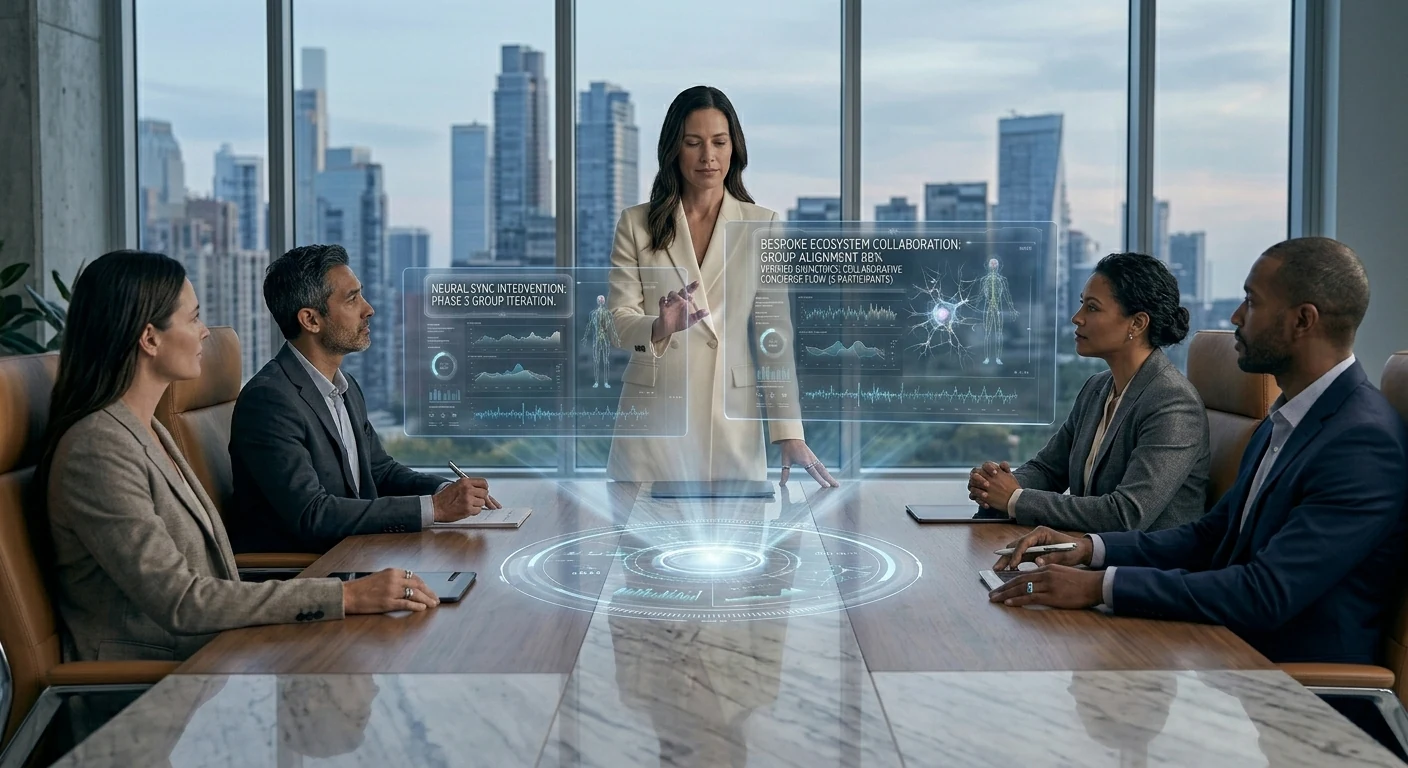
    The studio meeting. Four colleagues, a marble table, a wall of glass onto the city. She’s standing because she’s leading.

    The hologram says “Group Alignment 88%.” That’s the part I want to pull forward. The ecosystem isn’t just running her individually — it’s running a measurement of how aligned her team is on the current iteration of the project. Eighty-eight percent is high. Twelve percent is the gap she has to close in the room.

    This is where the Curation Class moves from being a personal lifestyle to being an operational advantage. A team that can see its own alignment in real time, that can identify the twelve percent of disagreement and address it directly rather than letting it metastasize through three more meetings — that team will outperform a team that can’t. The ecosystem is doing the work of measurement that used to require an executive coach in the room. Now it’s just there, on the table, visible to everyone.

    I want to be careful here. There’s a version of this where the alignment metric becomes a cudgel, where dissent gets flattened by the pressure to push the number up. That’s a failure mode and the ecosystem above can absolutely become it if the culture around it is wrong. The fix isn’t to refuse the measurement. The fix is to make the measurement legible enough that disagreement is preserved as signal rather than erased as noise. The ecosystem can do that. Whether the team uses it that way is a cultural question, not a technological one.

    The technology, by itself, is neutral. The culture decides whether it’s surveillance or instrumentation. I’m building for the latter.

    The arc closes

    This is the image that earns the whole essay.

    She’s standing inside the building. The Veda Residences — the project that was iteration v9.2 in the studio scene — is now built. The curved concrete, the fluted glass, the composite timber that the hologram in that earlier scene specified, all of it has gone from model to reality. She designed the room she is now living in. The hologram above her is reporting that the sanctuary is “realized” and that the alignment is at 100%, which is the team-level analog of the personal sanctuary she was tuning at home.

    She designed her own world into existence. The ecosystem made the through-line tractable across nine months of design iterations, two construction phases, fifteen vendor relationships, three biometric recovery cycles, a hundred small daily curations, and the original choice — three years earlier — to commission a hand-finished AR ring from a maker who works with leather and aluminum on a single bench.

    The Curation Class is not, fundamentally, a class that consumes better products. It’s a class that authors its own life and uses an ecosystem to make the authorship coherent across time. The wearable, the home, the studio, the wellness suite, the car, the team, the building — these are all expressions of one continuous act of authorship. The technology is the substrate. The taste is the act. The realization is the proof.

    Why I’m building for this

    I started this essay by saying it’s about what I’m building for myself and my clients. I want to close on that more directly.

    I am not building generic AI tools. I am not building “content automation.” I am building the operational substrate that lets a person — a founder, an operator, an artist, an architect — author their own coherent system across time and have the system reliably express the authorship. That’s the Notion architecture. That’s the model routing layer. That’s the content pipeline. That’s the persistent memory. None of it is interesting in isolation. All of it is interesting because of what it adds up to.

    The person I am building for is the architect above. She doesn’t know me. She might not exist yet. But the infrastructure that makes her life tractable is the infrastructure I am wiring this week, this month, this year. Every client I take on is a step toward making the substrate real. Every article I publish is a way of describing the future I’m trying to bring forward. Every system I document is a piece of the operating manual for the Curation Class.

    I think this is the work. I think it’s where the next ten years are. I think the people who get this right will look back at the current era — when AI was being used to mass-produce the same five blog posts and the same five product descriptions — the way the Bauhaus generation looked back at Victorian ornament. They will see the gap between what was being built and what could have been built, and they will name it.

    I’m trying to be on the right side of that gap.

    The image above — the woman standing inside the building she designed, with a glass of water, watching the city she optimized — is what I’m working toward. Not for her specifically. For the version of that life that becomes available to anyone who decides to author it and has the infrastructure to do so. That’s the Curation Class. That’s the brief I’m operating under. That’s the future I’m building.

    It’s already starting. The man in the first image is finishing the ring by hand. The system is being built. The class is forming. The rest is execution.

  • How to Connect AI Platforms to Your Notion Everything Database: OpenAI, Perplexity, Grok, Mistral, and Zapier

    Last refreshed: May 15, 2026

    Update — May 15, 2026: On May 13, 2026, Notion shipped the Notion Developer Platform (version 3.5), with Claude as a launch partner. The platform adds Workers, database sync, an External Agents API, and a Notion CLI. For the full breakdown of what changed and what it means for the Notion + Claude stack, see Notion Developer Platform Launch (May 13, 2026). For the underlying operating philosophy, see The Three-Legged Stack: Notion + Claude + Google Cloud.

    What Is the Notion Everything Database?
    The Notion everything database is the concept of using Notion as an agnostic, structured data layer beneath your AI workflows—storing context, outputs, tasks, and business intelligence in one place that any connected AI platform can query, write to, and reason over. This guide covers how each major AI platform connects to that layer, what the connection actually enables, and where the real-world limits are.

    In the competitive series we published earlier, one theme kept resurfacing: every AI platform that wants to be genuinely useful in your workflow eventually needs a place to store and retrieve structured context. Memory. History. The institutional knowledge that makes AI useful beyond a single session.

    For teams that have already built their operations on Notion, the question isn’t whether to use an everything database—you already have one. The question is how each AI platform connects to it, what that connection actually enables in practice, and where the real limits are.

    This guide is the answer. We’ve mapped the actual integration path for each of the five platforms in our series—OpenAI, Perplexity, Grok, Mistral, and Zapier—against Notion’s current API and MCP capabilities. No hypotheticals. No aspirational features. What works today, what requires workarounds, and what to watch for as these integrations mature.

    📚 This Is Track 2 of the Everything App Series

    Track 1 analyzed each platform’s everything app ambitions. Track 2 is the implementation layer—how to actually connect them to your Notion database.

    The Foundation: Notion’s Official MCP Server

    Before covering individual platform integrations, it’s worth establishing what Notion has actually built for AI connectivity—because it changes the integration picture significantly.

    Notion ships an official, hosted MCP (Model Context Protocol) server. This is not a third-party hack or a community project. It lives at developers.notion.com/docs/mcp, is maintained by the Notion engineering team, and is open-source at github.com/makenotion/notion-mcp-server. Version 2.0.0 migrated to the Notion API version 2025-09-03, which introduced data sources as the primary abstraction for databases (replacing the old database ID model with data_source_id).

    The MCP server uses OAuth for authentication. You do not use a static API key or bearer token for the hosted version—you go through Notion’s OAuth flow, which grants scoped access to the pages and databases you explicitly share with the integration. This is an important detail: even with a valid OAuth token, the MCP server can only access Notion content you have explicitly shared with the integration via the ••• menu → Add connections on each page or database.

    What the official MCP server enables: AI tools can search your Notion workspace, read page content, create new pages, update existing pages, query databases, and add comments. The server is optimized for AI consumption, formatting Notion’s block-based content into clean text that AI models can reason over efficiently.

    Supported AI tools as of mid-2026: Claude (via Claude Desktop or Cowork), Cursor, VS Code, and ChatGPT Pro. The Notion team publishes a plugin for Claude specifically at github.com/makenotion/claude-code-notion-plugin.

    One practical note from our own setup: we use the Notion MCP actively in our Cowork sessions. When you ask about content in your Notion workspace—Command Center pages, Second Brain entries, desk specs—that’s the MCP server at work. Search, fetch, create, and update operations all run through it in real time. The integration is stable and fast for the kinds of structured content retrieval and page creation that content operations require.

    The Notion API in 2026: What You Need to Know

    A few API facts that matter for any integration you build:

    Rate limit: Approximately 3 requests per second per integration for most operations (some sources indicate up to 5 req/s for integration-heavy workspaces). When you hit the limit, the API returns HTTP 429 with a Retry-After header. Any well-built integration respects this automatically. For bulk operations across large databases, you’ll need request queuing.

    Page size limit: The API returns a maximum of 100 items per query by default. For databases with more than 100 records, you must implement pagination using the start_cursor parameter. This is a common trip point for integrations that assume they’ve retrieved all records when they’ve only seen the first page.

    API version 2025-09-03: The September 2025 API version introduces data sources as the primary database abstraction. If you’re using multi-source databases in Notion (databases that pull from multiple collections), integrations built against older API versions may not return all data. The MCP server v2.0.0 handles this correctly. Custom integrations built before September 2025 may need updating.

    Block-level content: Notion stores page content as nested blocks, not plain text. The API returns this block structure. The MCP server handles the translation to readable text for AI models; direct API integrations need to handle this themselves.

    Platform 1: OpenAI / ChatGPT

    What Actually Exists

    There are two meaningful integration paths between OpenAI and Notion, and they are not the same thing.

    Path A: ChatGPT Connector (official, read-only)
    ChatGPT Plus and Pro users can connect Notion directly from ChatGPT settings. This is an official integration. The significant limitation: it is read-only. ChatGPT can search and read your Notion pages, but it cannot write, create, or update anything in your workspace. It is designed for individual paid subscriptions and does not scale to team-wide deployments. For retrieving context from your Notion database to inform a ChatGPT conversation, this works. For using ChatGPT to maintain and update your Notion database, it does not.

    Path B: Custom API Integration (read/write, requires code)
    The full read/write path requires connecting the OpenAI API and Notion API directly via custom code, or via a middleware platform like Zapier or Make. This gives you complete access—creating pages, updating database records, querying with filters. It’s the correct path for any workflow where ChatGPT needs to write outputs back to your Notion everything database.

    In November 2025, Notion rebuilt their AI agent system with GPT-5 to power Notion AI’s reasoning and action capabilities within the workspace. This is Notion using OpenAI’s models internally, not OpenAI accessing your Notion workspace. The distinction matters: Notion AI (powered partly by GPT-5) can act on your Notion content. ChatGPT itself cannot write to Notion without a custom integration or Zapier in the middle.

    The Practical Integration Pattern

    For teams using OpenAI models as their primary AI layer and Notion as their everything database, the most reliable pattern is: OpenAI API → custom Python/Node.js integration → Notion API. Use the GPT Actions framework (documented at cookbook.openai.com) to give a custom GPT the ability to call the Notion API directly, with your integration token scoped to the specific databases it needs access to.

    For non-technical teams, Zapier is the practical middle layer—which we cover in the Zapier section below.

    Platform 2: Perplexity

    What Actually Exists

    Perplexity does not have an official native Notion integration. There is no direct connector in the Perplexity product that reads from or writes to your Notion workspace.

    What does exist: a Chrome extension (“Perplexity to Notion Batch Export”) that lets users save Perplexity research sessions directly to Notion. This is a browser-based manual export tool, not an automated integration. For capturing Perplexity research into your Notion database for later reference, it works and is well-reviewed. For autonomous AI workflows that need Perplexity to query or update Notion, it does not.

    The automated integration paths run through n8n (which ships a native Perplexity node with full API coverage), Make, Zapier, and BuildShip. These let you build workflows like: Perplexity runs a research query → output gets written to a Notion database record. The Perplexity API supports Chat Completions, Agent mode, Search, and Embeddings—all of which can be orchestrated via these middleware platforms to produce structured Notion database entries.

    The Practical Integration Pattern

    The most useful Perplexity→Notion workflow for content operations: trigger a Perplexity search query on a topic, take the structured response, and use the Notion API to create a new database record with the research as the page body. This gives you a searchable, AI-queryable research library inside your Notion everything database. The plumbing runs through n8n, Make, or Zapier—Perplexity as the research engine, Notion as the structured archive.

    Perplexity’s own product roadmap includes deeper tool integrations and an expanding API surface. Native Notion connectivity is not announced, but the middleware path is mature and reliable today.

    Platform 3: Grok / xAI

    What Actually Exists

    Grok does not have a native Notion integration in the X/Grok product interface. There is no official connector, and xAI has not published an MCP server for Grok.

    xAI does offer the Grok API (via api.x.ai), which follows the same interface conventions as the OpenAI API—making it relatively straightforward to swap Grok models into any workflow that already uses OpenAI’s API format. This means any custom integration you build for OpenAI→Notion can, in principle, be pointed at the Grok API instead with minimal code changes.

    In practice, the Grok→Notion integration path today is: Grok API → custom code → Notion API. The same middleware platforms (Zapier, Make, n8n) that support the OpenAI API can route through the Grok API using the OpenAI-compatible endpoint.

    The Practical Integration Pattern

    If your use case specifically requires Grok’s models (for instance, if you’re building X-platform-aware content workflows where Grok’s real-time access to X data is the value), the integration pattern is the same as OpenAI’s custom API path. Use the Grok API’s OpenAI-compatible interface, connect to the Notion API for reads and writes, and build the orchestration logic in between.

    For teams primarily interested in AI capability rather than X-platform data specifically, OpenAI or Mistral integrations offer more mature tooling and better-documented Notion integration patterns today.

    Platform 4: Mistral

    What Actually Exists

    Mistral offers two meaningful integration paths with Notion, and the self-hosting angle we covered in the competitive series creates a unique capability that no other platform in this guide has.

    Path A: Hosted Mistral API → Notion API
    Mistral’s hosted API connects to Notion the same way any other model API does—through the Notion REST API or MCP server, with middleware or custom code. Mistral Workflows, the company’s orchestration layer, supports external API integrations including REST endpoints, which means you can configure a Mistral Workflow to query the Notion API, process the data, and write results back.

    Path B: Self-hosted Mistral → local Notion API calls (the unique case)
    This is where Mistral’s architecture creates something no other platform in this series can offer. When you run Mistral Large 3 (Apache 2.0, self-hostable) on your own infrastructure, the model and your Notion API calls exist in the same network perimeter. Your Notion integration token never leaves your infrastructure. The API calls are local. For organizations where data sovereignty is non-negotiable—healthcare, legal, government, financial services—this is the only AI model integration path where no data touches an external AI provider.

    The practical setup: deploy Mistral Large 3 on your own server or VPC. Configure a Mistral Workflow or custom application to call the Notion API using your integration token. Process Notion data entirely on-premise. Write results back to Notion. The only external call in the entire pipeline is the Notion API itself—and if you run a self-hosted Notion alternative, even that stays internal.

    The Practical Integration Pattern

    For teams that don’t require self-hosting: use Mistral’s hosted API with the Notion API via Mistral Workflows or a custom integration. The same middleware platforms support Mistral’s API.

    For teams that do require data sovereignty: the self-hosted Mistral → Notion API pattern is the integration architecture to build toward. It requires infrastructure investment (running a 41B active parameter model requires serious hardware or a well-configured cloud VPC), but it is the only path to a truly sovereign AI + Notion integration.

    Platform 5: Zapier

    What Actually Exists

    Zapier has the most mature, most capable, and most immediately actionable Notion integration of any platform in this guide—and it is the practical middle layer for connecting every other platform to Notion without custom code.

    Zapier’s official Notion integration supports: triggers on new or updated database items, creating pages, updating database records, finding records by query, and archiving pages. These are the building blocks for serious Notion automation.

    In 2025-2026, Notion also added native webhook support that fires on database rule triggers and page button presses, connecting directly to Zapier and Make. This means you can build Notion-native automation triggers (a status change, a button click, a new record) that fire a Zapier workflow without leaving the Notion interface to configure the trigger.

    Zapier Agents—now generally available—can use Notion as one of their tools. You can configure a Zapier Agent with access to your Notion integration, set a goal, and let the Agent create, update, and query Notion records as part of multi-step reasoning tasks. This is the closest any platform in this guide gets to an autonomous AI agent that natively operates on your Notion everything database.

    Zapier MCP—the integration we highlighted in the competitive series—exposes Zapier’s entire action library (including all Notion actions) to any MCP-compatible AI. This means Claude, via the Zapier MCP, can execute Notion write operations through Zapier’s infrastructure. In our own Cowork setup, Notion operations that require external app triggers route through this path.

    The Practical Integration Pattern

    Zapier is the recommended integration layer for non-technical teams connecting any of the other four platforms to Notion. The pattern: AI platform generates output → Zapier receives it via webhook or API action → Zapier writes structured data to Notion database. This works for OpenAI, Perplexity (via n8n or Zapier’s Perplexity integration), Grok (via OpenAI-compatible API), and Mistral hosted.

    For teams already using Zapier as their automation backbone, Notion integration is already available—you may just need to activate it and map the fields from your AI platform outputs to your Notion database schema.

    The Architecture That Works: Our Setup

    For context on what a production Notion everything database + AI integration actually looks like, here’s the architecture we use in this operation:

    The Notion workspace serves as the Command Center—structured databases for content queues, second brain entries, session logs, desk specs, and operational data. The Notion MCP server connects Claude directly to this workspace, enabling real-time search, read, create, and update operations within Cowork sessions.

    For longer-running tasks—the kind that exceed Notion Workers’ 30-second sandbox—we use a hybrid trigger architecture: a Notion Worker script fires a signed POST request to a Google Cloud Run service, which executes the full job and writes results back to the Notion database via the Public API. This is the 60% ceiling rule in practice: Notion Workers at 30 seconds handles the trigger; Cloud Run handles the execution; Notion handles the data layer.

    Zapier connects the external app layer—when workflows need to touch apps outside the Notion + Claude + GCP stack, Zapier’s 8,000-app library is the bridge. The Zapier MCP makes these actions available to Claude directly.

    This isn’t the only valid architecture. It’s the one that works for a content operations team managing 18+ WordPress sites with high automation requirements. Your stack will differ. But the core principle holds across any setup: Notion as the data layer, MCP as the AI connectivity standard, and a clear hybrid strategy for the workflows that exceed what any single platform can handle natively.

    Integration Readiness by Platform: Honest Assessment

    Platform Native Notion Write Native Notion Read Via MCP Via Zapier Self-Hosted Option
    OpenAI / ChatGPT ❌ (API only) ✅ (Plus/Pro) ✅ (Pro)
    Perplexity ✅ (via n8n/Make)
    Grok / xAI ✅ (OAI-compatible)
    Mistral ✅ (Workflows) ✅ (Workflows) ❌ (not yet) ✅ (Apache 2.0)
    Zapier ✅ (native) ✅ (native) ✅ (Zapier MCP)

    What to Build First

    If you’re starting from zero with a Notion everything database and want to connect AI platforms to it, here’s the practical sequence:

    Start with the Notion MCP server. Set it up with your preferred AI assistant (Claude, ChatGPT Pro, Cursor). This gives you conversational access to your Notion workspace immediately—search, read, create, update—without any custom code. It’s the fastest path to an AI that can reason over your Notion data.

    Connect Zapier next. Activate the Notion integration in Zapier and map your key databases. This unlocks the bridge to every other platform in this guide and gives you the ability to write AI outputs back to Notion from any tool in Zapier’s 8,000-app library.

    Add platform-specific integrations as your workflows require them. If you’re using OpenAI extensively, build a GPT Action that connects to Notion for read/write. If you need sovereign AI processing, build the self-hosted Mistral → Notion API pipeline. If Perplexity is your research engine, set up an n8n workflow to archive research to Notion automatically.

    The Notion everything database isn’t a product you buy. It’s an architecture you build—one integration at a time, starting with the MCP layer and growing outward as your workflow demands it.

    Key Takeaway

    Zapier is the most immediately actionable integration for connecting all five AI platforms to Notion today. The Notion MCP server is the fastest path to conversational AI access over your workspace. Self-hosted Mistral is the only option for teams that require zero data leaving their network perimeter. Build in that order.

    Frequently Asked Questions

    Does ChatGPT have official Notion integration?

    Yes, but with a significant limitation. ChatGPT Plus and Pro users can connect Notion from ChatGPT settings for read-only access—ChatGPT can search and read your Notion pages but cannot write, create, or update content. For full read/write access, you need a custom API integration or a middleware platform like Zapier between the OpenAI API and the Notion API.

    What is the Notion MCP server?

    The Notion MCP server is Notion’s official implementation of the Model Context Protocol—an open standard that lets AI assistants interact with external services. It’s hosted by Notion, open-source at github.com/makenotion/notion-mcp-server, and uses OAuth for authentication. It supports Claude, ChatGPT Pro, Cursor, and VS Code. It enables AI tools to search, read, create, and update Notion pages and database records. Version 2.0.0 uses the Notion API version 2025-09-03.

    Can Perplexity write to Notion automatically?

    Not natively. Perplexity has no official Notion connector. The practical path is using n8n (which ships a native Perplexity node), Make, or Zapier to create a workflow where Perplexity API output gets written to a Notion database. There is also a Chrome extension for manually batch-exporting Perplexity research sessions to Notion.

    Does Grok have a Notion integration?

    Not officially. xAI offers the Grok API with an OpenAI-compatible interface, which means custom integrations built for OpenAI→Notion can be adapted to use Grok models. Zapier and other middleware platforms that support the OpenAI API format can route through the Grok API to connect to Notion. There is no native Grok connector in the X/Grok product.

    What makes Mistral’s Notion integration unique?

    Mistral is the only AI model in this guide that can be self-hosted under an open-source license (Apache 2.0). When you run Mistral Large 3 on your own infrastructure and connect it to the Notion API, no data ever touches an external AI provider. Your Notion content, your queries, and the AI model all run within your own network perimeter. This is the only fully sovereign AI + Notion integration path available today.

    What Notion API limits should I know about?

    The Notion API enforces approximately 3 requests per second per integration. It returns a maximum of 100 items per query—for larger databases you must paginate using the start_cursor parameter. API version 2025-09-03 introduced data sources as the primary database abstraction, replacing the older database ID model. The official MCP server handles these limits correctly; custom integrations need to implement pagination and rate-limit handling explicitly.

    Is Zapier the best way to connect AI platforms to Notion?

    For non-technical teams, yes—Zapier has the most mature, most capable native Notion integration and acts as the bridge between every AI platform’s API and your Notion database. Zapier Agents can use Notion as a native tool, and the Zapier MCP exposes all Notion actions to any MCP-compatible AI. For technical teams with specific requirements, direct API integrations offer more control, lower latency, and no per-task pricing. Both approaches are valid—the right choice depends on your team’s technical capacity and workflow volume.

    What is the hybrid trigger architecture for Notion automation?

    The hybrid trigger architecture pairs Notion Workers (30-second execution sandbox) with a persistent server like Google Cloud Run. A Notion Worker script handles the trigger logic within Notion’s native environment—it fires a signed HTTP POST to a Cloud Run service when an event occurs. Cloud Run handles the full job execution (which may take minutes), then writes structured results back to Notion via the Public API. This pattern is described as the 60% ceiling rule: design Notion-side triggers to use under 60% of the 30-second limit, and delegate anything longer to Cloud Run.

  • Notion Second Brain Setup for Agency Owners and AI-Native Operators

    Notion Second Brain Setup for Agency Owners and AI-Native Operators

    What Is a Notion Second Brain Setup?
    A Notion Second Brain is a structured personal knowledge operating system — not a template dump, but a living architecture that captures decisions, organizes projects, tracks clients, and gives you (and your AI) persistent operational context. Built right, it becomes the intelligence layer between your brain and your tools.

    Most Notion setups look impressive for three weeks and collapse by month two. The problem isn’t Notion — it’s that generic templates aren’t built around how you actually work.

    We built our own from scratch. It runs a multi-client agency, integrates directly with Claude AI, maintains operational memory across sessions, and has been stress-tested across content operations at scale. We’ve now productized it so you don’t have to rebuild what we already broke and fixed.

    Who This Is For

    Agency owners, fractional executives, solo operators, and founders who are drowning in browser tabs, scattered notes, and tools that don’t talk to each other. If you’re running more than 3 clients or 5 active projects and your “system” is a mix of sticky notes, Slack threads, and half-finished Notion pages — this is for you.

    What the 6-Database Command Center Architecture Delivers

    • Command Center Hub — One master dashboard linking every active project, client, and initiative with live status
    • Client & Project Database — Structured client records, deliverable tracking, and project timelines in one view
    • Content Pipeline — Brief-to-publish workflow with status stages, site assignment, and AI output staging
    • Knowledge Lab — Permanent storage for research, SOPs, skill documentation, and reference material
    • Operations Ledger — Decision log, session history, and change records so nothing gets lost
    • Task Triage Board — Priority-ranked action queue pulling from every database in the system

    The claude_delta Standard (What Makes This Different)

    Every page in this system includes a claude_delta v1.0 metadata block — a structured JSON header that gives Claude AI immediate operational context when you paste a page into a session. No re-explaining. No re-briefing. Claude reads the block and knows what it’s looking at.

    This is not something you’ll find in an Etsy template. It’s the result of running a real AI-native agency operation and discovering what actually breaks when your context window expires.

    What We Deliver

    Item Included
    Full 6-database architecture setup in your Notion workspace
    claude_delta metadata standard applied to all key pages
    Claude AI integration guide (how to use your Second Brain in sessions)
    3 custom views per database (board, table, calendar)
    SOP templates for your top 5 recurring workflows
    1-hour architecture walkthrough call
    30-day async support for questions and adjustments

    What You Get vs. DIY vs. Generic Agency

    Tygart Media Setup DIY (YouTube tutorials) Generic Notion Consultant
    Built around AI-native workflows
    claude_delta AI context standard
    Multi-client agency architecture Sometimes
    Ongoing async support Extra cost
    Proven under real operational load Unknown Unknown

    Ready to Stop Rebuilding Your System Every 90 Days?

    Send a note describing your current setup (or lack of one) and what you’re trying to manage. We’ll tell you if this is the right fit.

    will@tygartmedia.com

    Email only. No sales call required. No commitment to reply.

    Frequently Asked Questions

    Do I need to already use Notion?

    You need a Notion account (free works for setup, Team plan recommended for ongoing use). No prior Notion experience required — we build it around your workflows, not the other way around.

    How long does setup take?

    The architecture is built within 5 business days. The walkthrough call is scheduled in week two. Adjustments and SOP templates are completed within 30 days.

    What if I already have a Notion setup I’ve been using?

    We can audit your existing structure and either retrofit the 6-database architecture into it or rebuild cleanly. We’ll recommend one or the other after reviewing your current setup.

    Is this just a template I download?

    No. This is a custom build in your workspace. We configure databases, relations, views, formulas, and the claude_delta metadata standard to match your actual operation — clients, projects, workflows, and all.

    What industries is this built for?

    Originally built for a content and SEO agency. The architecture works for any service business running multiple clients, projects, or revenue streams simultaneously. Consultants, fractional CMOs, boutique agencies, and solo operators with complex operations are the best fit.

    Does this work with Claude, ChatGPT, or other AI tools?

    The claude_delta standard was designed for Claude. The architecture works with any AI tool — the metadata blocks and structured content make any LLM more effective when you paste pages into sessions. Claude integration is deepest out of the box.

    Last updated: April 2026

  • Notion Second Brain Setup for Agency Owners and AI-Native Operators

    Notion Second Brain Setup for Agency Owners and AI-Native Operators

    What Is a Notion Second Brain Setup?
    A Notion Second Brain is a structured personal knowledge operating system — not a template dump, but a living architecture that captures decisions, organizes projects, tracks clients, and gives you (and your AI) persistent operational context. Built right, it becomes the intelligence layer between your brain and your tools.

    Most Notion setups look impressive for three weeks and collapse by month two. The problem isn’t Notion — it’s that generic templates aren’t built around how you actually work.

    We built our own from scratch. It runs a multi-client agency, integrates directly with Claude AI, maintains operational memory across sessions, and has been stress-tested across content operations at scale. We’ve now productized it so you don’t have to rebuild what we already broke and fixed.

    Who This Is For

    Agency owners, fractional executives, solo operators, and founders who are drowning in browser tabs, scattered notes, and tools that don’t talk to each other. If you’re running more than 3 clients or 5 active projects and your “system” is a mix of sticky notes, Slack threads, and half-finished Notion pages — this is for you.

    What the 6-Database Command Center Architecture Delivers

    • Command Center Hub — One master dashboard linking every active project, client, and initiative with live status
    • Client & Project Database — Structured client records, deliverable tracking, and project timelines in one view
    • Content Pipeline — Brief-to-publish workflow with status stages, site assignment, and AI output staging
    • Knowledge Lab — Permanent storage for research, SOPs, skill documentation, and reference material
    • Operations Ledger — Decision log, session history, and change records so nothing gets lost
    • Task Triage Board — Priority-ranked action queue pulling from every database in the system

    The claude_delta Standard (What Makes This Different)

    Every page in this system includes a claude_delta v1.0 metadata block — a structured JSON header that gives Claude AI immediate operational context when you paste a page into a session. No re-explaining. No re-briefing. Claude reads the block and knows what it’s looking at.

    This is not something you’ll find in an Etsy template. It’s the result of running a real AI-native agency operation and discovering what actually breaks when your context window expires.

    What We Deliver

    Item Included
    Full 6-database architecture setup in your Notion workspace
    claude_delta metadata standard applied to all key pages
    Claude AI integration guide (how to use your Second Brain in sessions)
    3 custom views per database (board, table, calendar)
    SOP templates for your top 5 recurring workflows
    1-hour architecture walkthrough call
    30-day async support for questions and adjustments

    What You Get vs. DIY vs. Generic Agency

    Tygart Media Setup DIY (YouTube tutorials) Generic Notion Consultant
    Built around AI-native workflows
    claude_delta AI context standard
    Multi-client agency architecture Sometimes
    Ongoing async support Extra cost
    Proven under real operational load Unknown Unknown

    Ready to Stop Rebuilding Your System Every 90 Days?

    Send a note describing your current setup (or lack of one) and what you’re trying to manage. We’ll tell you if this is the right fit.

    will@tygartmedia.com

    Email only. No sales call required. No commitment to reply.

    Frequently Asked Questions

    Do I need to already use Notion?

    You need a Notion account (free works for setup, Team plan recommended for ongoing use). No prior Notion experience required — we build it around your workflows, not the other way around.

    How long does setup take?

    The architecture is built within 5 business days. The walkthrough call is scheduled in week two. Adjustments and SOP templates are completed within 30 days.

    What if I already have a Notion setup I’ve been using?

    We can audit your existing structure and either retrofit the 6-database architecture into it or rebuild cleanly. We’ll recommend one or the other after reviewing your current setup.

    Is this just a template I download?

    No. This is a custom build in your workspace. We configure databases, relations, views, formulas, and the claude_delta metadata standard to match your actual operation — clients, projects, workflows, and all.

    What industries is this built for?

    Originally built for a content and SEO agency. The architecture works for any service business running multiple clients, projects, or revenue streams simultaneously. Consultants, fractional CMOs, boutique agencies, and solo operators with complex operations are the best fit.

    Does this work with Claude, ChatGPT, or other AI tools?

    The claude_delta standard was designed for Claude. The architecture works with any AI tool — the metadata blocks and structured content make any LLM more effective when you paste pages into sessions. Claude integration is deepest out of the box.

    Last updated: April 2026

  • Notion Second Brain Setup for Agency Owners and AI-Native Operators

    Notion Second Brain Setup for Agency Owners and AI-Native Operators

    What Is a Notion Second Brain Setup?
    A Notion Second Brain is a structured personal knowledge operating system — not a template dump, but a living architecture that captures decisions, organizes projects, tracks clients, and gives you (and your AI) persistent operational context. Built right, it becomes the intelligence layer between your brain and your tools.

    Most Notion setups look impressive for three weeks and collapse by month two. The problem isn’t Notion — it’s that generic templates aren’t built around how you actually work.

    We built our own from scratch. It runs a multi-client agency, integrates directly with Claude AI, maintains operational memory across sessions, and has been stress-tested across content operations at scale. We’ve now productized it so you don’t have to rebuild what we already broke and fixed.

    Who This Is For

    Agency owners, fractional executives, solo operators, and founders who are drowning in browser tabs, scattered notes, and tools that don’t talk to each other. If you’re running more than 3 clients or 5 active projects and your “system” is a mix of sticky notes, Slack threads, and half-finished Notion pages — this is for you.

    What the 6-Database Command Center Architecture Delivers

    • Command Center Hub — One master dashboard linking every active project, client, and initiative with live status
    • Client & Project Database — Structured client records, deliverable tracking, and project timelines in one view
    • Content Pipeline — Brief-to-publish workflow with status stages, site assignment, and AI output staging
    • Knowledge Lab — Permanent storage for research, SOPs, skill documentation, and reference material
    • Operations Ledger — Decision log, session history, and change records so nothing gets lost
    • Task Triage Board — Priority-ranked action queue pulling from every database in the system

    The claude_delta Standard (What Makes This Different)

    Every page in this system includes a claude_delta v1.0 metadata block — a structured JSON header that gives Claude AI immediate operational context when you paste a page into a session. No re-explaining. No re-briefing. Claude reads the block and knows what it’s looking at.

    This is not something you’ll find in an Etsy template. It’s the result of running a real AI-native agency operation and discovering what actually breaks when your context window expires.

    What We Deliver

    Item Included
    Full 6-database architecture setup in your Notion workspace
    claude_delta metadata standard applied to all key pages
    Claude AI integration guide (how to use your Second Brain in sessions)
    3 custom views per database (board, table, calendar)
    SOP templates for your top 5 recurring workflows
    1-hour architecture walkthrough call
    30-day async support for questions and adjustments

    What You Get vs. DIY vs. Generic Agency

    Tygart Media Setup DIY (YouTube tutorials) Generic Notion Consultant
    Built around AI-native workflows
    claude_delta AI context standard
    Multi-client agency architecture Sometimes
    Ongoing async support Extra cost
    Proven under real operational load Unknown Unknown

    Ready to Stop Rebuilding Your System Every 90 Days?

    Send a note describing your current setup (or lack of one) and what you’re trying to manage. We’ll tell you if this is the right fit.

    will@tygartmedia.com

    Email only. No sales call required. No commitment to reply.

    Frequently Asked Questions

    Do I need to already use Notion?

    You need a Notion account (free works for setup, Team plan recommended for ongoing use). No prior Notion experience required — we build it around your workflows, not the other way around.

    How long does setup take?

    The architecture is built within 5 business days. The walkthrough call is scheduled in week two. Adjustments and SOP templates are completed within 30 days.

    What if I already have a Notion setup I’ve been using?

    We can audit your existing structure and either retrofit the 6-database architecture into it or rebuild cleanly. We’ll recommend one or the other after reviewing your current setup.

    Is this just a template I download?

    No. This is a custom build in your workspace. We configure databases, relations, views, formulas, and the claude_delta metadata standard to match your actual operation — clients, projects, workflows, and all.

    What industries is this built for?

    Originally built for a content and SEO agency. The architecture works for any service business running multiple clients, projects, or revenue streams simultaneously. Consultants, fractional CMOs, boutique agencies, and solo operators with complex operations are the best fit.

    Does this work with Claude, ChatGPT, or other AI tools?

    The claude_delta standard was designed for Claude. The architecture works with any AI tool — the metadata blocks and structured content make any LLM more effective when you paste pages into sessions. Claude integration is deepest out of the box.

    Last updated: April 2026