Category: Agency Playbook

How we build, scale, and run a digital marketing agency. Behind the scenes, systems, processes.

  • Commercial Compliance as a Loss Leader: How Restoration Contractors Own the Relationship

    Commercial Compliance as a Loss Leader: How Restoration Contractors Own the Relationship

    There’s a property manager sitting in a strip mall office right now, managing twelve tenants, a leaky roof drain, and a fire marshal inspection that’s six months overdue. She’s not looking for a restoration company. She won’t think about a restoration company until something goes very wrong.

    That’s the problem — and the opportunity.

    The restoration industry runs almost entirely on reactive marketing. Someone floods, someone calls. Someone burns, someone calls. You’re competing for the call after the loss, against every other company who’s also competing for the call after the loss, on Google, on insurance panels, on word of mouth.

    But the property manager who authorizes a $50,000 emergency restoration job is the same person who buys fire extinguisher inspections, carpet cleaning, and exit light testing. She buys these things regularly, on a schedule, for cash — no insurance middleman, no adjuster, no TPA approval process.

    Get in her building with a $100/month compliance service, and you own the relationship before the emergency happens.

    The Compliance Walk

    Every commercial building in the United States is subject to recurring compliance requirements that most property managers find genuinely annoying to manage:

    • Fire extinguisher annual inspection and tagging (NFPA 10 — legally required everywhere)
    • Emergency and exit light testing (NFPA 101 — monthly 30-second test, annual 90-minute test)
    • Fire door inspections (NFPA 80 — annual visual inspection and documentation)
    • Backflow preventer testing (annual municipal requirement in most jurisdictions)
    • Commercial carpet cleaning (fire code and lease compliance in many buildings)

    These aren’t optional. They’re not upsells. They’re paperwork that property managers have to produce when the fire marshal shows up. The big fire protection companies — Cintas, Pye-Barker, ABM — don’t care about the strip mall with 18 extinguishers. Their route economics don’t work below a certain account size.

    That’s the gap. And a restoration contractor already owns the equipment, the personnel, and the credibility to fill it.

    What the Quarterly Visit Actually Buys You

    Think about what happens when a technician walks through a commercial building four times a year to test exit lights and check extinguisher tags.

    They see the water stain on the ceiling tile in unit 7. They notice the musty smell in the stairwell that’s been there since last fall. They observe that the roof drain on the north side is partially blocked. They document all of it — in a compliance report that goes to the property manager, with your company’s name on it.

    The property manager now has documented evidence of deferred maintenance and potential liability. You found it. You’re the expert she trusts. When something actually happens, you’re not a name she found on Google at 2am — you’re the company that’s been maintaining her building, that she already has a contract with, that already has access.

    This is not a marketing strategy. This is a relationship architecture.

    The Numbers That Make It Real

    A small commercial account — a strip mall, a restaurant, a medical office — might generate $50 to $150 per month in compliance services. That’s not the revenue story.

    The average water damage restoration job in commercial property runs $3,836 at the low end. Significant losses start at $15,000. Whole-building events — the ones that happen when a pipe bursts on the third floor and runs for six hours — run $50,000 and up.

    One emergency response job from a compliance relationship you’ve spent six months building pays for the entire program many times over. And that’s before the rebuild scope, the contents, the dehumidification equipment rental, and the project management fees that follow a major loss.

    The compliance service isn’t the product. It’s the acquisition cost.

    How to Structure the Offer

    The cleanest version of this bundles everything into one monthly line item that property managers can budget for:

    • Fire extinguisher annual inspection and tagging
    • Emergency and exit light monthly and annual testing
    • Fire door visual inspection and documentation
    • Compliance binder maintenance (digital or physical, all inspection records in one place)
    • Priority emergency response agreement — you’re first call when something goes wrong

    One vendor. One monthly fee. One quarterly visit. Everything documented, everything current, fire marshal ready.

    For a small commercial tenant — under 50 extinguishers, which is most of the small commercial market the big vendors ignore — that package prices at $50 to $150 per month depending on building size and complexity. Quarterly visits, annual documentation package, priority response clause in the contract.

    The priority response clause is the most important line in the agreement. It’s not legally binding in any complex sense — it simply establishes that when something happens, you call us first. You’ve already signed the paperwork. We’re already in your system. No one has to go find a contractor at 2am.

    The Certification Question

    Fire extinguisher inspection requires certification. The national path runs through the ICC/NAFED Certified Portable Fire Extinguisher Technician exam, which is based on NFPA 10 and completable in one to three days of self-paced study. Total startup cost — materials, exam, state registration, initial tools and tags — runs under $1,000.

    Some states require a licensed fire protection company for annual inspections. Washington, for example, requires both state and local licensing. Texas requirements vary by jurisdiction. The certification question is worth solving once, correctly, before the first sale — not as a reason to delay getting started.

    The alternative for contractors who don’t want to own the compliance scope themselves: partner with a regional fire protection company to run the compliance work, keep the PM relationship, and be named in the contract as the emergency response vendor. The fire protection company gets route density they want. You get the access and the relationship.

    Starting Without the Certification

    You don’t need certification to start. You need content and a phone call.

    Write about commercial fire code compliance for property managers. Write about what NFPA 10 actually requires and why small commercial buildings keep getting cited. Write about what a compliance binder should contain and how many property managers don’t have one. Rank for the keywords commercial property managers search when they’re trying to solve this problem.

    Leads come in. You call them. You ask them what their current compliance situation looks like. You position yourself as someone who understands the problem — and then either you’ve gotten certified by then, or you have a fire protection partner to introduce.

    The digital presence creates the warm lead. The relationship closes the deal. The quarterly visit owns the building.

    The Larger Play

    This isn’t just a retention strategy for one contractor. It’s the skeleton of a commercial PM ecosystem.

    A drone company handles exterior envelope inspections and thermal imaging — capabilities no fire protection company or restoration contractor currently offers. A fire protection company handles the interior compliance walk. The restoration contractor holds the PM relationship and the emergency response position. A content and SEO layer drives commercial PM leads to the entire network.

    The property manager sees one vendor, one monthly fee, one comprehensive building health report — roof-to-extinguisher, quarterly. Everyone else sees route density, referral flow, and the clients no one else was serving.

    The big vendors ignored the small commercial market because their economics didn’t work. That’s not a problem. That’s an opening.


    Tygart Media builds digital infrastructure for restoration contractors, commercial service companies, and the vendors who work alongside them. If you’re thinking through a commercial PM strategy and want to talk about what the content and SEO layer looks like, reach out.

    {
    “@context”: “https://schema.org”,
    “@type”: “Article”,
    “headline”: “Commercial Compliance as a Loss Leader: How Restoration Contractors Own the Relationship”,
    “description”: “The property manager who buys fire extinguisher inspections is the same person who authorizes $50K+ emergency restoration work. Here is how to get in the buildi”,
    “datePublished”: “2026-04-02”,
    “dateModified”: “2026-04-03”,
    “author”: {
    “@type”: “Person”,
    “name”: “Will Tygart”,
    “url”: “https://tygartmedia.com/about”
    },
    “publisher”: {
    “@type”: “Organization”,
    “name”: “Tygart Media”,
    “url”: “https://tygartmedia.com”,
    “logo”: {
    “@type”: “ImageObject”,
    “url”: “https://tygartmedia.com/wp-content/uploads/tygart-media-logo.png”
    }
    },
    “mainEntityOfPage”: {
    “@type”: “WebPage”,
    “@id”: “https://tygartmedia.com/commercial-compliance-loss-leader-restoration/”
    }
    }

  • AI Infrastructure ROI Simulator: Build vs Buy vs API

    AI Infrastructure ROI Simulator: Build vs Buy vs API

    The biggest question in AI infrastructure right now isn’t what to build — it’s whether to build at all. We run our entire operation on a single GCP instance with MCP servers and custom pipelines at near-zero marginal cost. But that approach isn’t right for everyone.

    This simulator models three scenarios — 100% SaaS/API, Hybrid with MCP servers, and Full Build — and calculates monthly costs, 3-year total cost of ownership, and break-even timelines based on your actual numbers.

    Input your current marketing spend, team size, and content volume to see which infrastructure approach delivers the best ROI for your situation.

    AI Infrastructure ROI Simulator: Build vs Buy vs API * { margin: 0; padding: 0; box-sizing: border-box; } body { font-family: -apple-system, BlinkMacSystemFont, ‘Segoe UI’, Roboto, ‘Helvetica Neue’, Arial, sans-serif; background: linear-gradient(135deg, #0f172a 0%, #1a2551 100%); color: #e5e7eb; min-height: 100vh; padding: 20px; } .container { max-width: 1300px; margin: 0 auto; } header { text-align: center; margin-bottom: 40px; animation: slideDown 0.6s ease-out; } h1 { font-size: 2.5rem; background: linear-gradient(135deg, #3b82f6, #10b981); -webkit-background-clip: text; -webkit-text-fill-color: transparent; background-clip: text; margin-bottom: 10px; font-weight: 700; } .subtitle { font-size: 1.1rem; color: #9ca3af; } .input-section { background: rgba(15, 23, 42, 0.8); border: 1px solid rgba(59, 130, 246, 0.2); border-radius: 12px; padding: 40px; margin-bottom: 30px; backdrop-filter: blur(10px); animation: fadeIn 0.8s ease-out; } .form-row { display: grid; grid-template-columns: repeat(auto-fit, minmax(250px, 1fr)); gap: 20px; margin-bottom: 25px; } .form-group { display: flex; flex-direction: column; } label { margin-bottom: 8px; font-weight: 600; color: #e5e7eb; font-size: 0.95rem; } input[type=”number”], input[type=”range”] { padding: 12px; background: rgba(255, 255, 255, 0.03); border: 1px solid rgba(59, 130, 246, 0.2); border-radius: 8px; color: #e5e7eb; font-family: inherit; font-size: 0.95rem; transition: all 0.3s ease; } input[type=”number”]:focus, input[type=”range”]:focus { outline: none; border-color: rgba(59, 130, 246, 0.5); background: rgba(59, 130, 246, 0.05); } .slider-group { display: flex; gap: 10px; align-items: center; } .slider-group input[type=”range”] { flex: 1; } .slider-value { background: rgba(59, 130, 246, 0.2); padding: 8px 12px; border-radius: 6px; min-width: 80px; text-align: right; color: #3b82f6; font-weight: 600; } .button-group { display: flex; gap: 15px; margin-top: 30px; flex-wrap: wrap; } button { padding: 12px 30px; border: none; border-radius: 8px; font-weight: 600; cursor: pointer; transition: all 0.3s ease; font-size: 1rem; } .btn-primary { background: linear-gradient(135deg, #3b82f6, #2563eb); color: white; flex: 1; min-width: 200px; } .btn-primary:hover { transform: translateY(-2px); box-shadow: 0 10px 20px rgba(59, 130, 246, 0.3); } .results-section { display: none; animation: fadeIn 0.8s ease-out; } .results-section.visible { display: block; } .content-section { background: rgba(15, 23, 42, 0.8); border: 1px solid rgba(59, 130, 246, 0.2); border-radius: 12px; padding: 40px; margin-bottom: 30px; backdrop-filter: blur(10px); } .scenario-comparison { display: grid; grid-template-columns: repeat(auto-fit, minmax(300px, 1fr)); gap: 25px; margin-bottom: 40px; } .scenario-card { background: linear-gradient(135deg, rgba(59, 130, 246, 0.1), rgba(16, 185, 129, 0.05)); border: 1px solid rgba(59, 130, 246, 0.2); border-radius: 12px; padding: 25px; position: relative; overflow: hidden; } .scenario-card::before { content: ”; position: absolute; top: 0; left: 0; right: 0; height: 3px; background: linear-gradient(90deg, #3b82f6, #10b981); } .scenario-title { font-size: 1.2rem; font-weight: 700; margin-bottom: 20px; color: #e5e7eb; } .cost-line { display: flex; justify-content: space-between; padding: 12px 0; border-bottom: 1px solid rgba(59, 130, 246, 0.1); font-size: 0.95rem; } .cost-line:last-child { border-bottom: none; margin-top: 10px; padding-top: 10px; border-top: 1px solid rgba(59, 130, 246, 0.2); font-weight: 600; } .cost-label { color: #d1d5db; } .cost-value { color: #3b82f6; font-weight: 600; } .monthly-cost { color: #9ca3af; font-size: 0.85rem; } .annual-cost { background: rgba(59, 130, 246, 0.1); padding: 15px; border-radius: 8px; margin-top: 20px; text-align: center; } .annual-number { font-size: 1.8rem; font-weight: 700; background: linear-gradient(135deg, #3b82f6, #10b981); -webkit-background-clip: text; -webkit-text-fill-color: transparent; background-clip: text; } .timeline { margin: 40px 0; position: relative; } .timeline-title { font-size: 1.2rem; font-weight: 600; margin-bottom: 30px; color: #e5e7eb; } .timeline-line { position: relative; height: 4px; background: linear-gradient(90deg, rgba(59, 130, 246, 0.2), rgba(16, 185, 129, 0.2)); border-radius: 2px; margin-bottom: 40px; } .timeline-marker { position: absolute; top: -8px; width: 20px; height: 20px; background: #3b82f6; border: 3px solid #0f172a; border-radius: 50%; } .timeline-marker.reached { background: #10b981; } .timeline-labels { display: flex; justify-content: space-between; padding: 0 10px; } .timeline-label { text-align: center; font-size: 0.85rem; color: #9ca3af; } .breakeven-box { background: rgba(16, 185, 129, 0.1); border: 1px solid rgba(16, 185, 129, 0.3); border-radius: 8px; padding: 20px; margin: 30px 0; text-align: center; } .breakeven-box h3 { color: #10b981; margin-bottom: 10px; } .breakeven-time { font-size: 1.5rem; font-weight: 700; color: #e5e7eb; } .three-year-comparison { margin: 40px 0; } .three-year-title { font-size: 1.2rem; font-weight: 600; margin-bottom: 20px; color: #e5e7eb; } .comparison-bars { display: grid; grid-template-columns: repeat(auto-fit, minmax(200px, 1fr)); gap: 20px; } .bar-group { background: rgba(255, 255, 255, 0.02); border: 1px solid rgba(59, 130, 246, 0.2); border-radius: 8px; padding: 15px; } .bar-label { font-size: 0.9rem; color: #9ca3af; margin-bottom: 10px; font-weight: 600; } .bar { background: rgba(255, 255, 255, 0.05); height: 200px; border-radius: 6px; overflow: hidden; position: relative; } .bar-fill { background: linear-gradient(180deg, #3b82f6, #2563eb); border-radius: 6px; display: flex; align-items: flex-end; justify-content: center; color: white; font-weight: 700; font-size: 0.85rem; padding-bottom: 8px; transition: all 0.6s ease-out; } .hidden-costs { background: rgba(239, 68, 68, 0.05); border: 1px solid rgba(239, 68, 68, 0.2); border-radius: 8px; padding: 20px; margin: 30px 0; } .hidden-costs h3 { color: #fca5a5; margin-bottom: 15px; } .cost-item { background: rgba(255, 255, 255, 0.02); padding: 12px 15px; margin-bottom: 10px; border-radius: 6px; border-left: 3px solid #f87171; color: #d1d5db; font-size: 0.95rem; line-height: 1.5; } .recommendation { background: linear-gradient(135deg, rgba(59, 130, 246, 0.1), rgba(16, 185, 129, 0.05)); border: 1px solid rgba(59, 130, 246, 0.3); border-radius: 8px; padding: 25px; margin: 30px 0; } .recommendation h3 { color: #3b82f6; margin-bottom: 15px; font-size: 1.1rem; } .recommendation p { color: #d1d5db; line-height: 1.6; margin-bottom: 10px; } .cta-link { display: inline-block; color: #3b82f6; text-decoration: none; font-weight: 600; margin-top: 20px; padding: 10px 0; border-bottom: 2px solid rgba(59, 130, 246, 0.3); transition: all 0.3s ease; } .cta-link:hover { border-bottom-color: #3b82f6; padding-right: 5px; } footer { text-align: center; padding: 30px; color: #6b7280; font-size: 0.85rem; margin-top: 50px; } @keyframes slideDown { from { opacity: 0; transform: translateY(-20px); } to { opacity: 1; transform: translateY(0); } } @keyframes fadeIn { from { opacity: 0; } to { opacity: 1; } } @media (max-width: 768px) { h1 { font-size: 1.8rem; } .input-section, .content-section { padding: 25px; } .form-row { grid-template-columns: 1fr; } .scenario-comparison { grid-template-columns: 1fr; } }

    AI Infrastructure ROI Simulator

    Build vs Buy vs API: What’s Right for Your Team?

    3 people
    None Part-time (10-20 hrs/week) Full-time (40 hrs/week) Team (multiple full-time)

    Your ROI Comparison

    3-Year Total Cost of Ownership

    Break-Even Timeline

    When Full Build investment is recovered through API cost savings

    Now
    Month 18
    36 months

    Hidden Costs to Consider

    Vendor Lock-in: SaaS/API providers can increase pricing or shut down services. Full Build gives you control.
    Scaling Limitations: API rate limits and costs scale directly with volume. Full Build scales incrementally.
    Maintenance Burden: Full Build requires ongoing updates, security patches, and infrastructure management.
    Knowledge Silos: Custom systems create dependency on specific developers. SaaS is more portable.
    Integration Costs: All scenarios require integration time. Full Build often requires more custom work.
    Read how we built the $0 Marketing Stack →
    Powered by Tygart Media | tygartmedia.com
    document.getElementById(‘teamSize’).addEventListener(‘input’, function() { document.getElementById(‘teamSizeValue’).textContent = this.value; }); document.getElementById(‘roiForm’).addEventListener(‘submit’, function(e) { e.preventDefault(); const budget = parseFloat(document.getElementById(‘budget’).value); const teamSize = parseInt(document.getElementById(‘teamSize’).value); const contentVolume = parseInt(document.getElementById(‘contentVolume’).value); const toolsCost = parseFloat(document.getElementById(‘toolsCost’).value); const devCapacity = document.getElementById(‘devCapacity’).value; const scenarios = calculateScenarios(budget, teamSize, contentVolume, toolsCost, devCapacity); displayResults(scenarios); }); function calculateScenarios(budget, teamSize, contentVolume, toolsCost, devCapacity) { // Cost per article via API const costPerArticle = 0.05 * contentVolume; // rough estimate // 100% SaaS/API const saasMonthly = toolsCost + (costPerArticle * 12 / 12) + (budget * 0.05); // 5% cloud const saasAnnual = saasMonthly * 12; const saas3Year = saasAnnual * 3; // Hybrid const setupHybrid = 10000; // one-time const cloudHybrid = 75; // monthly const apiCostHybrid = costPerArticle * 12 * 0.5 / 12; // 50% reduction const devTimeHybrid = 15 * 150; // 15 hrs/mo at $150/hr const hybridMonthly = (setupHybrid / 36) + cloudHybrid + apiCostHybrid + devTimeHybrid + toolsCost; const hybridAnnual = hybridMonthly * 12; const hybrid3Year = hybridMonthly * 36; // Full Build const setupFull = 30000; // one-time const cloudFull = 250; // monthly const apiFull = costPerArticle * 12 * 0.2 / 12; // 80% reduction const devTimeFull = 30 * 150; // 30 hrs/mo at $150/hr const fullMonthly = (setupFull / 36) + cloudFull + apiFull + devTimeFull + toolsCost; const fullAnnual = fullMonthly * 12; const full3Year = fullMonthly * 36; // Break-even let breakEvenMonth = 0; for (let month = 1; month <= 36; month++) { const saasTotal = saasMonthly * month; const fullTotal = fullMonthly * month; if (fullTotal < saasTotal) { breakEvenMonth = month; break; } } if (breakEvenMonth === 0) breakEvenMonth = 36; return { saas: { monthly: saasMonthly, annual: saasAnnual, threeYear: saas3Year, setup: 0 }, hybrid: { monthly: hybridMonthly, annual: hybridAnnual, threeYear: hybrid3Year, setup: setupHybrid }, full: { monthly: fullMonthly, annual: fullAnnual, threeYear: full3Year, setup: setupFull }, breakEvenMonth: breakEvenMonth, devCapacity: devCapacity }; } function displayResults(scenarios) { // Scenario cards const scenarioHTML = `
    100% SaaS/API
    API Costs $${(scenarios.saas.monthly * 0.1).toFixed(0)}/mo
    Tool Subscriptions $500/mo
    Developer Time $0/mo
    Monthly Total $${scenarios.saas.monthly.toFixed(0)}
    Annual Cost
    $${(scenarios.saas.annual).toFixed(0)}
    Hybrid (Some MCP)
    Setup (1-time) $${scenarios.hybrid.setup.toFixed(0)}
    Cloud Infrastructure $75/mo
    API Costs (50% saved) $${(scenarios.hybrid.monthly * 0.08).toFixed(0)}/mo
    Dev Maintenance $2,250/mo
    Monthly Total $${scenarios.hybrid.monthly.toFixed(0)}
    Annual Cost
    $${(scenarios.hybrid.annual).toFixed(0)}
    Full Build
    Setup (1-time) $${scenarios.full.setup.toFixed(0)}
    Cloud Infrastructure $250/mo
    API Costs (80% saved) $${(scenarios.full.monthly * 0.04).toFixed(0)}/mo
    Dev Maintenance $4,500/mo
    Monthly Total $${scenarios.full.monthly.toFixed(0)}
    Annual Cost
    $${(scenarios.full.annual).toFixed(0)}
    `; document.getElementById(‘scenarioComparison’).innerHTML = scenarioHTML; // 3-year bars const maxValue = Math.max(scenarios.saas.threeYear, scenarios.hybrid.threeYear, scenarios.full.threeYear); const barsHTML = `
    SaaS/API
    $${(scenarios.saas.threeYear).toFixed(0)}
    Hybrid
    $${(scenarios.hybrid.threeYear).toFixed(0)}
    Full Build
    $${(scenarios.full.threeYear).toFixed(0)}
    `; document.getElementById(‘comparisonBars’).innerHTML = barsHTML; // Timeline const marker2Pos = (scenarios.breakEvenMonth / 36) * 100; document.getElementById(‘marker2’).style.left = marker2Pos + ‘%’; document.getElementById(‘marker2’).classList.add(‘reached’); document.getElementById(‘breakEvenLabel’).textContent = `Month ${scenarios.breakEvenMonth}`; // Recommendation let recommendation = ”; if (scenarios.saas.threeYear < scenarios.hybrid.threeYear) { recommendation = `

    Recommendation: SaaS/API Approach

    For your current scale, SaaS/API is the most cost-effective solution. You benefit from:

    • No upfront infrastructure costs
    • Minimal maintenance overhead
    • Easy scaling as your team grows
    • Access to latest AI models automatically

    Action: Start with Claude API, ChatGPT API, and managed tools to validate your workflows before investing in infrastructure.

    `; } else if (scenarios.hybrid.threeYear < scenarios.full.threeYear) { recommendation = `

    Recommendation: Hybrid Approach

    You have enough volume to justify some custom infrastructure. A hybrid approach:

    • Reduces API costs by ~50%
    • Requires only part-time development
    • Provides flexibility with MCP servers
    • Balances control with simplicity

    Action: Set up a small GCP VM with MCP servers for high-volume workloads while keeping SaaS for specialized tasks.

    `; } else { recommendation = `

    Recommendation: Full Build

    Your volume justifies full infrastructure investment. Full Build offers:

    • Maximum cost savings at scale
    • Complete control and customization
    • Zero vendor lock-in
    • Lowest operating costs at 3+ years

    Action: Invest in a full infrastructure stack with dedicated development resources. Break-even occurs in ~${scenarios.breakEvenMonth} months.

    `; } document.getElementById(‘recommendationBox’).innerHTML = recommendation; document.getElementById(‘resultsContainer’).classList.add(‘visible’); document.getElementById(‘resultsContainer’).scrollIntoView({ behavior: ‘smooth’ }); } { “@context”: “https://schema.org”, “@type”: “Article”, “headline”: “AI Infrastructure ROI Simulator: Build vs Buy vs API”, “description”: “Calculate the 3-year total cost of ownership for three AI infrastructure approaches: 100% SaaS, Hybrid with MCP servers, or Full Build.”, “datePublished”: “2026-04-01”, “dateModified”: “2026-04-03”, “author”: { “@type”: “Person”, “name”: “Will Tygart”, “url”: “https://tygartmedia.com/about” }, “publisher”: { “@type”: “Organization”, “name”: “Tygart Media”, “url”: “https://tygartmedia.com”, “logo”: { “@type”: “ImageObject”, “url”: “https://tygartmedia.com/wp-content/uploads/tygart-media-logo.png” } }, “mainEntityOfPage”: { “@type”: “WebPage”, “@id”: “https://tygartmedia.com/ai-infrastructure-roi-simulator/” } }
  • The Human Knowledge Distillery: What Tygart Media Actually Is

    The Human Knowledge Distillery: What Tygart Media Actually Is

    I’ve been building Tygart Media for a while now, and I’ve always struggled to explain what we actually do. Not because the work is complicated — it’s not. But because the thing we do doesn’t have a clean label yet.

    We’re not a content agency. We’re not a marketing firm. We’re not an SEO shop, even though SEO is part of what happens. Those are all descriptions of outputs, and they miss the thing underneath.

    The Moment It Clicked

    I was working with a client recently — a business owner who has spent 20 years building expertise in his industry. He knows things that nobody else knows. Not because he’s secretive, but because that knowledge lives in his head, in his gut, in the way he reads a situation and makes a call. It’s tacit knowledge. The kind you can’t Google.

    My job wasn’t to write blog posts for him. My job was to extract that knowledge, organize it, structure it, and put it into a format that could actually be used — by his team, by his customers, by AI systems, by anyone who needs it.

    That’s when I realized: Tygart Media is a human knowledge distillery.

    What a Knowledge Distillery Does

    Think about what a distillery actually does. You take raw material — grain, fruit, whatever — and you run it through a process that extracts the essence. You remove the noise. You concentrate what matters. And you put it in a form that can be stored, shared, and used.

    That’s exactly what we do with human expertise. Every business leader, every subject matter expert, every operator who has been doing this work for years — they are sitting on enormous reserves of knowledge that is trapped. It’s trapped in their heads, in their habits, in their decision-making patterns. It’s not written down. It’s not structured. It can’t be searched, referenced, or built upon by anyone else.

    We extract it. We distill it. We put it into structured formats — articles, knowledge bases, structured data, content architectures — that make it usable.

    The Media Is the Knowledge

    Here’s the shift that changed everything for me: the word “media” in Tygart Media doesn’t mean content. It means medium — as in, the thing through which knowledge travels.

    When we publish an article, we’re not creating content for content’s sake. We’re creating a vessel for knowledge that was previously locked inside someone’s brain. The article is just the delivery mechanism. The real product is the structured intelligence underneath it.

    Every WordPress post we publish, every schema block we inject, every entity we map — those are all expressions of distilled knowledge being put into circulation. The websites aren’t marketing channels. They’re knowledge infrastructure.

    Content as Data, Not Decoration

    Most agencies look at content and see marketing material. We look at content and see data. Every piece of content we create is structured, tagged, embedded, and connected to a larger knowledge graph. It’s not sitting in a silo waiting for someone to stumble across it — it’s part of a living system that AI can read, search engines can parse, and humans can navigate.

    When you start treating content as data and knowledge rather than decoration, everything changes. You stop asking “what should we blog about?” and start asking “what does this organization know that nobody else does, and how do we make that knowledge accessible to every system that could use it?”

    Where This Goes

    Right now, we run our own operations out of this distilled knowledge. We manage 27+ WordPress sites across wildly different industries — restoration, luxury lending, cold storage, comedy streaming, veterans services, and more. Every one of those sites is a node in a knowledge network that gets smarter with every engagement.

    But here’s where it gets interesting. The distilled knowledge we’re building — stripped of personal information, structured for machine consumption — could become an open API. A knowledge layer that anyone could plug into. Your AI assistant, your search tools, your internal systems — they could all connect to the Tygart Brain and immediately get smarter about the domains we’ve mapped.

    That’s not a fantasy. The infrastructure already exists. We already have the knowledge pages, the embeddings, the structured data. The question isn’t whether we can open it up — it’s when.

    Some people call this democratizing knowledge. I just call it doing the obvious thing. If you’ve spent the time to extract, distill, and structure expertise across dozens of industries, why would you keep it locked in a private database? The whole point of a distillery is that what comes out is meant to be shared.

    What This Means for You

    If you’re a business leader sitting on years of expertise that’s trapped in your head — that’s the raw material. We can extract it, distill it, and turn it into a knowledge asset that works for you around the clock.

    If you’re someone who wants to build AI-powered tools or systems — eventually, you’ll be able to plug into a growing, curated knowledge network that’s been distilled from real human expertise. Not scraped. Not summarized. Distilled.

    Tygart Media isn’t a content agency that figured out AI. It’s a knowledge distillery that happens to express itself as content. That distinction matters, and I think it’s going to matter a lot more very soon.


  • From 200+ Episodes to a Searchable AI Brain: How We Built an Intelligence Layer for a Consulting Empire

    From 200+ Episodes to a Searchable AI Brain: How We Built an Intelligence Layer for a Consulting Empire

    The Problem Nobody Talks About: 200+ Episodes of Expertise, Zero Searchability

    Here’s a scenario that plays out across every industry vertical: a consulting firm spends five years recording podcast episodes, livestreams, and training sessions. Hundreds of hours of hard-won expertise from a founder who’s been in the trenches for decades. The content exists. It’s published. People can watch it. But nobody — not the team, not the clients, not even the founder — can actually find the specific insight they need when they need it.

    That’s the situation we walked into six months ago with a client in a $250B service industry. A podcast-and-consulting operation with real authority — the kind of company where a single episode contains more actionable intelligence than most competitors’ entire content libraries. The problem wasn’t content quality. The problem was that the knowledge was trapped inside linear media formats, unsearchable, undiscoverable, and functionally invisible to the AI systems that are increasingly how people find answers.

    What We Actually Built: A Searchable AI Brain From Raw Content

    We didn’t build a chatbot. We didn’t slap a search bar on a podcast page. We built a full retrieval-augmented generation (RAG) system — an AI brain that ingests every piece of content the company produces, breaks it into semantically meaningful chunks, embeds each chunk as a high-dimensional vector, and makes the entire knowledge base queryable in natural language.

    The architecture runs entirely on Google Cloud Platform. Every transcript, every training module, every livestream recording gets processed through a pipeline that extracts metadata using Gemini, splits the content into overlapping chunks at sentence boundaries, generates 768-dimensional vector embeddings, and stores everything in a purpose-built database optimized for cosine similarity search.

    When someone asks a question — “What’s the best approach to commercial large loss sales?” or “How should adjusters handle supplement disputes?” — the system doesn’t just keyword-match. It understands the semantic meaning of the query, finds the most relevant chunks across the entire knowledge base, and synthesizes an answer grounded in the company’s own expertise. Every response cites its sources. Every answer traces back to a specific episode, timestamp, or training session.

    The Numbers: From 171 Sources to 699 in Six Months

    When we first deployed the knowledge base, it contained 171 indexed sources — primarily podcast episodes that had been transcribed and processed. That alone was transformative. The founder could suddenly search across years of conversations and pull up exactly the right insight for a client call or a new piece of content.

    But the real inflection point came when we expanded the pipeline. We added course material — structured training content from programs the company sells. Then we ingested 79 StreamYard livestream transcripts in a single batch operation, processing all of them in under two hours. The knowledge base jumped to 699 sources with over 17,400 individually searchable chunks spanning 2,800+ topics.

    Here’s the growth trajectory:

    Phase Sources Topics Content Types
    Initial Deploy 171 ~600 Podcast episodes
    Course Integration 620 2,054 + Training modules
    StreamYard Batch 699 2,863 + Livestream recordings

    Each new content type made the brain smarter — not just bigger, but more contextually rich. A query about sales objection handling might now pull from a podcast conversation, a training module, and a livestream Q&A, synthesizing perspectives that even the founder hadn’t connected.

    The Signal App: Making the Brain Usable

    A knowledge base without an interface is just a database. So we built Signal — a web application that sits on top of the RAG system and gives the team (and eventually clients) a way to interact with the intelligence layer.

    Signal isn’t ChatGPT with a custom prompt. It’s a purpose-built tool that understands the company’s domain, speaks the industry’s language, and returns answers grounded exclusively in the company’s own content. There are no hallucinations about things the company never said. There are no generic responses pulled from the open internet. Every answer comes from the proprietary knowledge base, and every answer shows you exactly where it came from.

    The interface shows source counts, topic coverage, system status, and lets users run natural language queries against the full corpus. It’s the difference between “I think Chris mentioned something about that in an episode last year” and “Here’s exactly what was said, in three different contexts, with links to the source material.”

    What’s Coming Next: The API Layer and Client Access

    Here’s where it gets interesting. The current system is internal — it serves the company’s own content creation and consulting workflows. But the next phase opens the intelligence layer to clients via API.

    Imagine you’re a restoration company paying for consulting services. Instead of waiting for your next call with the consultant, you can query the knowledge base directly. You get instant access to years of accumulated expertise — answers to your specific questions, drawn from hundreds of real-world conversations, case studies, and training materials. The consultant’s brain, available 24/7, grounded in everything they’ve ever taught.

    This isn’t theoretical. The RAG API already exists and returns structured JSON responses with relevance-scored results. The Signal app already consumes it. Extending access to clients is an infrastructure decision, not a technical one. The plumbing is built.

    And because every query and every source is tracked, the system creates a feedback loop. The company can see what clients are asking about most, identify gaps in the knowledge base, and create new content that directly addresses the highest-demand topics. The brain gets smarter because people use it.

    The Content Machine: From Knowledge Base to Publishing Pipeline

    The other unlock — and this is the part most people miss — is what happens when you combine a searchable AI brain with an automated content pipeline.

    When you can query your own knowledge base programmatically, content creation stops being a blank-page exercise. Need a blog post about commercial water damage sales techniques? Query the brain, pull the most relevant chunks from across the corpus, and use them as the foundation for a new article that’s grounded in real expertise — not generic AI filler.

    We built the publishing pipeline to go from topic to live, optimized WordPress post in a single automated workflow. The article gets written, then passes through nine optimization stages: SEO refinement, answer engine optimization for featured snippets and voice search, generative engine optimization so AI systems cite the content, structured data injection, taxonomy assignment, and internal link mapping. Every article published this way is born optimized — not retrofitted.

    The knowledge base isn’t just a reference tool. It’s the engine that feeds a content machine capable of producing authoritative, expert-sourced content at a pace that would be impossible with traditional workflows.

    The Bigger Picture: Why Every Expert Business Needs This

    This isn’t a story about one company. It’s a blueprint that applies to any business sitting on a library of expert content — law firms with years of case analysis podcasts, financial advisors with hundreds of market commentary videos, healthcare consultants with training libraries, agencies with decade-long client education archives.

    The pattern is always the same: the expertise exists, it’s been recorded, and it’s functionally invisible. The people who created it can’t search it. The people who need it can’t find it. And the AI systems that increasingly mediate discovery don’t know it exists.

    Building an AI brain changes all three dynamics simultaneously. The creator gets a searchable second brain. The audience gets instant, cited access to deep expertise. And the AI layer — the Perplexitys, the ChatGPTs, the Google AI Overviews — gets structured, authoritative content to cite and recommend.

    We’re building these systems for clients across multiple verticals now. The technology stack is proven, the pipeline is automated, and the results compound over time. If you’re sitting on a content library and wondering how to make it actually work for your business, that’s exactly the problem we solve.

    Frequently Asked Questions

    What is a RAG system and how does it differ from a regular chatbot?

    A retrieval-augmented generation (RAG) system is an AI architecture that answers questions by first searching a proprietary knowledge base for relevant information, then generating a response grounded in that specific content. Unlike a general chatbot that draws from broad training data, a RAG system only uses your content as its source of truth — eliminating hallucinations and ensuring every answer traces back to something your organization actually said or published.

    How long does it take to build an AI knowledge base from existing content?

    The initial deployment — ingesting, chunking, embedding, and indexing existing content — typically takes one to two weeks depending on volume. We processed 79 livestream transcripts in under two hours and 500+ podcast episodes in a similar timeframe. The ongoing pipeline runs automatically as new content is created, so the knowledge base grows without manual intervention.

    What types of content can be ingested into the AI brain?

    Any text-based or transcribable content works: podcast episodes, video transcripts, livestream recordings, training courses, webinar recordings, blog posts, whitepapers, case studies, email newsletters, and internal documents. Audio and video files are transcribed automatically before processing. The system handles multiple content types simultaneously and cross-references between them during queries.

    Can clients access the knowledge base directly?

    Yes — the system is built with an API layer that can be extended to external users. Clients can query the knowledge base through a web interface or via API integration into their own tools. Access controls ensure clients see only what they’re authorized to access, and every query is logged for analytics and content gap identification.

    How does this improve SEO and AI visibility?

    The knowledge base feeds an automated content pipeline that produces articles optimized for traditional search, answer engines (featured snippets, voice search), and generative AI systems (Google AI Overviews, ChatGPT, Perplexity). Because the content is grounded in real expertise rather than generic AI output, it carries the authority signals that both search engines and AI systems prioritize when selecting sources to cite.

    What does Tygart Media’s role look like in this process?

    We serve as the AI Sherpa — handling the full stack from infrastructure architecture on Google Cloud Platform through content pipeline automation and ongoing optimization. Our clients bring the expertise; we build the system that makes that expertise searchable, discoverable, and commercially productive. The technology, pipeline design, and optimization strategy are all managed by our team.

  • Watch: Build an Automated Image Pipeline That Writes Its Own Metadata

    Watch: Build an Automated Image Pipeline That Writes Its Own Metadata

    This video was generated from the original Tygart Media article using NotebookLM’s audio-to-video pipeline. The article that describes how we automate image production became the script for an AI-produced video about that automation — a recursive demonstration of the system it documents.


    Watch: Build an Automated Image Pipeline That Writes Its Own Metadata

    The Image Pipeline That Writes Its Own Metadata — Full video breakdown. Read the original article →

    What This Video Covers

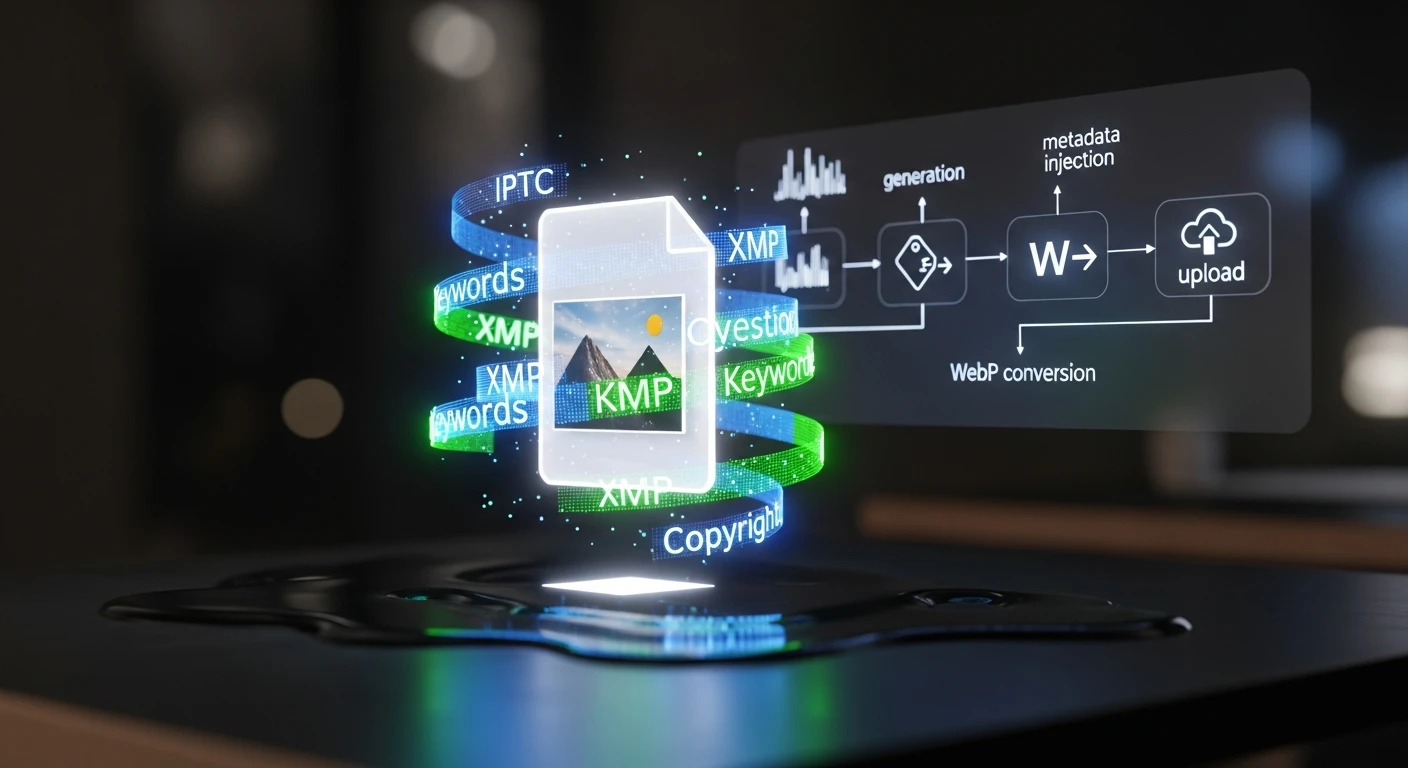
    Every article needs a featured image. Every featured image needs metadata — IPTC tags, XMP data, alt text, captions, keywords. When you’re publishing 15–20 articles per week across 19 WordPress sites, manual image handling isn’t just tedious; it’s a bottleneck that guarantees inconsistency. This video walks through the exact automated pipeline we built to eliminate that bottleneck entirely.

    The video breaks down every stage of the pipeline:

    • Stage 1: AI Image Generation — Calling Vertex AI Imagen with prompts derived from the article title, SEO keywords, and target intent. No stock photography. Every image is custom-generated to match the content it represents, with style guidance baked into the prompt templates.
    • Stage 2: IPTC/XMP Metadata Injection — Using exiftool to inject structured metadata into every image: title, description, keywords, copyright, creator attribution, and caption. XMP data includes structured fields about image intent — whether it’s a featured image, thumbnail, or social asset. This is what makes images visible to Google Images, Perplexity, and every AI crawler reading IPTC data.
    • Stage 3: WebP Conversion & Optimization — Converting to WebP format (40–50% smaller than JPG), optimizing to target sizes: featured images under 200KB, thumbnails under 80KB. This runs in a Cloud Run function that scales automatically.
    • Stage 4: WordPress Upload & Association — Hitting the WordPress REST API to upload the image, assign metadata in post meta fields, and attach it as the featured image. The post ID flows through the entire pipeline end-to-end.

    Why IPTC Metadata Matters Now

    This isn’t about SEO best practices from 2019. Google Images, Perplexity, ChatGPT’s browsing mode, and every major AI crawler now read IPTC metadata to understand image context. If your images don’t carry structured metadata, they’re invisible to answer engines. The pipeline solves this at the point of creation — metadata isn’t an afterthought applied later, it’s injected the moment the image is generated.

    The results speak for themselves: within weeks of deploying the pipeline, we started ranking for image keywords we never explicitly optimized for. Google Images was picking up our IPTC-tagged images and surfacing them in searches related to the article content.

    The Economics

    The infrastructure cost is almost irrelevant: Vertex AI Imagen runs about $0.10 per image, Cloud Run stays within free tier for our volume, and storage is minimal. At 15–20 images per week, the total cost is roughly $8/month. The labor savings — eliminating manual image sourcing, editing, metadata tagging, and uploading — represent hours per week that now go to strategy and client delivery instead.

    How This Video Was Made

    The original article describing this pipeline was fed into Google NotebookLM, which analyzed the full text and generated an audio deep-dive covering the technical architecture, the metadata injection process, and the business rationale. That audio was converted to this video — making it a recursive demonstration: an AI system producing content about an AI system that produces content.

    Read the Full Article

    The video covers the architecture and results. The full article goes deeper into the technical implementation — the exact Vertex AI API calls, exiftool commands, WebP conversion parameters, and WordPress REST API patterns. If you’re building your own pipeline, start there.


    Related from Tygart Media


  • Watch: The $0 Automated Marketing Stack — AI-Generated Video Breakdown

    Watch: The $0 Automated Marketing Stack — AI-Generated Video Breakdown

    This video was generated from the original Tygart Media article using NotebookLM’s audio-to-video pipeline — a live demonstration of the exact AI-first workflow we describe in the piece. The article became the script. AI became the production team. Total production cost: $0.


    Watch: The $0 Automated Marketing Stack

    The $0 Automated Marketing Stack — Full video breakdown. Read the original article →

    What This Video Covers

    Most businesses assume enterprise-grade marketing automation requires enterprise-grade budgets. This video walks through the exact stack we use at Tygart Media to manage SEO, content production, analytics, and automation across 18 client websites — for under $50/month total.

    The video breaks down every layer of the stack:

    • The AI Layer — Running open-source LLMs (Mistral 7B) via Ollama on cheap cloud instances for $8/month, handling 60% of tasks that would otherwise require paid API calls. Content summarization, data extraction, classification, and brainstorming — all self-hosted.
    • The Data Layer — Free API tiers from DataForSEO (5 calls/day), NewsAPI (100 requests/day), and SerpAPI (100 searches/month) that provide keyword research, trend detection, and SERP analysis at zero recurring cost.
    • The Infrastructure Layer — Google Cloud’s free tier delivering 2 million Cloud Run requests/month, 5GB storage, unlimited Cloud Scheduler jobs, and 1TB of BigQuery analysis. Enough to host, automate, log, and analyze everything.
    • The WordPress Layer — Self-hosted on GCP with open-source plugins, giving full control over the content management system without per-seat licensing fees.
    • The Analytics Layer — Plausible’s free tier for privacy-focused analytics: 50K pageviews/month, clean dashboards, no cookie headaches.
    • The Automation Layer — Zapier’s free tier (5 zaps) combined with GitHub Actions for CI/CD, creating a lightweight but functional automation backbone.

    The Philosophy Behind $0

    This isn’t about being cheap. It’s about being strategic. The video explains the core principle: start with free tiers, prove the workflow works, then upgrade only the components that become bottlenecks. Most businesses pay for tools they don’t fully use. The $0 stack forces you to understand exactly what each layer does before you spend a dollar on it.

    The upgrade path is deliberate. When free tier limits get hit — and they will if you’re growing — you know exactly which component to scale because you’ve been running it long enough to understand the ROI. DataForSEO at 5 calls/day becomes DataForSEO at $0.01/call. Ollama on a small instance becomes Claude API for the reasoning-heavy tasks. The architecture doesn’t change. Only the throughput does.

    How This Video Was Made

    This video is itself a demonstration of the stack’s philosophy. The original article was written as part of our content pipeline. That article URL was fed into Google’s NotebookLM, which analyzed the full text and generated an audio deep-dive. That audio was then converted to video — an AI-produced visual breakdown of AI-produced content, created from AI-optimized infrastructure.

    No video editor. No voiceover artist. No production budget. The content itself became the production brief, and AI handled the rest. This is what the $0 stack looks like in practice: the tools create the tools that create the content.

    Read the Full Article

    The video covers the highlights, but the full article goes deeper — with exact pricing breakdowns, tool-by-tool comparisons, API rate limits, and the specific workflow we use to batch operations for maximum free-tier efficiency. If you’re ready to build your own $0 stack, start there.


    Related from Tygart Media


  • I Used a Monte Carlo Simulation to Decide Which AI Tasks to Automate First — Here’s What Won

    I Used a Monte Carlo Simulation to Decide Which AI Tasks to Automate First — Here’s What Won

    The Problem Every Agency Owner Knows

    You’ve read the announcements. You’ve seen the demos. You know AI can automate half your workflow — but which half do you start with? When every new tool promises to “transform your business,” the hardest decision isn’t whether to adopt AI. It’s figuring out what to do first.

    I run Tygart Media, where we manage SEO, content, and optimization across 18 WordPress sites for clients in restoration, luxury lending, healthcare, comedy, and more. Claude Cowork — Anthropic’s agentic AI for knowledge work — sits at the center of our operation. But last week I found myself staring at a list of 20 different Cowork capabilities I could implement, from scheduled site-wide SEO refreshes to building a private plugin marketplace. All of them sounded great. None of them told me where to start.

    So I did what any data-driven agency owner should do: I stopped guessing and ran a Monte Carlo simulation.

    Step 1: Research What Everyone Else Is Doing

    Before building any model, I needed raw material. I spent a full session having Claude research how people across the internet are actually using Cowork — not the marketing copy, but the real workflows. We searched Twitter/X, Reddit threads, Substack power-user guides, developer communities, enterprise case studies, and Anthropic’s own documentation.

    What emerged was a taxonomy of use cases that most people never see compiled in one place. The obvious ones — content production, sales outreach, meeting prep — were there. But the edge cases were more interesting: a user running a Tuesday scheduled task that scrapes newsletter ranking data, analyzes trends, and produces a weekly report showing the ten biggest gainers and losers. Another automating flight price tracking. Someone else using Computer Use to record a workflow in an image generation tool, then having Claude process an entire queue of prompts unattended.

    The full research produced 20 implementation opportunities mapped to my specific workflow. Everything from scheduling site-wide SEO/AEO/GEO refresh cycles (which we already had the skills for) to building a GCP Fortress Architecture for regulated healthcare clients (which we didn’t). The question wasn’t whether these were good ideas. It was which ones would move the needle fastest for our clients.

    Step 2: Score Every Opportunity on Five Dimensions

    I needed a framework that could handle uncertainty honestly. Not a gut-feel ranking, but something that accounts for the fact that some estimates are more reliable than others. A Monte Carlo simulation does exactly that — it runs thousands of randomized scenarios to show you not just which option scores highest, but how confident you should be in that ranking.

    Each of the 20 opportunities was scored on five dimensions, rated 1 to 10:

    • Client Delivery Impact — Does this improve what clients actually see and receive? This was weighted at 40% because, for an agency, client outcomes are the business.
    • Time Savings — How many hours per week does this free up from repetitive work? Weighted at 20%.
    • Revenue Impact — Does this directly generate or save money? Weighted at 15%.
    • Ease of Implementation — How hard is this to set up? Scored inversely (lower effort = higher score). Weighted at 15%.
    • Risk Safety — What’s the probability of failure or unintended complications? Also inverted. Weighted at 10%.

    The weighting matters. If you’re a solopreneur optimizing for personal productivity, you might weight time savings at 40%. If you’re a venture-backed startup, revenue impact might dominate. For an agency where client retention drives everything, client delivery had to lead.

    Step 3: Add Uncertainty and Run 10,000 Simulations

    Here’s where Monte Carlo earns its keep. A simple weighted score would give you a single ranking, but it would lie to you about confidence. When I score “Private Plugin Marketplace” as a 9/10 on revenue impact, that’s a guess. When I score “Scheduled SEO Refresh” as a 10/10 on client delivery, that’s based on direct experience running these refreshes manually for months.

    Each opportunity was assigned an uncertainty band — a standard deviation reflecting how confident I was in the base scores. Opportunities built on existing, proven skills got tight uncertainty (σ = 0.7–1.0). New builds requiring infrastructure I hadn’t tested got wider bands (σ = 1.5–2.0). The GCP Fortress Architecture, which involves standing up an isolated cloud environment, got the widest band at σ = 2.0.

    Then we ran 10,000 iterations. In each iteration, every score for every opportunity was randomly perturbed within its uncertainty band using a normal distribution. The composite weighted score was recalculated each time. After 10,000 runs, each opportunity had a distribution of outcomes — a mean score, a median, and critically, a 90% confidence interval showing the range from pessimistic (5th percentile) to optimistic (95th percentile).

    What the Data Said

    The results organized themselves into four clean tiers. The top five — the “implement immediately” tier — shared three characteristics that I didn’t predict going in.

    First, they were all automation of existing capabilities. Not a single new build made the top tier. The highest-scoring opportunity was scheduling monthly SEO/AEO/GEO refresh cycles across all 18 sites — something we already do manually. Automating it scored 8.4/10 with a tight confidence interval of 7.8 to 8.9. The infrastructure already existed. The skills were already built. The only missing piece was a cron expression.

    Second, client delivery and time savings dominated together. The top five all scored 8+ on client delivery and 7+ on time savings. These weren’t either/or tradeoffs — the opportunities that produce better client deliverables also happen to be the ones that free up the most time. That’s not a coincidence. It’s the signature of mature automation: you’ve already figured out what good looks like, and now you’re removing yourself from the execution loop.

    Third, new builds with high revenue potential ranked lower because of uncertainty. The Private Plugin Marketplace scored 9/10 on revenue impact — the highest of any opportunity. But it also carried an effort score of 8/10, a risk score of 5/10, and the widest confidence interval in the dataset (4.5 to 7.3). Monte Carlo correctly identified that high-reward/high-uncertainty bets should come after you’ve secured the reliable wins.

    The Final Tier 1 Lineup

    Here’s what we’re implementing immediately, in order:

    1. Scheduled Site-Wide SEO/AEO/GEO Refresh Cycles (Score: 8.4) — Monthly full-stack optimization passes across all 18 client sites. Every post that needs a meta description update, FAQ block, entity enrichment, or schema injection gets it automatically on the first of the month.
    2. Scheduled Cross-Pollination Batch Runs (Score: 8.2) — Every Tuesday, Claude identifies the highest-ranking pages across site families (luxury lending, restoration, business services) and creates locally-relevant variant articles on sister sites with natural backlinks to the authority page.
    3. Weekly Content Intelligence Audits (Score: 8.1) — Every Monday morning, Claude audits all 18 sites for content gaps, thin posts, missing metadata, and persona-based opportunities. By the time I sit down at 9 AM, a prioritized report is waiting in Notion.
    4. Auto Friday Client Reports (Score: 7.9) — Every Friday at 1 PM, Claude pulls the week’s data from SpyFu, WordPress, and Notion, then generates a professional PowerPoint deck and Excel spreadsheet for each client group.
    5. Client Onboarding Automation Package (Score: 7.6) — A single-trigger pipeline that takes a new WordPress site from zero to fully audited, with knowledge files built, taxonomy designed, and an optimization roadmap produced. Triggered manually whenever we sign a new client.

    Sixteen of the twenty opportunities run on our existing stack. The infrastructure is already built. The biggest wins come from scheduling and automating what already works.

    Why This Approach Matters for Any Business

    You don’t need to be running 18 WordPress sites to use this framework. The Monte Carlo approach works for any business facing a prioritization problem with uncertain inputs. The methodology is transferable:

    • Define your dimensions. What matters to your business? Client outcomes? Revenue? Speed to market? Cost reduction? Pick 3–5 and weight them honestly.
    • Score with uncertainty in mind. Don’t pretend you know exactly how hard something will be. Assign confidence bands. A proven workflow gets a tight band. An untested idea gets a wide one.
    • Let the math handle the rest. Ten thousand iterations will surface patterns your intuition misses. You’ll find that your “exciting new thing” ranks below your “boring automation of what works” — and that’s the right answer.
    • Tier your implementation. Don’t try to do everything at once. Tier 1 goes this week. Tier 2 goes next sprint. Tier 3 gets planned. Tier 4 stays in the backlog until the foundation is solid.

    The biggest insight from this exercise wasn’t any single opportunity. It was the meta-pattern: the highest-impact moves are almost always automating what you already know how to do well. The new, shiny, high-risk bets have their place — but they belong in month two, after the reliable wins are running on autopilot.

    The Tools Behind This

    For anyone curious about the technical stack: the research was conducted in Claude Cowork using WebSearch across multiple source types. The Monte Carlo simulation was built in Python (numpy, pandas) with 10,000 iterations per opportunity. The scoring model used weighted composite scores with normal distribution randomization and clamped bounds. Results were visualized in an interactive HTML dashboard and the implementation was deployed as Cowork scheduled tasks — actual cron jobs that run autonomously on a weekly and monthly cadence.

    The entire process — research, simulation, analysis, task creation, and this blog post — was completed in a single Cowork session. That’s the point. When the infrastructure is right, the question isn’t “can AI do this?” It’s “what should AI do first?” And now we have a data-driven answer.

    { “@context”: “https://schema.org”, “@type”: “Article”, “headline”: “I Used a Monte Carlo Simulation to Decide Which AI Tasks to Automate First — Heres What Won”, “description”: “When you have 20 AI automation opportunities and can’t do them all at once, stop guessing. I ran 10,000 Monte Carlo simulations to rank which Claude Cowor”, “datePublished”: “2026-03-31”, “dateModified”: “2026-04-03”, “author”: { “@type”: “Person”, “name”: “Will Tygart”, “url”: “https://tygartmedia.com/about” }, “publisher”: { “@type”: “Organization”, “name”: “Tygart Media”, “url”: “https://tygartmedia.com”, “logo”: { “@type”: “ImageObject”, “url”: “https://tygartmedia.com/wp-content/uploads/tygart-media-logo.png” } }, “mainEntityOfPage”: { “@type”: “WebPage”, “@id”: “https://tygartmedia.com/i-used-a-monte-carlo-simulation-to-decide-which-ai-tasks-to-automate-first-heres-what-won/” } }
  • The Programmable Company: Codifying Your Business DNA Into Machine-Readable Protocols

    The Programmable Company: Codifying Your Business DNA Into Machine-Readable Protocols

    TL;DR: The programmable company treats business logic like software: policy and SOP are codified as machine-readable JSON schemas, stored in version control, and executed by the system. Instead of a 50-page employee handbook, you have an executable constitution. When a customer dispute arrives, it doesn’t go to a human who reads a policy manual—it goes to the system, which executes the decision tree. When policy needs to change, you don’t email everyone; you update the schema, commit it, and the entire organization adapts instantly. This eliminates ambiguity, creates an audit trail, and scales decision-making without scaling headcount.

    The Problem: Companies Run on Ambiguous Documents

    Most companies are governed by documents. An employee handbook. A policy manual. A decision matrix buried in a Confluence page that hasn’t been updated in 18 months. These documents are:

    • Ambiguous. “We approve refunds for defective products” is clear until you have a case that’s genuinely ambiguous. Now what?
    • Inconsistently applied. One manager approves refunds under $100 without escalation. Another requires approval for anything. Consistency erodes.
    • Unmaintained. Policy changes, but the handbook doesn’t get updated. People follow the wrong version.
    • Unauditable. Why was this decision made? You’d have to ask the person who made it. No record. No precedent. No learning.
    • Unmeasurable. Are refund approvals consistent? Are they profitable? You don’t know. You’d have to manually review cases and infer patterns.

    This is why larger organizations have compliance departments, legal review processes, and endless meetings. You’re trying to make a chaotic system legible.

    The Innovation: Business Logic as Code

    What if policy wasn’t a document? What if it was executable code?

    Here’s what a customer refund policy looks like as machine-readable protocol:

    {
      "decision": "approve_refund",
      "version": "2.1",
      "effective_date": "2025-03-01",
      "conditions": {
        "defect_reported": true,
        "photo_evidence": true,
        "within_warranty": {
          "days_since_purchase": {"$lte": 30}
        }
      },
      "actions": {
        "approval": true,
        "refund_amount": "product_price",
        "timeline": "5_business_days",
        "communication": "send_template_email"
      },
      "escalation": {
        "if": "claim_value > $500",
        "then": "require_manager_review"
      }
    }

    A customer refund request comes in. The system evaluates it against this protocol. Does the claim include photos? Is it within warranty? Has 30 days passed? The system answers each question. If all conditions are met, it executes the refund. If something is ambiguous (claim is $501, requires escalation), it routes to a manager with context: “This claim meets conditions A, B, C. It exceeds the $500 threshold. Requires your review.”

    This is a living constitution. When you need to update policy, you don’t send a memo; you update the JSON, commit it with a message explaining the change, and the system deploys it instantly.

    How This Scales Decision-Making

    In a traditional company, decision-making doesn’t scale. You hire managers to make decisions. More decisions? Hire more managers. Each manager interprets policy slightly differently. Consistency erodes.

    A programmable company inverts this. The policy is codified once. Every instance executes the same logic. A new manager doesn’t re-learn the policy through experience and mistakes—they query the system. “Show me all approved refund requests this month.” “What’s the approval rate for over-$1000 claims?” The system has perfect consistency and perfect audit trails.

    Scale becomes a matter of infrastructure, not headcount. 10 refund requests per day? System handles it. 10,000 per day? System handles it. The cost is compute, not people.

    The Constitution as Version Control

    Here’s where it gets interesting: treat your business constitution like software code. It lives in a Git repository. Every policy change is a commit. Every commit has a message explaining why.

    Example commit history:

    2025-03-01: Raise refund limit from $500 to $750 (customer feedback: too many escalations)
    2025-02-15: Add photo requirement for defect claims (reducing false claims by 40%)
    2025-02-01: Reduce approval timeline from 7 days to 5 days (competitive pressure)
    2025-01-15: Add escalation rule for bulk claims (prevent gaming the system)

    Every policy change is auditable. You can see the history. You can reason about decisions. If a policy change caused a problem, you can roll it back with one command. You can even create branches: test a new policy on 10% of requests before deploying it organization-wide.

    Machine-Readable Decision Trees

    The real power is that the system doesn’t just execute; it learns. As more decisions flow through your protocols, you build data:

    • Which decision branches are executed most frequently?
    • What’s the approval rate for each condition combination?
    • Are there decision branches that never execute? (Dead code. Candidate for removal.)
    • Are there patterns in escalated decisions? (Signal that your policy needs refinement.)

    This creates a feedback loop. Policy gets smarter. Your decision-making improves. Your metrics improve.

    Onboarding Without Handbooks

    A new hire arrives. In a traditional company, they spend a week reading policy manuals and shadowing experienced people. They make mistakes as they learn the unwritten rules.

    In a programmable company, a new hire’s first day looks different:

    “Welcome. Here’s your terminal access. Query the constitution: ‘Show me the process for approving customer refunds.’ The system returns the decision tree. You now know exactly how to handle refunds. Here’s a simulated request; try processing it. The system validates your decision against the protocol. You’re trained in 30 minutes, not a week.”

    This is radical for employee experience. No ambiguity. No “it depends.” No figuring it out by trial and error. Just: here’s what the system expects, here’s what you do.

    Regulation and Compliance as Code

    Compliance becomes tractable. If your business is regulated (finance, healthcare, etc.), you’re already dealing with requirements: “Approve refunds only if X, Y, Z.” Your protocol is literally the regulation rendered as code.

    Auditor shows up? You don’t hand them a stack of documents. You show them the protocol and the audit log. “Here are the refund decisions made in Q4. Each one was evaluated against this protocol. Here’s what approved, here’s what was escalated, here’s what was denied. Here’s the version history—these are the policy changes we made this quarter.”

    Compliance moves from “do we have documentation?” to “do our decisions match our policy?” and the answer is provably yes.

    Real-World Example: The Content Approval Workflow

    In a content operation, the approval workflow is traditionally messy. Article is written. Editor reviews. Client reviews. Some edits. Back and forth. Unclear approval criteria. Slow shipping.

    As a programmable company protocol:

    {
      "process": "content_approval",
      "version": "1.3",
      "stages": [
        {
          "name": "editorial_review",
          "assigned_to": "role:editor",
          "required_checks": [
            "grammar_pass",
            "fact_check_complete",
            "tone_matches_brand",
            "word_count_within_range"
          ],
          "approval_rule": "all_checks_passed",
          "timeout": "2_days"
        },
        {
          "name": "client_review",
          "assigned_to": "client:stake_holder",
          "required_checks": [
            "message_aligned_with_brief",
            "no_confidential_info_leaked"
          ],
          "approval_rule": "client_approves_or_72_hours_pass",
          "timeout": "3_days"
        },
        {
          "name": "final_approval",
          "assigned_to": "role:manager",
          "required_checks": [
            "both_previous_stages_approved",
            "seo_metadata_complete"
          ],
          "approval_rule": "manager_approves",
          "timeout": "1_day"
        }
      ],
      "escalation": {
        "if_timeout_exceeded": "notify_stakeholders"
      }
    }

    Now every article flows through the same process. Everyone knows exactly what’s required. Approval isn’t ambiguous; it’s criteria-based. The timeline is explicit. Bottlenecks are visible. If client review is timing out, management sees it and can escalate.

    Building Your Constitution: A Phased Approach

    Phase 1: Map your current decision logic. What are your most critical processes? Customer refunds, content approval, hiring decisions, client escalations? For each, write down the actual logic: “If X, then do Y. If Z, escalate.” You already have this logic; it’s just in people’s heads. Get it out.

    Phase 2: Codify one critical path. Pick one workflow that’s high-volume and currently ambiguous. Codify it in JSON. Test it. Refine it. Deploy it. Measure the impact.

    Phase 3: Expand to system-wide consistency. Take what you learned. Codify other critical processes. Link them together. Your constitution starts to form a coherent whole.

    Phase 4: Govern the constitution itself. Now you need rules for changing rules. Who can propose a policy change? What review process is required? How are changes tested before deployment? Codify governance as part of your constitution.

    The Broader AI-Native Architecture

    The programmable company is the governance layer of the AI-native business operating system. It pairs with self-evolving databases (that learn your data shapes) and model routers (that learn optimal dispatch). Together, they create an organization that adapts, improves, and scales without requiring humans to make the same decisions repeatedly.

    What You Do Next

    Start small. Pick one workflow you find yourself explaining repeatedly. Content approval. Customer refund requests. New hire onboarding. Codify it in a simple JSON schema. Run it by your team: “Does this capture our actual process?” Refine it. Then execute one request manually using the schema: “If I follow this exactly, do I get the right outcome?”

    Once you’ve validated one process, you’ll see the pattern. You’ll start thinking in protocols automatically. That’s when you know you’re ready to expand to a company-wide constitution.

    The companies that move first build a competitive moat. Policies are codified, tested, versioned, and auditable. Decisions are consistent. Onboarding is fast. Scaling is a matter of infrastructure, not headcount. Everyone else is still reading policy manuals and figuring it out as they go.

    The programmable company wins.

    {
    “@context”: “https://schema.org”,
    “@type”: “Article”,
    “headline”: “The Programmable Company: Codifying Your Business DNA Into Machine-Readable Protocols”,
    “description”: “TL;DR: The programmable company treats business logic like software: policy and SOP are codified as machine-readable JSON schemas, stored in version control, an”,
    “datePublished”: “2026-03-30”,
    “dateModified”: “2026-04-03”,
    “author”: {
    “@type”: “Person”,
    “name”: “Will Tygart”,
    “url”: “https://tygartmedia.com/about”
    },
    “publisher”: {
    “@type”: “Organization”,
    “name”: “Tygart Media”,
    “url”: “https://tygartmedia.com”,
    “logo”: {
    “@type”: “ImageObject”,
    “url”: “https://tygartmedia.com/wp-content/uploads/tygart-media-logo.png”
    }
    },
    “mainEntityOfPage”: {
    “@type”: “WebPage”,
    “@id”: “https://tygartmedia.com/the-programmable-company-codifying-your-business-dna-into-machine-readable-protocols/”
    }
    }

  • The Model Router: Why Smart Companies Never Send Every Task to the Same AI

    The Model Router: Why Smart Companies Never Send Every Task to the Same AI

    TL;DR: A model router is a dispatch system that examines incoming tasks, understands their requirements (latency, cost, accuracy, compliance), and sends them to the optimal AI system. GPT-4 excels at reasoning but costs $0.03/1K tokens. Claude is fast and nuanced at $0.003/1K tokens. Local open-source models run on your own hardware for free. Fine-tuned classifiers do one thing perfectly. A router doesn’t care which model is best in abstract—it cares which model is best for this task, right now, within your constraints. This architectural decision alone can reduce AI costs by 70% while improving output quality.

    The Naive Approach: One Model to Rule Them All

    Most companies start with one large model. GPT-4. Claude. Something state-of-the-art. They send every task to it. Summarization? GPT-4. Classification? GPT-4. Data extraction? GPT-4. Content generation? GPT-4.

    This is comfortable. One system. One API. One contract. One pricing model. And it’s wildly inefficient.

    A GPT-4 API call costs $0.03 per 1,000 input tokens. A Claude 3.5 Sonnet call costs $0.003. Llama 3.1 running locally on your hardware costs effectively $0. If you’re running 100,000 classification tasks a month, and 90% of them are straightforward (positive/negative/neutral sentiment), sending all of them to GPT-4 is burning $27,000/month you don’t need to spend.

    Worse: you’re introducing latency you don’t need. A local model responds in 200ms. An API model responds in 1-2 seconds. If your customer is waiting, that matters.

    The Router Pattern: Task-Based Dispatch

    A model router changes the architecture fundamentally. Instead of “all tasks go to the same system,” the logic becomes: “examine the task, understand its requirements, dispatch to the optimal system.”

    Here’s how it works:

    1. Task Characterization. When a request arrives, the router doesn’t execute it immediately. It first understands: What is this task asking for? What are its requirements?
    • Does it require reasoning and nuance, or is it a pattern-match?
    • Is latency critical (sub-second) or can it wait 5 seconds?
    • What’s the cost sensitivity? Is this a user-facing operation (budget: expensive) or a batch job (budget: cheap)?
    • Are there compliance requirements? (Some tasks need on-premise execution.)
    • Does this task have historical data we can use to fine-tune a specialist model?
    1. Model Selection. Based on the characterization, the router picks from available systems:
    • GPT-4: Complex reasoning, creativity, multi-step logic. Best-in-class for novel problems. Expensive. Latency: 1-2s.
    • Claude 3.5 Sonnet: Balanced reasoning, writing quality, speed. Good for creative and technical work. 10x cheaper than GPT-4. Latency: 1-2s.
    • Local Llama/Mistral: Fast, cheap, compliant. Good for summarization, extraction, straightforward classification. Latency: 200ms. Cost: free.
    • Fine-tuned classifier: 99% accuracy on a specific task (e.g., “is this email spam?”). Trained on historical data. Latency: 50ms. Cost: negligible.
    • Humans: For edge cases the system hasn’t seen before. For decisions that require judgment.
    1. Execution and Feedback. The router sends the task to the selected system. The result comes back. The router logs: What did we send? Where did we send it? What was the output? This feedback loop trains the router to get better at dispatch over time.

    How This Works at Scale: The Tygart Media Case

    Tygart Media operates 23 WordPress sites with AI on autopilot. That’s 500+ articles published monthly, across multiple clients, with one person. How? A model router.

    Here’s the flow:

    Content generation: A prompt comes in for a blog post. The router examines it: Is this a high-value piece (pillar content, major client) or commodity content (weekly news roundup)? Is it technical or narrative? Does the client have tone preferences in historical data?

    If it’s pillar content: Send to Claude 3.5 Sonnet for quality. Invest time. Cost: $0.05. Latency: 2s. Acceptable.

    If it’s commodity: Send to a fine-tuned local model. Cost: $0.001. Latency: 400ms. Ship it.

    Content optimization: Every article needs SEO metadata: title, slug, meta description. The router knows: this is a pattern-match. No creativity needed. Send to local Llama. Extract keywords, generate 160-char meta description. Cost per article: $0. Time: 300ms. No human needed.

    Quality gates: Finished articles need fact-checking. The router analyzes: Are there claims that need verification? Send flagged sections to Claude for deep review. Send straightforward sections to local model for format validation. Cost per article: $0.01. Latency: 2-3s. Still acceptable for non-real-time publishing.

    Exception handling: An article doesn’t meet quality thresholds. The router routes it to a human for review. The human marks it: “unclear evidence for claim 3” or “tone is off.” The router learns. Next time, that model + that client combination gets more scrutiny.

    The Routing Logic: A Simple Example

    Let’s make this concrete. Here’s pseudocode for a routing decision:

    incoming_task = {
      type: "classify_customer_email",
      urgency: "high",
      historical_accuracy: 0.94,
      volume: 10000_per_day,
      cost_sensitivity: "high"
    }
    
    if historical_accuracy > 0.90 and volume > 1000:
      # Send to fine-tuned model
      return send_to(fine_tuned_model)
    
    if urgency == "high" and latency_budget < 500ms:
      # Send to local model
      return send_to(local_model)
    
    if type == "reason_about_edge_case":
      # Send to best reasoning model
      return send_to(gpt4)
    
    default:
      return send_to(claude)

    This logic is simple, but it compounds. Over a month, if you’re routing 100,000 tasks, this decision tree can save $15,000-20,000 in model costs while improving latency and output quality.

    Fine-Tuning as a Routing Strategy

    Fine-tuning isn’t “make a model smart about your domain.” It’s “make a model accurate at one specific task.” This is perfect for a router strategy.

    If you’re doing 10,000 classification tasks a month, fine-tune a small model on 500 examples. Cost: $100. Then route all 10,000 to it. Cost: $20 total. Baseline: send to Claude = $3,000. Savings: $2,880 monthly. Payoff: 1 week.

    The router doesn’t care that the fine-tuned model is “smaller” or “less general” than Claude. It only cares: For this specific task, which system is best? And for classification, the fine-tuned model wins on cost and latency.

    The Harder Problem: Knowing When You’re Wrong

    A router is only as good as its feedback loop. Send a task to a local model because it’s cheap and fast. But what if the output is subtly wrong? What if the model hallucinated slightly, and you didn’t notice?

    This is why quality gates are essential. After routing, you need:

    1. Automatic validation: Does the output match expected format? Does it pass sanity checks? If not, re-route.
    2. Human spot-checks: Sample 1-5% of outputs randomly. Validate they’re correct. If quality drops below threshold, re-evaluate routing logic.
    3. Downstream monitoring: If this output is going to be published or used by customers, monitor for complaints. If quality drops, trigger re-evaluation.
    4. Expert review for edge cases: Some tasks are too novel or risky for full automation. Route to human expert. Log the decision. Use it to train future routing.

    This is what the expert-in-the-loop imperative means. Humans aren’t removed; they’re strategically inserted at decision points.

    Building Your Router: A Phased Approach

    Phase 1: Single decision point. Pick one high-volume task (e.g., content summarization). Route between 2 models: expensive (Claude) and cheap (local Llama). Measure cost and quality. Find the breakpoint.

    Phase 2: Expand dispatch options. Add fine-tuned models for tasks where you have historical data. Add specialized models (e.g., a code model for technical content). Expand routing logic incrementally.

    Phase 3: Dynamic routing. Instead of static rules (“all summaries go to local model”), make routing dynamic. If input is complex, upgrade to Claude. If historical model performs well, use it. Adapt based on real performance.

    Phase 4: Autonomous fine-tuning. The system detects that a specific task type is high-volume and error-prone. It automatically fine-tunes a small model. It routes to the fine-tuned model. Over time, your router gets a custom model suite tailored to your actual workload.

    The Convergence: Router + Self-Evolving Infrastructure

    A model router works best when paired with self-evolving database infrastructure and programmable company protocols. Together, they form the AI-native business operating system.

    The database learns what data shapes your business actually needs. The protocols codify your decision logic. The router dispatches tasks to the optimal execution system. All three components evolve continuously.

    What You Do Next

    Start with cost visibility. Audit your AI spending. What are your top 10 most expensive use cases? For each one, ask: Does this really need GPT-4? Could a fine-tuned model do it for 1/10th the cost? Could a local model do it for free?

    Pick the highest-cost, highest-volume task. Build a router for it. Measure the savings. Prove the pattern. Then expand.

    A good router can cut your AI costs in half while improving output quality. It’s not optional anymore—it’s table stakes.

    {
    “@context”: “https://schema.org”,
    “@type”: “Article”,
    “headline”: “The Model Router: Why Smart Companies Never Send Every Task to the Same AI”,
    “description”: “A model router is a dispatch system that examines incoming tasks, understands their requirements (latency, cost, accuracy, compliance), and sends them to the op”,
    “datePublished”: “2026-03-30”,
    “dateModified”: “2026-04-03”,
    “author”: {
    “@type”: “Person”,
    “name”: “Will Tygart”,
    “url”: “https://tygartmedia.com/about”
    },
    “publisher”: {
    “@type”: “Organization”,
    “name”: “Tygart Media”,
    “url”: “https://tygartmedia.com”,
    “logo”: {
    “@type”: “ImageObject”,
    “url”: “https://tygartmedia.com/wp-content/uploads/tygart-media-logo.png”
    }
    },
    “mainEntityOfPage”: {
    “@type”: “WebPage”,
    “@id”: “https://tygartmedia.com/the-model-router-why-smart-companies-never-send-every-task-to-the-same-ai/”
    }
    }

  • The Self-Evolving Database: When Your Infrastructure Mutates to Fit Your Business

    The Self-Evolving Database: When Your Infrastructure Mutates to Fit Your Business

    TL;DR: A self-evolving database watches query patterns, detects emerging data shapes, and mutates its schema without human intervention. When the system detects a frequently-accessed column combination, it auto-creates an indexed view. When it sees a new data pattern emerging, it adds columns or suggests linked tables. When fields go unused, it archives them. The result: infrastructure that gets smarter as you scale, not dumber. This eliminates the DBA as a bottleneck and turns your database into an adaptive system that fits your business, not the other way around.

    The Problem: Databases Are Frozen in Time

    Databases are designed for permanence. You create a schema. You normalize it. You lock it. Changes require migrations, downtime, and careful orchestration. A DBA sits between your business and your data, translating requirements into schema changes.

    This worked in 1995. In 2025, when your business is mutating weekly and your data patterns are emerging in real-time, a static database is a liability.

    Here’s what actually happens: Your business starts with a clear model. Customers have orders. Orders have line items. Line items have SKUs. You create a normalized schema. Three months in, you discover you need to track customer lifetime value, RFM segmentation, and seasonal patterns. You request a DBA change. Two weeks later, three new columns appear. But by then, your analysis team has already worked around the problem with denormalized views and ETL pipelines. Your data quality suffers. Your query performance degrades.

    This is the hidden cost of static databases: the accumulating workarounds that build on each other until your data layer becomes unmaintainable.

    The Evolution: Databases That Watch Themselves

    A self-evolving database is built on a simple principle: watch what your users actually do, and optimize for that.

    It monitors three things in real-time:

    1. Query patterns. How many times per day does the system execute “SELECT * FROM customers WHERE segment=’high_value’ AND ltv > 10000”? If it’s 1,000 times a day, that’s a materialized view waiting to happen. The database auto-creates it, maintains it, and updates your query planner to prefer it.
    1. Data shapes. When new data arrives, does it contain fields that don’t exist in your schema? When the system detects a consistent new pattern—say, every customer record now includes a “preference_json” field—it adds the column automatically. When a pattern is present in 80% of records, that’s a signal. When it’s present in 5%, that might be noise. The system needs heuristics to decide, but the goal is clear: let your schema follow your data, not the reverse.
    1. Field usage. Which columns haven’t been queried in 6 months? Which tables are rarely joined? The database tracks this and archives unused schema elements into separate read-only tables. You reclaim storage, improve query planner performance, and keep the active schema clean.

    Protocol Darwin: Applying Evolution to Notion

    This concept works even in a high-level tool like Notion. Protocol Darwin is a framework—think of it as a meta-layer on top of your database—that applies the same evolutionary logic:

    • Stale field detection: Which properties in your database haven’t been filled in the last 60 days? Archive them. The system suggests they’re candidates for removal.
    • Schema suggestion engine: When the system detects that two different databases are frequently cross-referenced, it suggests creating a relational link. When a property would be useful in 80% of records, it suggests making it standard.
    • Autonomous archival: Old records don’t need to stay in your active schema. The system auto-archives by age or status, keeping your operational database lean.
    • Linked database spawning: When a single database reaches a complexity threshold—too many properties, too many related items—the system suggests splitting it. One database becomes three. The evolution is explicit and auditable.

    This isn’t magic. It’s systematic observation applied to your information architecture.

    The Self-Evolving Database Genome

    The technical implementation requires three components:

    1. Observation layer. Every query, every data insertion, every access pattern is logged with minimal overhead. The observation layer runs as a background process, aggregating these signals without impacting primary performance.
    1. Decision engine. The heuristics that decide when to create a materialized view, when to add a column, when to archive a field. These start simple and become more sophisticated. Initially, you use statistical thresholds: “If query count > 500/day, materialize.” Over time, you add cost-based logic: “If query cost * frequency > threshold, optimize.”
    1. Execution layer. When the decision engine says “create a view,” the system needs to do it safely. This means: create the view in parallel, validate correctness, switch over with zero downtime, roll back if something breaks. The execution layer handles the operational complexity.

    How This Eliminates the DBA Bottleneck

    In traditional companies, the DBA is the constraint. You need a schema change? You create a ticket. The DBA gets to it in a few weeks. Meanwhile, your application is building workarounds. Your data is fragmenting. Your team is frustrated.

    A self-evolving database eliminates this bottleneck by making the schema self-managing. The DBA shifts from “design and maintain schema” to “monitor the system and set the heuristics.” This is a 10x reduction in human workload.

    Better: the system evolves faster than humans would. A new data pattern detected at 3 AM? The system responds in seconds. A frequently-accessed combination that would benefit from indexing? Implemented automatically. A field that’s been unused for a quarter? Archived automatically.

    The Tension: Automation vs. Deliberation

    There’s a real tension here. Do you really want your database making decisions autonomously? What if the system archives a field you actually needed? What if it creates the wrong materialized view?

    The answer is: yes, with guardrails. The self-evolving database should:

    1. Default to conservative changes. Only auto-archive fields that haven’t been touched in 2 quarters AND have a low information density. Only auto-materialize views that exceed a very high threshold of access.
    2. Make changes auditable. Every schema evolution is logged. Who (system or human) made the change? When? What was the rationale? You can review and roll back.
    3. Allow human override. The DBA or architect can set policies: “Never auto-archive fields in the contracts table.” “Always require approval before materialized views.” “Archive quarterly, never daily.”
    4. Predict before acting. Before the system makes a breaking change, it simulates impact on known queries and alerts if performance would degrade.

    Real-World Impact: Why This Matters

    Consider a content operation that’s publishing 500 articles a month across multiple sites. Each article has 30+ properties: title, slug, body, featured image, categories, tags, SEO metadata, publication status, version history, author, reviewer, client, project, performance metrics, and more.

    Over 6 months, usage patterns emerge:

    • SEO metadata is accessed in 90% of workflows but updated in only 2%. This is a denormalization opportunity.
    • Publication status and version history are always accessed together. They should be linked or nested.
    • Client and project properties are accessed rarely for querying but heavily for filtering. They need better indexing.
    • Performance metrics emerged three months in and are present in 95% of records. They should be a standard property, not optional.

    In a static database, discovering these patterns takes weeks. In a self-evolving database, the system detects them in days and implements optimizations in hours. Your query performance improves. Your data quality improves. Your operational database stays lean.

    The Broader AI-Native Architecture

    A self-evolving database is one pillar of the AI-native business operating system. The other two are intelligent model routing and programmable company protocols. Together, they create infrastructure that doesn’t require constant human intervention to scale.

    The self-evolving database specifically solves the problem: “How do I keep my data layer optimized as my business mutates?”

    Implementing Self-Evolution

    You don’t need to wait for your database vendor to build this. You can implement a self-evolving layer on top of existing infrastructure:

    1. Instrument your queries. Log every query with execution time, cost, and access patterns. This is low-cost with modern APM tools.
    2. Run a background analysis process. Weekly, analyze the logs. Identify materialization candidates, new columns, unused fields. Create a report.
    3. Implement conservative auto-changes. Materialized views and indexed views are safe. Auto-create them. Archive fields only after explicit approval.
    4. Version control schema changes. Every change gets a commit, a reason, and a timestamp. This makes rollback and auditing simple.
    5. Monitor for regressions. After each change, watch query performance on a canary set of queries. If performance degrades, roll back automatically.

    What You Do Next

    Start with query logging. Instrument your database to track what’s actually happening. You can’t optimize what you don’t measure. Once you have visibility, you can begin implementing targeted optimizations: materialized views for high-frequency queries, denormalization for frequently co-accessed fields, archival for the clearly dead weight.

    The goal isn’t to fully automate schema evolution on day one. It’s to move from “schema is designed once and never changes” to “schema continuously improves based on actual usage.”

    That’s the self-evolving database. And it’s the foundation of any serious AI-native infrastructure.

    {
    “@context”: “https://schema.org”,
    “@type”: “Article”,
    “headline”: “The Self-Evolving Database: When Your Infrastructure Mutates to Fit Your Business”,
    “description”: “TL;DR: A self-evolving database watches query patterns, detects emerging data shapes, and mutates its schema without human intervention. When the system detects”,
    “datePublished”: “2026-03-30”,
    “dateModified”: “2026-04-03”,
    “author”: {
    “@type”: “Person”,
    “name”: “Will Tygart”,
    “url”: “https://tygartmedia.com/about”
    },
    “publisher”: {
    “@type”: “Organization”,
    “name”: “Tygart Media”,
    “url”: “https://tygartmedia.com”,
    “logo”: {
    “@type”: “ImageObject”,
    “url”: “https://tygartmedia.com/wp-content/uploads/tygart-media-logo.png”
    }
    },
    “mainEntityOfPage”: {
    “@type”: “WebPage”,
    “@id”: “https://tygartmedia.com/the-self-evolving-database-when-your-infrastructure-mutates-to-fit-your-business/”
    }
    }