Tag: Anthropic Models

  • Claude AI Context Window Explained: Size, Limits, and How It Works

    Claude’s context window is one of the most consequential — and most misunderstood — specs in the AI landscape. It determines how much information Claude can hold and reason about at once. Get it wrong in your planning and you’ll hit hard walls mid-task. This guide covers exactly how large Claude’s context window is, how it differs by model and plan, and what it means in practice.

    What is a context window? The context window is Claude’s working memory for a conversation — the total amount of text (including your messages, Claude’s responses, uploaded files, and system instructions) that Claude can actively process at once. When a conversation exceeds this limit, Claude can no longer reference earlier parts of it without summarization or a new session.

    Claude’s Context Window Size by Model and Plan

    Context window size in Claude varies by model, plan type, and which product surface you’re using. Here’s the accurate picture as of April 2026:

    Claude.ai (Web and Mobile Chat)

    For users on paid claude.ai plans — Pro, Max, Team, and most Enterprise — the context window is 200,000 tokens across all models and paid plans. According to Anthropic’s support documentation, this is roughly 500 pages of text or more.

    Enterprise plans on specific models have access to a 500,000 token context window. This is a plan-level feature, not a model selection — contact Anthropic’s enterprise team for details on which models qualify.

    Claude Code (Terminal and IDE)

    The larger context windows — 1 million tokens — are available specifically through Claude Code on paid plans:

    • Claude Opus 4.6: Supports a 1M token context window in Claude Code on Pro, Max, Team, and Enterprise plans. Pro users need to enable extra usage to access Opus 4.6 in Claude Code.
    • Claude Sonnet 4.6: Also supports a 1M token context window in Claude Code, but extra usage must be enabled to access it (except for usage-based Enterprise plans).

    Claude API

    Via the direct API, the current model context windows as published in Anthropic’s official documentation are:

    Model Context Window Max Output
    Claude Opus 4.7 1,000,000 tokens 128,000 tokens
    Claude Sonnet 4.6 1,000,000 tokens 64,000 tokens
    Claude Haiku 4.5 200,000 tokens 64,000 tokens

    Source: Anthropic Models Overview, April 2026.

    What 200K Tokens Actually Means

    Tokens are not the same as words. A token is roughly 3–4 characters, which works out to approximately 0.75 words in English. Here’s how the 200K token context window translates into practical content:

    • ~150,000 words of plain text
    • ~500+ pages of a standard document
    • A full-length novel (most are 80,000–120,000 words) with room to spare
    • Hundreds of emails in a thread
    • A moderately large codebase or multiple interconnected files
    • Hours of meeting transcripts

    For the vast majority of everyday tasks — document review, writing, research, coding, analysis — 200K tokens is more than enough. The ceiling only becomes relevant for extended research sessions, very large codebases, or scenarios where you need to maintain context across a lengthy back-and-forth over many hours.

    What 1M Tokens Actually Means

    One million tokens is roughly 750,000 words — equivalent to about five full-length novels, or a substantial enterprise codebase in a single session. The practical use cases that genuinely require this scale are narrower than the marketing suggests, but they’re real:

    • Large codebase analysis: Feeding an entire repository — multiple files, modules, and dependencies — into a single Claude Code session for architecture review, debugging, or refactoring.
    • Book-length document processing: Analyzing or summarizing an entire textbook, legal corpus, or research archive without chunking.
    • Long-running agentic workflows: Multi-agent tasks where conversation history, tool call results, and accumulated context grow significantly over time.
    • Extended conversation history: Maintaining full context across a very long research or writing session without losing earlier exchanges.

    For most individual users on claude.ai, the 200K chat context window is the relevant number. The 1M context window matters most to developers building on the API and power users running Claude Code sessions on large codebases.

    Context Window vs. Usage Limit: Two Different Things

    This is the most common point of confusion. The context window and usage limit are separate constraints that operate independently:

    Context window (length limit): How much content Claude can hold in a single conversation. This is a technical capability of the model. When you hit the context window, Claude can no longer actively process earlier parts of the conversation without summarization.

    Usage limit: How much you can interact with Claude over a rolling time period — the five-hour session window and weekly cap on paid plans. This controls how many total messages and how much total compute you consume across all your conversations, not the depth of any single conversation.

    You can hit a usage limit without ever approaching the context window (many short conversations). You can also approach the context window limit without hitting your usage limit (one very long, deep conversation). They’re orthogonal constraints.

    Automatic Context Management

    For paid plan users with code execution enabled, Claude automatically manages long conversations when they approach the context window limit. When the conversation gets long enough that it would otherwise hit the ceiling, Claude summarizes earlier messages to make room for new content — allowing the conversation to continue without interruption.

    Important details about how this works:

    • Your full chat history is preserved — Claude can still reference earlier content even after summarization.
    • This does not count toward your usage limit.
    • You may see Claude note that it’s “organizing its thoughts” — this indicates automatic context management is active.
    • Code execution must be enabled for automatic context management to work. Users without code execution enabled may encounter hard context limits.
    • Rare edge cases — very large first messages or system errors — may still hit context limits even with automatic management active.

    How Context Window Affects Cost on the API

    For developers using the Claude API directly, context window size has direct billing implications. Every token in the context window — input messages, conversation history, system prompts, uploaded documents, and tool call results — is billed as input tokens on each API call.

    This creates an important cost dynamic: long conversations get progressively more expensive per message. In a 100-message thread, every new message requires reprocessing the entire conversation history as input tokens. A session that started at $0.01 per exchange can reach $0.10 or more per exchange by message 80.

    Two features exist specifically to manage this cost:

    • Prompt caching: For repeated content — large system prompts, reference documents, or conversation history that doesn’t change — prompt caching allows Claude to read from a cache at roughly 10% of the standard input token price, rather than reprocessing the same content on every call. This can reduce costs by up to 90% on cached content.
    • Message Batches API: For non-real-time workloads, the Batch API provides a 50% discount on all token pricing. It doesn’t reduce the token count, but halves the cost per token.

    How Projects Expand Effective Context

    Claude Projects on claude.ai use retrieval-augmented generation (RAG), which changes how context works in a meaningful way. Instead of loading all project knowledge into the active context window at once, Projects retrieve only the most relevant content for each message.

    This means you can store substantially more information in a Project’s knowledge base than would fit in the raw context window — and Claude will pull the relevant pieces into the active context as needed. For research-heavy workflows, content libraries, or any use case where you’re working with a large knowledge base across many sessions, Projects are the practical way to work beyond the hard context window ceiling.

    Anthropic also offers a RAG mode for expanded project knowledge capacity that pushes this further for users who need it.

    Context Window and Model Choice

    If context window size is a primary constraint for your use case, here’s how to think about model selection:

    For claude.ai chat users, all paid plans give you 200K tokens regardless of which model you’re using. The model choice doesn’t affect the context window in the chat interface.

    For Claude Code users on Pro, Max, or Team plans, Opus 4.6 and Sonnet 4.6 both offer the 1M context window — but you need extra usage enabled to access it (except on usage-based Enterprise plans).

    For API developers, Opus 4.7 and Sonnet 4.6 both provide 1M token context windows at their standard per-token rates. Haiku 4.5 is capped at 200K. If your workload requires context beyond 200K tokens, Sonnet 4.6 at $3/$15 per million tokens is the cost-efficient choice — you get the same 1M context window as Opus at 40% lower cost.

    Practical Tips to Maximize Your Context Window

    Whether you’re on the 200K or 1M window, these practices extend how effectively you can use available context:

    • Start fresh conversations for new topics. Don’t carry long threads across unrelated tasks — the accumulated history consumes context without adding value for the new task.
    • Use Projects for recurring reference material. Documents, instructions, and background context that you reference repeatedly belong in a Project, not re-uploaded to each conversation.
    • Keep system prompts concise. In API applications, every extra token in a system prompt multiplies across every call. Trim aggressively.
    • Disable unused tools and connectors. Web search, MCP connectors, and other tools add system prompt tokens even when not actively used. Turn them off for sessions that don’t need them.
    • Enable code execution if you’re on a paid plan — it activates automatic context management and extends how long conversations can run without hitting the ceiling.

    Frequently Asked Questions

    What is Claude’s context window size?

    For paid claude.ai plans (Pro, Max, Team), the context window is 200,000 tokens — roughly 500 pages of text. Enterprise plans have a 500,000 token context window on specific models. Via the API and in Claude Code, Opus 4.7 and Sonnet 4.6 support a 1,000,000 token context window. Haiku 4.5 is 200,000 tokens across all surfaces.

    How many words is 200K tokens?

    Approximately 150,000 words. A token is roughly 0.75 words in English. 200,000 tokens is equivalent to a long novel, 500+ pages of standard text, or many hours of conversation history.

    How many words is 1 million tokens?

    Approximately 750,000 words — roughly five full-length novels, or the equivalent of a substantial codebase in a single session.

    Does the context window reset between conversations?

    Yes. Each new conversation starts with a fresh context window. Previous conversations do not carry over unless you’re using a Project, which maintains persistent knowledge across sessions, or unless Claude has memory features enabled that reference past conversations.

    What happens when Claude hits the context window limit?

    For paid plan users with code execution enabled, Claude automatically summarizes earlier messages and continues the conversation. Without code execution enabled, you may encounter a hard limit that requires starting a new conversation. In either case, the context window limit is separate from your usage limit — hitting one doesn’t affect the other.

    Can I increase Claude’s context window?

    The context window size is fixed by your plan and model. You can’t expand it directly, but you can use Projects (which use RAG to work with more information than fits in the raw context window), enable automatic context management via code execution, or use the API with models that have larger native context windows.

    Does every message use the full context window?

    No. Context usage grows as a conversation progresses. The first message in a conversation uses only the tokens from that message plus any system prompt. By message 50, the entire thread history is included as context on every subsequent call. This is why long conversations get progressively more token-intensive over time.

    Is the context window the same as Claude’s memory?

    Not exactly. The context window is technical working memory — what Claude can actively process in a session. Claude’s memory features (available on paid plans) are separate: they extract and store information from past conversations and make it available in future sessions, beyond what the context window can hold.

  • Claude Opus vs Sonnet vs Haiku: Model Comparison Guide (2026)

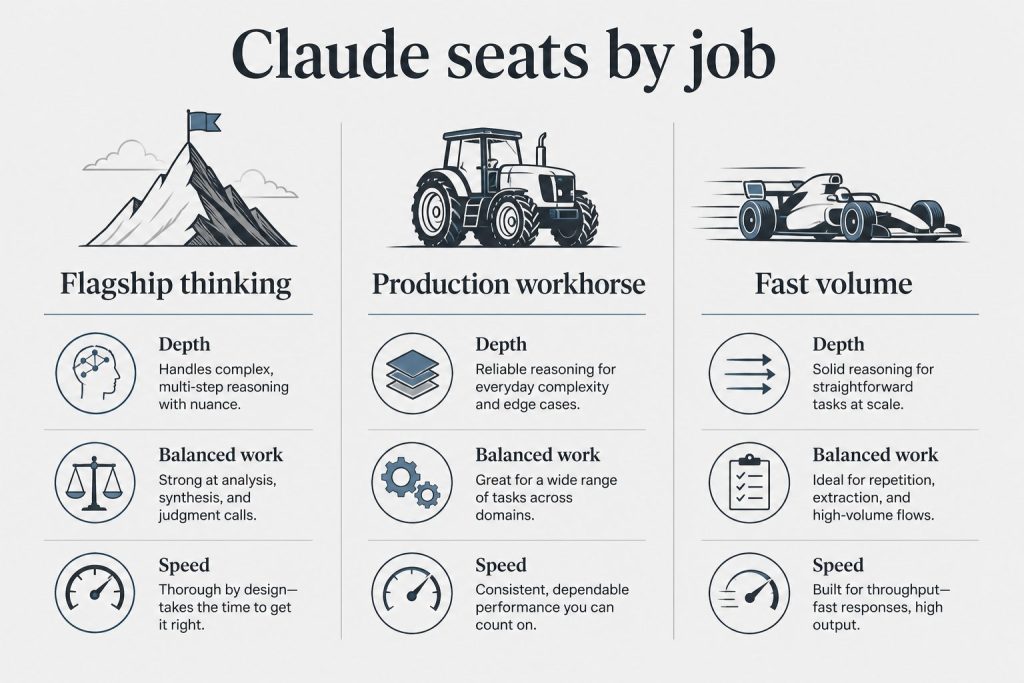
    Anthropic’s Claude model lineup in 2026 breaks down into three distinct tiers: Opus 4.7 for maximum capability, Sonnet 4.6 for the best balance of performance and cost, and Haiku 4.5 for speed and high-volume work. Picking the wrong model costs money or performance — sometimes both. This guide covers every meaningful difference so you can make the right call for your use case.

    Quick answer: Sonnet 4.6 handles 80–90% of tasks at 40% less cost than Opus. Use Opus 4.7 when you need maximum reasoning depth, the largest output window, or agentic coding at frontier quality. Use Haiku 4.5 when speed and cost are the priority and the task is straightforward.

    The Current Claude Model Lineup (April 2026)

    As of April 2026, Anthropic’s three recommended models are Claude Opus 4.7, Claude Sonnet 4.6, and Claude Haiku 4.5. All three support text and image input, multilingual output, and vision processing. They differ significantly in pricing, context window, output limits, and capability.

    Feature Opus 4.7 Sonnet 4.6 Haiku 4.5
    Input price $5 / MTok $3 / MTok $1 / MTok
    Output price $25 / MTok $15 / MTok $5 / MTok
    Context window 1M tokens 1M tokens 200K tokens
    Max output 128K tokens 64K tokens 64K tokens
    Extended thinking No Yes Yes
    Adaptive thinking Yes Yes No
    Latency Moderate Fast Fastest
    Knowledge cutoff Jan 2026 Aug 2025 Feb 2025

    Pricing is per million tokens (MTok) via the Claude API. Source: Anthropic Models Overview, April 2026.

    Claude Opus 4.7: When to Use It

    Opus 4.7 is Anthropic’s most capable generally available model as of April 2026. Anthropic describes it as a step-change improvement in agentic coding over Opus 4.6, with a new tokenizer that contributes to improved performance on a range of tasks. Note that this new tokenizer may use up to 35% more tokens for the same text compared to previous models — a cost consideration worth factoring in for high-volume workflows.

    Key differentiators for Opus 4.7 over the other two models:

    • 128K max output tokens — double Sonnet and Haiku’s 64K cap. This matters for generating long-form code, detailed reports, or complete document drafts in a single call.
    • 1M token context window — same as Sonnet 4.6, meaning Opus can process entire codebases or book-length documents in a single session.
    • Adaptive thinking — Opus 4.7 and Sonnet 4.6 both support adaptive thinking, which lets the model adjust reasoning depth based on task complexity.
    • Most recent knowledge cutoff — January 2026, versus August 2025 for Sonnet and February 2025 for Haiku.

    Opus does not support extended thinking — that capability lives on Sonnet 4.6 and Haiku 4.5. Extended thinking lets the model reason step-by-step before generating output, which is particularly useful for complex math, science, and multi-step logic problems.

    Use Opus 4.7 for: complex architecture decisions, large codebase analysis, multi-agent orchestration tasks, outputs that require more than 64K tokens, tasks demanding the latest possible knowledge, and any work where you need the absolute frontier of Anthropic’s reasoning capability.

    Skip Opus 4.7 for: routine content generation, customer support pipelines, high-volume classification or extraction, real-time applications requiring low latency, or any task where Sonnet scores within your acceptable quality threshold.

    Claude Sonnet 4.6: The Workhorse

    Sonnet 4.6 is the model Anthropic recommends as the best combination of speed and intelligence. Released in February 2026, it delivers a 1M token context window at $3 input / $15 output per million tokens — the same context window as Opus at 40% lower cost.

    Sonnet 4.6 also uniquely offers extended thinking, which Opus 4.7 does not. When extended thinking is enabled, Sonnet can perform additional internal reasoning before generating its response — useful for reasoning-heavy tasks like complex debugging, multi-step research, and technical problem-solving where chain-of-thought depth matters.

    For developers and teams using Claude Code, Sonnet 4.6 is the standard daily driver. It handles tool calling, agentic workflows, and multi-file code reasoning reliably, at a price point that makes heavy daily use economically viable.

    Use Sonnet 4.6 for: most production workloads, Claude Code sessions, long-document analysis, content generation, coding tasks, research synthesis, customer-facing applications, and any workflow requiring the 1M context window where Opus’s premium isn’t justified.

    Skip Sonnet 4.6 for: high-volume pipelines where Haiku’s lower cost is acceptable, simple classification or extraction tasks, or real-time applications where Haiku’s faster latency is required.

    Claude Haiku 4.5: Speed and Volume

    Haiku 4.5 is the fastest model in the Claude family and the most cost-efficient at $1 input / $5 output per million tokens. It has a 200K token context window — smaller than Opus and Sonnet’s 1M, but still substantial for most single-task work. It supports extended thinking but not adaptive thinking.

    The 200K context limit is the most important practical constraint. Most single-document, single-task workflows fit within 200K. Multi-file codebases, long books, or extended conversation histories that push past that threshold need Sonnet or Opus.

    Haiku 4.5 has the oldest knowledge cutoff of the three: February 2025. For tasks requiring awareness of events or developments from mid-2025 onward, Haiku won’t have that context baked in.

    Use Haiku 4.5 for: content moderation, classification pipelines, entity extraction, customer support triage, real-time chat interfaces, simple Q&A, high-volume API workflows where cost and speed dominate, and any task where quality requirements are modest.

    Skip Haiku 4.5 for: complex reasoning, large codebase analysis, tasks requiring recent knowledge (post-February 2025), multi-step agent workflows, or any output requiring more than 200K tokens of input context.

    Pricing: What the Numbers Actually Mean in Practice

    All three models price output tokens at 5x the input rate — a ratio that holds across the entire Claude lineup. This means verbose, long-form outputs cost significantly more than short, targeted responses. Minimizing generated output length is the highest-leverage cost optimization available before you touch model routing or caching.

    To put the pricing in concrete terms: generating one million output tokens (roughly 750,000 words of generated text) costs $25 on Opus, $15 on Sonnet, and $5 on Haiku. For input-heavy workloads like document analysis where you’re feeding in large amounts of text but getting shorter responses, the cost gap narrows.

    Three additional pricing levers apply across all models:

    • Prompt caching: Cuts cache-read input costs by up to 90% for repeated system prompts or documents. If your application reuses a large system prompt across many requests, caching is the single highest-impact cost reduction available.
    • Batch API: Provides a 50% discount for non-time-sensitive workloads processed asynchronously. Combine with prompt caching for up to 95% savings on qualifying workflows.
    • Model routing: Running a mix of Haiku for simple tasks, Sonnet for production workloads, and Opus for complex reasoning — rather than using one model for everything — can reduce total API costs by 60–70% without meaningful quality loss on the tasks that don’t require a flagship model.

    Context Windows: 1M Tokens vs. 200K

    Opus 4.7 and Sonnet 4.6 both offer a 1M token context window at standard pricing — no premium surcharge for extended context. For reference, 1 million tokens is roughly 750,000 words, enough to hold a large codebase, a full academic textbook, or months of business communications in a single conversation.

    Haiku 4.5 has a 200K token context window. That’s still roughly 150,000 words — sufficient for most single-document tasks, but it creates a hard ceiling for anything requiring multi-file code review, book-length document analysis, or lengthy conversation histories.

    If your workflow consistently requires more than 200K tokens of input, Sonnet 4.6 is the cost-efficient choice. Opus 4.7 is the right call only when the input load requires the additional reasoning capability Opus provides, not just the context window size — because Sonnet gets you the same 1M window at 40% lower cost.

    Extended Thinking vs. Adaptive Thinking

    These are two distinct features that appear together in the comparison table but serve different purposes.

    Extended thinking (available on Sonnet 4.6 and Haiku 4.5, not Opus 4.7) lets Claude perform additional internal reasoning before generating its response. When enabled, the model produces a “thinking” content block that exposes its reasoning process — step-by-step problem decomposition before the final answer. Extended thinking tokens are billed as standard output tokens at the model’s output rate. A minimum thinking budget of 1,024 tokens is required when enabling this feature.

    Adaptive thinking (available on Opus 4.7 and Sonnet 4.6, not Haiku 4.5) adjusts reasoning depth dynamically based on task complexity — the model allocates more reasoning for harder problems and less for simpler ones, without requiring explicit configuration.

    The practical implication: if you need transparent, controllable step-by-step reasoning that you can inspect and use in your application, Sonnet 4.6’s extended thinking is often the right tool — and at lower cost than Opus.

    Which Claude Model Should You Choose?

    The right framework for model selection in 2026 is to start with Sonnet 4.6 as your default and escalate selectively. Most production workloads — coding, writing, analysis, research, customer-facing applications — are well-served by Sonnet. Opus 4.7 earns its premium in specific scenarios: tasks requiring more than 64K output tokens, agent workflows demanding maximum reasoning depth, or applications where Anthropic’s latest knowledge cutoff is a meaningful factor.

    Haiku 4.5 belongs in any pipeline where you’ve identified tasks that don’t require Sonnet’s capability. High-volume routing, triage, classification, and real-time response scenarios are Haiku’s natural territory. Building a 70/20/10 routing split across Haiku, Sonnet, and Opus — rather than using a single model for everything — is the standard approach for cost-efficient production deployments.

    Frequently Asked Questions

    What is the difference between Claude Opus, Sonnet, and Haiku?

    Opus is Anthropic’s most capable model, optimized for complex reasoning, large outputs, and agentic tasks. Sonnet offers a balance of capability and cost, handling most production workloads at lower price. Haiku is the fastest and cheapest option, suited for high-volume, lower-complexity tasks. All three share the same core Claude architecture and safety training.

    Is Claude Opus worth the extra cost over Sonnet?

    For most tasks, no. Sonnet 4.6 handles the majority of coding, writing, and analysis work at 40% lower cost. Opus 4.7 is worth the premium when you need outputs longer than 64K tokens, maximum agentic coding capability, or the most recent knowledge cutoff (January 2026 vs. Sonnet’s August 2025).

    Which Claude model is best for coding?

    Sonnet 4.6 is the standard recommendation for most coding work, including Claude Code sessions. Opus 4.7 is preferred for large codebase analysis, complex architecture decisions, or multi-agent coding workflows where maximum reasoning depth is required. Haiku 4.5 can handle simple code edits and explanations at much lower cost.

    What is the Claude context window?

    Claude Opus 4.7 and Sonnet 4.6 both have a 1 million token context window — roughly 750,000 words of combined input and conversation history. Claude Haiku 4.5 has a 200,000 token context window. Context window size determines how much information Claude can hold and reference in a single conversation.

    Does Claude Opus support extended thinking?

    No. Extended thinking is available on Claude Sonnet 4.6 and Claude Haiku 4.5, but not on Claude Opus 4.7. Opus 4.7 supports adaptive thinking instead, which dynamically adjusts reasoning depth based on task complexity.

    What is the cheapest Claude model?

    Claude Haiku 4.5 is the least expensive model at $1 per million input tokens and $5 per million output tokens. It is also the fastest Claude model, making it well-suited for high-volume, latency-sensitive applications.

    Can I use Claude through Amazon Bedrock or Google Vertex AI?

    Yes. All three current Claude models — Opus 4.7, Sonnet 4.6, and Haiku 4.5 — are available through Amazon Bedrock and Google Vertex AI in addition to the direct Anthropic API. Bedrock and Vertex AI offer regional and global endpoint options. Pricing on third-party platforms may vary from direct Anthropic API rates.