Your GA4 new versus returning user data contains a ratio you are probably not monitoring. That ratio — what percentage of total sessions come from returning visitors — is your retention baseline. It tells you whether your content is building an audience or just attracting drive-by traffic.
Most content sites sit below 20% returning visitor sessions. Many are below 10%. That means for every 10 sessions the site earns, 9 of those users never come back.
The 14x Duration Gap
The 14x duration gap.
The behavioral difference between new and returning users on a typical content site is substantial enough that treating them as the same audience produces wrong conclusions about nearly everything.
In a live GA4 audit on a real content site, returning users showed an average session duration of 4 minutes 12 seconds. New users averaged 18 seconds. Same site, same content, same pages — 14x difference in how long users stayed. Returning users also engaged at 61% versus 22% for new users, and viewed 3.8 pages per session versus 1.2.
Every benchmark you track — engagement rate, bounce rate, session duration — is a blend of these two completely different behaviors. The aggregate number hides both the strength of your retained audience and the weakness of your new user conversion to loyalty.
Loyalty Anchors
Loyalty anchors.
Within any content library, a small number of pages are responsible for most return visits. These are your loyalty anchors — the content that made someone bookmark your site, set up a newsletter subscription, or search for you by name when they wanted to come back.
Loyalty anchor pages share identifiable characteristics. They are almost always comprehensive — long enough to reward deep reading. They address a recurring need rather than a one-time question. They are reference material that users come back to, not just something they read once. And they often cover something slightly counterintuitive or genuinely surprising, which makes them memorable and worth recommending.
Identifying your loyalty anchors in GA4 is a matter of filtering for pages where returning users are disproportionately represented in the session mix. Once identified, these pages deserve protection from monetization that would interrupt the user experience, regular updates to keep them fresh, and prominent internal linking to expose them to new users who might otherwise never find them.
The Best Retention Channel
Not all acquisition channels produce equal retention. Some channels deliver new users who return; others deliver one-time visitors. The channel producing your returning users is not always the channel producing your most new users — and optimizing for acquisition volume without understanding retention often means investing in the wrong channel.
When you segment returning user sessions by acquisition channel in GA4, the result often surprises teams. Organic search frequently produces higher retention than social media, even at lower initial volume. Email produces some of the highest retention rates when the newsletter is genuinely curated. Direct traffic — users who typed your URL or bookmarked you — is almost entirely returning users by definition.
Running the New vs Returning Session
Running the new vs returning session.
This analysis runs in one session using Claude-in-Chrome alongside Analytics Advisor in GA4. The methodology is the Books for Bots: GA4 New vs Returning Intelligence Kit.
Most content teams publish when they have something ready. Almost none publish based on when their audience is actually paying attention. The behavioral data for those two things — when you publish versus when your best readers arrive — rarely aligns.
GA4 bounce rate by day of week and hour of day tells you exactly when that window opens and closes. It is among the most actionable intelligence your analytics can produce, and among the least frequently pulled.
Wednesday Is Not Random
Wednesday is not random.
In a live GA4 audit session on a real content site, Wednesday produced the highest engagement rate and longest average session duration across all seven days of the week. Saturday and Sunday dropped below 20% engagement. The spread between the best and worst day was larger than the team expected — and they had been publishing on a Friday cadence for months.
The reason for the midweek peak is intent. Wednesday readers are in work mode, researching, planning, looking for answers they can act on before the week ends. Weekend readers are in browse mode — lower intent, higher bounce rate, shorter duration regardless of content quality. The content is the same. The audience arriving is different.
The Three Daily Engagement Windows
The three daily engagement windows.
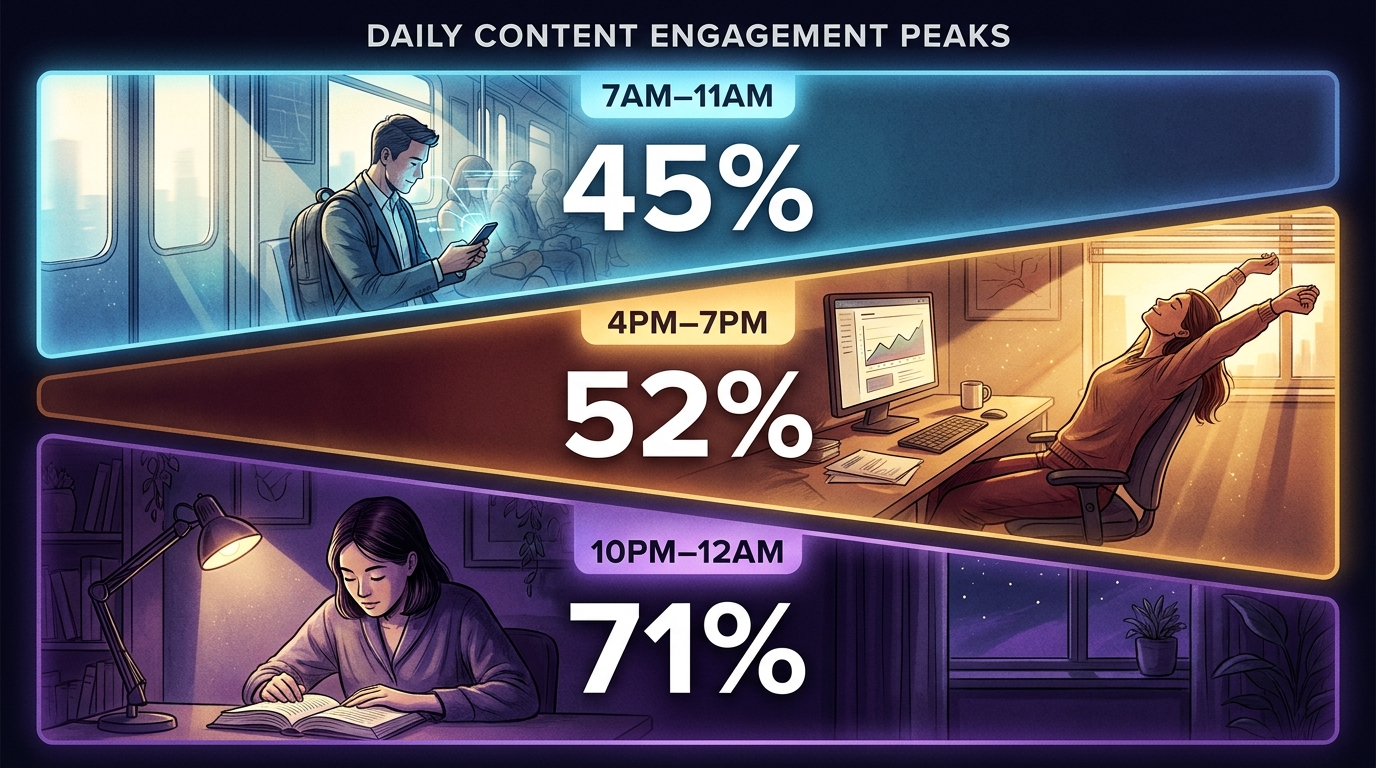
Beyond day of week, hour-of-day analysis reveals three distinct engagement windows on most content sites.
The morning window — roughly 7AM to 11AM — produces consistently elevated engagement rates. These are commuters, early starters, and researchers beginning their day. Session durations are moderate and bounce rates are lower than the daily average.
The late afternoon window — 4PM to 7PM — shows another engagement spike on most sites. These users are often winding down work, reading something they bookmarked earlier, or doing planning research for the next day. Some days in this window show 100% engagement rates in the data — every session that started, engaged.
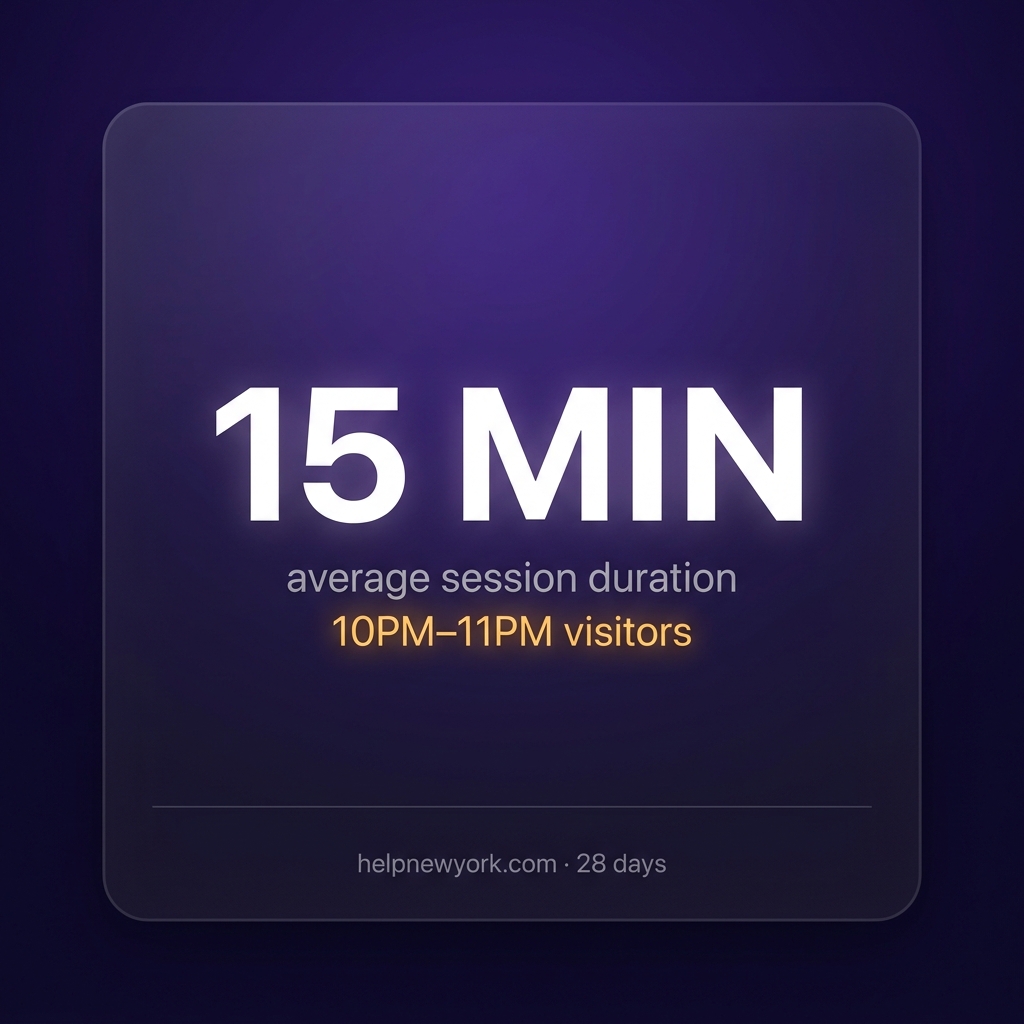
The late-night window — 10PM to midnight — is the most counterintuitive finding. Volume is low, but engagement depth is exceptional. On the site audited, users arriving between 10PM and 11PM averaged over 15 minutes on page. These are focused, high-intent readers who have carved out time to go deep. Nobody is publishing for them. That is an opportunity.
What This Means for Your Content Calendar
The scheduling insight from this analysis is immediately actionable without creating any new content. You simply move planned publishes to align with peak engagement windows — Wednesday over Friday, 9AM or 5PM over noon — and you are serving the same content to a more receptive audience.
For social promotion specifically, knowing that your peak engagement window is Wednesday morning means scheduling your distribution to that window rather than the time your team happens to be online.
Running the Time Intelligence Session
Running the time intelligence session.
This analysis runs in one session using Claude-in-Chrome alongside Analytics Advisor in GA4. The query sequence surfaces your day-of-week ranking, your three peak windows by hour, your dead zones, and a concrete publish timing recommendation based on your actual property data. The methodology is the Books for Bots: GA4 Time Intelligence Kit.
GA4 shows you exit rate. It does not tell you whether that exit was a success or a failure. That distinction matters more than the number itself.
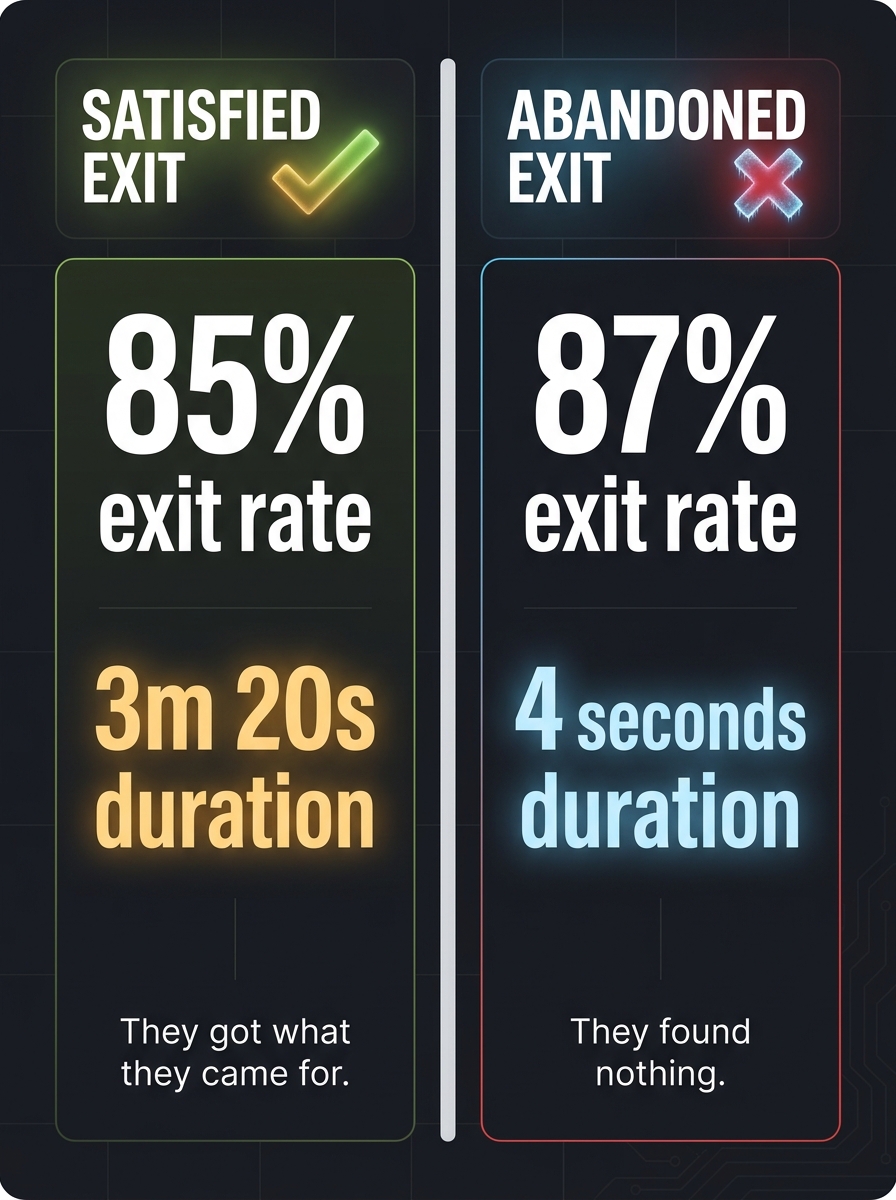
An 85% exit rate on a page where users stay for three minutes means the page did exactly what it was supposed to do. Users arrived, found their answer, and left complete. An 85% exit rate with four seconds means the page failed immediately.
Satisfied Exits vs Abandoned Exits
Satisfied exits vs abandoned exits.
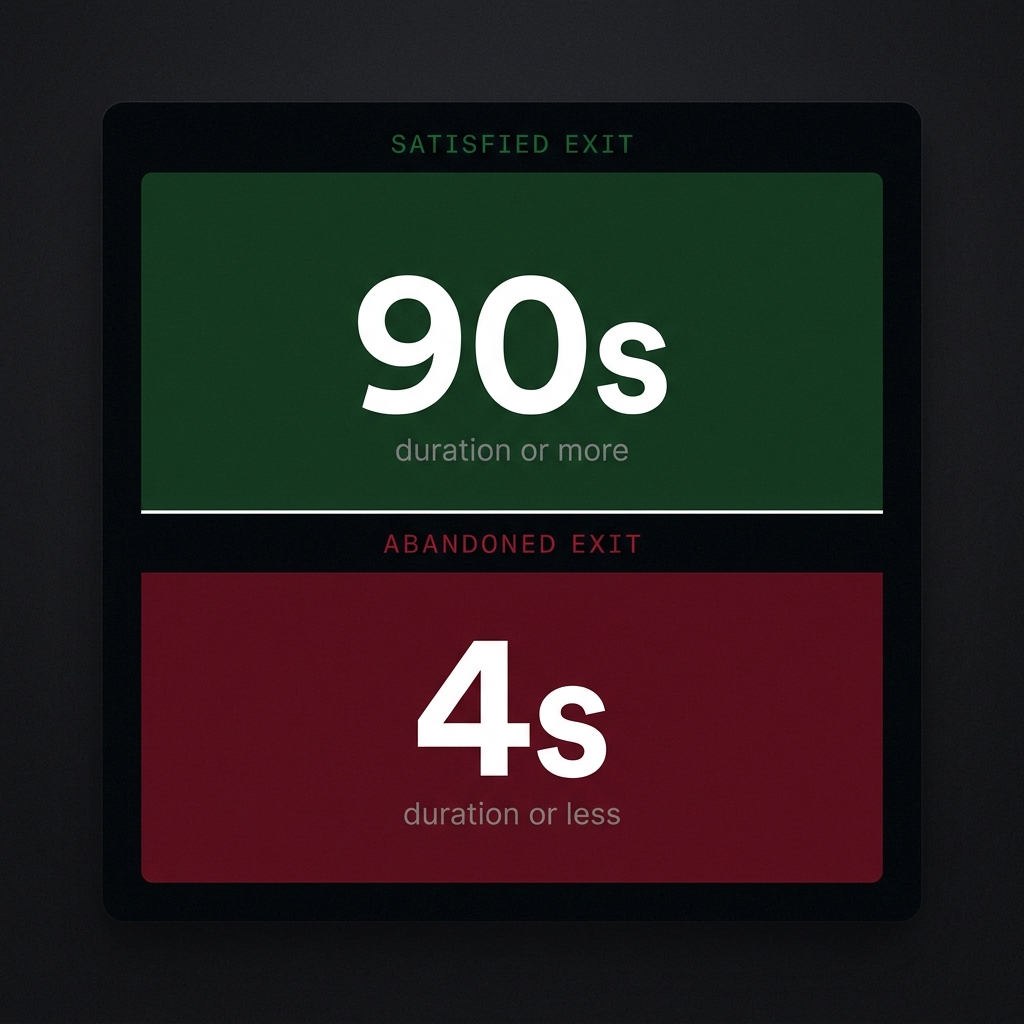
A satisfied exit has a high exit rate and high engagement duration — 90 seconds or more. The user read, completed their task, and left. Adding more CTAs to reduce the exit rate would interrupt a successful journey and make the page perform worse.
An abandoned exit has a high exit rate and low engagement duration — under 30 seconds. The user arrived, found nothing useful, and left. This page needs attention: it is either attracting the wrong audience, delivering the wrong content, or failing to provide a next step.
The diagnostic question for every high-exit-rate page is not “how do I reduce this?” It is “was this exit satisfied or abandoned?”
The NYC Summer Internships Finding
In a live audit on a real content site, the NYC Summer Internships guide showed an 85% exit rate with 3 minutes 20 seconds average duration. The first instinct — reduce the exit rate — would have been wrong. Users were spending over three minutes reading a comprehensive guide and leaving with the information they needed. The exit rate was a function of the page succeeding, not failing.
Compare that to the same site’s homepage: 65% exit rate with 8-second duration. Lower exit rate, dramatically worse performance. The homepage was failing more users despite fewer exits.
Dead-End Pages
Dead-end pages.
A third pattern exists beyond satisfied and abandoned: the dead end. Users arrive with genuine interest, engage enough to stay, but then have nowhere to go next. No internal links, no navigation to adjacent topics, no next step. The exit is not because the page failed — the site architecture failed.
Dead-end pages show moderate engagement duration and zero internal link click data. Adding one relevant internal link often produces measurable improvement in session depth without any content changes. It requires no developer, no design work, and no new content.
The Internal Link Opportunity Map
The internal link opportunity map.
The most actionable output from an exit intelligence audit is a specific list of page pairings: which abandoned exit pages should link to which high-engagement destination pages. Google’s Analytics Advisor can generate these recommendations from your actual behavioral data — not guesswork about what users might want next.
This analysis runs in one session using Claude-in-Chrome alongside Analytics Advisor. The methodology is packaged as the Books for Bots: GA4 Exit Intelligence Kit.
Open your GA4 referral traffic report and sort by sessions. The source at the top of the list is your most valuable referral partner, right?
Almost certainly not. The default GA4 referral view is sorted by volume. Volume is the wrong metric for understanding referral quality. And the gap between your highest-volume referral source and your highest-quality referral source is almost always larger than you expect.
The Quality Inversion
The quality inversion in referral traffic.
When you re-rank your referral sources by engagement rate instead of session count, the leaderboard flips completely. The source you have been grateful for because it sends 300 sessions a month is often delivering 6-8% engagement — users who arrive, glance at the page, and leave in under 10 seconds. The source sending 8 sessions a month may be delivering 70%+ engagement — users who read deeply, navigate to related pages, and return weeks later.
From a content investment perspective, those 8 sessions from the high-quality source are worth more than the 300 from the volume source. They represent real readers who found genuine value. The volume source is sending noise.
What Drives the Gap
The gap between volume and quality in referral traffic usually comes down to three things.
Intent alignment. A high-volume referral source often sends users whose intent does not match your content. A directory site might link to you as a resource while its users are looking for a service provider. They arrive, realize you are informational content, and leave. A niche newsletter that links to you as recommended reading sends users who explicitly opted in to this exact type of content. Every session is pre-qualified.
Audience specificity. The broader the audience of the referring site, the lower the average quality of the traffic it sends you. A general-interest news aggregator sends everyone. A specialized community sends people who care about your topic.
Editorial context. When a referring site links to you in the body of a relevant article with a reason to click, the user arrives with context and intent. When your URL appears in a list of 50 links on a resource page, the user arriving has no specific reason to engage with your content over anyone else on the list.
How to Find Your Hidden Gem Referrers
How to find your hidden gem referrers.
The query you are looking for in GA4 is not “which referral source sends the most sessions.” It is “which referral sources have fewer than 20 sessions but an engagement rate above 50%.”
That filter surfaces your hidden gems — the small sources that nobody is monitoring because they do not show up at the top of the volume-sorted list. These are the sites whose audiences are most aligned with your content, the writers and communities who are genuinely recommending you rather than listing you.
Once you have the list, the outreach writes itself. A referral partner whose audience stays on your site for 4 minutes and returns regularly is a relationship worth formalizing. A content exchange, a guest post, a link placement in their next relevant piece — any of these turns an organic quality referrer into a deliberate partnership.
What Your Bad Traffic Sources Are Costing You
Beyond missing the hidden gems, there is a cost to the volume sources you are currently treating as successes. If a referral source is sending 300 sessions at 6% engagement and you are investing link-building effort to maintain or grow that relationship, you are optimizing for a metric that does not correspond to business value.
The reallocation question is simple: what would happen if you redirected that same effort toward the sites whose audiences actually engage with your content?
Running the Audit
Running the audit.
This analysis runs in a single session using Claude-in-Chrome alongside Google’s Analytics Advisor in GA4. The query sequence inverts the default referral view, surfaces your hidden quality sources, identifies your bad traffic sources with specific domain-level data, and produces a partnership opportunity list for outreach.
No SQL. No BigQuery. No data analyst. The methodology is packaged as the Books for Bots: GA4 Referral Quality Audit.
Your GA4 engagement rate is one number. But it is not one audience. It is three audiences — and they behave so differently from each other that the aggregate number actively misleads you about how your content is performing.
Here is what most GA4 users see: a site-wide engagement rate of 35%, an average session duration of 90 seconds, and a top channel list led by Organic Search. What most GA4 users miss: within that same 35% number, three AI platforms are sending traffic with engagement rates of 21%, 46%, and 64% respectively — from the exact same pages, to users with completely different intent profiles.
The AI Referral Split Nobody Is Looking At
The AI referral split nobody is looking at.
ChatGPT, Claude, and Copilot all send referral traffic to content sites. But they do not send the same user. ChatGPT users arrive, scan for a quick answer, and leave in under 30 seconds — engagement rate around 21%, well below the organic search average. Claude users arrive with research intent, read deeply, and stay for 3-4 minutes — engagement rate above 64%. Copilot users are somewhere between, arriving in planning mode, spending 1-2 minutes on civic and services content.
If you blend these three into your site-wide engagement rate, you get a number that does not represent any of your actual users. You get a mathematical average of behaviors that have nothing in common.
Why Your Engagement Rate Lies
Why your engagement rate lies.
The problem is not your content. The problem is that engagement rate without source segmentation is noise. A 35% site-wide engagement rate could mean you have excellent content reaching the wrong distribution channels. It could mean you have mediocre content propped up by one high-engagement source. It could mean your AI referral traffic is dramatically outperforming your social traffic and you have no idea.
The only way to know which is true is to break the number open by source and look at what each channel is actually delivering in terms of engaged session quality — not just volume.
The Four-Question Audit
The four-question audit.
Before you make any content or distribution decisions based on your GA4 engagement rate, ask these four questions.
Which channel sends the most engaged users — not the most users? The answer is almost never the channel driving the highest session count. In most content sites we have audited, the highest-engagement channel is sending between 8 and 40 sessions per month, not 400.
What is the engagement rate for each AI referral source individually? Blending ChatGPT and Claude traffic treats them as equivalent. They are not. One is a fact-checking audience. The other is a research audience. The content structure that serves one actively fails the other.
Which pages produce satisfied exits versus abandoned exits? A 90% exit rate with a 3-minute duration is a success. A 90% exit rate with a 4-second duration is a dead end. Engagement rate alone does not tell you which you have.
Is your engagement rate rising or falling week-over-week from AI sources? AI referral traffic is growing on most content sites in 2026. If yours is flat or declining, you are losing ground in a channel that is becoming structurally important.
What This Reveals About Your Real Audience
When you segment your GA4 engagement rate by source and run the AI referral breakdown specifically, a picture emerges that the aggregate number completely hides. Your real audience — the people actually reading and acting on your content — is smaller and more specific than your total traffic suggests. It is concentrated in a few sources, a few content types, and in the case of Claude traffic specifically, a few geographic clusters that reflect the academic and professional demographics of that user base.
This is not a problem. It is a targeting signal. It tells you where to invest content development effort and which audience to write for on every new piece.
The Methodology Behind This Analysis
The behavioral profiles in this article come from five live sessions using Claude-in-Chrome to interrogate Google’s Analytics Advisor inside GA4 on a real property. The query architecture — the specific sequence of questions and the capture protocol — is packaged as the Books for Bots: GA4 AI Referral Audit Kit.
It runs in four sessions, requires no SQL, no BigQuery access, and no data analyst. You need Claude-in-Chrome, Editor access to a GA4 property with Analytics Advisor enabled, and approximately 90 minutes. The output is a complete per-AI behavioral profile of your traffic and a content variant framework for acting on it.
When your best traffic arrives. Day-of-week and hour-of-day patterns that tell you when to publish, when to promote, and when your audience is actually paying attention.
15 minutes Average session duration for 10PM–11PM visitors — your hidden audience
COMING SOON — $27
Most Teams Publish When It’s Convenient
This kit tells you when your audience is actually paying attention — and those two things are rarely the same. One session against Analytics Advisor reveals your peak engagement windows by day and hour, your dead zones, and a hidden late-night audience almost no one is writing for.
FIELD FINDING — LIVE SESSION
Wednesday produced the highest engagement rate and longest average session duration. Saturday and Sunday dropped below 20% engagement. The gap between best and worst day is larger than most teams expect.
What’s Inside
7 copy-paste queries for Analytics Advisor — one session
Day-of-week engagement ranking — all 7 days scored
Hour-of-day peak window identification — morning, afternoon, late night
Dead zone diagnosis — high volume, low quality windows
Late-night audience profiling — the segment nobody is writing for
Concrete publish timing recommendation from your actual property data
What You Need
Claude-in-Chrome — free from Anthropic
Editor or Analyst access to a GA4 property
Analytics Advisor (BETA) enabled
30–60 minutes
THE KEY INSIGHT
The scheduling insight from this kit is immediate and free to act on. You do not need to create new content. You need to redistribute what you already have into the windows where your audience is actually paying attention.
Individual Kit — Instant PDF Download
COMING SOON — $27
No subscription.
BETTER VALUE — BUNDLE
Get All 6 Kits for $97
Every GA4 intelligence methodology in one purchase. Save $65.
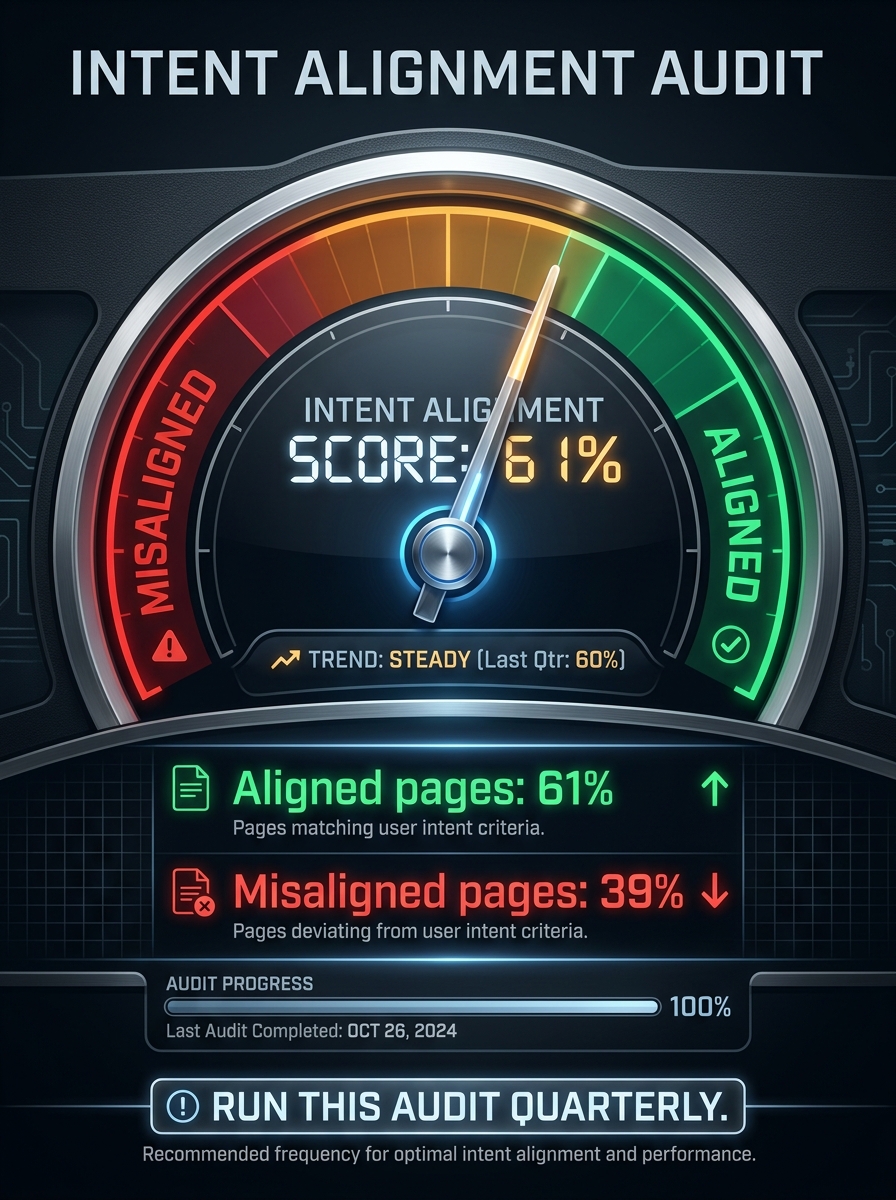
Are your keywords landing on the right pages? Diagnose intent mismatch between what users searched and what they found — and surface what your audience wanted and could not find.
39% misalignedOf organic landing pages delivering the wrong content for the search intent
COMING SOON — $27
A Page Can Rank Well and Still Fail
If the user searched “how to apply for X” and landed on a page about “what X is,” they bounce immediately. GA4 captures this failure even when you cannot see the original query. High organic traffic with low engagement is almost always intent mismatch in disguise.
CORE INSIGHT
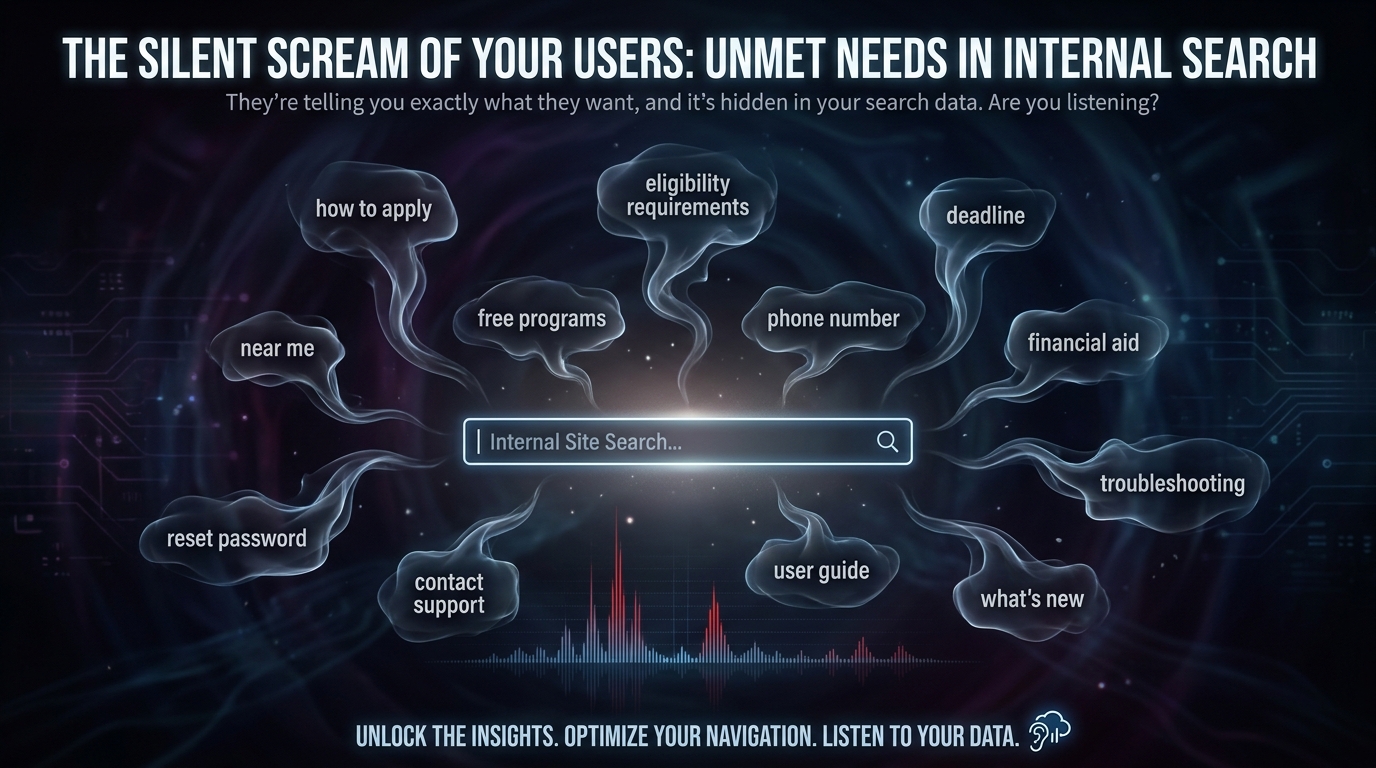
Internal site search is the most underused intelligence in GA4. When a user searches your site, they are explicitly telling you what they wanted and could not find. This kit makes that signal visible and actionable.
What’s Inside
7 copy-paste queries for Analytics Advisor — one session
Organic traffic to engagement mismatch identification
Internal search term extraction — top 20 with gap analysis
Zero-result internal search diagnosis
Homepage navigation gap analysis
Intent alignment score — baseline metric to track quarterly
Content repositioning recommendation framework
What You Need
Claude-in-Chrome — free from Anthropic
Editor or Analyst access to a GA4 property
Analytics Advisor (BETA) enabled
30–60 minutes
THE KEY INSIGHT
Internal search tells you what people search on your site after they arrived. That is a different and more valuable signal than anything a keyword tool produces — and it is sitting in your GA4 right now.
Where users leave your site — and what it means. Distinguish satisfied exits from abandoned ones, find your dead-end pages, and map your internal linking gaps.
85% exit rate With 3m 20s duration — a satisfied exit, not a problem to fix
COMING SOON — $27
Not All Exits Are Failures
A user who reads your guide for three minutes and then leaves got exactly what they needed. A user who hits your page and bounces in four seconds got nothing. GA4 treats them identically. This kit teaches you to tell the difference.
FIELD FINDING — LIVE SESSION
The NYC Summer Internships page has an 85% exit rate AND a 3m 20s average session. That is a satisfied exit. Adding CTAs to interrupt it would reduce performance, not improve it.
Satisfied exit.
Abandoned exit.
What’s Inside
7 copy-paste queries for Analytics Advisor — one session
Satisfied vs abandoned exit classification framework
Dead-end page audit — pages with zero internal link clicks
Homepage navigation effectiveness score
Internal link opportunity map — Advisor generates specific page pairings
Exit-to-content-gap mapping for abandoned pages
What You Need
Claude-in-Chrome — free from Anthropic
Editor or Analyst access to a GA4 property
Analytics Advisor (BETA) enabled
30–60 minutes
THE KEY INSIGHT
The internal link fix is the highest ROI action from this kit. No new content, no design changes, no developer. Add one sentence with a link on an abandoned exit page pointing to a relevant high-engagement page.
Individual Kit — Instant PDF Download
COMING SOON — $27
No subscription.
BUNDLE — ALL 6 KITS
Get All 6 Kits for $97
Every GA4 intelligence methodology in one purchase. Save $65.
The Second Take — inaugural piece. My take, then the one that would change my mind.
The Setup
The most repeated thing I’ve said on social this month is some version of the same sentence: AI only amplifies the editorial infrastructure you already have. Taxonomies, briefs, kill thresholds, interlinking, schema, the judgment layer — that’s the product. A one-person shop with that stack outships a ten-person department. I believe it. I’ve seen it on audits, on sites I run, on client work.
I also know the argument against it. I can feel where it lives. And I’d rather write about the thing where the friction is real than keep posting the half of it I already know how to win.
So this is the first piece in a new category on Tygart Media called The Second Take. The rule is simple: I say what I actually think. Then I give the best version of the view that would change my mind — not a strawman, the real one. Then I tell you where I haven’t landed yet.
Here’s the first one.
My Take
Earned judgment in object form.
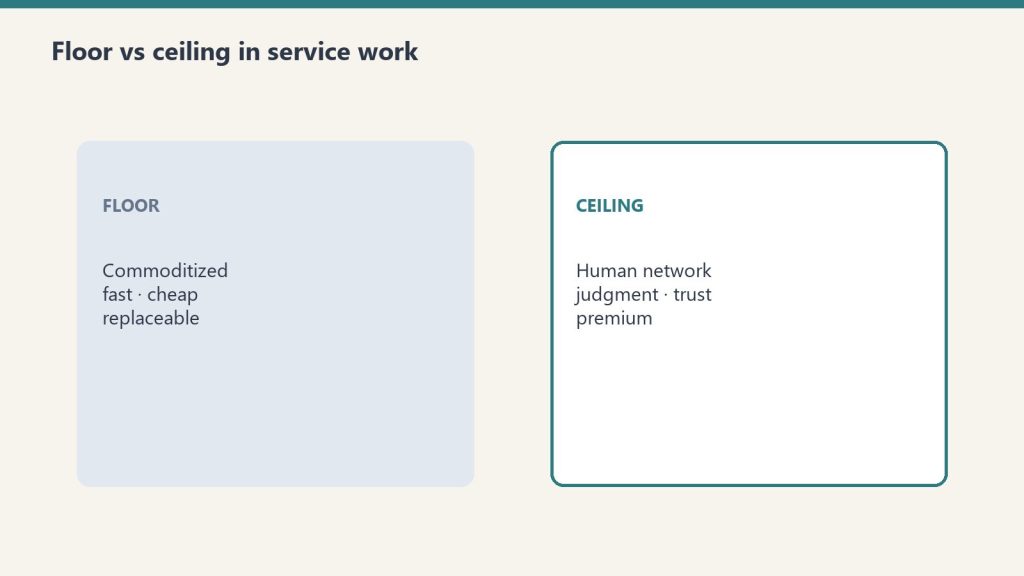
AI didn’t change what wins on the internet. It raised the floor on what counts as infrastructure.
Five years ago, you could run a content operation on vibes. Write a post, hit publish, let Google figure it out. The taxonomy was whatever the category dropdown happened to say. The interlinking was whatever the author remembered to do. The brief was an idea in somebody’s head on a Monday. That stack stopped working. Not because AI replaced writers — that’s the lazy frame. It stopped working because AI put a hundred of them at every keyboard, including your competitor’s. The floor rose. Vibes don’t clear it anymore.
What clears it is architecture. The boring kind.
A real taxonomy, where every piece has a home and knows what it’s a child of. Briefs that are built before the writing starts — target keyword, search intent, reader, angle, source of authority, what this piece does that nothing else on the site does. Kill thresholds, written down, that the writer and the editor and the AI all know before the first paragraph: can’t verify the claim, kill it; sounds like generic LinkedIn, kill it; doesn’t sound like the publisher actually wrote it, kill it. Interlinking as a system, not an afterthought — a hub and its spokes, the spokes pointing back up, every new piece finding its place in a graph that already exists. Schema on every page because you know what kind of thing you published. A quality gate before anything ships.
That’s the editorial surface area. AI runs across the surface and the surface is what shapes the output. Without the surface, AI accelerates mediocrity. With it, AI does work a ten-person department used to do, faster, and the output has the house voice because the house has a voice.
I’ve watched this on a concrete case. A site with forty-seven existing posts, decent writing, zero architecture. Duplicate cannibalizers. No interlinking. No schema. Categories that didn’t mean anything. I stopped new content for six weeks and worked only on the infrastructure — taxonomy, schema, interlinking, killing the duplicates, rewriting titles, fixing the hub-and-spoke. No new posts. Keyword rankings tripled on the existing library before anyone wrote a new word. That’s not an AI story. That’s an architecture story, and the AI only mattered once the architecture was there.
The operator thesis is this: the moat isn’t what AI writes for you. The moat is what you give it. The briefs. The taxonomies. The judgment layer. The willingness to publish the rules you write by.
Most shops won’t build this. It looks like overhead. It isn’t. It’s the product.
The Second Take
A system that moves everything through itself whether or not any single package matters.
Infrastructure is table stakes, not a moat.
That’s the hardest version of the case against my take, and it’s not a strawman — it’s what a sharp person who has been watching the shape of the web over the last few years would tell you, and they would not be wrong.
The argument runs something like this. Yes, the editorial surface area is real. Yes, the sites that have it outperform the sites that don’t, holding everything else equal. But holding everything else equal is the phrase doing most of the work, because on the open web nothing is equal for long. The platforms that mediate discovery — the search engines, the retrieval layers, the answer engines, the large language models that now sit between a reader and the page — can reweight any signal the infrastructure produces. They can absorb the answer into their own surface and never send the reader at all. They can decide tomorrow that a signal they valued yesterday is noise. They can announce a new format, a new schema, a new structured-data spec, and the sites that shipped the old one right are now the sites that shipped the old one. Infrastructure, by this reading, is not a defensible moat. It’s a cost of entry that everyone with an operator playbook will eventually pay.
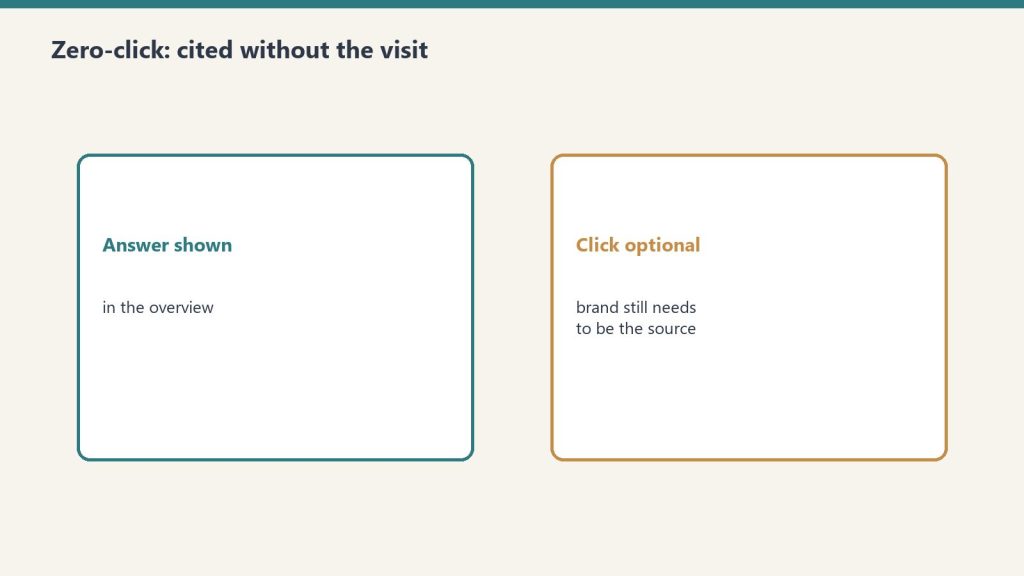
And this view gets sharper. A beautifully-architected site that ranks everywhere and gets cited everywhere can still fail to monetize, because the citation economy and the attention economy are not the same economy. A model cites you to answer a question; the user never clicks. The ingestion point captured the value. You provided the authority; somebody else provided the surface. Authority is not the same as value capture, and this is where the operator thesis quietly breaks. You can be the most credible voice in your vertical and also the least-rewarded, because the layer between you and the reader decided to keep the reader.
There is a harder version of this still. The infrastructure you build is in the platform’s language — its schema, its retrieval signals, its answer formats. To do it well you have to commit to the language. Commitment makes you legible. Legibility makes you extractable. The better your architecture, the more fluently the platform can read you, and the more frictionlessly the platform can become the thing the reader comes to instead of you. At the limit, the architecture is the moat and the architecture is what the platform eats are not different statements. They’re the same statement viewed from two ends.
The quiet version of this argument, which I think is the honest one, is that nobody outruns the platform for long. You can build a ten-year compounding asset on top of a distribution layer you don’t own, and it can still be worth less than a three-year brand built on top of a distribution layer somebody you pay controls. Architecture wins the game everyone is playing. The people setting the table are playing a different game.
If you take the second take seriously, the operator’s job changes. It stops being about building the cleanest surface and starts being about which relationships the surface makes possible before the platform eats it. The architecture becomes a lead generator for something the platform can’t intermediate — an email list that’s really read, a practice that gets hired, a small paid product, an audience that would notice if you stopped. The infrastructure is the bait. The relationship is the hook. If you stop at the infrastructure, you’ve built the prettiest version of somebody else’s funnel.
I have to live with that argument. It’s not wrong.
What I’m Still Sitting With
Public thinking that hasn’t closed the loop yet.
My take says the operators win because we can adapt the infrastructure faster than the platforms can co-opt it. The second take says nobody outruns the platform, so the infrastructure is only worth what it funnels into a relationship the platform can’t touch.
What would have to be true for my take to be right is that the gap between operator speed and platform drift stays wide enough for the work to compound before the rules change again. What would have to be true for the second take to be right is that the rules change faster than that, or that the platform absorbs the signal directly into its own answer surface and never lets the reader through.
I don’t know which is truer yet for people who aren’t already running the stack. For someone who already has the architecture, both takes point the same direction — keep building, and route the architecture toward relationships you own. For someone starting from zero, the two takes split. My take says build the infrastructure first and trust that it compounds. The second take says build the relationship first and let the infrastructure serve it, because any infrastructure you build on rented land is rented too.
I think the honest answer is that both are partially right, and which one is more right depends on how long the platform cycle holds. If we get another five calm years, the operators win. If the next phase of AI-mediated discovery looks less like search and more like a closed loop where the answer engine is also the reader, the second take wins, and it wins decisively.
I’ll write the piece again in a year and see which half aged better.
The Second Take is a new category on Tygart Media. Every piece follows the same contract — my take, then the view that would change my mind, then where I’m still sitting with it. The point isn’t to win the argument. The point is to give you a sharper starting place than the one the algorithm would.
How should restoration companies handle paid leads that don’t convert? Every paid lead — whether they closed the job or not — should flow into the organic asset. Email list, retargeting audience, community contact database, future review pipeline if they closed, referral seed network regardless. The paid spend bought an introduction. The organic asset is what converts that introduction into a durable relationship. Companies that capture every paid lead into the asset make every subsequent paid dollar more efficient. Companies that don’t stay on the lead-buying treadmill in perpetuity.
The highest-ROI paid advertising strategy in restoration is not a new campaign type, a new platform, or a more aggressive bid strategy. It is a retention discipline that costs almost nothing to install and pays compounding returns for the life of the company.
The discipline: every paid lead, whether they converted or not, gets captured into the organic marketing asset. The paid dollar bought an introduction. The organic asset is what turns that introduction into a durable relationship.
Most restoration companies do not do this. The paid lead closes or does not close, and the company moves on. A name, a phone number, and an interaction that cost real money disappear from the company’s awareness. The next time that homeowner or that commercial account has a restoration need, the company has to win them again — at cost, through paid, the same way the first time.
The fix is not complicated. It is a small set of habits that compound into a structural marketing advantage.
What “Evergreen” Means Here
What evergreen means here.
A paid lead is an introduction, not a transaction. The transaction might or might not happen on this loss. The introduction — the fact that this homeowner or this commercial buyer now knows the company’s name and has had a real interaction — is durable if the company treats it that way.
“Evergreen” means the paid lead continues to produce value for the company beyond the single loss that triggered the call. That happens when the lead flows into channels where the company can stay in front of them organically — email, social, retargeting, content, community — at a near-zero incremental cost per touch.
Over time, the accumulated paid-lead database becomes one of the company’s most valuable marketing assets. It is a list of people who already know the company, have already engaged, and are much more likely to convert on any future restoration need than a cold prospect is.
The Capture Points
The capture points.
The evergreen discipline runs at specific capture points throughout the lead journey.
First contact capture. When a paid lead first calls or messages in, the intake captures name, address, email, and the nature of the inquiry. The email address specifically is the unlock — it is what allows the future organic touch. If the intake workflow does not require an email before the quote or response is sent, the capture rate will be unacceptable.
Consent capture. At intake, the client is asked if they would like to receive occasional emails from the company — maintenance tips, storm preparation notes, community updates. Consent is logged. The ones who say yes become the email list. The ones who say no are still in the retargeting audience through behavioral signals on the website, but not in the email list.
Close-of-job capture. If the job closes, the close-out conversation includes the review ask, the photo-and-content permission ask, and the referral network ask. Clients who closed are warm ambassadors for everything the company does next. The close-out conversation is the highest-leverage capture opportunity in the process.
No-close capture. If the job does not close — they went with another company, the scope changed, the loss was smaller than they thought — the follow-up is a polite, helpful message that keeps the relationship alive. “We understand this did not work out this time. If anything changes or if you ever need us in the future, please reach out. In the meantime, we’ll stay in touch occasionally with maintenance tips and community updates.” Most non-closed leads will accept this framing. Many of them end up closing with the company on a future loss because the relationship was maintained.
The Channels That Hold the Relationship
The captured leads flow into specific channels that keep the company in front of them at low marginal cost.
Email list. Monthly newsletter at minimum. Content mix: maintenance tips, storm or seasonal prep, community updates, staff celebrations, completed-job highlights. The tone is helpful and local, not promotional. The list grows steadily as new leads flow in. Segmentation by client type (past client, past lead who did not close, referral partner, community contact) helps tune content.
Retargeting audience. Pixel fires on the website, captures visitors, builds an audience that can be targeted with Meta, Google, and YouTube ads at a low CPM. The retargeting is soft — staff anniversaries, job highlights, community posts, educational content — not high-pressure conversion creative. The purpose is to stay present in the retargeted audience’s social and browsing experience over time.
Social following. When leads are captured with email, they also get an organic invitation to follow the company’s social accounts. Not every captured lead will. The ones who do become the daily-cadence audience the content engine serves.
Text message list (selectively). For emergency-service focused companies, a text message list for severe weather alerts, storm prep, or service updates can be valuable. Opt-in requirements are stricter; compliance is real. Worth building for emergency-heavy service mixes.
Community contact database. Separate from email, for partners, referrers, and community contacts. Managed more manually — owner, sales lead, and PMs add notes. The database supports the observational B2B plan and the trade association relationship work.
Review pipeline. Closed clients flow into the review-capture sequence described in the reviews-as-comp article. That review is an immediate marketing asset, but the client is also now a candidate for referrals, content permissions, and longer-term relationship value.
The Cadence
Different channels run at different cadences.
Email: monthly newsletter minimum. Additional sends on seasonal triggers — pre-hurricane, pre-winter, post-storm. Four to eight sends a quarter is a working baseline.
Retargeting: continuous, automated. A small ongoing budget (a few hundred to a few thousand a month depending on company size) maintains presence with the captured audience.
Social: daily cadence on the highest-value platform for the company, three to five times a week on secondary platforms. The content engine feeds this.
Text: only triggered — weather events, service updates. Over-texting degrades the list.
Community database: monthly review of relationships, quarterly active outreach, annual plan review.
Review pipeline: triggered by job close, weekly monitoring of outcomes.
None of these cadences are heavy. All of them together cost a fraction of what they produce in residual value from the captured leads.
The Math of Compounding
The financial argument for the evergreen discipline is straightforward.
A restoration company running $100,000 a year in paid advertising generates, say, 800 leads at an average $125 per lead. Of those 800, maybe 300 close. The other 500 are “lost” in the standard operating model — the paid dollar was spent, the lead did not convert, the company moves on.
With the evergreen discipline, all 800 are captured. 600 give email consent. 800 end up in the retargeting audience. 200 follow the social accounts. The 300 who closed become review candidates and content permissions. The 500 who did not close get the helpful follow-up, some percentage of which will re-engage over time.
Two years later, the email list is at 1,200 engaged contacts. The retargeting audience is 1,600 people. The social following is 400 engaged followers. The review count is 500+ with regular velocity.
The next $100,000 of paid spend is suddenly dramatically more efficient. Retargeting converts leads from the existing audience at a fraction of the cold-lead CPL. Email drives additional job flow from the warmed list at near-zero marginal cost. Social amplifies content to an audience that is already engaged. Reviews strengthen map pack and LSA placement.
The compounding is not theoretical. It is a direct function of treating every paid dollar as an investment in the asset, not an expense against this month’s lead count.
The Operational Mechanic
Installing this is a short list of specific workflow changes.
Update the intake script. Every paid lead intake captures email and consent. If the current intake does not do this, fix it before running another dollar of paid spend.
Install the close-out extensions. Review ask, content permission ask, referral ask, email opt-in confirmation. Part of every job close-out.
Install the no-close follow-up. A polite, helpful message template. Sent within 48 hours of a non-close. Includes the offer to stay in touch.
Build the email list infrastructure. A simple email service provider (Mailchimp, Constant Contact, ConvertKit — choice less important than the discipline). Monthly newsletter template. Seasonal send plan.
Install the retargeting pixel and audiences. Meta Pixel, Google tag, LinkedIn Insight Tag if B2B-relevant. Configure the retention periods. Launch a soft retargeting campaign.
Map the data to CRM if you have one. If not, a spreadsheet works for the first 1,000 contacts. The important thing is that every captured lead is in one place and can be acted on.
Put a named owner on each channel. Email: marketing coordinator or outsourced specialist. Social: content operator. Retargeting: paid operator or agency. Community database: owner or sales lead. Without named ownership, the channels atrophy.
Common Failure Modes
Common failure modes.
A few consistent reasons this discipline fails to get installed.
Intake does not capture email. Fixable in a week of script updates and training. Non-negotiable if the evergreen discipline is going to work.
No one owns the email list. “Marketing” is not an owner. A specific person has to be responsible for the newsletter, the send cadence, the list maintenance. If nobody owns it, it dies.
Content for the email list is purely promotional. The list disengages fast. The content has to be useful — maintenance tips, community notes, staff celebrations, educational content. Promotional content can be mixed in, not dominant.
Retargeting runs without creative refresh. The same ad running to the same audience for months burns out. Creative needs to rotate weekly or monthly.
Lead capture in the CRM is inconsistent. Some leads get logged. Some do not. The list is corrupted by missing entries. Fix the workflow discipline. Audit monthly.
The no-close follow-up is awkward or feels transactional. Rewrite the template. It should read as a real person, writing to acknowledge that this was not the fit today, and offering to stay in touch for the future. The relationship-first framing lands better than any conversion copy.
How This Pairs With the Rest of the Stack
The evergreen discipline is what converts the paid layer from rent into an investment in the asset. It feeds the reviews practice. It amplifies the content engine’s reach by distributing the content to a growing captive audience. It reinforces the digital three-legged stool’s review and GBP signals by producing new five-star reviews from jobs that originated from paid but landed in the organic asset.
It is the connective tissue between the paid and organic sides of the stack.
Where to Start
Audit the last 90 days of paid leads. For each one, answer: did we capture email? Did we get consent? Are they on the email list? In the retargeting audience? Did they get a follow-up message whether they closed or not?
The gaps are the install plan. In most restoration companies, the majority of those answers are “no” or “I don’t know.” That is the cost of the current state.
Install the workflow changes this quarter. Run the list for 90 days. Send a first newsletter. Launch a soft retargeting campaign. Watch the numbers.
Twelve months in, the email list and the retargeting audience will be producing job flow that did not exist before, at a fraction of the CPL of cold paid acquisition. The paid spend will look different because the asset underneath it is different.
None of this is glamorous. All of it compounds.
Frequently Asked Questions
What does “every paid lead is evergreen” mean for restoration?
It means treating every paid lead — whether they closed the job or not — as a permanent contribution to the company’s marketing asset. Capture their contact information, get consent, flow them into the email list and retargeting audience, and maintain the relationship at near-zero cost over time. The paid dollar bought an introduction; the evergreen discipline turns that introduction into a durable asset.
How do you capture paid leads that don’t convert?
At intake, every lead provides name, email, address, and the nature of the inquiry. For those who don’t close, the follow-up message acknowledges that this didn’t work out, offers to stay in touch, and confirms email opt-in. The non-closed lead becomes part of the nurture audience. Many will convert on a future loss because the relationship was maintained.
What channels should captured leads flow into?
Email list (monthly newsletter minimum, seasonal triggers additional), retargeting audience (continuous, soft creative), organic social following, text messaging selectively for emergency-heavy companies, and the community contact database for partners and referrers. Each channel runs at a different cadence. All of them together cost a fraction of what they produce in residual value.
How much incremental spend does the evergreen discipline cost?
Most of the cost is workflow, not budget. Email service provider at $100-500/month depending on list size. Retargeting at a few hundred to a few thousand a month. The labor is distributed across existing roles. The return from captured leads converting over time typically exceeds the incremental cost many times over.
How long does it take to see compounding returns?
Twelve to twenty-four months. The first year builds the list and audience. The second year is when retargeting, email, and social start producing measurable job flow from previously “lost” leads. Companies that install the discipline see paid CPL decline meaningfully by year two because the warm audience is doing conversion work.
What kind of content should go in the email newsletter?
Helpful, not promotional. Maintenance tips, seasonal prep, community updates, staff celebrations, completed-job highlights. Tone is local and useful. Some mild promotional content is fine in the mix but cannot dominate. The list that treats subscribers as an audience, not a conversion funnel, stays engaged for years.
Tygart Media on restoration — an analyst-operator body of work on the systems that separate compounding restoration companies from busy ones. No client names. No brand placements. Just the operating standard.
The Signal — Tygart Media's weekly brief. What we actually ran, what it measured, and what it means for a restoration shop.