Last verified: September 2026. The AI-laptop wave is here — Copilot+ PCs, NPUs, “AI-ready” stickers on everything. Here’s the part the marketing skips: the laptop you already own can run a serious local AI stack today. No new hardware, no cloud bill, no subscription treadmill. This guide is the proof, the money math, and the build instructions — nine deep dives, one hub.
The proof: a $400 laptop that rivals a Copilot+ PC
Start here. A $400 budget laptop, no NPU, turned into a private AI operator rig that rivals a Copilot+ PC — command by command. This is the article that makes the whole premise undeniable: the hardware barrier is mostly marketing.
Will’s note: Ollama can also offload part of the compute to your GPU through its settings — we tried that route. We never really stuck with local, honestly; we like our CLIs backed by cloud compute. But if you want the full local path, the GPU setting is worth knowing about.
The money: replacing a $12K/month tool budget
The stack isn’t just a hobby project — it replaced $12,000 a month in expensive SaaS tools. Open-source models, Python, and PowerShell automation doing the work the subscriptions used to do. Read this one with your accounting hat on.
Using Ollama’s nomic-embed-text model and ChromaDB, a local RAG system was built that indexes every skill file, session transcript, and project doc on the machine — 468 files — and answers natural-language questions about the operation. Your laptop becomes the expert on your own business.
The business version: index, query with Claude, measure ROI
The production-grade take: indexing business documents into a local vector database and querying them with Claude — architecture, code, production lessons, and real ROI numbers. This is the one to hand your skeptical partner.
Enterprise AI costs are spiraling — GPT-4 API calls at scale run hundreds or thousands of dollars a month. The alternative: a free agent army built with Ollama and Claude. Zero cloud cost. This is the flagship piece of the stack.
AI triage agents eliminate manual bottlenecks by automating task routing, intent detection, and urgency scoring across business lines. Not a chatbot — infrastructure that decides where work goes.
Scheduled tasks, webhooks, and AI automating manual work — the goal is reclaiming the 40-hour work week for strategic growth instead of busywork. This is where the stack stops being a demo and starts being operations.
The vision: the AI-native business operating system
The end state: an AI-native business operating system that replaces static workflows with autonomous infrastructure, scaling the company with programmatic governance. Everything above is a component of this.
A local vector database Claude setup — indexed with your business documents, contracts, SOPs, client notes, and invoices — gives back the operational time lost to hunting through folders. The right answer appears in seconds, without any of those documents leaving the machine.
This is the full build: architecture, tools, working code, what performs well in production, what breaks, and whether the ROI justifies the setup time.
What Problem This Solves
The problem isn’t that the documents don’t exist. It’s that finding the right one — the specific contract clause, the pricing from eight months ago, the onboarding SOP for a client — takes longer than it should, and normal search doesn’t solve it.
File search matches keywords. It doesn’t understand that “what did we agree on for payment timing” and “net 30” are the same thing. A retrieval-augmented setup solves the semantic gap: the vector database finds relevant sections by meaning, Claude synthesizes them into a direct answer.
The use cases where this setup pays for itself:
Contract and clause lookup — “What are the payment terms in the Acme agreement?” in 4 seconds vs. 3 minutes of folder navigation
SOP retrieval — “What’s our onboarding process for new social media clients?” surfaces the relevant runbook section directly
Client history — “What scope did we quote [client] last spring?” retrieves the invoice or email thread
Cross-document synthesis — “What are the termination clauses across all active client contracts?” — something no file search can do
The Architecture
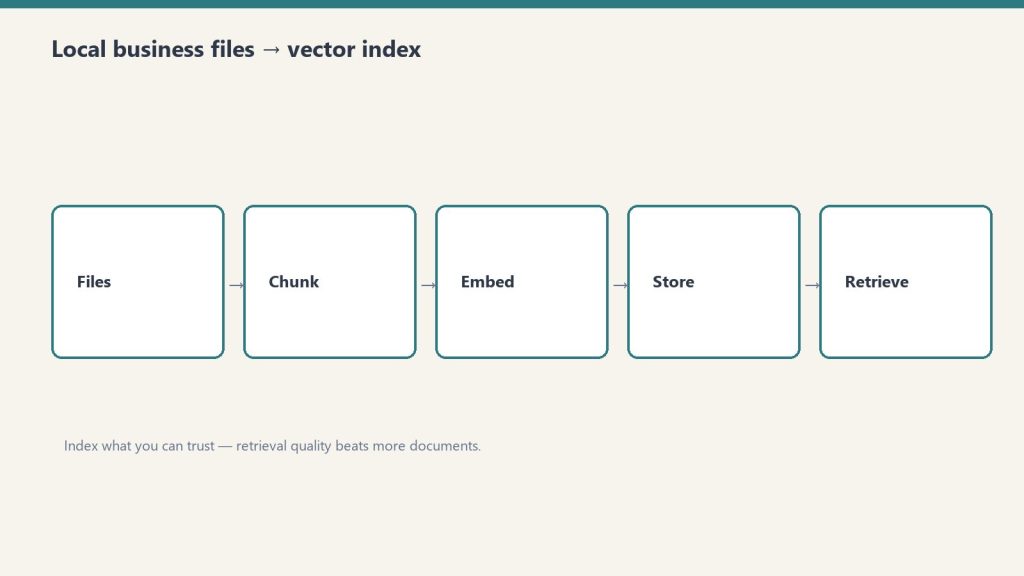
Architecture: business files into a local vector index.
The stack is ChromaDB for local vector storage, Nomic Embed for on-device embeddings via Ollama, LlamaIndex for document ingestion, and Claude Sonnet via API for the reasoning step — all files stay local, Claude only sees the retrieved chunks.
Component
Tool
Why
Vector database
ChromaDB (local)
Free, runs on-device, persistent to disk
Embedding model
Nomic Embed via Ollama
Open-source, 8K context, no external calls
Ingestion layer
LlamaIndex
Handles PDF, DOCX, MD, TXT, CSV natively
Retrieval layer
Python (custom)
Readable and modifiable as needs evolve
Reasoning layer
Claude Sonnet API
Materially better synthesis than local models
Interface
CLI
Most queries don’t need a UI
Why local for the vector database: The documents never leave the machine. Claude receives only the retrieved chunks — not the full corpus. For contracts, financial records, and internal communications, this is the right boundary.
Why Claude for reasoning and not a local model: Local models (Llama 3, Mistral) handle the retrieval step comparably. They don’t handle synthesis comparably — reading five contract sections and returning a coherent, accurate answer is where Claude’s API cost is earned.
What to Index
Start with the 50 most-referenced documents. Get the workflow running and verified before expanding to the full corpus.
File types that index well:
Contracts and agreements (PDF, DOCX)
Internal SOPs and runbooks (MD, DOCX)
Client notes and meeting logs (MD, TXT)
Invoices and financial records (PDF, CSV)
Email threads exported from Gmail (EML, TXT)
Organize before indexing. File names and folder paths become metadata attached to each chunk. A consistent folder structure takes an hour to set up and improves retrieval quality throughout:
500 files on an M2 MacBook Pro takes approximately 20–25 minutes. The index persists to disk — this runs once, then incrementally as files change.
Step 3: Build retrieval and reasoning
import anthropic

def query_business_knowledge(question: str, top_k: int = 5) -> str:
    retriever = index.as_retriever(similarity_top_k=top_k)
    nodes = retriever.retrieve(question)

    sep = chr(10) + chr(10) + "---" + chr(10) + chr(10)
    context = sep.join([
        f"Source: {node.metadata.get('file_name', 'unknown')}{chr(10)}{node.text}"
        for node in nodes
    ])

    client = anthropic.Anthropic()
    response = client.messages.create(
        model="claude-sonnet-4-6",
        max_tokens=1000,
        messages=[{
            "role": "user",
            "content": f"""Answer this question using only the provided business documents.
If the answer isn't in the documents, say so clearly. Always cite the source file.

Question: {question}

Documents:
{context}"""
        }]
    )

    return response.content[0].text

print(query_business_knowledge("What are the payment terms in the Acme contract?"))
Always include source attribution in the prompt. When an answer returns, the source file name makes verification fast.
What Works Well in Production
What works well in production — narrow corpora first.
Cross-document synthesis is the capability that justifies this over standard search — querying across hundreds of files simultaneously to find patterns, compare terms, or surface a specific clause is something no file search does.
Where the system consistently delivers:
Contract and clause lookup: Specific clause retrieval across a full contract library. Synthesis across multiple contracts simultaneously (termination terms, payment terms, liability caps) returns a summary across all of them at once.
SOP and runbook retrieval: Operational questions answered directly from internal documentation. Works best when SOPs are written in complete sentences rather than bullet fragments — the retrieval quality reflects the writing quality.
Client history: Invoice amounts, quoted scopes, prior project notes. Email threads sometimes split across chunks in ways that lose context — use the result as a pointer to the source document, then verify.
Cross-document pattern finding: “What are the common liability terms across our contracts?” — synthesizes across every indexed contract in one response. No file search tool does this.
What Breaks
What breaks — bad chunks and untrusted documents.
The index is only as current as the last re-index. The most common production failure is stale data — documents updated after the last index run return old answers.
Stale index: Build re-indexing into the workflow immediately. Schedule it weekly, or trigger it automatically when files are modified. Documents that change and don’t get re-indexed are the biggest reliability risk.
Top-k ceiling: Retrieval returns the top-k chunks (default 5). A question whose complete answer requires synthesizing 20 documents gets a partial answer. Increase top_k for broad synthesis questions — at the cost of slightly more API token usage.
Numerical calculations: The system finds financial documents reliably. It should not be trusted to calculate totals across extracted text. Use it to surface the right source documents; do the arithmetic elsewhere.
Documentation debt: The index reveals gaps in internal documentation. SOPs written in ambiguous shorthand, contracts with undefined terms, emails with unclear context — all produce lower quality retrieval. The index reflects the quality of the underlying documents.
Chunk Size
512 tokens with 50-token overlap is the right starting point for mixed document types.
Financial records (tabular): Parse as structured data where possible; plain text chunking loses table relationships
Metadata Filtering at Scale
Once the corpus exceeds ~200 files, adding metadata to chunks and filtering at query time significantly improves precision.
# Tag at ingestion
documents = SimpleDirectoryReader(
    "./business-knowledge",
    recursive=True,
    file_metadata=lambda filepath: {
        "document_type": filepath.split("/")[2],
        "client": filepath.split("/")[3] if len(filepath.split("/")) > 3 else "internal"
    }
).load_data()

# Filter at retrieval
retriever = index.as_retriever(
    similarity_top_k=5,
    filters={"document_type": "contracts"}
)
“What are our SOPs for [client]?” filtered to that client’s folder returns meaningfully more accurate results than querying the full corpus.
ROI
Setup takes roughly one full day. At 25 minutes saved per week on document lookups, break-even is approximately 6–8 weeks.
Item
Cost
Setup time
~8 hours
ChromaDB
Free
Nomic Embed (Ollama)
Free
Claude Sonnet API per query
~$0.003
Monthly at 50 queries/week
~$0.60
Weekly time saved
~25 minutes
Break-even
~7 weeks
The less quantifiable return: operational confidence. Questions that previously required folder-hunting get answered in seconds. That reduces the cognitive overhead of running a multi-client operation and changes how quickly decisions get made.
No. The vector database and embedding model run locally. Claude receives only the retrieved chunks — small sections of relevant documents — not the full corpus. For zero external calls, replace Claude with a local model, though synthesis quality will be lower.
What file types are supported?
LlamaIndex handles PDF, DOCX, TXT, MD, CSV, EML, and HTML natively. Other formats need conversion to plain text first.
How long does indexing take?
Approximately 20–25 minutes for 500 files on an M2 MacBook Pro. Subsequent re-indexing processes only changed or new files and takes a few minutes.
What is a vector database?
A vector database stores documents as numerical representations (embeddings) that encode meaning, not just keywords. This allows semantic search — finding relevant contract sections from a natural-language question, even when the exact words don’t match.
Can a local model replace Claude?
es — swap the API call for an Ollama-hosted model. Retrieval quality is comparable. Synthesis quality on complex multi-document questions is noticeably lower on current local models.
What chunk size should be used?
512 tokens with 50-token overlap is the right default for mixed document types. Adjust for document type: larger for dense contracts, smaller for short emails.