Tag: Claude Enterprise

  • Beyond the Chatbox: 10 Practical Use Cases for Claude Managed Agents Memory

    Last refreshed: August 2026

    Claude Managed Agents launched in public beta April 8, 2026. Memory for Managed Agents entered public beta April 23, 2026. Together they change what a Claude agent can do: instead of starting fresh on every session, an agent can carry context, corrections, and learned preferences across every future interaction with the same user, team, or project.

    This is a use-case guide, not a feature overview. Each case below is role-specific, grounded in how Managed Agents memory actually behaves in production, and paired with what to configure to make it work.


    How Managed Agents Memory Works
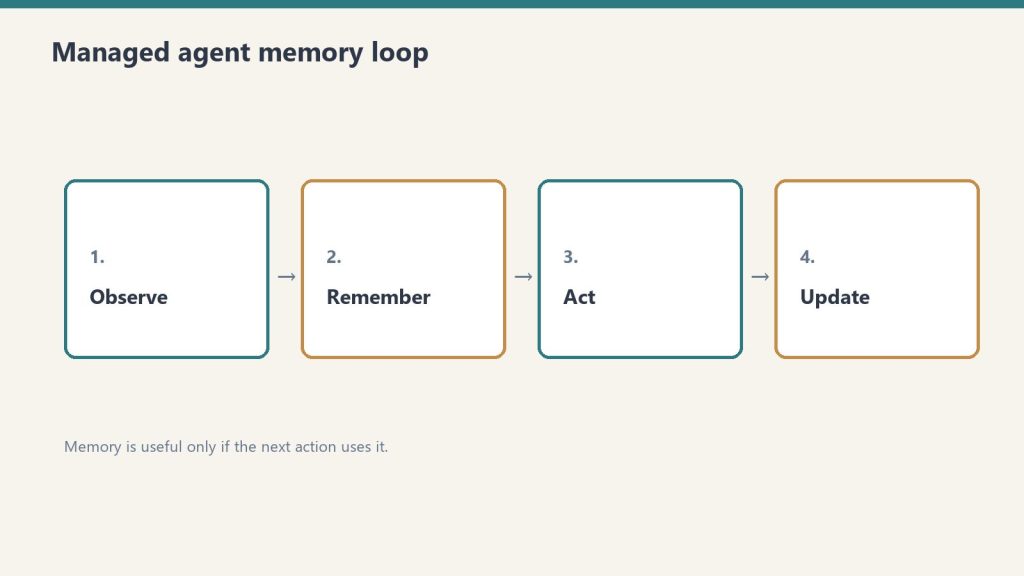
    Memory is a workspace-scoped collection of text documents that mounts inside the agent’s session container at /mnt/memory/. The agent reads and writes it using the same file tools it uses for everything else. When the session ends, the memory persists. The next session starts with it already there.

    Key properties:

    • Version-controlled per write — every write creates a new version with an audit trail in the Claude Console
    • Workspace-scoped — accessible to all agents in the same workspace, not per-user-only (unless you scope it that way in configuration)
    • Readable by the agent, not just the operator — the agent can query its own memory store to retrieve past context
    • 30-day version retention — historical versions retained for 30 days with redact endpoint for compliance removal

    The API header required: managed-agents-2026-04-01 for session endpoints; agent-memory-2026-07-22 for memory store endpoints (don’t combine them on memory store calls — this returns a 400 error).


    Use Case 1: Client Account Agent (Account Management)

    An account agent that knows each client’s preferences, pain points, prior decisions, and communication style — without needing to be re-briefed at the start of every session.

    What gets stored in memory:

    • Client brand voice and style notes
    • Recurring issues or requests
    • Prior project decisions and the rationale behind them
    • Delivery preferences and approval workflows

    Production example: Wisedocs built a document verification pipeline on Managed Agents and used cross-session memory to let agents identify and remember common document issues — including ones not anticipated at setup. Result: 30% faster verification per document.

    Configuration approach:

    • One memory store per client, named /clients/[client-name]/
    • Initialize with brand guidelines, contact notes, and a log of past decisions
    • Agent writes a session summary to memory at the end of each engagement

    Use Case 2: Development Team Agent (Software Teams)

    A coding agent that learns the codebase conventions, preferred patterns, past architectural decisions, and recurring issues for a specific project — so it doesn’t give the same wrong suggestion twice.

    What gets stored in memory:

    • Coding style guide for the project
    • Past refactoring decisions and why certain approaches were rejected
    • Known issues and workarounds in the codebase
    • Performance constraints and architectural boundaries

    The problem this solves: agents without memory re-suggest patterns the team already evaluated and rejected, requiring the same explanation each session. With memory, those rejections are logged and the agent builds on them.

    Configuration approach:

    • Memory store scoped to the project repository
    • Initialize with project conventions and architecture notes
    • Agent writes a session_log.md after each coding session with decisions made and issues found

    Use Case 3: Research Agent (Knowledge Work)

    A research agent that accumulates findings across sessions — building a persistent knowledge base from multiple research runs rather than starting from scratch each time.

    Netflix’s internal agents use memory to carry context across sessions, including insights that took multiple turns to surface and corrections from human reviewers mid-conversation, instead of manually updating prompts between sessions.

    What gets stored in memory:

    • Research findings with source attribution
    • Hypotheses confirmed or ruled out
    • Sources already evaluated (to avoid re-reviewing them)
    • Running list of open questions

    Configuration approach:

    • Memory organized by topic: /research/[topic]/findings.md/research/[topic]/sources.md/research/[topic]/open_questions.md
    • Agent reads existing findings at session start before beginning new research
    • Human reviewer can add corrections directly to memory files via the API; agent picks them up next session

    Use Case 4: Operations Agent (Business Operations)
    An operations agent that manages recurring workflows — weekly reporting, vendor follow-ups, SOP updates — and carries forward the state of each workflow between runs.

    What gets stored in memory:

    • Status of recurring tasks and workflows
    • Vendor and contact notes accumulated over time
    • Decision log for operational choices
    • Open items and their status

    Configuration approach:

    • Memory organized by workflow: /ops/weekly-report//ops/vendor-follow-ups/
    • Agent reads open items at session start, completes what it can, updates status in memory
    • Operators review memory state weekly rather than re-briefing the agent

    Use Case 5: Customer Support Agent (Support Teams)

    A support agent that remembers each customer’s history, prior issues, resolutions, and communication preferences — so customers don’t re-explain their context on every interaction.

    Ando is building their workplace messaging platform on Managed Agents, using memory to capture how each organization interacts instead of building custom memory infrastructure themselves.

    What gets stored in memory:

    • Customer account context and tier
    • Prior issue history with resolutions
    • Communication preferences (tone, channel, response length)
    • Known product configurations or integrations the customer uses

    Configuration approach:

    • Memory store per customer, scoped to their account ID
    • Initialize with CRM data (account type, history summary)
    • Agent writes a resolution summary after each ticket closes

    Use Case 6: Legal and Compliance Agent (Legal Teams)

    A compliance agent that tracks regulatory requirements, monitors changes, and maintains a running compliance status log — accumulating institutional knowledge across every compliance review it runs.

    What gets stored in memory:

    • Current compliance status by regulation and jurisdiction
    • Prior audit findings and remediation decisions
    • Regulatory change log with effective dates
    • Open items requiring human review

    Configuration approach:

    • Memory organized by regulation: /compliance/gdpr//compliance/hipaa//compliance/soc2/
    • Agent reads current status before each compliance check run
    • Writes updated status and flags human review items after each run

    For regulated industries: memory redaction endpoint supports removing specific content from historical versions for GDPR/CCPA compliance while preserving the audit record structure.


    Use Case 7: Sales Agent (Sales Teams)

    A sales agent that knows each prospect’s engagement history, objections raised, competitive comparisons requested, and where they are in the buying process — without requiring a CRM update to carry context forward.

    What gets stored in memory:

    • Prospect background and stakeholder map
    • Objections raised and responses given
    • Competitive questions and preferred comparisons
    • Next steps and commitments from prior conversations

    Configuration approach:

    • Memory store per prospect, keyed to their company or contact ID
    • Initialize with CRM pull at first contact
    • Agent writes call summary and updated next steps after each prospect interaction

    Use Case 8: Content Production Agent (Marketing Teams)

    A content agent that learns the brand voice, audience preferences, what topics have already been covered, and what performed well — building a persistent content intelligence layer across every piece produced.

    What gets stored in memory:

    • Brand voice rules and style examples
    • Topic map (what’s been covered, what’s planned)
    • Performance notes on past content (what resonated, what didn’t)
    • Client feedback on tone, format, and depth

    Configuration approach:

    • Memory organized by brand: /content/[brand-name]/voice.md/content/[brand-name]/topic_map.md/content/[brand-name]/performance_log.md
    • Agent reads voice rules at session start before producing any content
    • Operator adds performance feedback directly to memory after publishing

    Use Case 9: Finance Agent (Finance Teams)

    A financial analysis agent that carries forward context on recurring reports — month-over-month trends, known anomalies, and prior analytical decisions — so each report builds on the last rather than starting from raw data.

    Anthropic shipped a financial services agent template suite in May 2026, built on Managed Agents memory for cross-session continuity.

    What gets stored in memory:

    • Key metrics and their historical baselines
    • Known data quality issues and how they’ve been handled
    • Prior period variances and the explanation documented at the time
    • Model risk notes for regulated environments

    Configuration approach:

    • Memory organized by report type: /finance/monthly-pl//finance/board-report/
    • Agent reads prior period context before starting each new report cycle
    • Writes a period summary with key variances and decisions after each report run

    Use Case 10: Onboarding Agent (HR and Operations)

    An onboarding agent that adapts its guidance to each new hire’s role, prior experience, and progress through the onboarding checklist — and carries that context across every interaction during their ramp period.

    What gets stored in memory:

    • New hire profile (role, team, prior experience notes)
    • Onboarding checklist progress
    • Questions asked and answers given (to avoid repetition)
    • Manager notes on priorities for this hire

    Configuration approach:

    • Memory store per new hire, active during ramp period (typically 30–90 days)
    • Initialize with role profile and onboarding checklist
    • Agent writes progress update after each onboarding session
    • Archive or close memory store when onboarding period ends

    What Memory Doesn’t Replace

    Memory stores context and preferences. They don’t replace real-time data access, live system integrations, or human judgment on consequential decisions.

    Memory is document storage, not a database. It works well for: text-based preferences, accumulated notes, decision logs, prior outputs. It doesn’t work well for: real-time status queries (use MCP connectors for those), structured data that needs querying (use a real database), or high-frequency writes (memory is designed for periodic updates, not per-turn state).

    The right architecture in most production systems: memory for persistent context and preferences, MCP connectors for real-time system access, structured database for high-frequency operational data.


    Frequently Asked Questions

    What is Claude Managed Agents memory?

    Memory for Claude Managed Agents is a workspace-scoped document store that persists across agent sessions. Instead of starting fresh each session, agents read and write memory files that carry context, preferences, and accumulated knowledge forward into every future session.

    When did Managed Agents memory launch?

    Claude Managed Agents launched in public beta April 8, 2026. Memory for Managed Agents entered public beta April 23, 2026.

    How is memory different from a system prompt?

    A system prompt is static and set at agent configuration time. Memory is dynamic — it’s written and updated by the agent during sessions and grows over time. Memory stores things the agent has learned or been told; system prompts store standing instructions that don’t change session to session.

    What happens to memory when an agent is deleted?

    Memory stores are separate from agent configurations. Deleting an agent doesn’t delete its memory store. Memory stores must be deleted or archived separately.


    What to Read Next

    How to Install Claude Code

     Claude Team Plan Usage Limits 

    Claude AI Pricing — All Plans and API Rates

     Anthropic Console: API Keys and the Workbench

  • The 2026 AI Security Audit: How to Use Claude Without Compromising Enterprise Data

    Last refreshed: August 2026

    Claude is already inside most enterprises — through individual employee accounts, Claude Code on developer machines, and browser extensions — whether IT approved it or not. The security question in 2026 isn’t whether to allow Claude. It’s whether to govern it.

    This is a practical security audit checklist for Claude Enterprise deployments in 2026. It covers the five domains that matter, the specific CVEs that affect Claude Code, and the configuration steps that close the most significant exposure.


    The Current Threat Surface

    Claude operates across multiple surfaces — claude.ai web, mobile apps, Claude Code on developer machines, Cowork, and API integrations — each with different data exposure profiles and each requiring different controls.

    The most significant 2026 security events affecting Claude deployments:

    CVE-2025-59536 (CVSS 8.7): Disclosed by Check Point Research in early 2026. A vulnerability in Claude Code that allows remote code execution through malicious project configuration files — before any trust dialog appears to the user. Affects any organization that has deployed Claude Code without centralized governance.

    CVE-2026-21852: Demonstrates how an attacker can redirect all Claude Code traffic to an attacker-controlled server by manipulating the ANTHROPIC_BASE_URL environment variable. Silently exfiltrates API keys and conversation content. Reproducible attack chain.

    GTG-1002 campaign (September 2025): Anthropic identified this as one of the first AI-orchestrated cyberattacks at scale, establishing AI developer tooling as an active attack surface.

    These are not theoretical risks. They’re documented, reproducible attack chains that affect any Claude Code deployment without centralized governance.


    Security Domain 1: Identity and Access

    Configure SSO before any broad rollout. Without SSO, employees authenticate with personal Anthropic accounts — which means no centralized visibility, no revocation capability, and no audit trail.

    Implementation steps:

    1. Enable SAML 2.0 or OIDC SSO in the Claude Admin Console. This forces all claude.ai logins through your identity provider (IdP) and prevents personal account fallback.
    2. Enable domain capture alongside SSO. This prevents employees from using personal email accounts to access Claude outside the managed environment.
    3. Configure SCIM provisioning to automate user lifecycle management. When an employee is offboarded from your IdP, their Claude access is revoked automatically.
    4. Implement role-based access controls (RBAC). Not all users need access to all Claude capabilities. Segment by role: standard users, power users with Claude Code, API access holders.
    5. Set up periodic access reviews for Claude access, the same way you review access to other SaaS applications. SailPoint and similar identity governance tools can integrate via the Claude Compliance API.

    Audit evidence to collect: SSO configuration screenshots, SCIM provisioning logs, access review completion records.


    Security Domain 2: Data Controls

    The first security question in every enterprise deployment is where the data goes. The answer depends on which Claude product and deployment model is in use — and it matters enormously for regulated industries.

    Data handling by deployment model:

    DeploymentData RetentionNetwork PathZero Data Retention Available
    Claude Enterprise (Anthropic console)30 days default, ZDR availablePublic internetYes
    AWS BedrockPer AWS data agreementsVPC/private network availableYes
    Google Cloud Vertex AIPer GCP data agreementsVPC/private network availableYes
    Microsoft FoundryPer Microsoft data agreementsPrivate networkYes
    Claude.ai personal accountsAnthropic standard termsPublic internetNo

    For regulated industries (HIPAA, financial services, government): deploy via AWS Bedrock, Google Cloud Vertex AI, or Microsoft Foundry with private network configurations that keep traffic off the public internet. Enable ZDR (Zero Data Retention) for workloads with sensitive data.

    The silent risk: employees using personal claude.ai accounts for work tasks. Data entered into personal accounts is subject to Anthropic’s standard consumer terms, not Enterprise data agreements. SSO + domain capture closes this gap.


    Security Domain 3: Claude Code Governance

    Claude Code is the highest-risk surface in most enterprise deployments. It runs with the privileges of the developer’s user account, can execute arbitrary shell commands, read the full filesystem, and make outbound network connections.

    Hardening steps for Claude Code deployments:

    Centralize API key management:

    • Use organization-managed API keys (via the Admin Console) rather than individually generated keys
    • Create separate keys per team or project, not shared team keys
    • Rotate keys on a defined schedule (quarterly minimum)
    • Monitor for anomalous usage (volume spikes, off-hours activity) — feed audit logs to SIEM

    Address the CVE-2026-21852 attack vector:

    • Audit all developer machines for .claude/settings.json files in project repositories — these can be used to redirect traffic
    • Block arbitrary ANTHROPIC_BASE_URL overrides via environment variable policy
    • Add Claude Code traffic to network monitoring so redirected traffic is detectable

    Restrict filesystem access:

    • Prevent Claude Code from running in directories containing production secrets or sensitive data
    • Use separate working directories for Claude Code sessions, isolated from production credential stores

    Code execution controls:

    • Enable disableBypassPermissionsMode to require explicit approval for shell commands
    • Log all shell commands executed via Claude Code to the audit trail

    Security Domain 4: Audit Logging and Observability

    Claude Enterprise audit logs capture user authentication events, model calls with metadata, and file interactions. Without routing these logs to a SIEM, the audit trail exists but isn’t being monitored.

    What the audit log captures:

    {
      "event_type": "claude_api_call",
      "timestamp": "2026-08-01T09:14:32Z",
      "user_id": "u_8f3a9c",
      "session_id": "sess_x72kp",
      "workspace": "finance-reporting",
      "model": "claude-opus-4-6",
      "tokens_input": 2340,
      "tokens_output": 412,
      "latency_ms": 1840
    }
    

    Implementation steps:

    1. Enable audit logging in the Claude Admin Console (Enterprise plan)
    2. Export logs to SIEM — Splunk, Datadog, Elastic, or equivalent. Claude supports JSON and CSV export plus direct SIEM push.
    3. Build correlation rules for: unusual access times, geographic outliers, session volume spikes, API key misuse
    4. Use the Compliance API to export prompts, responses, and admin actions into DLP and insider risk monitoring workflows

    The gap Anthropic hasn’t filled: There is no built-in anomaly detection in the Admin Console. Usage anomaly detection requires SIEM integration and custom correlation rules. This is a known limitation — build it at the SIEM layer.


    Security Domain 5: Agentic Workflow Security

    Claude Managed Agents and Claude Code used in agentic workflows introduce a category of risk that traditional SaaS governance doesn’t cover: an AI taking autonomous actions in the environment.

    Key controls for agentic deployments:

    Human oversight checkpoints: For any agentic workflow that takes consequential actions (code commits, file modifications, API calls to production systems), require a human review step before execution. Don’t allow fully autonomous action without an approval gate on high-impact operations.

    Tool scope minimization: Define the smallest set of tools an agent needs and give it nothing else. An agent that only needs to read files shouldn’t have shell execution permissions. MCP server connections should be scoped to the minimum required access.

    MCP connector governance: MCP servers allow agents to connect to external systems (GitHub, Notion, Slack, etc.). Each MCP connection is an attack surface for prompt injection — a malicious response from an external system can instruct the agent to take unintended actions. Audit which MCP servers are connected; don’t allow arbitrary MCP connections.

    Prompt injection defense: Any content that flows from an external system into an agent’s context (web pages, API responses, file contents) should be treated as potentially adversarial. This is the mechanism behind most AI agent security incidents in 2025–2026. Validate and sanitize external inputs before they reach the agent context.


    Quick-Reference Audit Checklist

    Use this to assess the current state before deciding what to address first:

    Identity

    • SSO (SAML 2.0 or OIDC) enforced for all Claude access
    • Domain capture enabled to prevent personal account use
    • SCIM provisioning configured for automated user lifecycle
    • RBAC defined by role (standard / power user / API)

    Data

    • Deployment model documented (Anthropic console vs. Bedrock vs. Vertex)
    • ZDR enabled for sensitive data workloads
    • Personal claude.ai account use blocked or governed
    • Data classification applied to determine which workloads can use which deployment model

    Claude Code

    • Organization-managed API keys (not individual)
    • Per-team/per-project key segmentation
    • CVE-2025-59536 and CVE-2026-21852 remediation verified
    • Shell execution logging enabled

    Audit and Observability

    • Audit logging enabled in Admin Console
    • Logs routed to SIEM
    • Anomaly detection rules configured
    • Compliance API integrated with DLP tooling

    Agentic

    • Human oversight gates on consequential agent actions
    • MCP connections audited and scoped
    • Prompt injection defenses in place for external inputs

    Frequently Asked Questions

    Does Claude Enterprise offer zero data retention?

    Yes. Claude Enterprise deployed through the Anthropic console with a qualifying enterprise agreement offers zero data retention, where prompts and responses are not logged by Anthropic. ZDR is also available via AWS Bedrock, Google Cloud Vertex AI, and Microsoft Foundry deployments.

    What compliance certifications does Anthropic have?

    Anthropic holds ISO 27001:2022 and ISO/IEC 42001:2023 certifications and offers HIPAA-ready configurations with Business Associate Agreements to qualifying enterprise customers.

    What are the biggest security risks in a Claude Code deployment?

    CVE-2025-59536 (remote code execution via malicious project config files, CVSS 8.7) and CVE-2026-21852 (traffic redirection via ANTHROPIC_BASE_URL manipulation) are the most significant documented vulnerabilities. The broader risks are developers using personal Anthropic accounts, shared API keys without rotation, and no audit trail for code context that flows to Anthropic’s servers.

    What is the Compliance API?

    The Claude Compliance API is an Enterprise feature that exports prompts, responses, files, and admin actions to external monitoring systems — enabling integration with DLP tools (Proofpoint), SIEM platforms (Splunk, Datadog, Elastic), and identity governance tools (SailPoint). It’s the primary mechanism for bringing Claude activity into existing enterprise security workflows.

    What is prompt injection in AI agents?

    Prompt injection occurs when malicious content in external data sources (web pages, API responses, documents) instructs an AI agent to take actions the operator didn’t intend. In agentic Claude workflows, any content retrieved from external systems can potentially carry injected instructions. Defense requires treating external inputs as untrusted and implementing validation before they enter the agent context.


    What to Read Next

    Claude Enterprise Pricing: What Large Organizations Pay 

    Claude AI Pricing — All Plans and API Rates

     Anthropic Console: API Keys and Billing

    How to Install Claude Code

  • Calculating the ROI of Claude Enterprise: Is the $100+ Per User Seat Worth It?

    Last refreshed: August 2026

    Claude Enterprise starts at $20/seat/month for access, but actual spend runs $60–250+ per user depending on usage — because tokens are billed separately at API rates. The ROI calculation isn’t about the seat fee. It’s about whether the productivity return on active usage exceeds the total consumption cost.

    This is a practical ROI framework for business decision-makers evaluating Claude Enterprise in 2026. It covers what the pricing actually includes, how to model real cost, and what the productivity return looks like across different team roles.


    What Claude Enterprise Actually Costs in 2026

    Enterprise pricing changed in April 2026: Anthropic decoupled seat fees from token bundles. The headline price is $20/seat/month, but that covers access only — every token consumed by every user is billed separately at standard API rates.

    This is a meaningful structural change from the pre-2026 model, where Enterprise seats included bundled token allocations. Under the current model:

    ComponentCost
    Seat fee~$20/user/month (annual, contact sales)
    Token usage — Haiku 4.5$0.80 input / $4 output per 1M tokens
    Token usage — Sonnet 4.6$3 input / $15 output per 1M tokens
    Token usage — Opus 4.8$15 input / $75 output per 1M tokens
    Claude Code (premium seat)$100/seat/month (annual)
    Minimum seatsCustom, typically 20+ for sales-assisted

    Compare this to Claude Team:

    PlanSeat CostToken ModelCap
    Team Standard$20/seat/mo (annual)Bundled — included in seat150 users
    Team Premium (with Claude Code)$100/seat/mo (annual)Bundled150 users
    Enterprise~$20/seat + API usageMetered separatelyNone

    Team is predictable cost with a usage ceiling. Enterprise is variable cost with no ceiling and no cap. The right choice depends on your compliance requirements and usage intensity, not just team size.


    The Real Cost Per Active User

    The most important number is not the seat price — it’s the real cost per active user, which is seat fee plus token consumption. At 10% seat adoption, your effective cost per active user is 10x the headline seat price.

    Adoption rate determines economics:

    Team sizeActive users (40% adoption)Monthly seat costToken cost (moderate usage)Total / active user
    50 seats20$1,000~$800~$90
    100 seats40$2,000~$1,600~$90
    500 seats200$10,000~$8,000~$90

    At 10% adoption (a common early-deployment reality):

    Team sizeActive usersMonthly seat costToken costTotal / active user
    100 seats10$2,000~$400~$240

    The implication: increasing adoption from 10% to 40% is a higher-ROI move than adding seats. An adoption problem looks like an economics problem but isn’t.


    What the Productivity Return Looks Like

    Industry estimates put the productivity upside at $7,800 per employee per year — but that figure only materializes when Claude is actively integrated into daily workflows, not when it’s available as an optional chat tab.

    The $7,800/employee figure comes from enterprise AI ROI research measuring time saved across knowledge work tasks. It assumes genuine integration into workflows, not passive availability. Here’s how it breaks down by role:

    Software developers (highest ROI):

    • Agentic coding with Claude Code reduces code review cycles, test writing, and boilerplate
    • Estimated 1.5–2 hours/day returned on routine coding tasks
    • At $100K loaded annual salary: ~$9,000–12,000/year in time value per developer

    Content and marketing teams:

    • Drafting, editing, research, brief writing at significantly higher speed
    • Estimated 45–90 minutes/day returned on writing-heavy tasks
    • At $75K loaded: ~$5,600–11,200/year per person

    Legal and compliance teams:

    • Contract review, policy drafting, compliance checklist work
    • Estimated 30–60 minutes/day returned
    • At $120K loaded: ~$7,500–15,000/year per lawyer or compliance analyst

    Operations and admin:

    • SOPs, reporting, email drafting, meeting prep
    • Estimated 20–30 minutes/day returned
    • At $60K loaded: ~$2,500–3,750/year

    The ROI Model

    A simple ROI model: (hours returned per user per day × working days × loaded hourly rate) − annual total cost per user = net annual value per seat.

    Example for a 50-person software team on Enterprise:

    Loaded developer salary: $120,000/year = ~$57.70/hour
    Hours returned per day (conservative): 1 hour
    Working days: 230
    Value returned per developer: 230 × $57.70 = $13,271/year
    
    Annual Enterprise cost per developer:
      Seat fee: $20 × 12 = $240
      Token cost (moderate Sonnet usage): ~$600/year
      Total per developer: ~$840/year
    
    Net ROI per developer: $13,271 − $840 = $12,431
    ROI multiple: 15.8x
    

    Even at half the productivity estimate (30 minutes/day returned), the ROI multiple remains above 7x for any knowledge worker with a loaded salary above $60K. The economics are compelling when adoption is real.


    When Enterprise Is the Right Choice vs. Team

    Choose Enterprise when you have a compliance mandate (SSO, SCIM, audit logs, HIPAA), a team above 150 users, or a negotiated consumption commitment that reduces effective per-token cost. Otherwise, Team is more predictable and sufficient.

    NeedTeamEnterprise
    SSO / SAML authentication
    SCIM provisioning
    Audit logs
    HIPAA-ready configuration
    Compliance API (export to SIEM)
    Users above 150
    Fixed predictable monthly cost
    Usage bundled in seat price

    The honest rule: buy Team until a real compliance or scale requirement forces Enterprise. If security review, identity governance, or audit trails are requirements, Enterprise is necessary. If they’re not, Team is cheaper and simpler.


    Frequently Asked Questions

    How much does Claude Enterprise cost?

    Claude Enterprise starts at approximately $20/user/month for access (billed annually, custom via sales), with token usage billed separately at standard API rates. Real total cost typically runs $60–250+/user/month depending on usage intensity and which Claude models the team uses most.

    What’s the difference between Claude Team and Enterprise?

    Team is self-serve per-seat licensing ($20 standard / $100 premium per seat/month, annual) with token usage bundled into the seat and a 150-user cap. Enterprise adds SSO, SCIM, audit logs, HIPAA support, a Compliance API for SIEM integration, no user cap, and usage billed separately at API rates. Choose Team for simplicity; choose Enterprise for compliance and governance requirements.

    What is the ROI of Claude Enterprise?

    At 1 hour of productivity returned per day per knowledge worker, the annual value per seat at a $120K loaded developer salary is approximately $13,270 — against an annual Enterprise cost of ~$840/developer. ROI multiple is roughly 15x under that assumption. At 30 minutes/day returned, the multiple is still above 7x for most knowledge worker salaries.

    Why did Anthropic unbundle tokens from Enterprise seats?

    Anthropic decoupled seat fees from token bundles in April 2026, lowering the headline seat price from $40–200/seat to $20/seat while making token usage variable. The change gives large organizations more flexibility — light users cost less, heavy users cost more — but requires better usage monitoring to forecast actual spend.

    What to Read Next

    Claude AI Pricing — All Plans and API Rates

     Claude Team vs Enterprise: Complete Comparison

     Anthropic Console: API Keys and Billing

     Current Claude Model Version Tracker